wheel BMW 128I 2013 Workshop Manual
[x] Cancel search | Manufacturer: BMW, Model Year: 2013, Model line: 128I, Model: BMW 128I 2013Pages: 284, PDF Size: 6.93 MB
Page 242 of 284
241
Care
Mobility
In order to prevent staining, e.g due to clothing,
clean the leather approximately every two
months.
Clean light-colored leather
more frequently as it
shows dust and dirt more noticeably.
Use BMW Premium Leather Care since dirt and
grease will otherwise slow ly affect the protec-
tive layer of the leather.
Suitable care products are available at your
BMW center.
Upholstery care
Regularly vacuum with a vacuum cleaner.
To remove severe spots such as beverage
stains, use a soft sponge or lint-free microfiber
cloth and suitable interior cleaners.
Clean the upholstery down to the seams using a
sweeping motion. Avoid strong rubbing.
Opened Velcro fasteners on pants or
other articles of clothing can damage the
seat covers. Ensure that Velcro fasteners are
closed. <
Care of special parts
Light-alloy wheels
When cleaning on the vehicle, use only neutral
rim cleaner with a pH value of 5 to 9. Do not use
coarse cleansers and do not use steam clean-
ers at temperatures greater than 140 7/60 6.
Follow manufacturer's instructions.
Aggressive, acid-containing, or strongly alka-
line cleaning agents can destroy the protective
coating of nearby components such as the
brake discs.
Chrome look surfaces
Carefully clean vehicle parts such as the radia-
tor grill or door handles with copious quantities
of water and possibly a shampoo additive, par-
ticularly when roads ar e treated with deicing
salt.
Rubber parts
Treat only with water or rubber care products.
Do not use silicon-containing care products on
rubber seals; otherwis e, noise and damage
could occur.
Fine wood parts
Clean fine wood trim an d fine wood parts only
with a damp cloth. Wipe dry with a soft cloth.
Plastic parts
These include:
>Imitation leather surfaces
> Roofliner
> Lamp glasses
> Display pane of instrument cluster
> Parts spray painted matte black
> Painted parts in the passenger
compartment
Use a microfibre cloth for cleaning.
Moisten the cloth slightly with water.
Do not soak the roofliner. Do not use any cleaners that contain alco-
hol or solvents such as lacquer thinner,
cold cleaning agents, fuel, and the like; other-
wise, you may damage the surfaces. <
Safety belts
Dirty belt straps impede the reeling action and
thus have a negative impact on safety.
Do not clean chemic ally, as this may
destroy the webbing. <
Only clean with a mild soap solution in the
installed state.
Only reel in seat belts when they are dry.
00320051004F004C00510048000300280047004C0057004C005200510003
Page 247 of 284
246
MobilityReplacing components
Turn signals, front
PY21W bulb, 21 watts
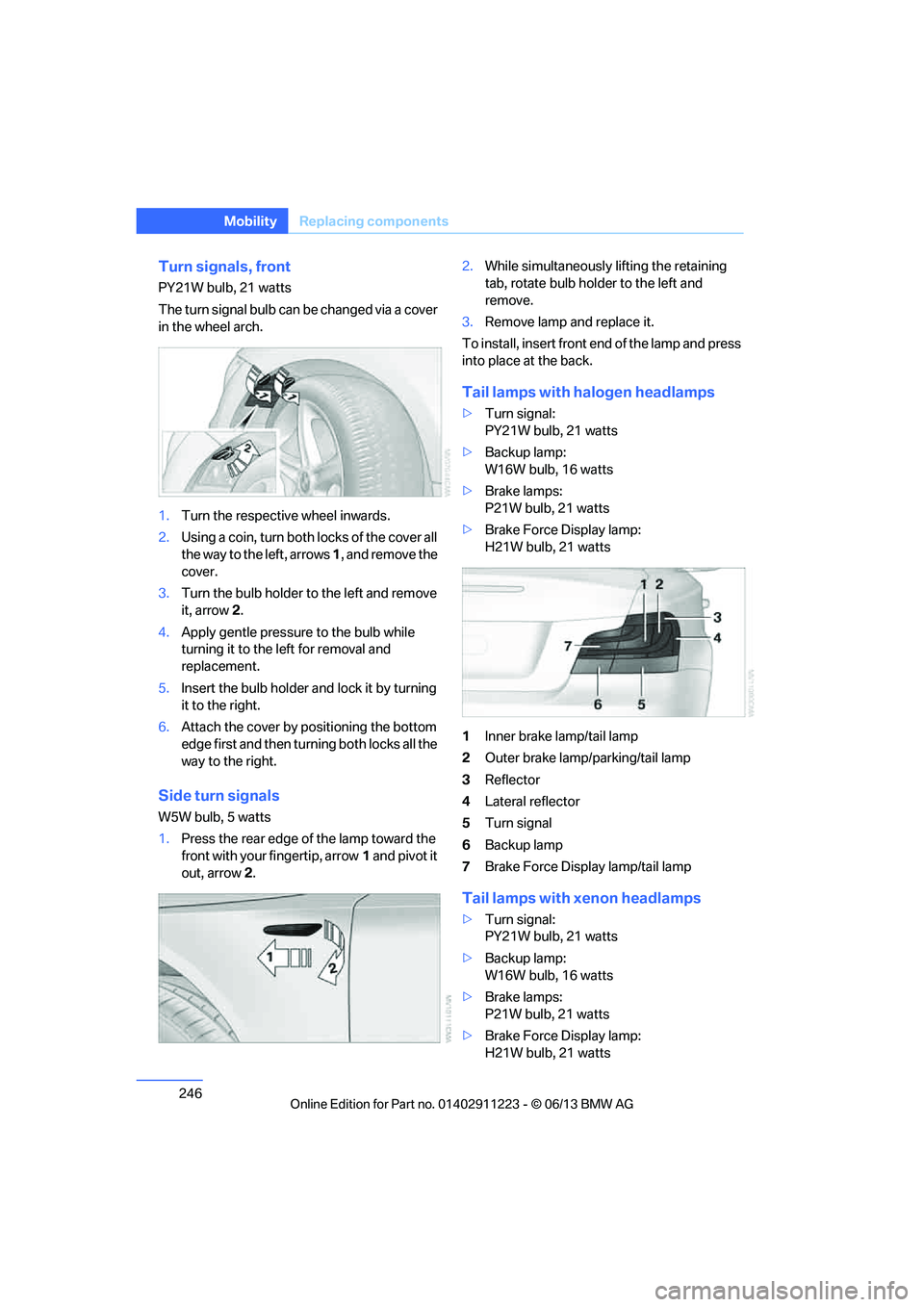
The turn signal bulb can be changed via a cover
in the wheel arch.
1.Turn the respecti ve wheel inwards.
2. Using a coin, turn both locks of the cover all
the way to the left, arrows 1, and remove the
cover.
3. Turn the bulb holder to the left and remove
it, arrow 2.
4. Apply gentle pressure to the bulb while
turning it to the left for removal and
replacement.
5. Insert the bulb holder and lock it by turning
it to the right.
6. Attach the cover by positioning the bottom
edge first and then turn ing both locks all the
way to the right.
Side turn signals
W5W bulb, 5 watts
1. Press the rear edge of the lamp toward the
front with your fingertip, arrow 1 and pivot it
out, arrow 2. 2.
While simultaneously lifting the retaining
tab, rotate bulb hold er to the left and
remove.
3. Remove lamp and replace it.
To install, insert front end of the lamp and press
into place at the back.
Tail lamps with halogen headlamps
> Turn signal:
PY21W bulb, 21 watts
> Backup lamp:
W16W bulb, 16 watts
> Brake lamps:
P21W bulb, 21 watts
> Brake Force Display lamp:
H21W bulb, 21 watts
1 Inner brake lamp/tail lamp
2 Outer brake lamp/parking/tail lamp
3 Reflector
4 Lateral reflector
5 Turn signal
6 Backup lamp
7 Brake Force Display lamp/tail lamp
Tail lamps with xenon headlamps
>Turn signal:
PY21W bulb, 21 watts
> Backup lamp:
W16W bulb, 16 watts
> Brake lamps:
P21W bulb, 21 watts
> Brake Force Display lamp:
H21W bulb, 21 watts
00320051004F004C00510048000300280047004C0057004C005200510003
Page 249 of 284
248
MobilityReplacing components
Changing wheels
Your BMW is equipped with run-flat tires as
standard. This eliminates the need to change a
wheel immediately in the event of a puncture.
For information on continuing to drive with a
damaged tire, refer to Indica tion of a flat tire on
page 92.
The symbol identifying run- flat tires is a circle
with the letters RSC on the sidewall, refer to
New wheels and tires, page 230.
When mounting new tires or changing over
from summer to winter tires and vice versa,
mount run-flat tires for your own safety. In the
event of a flat, no spare wheel is available. Your
BMW center will be glad to advise you. Refer
also to New wheels and tires, page 230.
The tools for changing wheels are avail-
able as optional accessories from your
BMW center. <
Jack mounting points
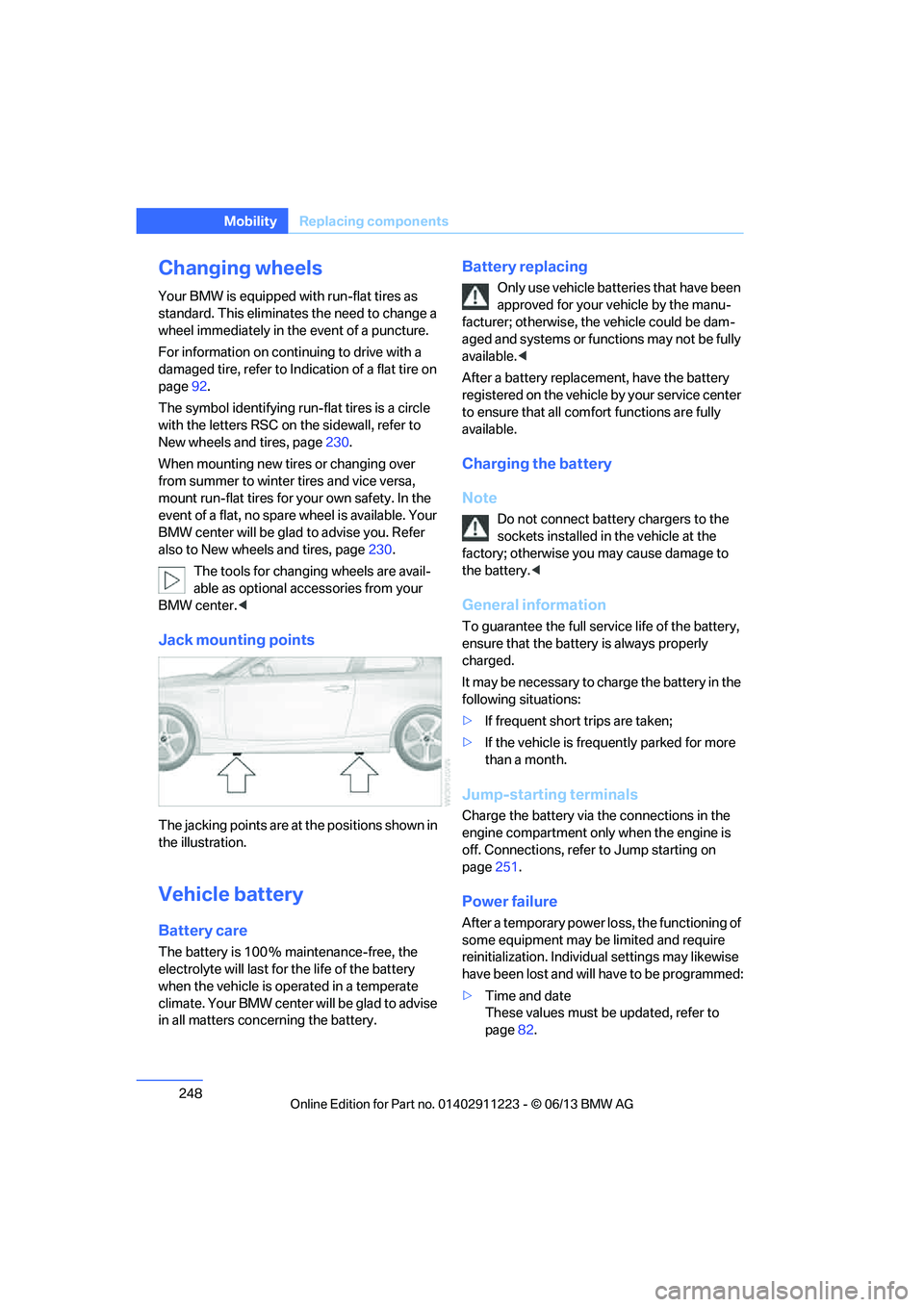
The jacking points are at the positions shown in
the illustration.
Vehicle battery
Battery care
The battery is 100 % maintenance-free, the
electrolyte will last for the life of the battery
when the vehicle is operated in a temperate
climate. Your BMW center will be glad to advise
in all matters conc erning the battery.
Battery replacing
Only use vehicle batteries that have been
approved for your vehicle by the manu-
facturer; otherwise, the vehicle could be dam-
aged and systems or functions may not be fully
available. <
After a battery replacem ent, have the battery
registered on the vehicle by your service center
to ensure that all comfort functions are fully
available.
Charging the battery
Note
Do not connect battery chargers to the
sockets installed in the vehicle at the
factory; otherwise you may cause damage to
the battery. <
General information
To guarantee the full serv ice life of the battery,
ensure that the battery is always properly
charged.
It may be necessary to ch arge the battery in the
following situations:
> If frequent short trips are taken;
> If the vehicle is frequently parked for more
than a month.
Jump-starting terminals
Charge the battery via the connections in the
engine compartment only when the engine is
off. Connections, refer to Jump starting on
page 251.
Power failure
After a temporary power lo ss, the functioning of
some equipment may be limited and require
reinitialization. Individual settings may likewise
have been lost and will have to be programmed:
> Time and date
These values must be updated, refer to
page 82.
00320051004F004C00510048000300280047004C0057004C005200510003
Page 254 of 284
253
Giving and receiving assistance
Mobility
Use only the tow fitting provided with the
vehicle and screw it a
ll the way in. Use the
tow fitting for towing on paved roads only. Avoid
lateral loading of the tow fitting, e.g. do not lift
the vehicle by the tow fitting. Otherwise, the
tow fitting and the vehicle could be damaged. <
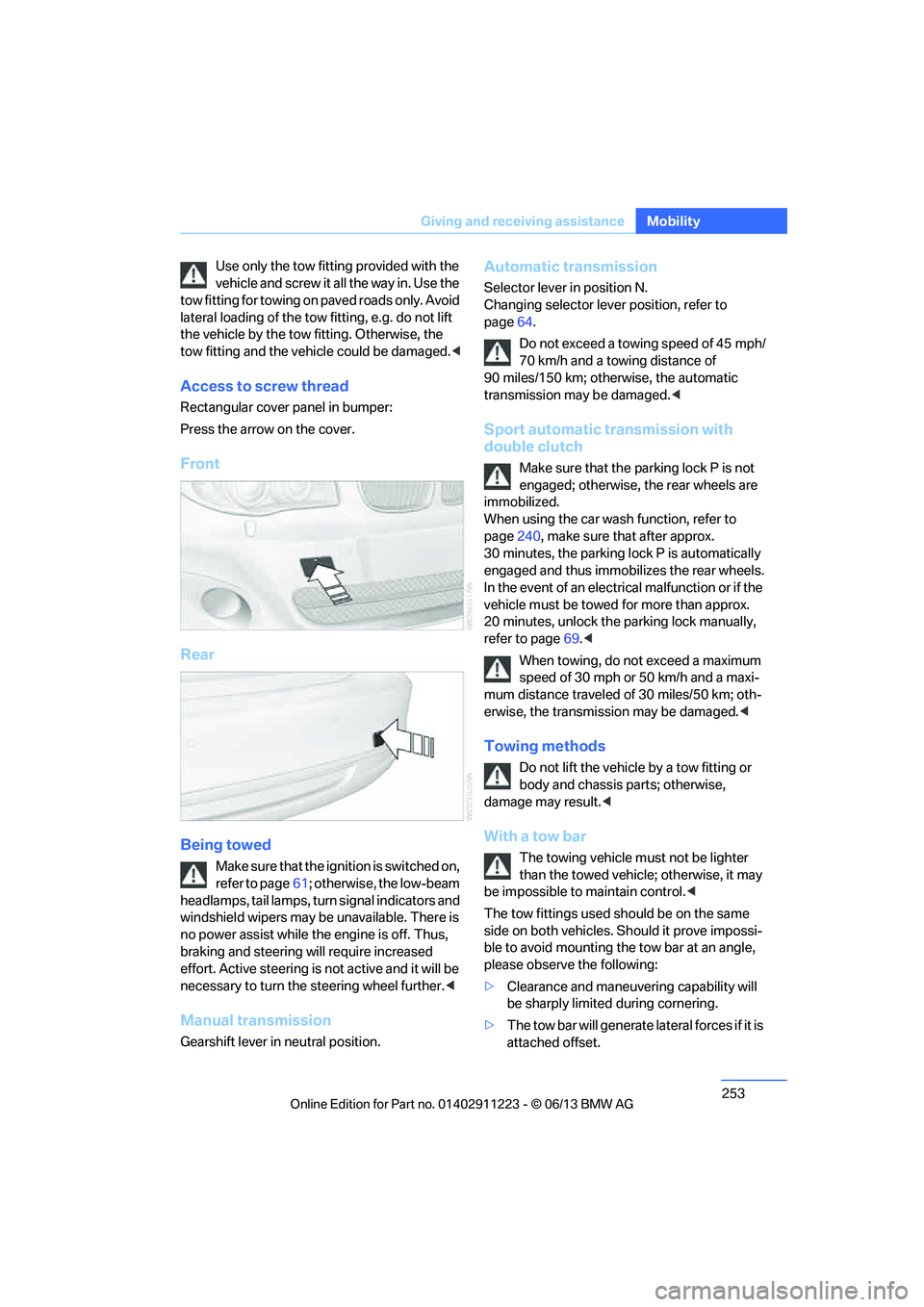
Access to screw thread
Rectangular cover panel in bumper:
Press the arrow on the cover.
Front
Rear
Being towed
Make sure that the ignition is switched on,
refer to page61; otherwise, the low-beam
headlamps, tail lamps, turn signal indicators and
windshield wipers may be unavailable. There is
no power assist while the engine is off. Thus,
braking and steering will require increased
effort. Active steering is not active and it will be
necessary to tu rn the steering wheel further. <
Manual transmission
Gearshift lever in neutral position.
Automatic transmission
Selector lever in position N.
Changing selector lever position, refer to
page 64.
Do not exceed a towing speed of 45 mph/
70 km/h and a towing distance of
90 miles/150 km; otherwise, the automatic
transmission may be damaged. <
Sport automatic transmission with
double clutch
Make sure that the parking lock P is not
engaged; otherwise, the rear wheels are
immobilized.
When using the car wash function, refer to
page 240, make sure that after approx.
30 minutes, the parking lock P is automatically
engaged and thus immobilizes the rear wheels.
In the event of an electrical malfunction or if the
vehicle must be towed for more than approx.
20 minutes, unlock the parking lock manually,
refer to page 69.<
When towing, do not exceed a maximum
speed of 30 mph or 50 km/h and a maxi-
mum distance traveled of 30 miles/50 km; oth-
erwise, the transmission may be damaged. <
Towing methods
Do not lift the vehicle by a tow fitting or
body and chassis parts; otherwise,
damage may result. <
With a tow bar
The towing vehicle must not be lighter
than the towed vehicle; otherwise, it may
be impossible to maintain control.<
The tow fittings used sh ould be on the same
side on both vehicles. Should it prove impossi-
ble to avoid mounting the tow bar at an angle,
please observe the following:
> Clearance and maneuvering capability will
be sharply limited during cornering.
> The tow bar will ge nerate lateral forces if it is
attached offset.
00320051004F004C00510048000300280047004C0057004C005200510003
Page 259 of 284
258
ReferenceTechnical data
Technical data
Vehicle equipment
In this chapter, all pr oduction, country, and
optional equipment that is offered in the model
range is described. For this reason, descrip- tions will be given of some equipment that may
not be available in a vehi
cle, for example due to
the special options or national-market version
selected. This also app lies to safety related
functions and systems.
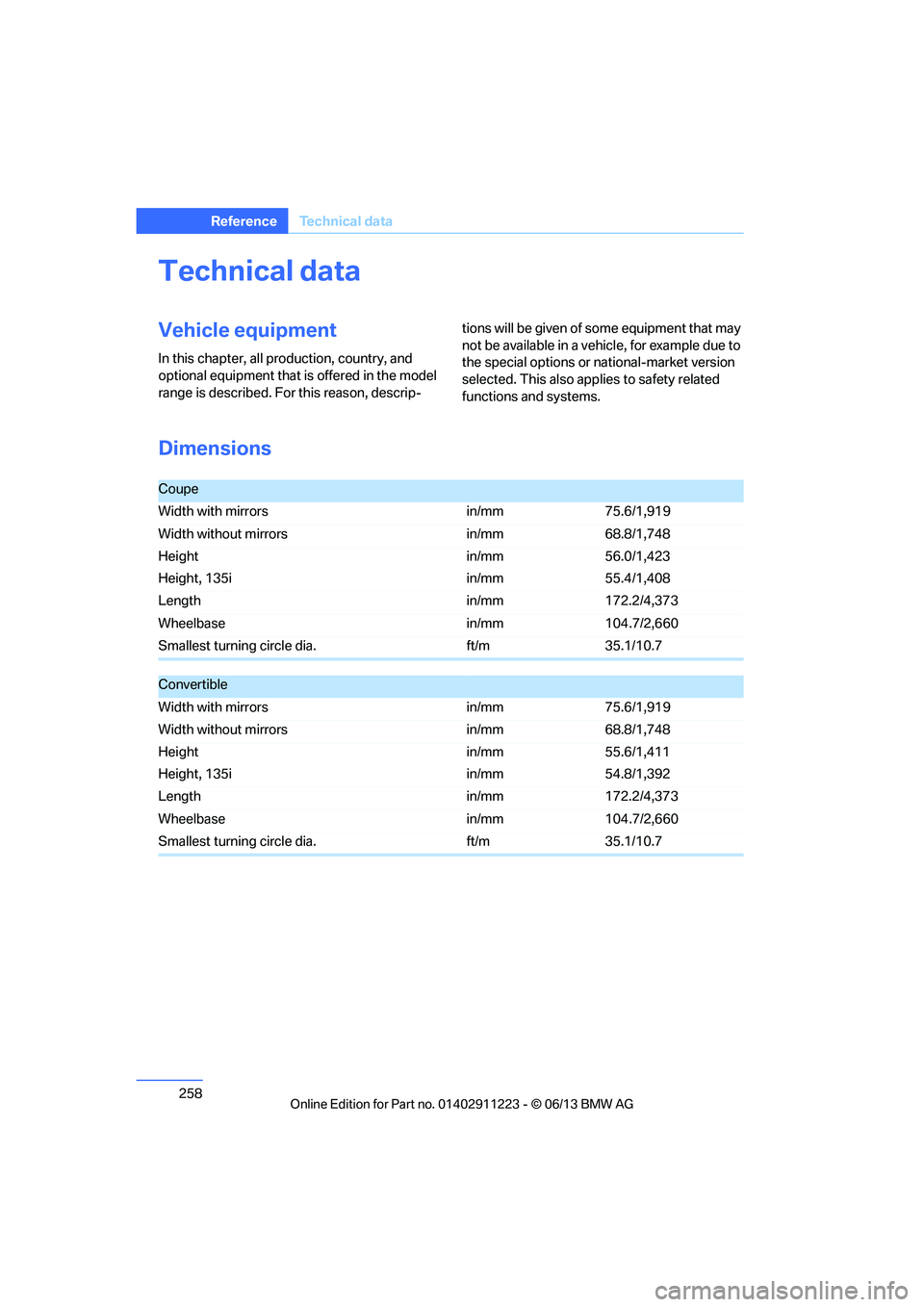
Dimensions
Coupe
Width with mirrors in/mm75.6/1,919
Width without mirrors in/mm68.8/1,748
Height
Height, 135i in/mm
in/mm56.0/1,423
55.4/1,408
Length in/mm172.2/4,373
Wheelbase in/mm104.7/2,660
Smallest turning circle dia. ft/m35.1/10.7
Convertible
Width with mirrors in/mm75.6/1,919
Width without mirrors in/mm68.8/1,748
Height
Height, 135i in/mm
in/mm55.6/1,411
54.8/1,392
Length in/mm172.2/4,373
Wheelbase in/mm104.7/2,660
Smallest turning circle dia. ft/m35.1/10.7
00320051004F004C00510048000300280047004C0057004C005200510003
Page 270 of 284
269
Everything from A to Z
Reference
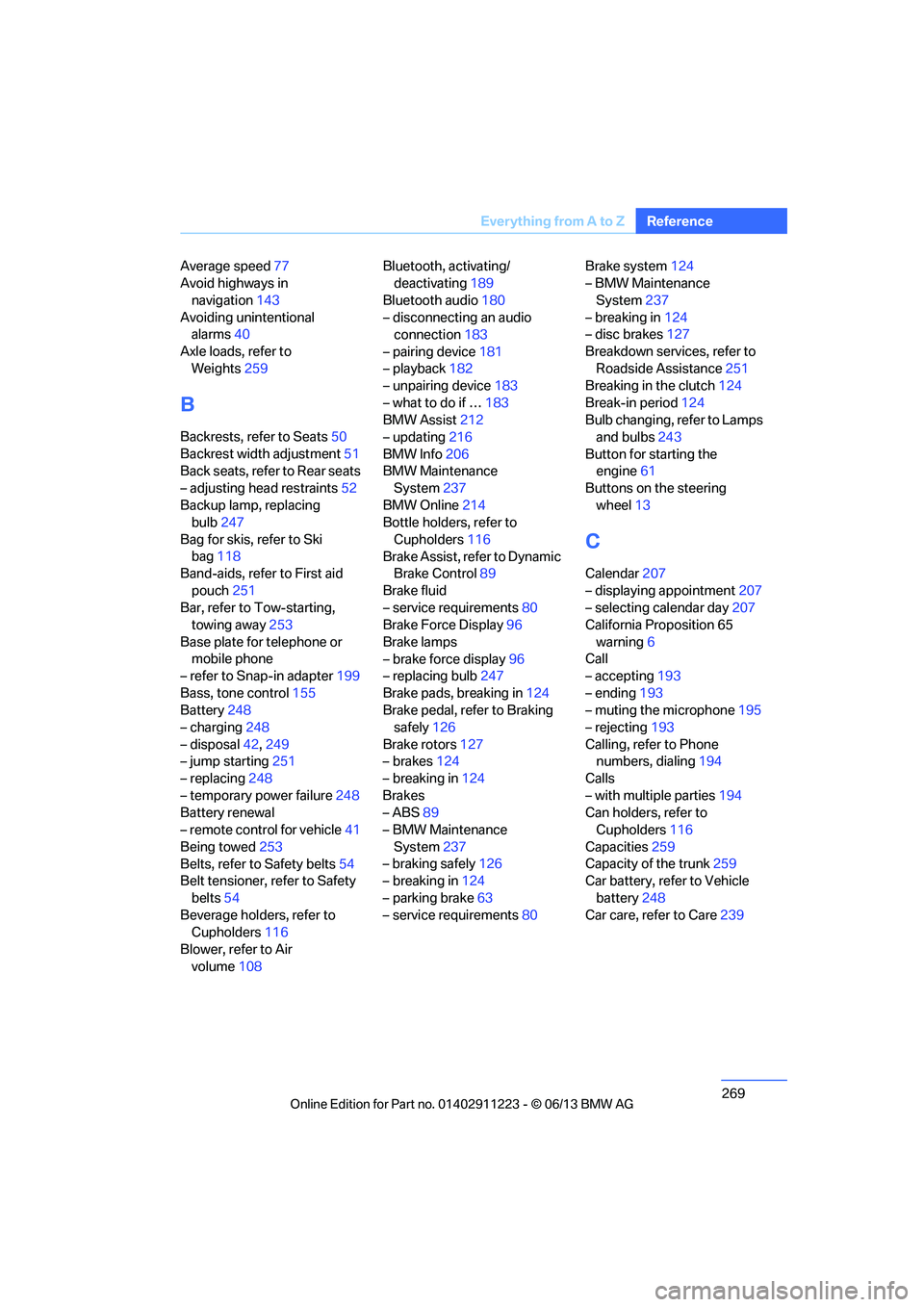
Average speed
77
Avoid highways in
navigation 143
Avoiding unintentional alarms 40
Axle loads, refer to Weights 259
B
Backrests, refer to Seats 50
Backrest width adjustment 51
Back seats, refer to Rear seats
– adjusting head restraints 52
Backup lamp, replacing bulb 247
Bag for skis, refer to Ski bag 118
Band-aids, refer to First aid
pouch 251
Bar, refer to Tow-starting, towing away 253
Base plate for telephone or mobile phone
– refer to Snap-in adapter 199
Bass, tone control 155
Battery 248
– charging 248
– disposal 42,249
– jump starting 251
– replacing 248
– temporary power failure 248
Battery renewal
– remote control for vehicle 41
Being towed 253
Belts, refer to Safety belts 54
Belt tensioner, refer to Safety
belts 54
Beverage holders, refer to Cupholders 116
Blower, refer to Air volume 108 Bluetooth, activating/
deactivating 189
Bluetooth audio 180
– disconnecting an audio connection 183
– pairing device 181
– playback 182
– unpairing device 183
– what to do if … 183
BMW Assist 212
– updating 216
BMW Info 206
BMW Maintenance System 237
BMW Online 214
Bottle holders, refer to
Cupholders 116
Brake Assist, refer to Dynamic Brake Control 89
Brake fluid
– service requirements 80
Brake Force Display 96
Brake lamps
– brake force display 96
– replacing bulb 247
Brake pads, breaking in 124
Brake pedal, refer to Braking safely 126
Bra k
e rotors 127
– brakes 124
– breaking in 124
Brakes
– ABS 89
– BMW Maintenance
System 237
– braking safely 126
– breaking in 124
– parking brake 63
– service requirements 80Brake system
124
– BMW Maintenance
System 237
– breaking in 124
– disc brakes 127
Breakdown services, refer to Roadside Assistance 251
Breaking in the clutch 124
Break-in period 124
Bulb changing, refer to Lamps and bulbs 243
Button for starting the engine 61
Buttons on the steering
wheel 13
C
Calendar 207
– displaying appointment 207
– selecting calendar day 207
California Proposition 65
warning 6
Call
– accepting 193
– ending 193
– muting the microphone 195
– rejecting 193
Calling, refer to Phone numbers, dialing 194
Calls
– with multiple parties 194
Can holders, refer to Cupholders 116
Capacities 259
Capacity of the trunk 259
Car battery, refer to Vehicle
battery 248
Car care, refer to Care 239
00320051004F004C00510048000300280047004C0057004C005200510003
Page 271 of 284
270
ReferenceEverything from A to Z
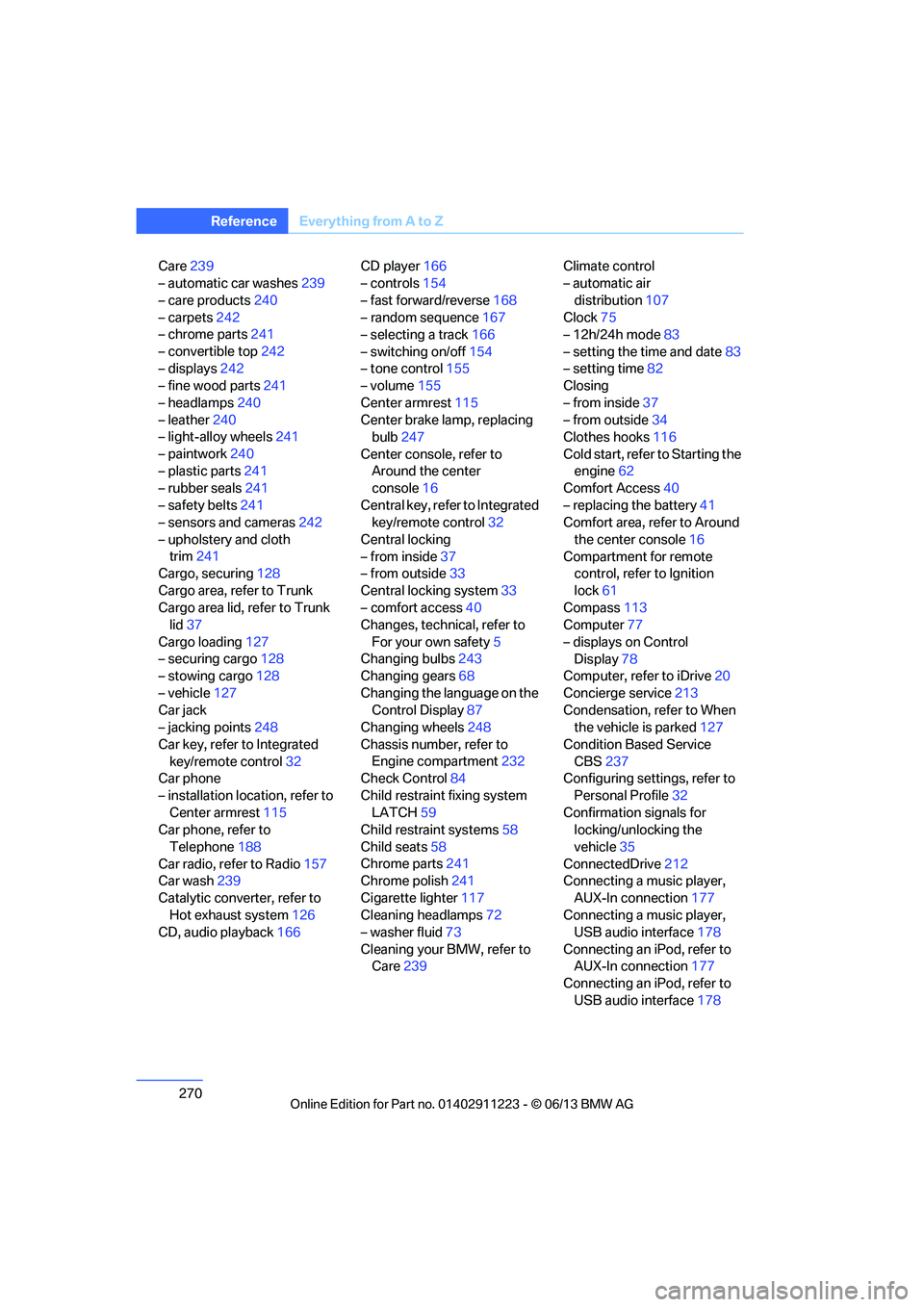
Care239
– automatic car washes 239
– care products 240
– carpets 242
– chrome parts 241
– convertible top 242
– displays 242
– fine wood parts 241
– headlamps 240
– leather 240
– light-alloy wheels 241
– paintwork 240
– plastic parts 241
– rubber seals 241
– safety belts 241
– sensors and cameras 242
– upholstery and cloth trim 241
Cargo, securing 128
Cargo area, refer to Trunk
Cargo area lid, refer to Trunk lid 37
Cargo loading 127
– securing cargo 128
– stowing cargo 128
– vehicle 127
Car jack
– jacking points 248
Car key, refer to Integrated key/remote control 32
Car phone
– installation location, refer to Center armrest 115
Car phone, refer to
Telephone 188
Car radio, refer to Radio 157
Car wash 239
Catalytic converter, refer to Hot exhaust system 126
CD, audio playback 166CD player
166
– controls 154
– fast forward/reverse 168
– random sequence 167
– selecting a track 166
– switching on/off 154
– tone control 155
– volume 155
Center armrest 115
Center brake lamp, replacing bulb 247
Center console, refer to Around the center
console 16
Central key, refer to Integrated key/remote control 32
Central locking
– from inside 37
– from outside 33
Central lo cking
system33
– comfort access 40
Changes, technical, refer to
For your own safety 5
Changing bulbs 243
Changing gears 68
Changing the language on the Control Display 87
Changing wheels 248
Chassis number, refer to Engine compartment 232
Check Control 84
Child restraint fixing system LATCH 59
Child restraint systems 58
Child seats 58
Chrome parts 241
Chrome polish 241
Cigarette lighter 117
Cleaning headlamps 72
– washer fluid 73
Cleaning your BMW, refer to Care 239 Climate control
– automatic air
distribution 107
Clock 75
– 12h/24h mode 83
– setting the time and date 83
– setting time 82
Closing
– from inside 37
– from outside 34
Clothes hooks 116
Cold start, refer to Starting the engine 62
Comfort Access 40
– replacing the battery 41
Comfort area, refer to Around
the center console 16
Compartment for remote control, refer to Ignition
lock 61
Compass 113
Computer 77
– displays on Control Display 78
Computer, refer to iDrive 20
Concierge service 213
Condensation, refer to When the vehicle is parked 127
Condition Based Service CBS 237
Configuring settings, refer to
Personal Profile 32
Confirmation signals for locking/unlocking the
vehicle 35
ConnectedDrive 212
Con n
ecting a music player,
AUX-In connection 177
Connecting a music player, USB audio interface 178
Connecting an iPod, refer to AUX-In connection 177
Connecting an iPod, refer to
USB audio interface 178
00320051004F004C00510048000300280047004C0057004C005200510003
Page 275 of 284
274
ReferenceEverything from A to Z
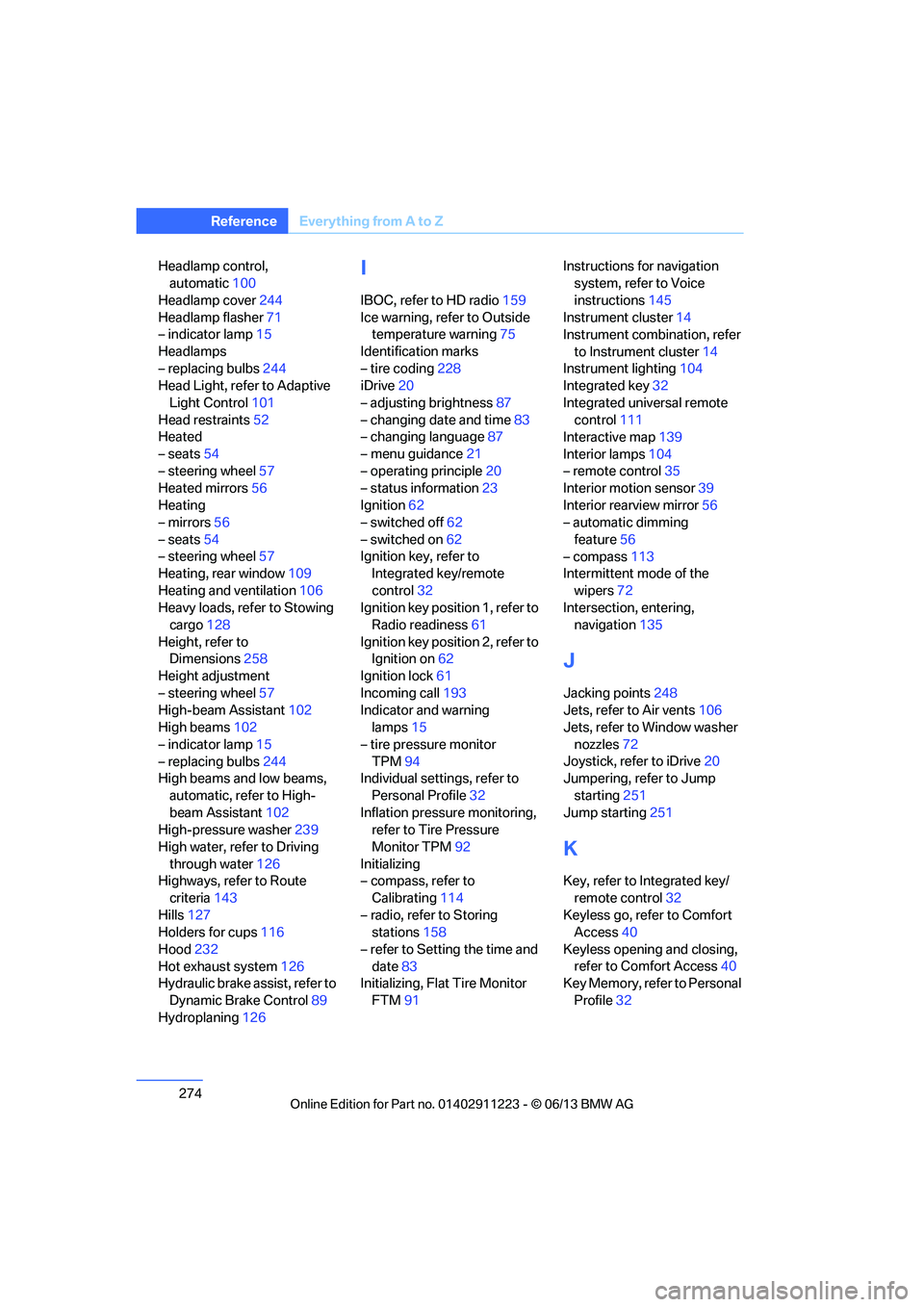
Headlamp control,
automatic 100
Headlamp cover 244
Headlamp flasher 71
– indicator lamp 15
Headlamps
– replacing bulbs 244
Head Light, refer to Adaptive
Light Control 101
Head restraints 52
Heated
– seats 54
– steering wheel 57
Heated mirrors 56
Heating
– mirrors 56
– seats 54
– steering wheel 57
Heating, rear window 109
Heating and ventilation 106
Heavy loads, refer to Stowing cargo 128
Height, refer to Dimensions 258
Height adjustment
– steering wheel 57
High-beam Assistant 102
High beams 102
– indicator lamp 15
– replacing bulbs 244
High beams and low beams,
automatic, refer to High-
beam Assistant 102
High-pressure washer 239
High water, refer to Driving through water 126
Highways, refer to Route
criteria 143
Hills 127
Holders for cups 116
Hood 232
Hot exhaust system 126
Hydraulic brake assist, refer to
Dynamic Brake Control 89
Hydroplaning 126I
IBOC, refer to HD radio 159
Ice warning, refer to Outside temperature warning 75
Identification marks
– tire coding 228
iDrive 20
– adjusting brightness 87
– changing date and time 83
– changing language 87
– menu guidance 21
– operating principle 20
– status information 23
Ignition 62
– switched off 62
– switched on 62
Ignition key, refer to Integrated key/remote
control 32
Ignition key position 1, refer to Radio readiness 61
Ignition key position 2, refer to Ignition on 62
Ignition lock 61
Incoming call 193
Indicator and warning lamps 15
– tire pressure monitor TPM 94
Individual settings, refer to
Personal Profile 32
Inflation pressure monitoring, refer to Tire Pressure
Monitor TPM 92
Initializing
– compass, refer to
Calibrating 114
– radio, refer to Storing stations 158
– refer to Setting the time and date 83
Initializing, Flat Tire Monitor
FTM 91 Instructions for navigation
system, refer to Voice
instructions 145
Instrument cluster 14
Instrument combination, refer
to Instrument cluster 14
Instrument lighting 104
Integrated key 32
Integrated universal remote control 111
Interactive map 139
Interior lamps 104
– remote control 35
Interior motion sensor 39
Interior rearview mirror 56
– automatic dimming
feature 56
– compass 113
Intermittent mode of the
wipers 72
Intersection, entering,
navigation 135
J
Jacking points
248
Jets, refer to Air vents 106
Jets, refer to Window washer
nozzles 72
Joystick, refer to iDrive 20
Jumpering, refer to Jump
starting 251
Jump starting 251
K
Key, refer to Integrated key/
remote control 32
Keyless go, refer to Comfort Access 40
Keyless opening and closing, refer to Comfort Access 40
Key Memory, refer to Personal
Profile 32
00320051004F004C00510048000300280047004C0057004C005200510003
Page 276 of 284
275
Everything from A to Z
Reference
Keypad dialing
195
Kickdown 65
Knock control 221
L
Lamps
– adaptive light control 101
– interior lighting 104
Lamps, refer to Parking lamps/ Low beams 100
Lamps and bulbs, replacing bulbs 243
Lashing eyes, refer to
Securing cargo 128
Last destinations 137
LATCH child restraint fixing system 59
Launch Control 70
Leather care 240
LED Light-emitting diodes 243
Length, refer to Dimensions 258
License plate lamp, replacing
bulb 247
Light
– instrument lighting 104
– refer to High-beam Assistant 102
Light-alloy wheels 241
Light control
– refer to High-beam Assistant 102
Light-emitting diodes LED 243
Lighter 117
– socket 117
Lighting
– lamps and bulbs 243
– of the instruments 104
– of vehicle, refer to Lamps 100
Light switch 100 Limit, refer to Speed limit
86
Load 127
Load securing equipment, refer to Securing cargo 128
Lock buttons of doors, refer to
Locking 37
Locking
– adjusting confirmation
signal 35
– from inside 37
– from outside 34
– without remote control, refer to Comfort Access 40
Locking and unlocking doors
– from inside 37
– from outside 34
Low beam control, refer to High-beam Assistant 102
Low-beam headlamps 100
– automatic 100
– replacing bulbs 244
Lower back support, refer to
Lumbar support 51
Luggage compartment
– lid, refer to Trunk lid 37
Luggage compartment, refer to Trunk
Luggage rack, refer to Roof-
mounted luggage rack 129
Lu mbar su
pport51
M
M+S tires, refer to Winter
tires 231
Maintenance, refer to
– BMW Maintenance
System 237
– Service and Warranty Information Booklet for US
models or in the Warranty
and Service Guide Booklet
for Canadian models
Maintenance system 237Malfunction warnings, refer to
Check Control 84
Managing music 175
Manually unlocking parking lock 69
Manual operation
– door lock 36
– fuel filler flap 221
– parking lock 69
– transmission lock, automatic transmission 66
Manual operation with automatic transmission 65
Manual transmission 64
Map for navigation
– changing scale 146
– entering destination 139
Map view 145
Maximum cooling 107
Maximum speed
– for winter tires 231
Menus, refer to iDrive 20
Messages 204
Messages from the Concierge service 205
Microfilter/activated-charcoal filter for automatic climate
control 109
Microphone for telephone 16
Mirror dimming feature 56
Mirrors 55
– automatic curb monitor 56
– exterior mirrors 55
– heating 56
– interior rearview mirror 56
Mobile phone
– adjusting volume 193
– connecting, refer to Mobile phone, pairing 189
– operation 193
– pairing 189
– suitable mobile phones 188
– unpairing 191
– what to do if…. 192
00320051004F004C00510048000300280047004C0057004C005200510003
Page 277 of 284
276
ReferenceEverything from A to Z
Mobile phone, installation
location, refer to Center
armrest 115
Mobile phone, refer to Telephone 188
Modifications, te chnical, refer
to For your own safety 5
Monitor, refer to iDrive 20
Monitoring system for tire pressures, refer to Flat Tire
Monitor 91
Multi-channel playback 156
Multifunctional steering wheel, refer to Buttons on
the steering wheel 13
Multifunction switch
– refer to Turn signals/ headlamp flasher 71
– refer to Wiper system 71
Music collection 172
– backing up 176
– deleting 176
– random sequence 175
– restoring 176
Music interface for
smartphones 178
Music search 174
My Info 205
N
Navigation
– starting destination
guidance after entering a
destination 136
– storing current position 136
– voice activation 140
Navigation announcements, refer to Switching voice
instructions on/off 145
Navigation data 132 Navigation system
132
– address book 136
– bypassing a route section 144
– continuing destination
guidance 143
– destination entry 134
– dynamic destination
guidance 149
– entering a destination by voice 140
– entering a destination manually 134
– frequently asked
questions 151
– gas station
recommendations 145
– planning a trip 141
– route list 144
– selecting destination via map 139
– selecting route criteria 143
– special destinations 137
– starting destination guidance 143
– terminating destination guidance 143
– traffic bulletins 147
– voice instructions 145
– volume adjustment 145
Neck support, refer to Head
restraints 52
Nets, refer to Storage compartments 116
Neutral 67
New tires 230
Next Service indicator, refer to
Condition Based Service
CBS 237
North-facing map 145
Notes 208
O
OBD socket, refer to Socket
for Onboard Diagnosis 238
Octane ratings, refer to Fuel
specifications 221
Odometer 75
Office 201
– current office 201
– what to do if…. 209
Oil, refer to Engine oil 233
Oil consumption 233
Oil level 233
Old batteries, refer to
Disposal 249
Onboard vehicle tool kit 243
Opening and closing
– comfort access 40
– from inside 37
– from outside 34
– using the door lock 36
– using the remote control 34
Options, selecting for navigation 143
Orientation menu, refer to
Start menu 21
Outlets, refer to Ventilation 109
Outside temperature display 75
– changing unit of measure 80
– in computer 80
Outside temperature warning 75
Overriding selector lever lock 66
Overview
– radio operation 154
P
Paintwork care240
Park assistant, refer to Park
Distance Control 88
00320051004F004C00510048000300280047004C0057004C005200510003