rear view mirror BMW 128I CONVERTIBLE 2010 User Guide
[x] Cancel search | Manufacturer: BMW, Model Year: 2010, Model line: 128I CONVERTIBLE, Model: BMW 128I CONVERTIBLE 2010Pages: 250, PDF Size: 8.24 MB
Page 215 of 250
Mobility
213Reference
At a glance
Controls
Driving tips
Communications
Navigation
Entertainment
When mounting new tires or changing over
from summer to winter tires and vice versa,
mount run-flat tires for your own safety. In the
event of a flat, no spare wheel is available. Your
BMW center will be glad to advise you. Refer
also to New wheels and tires, page196.
The tools for changing wheels are avail-
able as optional accessories from your
BMW center.<
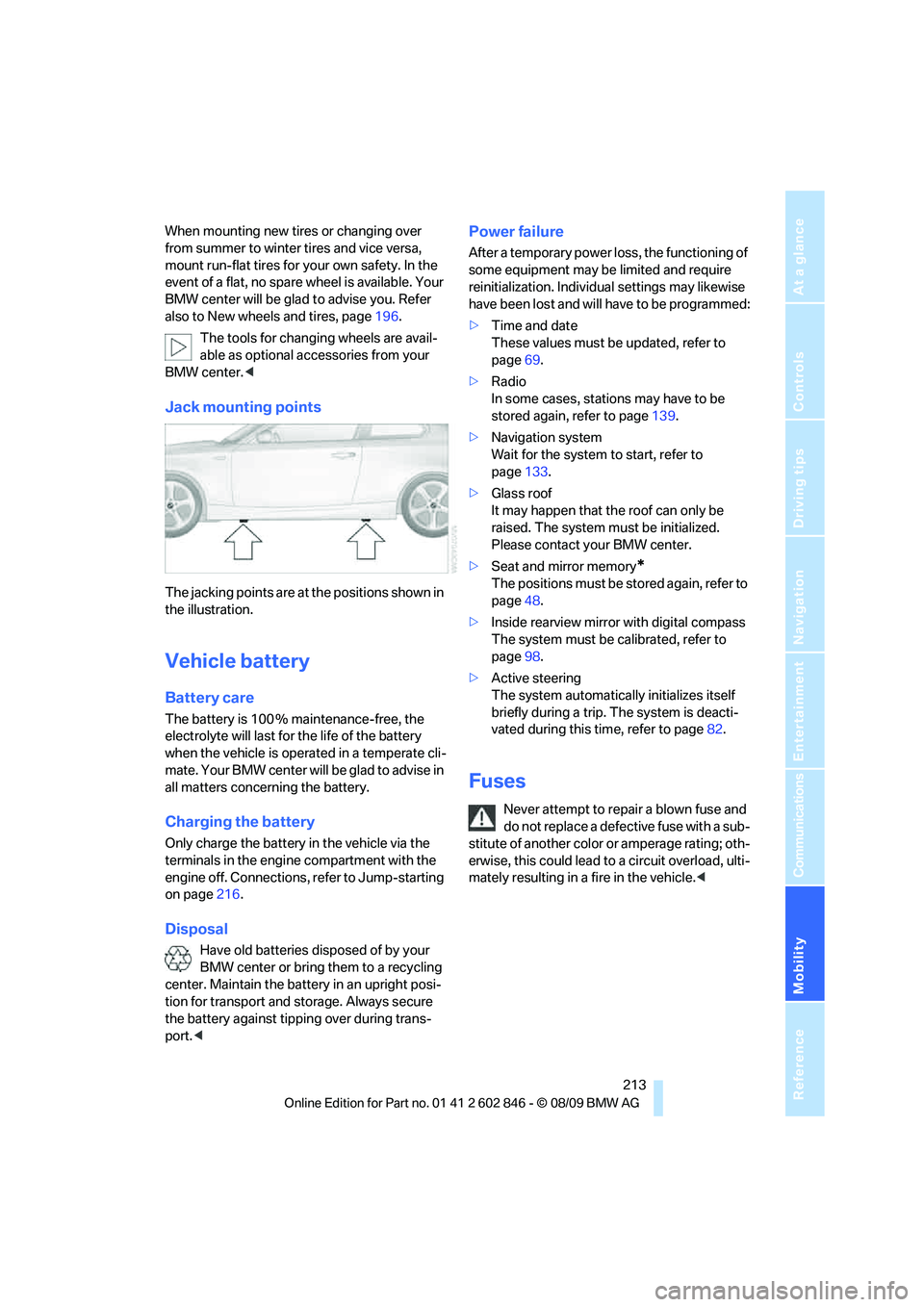
Jack mounting points
The jacking points are at the positions shown in
the illustration.
Vehicle battery
Battery care
The battery is 100 % maintenance-free, the
electrolyte will last for the life of the battery
when the vehicle is operated in a temperate cli-
mate. Your BMW center will be glad to advise in
all matters concerning the battery.
Charging the battery
Only charge the battery in the vehicle via the
terminals in the engine compartment with the
engine off. Connections, refer to Jump-starting
on page216.
Disposal
Have old batteries disposed of by your
BMW center or bring them to a recycling
center. Maintain the battery in an upright posi-
tion for transport and storage. Always secure
the battery against tipping over during trans-
port.<
Power failure
After a temporary power loss, the functioning of
some equipment may be limited and require
reinitialization. Individual settings may likewise
have been lost and will have to be programmed:
>Time and date
These values must be updated, refer to
page69.
>Radio
In some cases, stations may have to be
stored again, refer to page139.
>Navigation system
Wait for the system to start, refer to
page133.
>Glass roof
It may happen that the roof can only be
raised. The system must be initialized.
Please contact your BMW center.
>Seat and mirror memory
*
The positions must be stored again, refer to
page48.
>Inside rearview mirror with digital compass
The system must be calibrated, refer to
page98.
>Active steering
The system automatically initializes itself
briefly during a trip. The system is deacti-
vated during this time, refer to page82.
Fuses
Never attempt to repair a blown fuse and
do not replace a defective fuse with a sub-
stitute of another color or amperage rating; oth-
erwise, this could lead to a circuit overload, ulti-
mately resulting in a fire in the vehicle.<
Page 240 of 250
Everything from A - Z
238 Ignition key position 2, refer to
Ignition on55
Ignition lock55
Imprint2
Indicator and warning
lamps13
– Tire Pressure Monitor
TPM80
Indicator lighting, refer to
Instrument lighting89
Individual settings, refer to
Personal Profile26
Inflation pressure, tires190
Inflation pressure monitoring,
refer to Tire Pressure
Monitor TPM79
Initializing
– compass, refer to
Calibrating98
– radio, refer to Station,
storing139
– refer to Setting the time and
date70
Initializing, Flat Tire Monitor
FTM77
Instructions for navigation
system, refer to Voice
instructions127
Instrument cluster12
Instrument lighting89
Integrated key26
Integrated universal remote
control96
Interactive map122
Interior lamps90
– remote control28
Interior motion sensor32
Interior rearview mirror50
– automatic dimming
feature51
– compass98
Intermittent mode of the
wipers60
Intersection, entering,
navigation118
iPod, connecting, refer to
AUX-IN port159
iPod, connecting, refer to USB
audio interface159
J
Jacking points213
Jets, refer to Air vents91
Joystick, refer to iDrive16
Jumpering, refer to Jump-
starting216
Jump-starting216
K
Key, refer to Integrated key/
remote control26
Keyless go, refer to Comfort
Access33
Keyless opening and closing,
refer to Comfort Access33
Key Memory, refer to Personal
Profile26
Kickdown58
Knock control188
L
Lamps
– adaptive light control87
– instrument lighting89
– interior lighting90
Lamps, refer to Parking lamps/
low beams86
Lamps and bulbs, replacing
bulbs209
Lashing eyes, refer to
Securing cargo112
Last destinations120
LATCH child restraint fixing
system53
Leather care207
LED Light-emitting
diodes209
Length, refer to
Dimensions223
License plate lamp, replacing
bulb212
Light
– refer to High-beam
assistant88
Light-alloy wheels207Light control
– refer to High-beam
assistant88
Light-emitting diodes
LED209
Lighter101
– socket101
Lighting
– lamps and bulbs209
– of instruments89
– of vehicle, refer to Lamps86
Light switch86
Limit, refer to Speed limit73
Load111
Load securing equipment,
refer to Securing cargo112
Lock buttons of doors, refer to
Locking30
Locking
– adjusting confirmation
signal28
– from inside30
– from outside28
– without remote control, refer
to Comfort Access33
Locking and unlocking doors
– from inside30
– from outside27
Low beam control, refer to
High-beam assistant88
Low-beam headlamps86
– automatic86
– replacing bulbs210
Lower back support, refer to
Lumbar support45
Luggage compartment, refer
to Cargo area
Luggage rack, refer to Roof-
mounted luggage rack112
Lumbar support45
M
M+S tires, refer to Winter
tires197
Maintenance, refer to
– BMW Maintenance
System203
– Service booklet
Page 241 of 250
Reference 239
At a glance
Controls
Driving tips
Communications
Navigation
Entertainment
Mobility
Maintenance system203
Malfunction warnings, refer to
Check Control71
Manual car wash206
Manual operation
– door lock30
– fuel filler flap188
– glass roof37
– transmission lock, automatic
transmission59
Manual operation with
automatic transmission58
Manual transmission57
Map for navigation
– changing scale129
– entering destination122
Map view128
Maximum cooling92
Maximum speed
– for winter tires197
Menus, refer to iDrive16
Messages172
Messages from the concierge
service173
Microfilter/activated-charcoal
filter for automatic climate
control94
Microphone for telephone14
Mirror dimming feature51
Mirrors49
– automatic curb monitor50
– exterior mirrors49
– heating50
– interior rearview mirror50
Mobile phone
– adjusting volume169
– connecting, refer to Mobile
phone, pairing166
– operation via iDrive169
– pairing166
Mobile phone, installation
location, refer to Center
armrest100
Mobile phone, refer to
Telephone166
Mobile phone, refer to the
separate Owner's Manual
Modifications, technical, refer
to For your own safety5Monitor, refer to iDrive16
Monitoring system for tire
pressures, refer to Flat Tire
Monitor77
MP3 player, connecting, refer
to AUX-IN port159
MP3 player, connecting, refer
to USB audio interface159
Multi-channel playback137
Multifunctional steering
wheel, refer to Buttons on
the steering wheel11
Multifunction switch
– refer to Turn signals/
headlamp flasher59
– refer to Wiper system60
Music, managing
157
Music collection154
– backup158
– deleting158
– random sequence157
– restoring158
Music player, connecting,
refer to AUX-IN port159
Music player, connecting,
refer to USB audio
interface159
Music search155
My Info173
N
Navigation
– starting destination
guidance after entering a
destination119
– storing a destination119
– storing current position119
– voice activation123
Navigation announcements,
refer to Switching voice
instructions on/off127
Navigation data116Navigation system116
– address book119
– bypassing a route
section127
– continuing destination
guidance126
– destination entry117
– dynamic destination
guidance127
– entering a destination by
voice123
– entering a destination
manually117
– frequently asked
questions133
– gas station
recommendations127
– planning a trip124
– route list127
– selecting destination via
map122
– selecting route criteria126
– special destinations120
– starting destination
guidance126
– terminating destination
guidance126
– traffic bulletins129
– voice instructions127
– volume adjustment128
Neck support, refer to Head
restraints45
Nets, refer to Storage
compartments100
New tires196
North-facing map128
Number of cylinders, refer to
Engine data222
O
OBD socket, refer to Socket
for Onboard Diagnosis204
Octane ratings, refer to Fuel
specifications188
Odometer63
Oil, refer to Engine oil199
Oil consumption199
Oil level199
Page 242 of 250
Everything from A - Z
240 Old batteries, refer to
Disposal213
Onboard vehicle tool kit209
Opening and closing
– Comfort Access33
– from inside30
– from outside27
– using the door lock29
– via the remote control27
Options, selecting for
navigation126
Orientation menu, refer to
Start menu17
Outlets, refer to Ventilation94
Output, refer to Engine
data222
Outside temperature
display63
– changing unit of measure67
– on computer67
Outside temperature
warning63
Overriding selector lever
lock59
Overview
– radio control136
P
Paintwork care206
Park assistant, refer to Park
Distance Control75
Park Distance Control PDC75
Parked car ventilation94
– preselecting switch-on
times95
– switching on and off
directly94
Parking
– vehicle56
Parking aid, refer to Park
Distance Control PDC75
Parking brake57
– indicator lamp57
Parking lamps/low beams86
– replacing bulbs210
Parts and accessories, refer to
The individual vehicle5Passenger-side mirror tilt
function50
Pathway lighting87
Personal Profile26
Phone book169
Phone numbers
– dialing170
Pinch protection system
– glass roof, electric37
– windows36
Placing a call, refer to
telephone owner's manual
Playing music155
Polish208
Pollen, refer to Microfilter/
activated-charcoal filter94
Postal code, entering for
navigation118
Power windows35
Power windows, refer to
Windows35
Pressure, tires190
Pressure monitoring of tires,
refer to Flat Tire Monitor77
Pressure monitoring of tires,
refer to Tire Pressure
Monitor TPM79
Programmable buttons on the
steering wheel11
Programmable memory
keys20
Protection function, refer to
Pinch protection system
– glass roof, electric37
– windows36
Providing medical assistance,
refer to First add pouch215
Puncture
– Flat Tire Monitor77
R
Radio
– controls136
– HD Radio140
– satellite radio142
– selecting a waveband139
– storing stations139
– switching on/off136
– tone control136
– volume136
Radio position, refer to Radio
readiness55
Radio readiness55
– switched off55
– switched on55
Rain sensor60
Random sequence
– external devices161
– music collection157
Reading lamps90
Rear lamps, refer to Tail
lamps211
Rear luggage rack112
Rear seats
– adjusting head restraints46
– folding down backrests102
Rearview mirror, refer to
Mirrors49
Rear window defroster93
Receiving level of mobile
phone, refer to Status
information19
Reception
– quality140
– radio station140
Recirculated-air mode93
Recirculation of air, refer to
Recirculated-air mode93
Reflectors, refer to Tail
lamps211
Refueling188
Releasing
– hood198
Remaining distance, refer to
Computer65
Remaining distance, refer to
Cruising range65