clutch BMW 128I CONVERTIBLE 2013 User Guide
[x] Cancel search | Manufacturer: BMW, Model Year: 2013, Model line: 128I CONVERTIBLE, Model: BMW 128I CONVERTIBLE 2013Pages: 284, PDF Size: 6.93 MB
Page 128 of 284
127
Things to remember when driving
Driving tips
Hills
To prevent overheating and the resulting
reduced efficiency of the brake system,
drive long or steep downhill gradients in the
gear in which the least br aking is required. Even
light but consistent brak e pressure can lead to
high temperatures, brake wear and possibly
even brake failure. <
You can increase the engine's braking effect
by shifting down, all the way to first gear if nec-
essary. This strategy helps you avoid placing
excessive loads on the brake system. Down-
shifting in manual mo de of the automatic
transmission, refer to page 65.
Sport automatic transm ission with double
clutch: never drive with the transmission
in neutral or with the en gine switched off; other-
wise, there will be no en gine braking action and
no power assistance to the brakes and steering.
Manual transmission: never drive with the
clutch held down, with the transmission in neu-
tral or with the engine switched off; otherwise,
there will be no engine braking action and no
power assistance to the brakes and steering.
Never allow floor mats, carpets or any other
objects to protrude into the area around the
pedals; otherwise, pedal function could be
impaired. <
Corrosion on brake rotors
When the vehicle is driv en only occasionally,
during extended periods when the vehicle is not
used at all, and in operating conditions where
brake applications are le ss frequent, there is an
increased tendency for corrosion to form on
rotors, while contaminan ts accumulate on the
brake pads. This occurs because the minimum
pressure which must be exerted by the pads
during brake applications to clean the rotors is
not reached.
Should corrosion form on the brake rotors, the
brakes will tend to respond with a pulsating
effect that even extended application will fail to
cure.
When the vehicle is parked
Condensation forms while the automatic
climate control is in operation, and then exits
under the vehicle. Traces of condensed water
under the vehicle are therefore normal.
Cargo loading
To avoid loading the tires beyond their
approved carrying ca pacity, never over-
load the vehicle. Overlo ading can lead to over-
heating and increases the rate at which damage
develops inside the tires. In some situations,
this can result in sudden loss of tire pressure. <
Avoid fluid spills in the trunk as they could
damage the vehicle. <
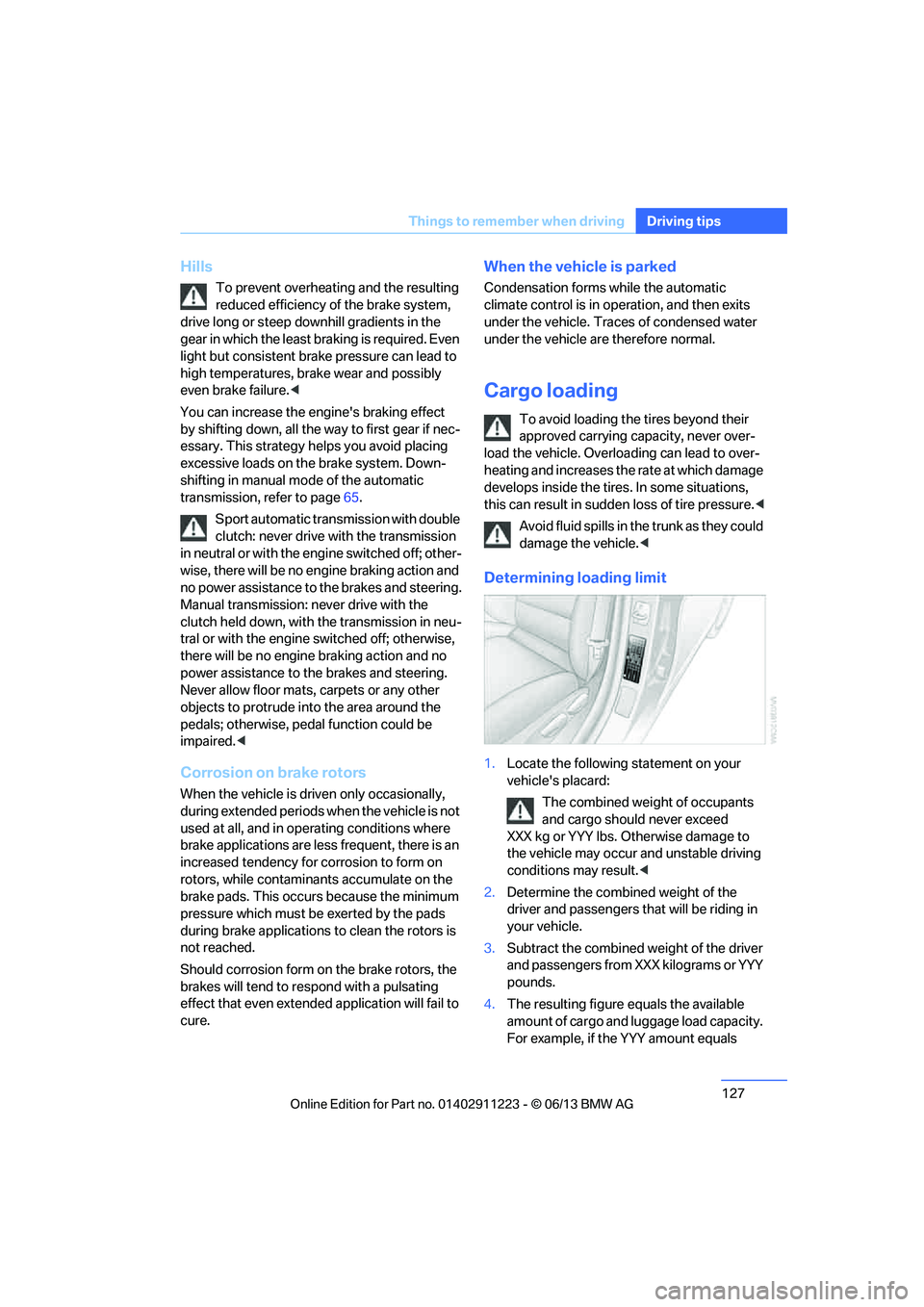
Determining loading limit
1.Locate the following statement on your
vehicle's placard:
The combined weight of occupants
and cargo should never exceed
XXX kg or YYY lbs. Otherwise damage to
the vehicle may occur and unstable driving
conditions may result.<
2. Determine the combined weight of the
driver and passengers that will be riding in
your vehicle.
3. Subtract the combined weight of the driver
and passengers from XXX kilograms or YYY
pounds.
4. The resulting figure equals the available
amount of cargo and luggage load capacity.
For example, if the YYY amount equals
00320051004F004C00510048000300280047004C0057004C005200510003
Page 241 of 284
240
MobilityCare
Driving into an automatic car wash
Perform the following steps to ensure that the
vehicle can roll:
Manual transmission:
1.Shift into neutral.
2. Release parking brake, refer to page 63.
3. Switch off the engine.
4. Leave the remote control in the ignition
lock.
Automatic transmission:
1. Insert the remote cont rol into the ignition
lock, even with Comfort Access.
2. Shift selector lever into position N.
3. Release parking brake, refer to page 63.
4. Switch off the engine.
5. Leave the remote control in the ignition
lock.
Sport automatic transmission with double
clutch:
1. Insert the remote cont rol into the ignition
lock, even with Comfort Access.
2. Shift selector lever into position N.
3. Release parking brake, refer to page 63.
4. Switch off the engine.
5. Leave the remote control in the ignition
lock.
The transmission is switched into position P:
> Automatically after approx. 30 minutes
> If you remove the infrared remote control
from the ignition lock
Headlamps
Do not rub them dry and do not use abrasive or
corrosive cleaning agents.
Loosen dirt, e.g. insects, with shampoo and
rinse away with water.
Thaw ice with a de-icer and do not use an ice
scraper.
After washing the vehicle
After washing the vehicle, apply the
brakes briefly to dry them; otherwise,
water can reduce braking efficiency over the
short term and the brake discs can corrode. <
R e m o v e r e s i d u e s o n t h e windows completely in
order to prevent impaired vision due to smear
formation and to reduce wiper noise and wiper
blade wear.
Vehicle care
Care products
BMW recommends using BMW cleaning and
care products since they have been tested and
approved for this purpose.
Follow the instructions on the packaging.
When cleaning inside the vehicle, always
open the doors and windows. Only use prod-
ucts designed for cleaning vehicles. Cleaning
agents can contain substa nces that are danger-
ous or hazardous to your health. <
Vehicle paintwork
Regular care contributes to driving safety and
value retention. Environmental influences in
regions with elevated levels of air pollution or
natural contaminants such as tree sap or pollen
can impact vehicle paintwork. The frequency
and scope of car care should be adapted
accordingly.
Immediately remove particularly corrosive sub-
stances such as spilled fuel, oil, grease, or bird
droppings to prevent damage to the paintwork.
Leather care
Frequently remove dust from the leather using
a cloth or vacuum cleaner.
Otherwise, dust and road grit in the pores and
folds of the leather will otherwise have an abra-
sive effect, resulting in increased wear and
causing the leather surf ace to become brittle
prematurely.
00320051004F004C00510048000300280047004C0057004C005200510003
Page 254 of 284
253
Giving and receiving assistance
Mobility
Use only the tow fitting provided with the
vehicle and screw it a
ll the way in. Use the
tow fitting for towing on paved roads only. Avoid
lateral loading of the tow fitting, e.g. do not lift
the vehicle by the tow fitting. Otherwise, the
tow fitting and the vehicle could be damaged. <
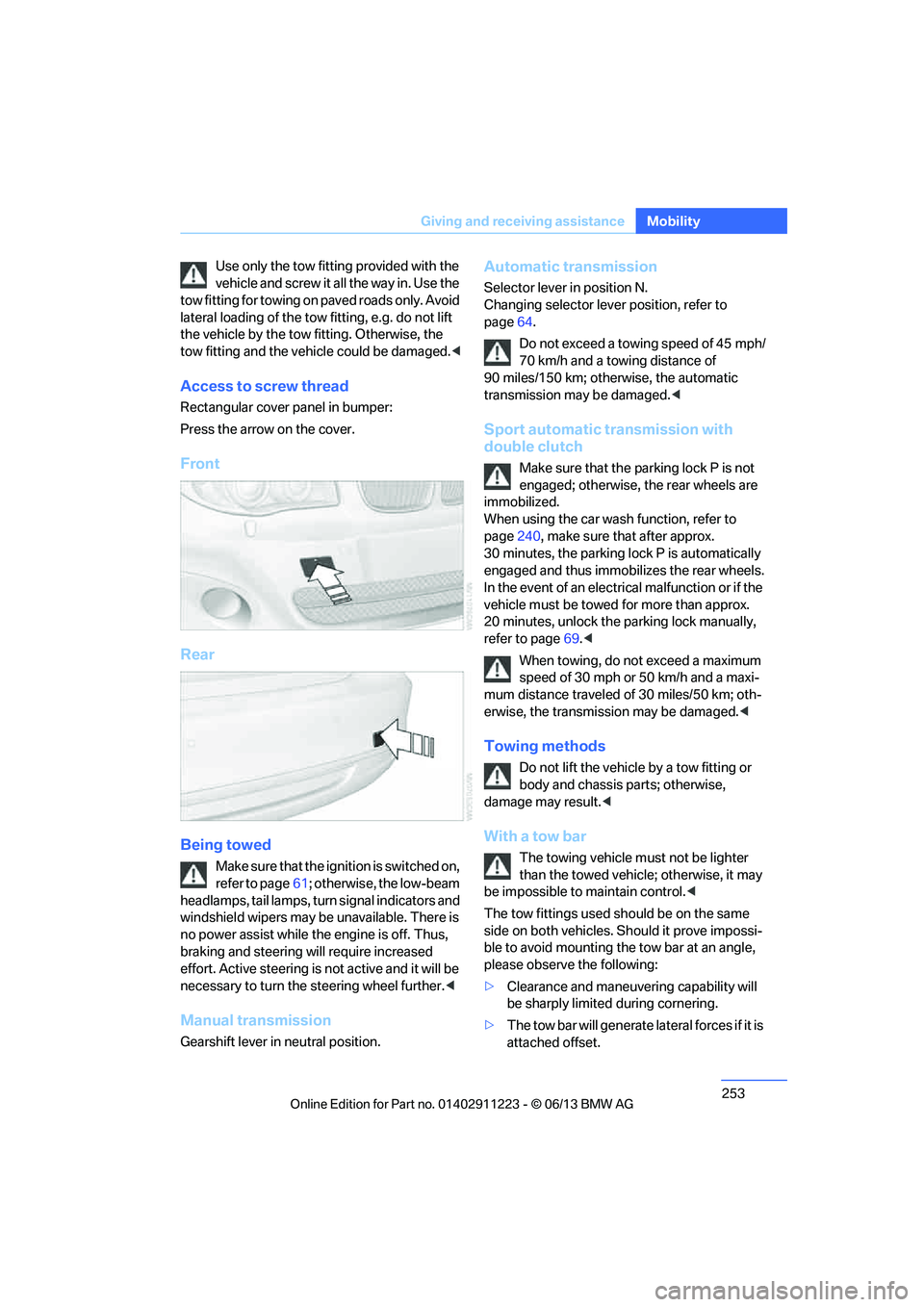
Access to screw thread
Rectangular cover panel in bumper:
Press the arrow on the cover.
Front
Rear
Being towed
Make sure that the ignition is switched on,
refer to page61; otherwise, the low-beam
headlamps, tail lamps, turn signal indicators and
windshield wipers may be unavailable. There is
no power assist while the engine is off. Thus,
braking and steering will require increased
effort. Active steering is not active and it will be
necessary to tu rn the steering wheel further. <
Manual transmission
Gearshift lever in neutral position.
Automatic transmission
Selector lever in position N.
Changing selector lever position, refer to
page 64.
Do not exceed a towing speed of 45 mph/
70 km/h and a towing distance of
90 miles/150 km; otherwise, the automatic
transmission may be damaged. <
Sport automatic transmission with
double clutch
Make sure that the parking lock P is not
engaged; otherwise, the rear wheels are
immobilized.
When using the car wash function, refer to
page 240, make sure that after approx.
30 minutes, the parking lock P is automatically
engaged and thus immobilizes the rear wheels.
In the event of an electrical malfunction or if the
vehicle must be towed for more than approx.
20 minutes, unlock the parking lock manually,
refer to page 69.<
When towing, do not exceed a maximum
speed of 30 mph or 50 km/h and a maxi-
mum distance traveled of 30 miles/50 km; oth-
erwise, the transmission may be damaged. <
Towing methods
Do not lift the vehicle by a tow fitting or
body and chassis parts; otherwise,
damage may result. <
With a tow bar
The towing vehicle must not be lighter
than the towed vehicle; otherwise, it may
be impossible to maintain control.<
The tow fittings used sh ould be on the same
side on both vehicles. Should it prove impossi-
ble to avoid mounting the tow bar at an angle,
please observe the following:
> Clearance and maneuvering capability will
be sharply limited during cornering.
> The tow bar will ge nerate lateral forces if it is
attached offset.
00320051004F004C00510048000300280047004C0057004C005200510003
Page 255 of 284
254
MobilityGiving and receiving assistance
Attach the tow bar to the tow fittings only,
as attaching it to othe r parts of the vehicle
could result in damage.<
With a tow rope
When starting off in the towing vehicle, make
sure that the tow rope is taut.
To avoid jerking and the associated
stresses on vehicle components when
towing, always use nylon ropes or nylon straps.
Attach the tow rope to the tow fittings only, as
attaching it to other parts of the vehicle could
result in damage. <
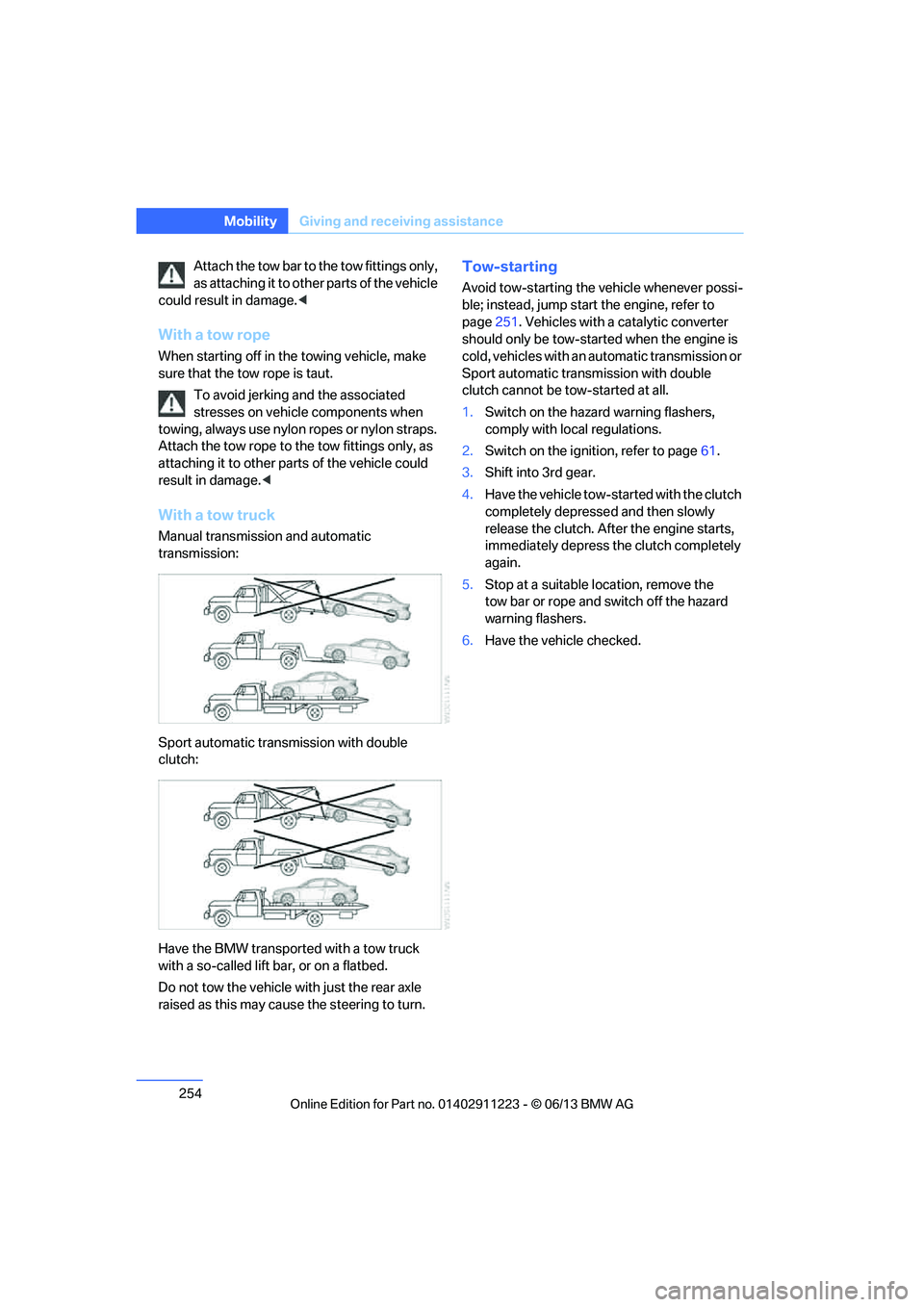
With a tow truck
Manual transmission and automatic
transmission:
Sport automatic transmission with double
clutch:
Have the BMW transported with a tow truck
with a so-called lift bar, or on a flatbed.
Do not tow the vehicle wi th just the rear axle
raised as this may cause the steering to turn.
Tow-starting
Avoid tow-starting the vehicle whenever possi-
ble; instead, jump start the engine, refer to
page 251. Vehicles with a catalytic converter
should only be tow-started when the engine is
cold, vehicles with an automatic transmission or
Sport automatic transmission with double
clutch cannot be tow-started at all.
1. Switch on the hazard warning flashers,
comply with local regulations.
2. Switch on the ignition, refer to page 61.
3. Shift into 3rd gear.
4. Have the vehicle tow-started with the clutch
completely depresse d and then slowly
release the clutch. Afte r the engine starts,
immediately depress the clutch completely
again.
5. Stop at a suitable location, remove the
tow bar or rope and switch off the hazard
warning flashers.
6. Have the vehicle checked.
00320051004F004C00510048000300280047004C0057004C005200510003
Page 260 of 284
259
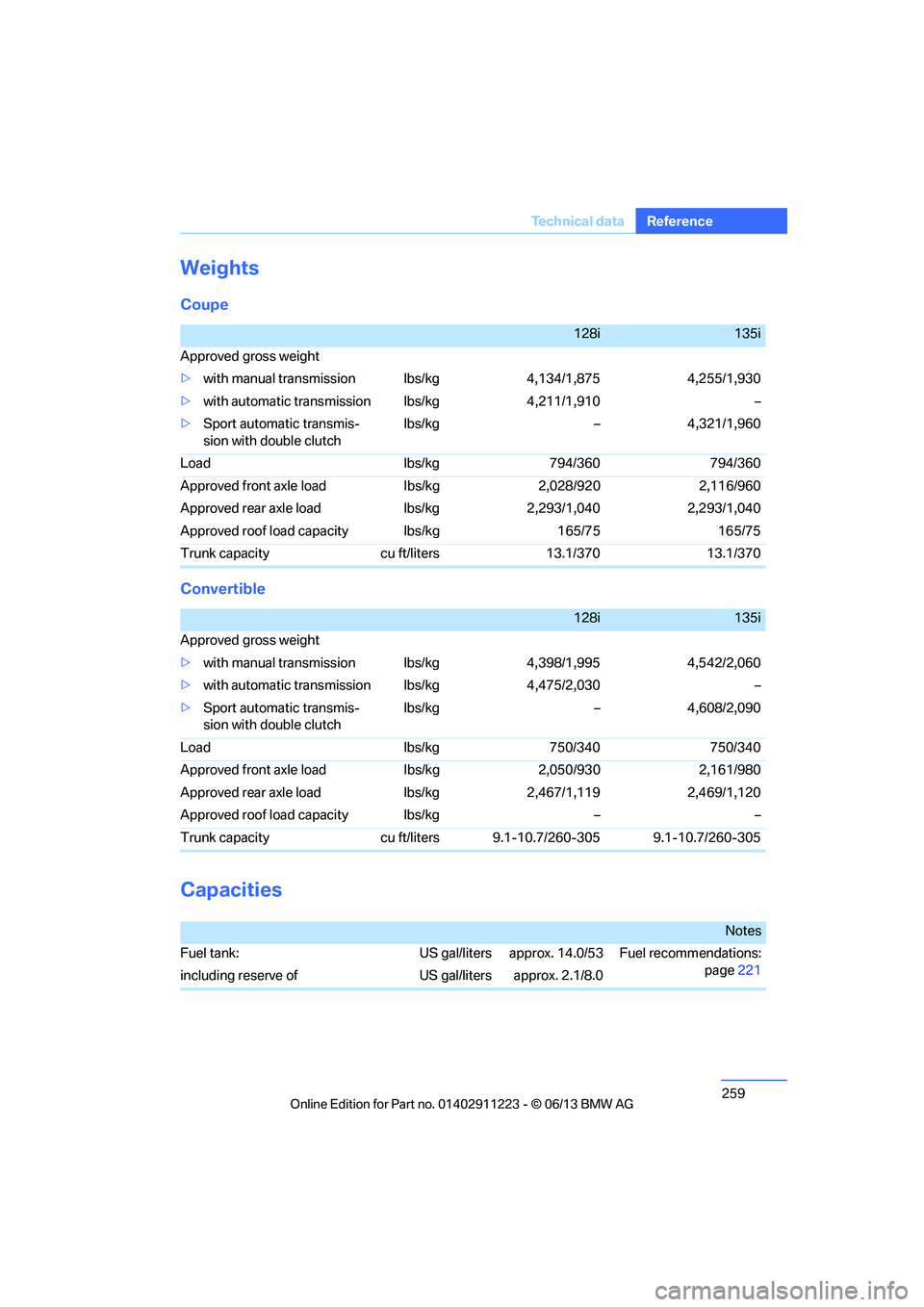
Te c h n i c a l d a t a
Reference
Weights
Coupe
Convertible
Capacities
128i135i
Approved gross weight
> with manual transmission lbs/kg 4,134/1,875 4,255/1,930
> with automatic transmi ssion lbs/kg 4,211/1,910 –
> Sport automatic transmis-
sion with double clutch lbs/kg – 4,321/1,960
Load lbs/kg 794/360 794/360
Approved front axle load lbs/kg 2,028/920 2,116/960
Approved rear axle load lbs/kg 2,293/1,040 2,293/1,040
Approved roof load capacity lbs/kg 165/75 165/75
Trunk capacity cu ft/liters 13.1/370 13.1/370
128i135i
Approved gross weight
> with manual transmission lbs/kg 4,398/1,995 4,542/2,060
> with automatic transmi ssion lbs/kg 4,475/2,030 –
> Sport automatic transmis-
sion with double clutch lbs/kg – 4,608/2,090
Load lbs/kg 750/340 750/340
Approved front axle load lbs/kg 2,050/930 2,161/980
Approved rear axle load lbs/kg 2,467/1,119 2,469/1,120
Approved roof load capacity lbs/kg – –
Trunk capacity cu ft/liters 9.1-10.7/260-305 9.1-10.7/260-305
Notes
Fuel tank: US gal/liters approx. 14.0/53 Fuel recommendations: page221
including reserve of US gal/liters approx. 2.1/8.0
00320051004F004C00510048000300280047004C0057004C005200510003
Page 270 of 284
269
Everything from A to Z
Reference
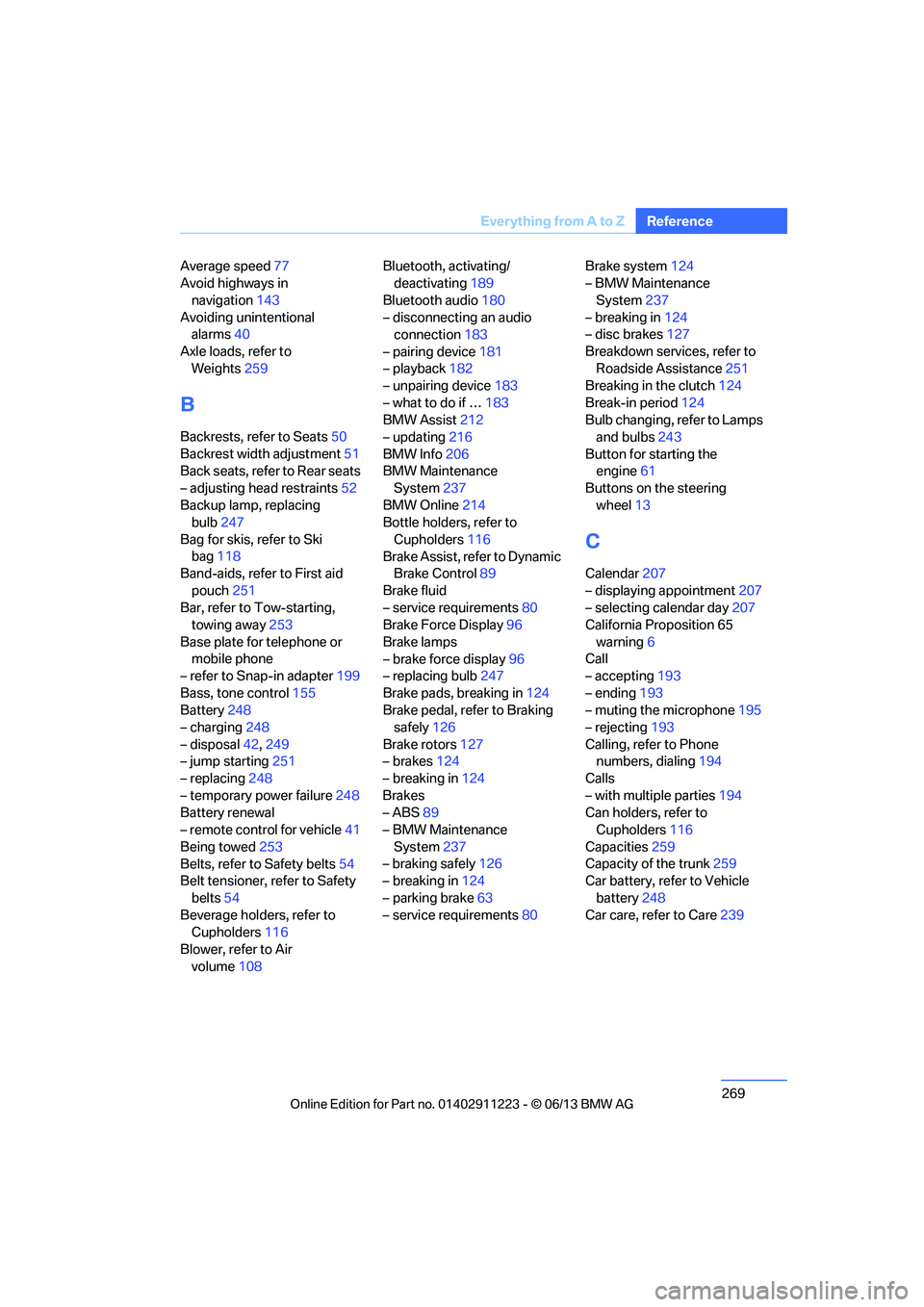
Average speed
77
Avoid highways in
navigation 143
Avoiding unintentional alarms 40
Axle loads, refer to Weights 259
B
Backrests, refer to Seats 50
Backrest width adjustment 51
Back seats, refer to Rear seats
– adjusting head restraints 52
Backup lamp, replacing bulb 247
Bag for skis, refer to Ski bag 118
Band-aids, refer to First aid
pouch 251
Bar, refer to Tow-starting, towing away 253
Base plate for telephone or mobile phone
– refer to Snap-in adapter 199
Bass, tone control 155
Battery 248
– charging 248
– disposal 42,249
– jump starting 251
– replacing 248
– temporary power failure 248
Battery renewal
– remote control for vehicle 41
Being towed 253
Belts, refer to Safety belts 54
Belt tensioner, refer to Safety
belts 54
Beverage holders, refer to Cupholders 116
Blower, refer to Air volume 108 Bluetooth, activating/
deactivating 189
Bluetooth audio 180
– disconnecting an audio connection 183
– pairing device 181
– playback 182
– unpairing device 183
– what to do if … 183
BMW Assist 212
– updating 216
BMW Info 206
BMW Maintenance System 237
BMW Online 214
Bottle holders, refer to
Cupholders 116
Brake Assist, refer to Dynamic Brake Control 89
Brake fluid
– service requirements 80
Brake Force Display 96
Brake lamps
– brake force display 96
– replacing bulb 247
Brake pads, breaking in 124
Brake pedal, refer to Braking safely 126
Bra k
e rotors 127
– brakes 124
– breaking in 124
Brakes
– ABS 89
– BMW Maintenance
System 237
– braking safely 126
– breaking in 124
– parking brake 63
– service requirements 80Brake system
124
– BMW Maintenance
System 237
– breaking in 124
– disc brakes 127
Breakdown services, refer to Roadside Assistance 251
Breaking in the clutch 124
Break-in period 124
Bulb changing, refer to Lamps and bulbs 243
Button for starting the engine 61
Buttons on the steering
wheel 13
C
Calendar 207
– displaying appointment 207
– selecting calendar day 207
California Proposition 65
warning 6
Call
– accepting 193
– ending 193
– muting the microphone 195
– rejecting 193
Calling, refer to Phone numbers, dialing 194
Calls
– with multiple parties 194
Can holders, refer to Cupholders 116
Capacities 259
Capacity of the trunk 259
Car battery, refer to Vehicle
battery 248
Car care, refer to Care 239
00320051004F004C00510048000300280047004C0057004C005200510003
Page 273 of 284
272
ReferenceEverything from A to Z
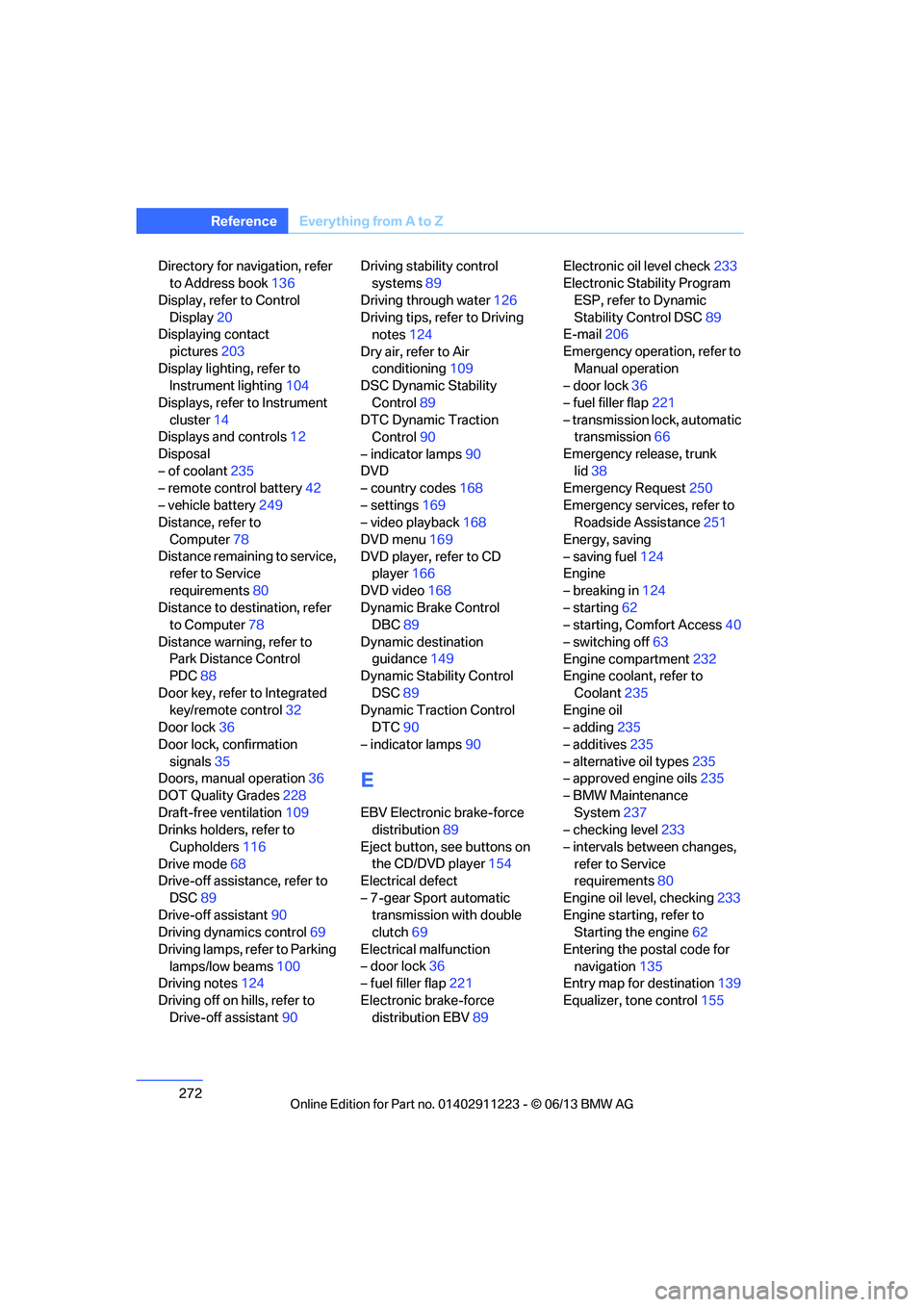
Directory for navigation, refer
to Address book 136
Display, refer to Control Display 20
Displaying contact
pictures 203
Display lighting, refer to Instrument lighting 104
Displays, refer to Instrument cluster 14
Displays and controls 12
Disposal
– of coolant 235
– remote control battery 42
– vehicle battery 249
Distance, refer to
Computer 78
Distance remaining to service, refer to Service
requirements 80
Distance to destination, refer to Computer 78
Distance warning, refer to Park Distance Control
PDC 88
Door key, refer to Integrated key/remote control 32
Door lock 36
Door lock, confirmation signals 35
Doors, manual operation 36
DOT Quality Grades 228
Draft-free ventilation 109
Drinks holders, refer to
Cupholders 116
Drive mode 68
Drive-off assistance, refer to
DSC 89
Drive-off assistant 90
Driving dynamics control 69
Driving lamps, refer to Parking lamps/low beams 100
Driving notes 124
Driving off on hills, refer to Drive-off assistant 90Driving stability control
systems 89
Driving through water 126
Driving tips, refer to Driving notes 124
Dry air, refer to Air conditioning 109
DSC Dynamic Stability
Control 89
DTC Dynamic Traction Control 90
– indicator lamps 90
DVD
– country codes 168
– settings 169
– video playback 168
DVD menu 169
DVD player, refer to CD player 166
DVD video 168
D y
namic Brake Control
DBC 89
Dynamic destination guidance 149
Dynamic Stability Control
DSC 89
Dynamic Traction Control DTC 90
– indicator lamps 90
E
EBV Electronic brake-force
distribution 89
Eject button, see buttons on the CD/DVD player 154
Electrical defect
– 7-gear Sport automatic transmission with double
clutch 69
Electrical malfunction
– door lock 36
– fuel filler flap 221
Electronic brake-force distribution EBV 89Electronic oil level check
233
Electronic Stability Program
ESP, refer to Dynamic
Stability Control DSC 89
E-mail 206
Emergency operation, refer to Manual operation
– door lock 36
– fuel filler flap 221
– transmission lock, automatic transmission 66
Emergency release, trunk lid 38
Emergency Request 250
Emergency services, refer to Roadside Assistance 251
Energy, saving
– saving fuel 124
Engine
– breaking in 124
– starting 62
– starting, Comfort Access 40
– switching off 63
Engine compartment 232
Engine coolant, refer to
Coolant 235
Engine oil
– adding 235
– additives 235
– alternative oil types 235
– approved engine oils 235
– BMW Maintenance System 237
– checking level 233
– intervals between changes, refer to Service
requirements 80
Engine oil level, checking 233
Engine starting, refer to Starting the engine 62
Entering the postal code for navigation 135
Entry map for destination 139
Equalizer, tone control 155
00320051004F004C00510048000300280047004C0057004C005200510003
Page 279 of 284
278
ReferenceEverything from A to Z
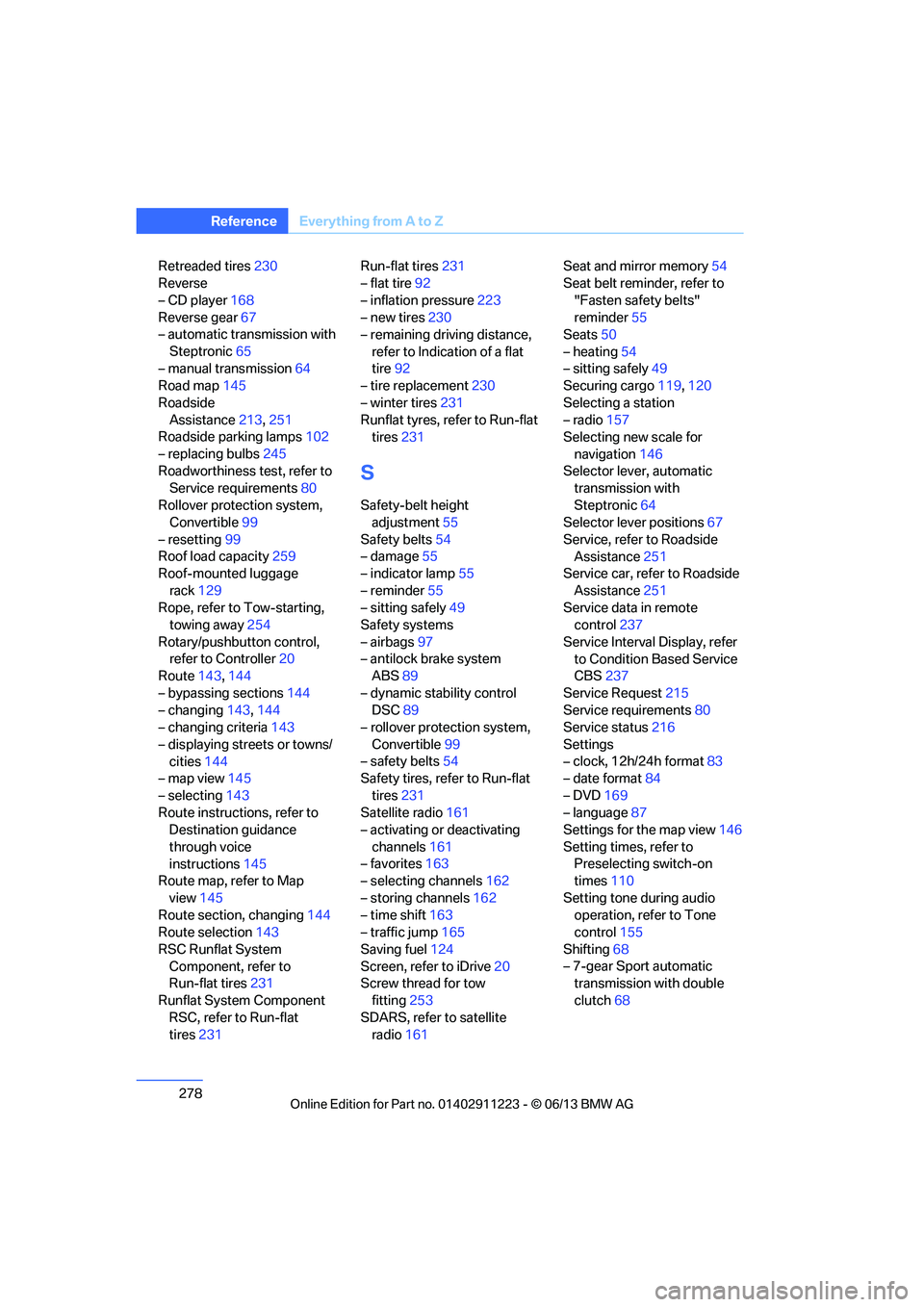
Retreaded tires 230
Reverse
– CD player 168
Reverse gear 67
– automatic transmission with
Steptronic 65
– manual transmission 64
Road map 145
Roadside Assistance 213,251
Roadside parking lamps 102
– replacing bulbs 245
Roadworthiness test, refer to Service requirements 80
Rollover protection system, Convertible 99
– resetting 99
Roof load capacity 259
Roof-mounted luggage
rack 129
Rope, refer to Tow-starting, towing away 254
Rotary/pushbutton control, refer to Controller 20
Route 143,144
– bypassing sections 144
– changing 143,144
– changing criteria 143
– displaying streets or towns/ cities 144
– map view 145
– selecting 143
Route instructions, refer to Destination guidance
through voice
instructions 145
Route map, refer to Map
view 145
Route section, changing 144
Route selection 143
RSC Runflat System Component, refer to
Run-flat tires 231
Runflat System Component RSC, refer to Run-flat
tires 231 Run-flat tires
231
– flat tire 92
– inflation pressure 223
– new tires 230
– remaining driving distance,
refer to Indication of a flat
tire 92
– tire replacement 230
– winter tires 231
Runflat tyres, refer to Run-flat tires 231
S
Safety-belt height
adjustment 55
Safety belts 54
– damage 55
– indicator lamp 55
– reminder 55
– sitting safely 49
Safety systems
– airbags 97
– antilock brake system ABS 89
– dynamic stability control DSC 89
– rollover protection system,
Convertible 99
– safety belts 54
Safety tires, re fer to Run-flat
tires 231
Satellite radio 161
– activating or deactivating
channels 161
– favorites 163
– selecting channels 162
– storing channels 162
– time shift 163
– traffic jump 165
Saving fuel 124
Screen, refer to iDrive 20
Screw thread for tow
fitting 253
SDARS, refer to satellite radio 161 Seat and mirror memory
54
Seat belt reminder, refer to
"Fasten safety belts"
reminder 55
Seats 50
– heating 54
– sitting safely 49
Securing cargo 119,120
Selecting a station
– radio 157
Selecting new scale for
navigation 146
Selector lever, automatic transmission with
Steptronic 64
Selector lever positions 67
Service, refer to Roadside Assistance 251
Service car, refer to Roadside
Assistance 251
Service data in remote control 237
Service Interval Display, refer to Condition Based Service
CBS 237
Service Request 215
Service requirements 80
Service status 216
Settings
– clock,
12h/24h format 83
– date format 84
– DVD 169
– language 87
Settings for the map view 146
Setting times, refer to Preselecting switch-on
times 110
Setting tone during audio operation, refer to Tone
control 155
Shifting 68
– 7-gear Sport automatic transmission with double
clutch 68
00320051004F004C00510048000300280047004C0057004C005200510003
Page 280 of 284
279
Everything from A to Z
Reference
Shifting gears with automatic
transmission with
Steptronic 65
Shift into a drive position, refer to selector lever
positions 67
Shiftlock, refer to Changing selector lever positions 64
Shift paddles on the steering wheel 68
Short commands for the voice
activation system 260
Short route in navigation, refer to Selecting route 143
Side airbags 97
Side windows, refer to
Windows 42
Signal horn, refer to Horn 12
Sitting safely 49
– airbags 49
– safety belts 49
Ski bag 118
Sliding/tilt sunroof, refer to Glass roof, electric 43
Slot for remote control 61
Smokers' package, refer to Ashtray 116,117
Snap-in adapter 188
– inserting/removing 199
Snap-in adapter, refer to Center armrest 115
Snow chains 231
Socket, refer to Connecting electrical appliances 117
Socket for Onboard Diagnosis OBD 238
Software update 184
Spare fuses 249
Special destinations 137
Special destinations,
displaying 139
Special oils, refer to Approved engine oils 235
Specified engine oils, refer to Approved engine oils 235Speed
– for winter tires
231
Speed limit warning, refer to Speed limit 86
Speedo, refer to
Speedometer 14
Speedometer 14
Speed Volume 156
Split screen content, refer to Selecting the display for the
split screen content 24
Sport automatic transmission with double clutch 66
– driving dynamics control 69
– kickdown 68
– launch control 70
– manually unlocking parking lock 69
– n eu
tral 67
– reverse gear 67
Sport program, automatic transmission with
Steptronic 65
Sport program with 7-gear Sport automatic
transmission with double
clutch 68
Stability control, refer to
Driving stability control
systems 89
Start/Stop button 61
– starting the engine 62
– switching off the engine 63
Starting, refer to Starting the
engine 62
Starting assistance, refer to Jump starting 251
Starting the engine
– start/stop button 61
Start menu 21
State/province, for navigation 134
Status information on the
Control Display 23
Status of this Owner's Manual at time of printing 5Steam jet
239
Steering wheel 57
– adjustment 57
– buttons on steering wheel 13
– heating 57
– shift paddles 68
Steering wheel buttons, refer
to Shift paddles 68
Steering with variable ratio, refer to Active steering 96
Steptronic, refer to Automatic transmission with
Steptronic 64
Storage 242
Storage compartment
package 116
Storage compartments 116
Stored trip, calling up 142
Storing
– seat position, refer to Seat and mirror memory 54
Storing a destination in the address book 136
Storing music 172
Storing tires 231
Stowage, refer to Storage compartments 116
Street, entering, navigation 135
Suitable mobile phones 188
Summer tires, refer to Wheels and tires 223
Surround 156
SVCD 168
SW , wav
eband 157
Switches, refer to Cockpit 12
Switching off
– engine 63
Switching off the engine
– start/stop button 61
Switching on
– audio 154
– CD player 154
– radio 154
00320051004F004C00510048000300280047004C0057004C005200510003
Page 281 of 284
280
ReferenceEverything from A to Z
Switching the air conditioning
on and off 109
Switching the entertainment audio output on/off 154
Switch-on times of parked car
ventilation, preselecting 110
Symbols 4
– status information 23
T
Tachometer76
Tailgate, refer to Trunk lid 37
Tail lamp, refer to Tail
lamps 246
– replacing bulb 247
Tail lamps 246
– replacing bulb 247
Tank contents, refer to
Capacities 259
Tasks 207
Technical data 258
– dimensions 258
Technical modifications 5
Telephone 188
– hands-free system 197
– phone book 195
– received calls 196
– redialing 196
– voice commands 197
Telephone, installation
location, refer to Center
armrest 115
TeleService 213
Teleservice Diagnosis 214
Temperature display
– outside temperature 75
– outside temperature warning 75
– setting the units 80
Tempomat, refer to Cruise control 73
Text message 205
Thigh support 50
Third brake lamp, refer to Center brake lamp 247Three-point safety belt
54
Through-loading system 117
Tilt alarm sensor 39
Tilt function, passenger side mirror 56
Timer, refer to Preselecting switch-on times 110
Tire inflation pressure 223
– loss 92,93
Tire pressure monitoring, refer to Flat Tire Monitor 91
Tire Pressure Monitor TPM 92
– resetting the system 93
– system limitations 93
– warning lamp 94
Tire puncture, refer to Flat Tire Monitor 92
Tire Quality Grading 228
Tires
– age 228,230
– air loss 94
– bre a
king in 124
– changing, refer to Changing wheels 248
– condition 229
– damage 229
– inflation pressure 223
– labels 228
– minimum tread depth 229
– new tires 230
– pressure monitoring, refer to Flat Tire Monitor 91
– pressure monitoring, refer to
Tire Pressure Monitor
TPM 92
– puncture 92
– retreaded 230
– run-flat tires 231
– size 228
– wear indicators, refer to Minimum tread depth 229
– winter tires 231
TMC station, refer to Traffic bulletins 147 Tone
– control
155
– middle setting 156
Tools, refer to Onboard vehicle tool kit 243
Top 50 in music collection 175
Tow bar 253
Tow fitting 252
Tow fittings for tow-starting and towing away 252
Towing 252
– car with automatic transmission 252
– methods 253
– with 7-gear Sport automatic
transmission with double
clutch 253
Towing and tow-starting 252
Town/city, for navigation 134
Tow rope 254
Tow-starting 252
TPM, refer to Tire Pressure Monitor 92
Track
– selecting on CD 166
Traction control, refer to Dynamic Stability Control
DSC 89
Traffic bulletins
– categories 149
Traffic bulletins, filtering 149
Traffic bulletins for navigation 147
– during destination guidance 149
Traffic bulletins in navigation
– screen display in the map view 148
Traf fic co
ngestion
– displaying traffic bulletins 147
– refer to Route, bypassing
segments 144
00320051004F004C00510048000300280047004C0057004C005200510003