light BMW 128I COUPE 2008 E82 Owners Manual
[x] Cancel search | Manufacturer: BMW, Model Year: 2008, Model line: 128I COUPE, Model: BMW 128I COUPE 2008 E82Pages: 260, PDF Size: 8.61 MB
Page 210 of 260
Wheels and tires
208
Recommended tire brands
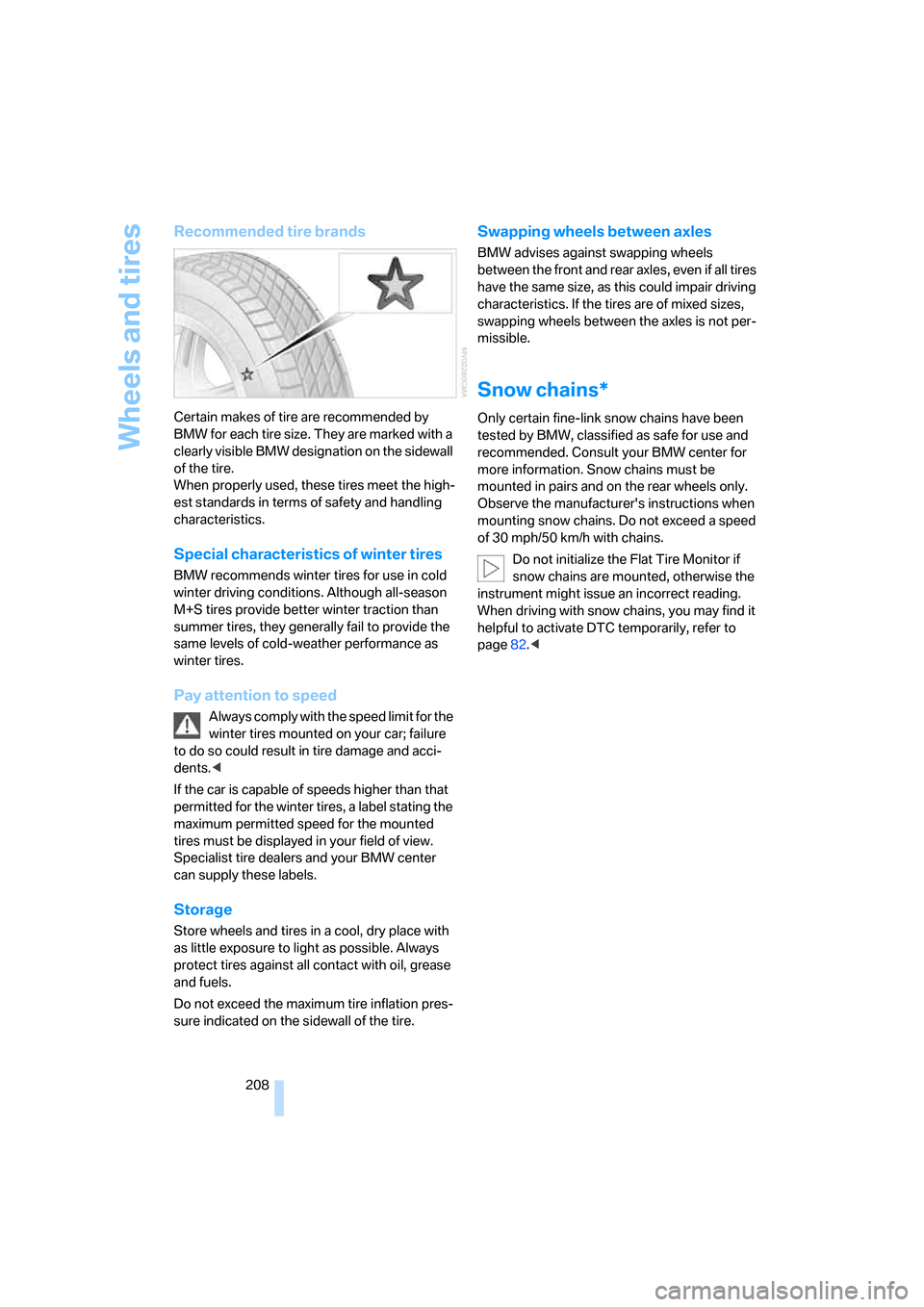
Certain makes of tire are recommended by
BMW for each tire size. They are marked with a
clearly visible BMW designation on the sidewall
of the tire.
When properly used, these tires meet the high-
est standards in terms of safety and handling
characteristics.
Special characteristics of winter tires
BMW recommends winter tires for use in cold
winter driving conditions. Although all-season
M+S tires provide better winter traction than
summer tires, they generally fail to provide the
same levels of cold-weather performance as
winter tires.
Pay attention to speed
Always comply with the speed limit for the
winter tires mounted on your car; failure
to do so could result in tire damage and acci-
dents.<
If the car is capable of speeds higher than that
permitted for the winter tires, a label stating the
maximum permitted speed for the mounted
tires must be displayed in your field of view.
Specialist tire dealers and your BMW center
can supply these labels.
Storage
Store wheels and tires in a cool, dry place with
as little exposure to light as possible. Always
protect tires against all contact with oil, grease
and fuels.
Do not exceed the maximum tire inflation pres-
sure indicated on the sidewall of the tire.
Swapping wheels between axles
BMW advises against swapping wheels
between the front and rear axles, even if all tires
have the same size, as this could impair driving
characteristics. If the tires are of mixed sizes,
swapping wheels between the axles is not per-
missible.
Snow chains*
Only certain fine-link snow chains have been
tested by BMW, classified as safe for use and
recommended. Consult your BMW center for
more information. Snow chains must be
mounted in pairs and on the rear wheels only.
Observe the manufacturer's instructions when
mounting snow chains. Do not exceed a speed
of 30 mph/50 km/h with chains.
Do not initialize the Flat Tire Monitor if
snow chains are mounted, otherwise the
instrument might issue an incorrect reading.
When driving with snow chains, you may find it
helpful to activate DTC temporarily, refer to
page82.<
Page 213 of 260
Mobility
211Reference
At a glance
Controls
Driving tips
Communications
Navigation
Entertainment
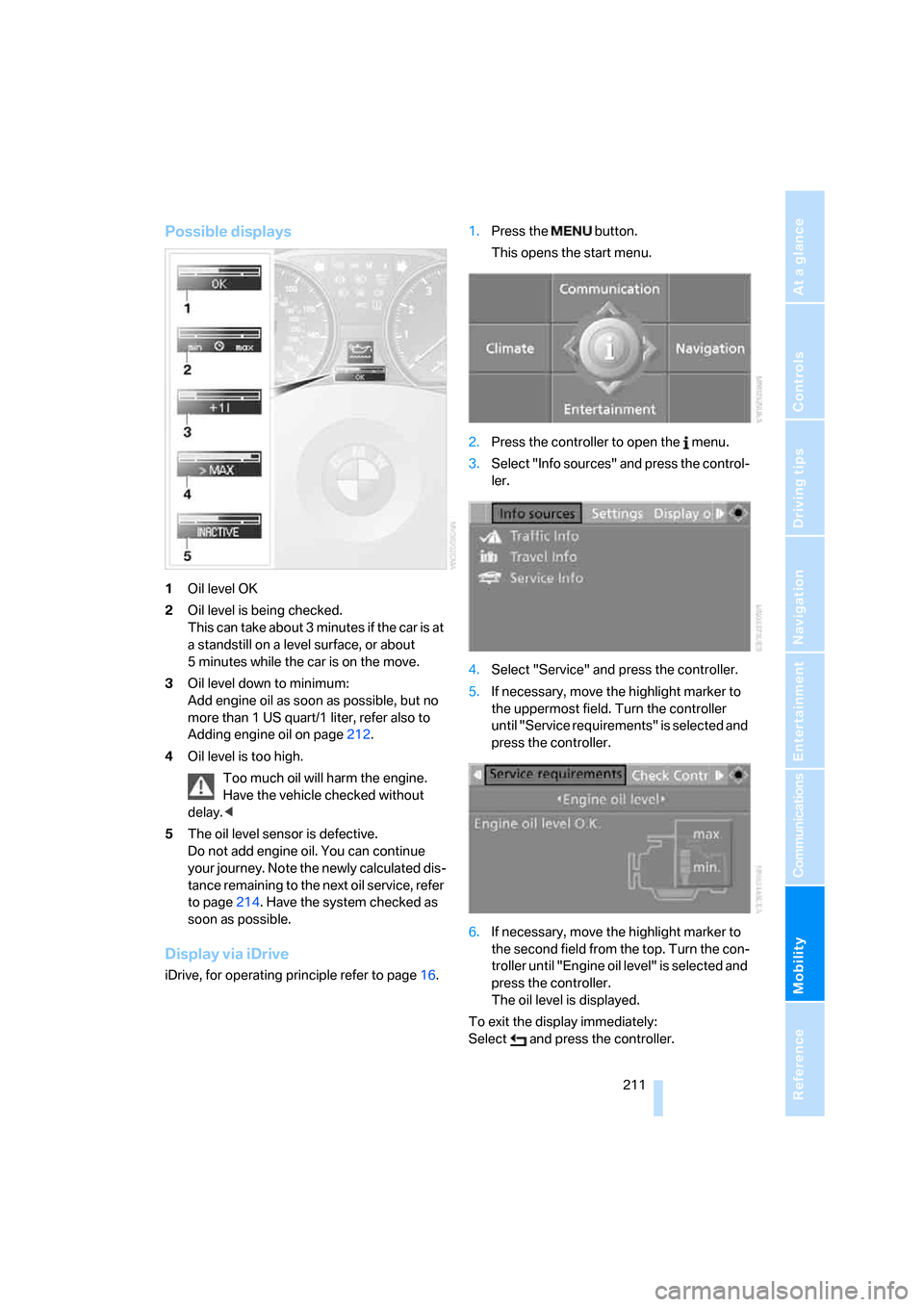
Possible displays
1Oil level OK
2Oil level is being checked.
This can take about 3 minutes if the car is at
a standstill on a level surface, or about
5 minutes while the car is on the move.
3Oil level down to minimum:
Add engine oil as soon as possible, but no
more than 1 US quart/1 liter, refer also to
Adding engine oil on page212.
4Oil level is too high.
Too much oil will harm the engine.
Have the vehicle checked without
delay.<
5The oil level sensor is defective.
Do not add engine oil. You can continue
your journey. Note the newly calculated dis-
tance remaining to the next oil service, refer
to page214. Have the system checked as
soon as possible.
Display via iDrive
iDrive, for operating principle refer to page16.1.Press the button.
This opens the start menu.
2.Press the controller to open the menu.
3.Select "Info sources" and press the control-
ler.
4.Select "Service" and press the controller.
5.If necessary, move the highlight marker to
the uppermost field. Turn the controller
until "Service requirements" is selected and
press the controller.
6.If necessary, move the highlight marker to
the second field from the top. Turn the con-
troller until "Engine oil level" is selected and
press the controller.
The oil level is displayed.
To exit the display immediately:
Select and press the controller.
Page 217 of 260
Mobility
215Reference
At a glance
Controls
Driving tips
Communications
Navigation
Entertainment
Socket for On-Board
Diagnosis OBD
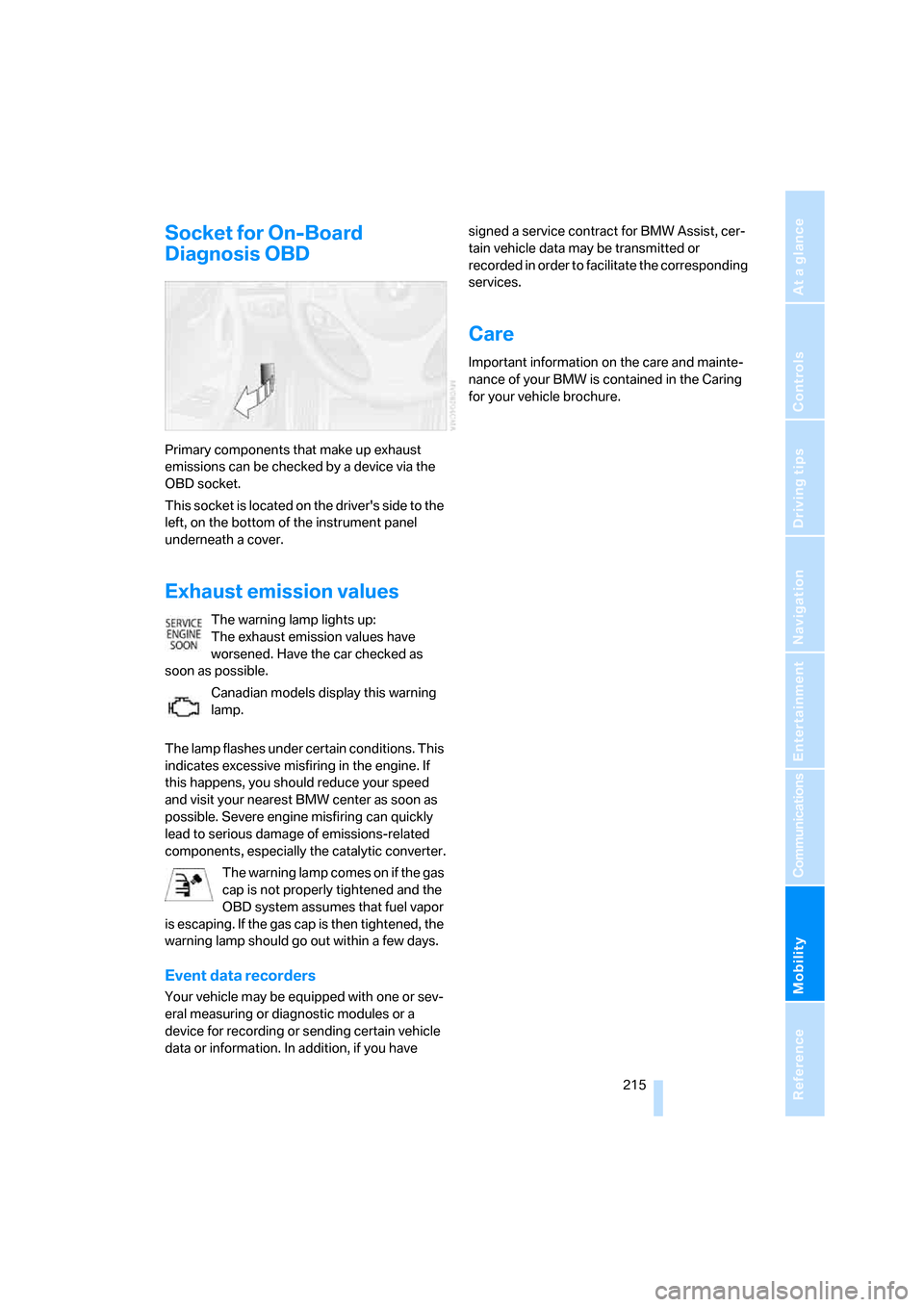
Primary components that make up exhaust
emissions can be checked by a device via the
OBD socket.
This socket is located on the driver's side to the
left, on the bottom of the instrument panel
underneath a cover.
Exhaust emission values
The warning lamp lights up:
The exhaust emission values have
worsened. Have the car checked as
soon as possible.
Canadian models display this warning
lamp.
The lamp flashes under certain conditions. This
indicates excessive misfiring in the engine. If
this happens, you should reduce your speed
and visit your nearest BMW center as soon as
possible. Severe engine misfiring can quickly
lead to serious damage of emissions-related
components, especially the catalytic converter.
The warning lamp comes on if the gas
cap is not properly tightened and the
OBD system assumes that fuel vapor
is escaping. If the gas cap is then tightened, the
warning lamp should go out within a few days.
Event data recorders
Your vehicle may be equipped with one or sev-
eral measuring or diagnostic modules or a
device for recording or sending certain vehicle
data or information. In addition, if you have signed a service contract for BMW Assist, cer-
tain vehicle data may be transmitted or
recorded in order to facilitate the corresponding
services.
Care
Important information on the care and mainte-
nance of your BMW is contained in the Caring
for your vehicle brochure.
Page 218 of 260
Replacing components
216
Replacing components
Onboard tool kit
The onboard tool kit is stored beneath the floor
panel in the cargo bay.
Wiper blades
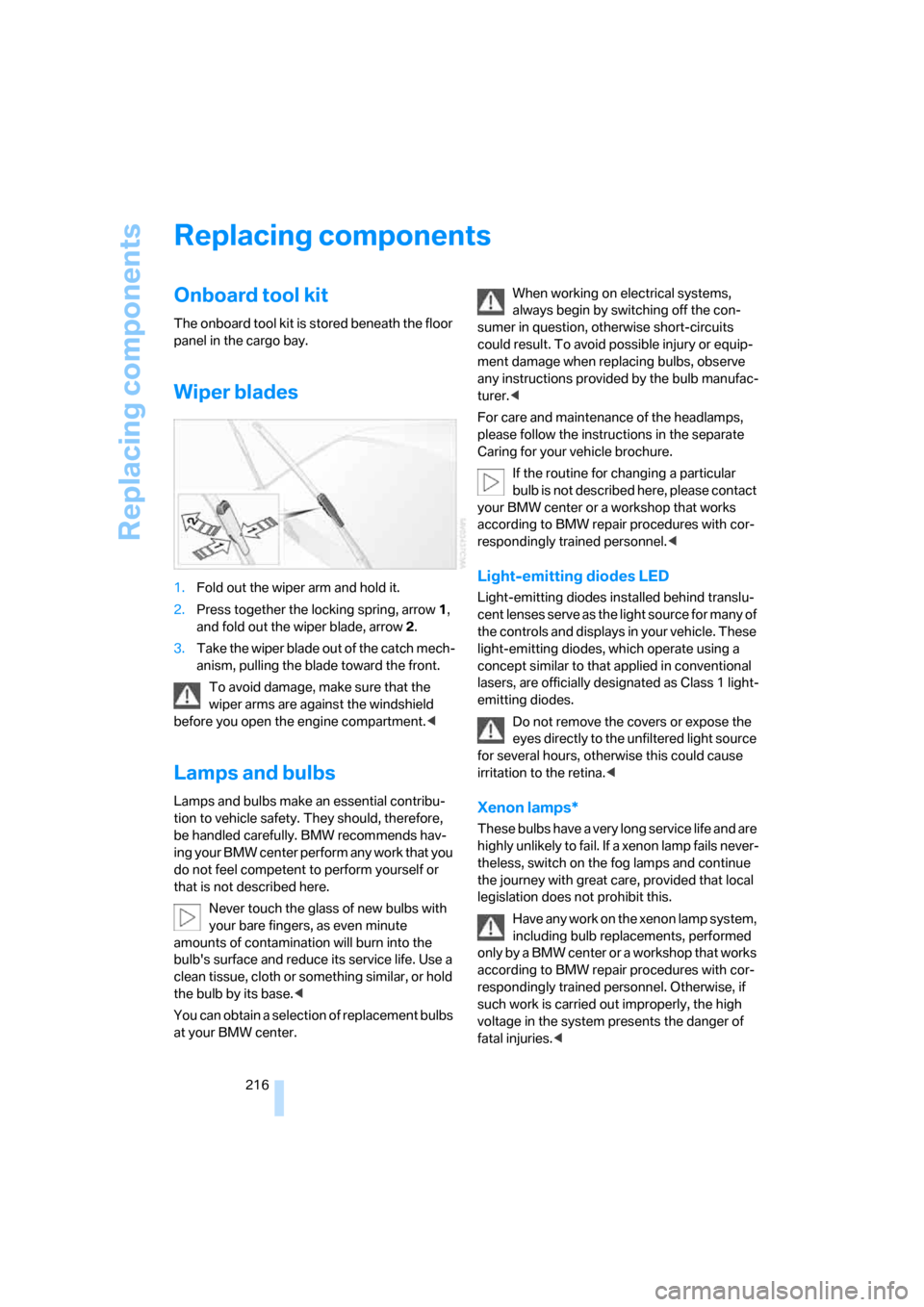
1.Fold out the wiper arm and hold it.
2.Press together the locking spring, arrow1,
and fold out the wiper blade, arrow2.
3.Take the wiper blade out of the catch mech-
anism, pulling the blade toward the front.
To avoid damage, make sure that the
wiper arms are against the windshield
before you open the engine compartment.<
Lamps and bulbs
Lamps and bulbs make an essential contribu-
tion to vehicle safety. They should, therefore,
be handled carefully. BMW recommends hav-
ing your BMW center perform any work that you
do not feel competent to perform yourself or
that is not described here.
Never touch the glass of new bulbs with
your bare fingers, as even minute
amounts of contamination will burn into the
bulb's surface and reduce its service life. Use a
clean tissue, cloth or something similar, or hold
the bulb by its base.<
You can obtain a selection of replacement bulbs
at your BMW center.When working on electrical systems,
always begin by switching off the con-
sumer in question, otherwise short-circuits
could result. To avoid possible injury or equip-
ment damage when replacing bulbs, observe
any instructions provided by the bulb manufac-
turer.<
For care and maintenance of the headlamps,
please follow the instructions in the separate
Caring for your vehicle brochure.
If the routine for changing a particular
bulb is not described here, please contact
your BMW center or a workshop that works
according to BMW repair procedures with cor-
respondingly trained personnel.<
Light-emitting diodes LED
Light-emitting diodes installed behind translu-
cent lenses serve as the light source for many of
the controls and displays in your vehicle. These
light-emitting diodes, which operate using a
concept similar to that applied in conventional
lasers, are officially designated as Class 1 light-
emitting diodes.
Do not remove the covers or expose the
eyes directly to the unfiltered light source
for several hours, otherwise this could cause
irritation to the retina.<
Xenon lamps*
These bulbs have a very long service life and are
highly unlikely to fail. If a xenon lamp fails never-
theless, switch on the fog lamps and continue
the journey with great care, provided that local
legislation does not prohibit this.
Have any work on the xenon lamp system,
including bulb replacements, performed
o nl y b y a BM W c e n t er o r a w o r k s h o p t h a t w o rk s
according to BMW repair procedures with cor-
respondingly trained personnel. Otherwise, if
such work is carried out improperly, the high
voltage in the system presents the danger of
fatal injuries.<
Page 224 of 260
Giving and receiving assistance
222
Giving and receiving assistance
Emergency Request*
Conditions for an Emergency Request:
>Full preparation package mobile phone:
This equipment makes it possible to send
an Emergency Request even if no mobile
phone is paired with the vehicle.
>BMW Assist is activated. Activating
BMW Assist, refer to page196.
>Radio readiness is on.
>The BMW Assist system is logged on to a
mobile phone network.
>The Emergency Request system is opera-
ble.
Once your service contract for BMW Assist
expires, the BMW Assist system can be deacti-
vated by a BMW center without you having to
visit a workshop. Once the BMW Assist system
has been deactivated, Emergency Requests
are not possible. The BMW Assist system can
be reactivated by a BMW center after a new
contract has been signed.
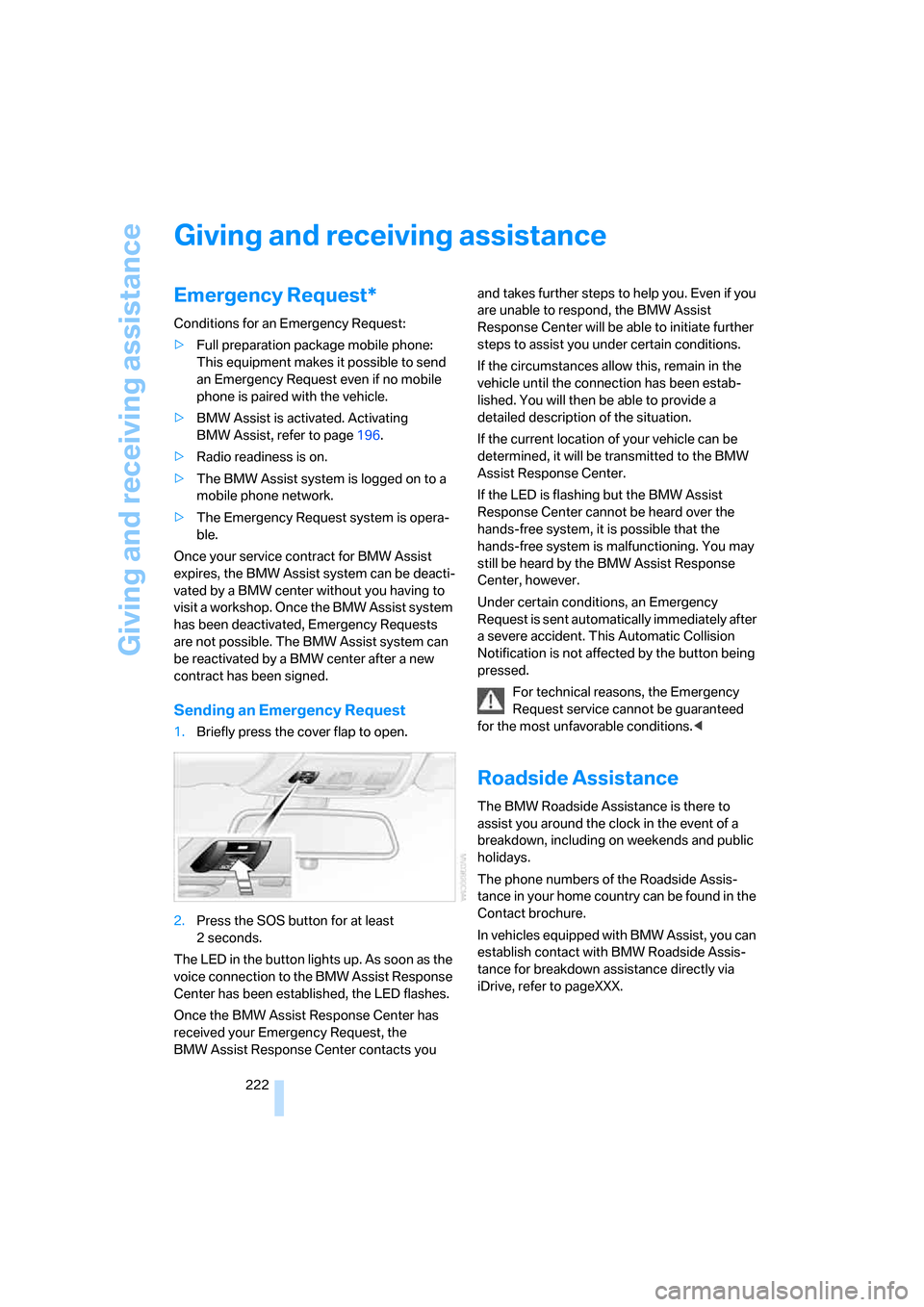
Sending an Emergency Request
1.Briefly press the cover flap to open.
2.Press the SOS button for at least
2seconds.
The LED in the button lights up. As soon as the
voice connection to the BMW Assist Response
Center has been established, the LED flashes.
Once the BMW Assist Response Center has
received your Emergency Request, the
BMW Assist Response Center contacts you and takes further steps to help you. Even if you
are unable to respond, the BMW Assist
Response Center will be able to initiate further
steps to assist you under certain conditions.
If the circumstances allow this, remain in the
vehicle until the connection has been estab-
lished. You will then be able to provide a
detailed description of the situation.
If the current location of your vehicle can be
determined, it will be transmitted to the BMW
Assist Response Center.
If the LED is flashing but the BMW Assist
Response Center cannot be heard over the
hands-free system, it is possible that the
hands-free system is malfunctioning. You may
still be heard by the BMW Assist Response
Center, however.
Under certain conditions, an Emergency
Request is sent automatically immediately after
a severe accident. This Automatic Collision
Notification is not affected by the button being
pressed.
For technical reasons, the Emergency
Request service cannot be guaranteed
for the most unfavorable conditions.<
Roadside Assistance
The BMW Roadside Assistance is there to
assist you around the clock in the event of a
breakdown, including on weekends and public
holidays.
The phone numbers of the Roadside Assis-
tance in your home country can be found in the
Contact brochure.
In vehicles equipped with BMW Assist, you can
establish contact with BMW Roadside Assis-
tance for breakdown assistance directly via
iDrive, refer to pageXXX.
Page 226 of 260
Giving and receiving assistance
224 4.Attach one terminal clamp of the minus/–
jumper cable to the negative terminal of the
battery or to an engine or body ground of
the assisting vehicle.
Your BMW has a special nut as body ground or
negative pole.
5.Attach the second terminal clamp of the
minus/– jumper cable to the negative termi-
nal of the battery or to the engine or body
ground of the vehicle to be started.
Starting the engine
1.Start the engine of the donor vehicle and
allow it to run for a few minutes at slightly
increased idle speed.
2.Start the engine on the other vehicle in the
usual way.
If the first start attempt is not successful,
wait a few minutes before another attempt
in order to allow the discharged battery to
recharge.
3.Let the engines run for a few minutes.
4.Disconnect the jumper cables by reversing
the above connecting sequence.
If necessary, have the battery checked and
recharged.
Never use spray fluids to start the
engine.<
Tow-starting, towing away
Observe the applicable laws and regula-
tions for tow-starting and towing vehi-
cles.
towed.<
Using a tow fitting
The screw-in tow fitting must always be carried
in the car. It can be screwed in at the front or
rear of the BMW.
It is stored with the onboard tool kit underneath
the floor mat in the cargo bay, refer to page216.
Use only the tow fitting provided with the
vehicle and screw it all the way in. Use the
tow fitting for towing on paved roads only. Avoid
lateral loading of the tow fitting, e.g. do not lift
the vehicle by the tow fitting. Otherwise the tow
fitting and the vehicle could be damaged.<
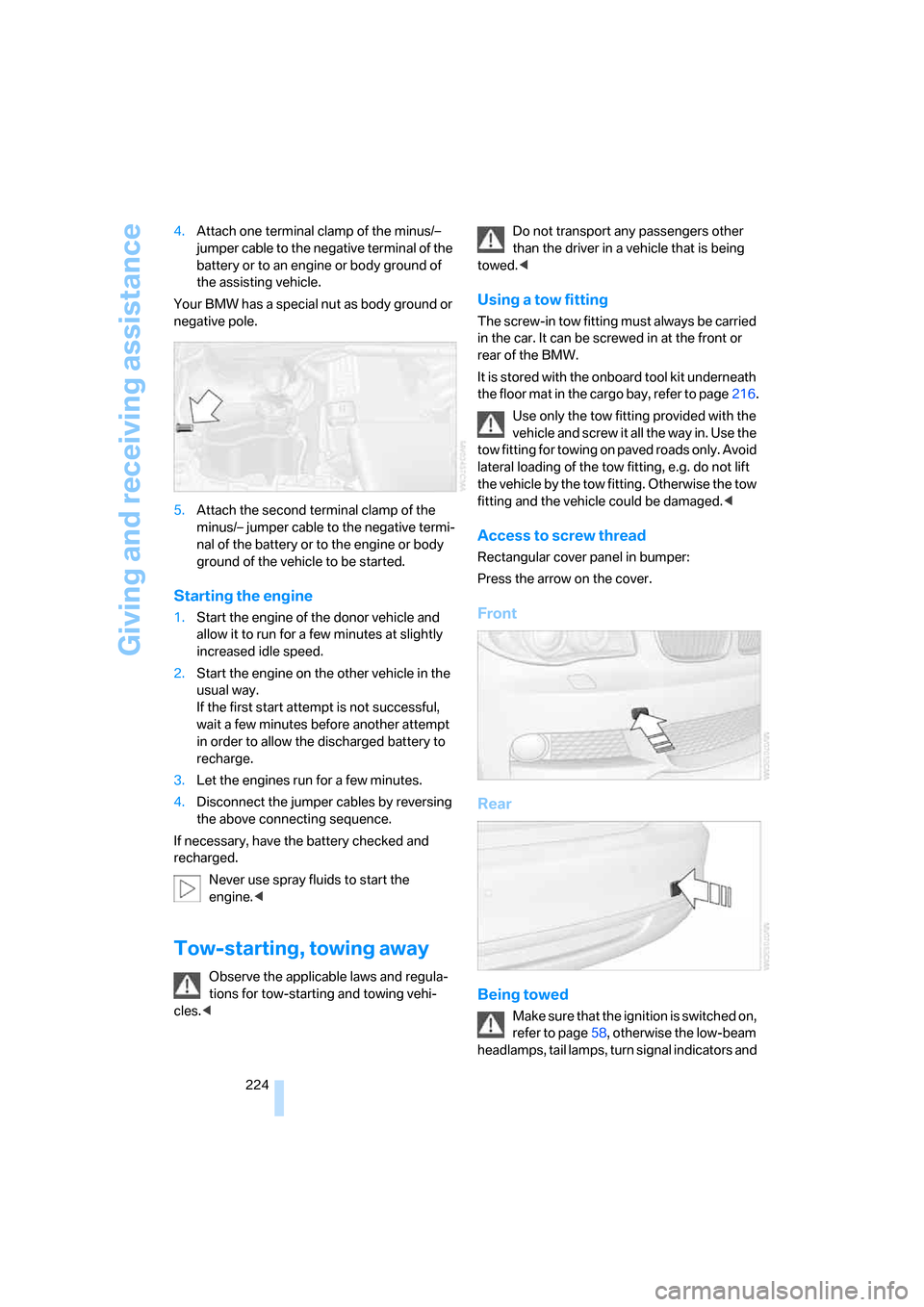
Access to screw thread
Rectangular cover panel in bumper:
Press the arrow on the cover.
Front
Rear
Being towed
Make sure that the ignition is switched on,
refer to page58, otherwise the low-beam
headlamps, tail lamps, turn signal indicators and
Page 227 of 260
Mobility
225Reference
At a glance
Controls
Driving tips
Communications
Navigation
Entertainment
windshield wipers may be unavailable. Power
steering assistance is not available when the
engine is not running. Thus, braking and steer-
ing will require increased effort. Active steering
is not active and it will be necessary to turn the
steering wheel further.<
Switch on the hazard warning flashers, depend-
ing on local regulations.
Manual transmission
Gearshift lever in idle position.
Automatic transmission
Selector lever in position N.
Changing the selector lever position, refer to
page61.
Do not exceed a towing speed of 45 mph/
70 km/h and a towing distance of
90 miles/150 km, otherwise the automatic
transmission may be damaged.<
Towing methods
I n s o m e c o u n t r i e s , i t i s i l l e g a l t o t o w y o u r v e h i c l e
with a tow bar or tow rope on public highways.
Please familiarize yourself with the relevant
towing regulations for the country in which you
are driving.
With a tow bar
The towing vehicle must not be lighter
than the towed vehicle, otherwise it may
be impossible to maintain control.<
The tow fittings used should be on the same
side on both vehicles. Should it prove impossi-
ble to avoid mounting the tow bar at an angle,
please observe the following:
>Clearance and maneuvering capability will
be sharply limited during cornering.
>The tow bar will generate lateral forces if it is
attached offset.
Attach the tow bar to the tow fittings only,
as attaching it to other parts of the vehicle
could result in damage.<
With a tow rope
When starting off in the towing vehicle, make
sure that the tow rope is taut.
To avoid jerking and the associated
stresses on vehicle components when
towing, always use nylon ropes or nylon straps.
Attach the tow rope to the tow fittings only, as
attaching it to other parts of the vehicle could
result in damage.<
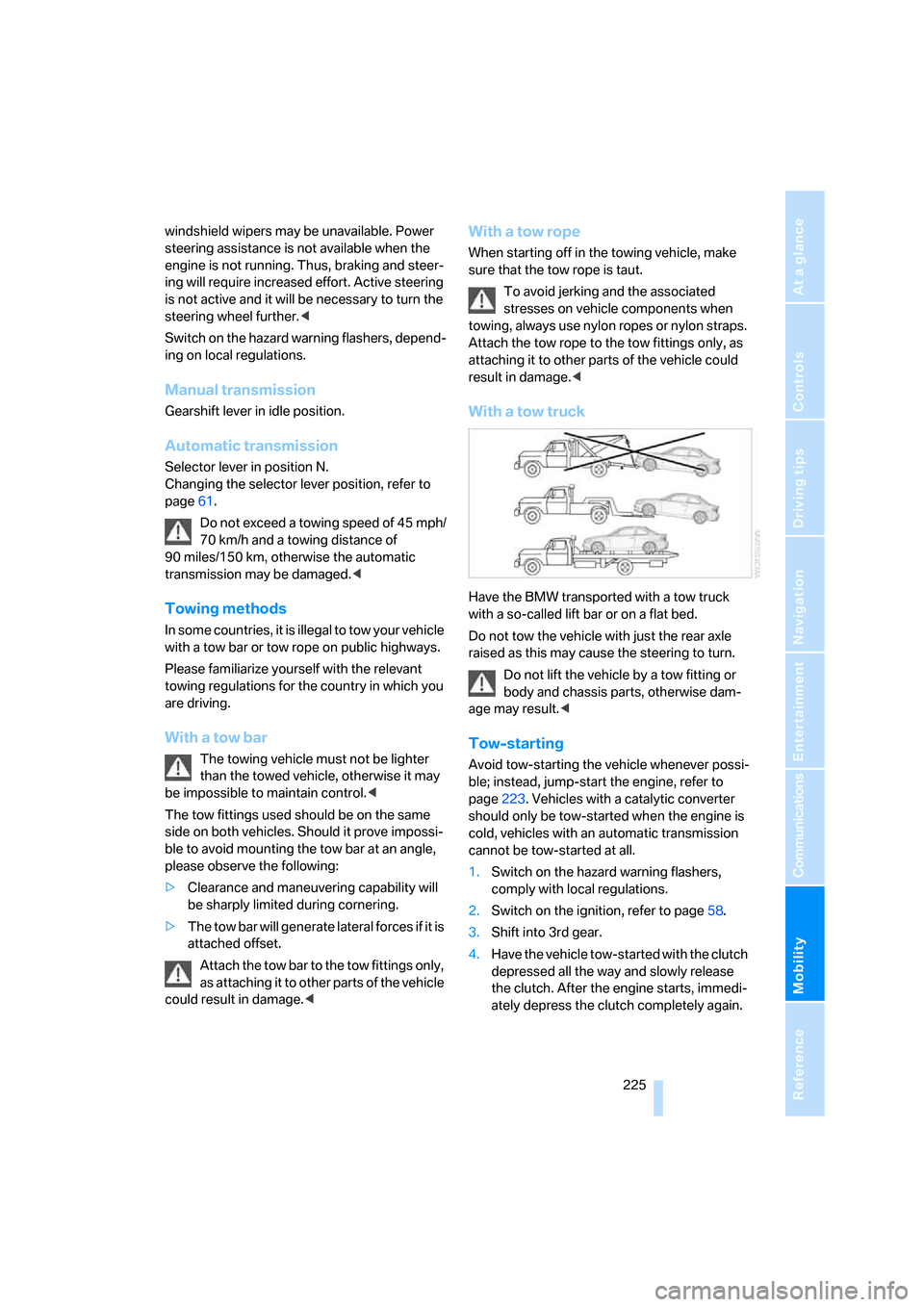
With a tow truck
Have the BMW transported with a tow truck
with a so-called lift bar or on a flat bed.
Do not tow the vehicle with just the rear axle
raised as this may cause the steering to turn.
Do not lift the vehicle by a tow fitting or
body and chassis parts, otherwise dam-
age may result.<
Tow-starting
Avoid tow-starting the vehicle whenever possi-
ble; instead, jump-start the engine, refer to
page223. Vehicles with a catalytic converter
should only be tow-started when the engine is
cold, vehicles with an automatic transmission
cannot be tow-started at all.
1.Switch on the hazard warning flashers,
comply with local regulations.
2.Switch on the ignition, refer to page58.
3.Shift into 3rd gear.
4.Have the vehicle tow-started with the clutch
depressed all the way and slowly release
the clutch. After the engine starts, immedi-
ately depress the clutch completely again.
Page 239 of 260
Reference 237
At a glance
Controls
Driving tips
Communications
Navigation
Entertainment
Mobility
Climate
menu
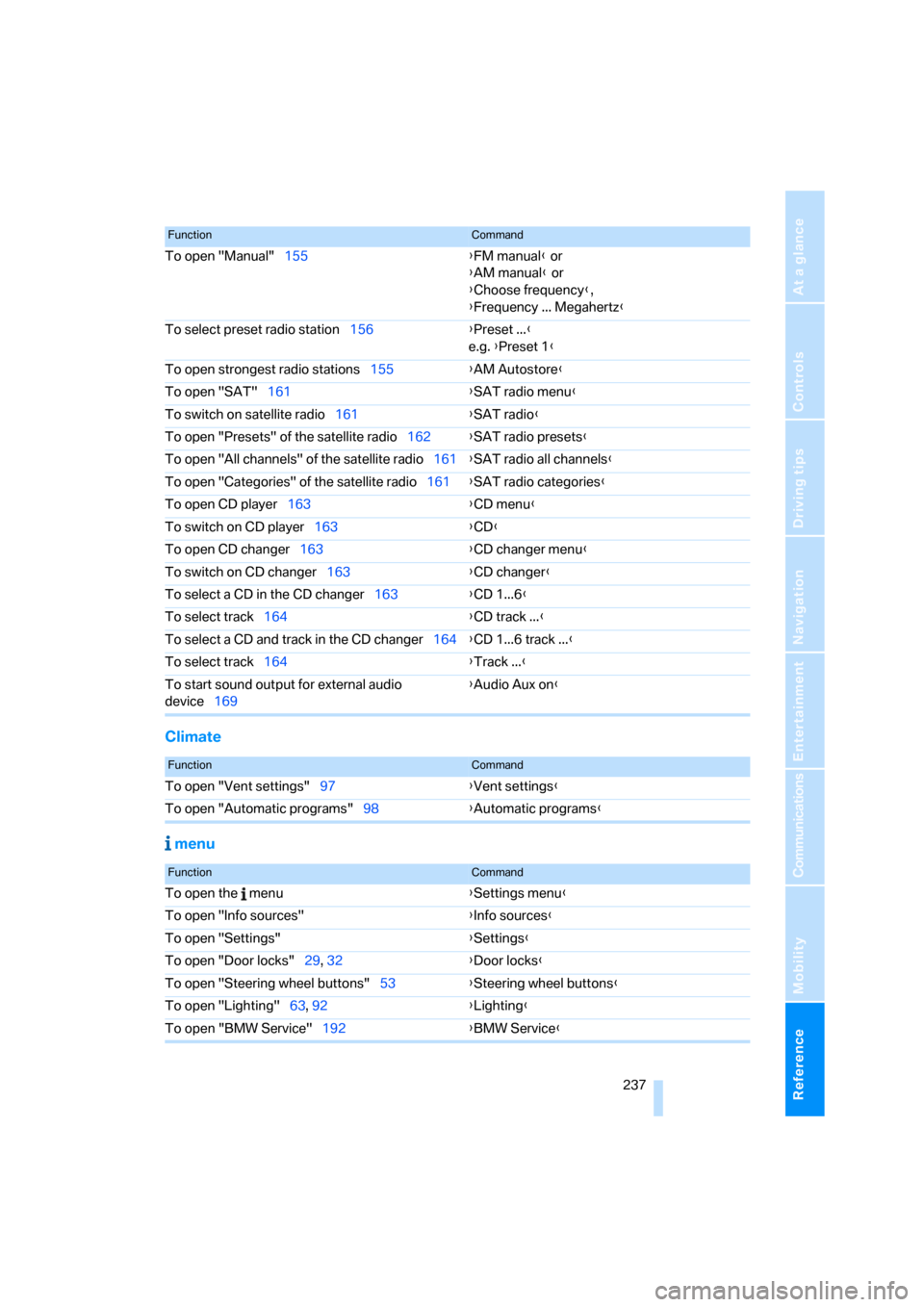
To open "Manual"155{FM manual} or
{AM manual} or
{Choose frequency},
{Frequency ... Megahertz}
To select preset radio station156{Preset ...}
e.g. {Preset 1}
To open strongest radio stations155{AM Autostore}
To open "SAT"161{SAT radio menu}
To switch on satellite radio161{SAT radio}
To open "Presets" of the satellite radio162{SAT radio presets}
To open "All channels" of the satellite radio161{SAT radio all channels}
To open "Categories" of the satellite radio161{SAT radio categories}
To open CD player163{CD menu}
To switch on CD player163{CD}
To open CD changer163{CD changer menu}
To switch on CD changer163{CD changer}
To select a CD in the CD changer163{CD 1...6}
To select track164{CD track ...}
To select a CD and track in the CD changer164{CD 1...6 track ...}
To select track164{Track ...}
To start sound output for external audio
device169{Audio Aux on
}
FunctionCommand
FunctionCommand
To open "Vent settings"97{Vent settings}
To open "Automatic programs"98{Automatic programs}
FunctionCommand
To open the menu{Settings menu}
To open "Info sources"{Info sources}
To open "Settings"{Settings}
To open "Door locks"29, 32{Door locks}
To open "Steering wheel buttons"53{Steering wheel buttons}
To open "Lighting"63, 92{Lighting}
To open "BMW Service"192{BMW Service}
Page 242 of 260
Everything from A - Z
240
Everything from A - Z
Index
"..." Identifies Control Display
texts used to select
individual functions and
refers you to the page where
these texts can be found.
A
Accessories, refer to The
individual vehicle5
Accident, reporting, refer to
Emergency Request222
Activated-charcoal filter100
"Activation time" for parked
car ventilation100
Active steering87
Adaptive Head Light93
"Add digits" on the mobile
phone184
Additives
– coolant213
– engine oil212
"Address book" in
navigation131
Address for navigation
– deleting133
– entering123,131
– selecting132
– storing131
– storing current position132
"Add to destination list"126
Airbags88
– sitting safely45
– warning lamp89
Air conditioner96
Air distribution
– automatic98
Air flow rate98
Airing, refer to Ventilation99
Air outlets, refer to Air
vents96Air pressure, checking, refer
to Tire inflation
pressure202
Air recirculation, refer to
Recirculated-air mode98
"Air recirculation on / off"53
Air vents96
AKI, refer to Fuel
specifications200
Alarm system34
– avoiding unintentional
alarms35
– interior motion sensor35
– switching off an alarm35
– tilt alarm sensor35
"All channels" for satellite
radio161
All-season tires, refer to
Winter tires208
"All stations", displaying with
the radio154
"AM", waveband150,154
Ambient air, refer to
Recirculated-air mode98
Antenna for mobile phone176
Antifreeze
– coolant213
– washer fluid64
Antilock Brake System
ABS81
Anti-theft alarm system, refer
to Alarm system34
Anti-theft system29
Approved axle loads, refer to
Weights233
Approved gross vehicle
weight, refer to Weights233
Armrest, refer to Center
armrest106
Arrival time
– computer68
Arrival time, refer to Starting
destination guidance136Arrow display for
navigation137
"Arrow display" in
navigation137
Ashtray107
Assistance systems, refer to
Dynamic Stability Control
DSC81
AUC Automatic recirculated-
air control98
"Audio"153,157
Audio150
– controls150
– switching on/off150
– tone control151
– volume151
"Audio", refer to Tone
control151
Automatic
– air distribution98
– air flow rate98
– cruise control64
– headlamp control91
– service notification193
– storing of stations155
Automatic car wash, refer to
Car wash116
Automatic climate control96
– automatic air distribution98
– settings via iDrive97
Automatic curb monitor52
Automatic lamps
– refer to Welcome lamps91
"Automatic programs" with
automatic climate control98
Automatic recirculated-air
control AUC98
Automatic station search155
Page 244 of 260
Everything from A - Z
242 Car-care products, refer to
Caring for your vehicle
brochure
"Car Data"68
Care, refer to Caring for your
vehicle brochure
Cargo, securing118
Cargo bay
– capacity233
– convenient access37
– enlarging, refer to Through-
loading system108
– lamp, refer to Interior
lamps94
– lid, refer to Luggage
compartment lid33
– opening from outside33
Cargo bay lid, refer to
Luggage compartment
lid33
Cargo bay net, refer to
Securing cargo118
Cargo loading
– securing cargo118
– stowing cargo117
– vehicle117
Caring for artificial leather,
refer to Caring for your
vehicle brochure
Caring for leather, refer to
Caring for your vehicle
brochure
Caring for plastic, refer to
Caring for your vehicle
brochure
Caring for the carpet, refer to
Caring for your vehicle
brochure
Caring for the vehicle finish,
refer to Caring for your
vehicle brochure
Car jack
– jacking points220
Car key, refer to Integrated
key/remote control28Car phone176
– installation location, refer to
Center armrest106
– refer to Mobile phone176
– refer to separate Owner's
Manual
Car radio, refer to Radio154
Car wash116
– also refer to Caring for your
vehicle brochure
Catalytic converter, refer to
Hot exhaust system115
"Categories" for satellite
radio161
"CD"150,163
CD changer163
– compressed audio files163
– controls150
– fast forward/reverse167
– installation location167
– playing a track165
– random order166
– repeating a track166
– selecting a CD163
– selecting a track164
– switching on/off150
– tone control151
– volume151
CD player163
– compressed audio files163
– controls150
– fast forward/reverse167
– playing a track165
– random order166
– repeating a track166
– selecting a track164
– switching on/off150
– tone control151
– volume151
Center armrest106
Center brake lamp, replacing
bulb219
Center console, refer to
Around the center
console14
Central key, refer to Integrated
key/remote control28
"Central locking"30,50Central locking
– from inside32
– from outside29
Central locking system29
– convenient access36
Changes, technical, refer to
For your own safety5
Changing the language on the
Control Display79
Changing the measurement
units on the Control
Display70,78
Changing wheels219
Chassis number, refer to
Engine compartment210
Check Control76
"Check Control
messages"77
Checking oil level210
Child-restraint fixing system
LATCH56
Child-restraint systems55
Child seats55
Chrome parts, care, refer to
Caring for your vehicle
brochure
Cigarette lighter107
Cleaning, refer to Caring for
your vehicle brochure
Cleaning headlamps64
– washer fluid64
"Climate"97
Clock66
– 12h/24h format75
– setting time74
Closing
– from inside32
– from outside29
Clothes hooks106
Cold start, refer to Starting the
engine59
Combination instrument, refer
to Instrument cluster12
Comfort access, refer to
Convenient access36
Comfort area, refer to Around
the center console14
"Communication"182,192,1
93,194