Reverse BMW 128I COUPE 2008 E82 User Guide
[x] Cancel search | Manufacturer: BMW, Model Year: 2008, Model line: 128I COUPE, Model: BMW 128I COUPE 2008 E82Pages: 260, PDF Size: 8.61 MB
Page 174 of 260
USB-audio interface
172
Repeating tracks
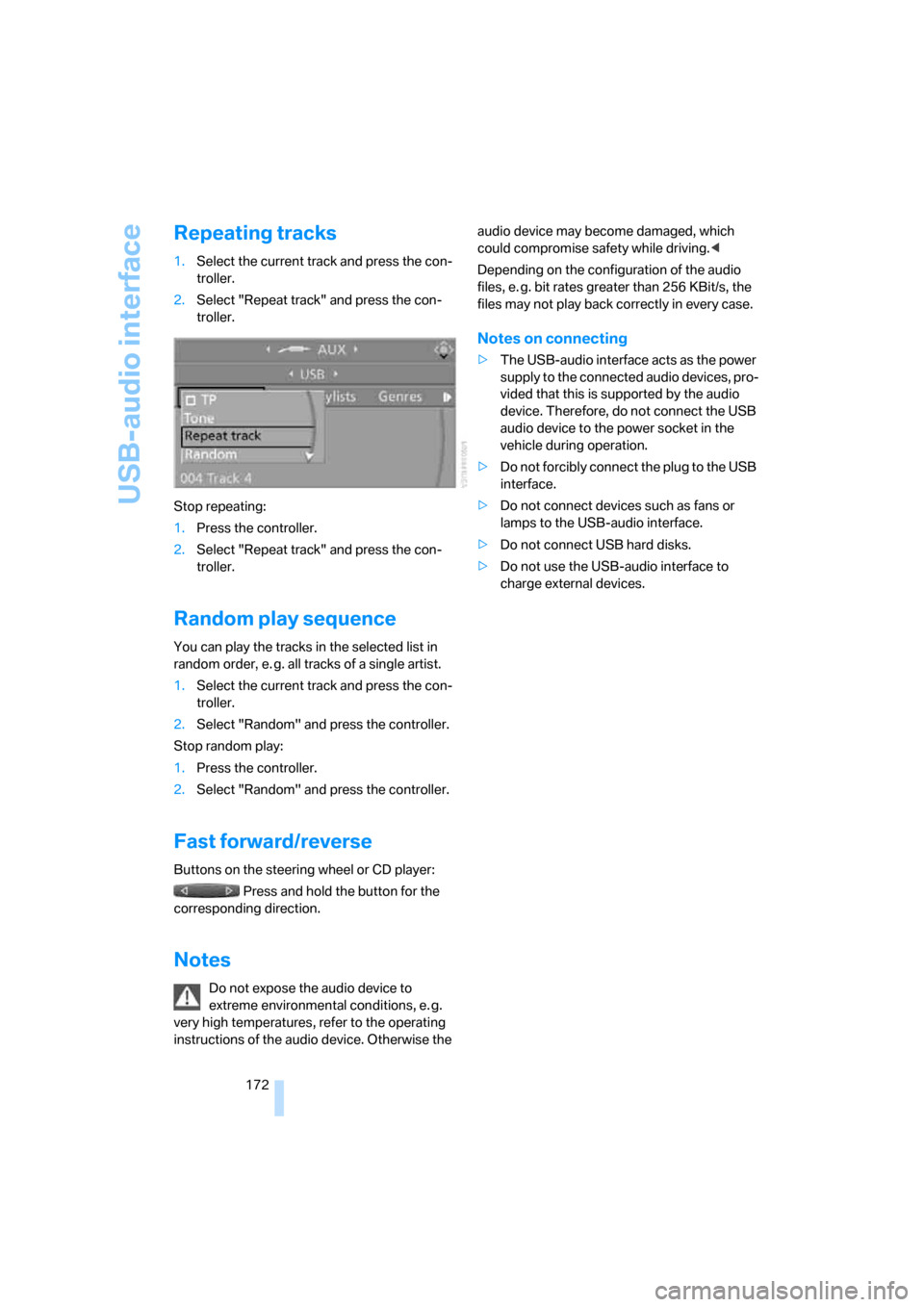
1.Select the current track and press the con-
troller.
2.Select "Repeat track" and press the con-
troller.
Stop repeating:
1.Press the controller.
2.Select "Repeat track" and press the con-
troller.
Random play sequence
You can play the tracks in the selected list in
random order, e. g. all tracks of a single artist.
1.Select the current track and press the con-
troller.
2.Select "Random" and press the controller.
Stop random play:
1.Press the controller.
2.Select "Random" and press the controller.
Fast forward/reverse
Buttons on the steering wheel or CD player:
Press and hold the button for the
corresponding direction.
Notes
Do not expose the audio device to
extreme environmental conditions, e. g.
very high temperatures, refer to the operating
instructions of the audio device. Otherwise the audio device may become damaged, which
could compromise safety while driving.<
Depending on the configuration of the audio
files, e. g. bit rates greater than 256 KBit/s, the
files may not play back correctly in every case.
Notes on connecting
>The USB-audio interface acts as the power
supply to the connected audio devices, pro-
vided that this is supported by the audio
device. Therefore, do not connect the USB
audio device to the power socket in the
vehicle during operation.
>Do not forcibly connect the plug to the USB
interface.
>Do not connect devices such as fans or
lamps to the USB-audio interface.
>Do not connect USB hard disks.
>Do not use the USB-audio interface to
charge external devices.
Page 219 of 260
Mobility
217Reference
At a glance
Controls
Driving tips
Communications
Navigation
Entertainment
Removing the headlamp cover
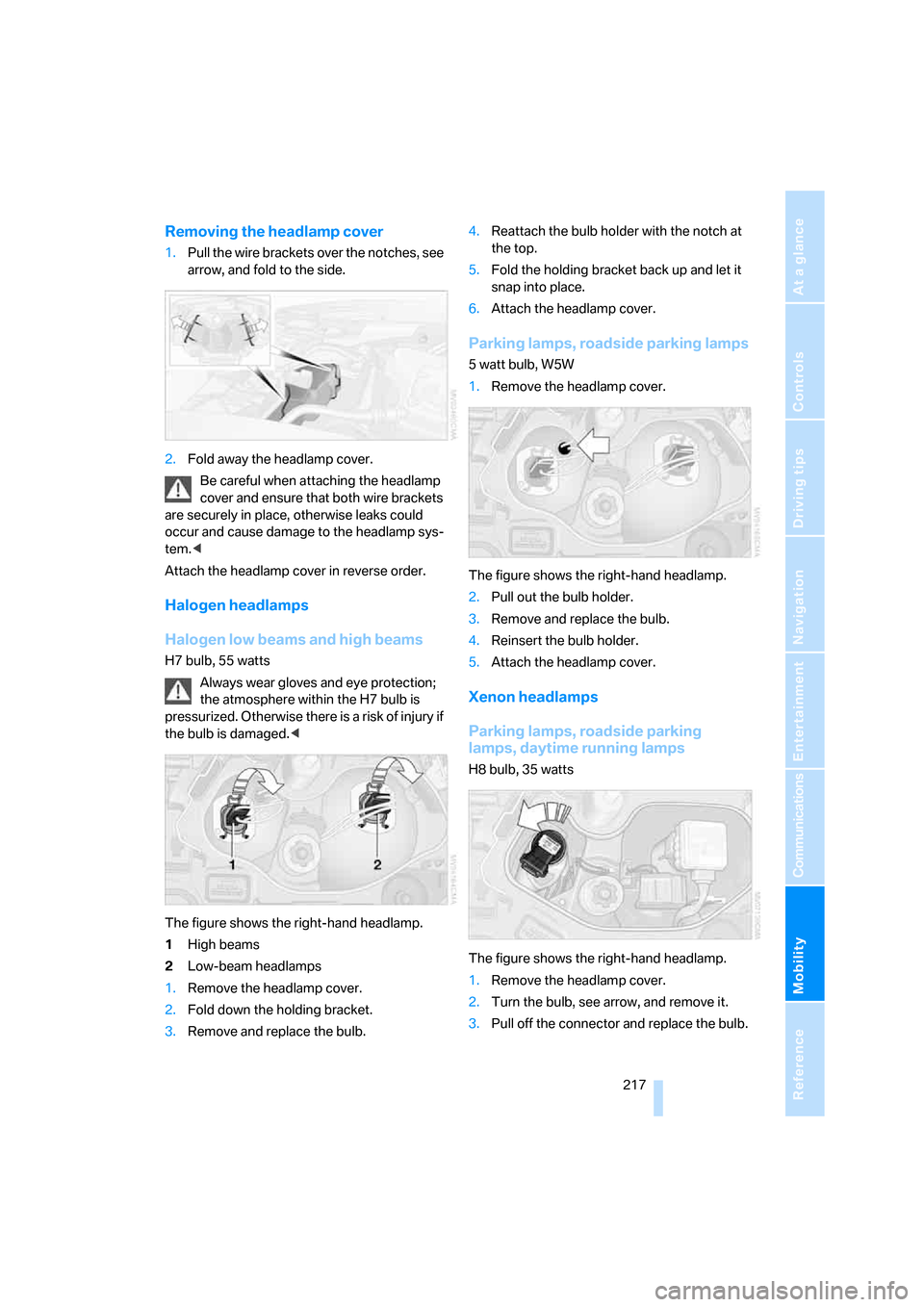
1.Pull the wire brackets over the notches, see
arrow, and fold to the side.
2.Fold away the headlamp cover.
Be careful when attaching the headlamp
cover and ensure that both wire brackets
are securely in place, otherwise leaks could
occur and cause damage to the headlamp sys-
tem.<
Attach the headlamp cover in reverse order.
Halogen headlamps
Halogen low beams and high beams
H7 bulb, 55 watts
Always wear gloves and eye protection;
the atmosphere within the H7 bulb is
pressurized. Otherwise there is a risk of injury if
the bulb is damaged.<
The figure shows the right-hand headlamp.
1High beams
2Low-beam headlamps
1.Remove the headlamp cover.
2.Fold down the holding bracket.
3.Remove and replace the bulb.4.Reattach the bulb holder with the notch at
the top.
5.Fold the holding bracket back up and let it
snap into place.
6.Attach the headlamp cover.
Parking lamps, roadside parking lamps
5 watt bulb, W5W
1.Remove the headlamp cover.
The figure shows the right-hand headlamp.
2.Pull out the bulb holder.
3.Remove and replace the bulb.
4.Reinsert the bulb holder.
5.Attach the headlamp cover.
Xenon headlamps
Parking lamps, roadside parking
lamps, daytime running lamps
H8 bulb, 35 watts
The figure shows the right-hand headlamp.
1.Remove the headlamp cover.
2.Turn the bulb, see arrow, and remove it.
3.Pull off the connector and replace the bulb.
Page 244 of 260
Everything from A - Z
242 Car-care products, refer to
Caring for your vehicle
brochure
"Car Data"68
Care, refer to Caring for your
vehicle brochure
Cargo, securing118
Cargo bay
– capacity233
– convenient access37
– enlarging, refer to Through-
loading system108
– lamp, refer to Interior
lamps94
– lid, refer to Luggage
compartment lid33
– opening from outside33
Cargo bay lid, refer to
Luggage compartment
lid33
Cargo bay net, refer to
Securing cargo118
Cargo loading
– securing cargo118
– stowing cargo117
– vehicle117
Caring for artificial leather,
refer to Caring for your
vehicle brochure
Caring for leather, refer to
Caring for your vehicle
brochure
Caring for plastic, refer to
Caring for your vehicle
brochure
Caring for the carpet, refer to
Caring for your vehicle
brochure
Caring for the vehicle finish,
refer to Caring for your
vehicle brochure
Car jack
– jacking points220
Car key, refer to Integrated
key/remote control28Car phone176
– installation location, refer to
Center armrest106
– refer to Mobile phone176
– refer to separate Owner's
Manual
Car radio, refer to Radio154
Car wash116
– also refer to Caring for your
vehicle brochure
Catalytic converter, refer to
Hot exhaust system115
"Categories" for satellite
radio161
"CD"150,163
CD changer163
– compressed audio files163
– controls150
– fast forward/reverse167
– installation location167
– playing a track165
– random order166
– repeating a track166
– selecting a CD163
– selecting a track164
– switching on/off150
– tone control151
– volume151
CD player163
– compressed audio files163
– controls150
– fast forward/reverse167
– playing a track165
– random order166
– repeating a track166
– selecting a track164
– switching on/off150
– tone control151
– volume151
Center armrest106
Center brake lamp, replacing
bulb219
Center console, refer to
Around the center
console14
Central key, refer to Integrated
key/remote control28
"Central locking"30,50Central locking
– from inside32
– from outside29
Central locking system29
– convenient access36
Changes, technical, refer to
For your own safety5
Changing the language on the
Control Display79
Changing the measurement
units on the Control
Display70,78
Changing wheels219
Chassis number, refer to
Engine compartment210
Check Control76
"Check Control
messages"77
Checking oil level210
Child-restraint fixing system
LATCH56
Child-restraint systems55
Child seats55
Chrome parts, care, refer to
Caring for your vehicle
brochure
Cigarette lighter107
Cleaning, refer to Caring for
your vehicle brochure
Cleaning headlamps64
– washer fluid64
"Climate"97
Clock66
– 12h/24h format75
– setting time74
Closing
– from inside32
– from outside29
Clothes hooks106
Cold start, refer to Starting the
engine59
Combination instrument, refer
to Instrument cluster12
Comfort access, refer to
Convenient access36
Comfort area, refer to Around
the center console14
"Communication"182,192,1
93,194
Page 252 of 260
Everything from A - Z
250
R
Radio
– autostore155
– controls150
– High Definition Radio157
– listening to stations154
– sampling stations155
– satellite radio160
– selecting a
waveband150,154
– selecting the frequency
manually155
– station search155
– stations with best
reception155
– storing stations156
– switching on/off150
– tone control151
– volume151
Radio position, refer to Radio
readiness58
Radio readiness58
– switched off58
– switched on58
Rain sensor63
"Random", refer to Random
play166
"Random all" for audio
mode167
"Random directory" for audio
mode167
Random play166
"RDS" Radio Data
System157
Reading lamps95
Rear fog lamps
– replacing bulb219
Rear lamps, refer to Tail
lamps218
Rear seats
– adjusting head restraints48
– folding down backrests108
Rearview mirror, refer to
Mirrors51
Rear window defroster99
"Received calls"184Receiving level of mobile
phone, refer to Status
information20
Recirculated-air mode98
Recirculation of air, refer to
Recirculated-air mode98
Recording times, refer to
Stopwatch78
"Redial" on the mobile
phone184
Reflectors, refer to Tail
lamps218
Refueling200
Releasing
– hood209
Remaining distance, refer to
Computer
68
Remaining distance, refer to
Cruising range68
Remote control28
– battery renewal37
– convenient access36
– garage door opener102
– luggage compartment lid30
– malfunctions31,37
– removing from the ignition
lock58
– service data214
Remote control key, refer to
Integrated key/remote
control28
"Repeat directory" for audio
mode166
"Repeat" for audio mode166
"Repeat track" for audio
mode166
Replacement remote
control28
Replacing bulbs, refer to
Lamps and bulbs216
Replacing tires, refer to New
wheels and tires207
Reporting safety defects6
Reserve warning, refer to Fuel
gauge67
Reservoir for washer
systems64
"Reset"83,85
– tone settings153Reset, refer to Resetting tone
settings152
"Reset" for stopwatch78
Residual heat99
Restraint systems, refer to
Safety belts51
Restraint systems for
children55
Retreaded tires207
Reverse
– CD changer167
– CD player167
Reverse gear
– automatic transmission with
Steptronic61
– manual transmission60
Road map138
"Roadside Assistance"192
Roadside
Assistance192,222
Roadside parking lamps93
– replacing bulbs217
Roadworthiness test, refer to
Service requirements71
Rollover protection system,
convertible89
– resetting90
Roof load capacity233
Roof-mounted luggage
rack118,119
Rope, refer to Tow-starting,
towing away225
Rotary/pushbutton control,
refer to Controller16
Route134
– arrow display137
– changing141
– display137
– displaying streets and
towns/cities139
– displaying town139
– list139
– map display138
– selecting134
– selecting criteria134
RSC Runflat System
Component, refer to Run-
Flat Tires207