fuel consumption BMW 128I COUPE 2008 E82 Owner's Manual
[x] Cancel search | Manufacturer: BMW, Model Year: 2008, Model line: 128I COUPE, Model: BMW 128I COUPE 2008 E82Pages: 260, PDF Size: 8.61 MB
Page 19 of 260
At a glance
17Reference
Controls
Driving tips
Communications
Navigation
Entertainment
Mobility
Menu overview
Communication
>Telephone*
>BMW Assist* or TeleService*
Navigation
>Navigation system
>Onboard information, e.g. for displaying the
average fuel consumption
Entertainment
>Radio
>CD player and CD changer
*
>AUX-In port, USB-audio interface* for
external audio device
Climate
>Vent settings
>Automatic programs
>Parked car operation
Menu
>Closing the screen
>Tone and display settings
>Traffic information settings
>Settings for your vehicle, e.g. for the central
locking system
>Display of service requirements and dates
for statutory inspections
>Settings for telephone
Operating principle
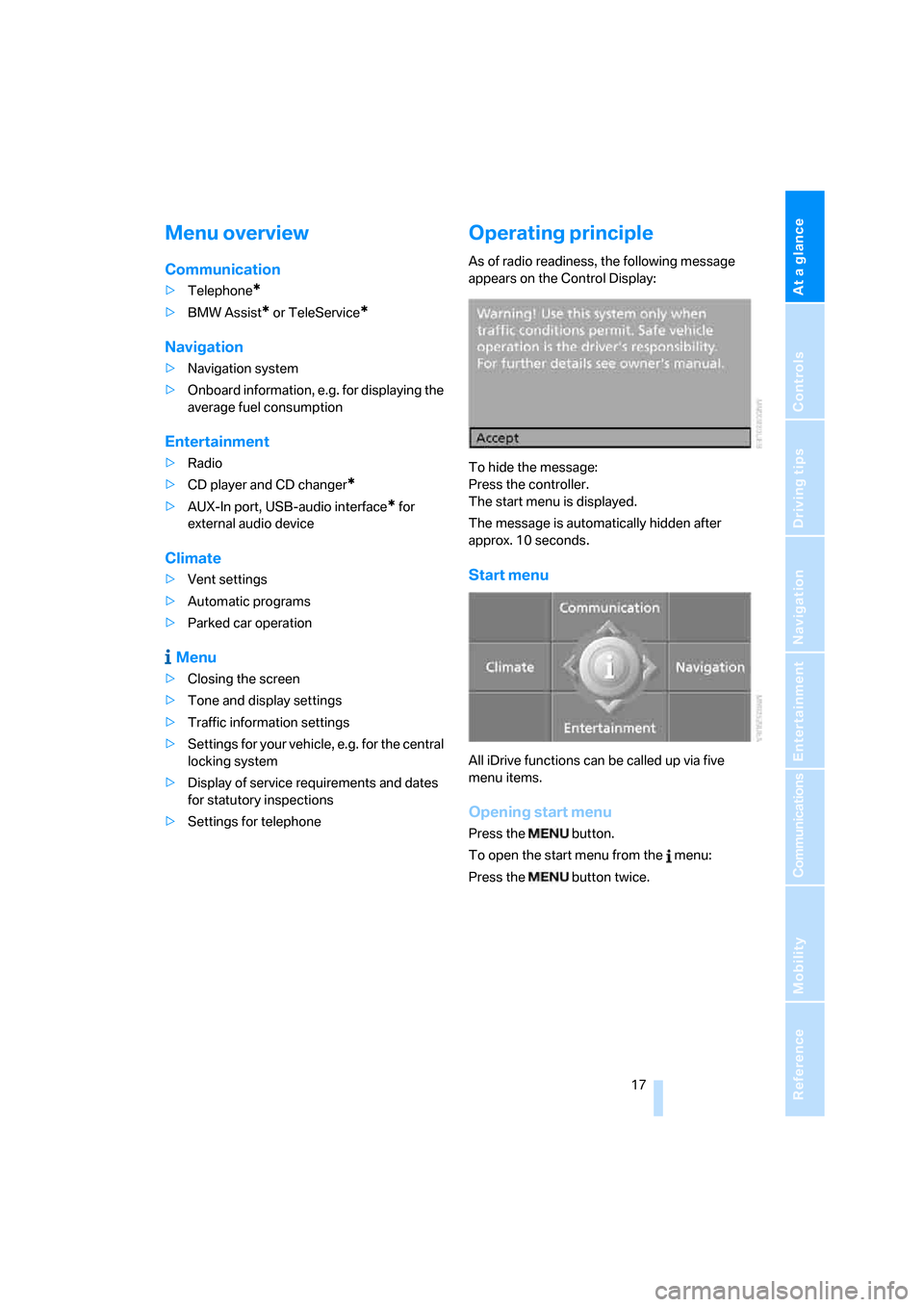
As of radio readiness, the following message
appears on the Control Display:
To hide the message:
Press the controller.
The start menu is displayed.
The message is automatically hidden after
approx. 10 seconds.
Start menu
All iDrive functions can be called up via five
menu items.
Opening start menu
Press the button.
To open the start menu from the menu:
Press the button twice.
Page 31 of 260
Controls
29Reference
At a glance
Driving tips
Communications
Navigation
Entertainment
Mobility
>Settings for the display on the Control Dis-
play and in the instrument cluster:
>12h/24h format of the clock, refer to
page75
>Date format, refer to page76
>Brightness of Control Display, refer to
page79
>Language of Control Display, refer to
page79
>Units of measure for fuel consumption,
distance covered/remaining distances,
and temperature, refer to page70
>Show visual warning for Park Distance Con-
trol PDC, refer to page80
>Light settings:
>Welcome lamps, refer to page91
>Pathway lighting, refer to page92
>Daytime running lamps, refer to page92
>Automatic climate control: AUTO program,
cooling function and automatic recircu-
lated-air control activation/deactivation,
temperature, air flow rate and distribution,
refer to page97
>Entertainment:
>Audio volume, refer to page151
>Tone control, refer to page151
>Speed-dependent volume control, refer
to page151
Central locking system
The concept
The central locking system is ready for opera-
tion whenever the driver's door is closed.
The system simultaneously engages and
releases the locks on the following:
>Doors
>Luggage compartment lid
>Fuel filler door
Operating from outside
>Via the remote control>Via the door lock
>In cars with convenient access
*, via the
handles on the driver's and front passen-
ger's doors
The anti-theft system is also operated at the
same time. It prevents the doors from being
unlocked using the lock buttons or door han-
dles. In addition, if the remote control is used,
the welcome lamps
*, interior lamps and the
door's courtesy lamps
* are switched on or off.
The alarm system
* is also armed or disarmed.
For further details on the alarm system
*, refer
to page34.
Operating from inside
By means of the button for central locking, refer
to page32.
In the event of a sufficiently severe accident, the
central locking system unlocks automatically. In
addition, the hazard warning flashers and inte-
rior lamps come on.
Opening and closing:
Using the remote control
Persons or animals in a parked vehicle
could lock the doors from the inside. You
should therefore take the remote control with
you when you leave the vehicle so that the latter
can be opened from outside.<
Unlocking
Press the button.
The interior lamps, the courtesy lamps
* and the
welcome lamps come on.
You can set how the vehicle is to be unlocked.
The setting is stored for the remote control cur-
rently in use.
iDrive, for operating principle refer to page16.
1.Press the button.
This opens the start menu.
2.Press the controller to open the menu.
3.Select "Settings" and press the controller.
4.Select "Vehicle / Tires" and press the con-
troller.
Page 69 of 260
Controls
67Reference
At a glance
Driving tips
Communications
Navigation
Entertainment
Mobility
Coolant temperature
A warning lamp comes on if the coolant, and
therefore the engine, becomes too hot. In addi-
tion, a message appears on the Control Display.
Check coolant level, refer to page213.
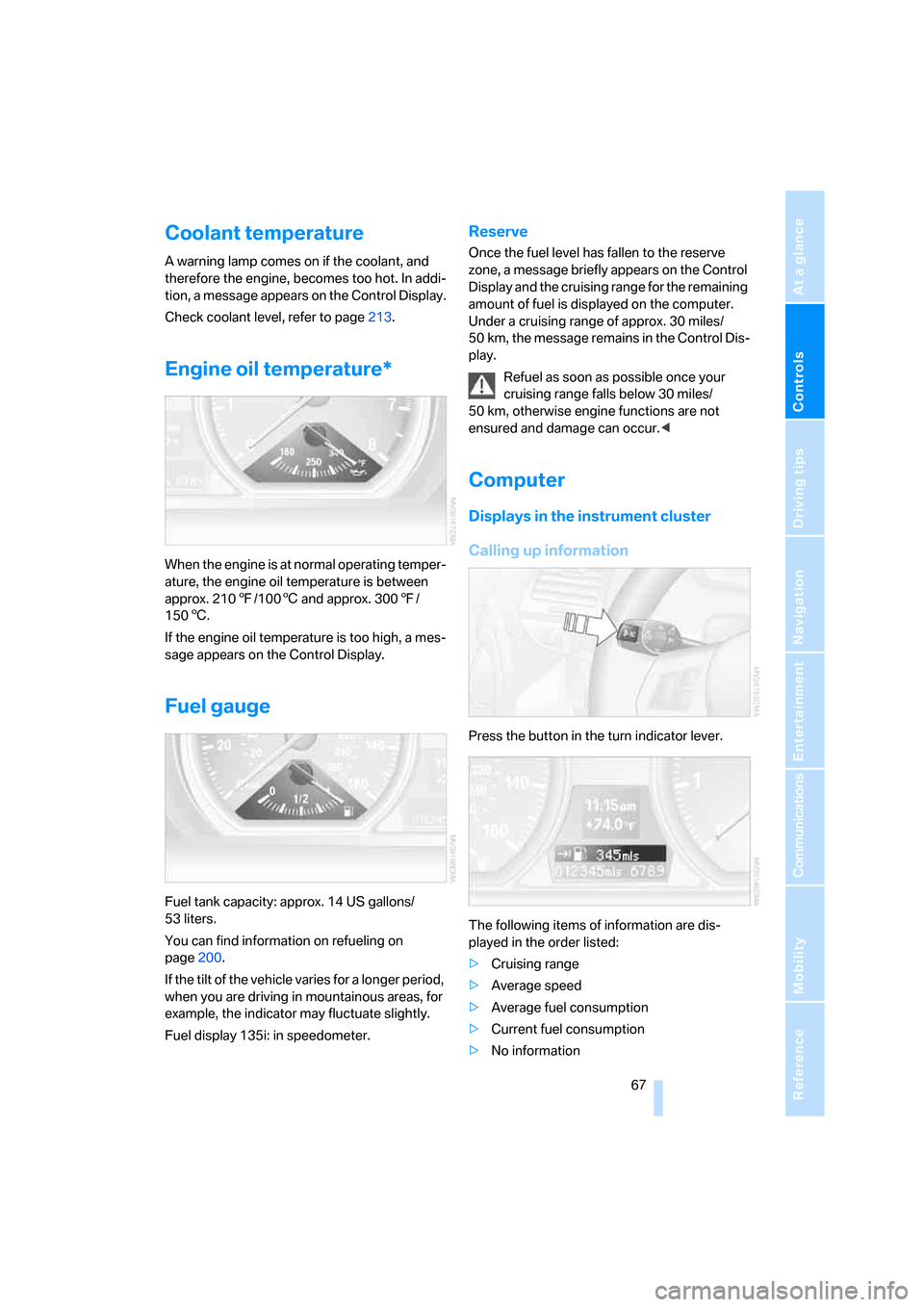
Engine oil temperature*
When the engine is at normal operating temper-
ature, the engine oil temperature is between
approx. 2107/1006 and approx. 3007/
1506.
If the engine oil temperature is too high, a mes-
sage appears on the Control Display.
Fuel gauge
Fuel tank capacity: approx. 14 US gallons/
53 liters.
You can find information on refueling on
page200.
If the tilt of the vehicle varies for a longer period,
when you are driving in mountainous areas, for
example, the indicator may fluctuate slightly.
Fuel display 135i: in speedometer.
Reserve
Once the fuel level has fallen to the reserve
zone, a message briefly appears on the Control
Display and the cruising range for the remaining
amount of fuel is displayed on the computer.
Under a cruising range of approx. 30 miles/
50 km, the message remains in the Control Dis-
play.
Refuel as soon as possible once your
cruising range falls below 30 miles/
50 km, otherwise engine functions are not
ensured and damage can occur.<
Computer
Displays in the instrument cluster
Calling up information
Press the button in the turn indicator lever.
The following items of information are dis-
played in the order listed:
>Cruising range
>Average speed
>Average fuel consumption
>Current fuel consumption
>No information
Page 70 of 260
Everything under control
68 To set the corresponding units of measure,
refer to Adjusting the units of measure on
page70.
Cruising range
Displays the estimated cruising range available
with the remaining fuel. The range is calculated
on the basis of the way the car has been driven
over the last 18 miles/30 km and the amount of
fuel currently in the tank.
It is important that you refuel as soon as
possible once your cruising range falls
below 30 miles/50 km, otherwise engine func-
tions are not ensured and damage can occur.<
Average speed
Periods with the vehicle parked and the engine
switched off are not included in the calculations
of average speed.
With the trip computer, refer to page69, you
can have the average speed for another trip dis-
played.
To reset average speed: press the button in the
turn indicator lever for approx. 2 seconds.
Average fuel consumption
The average fuel consumption is calculated for
the time during which the engine is running.
With the trip computer, refer to page69, you
can have the average consumption for another
trip displayed.
To reset average fuel consumption: press the
button in the turn indicator lever for approx.
2seconds.
Current fuel consumption
Displays the current fuel consumption. This
allows you to see whether your current driving
style is conducive to fuel economy with mini-
mum exhaust emissions.
Displays on the Control Display
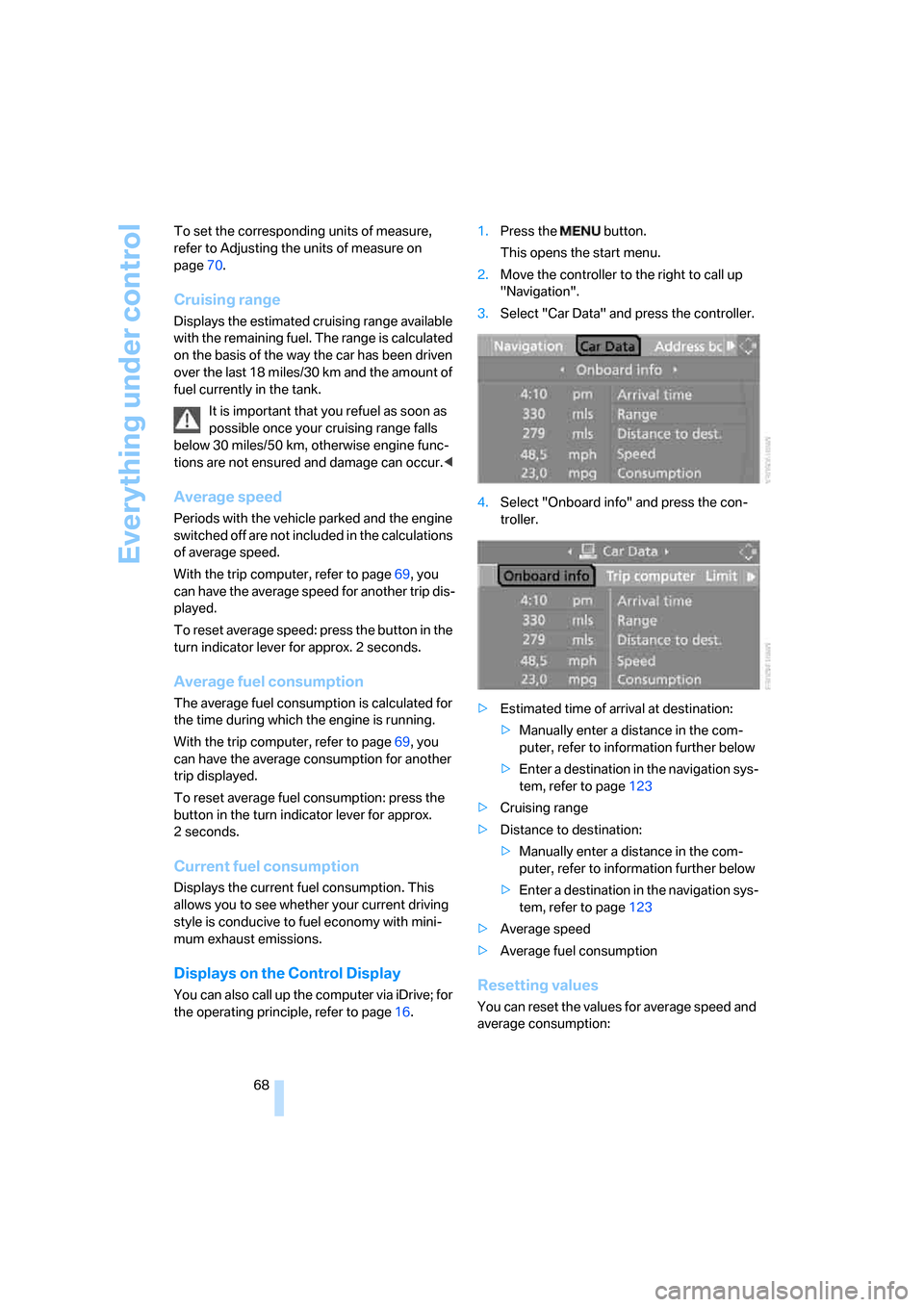
You can also call up the computer via iDrive; for
the operating principle, refer to page16.1.Press the button.
This opens the start menu.
2.Move the controller to the right to call up
"Navigation".
3.Select "Car Data" and press the controller.
4.Select "Onboard info" and press the con-
troller.
>Estimated time of arrival at destination:
>Manually enter a distance in the com-
puter, refer to information further below
>Enter a destination in the navigation sys-
tem, refer to page123
>Cruising range
>Distance to destination:
>Manually enter a distance in the com-
puter, refer to information further below
>Enter a destination in the navigation sys-
tem, refer to page123
>Average speed
>Average fuel consumptionResetting values
You can reset the values for average speed and
average consumption:
Page 71 of 260
Controls
69Reference
At a glance
Driving tips
Communications
Navigation
Entertainment
Mobility
1.Select the respective menu item and press
the controller.
2.Press the controller again to confirm your
selection.
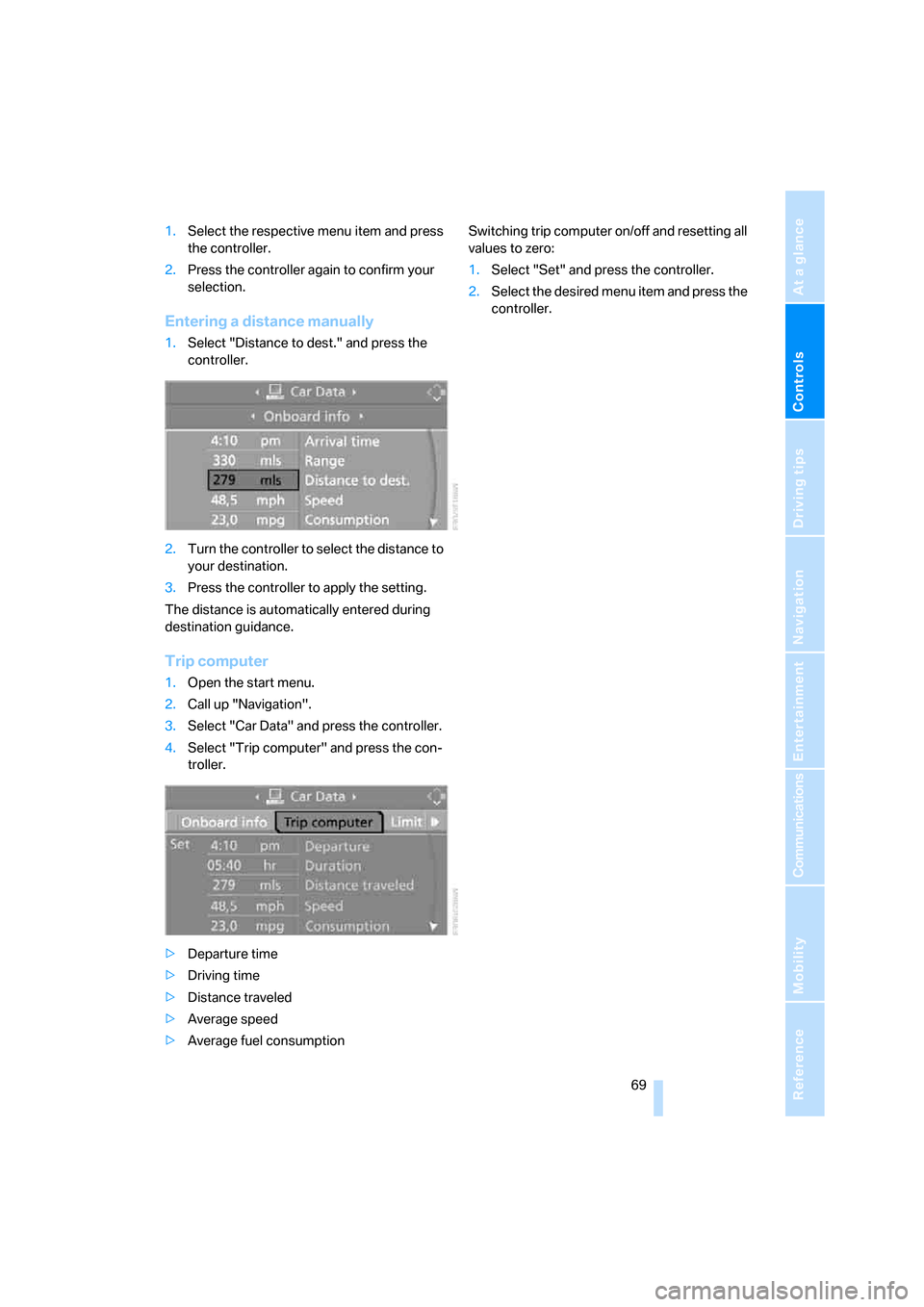
Entering a distance manually
1.Select "Distance to dest." and press the
controller.
2.Turn the controller to select the distance to
your destination.
3.Press the controller to apply the setting.
The distance is automatically entered during
destination guidance.
Trip computer
1.Open the start menu.
2.Call up "Navigation".
3.Select "Car Data" and press the controller.
4.Select "Trip computer" and press the con-
troller.
>Departure time
>Driving time
>Distance traveled
>Average speed
>Average fuel consumptionSwitching trip computer on/off and resetting all
values to zero:
1.Select "Set" and press the controller.
2.Select the desired menu item and press the
controller.
Page 116 of 260
Things to remember when driving
114
Things to remember when driving
Break-in period
Moving parts need breaking-in time to adjust to
each other. Please follow the instructions below
in order to achieve the optimal service life and
economy of operation for your vehicle.
Engine and differential
Always obey all official speed limits.
Up to 1,200 miles/2,000 km
Drive at varying engine and road speeds, but do
not exceed an engine speed of 4500 rpm or a
road speed of 100 mph/160 km/h.
Avoid full-throttle operation and use of the
transmission's kick-down mode.
After driving 1,200 miles/2,000 km
Engine and vehicle speeds can be gradually
increased.
Tires
Due to technical factors associated with their
manufacture, tires do not achieve their full trac-
tion potential until after an initial break-in
period. Therefore, drive cautiously during the
first 200 miles/300 km.
Brake system
Brakes require an initial break-in period of
approx. 300 miles/500 km to achieve optimized
contact and wear patterns between brake pads
and rotors. Drive cautiously during this break-in
period.
Clutch
The function of the clutch reaches its optimal
level only after a distance driven of approx.
300 miles/500 km. During this break-in period,
engage the clutch gently.
Following part replacement
The same break-in procedures should be
observed if any of the components mentioned
above have to be renewed in the course of the
vehicle's operating life.
Saving fuel
The fuel consumption of your vehicle depends
on several factors. You can lower fuel consump-
tion and the environmental impact by taking
certain measures, adjusting your driving style
and having the vehicle serviced regularly.
Remove any unneeded cargo
Additional weight increases fuel consumption.
Remove any mounted parts after you
have finished using them
Remove unneeded additional mirrors, the roof
rack and the rear luggage rack after use.
Mounted parts affect the vehicle's aerodynam-
ics and increase fuel consumption.
Close the windows and glass roof
An open glass roof or window causes higher air
resistance and thus increases fuel consump-
tion.
Check tire inflation pressure regularly
Check the tire inflation pressure at least twice a
month and before embarking on a long journey,
and correct it if necessary.
Low tire inflation pressure causes higher rolling
resistance and thus increases fuel consumption
and tire wear.
Set off immediately
Do not let the engine warm up while the car is
still standing, but set off immediately at moder-
ate engine speed. This is the fastest way for the
cold engine to reach its operating temperature.
Page 117 of 260
Driving tips
115Reference
At a glance
Controls
Communications
Navigation
Entertainment
Mobility
Drive defensively
Avoid unnecessary acceleration and braking
maneuvers. To do so, keep an adequate dis-
tance to the forward vehicle. A defensive and
smooth driving style keeps fuel consumption
down.
Avoid high engine speeds
Only use first gear when setting off. In second
and higher gears, accelerate without hesitation
or pauses. When accelerating, shift up before
reaching high engine speeds.
When you reach the desired speed, shift into
the highest applicable gear and drive with the
engine speed as low as possible and at a con-
stant speed.
As a rule: driving at low engine speeds lowers
fuel consumption and reduces wear.
Coasting
When approaching a red light, take your foot off
the accelerator and coast to a stop in the high-
est applicable gear.
O n a d o w n h il l s lo p e , t a k e y o u r f o o t o f f t h e a c c el -
erator and coast in a suitable gear.
The fuel supply is interrupted when coasting.
Switch off the engine during lengthy
stops
Switch off the engine when stopping for lengthy
periods, e.g. at traffic lights, railroad crossings
or in traffic congestions. You achieve fuel sav-
ings even if standing time is as short as approx.
4 seconds.
Switch off functions you do not need at
the moment
Functions such as the air conditioner and the
seat or rear window heating draw large amounts
of power and consume additional fuel. Espe-
cially in city traffic and in stop and go driving
they have a considerable impact. Therefore,
switch these functions off when they are not
really needed.
Have the vehicle serviced
Have the vehicle serviced regularly to achieve
good economy and a long vehicle life. BMW
recommends having the vehicle serviced at a
BMW center. Also note the BMW service sys-
tem, refer to page214.
General driving notes
Close the luggage compartment lid
Operate the vehicle only when the lug-
gage compartment lid is closed. Other-
wise, exhaust fumes could enter the interior of
the vehicle.<
If the vehicle must be driven with the luggage
compartment lid open:
1.Close all windows and the glass roof.
2.Greatly increase the air volume of the auto-
matic climate control system, refer to
page98.
Hot exhaust system
In all vehicles, extremely high tempera-
tures are generated in the exhaust sys-
tem. Do not remove the heat shields installed in
its vicinity, and never apply undercoating to
them. When driving, standing at idle and while
parking, take care to avoid possible contact
between the hot exhaust system and any highly
flammable materials such as hay, leaves, grass,
etc. Such contact could lead to a fire, with the
risk of serious personal injuries and property
damage. Do not touch hot exhaust tail pipes.
Otherwise there is a risk of burns.<
Hydroplaning
When driving on wet or slushy roads,
reduce road speed. If you do not, a wedge
of water can form between tires and road sur-
face. This situation, known as hydroplaning,
means that the tire can completely lose contact
with the road surface, so that neither the car can
be steered nor the brake be properly applied.<
Page 243 of 260
Reference 241
At a glance
Controls
Driving tips
Communications
Navigation
Entertainment
Mobility
Automatic transmission with
Steptronic60
– interlock61
– selector lever lock61
– shiftlock61
– towing224
– tow-starting224
"Automatic ventilation" for
parked car ventilation100
AUTO program for automatic
climate control98
"Auto Request"193
"Autostore"
– on the radio156
"AUX"150,169,171
– AUX-In port169
– USB-audio interface170
AUX-In port169
Average fuel consumption68
– setting the units70
Average speed68
"Avoid ferries" in
navigation134
"Avoid highways" in
navigation134
Avoid highways in
navigation134
Avoiding unintentional
alarms35
"Avoid tollroads" in
navigation134
Axle loads, refer to
Weights233
"A - Z"183,184
B
Backrests, refer to Seats46
Backrest width adjustment47
Back seats, refer to Rear seats
– adjusting head restraints48
Backup lamp, replacing
bulb219
Bag for skis, refer to Ski
bag109
Balance, tone control151
Band-aids, refer to First-aid
pouch223Bar, refer to Tow-starting,
towing away225
Bass, tone control151
Bass sounds, refer to Treble
and bass151
Battery220
– charging220
– disposal37,220
– jump starting223
– temporary power failure220
Battery renewal
– remote control for vehicle37
Being towed224
Belts, refer to Safety belts51
Belt tensioner, refer to Safety
belts51
Beverage holders, refer to
Cup holders106
Blower, refer to Air flow
rate98
"BMW Assist"192,193,194
BMW Assist
– activating196
– Concierge service194
– contacting BMW Customer
Relations194
– Roadside Assistance192
– services offered191
– TeleService193
"BMW Contact"186
"BMW Contact
Numbers"186
BMW Maintenance
System214
"BMW Service settings"197
Bottle holders, refer to Cup
holders106
Brake assist, refer to Dynamic
Brake Control81
Brake fluid
– service requirements71
Brake Force Display87
Brake lamps
– Brake Force Display87
– replacing bulb219
Brake pads, breaking in114
Brake rotors116
– brakes114
– breaking in114Brakes
– ABS81
– BMW Maintenance
System214
– braking safely116
– breaking in114
– parking brake59
– service requirements71
Brake system114
– BMW Maintenance
System214
– breaking in114
– disc brakes116
Breakdown services, refer to
Roadside Assistance222
Breaking in the clutch114
Break-in period114
"Brightness"79
Bulb changing, refer to Lamps
and bulbs216
Bulbs, changing216
Button for starting the
engine58
Buttons on the steering
wheel11
C
California Proposition 65
warning6
"Call"184,195
Call
– accepting182
– displaying accepted184
– ending183
– missed184
– starting183
Calling
– from phone book183
– from Top 8 list184
– redialing184
Can holders, refer to Cup
holders106
Capacities234
Capacity of the cargo bay233
Car battery, refer to Vehicle
battery220
Car care, refer to Caring for
your vehicle brochure
Page 245 of 260
Reference 243
At a glance
Controls
Driving tips
Communications
Navigation
Entertainment
Mobility
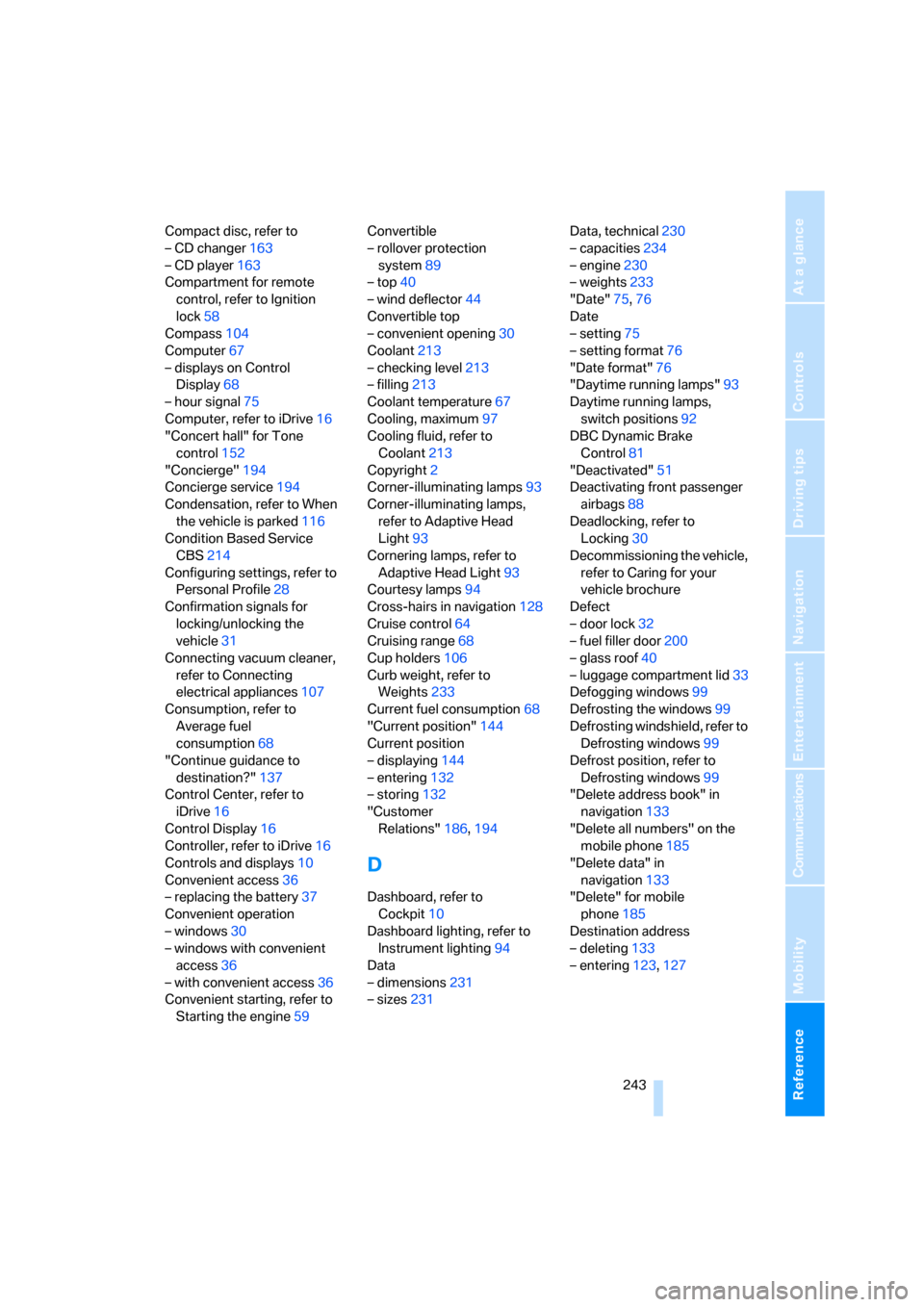
Compact disc, refer to
– CD changer163
– CD player163
Compartment for remote
control, refer to Ignition
lock58
Compass104
Computer67
– displays on Control
Display68
– hour signal75
Computer, refer to iDrive16
"Concert hall" for Tone
control152
"Concierge"194
Concierge service194
Condensation, refer to When
the vehicle is parked116
Condition Based Service
CBS214
Configuring settings, refer to
Personal Profile28
Confirmation signals for
locking/unlocking the
vehicle31
Connecting vacuum cleaner,
refer to Connecting
electrical appliances107
Consumption, refer to
Average fuel
consumption68
"Continue guidance to
destination?"137
Control Center, refer to
iDrive16
Control Display16
Controller, refer to iDrive16
Controls and displays10
Convenient access36
– replacing the battery37
Convenient operation
– windows30
– windows with convenient
access36
– with convenient access36
Convenient starting, refer to
Starting the engine59Convertible
– rollover protection
system89
– top40
– wind deflector44
Convertible top
– convenient opening30
Coolant213
– checking level213
– filling213
Coolant temperature67
Cooling, maximum97
Cooling fluid, refer to
Coolant213
Copyright2
Corner-illuminating lamps93
Corner-illuminating lamps,
refer to Adaptive Head
Light93
Cornering lamps, refer to
Adaptive Head Light93
Courtesy lamps94
Cross-hairs in navigation128
Cruise control64
Cruising range68
Cup holders106
Curb weight, refer to
Weights233
Current fuel consumption68
"Current position"144
Current position
– displaying144
– entering132
– storing132
"Customer
Relations"186,194
D
Dashboard, refer to
Cockpit10
Dashboard lighting, refer to
Instrument lighting94
Data
– dimensions231
– sizes231Data, technical230
– capacities234
– engine230
– weights233
"Date"75,76
Date
– setting75
– setting format76
"Date format"76
"Daytime running lamps"93
Daytime running lamps,
switch positions92
DBC Dynamic Brake
Control81
"Deactivated"51
Deactivating front passenger
airbags88
Deadlocking, refer to
Locking30
Decommissioning the vehicle,
refer to Caring for your
vehicle brochure
Defect
– door lock32
– fuel filler door200
– glass roof40
– luggage compartment lid33
Defogging windows99
Defrosting the windows99
Defrosting windshield, refer to
Defrosting windows99
Defrost position, refer to
Defrosting windows99
"Delete address book" in
navigation133
"Delete all numbers" on the
mobile phone185
"Delete data" in
navigation133
"Delete" for mobile
phone185
Destination address
– deleting133
– entering123,127
Page 247 of 260
Reference 245
At a glance
Controls
Driving tips
Communications
Navigation
Entertainment
Mobility
Emergency Request222
Emergency services, refer to
Roadside Assistance222
"Enabled services"196
"Enable services"197
"End call"183
Energy, saving
– saving fuel114
Engine
– breaking in114
– data230
– speed230
– starting59
– starting, convenient
access36
– switching off59
Engine compartment210
Engine coolant, refer to
Coolant213
Engine oil
– adding212
– additives212
– BMW Maintenance
System214
– checking level210
– intervals between changes,
refer to Service
requirements71
– specified engine oils212
"Engine oil level"211
Engine output, refer to Engine
data230
Engine speed, refer to Engine
data230
Engine starting, refer to
Starting the engine59
"Enter address"124
Entering a destination124
Entering a destination
country124
Entering a house number or
intersection126
Entering an intersection125
Entering a street125
"Entertainment"150
"Equalizer", refer to Tone
control152
Equalizer, refer to Tone
control152"ESN"160
ESP Electronic Stability
Program, refer to Dynamic
Stability Control DSC81
Event data recorders215
Exhaust system, refer to Hot
exhaust system115
Exterior mirrors51
– adjusting51
– automatic dimming
feature53
– automatic heating52
– folding in and out52
External audio device, refer to
AUX-In port169
Eyes
– for tow-starting and towing
away224
– for tying down loads118
F
Fader, tone control151
Failure messages, refer to
Check Control76
Failure of an electrical
consumer220
False alarm, refer to Avoiding
unintentional alarms35
Fastening safety belts, refer to
Safety belts51
Fastest route for
navigation134
Fast forward
– CD changer167
– CD player167
"Fast route" in navigation134
Filter of automatic climate
control, refer to Microfilter/
activated charcoal filter100
First aid pouch223
Fixture for remote control,
refer to Ignition lock58
Flash when locking/
unlocking31
Flat tire
– Run-Flat Tires207
– Tire Pressure Monitor
TPM84Flat Tire Monitor FTM83
– indicating a flat tire84
– initializing the system83
– malfunction84
– system limits83
Flat tires, refer to Tire
condition206
"FM", waveband150,154
FM, waveband154
Fog lamps94
– indicator lamp13,94
Footbrake, refer to Braking
safely116
Footwell lamps94
For your own safety5
Frequency, selecting
manually155
Front airbags88
Front seat setting45
Frost, removing from
windows, refer to Defrosting
windows99
FTM, refer to Flat Tire
Monitor83
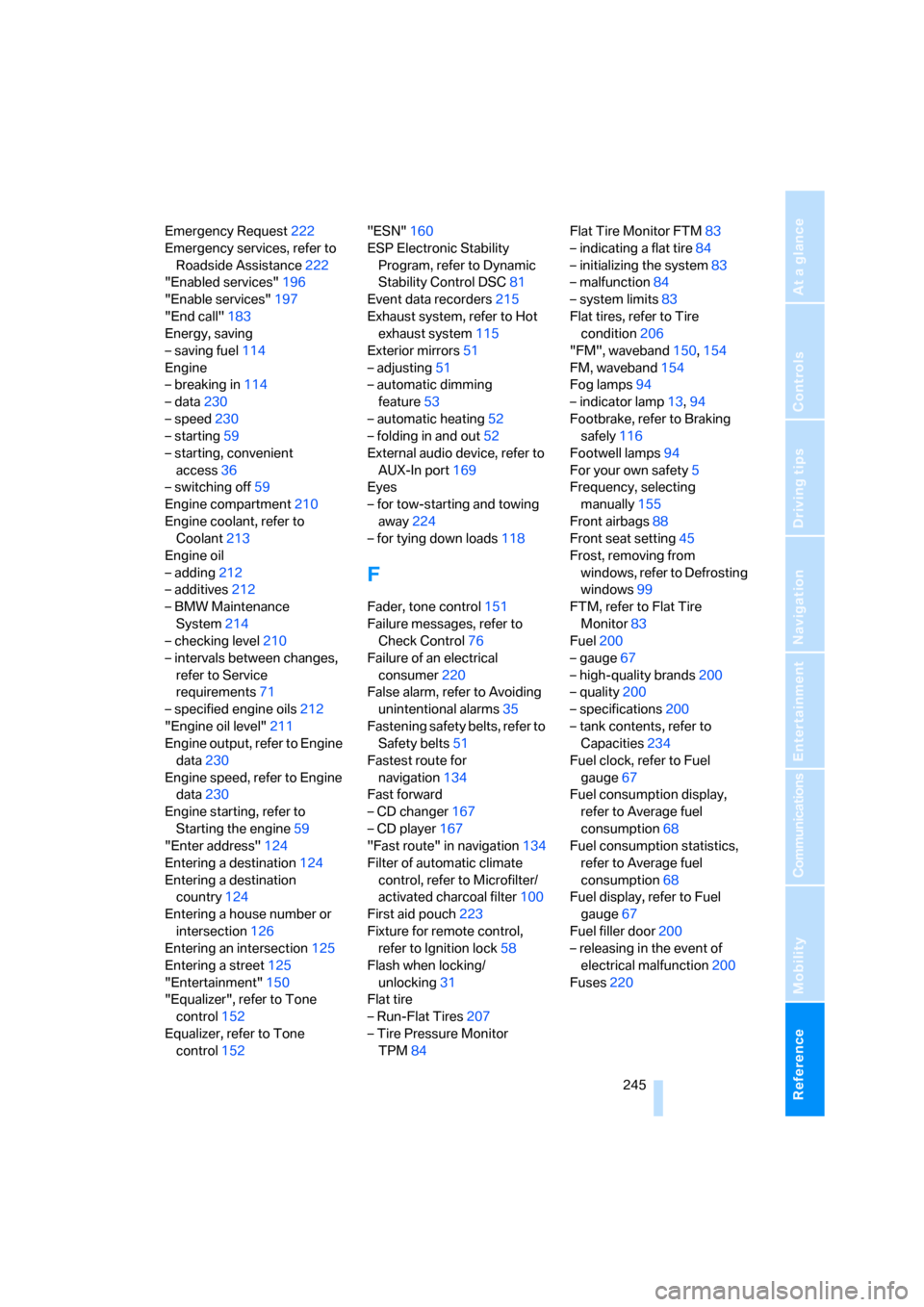
Fuel200
– gauge67
– high-quality brands200
– quality200
– specifications200
– tank contents, refer to
Capacities234
Fuel clock, refer to Fuel
gauge67
Fuel consumption display,
refer to Average fuel
consumption68
Fuel consumption statistics,
refer to Average fuel
consumption68
Fuel display, refer to Fuel
gauge67
Fuel filler door200
– releasing in the event of
electrical malfunction200
Fuses220