lamps BMW 128I COUPE 2012 Owner's Guide
[x] Cancel search | Manufacturer: BMW, Model Year: 2012, Model line: 128I COUPE, Model: BMW 128I COUPE 2012Pages: 272, PDF Size: 8.49 MB
Page 230 of 272
Replacing components
228 the journey with great care, provided that local
legislation does not prohibit this.
Have any work on the xenon lamp system,
including bulb replacements, performed
only by a BMW center or a workshop that works
according to BMW repair procedures with cor-
respondingly trained personnel. Due to high
voltage, there is a risk of fatal injury if work on
the xenon lamps is carried out improperly.<
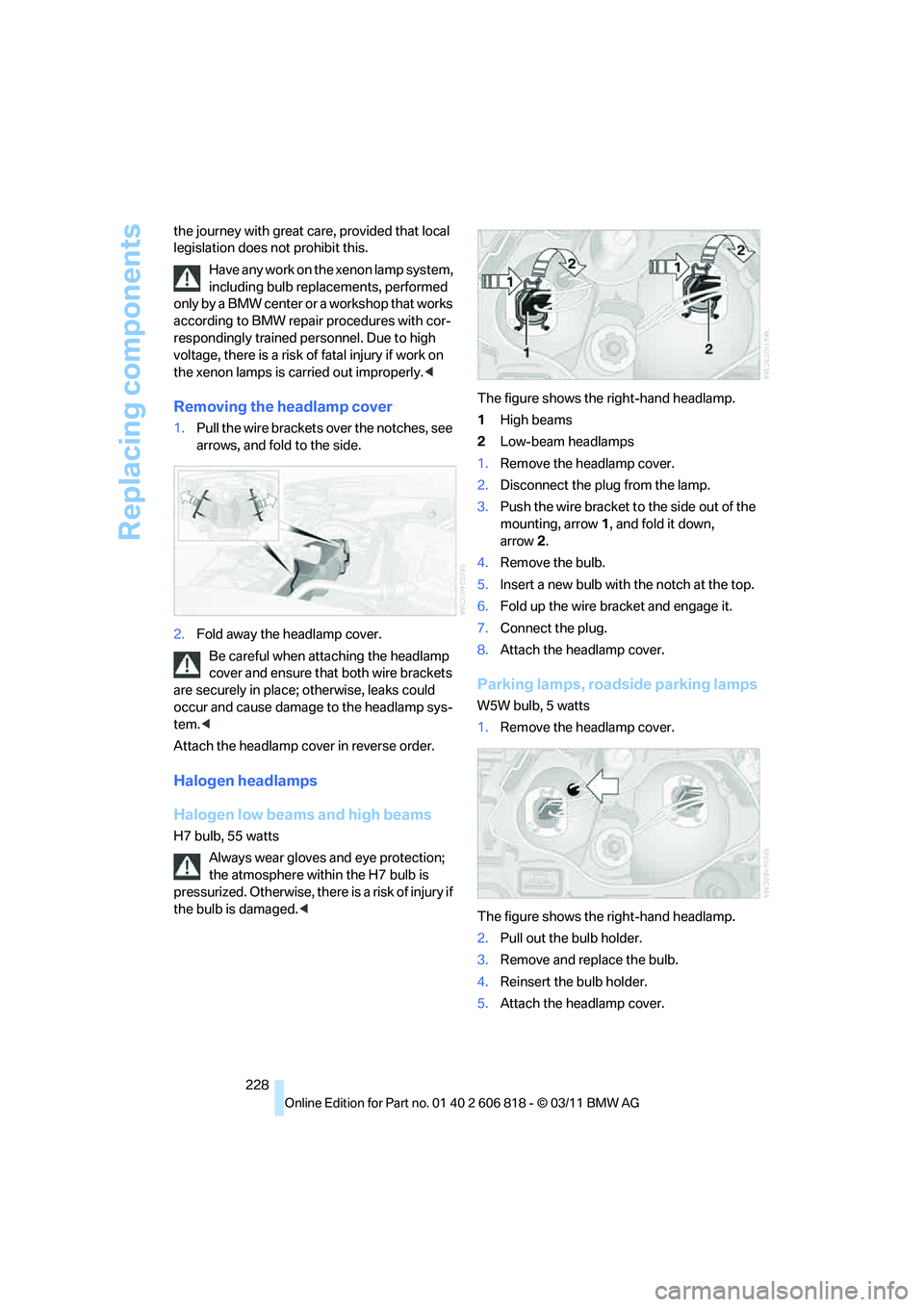
Removing the headlamp cover
1.Pull the wire brackets over the notches, see
arrows, and fold to the side.
2.Fold away the headlamp cover.
Be careful when attaching the headlamp
cover and ensure that both wire brackets
are securely in place; otherwise, leaks could
occur and cause damage to the headlamp sys-
tem.<
Attach the headlamp cover in reverse order.
Halogen headlamps
Halogen low beams and high beams
H7 bulb, 55 watts
Always wear gloves and eye protection;
the atmosphere within the H7 bulb is
pressurized. Otherwise, there is a risk of injury if
the bulb is damaged.
2Low-beam headlamps
1.Remove the headlamp cover.
2.Disconnect the plug from the lamp.
3.Push the wire bracket to the side out of the
mounting, arrow1, and fold it down,
arrow2.
4.Remove the bulb.
5.Insert a new bulb with the notch at the top.
6.Fold up the wire bracket and engage it.
7.Connect the plug.
8.Attach the headlamp cover.
Parking lamps, roadside parking lamps
W5W bulb, 5 watts
1.Remove the headlamp cover.
The figure shows the right-hand headlamp.
2.Pull out the bulb holder.
3.Remove and replace the bulb.
4.Reinsert the bulb holder.
5.Attach the headlamp cover.
Page 231 of 272
Mobility
229Reference
At a glance
Controls
Driving tips
Communications
Navigation
Entertainment
Xenon headlamps
Parking lamps, roadside parking
lamps, daytime running lights
H8 bulb, 35 watts
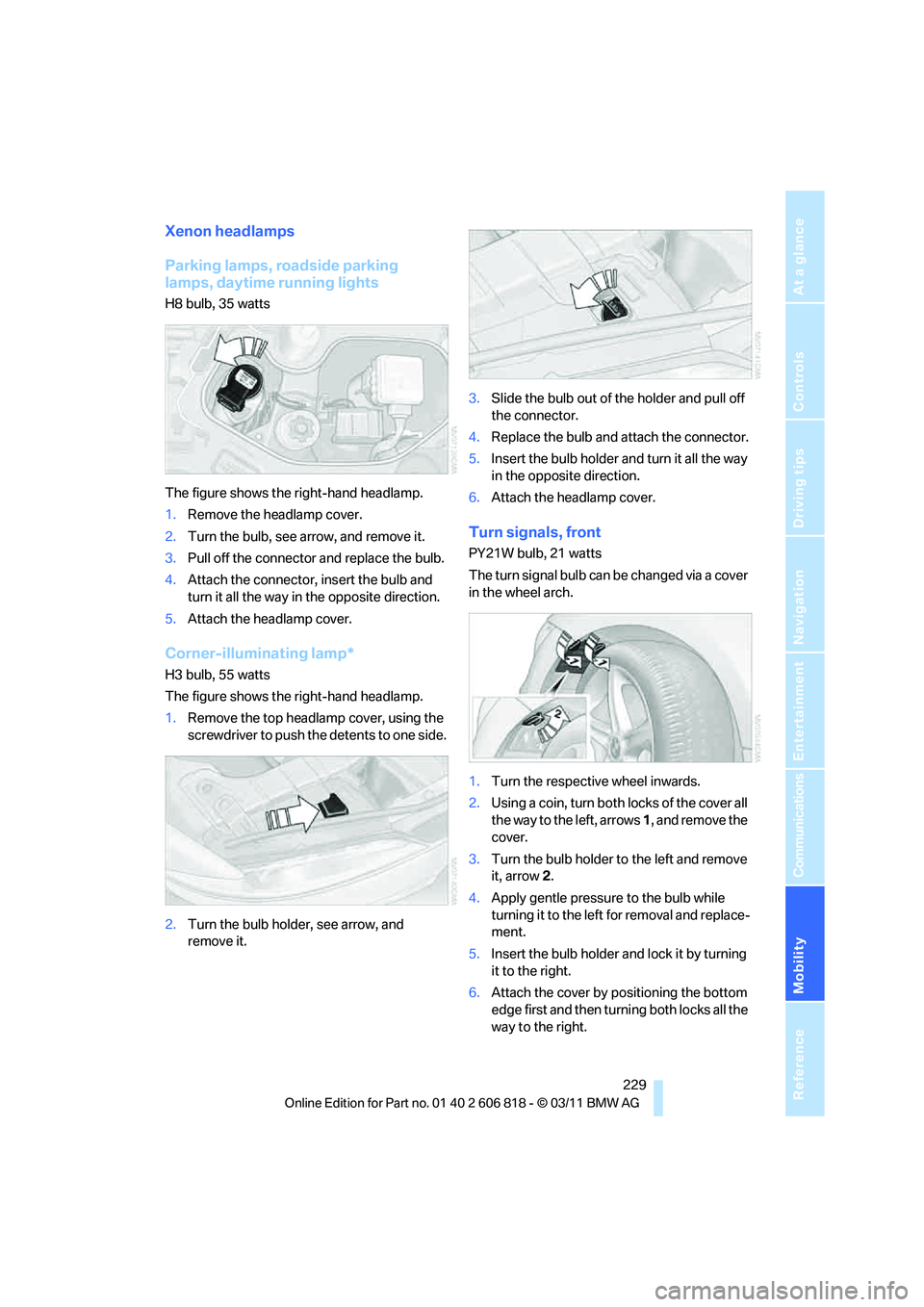
The figure shows the right-hand headlamp.
1.Remove the headlamp cover.
2.Turn the bulb, see arrow, and remove it.
3.Pull off the connector and replace the bulb.
4.Attach the connector, insert the bulb and
turn it all the way in the opposite direction.
5.Attach the headlamp cover.
Corner-illuminating lamp*
H3 bulb, 55 watts
The figure shows the right-hand headlamp.
1.Remove the top headlamp cover, using the
screwdriver to push the detents to one side.
2.Turn the bulb holder, see arrow, and
remove it.3.Slide the bulb out of the holder and pull off
the connector.
4.Replace the bulb and attach the connector.
5.Insert the bulb holder and turn it all the way
in the opposite direction.
6.Attach the headlamp cover.
Turn signals, front
PY21W bulb, 21 watts
The turn signal bulb can be changed via a cover
in the wheel arch.
1.Turn the respective wheel inwards.
2.Using a coin, turn both locks of the cover all
the way to the left, arrows 1, and remove the
cover.
3.Turn the bulb holder to the left and remove
it, arrow2.
4.Apply gentle pressure to the bulb while
turning it to the left for removal and replace-
ment.
5.Insert the bulb holder and lock it by turning
it to the right.
6.Attach the cover by positioning the bottom
edge first and then turning both locks all the
way to the right.
Page 232 of 272
Replacing components
230
Side turn signals
W5W bulb, 5 watts
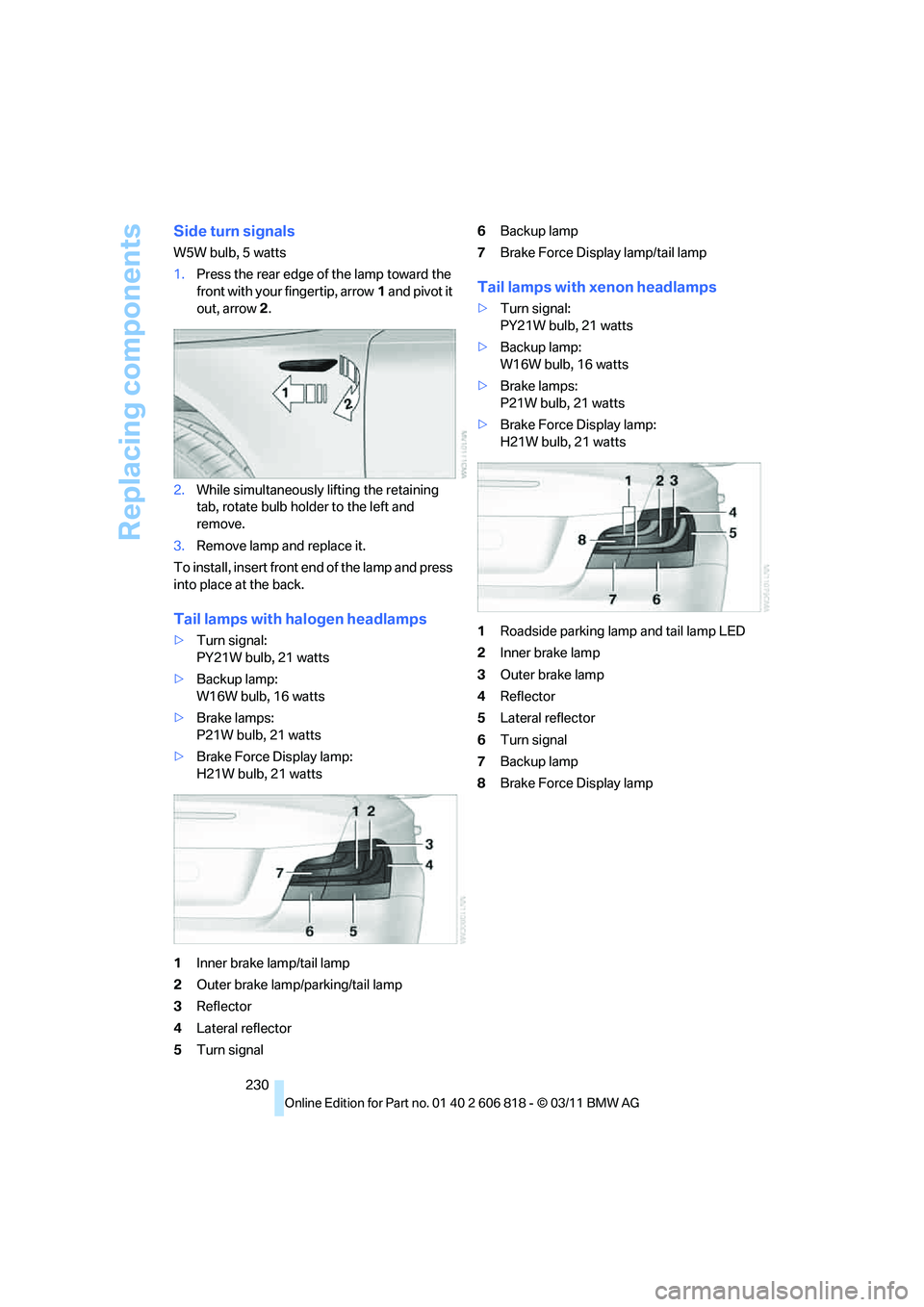
1.Press the rear edge of the lamp toward the
front with your fingertip, arrow1 and pivot it
out, arrow2.
2.While simultaneously lifting the retaining
tab, rotate bulb holder to the left and
remove.
3.Remove lamp and replace it.
To install, insert front end of the lamp and press
into place at the back.
Tail lamps with halogen headlamps
>Turn signal:
PY21W bulb, 21 watts
>Backup lamp:
W16W bulb, 16 watts
>Brake lamps:
P21W bulb, 21 watts
>Brake Force Display lamp:
H21W bulb, 21 watts
1Inner brake lamp/tail lamp
2Outer brake lamp/parking/tail lamp
3Reflector
4Lateral reflector
5Turn signal6Backup lamp
7Brake Force Display lamp/tail lamp
Tail lamps with xenon headlamps
>Turn signal:
PY21W bulb, 21 watts
>Backup lamp:
W16W bulb, 16 watts
>Brake lamps:
P21W bulb, 21 watts
>Brake Force Display lamp:
H21W bulb, 21 watts
1Roadside parking lamp and tail lamp LED
2Inner brake lamp
3Outer brake lamp
4Reflector
5Lateral reflector
6Turn signal
7Backup lamp
8Brake Force Display lamp
Page 233 of 272
Mobility
231Reference
At a glance
Controls
Driving tips
Communications
Navigation
Entertainment
Replacing tail lamps
Outer brake lamp
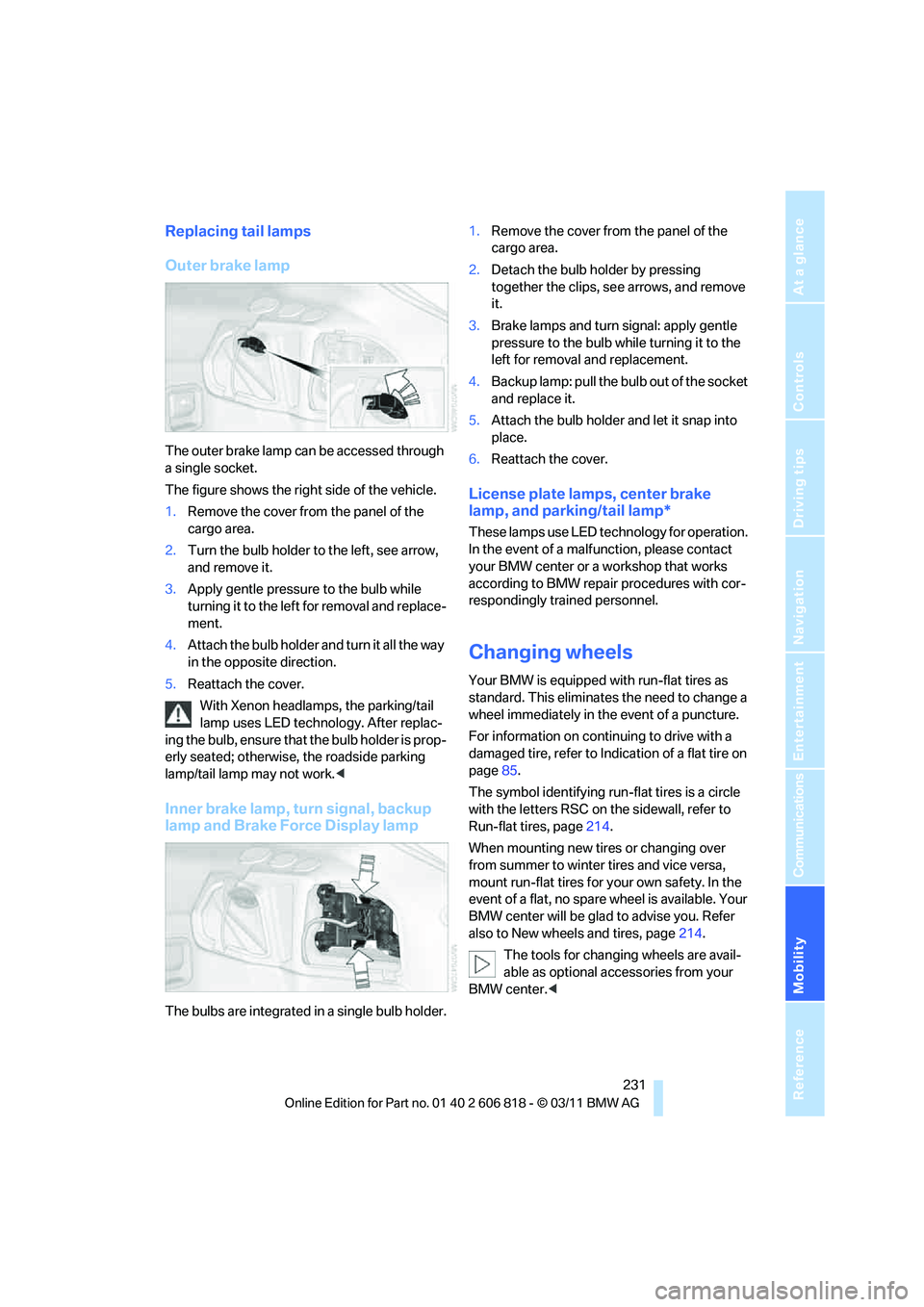
The outer brake lamp can be accessed through
a single socket.
The figure shows the right side of the vehicle.
1.Remove the cover from the panel of the
cargo area.
2.Turn the bulb holder to the left, see arrow,
and remove it.
3.Apply gentle pressure to the bulb while
turning it to the left for removal and replace-
ment.
4.Attach the bulb holder and turn it all the way
in the opposite direction.
5.Reattach the cover.
With Xenon headlamps, the parking/tail
lamp uses LED technology. After replac-
ing the bulb, ensure that the bulb holder is prop-
erly seated; otherwise, the roadside parking
lamp/tail lamp may not work.<
Inner brake lamp, turn signal, backup
lamp and Brake Force Display lamp
The bulbs are integrated in a single bulb holder.1.Remove the cover from the panel of the
cargo area.
2.Detach the bulb holder by pressing
together the clips, see arrows, and remove
it.
3.Brake lamps and turn signal: apply gentle
pressure to the bulb while turning it to the
left for removal and replacement.
4.Backup lamp: pull the bulb out of the socket
and replace it.
5.Attach the bulb holder and let it snap into
place.
6.Reattach the cover.
License plate lamps, center brake
lamp, and parking/tail lamp*
These lamps use LED technology for operation.
In the event of a malfunction, please contact
your BMW center or a workshop that works
according to BMW repair procedures with cor-
respondingly trained personnel.
Changing wheels
Your BMW is equipped with run-flat tires as
standard. This eliminates the need to change a
wheel immediately in the event of a puncture.
For information on continuing to drive with a
damaged tire, refer to Indication of a flat tire on
page85.
The symbol identifying run-flat tires is a circle
with the letters RSC on the sidewall, refer to
Run-flat tires, page214.
When mounting new tires or changing over
from summer to winter tires and vice versa,
mount run-flat tires for your own safety. In the
event of a flat, no spare wheel is available. Your
BMW center will be glad to advise you. Refer
also to New wheels and tires, page214.
The tools for changing wheels are avail-
able as optional accessories from your
BMW center.<
Page 239 of 272
Mobility
237Reference
At a glance
Controls
Driving tips
Communications
Navigation
Entertainment
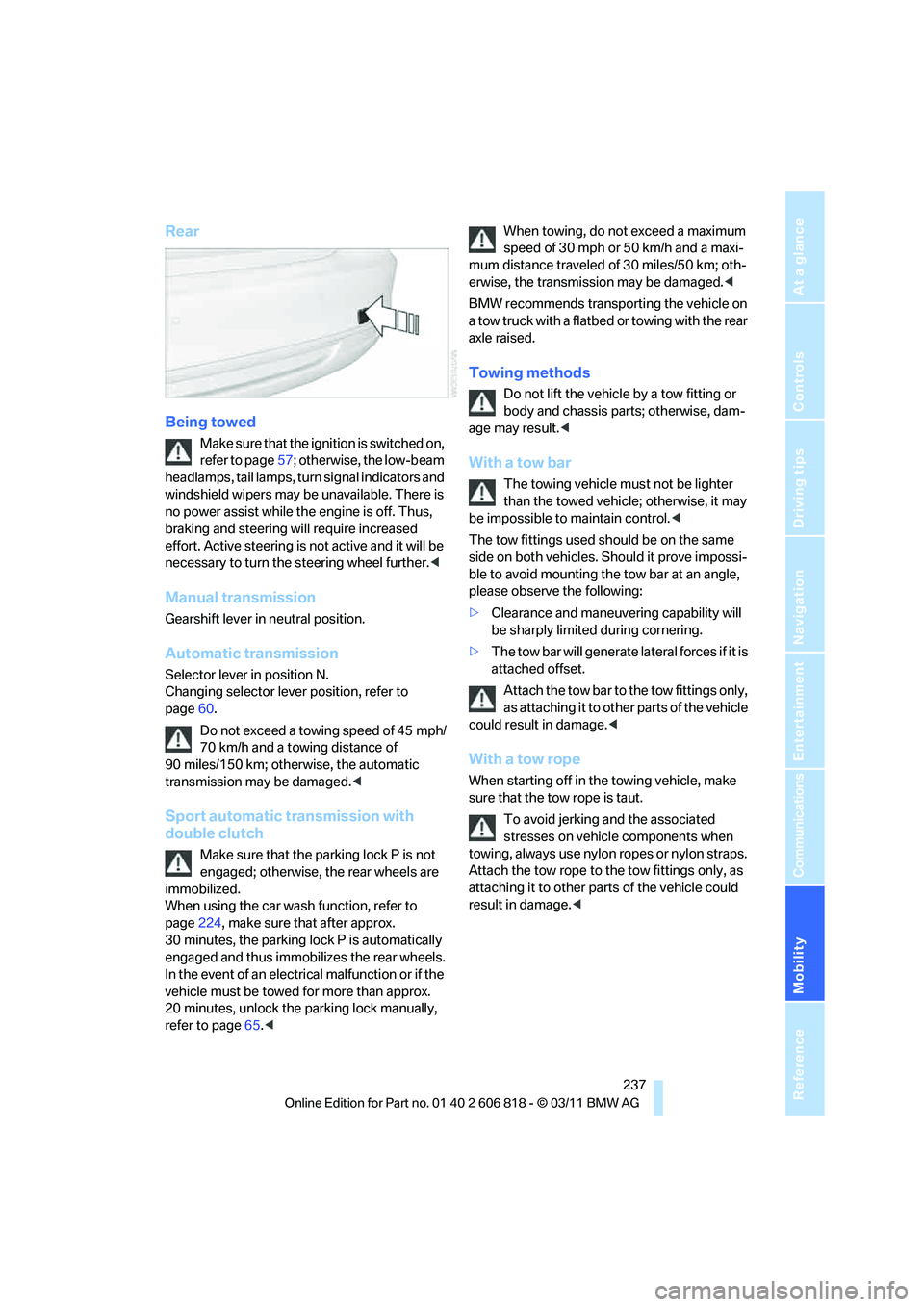
Rear
Being towed
Make sure that the ignition is switched on,
refer to page57; otherwise, the low-beam
headlamps, tail lamps, turn signal indicators and
windshield wipers may be unavailable. There is
no power assist while the engine is off. Thus,
braking and steering will require increased
effort. Active steering is not active and it will be
necessary to turn the steering wheel further.<
Manual transmission
Gearshift lever in neutral position.
Automatic transmission
Selector lever in position N.
Changing selector lever position, refer to
page60.
Do not exceed a towing speed of 45 mph/
70 km/h and a towing distance of
90 miles/150 km; otherwise, the automatic
transmission may be damaged.<
Sport automatic transmission with
double clutch
Make sure that the parking lock P is not
engaged; otherwise, the rear wheels are
immobilized.
When using the car wash function, refer to
page224, make sure that after approx.
30 minutes, the parking lock P is automatically
engaged and thus immobilizes the rear wheels.
In the event of an electrical malfunction or if the
vehicle must be towed for more than approx.
20 minutes, unlock the parking lock manually,
refer to page65.
mum distance traveled of 30 miles/50 km; oth-
erwise, the transmission may be damaged.<
BMW recommends transporting the vehicle on
a tow truck with a flatbed or towing with the rear
axle raised.
Towing methods
Do not lift the vehicle by a tow fitting or
body and chassis parts; otherwise, dam-
age may result.<
With a tow bar
The towing vehicle must not be lighter
than the towed vehicle; otherwise, it may
be impossible to maintain control.<
The tow fittings used should be on the same
side on both vehicles. Should it prove impossi-
ble to avoid mounting the tow bar at an angle,
please observe the following:
>Clearance and maneuvering capability will
be sharply limited during cornering.
>The tow bar will generate lateral forces if it is
attached offset.
Attach the tow bar to the tow fittings only,
as attaching it to other parts of the vehicle
could result in damage.<
With a tow rope
When starting off in the towing vehicle, make
sure that the tow rope is taut.
To avoid jerking and the associated
stresses on vehicle components when
towing, always use nylon ropes or nylon straps.
Attach the tow rope to the tow fittings only, as
attaching it to other parts of the vehicle could
result in damage.<
Page 256 of 272
Everything from A to Z
254
Everything from A to Z
Index
A
ABS Antilock Brake
System83
Acceleration assistant, refer to
Launch Control66
Accessories, refer to Your
individual vehicle5
Accident, reporting, refer to
Emergency Request234
Activated-charcoal filter102
Active steering89
Adaptive Light Control95
Additives
– coolant219
– engine oil219
Address, entering125,131
Address for navigation
– entering125
Adjusting temperature100
Airbags90
– sitting safely45
– warning lamp92
Air conditioner99
Air distribution
– automatic100
Airing, refer to Ventilation102
Air outlets, refer to Air
vents99
Air pressure, checking, refer
to Tire inflation
pressure208
Air recirculation, refer to
Recirculated air mode101
Air vents99
Air volume101
AKI, refer to Fuel grade207
Alarm system34
– avoiding unintentional
alarms35
– interior motion sensor35
– switching off an alarm34
– tilt alarm sensor35Albums of music
collection163
ALL program101
All-season tires, refer to
Winter tires215
AM, waveband147
Ambient air, refer to
Recirculated air mode101
Antifreeze
– coolant219
– washer fluid68
Antilock Brake System
ABS83
Anti-theft alarm system, refer
to Alarm system34
Anti-theft system29
Appointments, refer to
Calendar193
Approved axle loads, refer to
Weights245
Approved engine oils219
Approved gross vehicle
weight, refer to Weights245
Apps202
Armrest, refer to Center
armrest108
Arrival time
– computer72
Ashtray109
Assistance systems, refer to
Dynamic Stability Control
DSC83
AUC Automatic recirculated
air control101
Audible instructions, refer to
Voice instructions136
Audio144
– controls144
– switching on/off144
– tone control144
– volume144Automatic
– air distribution100
– air volume100
– cruise control68
– headlamp control94
Automatic car washes223
Automatic climate control99
Automatic curb monitor52
Automatic high beams and
low beams, refer to High-
beam Assistant96
Automatic lamps
– refer to Welcome lamps94
Automatic recirculated air
control AUC101
Automatic Service
Request202
Automatic transmission with
Steptronic59
– selector lever lock60
– shiftlock60
– towing236
– tow-starting236
AUTO program for automatic
climate control100
AUX-IN port166
Available services202
Average fuel consumption72
– setting the units74
Average speed72
Avoid highways in
navigation134
Avoiding unintentional
alarms35
Axle loads, refer to
Weights245
B
Backrests, refer to Seats46
Backrest width adjustment47
Back seats, refer to Rear seats
– adjusting head restraints48
Page 257 of 272
Reference 255
At a glance
Controls
Driving tips
Communications
Navigation
Entertainment
Mobility
Backup lamp, replacing
bulb231
Bag for skis, refer to Ski
bag110
Band-aids, refer to First aid
pouch235
Bar, refer to Tow-starting,
towing away237
Base plate for telephone or
mobile phone
– refer to Snap-in adapter186
Bass, tone setting144
Battery232
– charging232
– disposal37,232
– jump-starting235
– replacing232
– temporary power failure232
Battery renewal
– remote control for vehicle37
Being towed237
Belts, refer to Safety belts50
Belt tensioner, refer to Safety
belts50
Beverage holders, refer to
Cupholders108
Blower, refer to Air
volume101
Bluetooth, activating/
deactivating177
Bluetooth audio169
– disconnecting an audio
connection171
– pairing a device169
– playback170
– unpairing device171
– What to do if...171
BMW
– car shampoo224
BMW Assist198
– updating202
BMW Maintenance
System221
BMW Online*200
BMW TeleServices199
Bottle holders, refer to
Cupholders108
Brake Assist, refer to Dynamic
Brake Control83Brake fluid
– service requirements74
Brake Force Display90
Brake lamps
– Brake Force Display90
– replacing bulb231
Brake pads, breaking in116
Brake pedal, refer to Braking
safely118
Brake rotors118
– brakes116
– breaking in116
Brakes
– ABS83
– BMW Maintenance
System221
– braking safely118
– breaking in116
– parking brake59
– service requirements74
Brake system116
– BMW Maintenance
System221
– breaking in116
– disc brakes118
Breakdown services, refer to
Roadside Assistance234
Breaking in the clutch116
Break-in period116
Bulb changing, refer to Lamps
and bulbs227
Button for starting the
engine57
Buttons on the steering
wheel11
C
Calendar193
– displaying appointment193
– selecting calendar day193
California Proposition 65
warning6
Call
– accepting181
– ending181
– muting the microphone182
– rejecting181Calling, refer to Phone
numbers, dialing181
Calling, refer to Telephone
owner's manual
Calls
– with multiple parties181
Can holders, refer to
Cupholders108
Capacities246
Capacity of the cargo area245
Car battery, refer to Vehicle
battery232
Car care, refer to Care223
Care223
– automatic car washes223
– care products223
– carpets226
– CD/DVD drives226
– chrome parts225
– convertible top224
– displays226
– exterior223
– fine wood parts226
– headlamps224
– high-pressure washer224
– interior225
– leather225
– light-alloy wheels225
– paintwork225
– plastic parts226
– rubber seals225
– safety belts226
– sensors and cameras226
– upholstery and cloth
trim225
– washing the car
manually224
– windows224
Cargo, securing120
Cargo area
– capacity245
– Comfort Access36
– enlarging, refer to Through-
loading system109
– lamp, refer to Interior
lamps98
– lid, refer to Trunk lid
33
– opening from outside33
Page 258 of 272
Everything from A to Z
256 Cargo area lid, refer to Trunk
lid33
Cargo area net, refer to
Securing cargo120
Cargo loading119
– securing cargo120
– stowing cargo120
– vehicle119
Car jack
– jacking points232
Car key, refer to Integrated
key/remote control28
Car phone
– installation location, refer to
Center armrest108
– refer to separate Owner's
Manual
Car phone, refer to
Telephone176
Car radio, refer to Radio147
Car shampoo224
Car wash223
Catalytic converter, refer to
Hot exhaust system117
CD, audio playback155
CD changer155,159
– controls144
– fast forward/reverse157
– filling or emptying the
magazine159
– random play sequence156
– selecting a track155
– switching on/off144
– tone control144
– volume144
CD player155
– controls144
– fast forward/reverse157
– random order156
– selecting a track155
– switching on/off144
– tone control144
– volume144
Center armrest108
Center brake lamp, replacing
bulb231
Center console, refer to
Around the center
console14Central key, refer to Integrated
key/remote control28
Central locking
– from inside32
– from outside29
Central locking system29
– Comfort Access35
Changes, technical, refer to
For your own safety5
Changing bulbs227
Changing gears64
Changing the language on the
Control Display81
Changing wheels231
Chassis number, refer to
Engine compartment217
Check Control78
Child restraint fixing system
LATCH55
Child restraint systems54
Child seats54
Chrome parts225
Chrome polish225
Cigarette lighter109
Cleaning headlamps67
– washer fluid68
Cleaning your BMW, refer to
Care223
Climate control
– automatic air
distribution100
Clock70
– 12h/24h mode77
– setting the time and date77
– setting time76
Closing
– from inside32
– from outside29
Clothes hooks108
Cold start, refer to Starting the
engine58
Comfort Access35
– replacing the battery37
Comfort access, refer to
Comfort Access35
Comfort area, refer to Around
the center console14Compartment for remote
control, refer to Ignition
lock57
Compass106
Computer71
– displays on Control
Display72
Computer, refer to iDrive16
Concierge service199
Condensation, refer to When
the vehicle is parked119
Condition Based Service
CBS221
Configuring settings, refer to
Personal Profile28
Confirmation signals for
locking/unlocking the
vehicle30
ConnectedDrive198
Connecting vacuum cleaner,
refer to Connecting
electrical appliances109
Consumption, refer to
Average fuel
consumption72
Contacts188
– deleting190,197
– exporting/importing197
– new contact189
Control Center, refer to
iDrive16
Control Display16,17
Control Display, refer to iDrive
– switching on/off17
Controller, refer to iDrive16
Controls and displays10
Convenient opening and
closing
– windows30
– windows with Comfort
Access36
– with Comfort Access36
Convenient start, refer to
Starting the engine58
Convertible
– rollover protection
system92
– top40
– wind deflector43
Page 259 of 272
Reference 257
At a glance
Controls
Driving tips
Communications
Navigation
Entertainment
Mobility
Convertible top
– convenient opening30
Convertible top care224
Coolant219
– checking level220
– filling220
Coolant temperature219
Cooling, maximum100
Cooling fluid, refer to
Coolant219
Copyright2
Corner-illuminating lamps95
Cornering light, refer to
Adaptive Light Control95
Country codes DVD157
Courtesy lamps98
Criteria for route134
Cross-hairs in navigation130
Cruise control68
Cruising range72
Cupholders108
Curb weight, refer to
Weights245
Current fuel consumption72
Current playback
– external devices168
– of music collection163
Customer Relations201
D
Dashboard, refer to
Cockpit10
Dashboard lighting, refer to
Instrument lighting98
Data, technical242
– capacities246
– dimensions243
– engine242
– weights245
Data memory222
Data transfer202
Date
– setting78
– setting format78
Daytime running lights, switch
positions95
DBC Dynamic Brake
Control83Deactivating front passenger
airbags91
Deadlocking, refer to
Locking30
Defect
– door lock32
– fuel filler flap206
– glass roof40
Defining a home address190
Defogging windows101
Defrosting windows101
Defrosting windows and
removing condensation101
Defrosting windshield, refer to
Defrosting windows101
Defrost position, refer to
Defrosting windows101
Destination, entering by town/
city name125
Destination address
– entering125,131
Destination entry via BMW
Assist129
Destination for navigation
– entering by voice131
– entering via map130
– entry125
– home address128
– manual entry125
Destination guidance134
– bypassing a route
section135
– changing specified
route134
– continuing134
– starting134
– voice instructions136
– volume of voice
instructions136
Differential, breaking in116
Digital clock70
,76
Digital compass106
Digital radio, refer to HD
Radio148
Dimensions243
Directional indicators, refer to
Turn signals66
Direction instructions, refer to
Voice instructions136Directory for navigation, refer
to Address book127
Displacement, refer to Engine
data242
Display, refer to Control
Display16
Displaying contact
pictures190
Display lighting, refer to
Instrument lighting98
Displays, refer to Instrument
cluster12
Displays and controls10
Disposal
– of coolant219
– remote control battery37
– vehicle battery232
Distance, refer to
Computer72
Distance remaining to service,
refer to Service
requirements74
Distance to destination, refer
to Computer72
Distance warning, refer to
Park Distance Control
PDC82
Door key, refer to Integrated
key/remote control28
Door lock32
Door lock, confirmation
signals30
Doors, manual operation32
DOT Quality Grades212
Draft-free ventilation102
Drinks holders, refer to
Cupholders108
Drive mode63
Drive-off assistance, refer to
DSC83
Drive-off assistant84
Driving dynamics control64
Driving lamps, refer to Parking
lamps/low beams94
Driving notes116
Driving off on hills, refer to
Drive-off assistant84
Driving stability control
systems83
Page 260 of 272
Everything from A to Z
258 Driving through water118
Driving tips, refer to Driving
notes116
Dry air, refer to Cooling
function101
DSC Dynamic Stability
Control83
DTC Dynamic Traction
Control84
– indicator lamps84
DVD
– country codes157
– settings158
– video playback157
DVD menu158
DVD player, refer to CD
player155
DVD video157
Dynamic Brake Control
DBC83
Dynamic destination
guidance140
Dynamic Stability Control
DSC83
Dynamic Traction Control
DTC84
– indicator lamps84
E
EBV Electronic brake-force
distribution83
Eject button, refer to Buttons
on the CD/DVD player144
Electrical defect
– 7-gear Sport automatic
transmission with double
clutch65
Electrical malfunction
– door lock32
– fuel filler flap206
– glass roof40
Electronic brake-force
distribution EBV83
Electronic oil level check217
Electronic Stability Program
ESP, refer to Dynamic
Stability Control DSC83
Email192Emergency operation, refer to
Manual operation
– door lock32
– fuel filler flap206
– glass roof40
– transmission lock, automatic
transmission61
Emergency release, trunk
lid34
Emergency Request234
Emergency services, refer to
Roadside Assistance234
Energy, saving
– saving fuel116
Engine
– breaking in116
– data242
– speed242
– starting58
– starting, Comfort Access35
– switching off58
Engine compartment217
Engine coolant, refer to
Coolant219
Engine oil
– adding219
– additives219
– alternative oil types219
– approved engine oils219
– BMW Maintenance
System221
– checking level217
– intervals between changes,
refer to Service
requirements74
Engine oil level, checking217
Engine output, refer to Engine
data242
Engine speed, refer to Engine
data242
Engine starting, refer to
Starting the engine58
Entering the postal code for
navigation126
Entry map for destination130
Equalizer, tone setting145
ESP Electronic Stability
Program, refer to Dynamic
Stability Control DSC83Exhaust system, refer to Hot
exhaust system117
Exterior mirrors51
– adjusting51
– automatic dimming
feature52
– automatic heating52
– folding in and out51
External devices
– random play sequence168
– software update172
Eyes
– for tow-starting and towing
away236
– for tying down loads120
F
Failure messages, refer to
Check Control78
Failure of an electrical
consumer232
False alarm, refer to Avoiding
unintentional alarms35
Fastening safety belts, refer to
Safety belts50
Fastest route for
navigation134
Fast forward
– CD changer157
– CD player157
Filter of automatic climate
control, refer to Microfilter/
activated charcoal filter102
First aid pouch235
Fixture for remote control,
refer to Ignition lock57
Flash when locking/
unlocking30
Flat tire
– run-flat tires214
– Tire Pressure Monitor
TPM86
Flat Tire Monitor FTM84
– indicating a flat tire85
– initializing the system85
– system limits84
Flat tires, refer to Tire
condition213