213 BMW 135I CONVERTIBLE 2008 E88 Owner's Manual
[x] Cancel search | Manufacturer: BMW, Model Year: 2008, Model line: 135I CONVERTIBLE, Model: BMW 135I CONVERTIBLE 2008 E88Pages: 264, PDF Size: 8.68 MB
Page 14 of 264
Cockpit
12
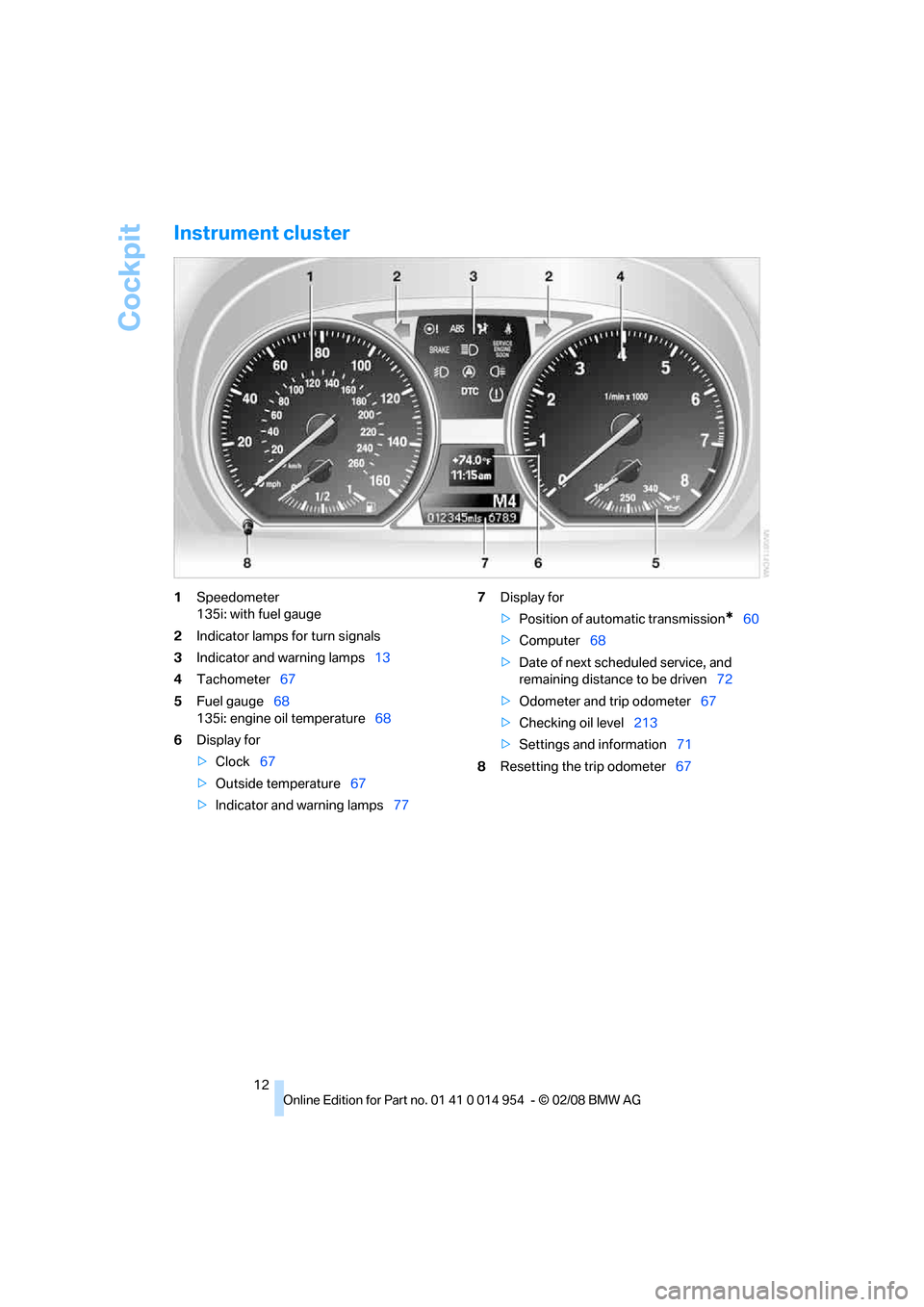
Instrument cluster
1Speedometer
135i: with fuel gauge
2Indicator lamps for turn signals
3Indicator and warning lamps13
4Tachometer67
5Fuel gauge68
135i: engine oil temperature68
6Display for
>Clock67
>Outside temperature67
>Indicator and warning lamps777Display for
>Position of automatic transmission
*60
>Computer68
>Date of next scheduled service, and
remaining distance to be driven72
>Odometer and trip odometer67
>Checking oil level213
>Settings and information71
8Resetting the trip odometer67
Page 73 of 264
Controls
71Reference
At a glance
Driving tips
Communications
Navigation
Entertainment
Mobility
Settings and information
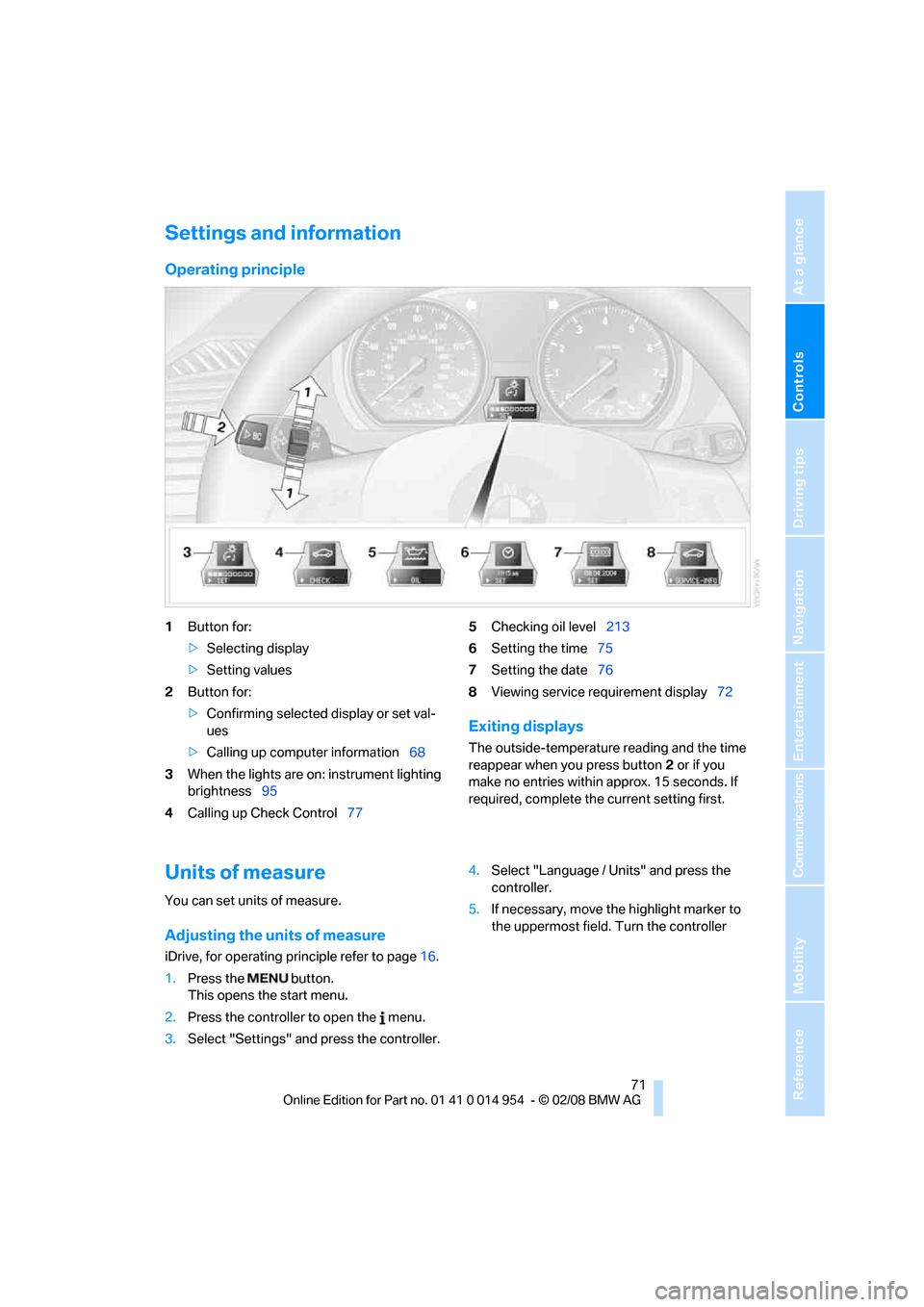
Operating principle
1Button for:
>Selecting display
>Setting values
2Button for:
>Confirming selected display or set val-
ues
>Calling up computer information68
3When the lights are on: instrument lighting
brightness95
4Calling up Check Control775Checking oil level213
6Setting the time75
7Setting the date76
8Viewing service requirement display72
Exiting displays
The outside-temperature reading and the time
reappear when you press button2 or if you
make no entries within approx. 15 seconds. If
required, complete the current setting first.
Units of measure
You can set units of measure.
Adjusting the units of measure
iDrive, for operating principle refer to page16.
1.Press the button.
This opens the start menu.
2.Press the controller to open the menu.
3.Select "Settings" and press the controller.4.Select "Language / Units" and press the
controller.
5.If necessary, move the highlight marker to
the uppermost field. Turn the controller
Page 215 of 264
Mobility
213Reference
At a glance
Controls
Driving tips
Communications
Navigation
Entertainment
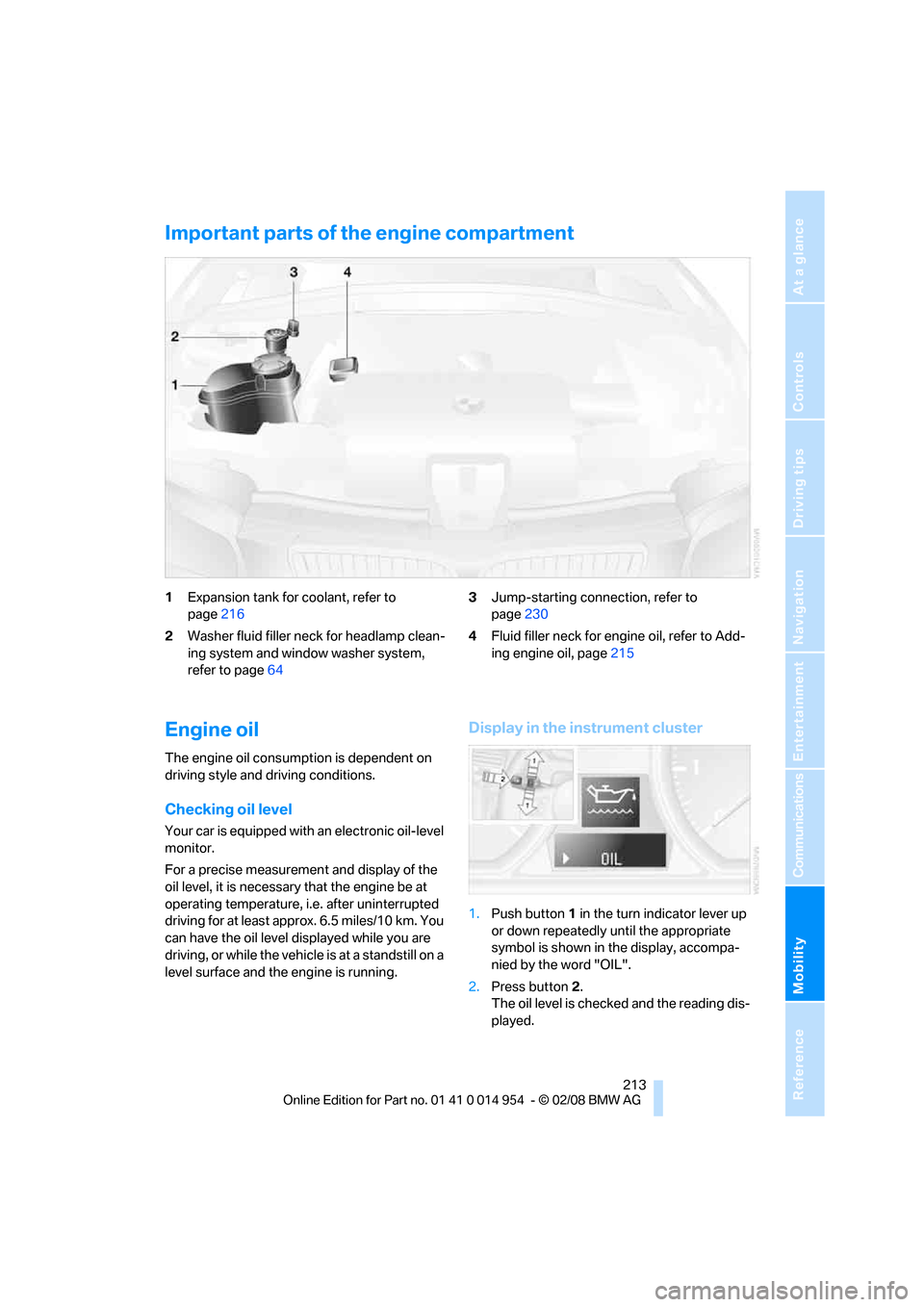
Important parts of the engine compartment
1Expansion tank for coolant, refer to
page216
2Washer fluid filler neck for headlamp clean-
ing system and window washer system,
refer to page643Jump-starting connection, refer to
page230
4Fluid filler neck for engine oil, refer to Add-
ing engine oil, page215
Engine oil
The engine oil consumption is dependent on
driving style and driving conditions.
Checking oil level
Your car is equipped with an electronic oil-level
monitor.
For a precise measurement and display of the
oil level, it is necessary that the engine be at
operating temperature, i.e. after uninterrupted
driving for at least approx. 6.5 miles/10 km. You
can have the oil level displayed while you are
driving, or while the vehicle is at a standstill on a
level surface and the engine is running.
Display in the instrument cluster
1.Push button 1 in the turn indicator lever up
or down repeatedly until the appropriate
symbol is shown in the display, accompa-
nied by the word "OIL".
2.Press button 2.
The oil level is checked and the reading dis-
played.
Page 232 of 264
Giving and receiving assistance
230
First aid pouch*
Some of the articles contained in the first aid
pouch have a limited service life. Therefore,
check the expiration dates of the contents reg-
ularly and replace any items in good time, if nec-
essary.
The first aid pouch is located on the right-hand
side of the cargo bay in a storage area.
Warning triangle*
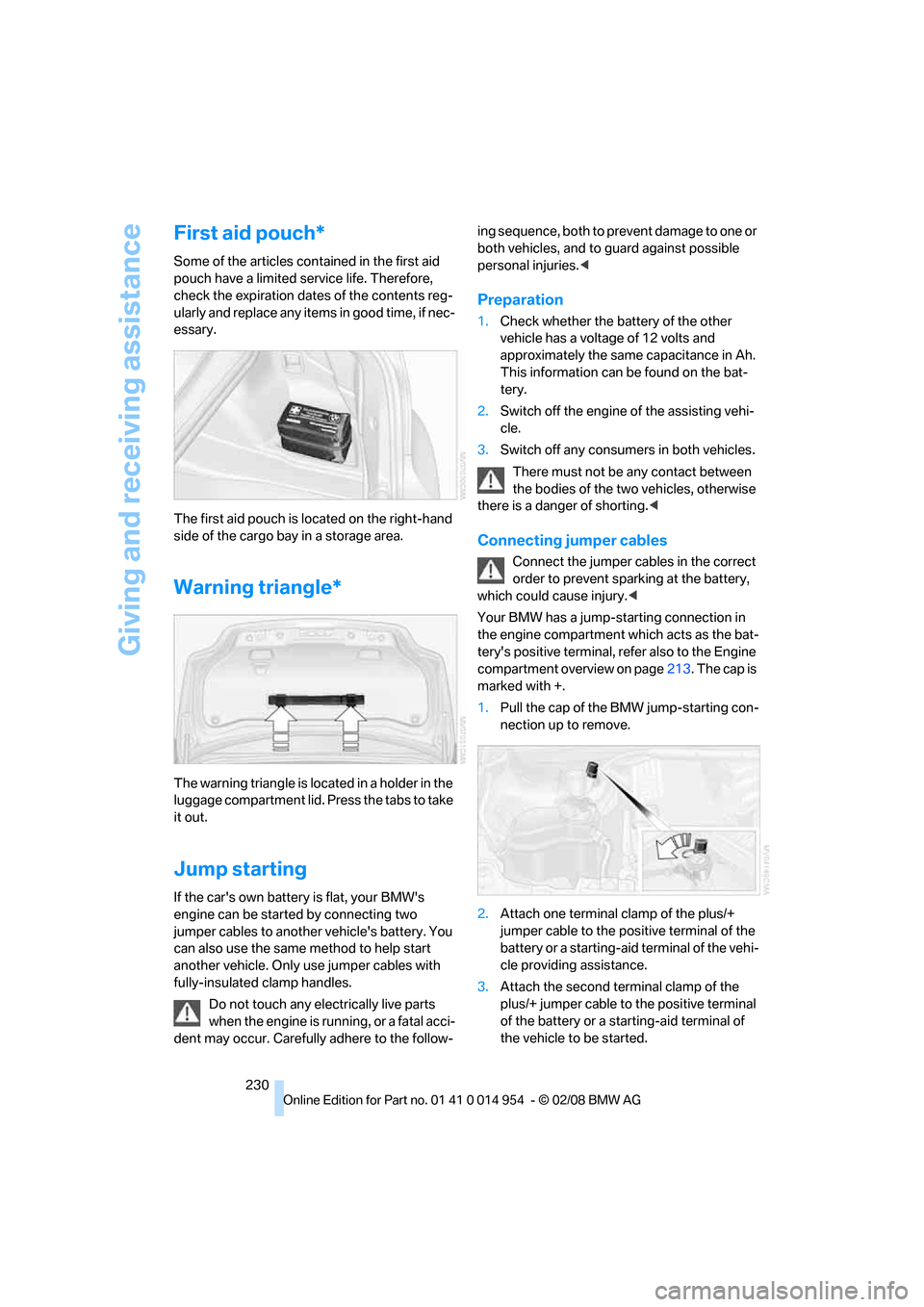
The warning triangle is located in a holder in the
luggage compartment lid. Press the tabs to take
it out.
Jump starting
If the car's own battery is flat, your BMW's
engine can be started by connecting two
jumper cables to another vehicle's battery. You
can also use the same method to help start
another vehicle. Only use jumper cables with
fully-insulated clamp handles.
Do not touch any electrically live parts
when the engine is running, or a fatal acci-
dent may occur. Carefully adhere to the follow-ing sequence, both to prevent damage to one or
both vehicles, and to guard against possible
personal injuries.<
Preparation
1.Check whether the battery of the other
vehicle has a voltage of 12 volts and
approximately the same capacitance in Ah.
This information can be found on the bat-
tery.
2.Switch off the engine of the assisting vehi-
cle.
3.Switch off any consumers in both vehicles.
There must not be any contact between
the bodies of the two vehicles, otherwise
there is a danger of shorting.<
Connecting jumper cables
Connect the jumper cables in the correct
order to prevent sparking at the battery,
which could cause injury.<
Your BMW has a jump-starting connection in
the engine compartment which acts as the bat-
tery's positive terminal, refer also to the Engine
compartment overview on page213. The cap is
marked with +.
1.Pull the cap of the BMW jump-starting con-
nection up to remove.
2.Attach one terminal clamp of the plus/+
jumper cable to the positive terminal of the
battery or a starting-aid terminal of the vehi-
cle providing assistance.
3.Attach the second terminal clamp of the
plus/+ jumper cable to the positive terminal
of the battery or a starting-aid terminal of
the vehicle to be started.
Page 248 of 264
Everything from A - Z
246 Calling
– from phone book183
– from Top 8 list184
– redialing184
Can holders, refer to Cup
holders107
Capacities239
Capacity of the cargo bay239
Car battery, refer to Vehicle
battery227
Car care, refer to Care219
"Car Data"69
Care219
– automatic car washes219
– care products219
– carpets221
– CD/DVD drives222
– chrome parts221
– convertible top220
– displays222
– exterior219
– fine wood parts222
– headlamps220
– high-pressure washer219
– interior221
– leather221
– light-alloy wheels221
– paintwork220
– plastic parts222
– rubber seals221
– safety belts222
– sensors and cameras222
– upholstery and cloth
trim221
– washing the car
manually220
– windows220
– wiper blades220
Cargo, securing118
Cargo bay
– capacity239
– convenient access37
– enlarging, refer to Through-
loading system108
– lamp, refer to Interior
lamps95
– lid, refer to Luggage
compartment lid33
– opening from outside33Cargo bay lid, refer to
Luggage compartment
lid33
Cargo bay net, refer to
Securing cargo118
Cargo loading
– securing cargo118
– stowing cargo117
– vehicle117
Car jack
– jacking points227
Car key, refer to Integrated
key/remote control28
Car phone176
– installation location, refer to
Center armrest107
– refer to Mobile phone176
– refer to separate Owner's
Manual
Car radio, refer to Radio154
Car shampoo222
Car wash116
Catalytic converter, refer to
Hot exhaust system115
"Categories" for satellite
radio161
"CD"150,163
CD changer163
– compressed audio files163
– controls150
– fast forward/reverse167
– installation location167
– playing a track165
– random order166
– repeating a track166
– selecting a CD163
– selecting a track164
– switching on/off150
– tone control151
– volume151CD player163
– compressed audio files163
– controls150
– fast forward/reverse167
– playing a track165
– random order166
– repeating a track166
– selecting a track164
– switching on/off150
– tone control151
– volume151
Center armrest107
Center brake lamp, replacing
bulb226
Center console, refer to
Around the center
console14
Central key, refer to Integrated
key/remote control28
"Central locking"30,50
Central locking
– from inside32
– from outside
29
Central locking system29
– convenient access36
Changes, technical, refer to
For your own safety5
Changing the language on the
Control Display80
Changing wheels226
Chassis number, refer to
Engine compartment213
Check Control77
"Check Control
messages"78
Checking oil level213
Child-restraint fixing system
LATCH56
Child-restraint systems55
Child seats55
Chrome parts222
Chrome polish222
Cigarette lighter108
Cleaning headlamps64
– washer fluid64
Cleaning your BMW, refer to
Care219
"Climate"98
Page 250 of 264
Everything from A - Z
248 "Delete address book" in
navigation133
"Delete all numbers" on the
mobile phone185
"Delete data" in
navigation133
"Delete" for mobile
phone185
Destination address
– deleting133
– entering123,127
Destination for navigation
– destination list130
– entry123
– home address133
– manual entry123,127
– selecting from address
book132
– selecting using
information129
– selecting via language127
– selecting via map128
– storing131
Destination guidance136
– canceling voice
instructions54
– changing specified
route134
– displaying route137
– distance and arrival136
– starting136
– terminating/continuing136
– voice instructions140
– volume of voice
instructions140
Destination list for navigation
system130
Destinations recently driven
to130
"Details" for audio mode171
"Dial" for mobile phone183
"Dial number"183
Differential, breaking in114
Digital clock67
Digital compass105
Digital radio, refer to High
Definition Radio157
Digital Versatile Disc, refer to
– Drive for navigation DVD150Dimensions237
Directional indicators, refer to
Turn signals62
Direction instructions, refer to
Voice instructions140
Directory for navigation, refer
to Address book131
Displacement, refer to Engine
data
236
"Display"20
Display, refer to Control
Display16
Display lighting, refer to
Instrument lighting95
Displays, refer to Instrument
cluster12
Displays and controls10
"Display settings"80
Disposal
– of coolant216
– remote control battery37
– vehicle battery227
Distance, refer to
Computer69
Distance remaining to service,
refer to Service
requirements72
"Distance to dest."70
Distance to destination, refer
to Computer69
Distance warning, refer to
Park Distance Control
PDC81
Door key, refer to Integrated
key/remote control28
Door lock32
Door lock, confirmation
signals31
"Door locks"30,32,73
Doors, emergency
operation32
DOT Quality Grades208
Draft-free ventilation100
Drinks holders, refer to Cup
holders107
Drive for navigation DVD150
Drive-off assistance, refer to
DSC82
Drive-off assistant83Driving around a traffic
congestion144
Driving lamps, refer to Parking
lamps/low beams92
Driving notes114
Driving off on hills, refer to
Drive-off assistant83
Driving route, refer to
Displaying route137
Driving stability control
systems82
Driving through water116
Driving tips, refer to Driving
notes114
Dry air, refer to Cooling
function100
DSC Dynamic Stability
Control82
DTC Dynamic Traction
Control83
– indicator lamps83
DVD
– drive for navigation DVD150
DVD for navigation122
Dynamic Brake Control
DBC82
"Dynamic route" in
navigation134
Dynamic Stability Control
DSC82
Dynamic Traction Control
DTC
– indicator lamps83
E
EBV Electronic brake-force
distribution82
Eject button, refer to Buttons
on the CD player150
Electrical malfunction
– door lock32
– fuel filler door202
– glass roof40
– luggage compartment lid33
Electronic brake-force
distribution EBV82
Electronic oil level check213
Page 251 of 264
Reference 249
At a glance
Controls
Driving tips
Communications
Navigation
Entertainment
Mobility
Electronic Stability Program
ESP, refer to Dynamic
Stability Control DSC82
Emergency operation, refer to
Manual operation
– door lock32
– fuel filler door202
– glass roof40
– transmission lock, automatic
transmission62
Emergency release, luggage
compartment lid34
Emergency Request229
Emergency services, refer to
Roadside Assistance229
"Enabled services"196
"Enabled TeleServices"194
"End call"183
Energy, saving
– saving fuel114
Engine
– breaking in114
– data236
– speed236
– starting59
– starting, convenient
access36
– switching off59
Engine compartment213
Engine coolant, refer to
Coolant216
Engine oil
– adding215
– additives215
– BMW Maintenance
System217
– checking level213
– intervals between changes,
refer to Service
requirements72
– specified engine oils215
"Engine oil level"214
Engine output, refer to Engine
data236
Engine speed, refer to Engine
data236
Engine starting, refer to
Starting the engine59
"Enter address"124Entering a destination124
Entering a destination
country124
Entering a house number or
intersection126
Entering an intersection125
Entering a street125
"Entertainment"150
"Equalizer", refer to Tone
control152
Equalizer, refer to Tone
control152
"ESN"160
ESP Electronic Stability
Program, refer to Dynamic
Stability Control DSC82
Event data recorders218
Exhaust system, refer to Hot
exhaust system115
Exterior mirrors51
– adjusting51
– automatic dimming
feature53
– automatic heating52
– folding in and out52
External audio device, refer to
AUX-In port169
Eyes
– for tow-starting and towing
away231
– for tying down loads118
F
Fader, tone control151
Failure messages, refer to
Check Control77
Failure of an electrical
consumer227
False alarm, refer to Avoiding
unintentional alarms35
Fastening safety belts, refer to
Safety belts51
Fastest route for
navigation134
Fast forward
– CD changer167
– CD player167
"Fast route" in navigation134Filter of automatic climate
control, refer to Microfilter/
activated charcoal filter101
First aid pouch230
Fixture for remote control,
refer to Ignition lock58
Flash when locking/
unlocking31
Flat tire
– Run-Flat Tires210
– Tire Pressure Monitor
TPM85
Flat Tire Monitor FTM84
– indicating a flat tire85
– initializing the system84
– malfunction85
– system limits84
Flat tires, refer to Tire
condition209
"FM", waveband150,154
FM, waveband154
Fog lamps95
– indicator lamp13,95
Footbrake, refer to Braking
safely116
Footwell lamps95
For your own safety5
Frequency, selecting
manually155
Front airbags89
Front seat setting45
Frost, removing from
windows, refer to Defrosting
windows100
FTM, refer to Flat Tire
Monitor84
Fuel202
– gauge68
– high-quality brands202
– quality202
– specifications202
– tank contents, refer to
Capacities239
Fuel clock, refer to Fuel
gauge68
Fuel consumption display,
refer to Average fuel
consumption69
Page 255 of 264
Reference 253
At a glance
Controls
Driving tips
Communications
Navigation
Entertainment
Mobility
"New address" in
navigation132
"New destination"124,128
"New route"141
New tires210
"Next entertainment
source"54
North-facing map138
Number of cylinders, refer to
Engine data236
O
OBD socket, refer to Socket
for On-Board Diagnosis218
Octane ratings, refer to Fuel
specifications202
Odometer67
Oil, refer to Engine oil213
Oil consumption213
Oil level213
Old batteries, refer to
Disposal227
"On a new destination" in
navigation130
"Onboard info"69
Onboard tool kit223
"On destination"130
"On location"130
Opening and closing
– convenient access36
– from inside32
– from outside29
– using the door lock32
– via the remote control29
Operation by voice for mobile
phone187
– adjusting volume188
– canceling187
– correcting phone
number188
– dialing phone number188
– placing a call188
– redialing188
– voice commands187
– voice phone book188
"Options"195,196
Orientation menu, refer to
Start menu17Outlets, refer to
Ventilation100
Output, refer to Engine
data236
Outside temperature
display67
– changing unit of measure71
– on computer71
Outside temperature
warning67
Overriding selector lever
lock62P
Paintwork care220
Park assistant, refer to Park
Distance Control81
Park Distance Control PDC81
"Parked car operation"101
"Parked car ventilation"101
Parked car ventilation101
– activating switch-on
time102
– preselecting switch-on
times101
– switching on and off
directly101
Parking
– vehicle59
Parking aid, refer to Park
Distance Control PDC81
Parking brake59
– indicator lamp60
Parking lamps/low beams92
– replacing bulbs224
Parts and accessories, refer to
The individual vehicle5
Passenger-side mirror tilt
function52
"Pathway lighting"93
Pathway lighting93
"PDC"81
Personal Profile28
"Perspective"138
Phone book181Phone numbers
– deleting from phone
book185
– dialing183
– most recent numbers184
– selecting in phone book184
– Top 8184
Pinch protection system
– glass roof, electric40
– windows39
Placing a call, refer to
telephone owner's manual
"Play" for satellite radio161
Polish222
Pollen, refer to Microfilter/
activated-charcoal filter101
Position
– displaying144
– saving, refer to Storing
current position132
Power windows38
Power windows, refer to
Windows38
"Presets", displaying with the
radio154
"Presets" for satellite
radio161
Pressure, tires204
Pressure monitoring of tires,
refer to Flat Tire Monitor84
Pressure monitoring of tires,
refer to Tire Pressure
Monitor TPM85
Programmable buttons on the
steering wheel11
Programmable memory
keys21
Protection function, refer to
Pinch protection system
– glass roof, electric40
– windows39
Providing medical assistance,
refer to First add pouch230
Puncture
– Flat Tire Monitor84
Page 260 of 264
Everything from A - Z
258 Turn, indicating
– triple turn signal63
Turning circle, refer to
Dimensions237
Turn signals62
– indicator lamp12
– replacing bulbs225
Tying down loads, refer to
Cargo loading118
U
Underbody protection, refer to
Caring for your vehicle
Uniform Tire Quality Grading/
UTQR208
"Units"71
Units of measure
– average fuel
consumption71
– temperature71
Universal garage door opener,
refer to Integrated universal
remote control103
Universal remote control103
Unlatching, refer to
Unlocking29
"Unlock button"30
Unlocking
– from inside33
– from outside29
– luggage compartment lid37
– without remote control, refer
to Convenient access36
Unlocking without a key, refer
to Convenient access36
"Update services"194,196
USB-audio interface170
"USB" for audio
mode169,171
V
Vehicle
– battery227
– breaking in114
– cargo loading117
– decommissioning, refer to
Vehicle storage
– dimensions237
– Identification Number, refer
to Engine compartment213
– parking59
– weight239
"Vehicle / Tires" for
unlocking30
Vehicle jack227
Vehicle position, refer to
Displaying current
position144
Vehicle storage222
Ventilation100
– draft-free100
Ventilation when parked, refer
to Parked car ventilation101
Vents, refer to Ventilation100
"Vent settings"98
Voice commands
– overview23
– short commands240
Voice instructions from
navigation system140
– muting54,140
– repeating54,140
– switching on/off54,140
– volume140
Voice phone book188
Volume150
– audio sources150
– fuel tank, refer to
Capacities239
– mobile phone181
– speed-dependent
control151
– voice instructions140
Volume distribution
– front/rear151
– left/right151
W
Warning and indicator
lamps13
Warning messages, refer to
Check Control77
Warning triangle230
Washer fluid64
– content of the reservoir64
Washer fluid filler neck64
Waste tray, refer to
Ashtray107
Water on roads, refer to
Driving through water116
Water penetration219,220
Waveband with the radio154
Wear indicators in tires, refer
to Minimum tread depth209
Weights239
Welcome lamps92
Wheelbase, refer to
Dimensions237
Wheels, new210
Wheels and tires204
Width, refer to
Dimensions237
Windows38
– convenient operation30
– convenient operation with
convenient access36
– opening, closing38
– pinch protection system39
Windows, defrosting and
removing condensation100
Windshield
– cleaning64
– defrosting and removing
condensation100
Windshield wash
– filling capacity, reservoir239
Windshield washer reservoir,
refer to Washer fluid filler
neck64
Windshield washer system63
– washer fluid64
– washer nozzles64
Windshield wiper blades,
changing223