Back light BMW 135I COUPE 2008 E82 Owner's Guide
[x] Cancel search | Manufacturer: BMW, Model Year: 2008, Model line: 135I COUPE, Model: BMW 135I COUPE 2008 E82Pages: 260, PDF Size: 8.61 MB
Page 199 of 260
197
Entertainment
Reference
At a glance
Controls
Driving tips Communications
Navigation
Mobility
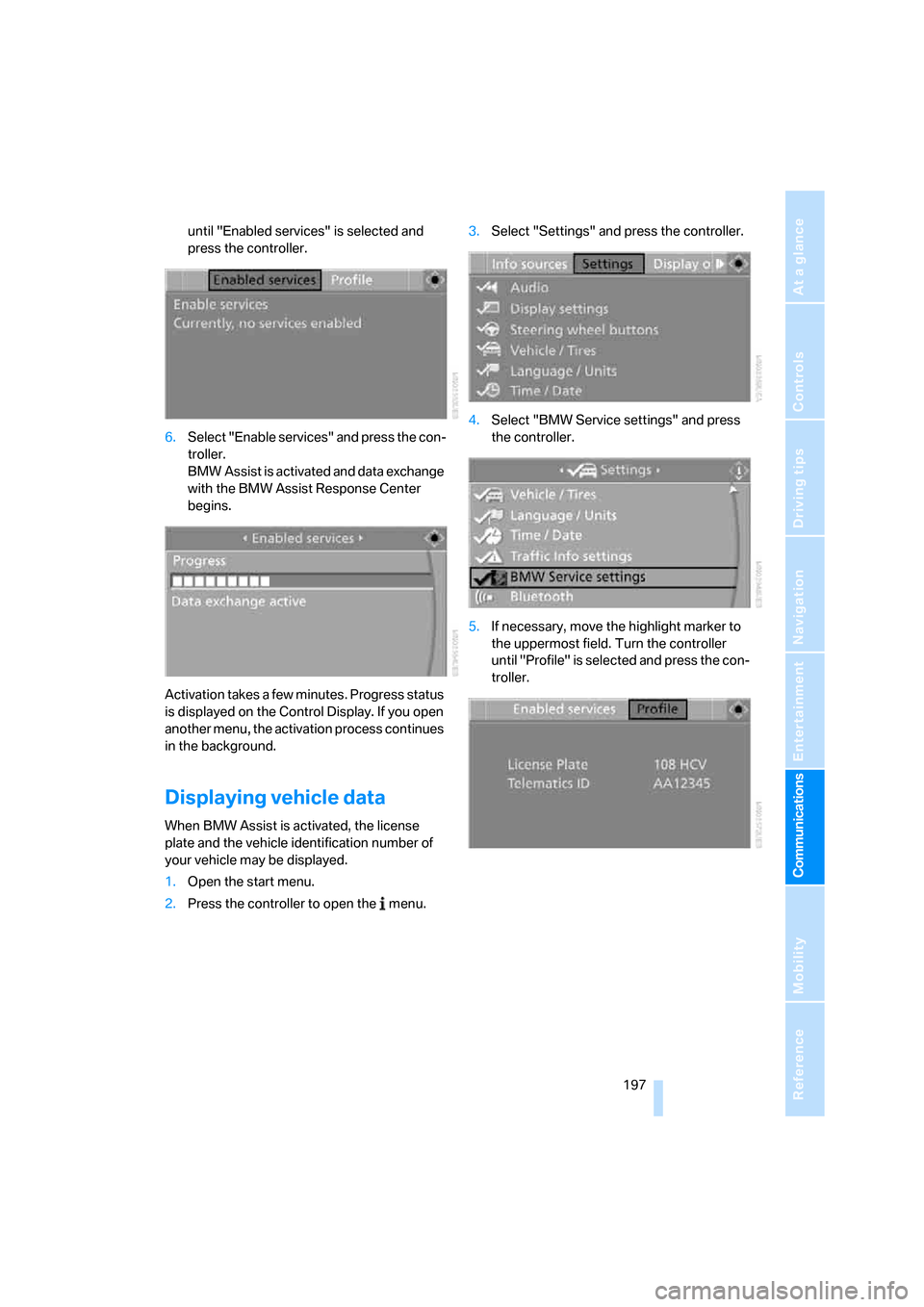
until "Enabled services" is selected and
press the controller.
6.Select "Enable services" and press the con-
troller.
BMW Assist is activated and data exchange
with the BMW Assist Response Center
begins.
Activation takes a few minutes. Progress status
is displayed on the Control Display. If you open
another menu, the activation process continues
in the background.
Displaying vehicle data
When BMW Assist is activated, the license
plate and the vehicle identification number of
your vehicle may be displayed.
1.Open the start menu.
2.Press the controller to open the menu.3.Select "Settings" and press the controller.
4.Select "BMW Service settings" and press
the controller.
5.If necessary, move the highlight marker to
the uppermost field. Turn the controller
until "Profile" is selected and press the con-
troller.
Page 249 of 260
Reference 247
At a glance
Controls
Driving tips
Communications
Navigation
Entertainment
Mobility
Inflation pressure, tires202
Inflation pressure monitoring,
refer to Tire Pressure
Monitor TPM84
Information
– on another location129
– on country129
– on current position129
– on destination location129
"Information on
destination"131
"Info sources"72
Initializing
– compass, refer to
Calibrating105
Initializing, Flat Tire Monitor
FTM83
"Input map"128
Installation location
– CD changer167
Instructions for navigation
system, refer to Voice
instructions140
Instrument cluster12
Instrument lighting94
Integrated key28
Integrated universal remote
control102
Interesting destination for
navigation129
"Interim time"78
Interior lamps94
– remote control30
Interior motion sensor35
Interior rearview mirror52
– automatic dimming
feature53
– compass104
Interlock61
Intermittent mode of the
wipers63
J
Jacking points220
Jets, refer to Air vents96
Joystick, refer to iDrive16
Jumpering, refer to Jump
starting223Jump starting223
K
Key, refer to Integrated key/
remote control28
Keyless go, refer to
Convenient access36
Keyless opening and closing,
refer to Convenient
access36
Key Memory, refer to Personal
Profile28
Kick-down61
Knock control200
L
Lamps
– Adaptive Head Light93
– instrument lighting94
– interior lighting94
Lamps, refer to Parking lamps/
low beams91
Lamps and bulbs, replacing
bulbs216
"Language / Units"70,79
"Language / Units" in
navigation138,140
"Languages"79
"Languages" in
navigation138,140
Lashing eyes, refer to
Securing cargo118
Last destinations, refer to
Destination list130
"Last seat pos."50
LATCH child-restraint fixing
system56
LED Light-emitting
diodes216
Length, refer to
Dimensions231
License plate lamp, replacing
bulb219
Light-emitting diodes
LED216
Lighter107
– socket107"Lighting"63,92
Lighting
– lamps and bulbs216
– of instruments94
– of vehicle, refer to Lamps91
Light-metal alloy wheels, care,
refer to Caring for your
vehicle brochure
Light switch91
"Limit", refer to Speed limit78
Limit, refer to Speed limit78
Load securing equipment,
refer to Securing cargo118
Lock buttons of doors, refer to
Locking33
Locking
– adjusting confirmation
signal31
– from inside33
– from outside30
– without remote control, refer
to Convenient access36
Locking and unlocking doors
– from inside32
– from outside29
Low-beam headlamps91
– automatic91
– replacing bulbs
217
Lower back support, refer to
Lumbar support47
Luggage compartment, refer
to Cargo bay
Luggage compartment lid33
– convenient access37
– emergency release34
– opening from outside33
– unlocking manually33
– unlocking with remote
control30
Luggage rack, refer to Roof-
mounted luggage
rack118,119
Lumbar support47
M
M+S tires, refer to Winter
tires208