flash BMW 135I COUPE 2011 E82 Owner's Guide
[x] Cancel search | Manufacturer: BMW, Model Year: 2011, Model line: 135I COUPE, Model: BMW 135I COUPE 2011 E82Pages: 256, PDF Size: 8.41 MB
Page 165 of 256
Navigation
Entertainment
Driving tips
163Reference
At a glance
Controls
Communications
Mobility
External devices
At a glance
AUX-IN port
You can connect an external audio device, for
instance an MP3 player, and play audio tracks
over the car's loudspeaker system. You can
adjust the tone using iDrive.
Connecting
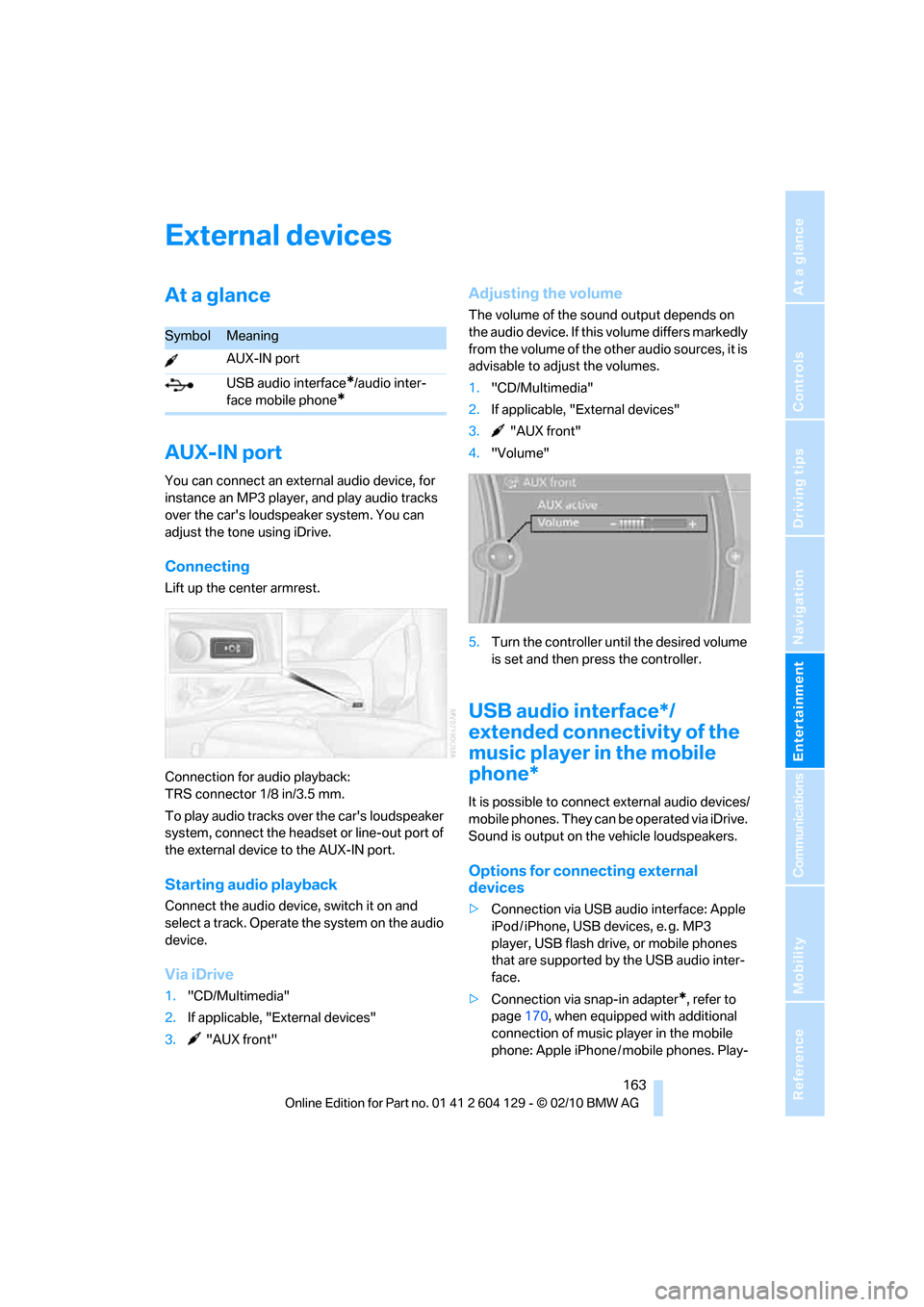
Lift up the center armrest.
Connection for audio playback:
TRS connector 1/8 in/3.5 mm.
To play audio tracks over the car's loudspeaker
system, connect the headset or line-out port of
the external device to the AUX-IN port.
Starting audio playback
Connect the audio device, switch it on and
select a track. Operate the system on the audio
device.
Via iDrive
1."CD/Multimedia"
2.If applicable, "External devices"
3."AUX front"
Adjusting the volume
The volume of the sound output depends on
the audio device. If this volume differs markedly
from the volume of the other audio sources, it is
advisable to adjust the volumes.
1."CD/Multimedia"
2.If applicable, "External devices"
3."AUX front"
4."Volume"
5.Turn the controller until the desired volume
is set and then press the controller.
USB audio interface*/
extended connectivity of the
music player in the mobile
phone*
It is possible to connect external audio devices/
mobile phones. They can be operated via iDrive.
Sound is output on the vehicle loudspeakers.
Options for connecting external
devices
>Connection via USB audio interface: Apple
iPod / iPhone, USB devices, e. g. MP3
player, USB flash drive, or mobile phones
that are supported by the USB audio inter-
face.
>Connection via snap-in adapter
*, refer to
page170, when equipped with additional
connection of music player in the mobile
phone: Apple iPhone / mobile phones. Play-
SymbolMeaning
AUX-IN port
USB audio interface
*/audio inter-
face mobile phone
*
Page 210 of 256
Maintenance
208
Socket for Onboard
Diagnosis OBD
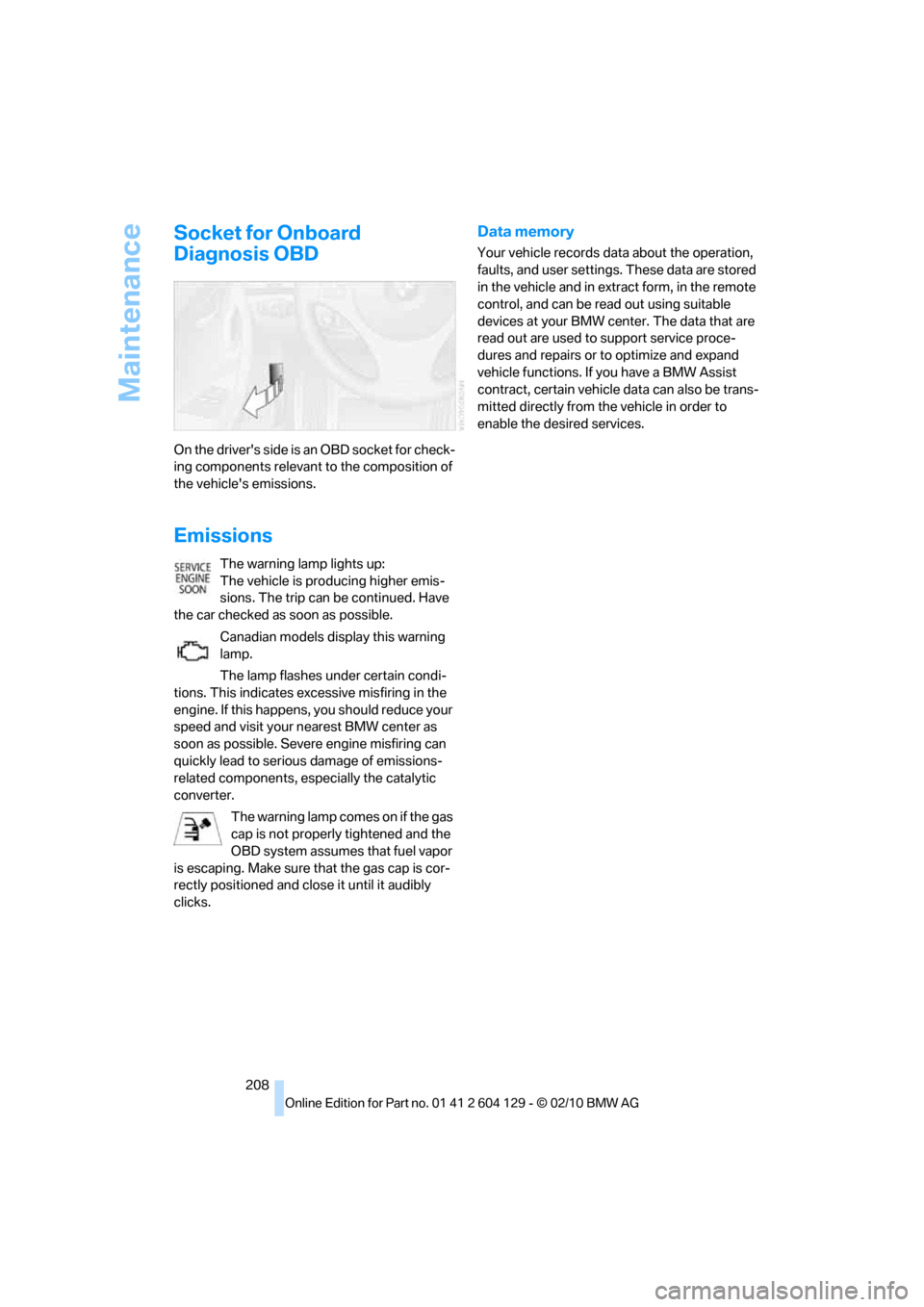
On the driver's side is an OBD socket for check-
ing components relevant to the composition of
the vehicle's emissions.
Emissions
The warning lamp lights up:
The vehicle is producing higher emis-
sions. The trip can be continued. Have
the car checked as soon as possible.
Canadian models display this warning
lamp.
The lamp flashes under certain condi-
tions. This indicates excessive misfiring in the
engine. If this happens, you should reduce your
speed and visit your nearest BMW center as
soon as possible. Severe engine misfiring can
quickly lead to serious damage of emissions-
related components, especially the catalytic
converter.
The warning lamp comes on if the gas
cap is not properly tightened and the
OBD system assumes that fuel vapor
is escaping. Make sure that the gas cap is cor-
rectly positioned and close it until it audibly
clicks.
Data memory
Your vehicle records data about the operation,
faults, and user settings. These data are stored
in the vehicle and in extract form, in the remote
control, and can be read out using suitable
devices at your BMW center. The data that are
read out are used to support service proce-
dures and repairs or to optimize and expand
vehicle functions. If you have a BMW Assist
contract, certain vehicle data can also be trans-
mitted directly from the vehicle in order to
enable the desired services.
Page 221 of 256
Mobility
219Reference
At a glance
Controls
Driving tips
Communications
Navigation
Entertainment
Giving and receiving assistance
Emergency Request*
Conditions for an Emergency Request:
>Full preparation package mobile phone: this
equipment makes it possible to send an
Emergency Request even if no mobile
phone is paired with the vehicle.
>BMW Assist is activated. Activating BMW
Assist, refer to page186.
>Radio readiness is on.
>The BMW Assist system is logged on to a
mobile phone network.
>The Emergency Request system is opera-
ble.
Once your service contract for BMW Assist
expires, the BMW Assist system can be deacti-
vated by a BMW center without you having to
visit a workshop. Once the BMW Assist system
has been deactivated, Emergency Requests
are not possible. The BMW Assist system can
be reactivated by a BMW center after a new
contract has been signed.
Sending an Emergency Request
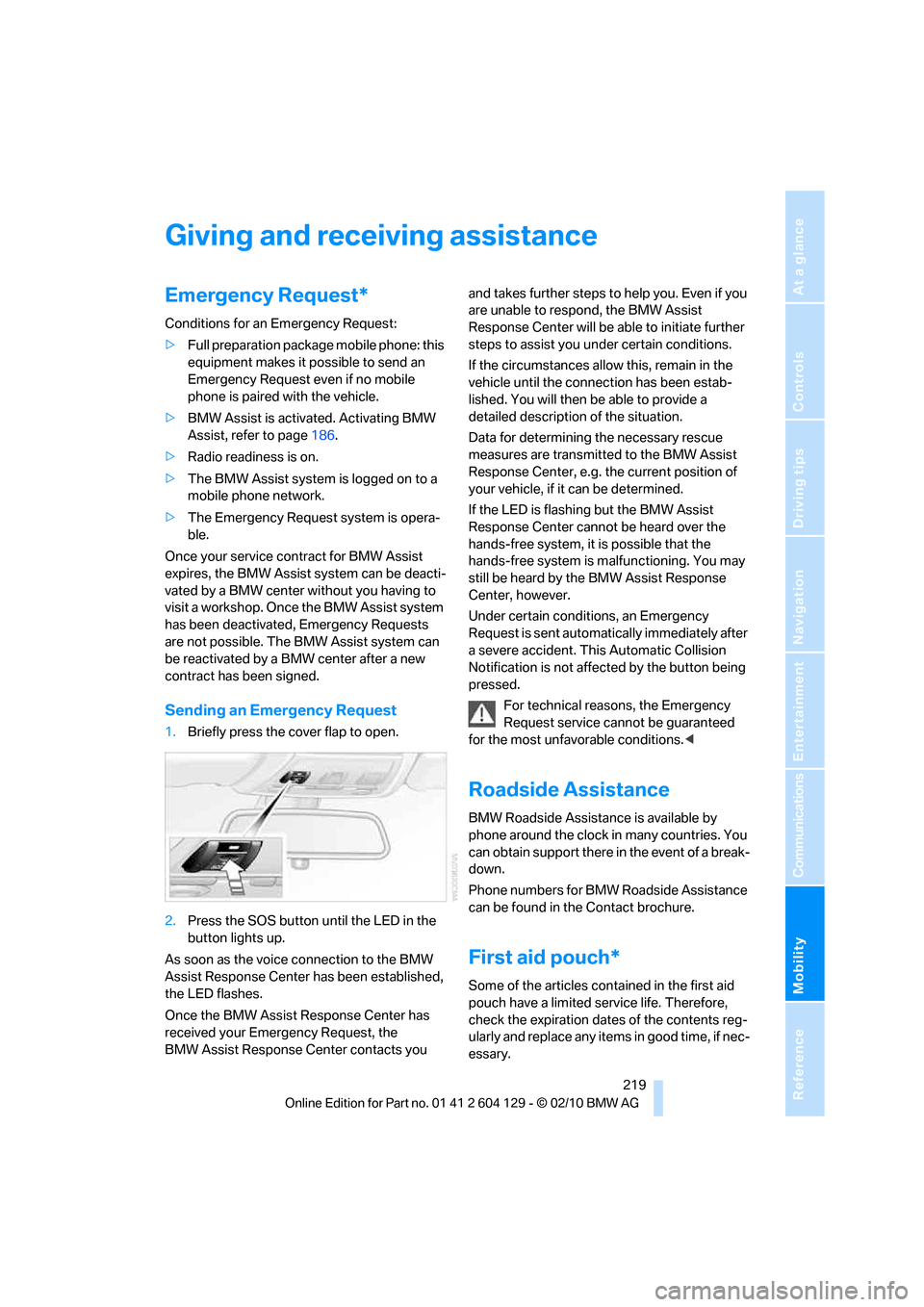
1.Briefly press the cover flap to open.
2.Press the SOS button until the LED in the
button lights up.
As soon as the voice connection to the BMW
Assist Response Center has been established,
the LED flashes.
Once the BMW Assist Response Center has
received your Emergency Request, the
BMW Assist Response Center contacts you and takes further steps to help you. Even if you
are unable to respond, the BMW Assist
Response Center will be able to initiate further
steps to assist you under certain conditions.
If the circumstances allow this, remain in the
vehicle until the connection has been estab-
lished. You will then be able to provide a
detailed description of the situation.
Data for determining the necessary rescue
measures are transmitted to the BMW Assist
Response Center, e.g. the current position of
your vehicle, if it can be determined.
If the LED is flashing but the BMW Assist
Response Center cannot be heard over the
hands-free system, it is possible that the
hands-free system is malfunctioning. You may
still be heard by the BMW Assist Response
Center, however.
Under certain conditions, an Emergency
Request is sent automatically immediately after
a severe accident. This Automatic Collision
Notification is not affected by the button being
pressed.
For technical reasons, the Emergency
Request service cannot be guaranteed
for the most unfavorable conditions.<
Roadside Assistance
BMW Roadside Assistance is available by
phone around the clock in many countries. You
can obtain support there in the event of a break-
down.
Phone numbers for BMW Roadside Assistance
can be found in the Contact brochure.
First aid pouch*
Some of the articles contained in the first aid
pouch have a limited service life. Therefore,
check the expiration dates of the contents reg-
ularly and replace any items in good time, if nec-
essary.
Page 225 of 256
Mobility
223Reference
At a glance
Controls
Driving tips
Communications
Navigation
Entertainment
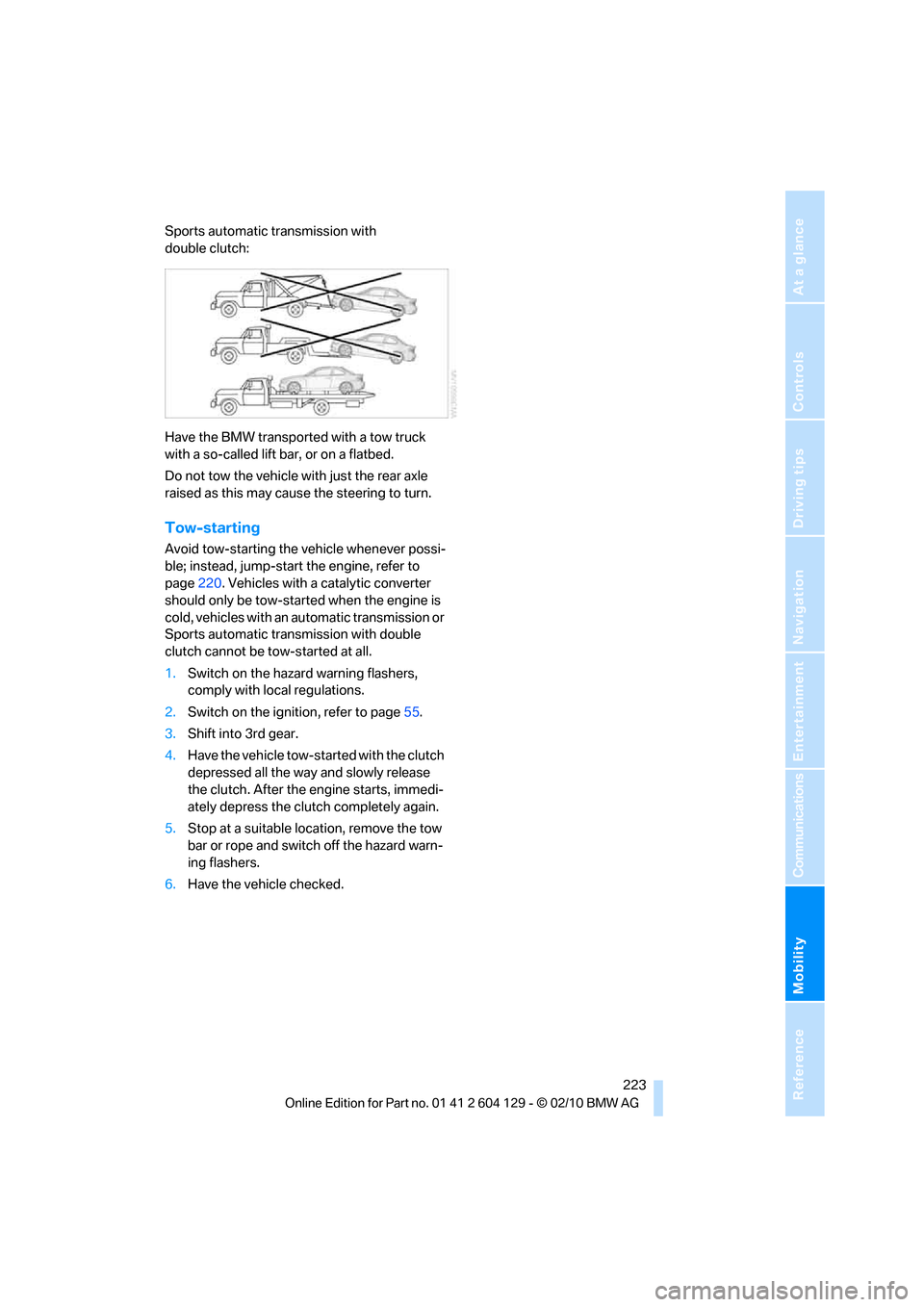
Sports automatic transmission with
double clutch:
Have the BMW transported with a tow truck
with a so-called lift bar, or on a flatbed.
Do not tow the vehicle with just the rear axle
raised as this may cause the steering to turn.
Tow-starting
Avoid tow-starting the vehicle whenever possi-
ble; instead, jump-start the engine, refer to
page220. Vehicles with a catalytic converter
should only be tow-started when the engine is
cold, vehicles with an automatic transmission or
Sports automatic transmission with double
clutch cannot be tow-started at all.
1.Switch on the hazard warning flashers,
comply with local regulations.
2.Switch on the ignition, refer to page55.
3.Shift into 3rd gear.
4.Have the vehicle tow-started with the clutch
depressed all the way and slowly release
the clutch. After the engine starts, immedi-
ately depress the clutch completely again.
5.Stop at a suitable location, remove the tow
bar or rope and switch off the hazard warn-
ing flashers.
6.Have the vehicle checked.
Page 244 of 256
Everything from A to Z
242 DTC Dynamic Traction
Control81
– indicator lamps81
DVD
– country codes153
– settings154
– video playback153
DVD menu154
DVD player, refer to CD
player151
DVD video153
Dynamic Brake Control
DBC81
Dynamic destination
guidance131
Dynamic Stability Control
DSC81
Dynamic Traction Control
DTC
– indicator lamps82
E
EBV Electronic brake-force
distribution81
Eject button, refer to Buttons
on the CD / DVD player140
Electrical defect
– 7-gear sports automatic
transmission with double
clutch63
Electrical malfunction
– door lock30
– fuel filler flap192
– glass roof37
Electronic brake-force
distribution EBV81
Electronic oil level check203
Electronic Stability Program
ESP, refer to Dynamic
Stability Control DSC81
Emergency operation, refer to
Manual operation
– door lock30
– fuel filler flap192
– glass roof37
– transmission lock, automatic
transmission59Emergency release, trunk
lid31
Emergency Request219
Emergency services, refer to
Roadside Assistance219
Energy, saving
– saving fuel112
Engine
– breaking in112
– data226
– speed226
– starting56
– starting, Comfort Access33
– switching off56
Engine compartment203
Engine coolant, refer to
Coolant205
Engine oil
– adding205
– additives205
– alternative oil grades205
– approved engine oils205
– BMW Maintenance
System207
– checking level203
– intervals between changes,
refer to Service
requirements72
Engine output, refer to Engine
data226
Engine speed, refer to Engine
data226
Engine starting, refer to
Starting the engine56
Entering the postal code for
navigation122
Entry map for destination126
Equalizer, tone setting141
ESP Electronic Stability
Program, refer to Dynamic
Stability Control DSC81
Exhaust system, refer to Hot
exhaust system113
Extended connectivity of the
music player in the mobile
phone163Exterior mirrors49
– adjusting49
– automatic dimming
feature51
– automatic heating50
– folding in and out50
External devices
– random sequence165
Eyes
– for tow-starting and towing
away221
– for tying down loads116
F
Failure messages, refer to
Check Control76
Failure of an electrical
consumer218
False alarm, refer to Avoiding
unintentional alarms33
Fastening safety belts, refer to
Safety belts49
Fastest route for
navigation130
Fast forward
– CD changer153
– CD player153
Filter of automatic climate
control, refer to Microfilter/
activated charcoal filter99
First aid pouch219
Fixture for remote control,
refer to Ignition lock55
Flash when locking/
unlocking28
Flat tire
– run-flat tires200
– Tire Pressure Monitor
TPM84
Flat Tire Monitor FTM82
– indicating a flat tire83
– initializing the system83
– system limits82
Flat tires, refer to Tire
condition199
FM, waveband143
Page 245 of 256
Reference 243
At a glance
Controls
Driving tips
Communications
Navigation
Entertainment
Mobility
Fog lamps94
– indicator lamp13,94
Footbrake, refer to Braking
safely114
Footwell lamps95
For your own safety5
Free memory capacity, music
collection161
Front airbags88
Front seat setting44
Frost, removing from
windows, refer to Defrosting
windows98
FTM, refer to Flat Tire
Monitor82
Fuel193
– gauge69
– high-quality brands193
– quality193
– specifications193
– tank contents, refer to
Capacities230
Fuel clock, refer to Fuel
gauge69
Fuel consumption indicator,
refer to Average fuel
consumption70
Fuel consumption statistics,
refer to Average fuel
consumption70
Fuel display, refer to Fuel
gauge69
Fuel filler flap192
– releasing in the event of
electrical malfunction192
Fuses218
G
Garage door opener, refer to
Integrated universal remote
control101
Gasoline, refer to Required
fuel193
Gasoline display, refer to Fuel
gauge69Gas station
recommendations131
Gear change
– with automatic
transmission58
– with manual transmission57
Gear display, with automatic
transmission58
Gear shifting62
Gearshift lever60
– automatic transmission with
Steptronic58
– manual transmission57
General driving notes113
Glass roof, electric36
– closing after electrical
malfunction37
– convenient operation30
– opening, closing37
– operation with Comfort
Access34
– pinch protection system37
– raising36
– remote control28
Glove compartment104
GPS navigation, refer to
Navigation system120
Grills, refer to Air vents96
Gross vehicle weight, refer to
Weights229
H
Halogen lamps
– replacing bulbs214
Handbrake, refer to Parking
brake57
Hands-free system, refer to
Microphone for hands-free
mode14
Hazard warning flashers14
HD Radio144
Head airbags88
Headlamp control,
automatic91
Headlamp cover214
Headlamp flasher64
– indicator lamp13Headlamps
– replacing bulbs214
Head restraints46
Heated
– seats48
– steering wheel51
Heated mirrors50
Heating
– mirrors50
– seats48
– steering wheel51
Heating, rear window98
Heating and ventilation96
Heavy loads, refer to Stowing
cargo115
Height, refer to
Dimensions227
Height adjustment
– steering wheel51
High-beam assistant93
High beams93
– indicator lamp13
– replacing bulbs214
High beams and low beams,
automatic, refer to High-
beam assistant93
High-pressure
washer209,210
High water, refer to Driving
through water114
Highways, refer to Route
criteria130
Hills114
Holders for cups105
Hood202
Hot exhaust system113
Hydraulic brake assist, refer to
Dynamic Brake Control81
Hydroplaning113
I
IBOC, refer to HD Radio144
Ice warning, refer to Outside
temperature warning68
Identification marks
– tire coding198
Idle position61
Page 247 of 256
Reference 245
At a glance
Controls
Driving tips
Communications
Navigation
Entertainment
Mobility
Lower back support, refer to
Lumbar support45
Luggage compartment, refer
to Cargo area
Luggage rack, refer to Roof-
mounted luggage rack116
Lumbar support45
M
M+S tires, refer to Winter
tires201
Maintenance, refer to
– BMW Maintenance
System207
– Service booklet
Maintenance system207
Malfunction warnings, refer to
Check Control76
Manual car wash210
Manually unlocking parking
lock63
Manual operation
– door lock30
– fuel filler flap192
– glass roof37
– parking lock63
– transmission lock, automatic
transmission59
Manual operation with
automatic transmission59
Manual transmission57
Map for navigation
– changing scale133
– entering destination126
Map view132
Maximum cooling97
Maximum speed
– for winter tires201
Menus, refer to iDrive16
Messages176
Messages from the concierge
service177
Microfilter/activated-charcoal
filter for automatic climate
control99
Microphone for telephone14
Mirror dimming feature51Mirrors49
– automatic curb monitor50
– exterior mirrors49
– heating50
– interior rearview mirror50
Mobile phone
– adjusting volume173
– connecting, refer to Mobile
phone, pairing170
– operation via iDrive173
– pairing170
Mobile phone, installation
location, refer to Center
armrest105
Mobile phone, refer to
Telephone170
Mobile phone, refer to the
separate Owner's Manual
Modifications, technical, refer
to For your own safety5
Monitor, refer to iDrive16
Monitoring system for tire
pressures, refer to Flat Tire
Monitor82
MP3 player, connecting, refer
to AUX-IN port163
MP3 player, connecting, refer
to USB audio interface163
Multi-channel playback141
Multifunctional steering
wheel, refer to Buttons on
the steering wheel11
Multifunction switch
– refer to Turn signals/
headlamp flasher64
– refer to Wiper system65
Music, managing161
Music collection158
– backup162
– deleting162
– random sequence161
– restoring162
Music player, connecting,
refer to AUX-IN port163
Music player, connecting,
refer to USB audio
interface163
Music search159
My Info177
N
Navigation
– starting destination
guidance after entering a
destination123
– storing current position123
– voice activation127
Navigation announcements,
refer to Switching voice
instructions on/off132
Navigation data120
Navigation system120
– address book123
– bypassing a route
section131
– continuing destination
guidance130
– destination entry121
– dynamic destination
guidance131
– entering a destination by
voice127
– entering a destination
manually121
– frequently asked
questions137
– gas station
recommendations131
– planning a trip128
– route list131
– selecting destination via
map126
– selecting route criteria130
– special destinations124
– starting destination
guidance130
– terminating destination
guidance130
– traffic bulletins133
– voice instructions132
– volume adjustment132
Neck support, refer to Head
restraints46
Nets, refer to Storage
compartments105
New tires200