replacing BMW 135I COUPE 2011 E82 Owner's Manual
[x] Cancel search | Manufacturer: BMW, Model Year: 2011, Model line: 135I COUPE, Model: BMW 135I COUPE 2011 E82Pages: 256, PDF Size: 8.41 MB
Page 5 of 256
Reference
At a glance
Controls
Driving tips
Communications
Navigation
Entertainment
Mobility
Contents
The quickest way to find special topics is to
consult the index, refer to page238.
Using this Owner's Manual
4Notes
7Reporting safety defects
At a glance
10Dashboard
16iDrive
21Letters and numbers
22Voice activation system
Controls
26Opening and closing
43Adjustments
52Transporting children safely
55Driving
68Controls overview
80Technology for driving comfort and
safety
91Lamps
96Climate
101Practical interior accessories
Driving tips
112Things to remember when driving
Navigation
120Navigation system
121Destination entry
130Destination guidance
137What to do if …
Entertainment
140On/off and tone
143Radio
146Satellite radio
151CD/DVD player and CD changer
158Music collection
163External devices
Communications
170Telephone
182Contacts
184BMW Assist
Mobility
192Refueling
194Wheels and tires
202Under the hood
207Maintenance
209Care
213Replacing components
219Giving and receiving assistance
Reference
226Technical data
231Short commands for the voice activation
system
238Everything from A to Z
Page 37 of 256
Controls
35Reference
At a glance
Driving tips
Communications
Navigation
Entertainment
Mobility
Replacing the battery
The remote control for Comfort Access con-
tains a battery that will need to be replaced from
time to time.
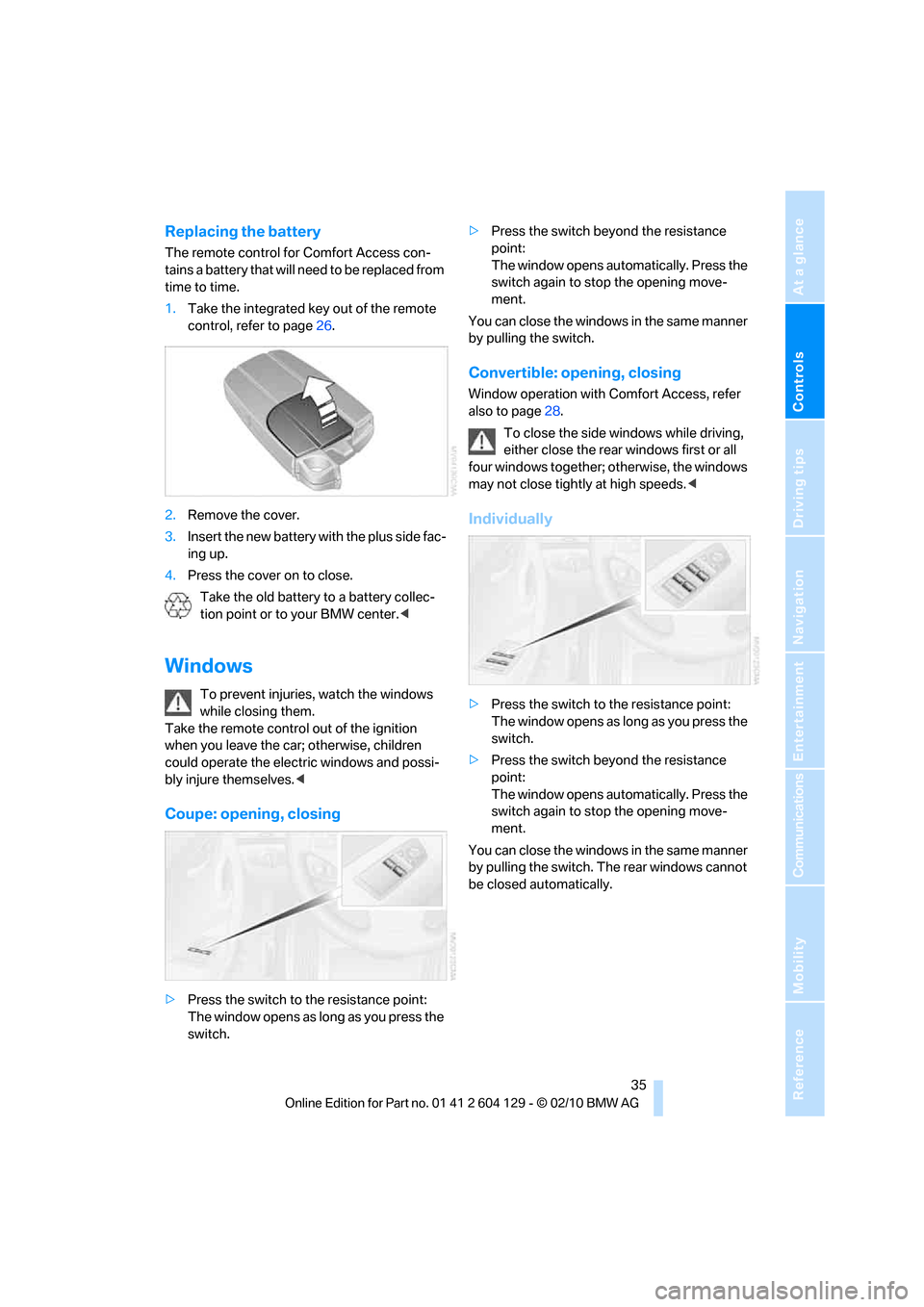
1.Take the integrated key out of the remote
control, refer to page26.
2.Remove the cover.
3.Insert the new battery with the plus side fac-
ing up.
4.Press the cover on to close.
Take the old battery to a battery collec-
tion point or to your BMW center.<
Windows
To prevent injuries, watch the windows
while closing them.
Take the remote control out of the ignition
when you leave the car; otherwise, children
could operate the electric windows and possi-
bly injure themselves.<
Coupe: opening, closing
>Press the switch to the resistance point:
The window opens as long as you press the
switch.>Press the switch beyond the resistance
point:
The window opens automatically. Press the
switch again to stop the opening move-
ment.
You can close the windows in the same manner
by pulling the switch.
Convertible: opening, closing
Window operation with Comfort Access, refer
also to page28.
To close the side windows while driving,
either close the rear windows first or all
four windows together; otherwise, the windows
may not close tightly at high speeds.<
Individually
>Press the switch to the resistance point:
The window opens as long as you press the
switch.
>Press the switch beyond the resistance
point:
The window opens automatically. Press the
switch again to stop the opening move-
ment.
You can close the windows in the same manner
by pulling the switch. The rear windows cannot
be closed automatically.
Page 88 of 256
Technology for driving comfort and safety
86
Message for unsuccessful system
reset
Yellow warning lamp comes on. A
message appears on the Control Dis-
play.
The system is not reset, e.g. after a wheel
change.
Check the tire inflation pressure and reset the
system, refer to page85.
Malfunction
The small warning lamp flashes in
yellow and then lights up continu-
ously; the large warning lamp comes
on in yellow.The tires appear in gray
in the Control Display. No punctures can be
detected.
Display in the following situations:
>Malfunction:
Have the system checked
>A wheel without TPM electronics has been
installed:
Have it checked by your BMW center.
>Interference from systems or devices that
use the same radio frequency:
The system automatically becomes active
again when the vehicle moves out of the
interference zone.
Declaration according to NHTSA/
FMVSS 138
Tire Pressure Monitoring Systems
Each tire should be checked monthly when cold
and inflated to the inflation pressure recom-
mended by the vehicle manufacturer on the
vehicle placard or tire inflation pressure label. If
your vehicle has tires of a different size than the
size indicated on the vehicle placard or tire infla-
tion pressure label, you should determine the
proper tire inflation pressure for those tires. As
an added safety feature, your vehicle has been
equipped with a tire pressure monitoring sys-
tem, TPMS, that illuminates a low tire pressure
telltale when one or more of your tires are signif-
icantly under-inflated. Accordingly, when the
low tire pressure telltale illuminates, you should stop and check your tires as soon as possible,
and inflate them to the proper pressure. Driving
on a significantly underinflated tire causes the
tire to overheat and can lead to tire failure.
Underinflation also reduces fuel efficiency and
tire tread life and may affect the vehicle's han-
dling and stopping ability. Please note that the
TPMS is not a substitute for proper tire mainte-
nance, and it is the driver's responsibility to
maintain correct tire pressure, even if underin-
flation has not reached the level to trigger illumi-
nation of the TPMS low tire pressure indicator.
The TPMS malfunction indicator is combined
with the low tire pressure telltale. When the sys-
tem detects a malfunction, the telltale will flash
for approximately one minute and then remain
continuously lit. This sequence will continue
upon subsequent vehicle startups as long as
the malfunction exists. When the malfunction
indicator is illuminated, the system may not be
able to detect or signal low tire pressure as
intended. TPMS malfunctions may occur for a
variety of reasons, including the installation of
replacement or alternate tires or wheels on the
vehicle that prevent the TPMS from functioning
properly. Always check the TPMS malfunction
telltale after replacing one or more tires or
wheels on your vehicle to ensure that the
replacement or alternate tires and wheels allow
the TPMS to continue to function properly.
Active steering*
The concept
Active steering varies the turning angle of the
front wheels in relation to steering wheel move-
ments. It also varies the steering force required
to turn the wheels depending on the speed at
which you are driving.
When you are driving in the low road speed
range, e.g. in a town or when parking, the steer-
ing angle is increased, i.e. steering becomes
very direct and less effort is required to turn the
wheels. In the higher speed range, on the other
hand, the steering angle is reduced as the
speed increases. This improves the handling of
your BMW over the entire speed range.
Page 215 of 256
Mobility
213Reference
At a glance
Controls
Driving tips
Communications
Navigation
Entertainment
Replacing components
Onboard vehicle tool kit
The onboard vehicle tool kit is stored below the
floor mat in the cargo area.
Wiper blades
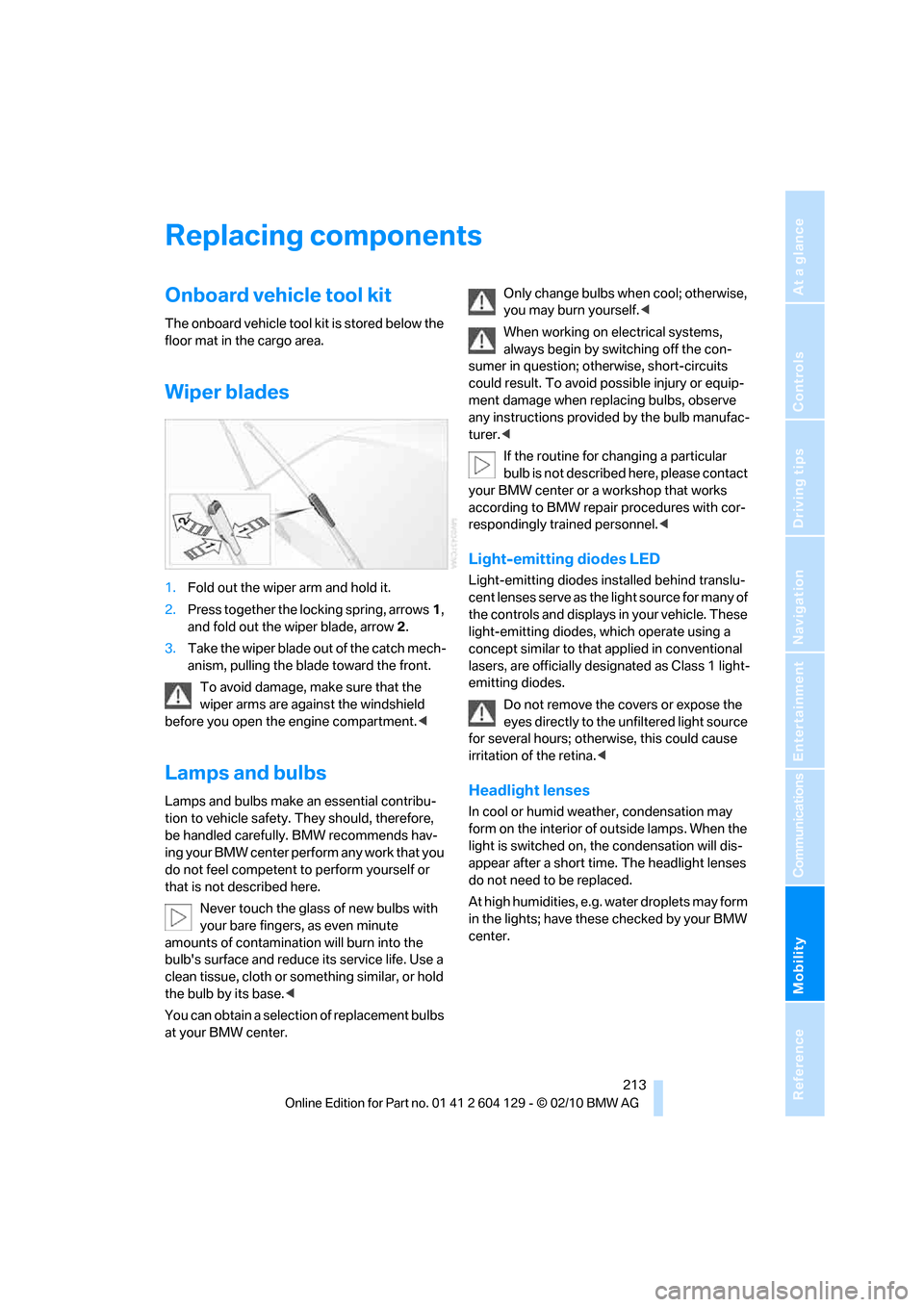
1.Fold out the wiper arm and hold it.
2.Press together the locking spring, arrows1,
and fold out the wiper blade, arrow2.
3.Take the wiper blade out of the catch mech-
anism, pulling the blade toward the front.
To avoid damage, make sure that the
wiper arms are against the windshield
before you open the engine compartment.<
Lamps and bulbs
Lamps and bulbs make an essential contribu-
tion to vehicle safety. They should, therefore,
be handled carefully. BMW recommends hav-
ing your BMW center perform any work that you
do not feel competent to perform yourself or
that is not described here.
Never touch the glass of new bulbs with
your bare fingers, as even minute
amounts of contamination will burn into the
bulb's surface and reduce its service life. Use a
clean tissue, cloth or something similar, or hold
the bulb by its base.<
You can obtain a selection of replacement bulbs
at your BMW center.Only change bulbs when cool; otherwise,
you may burn yourself.<
When working on electrical systems,
always begin by switching off the con-
sumer in question; otherwise, short-circuits
could result. To avoid possible injury or equip-
ment damage when replacing bulbs, observe
any instructions provided by the bulb manufac-
turer.<
If the routine for changing a particular
bulb is not described here, please contact
your BMW center or a workshop that works
according to BMW repair procedures with cor-
respondingly trained personnel.<
Light-emitting diodes LED
Light-emitting diodes installed behind translu-
cent lenses serve as the light source for many of
the controls and displays in your vehicle. These
light-emitting diodes, which operate using a
concept similar to that applied in conventional
lasers, are officially designated as Class 1 light-
emitting diodes.
Do not remove the covers or expose the
eyes directly to the unfiltered light source
for several hours; otherwise, this could cause
irritation of the retina.<
Headlight lenses
In cool or humid weather, condensation may
form on the interior of outside lamps. When the
light is switched on, the condensation will dis-
appear after a short time. The headlight lenses
do not need to be replaced.
At high humidities, e.g. water droplets may form
in the lights; have these checked by your BMW
center.
Page 216 of 256
Replacing components
214
Xenon lamps*
These bulbs have a very long service life and are
highly unlikely to fail. If a xenon lamp fails never-
theless, switch on the fog lamps and continue
the journey with great care, provided that local
legislation does not prohibit this.
Have any work on the xenon lamp system,
including bulb replacements, performed
o n ly b y a BM W c e n t e r o r a w o r k s h o p t h a t w o r k s
according to BMW repair procedures with cor-
respondingly trained personnel. Otherwise, if
such work is carried out improperly, the high
voltage in the system presents the danger of
fatal injuries.<
Removing the headlamp cover
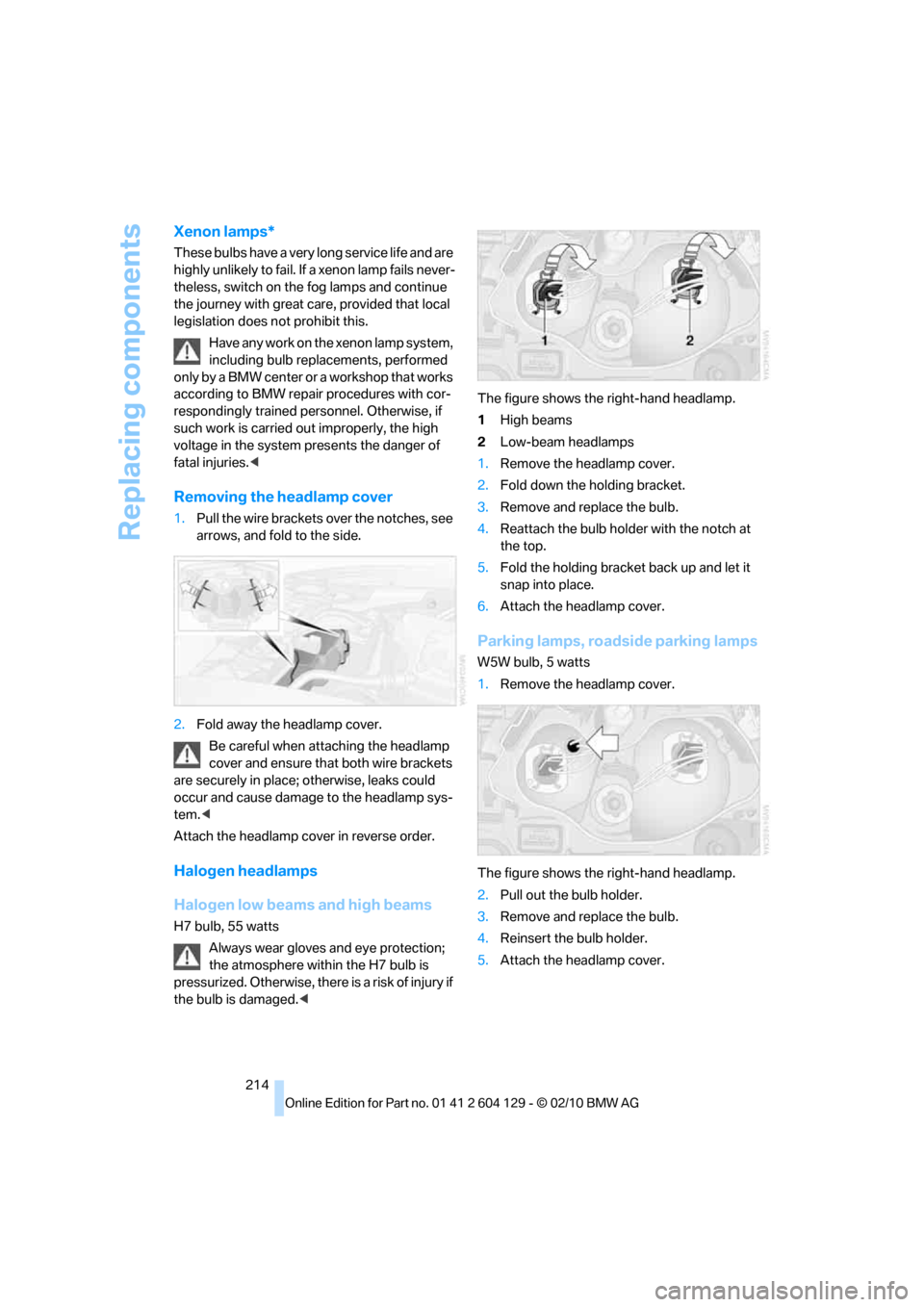
1.Pull the wire brackets over the notches, see
arrows, and fold to the side.
2.Fold away the headlamp cover.
Be careful when attaching the headlamp
cover and ensure that both wire brackets
are securely in place; otherwise, leaks could
occur and cause damage to the headlamp sys-
tem.<
Attach the headlamp cover in reverse order.
Halogen headlamps
Halogen low beams and high beams
H7 bulb, 55 watts
Always wear gloves and eye protection;
the atmosphere within the H7 bulb is
pressurized. Otherwise, there is a risk of injury if
the bulb is damaged.
2Low-beam headlamps
1.Remove the headlamp cover.
2.Fold down the holding bracket.
3.Remove and replace the bulb.
4.Reattach the bulb holder with the notch at
the top.
5.Fold the holding bracket back up and let it
snap into place.
6.Attach the headlamp cover.
Parking lamps, roadside parking lamps
W5W bulb, 5 watts
1.Remove the headlamp cover.
The figure shows the right-hand headlamp.
2.Pull out the bulb holder.
3.Remove and replace the bulb.
4.Reinsert the bulb holder.
5.Attach the headlamp cover.
Page 218 of 256
Replacing components
216
Side turn signals
W5W bulb, 5 watts
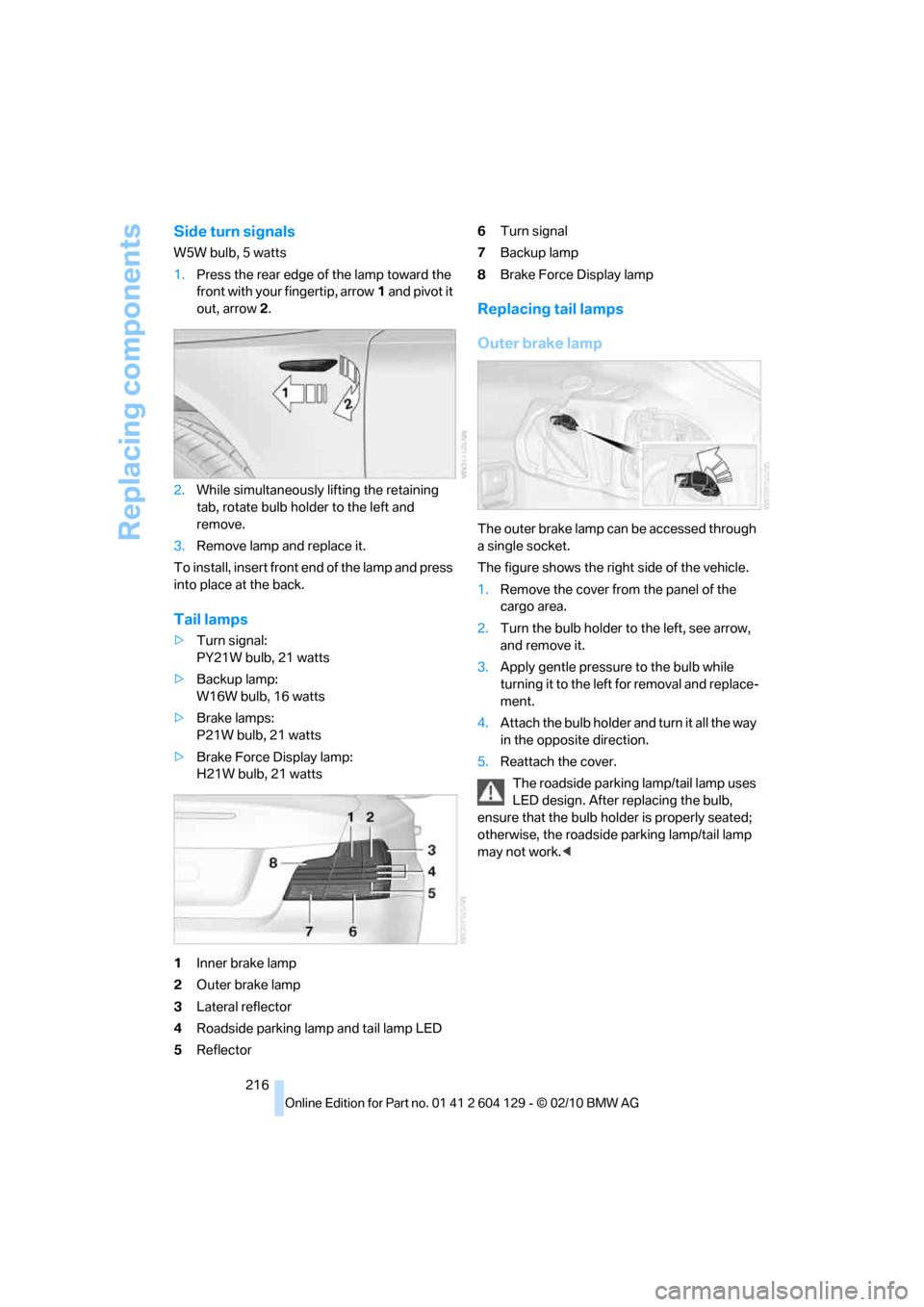
1.Press the rear edge of the lamp toward the
front with your fingertip, arrow1 and pivot it
out, arrow2.
2.While simultaneously lifting the retaining
tab, rotate bulb holder to the left and
remove.
3.Remove lamp and replace it.
To install, insert front end of the lamp and press
into place at the back.
Tail lamps
>Turn signal:
PY21W bulb, 21 watts
>Backup lamp:
W16W bulb, 16 watts
>Brake lamps:
P21W bulb, 21 watts
>Brake Force Display lamp:
H21W bulb, 21 watts
1Inner brake lamp
2Outer brake lamp
3Lateral reflector
4Roadside parking lamp and tail lamp LED
5Reflector6Turn signal
7Backup lamp
8Brake Force Display lamp
Replacing tail lamps
Outer brake lamp
The outer brake lamp can be accessed through
a single socket.
The figure shows the right side of the vehicle.
1.Remove the cover from the panel of the
cargo area.
2.Turn the bulb holder to the left, see arrow,
and remove it.
3.Apply gentle pressure to the bulb while
turning it to the left for removal and replace-
ment.
4.Attach the bulb holder and turn it all the way
in the opposite direction.
5.Reattach the cover.
The roadside parking lamp/tail lamp uses
LED design. After replacing the bulb,
ensure that the bulb holder is properly seated;
otherwise, the roadside parking lamp/tail lamp
may not work.<
Page 219 of 256
Mobility
217Reference
At a glance
Controls
Driving tips
Communications
Navigation
Entertainment
Inner brake lamp, turn signal, backup
lamp and Brake Force Display lamp
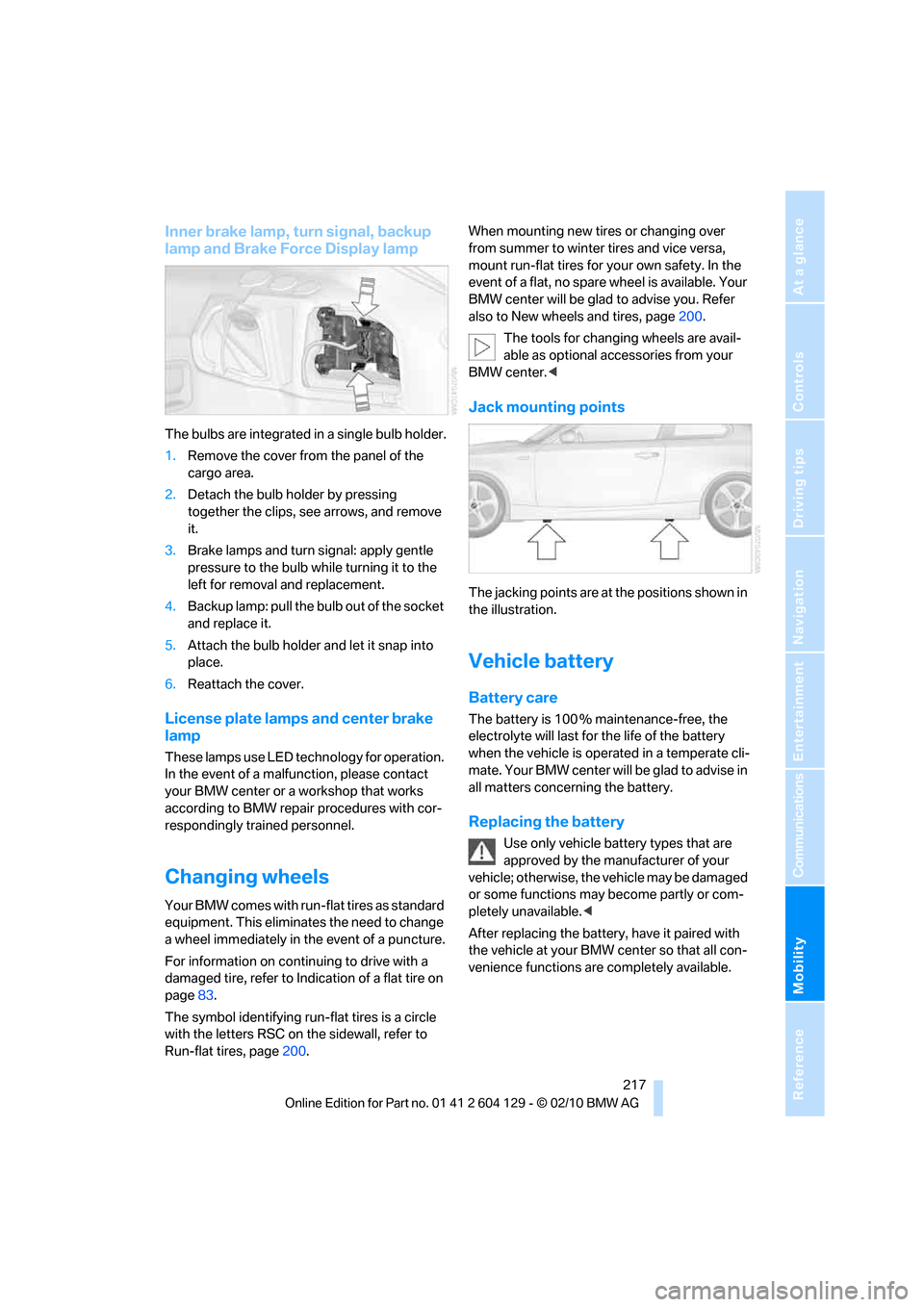
The bulbs are integrated in a single bulb holder.
1.Remove the cover from the panel of the
cargo area.
2.Detach the bulb holder by pressing
together the clips, see arrows, and remove
it.
3.Brake lamps and turn signal: apply gentle
pressure to the bulb while turning it to the
left for removal and replacement.
4.Backup lamp: pull the bulb out of the socket
and replace it.
5.Attach the bulb holder and let it snap into
place.
6.Reattach the cover.
License plate lamps and center brake
lamp
These lamps use LED technology for operation.
In the event of a malfunction, please contact
your BMW center or a workshop that works
according to BMW repair procedures with cor-
respondingly trained personnel.
Changing wheels
Your BMW comes with run-flat tires as standard
equipment. This eliminates the need to change
a wheel immediately in the event of a puncture.
For information on continuing to drive with a
damaged tire, refer to Indication of a flat tire on
page83.
The symbol identifying run-flat tires is a circle
with the letters RSC on the sidewall, refer to
Run-flat tires, page200.When mounting new tires or changing over
from summer to winter tires and vice versa,
mount run-flat tires for your own safety. In the
event of a flat, no spare wheel is available. Your
BMW center will be glad to advise you. Refer
also to New wheels and tires, page200.
The tools for changing wheels are avail-
able as optional accessories from your
BMW center.<
Jack mounting points
The jacking points are at the positions shown in
the illustration.
Vehicle battery
Battery care
The battery is 100 % maintenance-free, the
electrolyte will last for the life of the battery
when the vehicle is operated in a temperate cli-
mate. Your BMW center will be glad to advise in
all matters concerning the battery.
Replacing the battery
Use only vehicle battery types that are
approved by the manufacturer of your
vehicle; otherwise, the vehicle may be damaged
or some functions may become partly or com-
pletely unavailable.<
After replacing the battery, have it paired with
the vehicle at your BMW center so that all con-
venience functions are completely available.
Page 220 of 256
Replacing components
218
Charging the battery
Only charge the battery in the vehicle via the
terminals in the engine compartment with the
engine off. Connections, refer to Jump-starting
on page220.
Disposal
Have old batteries disposed of by your
BMW center or bring them to a recycling
center. Maintain the battery in an upright posi-
tion for transport and storage. Always secure
the battery against tipping over during trans-
port.<
Power failure
After a temporary power loss, the functioning of
some equipment may be limited and require
reinitialization. Individual settings may likewise
have been lost and will have to be programmed:
>Time and date
These values must be updated, refer to
page74.
>Radio
In some cases, stations may have to be
stored again, refer to page143.
>Navigation system
Wait for the system to start, refer to
page137.
>Glass roof
It may happen that the roof can only be
raised. The system must be initialized.
Please contact your BMW center.
>Seat and mirror memory
*
The positions must be stored again, refer to
page48.
>Inside rearview mirror with digital compass
The system must be calibrated, refer to
page104.
>Active steering
The system automatically initializes itself
briefly during a trip. The system is deacti-
vated during this time, refer to page87.
Fuses
Never attempt to repair a blown fuse and
do not replace a defective fuse with a sub-
stitute of another color or amperage rating; oth-
erwise, this could lead to a circuit overload, ulti-
mately resulting in a fire in the vehicle.<
In the glove compartment
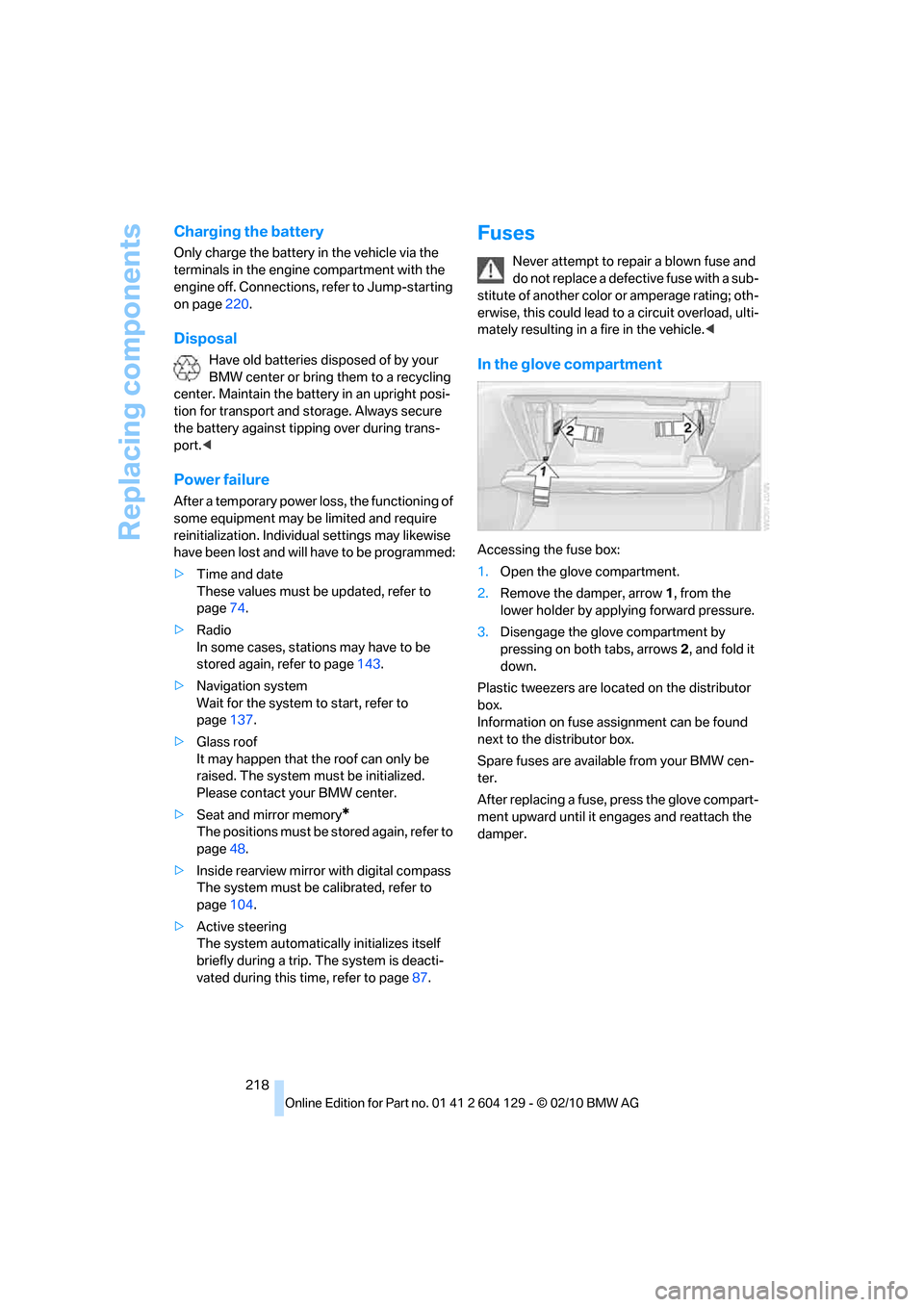
Accessing the fuse box:
1.Open the glove compartment.
2.Remove the damper, arrow1, from the
lower holder by applying forward pressure.
3.Disengage the glove compartment by
pressing on both tabs, arrows 2, and fold it
down.
Plastic tweezers are located on the distributor
box.
Information on fuse assignment can be found
next to the distributor box.
Spare fuses are available from your BMW cen-
ter.
After replacing a fuse, press the glove compart-
ment upward until it engages and reattach the
damper.
Page 241 of 256
Reference 239
At a glance
Controls
Driving tips
Communications
Navigation
Entertainment
Mobility
B
Backrests, refer to Seats44
Backrest width adjustment45
Back seats, refer to Rear seats
– adjusting head restraints46
Backup lamp, replacing
bulb216
Bag for skis, refer to Ski
bag107
Band-aids, refer to First aid
pouch219
Bar, refer to Tow-starting,
towing away222
Base plate for telephone or
mobile phone
– refer to Snap-in adapter180
Bass, tone setting140
Battery217
– charging218
– disposal35,218
– jump-starting220
– replacing217
– temporary power failure218
Battery for mobile phone181
Battery renewal
– remote control for vehicle35
Being towed222
Belts, refer to Safety belts49
Belt tensioner, refer to Safety
belts49
Beverage holders, refer to
Cupholders105
Blower, refer to Air volume98
Bluetooth, activating/
deactivating172
BMW
– car shampoo210
BMW Assist184
BMW Maintenance
System207
BMW Search186
Bottle holders, refer to
Cupholders105
Brake Assist, refer to Dynamic
Brake Control81
Brake fluid
– service requirements72
Brake Force Display87Brake lamps
– Brake Force Display87
– replacing bulb216
Brake pads, breaking in112
Brake rotors114
– brakes112
– breaking in112
Brakes
– ABS81
– BMW Maintenance
System207
– braking safely114
– breaking in112
– parking brake57
– service requirements72
Brake system112
– BMW Maintenance
System207
– breaking in112
– disc brakes114
Breakdown services, refer to
Roadside Assistance219
Breaking in the clutch112
Break-in period112
Bulb changing, refer to Lamps
and bulbs213
Bulbs, changing213
Button for starting the
engine55
Buttons on the steering
wheel11
C
California Proposition 65
warning6
Call
– accepting173
– ending174
– rejecting174
Calling, refer to Phone
numbers, dialing174
Calling, refer to Telephone
owner's manual
Can holders, refer to
Cupholders105
Capacities230
Capacity of the cargo area229Car battery, refer to Vehicle
battery217
Car care, refer to Care209
Care209
– automatic car washes209
– care products209
– carpets212
– CD/DVD drives212
– chrome parts211
– convertible top210
– displays212
– exterior209
– fine wood parts212
– headlamps210
– high-pressure washer210
– interior211
– leather211
– light-alloy wheels211
– paintwork211
– plastic parts212
– rubber seals211
– safety belts212
– sensors and cameras212
– upholstery and cloth
trim211
– washing the car
manually210
– windows210
Cargo, securing116
Cargo area
– capacity229
– Comfort Access34
– enlarging, refer to Through-
loading system106
– lamp, refer to Interior
lamps95
– lid, refer to Trunk lid31
– opening from outside31
Cargo area lid, refer to Trunk
lid31
Cargo area net, refer to
Securing cargo116
Cargo loading115
– securing cargo
116
– stowing cargo115
– vehicle114
Car jack
– jacking points217
Page 242 of 256
Everything from A to Z
240 Car key, refer to Integrated
key/remote control26
Car phone
– installation location, refer to
Center armrest105
– refer to separate Owner's
Manual
Car phone, refer to
Telephone170
Car radio, refer to Radio143
Car shampoo210
Car wash209
Catalytic converter, refer to
Hot exhaust system113
CD, audio playback151
CD changer151,155
– controls140
– fast forward/reverse153
– filling or emptying the
magazine156
– random play sequence152
– selecting a track151
– switching on/off140
– tone control140
– volume140
CD player151
– controls140
– fast forward/reverse153
– random play sequence152
– selecting a track151
– switching on/off140
– tone control140
– volume140
Center armrest105
Center brake lamp, replacing
bulb217
Center console, refer to
Around the center
console14
Central key, refer to Integrated
key/remote control26
Central locking
– from inside30
– from outside27
Central locking system27
– Comfort Access33
Changes, technical, refer to
For your own safety5Changing the language on the
Control Display79
Changing wheels217
Chassis number, refer to
Engine compartment203
Check Control76
Checking oil level203
Child restraint fixing system
LATCH53
Child restraint systems52
Child seats52
Chrome parts211
Chrome polish211
Cigarette lighter106
Cleaning headlamps65
– washer fluid66
Cleaning your BMW, refer to
Care209
Climate control
– automatic air distribution97
Clock68
– 12h/24h mode75
– setting the time and date75
– setting time74
Closing
– from inside30
– from outside27
clothes hooks105
Cold start, refer to Starting the
engine56
Comfort Access33
– replacing the battery35
Comfort access, refer to
Comfort Access33
Comfort area, refer to Around
the center console14
Compartment for remote
control, refer to Ignition
lock55
Compass103
Computer69
– displays on Control
Display70
Computer, refer to iDrive16
Concierge service185
Condensation, refer to When
the vehicle is parked114
Condition Based Service
CBS207Configuring settings, refer to
Personal Profile26
Confirmation signals for
locking/unlocking the
vehicle28
Congestion
– refer to Route, bypassing
sections131
Connecting vacuum cleaner,
refer to Connecting
electrical appliances106
Consumption, refer to
Average fuel
consumption70
Contacts
– creating182
Control Center, refer to
iDrive16
Control Display16
Control Display, refer to iDrive
– switching on/off19
Controller, refer to iDrive16
Controls and displays10
Convenient operation
– windows
28
– windows with Comfort
Access34
– with Comfort Access34
Convenient starting, refer to
Starting the engine56
Convertible
– rollover protection
system90
– top38
– wind deflector41
Convertible top
– convenient opening28
Convertible top care210
Coolant205
– checking level206
– filling206
Coolant temperature69
Cooling, maximum97
Cooling fluid, refer to
Coolant205
Copyright2
Corner-illuminating lamps92