steering wheel BMW 228I 2014 Owner's Manual
[x] Cancel search | Manufacturer: BMW, Model Year: 2014, Model line: 228I, Model: BMW 228I 2014Pages: 218, PDF Size: 6.6 MB
Page 115 of 218
Driving comfortVehicle equipment
All standard, country-specific and optional
equipment that is offered in the model series is
described in this chapter. Therefore, equip‐
ment is also described that is not available in a
vehicle, e. g., because of the selected optional
equipment or country variant. This also applies
for safety-related functions and systems.
Cruise control The concept
The system is functional at speeds beginning at approx. 20 mph/30 km/h.
It maintains the speed that was set using the
control elements on the steering wheel.
The system brakes on downhill gradients if en‐
gine braking action is insufficient.
Unfavorable conditions
Do not use the system if unfavorable
conditions make it impossible to drive at a con‐
stant speed, for instance:▷On curvy roads.▷In heavy traffic.▷On slippery roads, in fog, snow or rain, or
on a loose road surface.
Otherwise, you could lose control of the vehi‐
cle and cause an accident.◀
General information
Depending on the set driving program, the
characteristics of the cruise control can
change in certain areas.
At a glance
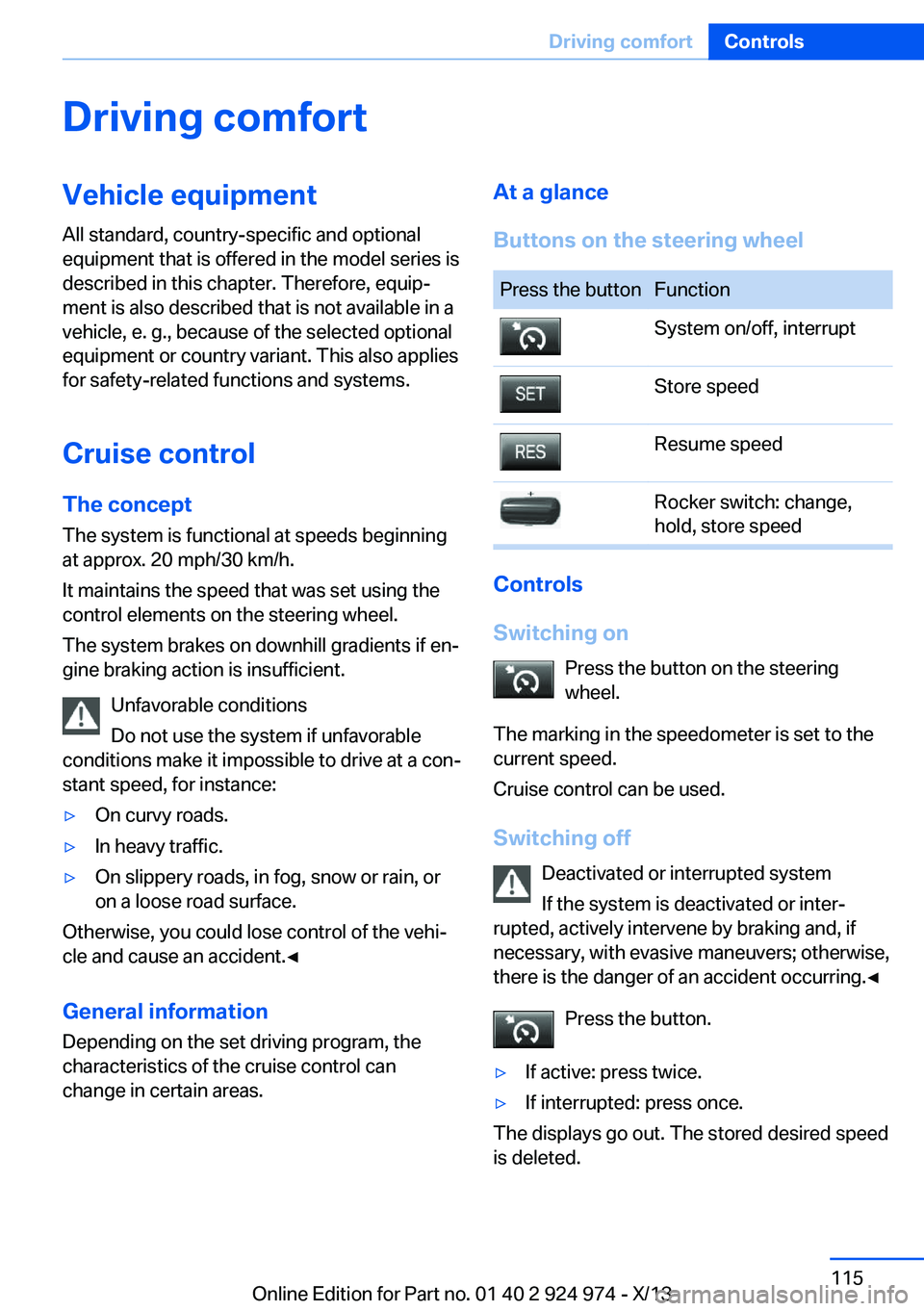
Buttons on the steering wheelPress the buttonFunctionSystem on/off, interruptStore speedResume speedRocker switch: change,
hold, store speed
Controls
Switching on Press the button on the steering
wheel.
The marking in the speedometer is set to the
current speed.
Cruise control can be used.
Switching off Deactivated or interrupted system
If the system is deactivated or inter‐
rupted, actively intervene by braking and, if
necessary, with evasive maneuvers; otherwise,
there is the danger of an accident occurring.◀
Press the button.
▷If active: press twice.▷If interrupted: press once.
The displays go out. The stored desired speed
is deleted.
Seite 115Driving comfortControls115
Online Edition for Part no. 01 40 2 924 974 - X/13
Page 121 of 218
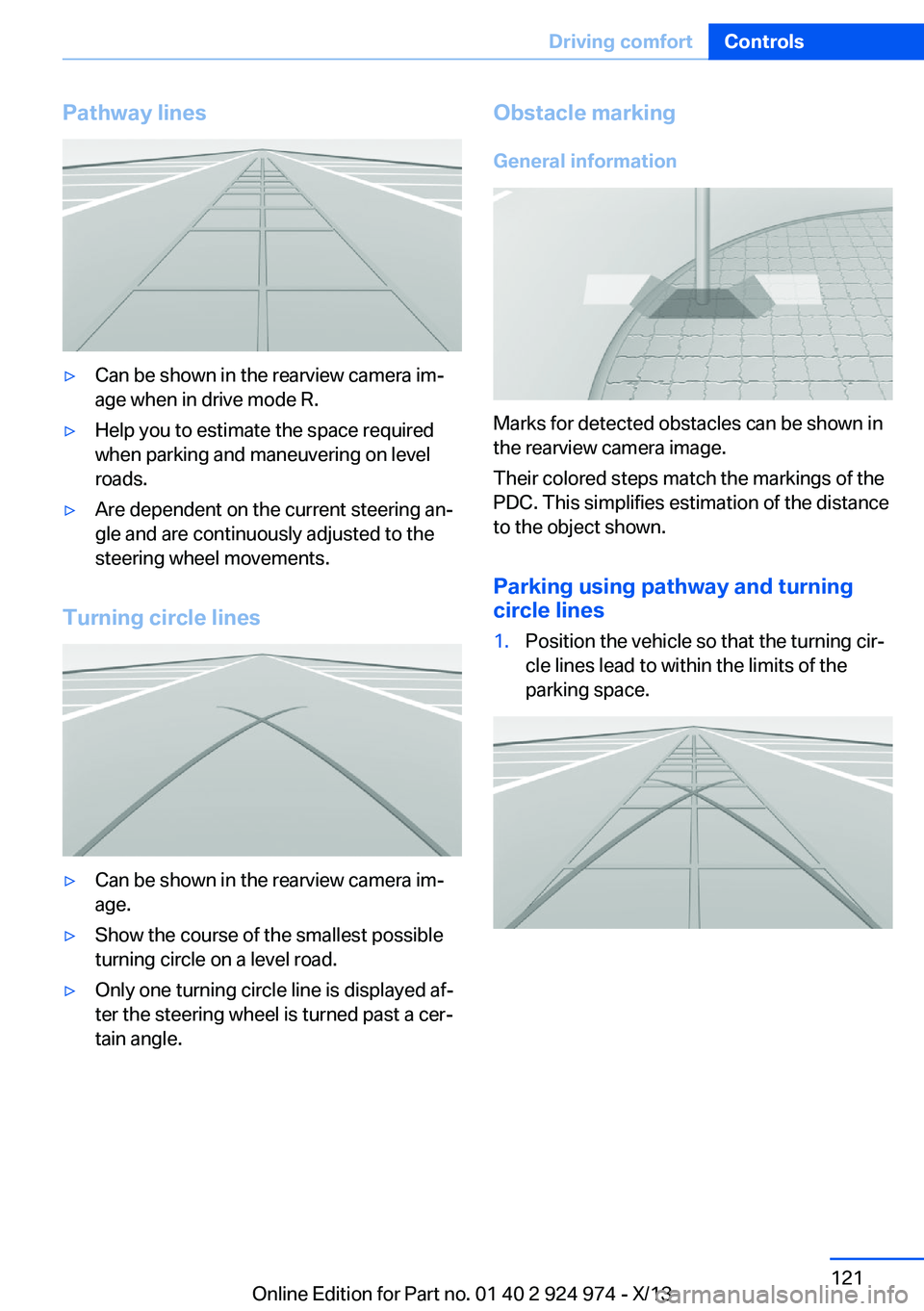
Pathway lines▷Can be shown in the rearview camera im‐
age when in drive mode R.▷Help you to estimate the space required
when parking and maneuvering on level
roads.▷Are dependent on the current steering an‐
gle and are continuously adjusted to the
steering wheel movements.
Turning circle lines
▷Can be shown in the rearview camera im‐
age.▷Show the course of the smallest possible
turning circle on a level road.▷Only one turning circle line is displayed af‐
ter the steering wheel is turned past a cer‐
tain angle.Obstacle marking
General information
Marks for detected obstacles can be shown in
the rearview camera image.
Their colored steps match the markings of the
PDC. This simplifies estimation of the distance
to the object shown.
Parking using pathway and turning
circle lines
1.Position the vehicle so that the turning cir‐
cle lines lead to within the limits of the
parking space.Seite 121Driving comfortControls121
Online Edition for Part no. 01 40 2 924 974 - X/13
Page 122 of 218
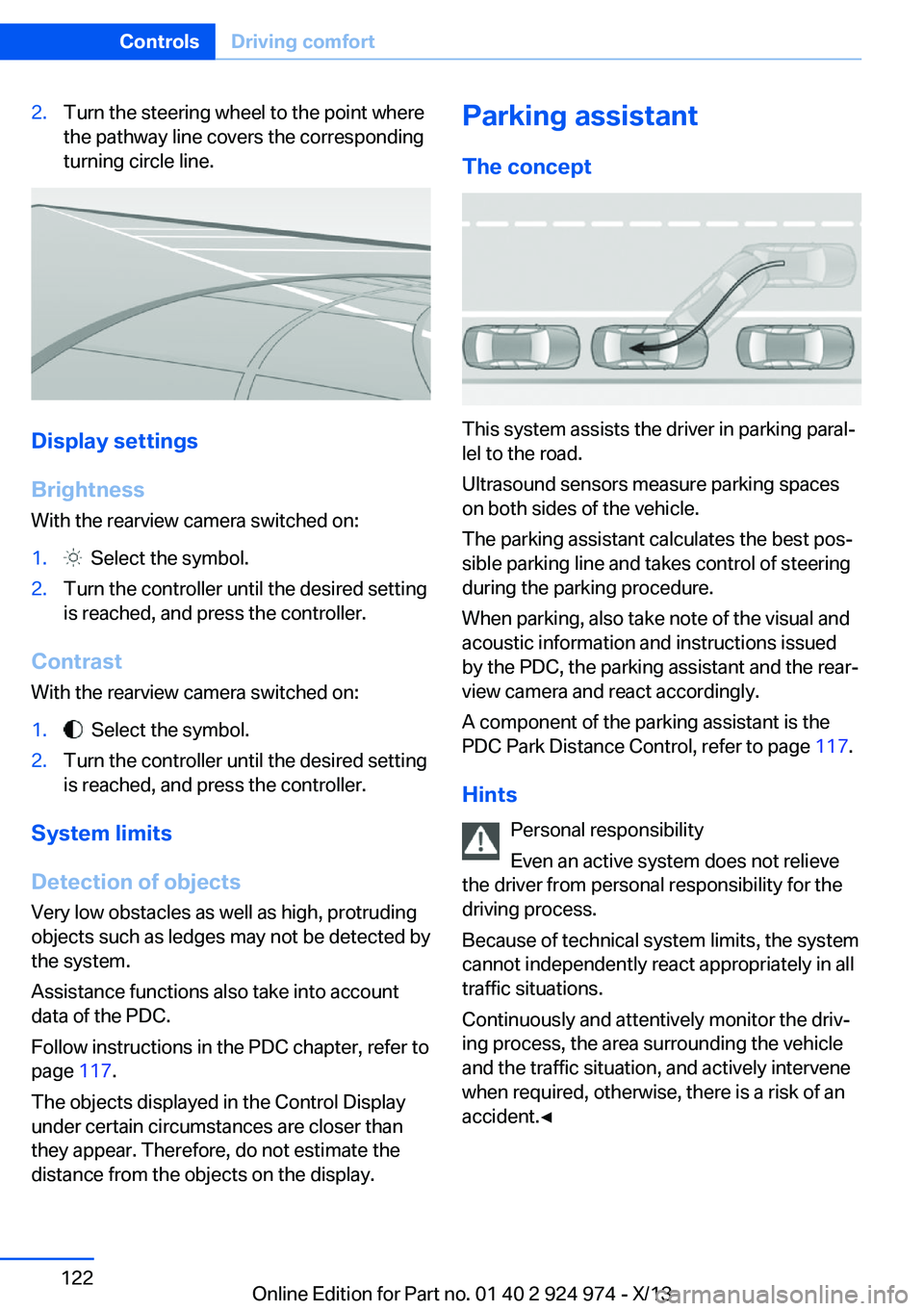
2.Turn the steering wheel to the point where
the pathway line covers the corresponding
turning circle line.
Display settings
Brightness
With the rearview camera switched on:
1. Select the symbol.2.Turn the controller until the desired setting
is reached, and press the controller.
Contrast
With the rearview camera switched on:
1. Select the symbol.2.Turn the controller until the desired setting
is reached, and press the controller.
System limits
Detection of objects
Very low obstacles as well as high, protruding
objects such as ledges may not be detected by
the system.
Assistance functions also take into account
data of the PDC.
Follow instructions in the PDC chapter, refer to
page 117.
The objects displayed in the Control Display
under certain circumstances are closer than
they appear. Therefore, do not estimate the
distance from the objects on the display.
Parking assistant
The concept
This system assists the driver in parking paral‐
lel to the road.
Ultrasound sensors measure parking spaces
on both sides of the vehicle.
The parking assistant calculates the best pos‐
sible parking line and takes control of steering
during the parking procedure.
When parking, also take note of the visual and
acoustic information and instructions issued
by the PDC, the parking assistant and the rear‐
view camera and react accordingly.
A component of the parking assistant is the
PDC Park Distance Control, refer to page 117.
Hints Personal responsibility
Even an active system does not relieve
the driver from personal responsibility for the
driving process.
Because of technical system limits, the system
cannot independently react appropriately in all
traffic situations.
Continuously and attentively monitor the driv‐
ing process, the area surrounding the vehicle
and the traffic situation, and actively intervene
when required, otherwise, there is a risk of an
accident.◀
Seite 122ControlsDriving comfort122
Online Edition for Part no. 01 40 2 924 974 - X/13
Page 125 of 218
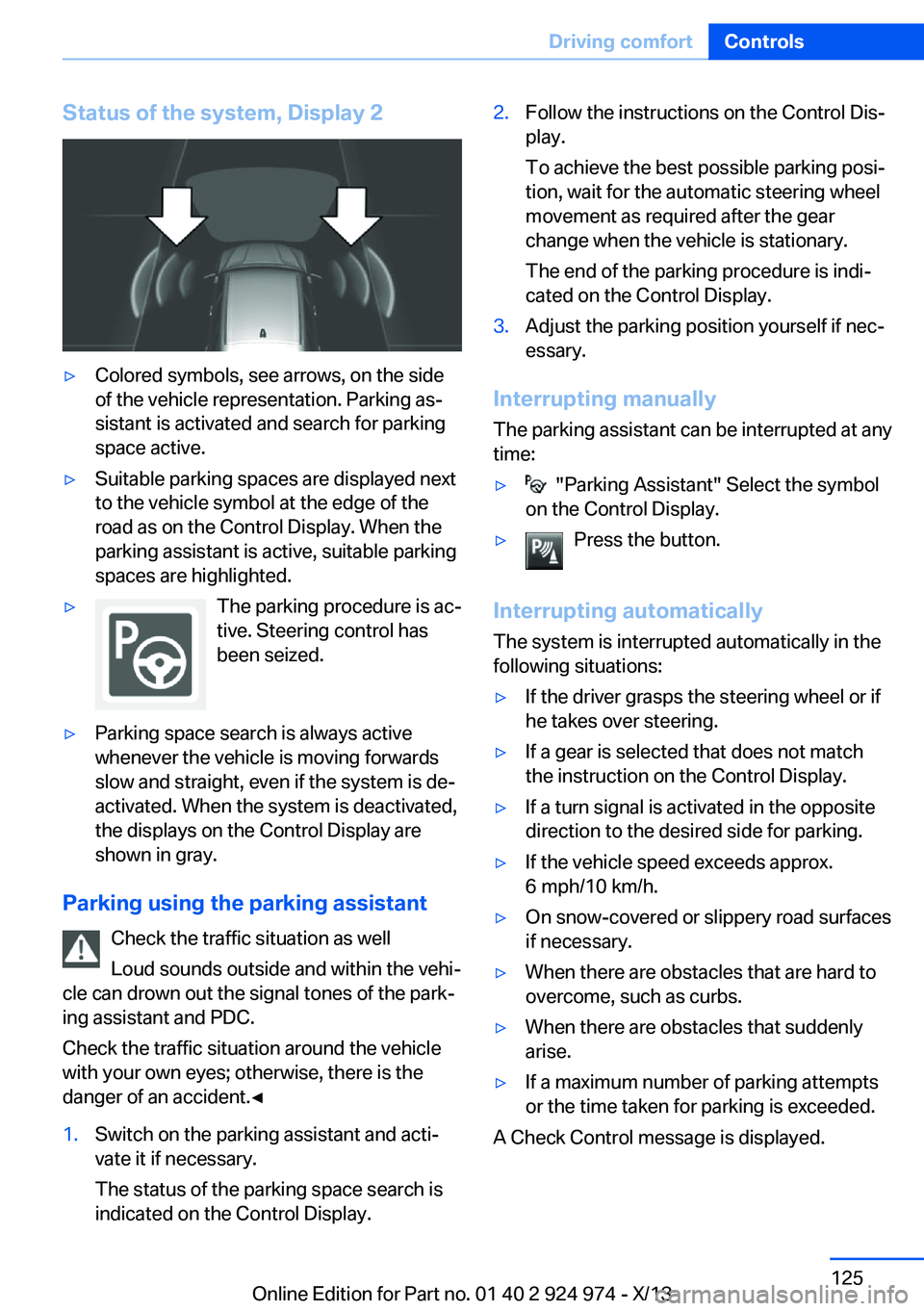
Status of the system, Display 2▷Colored symbols, see arrows, on the side
of the vehicle representation. Parking as‐
sistant is activated and search for parking
space active.▷Suitable parking spaces are displayed next
to the vehicle symbol at the edge of the
road as on the Control Display. When the
parking assistant is active, suitable parking
spaces are highlighted.▷The parking procedure is ac‐
tive. Steering control has
been seized.▷Parking space search is always active
whenever the vehicle is moving forwards
slow and straight, even if the system is de‐
activated. When the system is deactivated,
the displays on the Control Display are
shown in gray.
Parking using the parking assistant
Check the traffic situation as well
Loud sounds outside and within the vehi‐
cle can drown out the signal tones of the park‐
ing assistant and PDC.
Check the traffic situation around the vehicle
with your own eyes; otherwise, there is the
danger of an accident.◀
1.Switch on the parking assistant and acti‐
vate it if necessary.
The status of the parking space search is
indicated on the Control Display.2.Follow the instructions on the Control Dis‐
play.
To achieve the best possible parking posi‐
tion, wait for the automatic steering wheel
movement as required after the gear
change when the vehicle is stationary.
The end of the parking procedure is indi‐
cated on the Control Display.3.Adjust the parking position yourself if nec‐
essary.
Interrupting manually
The parking assistant can be interrupted at any
time:
▷ "Parking Assistant" Select the symbol
on the Control Display.▷Press the button.
Interrupting automatically
The system is interrupted automatically in the
following situations:
▷If the driver grasps the steering wheel or if
he takes over steering.▷If a gear is selected that does not match
the instruction on the Control Display.▷If a turn signal is activated in the opposite
direction to the desired side for parking.▷If the vehicle speed exceeds approx.
6 mph/10 km/h.▷On snow-covered or slippery road surfaces
if necessary.▷When there are obstacles that are hard to
overcome, such as curbs.▷When there are obstacles that suddenly
arise.▷If a maximum number of parking attempts
or the time taken for parking is exceeded.
A Check Control message is displayed.
Seite 125Driving comfortControls125
Online Edition for Part no. 01 40 2 924 974 - X/13
Page 196 of 218
other attempt in order to allow the dis‐
charged battery to recharge.3.Let both engines run for several minutes.4.Disconnect the jumper cables in the re‐
verse order.
Check the battery and recharge if necessary.
Tow-starting and towing Note Tow-starting and towing
When tow-starting and towing the vehi‐
cle, switch off the Intelligent Safety systems;
otherwise, improper behavior of the braking
function of individual systems could result in
an accident.◀
Switch off Intelligent Safety systems, refer to
page 103.
Automatic transmission: transporting
your vehicle
Note
Your vehicle is not permitted to be towed.
Therefore, contact a service center in the
event of a breakdown.
Do not have the vehicle towedHave your vehicle transported on a load‐
ing platform only; otherwise, damage may oc‐ cur.◀
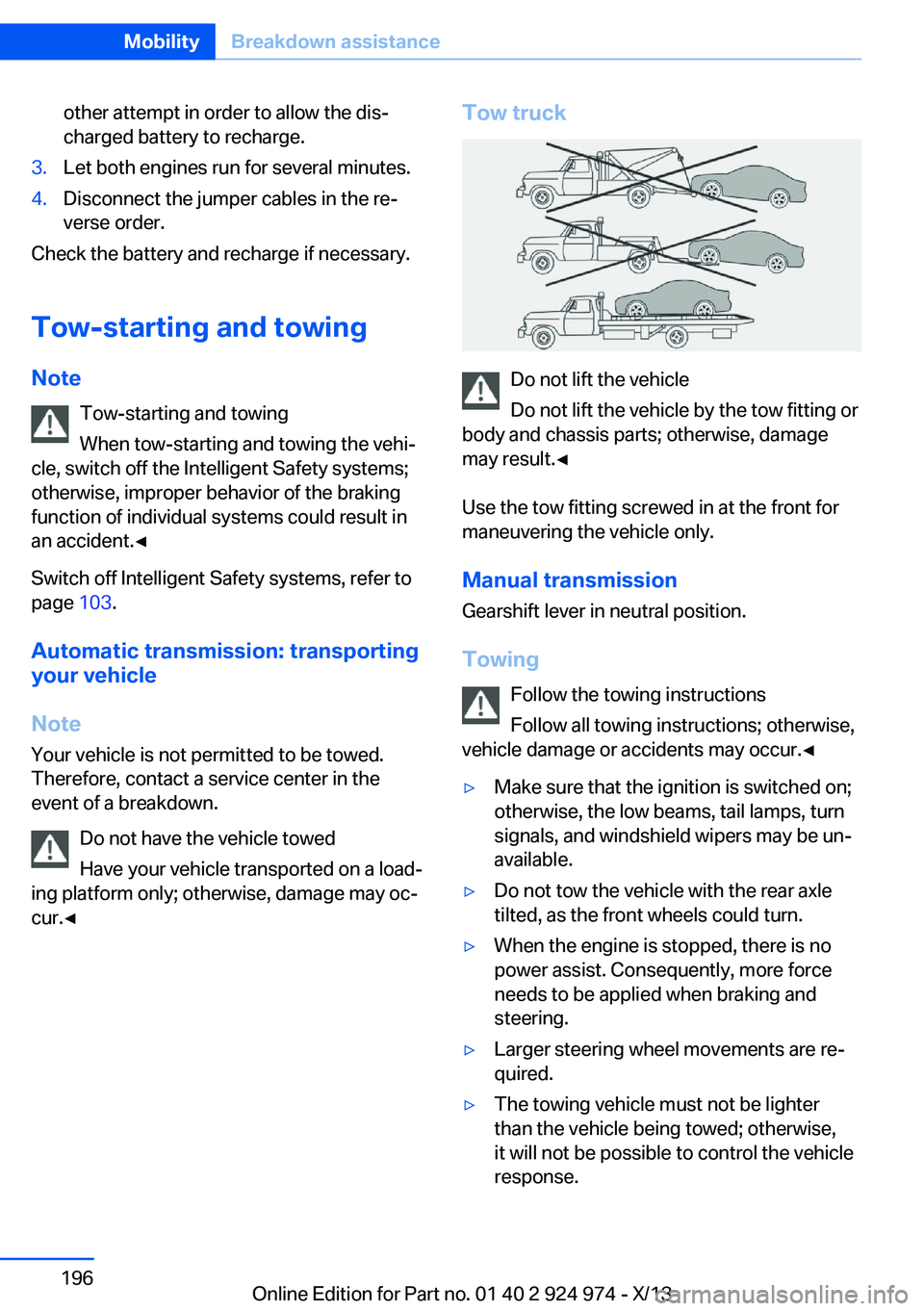
Tow truck
Do not lift the vehicle
Do not lift the vehicle by the tow fitting or
body and chassis parts; otherwise, damage
may result.◀
Use the tow fitting screwed in at the front for
maneuvering the vehicle only.
Manual transmission
Gearshift lever in neutral position.
Towing Follow the towing instructions
Follow all towing instructions; otherwise,
vehicle damage or accidents may occur.◀
▷Make sure that the ignition is switched on;
otherwise, the low beams, tail lamps, turn
signals, and windshield wipers may be un‐
available.▷Do not tow the vehicle with the rear axle
tilted, as the front wheels could turn.▷When the engine is stopped, there is no
power assist. Consequently, more force
needs to be applied when braking and
steering.▷Larger steering wheel movements are re‐
quired.▷The towing vehicle must not be lighter
than the vehicle being towed; otherwise,
it will not be possible to control the vehicle
response.Seite 196MobilityBreakdown assistance196
Online Edition for Part no. 01 40 2 924 974 - X/13
Page 208 of 218
Everything from A to Z
IndexA ABS, Antilock Brake Sys‐ tem 111
Acceleration Assistant, refer to Launch Control 73
Activated-charcoal filter 132
Adaptive brake lights, refer to Brake force display 110
Adaptive Light Control 91
Additives, oil 178
Adjustments, seats/head re‐ straints 48
After washing vehicle 200
Airbags 95
Airbags, indicator/warning light 96
Air circulation, refer to Recir‐ culated-air mode 128, 131
Air, dehumidifying, refer to Cooling function 128, 130
Air distribution, manual 128, 131
Air flow, air conditioner 128
Air flow, automatic climate control 131
Air pressure, tires 166
Air vents, refer to Ventila‐ tion 132
Alarm system 43
Alarm, unintentional 44
All around the center con‐ sole 16
All around the headliner 17
All around the steering wheel 14
All-season tires, refer to Win‐ ter tires 173
Alternating-code hand-held transmitter 135
Alternative oil types 179 Antifreeze, washer fluid 70
Antilock Brake System, ABS 111
Anti-slip control, refer to DSC 111
Approved axle load 206
Approved engine oils 178
Arrival time 86
Ash tray 138
Assistance, Roadside Assis‐ tance 194
Assistance when driving off 114
AUTO intensity 130
Automatic car wash 199
Automatic climate con‐ trol 127
Automatic climate control with enhanced features 129
Automatic Curb Monitor 56
Automatic deactivation, front passenger airbags 97
Automatic headlamp con‐ trol 91
Automatic locking 43
Automatic recirculated-air control 131
Automatic transmission with Steptronic 71
AUTO program, automatic cli‐ mate control 130
AUTO program, climate con‐ trol 128
AUTO program, intensity 130
Auto Start/Stop function 65
Average fuel consumption 86
Average speed 86
Axle loads, weights 206 B
Backrest curvature, refer to Lumbar support 50
Backrest, width 50
Band-aids, refer to First aid kit 194
Bar for tow-starting/ towing 197
Battery replacement, vehicle battery 190
Battery replacement, vehicle remote control 34
Battery, vehicle 190
Belts, safety belts 52
Beverage holder, cu‐ pholder 144
BMW Assist, see user's manual for Navigation, En‐
tertainment and Communi‐
cation
BMW Homepage 6
BMW Internet page 6
BMW maintenance sys‐ tem 181
Bonus range, ECO PRO 156
Bottle holder, refer to Cu‐ pholder 144
Brake assistant 111
Brake discs, breaking in 148
Brake force display 110
Brake lamps, brake force dis‐ play 110
Brake lights, adaptive 110
Brake pads, breaking in 148
Braking, hints 149
Breakdown assis‐ tance 193, 194
Breaking in 148
Brightness of Control Dis‐ play 88 Seite 208ReferenceEverything from A to Z208
Online Edition for Part no. 01 40 2 924 974 - X/13
Page 213 of 218
Minimum tread, tires 172
Mirror 56
Mirror memory 55
Mobile communication devi‐ ces in the vehicle 149
Modifications, technical, refer to Safety 7
Moisture in headlamp 184
Monitor, refer to Control Dis‐ play 18
Mounting of child restraint fix‐ ing systems 59
Multifunction steering wheel, buttons 14
N Navigation, see user's manual for Navigation, Entertain‐
ment and Communication
Neck restraints, front, refer to Head restraints 53
Neck restraints, rear, refer to Head restraints 54
Neutral cleaner, see wheel cleaner 201
New wheels and tires 172
No Passing Information 83
Nylon rope for tow-starting/ towing 197
O OBD Onboard Diagnosis 181
OBD, see OBD Onboard Di‐ agnosis 181
Obstacle marking, rearview camera 121
Octane rating, refer to Gaso‐ line quality 164
Odometer 80
Office, see user's manual for Navigation, Entertainment
and Communication
Oil 177
Oil, adding 178 Oil additives 178
Oil change 179
Oil change interval, service requirements 82
Oil filler neck 178
Oil types, alternative 179
Oil types, approved 178
Old batteries, disposal 190
Onboard monitor, refer to Control Display 18
Onboard vehicle tool kit 183
Opening and closing 34
Opening and closing, from in‐ side 40
Opening and closing via door lock 39
Opening and closing, with re‐ mote control 38
Operating concept, iDrive 18
Optional equipment, standard equipment 6
Outside air, refer to Auto‐ matic recirculated-air con‐
trol 131
Overheating of engine, refer to Coolant temperature 80
P Paint, vehicle 200
Parallel parking assistant 122
Park Distance Control PDC 117
Parked-car ventilation 132
Parked vehicle, condensa‐ tion 150
Parking aid, refer to PDC 117
Parking assistant 122
Parking brake 67
Parking lamps 90
Passenger side mirror, tilting downward 56
Pathway lines, rearview cam‐ era 121
PDC Park Distance Con‐ trol 117 Pedestrian warning with city
braking function 107
Personal Profile 35
Pinch protection system, glass sunroof 46
Pinch protection system, win‐ dows 45
Plastic, care 201
Power failure 190
Power sunroof, glass 46
Power windows 45
Pressure, tire air pres‐ sure 166
Pressure warning, tires 101
Profile, refer to Personal Pro‐ file 35
Programmable memory but‐ tons, iDrive 24
Protective function, glass sunroof 46
Protective function, win‐ dows 45
Push-and-turn switch, refer to Controller 18, 19
R Radiator fluid 180
Radio-operated key, refer to Remote control 34
Radio ready state 64
Radio, see user's manual for Navigation, Entertainment
and Communication
Rain sensor 69
Rear lamps 188
Rear socket 139
Rearview camera 119
Rearview mirror 56
Rear window de‐ froster 128, 131
Recirculated-air filter 132
Recirculated-air mode 128, 131
Recommended tire brands 173 Seite 213Everything from A to ZReference213
Online Edition for Part no. 01 40 2 924 974 - X/13
Page 214 of 218
Refueling 162
Remaining range 81
Remote control/key 34
Remote control, malfunc‐ tion 38
Remote control, univer‐ sal 134
Replacement fuse 191
Replacing parts 183
Replacing wheels/tires 172
Reporting safety defects 9
Reserve warning, refer to Range 81
Reset, Tire Pressure Monitor TPM 99
Retaining straps, securing cargo 152
Retreaded tires 173
Roadside parking lamps 91
RON gasoline quality 164
Roof load capacity 206
Roof-mounted luggage rack 153
Rope for tow-starting/ towing 197
RSC Run Flat System Com‐ ponent, refer to Run-flat
tires 174
Rubber components, care 201
Run-flat tires 174
S Safe braking 149
Safety 7
Safety belt reminder for driv‐ er's seat and front passen‐
ger seat 53
Safety belts 52
Safety belts, care 201
Safety systems, airbags 95
Saving fuel 154
Screen, refer to Control Dis‐ play 18
Screwdriver 183 Screw thread for tow fit‐
ting 198
Seat and mirror memory 55
Seat belts, refer to Safety belts 52
Seat heating, front 52
Seating position for chil‐ dren 59
Seats 48
Selection list in instrument cluster 84
Selector lever, automatic transmission 72
Sensors, care 202
Service and warranty 8
Service requirements, Condi‐ tion Based Service
CBS 181
Service requirements, dis‐ play 82
Service, Roadside Assis‐ tance 194
Services, ConnectedDrive
Settings, locking/unlock‐ ing 42
Settings on Control Dis‐ play 87
Settings, storing for seat, mir‐ ror 55
Shifting, automatic transmis‐ sion 71
Shifting, manual transmis‐ sion 71
Shift paddles on steering wheel 73
Side airbags 95
Signaling, horn 14
Signals when unlocking 42
Sitting safely 48
Size 206
Slide/tilt glass roof 46
Snow chains 174
Socket 138
Socket, OBD Onboard Diag‐ nostics 181
SOS button 193 Spare fuse 191
Specified engine oil types 178
Speed, average 86
Speed limit detection, on‐ board computer 86
Speed limiter, display 83
Speed Limit Information 83
Speed limit in the com‐ puter 86
Split screen 24
SPORT+ - program, Dynamic Driving Control 113
Sport automatic transmis‐ sion 73
Sport displays, torque dis‐ play, performance dis‐
play 87
SPORT program, Dynamic Driving Control 113
Sport program, transmis‐ sion 72
Sport steering, variable 112
Stability control systems 111
Start/stop, automatic func‐ tion 65
Start/Stop button 63
Start function during malfunc‐ tion 35
Starting the engine 64
Status display, tires 98
Status information, iDrive 23
Status of Owner's Manual 6
Steering wheel, adjusting 57
Steering wheel heating 58
Steptronic, automatic trans‐ mission 71
Stopping the engine 64
Storage compartment in the rear 143
Storage compartments 142
Storage compartments, loca‐ tions 142
Storage, tires 173
Storing the vehicle 202
Summer tires, tread 171 Seite 214ReferenceEverything from A to Z214
Online Edition for Part no. 01 40 2 924 974 - X/13
Page 215 of 218
Supplementary text mes‐sages 79
Switch for Dynamic Driv‐ ing 112
Switch-on times, parked-car ventilation 133
Switch, refer to Cockpit 14
Symbols 6
Symbols in the status field 23
T Tachometer 80
Tailgate 40
Tailgate via remote con‐ trol 38
Tail lamps 188
Technical changes, refer to Safety 7
Technical data 206
Telephone, see user's manual for Navigation, Entertain‐
ment and Communication
Temperature, automatic cli‐ mate control 128, 130
Temperature display, external temperature 81
Terminal, starting aid 195
Text messages, supplemen‐ tary 79
Theft alarm system, refer to Alarm system 43
Theft protection, refer to Central locking system 37
Thigh support 50
Through-loading system 140
Tilt alarm sensor 44
Time of arrival 86
Tire damage 172
Tire identification marks 170
Tire inflation pressure 166
Tire inflation pressure moni‐ tor, refer to FTM 101
Tire Pressure Monitor TPM 98
Tires, changing 172 Tires, everything on wheels
and tires 166
Tires, run-flat tires 174
Tire tread 171
Tone, see user's manual for Navigation, Entertainment
and Communication
Tools 183
Total vehicle weight 206
Touchpad 21
Tow fitting 197
Towing 196
Tow-starting 196
Tow truck 197
TPM Tire Pressure Moni‐ tor 98
Traction control 112
TRACTION program, Dy‐ namic Driving Control 112
Transmission, automatic 71
Transmission, manual 71
Transporting children safely 59
Tread, tires 171
Trip computer 87
Triple turn signal activa‐ tion 68
Trip odometer 80
Truck for tow-starting/ towing 197
Trunk lid 40
Trunk lid, emergency unlock‐ ing 41
Trunk lid, hotel function 41
Trunk lid via remote con‐ trol 38
Turning circle lines, rearview camera 121
Turn signals, operation 68
Turn signals, rear, bulb re‐ placement 188
U
Unintentional alarm 44
Units of measure 88 Universal remote control 134
Unlock button, automatic transmission 72
Unlocking/locking from in‐ side 40
Unlocking/locking via door lock 39
Unlocking/locking with re‐ mote control 38
Unlocking, settings 42
Updates made after the edito‐ rial deadline 6
Upholstery care 201
USB interface 139
V
Variable sport steering 112
Vehicle battery 190
Vehicle battery, replac‐ ing 190
Vehicle, breaking in 148
Vehicle care 200
Vehicle equipment 6
Vehicle identification number, refer to Identification num‐
ber in the engine compart‐
ment 175
Vehicle jack 190
Vehicle paint 200
Vehicle storage 202
Vehicle wash 199
Ventilation 132
Ventilation, refer to Parked- car ventilation 132
Voice activation system 26
W Warning indicators 78
Warning lamps 78
Warning messages, refer to Check Control 78
Warning triangle 194
Washer fluid 70 Seite 215Everything from A to ZReference215
Online Edition for Part no. 01 40 2 924 974 - X/13