change wheel BMW 228I COUPE 2015 User Guide
[x] Cancel search | Manufacturer: BMW, Model Year: 2015, Model line: 228I COUPE, Model: BMW 228I COUPE 2015Pages: 232, PDF Size: 5.76 MB
Page 105 of 232
▷Check the tire pressure and correct as
needed.▷Carry out a reset of the system after a tire
change.
System limits
The system does not function properly if a re‐
set has not been carried out, e.g., a flat tire is
reported though tire inflation pressures are
correct.
The tire inflation pressure depends on the
tire's temperature. Driving or exposure to the
sun will increase the tire's temperature, thus
increasing the tire inflation pressure. The tire
inflation pressure is reduced when the tire
temperature falls again. These circumstances
may cause a warning when temperatures fall
very sharply.
Malfunction The yellow warning lamp flashes and
then lights up continuously. A Check
Control message is displayed. No flat
tire or loss of tire inflation pressure can be de‐
tected.
Display in the following situations:
▷A wheel without TPM electronics is fitted:
have the service center check it if needed.▷Malfunction: have the system checked by
your service center.▷TPM was unable to complete the reset.
Reset the system again.▷Interference through systems or devices
with the same radio frequency: after leav‐
ing the area of the interference, the system
automatically becomes active again.
Declaration according to NHTSA/
FMVSS 138 Tire Pressure Monitoring
System
Each tire, including the spare (if provided)
should be checked monthly when cold and in‐
flated to the inflation pressure recommended
by the vehicle manufacturer on the vehicle
placard or tire inflation pressure label. (If your
vehicle has tires of a different size than the size
indicated on the vehicle placard or tire inflation
pressure label, you should determine the
proper tire inflation pressure for those tires.)
As an added safety feature, your vehicle has
been equipped with a tire pressure monitoring
system (TPMS) that illuminates a low tire pres‐
sure telltale when one or more of your tires is
significantly under-inflated. Accordingly, when
the low tire pressure telltale illuminates, you
should stop and check your tires as soon as
possible, and inflate them to the proper pres‐
sure. Driving on a significantly under-inflated
tire causes the tire to overheat and can lead to
tire failure. Under-inflation also reduces fuel ef‐
ficiency and tire tread life, and may affect the
vehicle's handling and stopping ability. Please
note that the TPMS is not a substitute for
proper tire maintenance, and it is the driver's
responsibility to maintain correct tire pressure,
even if under-inflation has not reached the
level to trigger illumination of the TPMS low
tire pressure telltale. Your vehicle has also
been equipped with a TPMS malfunction indi‐
cator to indicate when the system is not oper‐
ating properly. The TPMS malfunction indica‐
tor is combined with the low tire pressure
telltale. When the system detects a malfunc‐
tion, the telltale will flash for approximately one
minute and then remain continuously illumi‐
nated. This sequence will continue upon sub‐
sequent vehicle start-ups as long as the mal‐
function exists. When the malfunction indicator
is illuminated, the system may not be able to
detect or signal low tire pressure as intended.
TPMS malfunctions may occur for a variety of
reasons, including the installation of replace‐
ment or alternate tires or wheels on the vehicle
that prevent the TPMS from functioning prop‐
erly. Always check the TPMS malfunction tell‐
tale after replacing one or more tires or wheels
on your vehicle to ensure that the replacement
or alternate tires and wheels allow the TPMS
to continue to function properly.Seite 101SafetyControls101
Online Edition for Part no. 01 40 2 961 270 - II/15
Page 106 of 232
FTM Flat Tire MonitorThe concept
The system detects tire inflation pressure loss
on the basis of rotation speed differences be‐
tween the individual wheels while driving.
In the event of a tire inflation pressure loss, the
diameter and therefore the rotational speed of
the corresponding wheel changes. This will be
detected and reported as a flat tire.
The system does not measure the actual infla‐
tion pressure in the tires.
Functional requirements
The system must have been initialized when
the tire inflation pressure was correct; other‐
wise, reliable flagging of a flat tire is not as‐
sured. Initialize the system after each correc‐
tion of the tire inflation pressure and after
every tire or wheel change.
Status display The current status of the Flat Tire Monitor canbe displayed on the Control Display, e.g.,
whether or not the FTM is active.1."Vehicle info"2."Vehicle status"3. "Flat Tire Monitor (FTM)"
The status is displayed.
Initialization
When initializing the once set inflation tire
pressures serve as reference values in order to
detect a flat tire. Initialization is started by con‐
firming the tire inflation pressures.
Do not initialize the system when driving with
snow chains.
On the Control Display:
1."Vehicle info"2."Vehicle status"3. "Perform reset"4.Start the engine - do not drive off.5.Start the initialization with "Perform reset".6.Drive away.
The initialization is completed while driving,
which can be interrupted at any time.
The initialization automatically continues when
driving resumes.
Indication of a flat tire The yellow warning lamp lights up. A
Check Control message is displayed.
There is a flat tire or a major loss in tire
inflation pressure.
1.Reduce your speed and stop cautiously.
Avoid sudden braking and steering maneu‐
vers.2.Check whether the vehicle is fitted with
regular tires or run-flat tires.
Run-flat tires, refer to page 180, are la‐
beled with a circular symbol containing the
letters RSC marked on the tire's sidewall.
Do not continue driving without run-flat
tires
Do not continue driving if the vehicle is not
equipped with run-flat tires; continued driving
may result in serious accidents.◀
When a flat tire is indicated, DSC Dynamic Sta‐
bility Control is switched on if needed.
System limits Sudden tire damage
Sudden serious tire damage caused by
external circumstances cannot be recognized
in advance.◀
A natural, even tire inflation pressure loss in all
four tires will not be recognized. Therefore,
check the tire inflation pressure regularly.
The system could be delayed or malfunction in
the following situations:
▷When the system has not been initialized.Seite 102ControlsSafety102
Online Edition for Part no. 01 40 2 961 270 - II/15
Page 107 of 232
▷When driving on a snowy or slippery road
surface.▷Sporty driving style: spinning traction
wheels, high lateral acceleration (drifting).▷When driving with snow chains.
Actions in the event of a flat tire
Normal tires
1.Identify the damaged tire.
Do this by checking the air pressure in all
four tires.
If the tire inflation pressure in all four tires
is correct, the Flat Tire Monitor may not
have been initialized. In this case, initialize
the system.
If an identification is not possible, please
contact the service center.2.Rectify the flat tire on the damaged wheel.
Run-flat tires
Maximum speed
You may continue driving with a damaged tire
at speeds up to 50 mph/80 km/h.
Continued driving with a flat tire
If continuing to drive with a damaged tire:
1.Avoid sudden braking and steering maneu‐
vers.2.Do not exceed a speed of 50 mph/80 km/h.3.Check the air pressure in all four tires at
the next opportunity.
If the tire inflation pressure in all four tires
is correct, the Flat Tire Monitor may not
have been initialized. In this case, initialize
the system.
Possible driving distance with complete loss of
tire inflation pressure:
The possible driving distance after a loss of tire
inflation pressure depends on cargo load, driv‐
ing style and road conditions.
A vehicle with an average load has a possible
driving range of approx. 50 miles/80 km.
A vehicle with a damaged tire reacts differ‐
ently, e.g., it has reduced lane stability during
braking, a longer braking distance and different
self-steering properties. Adjust your driving
style accordingly. Avoid abrupt steering ma‐
neuvers or driving over obstacles, e.g., curbs,
potholes, etc.
Because the possible driving distance de‐
pends on how the vehicle is used during the
trip, the actual distance may be shorter or lon‐
ger depending on the driving speed, road con‐
ditions, external temperature, cargo load, etc.
Continued driving with a flat tire
Drive moderately and do not exceed a
speed of 50 mph/80 km/h.
Your car handles differently when you lose tire
inflation pressure, e.g., your lane stability is re‐
duced when braking, braking distances are
longer and the self-steering properties will
change.◀
Final tire failure
Vibrations or loud noises while driving
can indicate the final failure of a tire. Reduce
speed and stop; otherwise, pieces of the tire
could come loose and cause an accident. Do
not continue driving and contact your service
center.◀
Intelligent Safety
The concept Intelligent Safety enables central operation of
the driver assistance system.
Depending on how the vehicle is equipped, In‐
telligent Safety consists of one or more sys‐
tems that can help prevent a imminent colli‐
sion. These systems are active automatically
every time the engine is started using the
Start/Stop button:Seite 103SafetyControls103
Online Edition for Part no. 01 40 2 961 270 - II/15
Page 122 of 232
Driving comfortVehicle features and options
This chapter describes all standard, country-
specific and optional features offered with the
series. It also describes features that are not
necessarily available in your car, e. g., due to
the selected options or country versions. This
also applies to safety-related functions and
systems. The respectively applicable country
provisions must be observed when using the
respective features and systems.
Cruise control The concept The system maintains a preset speed via the
buttons on the steering wheel. The system brakes on downhill gradients if engine braking
is insufficient.
General information
Depending on the driving settings, the features
of the cruise control can change in certain
areas.
Hints Unfavorable conditions
Do not use the system if unfavorable
conditions make it impossible to drive at a con‐
stant speed, e.g.:▷On winding roads.▷In heavy traffic.▷On slippery roads, in fog, snow or rain, or
on a loose road surface.
Otherwise, you could lose control of the vehi‐
cle and cause an accident.◀
Overview
Buttons on the steering wheelPress buttonFunctionSystem on/off, interruptStore speedResume speedrocker switch: change, hold,
store speed
Controls
Switching on Press button on the steering wheel.
The marking in the speedometer is set to the
current speed.
Cruise control can be used.
Switch off Deactivated or interrupted system
With deactivated or interrupted system
use your brakes, steering and moves as usual
to avoid the chance of an accident.◀
Press button.
▷If active: press twice.▷If interrupted: press once.
The displays go out. The stored desired speed
is deleted.
Seite 118ControlsDriving comfort118
Online Edition for Part no. 01 40 2 961 270 - II/15
Page 139 of 232
Defrosts windows and removes
condensation
Press button.
Ice and condensation are quickly re‐
moved from the windshield and the front side
windows.
For this purpose, point the side vents onto the
side windows as needed.
Adjust air flow with the program active.
If the windows are fogged over, you can also
switch on the cooling function or press the AUTO button to utilize the condensation sen‐
sor.
Switching the system on/off Switch off Press the left button for the minimum
speed.
Switching on
Press any button except▷Rear window defroster.▷Seat heating.
Microfilter/activated-charcoal filter
In external and recirculated air mode the mi‐
crofilter/activated charcoal filter filters dust,
pollen, and gaseous pollutants out of the air.
This filter should be replaced during scheduled
maintenance, refer to page 191, of your vehi‐
cle.
Ventilation
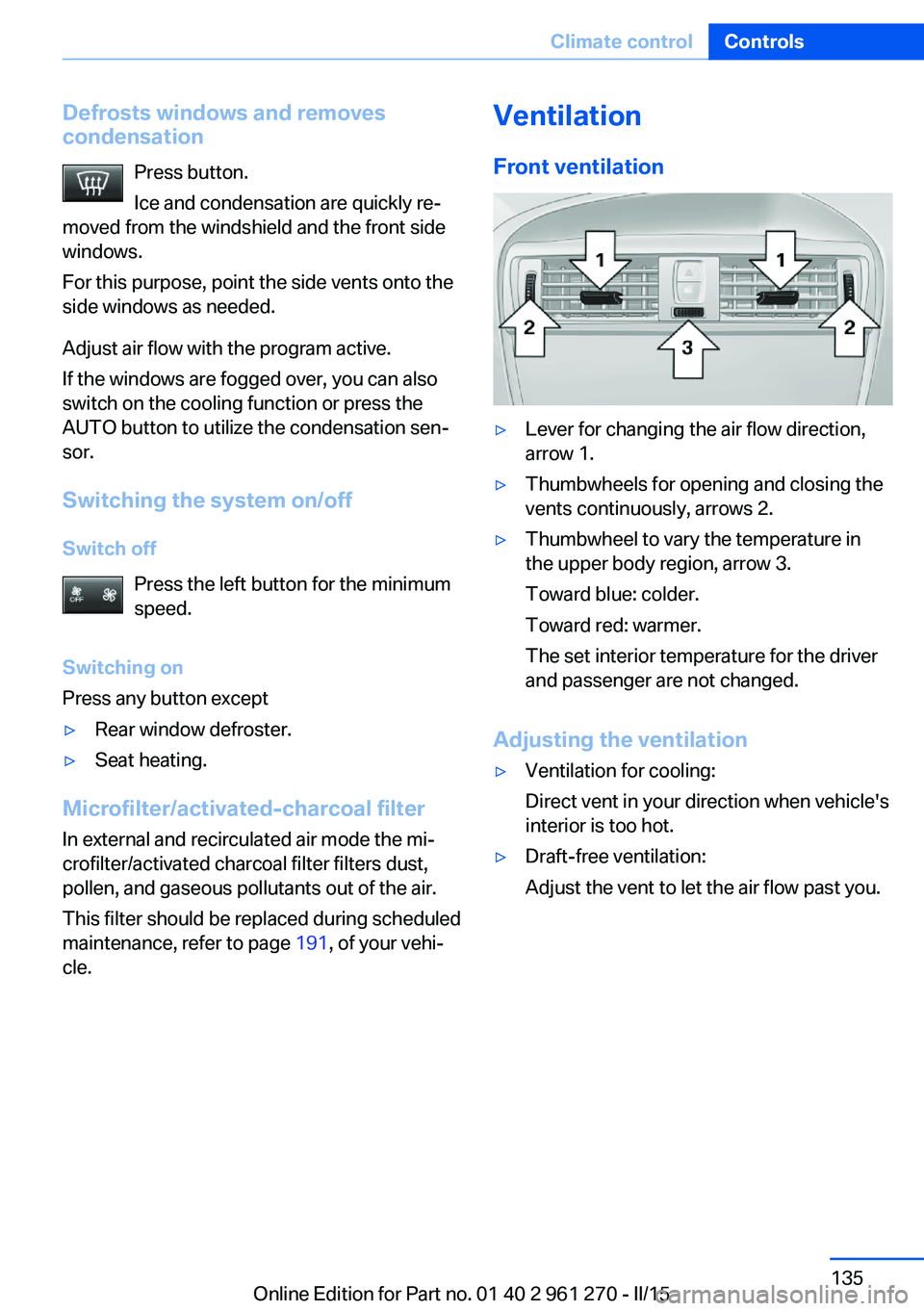
Front ventilation▷Lever for changing the air flow direction,
arrow 1.▷Thumbwheels for opening and closing the
vents continuously, arrows 2.▷Thumbwheel to vary the temperature in
the upper body region, arrow 3.
Toward blue: colder.
Toward red: warmer.
The set interior temperature for the driver
and passenger are not changed.
Adjusting the ventilation
▷Ventilation for cooling:
Direct vent in your direction when vehicle's
interior is too hot.▷Draft-free ventilation:
Adjust the vent to let the air flow past you.Seite 135Climate controlControls135
Online Edition for Part no. 01 40 2 961 270 - II/15
Page 203 of 232
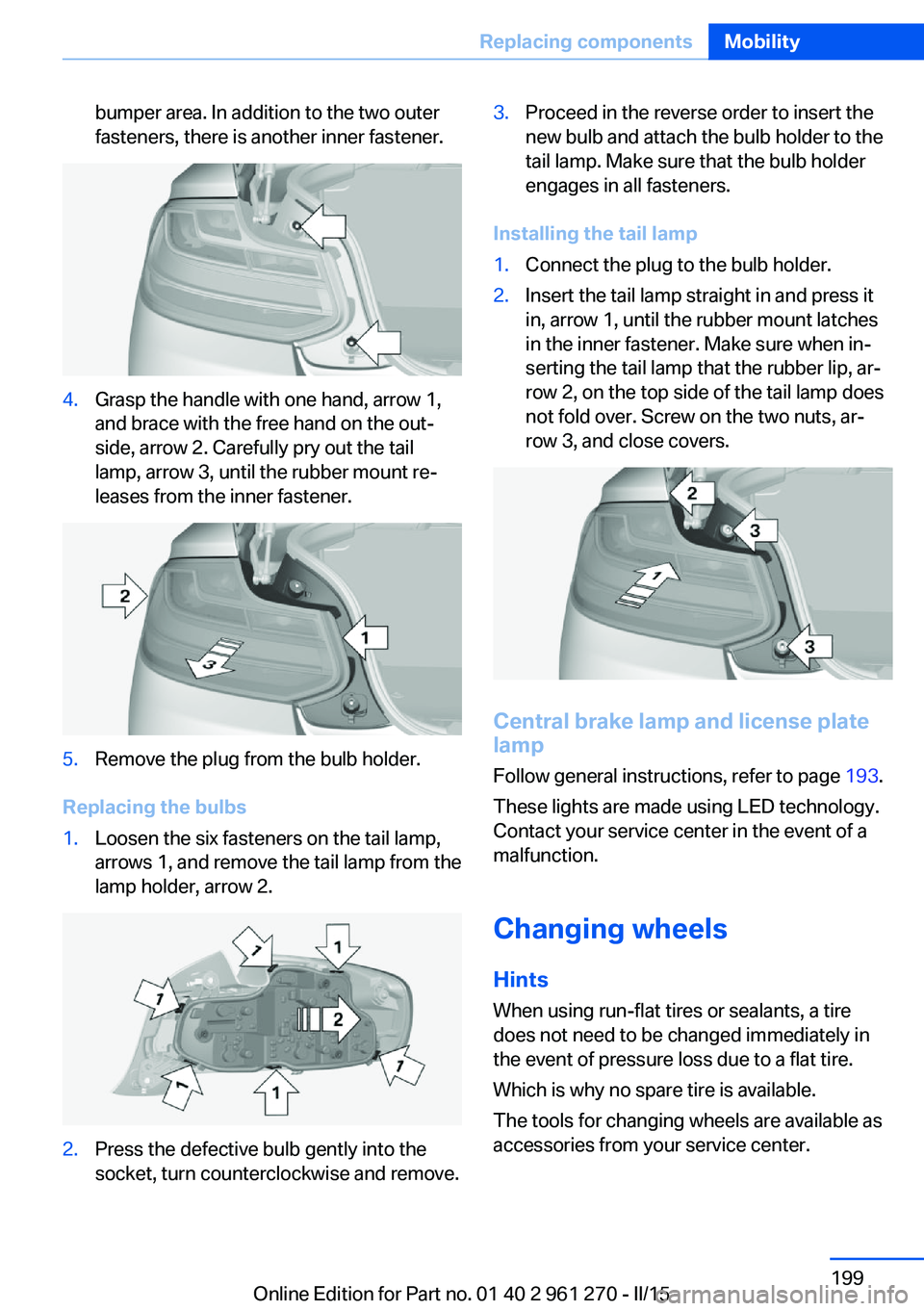
bumper area. In addition to the two outer
fasteners, there is another inner fastener.4.Grasp the handle with one hand, arrow 1,
and brace with the free hand on the out‐
side, arrow 2. Carefully pry out the tail
lamp, arrow 3, until the rubber mount re‐
leases from the inner fastener.5.Remove the plug from the bulb holder.
Replacing the bulbs
1.Loosen the six fasteners on the tail lamp,
arrows 1, and remove the tail lamp from the
lamp holder, arrow 2.2.Press the defective bulb gently into the
socket, turn counterclockwise and remove.3.Proceed in the reverse order to insert the
new bulb and attach the bulb holder to the
tail lamp. Make sure that the bulb holder
engages in all fasteners.
Installing the tail lamp
1.Connect the plug to the bulb holder.2.Insert the tail lamp straight in and press it
in, arrow 1, until the rubber mount latches
in the inner fastener. Make sure when in‐
serting the tail lamp that the rubber lip, ar‐
row 2, on the top side of the tail lamp does
not fold over. Screw on the two nuts, ar‐
row 3, and close covers.
Central brake lamp and license plate
lamp
Follow general instructions, refer to page 193.
These lights are made using LED technology.
Contact your service center in the event of a
malfunction.
Changing wheels
Hints
When using run-flat tires or sealants, a tire
does not need to be changed immediately in
the event of pressure loss due to a flat tire.
Which is why no spare tire is available.
The tools for changing wheels are available as
accessories from your service center.
Seite 199Replacing componentsMobility199
Online Edition for Part no. 01 40 2 961 270 - II/15
Page 223 of 232
Break-in 152
Brightness of Control Dis‐ play 88
Bulb replacement 193
Bulb replacement, front 194
Bulb replacement, rear 198
Bulbs and lights 193
Button, Start/Stop 63
Bypassing, refer to Jump- starting 203
C
California Proposition 65 Warning 7
Camera lenses, care 211
Camera, rearview cam‐ era 123
Can holder, refer to Cu‐ pholder 147
Car battery 200
Car care products 209
Care, displays 211
Care, vehicle 209
Cargo 155
Cargo area, enlarging 143
Cargo area, storage compart‐ ments 147
Cargo, securing 156
Cargo straps, securing cargo 156
Car key, refer to Remote con‐ trol 34
Carpet, care 211
Car wash 208
Catalytic converter, refer to Hot exhaust system 153
CBS Condition Based Serv‐ ice 191
CD/Multimedia, see user's manual for Navigation, En‐
tertainment and Communi‐
cation
Center armrest 146
Center console 16
Central locking system 39 Central screen, refer to Con‐
trol Display 18
Changes, technical, refer to Safety 7
Changing parts 193
Changing wheels 199
Changing wheels/tires 178
Chassis number, see vehicle identification number 9
Check Control 77
Checking the oil level elec‐ tronically 187
Children, seating position 59
Children, transporting safely 59
Child restraint fixing sys‐ tem 59
Child restraint fixing system LATCH 61
Child restraint fixing systems, mounting 59
Child seat, mounting 59
Child seats 59
Chrome parts, care 210
Cigarette lighter 141
Cleaning displays 211
Climate control 130, 132
Clock 81
Closing/opening via door lock 39
Closing/opening with remote control 37
Clothes hooks 147
Coasting 162
Coasting with engine decou‐ pled, coasting 162
Coasting with idling en‐ gine 162
Cockpit 14
Combination reel, refer to Turn signals 67
Combination switch, refer to Wiper system 68
Comfort Access 41
COMFORT program, Dy‐ namic Driving Control 116 Compartments in the
doors 146
Compass 139
Compressor 180
Condensation on win‐ dows 135
Condensation under the vehi‐ cle 154
Condition Based Service CBS 191
Configuring driving pro‐ gram 116
Confirmation signal 43
ConnectedDrive, see user's manual for Navigation, En‐
tertainment and Communi‐
cation
ConnectedDrive Services
Connecting electrical devi‐ ces 141
Continued driving with a flat tire 100 , 103
Control Display 18
Control Display, settings 87
Controller 18, 19
Control systems, driving sta‐ bility 112
Convenient opening with the remote control 37
Coolant 190
Coolant level 190
Coolant temperature 80
Cooling function 131, 134
Cooling, maximum 133
Cooling system 190
Cornering light 91
Corrosion on brake discs 154
Cosmetic mirror 141
Courtesy lamps during un‐ locking 37
Courtesy lamps with the vehi‐ cle locked 38
Cruise control 118
Cruising range 81
Cupholder 147
Current fuel consumption 81 Seite 219Everything from A to ZReference219
Online Edition for Part no. 01 40 2 961 270 - II/15
Page 224 of 232
D
Damage, tires 178
Damping control, dy‐ namic 114
Data, technical 214
Date 81
Daytime running lights 91
Daytime running lights, bulb replacement 196
Defrosting, refer to defrosting the windows 131
Defrosting, refer to Windows, defrosting 135
Defrosting the windows 131
Dehumidifying, air 131, 134
Deleting personal data 25
Deletion of personal data 25
Destination distance 86
Digital clock 81
Digital compass 139
Dimensions 214
Dimmable exterior mirrors 57
Dimmable interior rearview mirror 57
Direction indicator, refer to Turn signals 67
Display, electronic, instru‐ ment cluster 76
Display lighting, refer to In‐ strument lighting 93
Displays, cleaning 211
Disposal, coolant 190
Disposal, vehicle battery 200
Distance control, refer to PDC 120
Distance to destination 86
Divided screen view, split screen 23
Door lock 39
Door lock, refer to Remote control 34
Drive-off assistant 116
Drive-off assistant, refer to DSC 112 Driver assistance, refer to In‐
telligent Safety 103
Driving Assistant, refer to In‐ telligent Safety 103
Driving Dynamics Con‐ trol 114
Driving instructions, break- in 152
Driving mode 114
Driving notes, general 152
Driving stability control sys‐ tems 112
Driving style analysis 163
Driving tips 152
DSC Dynamic Stability Con‐ trol 112
DTC Dynamic Traction Con‐ trol 113
Dynamic Damping Con‐ trol 114
Dynamic Stability Control DSC 112
Dynamic Traction Control DTC 113
E
ECO PRO 159
ECO PRO, bonus range 160
ECO PRO display 159
ECO PRO driving mode 159
ECO PRO driving style analy‐ sis 163
ECO PRO mode 159
ECO PRO Tip - driving in‐ struction 161
EfficientDynamics 162
Electronic displays, instru‐ ment cluster 76
Electronic oil measure‐ ment 187
Electronic Stability Program ESP, refer to DSC 112
Emergency detection, remote control 35 Emergency release, fuel filler
flap 168
Emergency Request 202
Emergency start function, en‐ gine start 35
Emergency unlocking, trans‐ mission lock 74
Emergency unlocking, trunk lid 41
Energy Control 81
Energy recovery 82
Engine, automatic Start/Stop function 65
Engine, automatic switch- off 65
Engine compartment 185
Engine compartment, work‐ ing in 186
Engine coolant 190
Engine idling when driving, coasting 162
Engine oil 187
Engine oil, adding 188
Engine oil additives 188
Engine oil change 189
Engine oil filler neck 188
Engine oil types, alterna‐ tive 189
Engine oil types, ap‐ proved 189
Engine start during malfunc‐ tion 35
Engine start, jump-start‐ ing 203
Engine start, refer to Starting the engine 64
Engine stop 64
Entering a car wash 208
Equipment, interior 137
Error displays, see Check Control 77
ESP Electronic Stability Pro‐ gram, refer to DSC 112
Exchanging wheels/tires 178
Exhaust system 153 Seite 220ReferenceEverything from A to Z220
Online Edition for Part no. 01 40 2 961 270 - II/15
Page 225 of 232
Exterior mirror, automaticdimming feature 57
Exterior mirrors 55
External start 203
External temperature dis‐ play 81
External temperature warn‐ ing 81
Eyes for securing cargo 156
F
Failure message, see Check Control 77
False alarm, refer to Uninten‐ tional alarm 45
Fan, refer to Air flow 131, 134
Filler neck for engine oil 188
Fine wood, care 210
First aid kit 203
Fitting for towing, see Tow fit‐ ting 206
Flat tire, changing wheels 199
Flat Tire Monitor FTM 102
Flat tire, Tire Pressure Moni‐ tor TPM 98
Flat tire, warning lamp 99, 102
Flooding 153
Floor carpet, care 211
Floor mats, care 211
Fogged up windows 131
Fold down the rear seat back‐ rest, see Though-loading
system 143
Fold-out position, wiper 70
Foot brake 153
Front airbags 95
Front-end collision warning with City Braking func‐
tion 104
Front fog lights 93
Front fog lights, front, bulb re‐ placement 197 Front lights 194
front-seat passenger airbags, automatic deactivation 97
Front-seat passenger airbags, indicator lamp 97
FTM Flat Tire Monitor 102
Fuel 170
Fuel consumption, refer to Average fuel consump‐
tion 86
Fuel filler flap 168
Fuel gauge 80
Fuel lid 168
Fuel quality 170
Fuel recommendation 170
Fuel, tank capacity 216
Fuse 201
G
Garage door opener, refer to Universal Integrated Remote
Control 137
Gasoline 170
Gear change, Steptronic transmission 72
Gear shift indicator 83
General driving notes 152
Glare shield 141
Glass sunroof, powered 46
Glove compartment 145
Gross vehicle weight, ap‐ proved 214
H
Halogen headlights, bulb re‐ placement 194
Handbrake, refer to parking brake 67
Hand-held transmitter, alter‐ nating code 138
Hazard warning flashers 202
Head airbags 95
Headlight control, auto‐ matic 91 Headlight courtesy delay fea‐
ture 91
Headlight flasher 68
Headlight flasher, bulb re‐ placement 196
Headlight glass 194
Headlights 194
Headlights, care 209
Headlight washer system 68
Head restraints 48
Head restraints, front 53
Head restraints, rear 54
Heavy cargo, stowing 156
High-beam Assistant 92
High beams 68
High beams/low beams, refer to High-beam Assistant 92
High beams, bulb replace‐ ment 196
Hills 154
Hill start assistant, refer to Drive-off assistant 116
Hints 6
Holder for beverages 147
Homepage 6
Hood 186
Horn 14
Hotel function, trunk lid 41
Hot exhaust system 153
Hydroplaning 153
I Ice warning, see External temperature warning 81
Icy roads, see External tem‐ perature warning 81
Identification marks, tires 176
Identification number, see ve‐ hicle identification num‐
ber 9
iDrive 18
Ignition key, refer to Remote control 34
Ignition off 63
Ignition on 63 Seite 221Everything from A to ZReference221
Online Edition for Part no. 01 40 2 961 270 - II/15
Page 227 of 232
Manual operation, rearviewcamera 123
Manual transmission 71
Marking on approved tires 179
Marking, run-flat tires 180
Master key, refer to Remote control 34
Maximum cooling 133
Maximum speed, display 83
Maximum speed, winter tires 179
Measure, units of 88
Medical kit 203
Memory, seat, mirror 55
Menu, EfficientDynamics 162
Menu in instrument clus‐ ter 84
Menus, operating, iDrive 18
Menus, refer to iDrive operat‐ ing concept 20
Messages, see Check Con‐ trol 77
Microfilter 132, 135
Minimum tread, tires 178
Mirror 55
Mirror memory 55
Mobile communication devi‐ ces in the vehicle 153
Mobility System 180
Modifications, technical, refer to Safety 7
Moisture in headlight 194
Monitor, refer to Control Dis‐ play 18
Mounting of child restraint systems 59
Multifunction steering wheel, buttons 14
N Navigation, see user's manual for Navigation, Entertain‐
ment and Communication Neck restraints, front, refer to Head restraints 53
Neck restraints, rear, refer to Head restraints 54
Neutral cleaner, see wheel cleaner 210
New wheels and tires 178
Nylon rope for tow-starting/ towing 206
O OBD Onboard Diagnosis 192
OBD, see OBD Onboard Di‐ agnosis 192
Obstacle marking, rearview camera 124
Octane rating, refer to Rec‐ ommended fuel grade 170
Odometer 80
Office, see user's manual for Navigation, Entertainment
and Communication
Oil 187
Oil, adding 188
Oil additives 188
Oil change 189
Oil change interval, service requirements 82
Oil filler neck 188
Oil types, alternative 189
Oil types, approved 189
Old batteries, disposal 200
On-board computer 85
On-board computer, refer to On-board computer 85
Onboard monitor, refer to Control Display 18
Onboard vehicle tool kit 193
Opening/closing via door lock 39
Opening and closing 34
Opening and closing, without remote control 39
Opening and closing, with re‐ mote control 37 Operating concept, iDrive 18
Optional equipment, standard equipment 6
Outside air, refer to Auto‐ matic recirculated-air con‐
trol 134
Overheating of engine, refer to Coolant temperature 80
P Paint, vehicle 209
Parallel parking assistant 125
Park Distance Control PDC 120
Parked-car ventilation 136
Parked vehicle, condensa‐ tion 154
Parking aid, refer to PDC 120
Parking assistant 125
Parking brake 67
Parking lights 90
Parking lights, bulb replace‐ ment 196
Parts and accessories 7
Passenger side mirror, tilting downward 56
Pathway lines, rearview cam‐ era 124
PDC Park Distance Con‐ trol 120
Pedestrian warning with city braking function 107
Personal Profile 35
Personal Profile, exporting profiles 36
Personal Profile, importing profiles 37
Pinch protection system, glass sunroof 47
Pinch protection system, win‐ dows 46
Plastic, care 210
Power failure 200
Power sunroof, glass 46
Power windows 45 Seite 223Everything from A to ZReference223
Online Edition for Part no. 01 40 2 961 270 - II/15