Port BMW 3 SERIES 1985 E30 Service Manual
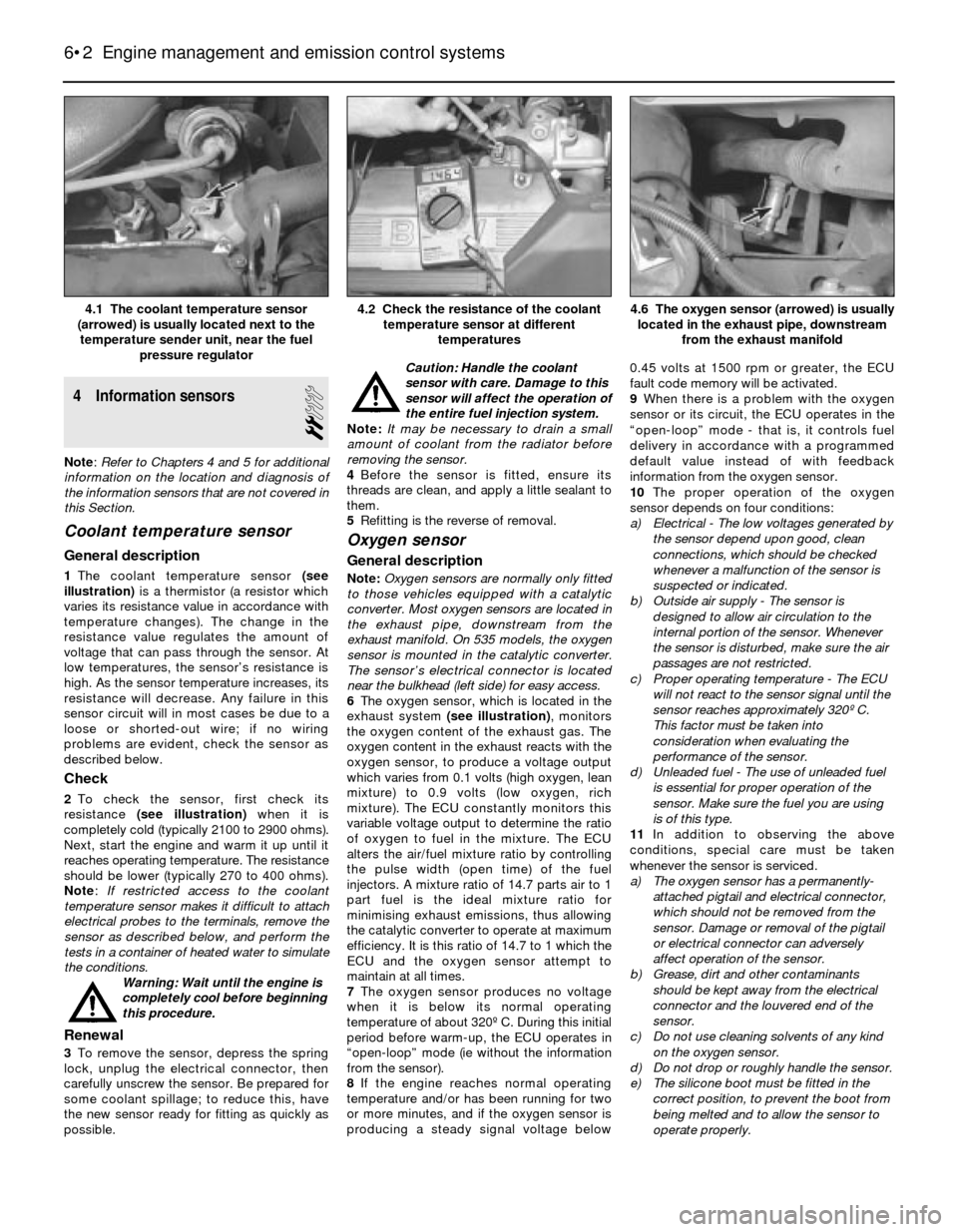
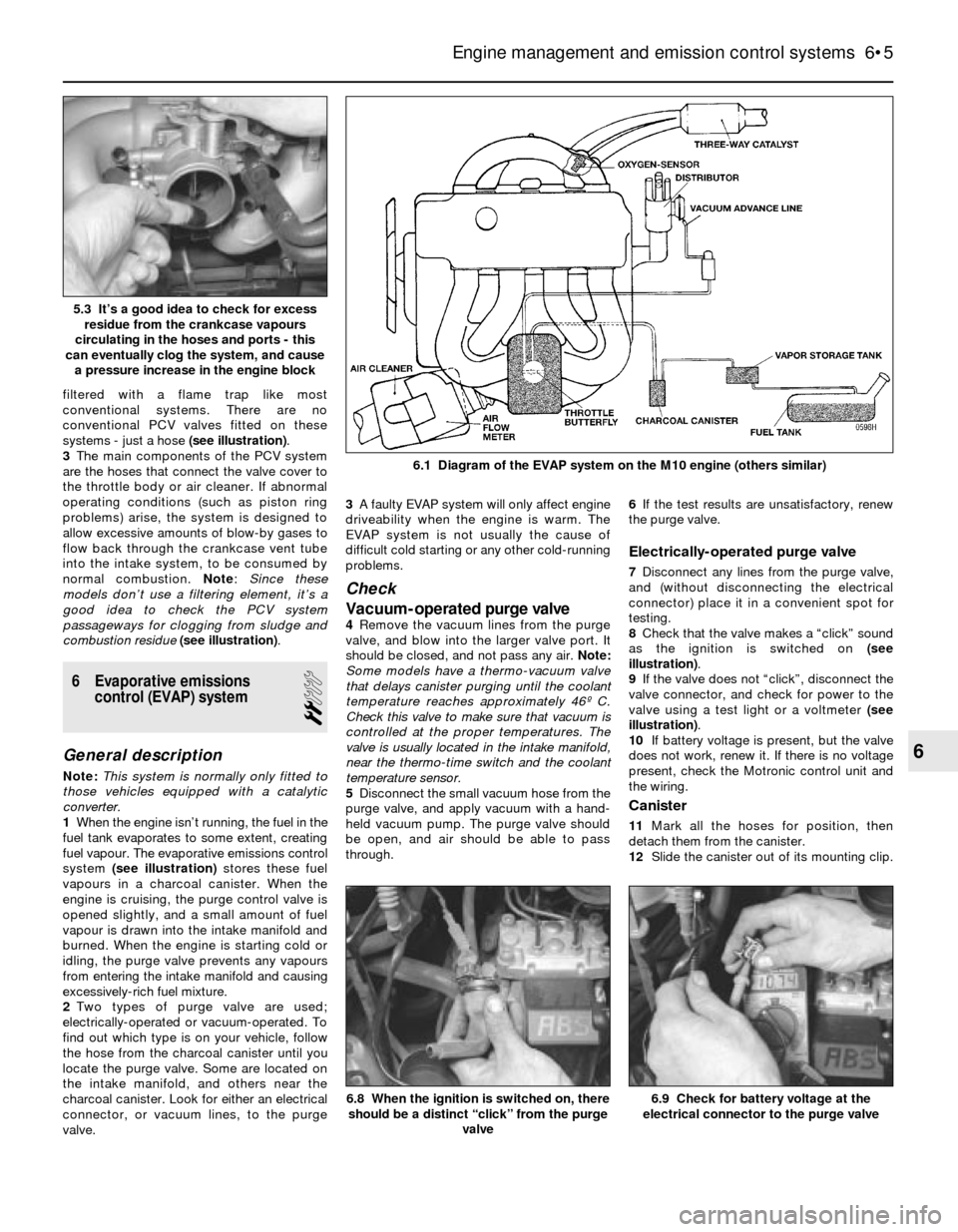
[x] Cancel search | Manufacturer: BMW, Model Year: 1985, Model line: 3 SERIES, Model: BMW 3 SERIES 1985 E30Pages: 228, PDF Size: 7.04 MB
Page 108 of 228
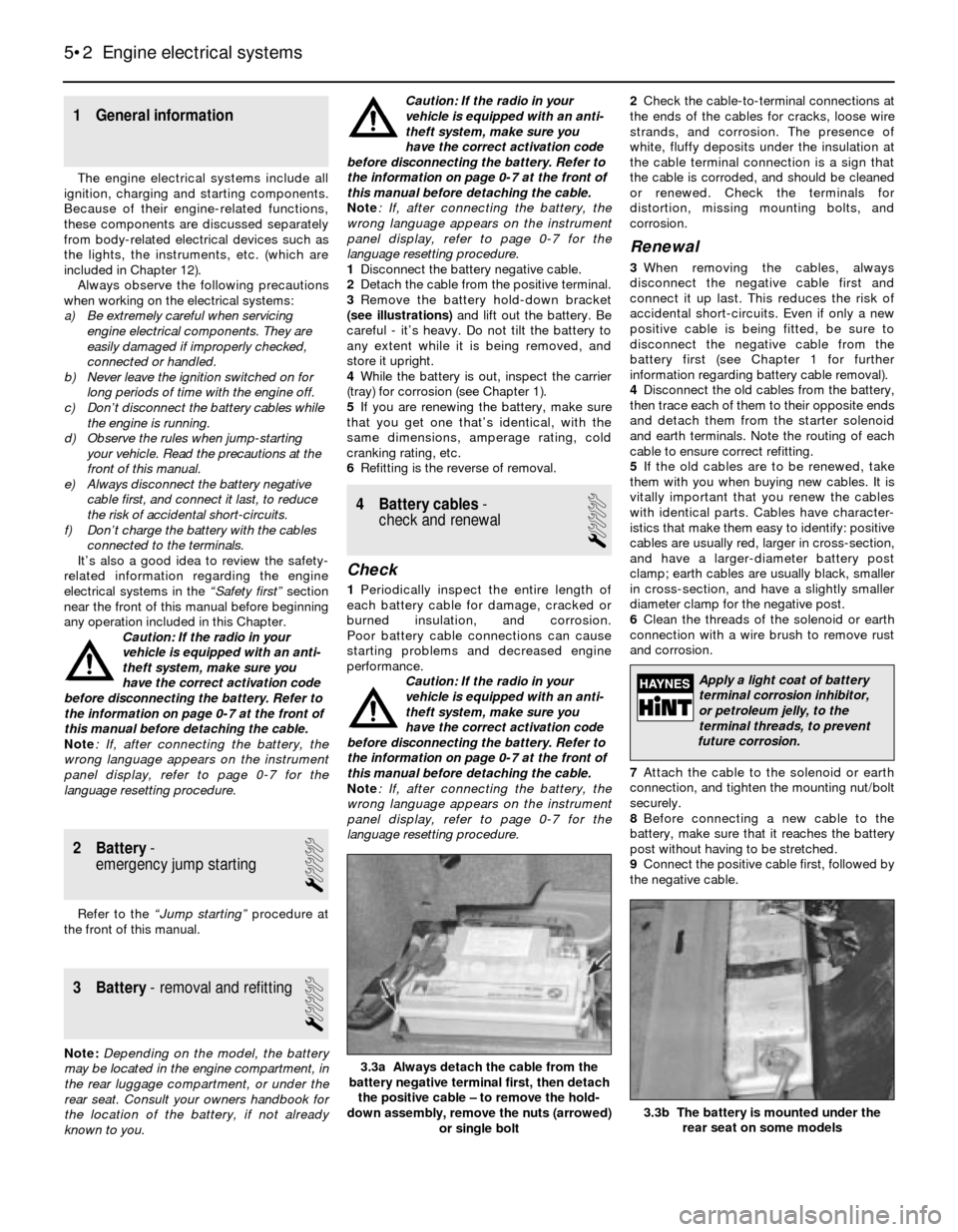
reading should be between 400 and 500 mA.
Adjust the valve if the current reading is not as
specified. Note: The idle air stabiliser current
will fluctuate between 400 and 1100 mA if the
engine is too cold, if the coolant temperature
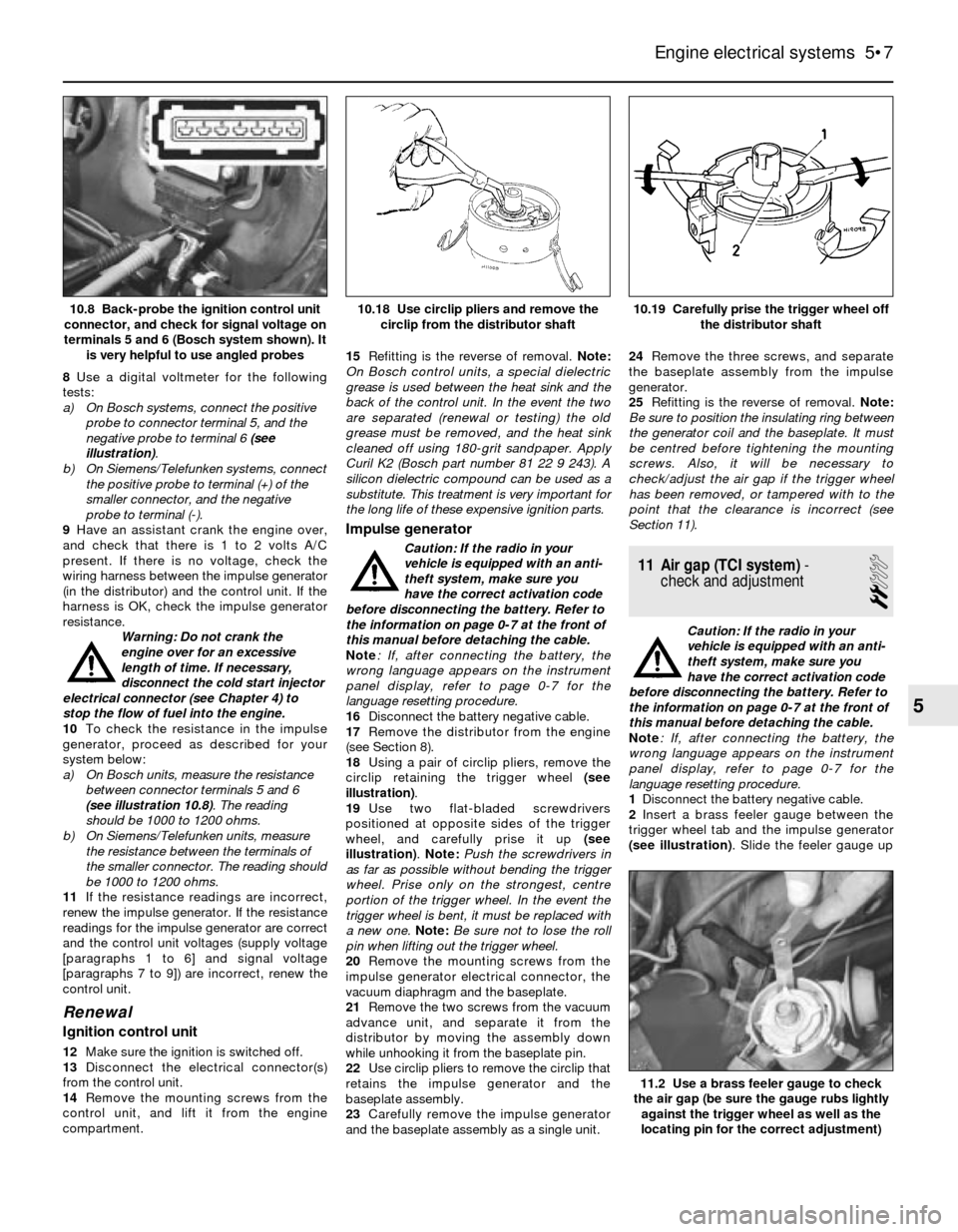
sensor is faulty, if there is an engine vacuum
leak, or if electrical accessories are on.
25If there is no current reading, have the idle
speed control unit (under the facia) checked
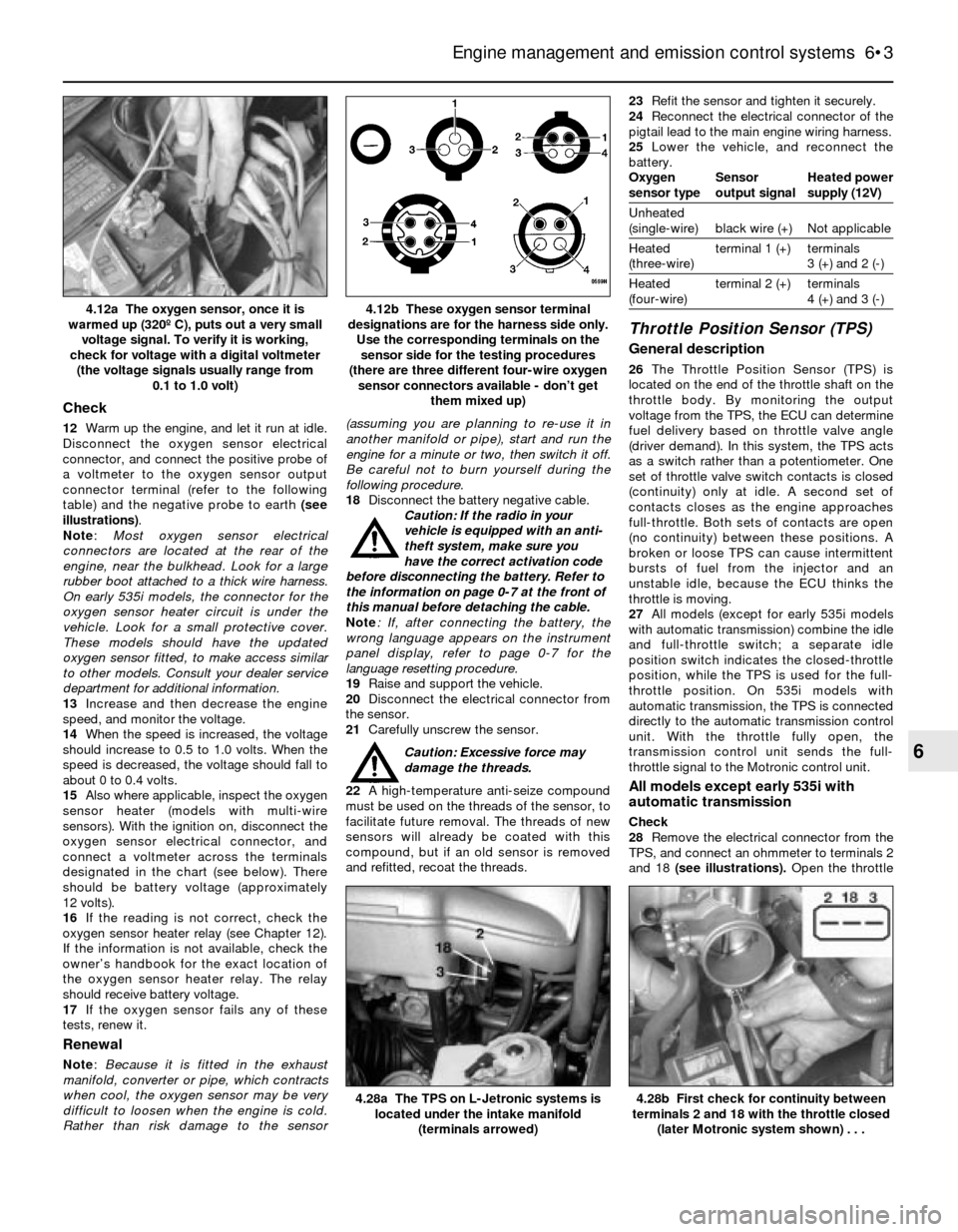
by a BMW dealer or other specialist.
26On three-wire valves, check for voltage at
the electrical connector. With the ignition on,
there should be battery voltage present at the
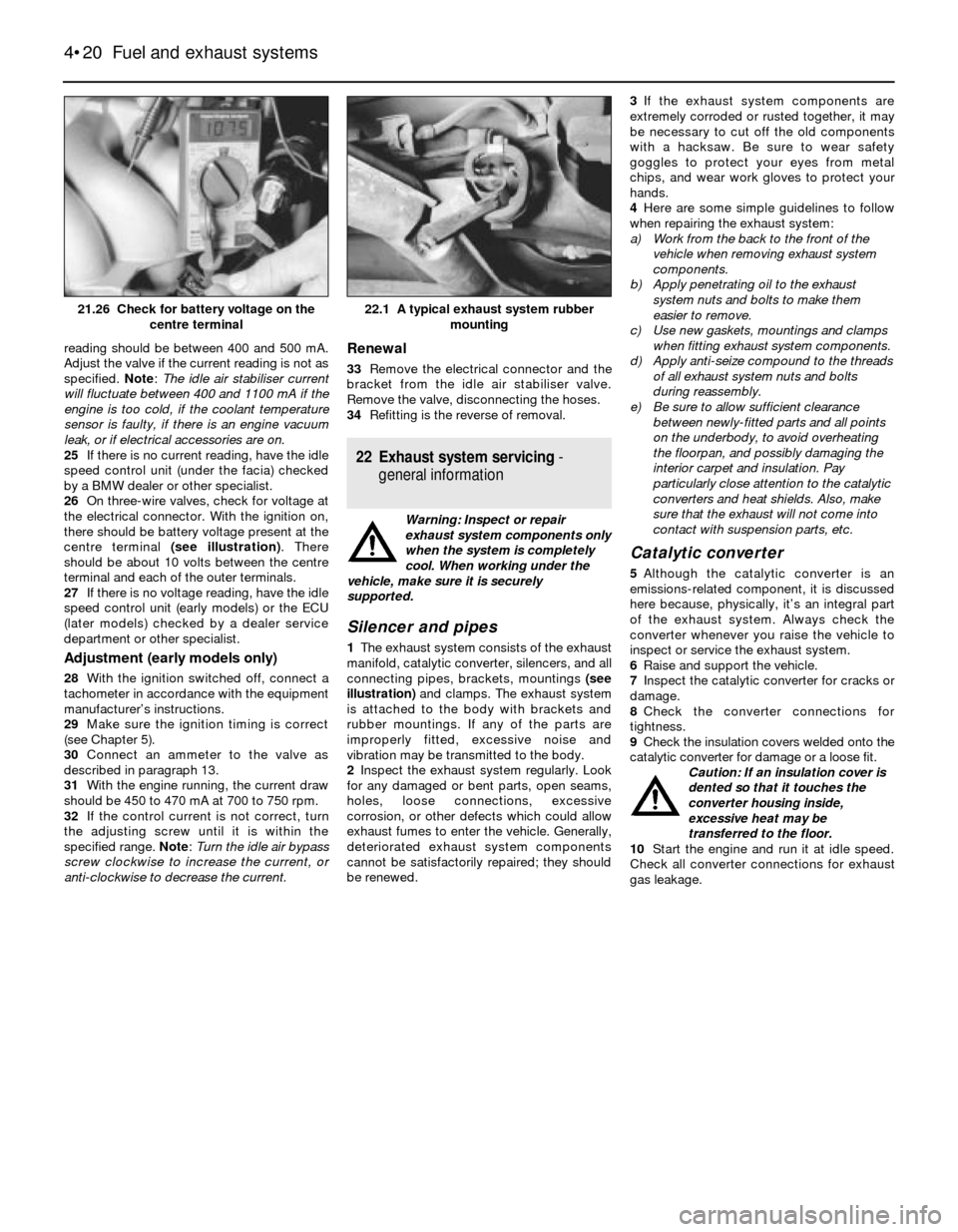
centre terminal (see illustration). There
should be about 10 volts between the centre
terminal and each of the outer terminals.
27If there is no voltage reading, have the idle
speed control unit (early models) or the ECU
(later models) checked by a dealer service
department or other specialist.
Adjustment (early models only)
28With the ignition switched off, connect a
tachometer in accordance with the equipment
manufacturer’s instructions.
29Make sure the ignition timing is correct
(see Chapter 5).
30Connect an ammeter to the valve as
described in paragraph 13.
31With the engine running, the current draw
should be 450 to 470 mA at 700 to 750 rpm.
32If the control current is not correct, turn
the adjusting screw until it is within the
specified range. Note: Turn the idle air bypass
screw clockwise to increase the current, or
anti-clockwise to decrease the current.
Renewal
33Remove the electrical connector and the
bracket from the idle air stabiliser valve.
Remove the valve, disconnecting the hoses.
34Refitting is the reverse of removal.
22 Exhaust system servicing-
general information
Warning: Inspect or repair
exhaust system components only
when the system is completely
cool. When working under the
vehicle, make sure it is securely
supported.
Silencer and pipes
1The exhaust system consists of the exhaust
manifold, catalytic converter, silencers, and all
connecting pipes, brackets, mountings (see
illustration)and clamps. The exhaust system
is attached to the body with brackets and
rubber mountings. If any of the parts are
improperly fitted, excessive noise and
vibration may be transmitted to the body.
2Inspect the exhaust system regularly. Look
for any damaged or bent parts, open seams,
holes, loose connections, excessive
corrosion, or other defects which could allow
exhaust fumes to enter the vehicle. Generally,
deteriorated exhaust system components
cannot be satisfactorily repaired; they should
be renewed.3If the exhaust system components are
extremely corroded or rusted together, it may
be necessary to cut off the old components
with a hacksaw. Be sure to wear safety
goggles to protect your eyes from metal
chips, and wear work gloves to protect your
hands.
4Here are some simple guidelines to follow
when repairing the exhaust system:
a) Work from the back to the front of the
vehicle when removing exhaust system
components.
b) Apply penetrating oil to the exhaust
system nuts and bolts to make them
easier to remove.
c) Use new gaskets, mountings and clamps
when fitting exhaust system components.
d) Apply anti-seize compound to the threads
of all exhaust system nuts and bolts
during reassembly.
e) Be sure to allow sufficient clearance
between newly-fitted parts and all points
on the underbody, to avoid overheating
the floorpan, and possibly damaging the
interior carpet and insulation. Pay
particularly close attention to the catalytic
converters and heat shields. Also, make
sure that the exhaust will not come into
contact with suspension parts, etc.
Catalytic converter
5Although the catalytic converter is an
emissions-related component, it is discussed
here because, physically, it’s an integral part
of the exhaust system. Always check the
converter whenever you raise the vehicle to
inspect or service the exhaust system.
6Raise and support the vehicle.
7Inspect the catalytic converter for cracks or
damage.
8Check the converter connections for
tightness.
9Check the insulation covers welded onto the
catalytic converter for damage or a loose fit.
Caution: If an insulation cover is
dented so that it touches the
converter housing inside,
excessive heat may be
transferred to the floor.
10Start the engine and run it at idle speed.
Check all converter connections for exhaust
gas leakage.
4•20 Fuel and exhaust systems
22.1 A typical exhaust system rubber
mounting21.26 Check for battery voltage on the
centre terminal
Page 112 of 228
1 General information
The engine electrical systems include all
ignition, charging and starting components.
Because of their engine-related functions,
these components are discussed separately
from body-related electrical devices such as
the lights, the instruments, etc. (which are
included in Chapter 12).
Always observe the following precautions
when working on the electrical systems:
a) Be extremely careful when servicing
engine electrical components. They are
easily damaged if improperly checked,
connected or handled.
b) Never leave the ignition switched on for
long periods of time with the engine off.
c) Don’t disconnect the battery cables while
the engine is running.
d) Observe the rules when jump-starting
your vehicle. Read the precautions at the
front of this manual.
e) Always disconnect the battery negative
cable first, and connect it last, to reduce
the risk of accidental short-circuits.
f) Don’t charge the battery with the cables
connected to the terminals.
It’s also a good idea to review the safety-
related information regarding the engine
electrical systems in the “Safety first”section
near the front of this manual before beginning
any operation included in this Chapter.
Caution: If the radio in your
vehicle is equipped with an anti-
theft system, make sure you
have the correct activation code
before disconnecting the battery. Refer to
the information on page 0-7 at the front of
this manual before detaching the cable.
Note: If, after connecting the battery, the
wrong language appears on the instrument
panel display, refer to page 0-7 for the
language resetting procedure.
2 Battery-
emergency jump starting
1
Refer to the “Jump starting”procedure at
the front of this manual.
3 Battery- removal and refitting
1
Note:Depending on the model, the battery
may be located in the engine compartment, in
the rear luggage compartment, or under the
rear seat. Consult your owners handbook for
the location of the battery, if not already
known to you.Caution: If the radio in your
vehicle is equipped with an anti-
theft system, make sure you
have the correct activation code
before disconnecting the battery. Refer to
the information on page 0-7 at the front of
this manual before detaching the cable.
Note: If, after connecting the battery, the
wrong language appears on the instrument
panel display, refer to page 0-7 for the
language resetting procedure.
1Disconnect the battery negative cable.
2Detach the cable from the positive terminal.
3Remove the battery hold-down bracket
(see illustrations)and lift out the battery. Be
careful - it’s heavy. Do not tilt the battery to
any extent while it is being removed, and
store it upright.
4While the battery is out, inspect the carrier
(tray) for corrosion (see Chapter 1).
5If you are renewing the battery, make sure
that you get one that’s identical, with the
same dimensions, amperage rating, cold
cranking rating, etc.
6Refitting is the reverse of removal.
4 Battery cables-
check and renewal
1
Check
1Periodically inspect the entire length of
each battery cable for damage, cracked or
burned insulation, and corrosion.
Poor battery cable connections can cause
starting problems and decreased engine
performance.
Caution: If the radio in your
vehicle is equipped with an anti-
theft system, make sure you
have the correct activation code
before disconnecting the battery. Refer to
the information on page 0-7 at the front of
this manual before detaching the cable.
Note: If, after connecting the battery, the
wrong language appears on the instrument
panel display, refer to page 0-7 for the
language resetting procedure.2Check the cable-to-terminal connections at
the ends of the cables for cracks, loose wire
strands, and corrosion. The presence of
white, fluffy deposits under the insulation at
the cable terminal connection is a sign that
the cable is corroded, and should be cleaned
or renewed. Check the terminals for
distortion, missing mounting bolts, and
corrosion.
Renewal
3When removing the cables, always
disconnect the negative cable first and
connect it up last. This reduces the risk of
accidental short-circuits. Even if only a new
positive cable is being fitted, be sure to
disconnect the negative cable from the
battery first (see Chapter 1 for further
information regarding battery cable removal).
4Disconnect the old cables from the battery,
then trace each of them to their opposite ends
and detach them from the starter solenoid
and earth terminals. Note the routing of each
cable to ensure correct refitting.
5If the old cables are to be renewed, take
them with you when buying new cables. It is
vitally important that you renew the cables
with identical parts. Cables have character-
istics that make them easy to identify: positive
cables are usually red, larger in cross-section,
and have a larger-diameter battery post
clamp; earth cables are usually black, smaller
in cross-section, and have a slightly smaller
diameter clamp for the negative post.
6Clean the threads of the solenoid or earth
connection with a wire brush to remove rust
and corrosion.
7Attach the cable to the solenoid or earth
connection, and tighten the mounting nut/bolt
securely.
8Before connecting a new cable to the
battery, make sure that it reaches the battery
post without having to be stretched.
9Connect the positive cable first, followed by
the negative cable.
5•2 Engine electrical systems
3.3b The battery is mounted under the
rear seat on some models
3.3a Always detach the cable from the
battery negative terminal first, then detach
the positive cable – to remove the hold-
down assembly, remove the nuts (arrowed)
or single bolt
Apply a light coat of battery
terminal corrosion inhibitor,
or petroleum jelly, to the
terminal threads, to prevent
future corrosion.
Page 117 of 228
8Use a digital voltmeter for the following
tests:
a) On Bosch systems, connect the positive
probe to connector terminal 5, and the
negative probe to terminal 6 (see
illustration).
b) On Siemens/Telefunken systems, connect
the positive probe to terminal (+) of the
smaller connector, and the negative
probe to terminal (-).
9Have an assistant crank the engine over,
and check that there is 1 to 2 volts A/C
present. If there is no voltage, check the
wiring harness between the impulse generator
(in the distributor) and the control unit. If the
harness is OK, check the impulse generator
resistance.
Warning: Do not crank the
engine over for an excessive
length of time. If necessary,
disconnect the cold start injector
electrical connector (see Chapter 4) to
stop the flow of fuel into the engine.
10To check the resistance in the impulse
generator, proceed as described for your
system below:
a) On Bosch units, measure the resistance
between connector terminals 5 and 6
(see illustration 10.8). The reading
should be 1000 to 1200 ohms.
b) On Siemens/Telefunken units, measure
the resistance between the terminals of
the smaller connector. The reading should
be 1000 to 1200 ohms.
11If the resistance readings are incorrect,
renew the impulse generator. If the resistance
readings for the impulse generator are correct
and the control unit voltages (supply voltage
[paragraphs 1 to 6] and signal voltage
[paragraphs 7 to 9]) are incorrect, renew the
control unit.
Renewal
Ignition control unit
12Make sure the ignition is switched off.
13Disconnect the electrical connector(s)
from the control unit.
14Remove the mounting screws from the
control unit, and lift it from the engine
compartment.15Refitting is the reverse of removal. Note:
On Bosch control units, a special dielectric
grease is used between the heat sink and the
back of the control unit. In the event the two
are separated (renewal or testing) the old
grease must be removed, and the heat sink
cleaned off using 180-grit sandpaper. Apply
Curil K2 (Bosch part number 81 22 9 243). A
silicon dielectric compound can be used as a
substitute. This treatment is very important for
the long life of these expensive ignition parts.
Impulse generator
Caution: If the radio in your
vehicle is equipped with an anti-
theft system, make sure you
have the correct activation code
before disconnecting the battery. Refer to
the information on page 0-7 at the front of
this manual before detaching the cable.
Note: If, after connecting the battery, the
wrong language appears on the instrument
panel display, refer to page 0-7 for the
language resetting procedure.
16Disconnect the battery negative cable.
17Remove the distributor from the engine
(see Section 8).
18Using a pair of circlip pliers, remove the
circlip retaining the trigger wheel (see
illustration).
19Use two flat-bladed screwdrivers
positioned at opposite sides of the trigger
wheel, and carefully prise it up (see
illustration). Note: Push the screwdrivers in
as far as possible without bending the trigger
wheel. Prise only on the strongest, centre
portion of the trigger wheel. In the event the
trigger wheel is bent, it must be replaced with
a new one. Note:Be sure not to lose the roll
pin when lifting out the trigger wheel.
20Remove the mounting screws from the
impulse generator electrical connector, the
vacuum diaphragm and the baseplate.
21Remove the two screws from the vacuum
advance unit, and separate it from the
distributor by moving the assembly down
while unhooking it from the baseplate pin.
22Use circlip pliers to remove the circlip that
retains the impulse generator and the
baseplate assembly.
23Carefully remove the impulse generator
and the baseplate assembly as a single unit.24Remove the three screws, and separate
the baseplate assembly from the impulse
generator.
25Refitting is the reverse of removal. Note:
Be sure to position the insulating ring between
the generator coil and the baseplate. It must
be centred before tightening the mounting
screws. Also, it will be necessary to
check/adjust the air gap if the trigger wheel
has been removed, or tampered with to the
point that the clearance is incorrect (see
Section 11).
11 Air gap (TCI system)-
check and adjustment
2
Caution: If the radio in your
vehicle is equipped with an anti-
theft system, make sure you
have the correct activation code
before disconnecting the battery. Refer to
the information on page 0-7 at the front of
this manual before detaching the cable.
Note: If, after connecting the battery, the
wrong language appears on the instrument
panel display, refer to page 0-7 for the
language resetting procedure.
1Disconnect the battery negative cable.
2Insert a brass feeler gauge between the
trigger wheel tab and the impulse generator
(see illustration). Slide the feeler gauge up
Engine electrical systems 5•7
10.19 Carefully prise the trigger wheel off
the distributor shaft10.18 Use circlip pliers and remove the
circlip from the distributor shaft10.8 Back-probe the ignition control unit
connector, and check for signal voltage on
terminals 5 and 6 (Bosch system shown). It
is very helpful to use angled probes
11.2 Use a brass feeler gauge to check
the air gap (be sure the gauge rubs lightly
against the trigger wheel as well as the
locating pin for the correct adjustment)
5
Page 122 of 228
when the transmission selector lever is in Park
or Neutral.
Always detach the battery negative cable
before working on the starting system.
19 Starter motor-
in-vehicle check
2
Note:Before diagnosing starter problems,
make sure the battery is fully charged.
1If the starter motor does not turn at all when
the switch is operated, make sure that the
gear lever is in Neutral or Park (automatic
transmission) or, where applicable, that the
clutch pedal is depressed (manual
transmission).
2Make sure that the battery is charged, and
that all cables, both at the battery and starter
solenoid terminals, are clean and secure.
3If the starter motor spins but the engine is
not cranking, the overrun clutch in the starter
motor is slipping, and the starter motor must
be renewed.
4If, when the switch is actuated, the starter
motor does not operate at all but the solenoid
clicks, then the problem lies either in the
battery, the main solenoid contacts, or the
starter motor itself (or the engine is seized).
5If the solenoid plunger cannot be heard
when the switch is actuated, the battery is
faulty, the switch is defective, the fusible link
is burned-out (the circuit is open), or the
solenoid itself is defective.
6To check the solenoid, connect a jumper
lead between the battery (+) and the ignition
switch wire terminal (the small terminal) on the
solenoid. If the starter motor now operates,
the solenoid is OK and the problem is in the
ignition switch, starter inhibitor switch
(automatic transmission models), clutch
switch (some manual transmission models), or
the wiring.
7If the starter motor still does not operate,
remove the starter/solenoid assembly for
dismantling, testing and repair.
8If the starter motor cranks the engine at an
abnormally-slow speed, first make sure that
the battery is charged, and that all terminal
connections are tight. If the engine is partially-
seized, or has the wrong viscosity oil in it, it
will crank slowly.
9Run the engine until normal operating
temperature is reached, then disconnect the
coil HT lead from the distributor cap and earth
it on the engine.
10Connect a voltmeter positive lead to the
battery positive post, and connect the
negative lead to the negative post.11Crank the engine, and take the voltmeter
readings as soon as a steady figure is
indicated. Do not allow the starter motor to
turn for more than 10 seconds at a time. A
reading of 9 volts or more, with the starter
motor turning at normal cranking speed, is
normal. If the reading is 9 volts or more but
the cranking speed is slow, the solenoid
contacts are burned, there is a bad
connection, or the starter motor itself is faulty.
If the reading is less than 9 volts and the
cranking speed is slow, the starter motor is
faulty or the battery is responsible (defective
or discharged).
20 Starter motor-
removal and refitting
1
Note:If the starter motor is defective, it should
be renewed, or taken to an auto electrical
specialist for repair. Overhaul of the starter
motor is unlikely to be a practical proposition
for the home mechanic, even if spare parts are
available. However, the solenoid can be
renewed separately (see Section 21).
Removal
Caution: If the radio in your
vehicle is equipped with an anti-
theft system, make sure you
have the correct activation code
before disconnecting the battery. Refer to
the information on page 0-7 at the front of
this manual before detaching the cable.
Note: If, after connecting the battery, the
wrong language appears on the instrument
panel display, refer to page 0-7 for the
language resetting procedure.
1Detach the battery negative cable.
2Raise the vehicle and support it securely on
axle stands.
3Clearly label the wires from the terminals onthe starter motor and solenoid, then
disconnect them. Note: On some models, it
may be necessary to remove the air cleaner
(see Chapter 4), coolant expansion tank (see
Chapter 3) and the heater hoses to gain
access to the top of the starter. Carefully label
any hoses or components that need to be
removed from the engine compartment, to
avoid confusion when reassembling.
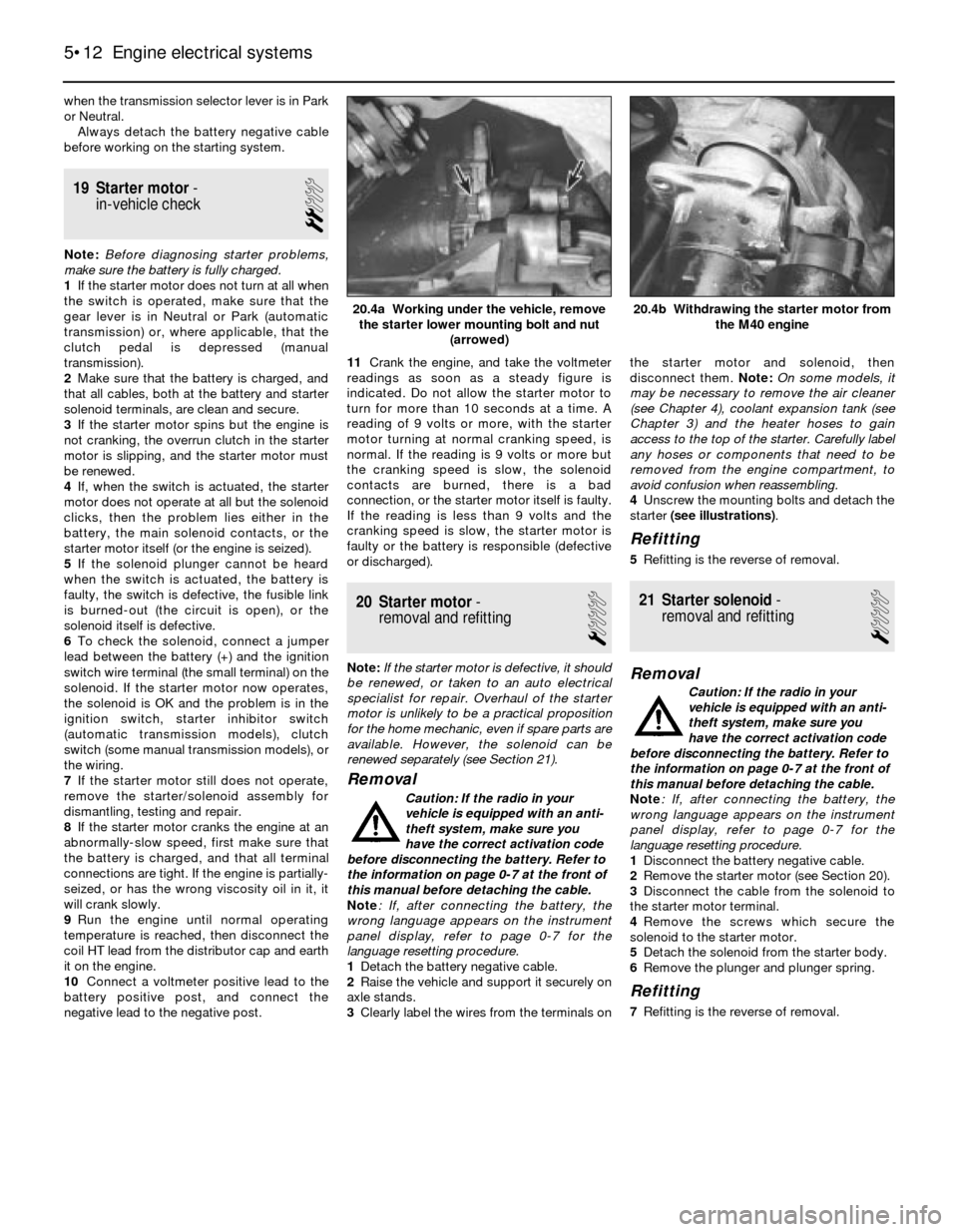
4Unscrew the mounting bolts and detach the
starter (see illustrations).
Refitting
5Refitting is the reverse of removal.
21 Starter solenoid-
removal and refitting
1
Removal
Caution: If the radio in your
vehicle is equipped with an anti-
theft system, make sure you
have the correct activation code
before disconnecting the battery. Refer to
the information on page 0-7 at the front of
this manual before detaching the cable.
Note: If, after connecting the battery, the
wrong language appears on the instrument
panel display, refer to page 0-7 for the
language resetting procedure.
1Disconnect the battery negative cable.
2Remove the starter motor (see Section 20).
3Disconnect the cable from the solenoid to
the starter motor terminal.
4Remove the screws which secure the
solenoid to the starter motor.
5Detach the solenoid from the starter body.
6Remove the plunger and plunger spring.
Refitting
7Refitting is the reverse of removal.
5•12 Engine electrical systems
20.4b Withdrawing the starter motor from
the M40 engine20.4a Working under the vehicle, remove
the starter lower mounting bolt and nut
(arrowed)
Page 124 of 228
4 Information sensors
2
Note:Refer to Chapters 4 and 5 for additional
information on the location and diagnosis of
the information sensors that are not covered in
this Section.
Coolant temperature sensor
General description
1The coolant temperature sensor (see
illustration)is a thermistor (a resistor which
varies its resistance value in accordance with
temperature changes). The change in the
resistance value regulates the amount of
voltage that can pass through the sensor. At
low temperatures, the sensor’s resistance is
high. As the sensor temperature increases, its
resistance will decrease. Any failure in this
sensor circuit will in most cases be due to a
loose or shorted-out wire; if no wiring
problems are evident, check the sensor as
described below.
Check
2To check the sensor, first check its
resistance (see illustration)when it is
completely cold (typically 2100 to 2900 ohms).
Next, start the engine and warm it up until it
reaches operating temperature. The resistance
should be lower (typically 270 to 400 ohms).
Note: If restricted access to the coolant
temperature sensor makes it difficult to attach
electrical probes to the terminals, remove the
sensor as described below, and perform the
tests in a container of heated water to simulate
the conditions.
Warning: Wait until the engine is
completely cool before beginning
this procedure.
Renewal
3To remove the sensor, depress the spring
lock, unplug the electrical connector, then
carefully unscrew the sensor. Be prepared for
some coolant spillage; to reduce this, have
the new sensor ready for fitting as quickly as
possible.Caution: Handle the coolant
sensor with care. Damage to this
sensor will affect the operation of
the entire fuel injection system.
Note: It may be necessary to drain a small
amount of coolant from the radiator before
removing the sensor.
4Before the sensor is fitted, ensure its
threads are clean, and apply a little sealant to
them.
5Refitting is the reverse of removal.
Oxygen sensor
General description
Note:Oxygen sensors are normally only fitted
to those vehicles equipped with a catalytic
converter. Most oxygen sensors are located in
the exhaust pipe, downstream from the
exhaust manifold. On 535 models, the oxygen
sensor is mounted in the catalytic converter.
The sensor’s electrical connector is located
near the bulkhead (left side) for easy access.
6The oxygen sensor, which is located in the
exhaust system (see illustration), monitors
the oxygen content of the exhaust gas. The
oxygen content in the exhaust reacts with the
oxygen sensor, to produce a voltage output
which varies from 0.1 volts (high oxygen, lean
mixture) to 0.9 volts (low oxygen, rich
mixture). The ECU constantly monitors this
variable voltage output to determine the ratio
of oxygen to fuel in the mixture. The ECU
alters the air/fuel mixture ratio by controlling
the pulse width (open time) of the fuel
injectors. A mixture ratio of 14.7 parts air to 1
part fuel is the ideal mixture ratio for
minimising exhaust emissions, thus allowing
the catalytic converter to operate at maximum
efficiency. It is this ratio of 14.7 to 1 which the
ECU and the oxygen sensor attempt to
maintain at all times.
7The oxygen sensor produces no voltage
when it is below its normal operating
temperature of about 320º C. During this initial
period before warm-up, the ECU operates in
“open-loop” mode (ie without the information
from the sensor).
8If the engine reaches normal operating
temperature and/or has been running for two
or more minutes, and if the oxygen sensor is
producing a steady signal voltage below 0.45 volts at 1500 rpm or greater, the ECU
fault code memory will be activated.
9When there is a problem with the oxygen
sensor or its circuit, the ECU operates in the
“open-loop” mode - that is, it controls fuel
delivery in accordance with a programmed
default value instead of with feedback
information from the oxygen sensor.
10The proper operation of the oxygen
sensor depends on four conditions:
a) Electrical - The low voltages generated by
the sensor depend upon good, clean
connections, which should be checked
whenever a malfunction of the sensor is
suspected or indicated.
b) Outside air supply - The sensor is
designed to allow air circulation to the
internal portion of the sensor. Whenever
the sensor is disturbed, make sure the air
passages are not restricted.
c) Proper operating temperature - The ECU
will not react to the sensor signal until the
sensor reaches approximately 320º C.
This factor must be taken into
consideration when evaluating the
performance of the sensor.
d) Unleaded fuel - The use of unleaded fuel
is essential for proper operation of the
sensor. Make sure the fuel you are using
is of this type.
11In addition to observing the above
conditions, special care must be taken
whenever the sensor is serviced.
a) The oxygen sensor has a permanently-
attached pigtail and electrical connector,
which should not be removed from the
sensor. Damage or removal of the pigtail
or electrical connector can adversely
affect operation of the sensor.
b) Grease, dirt and other contaminants
should be kept away from the electrical
connector and the louvered end of the
sensor.
c) Do not use cleaning solvents of any kind
on the oxygen sensor.
d) Do not drop or roughly handle the sensor.
e) The silicone boot must be fitted in the
correct position, to prevent the boot from
being melted and to allow the sensor to
operate properly.
6•2 Engine management and emission control systems
4.6 The oxygen sensor (arrowed) is usually
located in the exhaust pipe, downstream
from the exhaust manifold4.2 Check the resistance of the coolant
temperature sensor at different
temperatures4.1 The coolant temperature sensor
(arrowed) is usually located next to the
temperature sender unit, near the fuel
pressure regulator
Page 125 of 228
Check
12Warm up the engine, and let it run at idle.
Disconnect the oxygen sensor electrical
connector, and connect the positive probe of
a voltmeter to the oxygen sensor output
connector terminal (refer to the following
table) and the negative probe to earth (see
illustrations).
Note:Most oxygen sensor electrical
connectors are located at the rear of the
engine, near the bulkhead. Look for a large
rubber boot attached to a thick wire harness.
On early 535i models, the connector for the
oxygen sensor heater circuit is under the
vehicle. Look for a small protective cover.
These models should have the updated
oxygen sensor fitted, to make access similar
to other models. Consult your dealer service
department for additional information.
13Increase and then decrease the engine
speed, and monitor the voltage.
14When the speed is increased, the voltage
should increase to 0.5 to 1.0 volts. When the
speed is decreased, the voltage should fall to
about 0 to 0.4 volts.
15Also where applicable, inspect the oxygen
sensor heater (models with multi-wire
sensors). With the ignition on, disconnect the
oxygen sensor electrical connector, and
connect a voltmeter across the terminals
designated in the chart (see below). There
should be battery voltage (approximately
12 volts).
16If the reading is not correct, check the
oxygen sensor heater relay (see Chapter 12).
If the information is not available, check the
owner’s handbook for the exact location of
the oxygen sensor heater relay. The relay
should receive battery voltage.
17If the oxygen sensor fails any of these
tests, renew it.
Renewal
Note: Because it is fitted in the exhaust
manifold, converter or pipe, which contracts
when cool, the oxygen sensor may be very
difficult to loosen when the engine is cold.
Rather than risk damage to the sensor(assuming you are planning to re-use it in
another manifold or pipe), start and run the
engine for a minute or two, then switch it off.
Be careful not to burn yourself during the
following procedure.
18Disconnect the battery negative cable.
Caution: If the radio in your
vehicle is equipped with an anti-
theft system, make sure you
have the correct activation code
before disconnecting the battery. Refer to
the information on page 0-7 at the front of
this manual before detaching the cable.
Note: If, after connecting the battery, the
wrong language appears on the instrument
panel display, refer to page 0-7 for the
language resetting procedure.
19Raise and support the vehicle.
20Disconnect the electrical connector from
the sensor.
21Carefully unscrew the sensor.
Caution: Excessive force may
damage the threads.
22A high-temperature anti-seize compound
must be used on the threads of the sensor, to
facilitate future removal. The threads of new
sensors will already be coated with this
compound, but if an old sensor is removed
and refitted, recoat the threads.23Refit the sensor and tighten it securely.
24Reconnect the electrical connector of the
pigtail lead to the main engine wiring harness.
25Lower the vehicle, and reconnect the
battery.
Oxygen Sensor Heated power
sensor type output signal supply (12V)
Unheated
(single-wire) black wire (+) Not applicable
Heated terminal 1 (+) terminals
(three-wire) 3 (+) and 2 (-)
Heated terminal 2 (+) terminals
(four-wire) 4 (+) and 3 (-)
Throttle Position Sensor (TPS)
General description
26The Throttle Position Sensor (TPS) is
located on the end of the throttle shaft on the
throttle body. By monitoring the output
voltage from the TPS, the ECU can determine
fuel delivery based on throttle valve angle
(driver demand). In this system, the TPS acts
as a switch rather than a potentiometer. One
set of throttle valve switch contacts is closed
(continuity) only at idle. A second set of
contacts closes as the engine approaches
full-throttle. Both sets of contacts are open
(no continuity) between these positions. A
broken or loose TPS can cause intermittent
bursts of fuel from the injector and an
unstable idle, because the ECU thinks the
throttle is moving.
27All models (except for early 535i models
with automatic transmission) combine the idle
and full-throttle switch; a separate idle
position switch indicates the closed-throttle
position, while the TPS is used for the full-
throttle position. On 535i models with
automatic transmission, the TPS is connected
directly to the automatic transmission control
unit. With the throttle fully open, the
transmission control unit sends the full-
throttle signal to the Motronic control unit.
All models except early 535i with
automatic transmission
Check
28Remove the electrical connector from the
TPS, and connect an ohmmeter to terminals 2
and 18 (see illustrations). Open the throttle
Engine management and emission control systems 6•3
4.12b These oxygen sensor terminal
designations are for the harness side only.
Use the corresponding terminals on the
sensor side for the testing procedures
(there are three different four-wire oxygen
sensor connectors available - don’t get
them mixed up)4.12a The oxygen sensor, once it is
warmed up (320º C), puts out a very small
voltage signal. To verify it is working,
check for voltage with a digital voltmeter
(the voltage signals usually range from
0.1 to 1.0 volt)
4.28b First check for continuity between
terminals 2 and 18 with the throttle closed
(later Motronic system shown) . . .4.28a The TPS on L-Jetronic systems is
located under the intake manifold
(terminals arrowed)
6
Page 127 of 228
filtered with a flame trap like most
conventional systems. There are no
conventional PCV valves fitted on these
systems - just a hose (see illustration).
3The main components of the PCV system
are the hoses that connect the valve cover to
the throttle body or air cleaner. If abnormal
operating conditions (such as piston ring
problems) arise, the system is designed to
allow excessive amounts of blow-by gases to
flow back through the crankcase vent tube
into the intake system, to be consumed by
normal combustion. Note: Since these
models don’t use a filtering element, it’s a
good idea to check the PCV system
passageways for clogging from sludge and
combustion residue(see illustration).
6 Evaporative emissions
control (EVAP) system
2
General description
Note:This system is normally only fitted to
those vehicles equipped with a catalytic
converter.
1When the engine isn’t running, the fuel in the
fuel tank evaporates to some extent, creating
fuel vapour. The evaporative emissions control
system (see illustration)stores these fuel
vapours in a charcoal canister. When the
engine is cruising, the purge control valve is
opened slightly, and a small amount of fuel
vapour is drawn into the intake manifold and
burned. When the engine is starting cold or
idling, the purge valve prevents any vapours
from entering the intake manifold and causing
excessively-rich fuel mixture.
2Two types of purge valve are used;
electrically-operated or vacuum-operated. To
find out which type is on your vehicle, follow
the hose from the charcoal canister until you
locate the purge valve. Some are located on
the intake manifold, and others near the
charcoal canister. Look for either an electrical
connector, or vacuum lines, to the purge
valve.3A faulty EVAP system will only affect engine
driveability when the engine is warm. The
EVAP system is not usually the cause of
difficult cold starting or any other cold-running
problems.
Check
Vacuum-operated purge valve
4Remove the vacuum lines from the purge
valve, and blow into the larger valve port. It
should be closed, and not pass any air. Note:
Some models have a thermo-vacuum valve
that delays canister purging until the coolant
temperature reaches approximately 46º C.
Check this valve to make sure that vacuum is
controlled at the proper temperatures. The
valve is usually located in the intake manifold,
near the thermo-time switch and the coolant
temperature sensor.
5Disconnect the small vacuum hose from the
purge valve, and apply vacuum with a hand-
held vacuum pump. The purge valve should
be open, and air should be able to pass
through.6If the test results are unsatisfactory, renew
the purge valve.
Electrically-operated purge valve
7Disconnect any lines from the purge valve,
and (without disconnecting the electrical
connector) place it in a convenient spot for
testing.
8Check that the valve makes a “click” sound
as the ignition is switched on (see
illustration).
9If the valve does not “click”, disconnect the
valve connector, and check for power to the
valve using a test light or a voltmeter (see
illustration).
10If battery voltage is present, but the valve
does not work, renew it. If there is no voltage
present, check the Motronic control unit and
the wiring.
Canister
11Mark all the hoses for position, then
detach them from the canister.
12Slide the canister out of its mounting clip.
Engine management and emission control systems 6•5
6.1 Diagram of the EVAP system on the M10 engine (others similar)
6.9 Check for battery voltage at the
electrical connector to the purge valve6.8 When the ignition is switched on, there
should be a distinct “click” from the purge
valve
6
5.3 It’s a good idea to check for excess
residue from the crankcase vapours
circulating in the hoses and ports - this
can eventually clog the system, and cause
a pressure increase in the engine block
Page 130 of 228
Torque wrench settingsNm
Front disc brake caliper
Caliper guide (mounting) bolts . . . . . . . . . . . . . . . . . . . . . . . . . . . . . . 30 to 35
Caliper bracket-to-strut housing bolts
3-Series, E30 . . . . . . . . . . . . . . . . . . . . . . . . . . . . . . . . . . . . . . . . . . 123
5-Series, E28 (“old-shape”) . . . . . . . . . . . . . . . . . . . . . . . . . . . . . . . 123
5-Series, E34 (“new-shape”) . . . . . . . . . . . . . . . . . . . . . . . . . . . . . . 110
Rear disc brake caliper
Caliper guide (mounting) bolts . . . . . . . . . . . . . . . . . . . . . . . . . . . . . . 30 to 35
Carrier-to-trailing arm bolts . . . . . . . . . . . . . . . . . . . . . . . . . . . . . . . . 67
Brake hose-to-caliper fitting . . . . . . . . . . . . . . . . . . . . . . . . . . . . . . . . . . 14 to 17
Master cylinder-to-brake servo nuts
3-Series . . . . . . . . . . . . . . . . . . . . . . . . . . . . . . . . . . . . . . . . . . . . . . . . 24
5-Series . . . . . . . . . . . . . . . . . . . . . . . . . . . . . . . . . . . . . . . . . . . . . . . . 25 to 29
Brake servo mounting nuts . . . . . . . . . . . . . . . . . . . . . . . . . . . . . . . . . . . 22 to 24
Hydraulic line-to-hydraulic brake servo threaded
fittings - 5-Series, E28 (“old-shape”) . . . . . . . . . . . . . . . . . . . . . . . . . . . 31
Wheel bolts . . . . . . . . . . . . . . . . . . . . . . . . . . . . . . . . . . . . . . . . . . . . . . . See Chapter 1
9•2 Braking system
1 General information
All 3-Series models, and 5-Series E28 (“old-
shape”) models, are equipped with front disc
brakes and either rear drum or rear disc
brakes. 5-Series E34 (“new-shape”) models
have disc brakes front and rear. Front and
rear brakes are self-adjusting on all models.
Some later models are equipped with an Anti-
lock Braking System (ABS); this is described
in Section 2.
Hydraulic system
The hydraulic system consists of two
separate circuits. The master cylinder has
separate reservoirs for the two circuits; in the
event of a leak or failure in one hydraulic
circuit, the other circuit will remain operative.
Brake servo
The vacuum brake servo, utilising engine
manifold vacuum and atmospheric pressure
to provide assistance to the hydraulically
operated brakes, is mounted on the bulkhead
in the engine compartment.
A hydraulic brake servo system is used on
5-Series E28 models. This system uses
hydraulic pressure from the power steering
pump to assist braking.
Handbrake
The handbrake operates the rear brakes,
and is cable-operated via a lever mounted in
the centre console. The handbrake assembly
on rear drum brake models is part of the rear
drum brake assembly, and is self-adjusting.
On rear disc brake models, the handbrake
uses a pair of brake shoes located inside the
centre portion of the rear brake disc, and is
manually-adjusted.
Brake pad wear warning system
The brake pad wear warning system is
linked to a red warning light in the instrumentcluster, which comes on when the brake pads
have worn down to the point at which they
require renewal. DO NOT ignore this reminder.
If you don’t renew the pads shortly after the
brake pad wear warning light comes on, the
brake discs will be damaged.
On some models, the brake pad wear
warning system also includes an early
warning light that comes on only when the
brake pedal is depressed, letting you know in
advance that the pads need to be renewed.
The wear sensor is attached to the brake
pads. The sensor is located at the left front
wheel; on some models, there is another
sensor at the right rear wheel. The wear
sensor is part of a closed circuit. Once the
pads wear down to the point at which they’re
flush with the sensor, the disc grinds away the
side of the sensor facing the disc. Thus, the
wire inside the sensor is broken, and the red
light on the instrument panel comes on.
Always check the sensor(s) when renewing
the pads. If you change the pads before the
warning light comes on, the sensor(s) may still
be good; once the light has come on, renew
the sensor.
Service
After completing any operation involving
dismantling of any part of the brake system,
always test drive the vehicle to check for
proper braking performance before resuming
normal driving. When testing the brakes, try to
select a clean, dry, road with no camber (ie as
flat as possible) and with no other traffic.
Conditions other than these can lead to
inaccurate test results.
Test the brakes at various speeds with both
light and heavy pedal pressure. The vehicle
should stop evenly, without pulling to one side
or the other. Avoid locking the brakes,
because this slides the tyres and diminishes
braking efficiency and control of the vehicle.
Tyres, vehicle load and wheel alignment are
factors which also affect braking
performance.
2 Anti-lock Braking system
(ABS)- general information
The Anti-lock Braking System is designed
to maintain vehicle control, directional stability
and optimum deceleration under severe
braking conditions on most road surfaces. It
does so by monitoring the rotational speed of
each wheel and controlling the brake line
pressure to each wheel during braking. This
prevents the wheels from locking up.
The ABS system has three main
components - the wheel speed sensors, the
electronic control unit, and the hydraulic
control unit. The sensors - one at each wheel
since 1985, but at both front wheels and one
at the rear differential on earlier models - send
a variable voltage signal to the control unit,
which monitors these signals, compares them
to its program information, and determines
whether a wheel is about to lock up. When a
wheel is about to lock up, the control unit
signals the hydraulic unit to reduce hydraulic
pressure (or not increase it further) at that
wheel’s brake caliper. Pressure modulation is
handled by electrically-operated solenoid
valves.
If a problem develops within the system, an
“ABS” warning light will glow on the
dashboard. Sometimes, a visual inspection of
the ABS system can help you locate the
problem. Carefully inspect the ABS wiring
harness. Pay particularly close attention to the
harness and connections near each wheel.
Look for signs of chafing and other damage
caused by incorrectly-routed wires. If a wheel
sensor harness is damaged, the sensor
should be renewed (the harness and sensor
are integral).
Warning: DO NOT try to repair an
ABS wiring harness. The ABS
system is sensitive to even the
smallest changes in resistance. Repairing
the harness could alter resistance values
Page 131 of 228
and cause the system to malfunction. If
the ABS wiring harness is damaged in any
way, it must be renewed.
Caution: Make sure the ignition is
turned off before unplugging or
re-making any electrical
connections.
Diagnosis and repair
If the dashboard warning light comes on
and stays on while the vehicle is in operation,
the ABS system requires attention. Although
special electronic ABS diagnostic testing
tools are necessary to properly diagnose the
system, you can perform a few preliminary
checks before taking the vehicle to a dealer
service department.
a) Check the brake fluid level in the
reservoir.
b) Verify that the electronic control unit
connectors are securely connected.
c) Check the electrical connectors at the
hydraulic control unit.
d) Check the fuses.
e) Follow the wiring harness to each front
and rear wheel, and verify that all
connections are secure and that the
wiring is undamaged.
If the above preliminary checks do not
rectify the problem, the vehicle should bediagnosed by a dealer service department.
Due to the complex nature of this system, all
actual repair work must be done by a dealer
service department.
3 Disc brake pads- renewal
2
Warning: Disc brake pads must
be renewed on both front wheels
or both rear wheels at the same
time - NEVER renew the pads on
only one wheel. Also, the dust created by
the brake system may contain asbestos,
which is harmful to your health. Never
blow it out with compressed air, and don’t
inhale any of it. An approved filtering mask
should be worn when working on the
brakes. Do not, under any circumstances,
use petroleum-based solvents to clean
brake parts. Use brake system cleaner
only! When servicing the disc brakes, use
only original-equipment or high-quality
brand-name pads.
Warning: Brake fluid is
poisonous. It is also an effective
paint stripper. Refer to the
warning at the start of Section 16.
Note:This procedure applies to both the front
and rear disc brakes.
1Remove the cap(s) from the brake fluid
reservoir, and syphon off about two-thirds of
the fluid from the reservoir. Failing to do thiscould result in the reservoir overflowing when
the caliper pistons are pressed back into their
bores.
2Loosen the wheel bolts, raise the front or
rear of the vehicle and support it securely on
axle stands.
3Remove the front or rear wheels, as
applicable. Work on one brake assembly at a
time, using the assembled brake for reference
if necessary.
4Inspect the brake disc carefully as outlined
in Section 5. If machining is necessary, follow
the information in that Section to remove the
disc, at which time the pads can be removed
from the calipers as well.
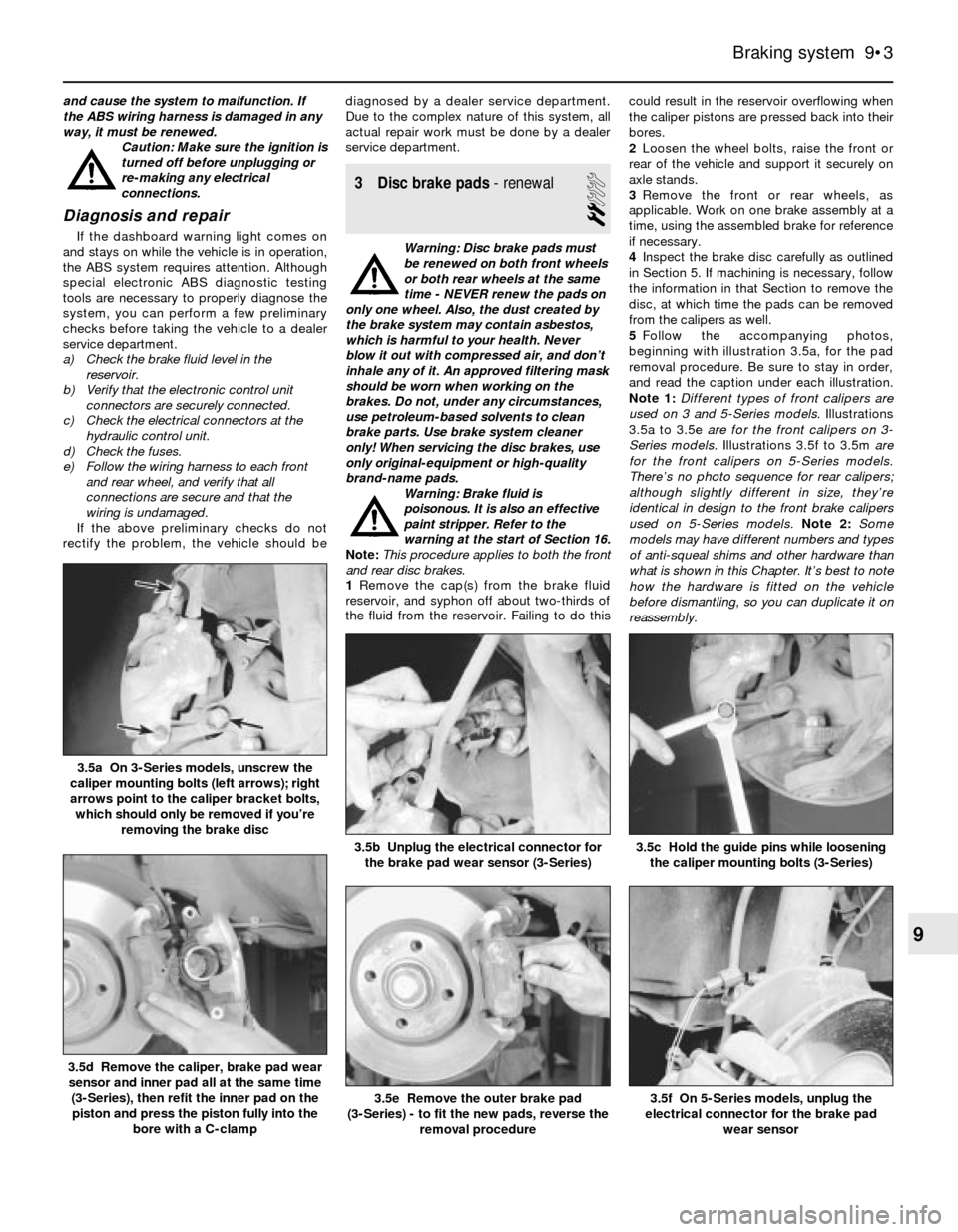
5Follow the accompanying photos,
beginning with illustration 3.5a, for the pad
removal procedure. Be sure to stay in order,
and read the caption under each illustration.
Note 1:Different types of front calipers are
used on 3 and 5-Series models. Illustrations
3.5a to 3.5e are for the front calipers on 3-
Series models.Illustrations 3.5f to 3.5m are
for the front calipers on 5-Series models.
There’s no photo sequence for rear calipers;
although slightly different in size, they’re
identical in design to the front brake calipers
used on 5-Series models.Note 2: Some
models may have different numbers and types
of anti-squeal shims and other hardware than
what is shown in this Chapter. It’s best to note
how the hardware is fitted on the vehicle
before dismantling, so you can duplicate it on
reassembly.
Braking system 9•3
3.5c Hold the guide pins while loosening
the caliper mounting bolts (3-Series)3.5b Unplug the electrical connector for
the brake pad wear sensor (3-Series)
3.5a On 3-Series models, unscrew the
caliper mounting bolts (left arrows); right
arrows point to the caliper bracket bolts,
which should only be removed if you’re
removing the brake disc
3.5f On 5-Series models, unplug the
electrical connector for the brake pad
wear sensor3.5e Remove the outer brake pad
(3-Series) - to fit the new pads, reverse the
removal procedure
3.5d Remove the caliper, brake pad wear
sensor and inner pad all at the same time
(3-Series), then refit the inner pad on the
piston and press the piston fully into the
bore with a C-clamp
9
Page 134 of 228
Inspection
1Loosen the wheel bolts, raise the vehicle
and support it securely on axle stands.
Remove the wheel, and refit three bolts to
hold the disc in place. If the rear brake disc is
being worked on, release the handbrake.
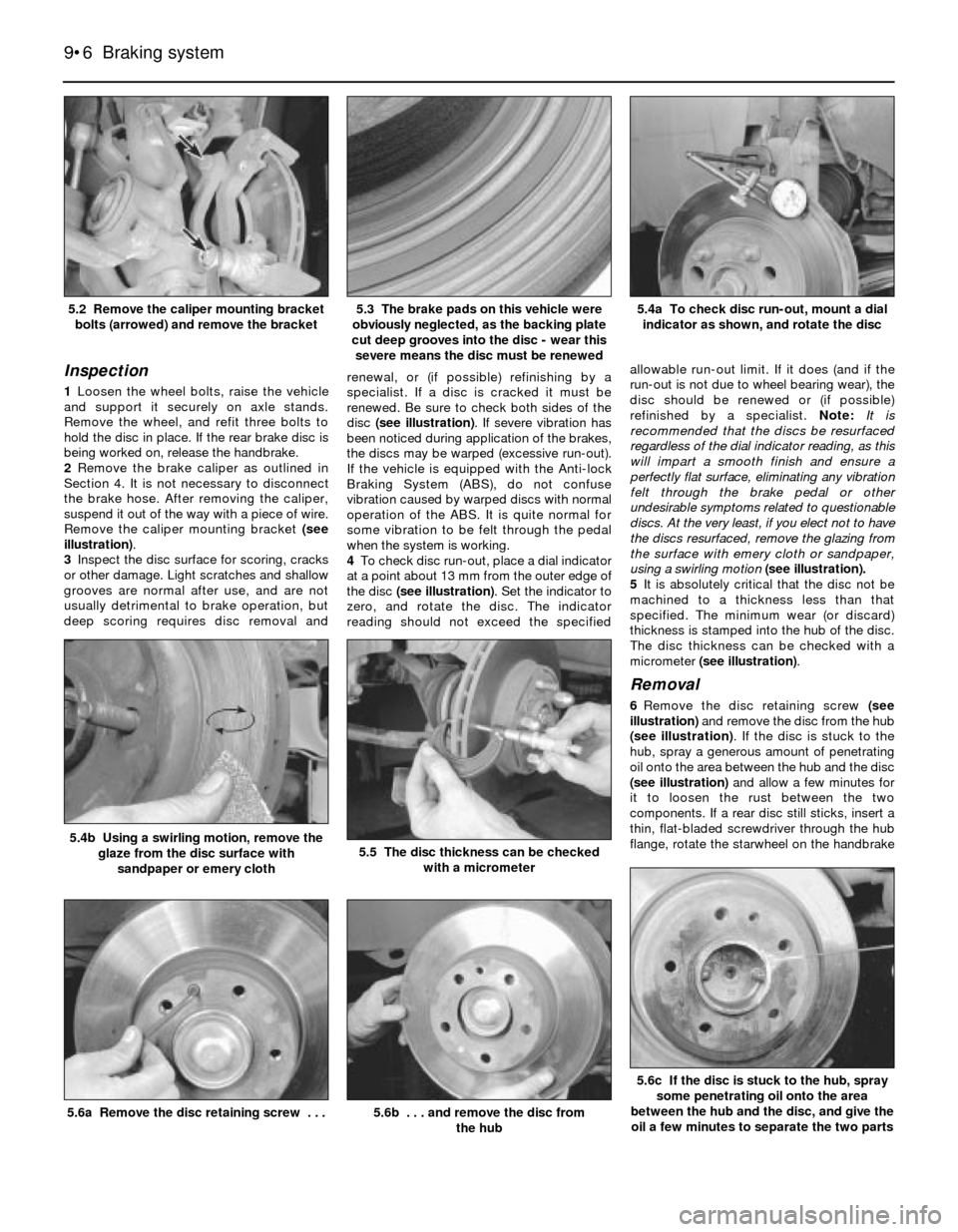
2Remove the brake caliper as outlined in
Section 4. It is not necessary to disconnect
the brake hose. After removing the caliper,
suspend it out of the way with a piece of wire.
Remove the caliper mounting bracket (see
illustration).
3Inspect the disc surface for scoring, cracks
or other damage. Light scratches and shallow
grooves are normal after use, and are not
usually detrimental to brake operation, but
deep scoring requires disc removal andrenewal, or (if possible) refinishing by a
specialist. If a disc is cracked it must be
renewed. Be sure to check both sides of the
disc (see illustration). If severe vibration has
been noticed during application of the brakes,
the discs may be warped (excessive run-out).
If the vehicle is equipped with the Anti-lock
Braking System (ABS), do not confuse
vibration caused by warped discs with normal
operation of the ABS. It is quite normal for
some vibration to be felt through the pedal
when the system is working.
4To check disc run-out, place a dial indicator
at a point about 13 mm from the outer edge of
the disc (see illustration). Set the indicator to
zero, and rotate the disc. The indicator
reading should not exceed the specifiedallowable run-out limit. If it does (and if the
run-out is not due to wheel bearing wear), the
disc should be renewed or (if possible)
refinished by a specialist. Note:It is
recommended that the discs be resurfaced
regardless of the dial indicator reading, as this
will impart a smooth finish and ensure a
perfectly flat surface, eliminating any vibration
felt through the brake pedal or other
undesirable symptoms related to questionable
discs. At the very least, if you elect not to have
the discs resurfaced, remove the glazing from
the surface with emery cloth or sandpaper,
using a swirling motion (see illustration).
5It is absolutely critical that the disc not be
machined to a thickness less than that
specified. The minimum wear (or discard)
thickness is stamped into the hub of the disc.
The disc thickness can be checked with a
micrometer (see illustration).
Removal
6Remove the disc retaining screw (see
illustration) and remove the disc from the hub
(see illustration). If the disc is stuck to the
hub, spray a generous amount of penetrating
oil onto the area between the hub and the disc
(see illustration)and allow a few minutes for
it to loosen the rust between the two
components. If a rear disc still sticks, insert a
thin, flat-bladed screwdriver through the hub
flange, rotate the starwheel on the handbrake
9•6 Braking system
5.6c If the disc is stuck to the hub, spray
some penetrating oil onto the area
between the hub and the disc, and give the
oil a few minutes to separate the two parts
5.6b . . . and remove the disc from
the hub5.6a Remove the disc retaining screw . . .
5.5 The disc thickness can be checked
with a micrometer5.4b Using a swirling motion, remove the
glaze from the disc surface with
sandpaper or emery cloth
5.4a To check disc run-out, mount a dial
indicator as shown, and rotate the disc5.3 The brake pads on this vehicle were
obviously neglected, as the backing plate
cut deep grooves into the disc - wear this
severe means the disc must be renewed5.2 Remove the caliper mounting bracket
bolts (arrowed) and remove the bracket