navigation BMW 3 SERIES 2011 User Guide
[x] Cancel search | Manufacturer: BMW, Model Year: 2011, Model line: 3 SERIES, Model: BMW 3 SERIES 2011Pages: 325, PDF Size: 12.94 MB
Page 82 of 325
Adjusting the info display
You can select what information from the on‐
board computer is to be displayed on the info
display of the instrument cluster.
1."Settings"
2."Info display"
3.Select the desired displays.
Information in detail
Range
Displays the estimated cruising range available
with the remaining fuel.
It is calculated based on your driving style over
the last 20 miles/30 km.
If there is only enough fuel left for less than
45 miles/80 km, the color of the display changes.
Average fuel consumption
This is calculated for the period during which the
engine is running.
The average fuel consumption is calculated on
the basis of various distances.
Average speed
Periods in which the vehicle is parked with the
engine manually stopped do not enter into the
calculation of the average speed.
Resetting average values
Press and hold the computer button on the turn
signal lever.
Distance to destination
The distance remaining to the destination is dis‐
played if a destination is entered in the naviga‐
tion system before the trip is started.
The distance to the destination is adopted au‐
tomatically.
Time of arrival
The estimated time of arrival is
displayed if a destination is en‐
tered in the navigation system
before the trip is started.
The time must be correctly set.
Speed limit detection
Description of the speed limit detection, refer to
page 79, function
Speed limit
Display of a speed limit which, when reached,
should cause a warning to be issued.
Renewed warning if the vehicle speed drops be‐
low the set speed limit once by at least 3 mph/
5 km/h.
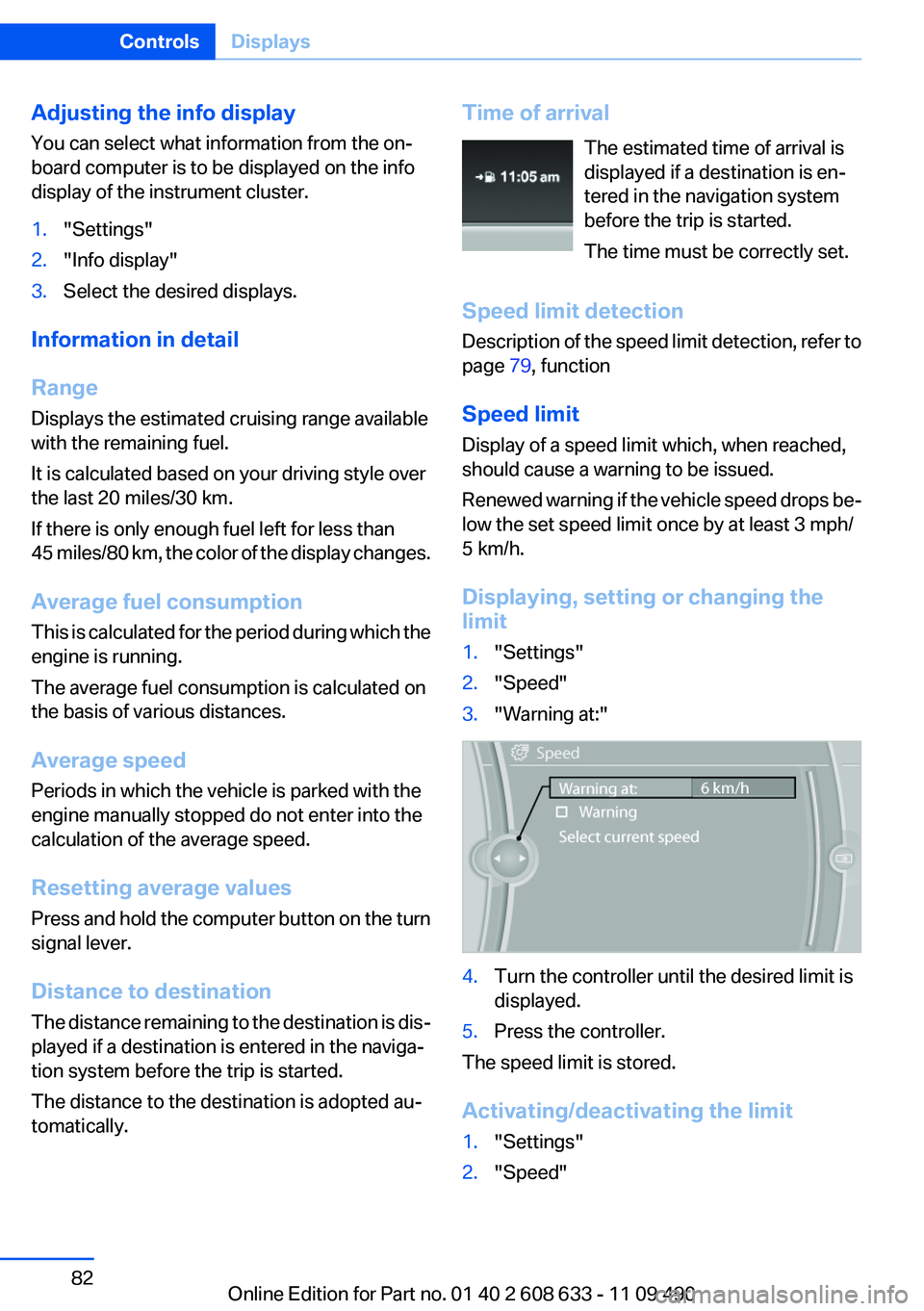
Displaying, setting or changing the
limit
1."Settings"
2."Speed"
3."Warning at:"
4.Turn the controller until the desired limit is
displayed.
5.Press the controller.
The speed limit is stored.
Activating/deactivating the limit
1."Settings"
2."Speed"
Seite 82
ControlsDisplays
82Online Edition for Part no. 01 40 2 608 633 - 11 09 490
Page 92 of 325
Protective action
Airbags are not triggered in every impact situa‐
tion, e.g., in less severe accidents or rear-end
collisions.
Information on how to ensure the optimal
protective effect of the airbags
▷Keep at a distance from the airbags.
▷Always grasp the steering wheel on the
steering wheel rim, holding your hands at
the 3 o'clock and 9 o'clock positions, to keep
the danger of injury to your hands or arms as
low as possible if the airbag is triggered.
▷There should be no people, animals, or ob‐
jects between an airbag and a person.
▷Do not use the cover of the front airbag on
the front passenger side as a storage area.
▷Keep the dashboard and window on the
front passenger side clear, i.e., do not cover
with adhesive labels or coverings, and do not
attach holders such as for navigation instru‐
ments and mobile phones.
▷Make sure that the front passenger is sitting
correctly, i.e., keeps his or her feet and legs
in the footwell; otherwise, leg injuries can
occur if the front airbag is triggered.
▷Do not place slip covers, seat cushions or
other objects on the front passenger seat
that are not approved specifically for seats
with integrated side airbags.
▷Do not hang pieces of clothing, such as jack‐
ets, over the backrests.
▷Make sure that occupants keep their heads
away from the side airbag and do not rest
against the head airbag; otherwise, injuries
can occur if the airbags are triggered.
▷Do not remove the airbag restraint system.
▷Do not remove the steering wheel.
▷Do not apply adhesive materials to the air‐
bag cover panels, cover them or modify
them in any way.
▷Never modify either the individual compo‐
nents or the wiring in the airbag system. This
also applies to steering wheel covers, the
dashboard, the seats, the roof pillars and the
sides of the headliner.◀
Even when all instructions are followed closely,
injury from contact with the airbags cannot be
ruled out in certain situations.
The ignition and inflation noise may lead to
short-term and, in most cases, temporary hear‐
ing impairment in sensitive individuals.
In the case of a malfunction, deactivation
and after triggering of the airbags
Do not touch the individual components imme‐
diately after the system has been triggered; oth‐
erwise, there is the danger of burns.
Only have the airbags checked, repaired or dis‐
mantled and the airbag generator scrapped by
your service center or a workshop that has the
necessary authorization for handling explosives.
Non-professional attempts to service the sys‐
tem could lead to failure in an emergency or un‐
desired triggering of the airbag, either of which
could result in injury.◀
Warnings and information on the airbags are
also found on the sun visors.
Functional readiness of the airbag
system
When the ignition is switch on, the warn‐
ing lamp in the instrument cluster lights
up briefly and thereby indicates the op‐
erational readiness of the entire airbag system
and the belt tensioner.
Airbag system malfunctioning
▷Warning lamp does not come on when the
ignition is turned on.
▷The warning lamp lights up continuously.
Seite 92
ControlsSafety
92Online Edition for Part no. 01 40 2 608 633 - 11 09 490
Page 129 of 325
▷Certain sitting positions.
▷Objects on the cover of the Head-up Dis‐
play.
▷Sunglasses with certain polarization filters.
▷Wet roads.
▷Unfavorable light conditions.
If the image is distorted, check the basic set‐
tings.
Switching on/off
1."Settings"
2."Head-up display"
3."Head-up display"
Switch the Head-up Display ON/OFF as re‐
quired.
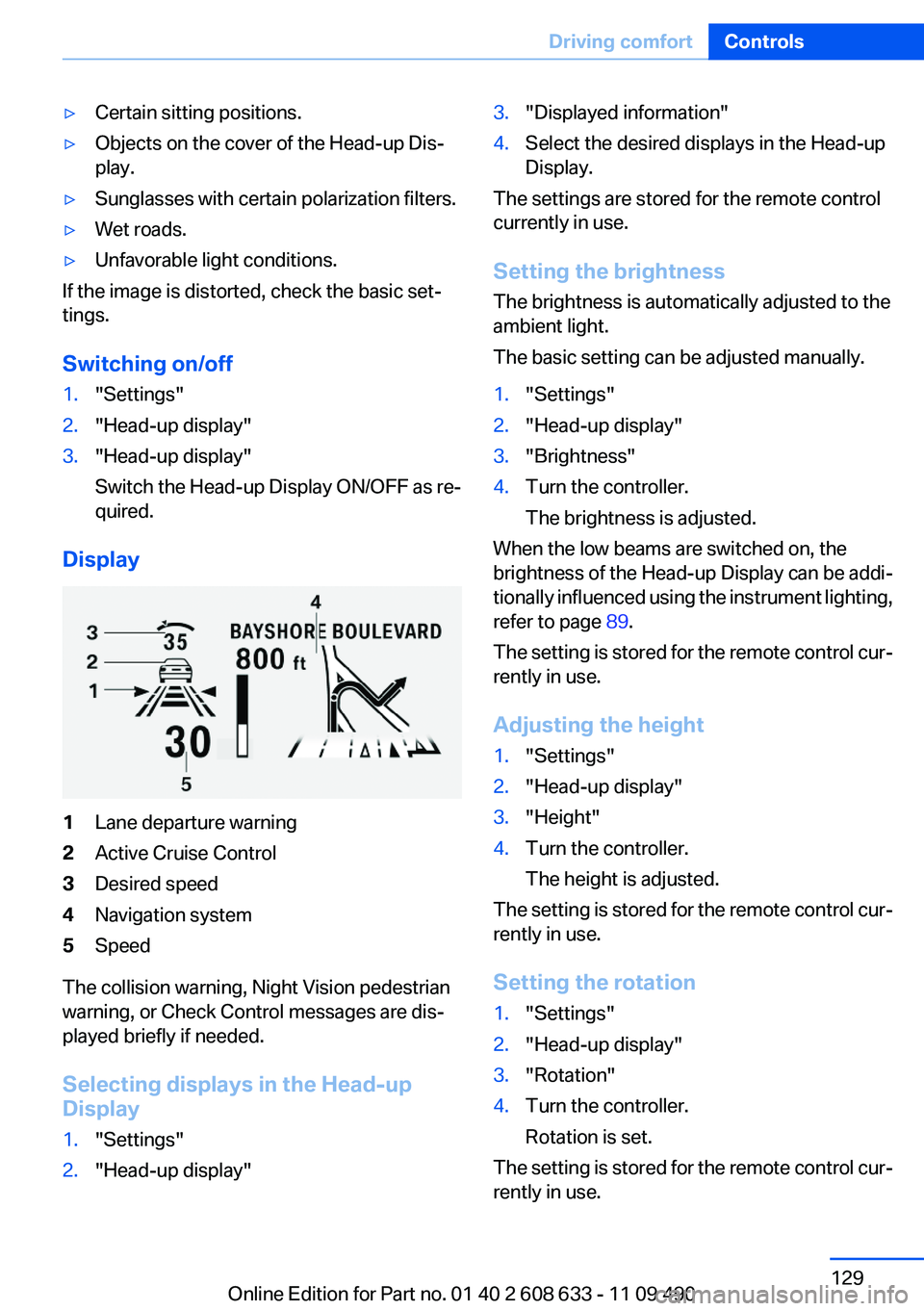
Display
1Lane departure warning
2Active Cruise Control
3Desired speed
4Navigation system
5Speed
The collision warning, Night Vision pedestrian
warning, or Check Control messages are dis‐
played briefly if needed.
Selecting displays in the Head-up
Display
1."Settings"
2."Head-up display"
3."Displayed information"
4.Select the desired displays in the Head-up
Display.
The settings are stored for the remote control
currently in use.
Setting the brightness
The brightness is automatically adjusted to the
ambient light.
The basic setting can be adjusted manually.
1."Settings"
2."Head-up display"
3."Brightness"
4.Turn the controller.
The brightness is adjusted.
When the low beams are switched on, the
brightness of the Head-up Display can be addi‐
tionally influenced using the instrument lighting,
refer to page 89.
The setting is stored for the remote control cur‐
rently in use.
Adjusting the height
1."Settings"
2."Head-up display"
3."Height"
4.Turn the controller.
The height is adjusted.
The setting is stored for the remote control cur‐
rently in use.
Setting the rotation
1."Settings"
2."Head-up display"
3."Rotation"
4.Turn the controller.
Rotation is set.
The setting is stored for the remote control cur‐
rently in use.
Seite 129
Driving comfortControls
129Online Edition for Part no. 01 40 2 608 633 - 11 09 490
Page 167 of 325
Navigation
This chapter contains various examples of how
the navigation system can guide you reliably to
your destination.
Online Edition for Part no. 01 40 2 608 633 - 11 09 490
Page 168 of 325
Navigation system
Vehicle equipment
All standard, country-specific and optional
equipment that is offered in the model series is
described in this chapter. Therefore, equipment
is also described that is not available in a vehicle,
e. g., because of the selected optional equip‐
ment or country variant. This also applies for
safety-related functions and systems.
General information
The navigation system can determine the pre‐
cise position of the vehicle, with the aid of sat‐
ellites and vehicle sensors, and can reliably
guide you to every entered destination.
Navigation data are stored in the vehicle and can
be updated.
Entries in stationary vehicle
Enter data only when the vehicle is sta‐
tionary, and always give priority to the applicable
traffic regulations in the event of any contradic‐
tion between traffic and road conditions and the
instructions issued by the navigation system.
Failure to take to this precaution can place you
in violation of the law and put vehicle occupants
and other road users in danger.◀
Starting navigation system
1. Press the button on the controller.
2."Navigation"
The navigation system can also be ac‐
cessed directly with the button on the con‐
troller.
Destination input
Manual destination entry
General information
The system supports you in entering street
names and house numbers by automatically
completing the entry and providing entry com‐
parisons, refer to page 22.
Stored town/city and street names can be called
up quickly.
▷If the existing entries should not be changed,
the entries for the state/province and town/
city can be skipped.
▷Destination guidance is started to the town/
city center if no street is entered.
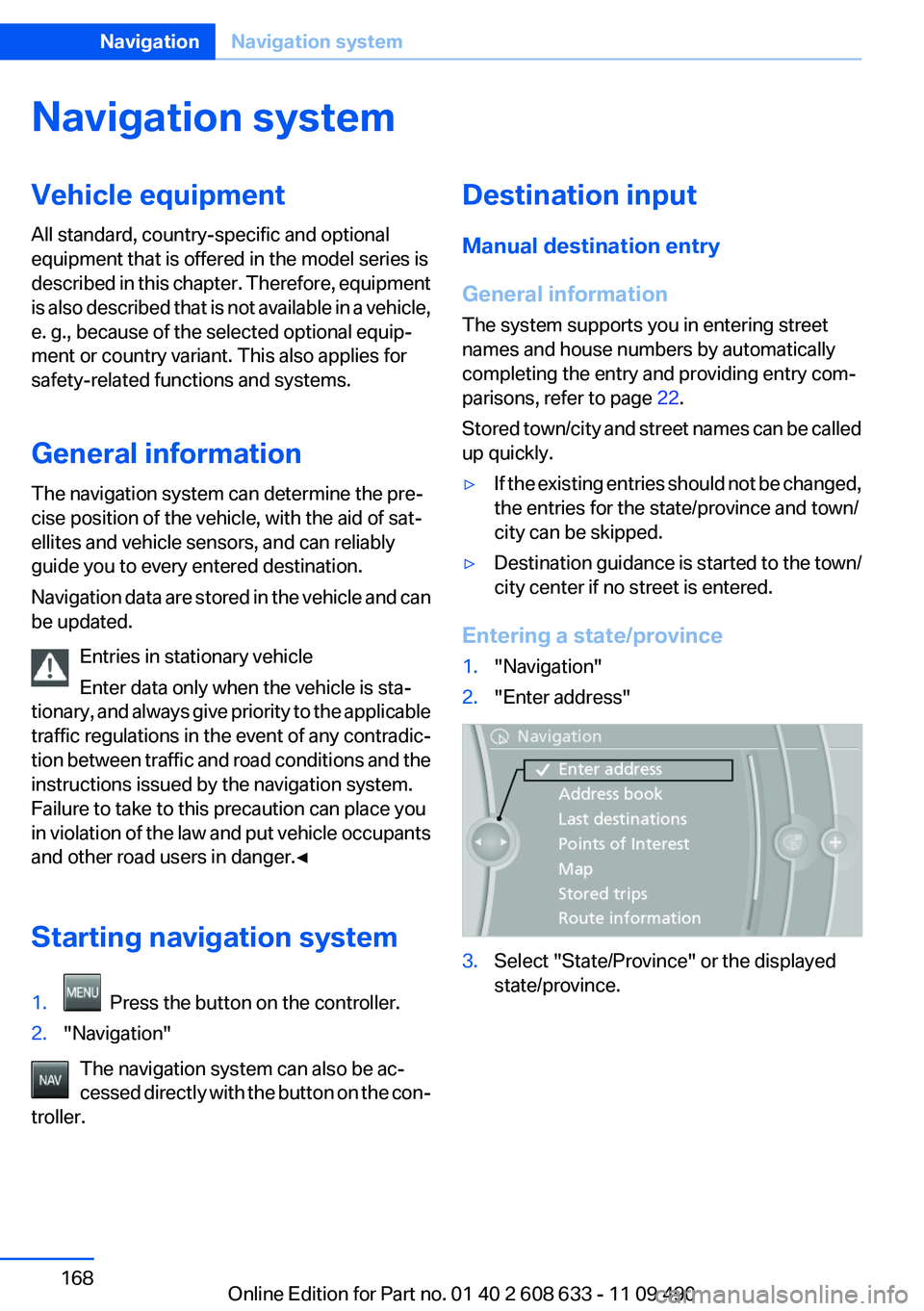
Entering a state/province
1."Navigation"
2."Enter address"
3.Select "State/Province" or the displayed
state/province.
Seite 168
NavigationNavigation system
168Online Edition for Part no. 01 40 2 608 633 - 11 09 490
Page 169 of 325
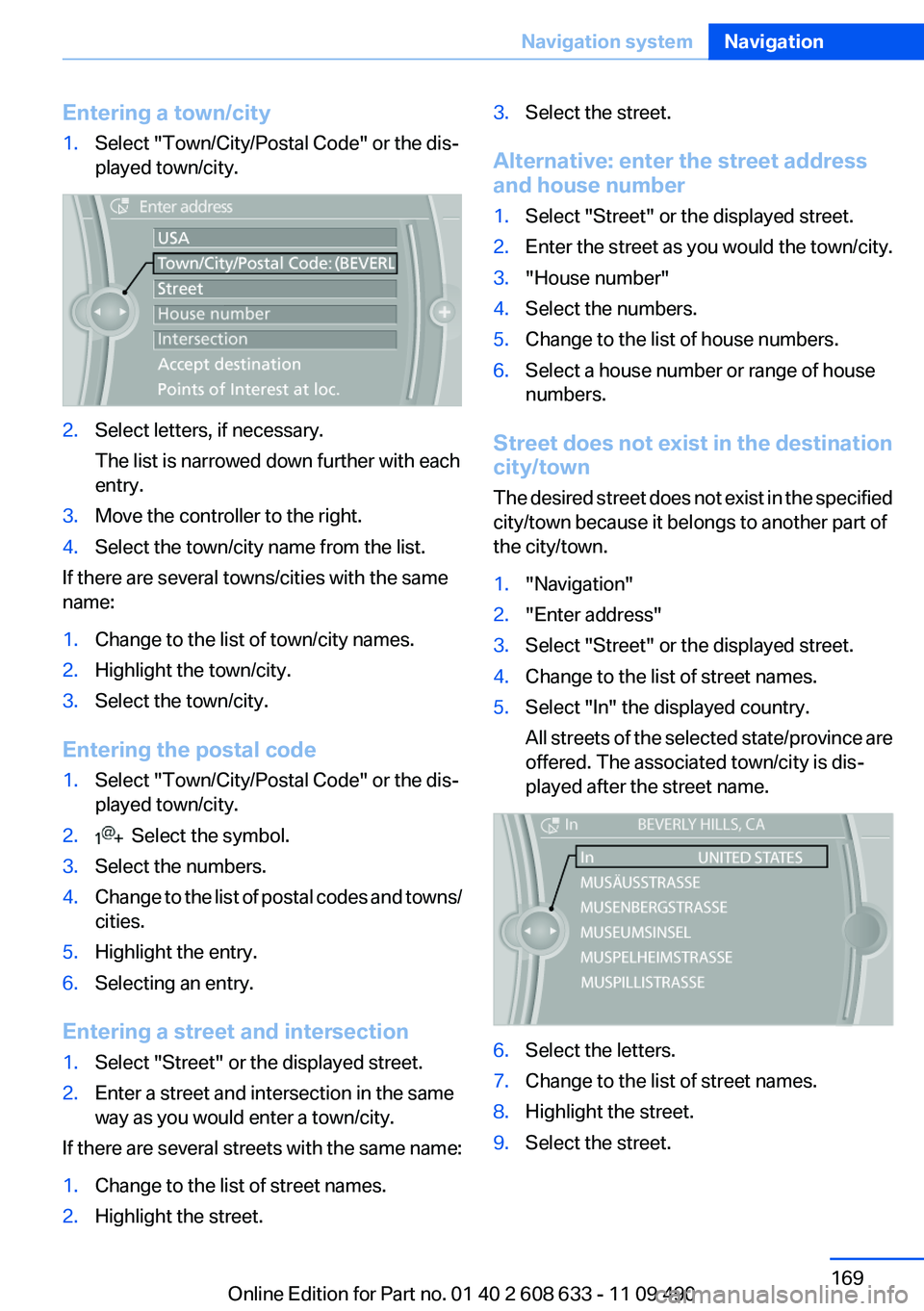
Entering a town/city
1.Select "Town/City/Postal Code" or the dis‐
played town/city.
2.Select letters, if necessary.
The list is narrowed down further with each
entry.
3.Move the controller to the right.
4.Select the town/city name from the list.
If there are several towns/cities with the same
name:
1.Change to the list of town/city names.
2.Highlight the town/city.
3.Select the town/city.
Entering the postal code
1.Select "Town/City/Postal Code" or the dis‐
played town/city.
2. Select the symbol.
3.Select the numbers.
4.Change to the list of postal codes and towns/
cities.
5.Highlight the entry.
6.Selecting an entry.
Entering a street and intersection
1.Select "Street" or the displayed street.
2.Enter a street and intersection in the same
way as you would enter a town/city.
If there are several streets with the same name:
1.Change to the list of street names.
2.Highlight the street.
3.Select the street.
Alternative: enter the street address
and house number
1.Select "Street" or the displayed street.
2.Enter the street as you would the town/city.
3."House number"
4.Select the numbers.
5.Change to the list of house numbers.
6.Select a house number or range of house
numbers.
Street does not exist in the destination
city/town
The desired street does not exist in the specified
city/town because it belongs to another part of
the city/town.
1."Navigation"
2."Enter address"
3.Select "Street" or the displayed street.
4.Change to the list of street names.
5.Select "In" the displayed country.
All streets of the selected state/province are
offered. The associated town/city is dis‐
played after the street name.
6.Select the letters.
7.Change to the list of street names.
8.Highlight the street.
9.Select the street.
Seite 169
Navigation systemNavigation
169Online Edition for Part no. 01 40 2 608 633 - 11 09 490
Page 170 of 325
Starting destination guidance after
entering the destination
1."Accept destination"
2."Start guidance" or "Add as another
destination"
Add, refer to page 175, a destination as a
further destination.
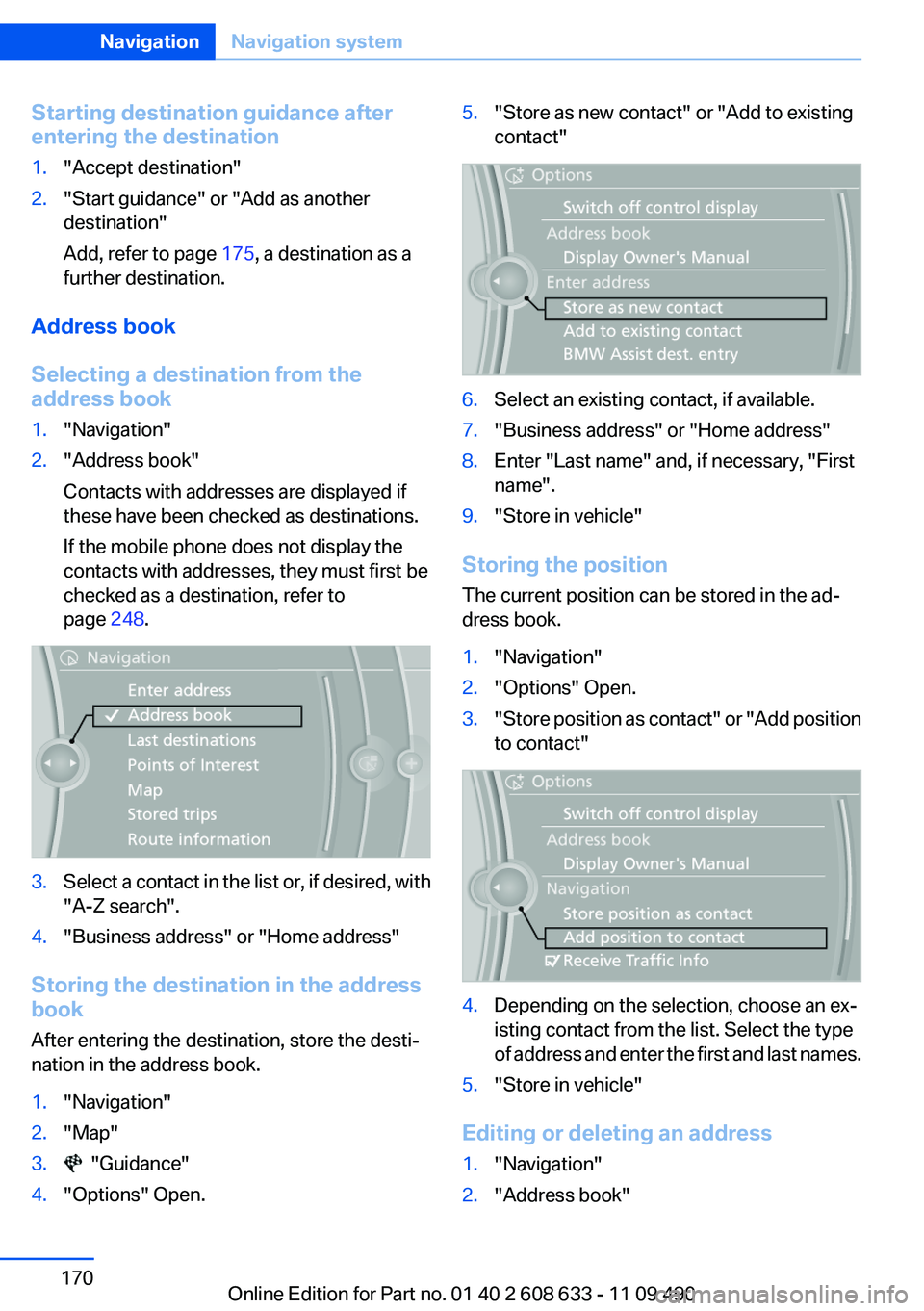
Address book
Selecting a destination from the
address book
1."Navigation"
2."Address book"
Contacts with addresses are displayed if
these have been checked as destinations.
If the mobile phone does not display the
contacts with addresses, they must first be
checked as a destination, refer to
page 248.
3.Select a contact in the list or, if desired, with
"A-Z search".
4."Business address" or "Home address"
Storing the destination in the address
book
After entering the destination, store the desti‐
nation in the address book.
1."Navigation"
2."Map"
3. "Guidance"
4."Options" Open.
5."Store as new contact" or "Add to existing
contact"
6.Select an existing contact, if available.
7."Business address" or "Home address"
8.Enter "Last name" and, if necessary, "First
name".
9."Store in vehicle"
Storing the position
The current position can be stored in the ad‐
dress book.
1."Navigation"
2."Options" Open.
3."Store position as contact" or "Add position
to contact"
4.Depending on the selection, choose an ex‐
isting contact from the list. Select the type
of address and enter the first and last names.
5."Store in vehicle"
Editing or deleting an address
1."Navigation"
2."Address book"
Seite 170
NavigationNavigation system
170Online Edition for Part no. 01 40 2 608 633 - 11 09 490
Page 171 of 325
3.Highlight the entry.
4."Options" Open.
5."Edit in Contacts" or "Delete entry"
Using the home address as the
destination
The home address must be stored. Specify the
home address, refer to page 247.
1."Navigation"
2."Address book"
3."Home"
4."Start guidance"
Last destinations
At a glance
The destinations previously entered are stored
automatically.
The destinations can be called up and used as a
destination for destination guidance.
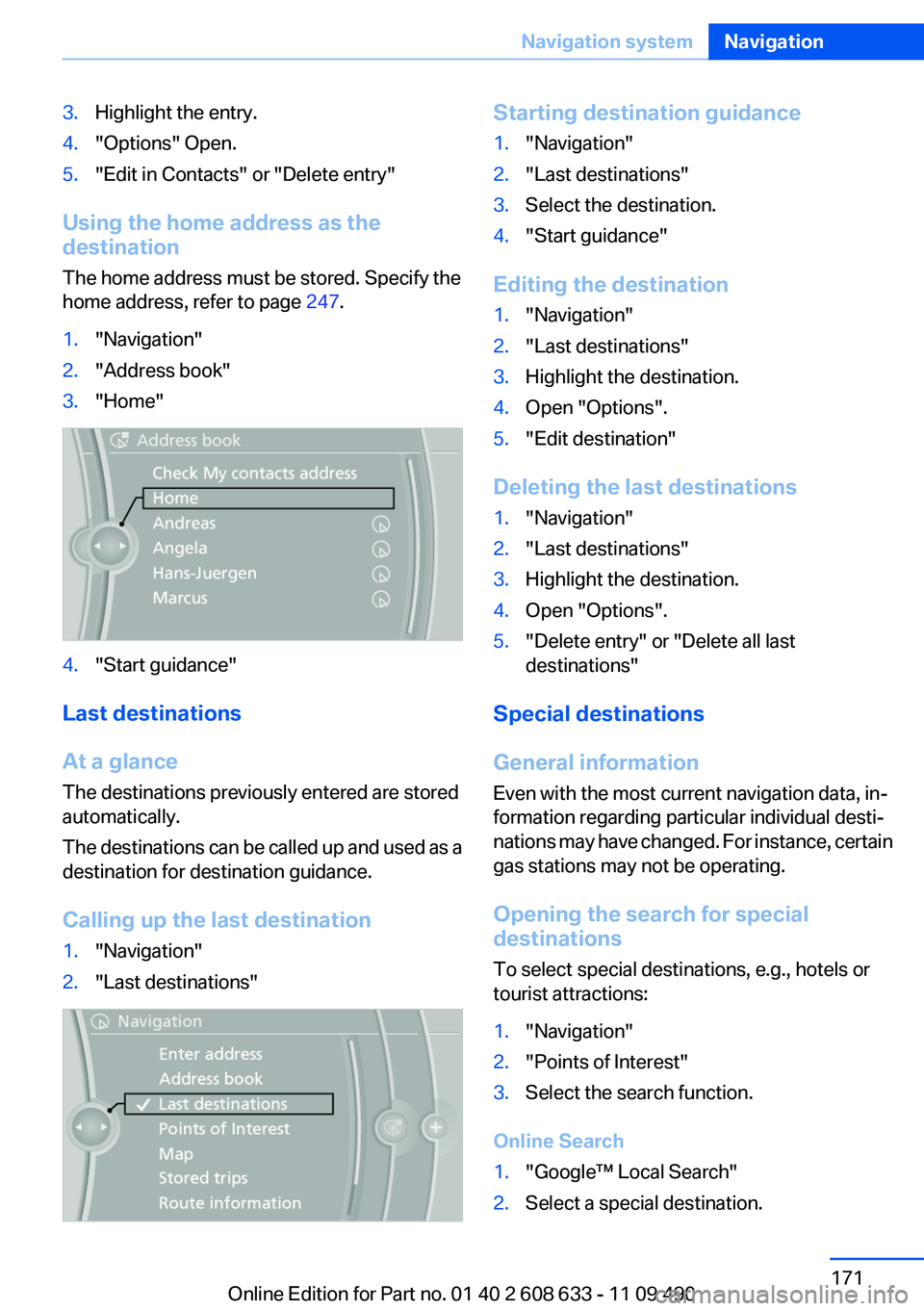
Calling up the last destination
1."Navigation"
2."Last destinations"
Starting destination guidance
1."Navigation"
2."Last destinations"
3.Select the destination.
4."Start guidance"
Editing the destination
1."Navigation"
2."Last destinations"
3.Highlight the destination.
4.Open "Options".
5."Edit destination"
Deleting the last destinations
1."Navigation"
2."Last destinations"
3.Highlight the destination.
4.Open "Options".
5."Delete entry" or "Delete all last
destinations"
Special destinations
General information
Even with the most current navigation data, in‐
formation regarding particular individual desti‐
nations may have changed. For instance, certain
gas stations may not be operating.
Opening the search for special
destinations
To select special destinations, e.g., hotels or
tourist attractions:
1."Navigation"
2."Points of Interest"
3.Select the search function.
Online Search
1."Google™ Local Search"
2.Select a special destination.
Seite 171
Navigation systemNavigation
171Online Edition for Part no. 01 40 2 608 633 - 11 09 490
Page 172 of 325
3. Select the symbol.
4."Start guidance"
A-Z search
1."A-Z search"
2."Town/City"
Select or enter the town/city.
3."Category"
4.Select the category.
5."Category details"
For some special destinations, multiple cat‐
egory details can be selected. Move the
controller to the left to leave the category
details.
6."Keyword"
7.Enter the keyword.
A list of the special destinations is displayed.
8.Select a special destination.
Details are displayed.
If multiple details are stored, you can leaf
through the pages.
If a phone number is available, a connection
can be established if necessary.
9. Select the symbol.
"Start guidance" or "Add as another
destination"
Add, refer to page 175, a destination as a
further destination.
"Start search": if a search term is not entered,
the search is repeated with the previous search
term.
Category search
1."Category search"
2."Town/City"
Select or enter the town/city.
3."Category"
4.Select the category.
5."Category details"
For some special destinations, multiple cat‐
egory details can be selected. Move the
controller to the left to leave the category
details.
6."Start search"
A list of the special destinations is displayed.
7.Select a special destination.
Details are displayed.
If multiple details are stored, you can leaf
through the pages.
If a phone number is available, a connection
can be established if necessary.
8. Select the symbol.
"Start guidance" or "Add as another
destination"
Add, refer to page 175, a destination as a
further destination.
Display of special destinations
List of special destinations: special destinations
are organized by distance and are displayed with
a directional arrow to the special destination.
On the split screen, special destinations of the
selected category are displayed in the map view
as symbols. The display depends on the scale
of the map and the category.
Destination entry via BMW Assist
A connection is established to the Concierge
service, refer to page 251.
1."Navigation"
2."Enter address"
3."Options" Open.
4."BMW Assist dest. entry"
Seite 172
NavigationNavigation system
172Online Edition for Part no. 01 40 2 608 633 - 11 09 490
Page 173 of 325
Displaying special destinations in the
map
To display symbols of the special destinations
in the map view:
1."Navigation"
2."Map"
3."Options" Open.
4."Display Points of Interest"
5.Select the setting.
Destination entry by map
Selecting the destination
1."Navigation"
2."Map"
The current position of the vehicle is indi‐
cated on the map.
3. "Interactive map"
4.Select the destination with crosshairs.
▷To change the scale: turn the controller.
▷To shift the map: move the controller in
the required direction.
▷To shift the map diagonally: move the
controller in the required direction and
turn it.
Specifying the street
If the system does not recognize a street, one of
the following is displayed:
▷The name of a street nearby.
▷The county.
▷The coordinates of the destination.
Additional functions
Additional functions are available on the inter‐
active map after the controller is pressed.
▷ Select the symbol.
"Start guidance" or "Add as another
destination"
▷"Exit interactive map": return to the map
view.
▷"View in northern direction" or "View in
driving direction"
▷"Display destination": the map section
around the destination is displayed.
▷"Display current location": the map section
around your current location is displayed.
▷"Find points of interest": the search for spe‐
cial destinations is started.
Destination entry by voice
General information
▷Instructions for voice activation system, re‐
fer to page 23.
▷When making a destination entry by voice,
you can change between voice operation
and iDrive.
▷To have the available spoken instructions
read out loud: ›Voice commands‹
Saying the entries
▷The town/city, street, and house number
can be entered as a single command.
▷Countries, towns and cities, streets, and in‐
tersections can be said as whole words or
Seite 173
Navigation systemNavigation
173Online Edition for Part no. 01 40 2 608 633 - 11 09 490