menu BMW 3 SERIES 2011 Owner's Manual
[x] Cancel search | Manufacturer: BMW, Model Year: 2011, Model line: 3 SERIES, Model: BMW 3 SERIES 2011Pages: 325, PDF Size: 12.94 MB
Page 307 of 325
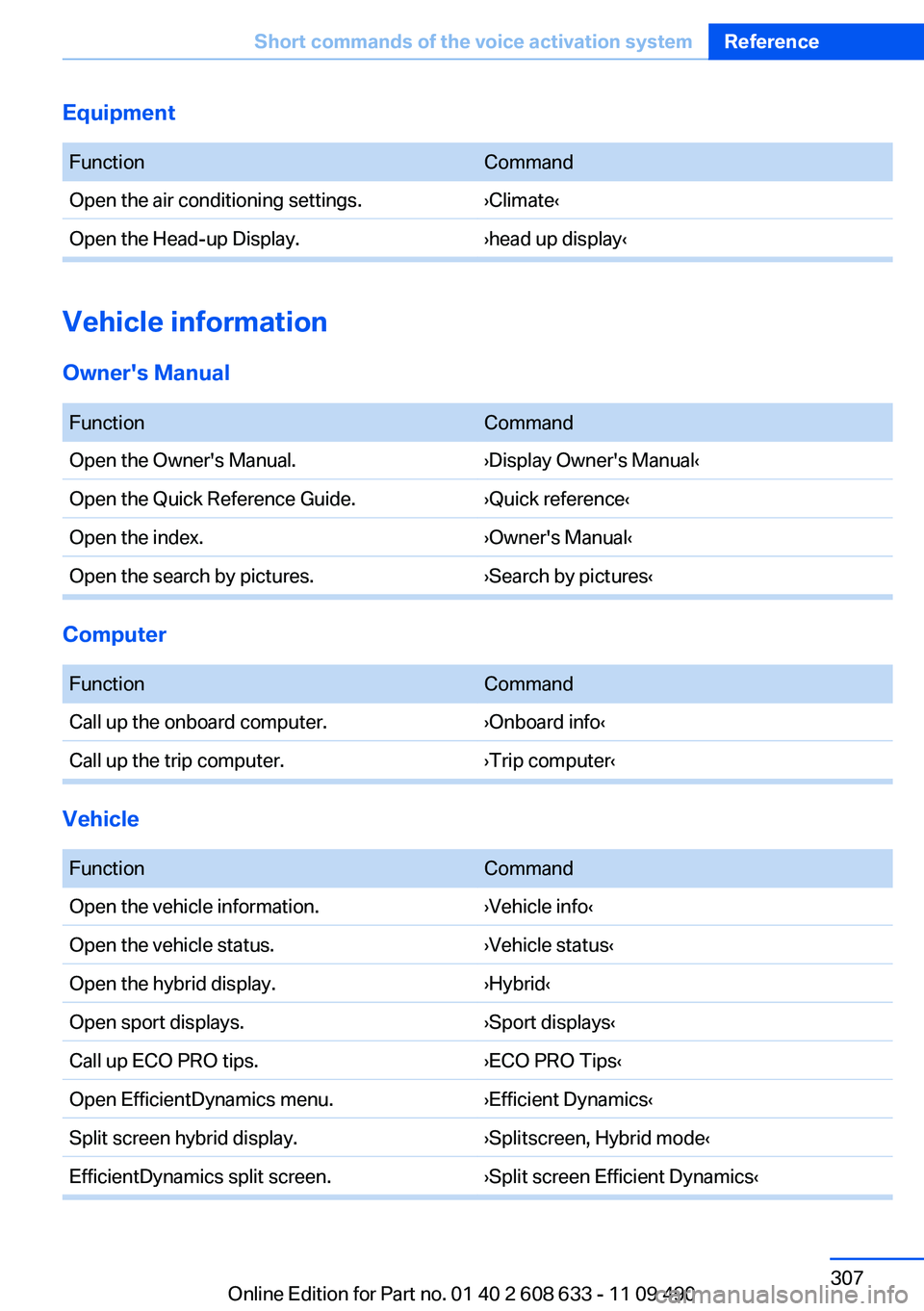
Equipment
FunctionCommand
Open the air conditioning settings.›Climate‹
Open the Head-up Display.›head up display‹
Vehicle information
Owner's Manual
FunctionCommand
Open the Owner's Manual.›Display Owner's Manual‹
Open the Quick Reference Guide.›Quick reference‹
Open the index.›Owner's Manual‹
Open the search by pictures.›Search by pictures‹
Computer
FunctionCommand
Call up the onboard computer.›Onboard info‹
Call up the trip computer.›Trip computer‹
Vehicle
FunctionCommand
Open the vehicle information.›Vehicle info‹
Open the vehicle status.›Vehicle status‹
Open the hybrid display.›Hybrid‹
Open sport displays.›Sport displays‹
Call up ECO PRO tips.›ECO PRO Tips‹
Open EfficientDynamics menu.›Efficient Dynamics‹
Split screen hybrid display.›Splitscreen, Hybrid mode‹
EfficientDynamics split screen.›Split screen Efficient Dynamics‹
Seite 307
Short commands of the voice activation systemReference
307Online Edition for Part no. 01 40 2 608 633 - 11 09 490
Page 308 of 325
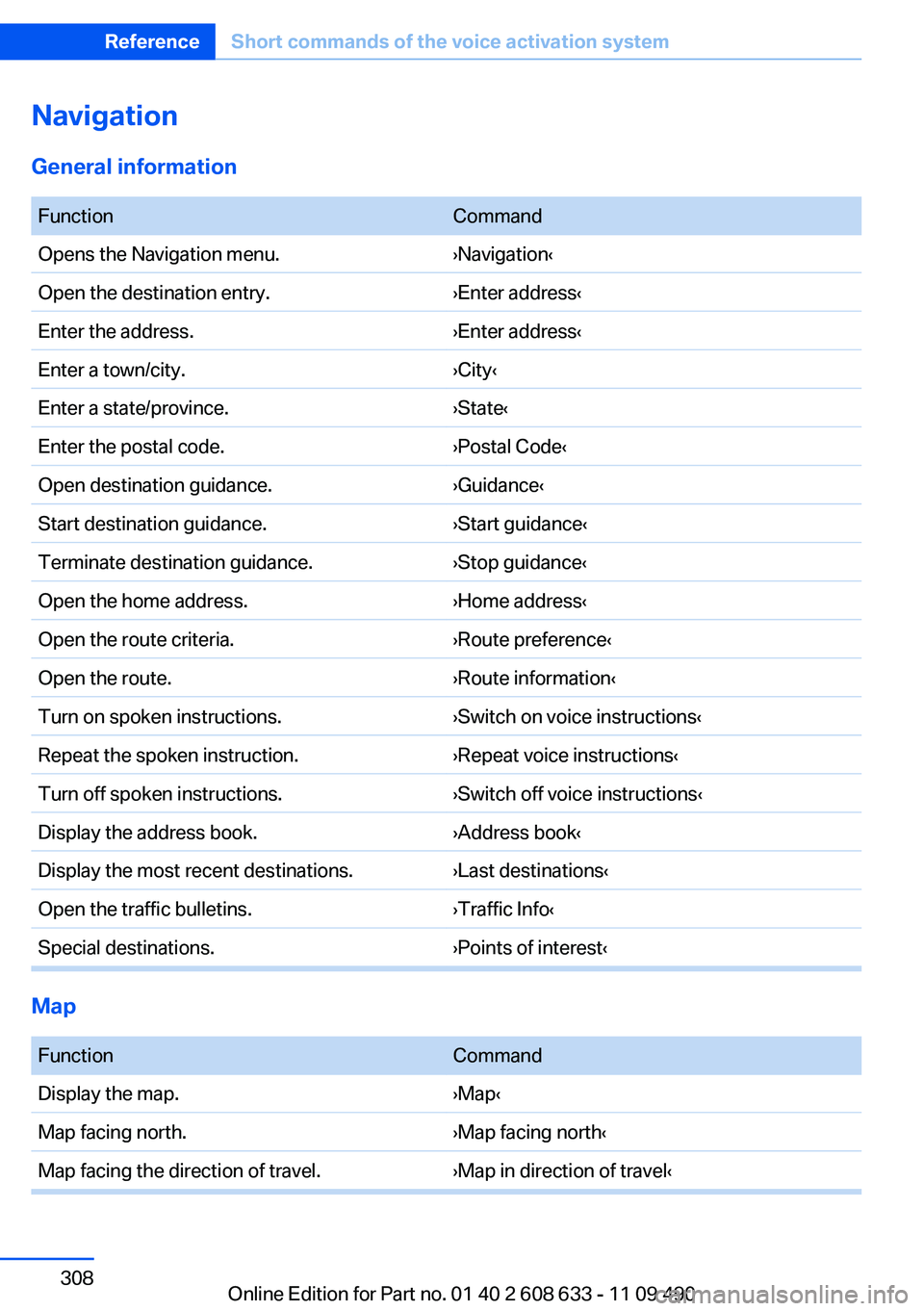
Navigation
General information
FunctionCommand
Opens the Navigation menu.›Navigation‹
Open the destination entry.›Enter address‹
Enter the address.›Enter address‹
Enter a town/city.›City‹
Enter a state/province.›State‹
Enter the postal code.›Postal Code‹
Open destination guidance.›Guidance‹
Start destination guidance.›Start guidance‹
Terminate destination guidance.›Stop guidance‹
Open the home address.›Home address‹
Open the route criteria.›Route preference‹
Open the route.›Route information‹
Turn on spoken instructions.›Switch on voice instructions‹
Repeat the spoken instruction.›Repeat voice instructions‹
Turn off spoken instructions.›Switch off voice instructions‹
Display the address book.›Address book‹
Display the most recent destinations.›Last destinations‹
Open the traffic bulletins.›Traffic Info‹
Special destinations.›Points of interest‹
Map
FunctionCommand
Display the map.›Map‹
Map facing north.›Map facing north‹
Map facing the direction of travel.›Map in direction of travel‹
Seite 308
ReferenceShort commands of the voice activation system
308Online Edition for Part no. 01 40 2 608 633 - 11 09 490
Page 311 of 325
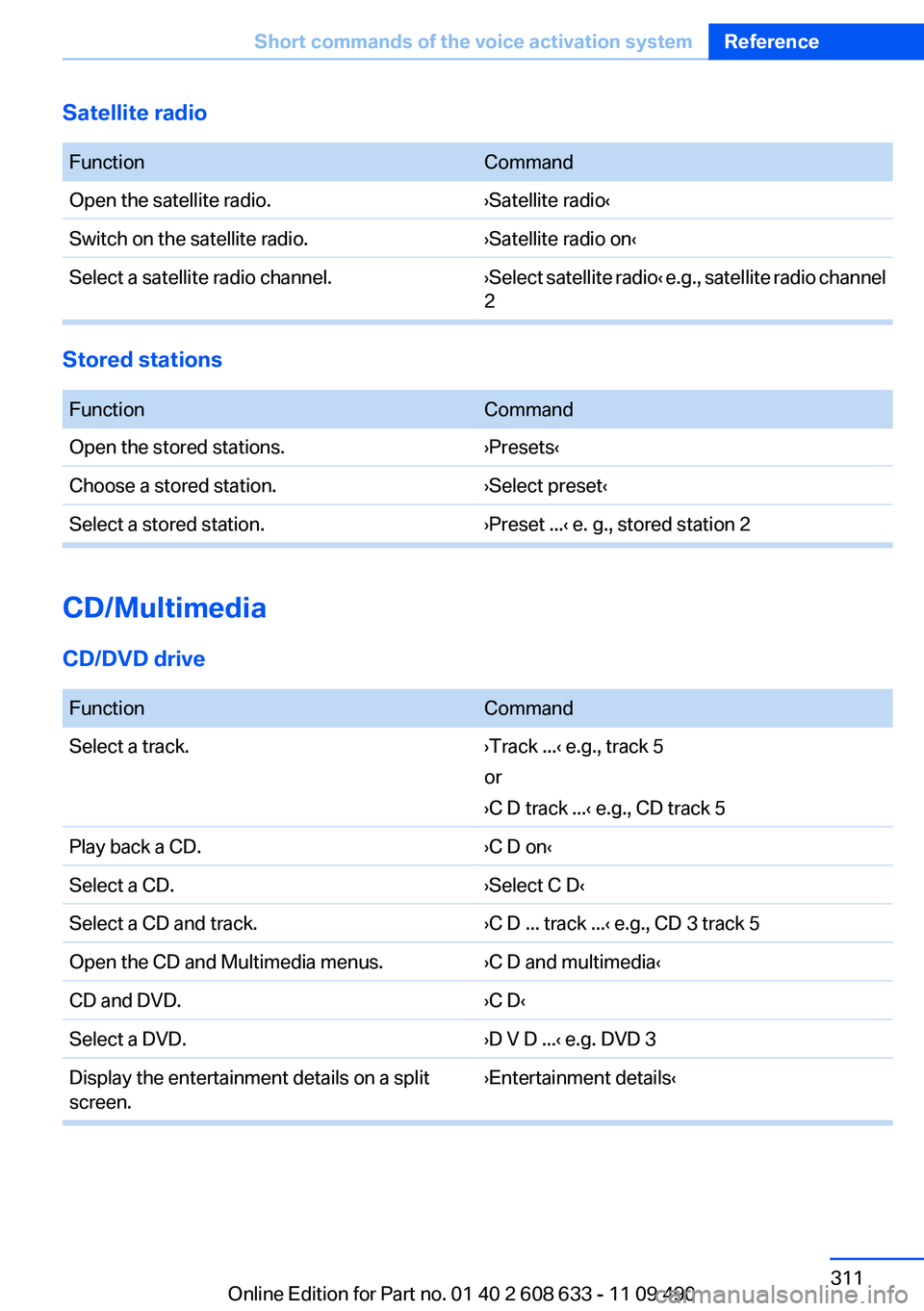
Satellite radio
FunctionCommand
Open the satellite radio.›Satellite radio‹
Switch on the satellite radio.›Satellite radio on‹
Select a satellite radio channel.›Select satellite radio‹ e.g., satellite radio channel
2
Stored stations
FunctionCommand
Open the stored stations.›Presets‹
Choose a stored station.›Select preset‹
Select a stored station.›Preset ...‹ e. g., stored station 2
CD/Multimedia
CD/DVD drive
FunctionCommand
Select a track.›Track ...‹ e.g., track 5
or
›C D track ...‹ e.g., CD track 5
Play back a CD.›C D on‹
Select a CD.›Select C D‹
Select a CD and track.›C D ... track ...‹ e.g., CD 3 track 5
Open the CD and Multimedia menus.›C D and multimedia‹
CD and DVD.›C D‹
Select a DVD.›D V D ...‹ e.g. DVD 3
Display the entertainment details on a split
screen.
›Entertainment details‹
Seite 311
Short commands of the voice activation systemReference
311Online Edition for Part no. 01 40 2 608 633 - 11 09 490
Page 312 of 325
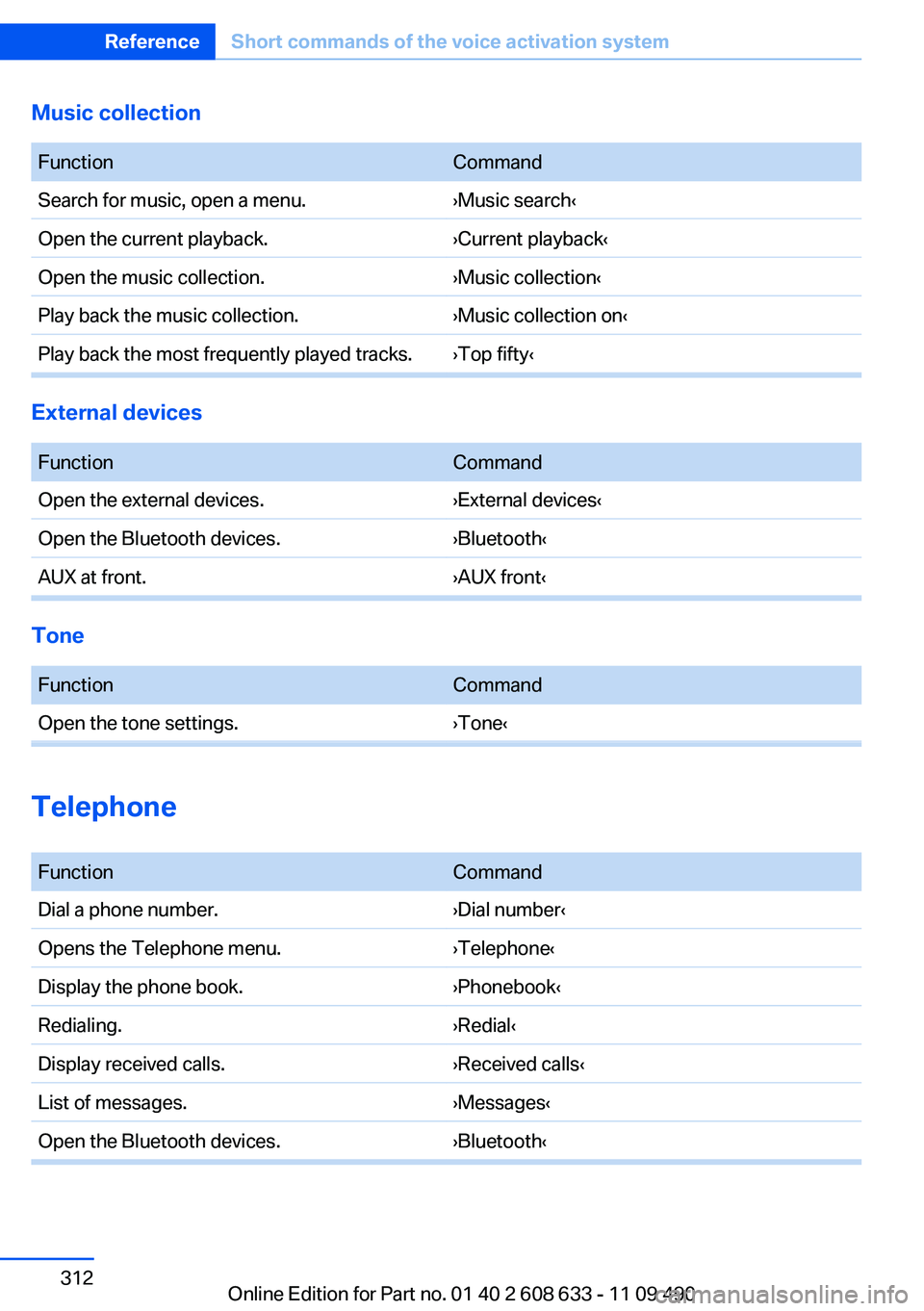
Music collection
FunctionCommand
Search for music, open a menu.›Music search‹
Open the current playback.›Current playback‹
Open the music collection.›Music collection‹
Play back the music collection.›Music collection on‹
Play back the most frequently played tracks. ›Top fifty‹
External devices
FunctionCommand
Open the external devices.›External devices‹
Open the Bluetooth devices.›Bluetooth‹
AUX at front.›AUX front‹
Tone
FunctionCommand
Open the tone settings.›Tone‹
Telephone
FunctionCommand
Dial a phone number.›Dial number‹
Opens the Telephone menu.›Telephone‹
Display the phone book.›Phonebook‹
Redialing.›Redial‹
Display received calls.›Received calls‹
List of messages.›Messages‹
Open the Bluetooth devices.›Bluetooth‹
Seite 312
ReferenceShort commands of the voice activation system
312Online Edition for Part no. 01 40 2 608 633 - 11 09 490
Page 313 of 325
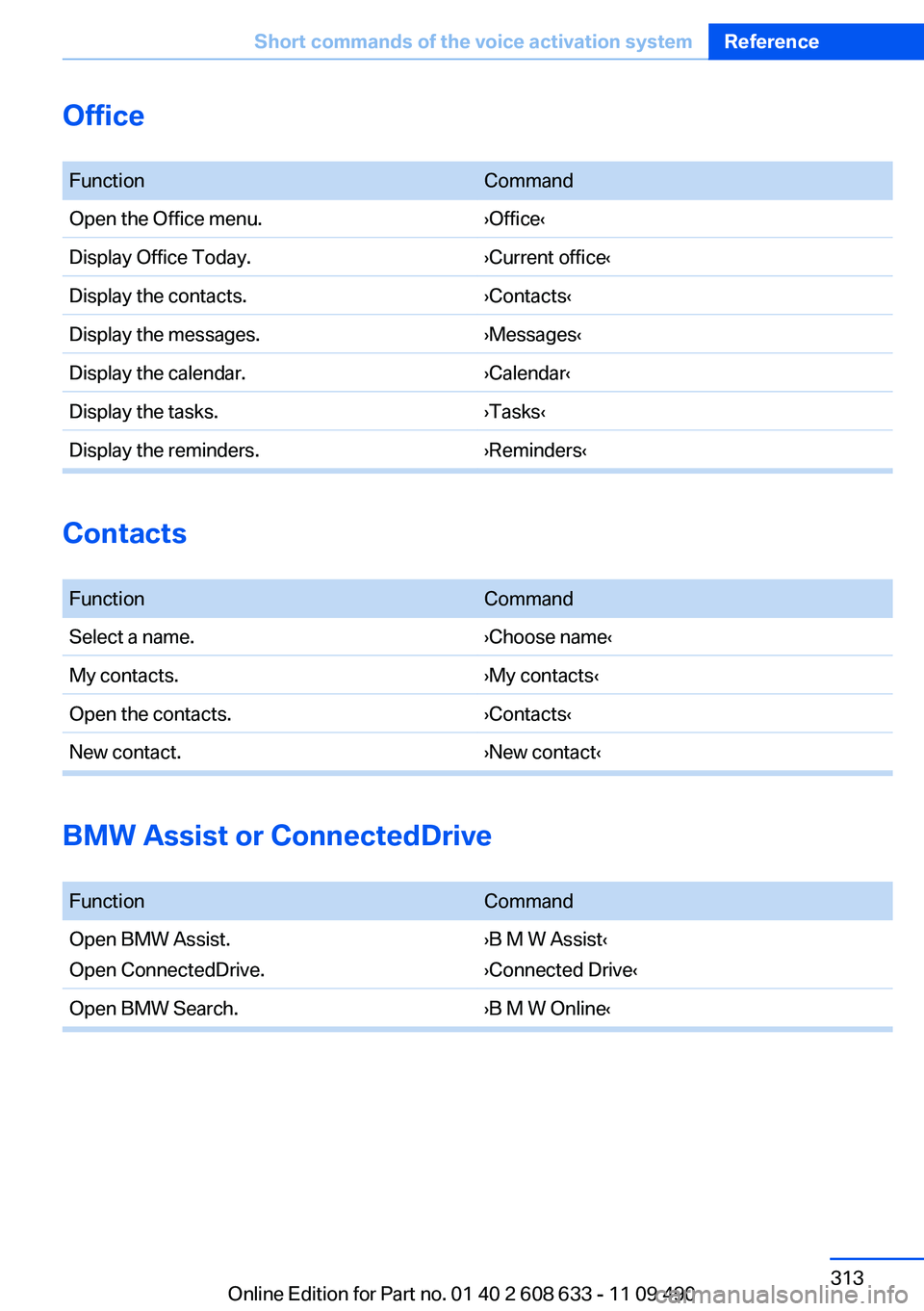
Office
FunctionCommand
Open the Office menu.›Office‹
Display Office Today.›Current office‹
Display the contacts.›Contacts‹
Display the messages.›Messages‹
Display the calendar.›Calendar‹
Display the tasks.›Tasks‹
Display the reminders.›Reminders‹
Contacts
FunctionCommand
Select a name.›Choose name‹
My contacts.›My contacts‹
Open the contacts.›Contacts‹
New contact.›New contact‹
BMW Assist or ConnectedDrive
FunctionCommand
Open BMW Assist.
Open ConnectedDrive.
›B M W Assist‹
›Connected Drive‹
Open BMW Search.›B M W Online‹
Seite 313
Short commands of the voice activation systemReference
313Online Edition for Part no. 01 40 2 608 633 - 11 09 490
Page 316 of 325
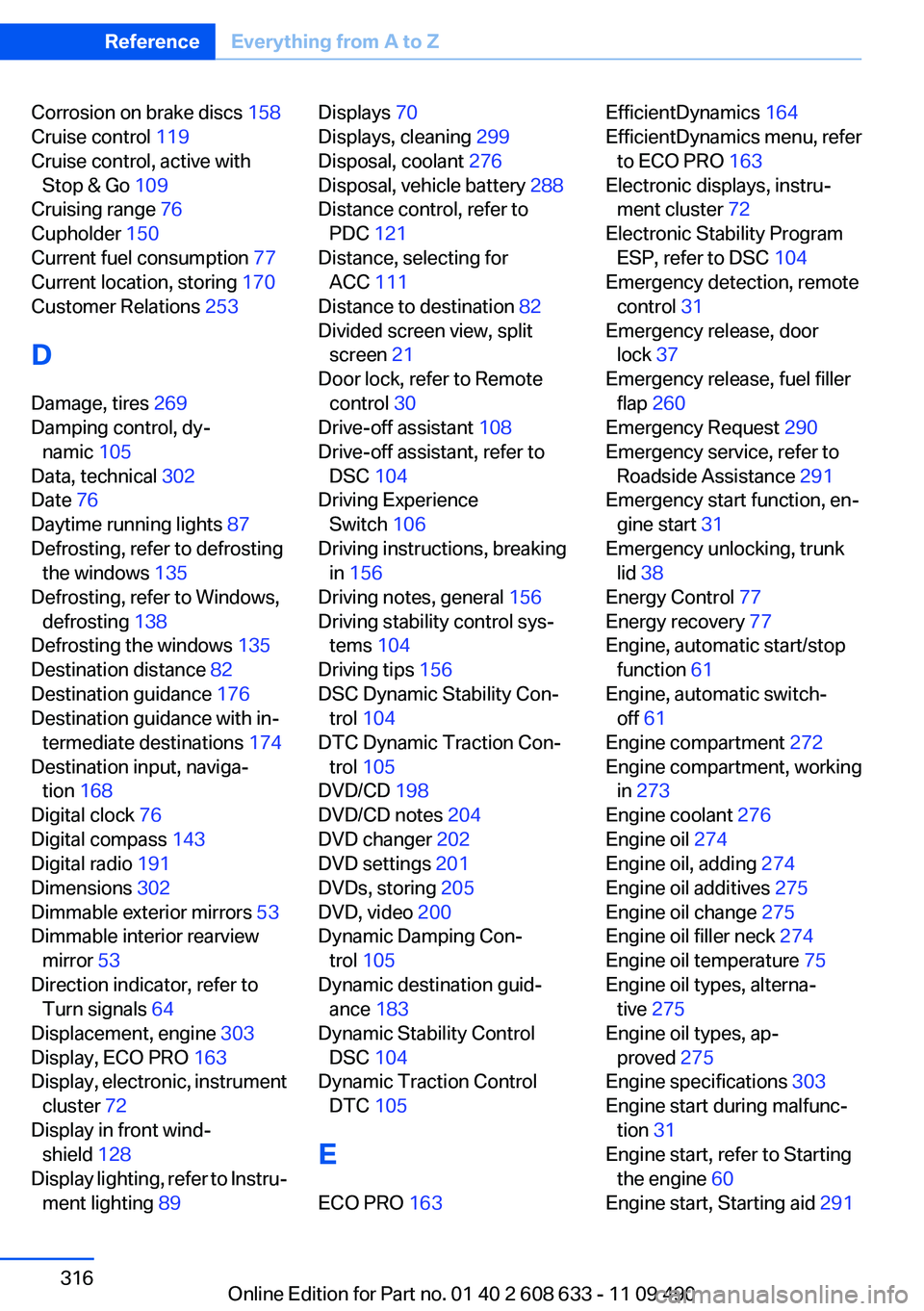
Corrosion on brake discs 158
Cruise control 119
Cruise control, active with
Stop & Go 109
Cruising range 76
Cupholder 150
Current fuel consumption 77
Current location, storing 170
Customer Relations 253
D
Damage, tires 269
Damping control, dy‐
namic 105
Data, technical 302
Date 76
Daytime running lights 87
Defrosting, refer to defrosting
the windows 135
Defrosting, refer to Windows,
defrosting 138
Defrosting the windows 135
Destination distance 82
Destination guidance 176
Destination guidance with in‐
termediate destinations 174
Destination input, naviga‐
tion 168
Digital clock 76
Digital compass 143
Digital radio 191
Dimensions 302
Dimmable exterior mirrors 53
Dimmable interior rearview
mirror 53
Direction indicator, refer to
Turn signals 64
Displacement, engine 303
Display, ECO PRO 163
Display, electronic, instrument
cluster 72
Display in front wind‐
shield 128
Display lighting, refer to Instru‐
ment lighting 89
Displays 70
Displays, cleaning 299
Disposal, coolant 276
Disposal, vehicle battery 288
Distance control, refer to
PDC 121
Distance, selecting for
ACC 111
Distance to destination 82
Divided screen view, split
screen 21
Door lock, refer to Remote
control 30
Drive-off assistant 108
Drive-off assistant, refer to
DSC 104
Driving Experience
Switch 106
Driving instructions, breaking
in 156
Driving notes, general 156
Driving stability control sys‐
tems 104
Driving tips 156
DSC Dynamic Stability Con‐
trol 104
DTC Dynamic Traction Con‐
trol 105
DVD/CD 198
DVD/CD notes 204
DVD changer 202
DVD settings 201
DVDs, storing 205
DVD, video 200
Dynamic Damping Con‐
trol 105
Dynamic destination guid‐
ance 183
Dynamic Stability Control
DSC 104
Dynamic Traction Control
DTC 105
E
ECO PRO 163
EfficientDynamics 164
EfficientDynamics menu, refer
to ECO PRO 163
Electronic displays, instru‐
ment cluster 72
Electronic Stability Program
ESP, refer to DSC 104
Emergency detection, remote
control 31
Emergency release, door
lock 37
Emergency release, fuel filler
flap 260
Emergency Request 290
Emergency service, refer to
Roadside Assistance 291
Emergency start function, en‐
gine start 31
Emergency unlocking, trunk
lid 38
Energy Control 77
Energy recovery 77
Engine, automatic start/stop
function 61
Engine, automatic switch-
off 61
Engine compartment 272
Engine compartment, working
in 273
Engine coolant 276
Engine oil 274
Engine oil, adding 274
Engine oil additives 275
Engine oil change 275
Engine oil filler neck 274
Engine oil temperature 75
Engine oil types, alterna‐
tive 275
Engine oil types, ap‐
proved 275
Engine specifications 303
Engine start during malfunc‐
tion 31
Engine start, refer to Starting
the engine 60
Engine start, Starting aid 291
Seite 316
ReferenceEverything from A to Z
316Online Edition for Part no. 01 40 2 608 633 - 11 09 490
Page 319 of 325
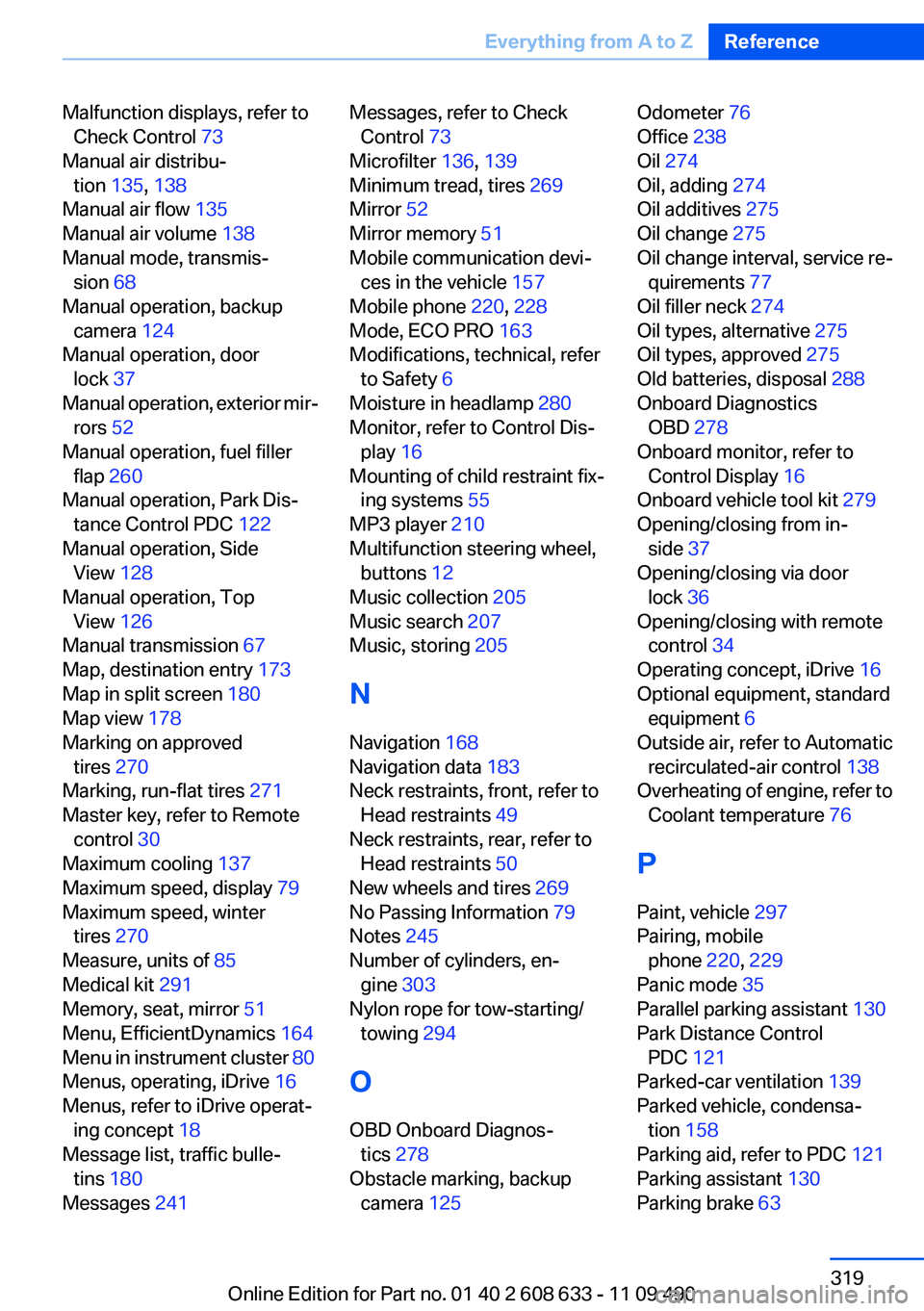
Malfunction displays, refer to
Check Control 73
Manual air distribu‐
tion 135, 138
Manual air flow 135
Manual air volume 138
Manual mode, transmis‐
sion 68
Manual operation, backup
camera 124
Manual operation, door
lock 37
Manual operation, exterior mir‐
rors 52
Manual operation, fuel filler
flap 260
Manual operation, Park Dis‐
tance Control PDC 122
Manual operation, Side
View 128
Manual operation, Top
View 126
Manual transmission 67
Map, destination entry 173
Map in split screen 180
Map view 178
Marking on approved
tires 270
Marking, run-flat tires 271
Master key, refer to Remote
control 30
Maximum cooling 137
Maximum speed, display 79
Maximum speed, winter
tires 270
Measure, units of 85
Medical kit 291
Memory, seat, mirror 51
Menu, EfficientDynamics 164
Menu in instrument cluster 80
Menus, operating, iDrive 16
Menus, refer to iDrive operat‐
ing concept 18
Message list, traffic bulle‐
tins 180
Messages 241
Messages, refer to Check
Control 73
Microfilter 136, 139
Minimum tread, tires 269
Mirror 52
Mirror memory 51
Mobile communication devi‐
ces in the vehicle 157
Mobile phone 220, 228
Mode, ECO PRO 163
Modifications, technical, refer
to Safety 6
Moisture in headlamp 280
Monitor, refer to Control Dis‐
play 16
Mounting of child restraint fix‐
ing systems 55
MP3 player 210
Multifunction steering wheel,
buttons 12
Music collection 205
Music search 207
Music, storing 205
N
Navigation 168
Navigation data 183
Neck restraints, front, refer to
Head restraints 49
Neck restraints, rear, refer to
Head restraints 50
New wheels and tires 269
No Passing Information 79
Notes 245
Number of cylinders, en‐
gine 303
Nylon rope for tow-starting/
towing 294
O
OBD Onboard Diagnos‐
tics 278
Obstacle marking, backup
camera 125
Odometer 76
Office 238
Oil 274
Oil, adding 274
Oil additives 275
Oil change 275
Oil change interval, service re‐
quirements 77
Oil filler neck 274
Oil types, alternative 275
Oil types, approved 275
Old batteries, disposal 288
Onboard Diagnostics
OBD 278
Onboard monitor, refer to
Control Display 16
Onboard vehicle tool kit 279
Opening/closing from in‐
side 37
Opening/closing via door
lock 36
Opening/closing with remote
control 34
Operating concept, iDrive 16
Optional equipment, standard
equipment 6
Outside air, refer to Automatic
recirculated-air control 138
Overheating of engine, refer to
Coolant temperature 76
P
Paint, vehicle 297
Pairing, mobile
phone 220, 229
Panic mode 35
Parallel parking assistant 130
Park Distance Control
PDC 121
Parked-car ventilation 139
Parked vehicle, condensa‐
tion 158
Parking aid, refer to PDC 121
Parking assistant 130
Parking brake 63
Seite 319
Everything from A to ZReference
319Online Edition for Part no. 01 40 2 608 633 - 11 09 490