switch BMW 3 SERIES CONVERTIBLE 2013 E93 Owners Manual
[x] Cancel search | Manufacturer: BMW, Model Year: 2013, Model line: 3 SERIES CONVERTIBLE, Model: BMW 3 SERIES CONVERTIBLE 2013 E93Pages: 311, PDF Size: 7.05 MB
Page 280 of 311
275
Giving and receiving assistance
Mobility
Starting the engine
1.
Start the engine of the donor vehicle and
allow it to run for a fe w minutes at slightly
increased idle speed.
2. Start the engine on the other vehicle in the
usual way.
If the first start attempt is not successful,
wait a few minutes be fore another attempt
in order to allow the discharged battery to
recharge.
3. Let the engines run for a few minutes.
4. Disconnect the jumper cables by reversing
the above connecting sequence.
If necessary, have th e battery checked and
recharged.
Never use spray fluids to start the
engine. <
Tow-starting, towing away
Observe the applicable laws and
regulations for tow-starting and towing
vehicles.<
Do not transport any passengers other
than the driver in a vehicle that is being
towed. <
Using a tow fitting
The screw-in tow fitting must always be carried
in the car. It can be sc rewed in at the front or
rear of the BMW.
Coupe: it is stored in the onboard vehicle tool kit
underneath the cover on the right-hand side of
the trunk, refer to page 266.
Convertible: it is stored in the onboard vehicle
tool kit underneath the trunk floor, refer to
page 266.
Use only the tow fitting provided with the
vehicle and screw it a ll the way in. Use the
tow fitting for towing on paved roads only. Avoid
lateral loading of the tow fitting, e.g. do not lift
the vehicle by the tow fitting. Otherwise, the
tow fitting and the vehicle could be damaged. <
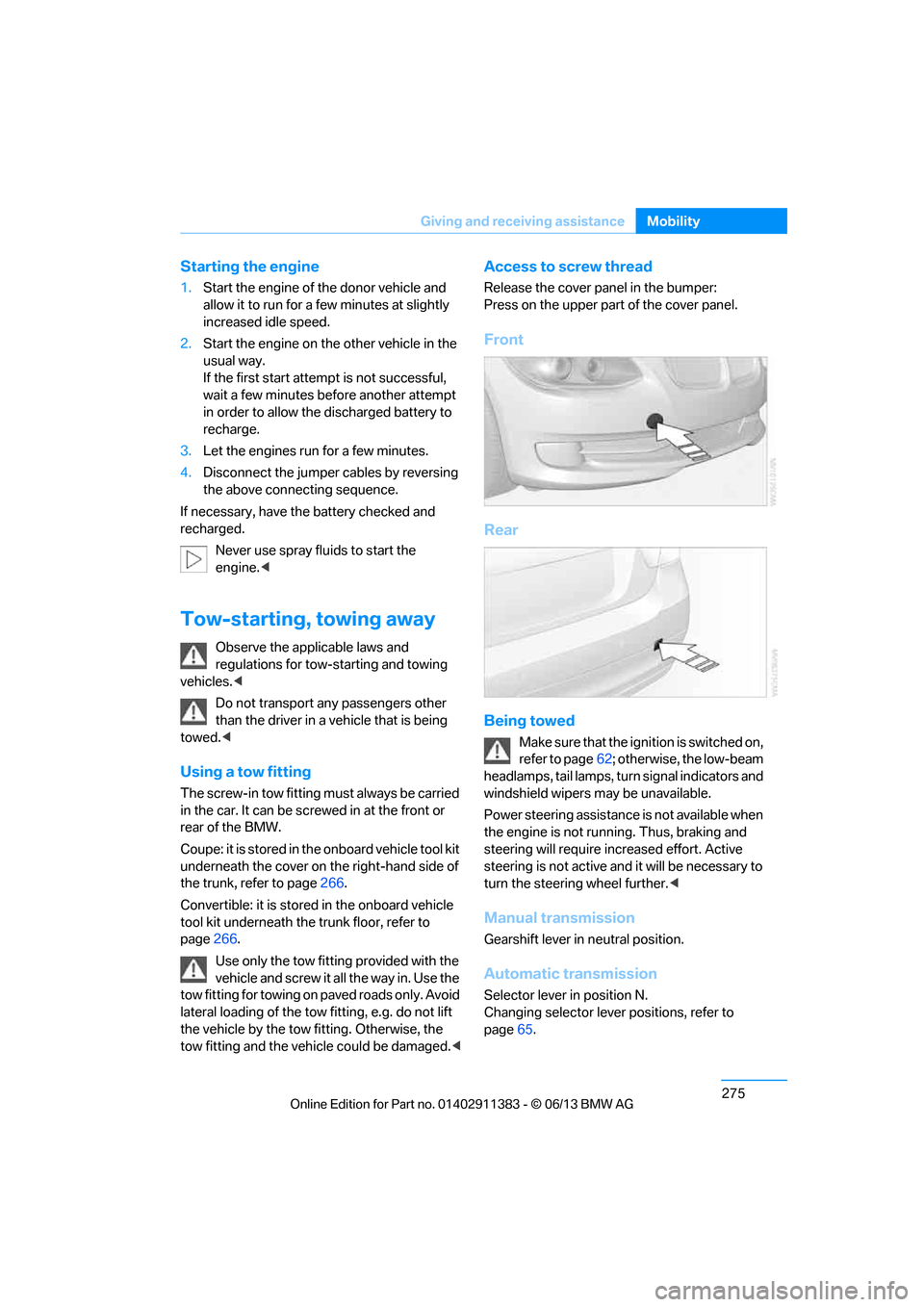
Access to screw thread
Release the cover panel in the bumper:
Press on the upper part of the cover panel.
Front
Rear
Being towed
Make sure that the ignition is switched on,
refer to page62; otherwise, the low-beam
headlamps, tail lamps, turn signal indicators and
windshield wipers may be unavailable.
Power steering assistance is not available when
the engine is not running. Thus, braking and
steering will require in creased effort. Active
steering is not active an d it will be necessary to
turn the steering wheel further. <
Manual transmission
Gearshift lever in neutral position.
Automatic transmission
Selector lever in position N.
Changing selector lever positions, refer to
page65.
00320051004F004C00510048000300280047004C0057004C005200510003
Page 282 of 311
277
Giving and receiving assistance
Mobility
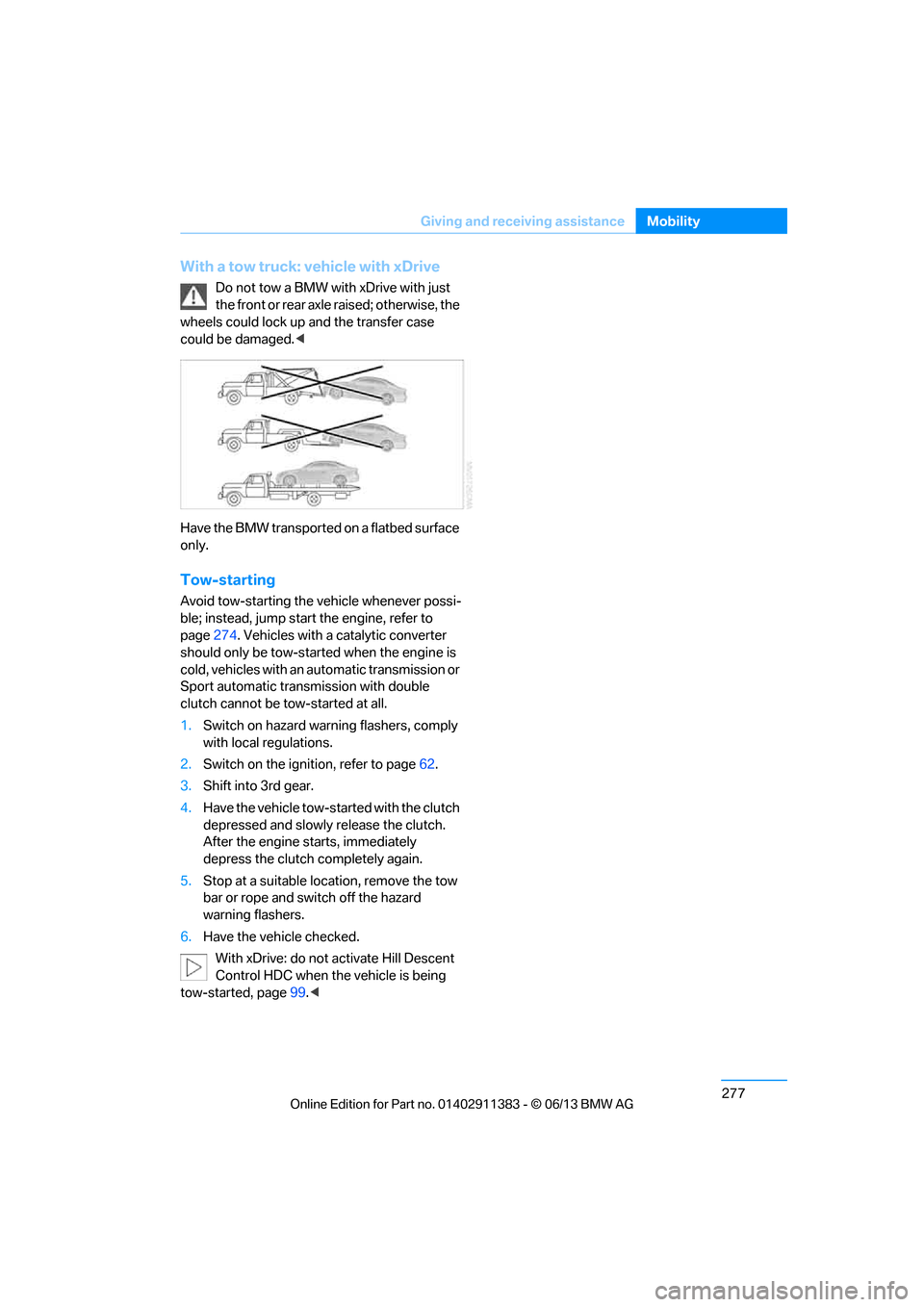
With a tow truck: vehicle with xDrive
Do not tow a BMW with xDrive with just
the front or rear axle raised; otherwise, the
wheels could lock up and the transfer case
could be damaged. <
Have the BMW transported on a flatbed surface
only.
Tow-starting
Avoid tow-starting the vehicle whenever possi-
ble; instead, jump start the engine, refer to
page 274. Vehicles with a catalytic converter
should only be tow-star ted when the engine is
cold, vehicles with an automatic transmission or
Sport automatic transmission with double
clutch cannot be tow-started at all.
1. Switch on hazard warning flashers, comply
with local regulations.
2. Switch on the ignition, refer to page 62.
3. Shift into 3rd gear.
4. Have the vehicle tow-st arted with the clutch
depressed and slowly release the clutch.
After the engine starts, immediately
depress the clutch completely again.
5. Stop at a suitable location, remove the tow
bar or rope and switch off the hazard
warning flashers.
6. Have the vehicle checked.
With xDrive: do not activate Hill Descent
Control HDC when the vehicle is being
tow-started, page 99.<
00320051004F004C00510048000300280047004C0057004C005200510003
Page 290 of 311
285
Short commands for the voice activation system
Reference
Radio
FM
AM
Satellite radio
Presets
FunctionCommand
Selecting a station directly
{Station … } e.g. National Public Radio
Calling up the radio {Radio }
Calling up an FM station {F M }
Opening manual search {Manual }
Selecting the frequency range {Select frequency }
Calling up a station {Select station }
FunctionCommand
Calling up an AM station {A M }
Opening manual search {Manual }
FunctionCommand
Calling up the satellite radio {Satellite radio }
Switching on the satellite radio {Satellite radio on }
Selecting a satellite radio channel {Select satellite radio } e.g. channel 2
FunctionCommand
Opening the stored stations {Presets }
Choosing a stored station {Select preset}
Selecting a stored station {Preset … } e.g. stored station 2
00320051004F004C00510048000300280047004C0057004C005200510003
Page 292 of 311
287
Short commands for the voice activation system
Reference
Navigation
General information
Map
FunctionCommand
Navigation menu
{Navigation }
Opening destination entry {Enter address }
Entering an address {Enter address }
Opening destination guidance {Guidance }
Starting destination guidance {Start guidance }
Ending destination guidance {Stop guidance }
Opening the home address {Home address }
Opening the route criteria {Route preference}
Opening the route {Route information}
Switching on the voice instructions {Switch on voice instructions }
Repeating a voice instruction {Repeat voice instructions }
Switching off the voice instructions {Switch off voice instructions }
Displaying the address book {Address book }
Displaying the last destinations {Last destinations }
Opening the traffic bulletins {Traffic Info }
Special destinations {Points of interest }
FunctionCommand
Displaying the map {Map }
Map facing north {Map facing north }
Map in the direction of travel {Map in direction of travel }
Perspective map {Map perspective view }
Automatic map scaling {Map with automatic scaling }
Changing the scale {Map scale }
Scale...meters {Map scale … meters} e.g. map scale of
100 meters
Scale...kilometers {Map scale … kilometers} e.g. split screen
scale of 5 kilometers
00320051004F004C00510048000300280047004C0057004C005200510003
Page 293 of 311
288
ReferenceShort commands for the voice activation system
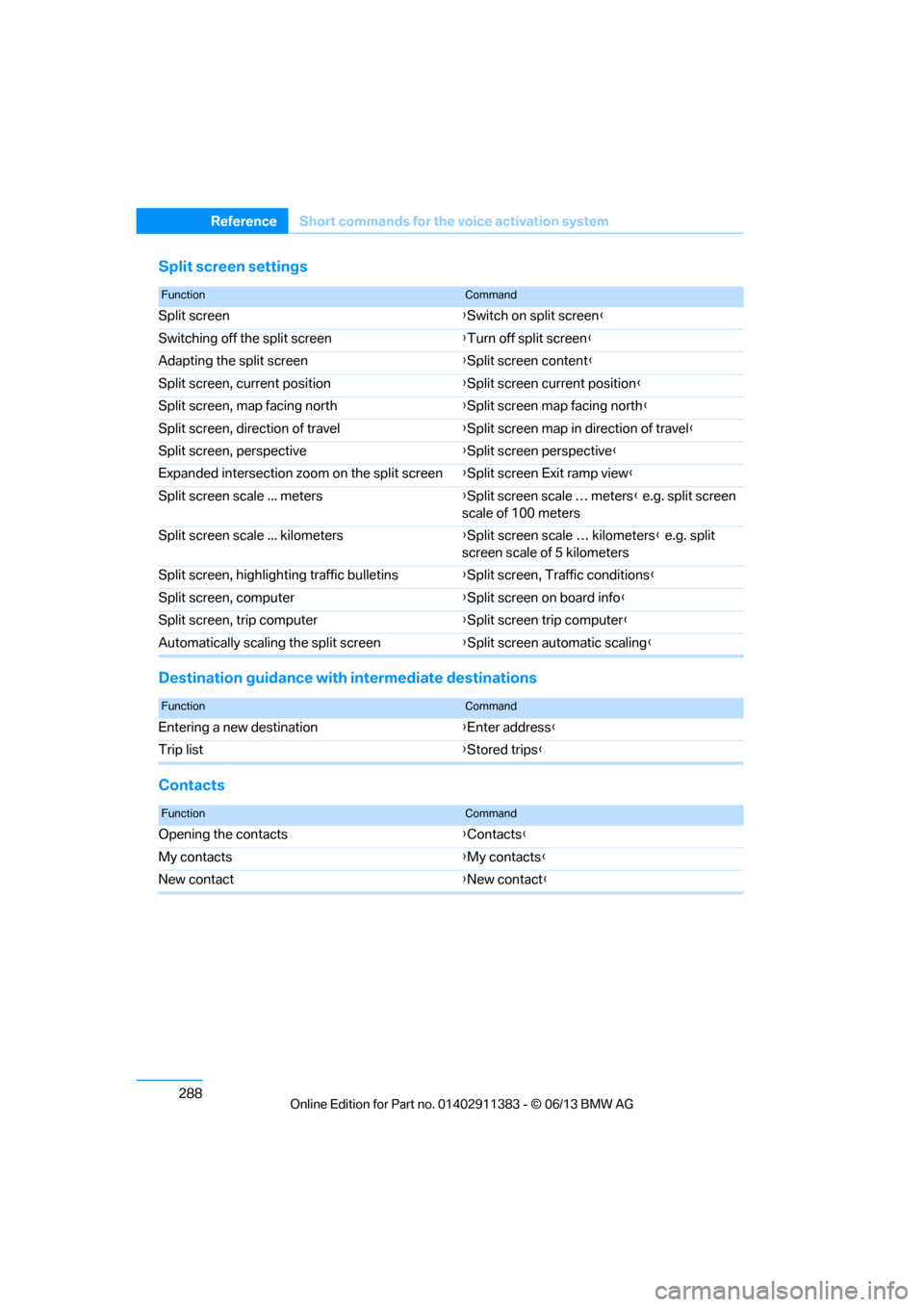
Split screen settings
Destination guidance with intermediate destinations
Contacts
FunctionCommand
Split screen {Switch on split screen }
Switching off the split screen {Turn off split screen }
Adapting the split screen {Split screen content }
Split screen, current position {Split screen current position }
Split screen, map facing north {Split screen map facing north }
Split screen, direction of travel {Split screen map in direction of travel }
Split screen, perspective {Split screen perspective }
Expanded intersection zoom on the split screen {Split screen Exit ramp view }
Split screen scale ... meters {Split screen scale … meters } e.g. split screen
scale of 100 meters
Split screen scale ... kilometers {Split screen scale … kilometers } e.g. split
screen scale of 5 kilometers
Split screen, highlighting traffic bulletins {Split screen, Traffic conditions }
Split screen, computer {Split screen on board info}
Split screen, trip computer {Split screen trip computer }
Automatically scaling the split screen {Split screen automatic scaling }
FunctionCommand
Entering a new destination {Enter address }
Trip list {Stored trips }
FunctionCommand
Opening the contacts {Contacts }
My contacts {My contacts }
New contact {New contact }
00320051004F004C00510048000300280047004C0057004C005200510003
Page 295 of 311
290
ReferenceEverything from A to Z
Everything from A to Z
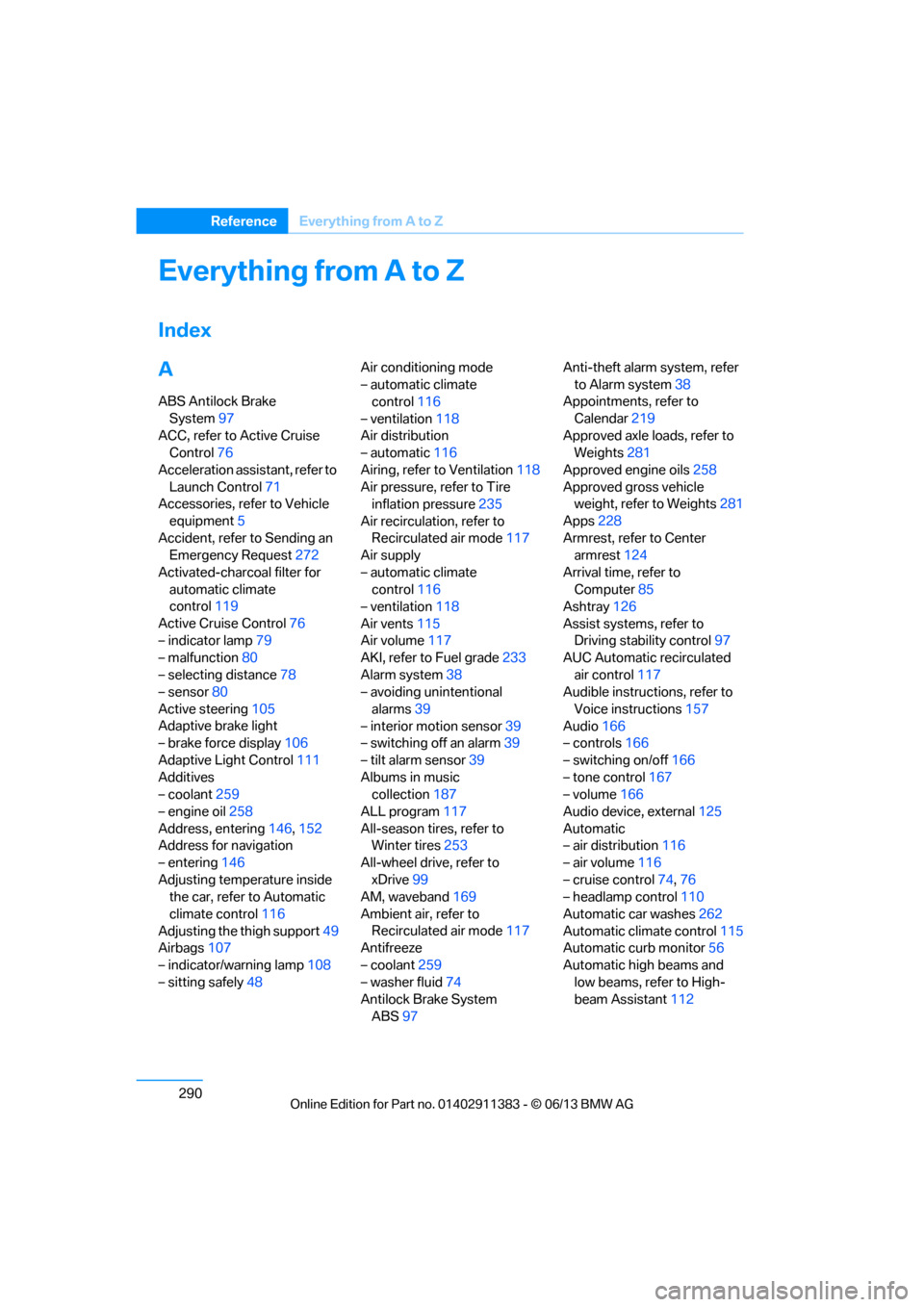
Index
A
ABS Antilock Brake
System 97
ACC, refer to Active Cruise Control 76
Acceleration assistant, refer to Launch Control 71
Accessories, refer to Vehicle
equipment 5
Accident, refer to Sending an Emergency Request 272
Activated-charcoal filter for automatic climate
control 119
Active Cruise Control 76
– indicator lamp 79
– malfunction 80
– selecting distance 78
– sensor 80
Active steering 105
Adaptive brake light
– brake force display 106
Adaptive Light Control 111
Additives
– coolant 259
– engine oil 258
Address, entering 146,152
Address for navigation
– entering 146
Adjusting temperature inside the car, refer to Automatic
climate control 116
Adjusting the thigh support 49
Airbags 107
– indicator/warning lamp 108
– sitting safely 48 Air conditioning mode
– automatic climate
control 116
– ventilation 118
Air distribution
– automatic 116
Airing, refer to Ventilation 118
Air pressure, refer to Tire inflation pressure 235
Air recirculation, refer to Recirculated air mode 117
Air supply
– automatic climate control 116
– ventilation 118
Air vents 115
Air volume 117
AKI, refer to Fuel grade 233
Alarm system 38
– avoiding unintentional
alarms 39
– interior motion sensor 39
– switching off an alarm 39
– tilt alarm sensor 39
Albums in music collection 187
ALL program 117
All-season tires, refer to
Wi nt
er tires 253
All-wheel drive, refer to xDrive 99
AM, waveband 169
Ambient air, refer to Recirculated air mode 117
Antifreeze
– coolant 259
– washer fluid 74
Antilock Brake System
ABS 97 Anti-theft alarm system, refer
to Alarm system 38
Appointments, refer to
Calendar 219
Approved axle loads, refer to Weights 281
Approved engine oils 258
Approved gross vehicle weight, refer to Weights 281
Apps 228
Armrest, refer to Center armrest 124
Arrival time, refer to Computer 85
Ashtray 126
Assist systems, refer to Driving stability control 97
AUC Automatic recirculated
air control 117
Audible instructions, refer to
Voice instructions 157
Audio 166
– controls 166
– switching on/off 166
– tone control 167
– volume 166
Audio device, external 125
Automatic
– air distribution 116
– air volume 116
– cruise control 74,76
– headlamp control 110
Automatic car washes 262
Automatic climate control 115
Automatic curb monitor 56
Automatic high beams and low beams, refer to High-
beam Assistant 112
00320051004F004C00510048000300280047004C0057004C005200510003
Page 297 of 311
292
ReferenceEverything from A to Z
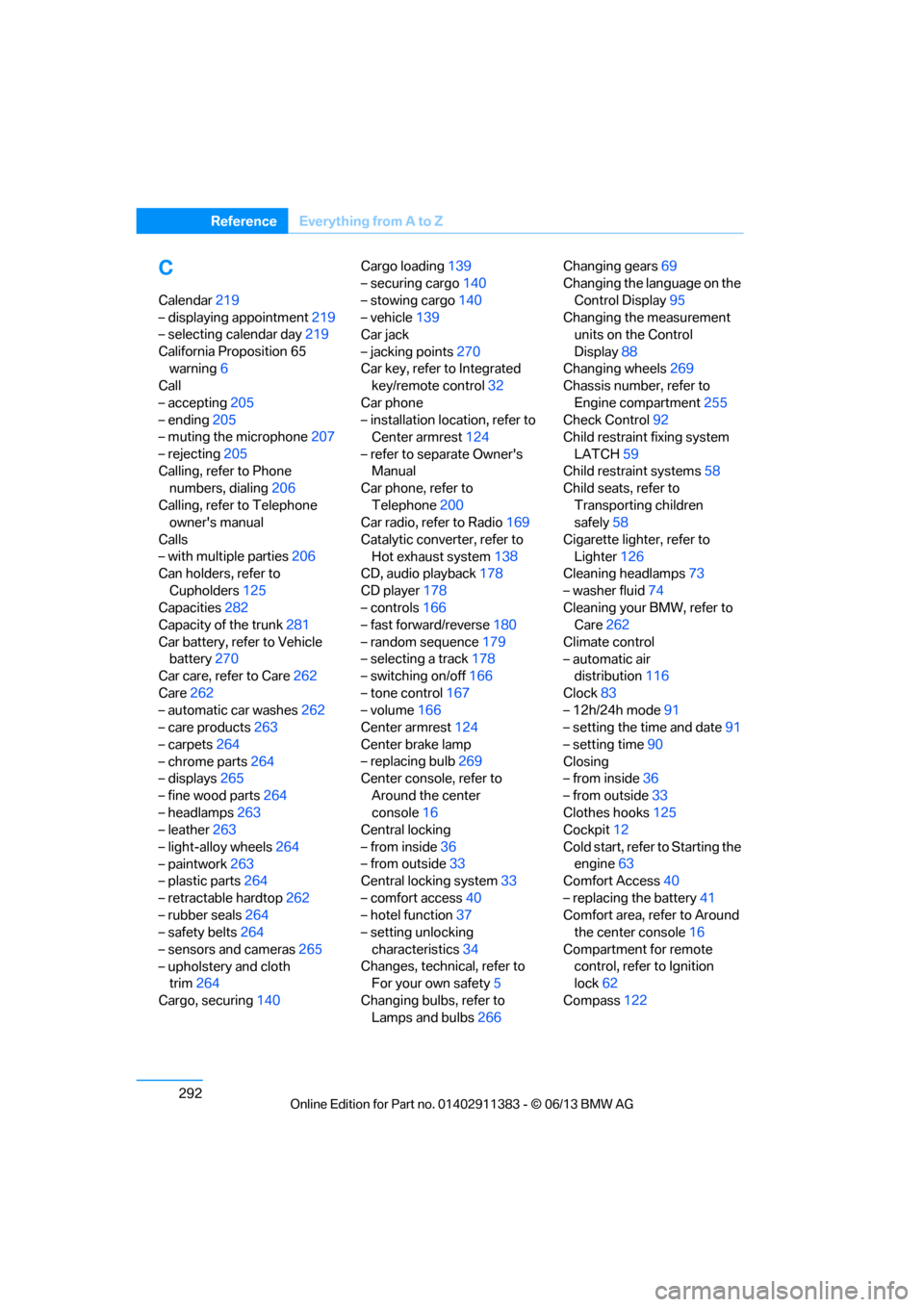
C
Calendar219
– displaying appointment 219
– selecting calendar day 219
California Proposition 65 warning 6
Call
– accepting 205
– ending 205
– muting the microphone 207
– rejecting 205
Calling, refer to Phone numbers, dialing 206
Calling, refer to Telephone owner's manual
Calls
– with multiple parties 206
Can holders, refer to
Cupholders 125
Capacities 282
Capacity of the trunk 281
Car battery, refer to Vehicle battery 270
Car care, refer to Care 262
Care 262
– automatic car washes 262
– care products 263
– carpets 264
– chrome parts 264
– displays 265
– fine wood parts 264
– headlamps 263
– leather 263
– light-alloy wheels 264
– paintwork 263
– plastic parts 264
– retractable hardtop 262
– rubber seals 264
– safety belts 264
– sensors and cameras 265
– upholstery and cloth trim 264
Cargo, securing 140 Cargo loading
139
– securing cargo 140
– stowing cargo 140
– vehicle 139
Car jack
– jacking points 270
Car key, refer to Integrated key/remote control 32
Car phone
– installation location, refer to Center armrest 124
– refer to separate Owner's Manual
Car phone, refer to
Telephone 200
Car radio, refer to Radio 169
Catalytic converter, refer to Hot exhaust system 138
CD
, audio playback 178
CD player 178
– controls 166
– fast forward/reverse 180
– random sequence 179
– selecting a track 178
– switching on/off 166
– tone control 167
– volume 166
Center armrest 124
Center brake lamp
– replacing bulb 269
Center console, refer to
Around the center
console 16
Central locking
– from inside 36
– from outside 33
Central locking system 33
– comfort access 40
– hotel function 37
– setting unlocking
characteristics 34
Changes, technical, refer to For your own safety 5
Changing bulbs, refer to Lamps and bulbs 266Changing gears
69
Changing the language on the
Control Display 95
Changing the measurement units on the Control
Display 88
Changing wheels 269
Chassis number, refer to
Engine compartment 255
Check Control 92
Child restraint fixing system
LATCH 59
Child restraint systems 58
Child seats, refer to
Transporting children
safely 58
Cigarette lighter, refer to Lighter 126
Cleaning headlamps 73
– washer fluid 74
Cleaning your BMW, refer to Care 262
Climate control
– automatic air distribution 116
Clock 83
– 12h/24h mode 91
– setting the time and date 91
– setting time 90
Closing
– from inside 36
– from outside 33
Clothes hooks 125
Cockpit 12
Cold start, refer to Starting t
he
engine 63
Comfort Access 40
– replacing the battery 41
Comfort area, refer to Around the center console 16
Compartment for remote control, refer to Ignition
lock 62
Compass 122
00320051004F004C00510048000300280047004C0057004C005200510003
Page 298 of 311
293
Everything from A to Z
Reference
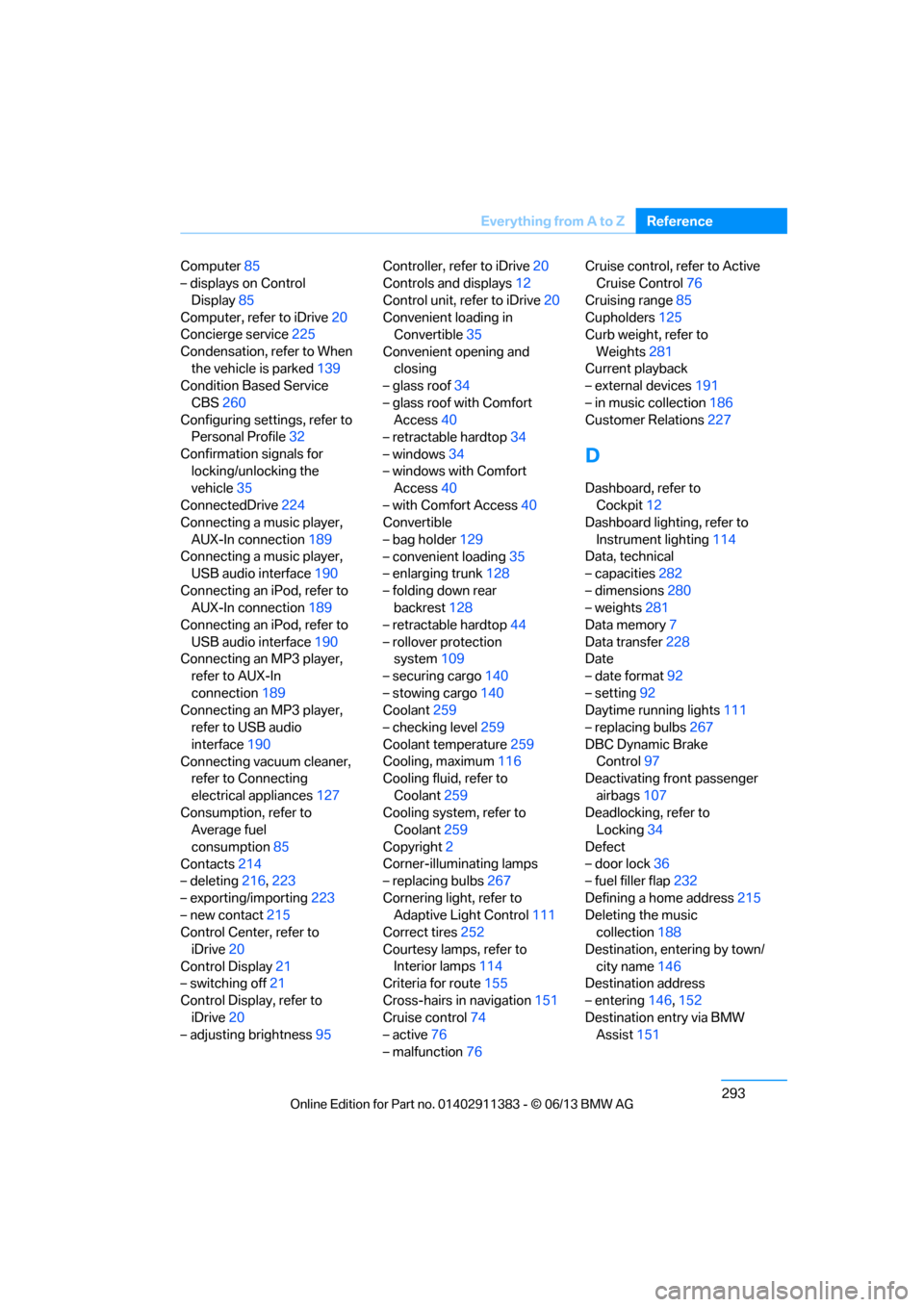
Computer
85
– displays on Control
Display 85
Computer, refer to iDrive 20
Concierge service 225
Condensation, refer to When the vehicle is parked 139
Condition Based Service
CBS 260
Configuring settings, refer to Personal Profile 32
Confirmation signals for locking/unlocking the
vehicle 35
ConnectedDrive 224
Connecting a music player,
AUX-In connection 189
Connecting a music player, USB audio interface 190
Connecting an iPod, refer to AUX-In connection 189
Connecting an iPod, refer to
USB audio interface 190
Connecting an MP3 player, refer to AUX-In
connection 189
Connecting an MP3 player, refer to USB audio
interface 190
Connecting vacuum cleaner, refer to Connecting
electrical appliances 127
Consumption, refer to Average fuel
consumption 85
Contacts 214
– deleting 216,223
– exporting/importing 223
– new contact 215
Control Center, refer to
iDrive 20
Control Display 21
– switching off 21
Control Display, refer to iDrive 20
– adjusting brightness 95Controller, refer to iDrive
20
Controls and displays 12
Control unit, refer to iDrive 20
Convenient loading in Convertible 35
Convenient opening and closing
– glass roof 34
– glass roof with Comfort Access 40
– retractable hardtop 34
– windows 34
– windows with Comfort Access 40
– with Comfort Access 40
Convertible
– bag holder 129
– convenient loading 35
– enlarging trunk 128
– folding down rear
backres
t128
– retractable hardtop 44
– rollover protection system 109
– securing cargo 140
– stowing cargo 140
Coolant 259
– checking level 259
Coolant temperature 259
Cooling, maximum 116
Cooling fluid, refer to
Coolant 259
Cooling system, refer to Coolant 259
Copyright 2
Corner-illuminating lamps
– replacing bulbs 267
Cornering light, refer to Adaptive Light Control 111
Correct tires 252
Courtesy lamps, refer to Interior lamps 114
Criteria for route 155
Cross-hairs in navigation151
Cruise control 74
– active 76
– malfunction 76 Cruise control, refer to Active
Cruise Control 76
Cruising range 85
Cupholders 125
Curb weight, refer to
Weights 281
Current playback
– external devices 191
– in music collection 186
Customer Relations 227
D
Dashboard, refer to
Cockpit 12
Dashboard lighting, refer to
Instrument lighting 114
Data, technical
– capacities 282
– dimensions 280
– weights 281
Data memory 7
Data transfer 228
Date
– date format 92
– setting 92
Daytime running lights 111
– replacing bulbs 267
DBC Dynamic Brake Control 97
Deactivating front passenger
airbags 107
Deadlocking, refer to Locking 34
Defect
– door lock 36
– fuel filler flap 232
Defining a home address 215
Deleting the music collection 188
Destination, entering by town/ city name 146
Destination address
– entering 146,152
Destination entry via BMW Assist 151
00320051004F004C00510048000300280047004C0057004C005200510003
Page 300 of 311
295
Everything from A to Z
Reference
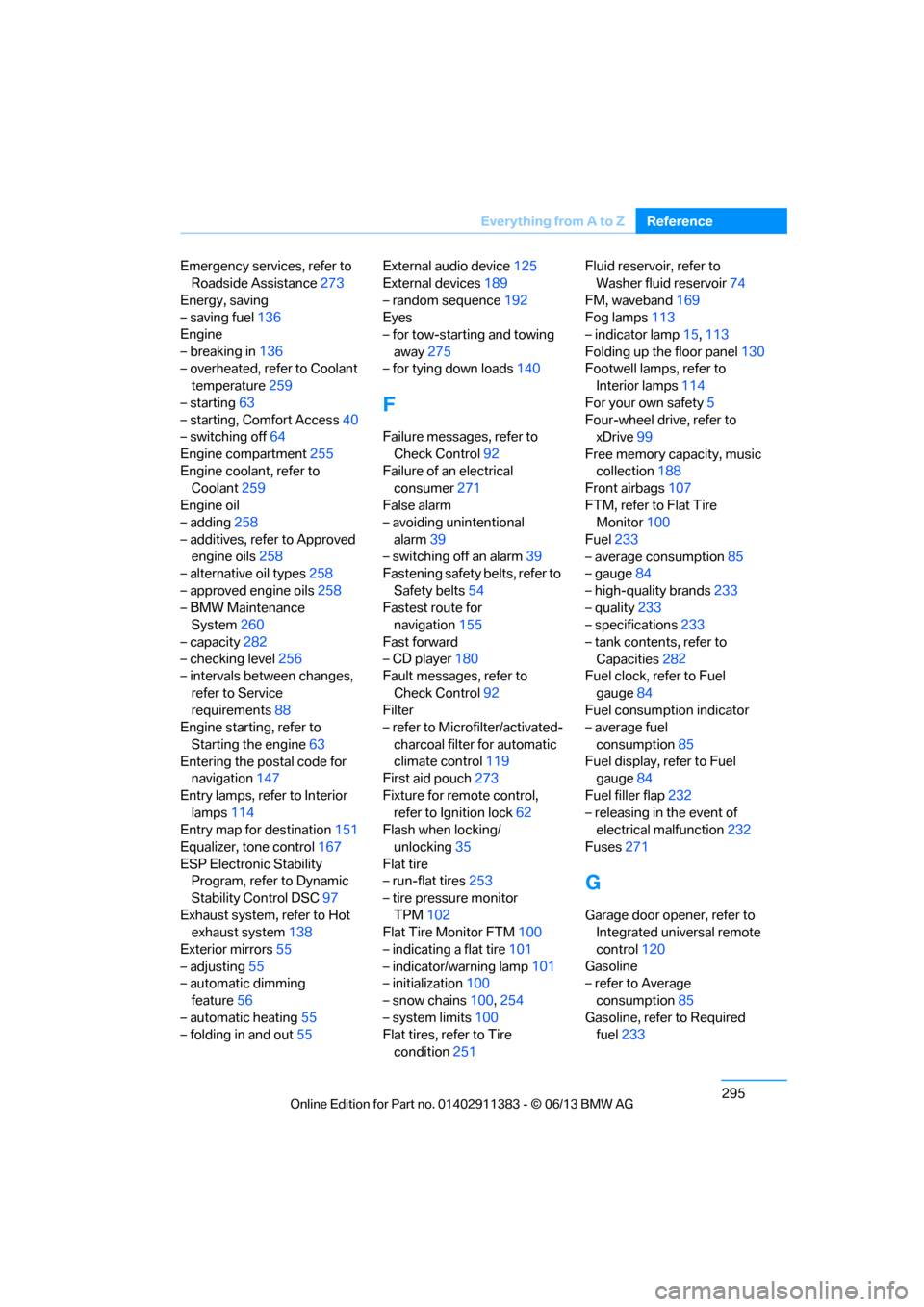
Emergency services, refer to
Roadside Assistance 273
Energy, saving
– saving fuel 136
Engine
– breaking in 136
– overheated, refer to Coolant temperature 259
– starting 63
– starting, Comfort Access 40
– switching off 64
Engine compartment 255
Engine coolant, refer to Coolant 259
Engine oil
– adding 258
– additives, refer to Approved engine oils 258
– alternative oil types 258
– approved engine oils 258
– BMW Maintenance System 260
– capacity 282
– checking level 256
– intervals between changes,
refer to Service
requirements 88
Engine starting, refer to
Starting the engine 63
Entering the postal code for navigation 147
Entry lamps, refer to Interior lamps 114
Entry map for destination 151
Equalizer, tone control 167
ESP Electronic Stability Program, refer to Dynamic
Stability Control DSC 97
Exhaust system, refer to Hot exhaust system 138
Exterior mirrors 55
– adjusting 55
– automatic dimming
feature 56
– automatic heating 55
– folding in and out 55External audio device
125
External devices 189
– random sequence 192
Eyes
– for tow-starting and towing
away 275
– for tying down loads 140
F
Failure messages, refer to
Check Control 92
Failure of an electrical consumer 271
False alarm
– avoiding unintentional alarm 39
– switching off an alarm 39
Fastening safety belts, refer to
Safety belts 54
Fastest route for navigation 155
Fast forward
– CD player 180
Fault messages, refer to
Check Control 92
Filter
– refer to Microfilter/activated-
charcoal filter for automatic
climate control 119
First aid pouch 273
Fixture for remote control, refer to Ignition lock 62
Flash when locking/
unlocking 35
Flat tire
– run-flat tires 253
– tire pressure monitor TPM 102
Flat Tire Monitor FTM 100
– indicating a flat tire 101
– indicator/warning lamp 101
– initialization 100
– snow chains 100,254
– system limits 100
Flat tires, refer to Tire
condition 251 Fluid reservoir, refer to
Washer fluid reservoir 74
FM, waveband 169
Fog lamps 113
– indicator lamp 15,113
Folding up the floor panel 130
Footwell lamps, refer to Interior lamps 114
For your own safety 5
Four-wheel drive, refer to xDrive 99
Free memory ca pacity, music
collection 188
Front airbags 107
FTM, refer to Flat Tire Monitor 100
Fuel 233
– average consumption 85
– gauge 84
– high-quality brands 233
– quality 233
– specifications 233
– tank contents, refer to Capacities 282
Fuel
clock, refer to Fuel
gauge 84
Fuel consumption indicator
– average fuel
consumption 85
Fuel display, refer to Fuel gauge 84
Fuel filler flap 232
– releasing in the event of electrical malfunction 232
Fuses 271
G
Garage door opener, refer to
Integrated universal remote
control 120
Gasoline
– refer to Average
consumption 85
Gasoline, refer to Required fuel 233
00320051004F004C00510048000300280047004C0057004C005200510003
Page 301 of 311
296
ReferenceEverything from A to Z
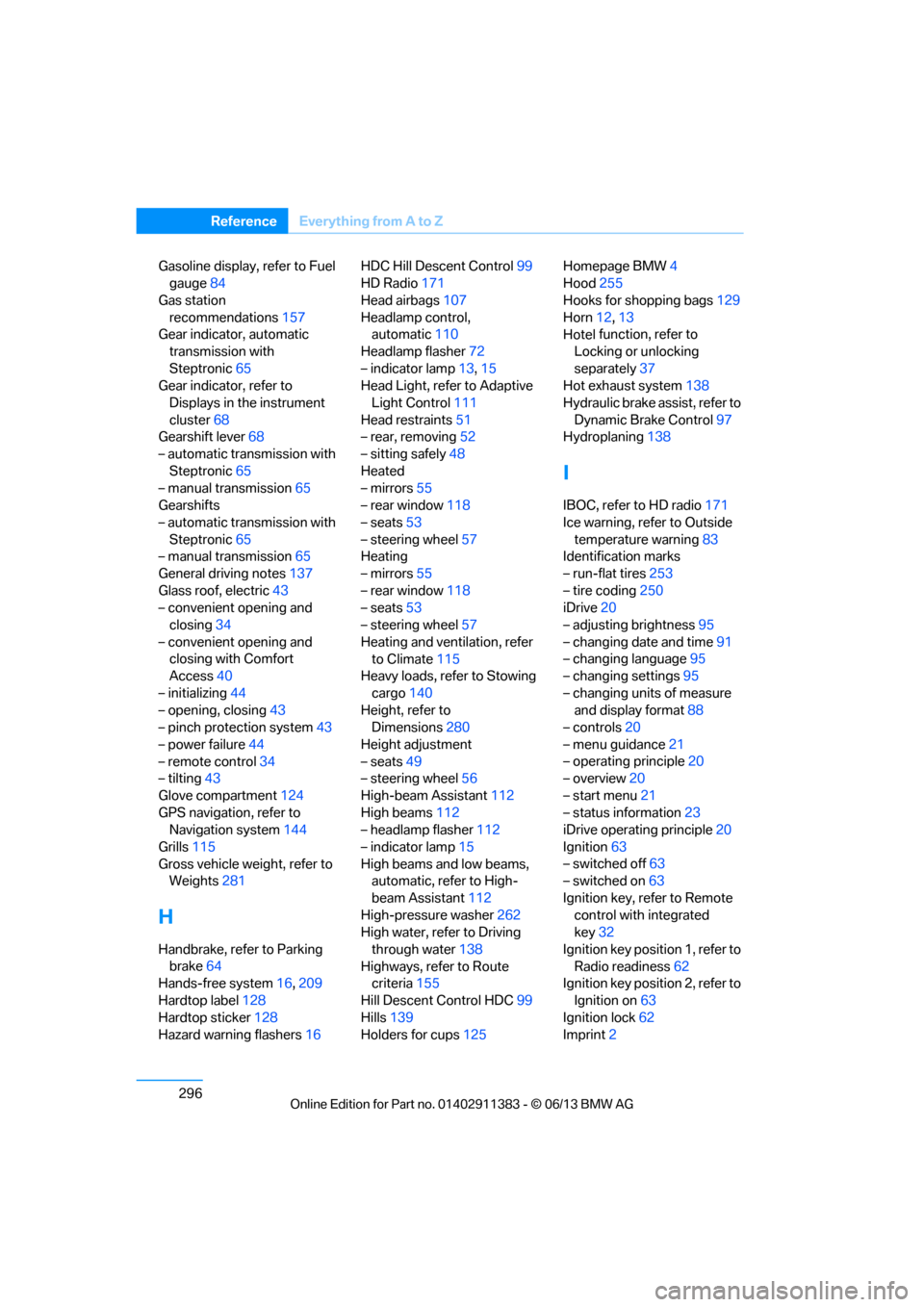
Gasoline display, refer to Fuel
gauge 84
Gas station recommendations 157
Gear indicator, automatic
transmission with
Steptronic 65
Gear indicator, refer to
Displays in the instrument
cluster 68
Gearshift lever 68
– automatic transmission with Steptronic 65
– manual transmission 65
Gearshifts
– automatic transmission with Steptronic 65
– manual transmission 65
General driving notes 137
Glass roof, electric 43
– convenient opening and closing 34
– convenient opening and closing with Comfort
Access 40
– initializing 44
– opening, closing 43
– pinch protection system 43
– power failure 44
– remote control 34
– tilting 43
Glove compartment 124
GPS navigation, refer to Navigation system 144
Grills 115
Gross vehicle weight, refer to Weights 281
H
Handbrake, refer to Parking
brake 64
Hands-free system 16,209
Hardtop label 128
Hardtop sticker 128
Hazard warning flashers 16HDC Hill Descent Control
99
HD Radio 171
Head airbags 107
Headlamp control, automatic 110
Headlamp flasher 72
– indicator lamp 13,15
Head Light, refer to Adaptive
Light Control 111
Head restraints 51
– rear, removing 52
– sitting safely 48
Heated
– mirrors 55
– rear window 118
– seats 53
– steering wheel 57
Heating
– mirrors 55
– rear window 118
– seats 53
– steering wheel 57
Heating and ventilation, refer to Climate 115
Heavy loads, refer to Stowing
cargo 140
Height, refer to Dimensions 280
Height adjustment
– seats 49
– steering wheel 56
High-beam Assistant 112
High beams 112
– headlamp flasher 112
– indicator lamp 15
High beams and low beams, automatic, refer to High-
beam Assistant 112
High-pressure washer 262
High water, refer to Driving
through water 138
Highways, refer to Route criteria 155
Hill Descent Control HDC 99
Hills 139
Holders for cups 125Homepage BMW
4
Hood 255
Hooks for shopping bags 129
Horn 12,
13
Hotel function, refer to
Locking o
r unlocking
separately 37
Hot exhaust system 138
Hydraulic brake assist, refer to Dynamic Brake Control 97
Hydroplaning 138
I
IBOC, refer to HD radio 171
Ice warning, refer to Outside
temperature warning 83
Identification marks
– run-flat tires 253
– tire coding 250
iDrive 20
– adjusting brightness 95
– changing date and time 91
– changing language 95
– changing settings 95
– changing units of measure and display format 88
– controls 20
– menu guidance 21
– operating principle 20
– overview 20
– start menu 21
– status information 23
iDrive operating principle 20
Ignition 63
– switched off 63
– switched on 63
Ignition key, refer to Remote control with integrated
key 32
Ignition key position 1, refer to Radio readiness 62
Ignition key position 2, refer to
Ignition on 63
Ignition lock 62
Imprint 2
00320051004F004C00510048000300280047004C0057004C005200510003