switch BMW 3 SERIES CONVERTIBLE 2013 E93 Manual Online
[x] Cancel search | Manufacturer: BMW, Model Year: 2013, Model line: 3 SERIES CONVERTIBLE, Model: BMW 3 SERIES CONVERTIBLE 2013 E93Pages: 311, PDF Size: 7.05 MB
Page 211 of 311
206
CommunicationsTe l e p h o n e
Entering phone numbers
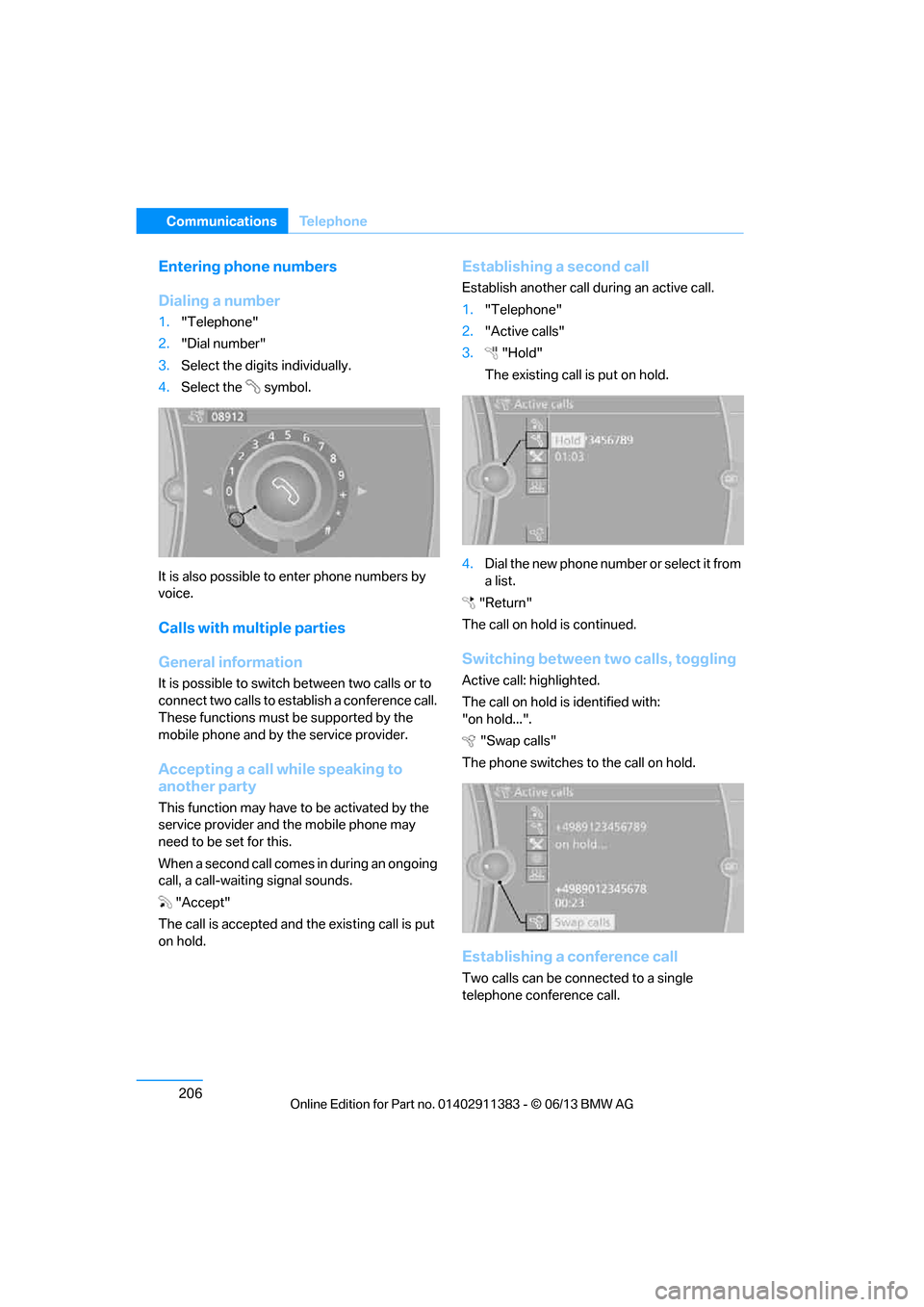
Dialing a number
1."Telephone"
2. "Dial number"
3. Select the digits individually.
4. Select the symbol.
It is also possible to enter phone numbers by
voice.
Calls with multiple parties
General information
It is possible to switch between two calls or to
connect two calls to establish a conference call.
These functions must be supported by the
mobile phone and by the service provider.
Accepting a call while speaking to
another party
This function may have to be activated by the
service provider and the mobile phone may
need to be set for this.
When a second call comes in during an ongoing
call, a call-waiting signal sounds.
"Accept"
The call is accepted and the existing call is put
on hold.
Establishing a second call
Establish another call during an active call.
1. "Telephone"
2. "Active calls"
3. "Hold"
The existing call is put on hold.
4. Dia l the ne w pho ne numbe r o r sele ct it from
a list.
"Return"
The call on hold is continued.
Switching between two calls, toggling
Active call: highlighted.
The call on hold is identified with:
"on hold...". "Swap calls"
The phone switches to the call on hold.
Establishing a conference call
Two calls can be connected to a single
telephone conference call.
00320051004F004C00510048000300280047004C0057004C005200510003
Page 212 of 311
207
Te l e p h o n e
Communications
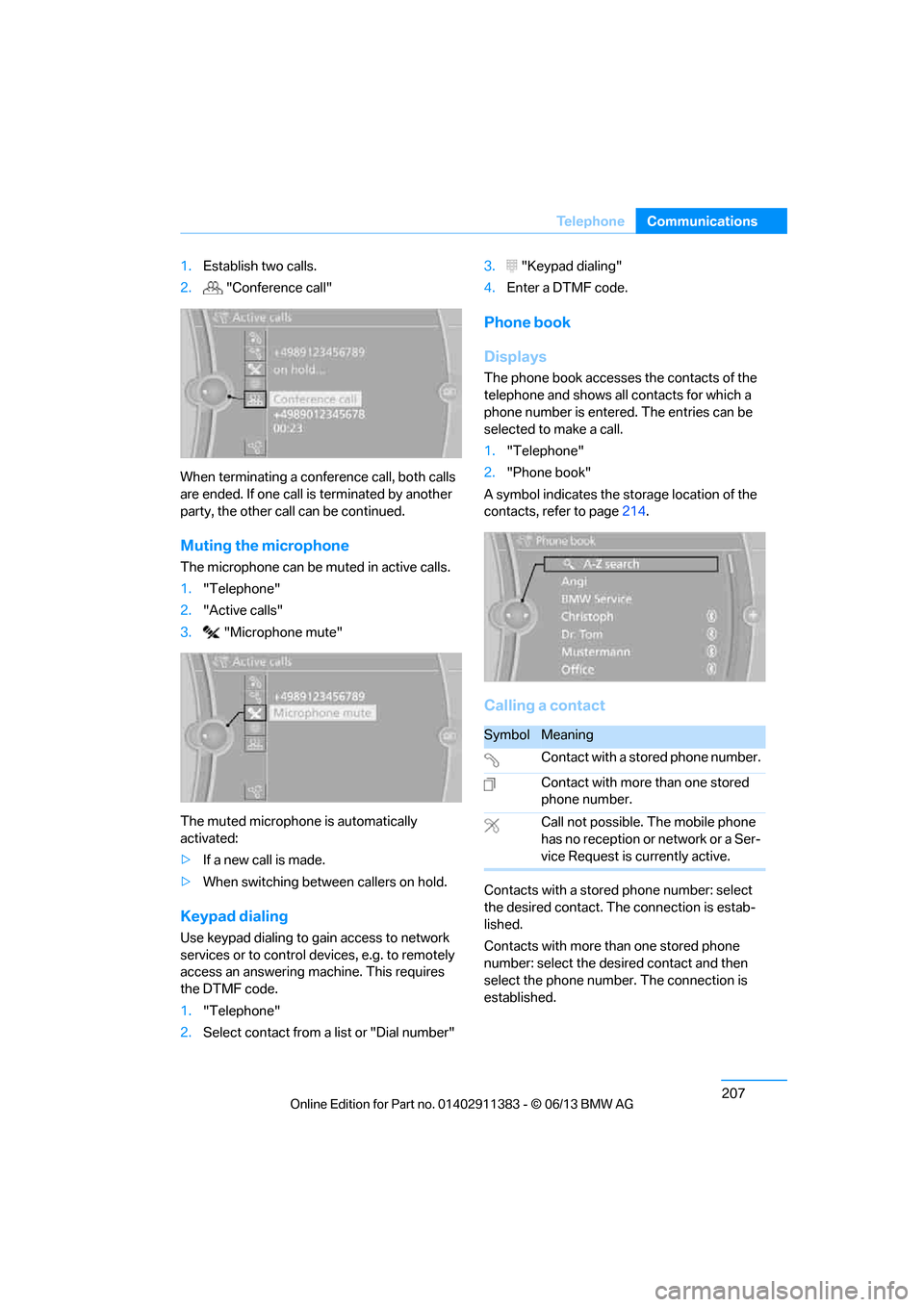
1.
Establish two calls.
2. "Conference call"
When terminating a conference call, both calls
are ended. If one call is terminated by another
party, the other call can be continued.
Muting the microphone
The microphone can be muted in active calls.
1. "Telephone"
2. "Active calls"
3. "Microphone mute"
The muted microphone is automatically
activated:
> If a new call is made.
> When switching between callers on hold.
Keypad dialing
Use keypad dialing to gain access to network
services or to control de vices, e.g. to remotely
access an answering ma chine. This requires
the DTMF code.
1. "Telephone"
2. Select contact from a list or "Dial number" 3.
"Keypad dialing"
4. Enter a DTMF code.
Phone book
Displays
The phone book accesses the contacts of the
telephone and shows all contacts for which a
phone number is entered. The entries can be
selected to make a call.
1. "Telephone"
2. "Phone book"
A symbol indicates the st orage location of the
contacts, refer to page 214.
Calling a contact
Contacts with a stored phone number: select
the desired contact. Th e connection is estab-
lished.
Contacts with more than one stored phone
number: select the desi red contact and then
select the phone number. The connection is
established.
SymbolMeaning
Contact with a stored phone number.
Contact with more than one stored
phone number.
Call not possible. The mobile phone
has no reception or network or a Ser-
vice Request is currently active.
00320051004F004C00510048000300280047004C0057004C005200510003
Page 214 of 311
209
Te l e p h o n e
Communications
Saving an entry in the contacts
1.
Highlight the entry.
2. Open "Options".
3. "Store as new contact" or "Add to existing
contact".
4. Select contact if necessary.
5. Select the type of number: "Home",
"Business", "Mobile" or "Other".
6. Complete the entr ies if necessary.
7. "Store contact"
Hands-free system
General information
Calls being conducted using the hands-free
system can be continued using the mobile
phone and vice versa.
From the mobile phone to the hands-
free system
Calls that have been in itiated from outside the
Bluetooth range of the vehicle can be continued
using the hands-free system if the ignition is
switched on.
Depending on the mobile phone, the call is
automatically switched to hands-free mode.
If the switch does not occur automatically, then
follow the instructions that appear on the
display of the mobile ph one, also refer to the
Owner's Manual for the mobile phone.
From hands-free system to mobile
phone
Calls being conducted using the hands-free
system can also be continued using the mobile
phone if so desired, depending on the mobile
phone.
At this point, follow the instructions that appear
on the display of the mobile phone, also refer to
the Owner's Manual for the mobile phone.
Operation by voice
With voice activation system:
Operation, refer to page 27.
Without voice acti vation system:
Depending upon the equipment, the mobile
phone can be voice-operated as described
below.
The list of short commands in the Owner's
Manual does not apply to this type of voice
operation.
The concept
> The mobile phone can be operated without
removing your hand from the steering
wheel.
> In many cases, the entry process is sup-
ported by means of announcements or
questions.
> {...} Verbal instructions to use with the voice
operation system.
Voice commands
Activating voice activation system
1. Press the button on the steering wheel.
2. Say the command.
Finishing voice input
Press the button on the steering wheel
or
Possible commands
Having possible commands read aloud
The system understands default commands
that must be spoken word for word.
Possible commands are read aloud.
Digits from zero to nine are recognized. {
Cancel }.
{ Help }.
00320051004F004C00510048000300280047004C0057004C005200510003
Page 230 of 311
225
ConnectedDrive
Communications
>
In addition, the optional Convenience Plan
offers Concierge servic e and information on
route planning, the traffic situation and
weather. Using Critical Calling, a limited
number of calls can be made via the BMW
Assist Response Center, for example if the
mobile phone is not available or discharged.
Press the SOS button to contact the BMW
Assist Response Center.
TeleService
General information
TeleService supports comm unication with your
BMW center.
> Data on the vehicle's service requirements
can be sent directly to the BMW center. In
this way, the BMW center can plan its work
in advance. This shor tens the duration of
the service appointment.
> In the event of a breakdown, data on the
vehicle's condition can be sent directly to
Roadside Assistance.
> The service varies by country.
> Connection may incur charges.
> Services may be restricted abroad.
Requirements
>BMW Assist is activated.
> Wireless reception is available.
> Ignition switched on.
Using TeleService
Generally, TeleService is activated in the
vehicle.
If TeleService is not activated, it is possible to
establish a voice contact to the BMW Group
Mobile Service.
For additional uses or to deactivate the ser-
vices, consult your BMW center or contact
Customer Relations.
Concierge service
General information
The Concierge service of BMW Assist will
inform you, for example, about upcoming
events, filling station, or hotels and supplies you
with their phone numbers and addresses. Many
hotels can be booked directly through the BMW
Assist Concierge service. Use of the Concierge
service requires an additi onal activation by the
BMW Assist Response Center.
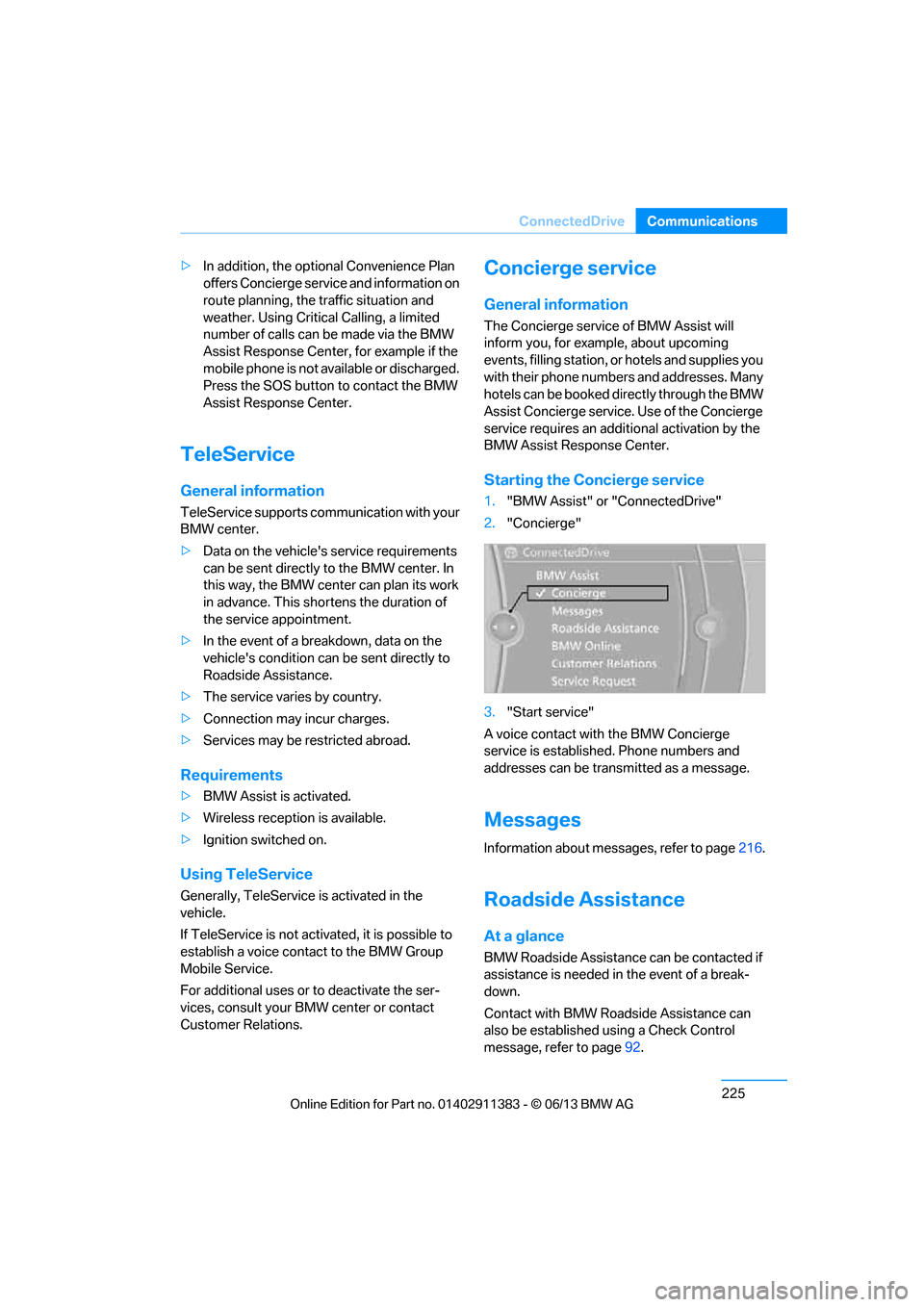
Starting the Concierge service
1. "BMW Assist" or "ConnectedDrive"
2. "Concierge"
3. "Start service"
A voice contact with the BMW Concierge
service is established. Phone numbers and
addresses can be transmitted as a message.
Messages
Information about messages, refer to page 216.
Roadside Assistance
At a glance
BMW Roadside Assistance can be contacted if
assistance is needed in the event of a break-
down.
Contact with BMW Roadside Assistance can
also be established using a Check Control
message, refer to page92.
00320051004F004C00510048000300280047004C0057004C005200510003
Page 237 of 311
232
MobilityRefueling
Refueling
Vehicle equipment
In this chapter, all pr oduction, country, and
optional equipment that is offered in the model
range is described. For this reason, descrip-
tions will be given of some equipment that may
not be available in a vehi cle, for example due to
the special options or national-market version
selected. This also app lies to safety related
functions and systems.
General information
Refuel as soon as possible once your
cruising range falls below 30 miles/
50 km; otherwise, engine functions are not
ensured and damage can occur. <
Always switch off the engine before refu-
eling; otherwise, fuel cannot be added to
the tank and a message will be displayed. <
Take all precautionary measures and
observe all applicable regulations when
handling fuel. Do not carry any spare fuel con-
tainers in your vehicle. They can develop a leak
and cause an explosion or cause a fire in the
event of an accident. <
Vehicles with diesel engines
The filler neck is designed for refueling at diesel
fuel pumps.
Fuel filler flap
Opening
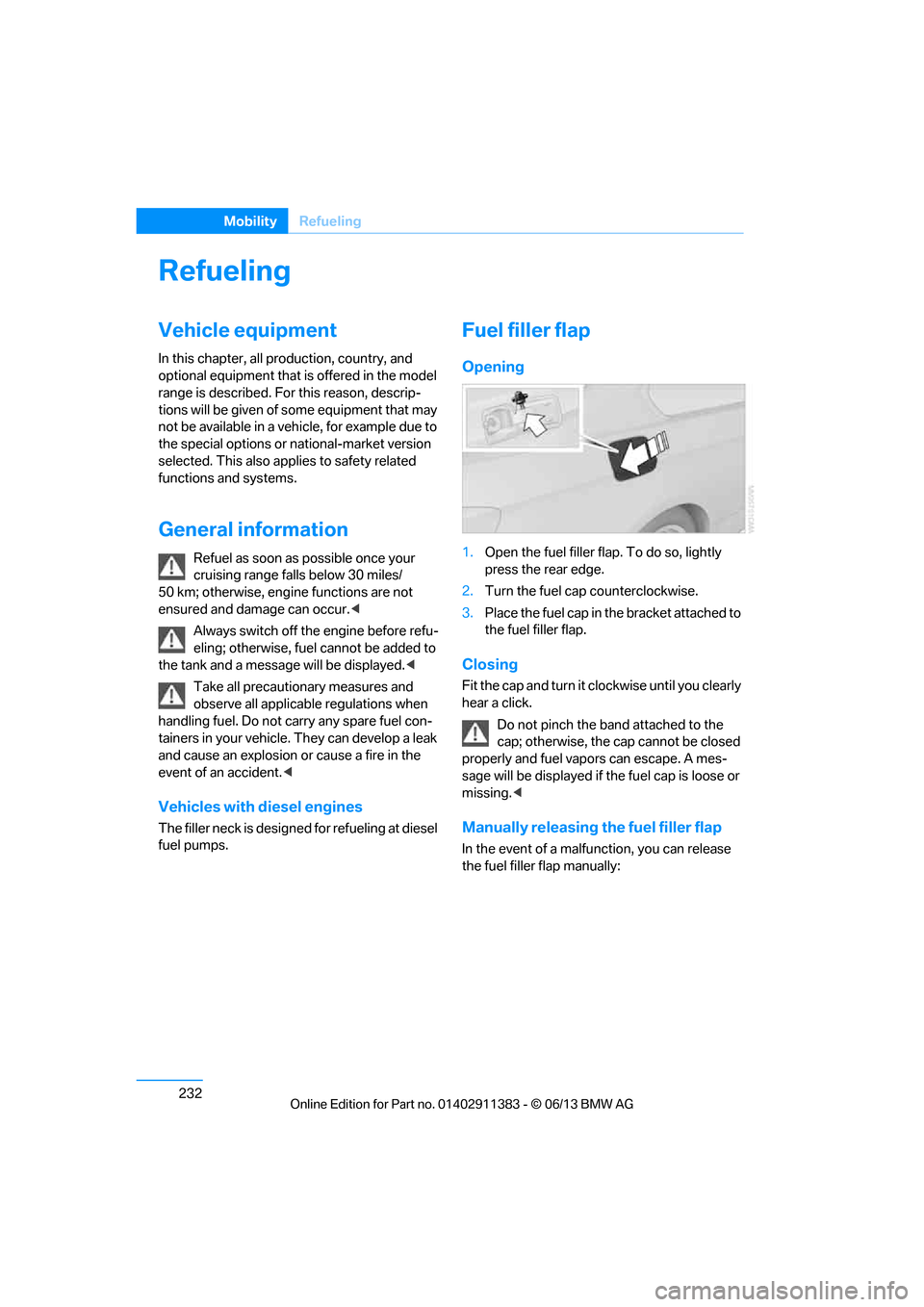
1.Open the fuel filler flap. To do so, lightly
press the rear edge.
2. Turn the fuel cap counterclockwise.
3. Place the fuel cap in th e bracket attached to
the fuel filler flap.
Closing
Fit the cap and turn it cl ockwise until you clearly
hear a click.
Do not pinch the band attached to the
cap; otherwise, the cap cannot be closed
properly and fuel vapors can escape. A mes-
sage will be displayed if the fuel cap is loose or
missing. <
Manually releasing the fuel filler flap
In the event of a malfunction, you can release
the fuel filler flap manually:
00320051004F004C00510048000300280047004C0057004C005200510003
Page 239 of 311
234
MobilityRefueling
Minimum fuel grade
BMW recommends AKI 89.
Do not use gasoline below the indicated
minimum fuel grade; otherwise, proper
engine function is not ensured. <
If you use gasoline with this minimum AKI rat-
ing, the engine may produce knocking sounds
when starting at high outside temperatures.
This has no effect on the engine life.
The use of poor-quality fuels may result in
harmful engine deposits or damage.
Additionally, problems re lating to drivability,
starting and stalling may occur, especially
under certain environmental conditions such as
high ambient temperatur e and high altitude.
If drivability problems are encountered, we rec-
ommend switching to a high quality gasoline
brand and a higher octane grade — AKI number
— for a few tank fills. To avoid harmful engine
deposits, we highly recommend purchasing
gasoline from BP or Top Tier retailers.
Failure to comply with these recommendations
may result in th e need for unscheduled mainte-
nance. <
00320051004F004C00510048000300280047004C0057004C005200510003
Page 268 of 311
263
Care
Mobility
Driving into an automatic car wash
Perform the following steps to ensure that the
vehicle can roll:
Manual transmission:
1.
Shift into neutral.
2. Release parking brake, refer to page 64.
3. Switch off the engine.
4. Leave the remote cont rol in the ignition
lock.
Automatic transmission:
1. Insert the remote control into the ignition
lock, even with Comfort Access.
2. Shift selector lever into position N.
3. Release parking brake, refer to page 64.
4. Switch off the engine.
5. Leave the remote cont rol in the ignition
lock.
Sport automatic transmission with double
clutch:
Before driving into an automatic car wash,
perform the following steps to ensure that the
vehicle can roll:
1. Insert the remote control into the ignition
lock, even with Comfort Access.
2. Engage transmission position N.
3. Release parking brake, refer to page 64.
4. Switch off the engine.
5. Leave the remote control in the ignition lock
so that the vehicle can roll.
The transmission is switched into position P:
> Automatically after approx. 30 minutes
> If you remove the infrared remote control
from the ignition lock
Headlamps
After washing the vehicle
After washing the ve hicle, apply the
brakes briefly to dry them; otherwise,
water can reduce braking efficiency over the
short term and the brake discs can corrode.
formation and to reduce wiper noise and wiper
blade wear.
Vehicle care
Care products
BMW recommends using BMW cleaning and
care products since they have been tested and
approved for this purpose.
Follow the instructions on the packaging.
When cleaning inside the vehicle, always
open the doors and windows. Only use prod-
ucts designed for cleaning vehicles. Cleaning
agents can contain substances that are danger-
ous or hazardous to your health. <
Vehicle paintwork
Regular care contributes to driving safety and
value retention. Enviro nmental influences in
regions with elevated leve ls of air pollution or
natural contaminants such as tree sap or pollen
can impact vehicle paintwork. The frequency
and scope of car care should be adapted
accordingly.
Immediately remove particularly corrosive sub-
stances such as spilled fuel , oil, grease, or bird
droppings to prevent damage to the paintwork.
Leather care
Frequently remove dust from the leather using
a cloth or vacuum cleaner.
Otherwise, dust and road grit in the pores and
folds of the leather will otherwise have an abra-
sive effect, resulting in increased wear and
causing the leather surface to become brittle
prematurely.
In order to prevent staining, e.g due to clothing,
clean the leather approximately every two
months.
Clean light-colored leather more frequently as it
shows dust and dirt more noticeably.
00320051004F004C00510048000300280047004C0057004C005200510003
Page 272 of 311
267
Replacing components
Mobility
When working on electrical systems,
always begin by switching off the con-
sumer in question; otherwise, short-circuits
could result. To avoid possible injury or equip-
ment damage when replacing bulbs, observe
any instructions provided by the bulb
manufacturer. <
For care of the headla mps, please follow the
instructions in the ch apter entitled 'Care'.
To replace lamps not described here,
please contact your BMW center. <
Light-emitting diodes LED
Light-emitting diodes installed behind translu-
cent lenses serve as the light source for many of
the controls, displays, and equipment in your
vehicle. These light-emitting diodes, which
operate using a concept similar to that applied
in conventional lasers, are officially designated
as Class 1 light-emitting diodes.
Do not remove the co vers or expose the
eyes directly to the unfiltered light source
for several hours; otherw ise, this could cause
irritation of the retina. <
Headlight lenses
In cool or humid weather, condensation may
form on the interior of outside lamps. The con-
densation will disappear after a short time when
driving with the headlamps switched on. The
headlamp glasses do not need to be changed.
If the headlamps do not defrost despite driving
with the headlamps switch ed on, and additional
moisture builds up, for example water droplets
in the lamps, have them checked by your BMW
center.
Xenon lamps
These bulbs have a very lo ng service life and are
highly unlikely to fail. If a xenon lamp fails never-
theless, switch on the fog lamps and continue
the journey with great ca re, provided that local
legislation does not prohibit this. Have all work on the xenon lamp system,
including bulb replacements, performed
only by your BMW center . Due to high voltage,
there is a risk of fatal injury if work on the xenon
lamps is carried out improperly. <
Access to the lamps
1.Switch off the lamps and take the remote
control out of the ignition lock.
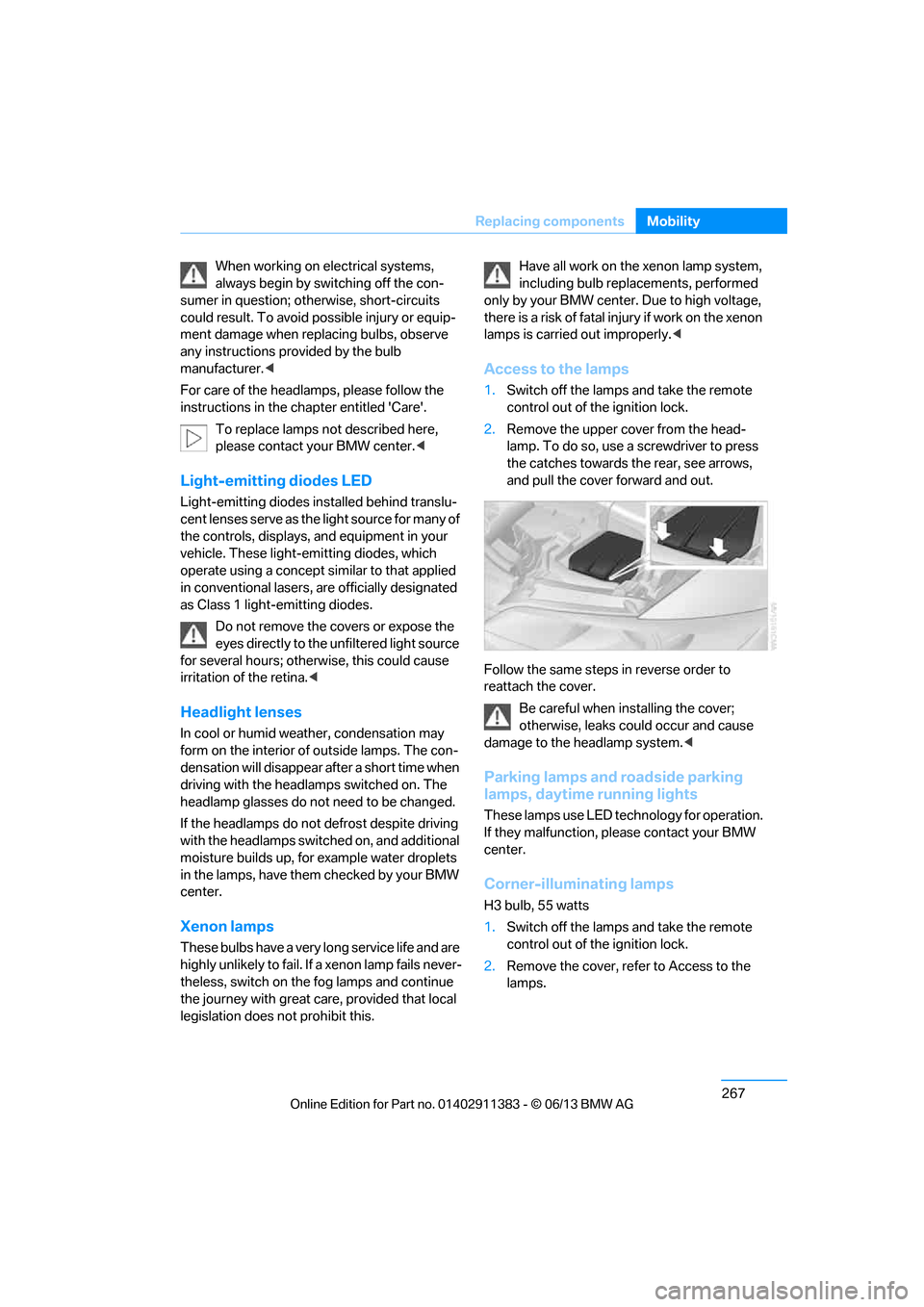
2. Remove the upper co ver from the head-
lamp. To do so, use a screwdriver to press
the catches towards the rear, see arrows,
and pull the cover forward and out.
Follow the same steps in reverse order to
reattach the cover. Be careful when installing the cover;
otherwise, leaks co uld occur and cause
damage to the headlamp system. <
Parking lamps and roadside parking
lamps, daytime running lights
These lamps use LED technology for operation.
If they malfunction, please contact your BMW
center.
Corner-illuminating lamps
H3 bulb, 55 watts
1.Switch off the lamps and take the remote
control out of the ignition lock.
2. Remove the cover, re fer to Access to the
lamps.
00320051004F004C00510048000300280047004C0057004C005200510003
Page 277 of 311
272
MobilityGiving and receiving assistance
Giving and receiving assistance
Vehicle equipment
In this chapter, all pr oduction, country, and
optional equipment that is offered in the model
range is described. For this reason, descrip-
tions will be given of some equipment that may
not be available in a vehi cle, for example due to
the special options or national-market version
selected. This also app lies to safety related
functions and systems.
Emergency Request
Requirements
> Full preparation package mobile phone: this
equipment makes it possible to send an
Emergency Request even if no mobile
phone is paired with the vehicle.
> BMW Assist is activated.
> Radio readiness is switched on.
> The BMW Assist system is logged into a
mobile phone network that is supported by
BMW Assist.
> The Emergency Request system is
operable.
Only press the SOS button in an emergency. For technical reasons, the Emergency
Request service canno t be guaranteed
for the most unfavorable conditions. <
Subscriber contract
Upon expiration of the subscriber contract with
BMW Assist, the BMW Assist system can be
deactivated by a BMW center without a work-
shop visit.
After the system is deacti vated, it is no longer
possible to make Emergency Requests.
It may be possible for a BMW center to reacti-
vate the system after a new contract has been
signed.
Sending an Emergency Request
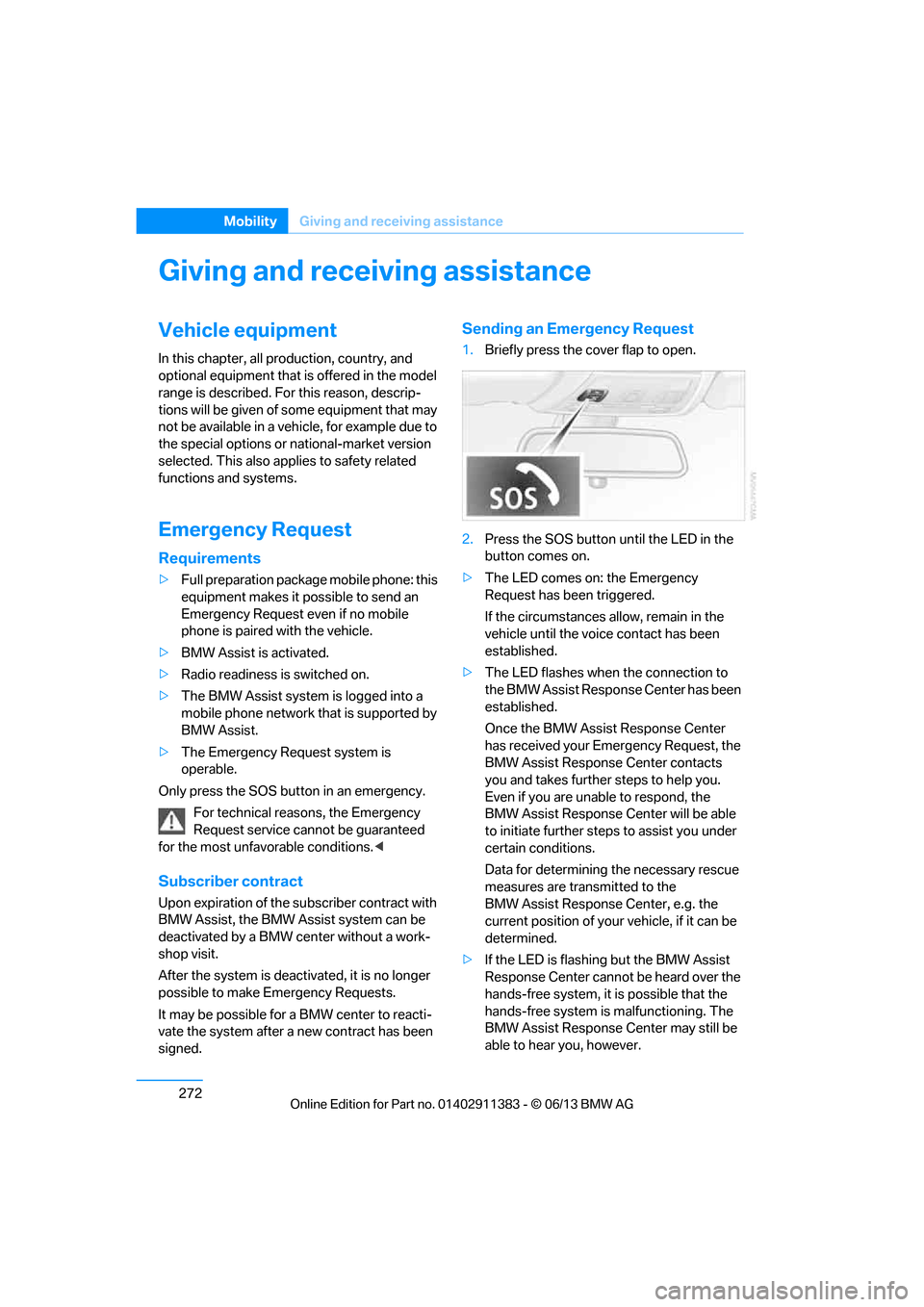
1. Briefly press the cover flap to open.
2. Press the SOS button until the LED in the
button comes on.
> The LED comes on: the Emergency
Request has been triggered.
If the circumstances a llow, remain in the
vehicle until the voice contact has been
established.
> The LED flashes when the connection to
the BMW Assist Response Center has been
established.
Once the BMW Assist Response Center
has received your Emergency Request, the
BMW Assist Response Center contacts
you and takes further steps to help you.
Even if you are unable to respond, the
BMW Assist Response Center will be able
to initiate further steps to assist you under
certain conditions.
Data for determining the necessary rescue
measures are transmitted to the
BMW Assist Response Center, e.g. the
current position of your vehicle, if it can be
determined.
> If the LED is flashing but the BMW Assist
Response Center cannot be heard over the
hands-free system, it is possible that the
hands-free system is malfunctioning. The
BMW Assist Response Center may still be
able to hear you, however.
00320051004F004C00510048000300280047004C0057004C005200510003
Page 279 of 311
274
MobilityGiving and receiving assistance
Jump starting
If the car's own battery is flat, your BMW's
engine can be starte d by connecting two
jumper cables to another vehicle's battery. You
can also use the same method to help start
another vehicle. Only use jumper cables with
fully-insulated clamp handles.
Do not touch any electrically live parts
when the engine is running, or a fatal
accident may occur. Ca refully adhere to the
following sequence, both to prevent damage
to one or both vehicles, and to guard against
possible personal injuries. <
Preparation
1.Check whether the ba ttery of the other
vehicle has a voltage of 12 volts and
approximately the same capacitance in Ah.
This information can be found on the
battery.
2. Switch off the engine of the assisting
vehicle.
3. Switch off any consumers in both vehicles.
There must not be any contact between
the bodies of the two vehicles; otherwise,
there is a danger of shorting. <
Connecting jumper cables
Connect the jumper cables in the correct
order, so that no sparks which could
cause injury occur. <
Your BMW has a jump-starting connection in
the engine compartment which acts as the bat-
tery's positive terminal, refer also to the Engine
compartment overview on page 255. The cap is
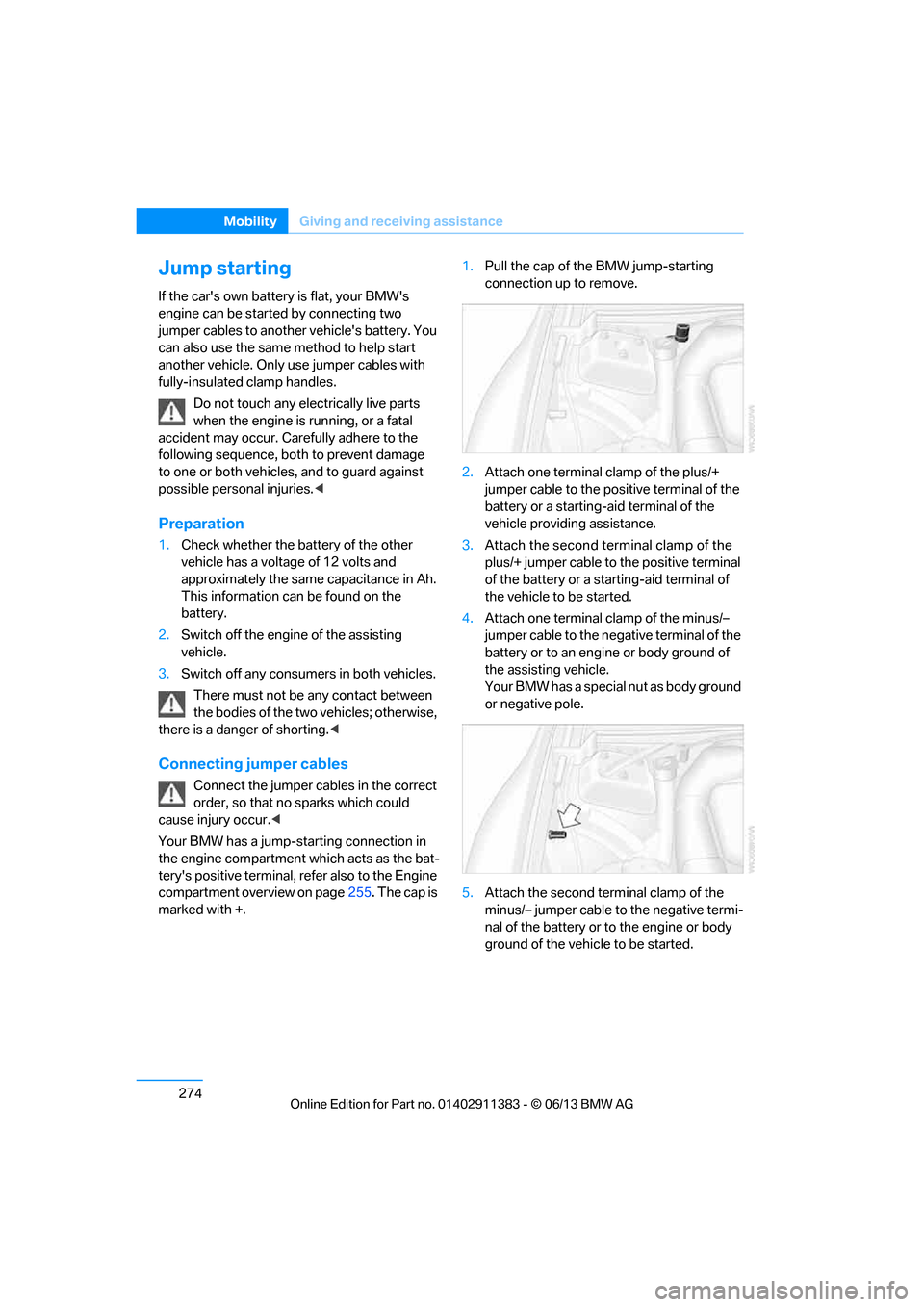
marked with +. 1.
Pull the cap of the BMW jump-starting
connection up to remove.
2. Attach one terminal clamp of the plus/+
jumper cable to the positive terminal of the
battery or a starting-a id terminal of the
vehicle providing assistance.
3. Attach the second terminal clamp of the
plus/+ jumper cable to the positive terminal
of the battery or a star ting-aid terminal of
the vehicle to be started.
4. Attach one terminal clamp of the minus/–
jumper cable to the nega tive terminal of the
battery or to an engine or body ground of
the assisting vehicle.
Your BMW has a special nut as body ground
or negative pole.
5. Attach the second te rminal clamp of the
minus/– jumper cable to the negative termi-
nal of the battery or to the engine or body
ground of the vehicle to be started.
00320051004F004C00510048000300280047004C0057004C005200510003