windshield BMW 3 SERIES CONVERTIBLE 2013 E93 User Guide
[x] Cancel search | Manufacturer: BMW, Model Year: 2013, Model line: 3 SERIES CONVERTIBLE, Model: BMW 3 SERIES CONVERTIBLE 2013 E93Pages: 311, PDF Size: 7.05 MB
Page 122 of 311
117
Climate
Controls
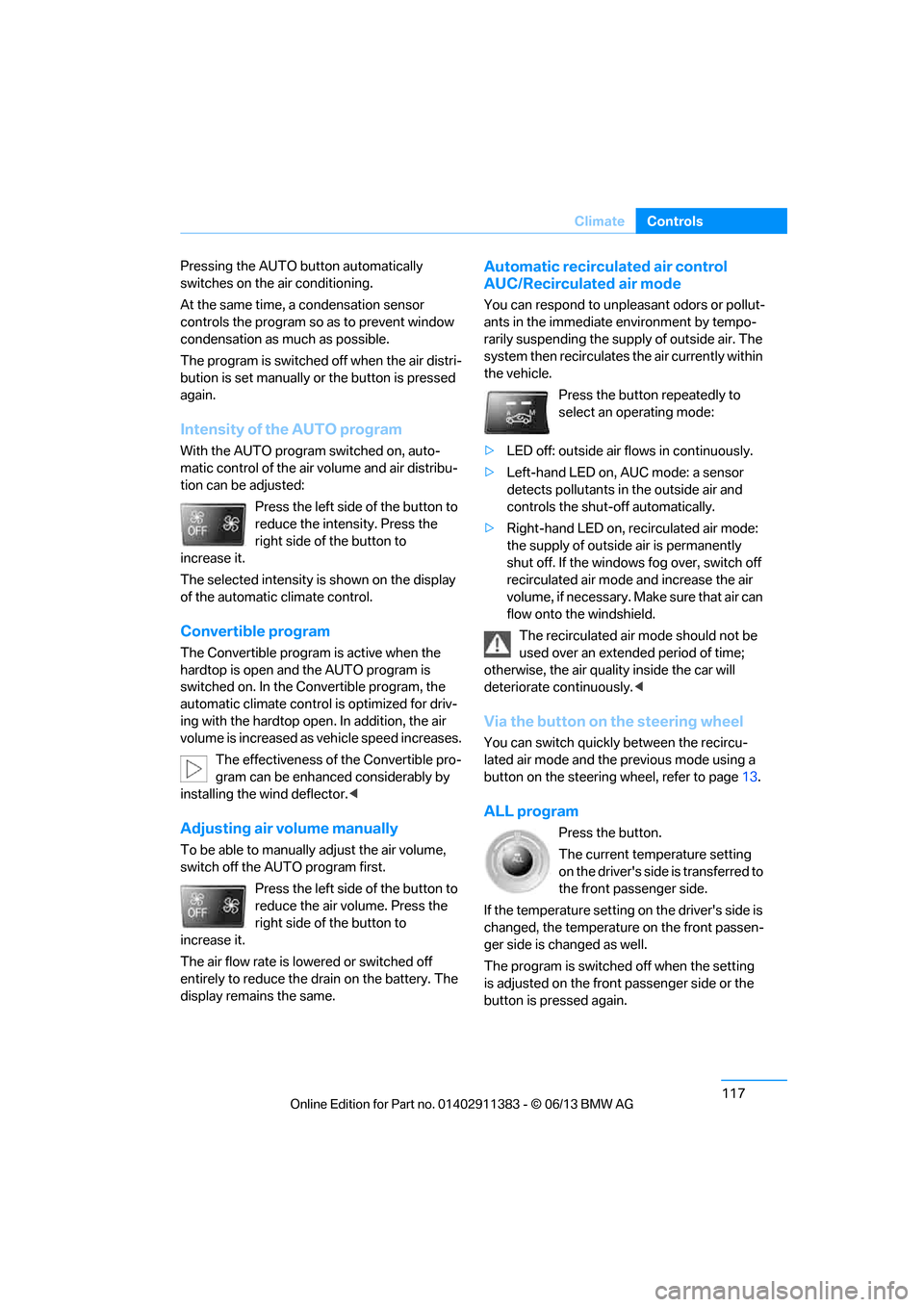
Pressing the AUTO
button automatically
switches on the air conditioning.
At the same time, a condensation sensor
controls the program so as to prevent window
condensation as much as possible.
The program is switched off when the air distri-
bution is set manually or the button is pressed
again.
Intensity of the AUTO program
With the AUTO program switched on, auto-
matic control of the air volume and air distribu-
tion can be adjusted:
Press the left side of the button to
reduce the intensity. Press the
right side of the button to
increase it.
The selected intensity is shown on the display
of the automatic climate control.
Convertible program
The Convertible program is active when the
hardtop is open and the AUTO program is
switched on. In the Convertible program, the
automatic climate control is optimized for driv-
ing with the hardtop open . In addition, the air
volume is increased as vehicle speed increases.
The effectiveness of the Convertible pro-
gram can be enhanced considerably by
installing the wind deflector. <
Adjusting air volume manually
To be able to manually adjust the air volume,
switch off the AUTO program first.
Press the left side of the button to
reduce the air volume. Press the
right side of the button to
increase it.
The air flow rate is lowered or switched off
entirely to reduce the drain on the battery. The
display remains the same.
Automatic recirculated air control
AUC/Recirculated air mode
You can respond to unpl easant odors or pollut-
ants in the immediate environment by tempo-
rarily suspending the supply of outside air. The
system then recirculates the air currently within
the vehicle.
Press the button repeatedly to
select an operating mode:
> LED off: outside air flows in continuously.
> Left-hand LED on, AUC mode: a sensor
detects pollutants in the outside air and
controls the shut-off automatically.
> Right-hand LED on, re circulated air mode:
the supply of outside air is permanently
shut off. If the windows fog over, switch off
recirculated air mode and increase the air
volume, if necessary. Make sure that air can
flow onto the windshield.
The recirculated air mode should not be
used over an extended period of time;
otherwise, the air quality inside the car will
deteriorate continuously. <
Via the button on the steering wheel
You can switch quickly between the recircu-
lated air mode and the previous mode using a
button on the steering wheel, refer to page 13.
ALL program
Press the button.
The current temperature setting
on the driver's side is transferred to
the front passenger side.
If the temperature setting on the driver's side is
changed, the temperature on the front passen-
ger side is changed as well.
The program is switched off when the setting
is adjusted on the front passenger side or the
button is pressed again.
00320051004F004C00510048000300280047004C0057004C005200510003
Page 123 of 311
118
ControlsClimate
Defrosting windows and removing
condensation
Press the button.
Quickly removes ice and conden-
sation from the windshield and
front side windows.
For this purpose, also switch on the air
conditioning.
Switching air conditioning on/off
The passenger compartment can only be
cooled while the engine is running.
Press the button.
The air is cooled and dehumidified
and – depending on the tempera-
ture setting – warmed again.
Depending on the weather, the windshield may
fog up briefly when the engine is started.
Pressing the AUTO button automatically
switches on the air conditioning.
Rear window defroster
Press the button.
The defroster is switched off auto-
matically after a certain time.
Depending on your vehi cle's equipment, the
upper wires serve as an antenna and are not
part of the rear window defroster.
Switching the system on/off
Switching off
Press and hold the left button or
press the left butto n at the lowest
level.
All displays are cleared except for the rear
window defroster if it is switched on.
The outside air supply is blocked when
the automatic climate control is switched
off. If the air quality deteriorates or the window
fogs over, switch the system back on and
increase the air volume. <
Switching on
Press any button, except the buttons for the
ALL program or the rear window defroster.
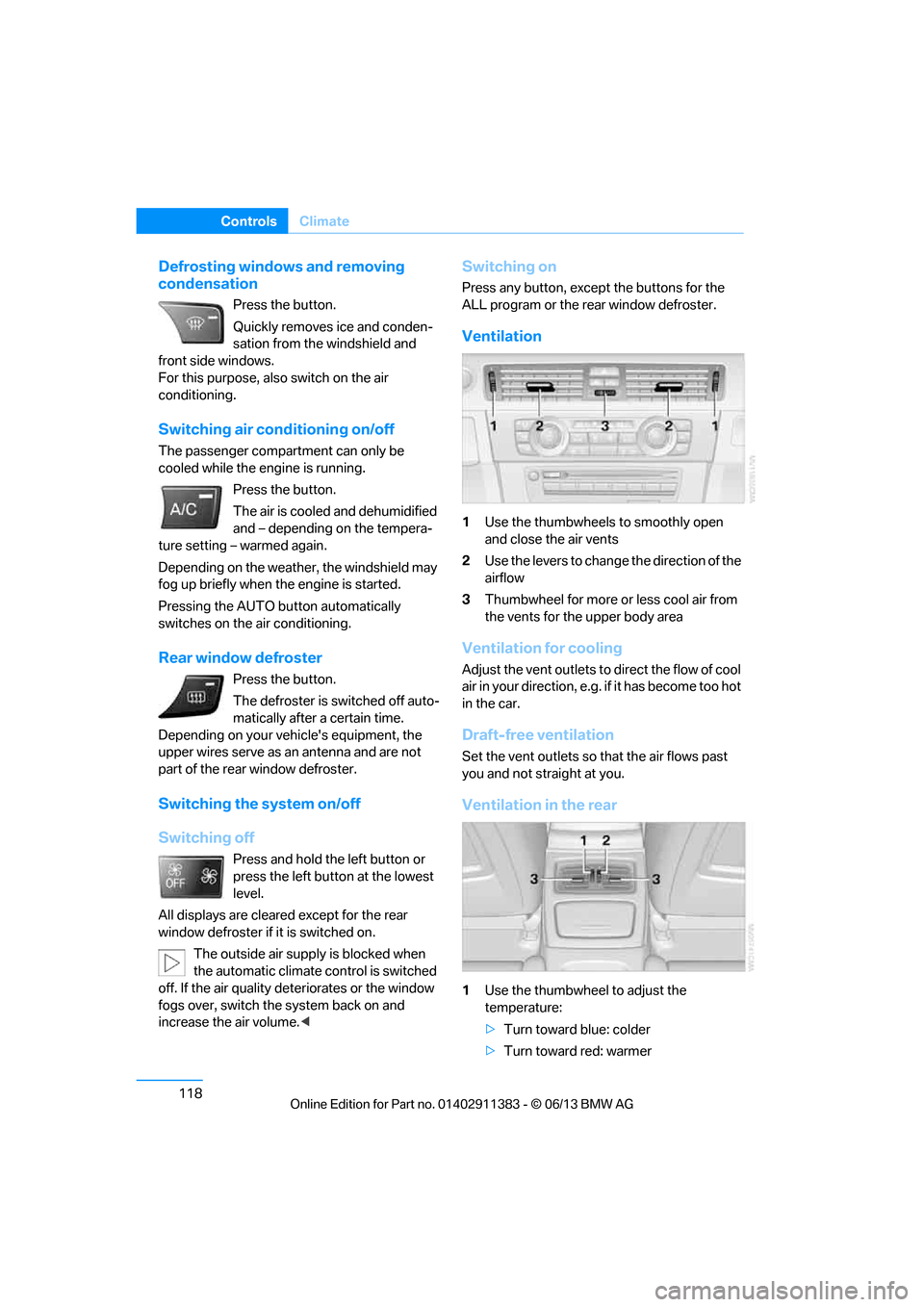
Ventilation
1Use the thumbwheels to smoothly open
and close the air vents
2 Use the levers to change the direction of the
airflow
3 Thumbwheel for more or less cool air from
the vents for the upper body area
Ventilation for cooling
Adjust the vent outlets to direct the flow of cool
air in your direction, e.g. if it has become too hot
in the car.
Draft-free ventilation
Set the vent outlets so that the air flows past
you and not straight at you.
Ventilation in the rear
1 Use the thumbwheel to adjust the
temperature:
>Turn toward blue: colder
> Turn toward red: warmer
00320051004F004C00510048000300280047004C0057004C005200510003
Page 261 of 311
256
MobilityEngine compartment
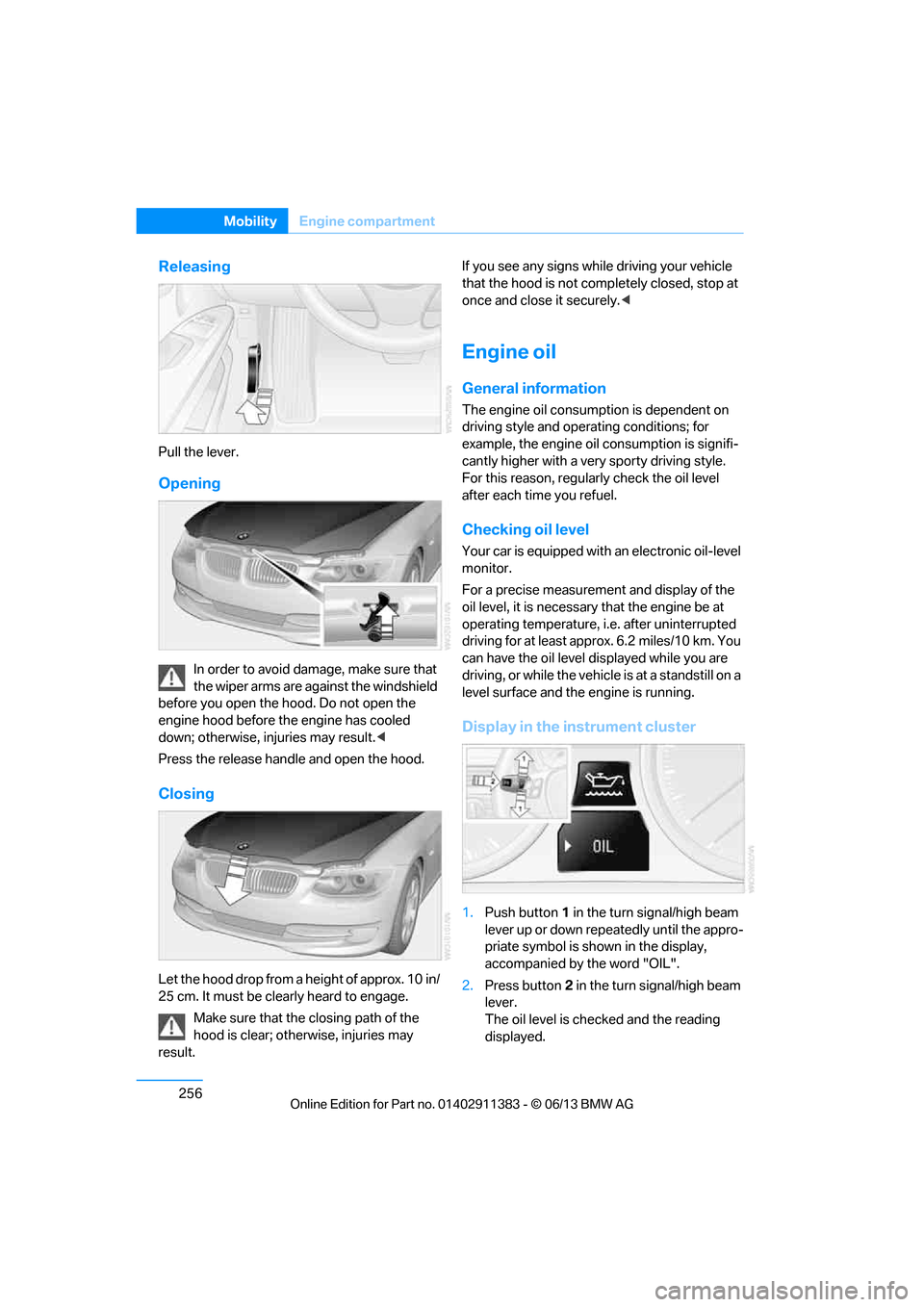
Releasing
Pull the lever.
Opening
In order to avoid damage, make sure that
the wiper arms are against the windshield
before you open the hood. Do not open the
engine hood before the engine has cooled
down; otherwise, injuries may result. <
Press the release handle and open the hood.
Closing
Let the hood drop from a height of approx. 10 in/
25 cm. It must be clearly heard to engage. Make sure that the closing path of the
hood is clear; otherwise, injuries may
result. If you see any signs while driving your vehicle
that the hood is not comp
letely closed, stop at
once and close it securely. <
Engine oil
General information
The engine oil consumption is dependent on
driving style and operating conditions; for
example, the engine oil consumption is signifi-
cantly higher with a very sporty driving style.
For this reason, regularly check the oil level
after each time you refuel.
Checking oil level
Your car is equipped with an electronic oil-level
monitor.
For a precise measurement and display of the
oil level, it is necessar y that the engine be at
operating temperature, i.e. after uninterrupted
driving for at least approx. 6.2 miles/10 km. You
can have the oil level displayed while you are
driving, or while the vehicle is at a standstill on a
level surface and the engine is running.
Display in the instrument cluster
1.Push button 1 in the turn signal/high beam
lever up or down repe atedly until the appro-
priate symbol is shown in the display,
accompanied by the word "OIL".
2. Press button 2 in the turn signal/high beam
lever.
The oil level is chec ked and the reading
displayed.
00320051004F004C00510048000300280047004C0057004C005200510003
Page 267 of 311
262
MobilityCare
Care
Vehicle equipment
In this chapter, all pr oduction, country, and
optional equipment that is offered in the model
range is described. For this reason, descrip-
tions will be given of some equipment that may
not be available in a vehi cle, for example due to
the special options or national-market version
selected. This also app lies to safety related
functions and systems.
Washing the vehicle
Notes
When using steam cleaners or high-pres-
sure cleaning jets, ma ke sure to maintain
a sufficient distance and stay below a maximum
temperature of 140 °F/60 6.
Too close a distance, too high a pressure, or too
high a temperature may cause damage or pre-
liminary damage that can then lead to long-term
damage.
Follow the operating instructions for the steam
jet or high-pressure washer. <
When using high-pressure washers, do
not spray the sensors, e.g. of the Park
Distance Control, for an extended period and
maintain a distance of at least 1 ft/30 cm from
them. <
Regularly remove foreign objects, e.g. leaves, in
the vicinity of the windshield when the hood is
open.
Wash the vehicle more frequently, particularly
in winter.
Heavy soiling and road salt can lead to vehicle
damage.
Automatic car washes
Notes
In car washes with high pressures and
nozzle positions, wate r may drip into the
vehicle around the windows. <
Please note the following:
> Give preference to car washes that use
cloth or soft brushes in order to avoid paint
damage.
> Wheels and tires must not be damaged by
transport devices.
> Fold in exterior mirror, refer to page 55; oth-
erwise, they can be damaged due to the
width of the vehicle.
> Deactivate the rain sensor, refer to page 73,
to prevent undesired wiper operation.
> Remove additional add-on parts, e.g. spoil-
ers or phone antennas, if they could be
damaged.
> Unscrew the rod antenna.
> Leave the remote control in the ignition
lock.
Avoid car washes with guide rail heights
over 4 in/10 cm, otherwise there is
danger of damaging chassis parts. <
Convertible: retractable hardtop
Proceed as you would in a normal car wash.
When you open a wet hardtop, water
drops may run into the trunk. If necessary,
remove items from the trunk beforehand to
avoid water stains or soiling. <
00320051004F004C00510048000300280047004C0057004C005200510003
Page 271 of 311
266
MobilityReplacing components
Replacing components
Vehicle equipment
In this chapter, all pr oduction, country, and
optional equipment that is offered in the model
range is described. For this reason, descrip-
tions will be given of some equipment that may
not be available in a vehi cle, for example due to
the special options or national-market version
selected. This also app lies to safety related
functions and systems.
Onboard vehicle tool kit
Coupe
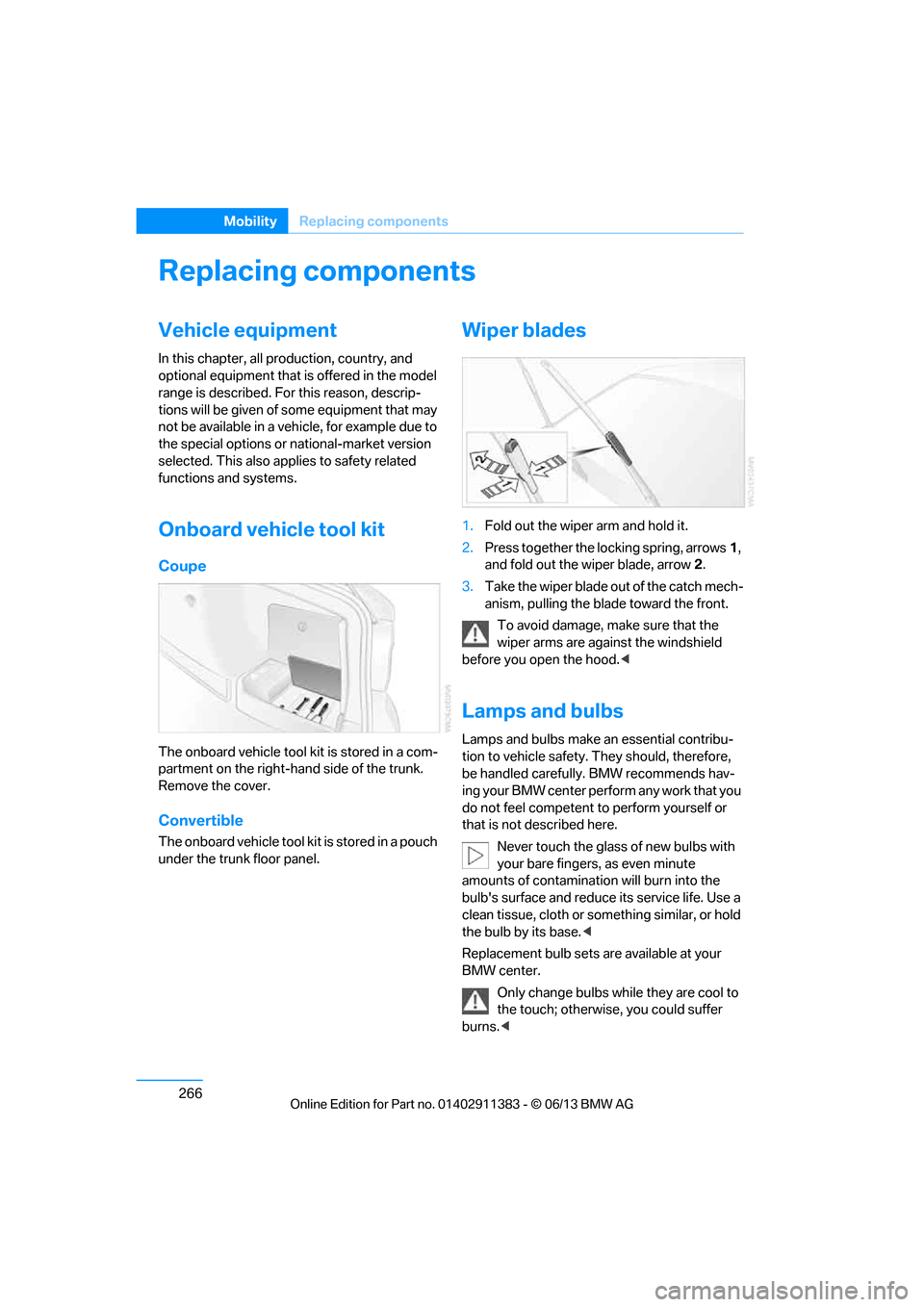
The onboard vehicle tool kit is stored in a com-
partment on the right-ha nd side of the trunk.
Remove the cover.
Convertible
The onboard vehicle tool kit is stored in a pouch
under the trunk floor panel.
Wiper blades
1. Fold out the wiper arm and hold it.
2. Press together the locking spring, arrows 1,
and fold out the wiper blade, arrow 2.
3. Take the wiper blade ou t of the catch mech-
anism, pulling the blade toward the front.
To avoid damage, make sure that the
wiper arms are against the windshield
before you open the hood. <
Lamps and bulbs
Lamps and bulbs make an essential contribu-
tion to vehicle safety. They should, therefore,
be handled carefully. BMW recommends hav-
ing your BMW center perform any work that you
do not feel competent to perform yourself or
that is not described here.
Never touch the glass of new bulbs with
your bare fingers, as even minute
amounts of contamination will burn into the
bulb's surface and reduce its service life. Use a
clean tissue, cloth or something similar, or hold
the bulb by its base. <
Replacement bulb sets are available at your
BMW center. Only change bulbs while they are cool to
the touch; otherwise, you could suffer
burns. <
00320051004F004C00510048000300280047004C0057004C005200510003
Page 280 of 311
275
Giving and receiving assistance
Mobility
Starting the engine
1.
Start the engine of the donor vehicle and
allow it to run for a fe w minutes at slightly
increased idle speed.
2. Start the engine on the other vehicle in the
usual way.
If the first start attempt is not successful,
wait a few minutes be fore another attempt
in order to allow the discharged battery to
recharge.
3. Let the engines run for a few minutes.
4. Disconnect the jumper cables by reversing
the above connecting sequence.
If necessary, have th e battery checked and
recharged.
Never use spray fluids to start the
engine. <
Tow-starting, towing away
Observe the applicable laws and
regulations for tow-starting and towing
vehicles.<
Do not transport any passengers other
than the driver in a vehicle that is being
towed. <
Using a tow fitting
The screw-in tow fitting must always be carried
in the car. It can be sc rewed in at the front or
rear of the BMW.
Coupe: it is stored in the onboard vehicle tool kit
underneath the cover on the right-hand side of
the trunk, refer to page 266.
Convertible: it is stored in the onboard vehicle
tool kit underneath the trunk floor, refer to
page 266.
Use only the tow fitting provided with the
vehicle and screw it a ll the way in. Use the
tow fitting for towing on paved roads only. Avoid
lateral loading of the tow fitting, e.g. do not lift
the vehicle by the tow fitting. Otherwise, the
tow fitting and the vehicle could be damaged. <
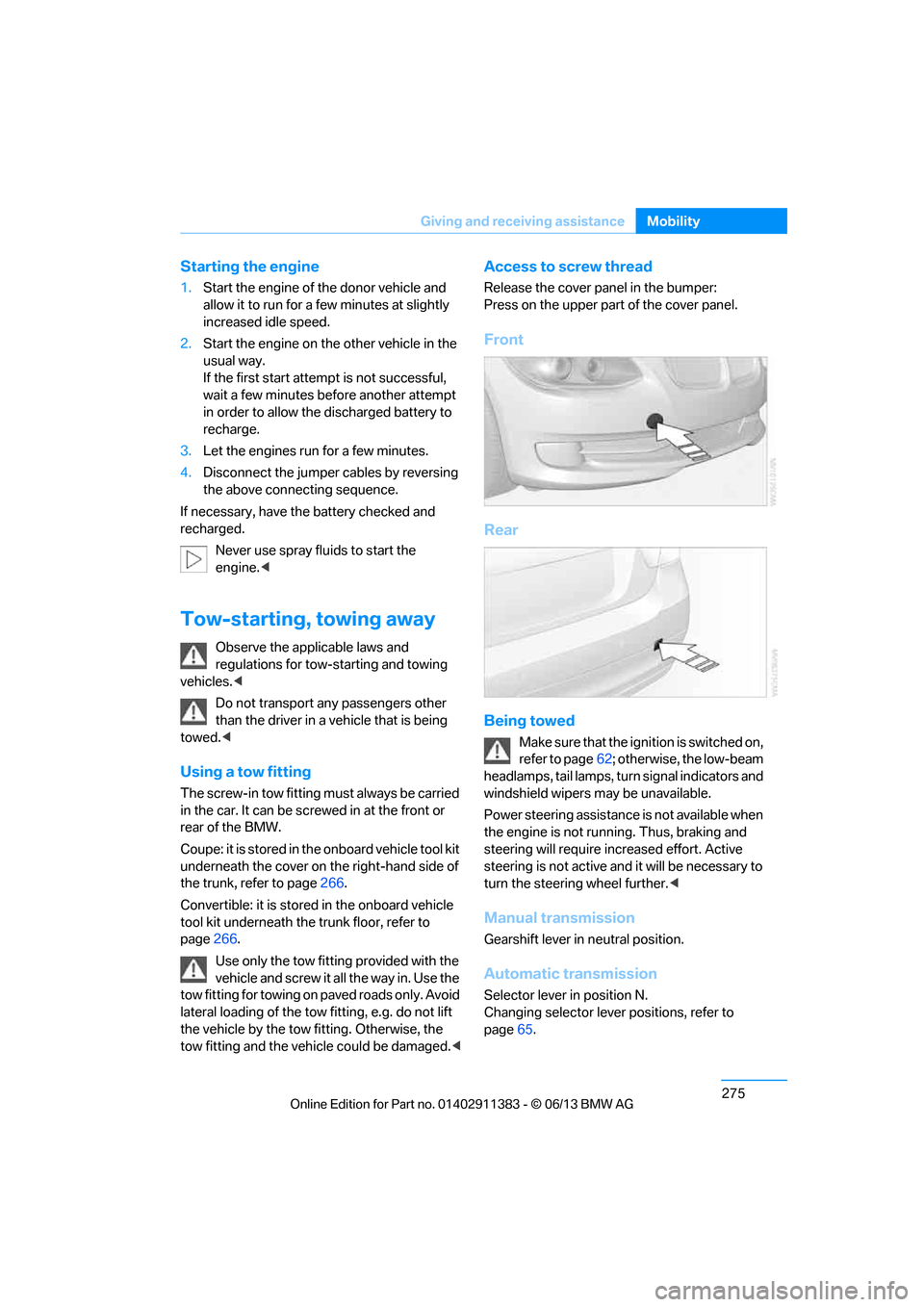
Access to screw thread
Release the cover panel in the bumper:
Press on the upper part of the cover panel.
Front
Rear
Being towed
Make sure that the ignition is switched on,
refer to page62; otherwise, the low-beam
headlamps, tail lamps, turn signal indicators and
windshield wipers may be unavailable.
Power steering assistance is not available when
the engine is not running. Thus, braking and
steering will require in creased effort. Active
steering is not active an d it will be necessary to
turn the steering wheel further. <
Manual transmission
Gearshift lever in neutral position.
Automatic transmission
Selector lever in position N.
Changing selector lever positions, refer to
page65.
00320051004F004C00510048000300280047004C0057004C005200510003
Page 307 of 311
302
ReferenceEverything from A to Z
Shift paddles on the steering
wheel 70
Short commands for the voice activation system 283
Short route in navigation, refer
to Selecting route 155
Side airbags 107
Side windows, refer to
Windows 41
Signal horn, refer to Horn 12,13
Sitting safely 48
– with airbags 48
– with head restraint 48
– with safety belts 48
Ski bag 130
Ski bag for Convertible, refer to Through-loading opening
with integrated transport
bag 131
Sliding/tilt sunroof, refer to Glass roof, electric 43
Slot for remote control 62
Smokers' package, refer to Ashtray 126
Snap-in adapter 200
– inserting/removing 211
Snap-in adapter, refer to
Center armrest storage
compartment 124
Socket, Onboard Diagnosis
OBD 261
Socket, refer to Connecting electrical appliances 127
Software update 196
SOS, refer to Sending an Emergency Request 272
Spare fuses 271
Special destinations 149
Special destinations,
displaying 151
Special oils, refe r to Approved
engine oils 258
Specified engine oils, refer to Approved engine oils 258Speed
– run-flat tires
101
– with winter tires 253
Speed limit 94
Speed limit warning, refer to
Speed limit 94
Speedo, refer to Speedometer 14
Speedometer 14
Speed Volume 168
Split screen content, refer to
Selecting the display for the
split screen content 24
Sport automatic transmission
with double clutch 67
– driving dynamics control 70
– kickdown 69
– lau
nch control 71
– manually unlocking parking
lock 70
– neutral 69
– reverse gear 69
Sport program with 7-gear Sport automatic
transmission with double
clutch 69
Spray nozzles, refer to Cleaning windshield and
headlamps 73
Stability control, refer to Driving stability control
systems 97
Start/Stop button 62
– starting the engine 63
– switching off the engine 64
Starting, refer to Starting the engine 63
Starting assistance, refer to Jump starting 274
Starting difficulties
– jump starting 274
Starting the engine
– start/stop button 62
Start menu 21 State/province, for
navigation 146
Status information on the Control Display 23
Status of this Owner's Manual
at time of printing 5
Steam jet 262
Steering wheel 56
– adjustment 56
– buttons on steering wheel 13
– heating 57
– lock 62
– locking with Comfort
Access 40
– shift paddles 70
Steering wheel buttons, refer to Shift paddles 70
Steering with variable ratio,
refer to Active steering 105
Steptronic, refer to Automatic transmission with
Steptronic 65
Storage 265
Storage compartments 125
Storage nets 129
Stored trip, calling up 154
Storing a destination in the
address book 148
Storing music 184
Storing seat positions, refer to
Seat and mirror memory 53
Storing tires 253
Stowage, refer to Storage
compartments 125
Street, entering, navigation 147
Suitable mo bile phones
200
Summer tires, re fer to W
heels
and tires 235
Surround 167
SVCD 180
SW, waveband 169
Switches, refer to Cockpit 12
00320051004F004C00510048000300280047004C0057004C005200510003
Page 310 of 311
305
Everything from A to Z
Reference
V
Variable light distribution,
refer to Adaptive Light
Control 111
VCD 180
Vehicle
– battery 270
– breaking in 136
– cargo loading 139
– identification number, refer
to Engine compartment 255
– measurements, refer to Dimensions 280
– parking 64
– weight 281
Vehicle equipment 5
Vehicle jack 270
Vehicle storage 265
Ventilation 118
– draft-free 118
– in the rear 118
Ventilation, refer to Climate 115
Ventilation while at a
standstill 119
Vents, refer to Ventilation 118
Video menu 180
Video playback 180
Voice, refer to Destination guidance through voice
instructions 157
Voice commands
– overview 27
– short commands 283
– telephone 209
Voice instructions from
navigation system 157
– repeating 157
– switching on/off 157
– volume 157 Voice phone book
210
Volume 166
– audio sources 166
– fuel tank, refer to Capacities 282
– mobile phone 205
– voice instructions 157
Volume compensation, tone
control 168
W
Warning and indicator
lamps 15
Warning messages, refer to Check Control 92
Warning triangle 273
Washer fluid 74
Washer fluid reservoir 74
Waste tray, refer to Ashtray 126
Water on roads, refer to
Driving through water 138
Water penetration 262
Waveband on radio 169
Wear indicators in tires, refer to Minimum tread depth 251
Weights 281
Welcome lamps 111
Wheel/tire combination, refer to Correct wheels and
tires 252
Wheelbase, refer to Dimensions 280
Wheels, new 252
Wheels and tires 235
Width, refer to
Dimensions 280
Wind deflector 45 Windows
41
– convenient opening and
closing 34
– convenient opening and closing with Comfort
Access 40
– opening, closing 42
– pinch protection system 42
Windows, indicator on Control Display 20
Windshield
– cleaning 73
Windshield wash 72
– filling capacity, reservoir 282
– nozzles 74
– reservoir for washer fluid 74
– washer fluid 74
Windshield wiper blades, changing 266
Windshield wipers, refer to Wiper system 72
Winter tires 253
– setting speed limit 94
– storage 253
Wiper blade replacement 266
Wiper system 72
Work in the engine compartment 255
Wrench/screwdriver, refer to Onboard vehicle tool kit 266
X
xDrive99
Xenon lamps
– replacing bulb 267
Y
Your individual vehicle
– settings, refer to Personal
Profile 32
00320051004F004C00510048000300280047004C0057004C005200510003