Telephone BMW 3 SERIES CONVERTIBLE 2013 E93 Owner's Guide
[x] Cancel search | Manufacturer: BMW, Model Year: 2013, Model line: 3 SERIES CONVERTIBLE, Model: BMW 3 SERIES CONVERTIBLE 2013 E93Pages: 311, PDF Size: 7.05 MB
Page 212 of 311
207
Te l e p h o n e
Communications
1.
Establish two calls.
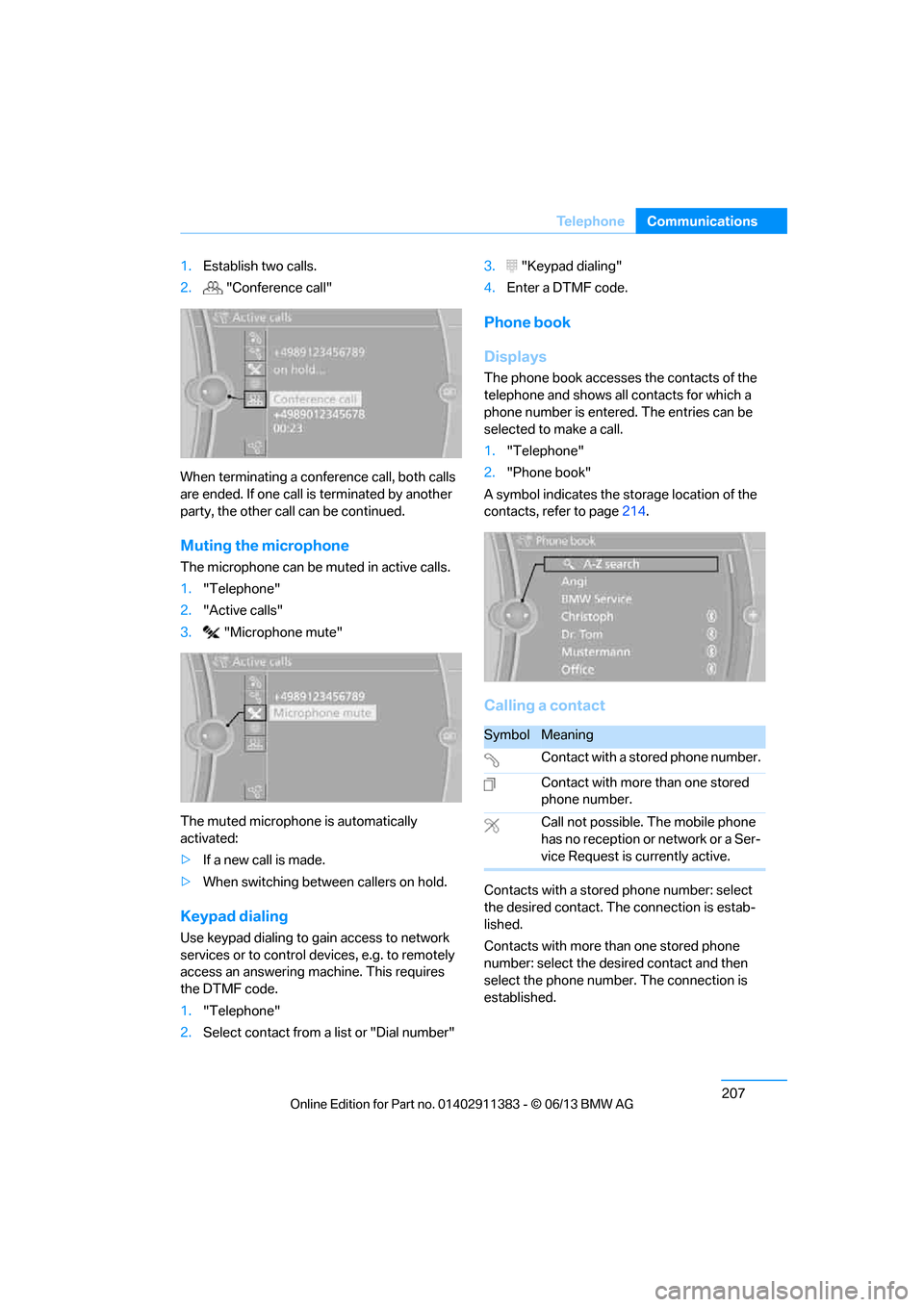
2. "Conference call"
When terminating a conference call, both calls
are ended. If one call is terminated by another
party, the other call can be continued.
Muting the microphone
The microphone can be muted in active calls.
1. "Telephone"
2. "Active calls"
3. "Microphone mute"
The muted microphone is automatically
activated:
> If a new call is made.
> When switching between callers on hold.
Keypad dialing
Use keypad dialing to gain access to network
services or to control de vices, e.g. to remotely
access an answering ma chine. This requires
the DTMF code.
1. "Telephone"
2. Select contact from a list or "Dial number" 3.
"Keypad dialing"
4. Enter a DTMF code.
Phone book
Displays
The phone book accesses the contacts of the
telephone and shows all contacts for which a
phone number is entered. The entries can be
selected to make a call.
1. "Telephone"
2. "Phone book"
A symbol indicates the st orage location of the
contacts, refer to page 214.
Calling a contact
Contacts with a stored phone number: select
the desired contact. Th e connection is estab-
lished.
Contacts with more than one stored phone
number: select the desi red contact and then
select the phone number. The connection is
established.
SymbolMeaning
Contact with a stored phone number.
Contact with more than one stored
phone number.
Call not possible. The mobile phone
has no reception or network or a Ser-
vice Request is currently active.
00320051004F004C00510048000300280047004C0057004C005200510003
Page 213 of 311
208
CommunicationsTe l e p h o n e
Editing a contact
Changing entries in the "Contacts" menu. If a
contact is changed, the changes are not stored
in the mobile phone. A copy of the entry is
stored in the vehicle.
1. Highlight the contact.
2. Open "Options".
3. "Edit entry"
The contact can be edited.
Redialing
General information
The list of dialed numbers in the mobile phone
are transferred to the vehicle, depending on the
mobile phone. In some cases, only numbers
that were dialed from the vehicle are displayed.
The last 20 phone numbers dialed are dis-
played. The sorting of the phone numbers
depends on the mobile phone.
Dialing the number via iDrive
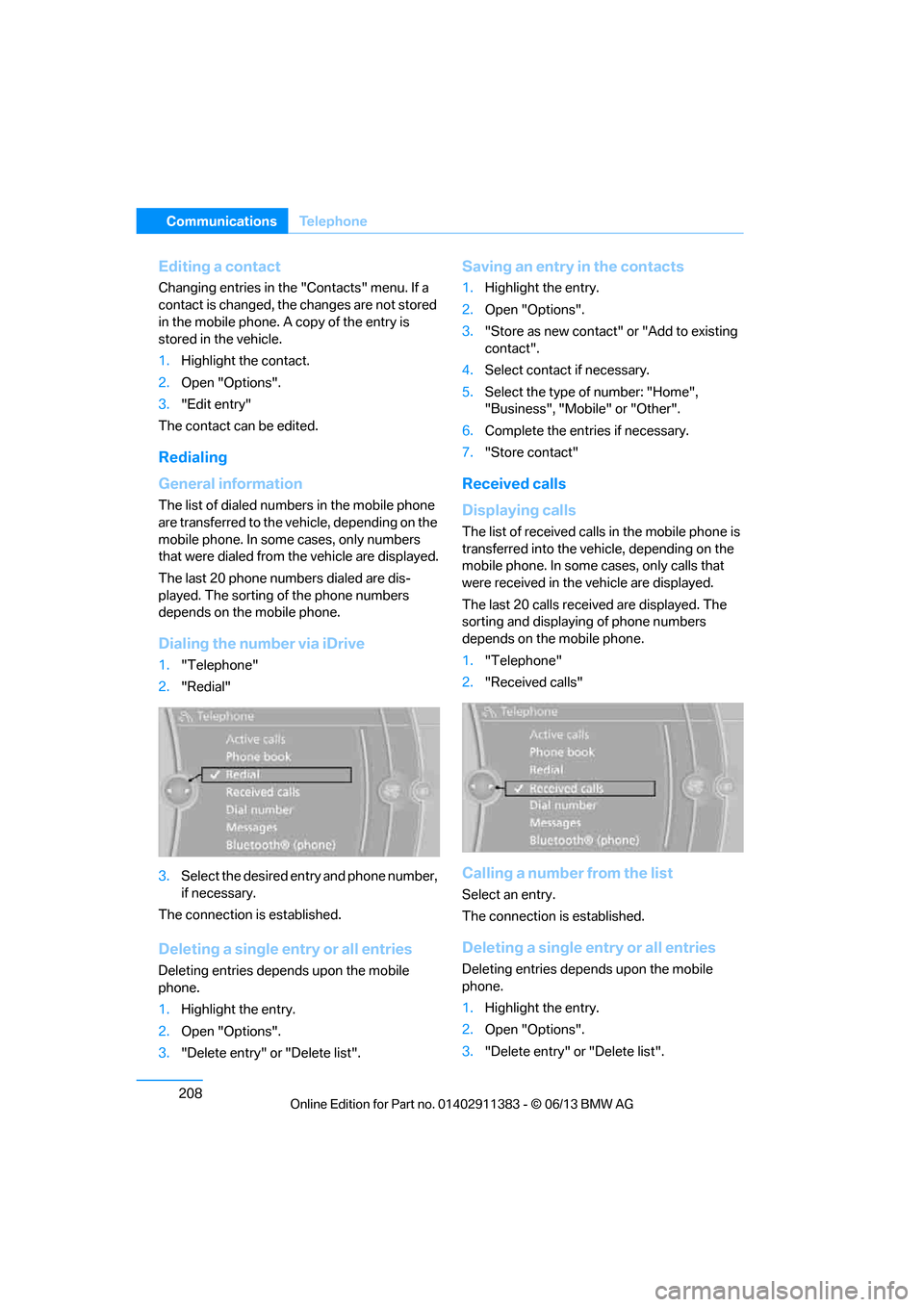
1. "Telephone"
2. "Redial"
3. Select the desired entry and phone number,
if necessary.
The connection is established.
Deleting a single entry or all entries
Deleting entries depends upon the mobile
phone.
1. Highlight the entry.
2. Open "Options".
3. "Delete entry" or "Delete list".
Saving an entry in the contacts
1.Highlight the entry.
2. Open "Options".
3. "Store as new contact" or "Add to existing
contact".
4. Select contact if necessary.
5. Select the type of number: "Home",
"Business", "Mobile" or "Other".
6. Complete the entries if necessary.
7. "Store contact"
Received calls
Displaying calls
The list of received calls in the mobile phone is
transferred into the vehi cle, depending on the
mobile phone. In some cases, only calls that
were received in the vehicle are displayed.
The last 20 calls received are displayed. The
sorting and displaying of phone numbers
depends on the mobile phone.
1. "Telephone"
2. "Received calls"
Calling a number from the list
Select an entry.
The connection is established.
Deleting a single entry or all entries
Deleting entries depends upon the mobile
phone.
1.Highlight the entry.
2. Open "Options".
3. "Delete entry" or "Delete list".
00320051004F004C00510048000300280047004C0057004C005200510003
Page 222 of 311
217
Office
Communications
Deleting messages
Messages from the Concierge service, My Info,
BMW Info, and BMW Online can be deleted.
To delete a message:
1.
"Office"
2. "Messages"
3. Select the desired message.
4. Open "Options".
5. Open "Delete message".
To delete all messages:
1. "Office"
2. "Messages"
3. Open "Options".
4. "Delete all messages"
Text message
Calling a text message sender
1.Select the desired message.
2. Select the symbol.
Saving sender in the contacts
1.Highlight the desired message.
2. Open "Options".
3. "Store as new contact" or "Add to existing
contact"
Using contact data
Contact data from de adlines, tasks, text
messages, e-mails and no tes can be stored or
selected, see page 220.
Reading text messages aloud
Having text messages read aloud, refer to
page221.
My Info
Selecting additional functions
Additional functions are available when a
message is selected.
Messages from the Concierge service
Saving an address
1. Select the desired message.
2. Open "Options".
3. "Store contact in vehicle"
Selecting additional functions
Additional functions are available when a
message is selected.
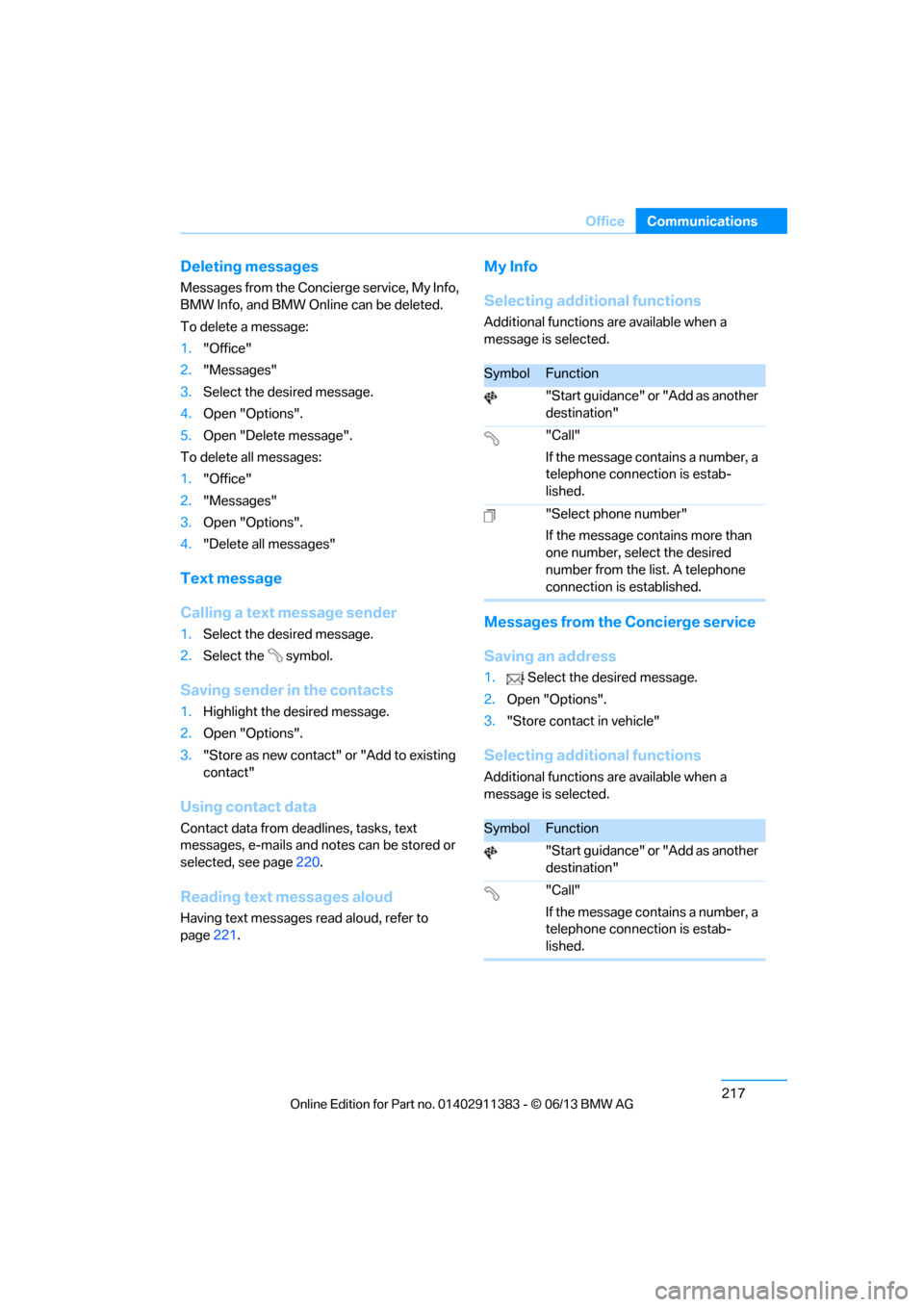
SymbolFunction
"Start guidance" or "Add as another
destination"
"Call"
If the message contains a number, a
telephone connection is estab-
lished.
"Select phone number"
If the message contains more than
one number, select the desired
number from the list. A telephone
connection is established.
SymbolFunction
"Start guidance" or "Add as another
destination"
"Call"
If the message contains a number, a
telephone connection is estab-
lished.
00320051004F004C00510048000300280047004C0057004C005200510003
Page 223 of 311
218
CommunicationsOffice
BMW Info
General information
Messages from BMW about technical
campaigns and news from BMW.
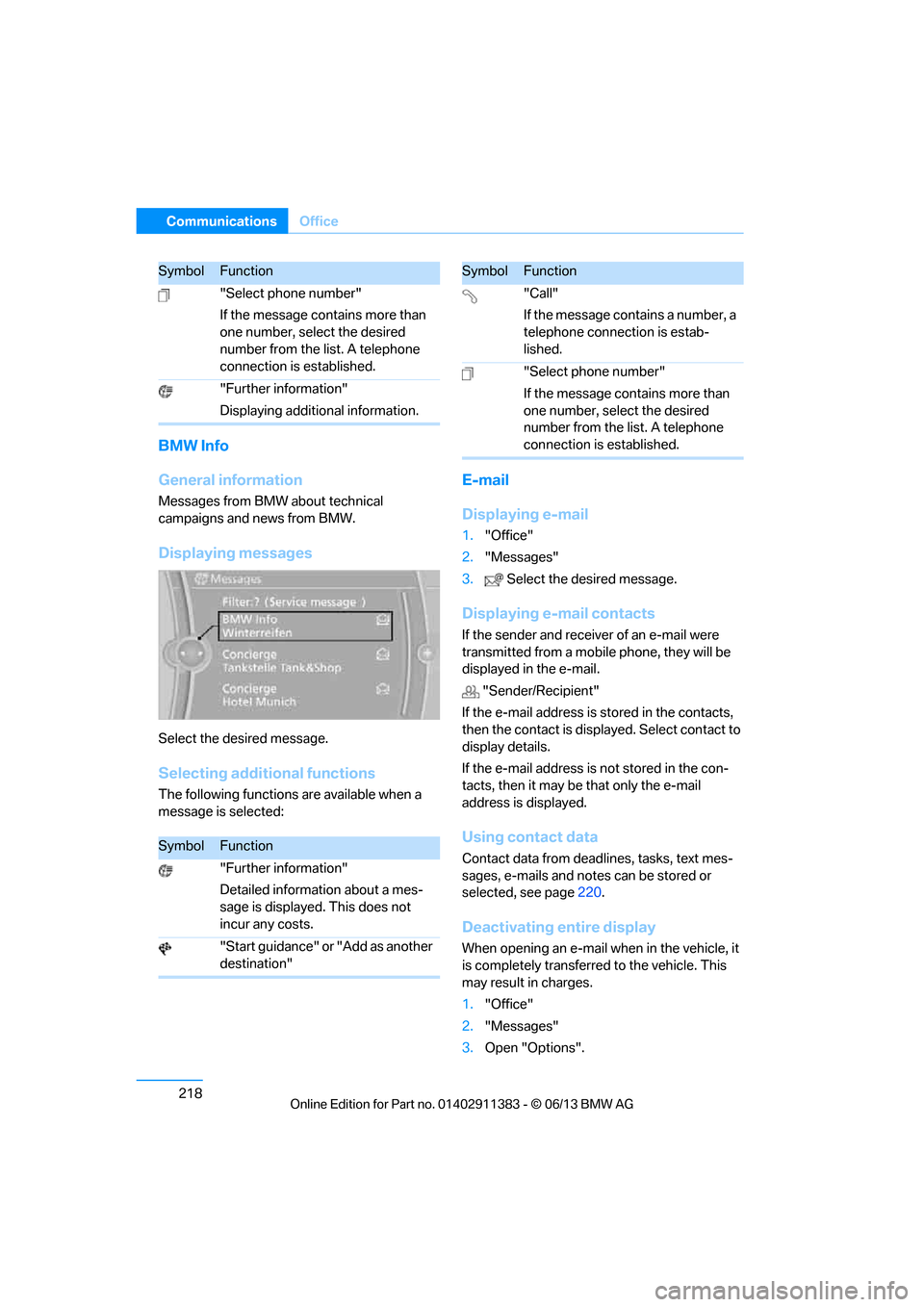
Displaying messages
Select the desired message.
Selecting additional functions
The following functions are available when a
message is selected:
E-mail
Displaying e-mail
1."Office"
2. "Messages"
3. Select the desired message.
Displaying e-mail contacts
If the sender and receiv er of an e-mail were
transmitted from a mobile phone, they will be
displayed in the e-mail.
"Sender/Recipient"
If the e-mail address is stored in the contacts,
then the contact is displa yed. Select contact to
display details.
If the e-mail address is not stored in the con-
tacts, then it may be that only the e-mail
address is displayed.
Using contact data
Contact data from dead lines, tasks, text mes-
sages, e-mails and notes can be stored or
selected, see page 220.
Deactivating entire display
When opening an e-mail when in the vehicle, it
is completely transferred to the vehicle. This
may result in charges.
1."Office"
2. "Messages"
3. Open "Options".
"Select phone number"
If the message contains more than
one number, select the desired
number from the list. A telephone
connection is established.
"Further information"
Displaying additional information.
SymbolFunction
"Further information"
Detailed information about a mes-
sage is displayed. This does not
incur any costs.
"Start guidance" or "Add as another
destination"
SymbolFunction
"Call"
If the message contains a number, a
telephone connection is estab-
lished.
"Select phone number"
If the message contains more than
one number, select the desired
number from the list. A telephone
connection is established.
SymbolFunction
00320051004F004C00510048000300280047004C0057004C005200510003
Page 291 of 311
286
ReferenceShort commands for the voice activation system
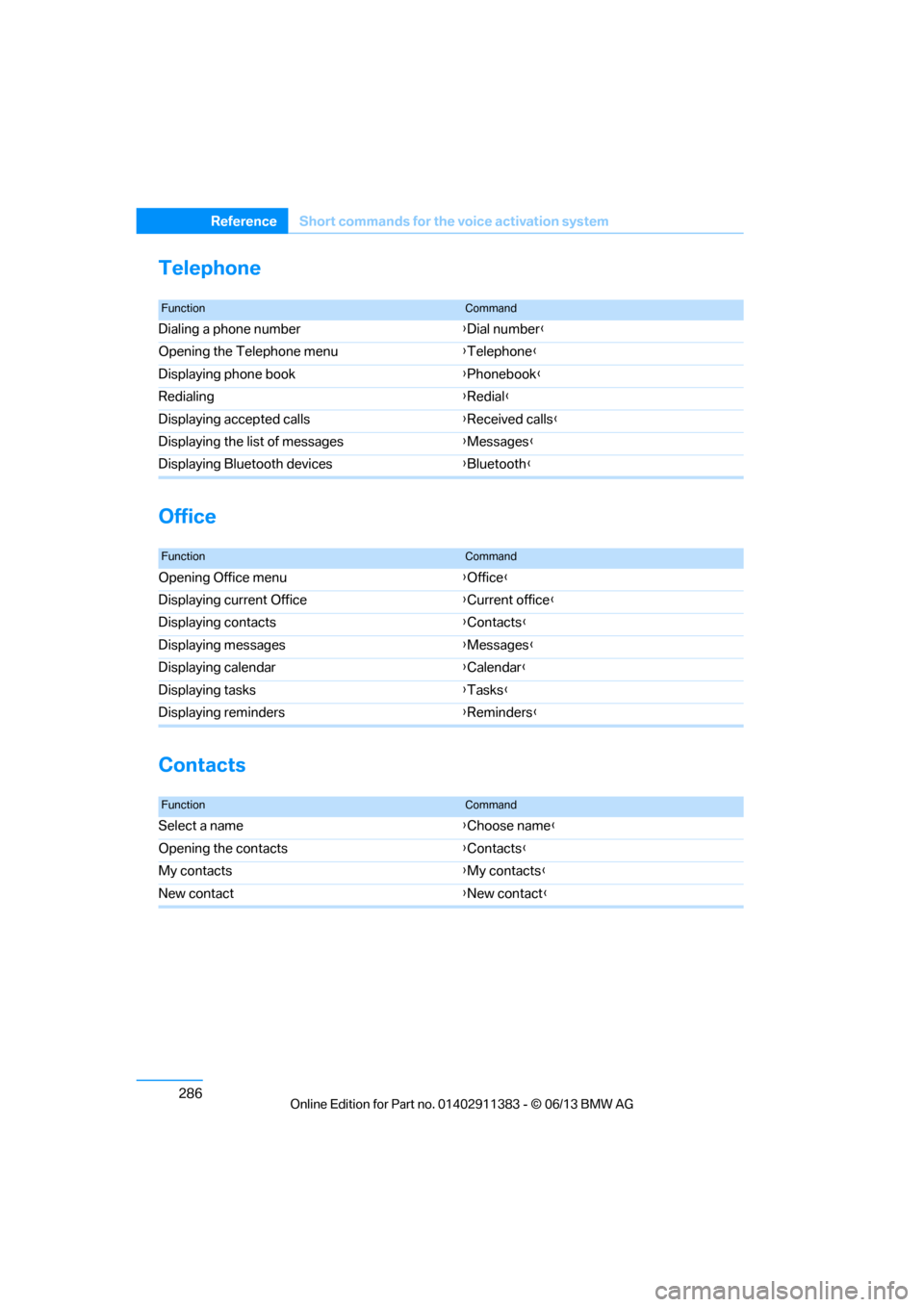
Telephone
Office
Contacts
FunctionCommand
Dialing a phone number {Dial number }
Opening the Telephone menu {Telephone }
Displaying phone book {Phonebook }
Redialing {Redial }
Displaying accepted calls {Received calls }
Displaying the list of messages {Messages }
Displaying Bluetooth devices {Bluetooth }
FunctionCommand
Opening Office menu {Office }
Displaying current Office {Current office }
Displaying contacts {Contacts }
Displaying messages {Messages }
Displaying calendar {Calendar }
Displaying tasks {Tasks }
Displaying reminders {Reminders }
FunctionCommand
Select a name {Choose name }
Opening the contacts {Contacts }
My contacts {My contacts }
New contact {New contact }
00320051004F004C00510048000300280047004C0057004C005200510003
Page 296 of 311
291
Everything from A to Z
Reference
Automatic recirculated air
control AUC 117
Automatic Service Request 227
Automatic transmission with
Steptronic 65
– interlock 65
– overriding selector lever
lock 67
– shiftlock, refer to Changing selector lever position 65
– sport program 66
– towing 275
– tow-starting 275
AUTO program for automatic climate control 116
AUX-In connection 125,189
Available services 228
Average fuel consumption 85
– setting the units 88
Average speed 85
Avoid highways in
navigation 155
Avoiding unintentional alarms 39
Axle loads, refer to Weights 281
B
Backing up the music
collection 188
Backrest contour, refer to Lumbar support 50
Backrests, refer to Seat adjustment 49
Backrest width adjustment 50
Back seats
– refer to Rear seats 52
Bag holder 129
Band-aids, refer to First aid pouch 273
Bar, refer to Towing
methods 276 Base plate for telephone or
mobile phone
– refer to Snap-in adapter 211
– refer to Snap-in adapter in the center armrest storage
compartment 124
Bass, tone control 167
Battery 270
– charging 270
– disposal 41,271
– jump starting 274
– remote control 32
– replacing 270
– temporary power failure 270
Battery renewal
– remote control 41
– remote control for vehicle 41
Being towed 275
Belt hand-over 54
– pinch protection system 55
Belts, refer to Safety belts 54
Belt tensioner, refer to Safety
belts 54
Beverage holders, refer to Cupholders 125
Black ice, refer to Outside temperature warning 83
Blinds, refer to Roller
sunblinds 124
Blower, refer to Air volume 117
Bluetooth, activating/ deactivating 201
Bluetooth audio 192
– disconnecting an audio connection 195
– pairing device 193
– playback 194
– unpairing device 195
– what to do if … 195
BMW Assist 224
– updating 228
BMW Homepage 4
BMW Info 218
BMW Maintenance
System 260
BM
W Online 226 BMW webpage
4
Bottle holders, refer to
Cupholders 125
Brake Assist, refer to Dynamic Brake Control DBC 97
Brake fluid, refer to Service requirements 88
Brake Force Display 106
Brake lights
– brake force display 106
Brake pads 136
– breaking in 136
Brake pedal, refer to Braking safely 138
Brake rotors 139
– brakes 136
– breaking in 136
Brakes
– ABS 97
– BMW Maintenance System 260
– brake force display 106
– breaking in 136
– parking brake 64
– service requirements 88
Brakes, refer to Braking safely 138
Brake system 136
– BMW Maintenance System 260
– breaking in 136
– disc brakes 139
Breakdown services, refer to Roadside Assistance 273
Breaking in the clutch 136
Breaking in the differential, refer to Engine and
differential 136
Break-in period 136
Brightness of the Control
Display 95
Bulb changing, refer to Lamps and bulbs 266
Button for starting the engine, refer to Start/Stop button 62
Buttons on the steering
wheel 13
00320051004F004C00510048000300280047004C0057004C005200510003
Page 297 of 311
292
ReferenceEverything from A to Z
C
Calendar219
– displaying appointment 219
– selecting calendar day 219
California Proposition 65 warning 6
Call
– accepting 205
– ending 205
– muting the microphone 207
– rejecting 205
Calling, refer to Phone numbers, dialing 206
Calling, refer to Telephone owner's manual
Calls
– with multiple parties 206
Can holders, refer to
Cupholders 125
Capacities 282
Capacity of the trunk 281
Car battery, refer to Vehicle battery 270
Car care, refer to Care 262
Care 262
– automatic car washes 262
– care products 263
– carpets 264
– chrome parts 264
– displays 265
– fine wood parts 264
– headlamps 263
– leather 263
– light-alloy wheels 264
– paintwork 263
– plastic parts 264
– retractable hardtop 262
– rubber seals 264
– safety belts 264
– sensors and cameras 265
– upholstery and cloth trim 264
Cargo, securing 140 Cargo loading
139
– securing cargo 140
– stowing cargo 140
– vehicle 139
Car jack
– jacking points 270
Car key, refer to Integrated key/remote control 32
Car phone
– installation location, refer to Center armrest 124
– refer to separate Owner's Manual
Car phone, refer to
Telephone 200
Car radio, refer to Radio 169
Catalytic converter, refer to Hot exhaust system 138
CD
, audio playback 178
CD player 178
– controls 166
– fast forward/reverse 180
– random sequence 179
– selecting a track 178
– switching on/off 166
– tone control 167
– volume 166
Center armrest 124
Center brake lamp
– replacing bulb 269
Center console, refer to
Around the center
console 16
Central locking
– from inside 36
– from outside 33
Central locking system 33
– comfort access 40
– hotel function 37
– setting unlocking
characteristics 34
Changes, technical, refer to For your own safety 5
Changing bulbs, refer to Lamps and bulbs 266Changing gears
69
Changing the language on the
Control Display 95
Changing the measurement units on the Control
Display 88
Changing wheels 269
Chassis number, refer to
Engine compartment 255
Check Control 92
Child restraint fixing system
LATCH 59
Child restraint systems 58
Child seats, refer to
Transporting children
safely 58
Cigarette lighter, refer to Lighter 126
Cleaning headlamps 73
– washer fluid 74
Cleaning your BMW, refer to Care 262
Climate control
– automatic air distribution 116
Clock 83
– 12h/24h mode 91
– setting the time and date 91
– setting time 90
Closing
– from inside 36
– from outside 33
Clothes hooks 125
Cockpit 12
Cold start, refer to Starting t
he
engine 63
Comfort Access 40
– replacing the battery 41
Comfort area, refer to Around the center console 16
Compartment for remote control, refer to Ignition
lock 62
Compass 122
00320051004F004C00510048000300280047004C0057004C005200510003
Page 302 of 311
297
Everything from A to Z
Reference
Incoming call
205
Indicator and warning
lamps 15
– tire pressure monitor TPM 103
Inflation pressure, refer to Tire inflation pressure 235
Inflation pressure monitoring,
refer to Tire Pressure
Monitor TPM 102
Initializing
– after power failure 270
– compass, refer to Calibrating 123
– flat tire monitor FTM 100
– glass roof 44
– radio, refer to Storing stations 170
– refer to Setting the time and
date 91
Installation location
– telephone 124
Instructions for navigation system, refer to Voice
instructions 157
Instrument cluster 14
Instrument cluster, refer to Cockpit 12
Instrument combination, refer to Instrument cluster 14
Instrument lighting 114
Instrument panel, see instrument cluster 14
Integrated key 32
Integrated universal remote control 120
Interactive map 151
Interior lamps 114
– remote control 34
Interior motion sensor 39
Interior rearview mirror 56
– automatic dimming feature 56
– compass 122
Interlock, refer to Disengaging the remote control 65Intermittent mode of the
wipers 73
Intersection, entering, navigation 147
J
Jacking points 270
Joystick, refer to iDrive 20
Jumpering, refer to Jump starting 274
Jump starting 274
K
Key, refer to Integrated key/
remote control 32
Keyless go, refer to Comfort Access 40
Keyless opening and closing, refer to Comfort Access 40
Key Memory, refer to Personal
Profile 32
Keypad dialing 207
Kickdown 66
– automatic transmission with Steptronic 66
Knock control 233
L
Lamps
– automatic headlamp
control 110
– parking lamps/low beams 110
Lamps and bulbs, replacing
bulbs 266
Lap-and-shoulder belt, refer
to Safety belts 54
Lashing eyes, refer to Securing cargo 140
Last destinations 149
LATCH child restraint fixing system 59
Launch Control 71 Leather care
263
LED Light-emitting
diodes 267
Length, refer to Dimensions 280
License plate lamp, replacing bulb 269
Light
– high-beam Assistant 112
Light alloy wheels, care 264
Light-emitting diodes
LED 267
Lighter 126
– connecting electrical
appliances 127
Lighting
– instruments 114
– lamps and bulbs 266
– vehicle, refer to Lamps 110
Light switch 110
Limit, refer to Speed limit 94
Load 140
Load securing equipment, refer to Securing cargo 140
Lock buttons, doors, refer to
Locking 37
Locking
– adjusting confirmation
signal 35
– from inside 37
– from outside 34
– without remote control, refer to Comfort Access 40
Locking and unlocking doors
– confirmation signals 35
– from inside 36
– from outside 33
Low beam control, refer to High-beam Assistant 112
Low-beam headlamps 110
– automatic 110
Lower back support, refer to Lumbar support 50
Luggage rack, refer to Roof- mounted luggage rack 141
Lumbar support 50
00320051004F004C00510048000300280047004C0057004C005200510003
Page 303 of 311
298
ReferenceEverything from A to Z
M
M+S tires, refer to Winter
tires 253
Maintenance, refer to Service
and Warranty Information
Booklet for US models or in
the Warranty and Service
Guide Booklet for Canadian
models
Maintenance system 260
Malfunction
– automatic transmission with Steptronic 67
– tires 101
Malfunction warnings, refer to
Check Control 92
Managing music 187
Manually unlocking parking
lock 70
Manual mode, automatic transmission with
Steptronic 66
Manual operation
– door lock 36
– driver's door 36
– fuel filler flap 232
– parking lock 70
– parking lock, automatic transmission 67
Manual transmission 65
Map for navigation
– changing scale 158
– entering destination 151
Map view 157
Master key, refer to Remote control with integrated
key 32
Maximum cooling 116
Maximum speed
– with winter tires 253
Measurements, refer to Dimensions 280 Memory, refer to Seat and
mirror memory 53
MENU button 20
Menus, refer to iDrive 20
Messages 216
Messages from the Concierge service 217
Microfilter
– BMW Maintenance System 260
– for automatic climate
control 119
Microfilter/activated-charcoal filter
– BMW Maintenance System 260
Microphone
– telephone 16
– voice commands 16
Mirror dimming feature 56
Mirrors 55
– automatic curb monitor 56
– exterior mirrors 55
– heating 55
– interior rearview mirror 56
– memory, refer to Seat and m i
rror memory 53
Mirrors, folding in before
entering a car wash 55
Mobile phone
– adjusting volume 205
– connecting, refer to Mobile phone, pairing 201
– installation location, refer to
Center armrest 124
– operation 205
– pairing 201
– refer to separate Owner's Manual
– suitable mobile phones 200
– unpairing 203
– what to do if…. 204Mobile phone, refer to
Telephone 200
Mobile phone, refer to the separate Owner's Manual
Modifications, technical, refer
to For your own safety 5
Monitor, refer to iDrive controls 20
Monitoring system for tire pressures, refer to Flat Tire
Monitor 100
Multi-channel playback 167
Multifunctional steering wheel, refer to Buttons on
the steering wheel 13
Multifunction switch
– refer to Turn signals/ headlamp flasher 72
– refer to Wiper system 72
Multimedia screen, refer to iDrive 20
Music collection 184
– random sequence 187
– restoring 188
Music interface for
smartphones 190
Music search 185
My Info 217
N
Navigation
– starting destination
guidance after entering a
destination 148
– storing current position 148
– voice activation 152
Navigation announcements, refer to Switching voice
instructions on/off 157
Navigation data 144
00320051004F004C00510048000300280047004C0057004C005200510003
Page 308 of 311
303
Everything from A to Z
Reference
Switching off
– engine
64
Switching off the engine
– start/stop button 62
Switching on
– audio 166
– CD player 166
– radio 166
Switching the air conditioning on and off 118
Switching the entertainment
audio output on/off 166
Switch-on times of parked car ventilation, preselecting 119
Symbols 4
T
Tachometer 84
Tailgate, refer to Trunk lid 37
Tail lamp
– replacing bulb 269
Tail lamp, refer to Tail lamps 268
Tail lamps 268
– replacing bulb 268,269
Tank contents, refer to Capacities 282
Tasks 219
Technical data 280
– dimensions 280
Technical modifications, refer to For your own safety 5
Telephone 200
– hands-free system 209
– installation location, refer to Center armrest 124
– phone book 207
– received calls 208
– redialing 208
– refer to separate Owner's Manual
– voice commands 209TeleService
225
Teleservice Diagnosis 226
Temperature
– automatic climate control 116
– changing unit of measure 88
– coolant, refer to Coolant temperature 259
Temperature display
– outside temperature 83
– outside temperature
warning 83
– setting the units 88
Tempomat, refer to Cruise
control 74
Tensioning straps, refer to
Securing cargo 140
Text message 217
Third brake lamp, refer to
Center brake lamp 269
Through-loading opening with integrated transport
bag 131
Through-loading system 127
Tilt alarm sensor 39
Tilt function, passenger side mirror 56
Timer, refer to Preselecting
switch-on times 119
Tire inflation pressure 235
– loss 101,102
Tire pressure monitoring, refer to Flat Tire
Monitor 100
Tire Pressure Monitor TPM 102
– resetting the s
ystem103
– system limitations 102
– warning lamp 103
Tire puncture, refer to Flat Tire
Monitor 101
Tire Quality Grading 250Tires
– age
250,252
– air loss 103
– breaking in 136
– changing, refer to Changing
wheels 269
– condition 251
– damage 251
– inflation pressure 235
– labels 250
– minimum tread depth 251
– new wheels and tires 252
– pressure monitoring, refer to Flat Tire Monitor 100
– pressure monitoring, refer to Tire Pressure Monitor
TPM 102
– puncture 101
– replacing 252
– run-flat tires 253
– size 250
– storage 253
– tread depth 251
– wear indicators, refer to Minimum tread depth 251
– wheel/tire combination, refer to Correct wheels and
tires 252
– winter tires 253
TMC station, refer to Traffic bulletins 159
Tone
– control 167
– middle setting 168
Tools, refer to Onboard vehicle tool kit 266
Top, refer to Retractable
hardtop 44
Top 50 in music collection 186
Tow bar 276
Tow fitting 275
– screw thread 275
00320051004F004C00510048000300280047004C0057004C005200510003