Telephone BMW 3 SERIES CONVERTIBLE 2013 E93 Owner's Manual
[x] Cancel search | Manufacturer: BMW, Model Year: 2013, Model line: 3 SERIES CONVERTIBLE, Model: BMW 3 SERIES CONVERTIBLE 2013 E93Pages: 311, PDF Size: 7.05 MB
Page 8 of 311
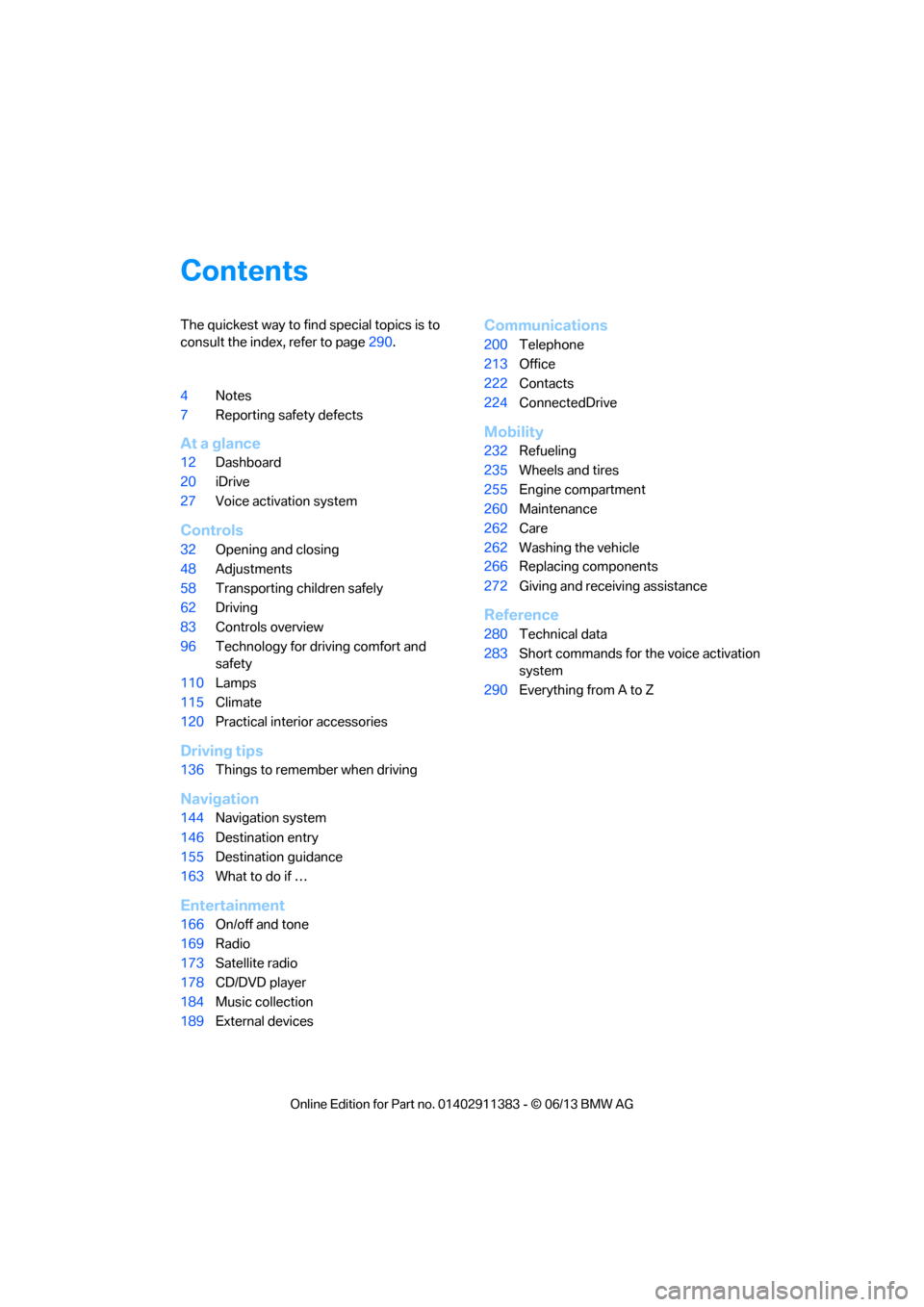
Contents
The quickest way to find special topics is to
consult the index, refer to page290.
4 Notes
7 Reporting safety defects
At a glance
12Dashboard
20 iDrive
27 Voice activation system
Controls
32Opening and closing
48 Adjustments
58 Transporting children safely
62 Driving
83 Controls overview
96 Technology for driving comfort and
safety
110 Lamps
115 Climate
120 Practical interior accessories
Driving tips
136Things to remember when driving
Navigation
144Navigation system
146 Destination entry
155 Destination guidance
163 What to do if …
Entertainment
166On/off and tone
169 Radio
173 Satellite radio
178 CD/DVD player
184 Music collection
189 External devices
Communications
200Telephone
213 Office
222 Contacts
224 ConnectedDrive
Mobility
232Refueling
235 Wheels and tires
255 Engine compartment
260 Maintenance
262 Care
262 Washing the vehicle
266 Replacing components
272 Giving and receiving assistance
Reference
280Technical data
283 Short commands for the voice activation
system
290 Everything from A to Z
00320051004F004C00510048000300280047004C0057004C005200510003
Page 11 of 311
6
Notes
Installation and operation of accessories not
approved by BMW, such as alarms, radios,
amplifiers, radar detectors, wheels, suspension
components, brake dust shields, telephones,
including operation of any mobile phone from
within the vehicle without using an externally
mounted antenna, or transceiver equipment, for
instance, CBs, walkie-talkies, ham radio or sim-
ilar accessories, may ca use extensive damage
to the vehicle, compromise its safety, interfere
with the vehicle's electrical system or affect the
validity of the BMW Limi ted Warranty. See your
BMW center for additional information. <
Maintenance, replacement, or repair of
the emission control devices and sys-
tems may be performed by any automotive
repair establishment or individual using any
certified automotive part. <
California Proposition 65 warning
California law requires us to issue the following
warning:
Engine exhaust and a wide variety of
automobile components and parts,
including components foun d in the interior fur-
nishings in a vehicle, contain or emit chemicals
known to the State of California to cause cancer
and birth defects and reproductive harm. In
addition, certain fluids contained in vehicles and
certain products of component wear contain or
emit chemicals known to the State of California
to cause cancer and birth defects or other
reproductive harm.
Battery posts, terminal s and related accesso-
ries contain lead and lead compounds. Wash
your hands after handling.
Used engine oil contains chemicals that have
caused cancer in labora tory animals. Always
protect your skin by washing thoroughly with
soap and water. <
Service and warranty
We recommend that you read this publication
thoroughly.
Your BMW is covered by the following
warranties:
> New Vehicle Limited Warranty
> Rust Perforation Limited Warranty
> Federal Emissions System Defect Warranty
> Federal Emissions Performance Warranty
> California Emission Control System Limited
Warranty
Detailed information abou t these warranties is
listed in the Service and Warranty Information
Booklet for US models or in the Warranty and
Service Guide Booklet for Canadian models.
Your vehicle has been sp ecifically adapted and
designed to meet the particular operating con-
ditions and registration requirements in your
country and continental region in order to
deliver the full driving pl easure while the vehicle
is operated under those conditions. If you wish
to operate your vehicle in another country or
region, you may be requir ed to adapt your vehi-
cle to meet different prevailing operating condi-
tions and registration re quirements. You should
also be aware of any a pplicable warranty limita-
tions or exclusions for such country or region. In
such case, please contact Customer Relations
for further information.
Maintenance
Maintain the vehicle re gularly to sustain the
road safety, operationa l reliability and the New
Vehicle Limited Warranty.
Specifications for required maintenance
measures:
> BMW Maintenance system
> Service and Warranty Information Booklet
for US models
> Warranty and Service Guide Booklet for
Canadian models
00320051004F004C00510048000300280047004C0057004C005200510003
Page 12 of 311
7
Notes
If the vehicle is not maintained according to
these specifications, this
could result in serious
damage to the vehicle. Such damage is not
covered by the BMW New Vehicle Limited
Warranty.
Data memory
A variety of electronic components in your vehi-
cle include data storag e devices, which store
technical information on the condition of your
vehicle, events and errors, either temporarily or
permanently. In general, this technical informa-
tion documents the condition of a component, a
module, a system or the surroundings:
> Operating conditions of system
components, e.g., fill levels.
> Status messages regarding the vehicle and
of its individual components, such as wheel
rpm/vehicle speed, resp onse delay, lateral
acceleration.
> Malfunctions and de fects in the major
system components, such as the lights and
brakes.
> Responses of the vehicle in special driving
situations, such as the deployment of an
airbag, the utilization of stability control
systems.
> Environmental conditions, such as
temperature.
These data are exclusively of a technical nature
and are used for the detection and correction of
errors, as well as the optimization of vehicle
functions. Motion profiles of traveled routes can
not be deduced from these data. If services are
required, such as repair services, service pro-
cesses, warranty claims and quality assurance,
then this technical information can be read out
by employees of service departments, includ-
ing the manufacturer, from the event and error
data storage devices by using special diagnos-
tic equipment. There, if necessary, you will receive further informatio
n. After remedying an
error, the information in the error memory is
deleted or progressively overwritten.
When using the vehicle, situations are conceiv-
able in which this techni cal data, in conjunction
with other information, such as accident
reports, vehicle damage, witness statements,
etc. - possibly with the assistance of an expert -
could be traced to pa rticular individuals.
Additional functions that are agreed upon con-
tractually with the cust omer, such as vehicle
tracking in case of emergency, permit the trans-
mission of certain vehicle data from the vehicle.
Reporting safety defects
For US customers
The following only app lies to vehicles owned
and operated in the US.
If you believe that your vehicle has a defect
which could cause a crash or could cause injury
or death, you should immediately inform the
National Highway Traffic Safety Administration,
NHTSA, in addition to notifying BMW of North
America, LLC, P.O. Box 1227, Westwood, New
Jersey 07675-1227, Telephone 1-800-831-
1117.
If NHTSA receives sim ilar complaints, it may
open an investigation, and if it finds that a safety
defect exists in a group of vehicles, it may order
a recall and remedy campaign. However,
NHTSA cannot become involved in individual
problems between you, yo ur center, or BMW of
North America, LLC.
To contact NHTSA, you may call the Vehicle
Safety Hotline toll-free at 1-888-327-4236
(TTY: 1-800-424-9153); go to
http://www.safercar.gov; or write to: Adminis-
trator, NHTSA, 400 Seventh Street, SW.,
Washington, DC 20590. You can also obtain
other information about motor vehicle safety
from http://www.safercar.gov
00320051004F004C00510048000300280047004C0057004C005200510003
Page 18 of 311
13
Dashboard
At a glance
4
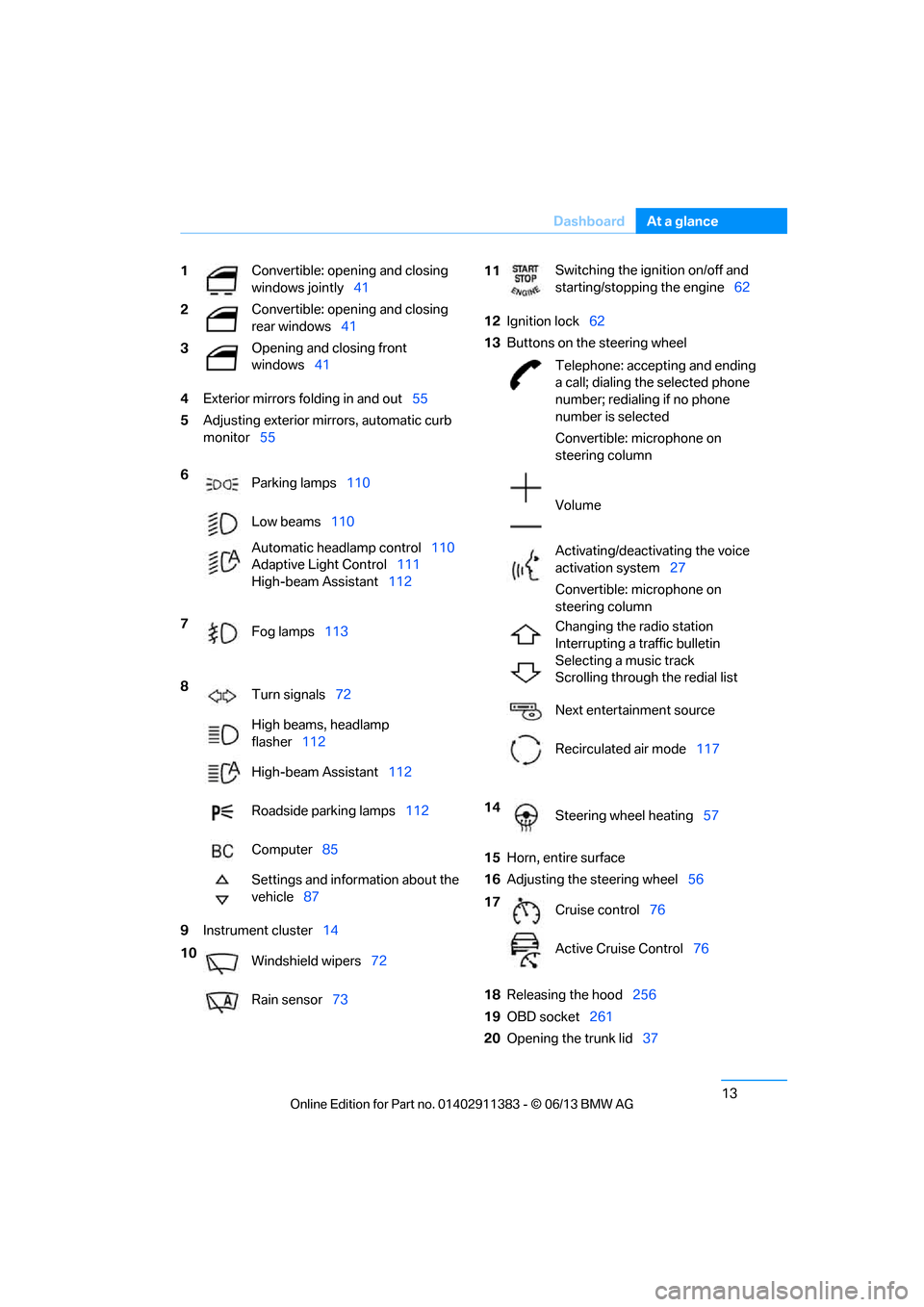
Exterior mirrors fo lding in and out55
5 Adjusting exterior mirrors, automatic curb
monitor 55
9 Instrument cluster 14 12
Ignition lock 62
13 Buttons on the steering wheel
15 Horn, entire surface
16 Adjusting the steering wheel 56
18 Releasing the hood 256
19 OBD socket 261
20 Opening the trunk lid 37
1
Convertible: opening and closing
windows jointly
41
2 Convertible: opening and closing
rear windows
41
3 Opening and closing front
windows
41
6 Parking lamps 110
Low beams 110
Automatic head lamp control110
Adaptive Light Control 111
High-beam Assistant 112
7 Fog lamps 113
8 Turn signals 72
High beams, headlamp
flasher 112
High-beam Assistant 112
Roadside parking lamps 112
Computer 85
Settings and information about the
vehicle 87
10 Windshield wipers 72
Rain sensor 73
11Switching the ignition on/off and
starting/stopping the engine
62
Telephone: accepting and ending
a call; dialing the selected phone
number; redialing if no phone
number is selected
Convertible: microphone on
steering column
Volume
Activating/deactivating the voice
activation system 27
Convertible: microphone on
steering column
Changing the radio station
Interrupting a traffic bulletin
Selecting a music track
Scrolling through the redial list
Next entertainment source
Recirculated air mode 117
14 Steering wheel heating 57
17 Cruise control 76
Active Cruise Control 76
00320051004F004C00510048000300280047004C0057004C005200510003
Page 23 of 311
18
At a glanceDashboard
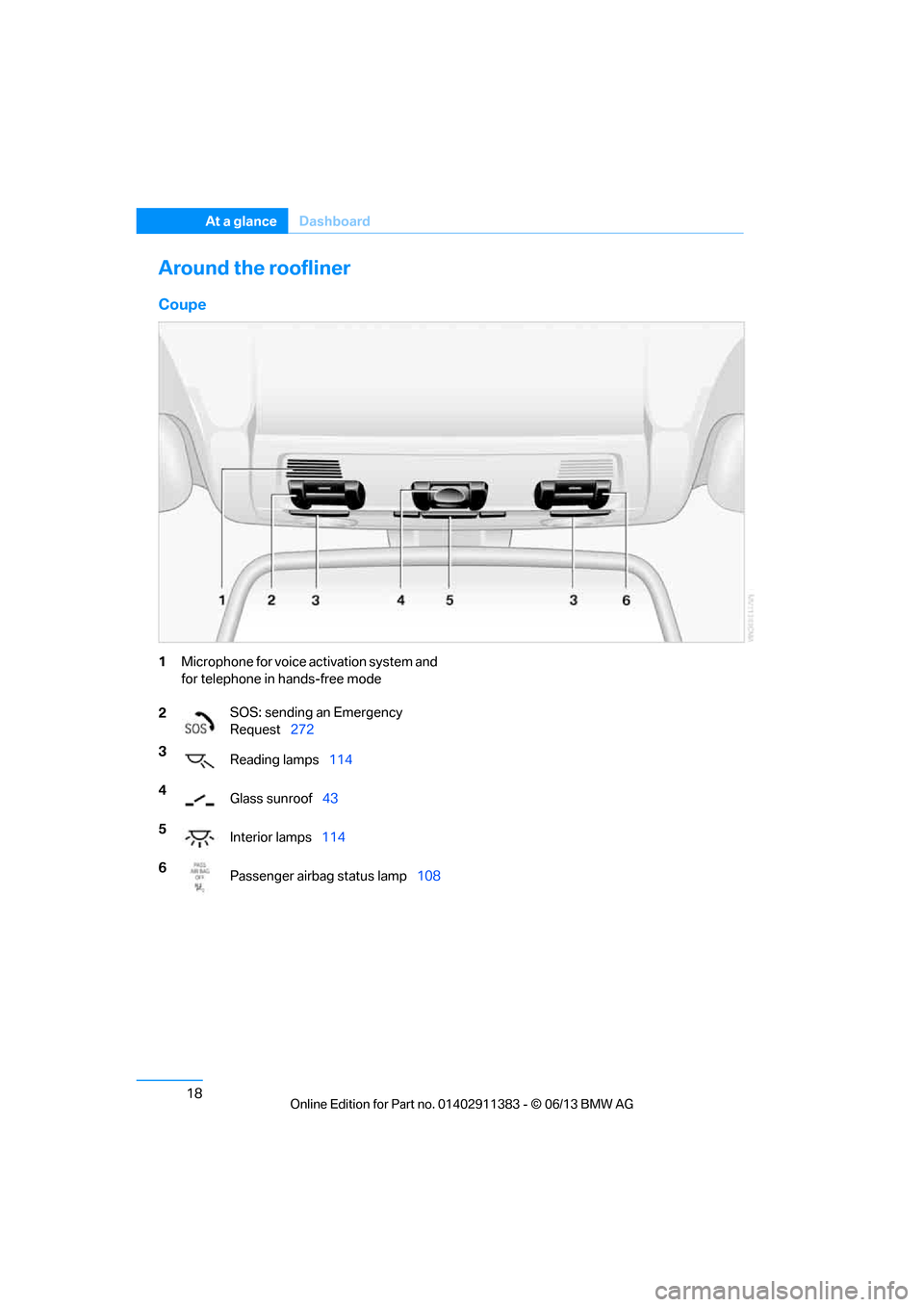
Around the roofliner
Coupe
1Microphone for voice activation system and
for telephone in hands-free mode
2 SOS: sending an Emergency
Request
272
3 Reading lamps 114
4 Glass sunroof 43
5 Interior lamps 114
6 Passenger airbag status lamp 108
00320051004F004C00510048000300280047004C0057004C005200510003
Page 26 of 311
21
iDrive
At a glance
Control Display
Notes
>
Follow care instructions when cleaning the
Control Display.
> Do not store items in the region in front of
the Control Display; doing so may damage
the Control Display.
Switching off
1. Press the button.
2. "Switch off control display"
Switching on
Press the controller to switch on.
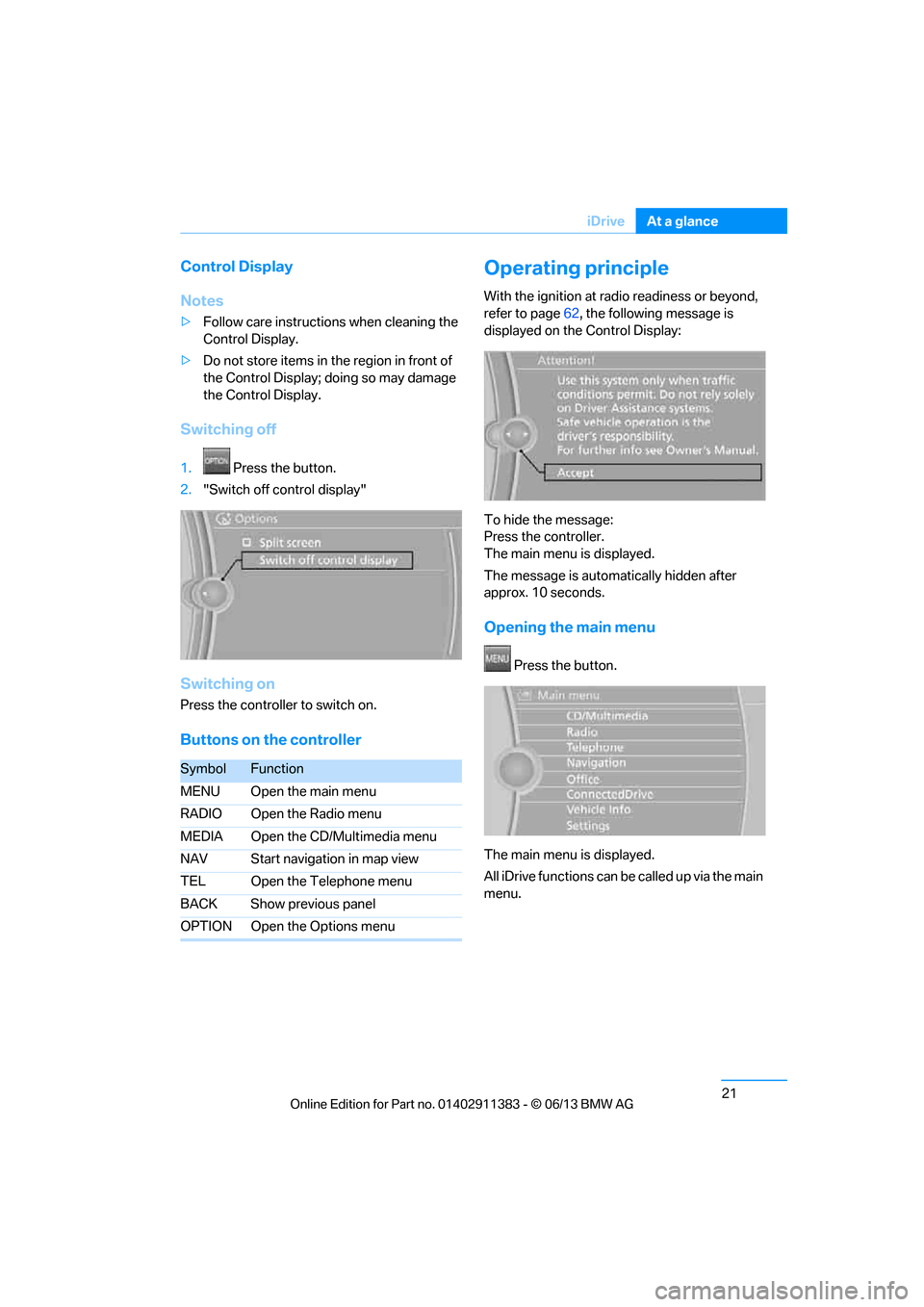
Buttons on the controller
Operating principle
With the ignition at radio readiness or beyond,
refer to page 62, the following message is
displayed on the Control Display:
To hide the message:
Press the controller.
The main menu is displayed.
The message is automatically hidden after
approx. 10 seconds.
Opening the main menu
Press the button.
The main menu is displayed.
All iDrive functions can be called up via the main
menu.
SymbolFunction
MENU Open the main menu
RADIO Open the Radio menu
MEDIA Open the CD/Multimedia menu
NAV Start navigation in map view
TEL Open the Telephone menu
BACK Show previous panel
OPTION Open the Options menu
00320051004F004C00510048000300280047004C0057004C005200510003
Page 28 of 311
23
iDrive
At a glance
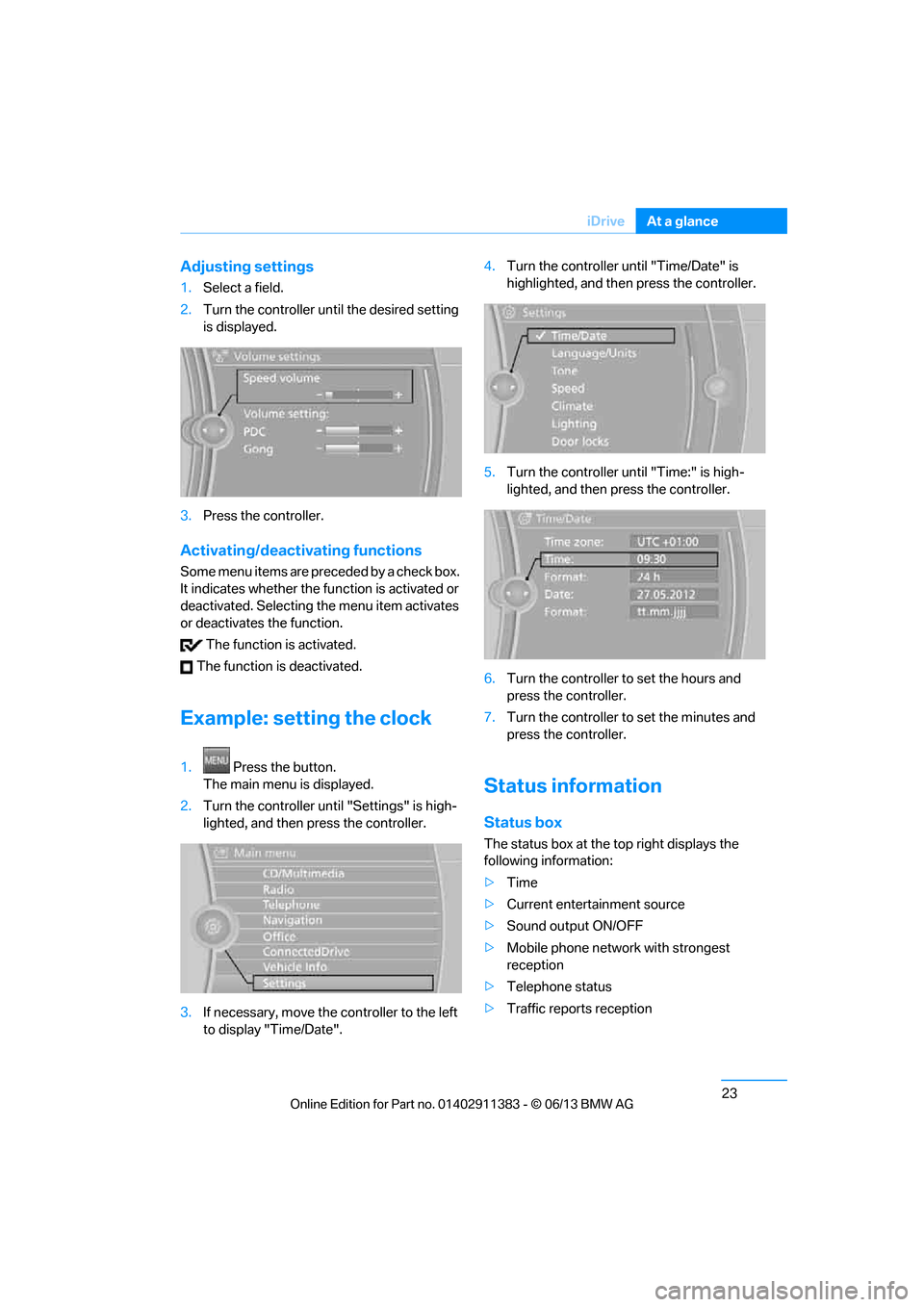
Adjusting settings
1.
Select a field.
2. Turn the controller until the desired setting
is displayed.
3. Press the controller.
Activating/deactivating functions
Some menu items are preceded by a check box.
It indicates whether the fu nction is activated or
deactivated. Selecting the menu item activates
or deactivates the function.
The function is activated.
The function is deactivated.
Example: setting the clock
1. Press the button.
The main menu is displayed.
2. Turn the controller until "Settings" is high-
lighted, and then press the controller.
3. If necessary, move the controller to the left
to display "Time/Date". 4.
Turn the controller until "Time/Date" is
highlighted, and then press the controller.
5. Turn the controller until "Time:" is high-
lighted, and then press the controller.
6. Turn the controller to set the hours and
press the controller.
7. Turn the controller to set the minutes and
press the controller.
Status information
Status box
The status box at the top right displays the
following information:
> Time
> Current entertainment source
> Sound output ON/OFF
> Mobile phone network with strongest
reception
> Telephone status
> Traffic reports reception
00320051004F004C00510048000300280047004C0057004C005200510003
Page 29 of 311
24
At a glanceiDrive
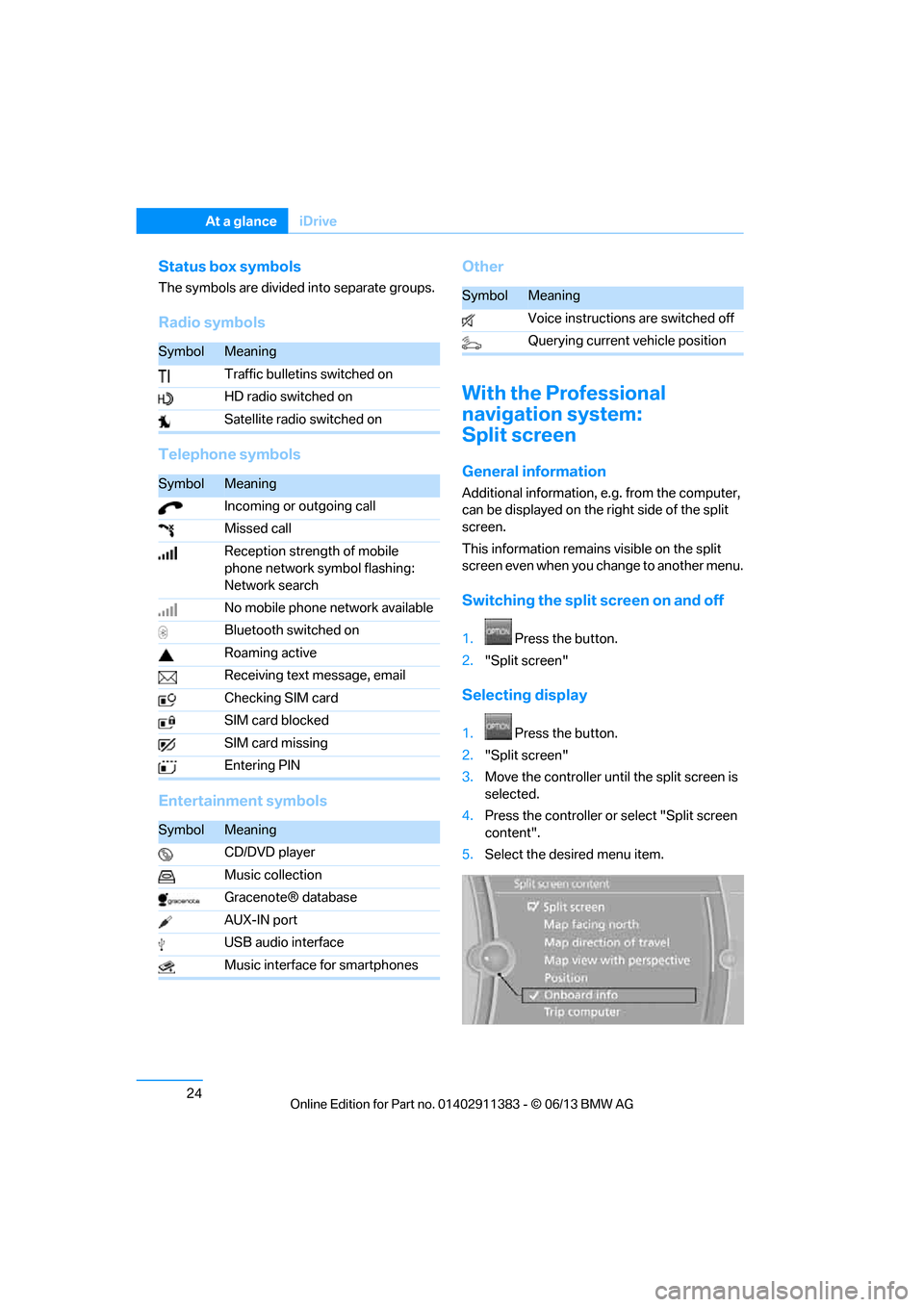
Status box symbols
The symbols are divided into separate groups.
Radio symbols
Telephone symbols
Entertainment symbols Other
With the Professional
navigation system:
Split screen
General information
Additional information, e.g. from the computer,
can be displayed on the right side of the split
screen.
This information remains visible on the split
screen even when you change to another menu.
Switching the split
screen on and off
1.Press the button.
2. "Split screen"
Selecting display
1. Press the button.
2. "Split screen"
3. Move the controller until the split screen is
selected.
4. Press the controller or select "Split screen
content".
5. Select the desired menu item.
SymbolMeaning
Traffic bulletins switched on
HD radio switched on
Satellite radio switched on
SymbolMeaning
Incoming or outgoing call
Missed call
Reception strength of mobile
phone network symbol flashing:
Network search
No mobile phone network available
Bluetooth switched on
Roaming active
Receiving text message, email
Checking SIM card
SIM card blocked
SIM card missing
Entering PIN
SymbolMeaning
CD/DVD player
Music collection
Gracenote® database
AUX-IN port
USB audio interface
Music interface for smartphones
SymbolMeaning
Voice instructions are switched off
Querying current vehicle position
00320051004F004C00510048000300280047004C0057004C005200510003
Page 34 of 311
29
Voice activation system
At a glance
Notes on Emergency
Requests
Do not use the voice activation system to ini-
tiate an Emergency Request. In stressful situa-
tions, the voice and vocal pitch can change.
This can unnecessarily
delay the establishment
of a telephone connection.
Instead, use the SOS button, refer to page 272,
in the vicinity of the interior rearview mirror.
Ambient conditions
> Say the commands, nu mbers and letters
smoothly and with normal volume, empha-
sis and speed.
> Always speak the commands in the
language of the voic e activation system.
> When selecting a radio station, use the
standard pronunciation of the station name:
{Station … } e.g. National Public Radio
> Keep the doors, windows, glass roof/
panoramic glass roof closed to prevent
interference from ambient noise.
> Avoid ambient noise in the vehicle while
speaking.
00320051004F004C00510048000300280047004C0057004C005200510003
Page 178 of 311
173
Satellite radio
Entertainment
Satellite radio
Vehicle equipment
In this chapter, all production, country, and
optional equipment that is offered in the model
range is described. Equipment is also described
that is not available because of, for example,
selected options or coun
try version. This also
applies to safety related functions and systems.
General information
The channels are offered in fixed packages.
Packages must be ac tivated by telephone.
Navigation bar
The functions of the navigation bar symbols can
also be stored on the programmable memory
buttons, refer to page 25.
Managing subscription
Clear reception is required for activating and
deactivating channels. Re ception is best when
you have an unobstructed view to the sky. The
channel name is displayed in the status line.
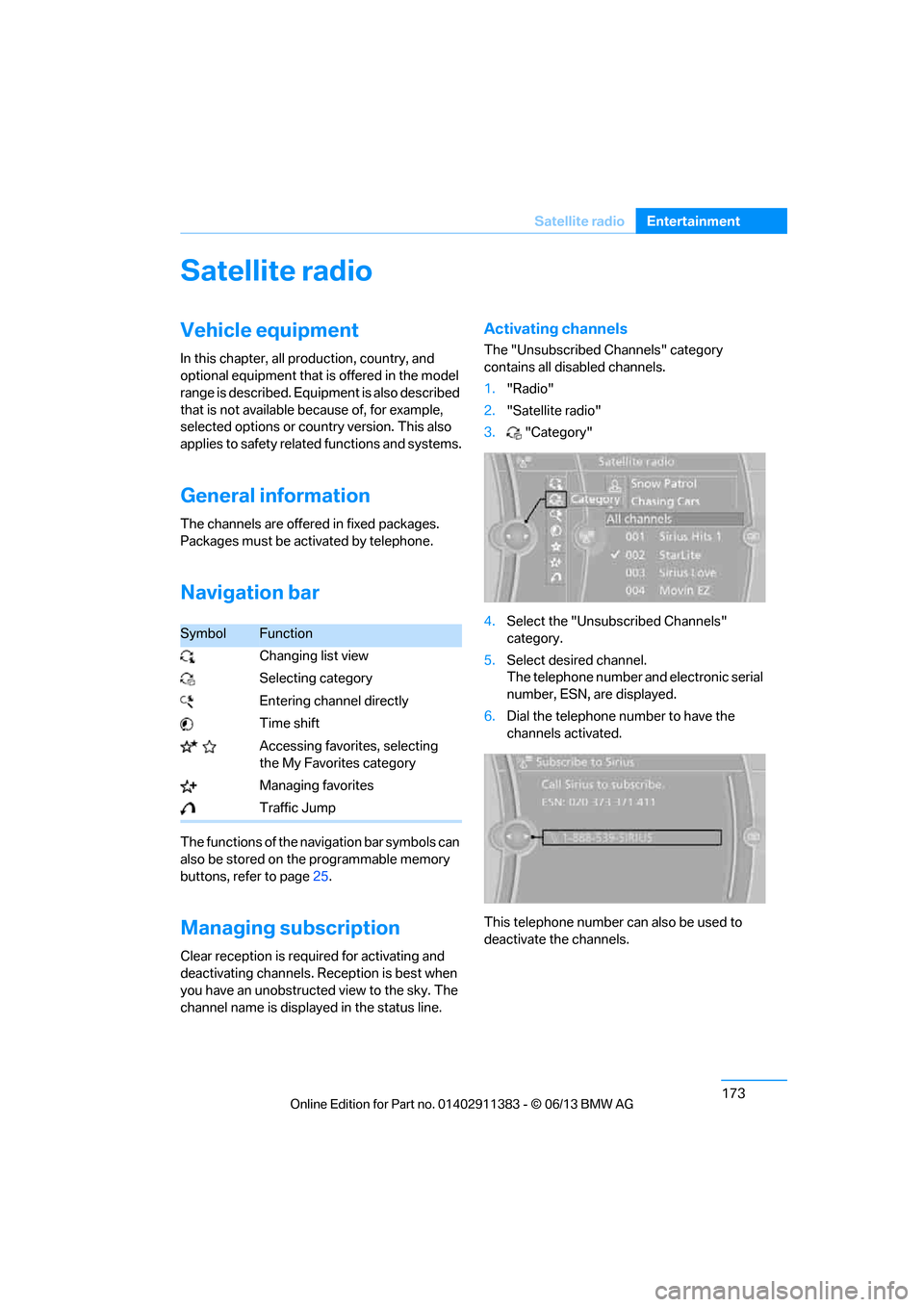
Activating channels
The "Unsubscribed Channels" category
contains all disabled channels.
1. "Radio"
2. "Satellite radio"
3. "Category"
4. Select the "Unsubscribed Channels"
category.
5. Select desired channel.
The telephone number and electronic serial
number, ESN, are displayed.
6. Dial the telephone number to have the
channels activated.
This telephone number can also be used to
deactivate the channels.
SymbolFunction
Changing list view
Selecting category
Entering channel directly
Time shift
Accessing favorites, selecting the My Favorites category
Managing favorites
Traffic Jump
00320051004F004C00510048000300280047004C0057004C005200510003