change wheel BMW 3 SERIES SEDAN 2013 F30 User Guide
[x] Cancel search | Manufacturer: BMW, Model Year: 2013, Model line: 3 SERIES SEDAN, Model: BMW 3 SERIES SEDAN 2013 F30Pages: 248, PDF Size: 5.21 MB
Page 118 of 248
Active Blind Spot Detection
The concept
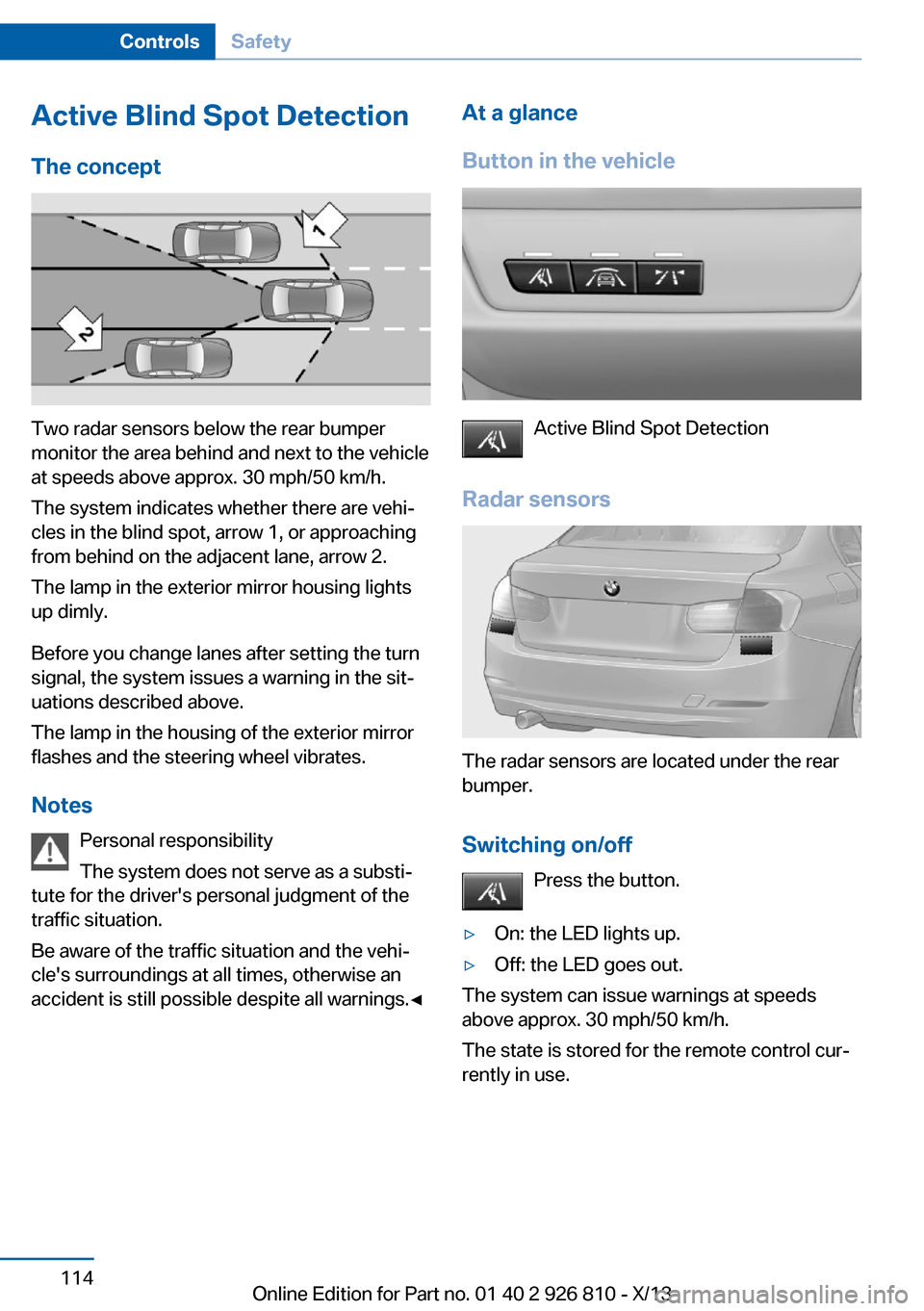
Two radar sensors below the rear bumper
monitor the area behind and next to the vehicle
at speeds above approx. 30 mph/50 km/h.
The system indicates whether there are vehi‐
cles in the blind spot, arrow 1, or approaching
from behind on the adjacent lane, arrow 2.
The lamp in the exterior mirror housing lights
up dimly.
Before you change lanes after setting the turn
signal, the system issues a warning in the sit‐
uations described above.
The lamp in the housing of the exterior mirror
flashes and the steering wheel vibrates.
Notes Personal responsibility
The system does not serve as a substi‐
tute for the driver's personal judgment of the
traffic situation.
Be aware of the traffic situation and the vehi‐
cle's surroundings at all times, otherwise an
accident is still possible despite all warnings.◀
At a glance
Button in the vehicle
Active Blind Spot Detection
Radar sensors
The radar sensors are located under the rear
bumper.
Switching on/off Press the button.
▷On: the LED lights up.▷Off: the LED goes out.
The system can issue warnings at speeds
above approx. 30 mph/50 km/h.
The state is stored for the remote control cur‐
rently in use.
Seite 114ControlsSafety114
Online Edition for Part no. 01 40 2 926 810 - X/13
Page 119 of 248
Display
Information stage
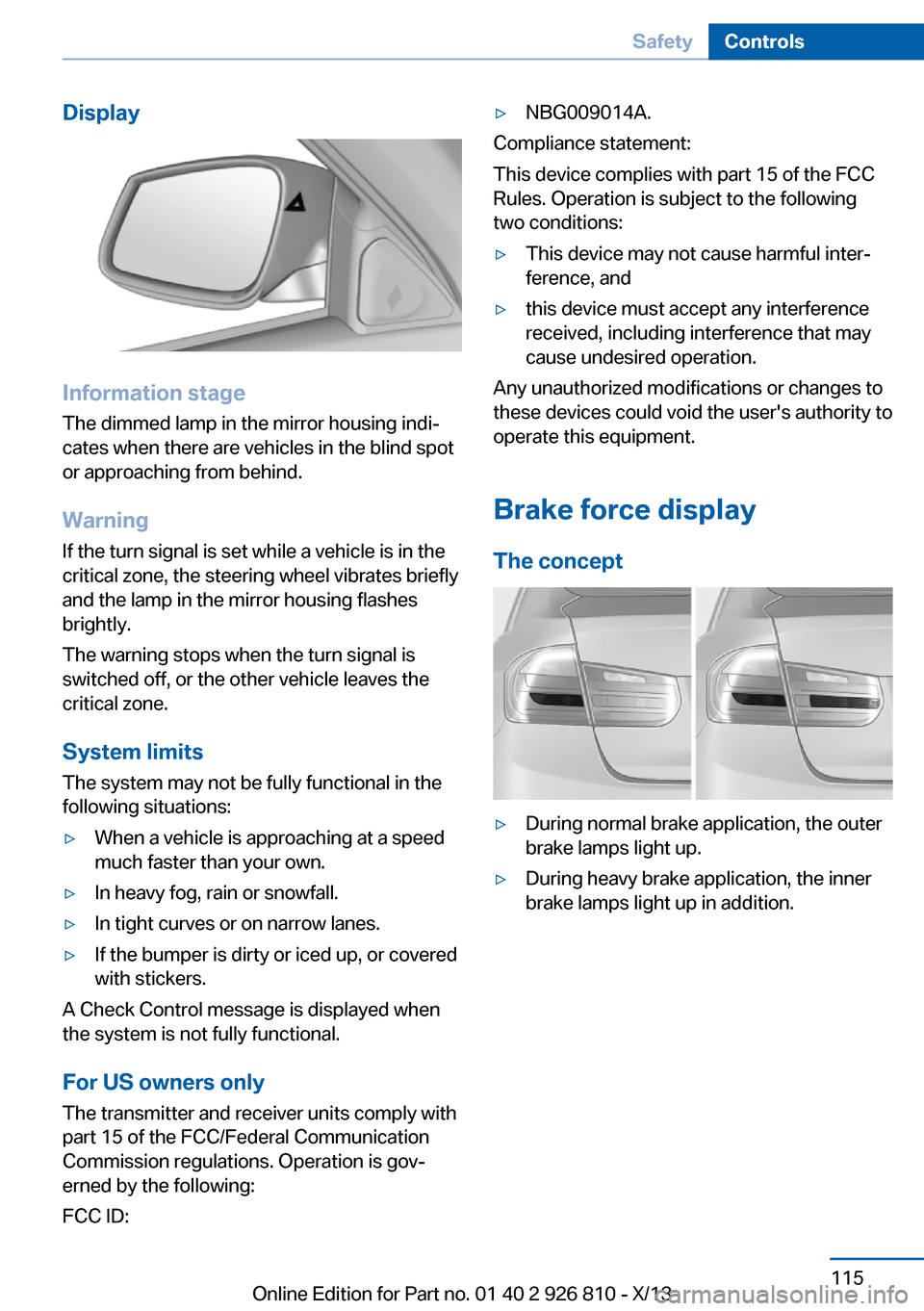
The dimmed lamp in the mirror housing indi‐
cates when there are vehicles in the blind spot
or approaching from behind.
Warning
If the turn signal is set while a vehicle is in the
critical zone, the steering wheel vibrates briefly
and the lamp in the mirror housing flashes
brightly.
The warning stops when the turn signal is
switched off, or the other vehicle leaves the
critical zone.
System limits
The system may not be fully functional in the
following situations:
▷When a vehicle is approaching at a speed
much faster than your own.▷In heavy fog, rain or snowfall.▷In tight curves or on narrow lanes.▷If the bumper is dirty or iced up, or covered
with stickers.
A Check Control message is displayed when
the system is not fully functional.
For US owners only The transmitter and receiver units comply with
part 15 of the FCC/Federal Communication
Commission regulations. Operation is gov‐
erned by the following:
FCC ID:
▷NBG009014A.
Compliance statement:
This device complies with part 15 of the FCC
Rules. Operation is subject to the following
two conditions:
▷This device may not cause harmful inter‐
ference, and▷this device must accept any interference
received, including interference that may
cause undesired operation.
Any unauthorized modifications or changes to
these devices could void the user's authority to
operate this equipment.
Brake force display
The concept
▷During normal brake application, the outer
brake lamps light up.▷During heavy brake application, the inner
brake lamps light up in addition.Seite 115SafetyControls115
Online Edition for Part no. 01 40 2 926 810 - X/13
Page 122 of 248
COMFORT/ECO PROBalanced control of the vehicle.
Variable sport steering The variable sport steering increases the
steering angle of the front wheels at large
steering wheel angles, e.g., in tight curves or
when parking. Steering becomes more direct.
It also varies the force required to turn the
wheels in accordance with the vehicle speed.
This results in a sporty steering response. In
addition, it becomes easier to steer during
parking and maneuvering.
Driving Dynamics Control The conceptThe Driving Dynamics Control can be used to
adjust the certain characteristics of the vehicle.
Various programs can be selected for this pur‐
pose. The Driving Dynamics Control and the
DSC OFF buttons can each be used to activate
a program.
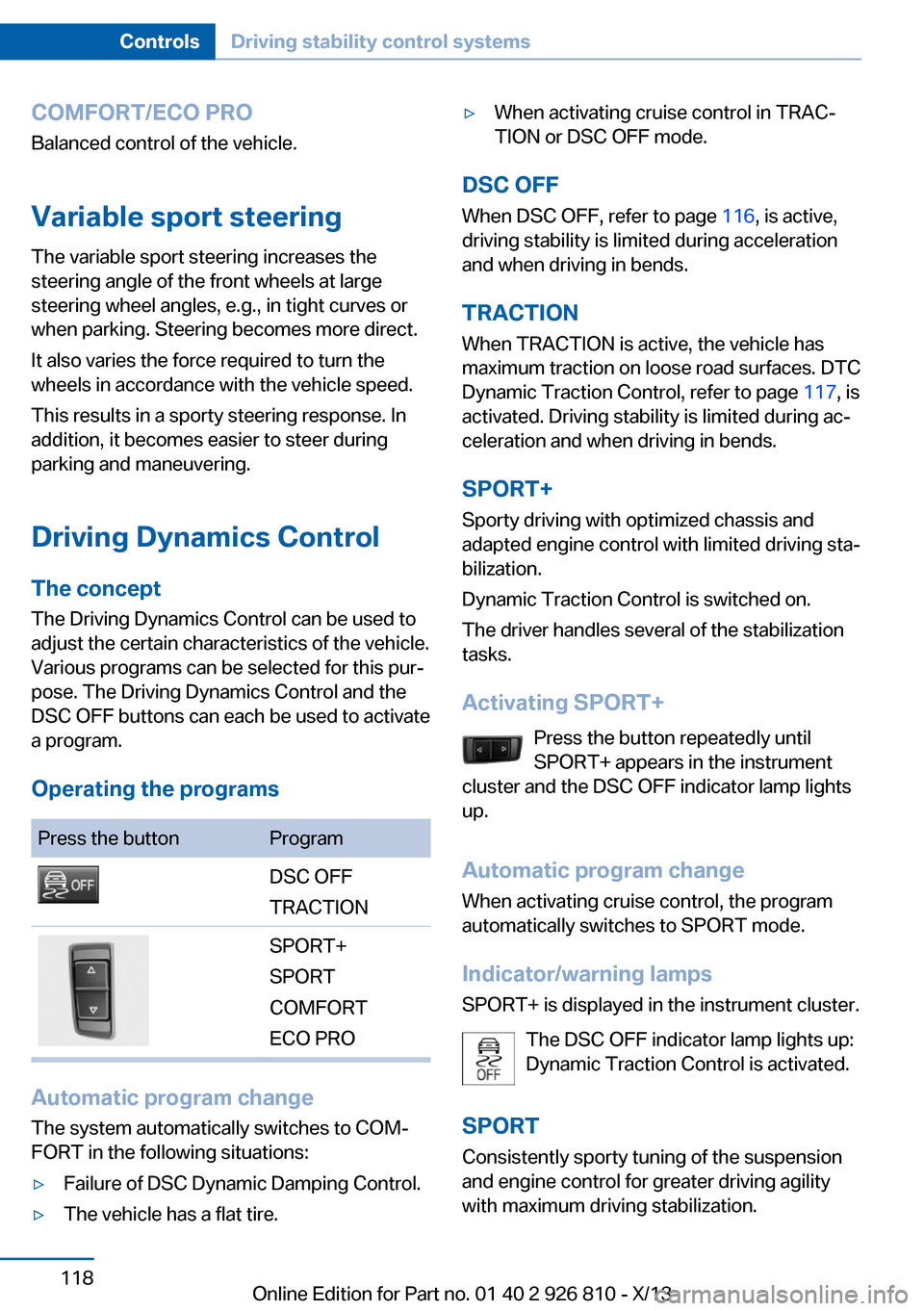
Operating the programsPress the buttonProgramDSC OFF
TRACTIONSPORT+
SPORT
COMFORT
ECO PRO
Automatic program change
The system automatically switches to COM‐
FORT in the following situations:
▷Failure of DSC Dynamic Damping Control.▷The vehicle has a flat tire.▷When activating cruise control in TRAC‐
TION or DSC OFF mode.
DSC OFF
When DSC OFF, refer to page 116, is active,
driving stability is limited during acceleration
and when driving in bends.
TRACTION When TRACTION is active, the vehicle has
maximum traction on loose road surfaces. DTC
Dynamic Traction Control, refer to page 117, is
activated. Driving stability is limited during ac‐
celeration and when driving in bends.
SPORT+
Sporty driving with optimized chassis and
adapted engine control with limited driving sta‐
bilization.
Dynamic Traction Control is switched on.
The driver handles several of the stabilization
tasks.
Activating SPORT+ Press the button repeatedly until
SPORT+ appears in the instrument
cluster and the DSC OFF indicator lamp lights
up.
Automatic program change When activating cruise control, the program
automatically switches to SPORT mode.
Indicator/warning lamps
SPORT+ is displayed in the instrument cluster.
The DSC OFF indicator lamp lights up:
Dynamic Traction Control is activated.
SPORT Consistently sporty tuning of the suspension
and engine control for greater driving agility
with maximum driving stabilization.
Seite 118ControlsDriving stability control systems118
Online Edition for Part no. 01 40 2 926 810 - X/13
Page 132 of 248
Malfunction
The system cannot be activated if the radar
sensor is not aligned correctly. This may be
caused by damage incurred during parking, for
example.
A Check Control message is displayed if the
system fails.
Cruise control
The concept The system is functional at speeds beginning
at approx. 20 mph/30 km/h.
It maintains the speed that was set using the
control elements on the steering wheel.
The system brakes on downhill gradients if en‐
gine braking action is insufficient.
Unfavorable conditions
Do not use the system if unfavorable
conditions make it impossible to drive at a con‐
stant speed, for instance:▷On curvy roads.▷In heavy traffic.▷On slippery roads, in fog, snow or rain, or
on a loose road surface.
Otherwise, you could lose control of the vehi‐
cle and cause an accident.◀
General information
Depending on the set driving program, the
characteristics of the cruise control can
change in certain areas.
At a glance
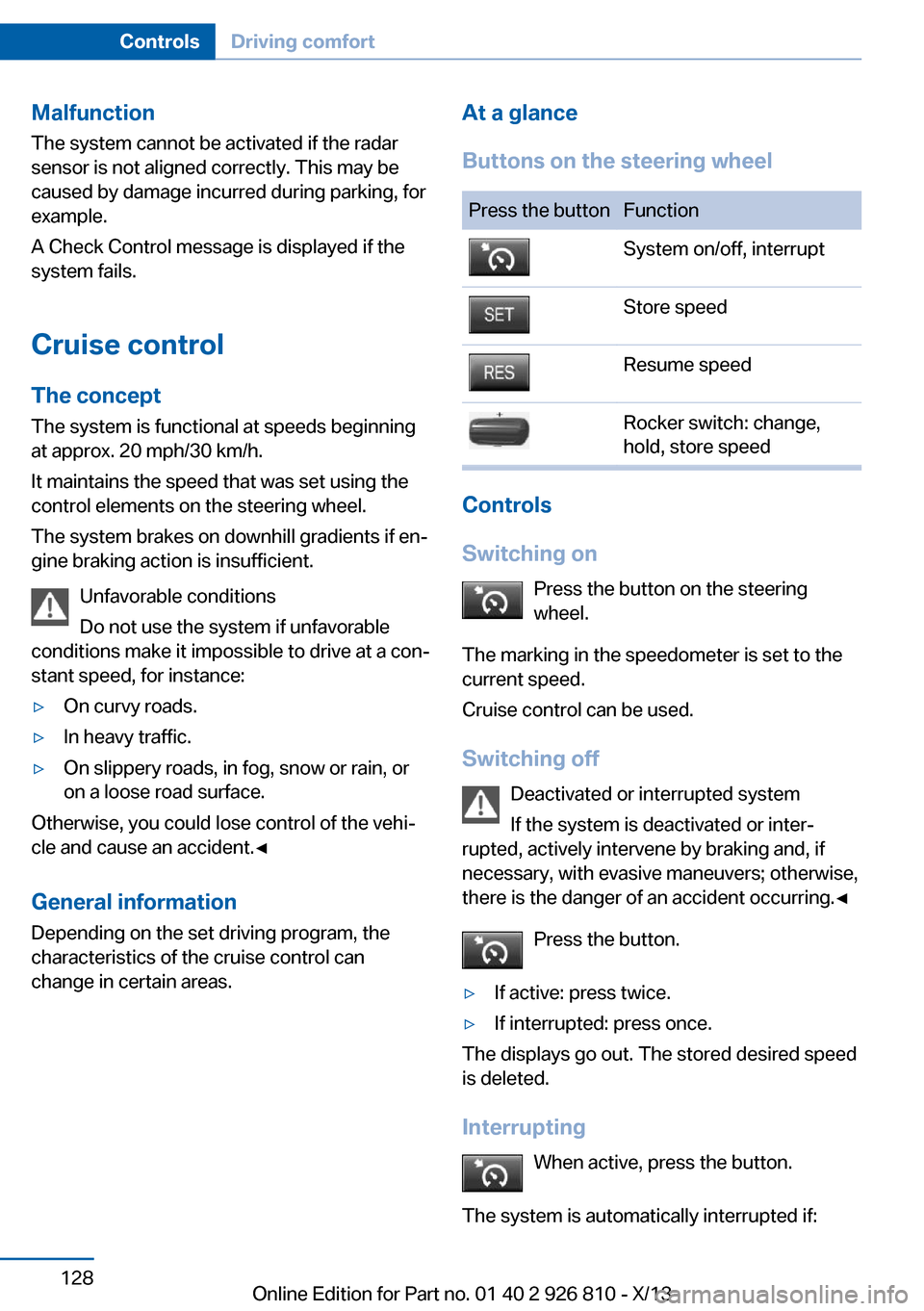
Buttons on the steering wheelPress the buttonFunctionSystem on/off, interruptStore speedResume speedRocker switch: change,
hold, store speed
Controls
Switching on Press the button on the steering
wheel.
The marking in the speedometer is set to the
current speed.
Cruise control can be used.
Switching off Deactivated or interrupted system
If the system is deactivated or inter‐
rupted, actively intervene by braking and, if
necessary, with evasive maneuvers; otherwise,
there is the danger of an accident occurring.◀
Press the button.
▷If active: press twice.▷If interrupted: press once.
The displays go out. The stored desired speed
is deleted.
Interrupting When active, press the button.
The system is automatically interrupted if:
Seite 128ControlsDriving comfort128
Online Edition for Part no. 01 40 2 926 810 - X/13
Page 143 of 248
Ultrasound sensors measure parking spaces
on both sides of the vehicle.
The parking assistant calculates the best pos‐
sible parking line and takes control of steering
during the parking procedure.
When parking, also take note of the visual and
acoustic information and instructions issued
by the PDC, the parking assistant and the rear‐
view camera and react accordingly.
A component of the parking assistant is the
PDC Park Distance Control, refer to page 130.
Hints Personal responsibility
Even an active system does not relieve
the driver from personal responsibility for the
driving process.
Because of technical system limits, the system
cannot independently react appropriately in all
traffic situations.
Continuously and attentively monitor the driv‐
ing process, the area surrounding the vehicle
and the traffic situation, and actively intervene
when required, otherwise, there is a risk of an
accident.◀
Changes to the parking space
Changes to the parking space after it was
measured are not taken into account by the
system.
Therefore, always be alert and ready to inter‐
vene; otherwise, there is the danger of an acci‐
dent occurring.◀
Transporting loads
Loads that extend beyond the perimeter
of the vehicle are not taken into account by the
system during the parking procedure.
Therefore, always be alert and ready to inter‐
vene; otherwise, there is the danger of an acci‐
dent occurring.◀Curbs
The parking assistant may steer the vehi‐
cle over or onto curbs.
Therefore, always be alert and ready to inter‐
vene; otherwise, the wheels, tires, or the vehi‐
cle may become damaged.◀
An engine that has been switched off by the
Auto Start Stop function is restarted automati‐
cally when the parking assistant is activated.
Requirements
For measuring parking spaces▷Maximum speed while driving forward ap‐
prox. 22 mph/35 km/h.▷Maximum distance to row of parked vehi‐
cles: 5 ft/1.5 m.
Suitable parking space
▷Gap between two objects with a minimum
length of approx. 5 ft/1.5 m.▷Minimum length of the gap: own vehicle's
length plus approx. 4 ft/1.2 m.▷Minimum depth: approx. 5 ft/1.5 m.
For parking procedure
▷Doors and trunk lid closed.▷Parking brake released.▷When parking in parking spaces on the
driver's side, the corresponding turn signal
must be set where applicable.Seite 139Driving comfortControls139
Online Edition for Part no. 01 40 2 926 810 - X/13
Page 145 of 248
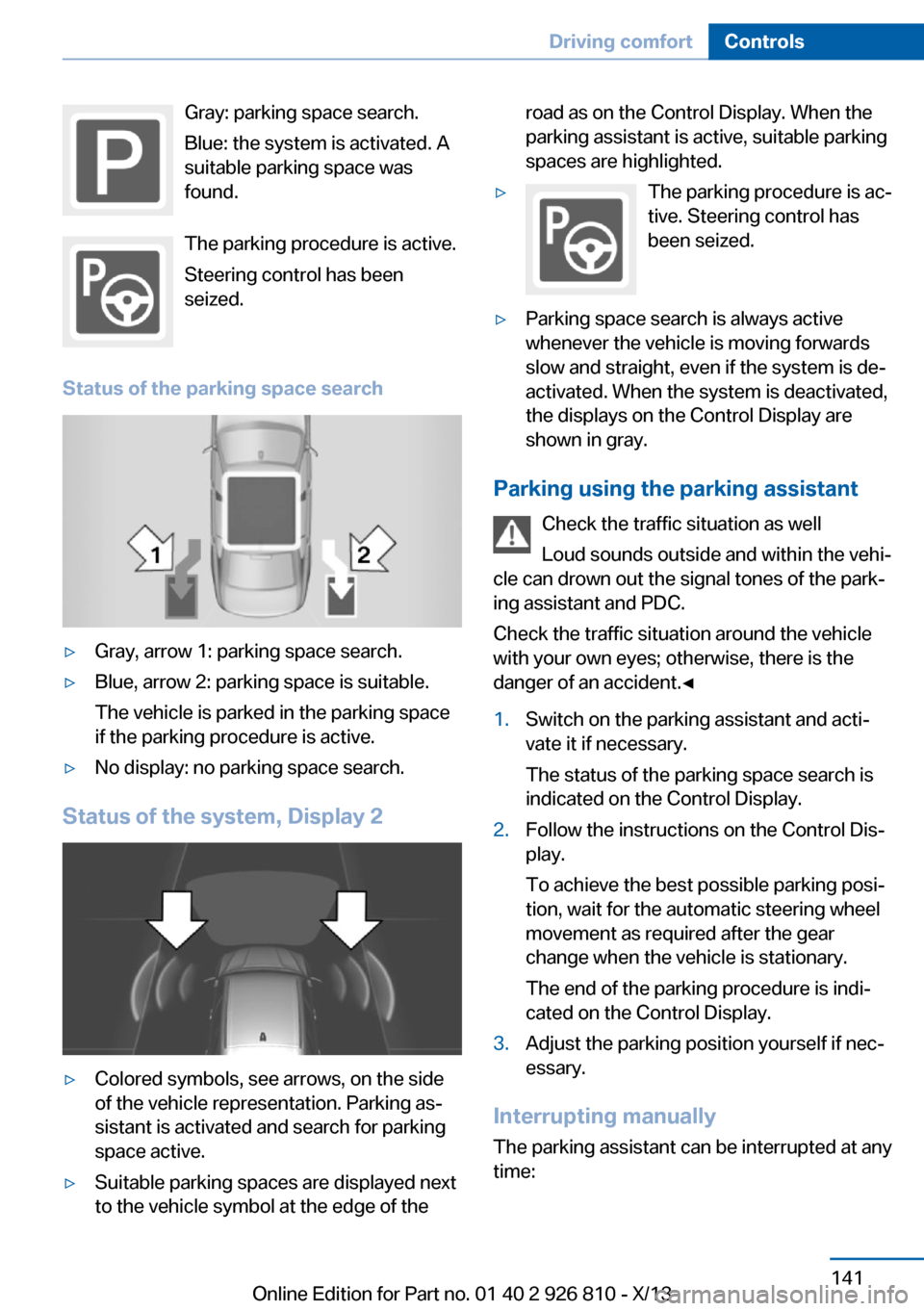
Gray: parking space search.
Blue: the system is activated. A
suitable parking space was
found.
The parking procedure is active.
Steering control has been
seized.
Status of the parking space search▷Gray, arrow 1: parking space search.▷Blue, arrow 2: parking space is suitable.
The vehicle is parked in the parking space
if the parking procedure is active.▷No display: no parking space search.
Status of the system, Display 2
▷Colored symbols, see arrows, on the side
of the vehicle representation. Parking as‐
sistant is activated and search for parking
space active.▷Suitable parking spaces are displayed next
to the vehicle symbol at the edge of theroad as on the Control Display. When the
parking assistant is active, suitable parking
spaces are highlighted.▷The parking procedure is ac‐
tive. Steering control has
been seized.▷Parking space search is always active
whenever the vehicle is moving forwards
slow and straight, even if the system is de‐
activated. When the system is deactivated,
the displays on the Control Display are
shown in gray.
Parking using the parking assistant
Check the traffic situation as well
Loud sounds outside and within the vehi‐
cle can drown out the signal tones of the park‐
ing assistant and PDC.
Check the traffic situation around the vehicle
with your own eyes; otherwise, there is the
danger of an accident.◀
1.Switch on the parking assistant and acti‐
vate it if necessary.
The status of the parking space search is
indicated on the Control Display.2.Follow the instructions on the Control Dis‐
play.
To achieve the best possible parking posi‐
tion, wait for the automatic steering wheel
movement as required after the gear
change when the vehicle is stationary.
The end of the parking procedure is indi‐
cated on the Control Display.3.Adjust the parking position yourself if nec‐
essary.
Interrupting manually
The parking assistant can be interrupted at any
time:
Seite 141Driving comfortControls141
Online Edition for Part no. 01 40 2 926 810 - X/13
Page 218 of 248
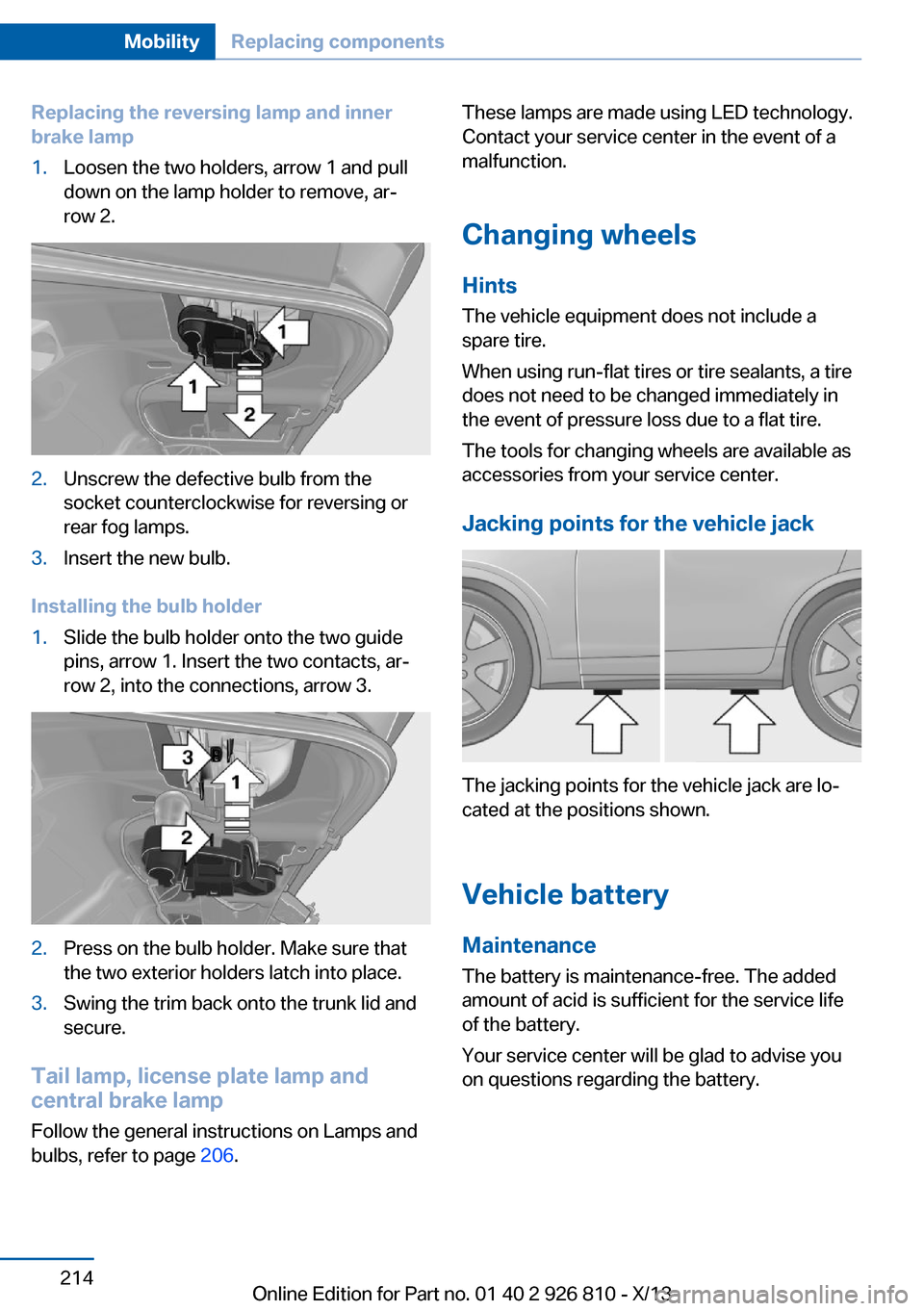
Replacing the reversing lamp and inner
brake lamp1.Loosen the two holders, arrow 1 and pull
down on the lamp holder to remove, ar‐
row 2.2.Unscrew the defective bulb from the
socket counterclockwise for reversing or
rear fog lamps.3.Insert the new bulb.
Installing the bulb holder
1.Slide the bulb holder onto the two guide
pins, arrow 1. Insert the two contacts, ar‐
row 2, into the connections, arrow 3.2.Press on the bulb holder. Make sure that
the two exterior holders latch into place.3.Swing the trim back onto the trunk lid and
secure.
Tail lamp, license plate lamp and
central brake lamp
Follow the general instructions on Lamps and
bulbs, refer to page 206.
These lamps are made using LED technology.
Contact your service center in the event of a
malfunction.
Changing wheels
Hints The vehicle equipment does not include a
spare tire.
When using run-flat tires or tire sealants, a tire
does not need to be changed immediately in
the event of pressure loss due to a flat tire.
The tools for changing wheels are available as
accessories from your service center.
Jacking points for the vehicle jack
The jacking points for the vehicle jack are lo‐
cated at the positions shown.
Vehicle battery Maintenance
The battery is maintenance-free. The added
amount of acid is sufficient for the service life
of the battery.
Your service center will be glad to advise you
on questions regarding the battery.
Seite 214MobilityReplacing components214
Online Edition for Part no. 01 40 2 926 810 - X/13
Page 239 of 248
Brake discs, breaking in 166
Brake force display 115
Brake lamps, brake force dis‐ play 115
Brake lights, adaptive 115
Brake pads, breaking in 166
Braking, hints 167
Breakdown assis‐ tance 217, 218
Breaking in 166
Brightness of Control Dis‐ play 89
Bulb replacement 206
Bulb replacement, front 207
Bulb replacement, halogen headlamps 207
Bulb replacement, rear 212
Bulb replacement, xenon headlamps 210
Bulbs and lamps 206
Button, RES 124
Button, Start/Stop 63
Bypassing, refer to Jump- starting 218
C
California Proposition 65 Warning 7
Camera, care 226
Camera, rearview cam‐ era 133
Camera, Side View 136
Camera, Top View 137
Can holder, refer to Cu‐ pholder 161
Car battery 214
Car care products 224
Care, displays 226
Care, vehicle 224
Cargo 169
Cargo area, enlarging 157
Cargo area lid 40
Cargo area, storage compart‐ ments 162
Cargo, securing 170 Cargo straps, securing
cargo 170
Car key, refer to Remote con‐ trol 34
Carpet, care 226
Car wash 223
Catalytic converter, refer to Hot exhaust system 167
CBS Condition Based Serv‐ ice 204
CD/Multimedia, see user's manual for Navigation, En‐
tertainment and Communi‐
cation
Center armrest 160
Center console 16
Center-Lock, see button for central locking 37
Central locking system 37
Central screen, refer to Con‐ trol Display 18
Changes, technical, refer to Safety 7
Changing parts 206
Changing wheels 214
Changing wheels/tires 195
Check Control 78
Checking the oil level elec‐ tronically 200
Children, seating position 59
Children, transporting safely 59
Child restraint fixing sys‐ tem 59
Child restraint fixing system LATCH 60
Child restraint fixing systems, mounting 59
Child safety locks 62
Child seat, mounting 59
Child seats 59
Chrome parts, care 225
Cigarette lighter 155
Cleaning, displays 226
Climate control 144, 146
Clock 81 Closing/opening from in‐
side 40
Closing/opening via door lock 39
Closing/opening with remote control 38
Clothes hooks 161
Coasting 176
Coasting with engine decou‐ pled, coasting 176
Coasting with idling en‐ gine 176
Cockpit 14
Cold starting, refer to Starting the engine 64
Collision warning with braking function 108
Collision warning with City Braking function 105
Combination switch, refer to Turn signals 68
Combination switch, refer to Wiper system 68
Comfort Access 41
COMFORT program, Dy‐ namic Driving Control 119
Compartments in the doors 160
Compass 153
Computer 86
Condensation on win‐ dows 148
Condensation under the vehi‐ cle 168
Condition Based Service CBS 204
Configuring drive pro‐ gram 119
Confirmation signal 43
ConnectedDrive, see user's manual for Navigation, En‐
tertainment and Communi‐
cation
ConnectedDrive Services
Connecting electrical devi‐ ces 155 Seite 235Everything from A to ZReference235
Online Edition for Part no. 01 40 2 926 810 - X/13
Page 241 of 248
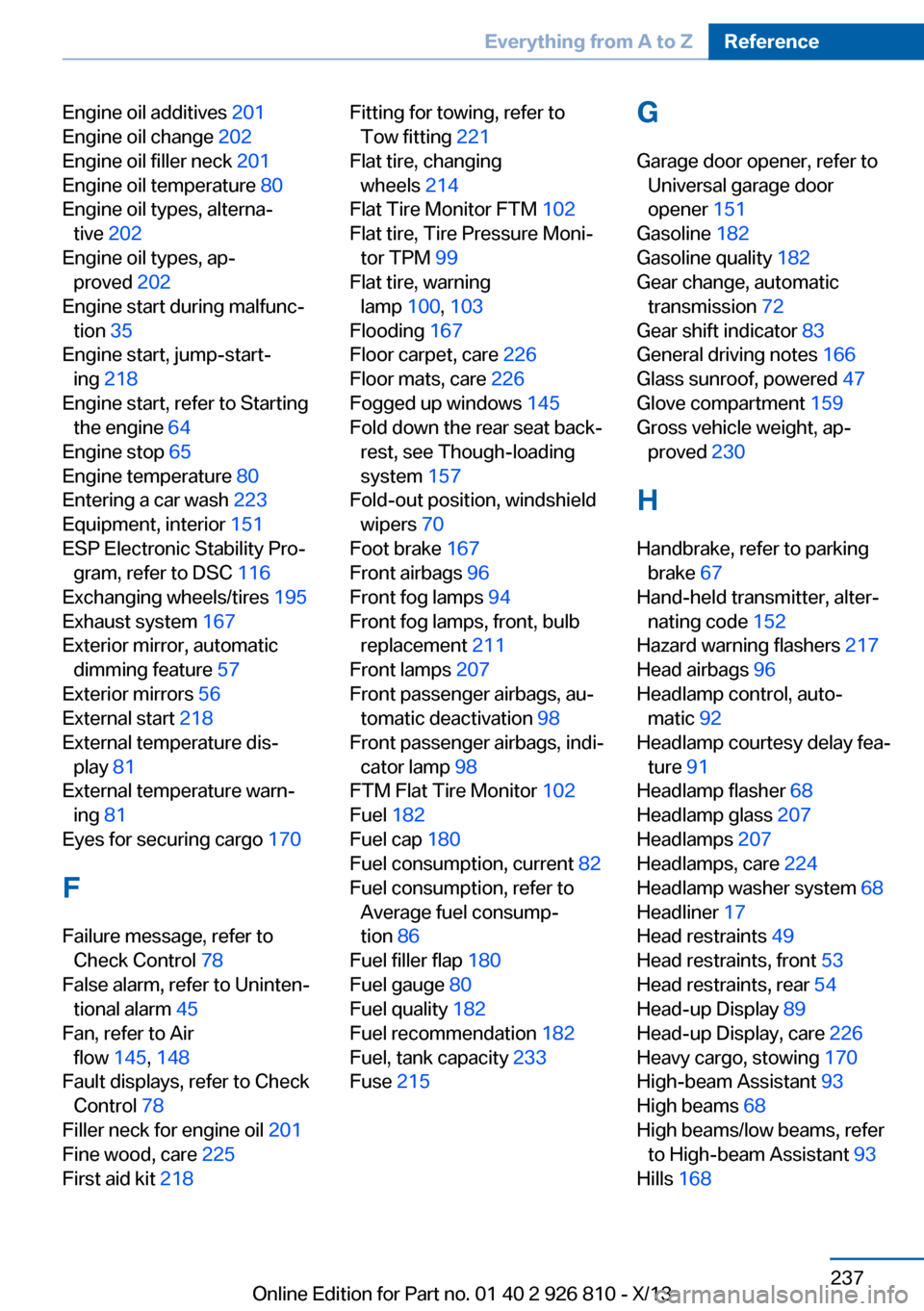
Engine oil additives 201
Engine oil change 202
Engine oil filler neck 201
Engine oil temperature 80
Engine oil types, alterna‐ tive 202
Engine oil types, ap‐ proved 202
Engine start during malfunc‐ tion 35
Engine start, jump-start‐ ing 218
Engine start, refer to Starting the engine 64
Engine stop 65
Engine temperature 80
Entering a car wash 223
Equipment, interior 151
ESP Electronic Stability Pro‐ gram, refer to DSC 116
Exchanging wheels/tires 195
Exhaust system 167
Exterior mirror, automatic dimming feature 57
Exterior mirrors 56
External start 218
External temperature dis‐ play 81
External temperature warn‐ ing 81
Eyes for securing cargo 170
F
Failure message, refer to Check Control 78
False alarm, refer to Uninten‐ tional alarm 45
Fan, refer to Air flow 145, 148
Fault displays, refer to Check Control 78
Filler neck for engine oil 201
Fine wood, care 225
First aid kit 218 Fitting for towing, refer to
Tow fitting 221
Flat tire, changing wheels 214
Flat Tire Monitor FTM 102
Flat tire, Tire Pressure Moni‐ tor TPM 99
Flat tire, warning lamp 100, 103
Flooding 167
Floor carpet, care 226
Floor mats, care 226
Fogged up windows 145
Fold down the rear seat back‐ rest, see Though-loading
system 157
Fold-out position, windshield wipers 70
Foot brake 167
Front airbags 96
Front fog lamps 94
Front fog lamps, front, bulb replacement 211
Front lamps 207
Front passenger airbags, au‐ tomatic deactivation 98
Front passenger airbags, indi‐ cator lamp 98
FTM Flat Tire Monitor 102
Fuel 182
Fuel cap 180
Fuel consumption, current 82
Fuel consumption, refer to Average fuel consump‐
tion 86
Fuel filler flap 180
Fuel gauge 80
Fuel quality 182
Fuel recommendation 182
Fuel, tank capacity 233
Fuse 215 G
Garage door opener, refer to Universal garage door
opener 151
Gasoline 182
Gasoline quality 182
Gear change, automatic transmission 72
Gear shift indicator 83
General driving notes 166
Glass sunroof, powered 47
Glove compartment 159
Gross vehicle weight, ap‐ proved 230
H
Handbrake, refer to parking brake 67
Hand-held transmitter, alter‐ nating code 152
Hazard warning flashers 217
Head airbags 96
Headlamp control, auto‐ matic 92
Headlamp courtesy delay fea‐ ture 91
Headlamp flasher 68
Headlamp glass 207
Headlamps 207
Headlamps, care 224
Headlamp washer system 68
Headliner 17
Head restraints 49
Head restraints, front 53
Head restraints, rear 54
Head-up Display 89
Head-up Display, care 226
Heavy cargo, stowing 170
High-beam Assistant 93
High beams 68
High beams/low beams, refer to High-beam Assistant 93
Hills 168 Seite 237Everything from A to ZReference237
Online Edition for Part no. 01 40 2 926 810 - X/13
Page 243 of 248
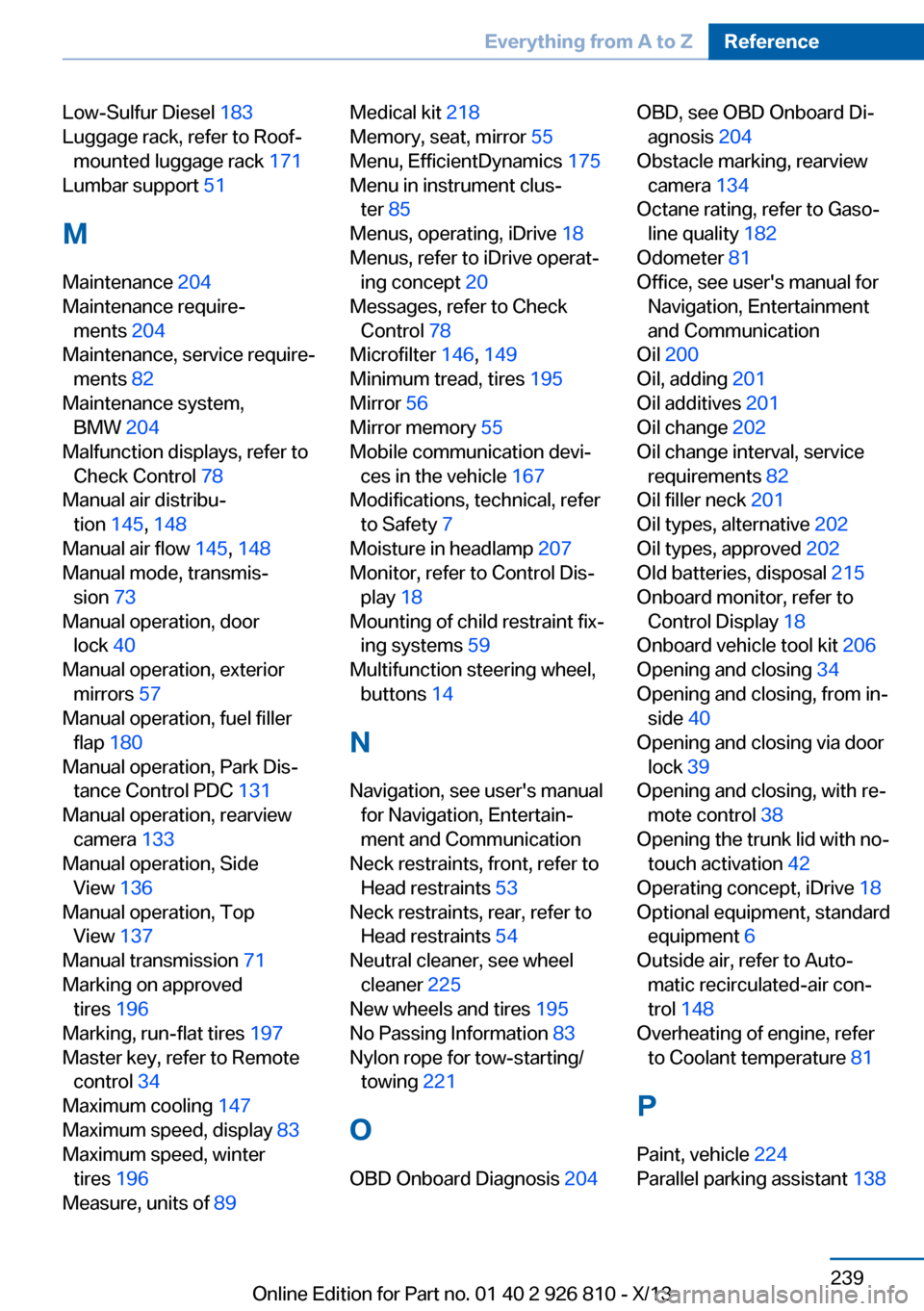
Low-Sulfur Diesel 183
Luggage rack, refer to Roof- mounted luggage rack 171
Lumbar support 51
M
Maintenance 204
Maintenance require‐ ments 204
Maintenance, service require‐ ments 82
Maintenance system, BMW 204
Malfunction displays, refer to Check Control 78
Manual air distribu‐ tion 145, 148
Manual air flow 145, 148
Manual mode, transmis‐ sion 73
Manual operation, door lock 40
Manual operation, exterior mirrors 57
Manual operation, fuel filler flap 180
Manual operation, Park Dis‐ tance Control PDC 131
Manual operation, rearview camera 133
Manual operation, Side View 136
Manual operation, Top View 137
Manual transmission 71
Marking on approved tires 196
Marking, run-flat tires 197
Master key, refer to Remote control 34
Maximum cooling 147
Maximum speed, display 83
Maximum speed, winter tires 196
Measure, units of 89 Medical kit 218
Memory, seat, mirror 55
Menu, EfficientDynamics 175
Menu in instrument clus‐ ter 85
Menus, operating, iDrive 18
Menus, refer to iDrive operat‐ ing concept 20
Messages, refer to Check Control 78
Microfilter 146, 149
Minimum tread, tires 195
Mirror 56
Mirror memory 55
Mobile communication devi‐ ces in the vehicle 167
Modifications, technical, refer to Safety 7
Moisture in headlamp 207
Monitor, refer to Control Dis‐ play 18
Mounting of child restraint fix‐ ing systems 59
Multifunction steering wheel, buttons 14
N Navigation, see user's manual for Navigation, Entertain‐
ment and Communication
Neck restraints, front, refer to Head restraints 53
Neck restraints, rear, refer to Head restraints 54
Neutral cleaner, see wheel cleaner 225
New wheels and tires 195
No Passing Information 83
Nylon rope for tow-starting/ towing 221
O OBD Onboard Diagnosis 204 OBD, see OBD Onboard Di‐
agnosis 204
Obstacle marking, rearview camera 134
Octane rating, refer to Gaso‐ line quality 182
Odometer 81
Office, see user's manual for Navigation, Entertainment
and Communication
Oil 200
Oil, adding 201
Oil additives 201
Oil change 202
Oil change interval, service requirements 82
Oil filler neck 201
Oil types, alternative 202
Oil types, approved 202
Old batteries, disposal 215
Onboard monitor, refer to Control Display 18
Onboard vehicle tool kit 206
Opening and closing 34
Opening and closing, from in‐ side 40
Opening and closing via door lock 39
Opening and closing, with re‐ mote control 38
Opening the trunk lid with no- touch activation 42
Operating concept, iDrive 18
Optional equipment, standard equipment 6
Outside air, refer to Auto‐ matic recirculated-air con‐
trol 148
Overheating of engine, refer to Coolant temperature 81
P Paint, vehicle 224
Parallel parking assistant 138 Seite 239Everything from A to ZReference239
Online Edition for Part no. 01 40 2 926 810 - X/13