dynamic BMW 3 SERIES SPORTS WAGON 2015 F31 Owner's Guide
[x] Cancel search | Manufacturer: BMW, Model Year: 2015, Model line: 3 SERIES SPORTS WAGON, Model: BMW 3 SERIES SPORTS WAGON 2015 F31Pages: 255, PDF Size: 5.6 MB
Page 137 of 255
When cruise control is maintained or stored,
DSC Dynamic Stability Control will be turned
on if needed.
Changing the speed
Press the rocker switch up or down repeatedly
until the desired speed is set.
If active, the displayed speed is stored and the
vehicle reaches the stored speed when the
road is clear.▷Each time the rocker switch is pressed to
the point of resistance, the desired speed
increases or decreases by approx.
1 mph/1 km/h.▷Each time the rocker switch is pressed
past the point of resistance, the desired
speed increases or decreases by a maxi‐
mum of 5 mph/10 km/h.
The maximum speed that can be set de‐
pends on the vehicle.▷Pressing the rocker switch to the resist‐
ance point and holding it accelerates or de‐
celerates the vehicle without requiring
pressure on the accelerator pedal.
After the rocker switch is released, the ve‐
hicle maintains its final speed. Pressing the
switch beyond the resistance point causes
the vehicle to accelerate more rapidly.
Resuming the desired speed
Press button.
The stored speed is reached and maintained. Displays in the instrument cluster
Indicator lamp Depending on how the vehicle is equip‐
ped, the indicator lamp in the instru‐
ment cluster indicates whether the sys‐
tem is switched on.
Desired speed▷The marking lights up green:
the system is active.▷The marking lights up or‐
ange: the system has been
interrupted.▷The marking does not light up: the system
is switched off.
Brief status display
Selected desired speed.
If --- appears briefly on the display for Check
Control messages, it is possible that the sys‐
tem requirements are currently not ready for
operations.
Displays in the Head-up Display Some system information can also be dis‐played in the Head-up Display.
PDC Park Distance Control
The concept PDC is a support when parking. When you
slowly approach an object in the rear - or also
in the front of the vehicle if the feature is availa‐
ble - then the object is reported through:
▷Signal tones.▷Visual display.
General information
Ultrasound sensors in the bumpers measure
the distances from objects.
The maneuvering range, depending on the ob‐
stacle and environmental conditions, is approx.
6 ft/2 m.
An acoustic warning is first given:
▷By the front sensors and the two rear cor‐
ner sensors at approx. 24 in/60 cm.Seite 133Driving comfortControls133
Online Edition for Part no. 01 40 2 960 493 - II/15
Page 180 of 255
Saving fuelVehicle features and optionsThis chapter describes all standard, country-
specific and optional features offered with the
series. It also describes features that are not
necessarily available in your car, e. g., due to
the selected options or country versions. This
also applies to safety-related functions and
systems. The respectively applicable country
provisions must be observed when using the
respective features and systems.
General information Your vehicle contains advanced technology for
the reduction of fuel consumption and emis‐
sions.
Fuel consumption depends on a number of dif‐
ferent factors.
Carrying out certain measures, such as a mod‐
erate driving style and regular maintenance,
can influence fuel consumption and the envi‐
ronmental impact.
Remove unnecessary cargo
Additional weight increases fuel consumption.
Remove attached parts
following use
Remove auxiliary mirrors, roof or rear luggage
racks which are no longer required following use.
Attached parts on the vehicle impair the aero‐
dynamics and increase the fuel consumption.Close the windows and glass
sunroof
Driving with the glass sunroof and windows
open results in increased air resistance and
thereby reduces the range.
Tires
General information Tires can affect fuel consumption in various
ways, e.g., tire size may influence fuel con‐
sumption.
Check the tire inflation pressure
regularly
Check and, if needed, correct the tire inflation
pressure at least twice a month and before
starting on a long trip.
Low tire inflation pressure increases rolling re‐
sistance and thus raises fuel consumption and
tire wear.
Drive away immediately
Do not wait for the engine to warm-up while
the vehicle remains stationary. Start driving
right away, but at moderate engine speeds.
This is the quickest way of warming the cold
engine up to operating temperature.
Look well ahead when
driving
Avoid unnecessary acceleration and braking.
By maintaining a suitable distance to the vehi‐
cle driving ahead of you.
Driving smoothly and proactively reduces fuel
consumption.Seite 176Driving tipsSaving fuel176
Online Edition for Part no. 01 40 2 960 493 - II/15
Page 182 of 255
The achieved extended range is displayed in
the instrument cluster as bonus range.
Overview
The system includes the following
EfficientDynamics functions and displays:▷ECO PRO bonus range, refer to page 178.▷ECO PRO tips driving instruction, refer to
page 179▷ECO PRO climate control, refer to
page 178.▷ECO PRO coasting driving status, refer to
page 180.▷ECO PRO driving style analysis, refer to
page 181.
Activate ECO PRO
Press button repeatedly until ECO
PRO is displayed in the instrument
cluster.
Configuring ECO PRO
Via the Driving Dynamics Control
1.Activate ECO PRO.2."Configure ECO PRO"3.Configure the program.
Via the iDrive
1."Settings"2."ECO PRO mode"
Or
1."Settings"2."Driving mode"3."Configure ECO PRO"
Configure the program.
ECO PRO Tip
▷"Tip at:":
Adjust the ECO PRO speed.▷"ECO PRO speed warning":
The output is reduced once the set ECO
PRO speed is reached.
Coasting
Fuel-efficiency can be optimized by disengag‐
ing the engine and Coasting, refer to
page 180, with the engine idling.
This function is only available in ECO PRO
mode.
ECO PRO climate control
"ECO PRO climate control"
Climate control is set to be fuel-efficient.
By making a slight change to the set tempera‐
ture, or slowly adjusting the rate of heating or
cooling of the car's interior, fuel consumption
can be economized.
The mirror heating is made available when out‐
side temperatures are very cold.
ECO PRO potential Shows potential savings with the current set‐
tings in percentages.
Display in the instrument cluster
ECO PRO bonus range An adjusted driving style helps
you extend your driving range.
This may be displayed as the
bonus range in the instrument
cluster.
The bonus range is shown in the range display.
The bonus range is automatically reset every
time the vehicle is refueled.
Seite 178Driving tipsSaving fuel178
Online Edition for Part no. 01 40 2 960 493 - II/15
Page 184 of 255
Indications on the Control DisplayEfficientDynamics Information on fuel consumption and technol‐
ogy can be displayed while driving.1."Vehicle info"2."EfficientDynamics"
Displaying fuel consumption history
The average fuel consumption can be dis‐
played within an adjustable time frame.
Vertical bars show consumption for the se‐
lected time frame.
Trip interruptions are represented below the
bar on the time axis.
"Consumption history"
Adjusting fuel consumption history time frame
Select the symbol.
Resetting fuel consumption history
1.Open "Options".2."Reset consumption history"
Displaying EfficientDynamics info
The current efficiency can be displayed.
"EfficientDynamics info"
The following systems are displayed:
▷Auto Start/Stop function.▷Energy recovery.▷Climate control output.▷Coasting.
Display ECO PRO tips
"ECO PRO Tips"
Settings are stored for the profile currently in
use.
Coasting
The concept The system helps to conserve fuel.
To do this, under certain conditions the engine
is automatically decoupled from the transmis‐
sion when selector lever position D is set. The
vehicle continues traveling with the engine idling to reduce fuel consumption. Selector
lever position D remains engaged.
This driving condition is referred to as coast‐
ing.
As soon as you step on the brake or accelera‐
tor pedal, the engine is automatically coupled
again.
Hints
Coasting is a component of the ECO PRO, re‐
fer to page 177, driving mode.
Coasting is automatically activated when ECO
PRO mode is called via the Driving Dynamics
Control.
The function is available in a certain speed
range.
A proactively driving style helps the driver to
use the function as often as possible and sup‐
ports the fuel-conserving effect of coasting.
Safety mode
The function is not available under one of the
following conditions.▷DSC OFF or TRACTION activated.▷Driving in the dynamic limit range and on
steep uphill or downhill grades.▷Battery charge status temporarily too low
or vehicle electrical system drawing exces‐
sive current.▷Cruise control activated.
Functional requirements
In ECO PRO mode, this function is available in
a speed range from approximately 30 mph, ap‐
Seite 180Driving tipsSaving fuel180
Online Edition for Part no. 01 40 2 960 493 - II/15
Page 185 of 255
prox. 50 km/h to 100 mph, approx. 160 km/h, if
the following conditions are met:▷Accelerator pedal and brake pedal are not
operated.▷The selector lever is in selector lever posi‐
tion D.▷Engine and transmission are at operating
temperature.
The driving status Coast can be influenced
with the shift paddles.
Display Display in the instrument cluster
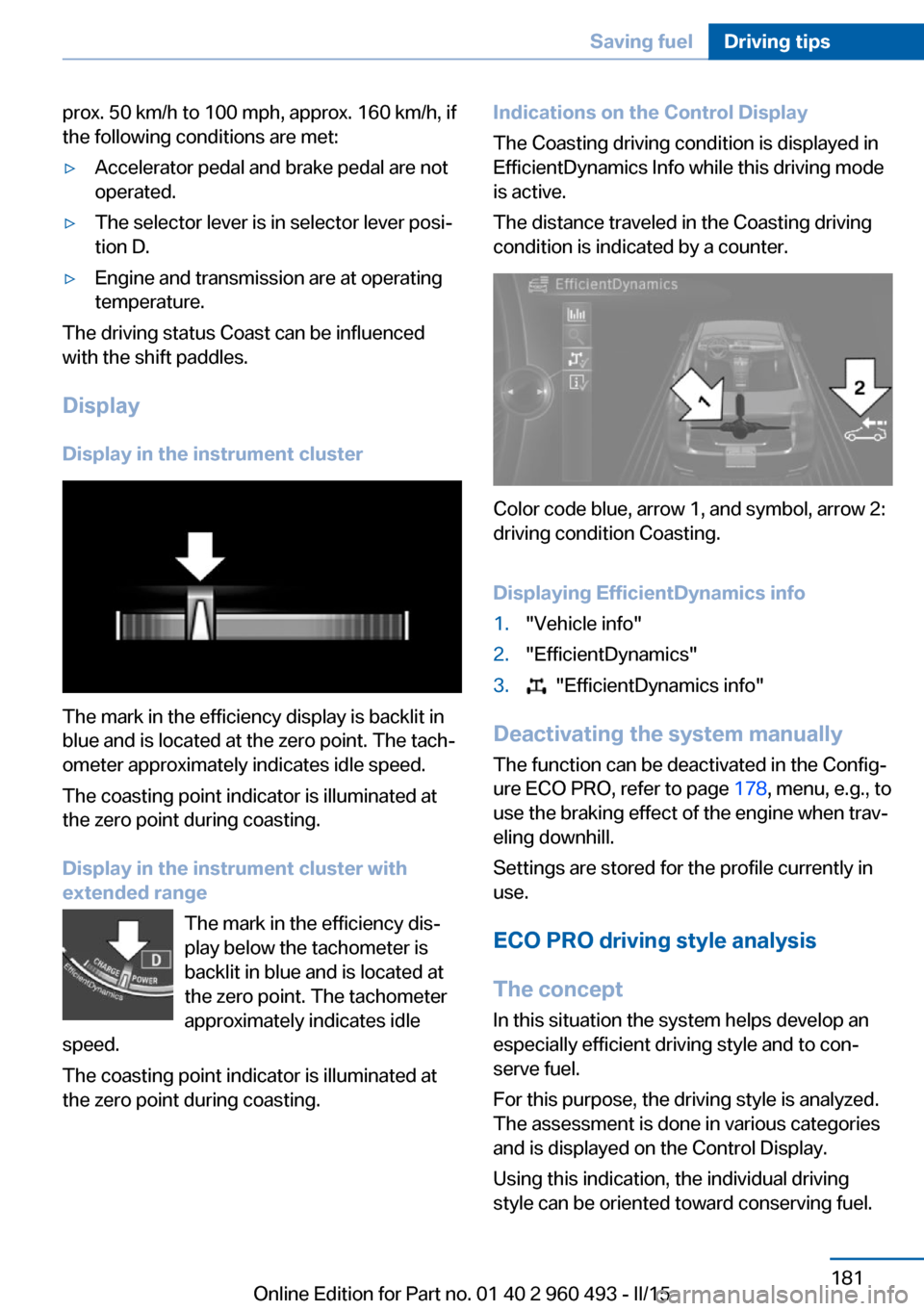
The mark in the efficiency display is backlit in
blue and is located at the zero point. The tach‐
ometer approximately indicates idle speed.
The coasting point indicator is illuminated at
the zero point during coasting.
Display in the instrument cluster with
extended range
The mark in the efficiency dis‐
play below the tachometer is
backlit in blue and is located at
the zero point. The tachometer
approximately indicates idle
speed.
The coasting point indicator is illuminated at
the zero point during coasting.
Indications on the Control Display
The Coasting driving condition is displayed in
EfficientDynamics Info while this driving mode
is active.
The distance traveled in the Coasting driving
condition is indicated by a counter.
Color code blue, arrow 1, and symbol, arrow 2:
driving condition Coasting.
Displaying EfficientDynamics info
1."Vehicle info"2."EfficientDynamics"3. "EfficientDynamics info"
Deactivating the system manually The function can be deactivated in the Config‐
ure ECO PRO, refer to page 178, menu, e.g., to
use the braking effect of the engine when trav‐
eling downhill.
Settings are stored for the profile currently in
use.
ECO PRO driving style analysis
The concept
In this situation the system helps develop an
especially efficient driving style and to con‐
serve fuel.
For this purpose, the driving style is analyzed.
The assessment is done in various categories
and is displayed on the Control Display.
Using this indication, the individual driving
style can be oriented toward conserving fuel.
Seite 181Saving fuelDriving tips181
Online Edition for Part no. 01 40 2 960 493 - II/15
Page 186 of 255
The last fifteen minutes of a trip are evaluated.
The range of the vehicle can be extended by
an efficient driving style.
This gain in range is displayed as a bonus
range in the instrument cluster and on the
Control Display.
Functional requirement
The function is only available in ECO PRO
mode.
Calling up ECO PRO driving style
analysis1.Activate ECO PRO.2."EfficientDynamics"3. Select the symbol.
Display on the Control Display
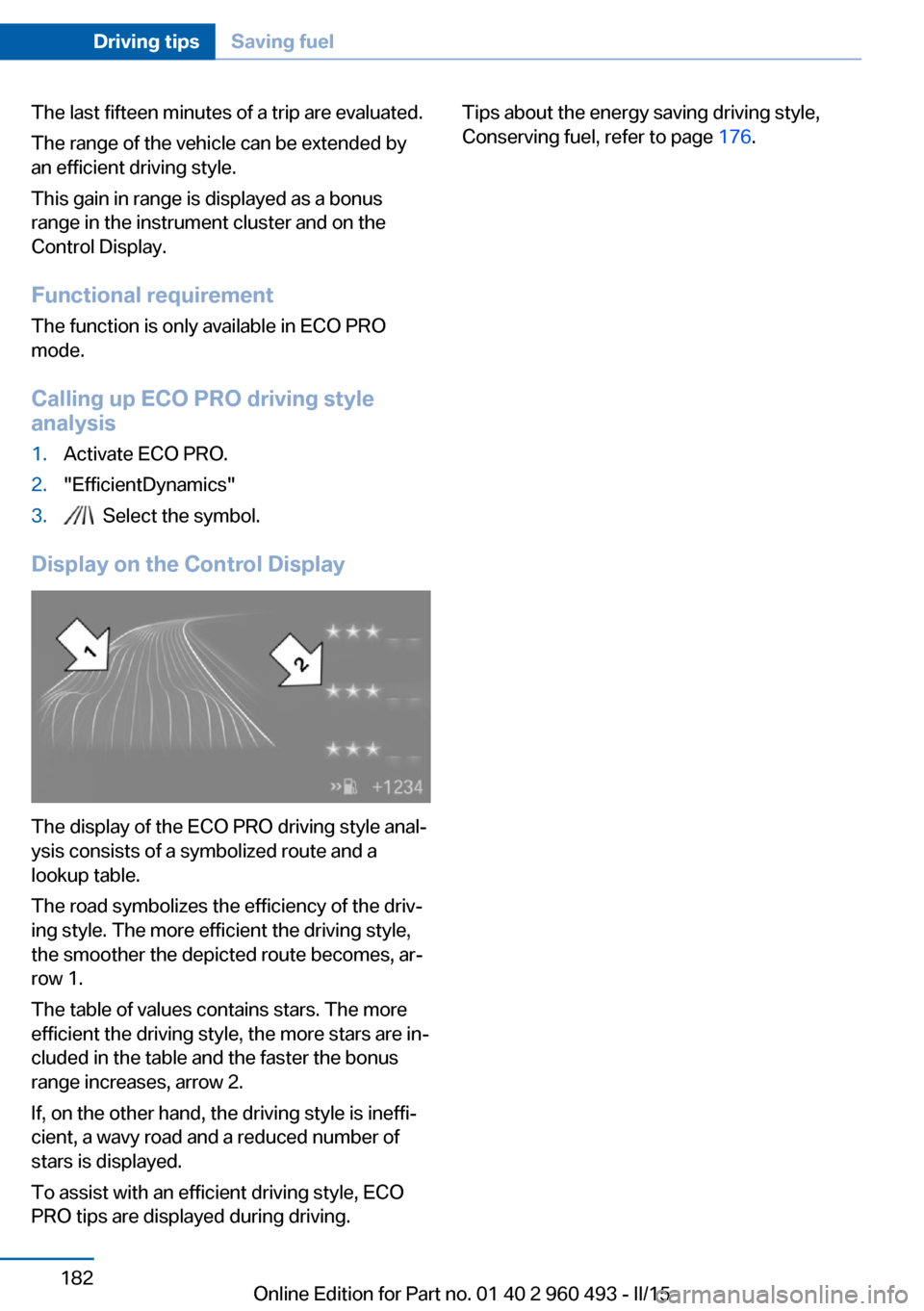
The display of the ECO PRO driving style anal‐
ysis consists of a symbolized route and a
lookup table.
The road symbolizes the efficiency of the driv‐
ing style. The more efficient the driving style,
the smoother the depicted route becomes, ar‐
row 1.
The table of values contains stars. The more
efficient the driving style, the more stars are in‐
cluded in the table and the faster the bonus
range increases, arrow 2.
If, on the other hand, the driving style is ineffi‐
cient, a wavy road and a reduced number of
stars is displayed.
To assist with an efficient driving style, ECO
PRO tips are displayed during driving.
Tips about the energy saving driving style,
Conserving fuel, refer to page 176.Seite 182Driving tipsSaving fuel182
Online Edition for Part no. 01 40 2 960 493 - II/15
Page 207 of 255
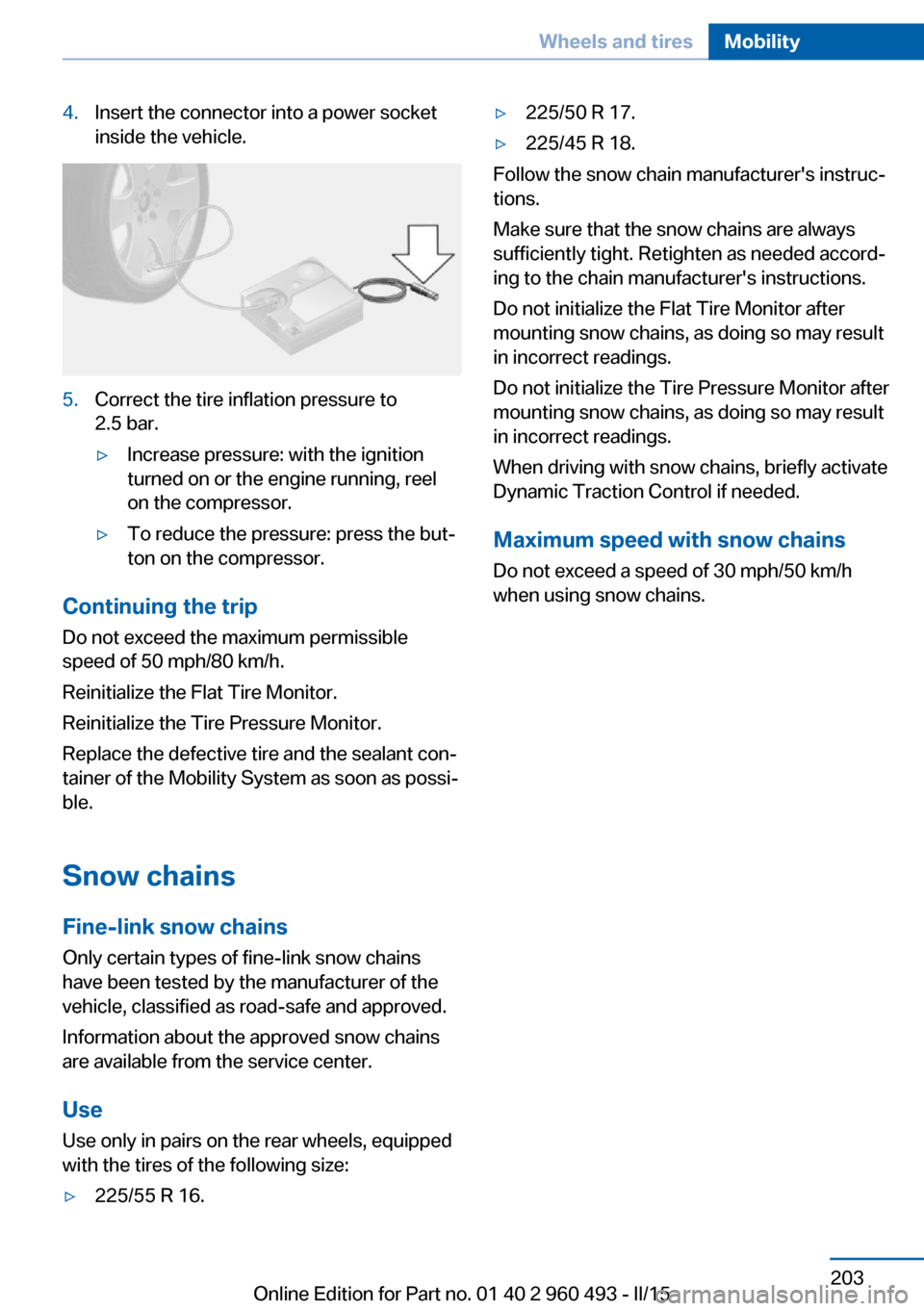
4.Insert the connector into a power socket
inside the vehicle.5.Correct the tire inflation pressure to
2.5 bar.▷Increase pressure: with the ignition
turned on or the engine running, reel
on the compressor.▷To reduce the pressure: press the but‐
ton on the compressor.
Continuing the trip
Do not exceed the maximum permissible
speed of 50 mph/80 km/h.
Reinitialize the Flat Tire Monitor.
Reinitialize the Tire Pressure Monitor.
Replace the defective tire and the sealant con‐
tainer of the Mobility System as soon as possi‐
ble.
Snow chains Fine-link snow chains
Only certain types of fine-link snow chains
have been tested by the manufacturer of the
vehicle, classified as road-safe and approved.
Information about the approved snow chains
are available from the service center.
Use
Use only in pairs on the rear wheels, equipped
with the tires of the following size:
▷225/55 R 16.▷225/50 R 17.▷225/45 R 18.
Follow the snow chain manufacturer's instruc‐
tions.
Make sure that the snow chains are always
sufficiently tight. Retighten as needed accord‐
ing to the chain manufacturer's instructions.
Do not initialize the Flat Tire Monitor after
mounting snow chains, as doing so may result
in incorrect readings.
Do not initialize the Tire Pressure Monitor after
mounting snow chains, as doing so may result
in incorrect readings.
When driving with snow chains, briefly activate
Dynamic Traction Control if needed.
Maximum speed with snow chains Do not exceed a speed of 30 mph/50 km/hwhen using snow chains.
Seite 203Wheels and tiresMobility203
Online Edition for Part no. 01 40 2 960 493 - II/15
Page 246 of 255
tertainment and Communi‐
cation
ConnectedDrive Services
Connecting electrical devi‐ ces 157
Continued driving with a flat tire 103 , 106
Control Display 18
Control Display, settings 90
Controller 18, 19
Control systems, driving sta‐ bility 120
Convenient opening with the remote control 37
Coolant 209
Coolant level 209
Coolant temperature 83
Cooling function 147, 150
Cooling, maximum 149
Cooling system 209
Cornering light 94
Corrosion on brake discs 172
Cosmetic mirror 157
Courtesy lamps during un‐ locking 37
Courtesy lamps with the vehi‐ cle locked 38
Cruise control 131
Cruise control, active with Stop & Go 125
Cruising range 83
Cupholders 165
Current fuel consumption 84
D
Damage, tires 197
Damping control, dy‐ namic 122
Data, technical 236
Date 83
Daytime running lights 94
Defrosting, refer to defrosting the windows 147
Defrosting, refer to Windows, defrosting 151 Defrosting the windows 147
Dehumidifying, air 147, 150
Deleting personal data 25
Deletion of personal data 25
Destination distance 88
Diesel exhaust fluid, at low temperatures 190
Diesel exhaust fluid, having refilled 190
Diesel exhaust fluid, on mini‐ mum 190
Diesel exhaust fluid, replen‐ ishing yourself 190
Diesel particulate filter 171
Digital clock 83
Digital compass 155
Dimensions 236
Dimmable exterior mirrors 59
Dimmable interior rearview mirror 60
Direction indicator, refer to Turn signals 70
Display, electronic, instru‐ ment cluster 78
Display in windshield 91
Display lighting, refer to In‐ strument lighting 96
Displays, cleaning 233
Disposal, coolant 209
Disposal, vehicle battery 222
Distance control, refer to PDC 133
Distance to destination 88
Divided screen view, split screen 23
Door lock 39
Door lock, refer to Remote control 34
Drive-off assistant 124
Drive-off assistant, refer to DSC 120
Driver assistance, refer to In‐ telligent Safety 107
Driving Assistant, refer to In‐ telligent Safety 107 Driving Dynamics Con‐
trol 122
Driving instructions, break- in 170
Driving mode 122
Driving notes, general 170
Driving stability control sys‐ tems 120
Driving style analysis 181
Driving tips 170
DSC Dynamic Stability Con‐ trol 120
DTC Dynamic Traction Con‐ trol 121
Dynamic Damping Con‐ trol 122
Dynamic Stability Control DSC 120
Dynamic Traction Control DTC 121
E
ECO PRO 177
ECO PRO, bonus range 178
ECO PRO display 177
ECO PRO driving mode 177
ECO PRO driving style analy‐ sis 181
ECO PRO mode 177
ECO PRO Tip - driving in‐ struction 179
EfficientDynamics 180
Electronic displays, instru‐ ment cluster 78
Electronic oil measure‐ ment 206
Electronic Stability Program ESP, refer to DSC 120
Emergency detection, remote control 35
Emergency release, fuel filler flap 186
Emergency Request 224
Emergency start function, en‐ gine start 35 Seite 242ReferenceEverything from A to Z242
Online Edition for Part no. 01 40 2 960 493 - II/15
Page 249 of 255
Lights and bulbs 213
Light switch 93
Load 174
Loading 173
Lock, door 39
Locking/unlocking via door lock 39
Locking/unlocking with re‐ mote control 37
Locking, automatic 45
Locking, settings 45
Lock, power window 48
Locks, doors, and win‐ dows 64
Low beams 93
Low beams, automatic, refer to High-beam Assistant 95
Lower back support 53
Low-Sulfur Diesel 189
Luggage rack, see Roof- mounted luggage rack 175
Lumbar support 53
M
Maintenance 210
Maintenance require‐ ments 210
Maintenance, service require‐ ments 84
Maintenance system, BMW 210
Make-up mirror 157
Malfunction displays, see Check Control 79
Manual air distribu‐ tion 147, 150
Manual air flow 147, 150
Manual mode, Steptronic transmission 75
Manual operation, door lock 39
Manual operation, exterior mirrors 59
Manual operation, fuel filler flap 186 Manual operation, Park Dis‐
tance Control PDC 134
Manual operation, rearview camera 137
Manual operation, Side View 139
Manual operation, Top View 140
Manual transmission 73
Marking on approved tires 198
Marking, run-flat tires 199
Master key, refer to Remote control 34
Maximum cooling 149
Maximum speed, display 86
Maximum speed, winter tires 199
Measure, units of 91
Medical kit 225
Memory, seat, mirror 57
Menu, EfficientDynamics 180
Menu in instrument clus‐ ter 87
Menus, operating, iDrive 18
Menus, refer to iDrive operat‐ ing concept 20
Messages, see Check Con‐ trol 79
Microfilter 148, 151
Minimum tread, tires 197
Mirror 58
Mirror memory 57
Mobile communication devi‐ ces in the vehicle 171
Mobility System 199
Modifications, technical, refer to Safety 7
Moisture in headlight 213
Monitor, refer to Control Dis‐ play 18
Mounting of child restraint systems 61
Multifunction steering wheel, buttons 14 N
Navigation, see user's manual for Navigation, Entertain‐
ment and Communication
Neck restraints, front, refer to Head restraints 55
Neck restraints, rear, refer to Head restraints 56
Neutral cleaner, see wheel cleaner 232
New wheels and tires 198
Nylon rope for tow-starting/ towing 228
O OBD Onboard Diagnosis 211
OBD, see OBD Onboard Di‐ agnosis 211
Obstacle marking, rearview camera 137
Octane rating, refer to Rec‐ ommended fuel grade 188
Odometer 83
Office, see user's manual for Navigation, Entertainment
and Communication
Oil 206
Oil, adding 207
Oil additives 208
Oil change 208
Oil change interval, service requirements 84
Oil filler neck 207
Oil types, alternative 208
Oil types, approved 208
Old batteries, disposal 222
On-board computer 87
Onboard monitor, refer to Control Display 18
Onboard vehicle tool kit 212
Opening/closing via door lock 39
Opening and closing 34 Seite 245Everything from A to ZReference245
Online Edition for Part no. 01 40 2 960 493 - II/15
Page 251 of 255
Safety belt reminder for driv‐er's seat and front passen‐
ger seat 55
Safety belts 54
Safety belts, care 233
Safety switch, windows 48
Safety systems, airbags 98
Saving fuel 176
Screen, refer to Control Dis‐ play 18
Screwdriver, see Onboard ve‐ hicle tool kit 212
Screw thread, see screw thread for tow fitting, screw
thread for tow fitting 229
Sealant 199
Seat and mirror memory 57
Seat belts, refer to Safety belts 54
Seat heating, front 54
Seat heating, rear 54
Seating position for chil‐ dren 61
Seats 51
Selection list in instrument cluster 87
Selector lever, Steptronic transmission 74
Sensors, care 233
Service and warranty 8
Service requirements, Condi‐ tion Based Service
CBS 210
Service requirements, dis‐ play 84
Services, ConnectedDrive
Servotronic 124
SET button, see Active Cruise Control, ACC 125
SET button, see Cruise con‐ trol 131
Settings, locking/unlock‐ ing 45
Settings on Control Dis‐ play 90 Settings, storing for seat, mir‐
ror 57
Shift paddles on the steering wheel 76
Side airbags 98
Side View 138
Signaling, horn 14
Signals when unlocking 45
Sitting safely 51
Size 236
Slide/tilt glass roof 48
Smallest turning radius 236
Snow chains 203
Socket 157
Socket, OBD Onboard Diag‐ nostics 211
Soot particulate filter 171
SOS button 224
Spare fuse 222
Specified engine oil types 208
Speed, average 88
Speed limit detection, on- board computer 89
Speed limiter, display 86
Speed Limit Information 86
Speed warning 89
Split screen 23
SPORT+ - program, Dynamic Driving Control 123
Sport displays, torque dis‐ play, performance dis‐
play 89
SPORT program, Dynamic Driving Control 123
Sport program, transmis‐ sion 75
Sport steering, variable 122
Stability control systems 120
Start/stop, automatic func‐ tion 67
Start/Stop button 65
Start function during malfunc‐ tion 35
Starting the engine 66 Status control display,
tires 102
Status information, iDrive 23
Status of Owner's Manual 7
Steering assistance 124
Steering wheel, adjusting 60
Steering wheel heating 60
Steptronic Sport transmis‐ sion, refer to Steptronic
transmission 73
Steptronic transmission 73
Stopping the engine 67
Storage compartment in the rear 165
Storage compartments 163
Storage compartments, loca‐ tions 163
Storage, tires 199
Storing the vehicle 233
Suitable engine oils 208
Summer tires, tread 197
Sun visor 157
Supplementary text mes‐ sage 82
Surround View 136
Switch for Dynamic Driv‐ ing 122
Switch-on times, parked-car ventilation 152
Switch, refer to Cockpit 14
Symbols 6
Symbols in the status field 23
T Tachometer 82
Tailgate, automatic 40
Tailgate, closing with no- touch activation 43
Tailgate, opening with no- touch activation 43
Tailgate via remote con‐ trol 38
Tail lights 218
Technical changes, refer to Safety 7 Seite 247Everything from A to ZReference247
Online Edition for Part no. 01 40 2 960 493 - II/15