lock BMW 323i 1992 E36 Workshop Manual
[x] Cancel search | Manufacturer: BMW, Model Year: 1992, Model line: 323i, Model: BMW 323i 1992 E36Pages: 759
Page 417 of 759
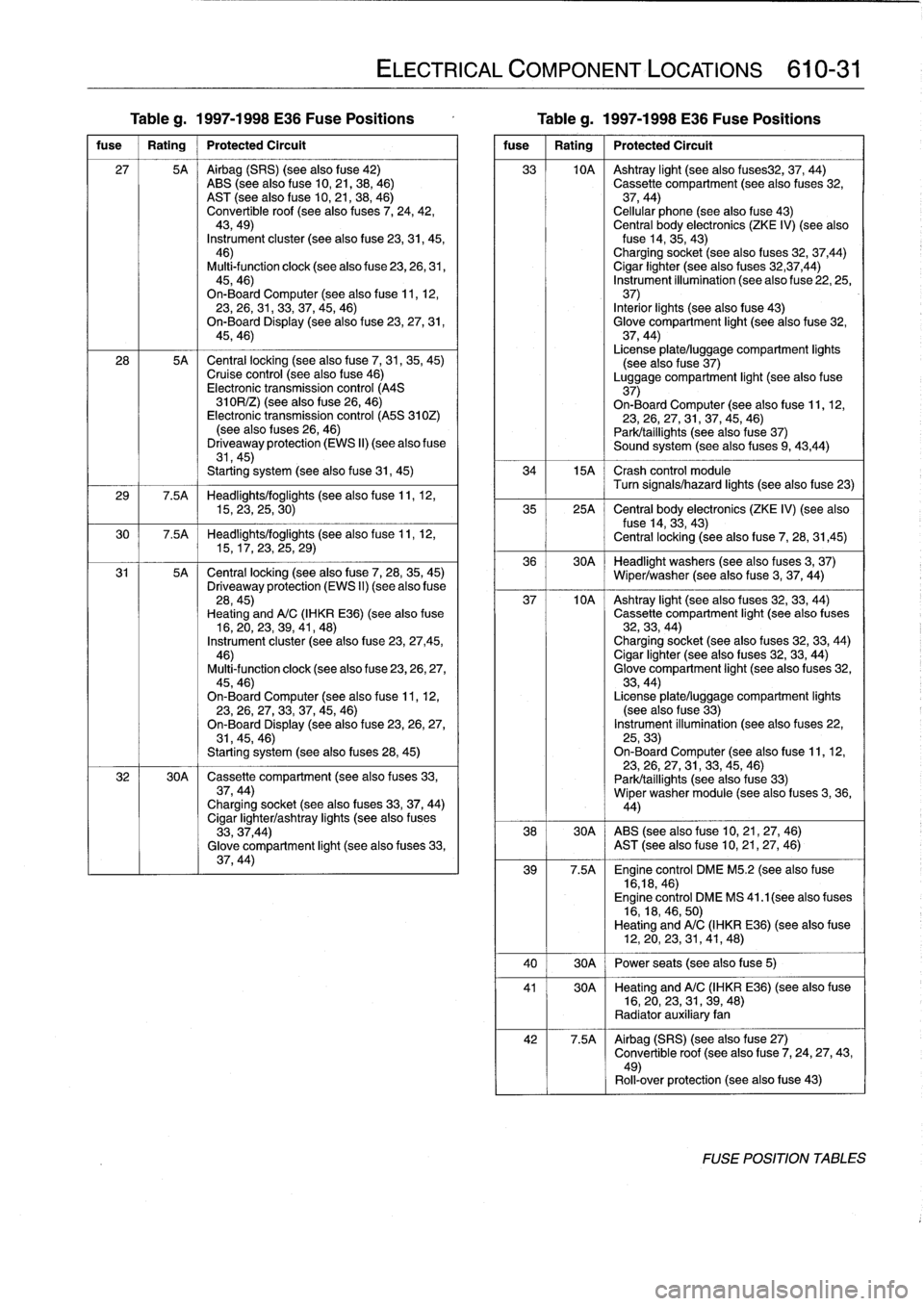
Table
g
.
1997-1998
E36
Fuse
Positions
Table
g
.
1997-1998
E36
Fuse
Positions
fuse
1
Rating
1
Protected
Circuit
27
5A
Airbag
(SRS)
(seealsofuse
42)
ABS
(see
also
fuse
10,21,38,
46)
AST
(see
alsofuse
10,
21,
38,
46)
Convertible
roof
(see
also
fuses
7,
24,
42,
43,49)
Instrument
cluster
(see
alsofuse
23,31,
45,46)
Multi-function
clock
(see
also
fuse
23,
26,
31,
45,46)
On-Board
Computer
(see
alsofuse
11,12,23,26,31,33,37,45,
46)
On-Board
Display
(see
also
f
use
23,27,
31,
45,46)
28
5A
Central
locking
(see
also
fuse
7,
31,35,
45)Cruise
control
(see
also
fuse
46)
Electronic
transmission
control
(A4S
310R/Z)
(seealso
f
use
26,
46)
Electronic
transmission
control
(A5S
310Z)
(seealso
(uses
26,
46)
Driveaway
protection
(EWS
II)
(see
also
fuse
31,45)
Starting
system
(seealsofuse
31,
45)
29
7
.5A
Headlights/foglights
(seealsofuse
11,
12,15,23,
25,
30)
30
7
.5A
Headlights/foglights
(seealsofuse
11,
12,15,
17,
23,25,
29)
31
5A
Central
locking
(seealsofuse
7,
28,
35,
45)
Driveaway
protection
(EWS
II)
(see
also
fuse
28,45)
Heating
andA/C
(IHKR
E36)(see
also
fuse
16,20,23,39,41,
48)
Instrument
cluster
(see
alsofuse
23,
27,45,
46)
Multi-function
clock
(see
alsofuse
23,26,27,
45,46)
On-BoardComputer
(seealsofuse
11,12,23,26,27,33,37,
45,46)
On-Board
Display
(seealso
f
use
23,
26,
27,31,45,46)
Starting
system
(see
also
fuses
28,
45)
32
30A
Cassette
compartment
(seealso
f
uses
33,
37,44)Charging
socket
(see
also
fuses
33,37,
44)
Cigar
lighter/ashtray
lights
(seealso
f
uses
33,37,44)
Glove
compartment
light
(see
also
fuses
33,
37,44)
ELECTRICAL
COMPONENT
LOCATIONS
610-31
fuse
1
Rating
1
Protected
Circuit
33
10A
Ashtray
light
(seealso
fuses32,
37,
44)
Cassette
compartment
(seealso
fuses
32,
37,44)
Cellular
phone
(seealso
fuse
43)
Central
body
electronics
(ZKE
IV)
(seealsofuse
14,
35,
43)
Charging
socket
(seealso
fuses
32,
37,44)
Cigar
lighter
(seealso
fuses
32,37,44)
Instrument
illumination
(see
also
fuse
22,
25,37)
Interior
¡ights
(seealso
fuse
43)
Glove
compartment
light
(see
also
fuse
32,
37,44)
License
plate/luggage
compartment
lights
(see
also
fuse
37)
Luggage
compartment
light
(seealso
f
use
37)
On-BoardComputer
(see
also
f
use
11,12,
23,26,
27,
31,37,45,
46)
Park/taillights
(seealsofuse
37)
Sound
system
(seealso
fuses
9,
43,44)
34
15A
Crash
control
module
Turn
signals/hazard
lights
(see
alsofuse
23)
35
25A
~
Central
body
electronics
(ZKE
IV)
(see
also
fuse
14,
33,
43)
Central
locking
(see
also
f
use
7,
28,
31,45)
36
30A
Headlight
washers
(see
also
fuses
3,
37)
Wiper/washer
(seealsofuse
3,
37,
44)
37
10A
Ashtray
light
(see
also
(uses
32,33,
44)
Cassette
compartment
light
(seealso
fuses
32,
33,
44)
Charging
socket
(see
also
fuses
32,
33,44)
Cigar
lighter
(see
also
f
uses
32,33,
44)
Glove
compartment
light
(see
also
fuses
32,
33,44)
License
plate/luggage
compartment
lights
(seealso
f
use
33)
Instrument
illumination
(seealso
fuses
22,
25,33)
On-Board
Computer
(seealsofuse
11,12,23,
26,
27,31,33,
45,
46)
Park/taillights
(see
alsofuse
33)
Wiper
washer
module
(see
also
f
uses
3,
36,
44)
38
30A
ABS
(seealsofuse
10,
21,
27,
46)
AST
(see
also
fuse
10,21,27,
46)
39
7
.5A
Engine
control
DME
M5
.2
(see
also
fuse
16,18,
46)
Engine
control
DME
MS
41
.1
(seealso
fuses
16,18,46,
50)
Heating
andA/C
(IHKR
E36)
(see
alsofuse
12,20,23,31,
41,48)
40
30A
Power
seats
(seealsofuse
5)
41
30A
~
Heating
andA/C
(IHKR
E36)
(see
alsofuse
16,20,23,
31,
39,
48)
Radiator
auxiliary
fan
42
7
.5A
Airbag
(SRS)
(seealsofuse
27)
Convertible
roof
(seealso
f
use
7,
24,27,43,
49)
Rol¡-over
protection
(seealso
f
use
43)
FOSE
POSITION
TABLES
Page 418 of 759
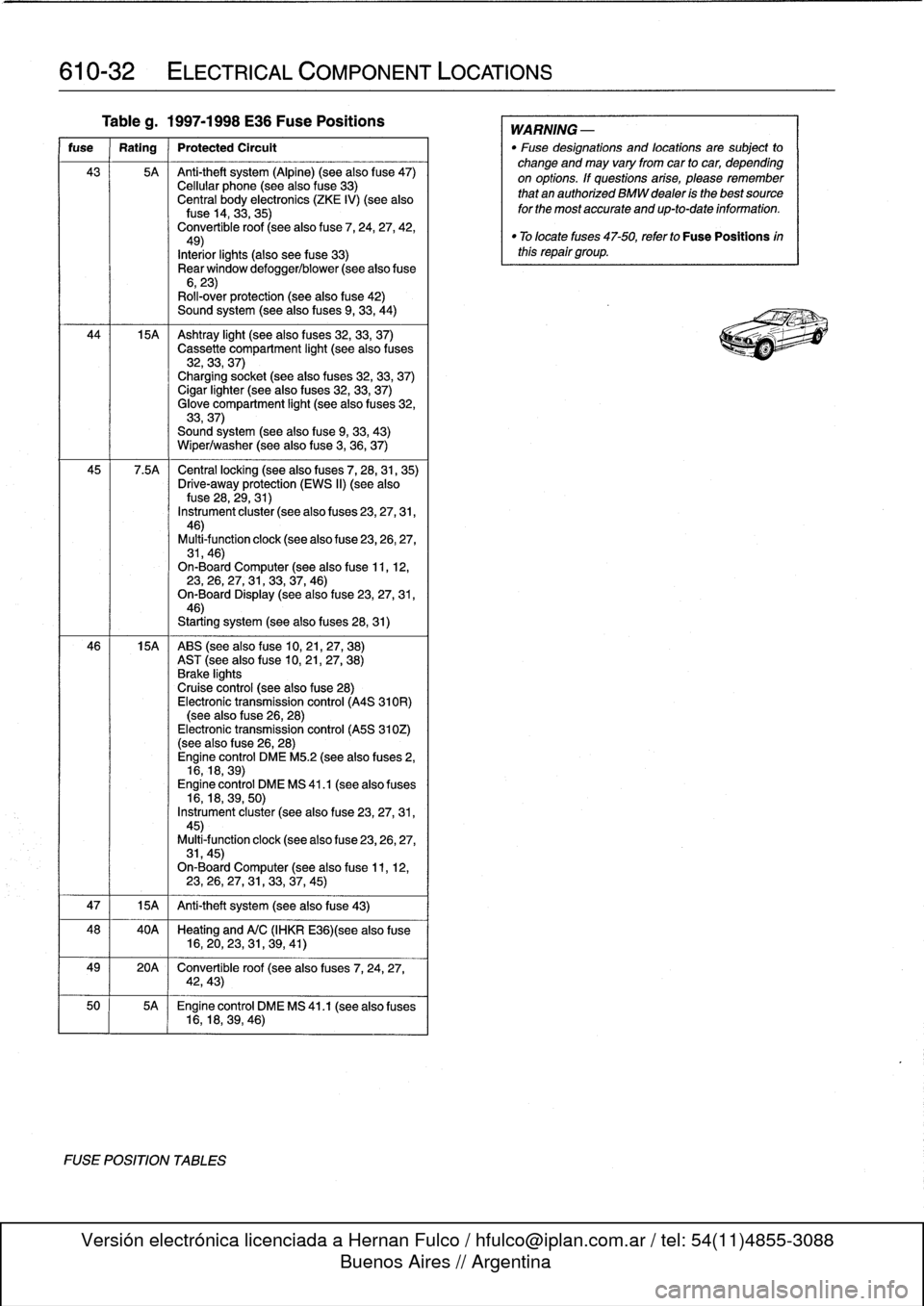
610-32
ELECTRICAL
COMPONENT
LOCATIONS
Tableg
.
1997-1998
E36
Fuse
Positions
fuse
Rating
Protected
Circult
43
5A
Anti-theft
system
(Alpine)
(see
also
f
use47)
Cellular
phone
(seealso
fuse
33)
Central
body
electronics
(ZKE
IV)
(see
alsofuse
14,
33,35)
Convertible
roof
(seealso
fuse
7,
24,
27,
42,49)
Interiorlights
(also
see
fuse
33)
Rear
window
defogger/blower
(see
alsofuse
6,23)
Roll-over
protection
(see
also
fuse
42)
Sound
system
(seealso
fuses
9,
33,
44)
44
15A
Ashtray
light
(seealso
f
uses
32,
33,
37)
Cassette
compartment
light
(seealso
fuses
32,33,
37)
Charging
socket
(seealso
fuses
32,33,
37)
Cigar
lighter
(seealso
fuses
32,33,
37)
Glove
compartment
light
(seealso
f
uses
32,
33,37)
Sound
system
(seealsofuse
9,
33,
43)
Wiper/washer
(seealsofuse
3,
36,
37)
45
7
.5A
Central
locking
(see
also
fuses
7,
28,31,
35)
Drive-away
protection
(EWS
II)
(see
alsofuse
28,
29,31)
Instrument
cluster
(see
also
f
uses
23,27,31,
46)
Multi-function
clock
(see
also
f
use
23,26,27,
31,46)
On-Board
Computer
(see
alsofuse
11,
12,23,
26,27,
31,33,37,
46)
On-Board
Display
(seealsofuse
23,27,31,
46)
Starting
system
(seealso
fuses
28,31)
46
15A
ABS
(see
also
fuse
10,21,27,
38)
AST
(seealsofuse
10,
21,27,
38)
Brake
lights
Cruise
control
(see
also
fuse
28)
Electronic
transmission
control
(A4S
310R)
(see
also
fuse
26,
28)
Electronic
transmission
control
(A5S
310Z)
(see
also
f
use
26,28)
Engine
control
DME
M5
.2
(see
also
fuses
2,
16,18,
39)
Engine
control
DME
MS
41
.1
(seealso
fuses
16,18,39,
50)
Instrument
cluster
(see
also
fuse
23,27,31,
45)
Multi4unction
clock
(see
also
fuse
23,26,27,
31,45)
On-Board
Computer
(seealsofuse
11,
12,23,26,27,
31,
33,37,
45)
47
1
15A
1
Anti-theft
system
(see
also
fuse
43)
48
40A
Heating
and
A/C
(IHKR
E36)(see
also
fuse
16,20,23,
31,
39,
41)
49
20A
Convertible
roof
(see
also
fuses
7,
24,
27,
42,43)
50
5A
Engine
control
DME
MS
41
.1
(seealso
fuses
16,18,39,
46)
FUSE
POSITION
TABLES
WARNING
-
"
Fuse
designations
and
locations
are
subject
to
change
and
may
vary
fromcar
to
car,
depending
on
options
.
If
questions
arise,
please
remember
that
an
authorized
BMW
dealer
is
the
bestsource
for
the
most
accurate
and
up-to-date
information
.
"
Tolocate
fuses
47-50,
refer
to
Fuse
Positions
inthis
repair
group
.
Page 420 of 759

611-2
WIPERS
AND
WASHERS
5
.
Slide
new
insert
through
wiperblade
guides
.
Lock
in-
sert
m
place
at
end
gudes
.
.,
\
-
-
--
,
1
Wiper
arms,
removing
and
installing
Fig
.
1
.
Windshield
wiper
biade
retaining
tab
.
Press
in
on
tab
(arrow)
to
release
bfade
from
arm
.
4
.
Installation
is
reverse
of
removal
.
Instan
wiperblade
to
wiper
arm
until
retaining
tab
can
be
heard
toclickinto
position
.
Wiper
biade
inserts,
replacing
1
.
Remove
wiper
blade
as
described
earlier
.
2
.
Unhook
end
of
wiper
blade
insert
fromwiper
arm
guides
.
See
Fig
.
2
.
0011784
Fig
.
2
.
Unhook
wiperbiade
insert
from
wiper
arm
guide
.
If
necessary,
guide
slightly
usingneed1e
nose
pliers
.
3
.
Pull
old
insert
fromwiper
arm
guides,
noting
installation
position
.
4
.
Remove
metal
support
strips
from
old
insert
and
instan
intoslots
in
new
insert,
noting
installation
direction
of
cutouts
in
support
strips
.
GENERAL
NOTE
-
The
notched
cutouts
in
the
retaining
strips
should
en-
gage
the
molded
notches
in
the
inserts
.
NOTE-
On
2-door
models
it
may
be
necessary
to
raise
the
hood
to
the
service
position
.
See
410
Fenders,
Engine
Hood
.
CAUTION-
"
Use
fender
cover
to
protect
windshield
.
"
Remove
windshield
wiper
fuse
to
prevent
acci-
dents
.
1.
With
engine
hood
in
closed
position,
remove
both
wiper
blades
.
2
.
Open
hood
.
Remove
cap
covering
wiper
arm
retaining
nutsby
inserting
anarrow
screwdriver
biade
in
slot
be-
low
capand
prying
upward
.
NOTE
-
Marking
position
of
wiper
arm
on
shaft
will
aid
installa-tion
.
3
.
Using
a13
mm
socket,
remove
wiper
arm
retaining
nut
andremove
wiper
arm
.
See
Fig
.
3
.
Fig
.
3
.
Wiper
arm
retaining
nut
.
(arrow)
.
,
NOTE
-
ft
may
benecessary
to
gently
rock
wiper
arm
back
and
forth
to
loosen
arm
from
shaft
.
Page 429 of 759
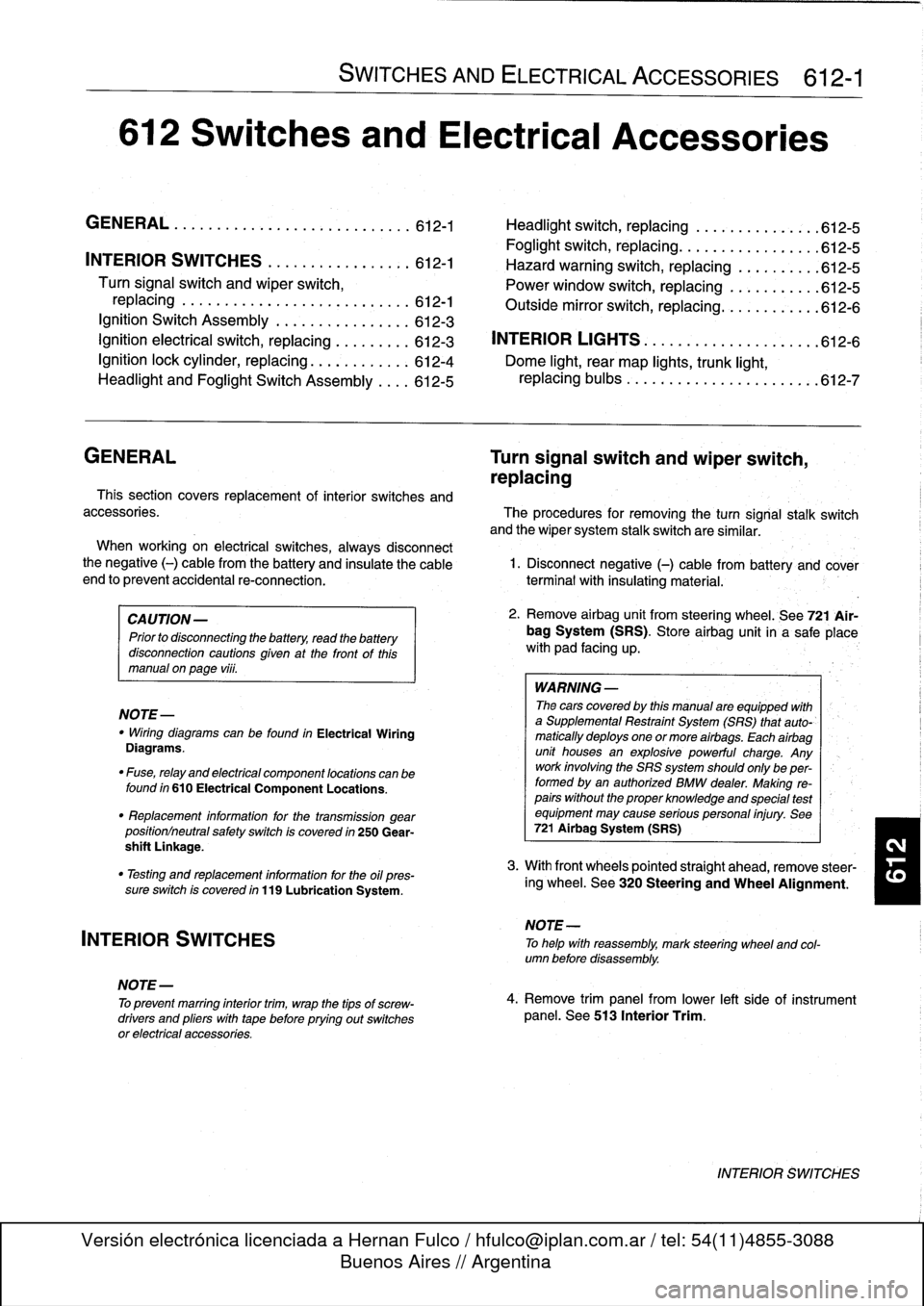
612
Switches
and
Electrical
Accessories
GENERAL
.
.
.
.
.
.
.
.
.
...
.
.
.
.
.
...
.
......
.612-1
Headlight
switch,
replacing
..
.
...
.
.
.
.
.
.
.
.
.
612-5
Foglight
switch,
replacing
....
.
.
.
.
.
.
.
.
.
.
.
.
.
612-5
INTERIOR
SWITCHES
.
.
...
.
.
.
.
.
.
.
.....
612-1
Hazard
warning
switch,
replacing
.
.
.
.
.
.
.
.
.
.612-5
Turn
signal
switch
and
wiper
switch,
Powerwindow
switch,
replacing
.
.
.
...
.
.
.
.
.
612-5
replacing
.
.
.
.
.
.
.
...
.
.
.
.....
.
....
.
.
.
.
612-1
Outside
mirrorswitch,
replacing
.
.
.
.
.....
.
.
.612-6
Ignition
Switch
Assembly
.
.
.
.
.
.
.
.
....
.
...
612-3
Ignition
electrical
switch,
replacing
.
...
.
....
612-3
INTERIOR
LIGHTS
.
.
................
.
..
612-6
Ignition
lock
cylinder,
replacing
.
.
.
.
.....
.
..
612-4
Dome
light,
rear
map
lights,
trunk
light,
Headlight
and
Foglight
Switch
Assembly
.
.
.
.
612-5
replacing
bulbs
.
......
.
.
.
.
.
.
.
.
.
.....
.
.612-7
GENERAL
Turn
signal
switch
and
wiper
switch,
replacing
Thissection
covers
replacement
of
interior
switches
and
accessories
.
The
procedures
for
removing
the
turn
signal
stalk
switch
and
the
wiper
system
stalk
switchare
similar
.
When
working
on
electrical
switches,
always
disconnect
the
negative
(-)
cable
from
the
battery
and
insulate
the
cable
end
to
prevent
accidental
re-connection
.
CAUTION-
Prior
to
disconnectiog
the
battery,
read
the
battery
disconnection
cautions
given
at
the
front
of
this
manual
on
page
viii
.
WARNING
-
The
cars
covered
by
this
manual
are
equipped
with
a
Supplemental
Restraint
System
(SRS)
that
auto-'
matically
deploys
one
or
more
airbags
.
Each
airbag
unit
houses
an
explosive
powerful
charge
.
Any
work
involving
the
SRS
system
should
only
be
per-
formed
byan
authorized
BMW
dealer
.
Making
re-
pairs
without
the
proper
knowledge
and
special
test
equipment
may
cause
serious
personal
injury
.
See
721
Airbag
System
(SRS)
3
.
With
front
wheels
pointed
straight
ahead,
remove
steer-
"
Testing
and
replacement
information
for
the
oil
ores-
¡ng
wheel
.
See
320
Steering
and
Wheel
Alignment
.
sure
switch
is
covered
in
119
Lubrication
System
.
NOTE-
"
Wirfng
diagramscan
be
found
in
Electrical
Wiring
Diagrams
.
"
Fuse,
relay
and
electrical
component
locations
can
be
found
in
610
Electrical
Component
Locations
.
"
Replacement
information
for
thetransmission
gear
position/neutral
safety
switch
is
covered
in
250
Gear-
shift
Unkage
.
INTERIOR
SWITCHES
NOTE
-
To
preventmarring
interior
trim,
wrap
the
tips
of
screw-
drivers
and
pliers
with
tape
beforeprying
out
switches
or
electrical
accessories
.
SWITCHES
AND
ELECTRICAL
ACCESSORIES
612-1
1
.
Disconnect
negative
(-)
cable
from
battery
and
cover
terminal
with
insulating
material
.
2
.
Remove
airbag
unit
from
steering
wheel
.
See
721
Air-
bag
System
(SRS)
.
Store
airbag
unit
in
a
safe
placew¡th
pad
facing
up
.
NOTE
-
To
helo
with
reassembly,
mark
steering
wheel
and
col-
umn
before
disassembly
.
4
.
Remove
trim
panel
from
lower
left
side
of
instrument
panel
.
See513
Interior
Trim
.
INTERIOR
SWITCHES
Page 431 of 759
Ignition
Switch
ASsembly
3
.
Remove
screw
retaining
lower
steering
column
cover
and
remove
cover
.
Refer
to
Fig
.
1
.
,
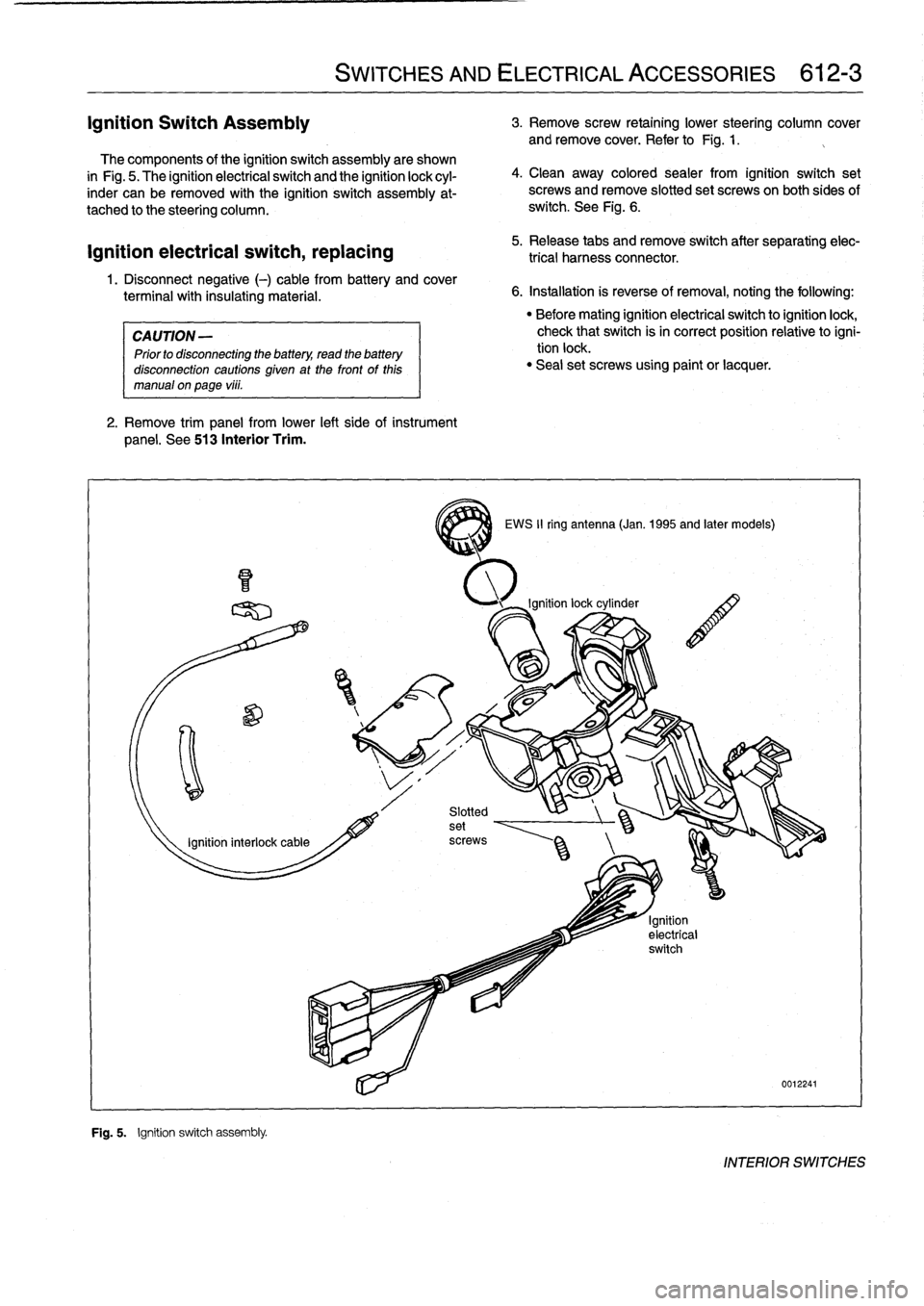
The
components
of
the
ignition
switch
assembly
are
shown
in
Fig
.
5
.
The
ignitionelectrical
switch
and
the
ignition
lock
cyl-
inder
can
be
removed
with
the
ignition
switch
assembly
at-
tached
to
the
steering
column
.
ignition
electrical
switch,
replacing
1
.
Disconnect
negative
(-)
cable
from
battery
and
cover
terminal
with
insulating
material
.
CAUTION
-
Prior
to
disconnecting
the
battery,
read
the
battery
disconnection
cautions
given
at
the
front
of
this
manual
on
page
vi¡¡
.
2
.
Remove
trim
panel
from
lower
left
side
of
instrument
panel
.
See
513
Interior
Trim
.
F~
"
Fig
.
5
.
Ignition
switch
assembly
.
SWITCHES
AND
ELECTRICAL
ACCESSORIES
612-3
4
.
Clean
away
colored
sealer
from
ignition
switch
set
screws
and
remove
slotted
set
screwson
both
sides
of
switch
.
See
Fig
.
6
.
5
.
Release
tabs
andremove
switch
after
separating
elec-
trical
harness
connector
.
6
.
Installation
is
reverse
of
removal,
noting
the
following
:
3
EWS
II
ring
antenna
(Jan
.
1995
and
later
models)
"
Before
mating
ignition
electrical
switch
toignitionlock,
check
that
switch
isin
correct
position
relativetoigni-
tion
lock
.
"
Seal
set
screws
using
paint
or
lacquer
.
0012241
INTERIOR
SWITCHES
Page 432 of 759
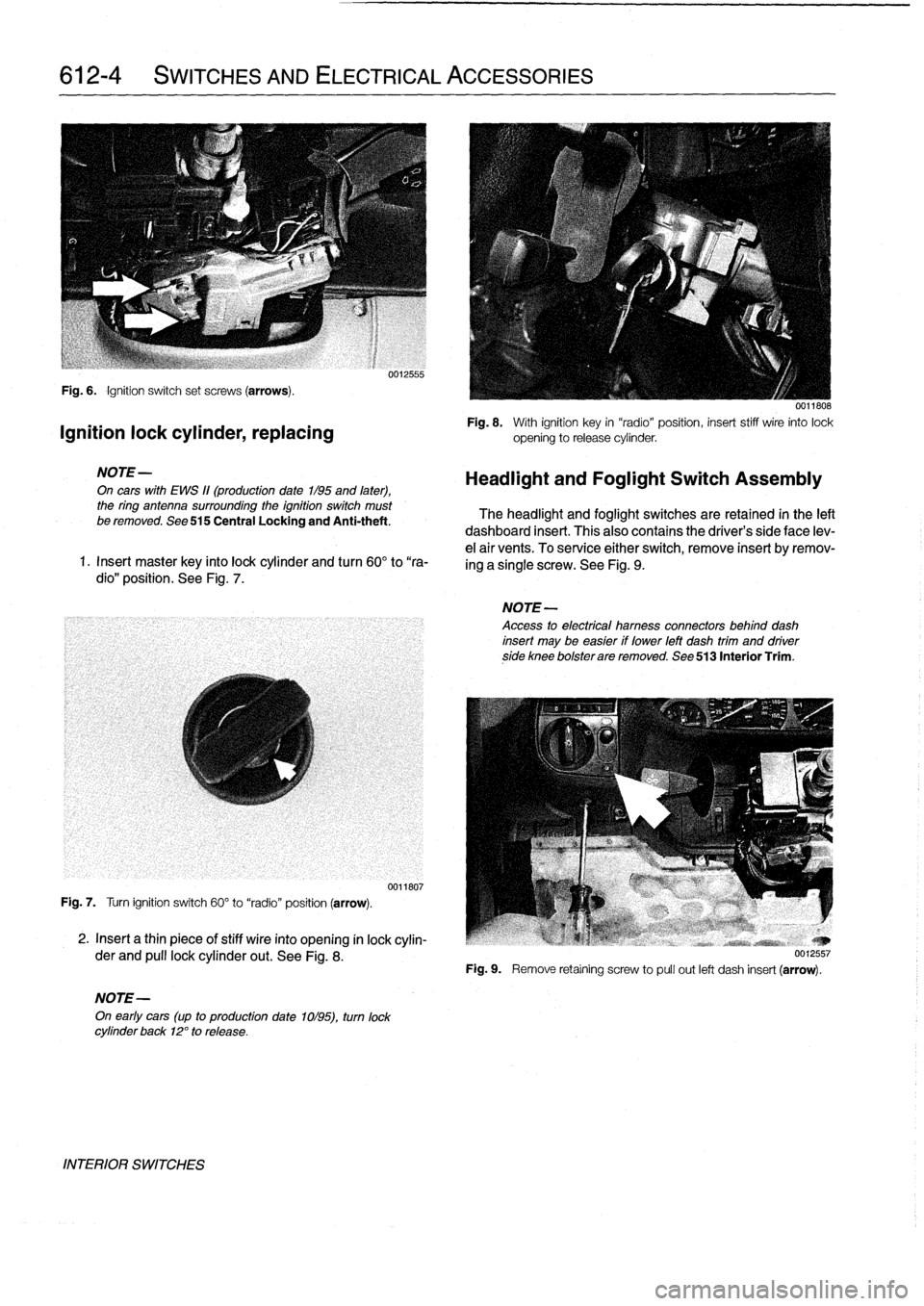
612-4
SWITCHES
AND
ELECTRICAL
ACCESSORIES
Fig
.
6
.
Ignition
switch
set
screws
(arrows)
.
Ignition
lock
cylinder,
replacing
NOTE-
On
cars
with
EWS
11(production
date
1/95
and
later),
the
ring
antenna
surrounding
the
ignition
switch
must
be
removed
.
See
515
Central
Locking
and
Anti-theft
.
1
.
Insert
master
key
finto
lock
cylinder
and
turn
60°
to
"ra-
dio"
position
.
See
Fig
.
7
.
Fig
.
7
.
Turn
ignition
switch
60°
to
"radio"
position
(arrow)
.
2
.
Insert
a
thin
piece
of
stiff
wire
into
opening
in
lock
cylin-
der
and
pull
lockcylinder
out
.
See
Fig
.
8
.
NOTE-
On
early
cars
(up
to
production
date
1ol95),
turn
lock
cylinder
back
12°
to
release
.
INTERIOR
SWITCHES
0012555
0011807
0011808
Fig
.
8
.
With
ignition
key
in
"radio"position,
insert
stiff
wire
into
lock
opening
to
release
cylinder
.
Headlight
and
Foglight
Switch
Assembly
The
headlight
and
foglight
switches
are
retained
in
the
left
dashboard
insert
.
This
alsocontains
the
driver's
side
face
lev-
e¡
air
vents
.
To
service
either
switch,
remove
insert
byremov-
ing
a
single
screw
.
See
Fig
.
9
.
NOTE-
Access
to
electrical
hamess
connectors
behind
dash
insert
may
be
easier
if
lower
left
dash
trim
and
driverside
knee
bolsterare
removed
.
See
513
Interior
Trim
.
Fig
.
9
.
Remove
retaíning
screw
to
pull
out
left
dash
insert
(arrow)
.
Page 434 of 759
612-6
SWITCHES
AND
ELECTRICAL
ACCESSORIES
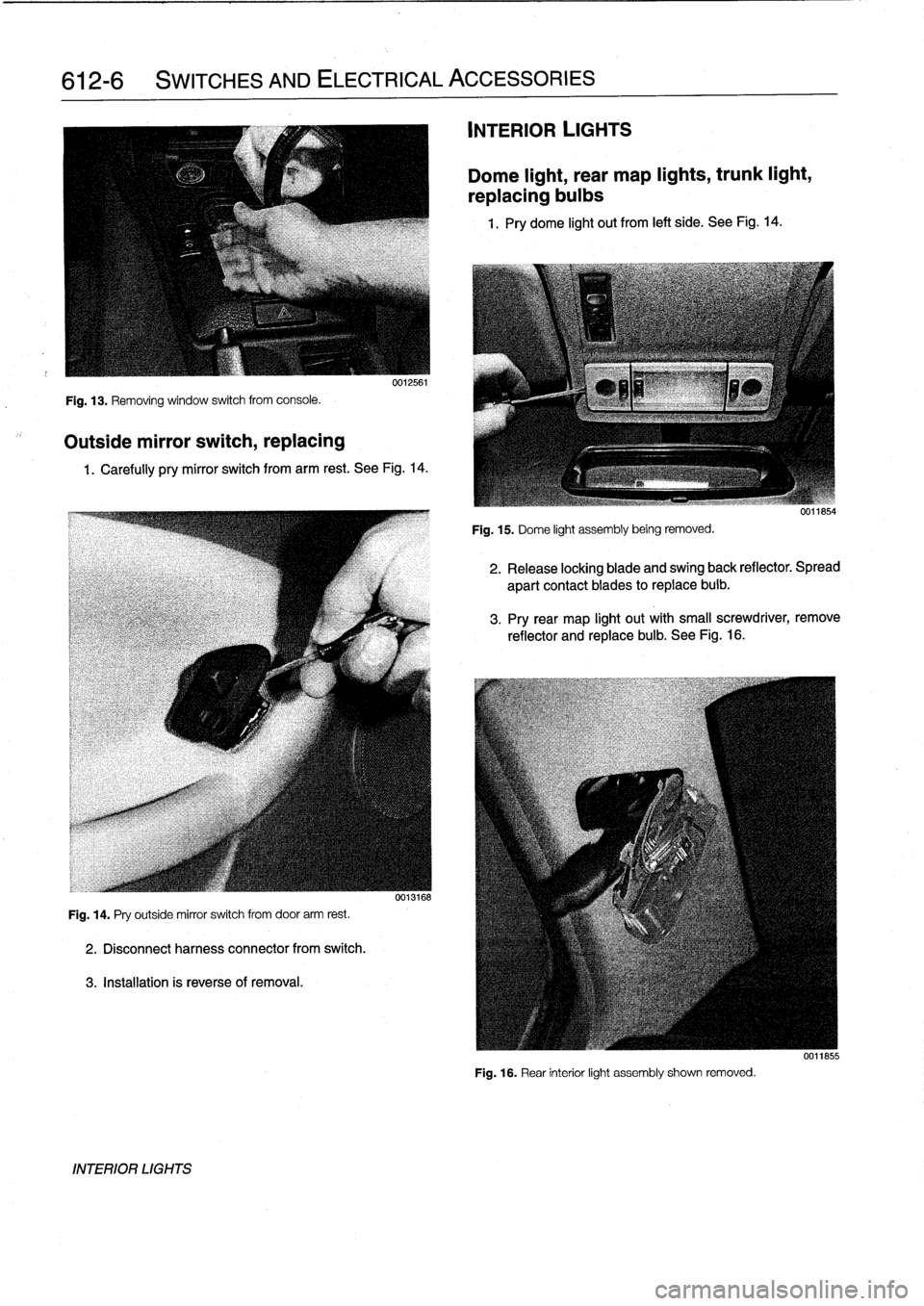
Fig
.
13
.
Removing
window
switch
from
console
.
Outside
mirror
switch,
replacing
0012561
1
.
Carefully
pry
mirror
switch
from
arm
rest
.
See
Fig
.
14
.
Fig
.
14
.
Pry
outside
mirror
switch
from
door
arm
rest
.
2
.
Disconnectharness
connector
from
switch
.
3
.
Installation
is
reverseof
removal
.
INTERIOR
LIGHTS
0013168
INTERIOR
LIGHTS
Dome
light,
rear
map
lights,
trunk
light,
replacing
bulbs
1
.
Pry
dome
light
out
from
left
side
.
See
Fig
.
14
.
Fig
.
15
.
Dome
light
assembly
being
removed
.
2
.
Release
locking
blade
and
swing
back
reflector
.
Spread
apart
contact
blades
toreplace
buib
.
3
.
Pry
rear
map
light
out
with
small
screwdriver,
remove
reflector
and
replace
bulb
.
See
Fig
.
16
.
Fig
.
16
.
Rear
interior
light
assembly
shown
removed
.
0011855
Page 437 of 759
INSTRUMENT
CLUSTER
....
.
.
.
.
.
...
.
..
620-1
Instrument
cluster,
seif-testing
.
.
.......
.
..
620-1
Instrument
cluster,
removing
and
installing
...
620-1
Instrument
cluster
bulbs,
replacing
.
.
.
.
.
.
...
620-2
GENERAL
This
repair
group
covers
removal
and
installation
of
the
in-
strument
cluster
and
the
Multi-information
Display
(MID)
mod-
ule
.
Bulb
replacement
information
for
these
units
is
also
included
here
.
NOTE
-
A
quick
check
of
the
temperature
gauge
and
its
electri-
cal
circuitis
given
in
170
Radiator
and
Cooling
Sys-
tem
.
Use
this
procedure
to
diagnosea
faulty
temperature
gauge
INSTRUMENT
CLUSTER
When
servicing
the
instrument
cluster,
always
disconnect
the
negative
(-)
cable
from
the
battery
and
insulate
the
cable
end
to
prevent
accidental
re-connection
.
Instrument
cluster,
seif-testing
Severa¡
different
versions
of
the
basic
instrument
cluster
havebeen
fitted
in
E36
cars
.
It
is
possibleto
perform
an
instru-
ment
cluster
test
and
display
system
test
information
.
Some
of
the
information
displayed
by
the
instrument
cluster
during
seif-testing
is
used
for
interna¡
BMW
organizationpur-
poses,
suchasmatching
the
correct
instrument
cluster
com-
ponents
during
parts
replacement
.
Other
functions
test
the
various
instrument
modules
.
Self-test
is
also
used
to
recode
the
instrument
cluster
after
removal
.
In
later
production
vehicles
(1996
and
later)
the
test
results
canbe
downioaded,
via
the
diagnostic
plug,
byan
authorized
BMW
dealertechnician
.
1
.
Turn
ignition
to
"radio"position
.
2
.
Press
and
hold
reset
button
on
trip-odometer
untiltrip-
odometer
display
shows
numerical
codes
.
620
Instruments
4
.
Turn
off
ignition
.
Instrument
cluster,
removing
and
installing
INSTRUMENTS
620-1
GENERAL
.....
.
.
.
.
.
.
.
.
.
.........
.
....
620-1
Odometer
coding
plug,
replacing
.....
.
.
.
.
.
.
620-2
Vehicle
speed
sender,
replacing
...
.
.
.
.
.
.
.
.
620-3
MULTI-INFORMATION
DISPLAY
(MID)
.
.
.
620-4
Multi-Information
Display,
removing
and
installing
..
.
....
.
.........
620-4
3
.
With
each
subsequent
press
of
the
button,
a
different
function
is
tested
.
Some
functions
will
activate
need1e
gauges
.
1
.
Disconnect
negative
(-)
cable
from
battery
and
cover
terminal
with
insulating
material
.
CAUTION-
Prior
to
disconnectiog
the
battery,
read
the
battery
disconnection
cautionsgiven
at
the
front
of
this
manual
on
page
vi¡¡
.
2
.
Remove
airbag
unit
from
steering
wheel
.
See
721
Air-
bag
System
(SRS)
.
Store
unit
in
a
safe
place
.
WARNING
-
The
airbag
is
an
explosive
devfce
and
should
be
treated
with
extreme
caution
.
Improper
handling
of
the
airbag
could
cause
serious
injury
or
death
.
Store
the
airbag
with
the
horn
pad
facing
up
.
If
stored
facing
down,
accidental
deployment
couldpropel
it
vfolently
into
the
air,
causing
injury
.
3
.
With
front
wheels
pointed
straight
ahead,
remove
steer-
ing
wheel
.
See
320
Steering
and
Wheel
Alignment
.
4
.
Remove
instrument
cluster
retaining
screws
.
See
Fig
.
1
.
5
.
Place
a
towel
over
steering
column
.
Carefully
tilt
top
of
cluster
out
of
dash
panel
.
Unlock
and
disconnect
har-
ness
connectors
from
back
of
cluster
.
See
Fig
.
2
.
INSTRUMENT
CLUSTER
Page 438 of 759
620-2
INSTRUMENTS
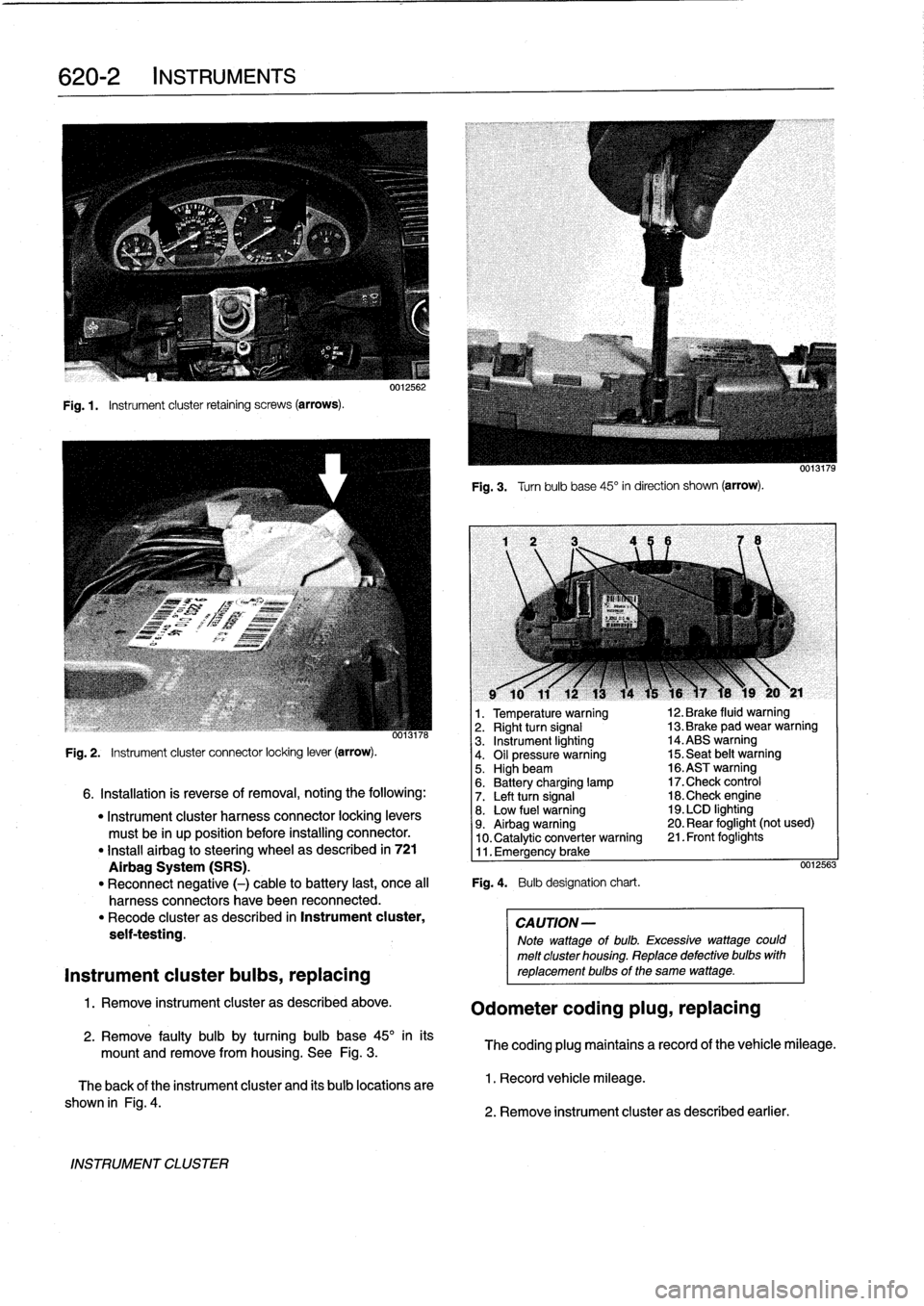
Fig
.1.
Instrument
cluster
retaining
screws
(arrows)
.
INSTRUMENT
CLUSTER
0012562
Fig
.
3
.
Turnbulb
base
45°
in
direction
shown
(arrow)
.
l
v
w
r
v
9
10
11
12
13
14
15
16
)7
18
19
20
y
21
1
.
Temperature
warning
12
.
Brake
fluid
warning
oo13n6
2
.
Right
turn
signal
13
.
Brake
pad
wear
warning
3
.
Instrument
lighting
14
.ABS
warning
Fig
.
2
.
Instrument
cluster
connector
locking
lever
(arrow)
.
4
.
Oil
pressure
warning
15
.
Seat
belt
warning5
.
Highbeam
16
.ASTwarning
6
.
Battery
charging
lamp
17
.Check
control
6
.
Installation
is
reverse
of
removal,
noting
the
following
:
7
.
Left
turn
signal
18
.Check
engine
"
Instrument
cluster
harness
connector
locking
levers
8
.
Low
fuel
warning
19
.
LCD
lighting
must
be
in
up
position
before
installing
connector
.
9
.
Airbag
warning
20
.
Rear
foglight
(not
used)
10
.
Catalytic
converter
warning
21
.
Front
foglights
"
Install
airbag
to
steering
wheel
as
described
in
721
11
.
Emergency
brake
Airbag
System
(SRS)
.
0012563
"
Reconnect
negative
(-)
cable
to
battery
last,
once
al¡
Fig
.
4
.
Bulb
designation
chart
.
harness
connectors
have
been
reconnected
.
"
Recode
cluster
as
described
in
Instrument
cluster,
CAUTION-
seif-testing
.
Note
wattage
of
bulb
.
Excessive
wattage
could
melt
cluster
housing
.
Replace
defective
bulbs
with
Instrument
cluster
bulbs,
replacing
reptacementbulbs
of
the
same
wattage
.
1
.
Remove
instrument
cluster
as
described
above
.
Odometer
coding
plug,
replacing
2
.
Remove
faulty
bulb
by
turning
bulb
base
45°
inits
mount
and
remove
from
housing
.
See
Fig
.
3
.
The
coding
plug
maintains
a
record
of
thevehicle
mileage
.
The
back
of
the
instrument
cluster
and
its
bulb
locations
are
1
.
Record
vehicle
mileage
.
shown
in
Fig
.
4
.
2
.
Remove
instrument
cluster
as
described
earlier
.
Page 440 of 759
620-
4
INSTRUMENTS
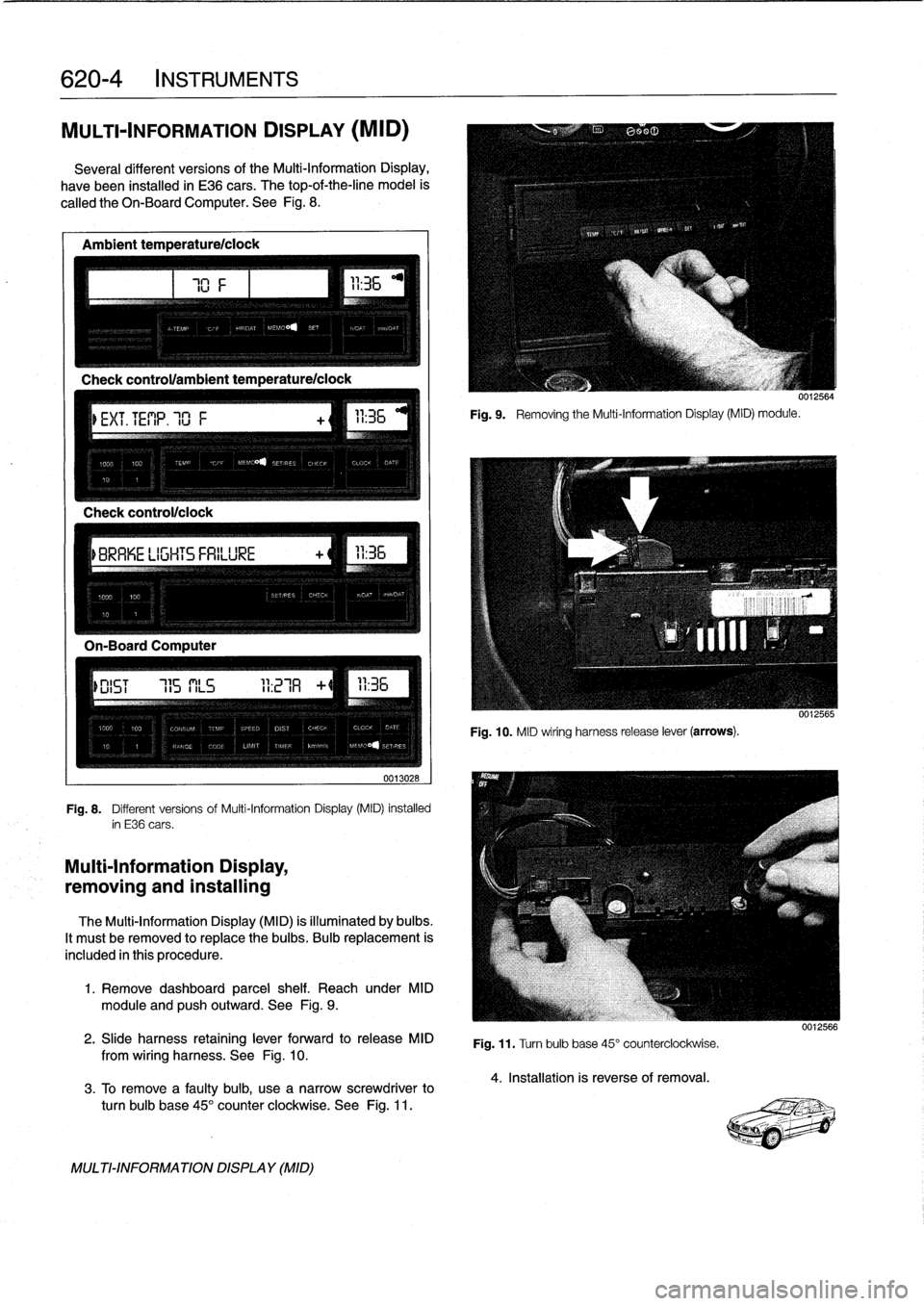
MULTI-INFORMATION
DISPLAY
(MID)
Severa¡
different
versionsof
the
Multi-Information
Display,
have
been
installed
in
E36
cars
.
The
top-of-the-line
model
is
called
the
Oh-BoardComputer
.
See
Fig
.
8
.
Ambient
temperature/ciock
Check
control/clock
0013028
Fig
.
8
.
Different
versions
of
Multi-Information
Display
(MID)
installed
in
E36
cars
.
Multi-Information
Display,
removing
and
installing
The
Multi-Information
Display
(MID)
is
illuminated
by
bulbs
.
It
mustbe
removed
to
replace
the
bulbs
.
Bulb
replacement
is
included
in
this
procedure
.
1
.
Remove
dashboard
parcel
shelf
.
Reach
under
MID
module
and
pushoutward
.
See
Fig
.
9
.
2
.
Slide
harness
retaining
lever
forward
to
release
MID
from
wiring
harness
.
See
Fig
.
10
.
3
.
To
Rmove
a
faulty
bulb,
use
anarrow
screwdriver
to
turn
bulb
base
45°
counter
clockwíse
.
See
Fig
.
11
.
MULTI-INFORMATIONDISPLAY
(MID)
111
Fig
.
9
.
Removing
the
Multi-Information
Display(MID)
module
.
0012564
Fig
.
10
.
MID
wiring
harness
release
lever
(arrows)
.
Fig
.
11
.
Turn
bulb
base
45°
counterclockwise
.
4
.
Installation
is
reverse
of
removal
.
0012566