lug BMW 323I 2011 E90 User Guide
[x] Cancel search | Manufacturer: BMW, Model Year: 2011, Model line: 323I, Model: BMW 323I 2011 E90Pages: 286, PDF Size: 8.25 MB
Page 128 of 286
Things to remember when driving
126
Load
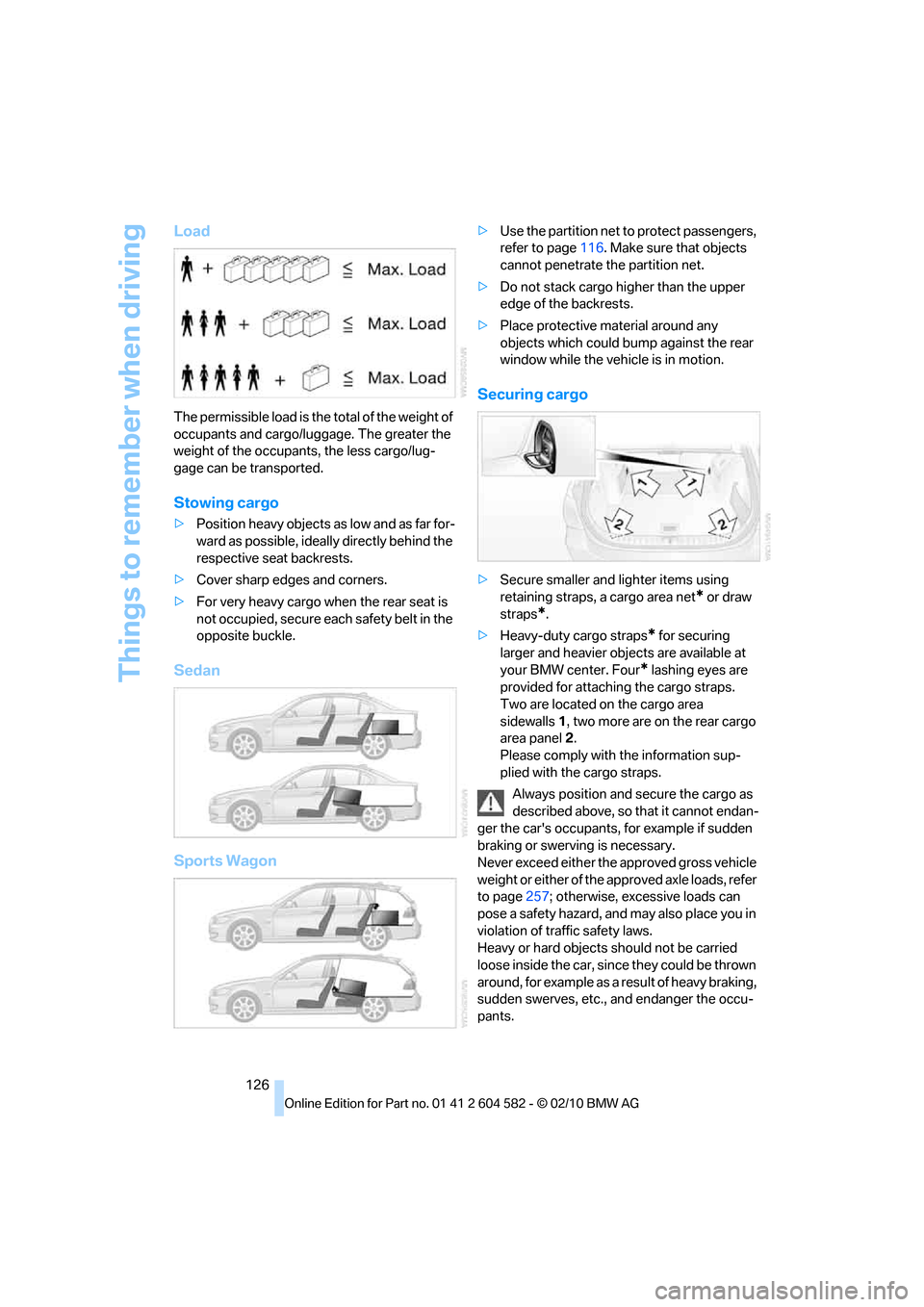
The permissible load is the total of the weight of
occupants and cargo/luggage. The greater the
weight of the occupants, the less cargo/lug-
gage can be transported.
Stowing cargo
>Position heavy objects as low and as far for-
ward as possible, ideally directly behind the
respective seat backrests.
>Cover sharp edges and corners.
>For very heavy cargo when the rear seat is
not occupied, secure each safety belt in the
opposite buckle.
Sedan
Sports Wagon
>Use the partition net to protect passengers,
refer to page116. Make sure that objects
cannot penetrate the partition net.
>Do not stack cargo higher than the upper
edge of the backrests.
>Place protective material around any
objects which could bump against the rear
window while the vehicle is in motion.
Securing cargo
>Secure smaller and lighter items using
retaining straps, a cargo area net
* or draw
straps
*.
>Heavy-duty cargo straps
* for securing
larger and heavier objects are available at
your BMW center. Four
* lashing eyes are
provided for attaching the cargo straps.
Two are located on the cargo area
sidewalls1, two more are on the rear cargo
area panel2.
Please comply with the information sup-
plied with the cargo straps.
Always position and secure the cargo as
described above, so that it cannot endan-
ger the car's occupants, for example if sudden
braking or swerving is necessary.
Never exceed either the approved gross vehicle
weight or either of the approved axle loads, refer
to page257; otherwise, excessive loads can
pose a safety hazard, and may also place you in
violation of traffic safety laws.
Heavy or hard objects should not be carried
loose inside the car, since they could be thrown
around, for example as a result of heavy braking,
sudden swerves, etc., and endanger the occu-
pants.
Page 129 of 286
Driving tips
127Reference
At a glance
Controls
Communications
Navigation
Entertainment
Mobility
Only attach the cargo straps using the lashing
eyes shown in the illustration. Do not secure
cargo with the anchors for tether straps, refer to
page53; otherwise, these could be damaged.<
Roof-mounted luggage rack*
A special rack system is available as an option
for your BMW. Comply with the directions given
in the installation instructions.
Mounting points
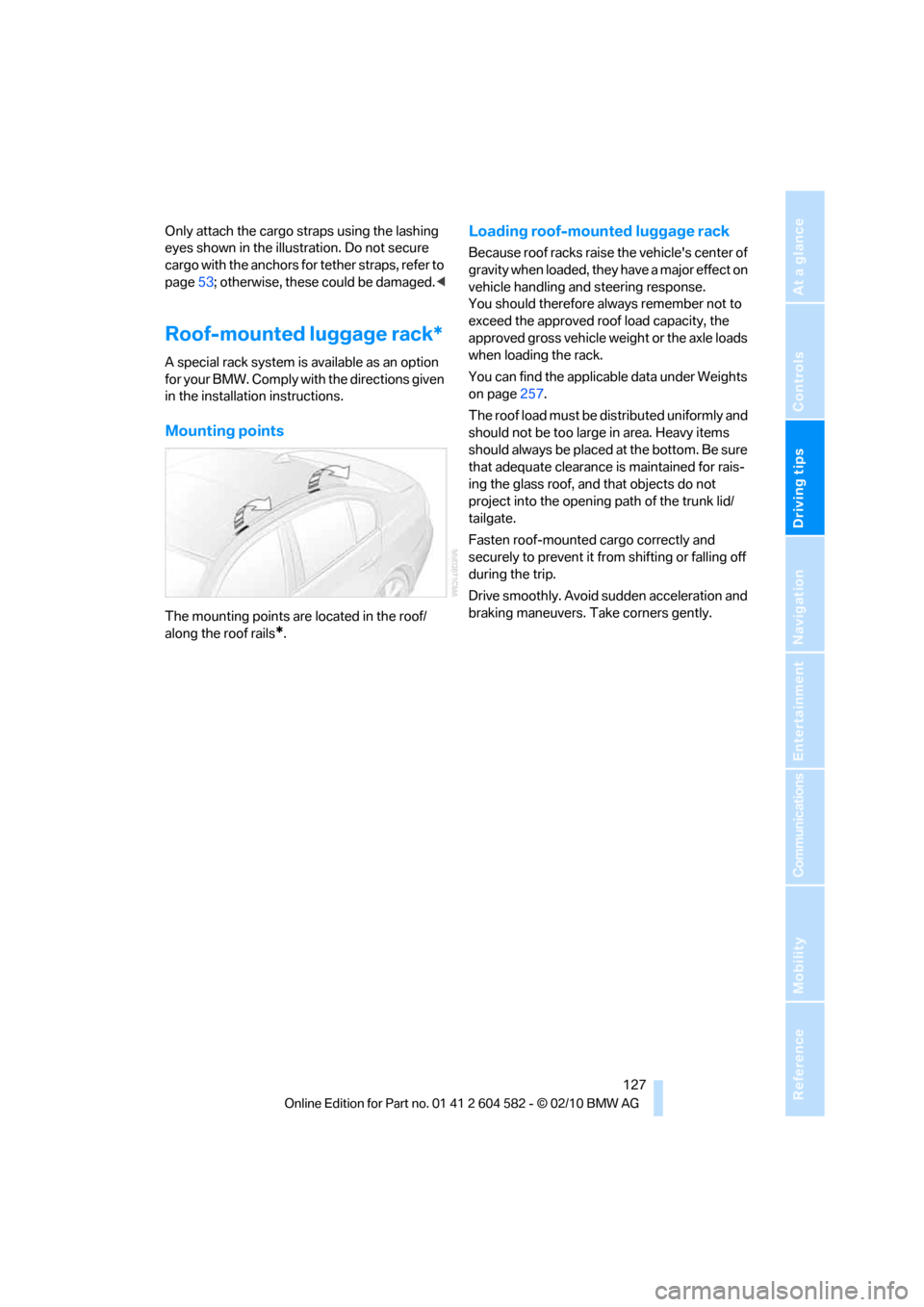
The mounting points are located in the roof/
along the roof rails
*.
Loading roof-mounted luggage rack
Because roof racks raise the vehicle's center of
gravity when loaded, they have a major effect on
vehicle handling and steering response.
You should therefore always remember not to
exceed the approved roof load capacity, the
approved gross vehicle weight or the axle loads
when loading the rack.
You can find the applicable data under Weights
on page257.
The roof load must be distributed uniformly and
should not be too large in area. Heavy items
should always be placed at the bottom. Be sure
that adequate clearance is maintained for rais-
ing the glass roof, and that objects do not
project into the opening path of the trunk lid/
tailgate.
Fasten roof-mounted cargo correctly and
securely to prevent it from shifting or falling off
during the trip.
Drive smoothly. Avoid sudden acceleration and
braking maneuvers. Take corners gently.
Page 178 of 286
External devices
176
Restarting a track search
"New search"
Playback lists
To open playback lists.
1."CD/Multimedia"
2."External devices"
3.Select the symbol.
4."Playlists"
Current playback
List of tracks currently being played.
1."CD/Multimedia"
2."External devices"
3.Select the symbol.
4."Current playback"
Random play sequence
You can play the tracks in the selected list in
random order, e.g. all tracks of a single artist.
1."CD/Multimedia"
2."External devices"
3.Open "Options".
4."Random"
Fast forward/reverse
Press and hold the button for the corre-
sponding direction.
Notes
Do not expose the audio device to
extreme environmental conditions, e.g.
very high temperatures, refer to the operating
instructions of the audio device. Otherwise, the
audio device may become damaged, which
could compromise safety while driving.<
Depending on the configuration of the audio
files, e.g. bit rates greater than 256 KBit/s, the
files may not play back correctly in every case.
Notes on connecting
>The connected audio device is supplied
with a maximum current of 500 mA, if the
device supports this. Therefore, do not con-
nect the device to the power socket in the
vehicle.
>Do not forcibly connect the plug to the
USB interface.
>Do not connect devices such as fans or
lamps to the USB audio interface.
>Do not connect USB hard drives.
>Do not use the USB audio interface to
charge external devices.
Page 241 of 286
Mobility
239Reference
At a glance
Controls
Driving tips
Communications
Navigation
Entertainment
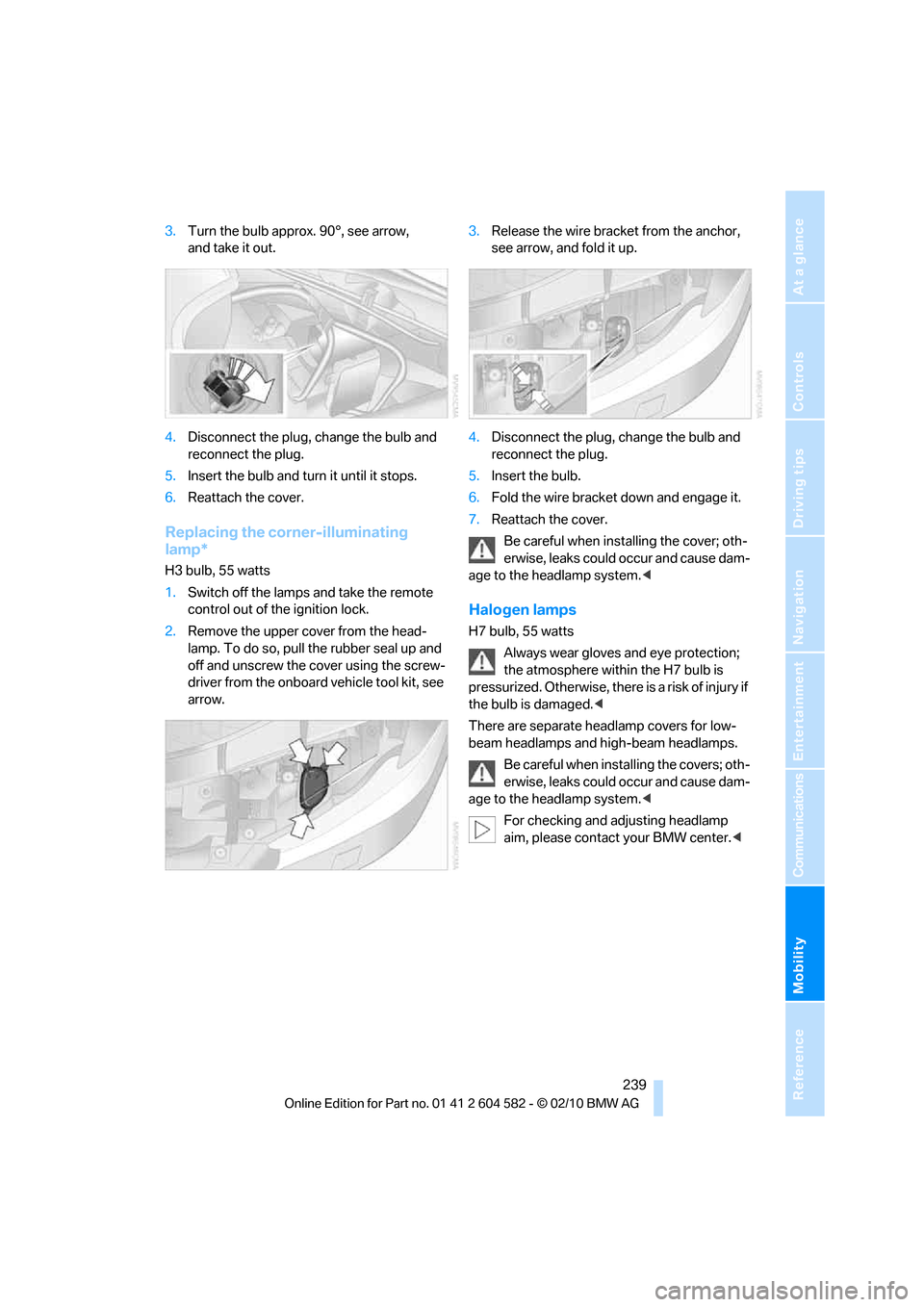
3.Turn the bulb approx. 90°, see arrow,
and take it out.
4.Disconnect the plug, change the bulb and
reconnect the plug.
5.Insert the bulb and turn it until it stops.
6.Reattach the cover.
Replacing the corner-illuminating
lamp*
H3 bulb, 55 watts
1.Switch off the lamps and take the remote
control out of the ignition lock.
2.Remove the upper cover from the head-
lamp. To do so, pull the rubber seal up and
off and unscrew the cover using the screw-
driver from the onboard vehicle tool kit, see
arrow.3.Release the wire bracket from the anchor,
see arrow, and fold it up.
4.Disconnect the plug, change the bulb and
reconnect the plug.
5.Insert the bulb.
6.Fold the wire bracket down and engage it.
7.Reattach the cover.
Be careful when installing the cover; oth-
erwise, leaks could occur and cause dam-
age to the headlamp system.<
Halogen lamps
H7 bulb, 55 watts
Always wear gloves and eye protection;
the atmosphere within the H7 bulb is
pressurized. Otherwise, there is a risk of injury if
the bulb is damaged.<
There are separate headlamp covers for low-
beam headlamps and high-beam headlamps.
Be careful when installing the covers; oth-
erwise, leaks could occur and cause dam-
age to the headlamp system.<
For checking and adjusting headlamp
aim, please contact your BMW center.<
Page 242 of 286
Replacing components
240
Access to the lamps
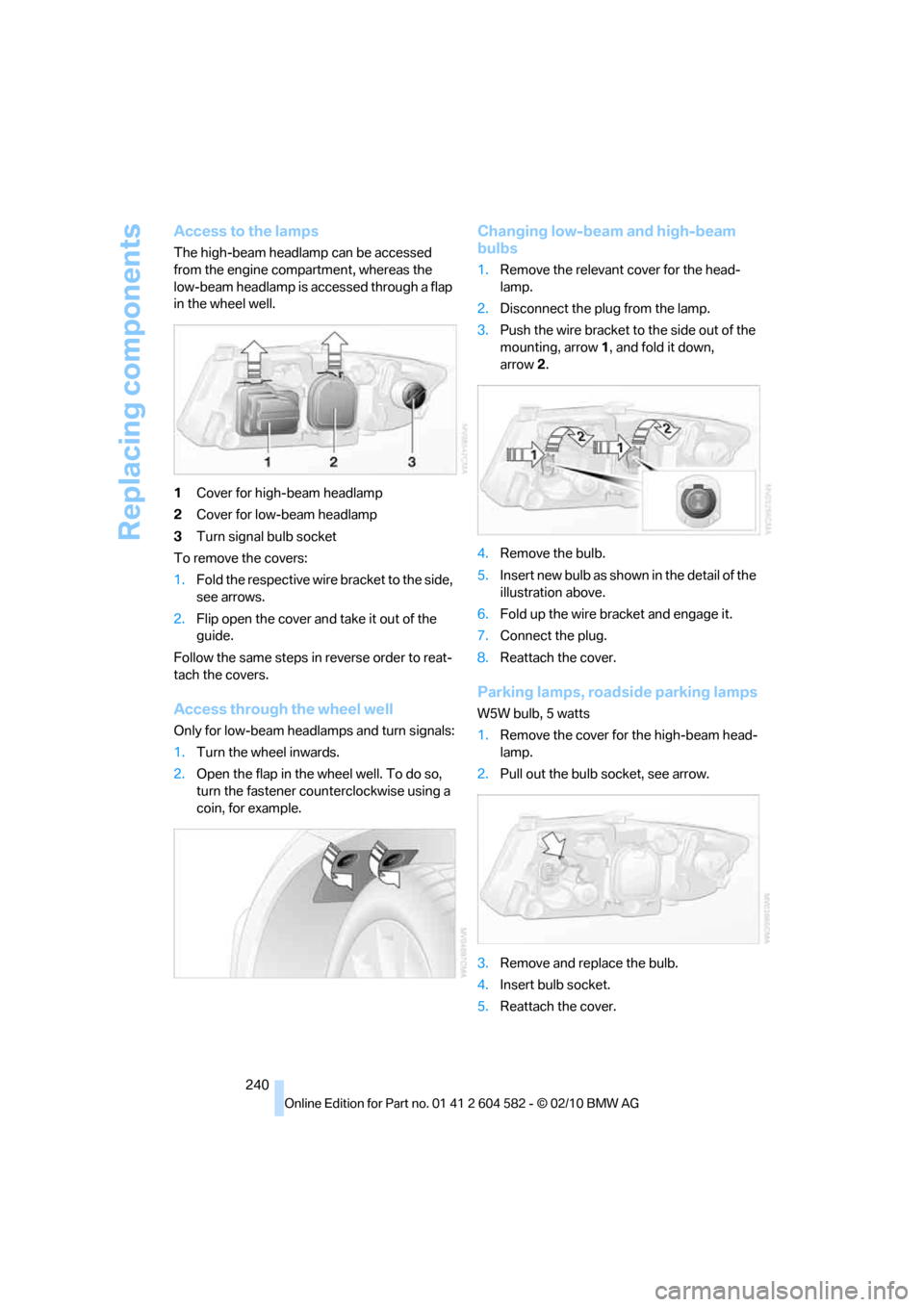
The high-beam headlamp can be accessed
from the engine compartment, whereas the
low-beam headlamp is accessed through a flap
in the wheel well.
1Cover for high-beam headlamp
2Cover for low-beam headlamp
3Turn signal bulb socket
To remove the covers:
1.Fold the respective wire bracket to the side,
see arrows.
2.Flip open the cover and take it out of the
guide.
Follow the same steps in reverse order to reat-
tach the covers.
Access through the wheel well
Only for low-beam headlamps and turn signals:
1.Turn the wheel inwards.
2.Open the flap in the wheel well. To do so,
turn the fastener counterclockwise using a
coin, for example.
Changing low-beam and high-beam
bulbs
1.Remove the relevant cover for the head-
lamp.
2.Disconnect the plug from the lamp.
3.Push the wire bracket to the side out of the
mounting, arrow1, and fold it down,
arrow2.
4.Remove the bulb.
5.Insert new bulb as shown in the detail of the
illustration above.
6.Fold up the wire bracket and engage it.
7.Connect the plug.
8.Reattach the cover.
Parking lamps, roadside parking lamps
W5W bulb, 5 watts
1.Remove the cover for the high-beam head-
lamp.
2.Pull out the bulb socket, see arrow.
3.Remove and replace the bulb.
4.Insert bulb socket.
5.Reattach the cover.
Page 245 of 286
Mobility
243Reference
At a glance
Controls
Driving tips
Communications
Navigation
Entertainment
2.Loosen the bulb holder at the clip, see
arrow, and pull out.
3.Apply gentle pressure to the bulb while
turning it to the left for removal and replace-
ment.
4.Re-engage the bulb holder so that it audibly
clicks into place.
5.Reattach the cover in the cargo area.
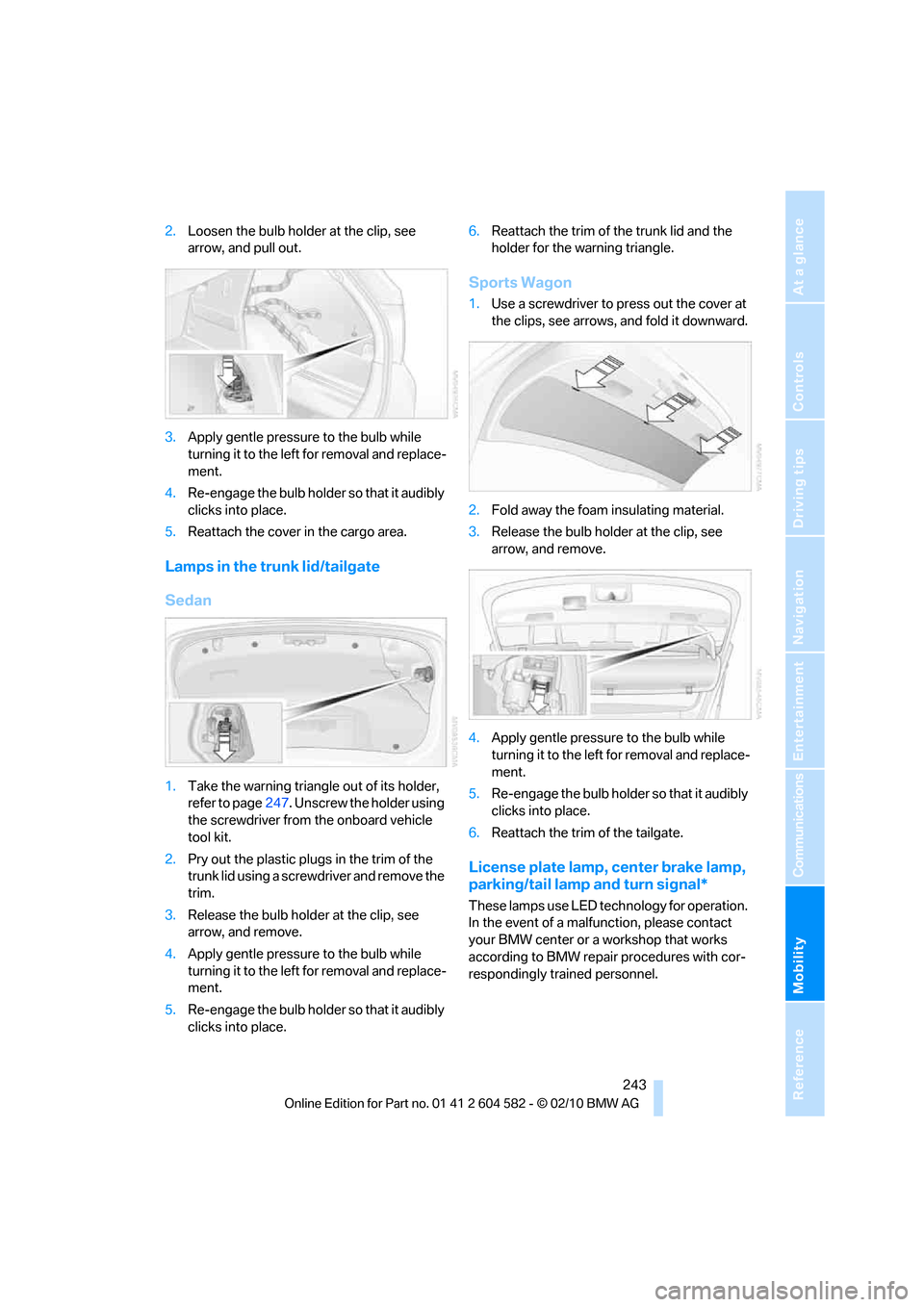
Lamps in the trunk lid/tailgate
Sedan
1.Take the warning triangle out of its holder,
refer to page247. Unscrew the holder using
the screwdriver from the onboard vehicle
tool kit.
2.Pry out the plastic plugs in the trim of the
trunk lid using a screwdriver and remove the
trim.
3.Release the bulb holder at the clip, see
arrow, and remove.
4.Apply gentle pressure to the bulb while
turning it to the left for removal and replace-
ment.
5.Re-engage the bulb holder so that it audibly
clicks into place.6.Reattach the trim of the trunk lid and the
holder for the warning triangle.
Sports Wagon
1.Use a screwdriver to press out the cover at
the clips, see arrows, and fold it downward.
2.Fold away the foam insulating material.
3.Release the bulb holder at the clip, see
arrow, and remove.
4.Apply gentle pressure to the bulb while
turning it to the left for removal and replace-
ment.
5.Re-engage the bulb holder so that it audibly
clicks into place.
6.Reattach the trim of the tailgate.
License plate lamp, center brake lamp,
parking/tail lamp and turn signal*
These lamps use LED technology for operation.
In the event of a malfunction, please contact
your BMW center or a workshop that works
according to BMW repair procedures with cor-
respondingly trained personnel.
Page 275 of 286
Reference 273
At a glance
Controls
Driving tips
Communications
Navigation
Entertainment
Mobility
Instructions for navigation
system, refer to Voice
instructions142
Instrument cluster12
Instrument combination, refer
to Instrument cluster12
Instrument lighting101
Instrument panel, refer to
Cockpit10
Integrated key26
Integrated universal remote
control107
Interactive map137
Interior lamps101
– remote control28
Interior motion sensor34
Interior rearview mirror49
– automatic dimming
feature49
– compass109
Interlock, refer to Disengaging
the remote control58
Intermittent mode of the
wipers61
Intersection, entering,
navigation132
iPod, connecting, refer to
AUX-IN port173
iPod, connecting, refer to USB
audio interface174
J
Jacking points244
Joystick, refer to iDrive16
Jumpering, refer to Jump-
starting247
Jump-starting247
K
Key, refer to Integrated key/
remote control26
Keyless go, refer to Comfort
Access34
Keyless opening and closing,
refer to Comfort Access34Key Memory, refer to Personal
Profile26
Kickdown58
– automatic transmission with
Steptronic58
Knock control203
L
Lamps
– automatic headlamp
control97
– parking lamps/low beams97
Lamps and bulbs, replacing
bulbs238
Lap-and-shoulder belt, refer
to Safety belts47
Lashing eyes, refer to
Securing cargo126
Last destinations134
LATCH child restraint fixing
system52
Leather care235
LED Light-emitting
diodes238
Length, refer to
Dimensions255
License plate lamp, replacing
bulb243
Light
– high-beam assistant99
Light-alloy wheels235
Light-emitting diodes
LED238
Lighter113
– connecting electrical
appliances113
Lighting
– instruments101
– lamps and bulbs238
– vehicle, refer to Lamps97
Light switch97
Limit, refer to Speed limit82
Load126
Load securing equipment,
refer to Securing cargo126
Lock buttons, doors, refer to
Locking30Locking
– adjusting confirmation
signal28
– from inside30
– from outside28
– without remote control, refer
to Comfort Access34
Locking and unlocking doors
– confirmation signals28
– from inside30
– from outside27
Low beam control, refer to
High-beam assistant99
Low-beam headlamps97
– automatic97
– replacing bulbs239
Lower back support, refer to
Lumbar support44
Luggage rack, refer to Roof-
mounted luggage rack127
Lumbar support44
M
M+S tires, refer to Winter
tires224
Maintenance, refer to Service
Booklet
Maintenance system231
Malfunction
– automatic transmission with
Steptronic60
– tires89
– trunk lid32
Malfunction warnings, refer to
Check Control80
Manual car wash234
Manual mode, automatic
transmission with
Steptronic59
Manual operation
– door lock30
– driver's door30
– fuel filler flap202
– glass roof38
– panorama glass roof40
– parking lock, automatic
transmission60
– trunk lid32
Page 278 of 286
Everything from A to Z
276 Radio position, refer to Radio
readiness55
Radio readiness55
– switched off56
– switched on55
Radio-remote key, refer to
Remote control with
integrated key26
Rain sensor61
Random sequence
– external devices176
– music collection171
Rapeseed-oil methyl ester
RME204
Reading lamps101
Rear lamps, refer to Tail
lamps241
Rear seat backrest,
folding115
Rear seats
– adjusting head restraints45
– folding115
– folding down
backrests114,115
– folding head restraint down
and up45
Rear ventilation105
Rearview mirror, refer to
Mirrors48
Rear window
– cleaning62
– opening33
Rear window blind, refer to
Roller sun blinds110
Rear window defroster104
Rear window safety switch37
Rear window wiper62
– changing rear wiper
blade237
Receiving level of mobile
phone, refer to Status
information19
Reception
– quality154
– radio station154
Recirculated-air mode104
Recirculation of air, refer to
Recirculated-air mode104Reclining seat, refer to
Backrest43
Refueling202
Releasing
– hood225
Remaining distance, refer to
Cruising range73
Remote control26
– battery renewal36
– Comfort Access34
– garage door opener107
– malfunction29,36
– removing from the ignition
lock55
– service data231
– tailgate28
– trunk lid28
Replacement fuses, refer to
Fuses245
Replacement remote
control26
Replacing bulbs, refer to
Lamps and bulbs238
Replacing tires223
Replacing tires, refer to New
wheels and tires223
Reporting safety defects7
Reserve warning, refer to Fuel
gauge72
Reset, refer to Resetting tone
settings152
Restraint systems
– for children51
– refer to Safety belts47
Reverse
– CD changer163
– CD player163
Reverse gear
– automatic transmission with
Steptronic58
– manual transmission57
RME, refer to Rapeseed-oil
methyl ester204
Road map142
Roadside
Assistance196,246
Roadside parking lamps99
– replacing bulbs238,240Roadworthiness test, refer to
Service requirements76
Roller blind
– sun blinds110
Roof load capacity257
Roof-mounted luggage
rack127
Rope, refer to Tow-starting,
towing away250
Rotary/pushbutton, refer to
iDrive16
Route140,141
– bypassing sections141
– changing140,141
– changing criteria140
– displaying streets or towns/
cities141
– map view142
– selecting140
Route instructions, refer to
Destination guidance
through voice
instructions142
Route map, refer to Map
view142
Route section, changing141
Route selection140
RSC Runflat System
Component, refer to Run-
flat tires223
Runflat System Component
RSC, refer to Run-flat
tires223
Run-flat tires223
– continuing driving with a
damaged tire89
– flat tire89
– Flat Tire Monitor89
– Inflation pressure208
– new tires223
– tire replacement223
– winter tires224
Runflat tyres, refer to Run-flat
tires223