storage compartment BMW 323I 2011 E90 Owner's Manual
[x] Cancel search | Manufacturer: BMW, Model Year: 2011, Model line: 323I, Model: BMW 323I 2011 E90Pages: 286, PDF Size: 8.25 MB
Page 113 of 286
Controls
111Reference
At a glance
Driving tips
Communications
Navigation
Entertainment
Mobility
Locking
To lock the glove compartment, use the inte-
grated key of the remote control, refer to
page26.
USB interface for data transmission
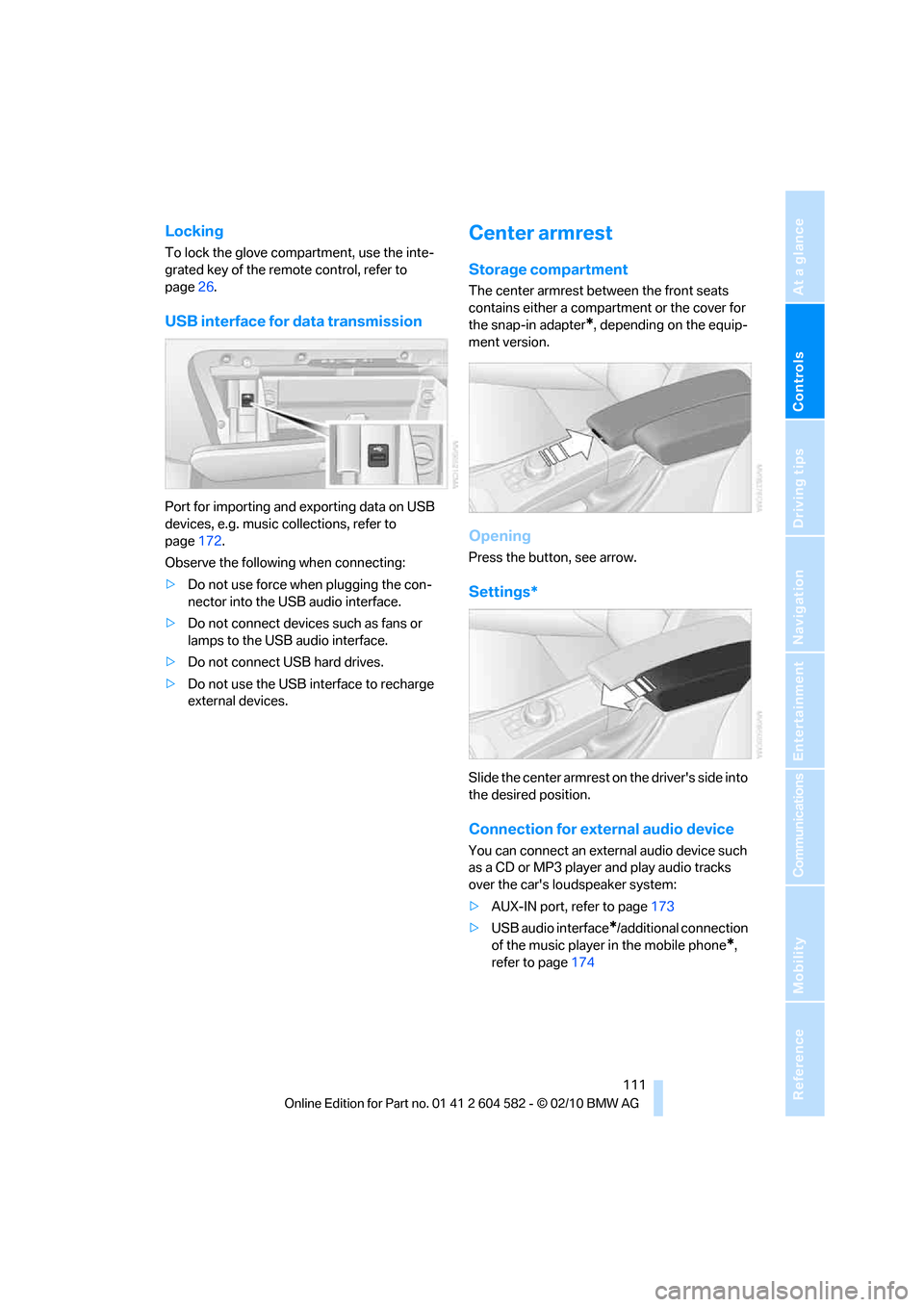
Port for importing and exporting data on USB
devices, e.g. music collections, refer to
page172.
Observe the following when connecting:
>Do not use force when plugging the con-
nector into the USB audio interface.
>Do not connect devices such as fans or
lamps to the USB audio interface.
>Do not connect USB hard drives.
>Do not use the USB interface to recharge
external devices.
Center armrest
Storage compartment
The center armrest between the front seats
contains either a compartment or the cover for
the snap-in adapter
*, depending on the equip-
ment version.
Opening
Press the button, see arrow.
Settings*
Slide the center armrest on the driver's side into
the desired position.
Connection for external audio device
You can connect an external audio device such
as a CD or MP3 player and play audio tracks
over the car's loudspeaker system:
>AUX-IN port, refer to page173
>USB audio interface
*/additional connection
of the music player in the mobile phone
*,
refer to page174
Page 114 of 286
Practical interior accessories
112
Storage compartments inside
the vehicle
Depending on your vehicle's equipment, you
will find compartments beside the steering col-
umn
*, in the front doors and in the center con-
sole
*.
There are nets
* on the front-seat backrests.
Clothes hooks
There are clothes hooks on the grab handles in
the rear passenger compartment.
Items of clothing hung from the hooks
must not obstruct the driver's view. Do
not hang heavy objects from the hooks; other-
wise, they could endanger the car's occupants,
e.g. in case of heavy braking or sudden swerv-
ing.<
Cupholders
Use lightweight and shatterproof contain-
ers and do not transport hot beverages;
otherwise, there is an increased risk of injury in
the event of the accident. Do not force contain-
ers that are too large into the cupholders; other-
wise, damage could result.<
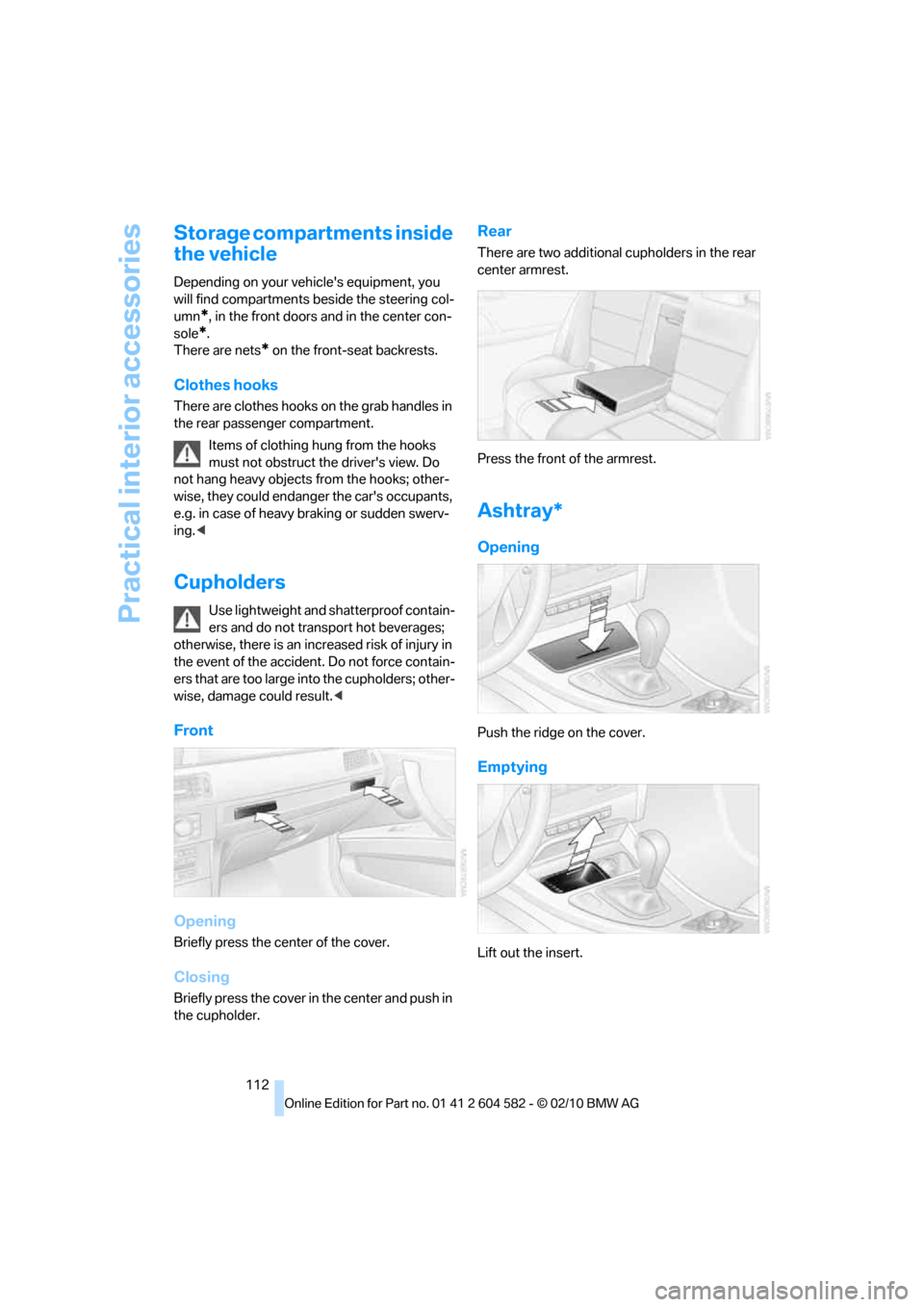
Front
Opening
Briefly press the center of the cover.
Closing
Briefly press the cover in the center and push in
the cupholder.
Rear
There are two additional cupholders in the rear
center armrest.
Press the front of the armrest.
Ashtray*
Opening
Push the ridge on the cover.
Emptying
Lift out the insert.
Page 118 of 286
Practical interior accessories
116
Partition net
Do not let the partition net retract; other-
wise, there is a risk of danger and the par-
tition net could be damaged.<
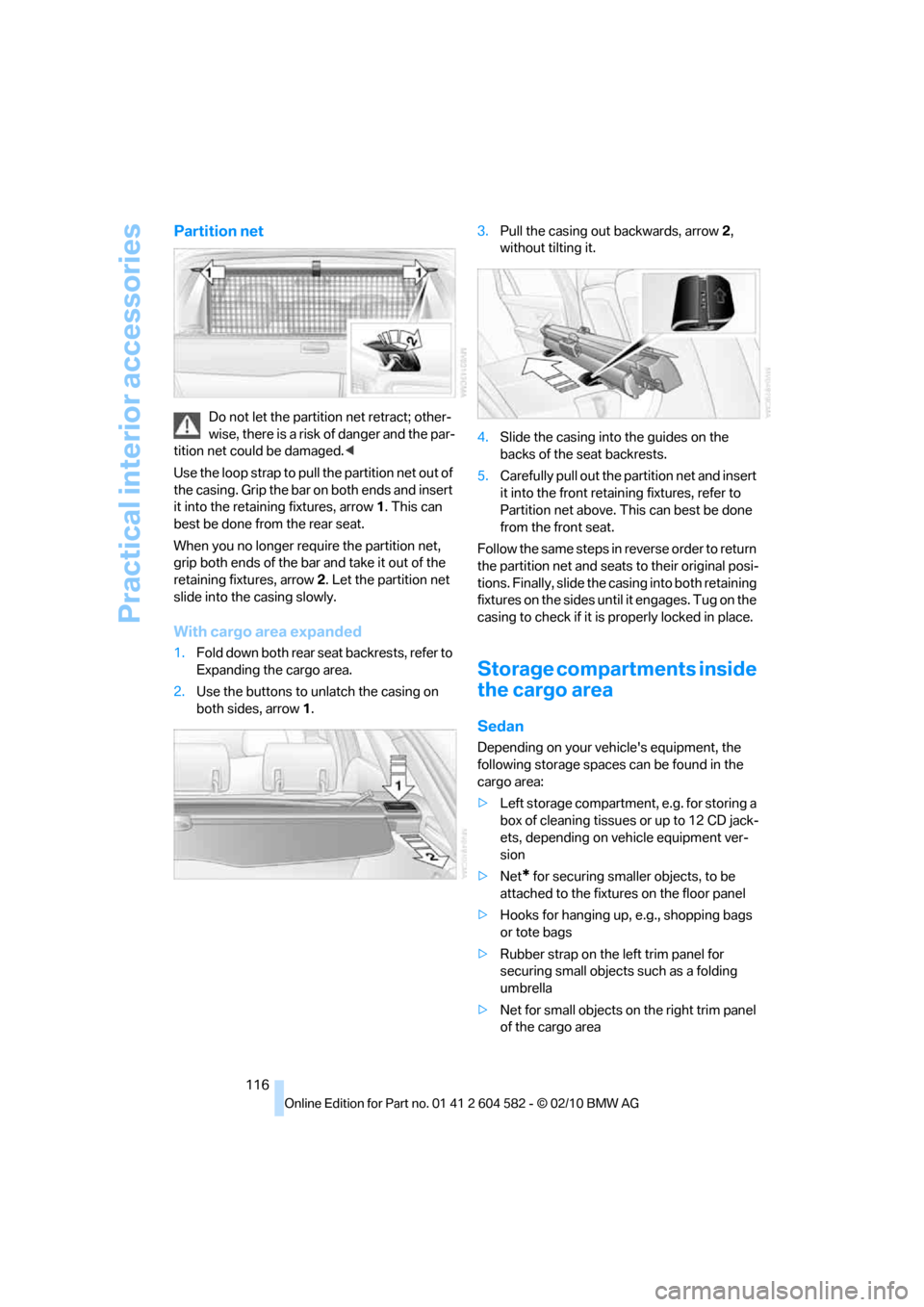
Use the loop strap to pull the partition net out of
the casing. Grip the bar on both ends and insert
it into the retaining fixtures, arrow 1. This can
best be done from the rear seat.
When you no longer require the partition net,
grip both ends of the bar and take it out of the
retaining fixtures, arrow 2. Let the partition net
slide into the casing slowly.
With cargo area expanded
1.Fold down both rear seat backrests, refer to
Expanding the cargo area.
2.Use the buttons to unlatch the casing on
both sides, arrow 1.3.Pull the casing out backwards, arrow 2,
without tilting it.
4.Slide the casing into the guides on the
backs of the seat backrests.
5.Carefully pull out the partition net and insert
it into the front retaining fixtures, refer to
Partition net above. This can best be done
from the front seat.
Follow the same steps in reverse order to return
the partition net and seats to their original posi-
tions. Finally, slide the casing into both retaining
fixtures on the sides until it engages. Tug on the
casing to check if it is properly locked in place.
Storage compartments inside
the cargo area
Sedan
Depending on your vehicle's equipment, the
following storage spaces can be found in the
cargo area:
>Left storage compartment, e.g. for storing a
box of cleaning tissues or up to 12 CD jack-
ets, depending on vehicle equipment ver-
sion
>Net
* for securing smaller objects, to be
attached to the fixtures on the floor panel
>Hooks for hanging up, e.g., shopping bags
or tote bags
>Rubber strap on the left trim panel for
securing small objects such as a folding
umbrella
>Net for small objects on the right trim panel
of the cargo area
Page 119 of 286
Controls
117Reference
At a glance
Driving tips
Communications
Navigation
Entertainment
Mobility
>Folding, removable box* under the floor
panel, e.g. for wet or dirty items
>Stowage compartment under the floor
panel
>Insertable dividers
* and removable storage
tray for the storage compartment under the
floor panel
Sports Wagon
The following storage spaces can be found in
the cargo area:
>Umbrella holder
* on the bottom of the par-
tition net casing
>Rubber strap on the left
* and right trim
panel for securing small objects such as a
folding umbrella
>Hooks for hanging up shopping bags or tote
bags, for example, on the left and right sides
of the cargo area
>Net for small objects on the right trim panel
of the cargo area
>Stowage compartment under the floor
panel
Depending on your vehicle's equipment, other
storage spaces can be found in the cargo area:
>Net
* for securing smaller objects, to be
attached to the fixtures on the floor panel
>Net
* on the left side trim of the cargo area
instead of the rubber strap
>Reversible floor panel with integrated plas-
tic cover
* for cargo area or bumper
>Folding, removable box
* under the floor
panel, e.g. for wet or dirty items>Insertable dividers
* and removable storage
tray for the storage compartment under the
floor panel
Folding up the floor panel
Do not exceed the maximum permissible
load of 55 lbs/25 kg for the storage com-
partment under the floor panel; otherwise, dam-
age could result.<
Sedan
Press the floor panel against the ceiling of the
cargo area; a locking device holds the floor
panel in place. To detach the floor panel, pull it
out of the locking device.
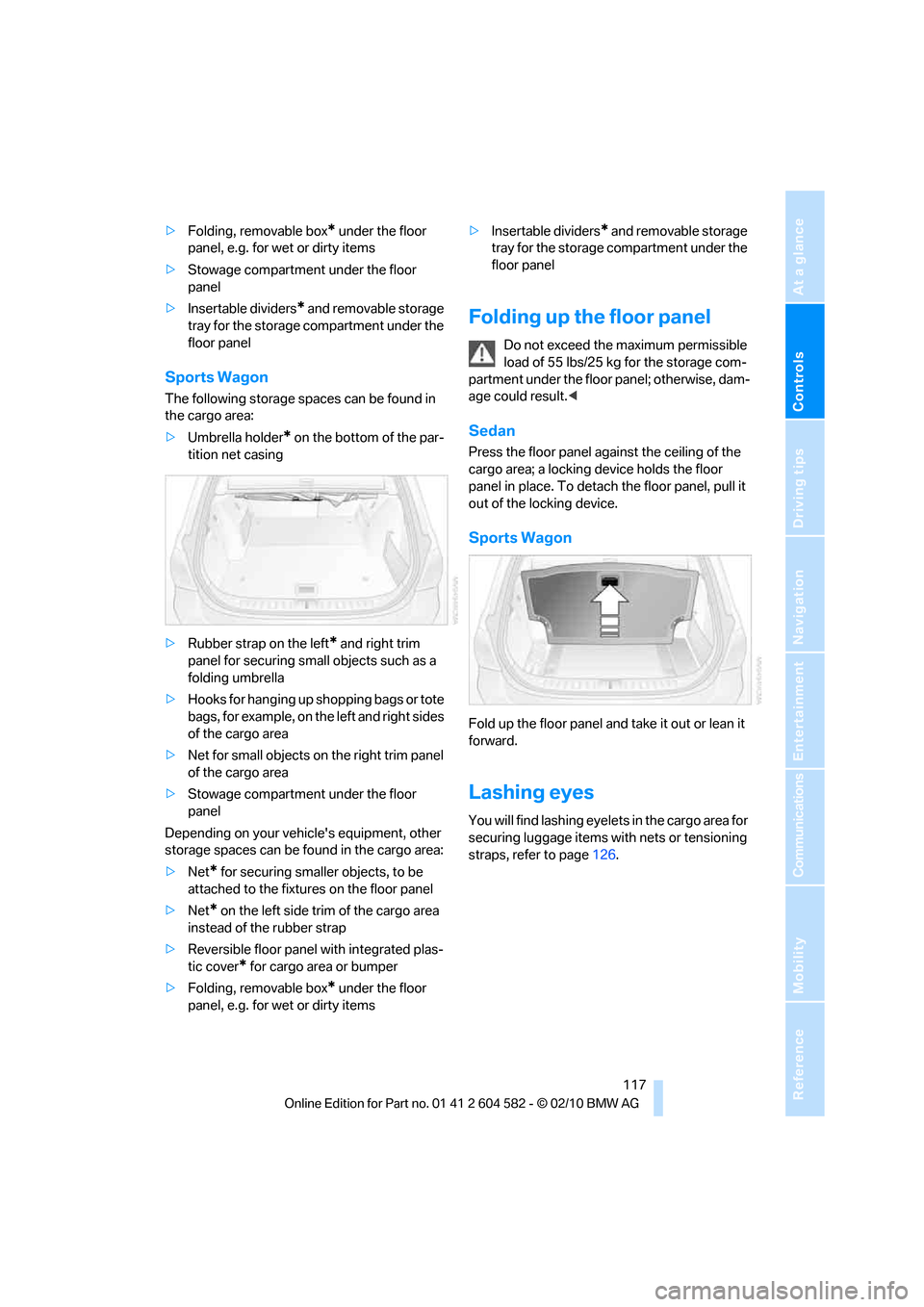
Sports Wagon
Fold up the floor panel and take it out or lean it
forward.
Lashing eyes
You will find lashing eyelets in the cargo area for
securing luggage items with nets or tensioning
straps, refer to page126.
Page 171 of 286
Navigation
Entertainment
Driving tips
169Reference
At a glance
Controls
Communications
Mobility
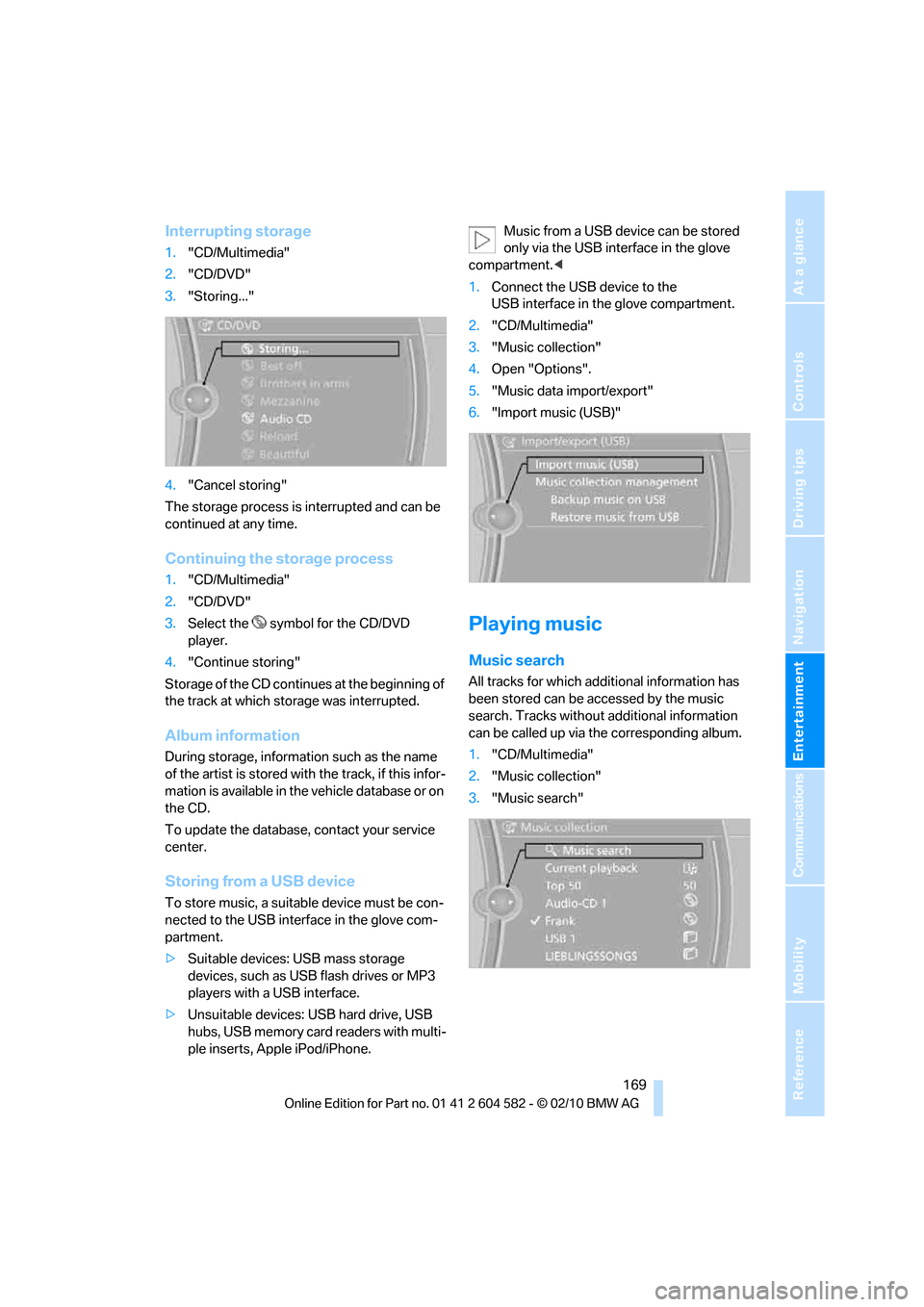
Interrupting storage
1."CD/Multimedia"
2."CD/DVD"
3."Storing..."
4."Cancel storing"
The storage process is interrupted and can be
continued at any time.
Continuing the storage process
1."CD/Multimedia"
2."CD/DVD"
3.Select the symbol for the CD/DVD
player.
4."Continue storing"
Storage of the CD continues at the beginning of
the track at which storage was interrupted.
Album information
During storage, information such as the name
of the artist is stored with the track, if this infor-
mation is available in the vehicle database or on
the CD.
To update the database, contact your service
center.
Storing from a USB device
To store music, a suitable device must be con-
nected to the USB interface in the glove com-
partment.
>Suitable devices: USB mass storage
devices, such as USB flash drives or MP3
players with a USB interface.
>Unsuitable devices: USB hard drive, USB
hubs, USB memory card readers with multi-
ple inserts, Apple iPod/iPhone.Music from a USB device can be stored
only via the USB interface in the glove
compartment.<
1.Connect the USB device to the
USB interface in the glove compartment.
2."CD/Multimedia"
3."Music collection"
4.Open "Options".
5."Music data import/export"
6."Import music (USB)"
Playing music
Music search
All tracks for which additional information has
been stored can be accessed by the music
search. Tracks without additional information
can be called up via the corresponding album.
1."CD/Multimedia"
2."Music collection"
3."Music search"
Page 246 of 286
Replacing components
244
Changing wheels
Your BMW is equipped with run-flat tires as
standard. This eliminates the need to change a
wheel immediately in the event of a puncture.
For information on continuing to drive with a
damaged tire, refer to Indication of a flat tire on
page89.
The symbol identifying run-flat tires is a circle
with the letters RSC on the sidewall, refer to
Run-flat tires, page223.
When mounting new tires or changing over
from summer to winter tires and vice versa,
mount run-flat tires for your own safety. In the
event of a flat, no spare wheel is available. Your
BMW center will be glad to advise you. Refer
also to New wheels and tires, page223.
The tools for changing wheels are avail-
able as optional accessories from your
BMW center.<
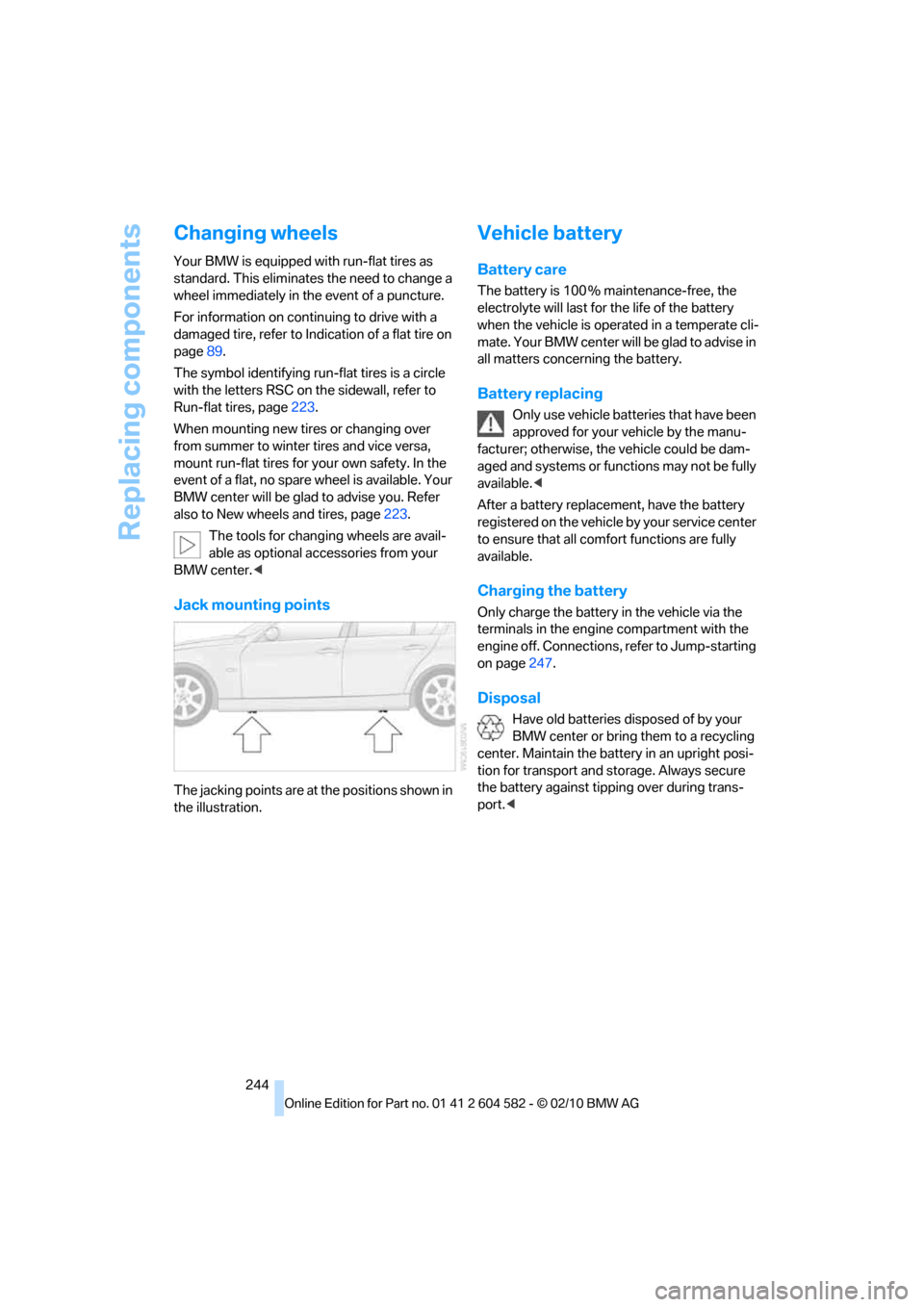
Jack mounting points
The jacking points are at the positions shown in
the illustration.
Vehicle battery
Battery care
The battery is 100 % maintenance-free, the
electrolyte will last for the life of the battery
when the vehicle is operated in a temperate cli-
mate. Your BMW center will be glad to advise in
all matters concerning the battery.
Battery replacing
Only use vehicle batteries that have been
approved for your vehicle by the manu-
facturer; otherwise, the vehicle could be dam-
aged and systems or functions may not be fully
available.<
After a battery replacement, have the battery
registered on the vehicle by your service center
to ensure that all comfort functions are fully
available.
Charging the battery
Only charge the battery in the vehicle via the
terminals in the engine compartment with the
engine off. Connections, refer to Jump-starting
on page247.
Disposal
Have old batteries disposed of by your
BMW center or bring them to a recycling
center. Maintain the battery in an upright posi-
tion for transport and storage. Always secure
the battery against tipping over during trans-
port.<
Page 269 of 286
Reference 267
At a glance
Controls
Driving tips
Communications
Navigation
Entertainment
Mobility
Available services199
Average fuel consumption73
– setting the units76
Average speed73
Avoid highways in
navigation140
Avoiding unintentional
alarms34
Axle loads, refer to
Weights257
B
Backrest contour, refer to
Lumbar support44
Backrests, refer to Seat
adjustment43
Backrest width adjustment44
Back seats
– refer to Rear seats45
Backup lamps
– replacing bulb242,243
Band-aids, refer to First aid
pouch247
Bar, refer to Towing
methods249
Base plate for telephone or
mobile phone
– refer to Snap-in adapter192
– refer to Snap-in adapter in
the center armrest storage
compartment111
Bass, tone setting150
Battery244
– charging244
– disposal36,244
– jump-starting247
– remote control26
– replacing244
– temporary power failure245
Battery for mobile phone192
Battery renewal
– remote control36
– remote control for vehicle36
Being towed249Belts, refer to Safety belts47
Belt tensioner, refer to Safety
belts47
Beverage holders, refer to
Cupholders112
Black ice, refer to Outside
temperature warning71
Blower, refer to Air
volume104
Bluetooth, activating/
deactivating183
BMW
– car shampoo235
BMW Advanced Diesel204
BMW Assist195
BMW Assist,
activating197,199
BMW Homepage4
BMW Maintenance
System231
BMW Search197
BMW webpage4
Bottle holders, refer to
Cupholders112
Brake Assist, refer to Dynamic
Brake Control DBC85
Brake fluid, refer to Service
requirements76
Brake Force Display93
Brake lamps
– Brake Force Display93
– replacing bulb242,243
Brake pads122
– breaking in122
Brake rotors125
– brakes122
– breaking in122
Brakes
– ABS85
– BMW Maintenance
System231
– Brake Force Display93
– breaking in122
– parking brake57
– service requirements76Brakes, refer to Braking
safely124
Brake system122
– BMW Maintenance
System231
– breaking in122
– disc brakes125
Breakdown services, refer to
Roadside Assistance246
Breaking in the clutch122
Breaking in the differential,
refer to Engine and
differential122
Break-in period122
Brightness of the Control
Display83
Bulb changing, refer to Lamps
and bulbs238
Button for starting the engine,
refer to Start/stop button55
Buttons on the steering
wheel11
C
California Proposition 65
warning6
Call
– accepting184
– ending184
– rejecting184
Calling, refer to Phone
numbers, dialing185
Calling, refer to Telephone
owner's manual
Can holders, refer to
Cupholders112
Capacities258
Capacity of the cargo area257
Car battery, refer to Vehicle
battery244
Car care, refer to Care233
Page 277 of 286
Reference 275
At a glance
Controls
Driving tips
Communications
Navigation
Entertainment
Mobility
Neck support, refer to Head
restraints44
Nets, refer to Storage
compartments112
New tires223
Next Service indicator, refer to
Condition Based Service
CBS231
North-facing map142
Nozzles102
Number of cylinders, refer to
Engine data254
Nylon rope, refer to Tow
rope250
O
OBD socket, refer to Socket
for Onboard Diagnosis232
Octane ratings, refer to Fuel
specifications203
Odometer71
Oil, refer to Engine oil227
Oil consumption227
Oil level227
Old batteries, refer to
Disposal244
Onboard vehicle tool kit237
Opening and closing
– Comfort Access34
– from inside30
– from outside27
– using the door lock29
– using the remote control27
Options, selecting for
navigation140
Orientation menu, refer to
Start menu17
Outlets
– refer to Ventilation105
Output, refer to Engine
data254
Outside-air mode
– automatic climate
control104
Outside temperature
display71
– changing unit of measure76
– in computer76Outside temperature
warning71
Overheated engine, refer to
Coolant temperature72
Overriding selector lever
lock60
Overview
– radio control150
P
Paintwork care234
Panorama glass roof39
– closing after electrical
malfunction40
– comfort position40
– convenient operation28
– initializing40
– opening, closing39
– pinch protection system40
– power failure40
– raising39
– remote control28
Park assistant, refer to Park
Distance Control84
Park Distance Control PDC84
Parked car ventilation106
– preselecting switch-on
times106
– switching on and off
directly106
Parking
– vehicle56
Parking aid, refer to Park
Distance Control PDC84
Parking brake57
– indicator lamp57
Parking lamps97
– replacing bulbs238,240
Parking lamps/low beams97
Particulate filter, refer to
Diesel particulate filter124
Partition net116
Passenger side mirror tilt
function49
Pathway lighting98
Personal Profile26
Phone book184Phone numbers
– dialing185
Pinch protection system
– glass roof, electric38
– panorama glass roof40
– windows37
Playing music169
Polish235
Pollen
– refer to Microfilter/activated-
charcoal filter for automatic
climate control105
Power failure245
Power windows36
– safety switch37
Power windows, refer to
Windows36
Preheating, refer to Diesel
engine56
Pressure, tires208
Pressure monitoring, tires88
– Flat Tire Monitor88
Pressure monitoring of tires,
refer to Tire Pressure
Monitor TPM89
Programmable buttons on the
steering wheel11
Protection function, refer to
Pinch protection system
– glass roof, electric38
– panorama glass roof40
– windows37
Providing medical assistance,
refer to First aid pouch247
Puncture
– Flat Tire Monitor88
R
Radio
– controls150
– HD Radio154
– satellite radio156
– selecting waveband153
– storing stations154
– switching on/off150
– tone control150
– volume150
Page 279 of 286
Reference 277
At a glance
Controls
Driving tips
Communications
Navigation
Entertainment
Mobility
S
Safety-belt height
adjustment47
Safety belts47
– damage48
– indicator/warning lamp47
– reminder47
– sitting safely42
Safety systems
– airbags94
– Antilock Brake System
ABS85
– brake system85
– driving stability control85
– Dynamic Stability Control
DSC85
– safety belts47
Safety tires, refer to Run-flat
tires223
Satellite radio156
– enabling or unsubscribing
from a channel156
– favorites159
– selecting channel157
– storing channel157
– timeshift158
– Traffic Jump160
Saving fuel122
Screen, refer to iDrive
controls16
Screw thread for tow
fitting249
SDARS, refer to Satellite
radio156
Seat adjustment
– electric43
– mechanical43
Seat and mirror memory46
Seat belt reminder, refer to
"Fasten safety belts"
reminder47
Seat heating46Seats43
– adjusting electrically43
– adjusting the seats43
– heating46
– memory, refer to Seat and
mirror memory46
– saving a setting, refer to Seat
and mirror memory46
– sitting safely42
Securing cargo118
Securing the vehicle
– from inside30
– from outside27
Selecting a detour146
Selecting distance for active
cruise control66
Selecting new scale for
navigation143
Selector lever
– automatic transmission with
Steptronic58
Selector lever lock, refer to
Changing selector lever
positions, shiftlock58
Selector lever positions
– automatic transmission with
Steptronic58
Service, refer to Roadside
Assistance246
Service car, refer to Roadside
Assistance246
Service data in the remote
control231
Service Interval Display, refer
to Condition Based Service
CBS231
Service Request198
Service requirements76
Service status199
Settings
– Changing on the Control
Display83
– clock, 12h/24h format79
– DVD164
– language83
Settings and information75
Settings for the map view143Setting times, refer to
Preselecting switch-on
times106
Shifting gears
– automatic transmission with
Steptronic59
– manual transmission57
Shiftlock
– automatic transmission,
refer to Changing selector
lever positions58
Short commands for the voice
activation system259
Short route in navigation, refer
to Selecting route140
Shuffled, refer to Random
– CD changer162
– CD player162
Side airbags94
Side window blind, refer to
Roller sun blinds110
Side windows, refer to
Windows36
Signal horn, refer to
Horn10,11
Sitting safely42
– with airbags42
– with head restraint42
– with safety belts42
Ski bag118
Sliding/tilt sunroof
– refer to Panorama glass
roof39
Sliding/tilt sunroof, refer to
Glass roof, electric37
Slot for remote control55
Smokers' package, refer to
Ashtray
113
Snap-in adapter
– inserting/removing192
– use180
Snap-in adapter, refer to
Center armrest storage
compartment111
Socket, Onboard Diagnosis
OBD232
Socket, refer to Connecting
electrical appliances113
Page 280 of 286
Everything from A to Z
278 Soot particulate filter, refer to
Diesel particulate filter124
SOS, refer to Sending an
Emergency Request246
Sound, adjusting during audio
playback, refer to Tone
control150
Sound output for
entertainment on/off150
Spare fuses245
Special destinations135
Special destinations,
displaying136
Speed
– Run-flat tires89
– with winter tires224
Speed limit82
Speed limit warning, refer to
Speed limit82
Speedometer12
Speed reading, refer to
Speedometer12
Speed Volume152
Split rear seat backrest, refer
to Expanding the cargo
area115
Split screen, refer to Control
Display, switching on/off19
Split screen content, refer to
Display for split screen
content, selecting20
Spray nozzles, refer to
Cleaning windshield and
headlamps61
Stability control, refer to
Driving stability control
systems85
Start/stop button55
– starting the engine56
– switching off the engine56
Starting, refer to Starting the
engine56
Starting assistance, refer to
Jump-starting247
Starting difficulties
– jump-starting247
Starting the engine
– start/stop button55Start menu17
State/province, for
navigation131
Station, selecting
– radio153
Status of this Owner's Manual
at time of printing5
Steam jet233,234
Steering wheel50
– adjustment50
– buttons on steering
wheel11
– heating50
– lock55
– locking with Comfort
Access35
Steering with variable ratio,
refer to Active steering
92
Steptronic, refer to Automatic
transmission with
Steptronic57
Storage236
Storage compartments112
Storage nets116
Stored trip, calling up139
Storing a destination in the
address book133
Storing music168
Storing seat positions, refer to
Seat and mirror memory46
Storing tires224
Stowage, refer to Storage
compartments112
Street, entering,
navigation132
Summer tires, refer to Wheels
and tires208
Sun blinds110
Surround151
SVCD163
SW, waveband153
Switches, refer to Cockpit10
Switching off
– engine56
Switching off the engine
– start/stop button55Switching on
– audio150
– CD changer150
– CD player150
– radio150
Switching the cooling function
on and off104
Switch-on times of parked car
ventilation, preselecting106
Symbols4
– status information19
T
Tachometer71
Tailgate31
– Comfort Access35
– emergency operation, refer
to Opening manually32
– opening from inside31
– opening from outside31
– opening manually32
– remote control28
Tailgate, refer to Trunk lid/
tailgate31
Tail lamp
– replacing bulb243
Tail lamp, refer to Tail
lamps241
Tail lamps241
– replacing bulb242,243
Tank contents, refer to
Capacities258
Technical data254
– dimensions255
Technical modifications, refer
to For your own safety5
Telephone180
– installation location, refer to
Center armrest111
– refer to separate Owner's
Manual
– voice commands189
TeleService196
TeleService Diagnosis197
TeleService Help197