program BMW 325I SEDAN 2006 E90 User Guide
[x] Cancel search | Manufacturer: BMW, Model Year: 2006, Model line: 325I SEDAN, Model: BMW 325I SEDAN 2006 E90Pages: 245, PDF Size: 8.24 MB
Page 100 of 245
Climate
98
Automatic climate control
Comfortable interior climate
AUTO program7 offers the ideal air distribution
and air flow rate for almost all conditions, refer
to AUTO program below. All you need to do is
select an interior temperature which is comfort-
able for you.
The following sections inform you in detail
about how to adjust the settings.
Most settings are stored for the remote control
currently in use, refer also to Personal Profile
settings on page29.
Switching manual air distribution on/
off
The emerging air is directed to the
windows, to the upper body area or
to the footwell.
You can switch the automatic air
distribution back on by pressing the AUTO but-
ton.
Fine adjustments to manual air
distribution
You can set the rate of incoming airflow for
manual air distribution.
iDrive concept, refer to page16.
1.Press the button.
This opens the start menu.
2.Move the controller to the left to call up "Cli-
mate".
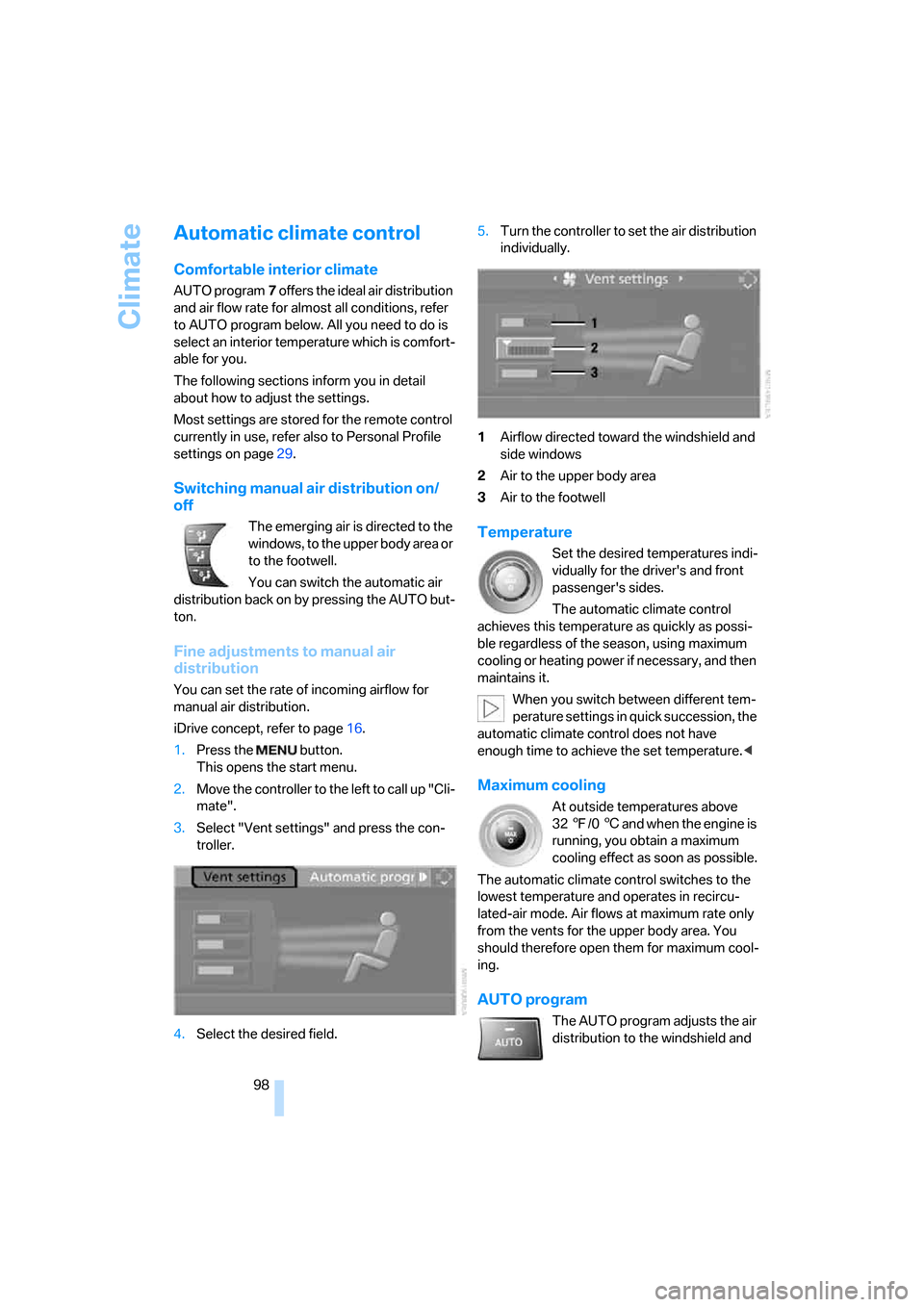
3.Select "Vent settings" and press the con-
troller.
4.Select the desired field.5.Turn the controller to set the air distribution
individually.
1Airflow directed toward the windshield and
side windows
2Air to the upper body area
3Air to the footwell
Temperature
Set the desired temperatures indi-
vidually for the driver's and front
passenger's sides.
The automatic climate control
achieves this temperature as quickly as possi-
ble regardless of the season, using maximum
cooling or heating power if necessary, and then
maintains it.
When you switch between different tem-
perature settings in quick succession, the
automatic climate control does not have
enough time to achieve the set temperature.<
Maximum cooling
At outside temperatures above
327/06 and when the engine is
running, you obtain a maximum
cooling effect as soon as possible.
The automatic climate control switches to the
lowest temperature and operates in recircu-
lated-air mode. Air flows at maximum rate only
from the vents for the upper body area. You
should therefore open them for maximum cool-
ing.
AUTO program
The AUTO program adjusts the air
distribution to the windshield and
Page 101 of 245
Controls
99Reference
At a glance
Driving tips
Communications
Navigation
Entertainment
Mobility
side windows, towards the upper body area and
into the footwell for you. The air flow rate and
your temperature specifications will be adapted
to outside influences as a result of seasonal
changes, e.g. sunlight or window condensation.
The cooling is switched on automatically with
the AUTO program.
Intensity of the AUTO program
You can set the intensity of the air supply in the
AUTO program. This changes the duration of
time during which the vehicle interior is heated
or cooled.
1.Open the start menu.
2.Call up "Climate".
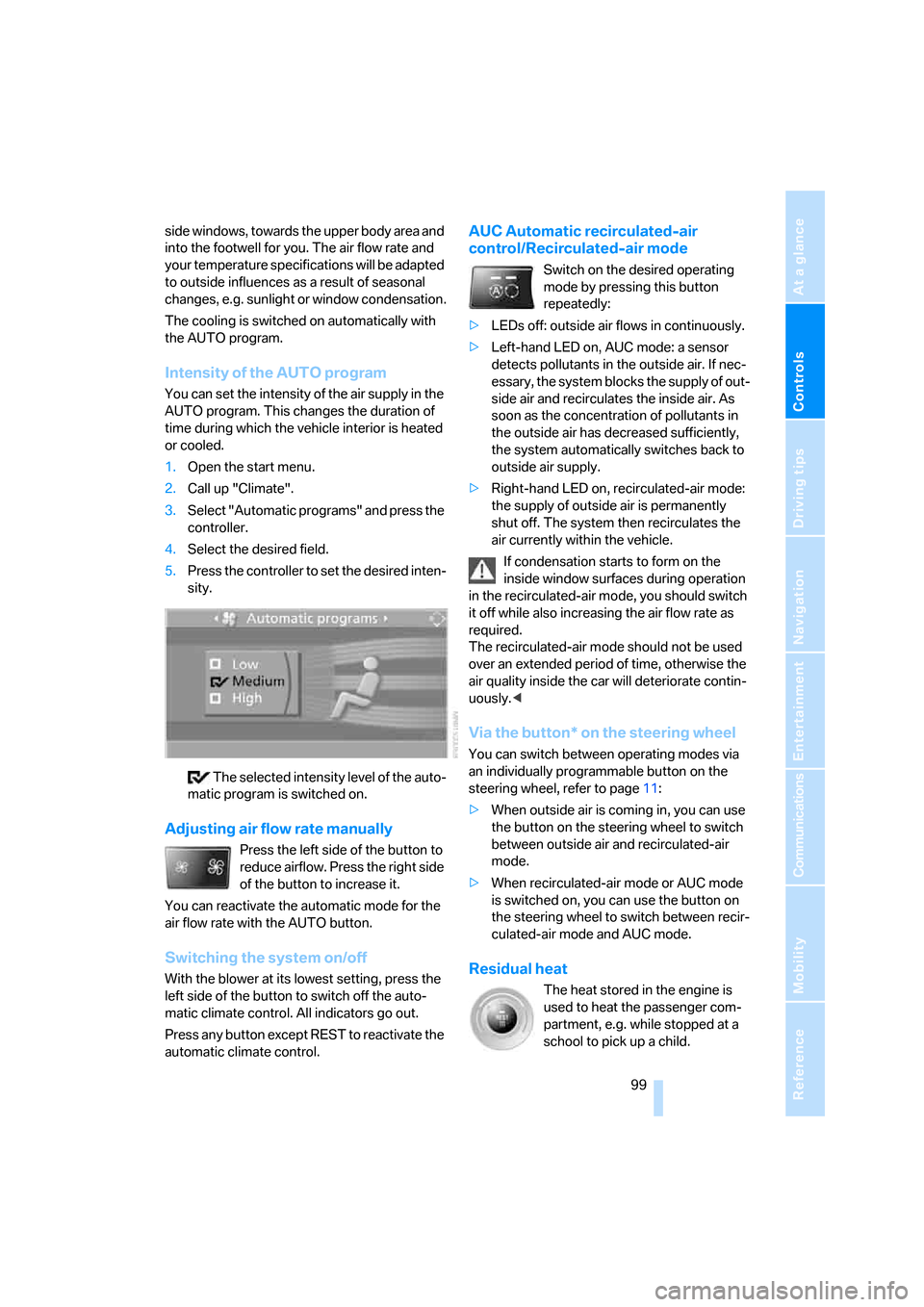
3.Select "Automatic programs" and press the
controller.
4.Select the desired field.
5.Press the controller to set the desired inten-
sity.
The selected intensity level of the auto-
matic program is switched on.
Adjusting air flow rate manually
Press the left side of the button to
reduce airflow. Press the right side
of the button to increase it.
You can reactivate the automatic mode for the
air flow rate with the AUTO button.
Switching the system on/off
With the blower at its lowest setting, press the
left side of the button to switch off the auto-
matic climate control. All indicators go out.
Press any button except REST to reactivate the
automatic climate control.
AUC Automatic recirculated-air
control/Recirculated-air mode
Switch on the desired operating
mode by pressing this button
repeatedly:
>LEDs off: outside air flows in continuously.
>Left-hand LED on, AUC mode: a sensor
detects pollutants in the outside air. If nec-
essary, the system blocks the supply of out-
side air and recirculates the inside air. As
soon as the concentration of pollutants in
the outside air has decreased sufficiently,
the system automatically switches back to
outside air supply.
>Right-hand LED on, recirculated-air mode:
the supply of outside air is permanently
shut off. The system then recirculates the
air currently within the vehicle.
If condensation starts to form on the
inside window surfaces during operation
in the recirculated-air mode, you should switch
it off while also increasing the air flow rate as
required.
The recirculated-air mode should not be used
over an extended period of time, otherwise the
air quality inside the car will deteriorate contin-
uously.<
Via the button* on the steering wheel
You can switch between operating modes via
an individually programmable button
on the
steering wheel, refer to page11:
>When outside air is coming in, you can use
the button on the steering wheel to switch
between outside air and recirculated-air
mode.
>When recirculated-air mode or AUC mode
is switched on, you can use the button on
the steering wheel to switch between recir-
culated-air mode and AUC mode.
Residual heat
The heat stored in the engine is
used to heat the passenger com-
partment, e.g. while stopped at a
school to pick up a child.
Page 102 of 245
Climate
100 The function can be switched on when the fol-
lowing conditions are met:
>Up to 15 minutes after the engine has been
switched off
>While the engine is at operating tempera-
ture
>As long as battery voltage is sufficient
>At an outside temperature below 777/
256
The LED is lit when the function is on.
As of radio readiness, you can set the interior
temperature, the air flow rate and the air distri-
bution.
Defrosting windows and removing
condensation
Quickly removes ice and conden-
sation from the windshield and
front side windows.
Switching cooling function on/off
The cooling function cools and
dehumidifies the incoming air
before also reheating it as
required, according to the temperature setting.
Depending on the weather, the windshield may
fog over briefly when the engine is started.
The cooling function is automatically switched
on along with the AUTO program. The passen-
ger compartment can only be cooled while the
engine is running.
Rear window defroster
The defroster switches off auto-
matically after a certain time.
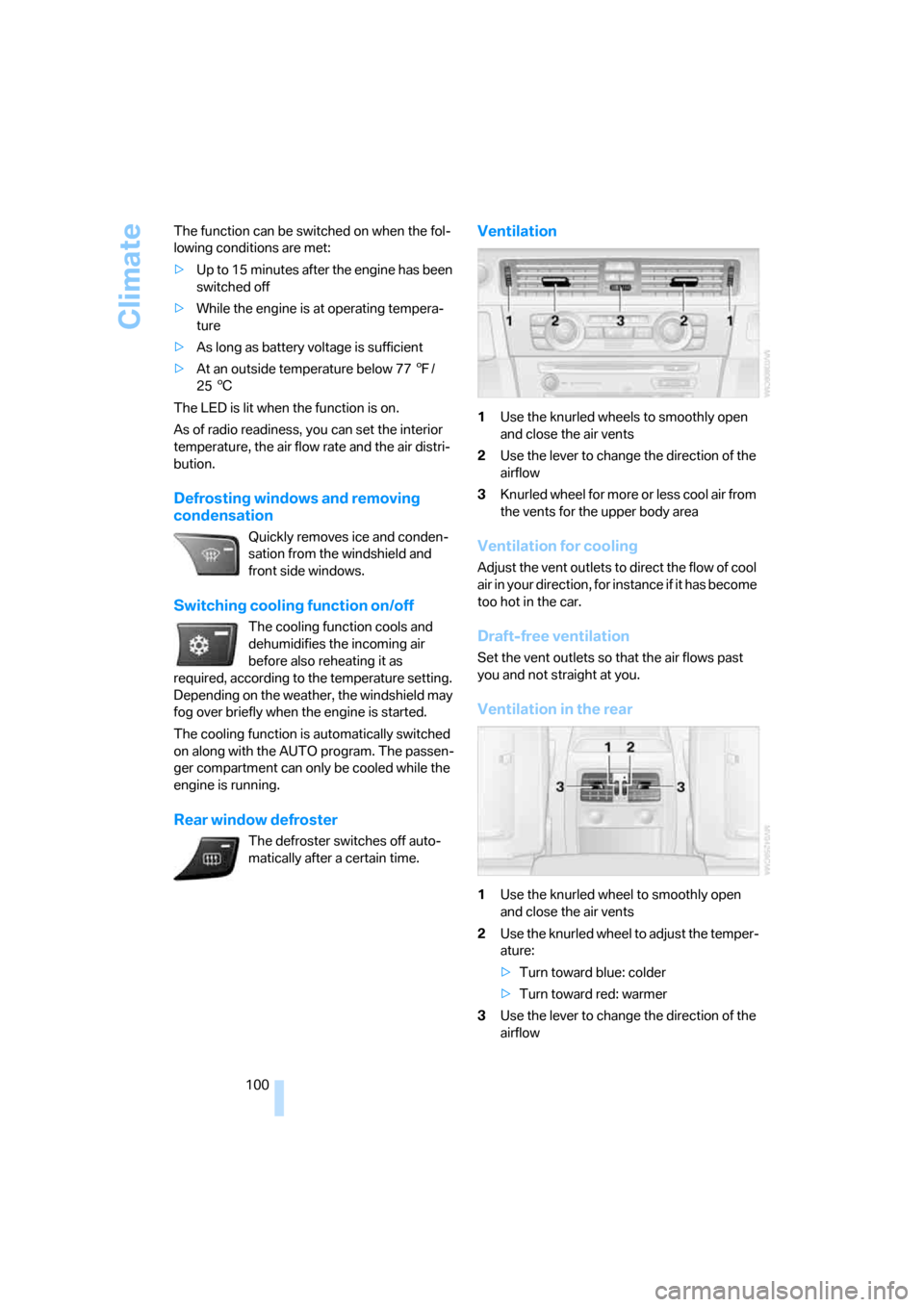
Ventilation
1Use the knurled wheels to smoothly open
and close the air vents
2Use the lever to change the direction of the
airflow
3Knurled wheel for more or less cool air from
the vents for the upper body area
Ventilation for cooling
Adjust the vent outlets to direct the flow of cool
air in your direction, for instance if it has become
too hot in the car.
Draft-free ventilation
Set the vent outlets so that the air flows past
you and not straight at you.
Ventilation in the rear
1Use the knurled wheel to smoothly open
and close the air vents
2Use the knurled wheel to adjust the temper-
ature:
>Turn toward blue: colder
>Turn toward red: warmer
3Use the lever to change the direction of the
airflow
Page 105 of 245
Controls
103Reference
At a glance
Driving tips
Communications
Navigation
Entertainment
Mobility
Practical interior accessories
Integrated universal remote
control*
The concept
The integrated universal remote control can
replace as many as three hand-held transmit-
ters for various remote-controlled devices,
such as door openers and house alarm sys-
tems. The integrated universal remote control
registers and stores signals from the original
hand-held transmitters.
The signal of an original hand-held transmitter
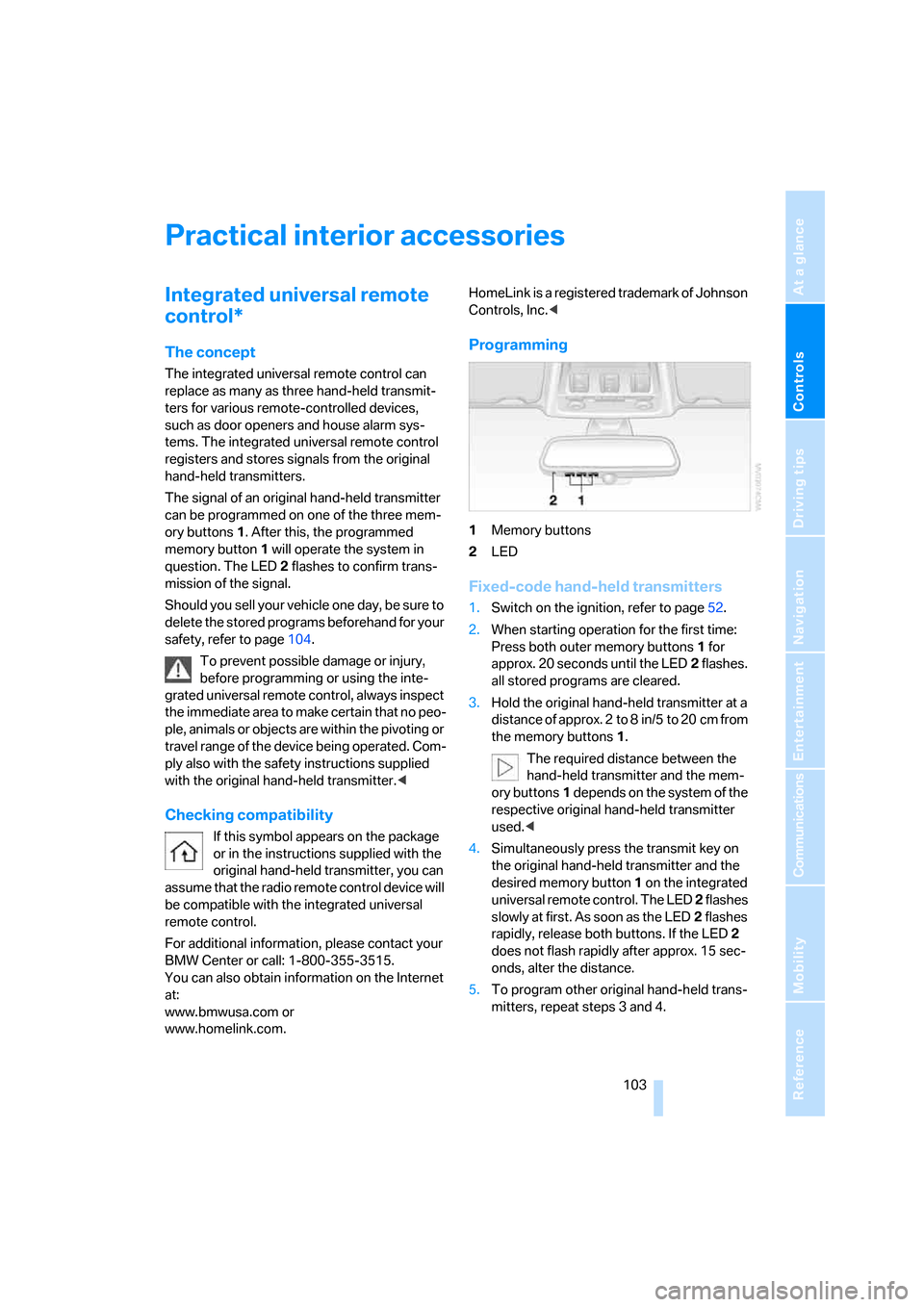
can be programmed on one of the three mem-
ory buttons1. After this, the programmed
memory button1 will operate the system in
question. The LED2 flashes to confirm trans-
mission of the signal.
Should you sell your vehicle one day, be sure to
delete the stored programs beforehand for your
safety, refer to page104.
To prevent possible damage or injury,
before programming or using the inte-
grated universal remote control, always inspect
the immediate area to make certain that no peo-
ple, animals or objects are within the pivoting or
travel range of the device being operated. Com-
ply also with the safety instructions supplied
with the original hand-held transmitter.<
Checking compatibility
If this symbol appears on the package
or in the instructions supplied with the
original hand-held transmitter, you can
assume that the radio remote control device will
be compatible with the integrated universal
remote control.
For additional information, please contact your
BMW Center or call: 1-800-355-3515.
You can also obtain information on the Internet
at:
www.bmwusa.com or
www.homelink.com. HomeLink is a registered trademark of Johnson
Controls, Inc.<
Programming
1Memory buttons
2LED
Fixed-code hand-held transmitters
1.Switch on the ignition, refer to page52.
2.When starting operation for the first time:
Press both outer memory buttons1 for
approx. 20 seconds until the LED2 flashes.
all stored programs are cleared.
3.Hold the original hand-held transmitter at a
distance of approx. 2 to 8 in/5 to 20 cm from
the memory buttons1.
The required distance between the
hand-held transmitter and the mem-
ory buttons1 depends on the system of the
respective original hand-held transmitter
used.<
4.Simultaneously press the transmit key on
the original hand-held transmitter and the
desired memory button 1 on the integrated
universal remote control. The LED 2 flashes
slowly at first. As soon as the LED2 flashes
rapidly, release both buttons. If the LED2
does not flash rapidly after approx. 15 sec-
onds, alter the distance.
5.To program other original hand-held trans-
mitters, repeat steps 3 and 4.
Page 106 of 245
Practical interior accessories
104 The corresponding memory button 1 is now
programmed with the signal of the original
hand-held transmitter.
You can operate the system when the engine is
running or when the ignition is switched on.
If the system fails to function even after
repeated programming, check whether
the original hand-held transmitter uses an alter-
nating-code system. To do so, either read the
instructions for the original hand-held transmit-
ter or hold down the programmed memory
button1 of the integrated universal remote
control. If the LED2 on the integrated universal
remote control flashes rapidly for a short while
and then remains lit for about two seconds, the
original hand-held transmitter uses an alternat-
ing-code system. If it uses an alternating-code
system, program the memory buttons1 as
described under Alternating-code hand-held
transmitters.<
Alternating-code hand-held
transmitters
To program the integrated universal remote
control, consult the operating instructions for
the device to be set. You will find information
there on the possibilities for synchronization.
When programming hand-held transmitters that employ an alternating code, please observe
the following supplementary instructions:
Programming will be easier with the aid of
a second person.<
1.Park your vehicle within the range of the
remote-controlled device.
2.Program the integrated universal remote
control as described above in the section
Fixed-code hand-held transmitters.
3.Locate the button on the receiver of the
device to be set, e.g. on the drive unit.
4.Press the button on the receiver of the
device to be set. After step 4, you have
approx. 30 seconds for step 5.
5.Press the programmed memory button1 of
the integrated universal remote control
three times.
The corresponding memory button 1 is now
programmed with the signal of the original
hand-held transmitter.
If you have any questions, please contact
your BMW Center.<
Deleting stored programs
Press both outer memory buttons1 for approx.
20 seconds until the LED2 flashes: all stored
programs are cleared.
It is not possible to clear individual programs.
Interior rearview mirror with digital compass*
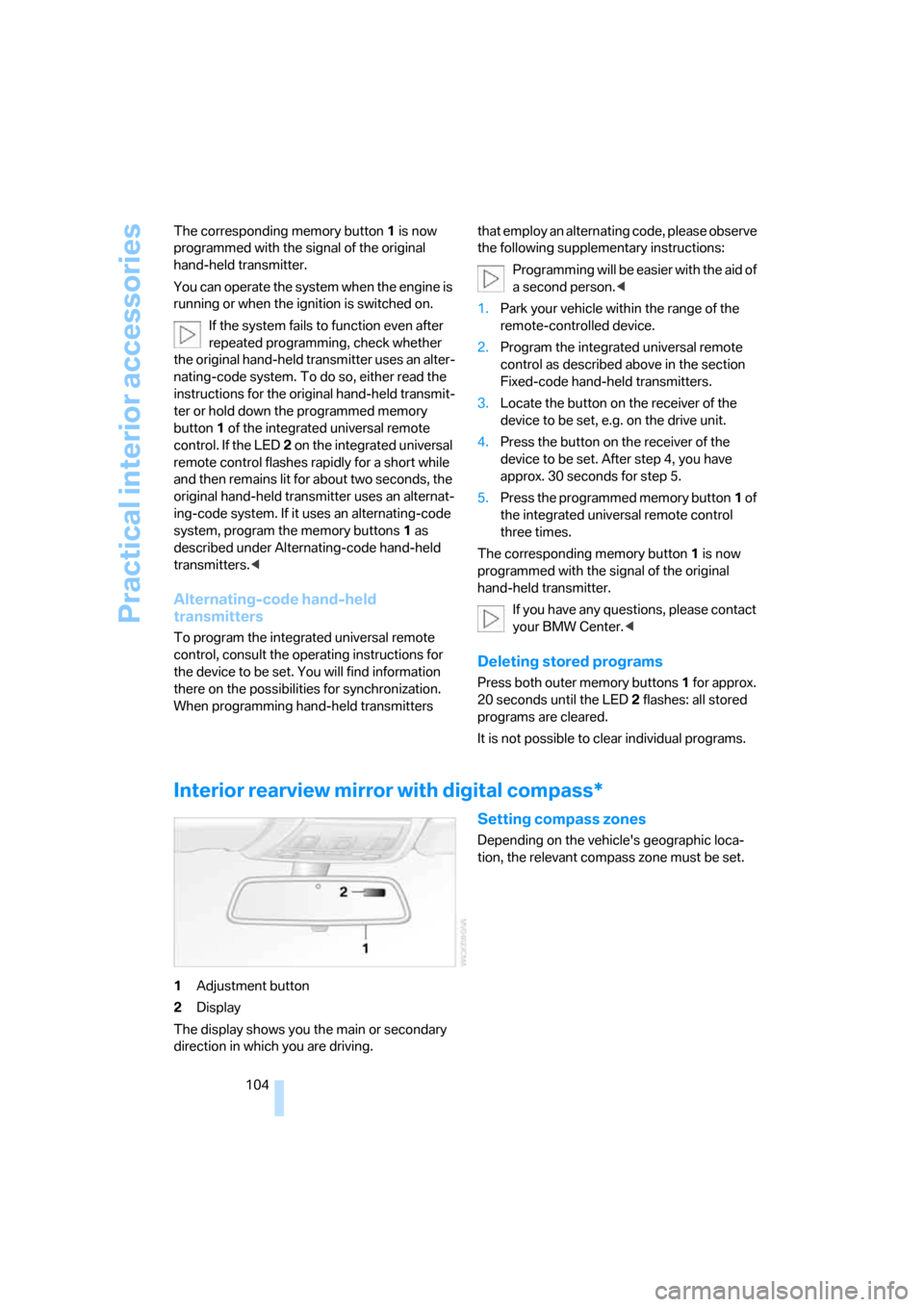
1Adjustment button
2Display
The display shows you the main or secondary
direction in which you are driving.
Setting compass zones
Depending on the vehicle's geographic loca-
tion, the relevant compass zone must be set.
Page 141 of 245
Navigation
Driving tips
139Reference
At a glance
Controls
Communications
Entertainment
Mobility
Displaying towns/cities and streets
along the route
You can have the roads and towns along the
route displayed during destination guidance.
The distances remaining to be traveled within
each section of the route are also displayed.
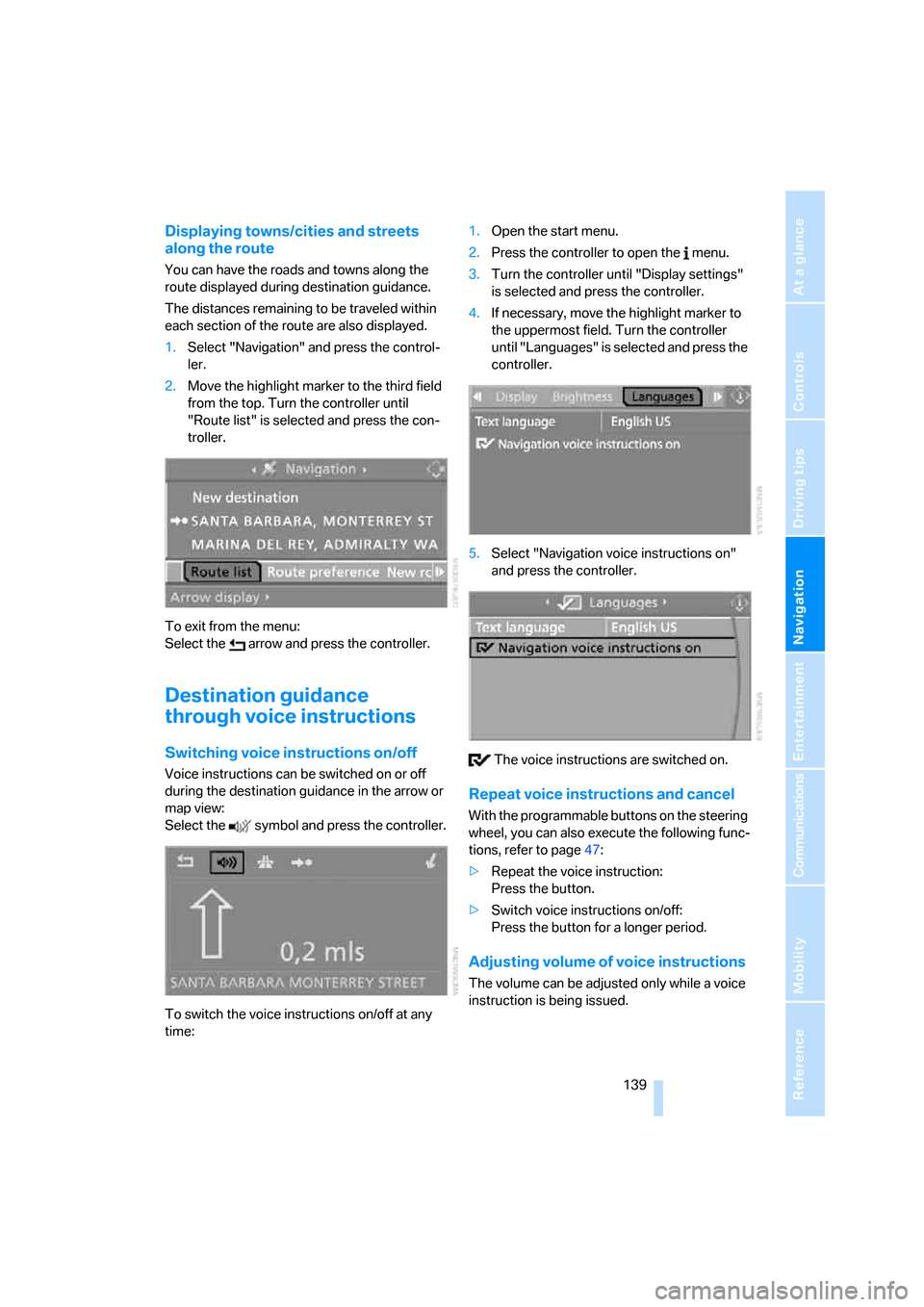
1.Select "Navigation" and press the control-
ler.
2.Move the highlight marker to the third field
from the top. Turn the controller until
"Route list" is selected and press the con-
troller.
To exit from the menu:
Select the arrow and press the controller.
Destination guidance
through voice instructions
Switching voice instructions on/off
Voice instructions can be switched on or off
during the destination guidance in the arrow or
map view:
Select the symbol and press the controller.
To switch the voice instructions on/off at any
time:1.Open the start menu.
2.Press the controller to open the menu.
3.Turn the controller until "Display settings"
is selected and press the controller.
4.If necessary, move the highlight marker to
the uppermost field. Turn the controller
until "Languages" is selected and press the
controller.
5.Select "Navigation voice instructions on"
and press the controller.
The voice instructions are switched on.
Repeat voice instructions and cancel
With the programmable buttons on the steering
wheel, you can also execute the following func-
tions, refer to page47:
>Repeat the voice instruction:
Press the button.
>Switch voice instructions on/off:
Press the button for a longer period.
Adjusting volume of voice instructions
The volume can be adjusted only while a voice
instruction is being issued.
Page 211 of 245
Mobility
209Reference
At a glance
Controls
Driving tips
Communications
Navigation
Entertainment
according to BMW repair procedures with cor-
respondingly trained personnel.
Changing wheels
Your BMW is equipped with Run-Flat Tires as
standard. This removes the need to change a
wheel immediately in the event of a puncture.
The symbol identifying Run-Flat Tires is a circle
with the letters RSC on the sidewall, refer to
Run-Flat Tires, page196.
When mounting new tires or changing over
from summer to winter tires and vice versa,
mount Run-Flat Tires for your own safety. In the
event of a flat, moreover, no spare wheel is
available. Your BMW Center will be glad to
advise you. Refer also to New wheels and tires,
page196.
The tools for changing wheels are avail-
able as optional accessories from your
BMW Center.<
Jack mounting points
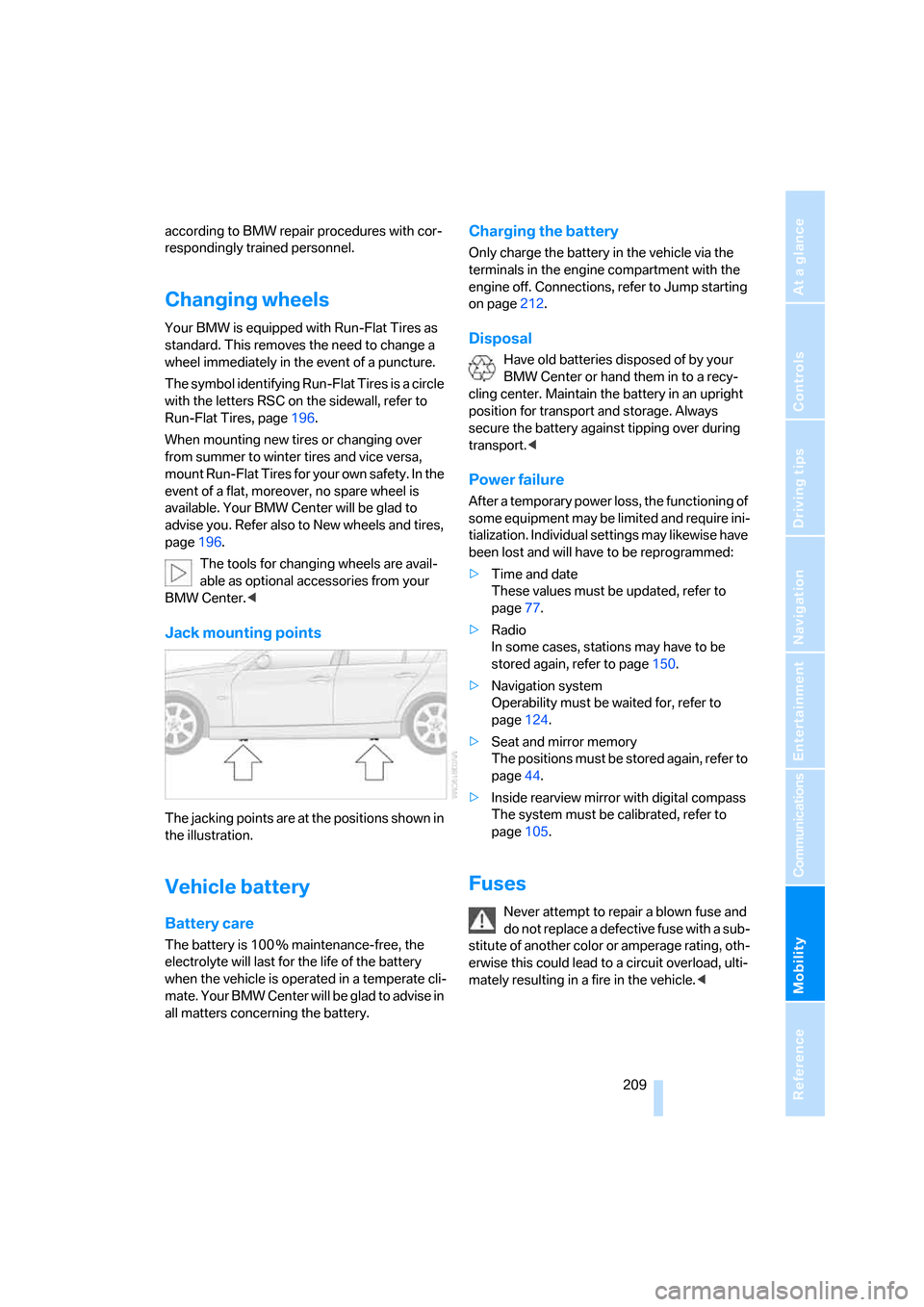
The jacking points are at the positions shown in
the illustration.
Vehicle battery
Battery care
The battery is 100 % maintenance-free, the
electrolyte will last for the life of the battery
when the vehicle is operated in a temperate cli-
mate. Your BMW Center will be glad to advise in
all matters concerning the battery.
Charging the battery
Only charge the battery in the vehicle via the
terminals in the engine compartment with the
engine off. Connections, refer to Jump starting
on page212.
Disposal
Have old batteries disposed of by your
BMW Center or hand them in to a recy-
cling center. Maintain the battery in an upright
position for transport and storage. Always
secure the battery against tipping over during
transport.<
Power failure
After a temporary power loss, the functioning of
some equipment may be limited and require ini-
tialization. Individual settings may likewise have
been lost and will have to be reprogrammed:
>Time and date
These values must be updated, refer to
page77.
>Radio
In some cases, stations may have to be
stored again, refer to page150.
>Navigation system
Operability must be waited for, refer to
page124.
>Seat and mirror memory
The positions must be stored again, refer to
page44.
>Inside rearview mirror with digital compass
The system must be calibrated, refer to
page105.
Fuses
Never attempt to repair a blown fuse and
do not replace a defective fuse with a sub-
stitute of another color or amperage rating, oth-
erwise this could lead to a circuit overload, ulti-
mately resulting in a fire in the vehicle.<
Page 227 of 245
Reference 225
At a glance
Controls
Driving tips
Communications
Navigation
Entertainment
Mobility
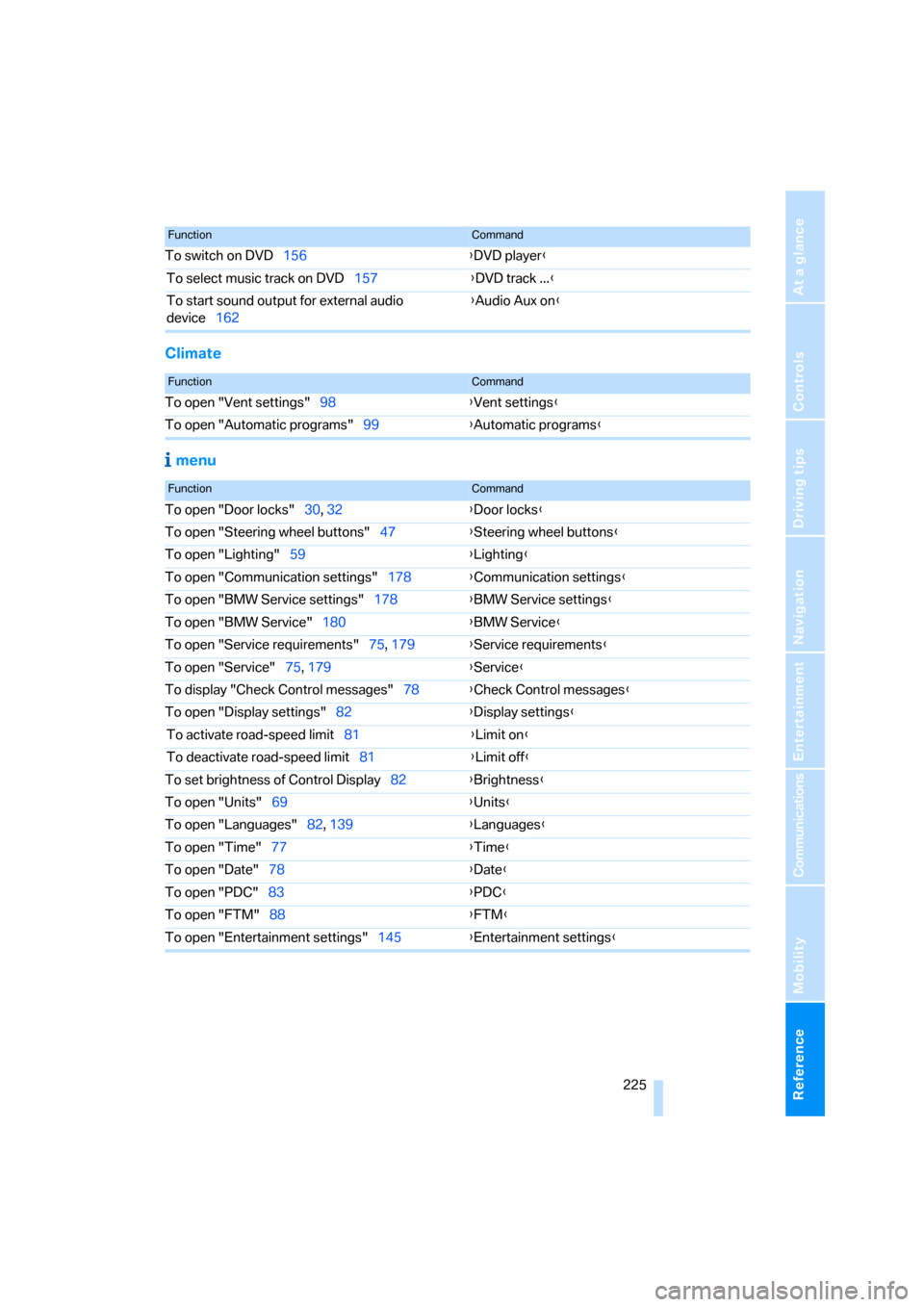
Climate
menu
To switch on DVD156{DVD player}
To select music track on DVD157{DVD track ...}
To start sound output for external audio
device162{Audio Aux on}
FunctionCommand
FunctionCommand
To open "Vent settings"98{Vent settings}
To open "Automatic programs"99{Automatic programs}
FunctionCommand
To open "Door locks"30, 32{Door locks}
To open "Steering wheel buttons"47{Steering wheel buttons}
To open "Lighting"59{Lighting}
To open "Communication settings"178{Communication settings}
To open "BMW Service settings"178{BMW Service settings}
To open "BMW Service"180{BMW Service}
To open "Service requirements"75, 179{Service requirements}
To open "Service"75, 179{Service}
To display "Check Control messages"78{Check Control messages}
To open "Display settings"82{Display settings}
To activate road-speed limit81{Limit on}
To deactivate road-speed limit81{Limit off}
To set brightness of Control Display82{Brightness}
To open "Units"69{Units}
To open "Languages"82, 139{Languages}
To open "Time"77{Time}
To open "Date"78{Date}
To open "PDC"83{PDC}
To open "FTM"88{
FTM}
To open "Entertainment settings"145{Entertainment settings}
Page 229 of 245
Reference 227
At a glance
Controls
Driving tips
Communications
Navigation
Entertainment
Mobility
Audio device,
external107,162
"Audio" tone settings145
"Auto. headlamps"94
Automatic
– air distribution98
– air flow rate98
– cruise control60,62
– headlamp control93
– service notification179
– storing of stations149
Automatic climate control97
– automatic air distribution98
– settings via iDrive98
Automatic curb monitor46
"Automatic programs" with
automatic climate control99
Automatic recirculated-air
control AUC99
Automatic station search149
Automatic transmission with
Steptronic57
– interlock57
– overriding selector lever
lock58
– shiftlock57
– sport program58
"Automatic ventilation"101
AUTO program for automatic
climate control98
"Autostore"
– on the radio150
AUX-IN162
– port107
Average fuel consumption71
– setting the units73
Average speed70
"Avoid ferries" in
navigation135
"Avoid highways" in
navigation135
Avoid highways in
navigation135
Avoiding unintentional
alarms35
"Avoid tollroads" in
navigation135
Axle loads, refer to
Weights220"A - Z"172
B
Backrests, refer to Seats40
Backrest width adjustment42
Back seats
– refer to Rear seats
Backup lamps
– replacing bulbs208
Backup lamps, refer to Tail
lamps207
Balance, tone control145
Band-aids, refer to First-aid
pouch212
Bar, refer to Tow-starting,
towing away214
Bass, tone control145
Bass sounds, refer to Tone
control145
Bass sounds, refer to Treble
and bass145
Battery209
– charging209
– disposal37,209
– jump starting212
– temporary power failure209
Battery renewal
– remote control37
Being towed213
Belts, refer to Safety belts45
Belt tensioner, refer to Safety
belts45
Beverage holders, refer to
Cup holders107
Black ice, refer to Outside
temperature warning69
Blower, refer to Air flow
rate99
BMW Assist178
– enabling178
– services offered179
"BMW Contact"182
"BMW Contact
Numbers"182
BMW Homepage4
BMW Maintenance
System203
"BMW Service"180"BMW Service settings"179
BMW webpage4
Bottle holders, refer to Cup
holders107
Brake assist, refer to Dynamic
Brake Control84
Brake fluid202
– level too low202
– warning lamp202
Brake fluid, refer to Service
requirements74
Brake Force Display90
Brake hydraulics, refer to
Brakes202
Brake lamps
– Brake Force Display90
– replacing bulbs208
Brake pads, breaking in116
Brake rotors118
– brakes116
– breaking in116
Brakes
– ABS84
– BMW Maintenance
System203
– brake fluid202
– brake pads202
– breaking in116
– handbrake54
– service requirements74
Brakes, refer to Braking
safely117
Brake system116
– BMW Maintenance
System203
– brake fluid202
– brake pads202
– breaking in116
– disc brakes118
Breakdown services, refer to
Roadside Assistance211
Breaking in
– sequential manual gearbox
SMG116
Breaking in the clutch116
Breaking in the
differential116
Break-in period116
Page 233 of 245
Reference 231
At a glance
Controls
Driving tips
Communications
Navigation
Entertainment
Mobility
Emergency release
– luggage compartment lid
from inside34
Emergency services, refer to
Roadside Assistance211
Emissions test, refer to
Service requirements74
"Enable services"179
"End call"171
Energy-conscious driving,
refer to Energy Control70
Energy Control70
Engine
– breaking in116
– data218
– overheated, refer to Coolant
temperature69
– speed218
– starting53
– starting, convenient
access35
– switching off53
Engine compartment199
Engine coolant, refer to
Coolant201
Engine oil
– adding201
– BMW Maintenance
System203
– checking level199
– intervals between changes,
refer to Service
requirements74
"Engine oil level"200
Engine output, refer to Engine
data218
Engine speed218
Engine starting, refer to
Starting the engine53
"Enter address"126
Entering destination126
Entering the address128
Entering the intersection127
"Entertainment"144
"Entertainment
settings"145,152
Environmentally friendly
driving, refer to Energy
Control70"Equalizer", refer to Tone
control146
Equalizer, refer to Tone
control146
Error messages, refer to
Check Control79
"ESN"154
ESP Electronic Stability
Program, refer to DSC
Dynamic Stability
Control84
Event data recorders204
Exhaust system, refer to Hot
exhaust system
116
Exterior mirrors45
– adjusting45
– automatic dimming
feature117
– automatic heating46
External audio
device107,162
Eyes
– for tow-starting and towing
away213
– for tying down loads119
F
Fader, tone control145
Failure messages, refer to
Check Control79
Failure of an electrical
consumer209
False alarm, refer to Avoiding
unintentional alarms35
Fastening safety belts, refer to
Safety belts45
Fastest route for
navigation134
Fast forward
– CD changer160
– CD player160
"Fast route" in navigation135
Filter
– refer to Microfilter/activated-
charcoal filter for automatic
climate control101
First aid pouch212Fixture for remote control,
refer to Ignition lock52
Flashlight, refer to
Rechargeable flashlight106
Flash when locking/
unlocking31
Flat
– Run-Flat Tires196
Flat Tire Monitor FTM88
– indicating a flat tire89
– initializing the system88
– malfunction89
– snow chains88,197
– system limits88
Flat tires, refer to Tire
condition195
"FM", waveband144,148
FM, waveband148
Fog lamps95
– indicator lamp13,95
Footbrake, refer to Braking
safely117
Footwell lamps96
For your own safety5
Front airbags90
Front seat adjustment40
"FTM"88
FTM, refer to Flat Tire
Monitor88
Fuel186
– display70
– high-quality brands186
– quality186
– specifications186
– tank capacity221
Fuel clock, refer to Fuel
gauge
70
Fuel consumption, refer to
Average fuel
consumption71
Fuel display, refer to Fuel
gauge70
Fuel filler door186
– releasing in the event of
electrical malfunction186
Fuses209