con BMW 328I 2011 E90 User Guide
[x] Cancel search | Manufacturer: BMW, Model Year: 2011, Model line: 328I, Model: BMW 328I 2011 E90Pages: 286, PDF Size: 8.25 MB
Page 14 of 286
Cockpit
12
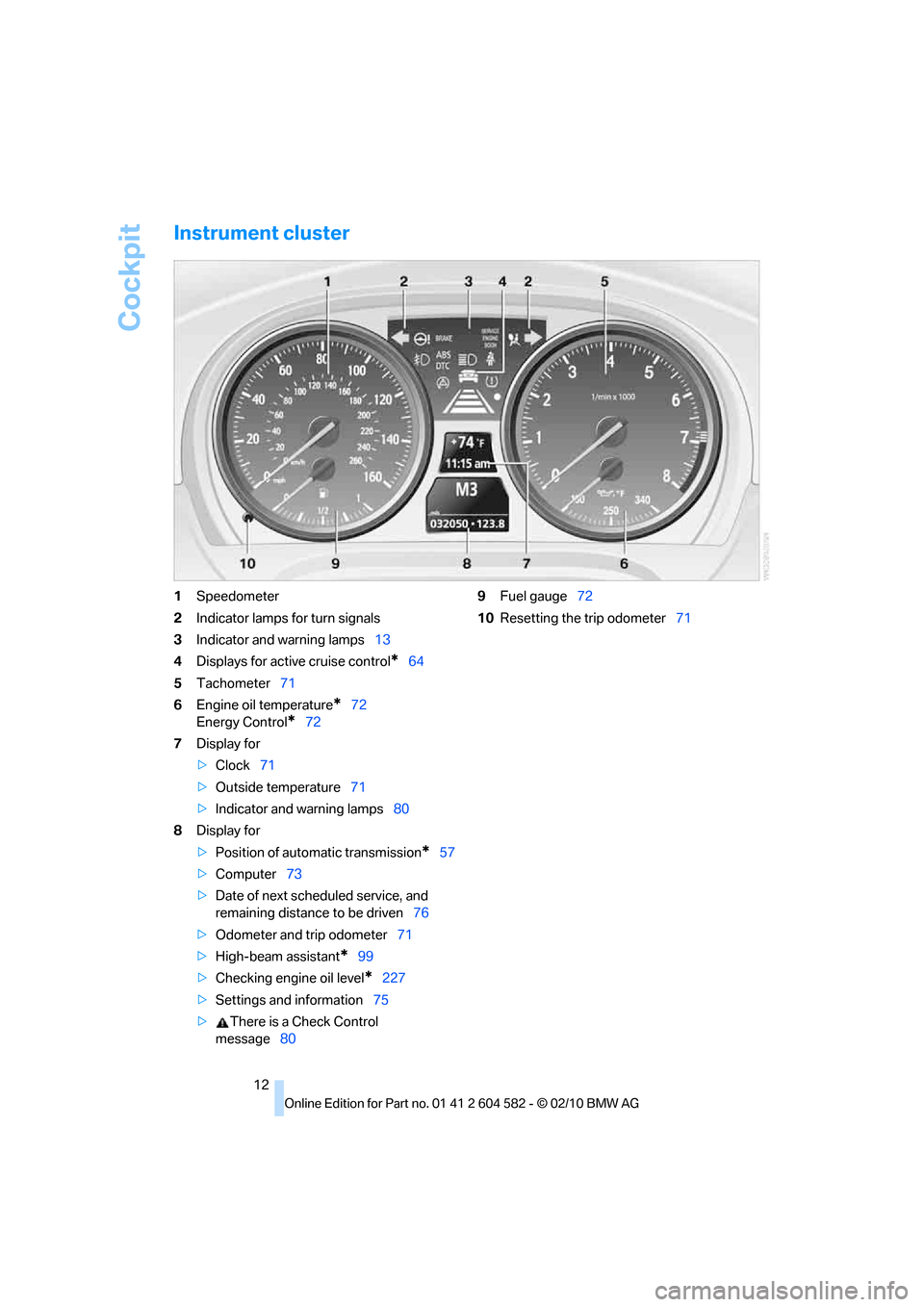
Instrument cluster
1Speedometer
2Indicator lamps for turn signals
3Indicator and warning lamps13
4Displays for active cruise control
*64
5Tachometer71
6Engine oil temperature
*72
Energy Control
*72
7Display for
>Clock71
>Outside temperature71
>Indicator and warning lamps80
8Display for
>Position of automatic transmission
*57
>Computer73
>Date of next scheduled service, and
remaining distance to be driven76
>Odometer and trip odometer71
>High-beam assistant
*99
>Checking engine oil level
*227
>Settings and information75
>There is a Check Control
message809Fuel gauge72
10Resetting the trip odometer71
Page 15 of 286
At a glance
13Reference
Controls
Driving tips
Communications
Navigation
Entertainment
Mobility
Indicator and warning lamps
The concept
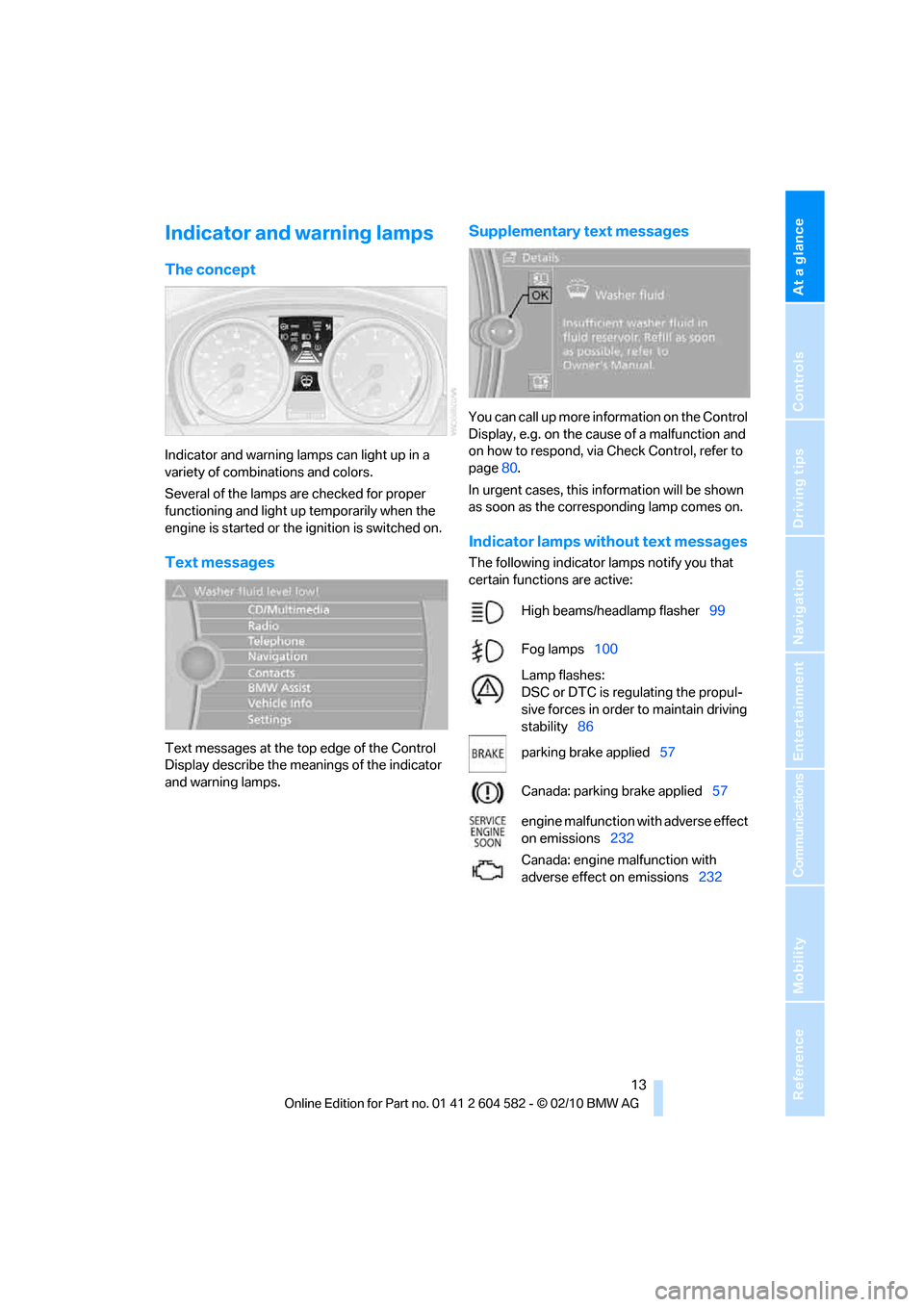
Indicator and warning lamps can light up in a
variety of combinations and colors.
Several of the lamps are checked for proper
functioning and light up temporarily when the
engine is started or the ignition is switched on.
Text messages
Text messages at the top edge of the Control
Display describe the meanings of the indicator
and warning lamps.
Supplementary text messages
You can call up more information on the Control
Display, e.g. on the cause of a malfunction and
on how to respond, via Check Control, refer to
page80.
In urgent cases, this information will be shown
as soon as the corresponding lamp comes on.
Indicator lamps without text messages
The following indicator lamps notify you that
certain functions are active:
High beams/headlamp flasher99
Fog lamps100
Lamp flashes:
DSC or DTC is regulating the propul-
sive forces in order to maintain driving
stability86
parking brake applied57
Canada: parking brake applied57
engine malfunction with adverse effect
on emissions232
Canada: engine malfunction with
adverse effect on emissions232
Page 16 of 286
Cockpit
14
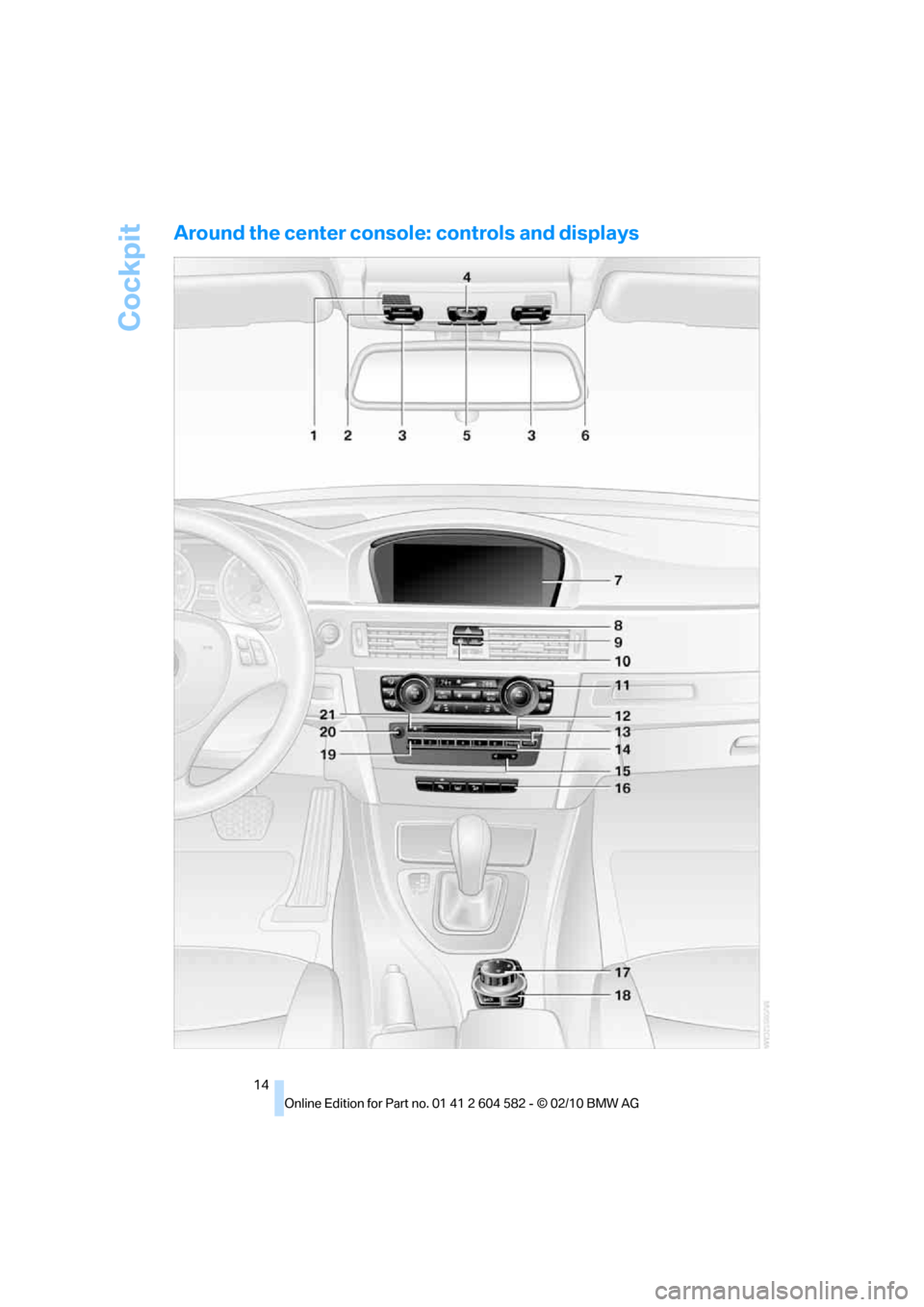
Around the center console: controls and displays
Page 17 of 286
At a glance
15Reference
Controls
Driving tips
Communications
Navigation
Entertainment
Mobility
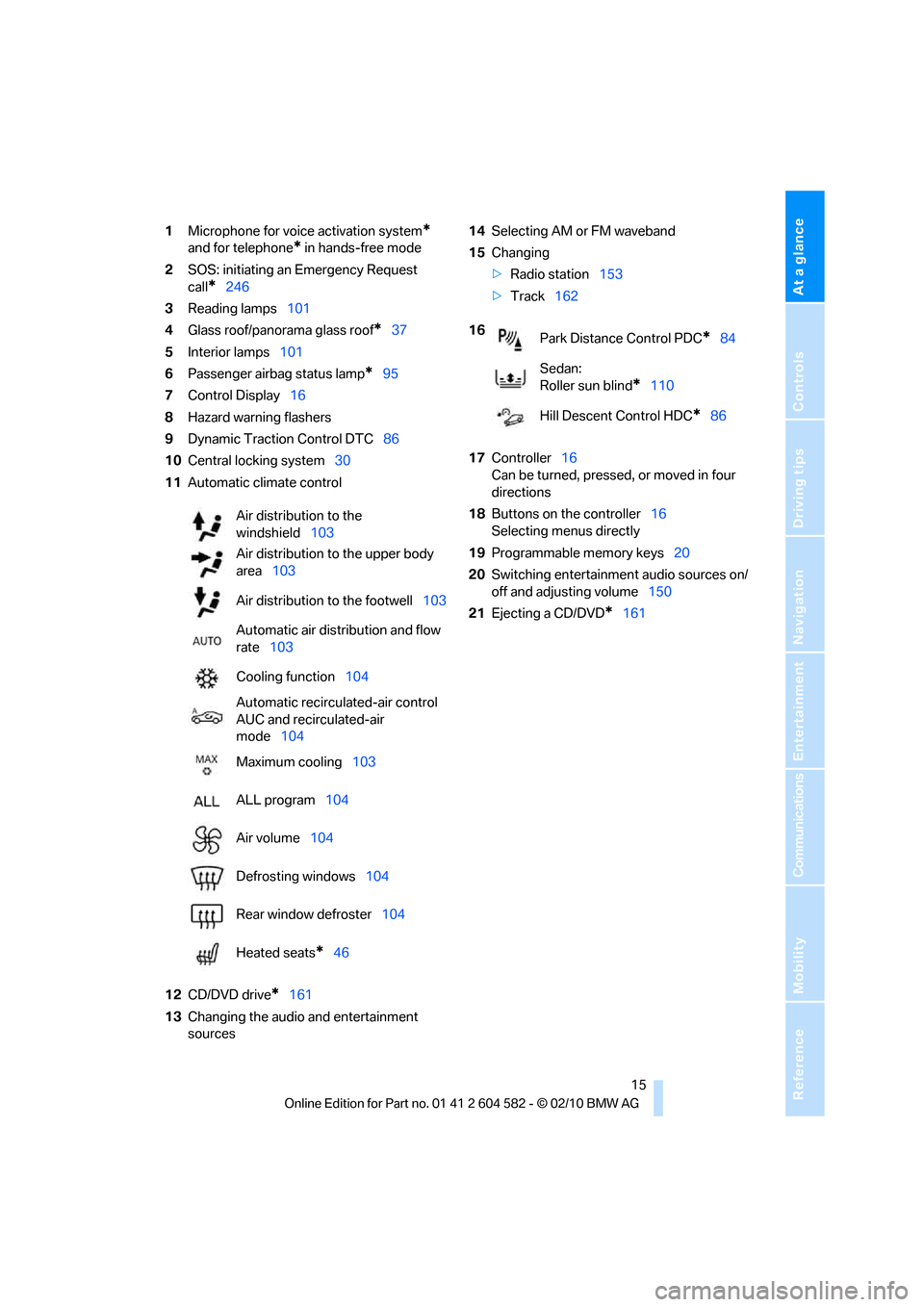
1Microphone for voice activation system*
and for telephone* in hands-free mode
2SOS: initiating an Emergency Request
call
*246
3Reading lamps101
4Glass roof/panorama glass roof
*37
5Interior lamps101
6Passenger airbag status lamp
*95
7Control Display16
8Hazard warning flashers
9Dynamic Traction Control DTC86
10Central locking system30
11Automatic climate control
12CD/DVD drive
*161
13Changing the audio and entertainment
sources14Selecting AM or FM waveband
15Changing
>Radio station153
>Track162
17Controller16
Can be turned, pressed, or moved in four
directions
18Buttons on the controller16
Selecting menus directly
19Programmable memory keys20
20Switching entertainment audio sources on/
off and adjusting volume150
21Ejecting a CD/DVD
*161 Air distribution to the
windshield103
Air distribution to the upper body
area103
Air distribution to the footwell103
Automatic air distribution and flow
rate103
Cooling function104
Automatic recirculated-air control
AUC and recirculated-air
mode104
Maximum cooling103
ALL program104
Air volume104
Defrosting windows104
Rear window defroster104
Heated seats
*46
16
Park Distance Control PDC*84
Sedan:
Roller sun blind
*110
Hill Descent Control HDC
*86
Page 18 of 286
iDrive
16
iDrive
iDrive integrates the functions of a large num-
ber of switches. This allows these functions to
be operated from a single central position. The
following section provides an introduction to basic menu navigation. The control of the indi-
vidual functions is described in connection with
the relevant equipment.
Controls
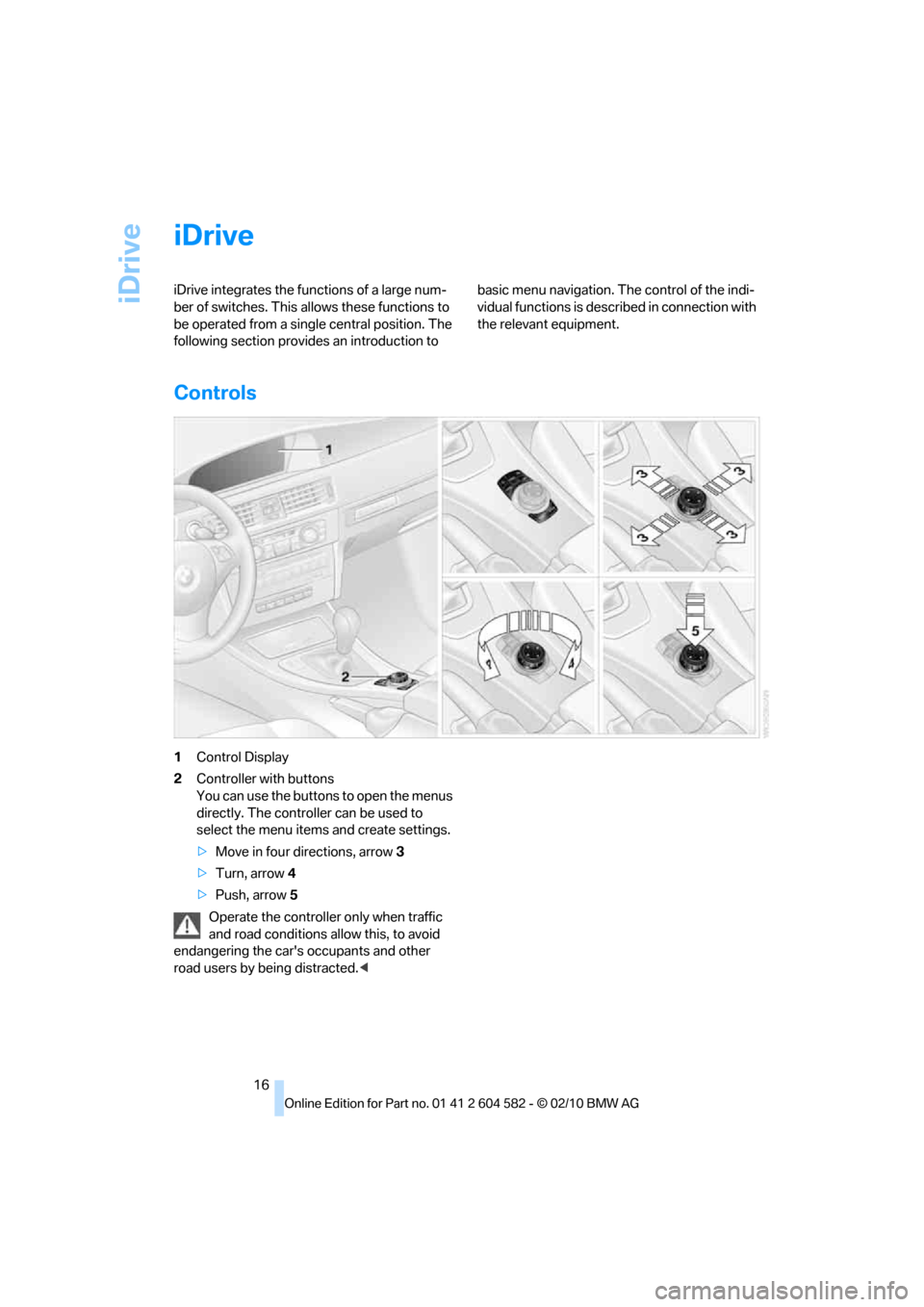
1Control Display
2Controller with buttons
You can use the buttons to open the menus
directly. The controller can be used to
select the menu items and create settings.
>Move in four directions, arrow3
>Turn, arrow 4
>Push, arrow 5
Operate the controller only when traffic
and road conditions allow this, to avoid
endangering the car's occupants and other
road users by being distracted.<
Page 19 of 286
At a glance
17Reference
Controls
Driving tips
Communications
Navigation
Entertainment
Mobility
Buttons on the controller
Operating principle
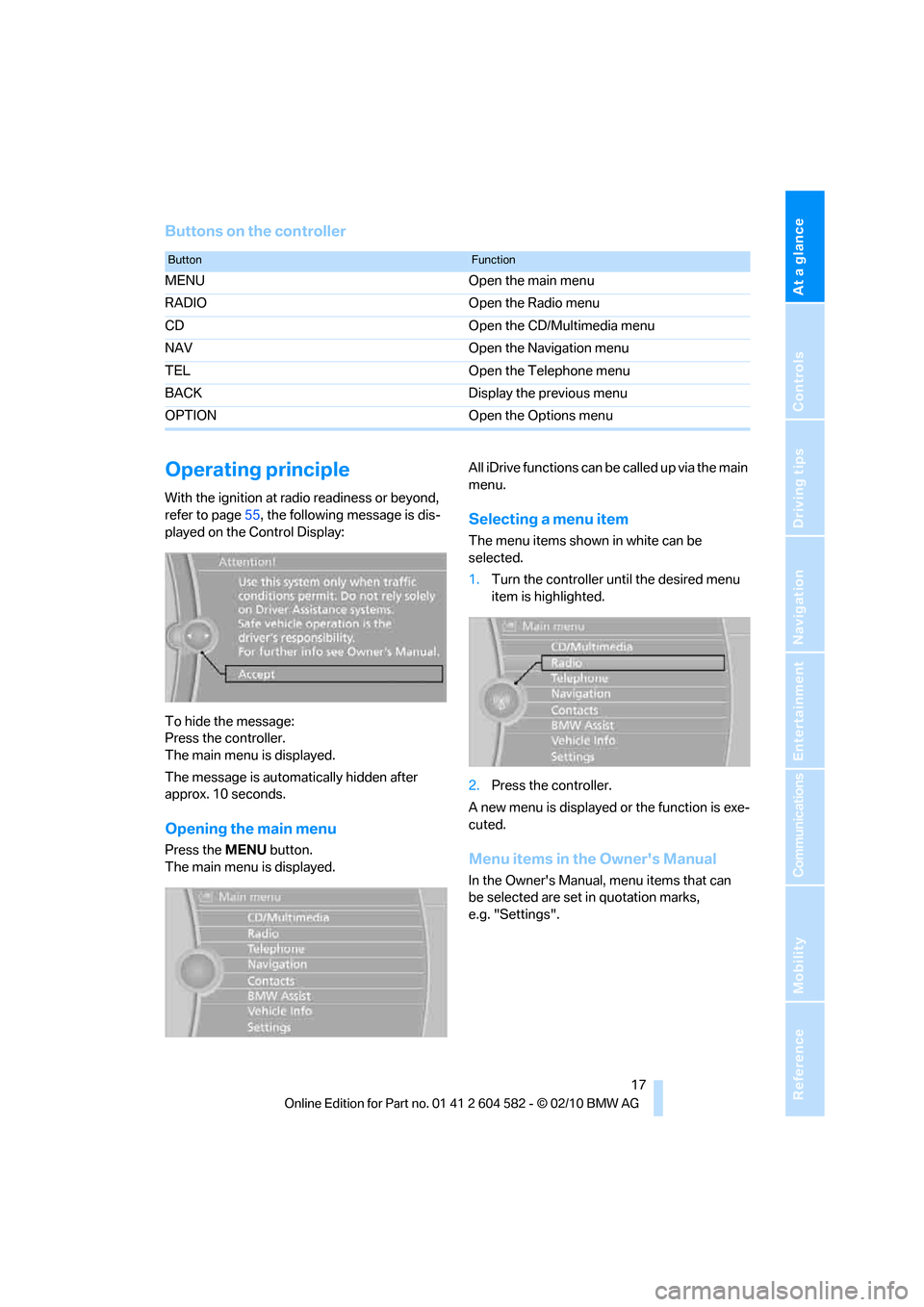
With the ignition at radio readiness or beyond,
refer to page55, the following message is dis-
played on the Control Display:
To hide the message:
Press the controller.
The main menu is displayed.
The message is automatically hidden after
approx. 10 seconds.
Opening the main menu
Press the MENUbutton.
The main menu is displayed.All iDrive functions can be called up via the main
menu.
Selecting a menu item
The menu items shown in white can be
selected.
1.Turn the controller until the desired menu
item is highlighted.
2.Press the controller.
A new menu is displayed or the function is exe-
cuted.
Menu items in the Owner's Manual
In the Owner's Manual, menu items that can
be selected are set in quotation marks,
e.g. "Settings".
ButtonFunction
MENU Open the main menu
RADIO Open the Radio menu
CD Open the CD/Multimedia menu
NAV Open the Navigation menu
TEL Open the Telephone menu
BACK Display the previous menu
OPTION Open the Options menu
Page 20 of 286
iDrive
18
Changing between panels
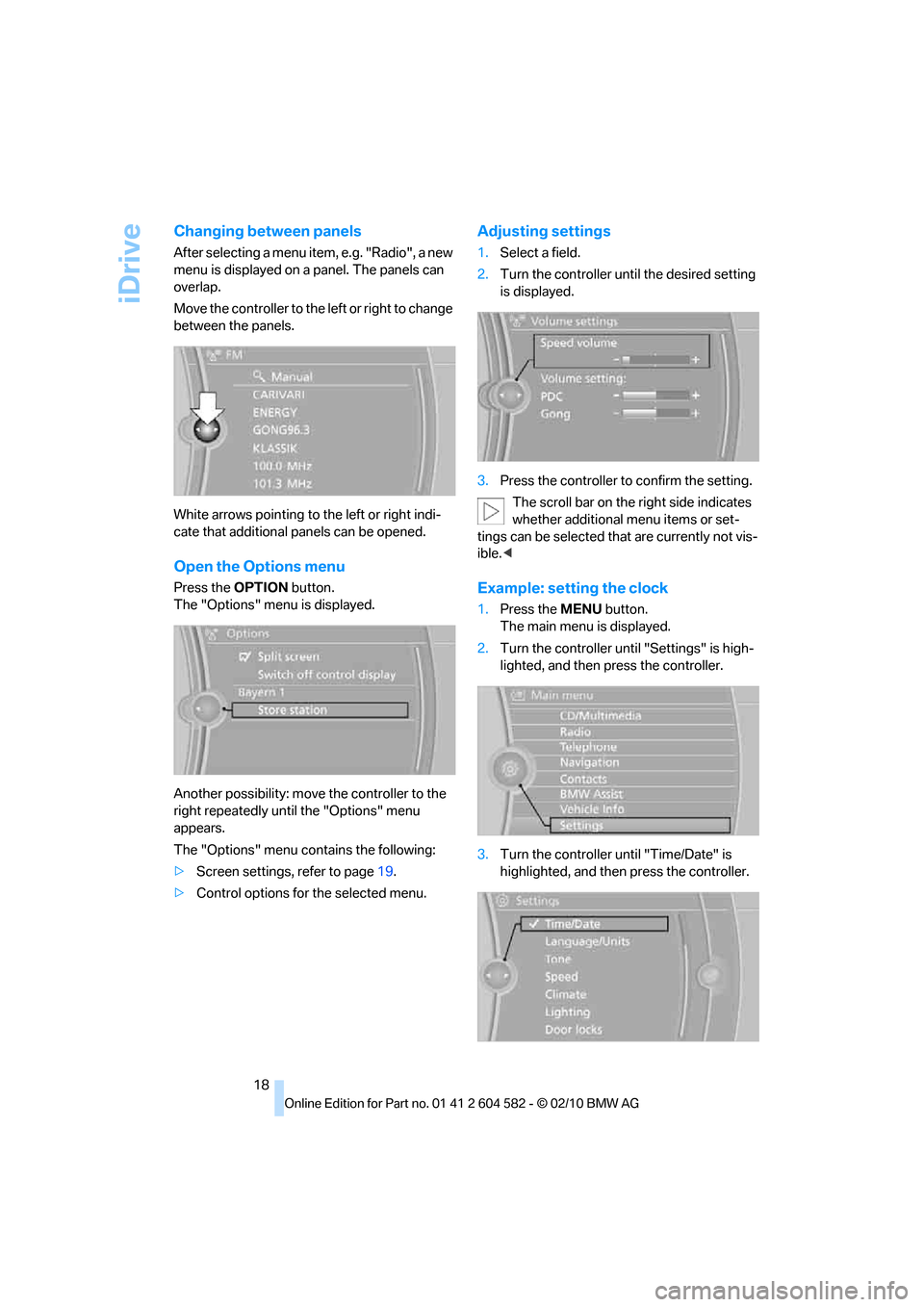
After selecting a menu item, e.g. "Radio", a new
menu is displayed on a panel. The panels can
overlap.
Move the controller to the left or right to change
between the panels.
White arrows pointing to the left or right indi-
cate that additional panels can be opened.
Open the Options menu
Press the OPTIONbutton.
The "Options" menu is displayed.
Another possibility: move the controller to the
right repeatedly until the "Options" menu
appears.
The "Options" menu contains the following:
>Screen settings, refer to page19.
>Control options for the selected menu.
Adjusting settings
1.Select a field.
2.Turn the controller until the desired setting
is displayed.
3.Press the controller to confirm the setting.
The scroll bar on the right side indicates
whether additional menu items or set-
tings can be selected that are currently not vis-
ible.<
Example: setting the clock
1.Press the MENUbutton.
The main menu is displayed.
2.Turn the controller until "Settings" is high-
lighted, and then press the controller.
3.Turn the controller until "Time/Date" is
highlighted, and then press the controller.
Page 21 of 286
At a glance
19Reference
Controls
Driving tips
Communications
Navigation
Entertainment
Mobility
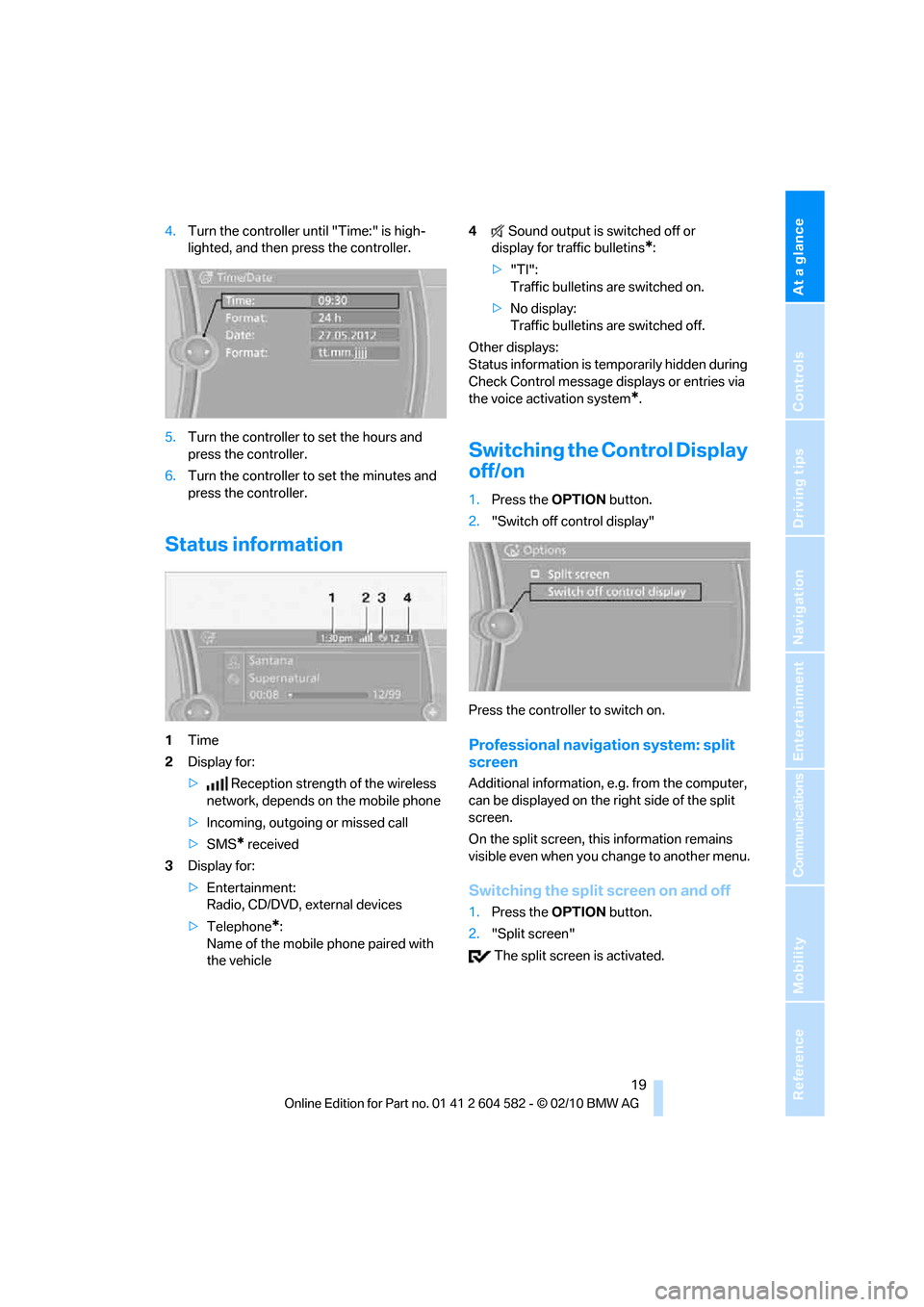
4.Turn the controller until "Time:" is high-
lighted, and then press the controller.
5.Turn the controller to set the hours and
press the controller.
6.Turn the controller to set the minutes and
press the controller.
Status information
1Time
2Display for:
>Reception strength of the wireless
network, depends on the mobile phone
>Incoming, outgoing or missed call
>SMS
* received
3Display for:
>Entertainment:
Radio, CD/DVD, external devices
>Telephone
*:
Name of the mobile phone paired with
the vehicle4Sound output is switched off or
display for traffic bulletins
*:
>"TI":
Traffic bulletins are switched on.
>No display:
Traffic bulletins are switched off.
Other displays:
Status information is temporarily hidden during
Check Control message displays or entries via
the voice activation system
*.
Switching the Control Display
off/on
1.Press the OPTIONbutton.
2."Switch off control display"
Press the controller to switch on.
Professional navigation system: split
screen
Additional information, e.g. from the computer,
can be displayed on the right side of the split
screen.
On the split screen, this information remains
visible even when you change to another menu.
Switching the split screen on and off
1.Press the OPTIONbutton.
2."Split screen"
The split screen is activated.
Page 22 of 286
iDrive
20
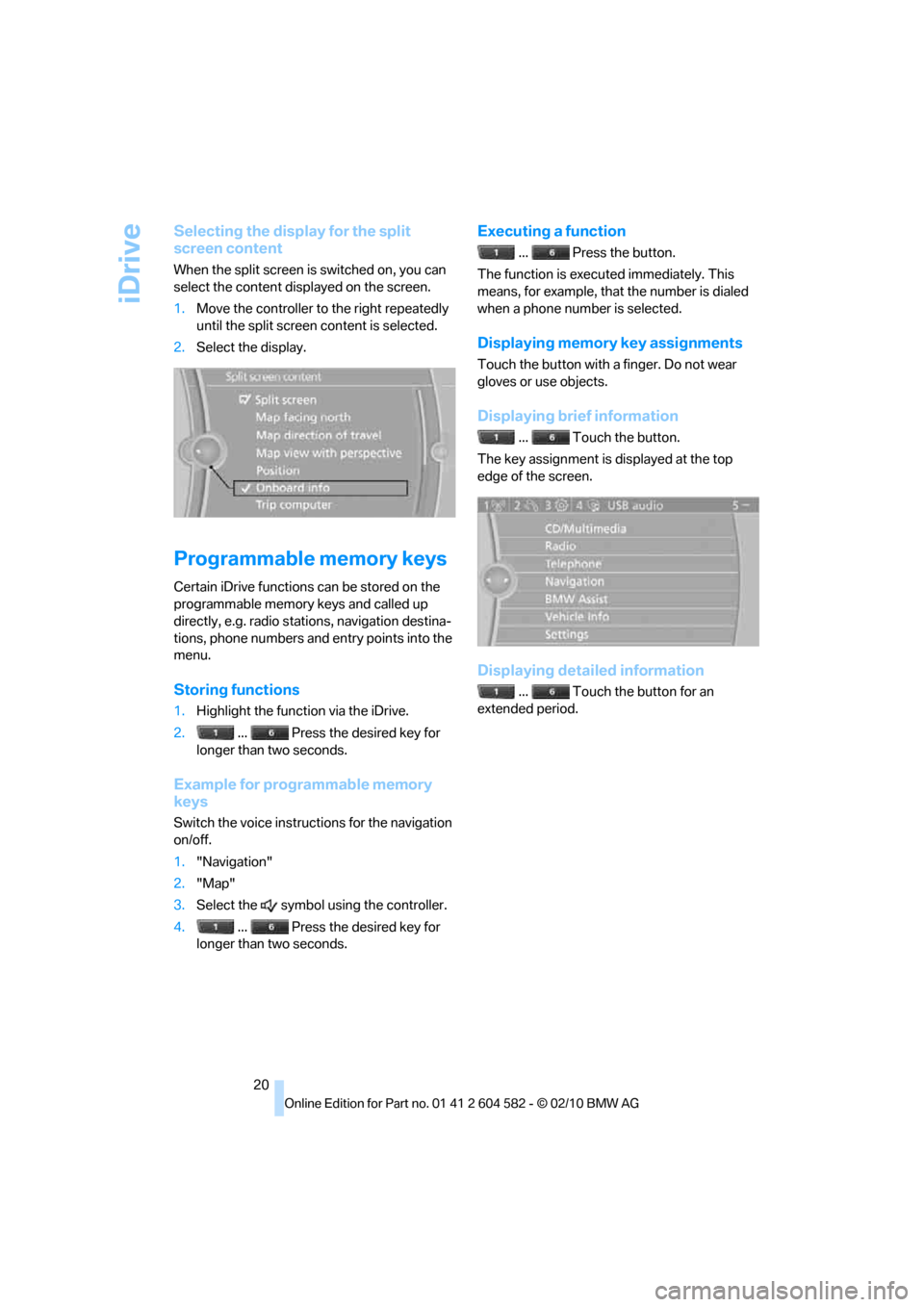
Selecting the display for the split
screen content
When the split screen is switched on, you can
select the content displayed on the screen.
1.Move the controller to the right repeatedly
until the split screen content is selected.
2.Select the display.
Programmable memory keys
Certain iDrive functions can be stored on the
programmable memory keys and called up
directly, e.g. radio stations, navigation destina-
tions, phone numbers and entry points into the
menu.
Storing functions
1.Highlight the function via the iDrive.
2. ... Press the desired key for
longer than two seconds.
Example for programmable memory
keys
Switch the voice instructions for the navigation
on/off.
1."Navigation"
2."Map"
3.Select the symbol using the controller.
4. ... Press the desired key for
longer than two seconds.
Executing a function
... Press the button.
The function is executed immediately. This
means, for example, that the number is dialed
when a phone number is selected.
Displaying memory key assignments
Touch the button with a finger. Do not wear
gloves or use objects.
Displaying brief information
... Touch the button.
The key assignment is displayed at the top
edge of the screen.
Displaying detailed information
... Touch the button for an
extended period.
Page 23 of 286
At a glance
21Reference
Controls
Driving tips
Communications
Navigation
Entertainment
Mobility
Letters and numbers
Entering letters and numbers
1.Turn the controller: select the letters or
numbers.
2.Select additional letters or numbers if
needed.
3."OK": confirm the entry.
Switching between letters and
numbers
Depending on the menu, you can switch
between entering letters and numbers:
Wordmatch concept during navigation
Entry of names and addresses: the selection is
narrowed down every time a letter is entered
and letters may be added automatically.
Destination search: the entries are continuously
compared to the data stored in the vehicle.
>The only letters offered for entering
addresses are those for which data are
available.
>Town/city names can be entered with the
spelling used in any of the languages avail-
able on the Control Display.
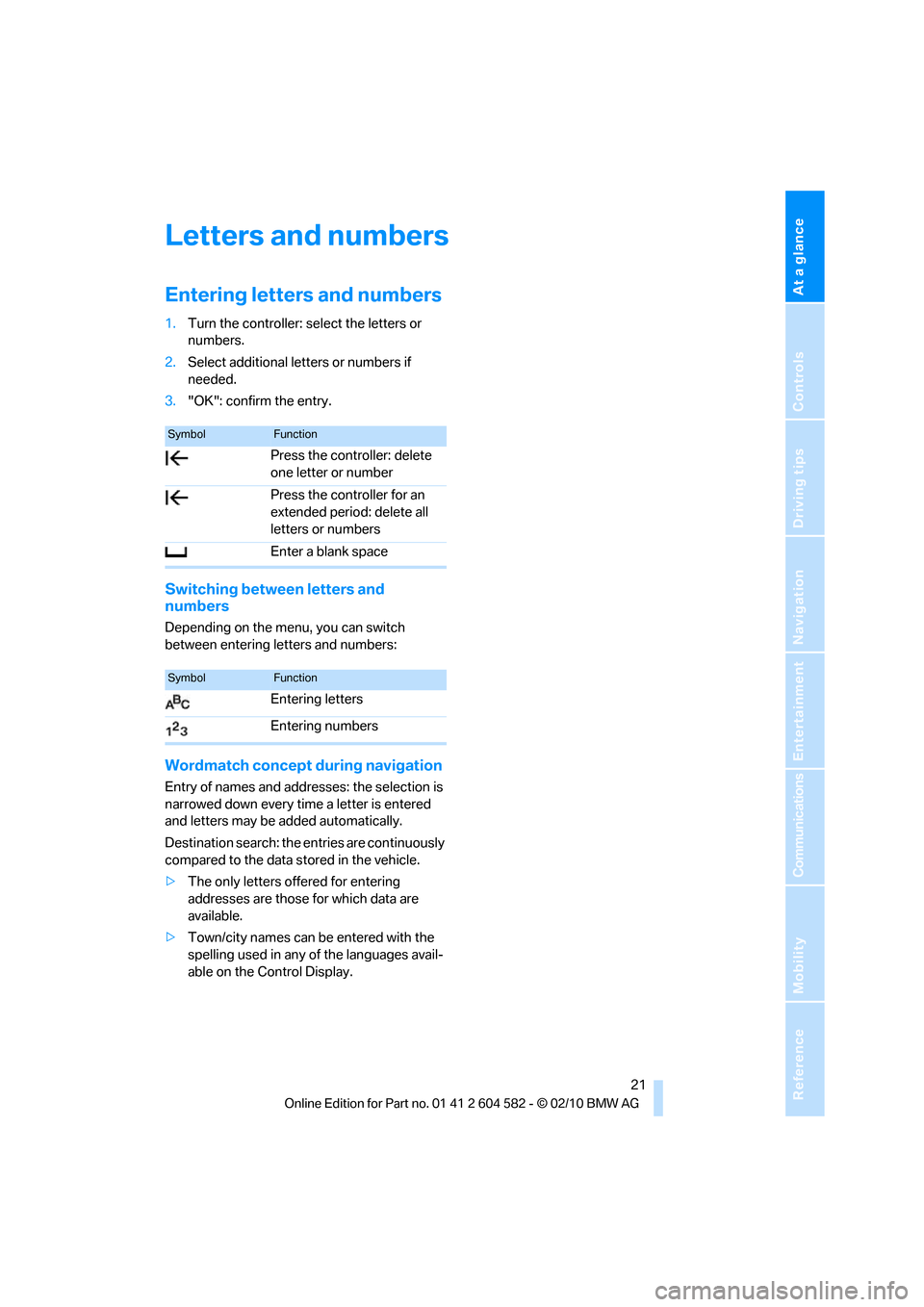
SymbolFunction
Press the controller: delete
one letter or number
Press the controller for an
extended period: delete all
letters or numbers
Enter a blank space
SymbolFunction
Entering letters
Entering numbers