Controller BMW 328I CONVERTIBLE 2007 E93 Owner's Manual
[x] Cancel search | Manufacturer: BMW, Model Year: 2007, Model line: 328I CONVERTIBLE, Model: BMW 328I CONVERTIBLE 2007 E93Pages: 272, PDF Size: 8.97 MB
Page 207 of 272
205
Entertainment
Reference
At a glance
Controls
Driving tips Communications
Navigation
Mobility
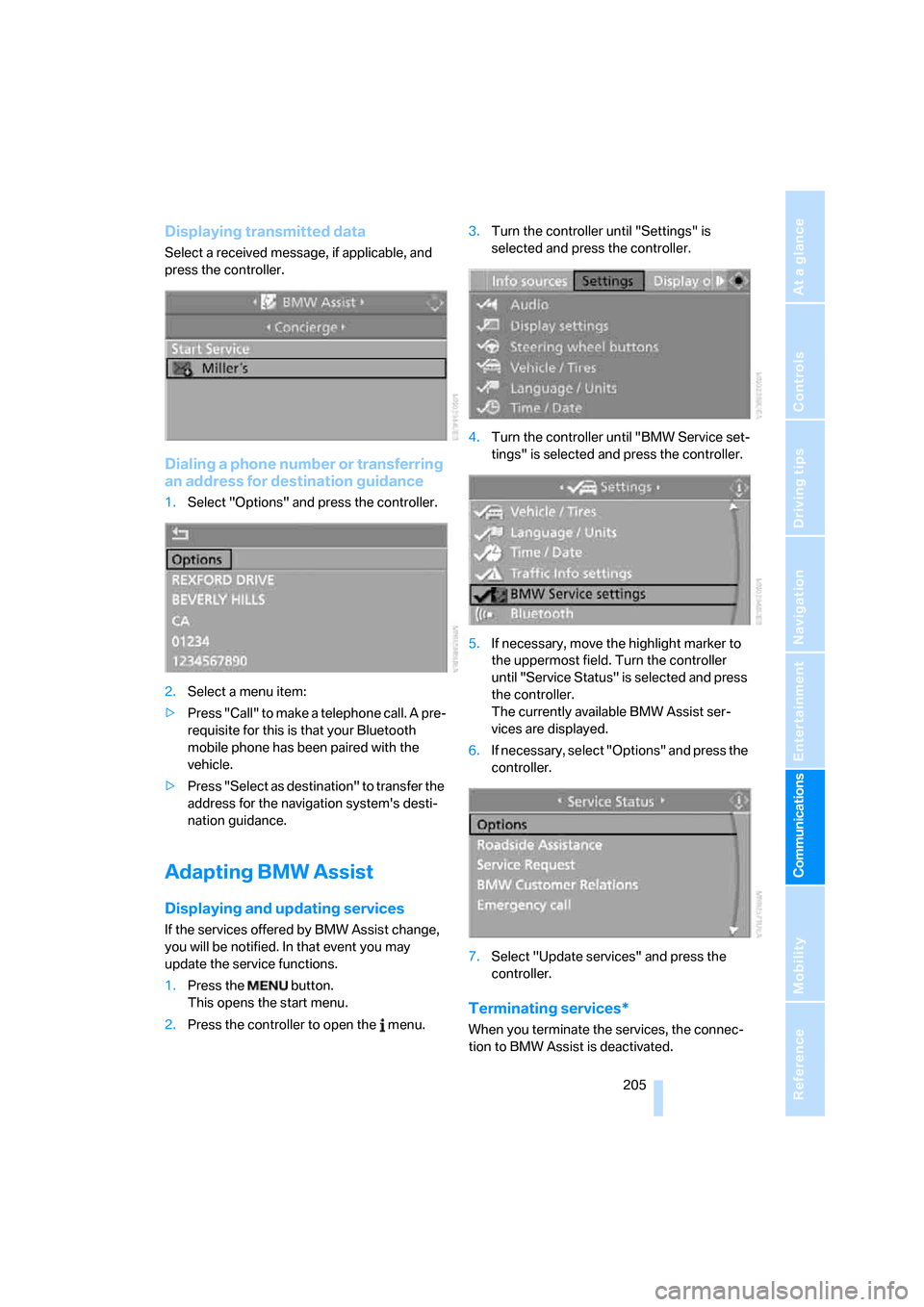
Displaying transmitted data
Select a received message, if applicable, and
press the controller.
Dialing a phone number or transferring
an address for destination guidance
1.Select "Options" and press the controller.
2.Select a menu item:
>Press "Call" to make a telephone call. A pre-
requisite for this is that your Bluetooth
mobile phone has been paired with the
vehicle.
>Press "Select as destination" to transfer the
address for the navigation system's desti-
nation guidance.
Adapting BMW Assist
Displaying and updating services
If the services offered by BMW Assist change,
you will be notified. In that event you may
update the service functions.
1.Press the button.
This opens the start menu.
2.Press the controller to open the menu.3.Turn the controller until "Settings" is
selected and press the controller.
4.Turn the controller until "BMW Service set-
tings" is selected and press the controller.
5.If necessary, move the highlight marker to
the uppermost field. Turn the controller
until "Service Status" is selected and press
the controller.
The currently available BMW Assist ser-
vices are displayed.
6.If necessary, select "Options" and press the
controller.
7.Select "Update services" and press the
controller.
Terminating services*
When you terminate the services, the connec-
tion to BMW Assist is deactivated.
Page 208 of 272
BMW Assist
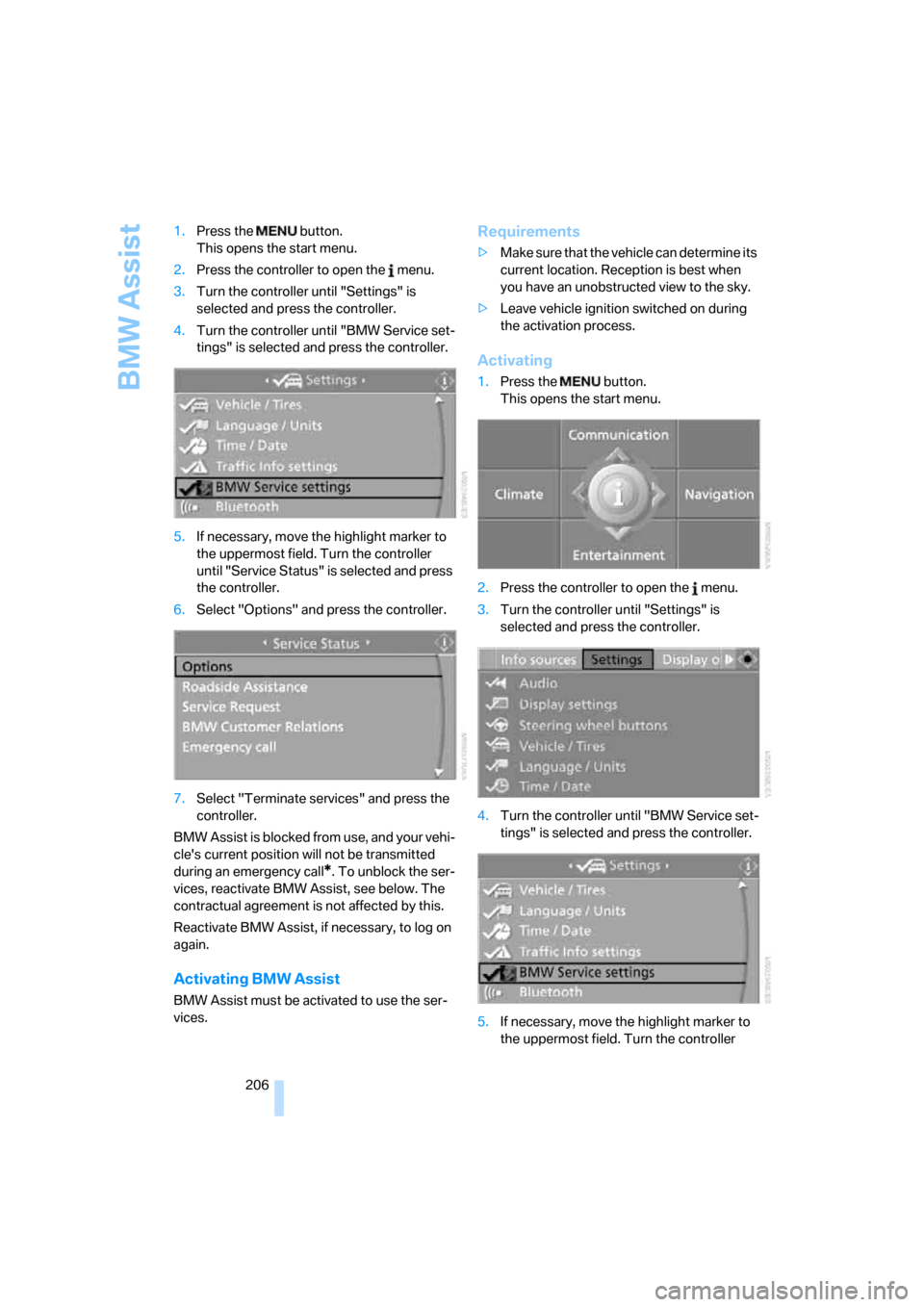
206 1.Press the button.
This opens the start menu.
2.Press the controller to open the menu.
3.Turn the controller until "Settings" is
selected and press the controller.
4.Turn the controller until "BMW Service set-
tings" is selected and press the controller.
5.If necessary, move the highlight marker to
the uppermost field. Turn the controller
until "Service Status" is selected and press
the controller.
6.Select "Options" and press the controller.
7.Select "Terminate services" and press the
controller.
BMW Assist is blocked from use, and your vehi-
cle's current position will not be transmitted
during an emergency call
*. To unblock the ser-
vices, reactivate BMW Assist, see below. The
contractual agreement is not affected by this.
Reactivate BMW Assist, if necessary, to log on
again.
Activating BMW Assist
BMW Assist must be activated to use the ser-
vices.
Requirements
>Make sure that the vehicle can determine its
current location. Reception is best when
you have an unobstructed view to the sky.
>Leave vehicle ignition switched on during
the activation process.
Activating
1.Press the button.
This opens the start menu.
2.Press the controller to open the menu.
3.Turn the controller until "Settings" is
selected and press the controller.
4.Turn the controller until "BMW Service set-
tings" is selected and press the controller.
5.If necessary, move the highlight marker to
the uppermost field. Turn the controller
Page 209 of 272
207
Entertainment
Reference
At a glance
Controls
Driving tips Communications
Navigation
Mobility
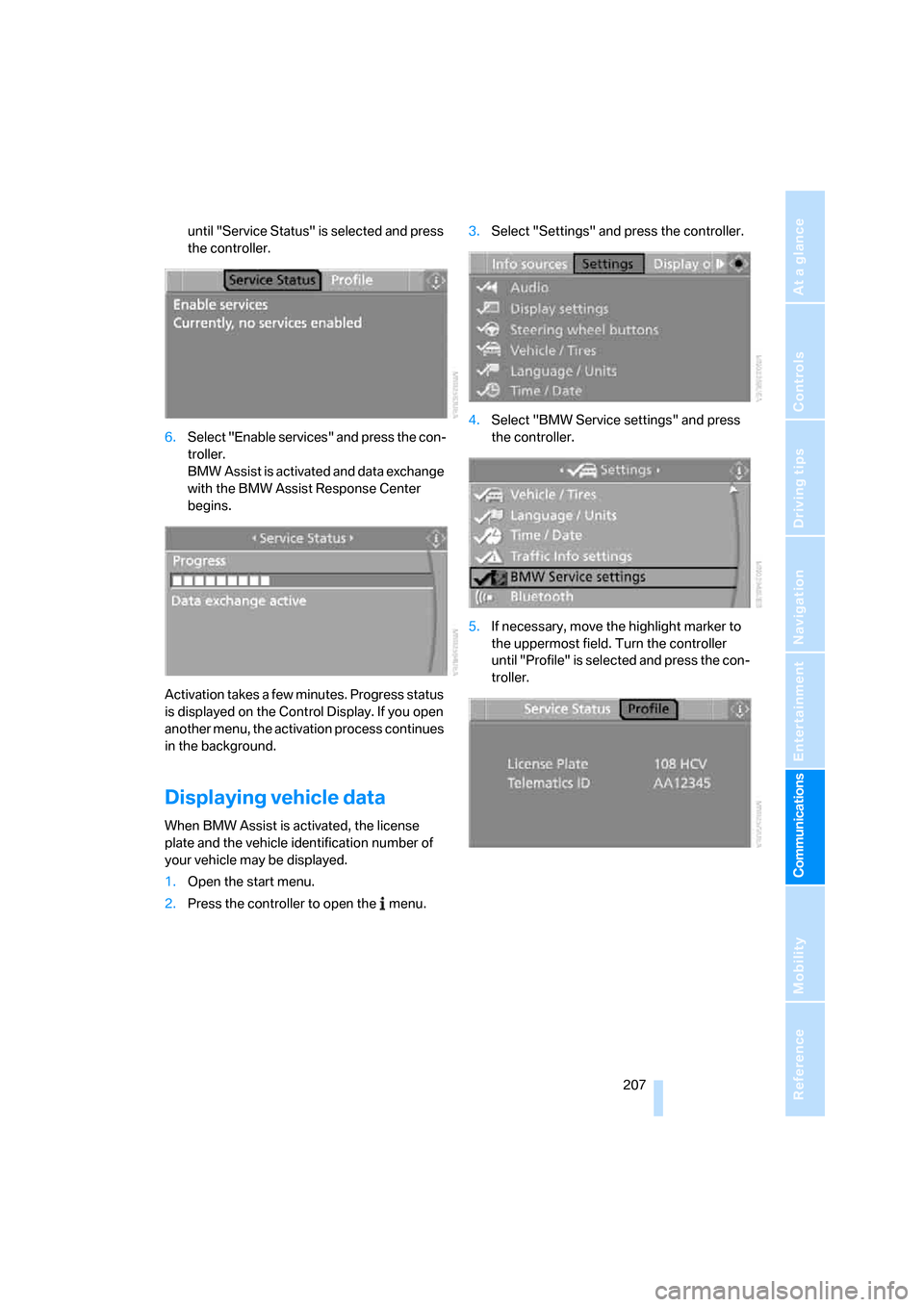
until "Service Status" is selected and press
the controller.
6.Select "Enable services" and press the con-
troller.
BMW Assist is activated and data exchange
with the BMW Assist Response Center
begins.
Activation takes a few minutes. Progress status
is displayed on the Control Display. If you open
another menu, the activation process continues
in the background.
Displaying vehicle data
When BMW Assist is activated, the license
plate and the vehicle identification number of
your vehicle may be displayed.
1.Open the start menu.
2.Press the controller to open the menu.3.Select "Settings" and press the controller.
4.Select "BMW Service settings" and press
the controller.
5.If necessary, move the highlight marker to
the uppermost field. Turn the controller
until "Profile" is selected and press the con-
troller.
Page 227 of 272
Mobility
225Reference
At a glance
Controls
Driving tips
Communications
Navigation
Entertainment
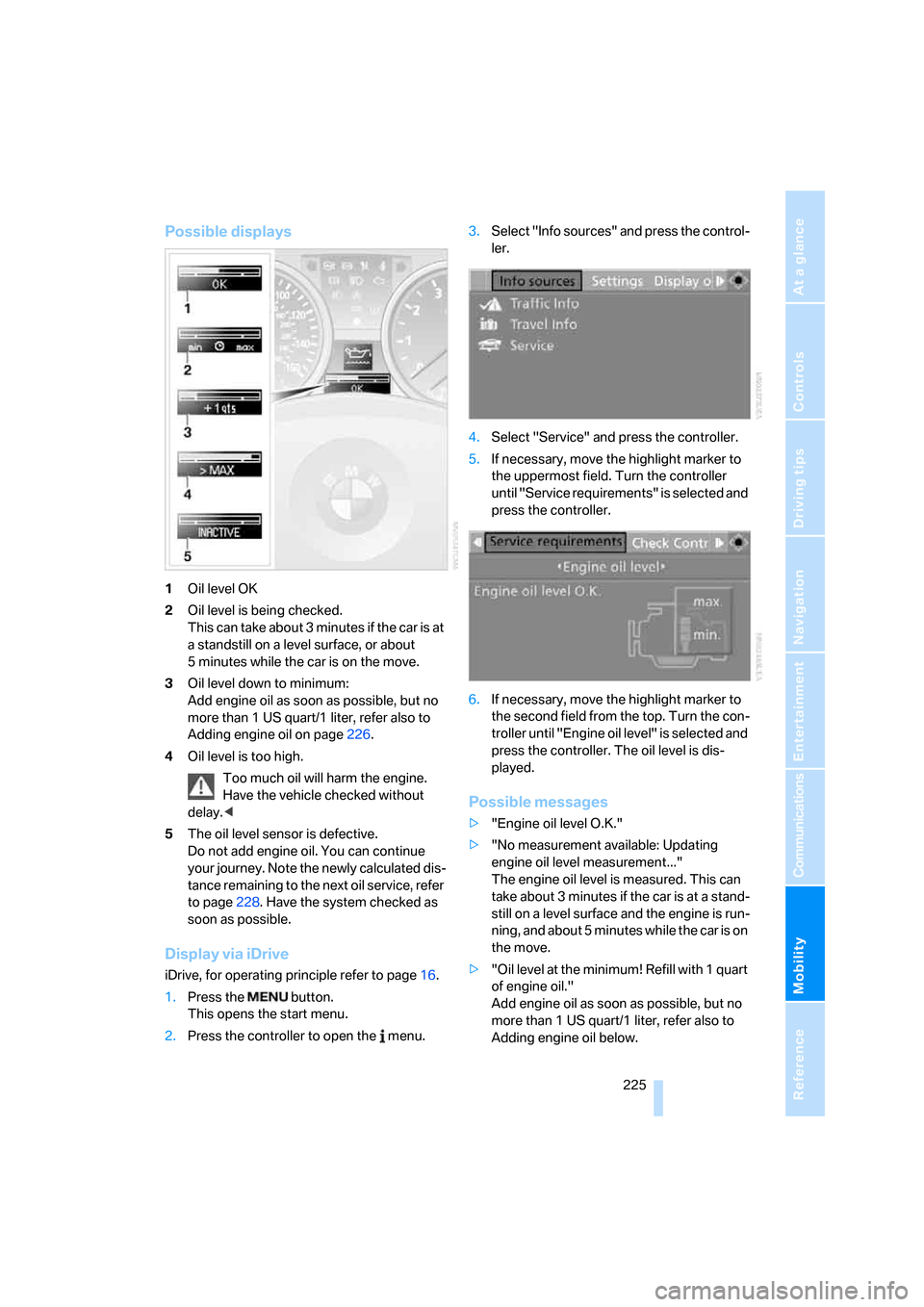
Possible displays
1Oil level OK
2Oil level is being checked.
This can take about 3 minutes if the car is at
a standstill on a level surface, or about
5 minutes while the car is on the move.
3Oil level down to minimum:
Add engine oil as soon as possible, but no
more than 1 US quart/1 liter, refer also to
Adding engine oil on page226.
4Oil level is too high.
Too much oil will harm the engine.
Have the vehicle checked without
delay.<
5The oil level sensor is defective.
Do not add engine oil. You can continue
your journey. Note the newly calculated dis-
tance remaining to the next oil service, refer
to page228. Have the system checked as
soon as possible.
Display via iDrive
iDrive, for operating principle refer to page16.
1.Press the button.
This opens the start menu.
2.Press the controller to open the menu.3.Select "Info sources" and press the control-
ler.
4.Select "Service" and press the controller.
5.If necessary, move the highlight marker to
the uppermost field. Turn the controller
until "Service requirements" is selected and
press the controller.
6.If necessary, move the highlight marker to
the second field from the top. Turn the con-
troller until "Engine oil level" is selected and
press the controller. The oil level is dis-
played.
Possible messages
>"Engine oil level O.K."
>"No measurement available: Updating
engine oil level measurement..."
The engine oil level is measured. This can
take about 3 minutes if the car is at a stand-
still on a level surface and the engine is run-
ning, and about 5 minutes while the car is on
the move.
>"Oil level at the minimum! Refill with 1 quart
of engine oil."
Add engine oil as soon as possible, but no
more than 1 US quart/1 liter, refer also to
Adding engine oil below.
Page 257 of 272
Reference 255
At a glance
Controls
Driving tips
Communications
Navigation
Entertainment
Mobility
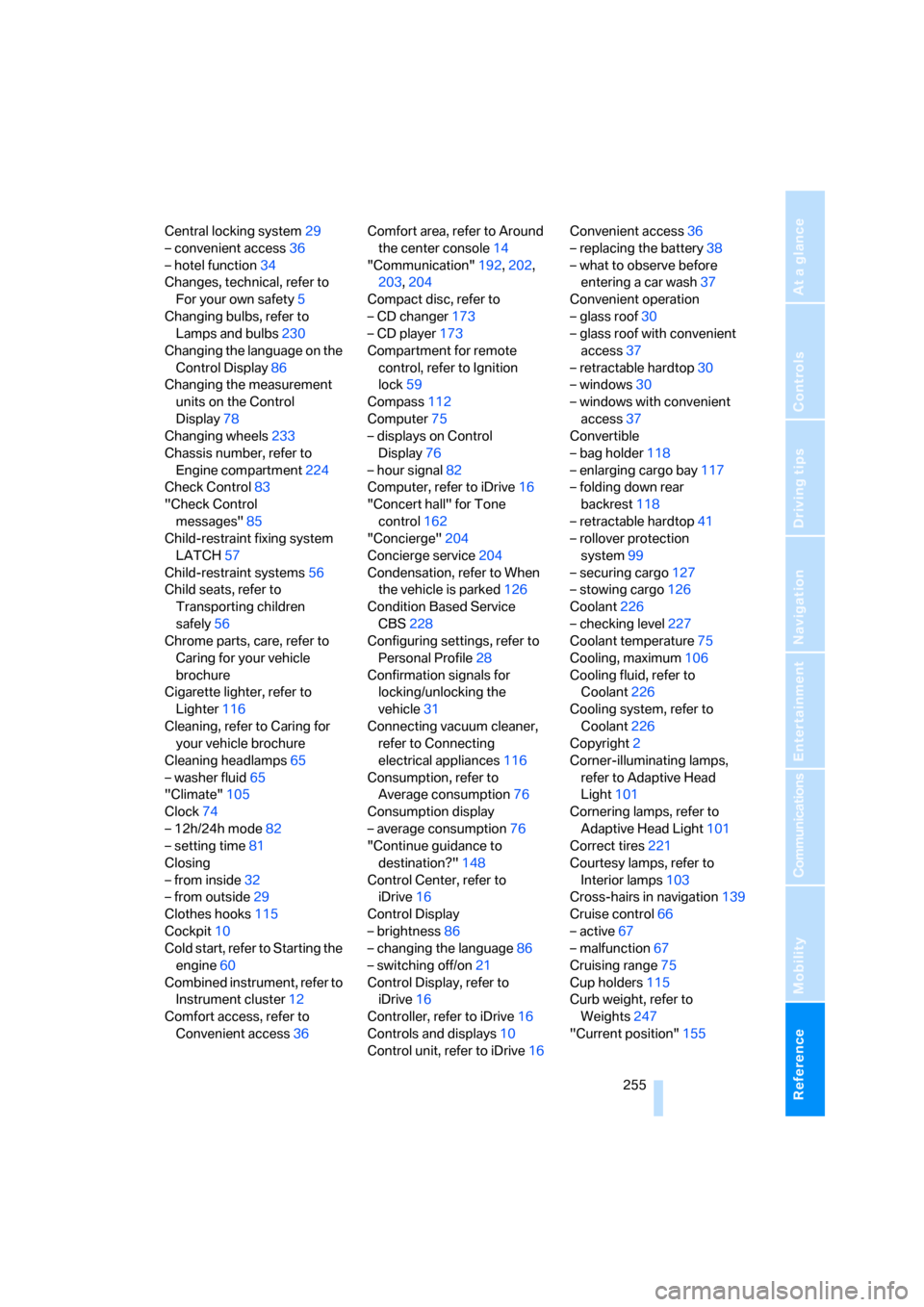
Central locking system29
– convenient access36
– hotel function34
Changes, technical, refer to
For your own safety5
Changing bulbs, refer to
Lamps and bulbs230
Changing the language on the
Control Display86
Changing the measurement
units on the Control
Display78
Changing wheels233
Chassis number, refer to
Engine compartment224
Check Control83
"Check Control
messages"85
Child-restraint fixing system
LATCH57
Child-restraint systems56
Child seats, refer to
Transporting children
safely56
Chrome parts, care, refer to
Caring for your vehicle
brochure
Cigarette lighter, refer to
Lighter116
Cleaning, refer to Caring for
your vehicle brochure
Cleaning headlamps65
– washer fluid65
"Climate"105
Clock74
– 12h/24h mode82
– setting time81
Closing
– from inside32
– from outside29
Clothes hooks115
Cockpit10
Cold start, refer to Starting the
engine60
Combined instrument, refer to
Instrument cluster12
Comfort access, refer to
Convenient access36Comfort area, refer to Around
the center console14
"Communication"192,202,
203,204
Compact disc, refer to
– CD changer173
– CD player173
Compartment for remote
control, refer to Ignition
lock59
Compass112
Computer75
– displays on Control
Display76
– hour signal82
Computer, refer to iDrive
16
"Concert hall" for Tone
control162
"Concierge"204
Concierge service204
Condensation, refer to When
the vehicle is parked126
Condition Based Service
CBS228
Configuring settings, refer to
Personal Profile28
Confirmation signals for
locking/unlocking the
vehicle31
Connecting vacuum cleaner,
refer to Connecting
electrical appliances116
Consumption, refer to
Average consumption76
Consumption display
– average consumption76
"Continue guidance to
destination?"148
Control Center, refer to
iDrive16
Control Display
– brightness86
– changing the language86
– switching off/on21
Control Display, refer to
iDrive16
Controller, refer to iDrive16
Controls and displays10
Control unit, refer to iDrive16Convenient access36
– replacing the battery38
– what to observe before
entering a car wash37
Convenient operation
– glass roof30
– glass roof with convenient
access37
– retractable hardtop30
– windows30
– windows with convenient
access37
Convertible
– bag holder118
– enlarging cargo bay117
– folding down rear
backrest118
– retractable hardtop41
– rollover protection
system99
– securing cargo127
– stowing cargo126
Coolant226
– checking level227
Coolant temperature75
Cooling, maximum106
Cooling fluid, refer to
Coolant226
Cooling system, refer to
Coolant226
Copyright2
Corner-illuminating lamps,
refer to Adaptive Head
Light101
Cornering lamps, refer to
Adaptive Head Light101
Correct tires221
Courtesy lamps, refer to
Interior lamps103
Cross-hairs in navigation139
Cruise control66
– active67
– malfunction67
Cruising range75
Cup holders115
Curb weight, refer to
Weights247
"Current position"155