Display BMW 328I COUPE 2009 E92 Owners Manual
[x] Cancel search | Manufacturer: BMW, Model Year: 2009, Model line: 328I COUPE, Model: BMW 328I COUPE 2009 E92Pages: 260, PDF Size: 7.95 MB
Page 184 of 260
Contacts
182 search is offered. A symbol indicates the stor-
age location of the contacts:
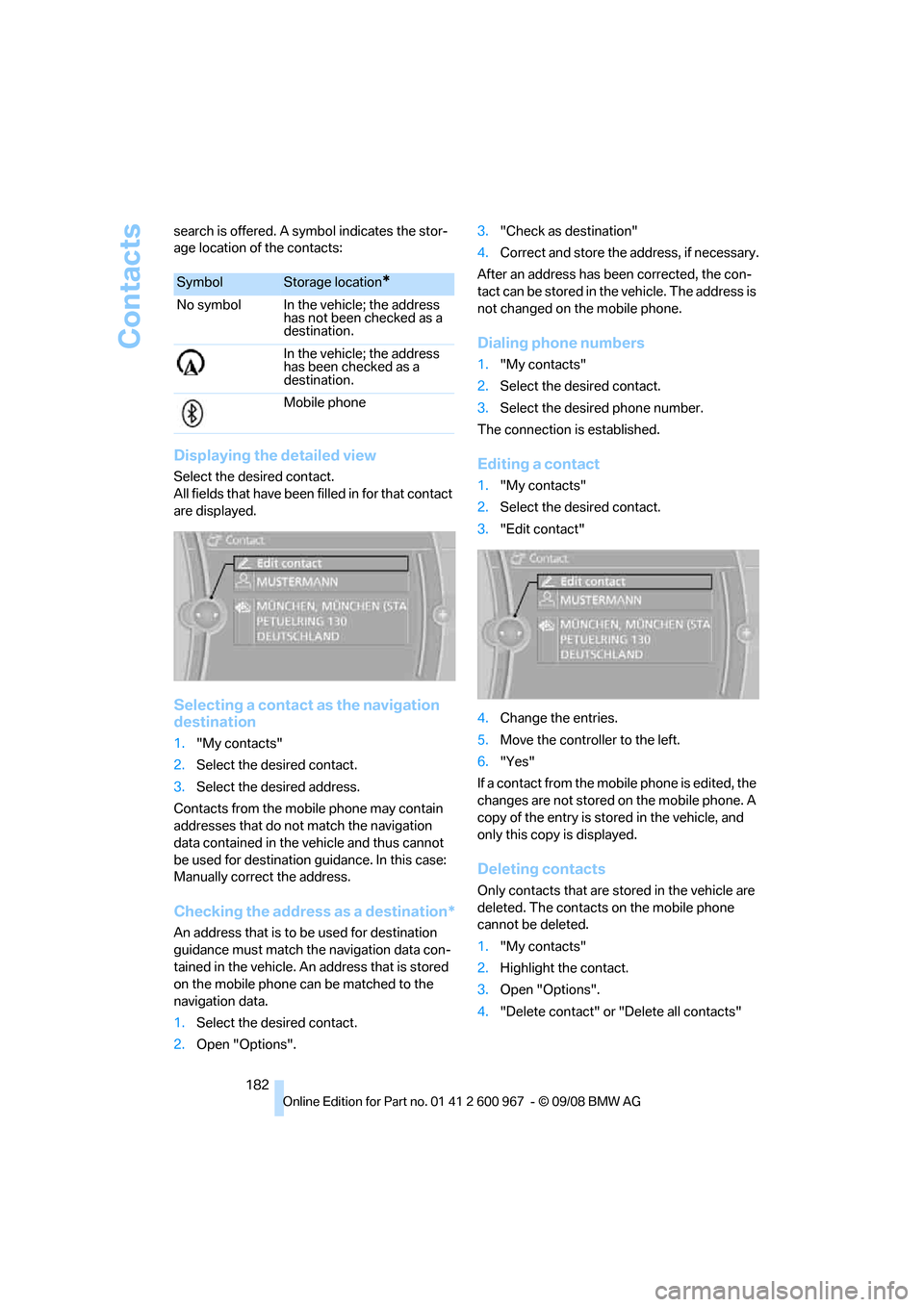
Displaying the detailed view
Select the desired contact.
All fields that have been filled in for that contact
are displayed.
Selecting a contact as the navigation
destination
1."My contacts"
2.Select the desired contact.
3.Select the desired address.
Contacts from the mobile phone may contain
addresses that do not match the navigation
data contained in the vehicle and thus cannot
be used for destination guidance. In this case:
Manually correct the address.
Checking the address as a destination*
An address that is to be used for destination
guidance must match the navigation data con-
tained in the vehicle. An address that is stored
on the mobile phone can be matched to the
navigation data.
1.Select the desired contact.
2.Open "Options".3."Check as destination"
4.Correct and store the address, if necessary.
After an address has been corrected, the con-
tact can be stored in the vehicle. The address is
not changed on the mobile phone.
Dialing phone numbers
1."My contacts"
2.Select the desired contact.
3.Select the desired phone number.
The connection is established.
Editing a contact
1."My contacts"
2.Select the desired contact.
3."Edit contact"
4.Change the entries.
5.Move the controller to the left.
6."Yes"
If a contact from the mobile phone is edited, the
changes are not stored on the mobile phone. A
copy of the entry is stored in the vehicle, and
only this copy is displayed.
Deleting contacts
Only contacts that are stored in the vehicle are
deleted. The contacts on the mobile phone
cannot be deleted.
1."My contacts"
2.Highlight the contact.
3.Open "Options".
4."Delete contact" or "Delete all contacts"
SymbolStorage location*
No symbol In the vehicle; the address
has not been checked as a
destination.
In the vehicle; the address
has been checked as a
destination.
Mobile phone
Page 185 of 260
183
Entertainment
Reference
At a glance
Controls
Driving tips Communications
Navigation
Mobility
BMW Assist
Concierge service*
When you call the BMW Assist Concierge, you
can obtain information about, for example, res-
taurants, emergency pharmacy services, gas
stations or hotels, as well as receive the corre-
sponding telephone numbers and addresses.
You can then dial a phone number directly or
use an address for destination guidance.
Starting the concierge service
1."BMW Assist"
2."Concierge"
3."Start service"
A voice connection is established to the BMW
Concierge.
You are connected to an employee of the BMW
Concierge to obtain the required information.
You can then have the phone number and
address sent to you and, for example, use it for
destination guidance in the navigation system.
Many hotels can be booked directly through the
BMW Concierge. When an information mes-
sage is received, a list of the received messages
is displayed automatically.
Messages
The BMW Concierge messages and MyInfo
messages from the BMW Assist portal are
listed here.
1."BMW Assist"
2."Messages"
3.Select the desired message.
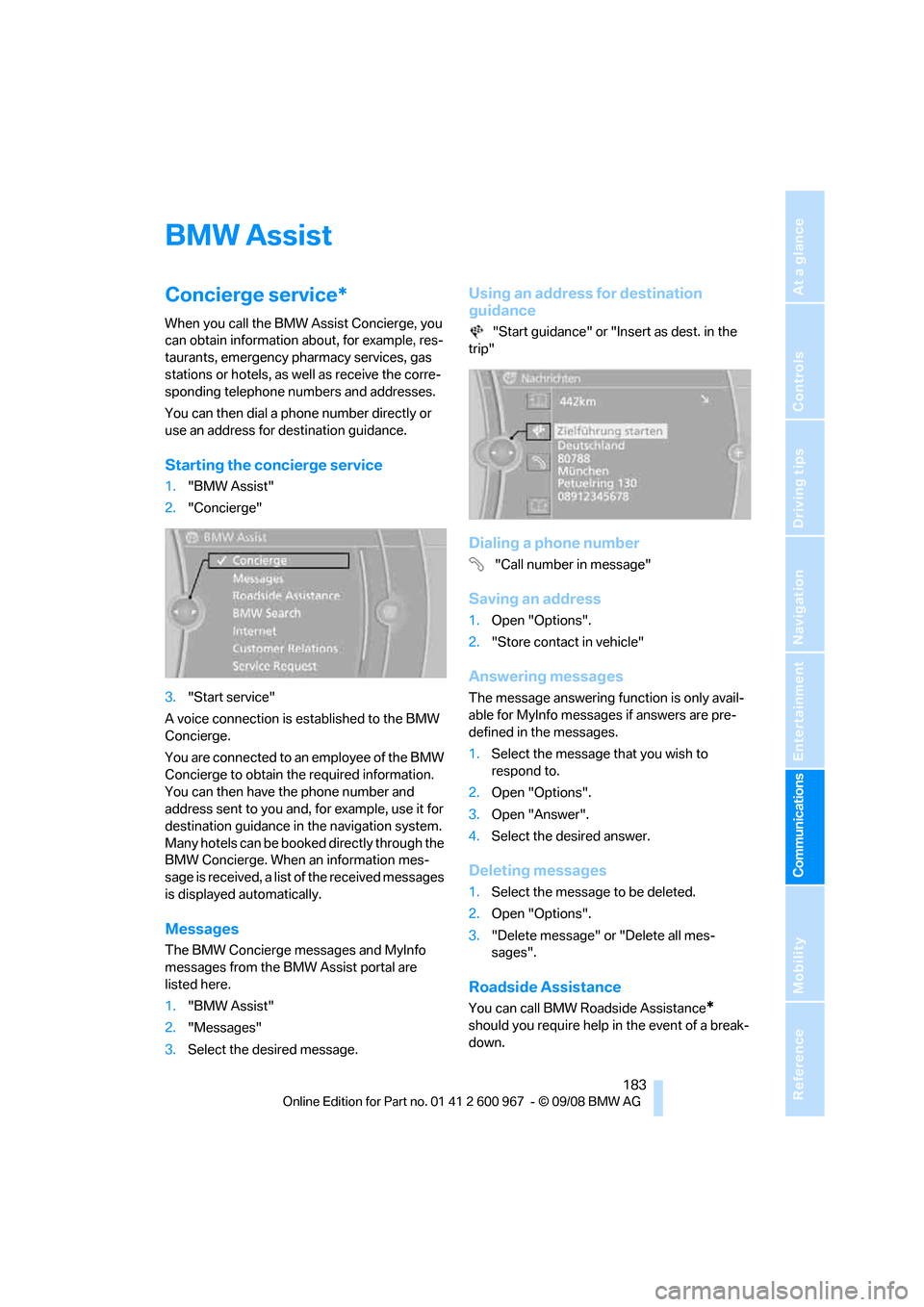
Using an address for destination
guidance
"Start guidance" or "Insert as dest. in the
trip"
Dialing a phone number
"Call number in message"
Saving an address
1.Open "Options".
2."Store contact in vehicle"
Answering messages
The message answering function is only avail-
able for MyInfo messages if answers are pre-
defined in the messages.
1.Select the message that you wish to
respond to.
2.Open "Options".
3.Open "Answer".
4.Select the desired answer.
Deleting messages
1.Select the message to be deleted.
2.Open "Options".
3."Delete message" or "Delete all mes-
sages".
Roadside Assistance
You can call BMW Roadside Assistance*
should you require help in the event of a break-
down.
Page 186 of 260
BMW Assist
184
Starting Roadside Assistance
Vehicle not equipped with BMW Assist
or BMW TeleService
1."BMW Assist"
2."Roadside Assistance"
The Roadside Assistance number is displayed.
3.Dial the number. If a mobile phone
* is
paired, a connection is established to BMW
Roadside Assistance.
Vehicle equipped with BMW Assist or
BMW TeleService
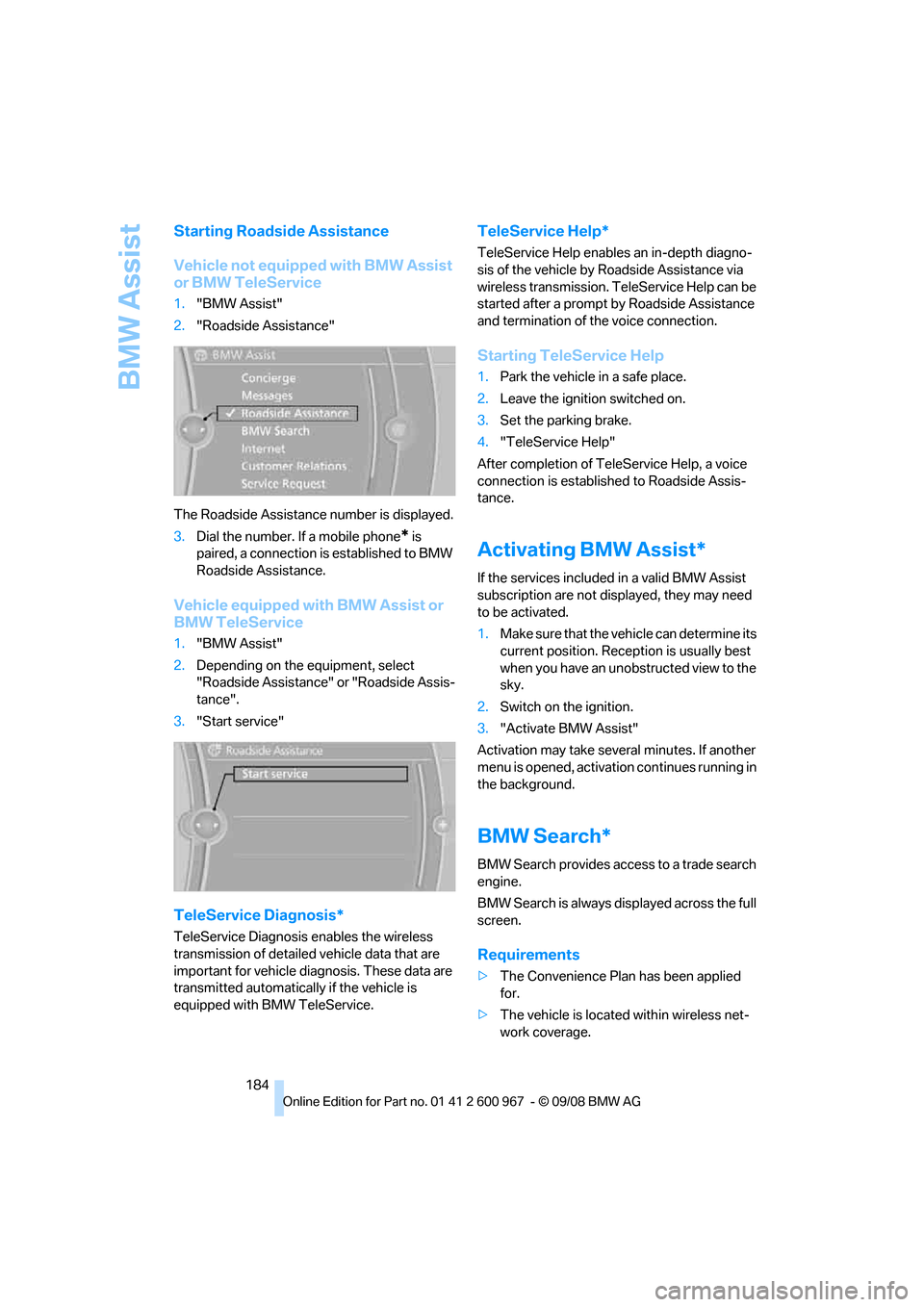
1."BMW Assist"
2.Depending on the equipment, select
"Roadside Assistance" or "Roadside Assis-
tance".
3."Start service"
TeleService Diagnosis*
TeleService Diagnosis enables the wireless
transmission of detailed vehicle data that are
important for vehicle diagnosis. These data are
transmitted automatically if the vehicle is
equipped with BMW TeleService.
TeleService Help*
TeleService Help enables an in-depth diagno-
sis of the vehicle by Roadside Assistance via
wireless transmission. TeleService Help can be
started after a prompt by Roadside Assistance
and termination of the voice connection.
Starting TeleService Help
1.Park the vehicle in a safe place.
2.Leave the ignition switched on.
3.Set the parking brake.
4."TeleService Help"
After completion of TeleService Help, a voice
connection is established to Roadside Assis-
tance.
Activating BMW Assist*
If the services included in a valid BMW Assist
subscription are not displayed, they may need
to be activated.
1.Make sure that the vehicle can determine its
current position. Reception is usually best
when you have an unobstructed view to the
sky.
2.Switch on the ignition.
3."Activate BMW Assist"
Activation may take several minutes. If another
menu is opened, activation continues running in
the background.
BMW Search*
BMW Search provides access to a trade search
engine.
BMW Search is always displayed across the full
screen.
Requirements
>The Convenience Plan has been applied
for.
>The vehicle is located within wireless net-
work coverage.
Page 187 of 260
185
Entertainment
Reference
At a glance
Controls
Driving tips Communications
Navigation
Mobility
>The date setting on the Control Display is
current.
Starting BMW Search
1."BMW Assist"
2."BMW Search"
3.Select "OK", if necessary.
The BMW Search start page is displayed.
Using BMW Search
To select and display content:
>Turn the controller to highlight an element.
>Press the controller to display an element.
Opening the start page
1.Open "Options".
2."Home"
Loading a new page
1.Open "Options".
2."Update"
Canceling
1.Open "Options".
2."Cancel loading"
Internet*
1."BMW Assist"
2."Internet"
The start page is displayed. The Internet pages
may not be displayed in the same way as on a
PC screen. Flash and Java applications cannot
be displayed.
Using the Internet
Menu bar
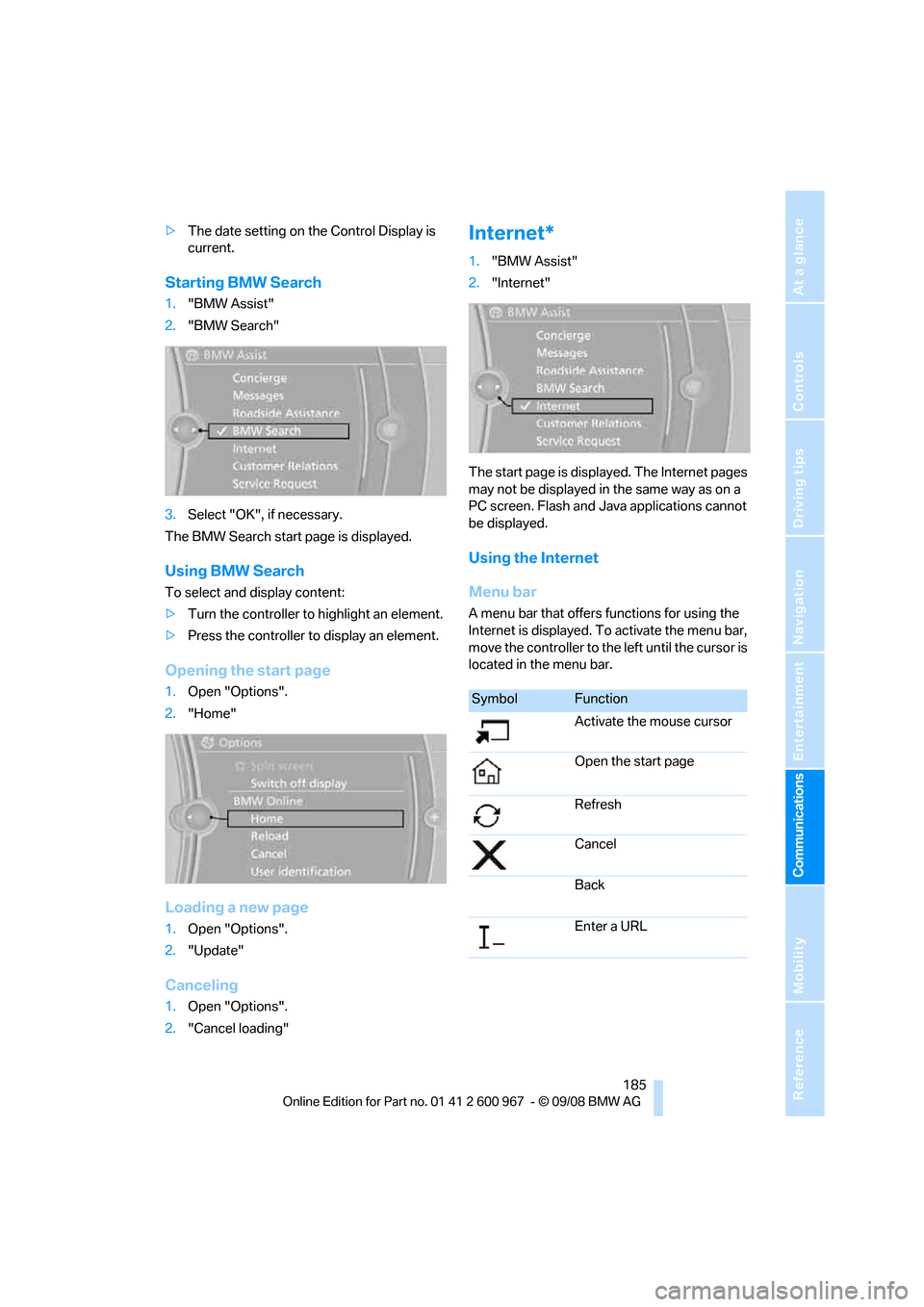
A menu bar that offers functions for using the
Internet is displayed. To activate the menu bar,
move the controller to the left until the cursor is
located in the menu bar.
SymbolFunction
Activate the mouse cursor
Open the start page
Refresh
Cancel
Back
Enter a URL
Page 188 of 260
BMW Assist
186
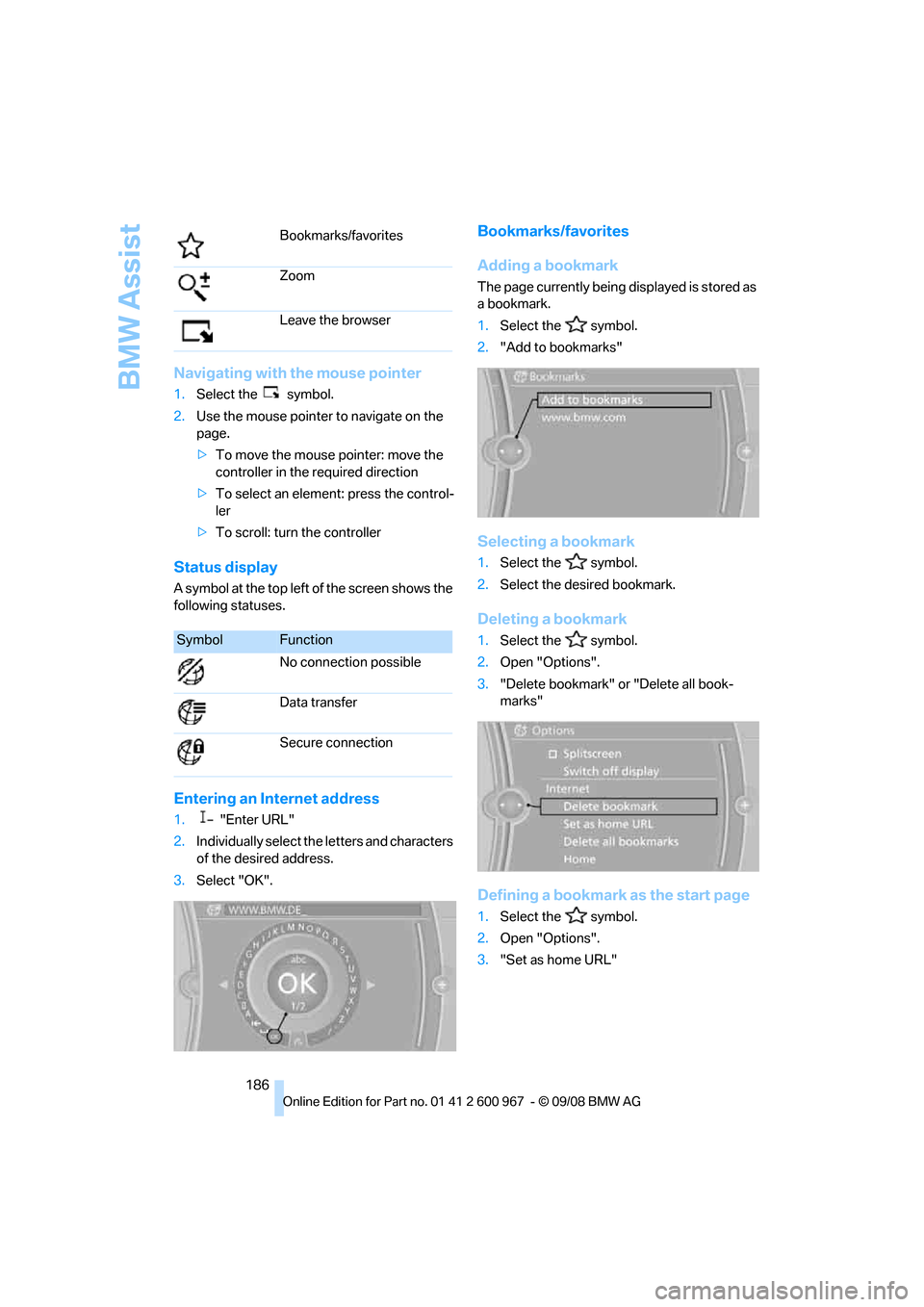
Navigating with the mouse pointer
1.Select the symbol.
2.Use the mouse pointer to navigate on the
page.
>To move the mouse pointer: move the
controller in the required direction
>To select an element: press the control-
ler
>To scroll: turn the controller
Status display
A symbol at the top left of the screen shows the
following statuses.
Entering an Internet address
1."Enter URL"
2.Individually select the letters and characters
of the desired address.
3.Select "OK".
Bookmarks/favorites
Adding a bookmark
The page currently being displayed is stored as
a bookmark.
1.Select the symbol.
2."Add to bookmarks"
Selecting a bookmark
1.Select the symbol.
2.Select the desired bookmark.
Deleting a bookmark
1.Select the symbol.
2.Open "Options".
3."Delete bookmark" or "Delete all book-
marks"
Defining a bookmark as the start page
1.Select the symbol.
2.Open "Options".
3."Set as home URL" Bookmarks/favorites
Zoom
Leave the browser
SymbolFunction
No connection possible
Data transfer
Secure connection
Page 189 of 260
187
Entertainment
Reference
At a glance
Controls
Driving tips Communications
Navigation
Mobility
Settings
Suppressing cookies
1.Open "Options".
2."Suppress cookies"
Suppressing pop-ups
1.Open "Options".
2."Suppress pop-ups"
Suppressing safety warnings
1.Open "Options".
2."Block HTTPS pop-ups"
Activating TeleService*
If the services are not displayed, they may need
to be activated.
1."BMW Assist"
2."Activate TeleService"
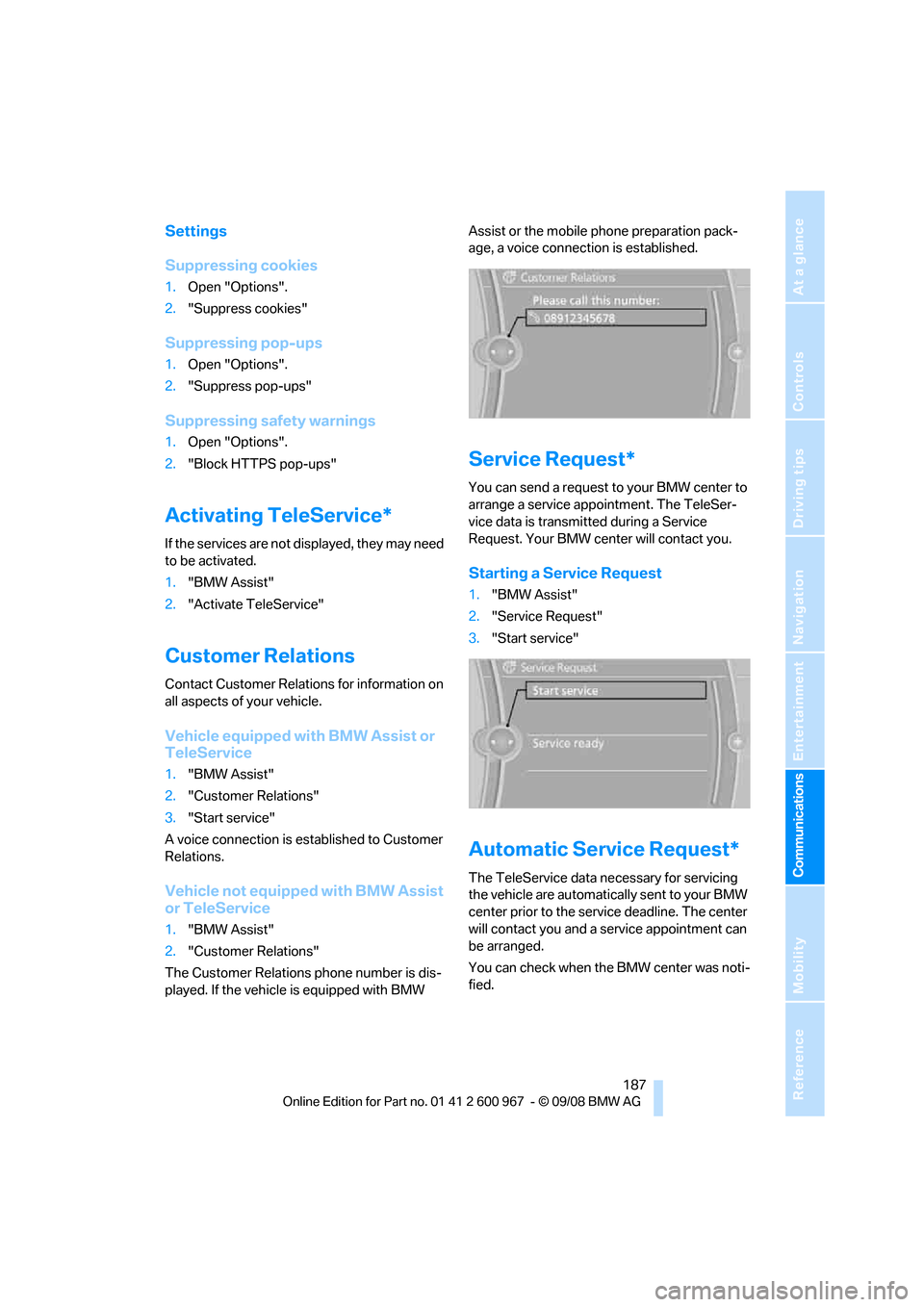
Customer Relations
Contact Customer Relations for information on
all aspects of your vehicle.
Vehicle equipped with BMW Assist or
TeleService
1."BMW Assist"
2."Customer Relations"
3."Start service"
A voice connection is established to Customer
Relations.
Vehicle not equipped with BMW Assist
or TeleService
1."BMW Assist"
2."Customer Relations"
The Customer Relations phone number is dis-
played. If the vehicle is equipped with BMW Assist or the mobile phone preparation pack-
age, a voice connection is established.
Service Request*
You can send a request to your BMW center to
arrange a service appointment. The TeleSer-
vice data is transmitted during a Service
Request. Your BMW center will contact you.
Starting a Service Request
1."BMW Assist"
2."Service Request"
3."Start service"
Automatic Service Request*
The TeleService data necessary for servicing
the vehicle are automatically sent to your BMW
center prior to the service deadline. The center
will contact you and a service appointment can
be arranged.
You can check when the BMW center was noti-
fied.
Page 190 of 260
BMW Assist
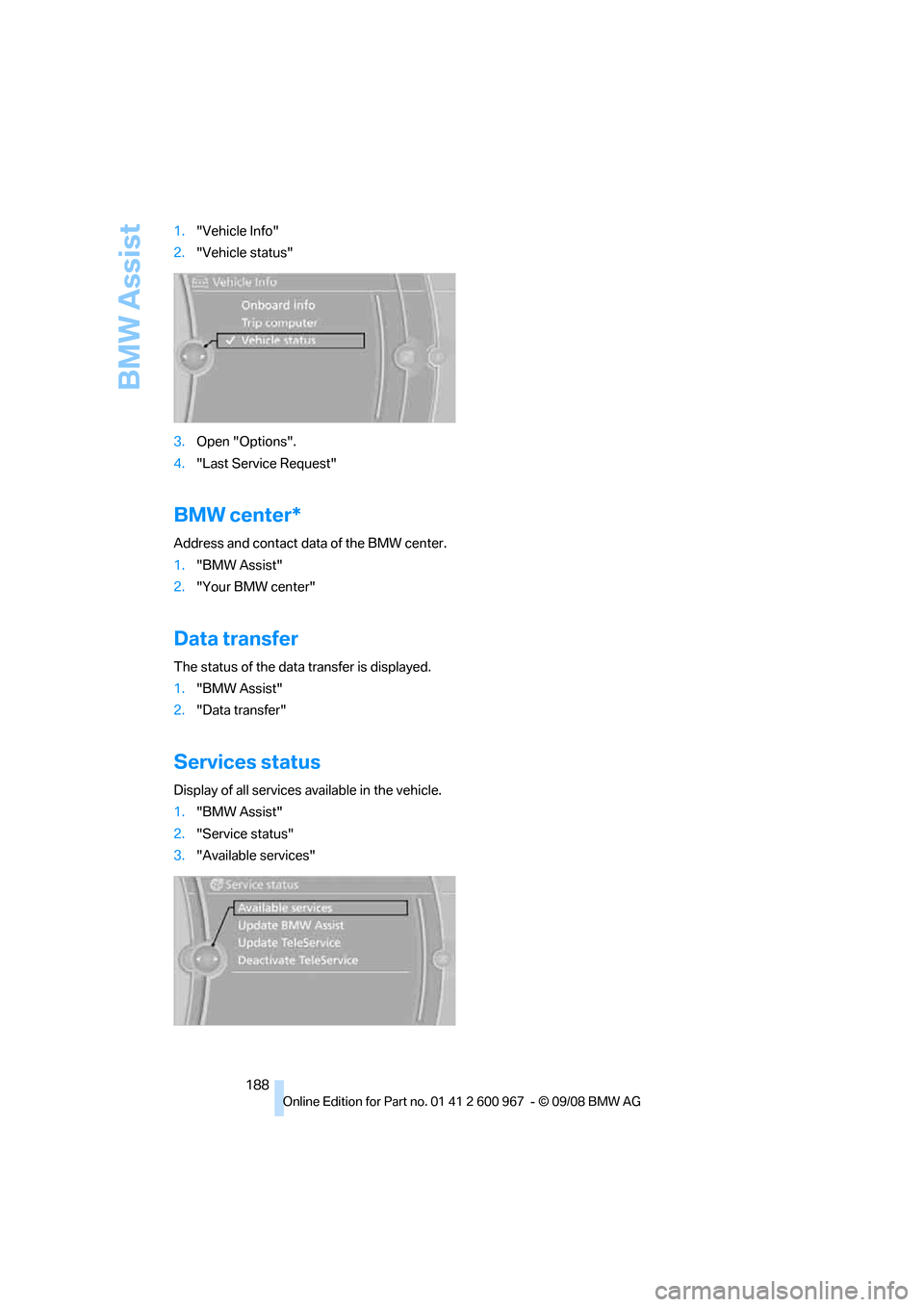
188 1."Vehicle Info"
2."Vehicle status"
3.Open "Options".
4."Last Service Request"
BMW center*
Address and contact data of the BMW center.
1."BMW Assist"
2."Your BMW center"
Data transfer
The status of the data transfer is displayed.
1."BMW Assist"
2."Data transfer"
Services status
Display of all services available in the vehicle.
1."BMW Assist"
2."Service status"
3."Available services"
Page 194 of 260
Refueling
192
Refueling
Always switch off the engine before refu-
eling, otherwise, fuel cannot be added to
the tank and a message will be displayed.<
Take all precautionary measures and
observe all applicable regulations when
handling fuel. Do not carry any spare fuel con-
tainers in your vehicle. They can develop a leak
and cause an explosion or cause a fire in the
event of an accident.<
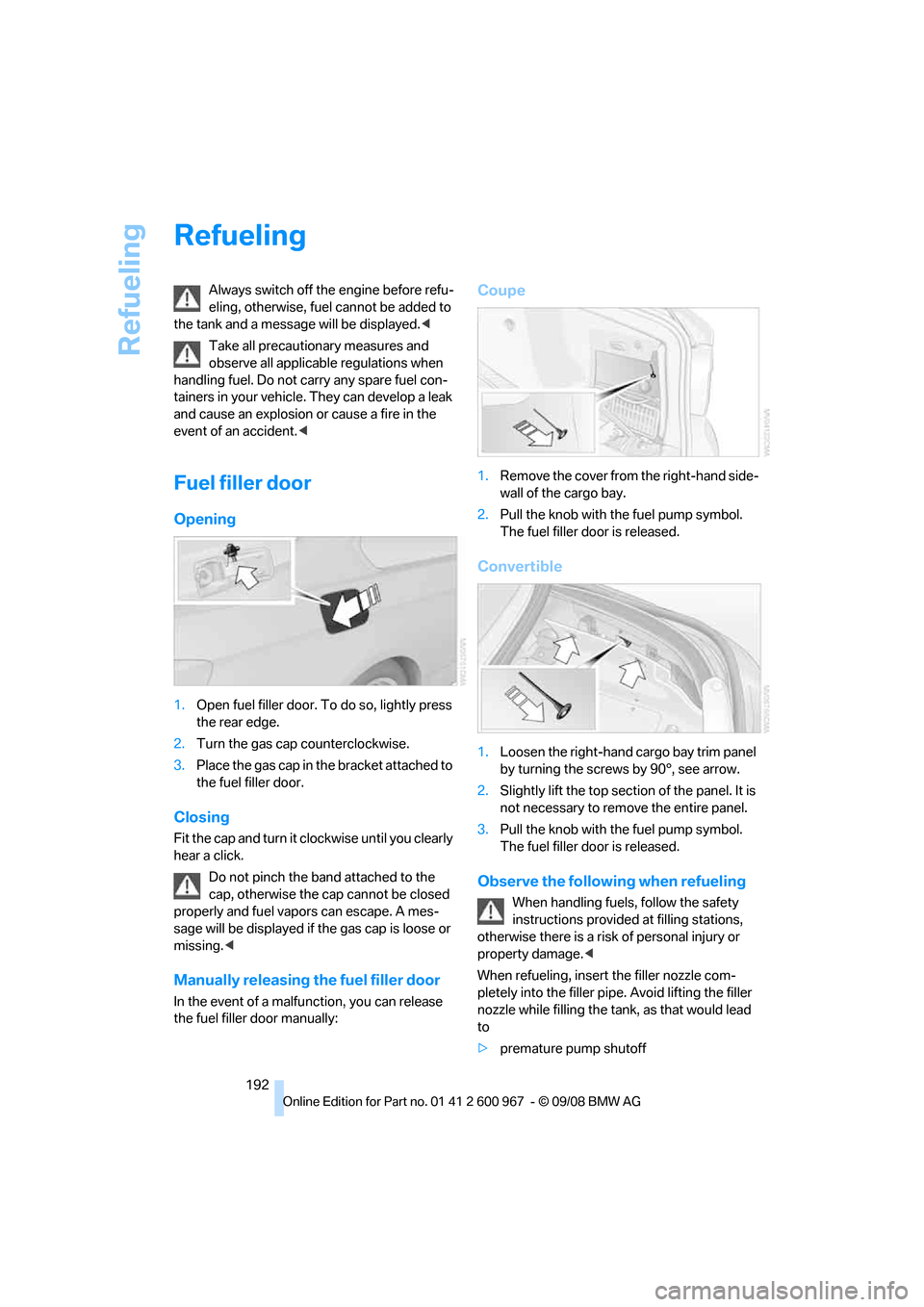
Fuel filler door
Opening
1.Open fuel filler door. To do so, lightly press
the rear edge.
2.Turn the gas cap counterclockwise.
3.Place the gas cap in the bracket attached to
the fuel filler door.
Closing
Fit the cap and turn it clockwise until you clearly
hear a click.
Do not pinch the band attached to the
cap, otherwise the cap cannot be closed
properly and fuel vapors can escape. A mes-
sage will be displayed if the gas cap is loose or
missing.<
Manually releasing the fuel filler door
In the event of a malfunction, you can release
the fuel filler door manually:
Coupe
1.Remove the cover from the right-hand side-
wall of the cargo bay.
2.Pull the knob with the fuel pump symbol.
The fuel filler door is released.
Convertible
1.Loosen the right-hand cargo bay trim panel
by turning the screws by 90°, see arrow.
2.Slightly lift the top section of the panel. It is
not necessary to remove the entire panel.
3.Pull the knob with the fuel pump symbol.
The fuel filler door is released.
Observe the following when refueling
When handling fuels, follow the safety
instructions provided at filling stations,
otherwise there is a risk of personal injury or
property damage.<
When refueling, insert the filler nozzle com-
pletely into the filler pipe. Avoid lifting the filler
nozzle while filling the tank, as that would lead
to
>premature pump shutoff
Page 207 of 260
Mobility
205Reference
At a glance
Controls
Driving tips
Communications
Navigation
Entertainment
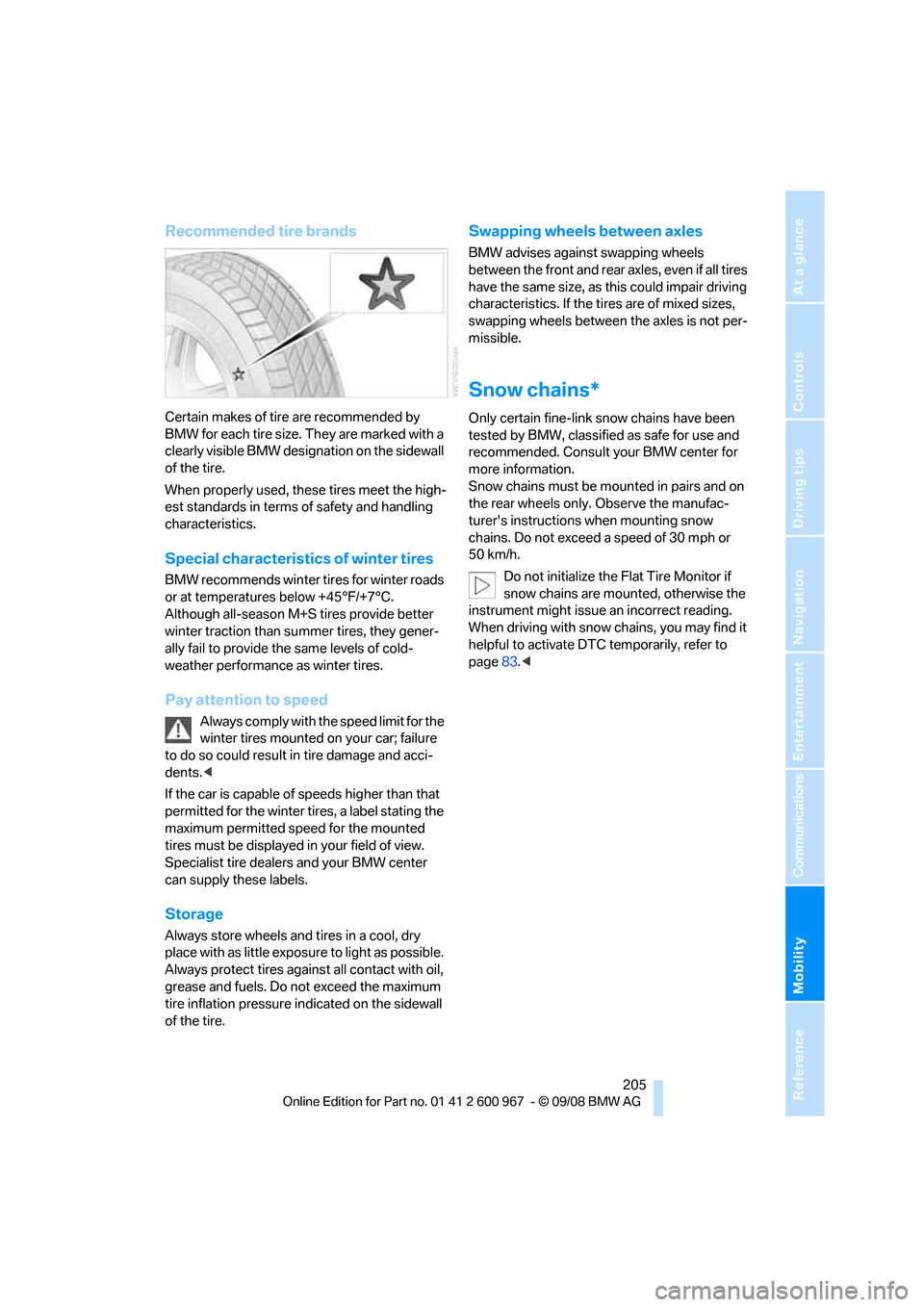
Recommended tire brands
Certain makes of tire are recommended by
BMW for each tire size. They are marked with a
clearly visible BMW designation on the sidewall
of the tire.
When properly used, these tires meet the high-
est standards in terms of safety and handling
characteristics.
Special characteristics of winter tires
BMW recommends winter tires for winter roads
or at temperatures below +45°F/+7°C.
Although all-season M+S tires provide better
winter traction than summer tires, they gener-
ally fail to provide the same levels of cold-
weather performance as winter tires.
Pay attention to speed
Always comply with the speed limit for the
winter tires mounted on your car; failure
to do so could result in tire damage and acci-
dents.<
If the car is capable of speeds higher than that
permitted for the winter tires, a label stating the
maximum permitted speed for the mounted
tires must be displayed in your field of view.
Specialist tire dealers and your BMW center
can supply these labels.
Storage
Always store wheels and tires in a cool, dry
place with as little exposure to light as possible.
Always protect tires against all contact with oil,
grease and fuels. Do not exceed the maximum
tire inflation pressure indicated on the sidewall
of the tire.
Swapping wheels between axles
BMW advises against swapping wheels
between the front and rear axles, even if all tires
have the same size, as this could impair driving
characteristics. If the tires are of mixed sizes,
swapping wheels between the axles is not per-
missible.
Snow chains*
Only certain fine-link snow chains have been
tested by BMW, classified as safe for use and
recommended. Consult your BMW center for
more information.
Snow chains must be mounted in pairs and on
the rear wheels only. Observe the manufac-
turer's instructions when mounting snow
chains. Do not exceed a speed of 30 mph or
50 km/h.
Do not initialize the Flat Tire Monitor if
snow chains are mounted, otherwise the
instrument might issue an incorrect reading.
When driving with snow chains, you may find it
helpful to activate DTC temporarily, refer to
page83.<
Page 209 of 260
Mobility
207Reference
At a glance
Controls
Driving tips
Communications
Navigation
Entertainment
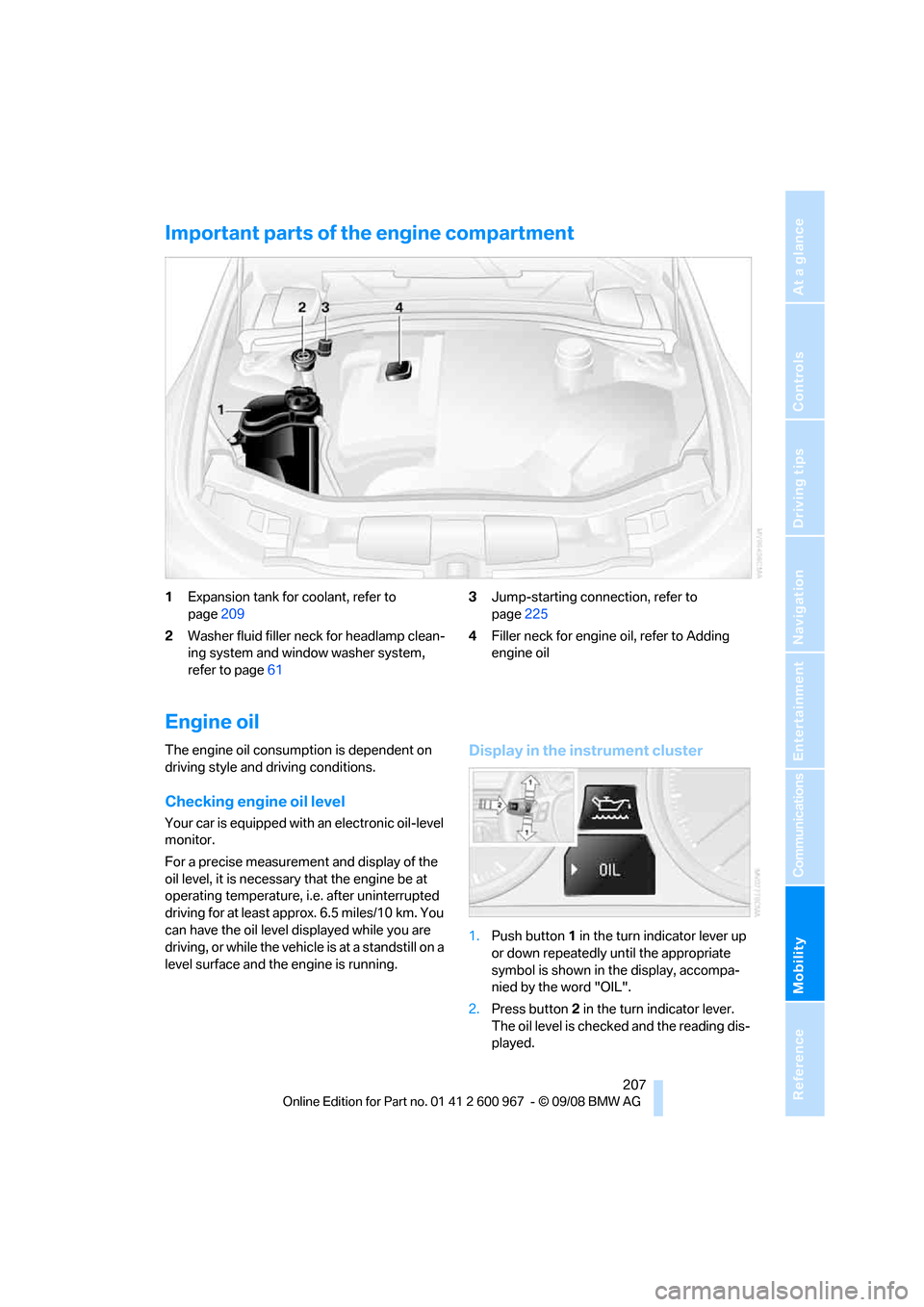
Important parts of the engine compartment
1Expansion tank for coolant, refer to
page209
2Washer fluid filler neck for headlamp clean-
ing system and window washer system,
refer to page613Jump-starting connection, refer to
page225
4Filler neck for engine oil, refer to Adding
engine oil
Engine oil
The engine oil consumption is dependent on
driving style and driving conditions.
Checking engine oil level
Your car is equipped with an electronic oil-level
monitor.
For a precise measurement and display of the
oil level, it is necessary that the engine be at
operating temperature, i.e. after uninterrupted
driving for at least approx. 6.5 miles/10 km. You
can have the oil level displayed while you are
driving, or while the vehicle is at a standstill on a
level surface and the engine is running.
Display in the instrument cluster
1.Push button 1 in the turn indicator lever up
or down repeatedly until the appropriate
symbol is shown in the display, accompa-
nied by the word "OIL".
2.Press button 2 in the turn indicator lever.
The oil level is checked and the reading dis-
played.