auto stop start BMW 328I SEDAN 2012 User Guide
[x] Cancel search | Manufacturer: BMW, Model Year: 2012, Model line: 328I SEDAN, Model: BMW 328I SEDAN 2012Pages: 325, PDF Size: 12.26 MB
Page 98 of 325
A natural, even pressure loss in all four tires can‐
not be detected. Therefore, check the tire infla‐
tion pressure regularly.
The system could be delayed or malfunction in
the following situations:▷When the system has not been initialized.▷When driving on a snowy or slippery road
surface.▷Sporty driving style: slip in the drive wheels,
high lateral acceleration.▷When driving with snow chains.
Status display
The current status of the Flat Tire Monitor can
be displayed on the Control Display, e.g.,
whether or not the FTM is active.
1."Vehicle Info"2."Vehicle status"3. "Flat Tire Monitor"
The status is displayed.
Initialization
The initialization process adopts the set inflation
tire pressures as reference values for the detec‐
tion of a flat tire. Initialization is started by con‐
firming the inflation pressures.
Do not initialize the system when driving with
snow chains.
1."Vehicle Info"2."Vehicle status"3. "Reset"4.Start the engine - do not drive away.5.Start the initialization with "Reset".6.Drive away.
The initialization is completed while driving,
which can be interrupted at any time.
The initialization automatically continues when
driving resumes.
Indication of a flat tire
The yellow warning lamp lights up. A
Check Control message is displayed.
There is a flat tire or a major loss in tire
inflation pressure.1.Reduce your speed and stop cautiously.
Avoid sudden braking and steering maneu‐
vers.2.Check whether the vehicle is fitted with reg‐
ular tires or run-flat tires.
Run-flat tires, refer to page 271, are labeled
with a circular symbol containing the letters
RSC marked on the tire sidewall.
Do not continue driving without run-flat
tires
Do not continue driving if the vehicle is not
equipped with run-flat tires; continued driving
may result in serious accidents.◀
When a flat tire is indicated, DSC Dynamic Sta‐
bility Control is switched on if necessary.
Actions in the event of a flat tire
Normal tires
1.Identify the damaged tire.
Do this by checking the air pressure in all
four tires.
If the tire inflation pressure in all four tires is
correct, the Flat Tire Monitor may not have
been initialized. In this case, initialize the
system.
If an identification is not possible, please
contact the service center.2.Rectify the flat tire.
Run-flat tires
Maximum speed
You can continue driving with a damaged tire at
speeds up to 50 mph/80 km/h.
Seite 98ControlsSafety98
Online Edition for Part no. 01 40 2 608 633 - 11 09 490
Page 165 of 325
Resetting fuel consumption history1."Options" Open.2."Reset consumption history"
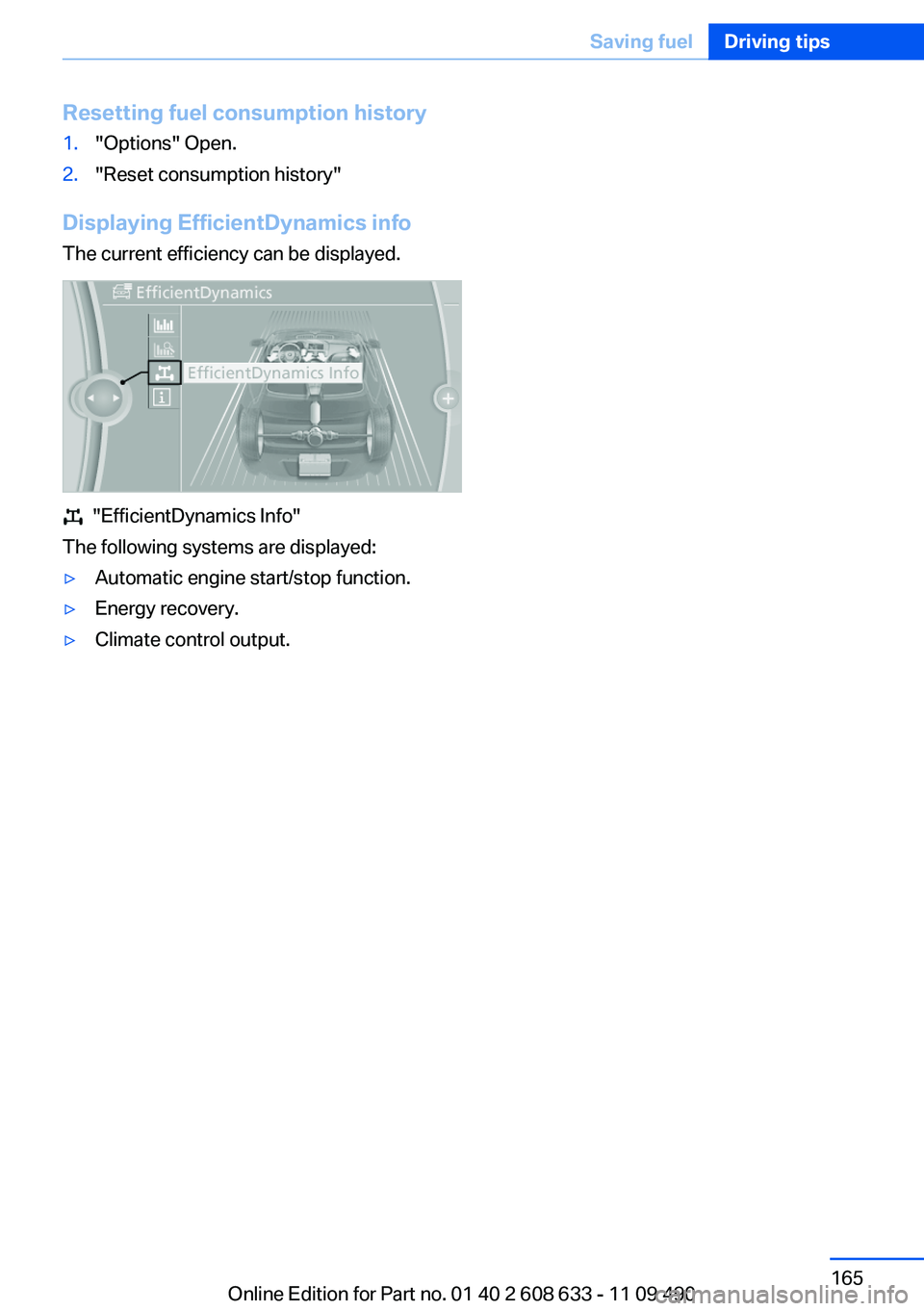
Displaying EfficientDynamics info
The current efficiency can be displayed.
"EfficientDynamics Info"
The following systems are displayed:
▷Automatic engine start/stop function.▷Energy recovery.▷Climate control output.Seite 165Saving fuelDriving tips165
Online Edition for Part no. 01 40 2 608 633 - 11 09 490
Page 182 of 325
▷Red: congestion.▷Orange: stop-and-go traffic.▷Yellow: heavy traffic.▷Green: clear roads.▷Gray: general traffic bulletins, e.g., construc‐
tion site.
The displayed information depends on the par‐
ticular traffic information service.
Filtering traffic bulletins
You can set which traffic bulletins appear on the
map.
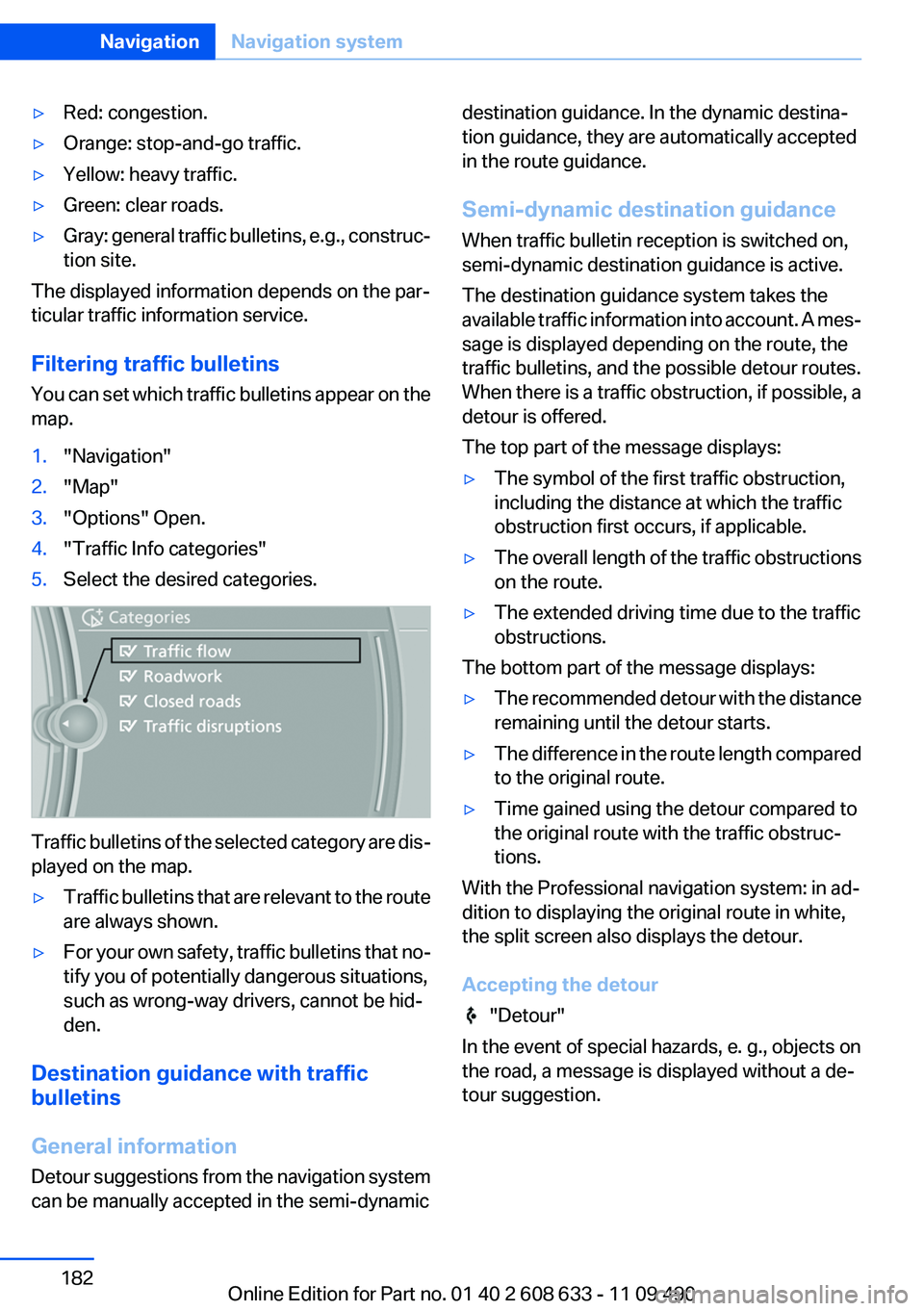
1."Navigation"2."Map"3."Options" Open.4."Traffic Info categories"5.Select the desired categories.
Traffic bulletins of the selected category are dis‐
played on the map.
▷Traffic bulletins that are relevant to the route
are always shown.▷For your own safety, traffic bulletins that no‐
tify you of potentially dangerous situations,
such as wrong-way drivers, cannot be hid‐
den.
Destination guidance with traffic
bulletins
General information
Detour suggestions from the navigation system
can be manually accepted in the semi-dynamic
destination guidance. In the dynamic destina‐
tion guidance, they are automatically accepted
in the route guidance.
Semi-dynamic destination guidance
When traffic bulletin reception is switched on,
semi-dynamic destination guidance is active.
The destination guidance system takes the
available traffic information into account. A mes‐
sage is displayed depending on the route, the
traffic bulletins, and the possible detour routes.
When there is a traffic obstruction, if possible, a
detour is offered.
The top part of the message displays:▷The symbol of the first traffic obstruction,
including the distance at which the traffic
obstruction first occurs, if applicable.▷The overall length of the traffic obstructions
on the route.▷The extended driving time due to the traffic
obstructions.
The bottom part of the message displays:
▷The recommended detour with the distance
remaining until the detour starts.▷The difference in the route length compared
to the original route.▷Time gained using the detour compared to
the original route with the traffic obstruc‐
tions.
With the Professional navigation system: in ad‐
dition to displaying the original route in white,
the split screen also displays the detour.
Accepting the detour
"Detour"
In the event of special hazards, e. g., objects on
the road, a message is displayed without a de‐
tour suggestion.
Seite 182NavigationNavigation system182
Online Edition for Part no. 01 40 2 608 633 - 11 09 490
Page 200 of 325

3.Select the desired CD or DVD.4."Options" Open.5."Random"
All tracks of the CD/DVD are played back in ran‐
dom order.
Fast forward/reverse Press and hold the button.
Automatic repeat
The selected CDs or DVDs are repeated auto‐
matically.
Video playback
Country codes
Only DVDs with the code of the home region can
be played back; also refer to the information on
the DVD.
CodeRegion1USA, Canada2Japan, Europe, Middle East, South Af‐
rica3Southeast Asia4Australia, Central and South America,
New Zealand5Northwest Asia, North Africa6China0All regionsPlayback
The video image is displayed on the front Con‐
trol Display up to a speed of approx. 2 mph/3 km/
h; in some countries, it is only displayed if the
parking brake is set or if the automatic trans‐
mission is in position P.
DVD video1."CD/Multimedia"2."CD/DVD"3.Select a DVD with video content.4. "DVD menu"
VCD/SVCD
1."CD/Multimedia"2."CD/DVD"3.Select a CD with video content.4. "Select track"5.Select the desired track.
Video menu
To open the video menu: turn the controller dur‐
ing playback.
Press the controller when "Back" is displayed.
SymbolFunction Open the DVD menu. Start playback. Pause Stop Next chapterSeite 200EntertainmentCD/multimedia200
Online Edition for Part no. 01 40 2 608 633 - 11 09 490
Page 203 of 325
4DVD slot5Fill DVD compartments
Filling the DVD compartments
individually
1. Press the button.
The LED on the first empty compartment
flashes.2.Select another compartment if necessary.3.Wait for the LEDs on the DVD slot to flash.4.Insert a single CD or DVD in the middle.
The CD/DVD is drawn in automatically and
placed into the selected compartment.
Sliding in CDs/DVDs
Do not insert the CD/DVD until the LEDs
on the DVD slot are flashing; otherwise, the CD/
DVD or the DVD changer could be damaged.
Do not continue to push on the CD/DVD; this
may cause it to jam and prevent it from being
able to eject again.◀
Filling all empty DVD compartments
1. Hold the button down.
The LEDs on the empty CD compartments
flash.2.Wait for the LEDs on the DVD slot to begin
flashing and then insert each CD or DVD into
the center of the slot.
The CDs/DVDs are drawn in automatically
and placed into the vacant compartments.
Sliding in CDs/DVDs
Do not insert the CD/DVD until the LEDs
on the DVD slot are flashing; otherwise, the CD/
DVD or the DVD changer could be damaged.
Do not continue to push on the CD/DVD; this
may cause it to jam and prevent it from being
able to eject again.◀
After they are inserted, it may take several mi‐
nutes for the CDs/DVDs to be read in.
Removing a single CD/DVD1. Press the button.2.Select the DVD compartment.
The CD/DVD is partially ejected.3.Remove the CD/DVD.
Removing all CDs/DVDs
1. Hold the button down.2.Remove the CDs/DVDs.
Malfunctions
If the LEDs on the DVD slot and on the com‐
partments are flashing rapidly, a malfunction has
occurred.
To eliminate the malfunction:
1.Press one of the following buttons:▷▷
The CD/DVD last inserted is ejected.
2.Remove the CD/DVD.
The DVD changer is functional again after the
LEDs stop flashing rapidly.
Audio playback
The audio track of a DVD can be played back
even if video playback is not possible in the ve‐
hicle.
Only the main film without the previews or extras
can be played back.
Starting playback
A DVD is located in the DVD changer.
1."CD/Multimedia"2."CD/DVD"Seite 203CD/multimediaEntertainment203
Online Edition for Part no. 01 40 2 608 633 - 11 09 490
Page 293 of 325
3.Let both engines run for several minutes.4.Disconnect the jumper cables in the reverse
order.
Check the battery and recharge if necessary.
Tow-starting and towing
Automatic transmission: transporting
your vehicle
Note
Your vehicle is not permitted to be towed.
Therefore, contact a service center in the event
of a breakdown.
Do not have the vehicle towed
Have your vehicle transported on a loading
platform only; otherwise, damage may occur.◀
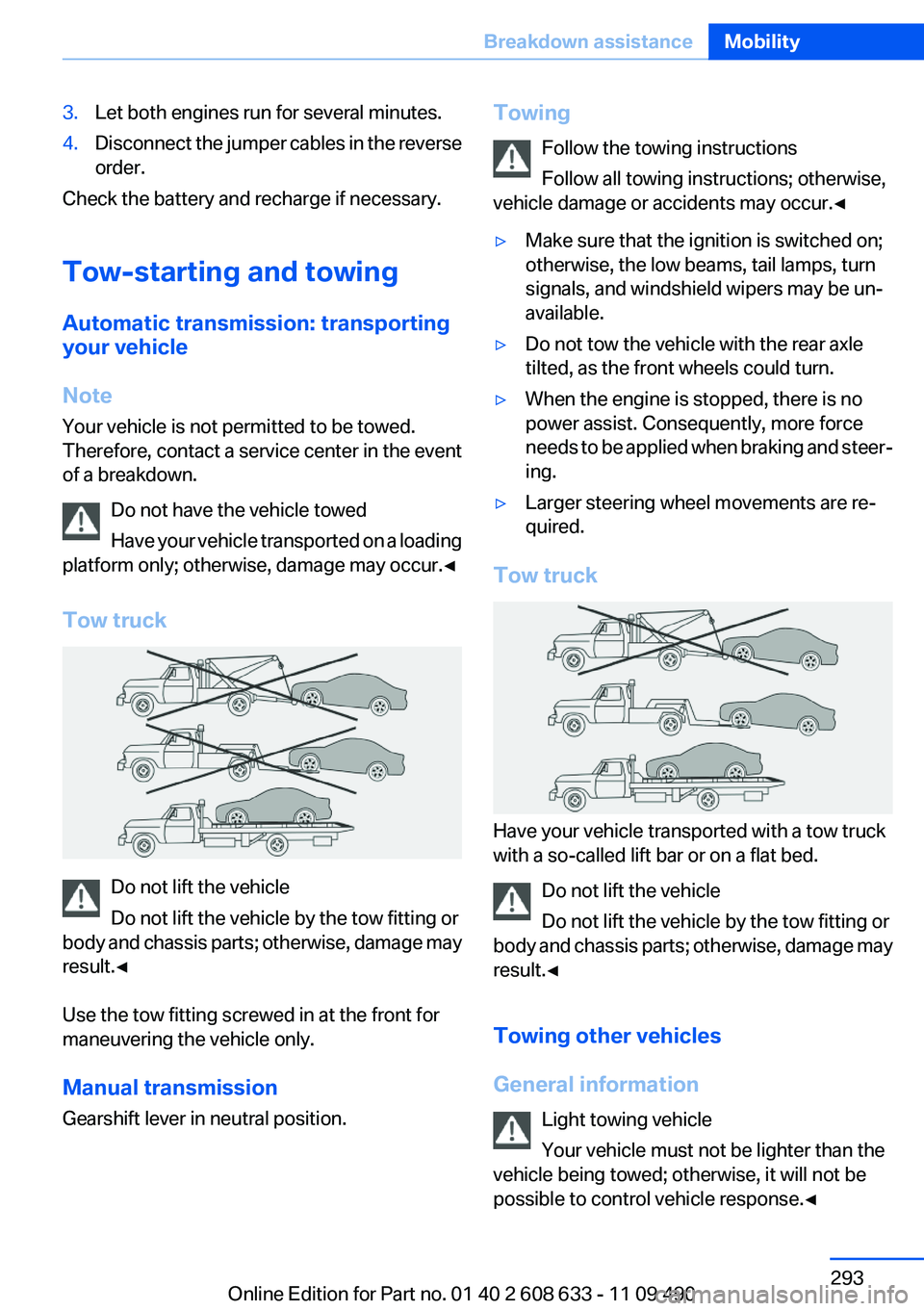
Tow truck
Do not lift the vehicle
Do not lift the vehicle by the tow fitting or
body and chassis parts; otherwise, damage may
result.◀
Use the tow fitting screwed in at the front for
maneuvering the vehicle only.
Manual transmission
Gearshift lever in neutral position.
Towing
Follow the towing instructions
Follow all towing instructions; otherwise,
vehicle damage or accidents may occur.◀▷Make sure that the ignition is switched on;
otherwise, the low beams, tail lamps, turn
signals, and windshield wipers may be un‐
available.▷Do not tow the vehicle with the rear axle
tilted, as the front wheels could turn.▷When the engine is stopped, there is no
power assist. Consequently, more force
needs to be applied when braking and steer‐
ing.▷Larger steering wheel movements are re‐
quired.
Tow truck
Have your vehicle transported with a tow truck
with a so-called lift bar or on a flat bed.
Do not lift the vehicle
Do not lift the vehicle by the tow fitting or
body and chassis parts; otherwise, damage may
result.◀
Towing other vehicles
General information Light towing vehicle
Your vehicle must not be lighter than the
vehicle being towed; otherwise, it will not be
possible to control vehicle response.◀
Seite 293Breakdown assistanceMobility293
Online Edition for Part no. 01 40 2 608 633 - 11 09 490
Page 295 of 325
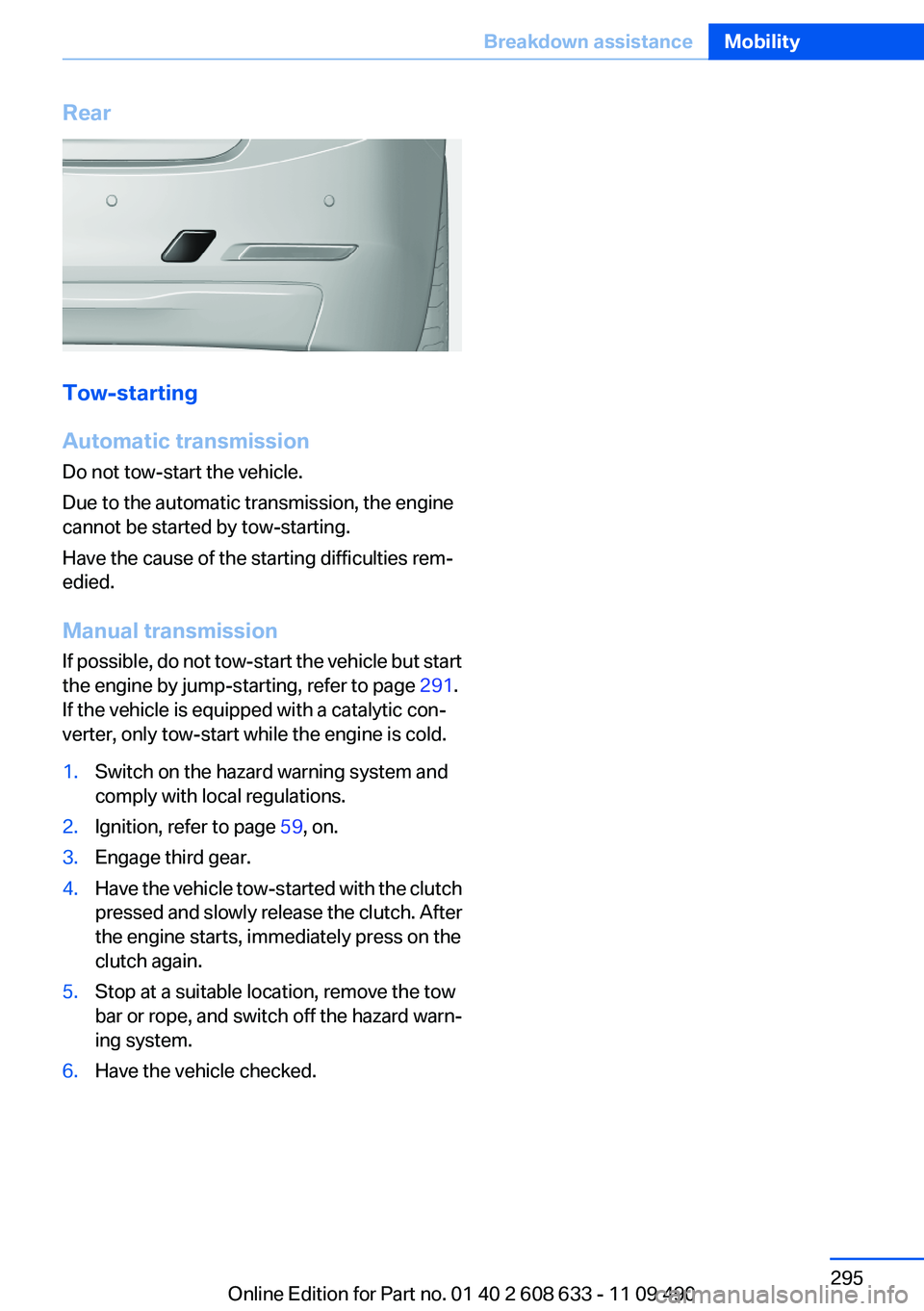
Rear
Tow-starting
Automatic transmission
Do not tow-start the vehicle.
Due to the automatic transmission, the engine
cannot be started by tow-starting.
Have the cause of the starting difficulties rem‐
edied.
Manual transmission
If possible, do not tow-start the vehicle but start
the engine by jump-starting, refer to page 291.
If the vehicle is equipped with a catalytic con‐
verter, only tow-start while the engine is cold.
1.Switch on the hazard warning system and
comply with local regulations.2.Ignition, refer to page 59, on.3.Engage third gear.4.Have the vehicle tow-started with the clutch
pressed and slowly release the clutch. After
the engine starts, immediately press on the
clutch again.5.Stop at a suitable location, remove the tow
bar or rope, and switch off the hazard warn‐
ing system.6.Have the vehicle checked.Seite 295Breakdown assistanceMobility295
Online Edition for Part no. 01 40 2 608 633 - 11 09 490
Page 314 of 325
Everything from A to Z
IndexA
ABS, Antilock Brake Sys‐ tem 104
ACC, Active Cruise Control with Stop & Go 109
Activated-charcoal filter 139
Active Blind Spot Detec‐ tion 101
Active Cruise Control with Stop & Go, ACC 109
Active Protection 102
Adaptive brake lights, refer to Brake force display 102
Adaptive light control 88
Additional telephone 228
Additives, oil 275
Adjustments, seats/head re‐ straints 45
After washing vehicle 297
Airbags 91
Airbags, indicator/warning light 92
Air circulation, refer to Recir‐ culated-air mode 135, 138
Air distribution, manual 135, 138
Air drying, refer to Cooling function 135, 137
Air flow, air conditioner 135
Air pressure, tires 263
Air vents, refer to Ventila‐ tion 139
Air volume, automatic climate control 138
Alarm system 40
Alarm, unintentional 41
All around the center con‐ sole 14
All around the headliner 15 All around the steering
wheel 12
All-season tires, refer to Win‐ ter tires 270
Alternating-code hand-held transmitter 142
Alternative oil types 275
AM/FM station 190
Announcement, navigation, refer to Spoken instruc‐
tions 178
Antifreeze, washer fluid 66
Antilock Brake System, ABS 104
Anti-slip control, refer to DSC 104
Applications 255
Appointments 243
Approved engine oils 275
Apps 255
Apps, video playback 213
Arrival time 82
Ash tray 145
Assistance, Roadside Assis‐ tance 291
Assistance when driving off 108
Assist, BMW 250
Assist system information, on Control Display 85
Audio playback 199
Audio playback, Blue‐ tooth 213
AUTO intensity 137
Automatic car wash 296
Automatic climate con‐ trol 134
Automatic climate control with enhanced features 136
Automatic Cruise Control with Stop & Go 109 Automatic Curb Monitor 52
Automatic deactivation, front passenger airbags 93
Automatic headlamp con‐ trol 87
Automatic locking 37
Automatic recirculated-air control 138
Automatic transmission with Steptronic 67
AUTO program, automatic cli‐ mate control 137
AUTO program, climate con‐ trol 135
AUTO program, intensity 137
Auto Start/Stop function 61
AUX-IN port 210
Average fuel consumption 82
Average speed 82
Axle loads, weights 304
B
Backrest curvature, refer to Lumbar support 47
Backrest, width 47
Backup camera 123
Balance 188
Band-Aids, refer to First aid kit 291
Bar for tow-starting/tow‐ ing 294
Bass 188
Battery replacement, vehicle battery 287
Battery replacement, vehicle remote control 30
Battery, vehicle 287
Belts, safety belts 48
Beverage holder, cu‐ pholder 150 Seite 314ReferenceEverything from A to Z314
Online Edition for Part no. 01 40 2 608 633 - 11 09 490
Page 316 of 325
Corrosion on brake discs 158
Cruise control 119
Cruise control, active with Stop & Go 109
Cruising range 76
Cupholder 150
Current fuel consumption 77
Current location, storing 170
Customer Relations 253
D
Damage, tires 269
Damping control, dy‐ namic 105
Data, technical 302
Date 76
Daytime running lights 87
Defrosting, refer to defrosting the windows 135
Defrosting, refer to Windows, defrosting 138
Defrosting the windows 135
Destination distance 82
Destination guidance 176
Destination guidance with in‐ termediate destinations 174
Destination input, naviga‐ tion 168
Digital clock 76
Digital compass 143
Digital radio 191
Dimensions 302
Dimmable exterior mirrors 53
Dimmable interior rearview mirror 53
Direction indicator, refer to Turn signals 64
Displacement, engine 303
Display, ECO PRO 163
Display, electronic, instrument cluster 72
Display in front wind‐ shield 128
Display lighting, refer to Instru‐ ment lighting 89 Displays 70
Displays, cleaning 299
Disposal, coolant 276
Disposal, vehicle battery 288
Distance control, refer to PDC 121
Distance, selecting for ACC 111
Distance to destination 82
Divided screen view, split screen 21
Door lock, refer to Remote control 30
Drive-off assistant 108
Drive-off assistant, refer to DSC 104
Driving Experience Switch 106
Driving instructions, breaking in 156
Driving notes, general 156
Driving stability control sys‐ tems 104
Driving tips 156
DSC Dynamic Stability Con‐ trol 104
DTC Dynamic Traction Con‐ trol 105
DVD/CD 198
DVD/CD notes 204
DVD changer 202
DVD settings 201
DVDs, storing 205
DVD, video 200
Dynamic Damping Con‐ trol 105
Dynamic destination guid‐ ance 183
Dynamic Stability Control DSC 104
Dynamic Traction Control DTC 105
E
ECO PRO 163 EfficientDynamics 164
EfficientDynamics menu, refer to ECO PRO 163
Electronic displays, instru‐ ment cluster 72
Electronic Stability Program ESP, refer to DSC 104
Emergency detection, remote control 31
Emergency release, door lock 37
Emergency release, fuel filler flap 260
Emergency Request 290
Emergency service, refer to Roadside Assistance 291
Emergency start function, en‐ gine start 31
Emergency unlocking, trunk lid 38
Energy Control 77
Energy recovery 77
Engine, automatic start/stop function 61
Engine, automatic switch- off 61
Engine compartment 272
Engine compartment, working in 273
Engine coolant 276
Engine oil 274
Engine oil, adding 274
Engine oil additives 275
Engine oil change 275
Engine oil filler neck 274
Engine oil temperature 75
Engine oil types, alterna‐ tive 275
Engine oil types, ap‐ proved 275
Engine specifications 303
Engine start during malfunc‐ tion 31
Engine start, refer to Starting the engine 60
Engine start, Starting aid 291 Seite 316ReferenceEverything from A to Z316
Online Edition for Part no. 01 40 2 608 633 - 11 09 490
Page 317 of 325
Engine stop 61
Engine temperature 75
Entering a car wash 296
Equalizer 188
Equipment, interior 141
ESP Electronic Stability Pro‐ gram, refer to DSC 104
Exchanging wheels/tires 269
Exhaust system 156
Exterior mirror, automatic dim‐ ming feature 53
Exterior mirrors 52
External devices 210
External start 291
External temperature dis‐ play 76
External temperature warn‐ ing 76
Eyes for securing cargo 160
F
Fader 188
Failure message, refer to Check Control 73
False alarm, refer to Uninten‐ tional alarm 41
Fan, refer to Air flow 135
Fan, refer to Air volume 138
Fault displays, refer to Check Control 73
Filler neck for engine oil 274
Fine wood, care 298
First aid kit 291
Fitting for towing, refer to Tow fitting 294
Flat tire, changing wheels 287
Flat Tire Monitor FTM 97
Flat tire, Tire Pressure Monitor TPM 94
Flat tire, warning lamp 95, 98
Flooding 157
Floor carpet, care 298
Floor mats, care 298
FM/AM station 190
Fogged up windows 135 Fold-out position, windshield
wipers 66
Foot brake 157
Front airbags 91
Front fog lamps 89
Front fog lamps, front, bulb re‐ placement 284
Front lamps 280
Front passenger airbags, au‐ tomatic deactivation 93
Front passenger airbags, indi‐ cator lamp 93
FTM Flat Tire Monitor 97
Fuel cap 260
Fuel consumption, current 77
Fuel consumption, refer to Average fuel consump‐
tion 82
Fuel filler flap 260
Fuel gauge 75
Fuel quality 262
Fuel, tank capacity 305
Fuse 288
G
Garage door opener, refer to Integrated universal remote
control 141
Gas station recommenda‐ tion 178
Gear change, automatic trans‐ mission 67
Gear shift indicator 78
General driving notes 156
Glass sunroof, powered 43
Glove compartment 148
Gong, volume equaliza‐ tion 189
GPS navigation 168
Gray display of the map 181
Gross vehicle weight, ap‐ proved 304
Gross weight, permissible for trailer towing 304 H
Handbrake, refer to parking brake 63
Hand-held transmitter, alter‐ nating code 142
Hazard warning flashers 290
HD Radio 191
Head airbags 91
Headlamp control, auto‐ matic 87
Headlamp courtesy delay fea‐ ture 87
Headlamp flasher 64
Headlamp glass 280
Headlamps 280
Headlamps, care 297
Headlamp washer system 65
Headliner 15
Head restraints 45
Head restraints, front 49
Head restraints, rear 50
Head-up Display 128
Head-up Display, care 299
Heavy cargo, stowing 160
Height, vehicle 302
High-beam Assistant 88
High beams 64
High beams/low beams, refer to High-beam Assistant 88
Hills 158
Hill start assistant, refer to Drive-off assistant 108
Hints 6
Holder for beverages 150
Homepage 6
Hood 273
Horn 12
Hotel function, trunk lid 38
Hot exhaust system 156
House number, entering for navigation 169
Hydroplaning 157 Seite 317Everything from A to ZReference317
Online Edition for Part no. 01 40 2 608 633 - 11 09 490