warning light BMW 328XI 2008 User Guide
[x] Cancel search | Manufacturer: BMW, Model Year: 2008, Model line: 328XI, Model: BMW 328XI 2008Pages: 272, PDF Size: 8.98 MB
Page 90 of 272
Technology for driving comfort and safety
88
Technology for driving comfort and safety
PDC Park Distance Control*
The concept
The PDC assists you with maneuvering in tight
parking spaces. Acoustic signals and a visual
indicator
warn you of the presence of an object
behind your vehicle. To measure the distance,
there are four ultrasonic sensors in either
bumper.
These sensors have a range of approx. 6.5 ft/
2 m. However, an acoustic warning does not
sound until an object is approx. 24 in/60 cm
from the corner sensors, or approx. 5 ft/1.50 m
from the center sensors.
PDC is a parking aid that can indicate
objects when they are approached
slowly, as is usually the case when parking.
Avoid approaching an object at high speed, oth-
erwise physical circumstances may lead to the
system warning being issued too late.<
Switching on automatically
With the engine running or the ignition switched
on, the system is activated after approx. 1 sec-
ond when you engage reverse gear or move the
automatic transmission selector lever to
position R. Wait this short period before driving.
Switching off automatically
After approx. 165 ft/50 m of driving or above
approx. 20 mph/approx. 30 km/h, the system
switches off and the LED goes out.
Signal tones
When nearing an object, its position is indicated
correspondingly by an interval tone. As the dis-
tance between vehicle and object decreases,
the intervals between the tones become
shorter. If the distance to the nearest object
falls to below roughly 1 ft/30 cm, then a contin-
uous tone sounds.
An interval tone is interrupted after approx.
3seconds>if you remain in front of an object that has
been detected by only one of the corner
sensors
>if you are driving parallel to a wall.
Malfunction
The indicator lamp in the instrument
cluster comes on. PDC is malfunc-
tioning. A message appears on the
Control Display. Have the system checked.
To avoid this problem, keep the sensors clean
and free of ice or snow in order to ensure that
they will continue to operate effectively. When
using a high-pressure cleaner, do not spray the
sensors for extended periods of time and only
from a distance of at least 4 in/10 cm.
PDC with visual warning
You can also have the system show distances
to objects on the Control Display. The contours
of distant objects are shown on the Control Dis-
play even before the acoustic signal sounds.
The setting is stored for the remote control cur-
rently in use.
iDrive, for operating principle refer to page16.
1.Press the button.
This opens the start menu.
2.Press the controller to open the menu.
3.Select "Settings" and press the controller.
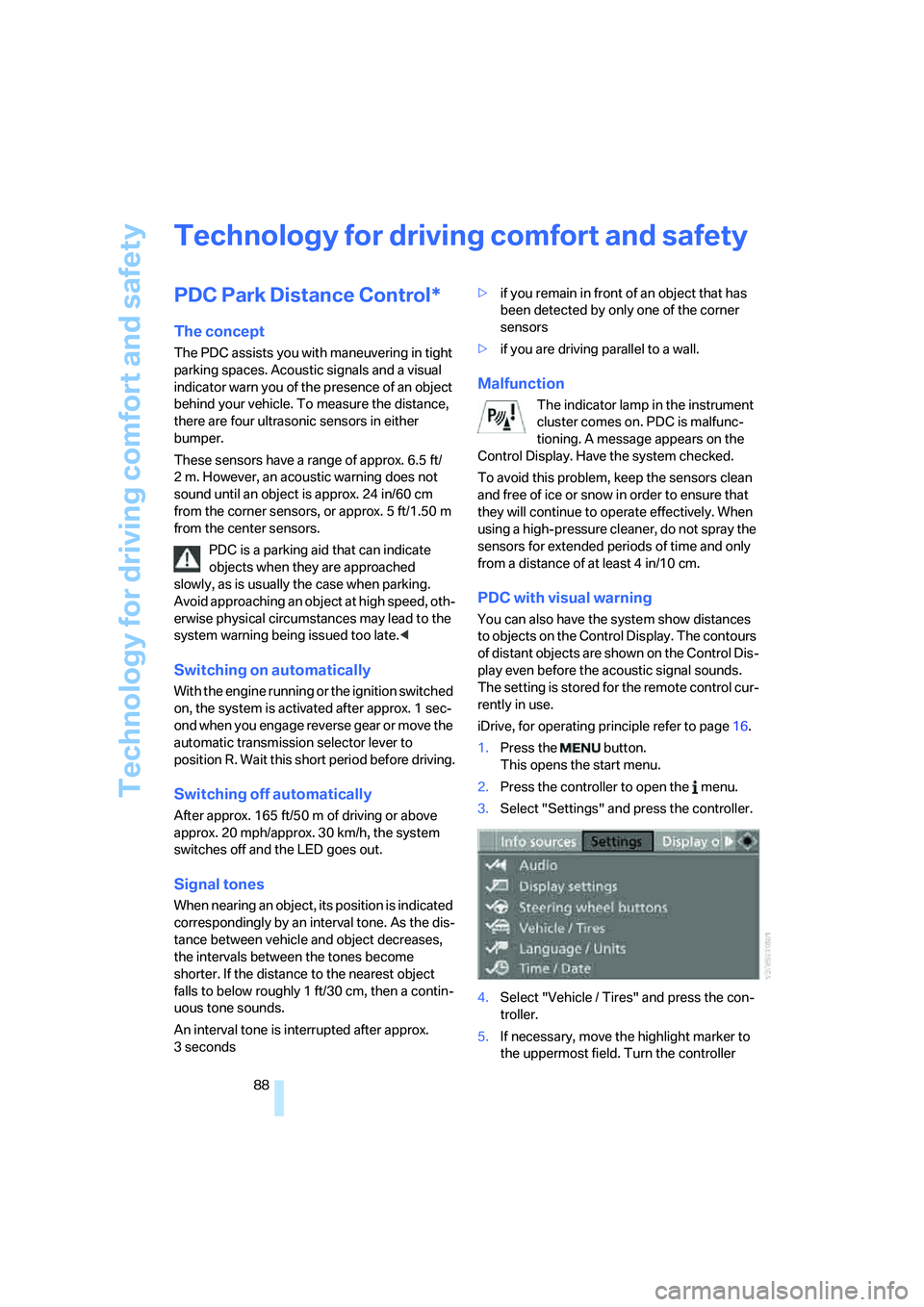
4.Select "Vehicle / Tires" and press the con-
troller.
5.If necessary, move the highlight marker to
the uppermost field. Turn the controller
Page 95 of 272
Controls
93Reference
At a glance
Driving tips
Communications
Navigation
Entertainment
Mobility
Indication of a flat tire
The warning lamps come on in yellow
and red. A message appears on the
Control Display. In addition, an
acoustic signal sounds. There is a flat
tire or substantial loss of tire pressure.
1.Cautiously reduce speed to below 50 mph
or 80 km/h. Avoid sudden braking and
steering maneuvers. Do not exceed a speed
of 50 mph or 80 km/h.
If the car is not equipped with Run-
Flat Tires, refer to page222, the stan-
dard equipment by design, do not continue
driving. Otherwise a severe accident could
result if you continue driving.<
2.At the next opportunity, check the air pres-
sure in all four tires.
If all four tires are inflated to the cor-
rect pressures, the Flat Tire Monitor
might not have been initialized. The system
must then be initialized.<
3.In the event of complete tire pressure loss,
0 psi/0 kPa, you can estimate the possible
distance for continued driving on the basis
of the following guidelines:
>With a light load:
1 to 2 persons without luggage:
approx. 155 miles/250 km
>With a medium load:
2 persons, cargo bay full, or 4 persons
without luggage:
approx. 90 miles/150 km
>With a full load or when towing a trailer:
4 persons, cargo bay full:
approx. 30 miles/50 km
Drive cautiously and do not exceed a
speed of 50 mph or 80 km/h, otherwise
there is a risk of an accident. In the event of
pressure loss, vehicle handling changes. This
includes reduced tracking stability in braking,
extended braking distance and altered natural
steering characteristics.
If unusual vibration or loud noises occur during
the journey, this may be an indication that the
damaged tire has finally failed. Reduce your
speed and pull over as soon as possible at a suitable location. Otherwise parts of the tire
could come loose, resulting in an accident. Do
not continue driving. Instead, contact your
BMW center.<
Malfunction
The warning lamps come on in yel-
low. A message appears on the Con-
trol Display. The Flat Tire Monitor has
a malfunction or has failed. Have the
system checked as soon as possible.
Tire Pressure Monitor TPM*
The concept
TPM checks the inflation pressures of the four
mounted tires. The system notifies you if there
is a significant loss of pressure in one or more
tires.
Functional requirement
In order to assure the reliable reporting of a flat
tire, the system must be reset while all tire infla-
tion pressures are correct.
Always use wheels with TPM electronics. Oth-
erwise, the system may malfunction.
Each time a tire inflation pressure has
been corrected or a wheel or tire has been
changed, reset the system.<
System limitations
TPM cannot warn you in advance of sud-
den severe tire damage caused by out-
side influences.<
The system does not work correctly if it has not
been reset; for example, a flat tire may be indi-
cated even though the tire inflation pressures
are correct.
The system is inactive and cannot indicate a flat
tire if a wheel without TPM electronics, such as
a compact spare wheel, has been mounted, or if
TPM is temporarily malfunctioning due to other
systems or devices using the same radio fre-
quency.
Page 97 of 272
Controls
95Reference
At a glance
Driving tips
Communications
Navigation
Entertainment
Mobility
rupted at any time. When driving resumes, the
reset is continued automatically. On the Control
Display, the tires are shown in green and "Sta-
tus: TPM active" is displayed again.
If a flat tire is detected while the system is
resetting and determining the inflation
pressures, all tires on the Control Display are
displayed in yellow. The message "Tire low!" is
shown.<
Message for low tire inflation pressure
The warning lamps come on in yellow
and red. A message appears on the
Control Display. In addition, a signal
sounds. There is a flat tire or substan-
tial loss of tire pressure.
1.Cautiously reduce speed to below 50 mph/
80 km/h. Avoid sudden braking and steer-
ing maneuvers. Do not exceed a speed of
50 mph/80 km/h.
If the car is not equipped with Run-
Flat Tires, refer to page222, the stan-
dard equipment by design, do not continue
driving. Otherwise a severe accident could
result after a tire puncture if you continue
driving.<
2.In the event of complete pressure loss,
0 psi/0 kPa, you can estimate the possible
distance for continued driving on the basis
of the following guidelines:
>With a light load:
1 to 2 persons without luggage:
approx. 155 miles/250 km
>With a medium load:
2 persons, cargo bay full, or 4 persons
without luggage:
approx. 95 miles/150 km
>With a full load:
4 persons, cargo bay full:
approx. 30 miles/50 km
Drive cautiously and do not exceed a
speed of 50 mph/80 km/h. In the event of
pressure loss, vehicle handling changes. This
includes reduced tracking stability in braking,
extended braking distance and altered natural
steering characteristics.If unusual vibration or loud noises occur during
the journey, this may be an indication that the
damaged tire has finally failed. Reduce your
speed and pull over as soon as possible at a
suitable location. Otherwise parts of the tire
could come loose, resulting in an accident. Do
not continue driving. Instead, contact your
BMW center.<
Malfunction
The small warning lamp flashes in
yellow and then lights up continu-
ously; the larger warning lamp comes
on in yellow. On the Control Display,
the tires are shown in gray and a message
appears. No punctures can be detected.
This type of message is shown in the following
situations:
>If there is a malfunction
Have the system checked.
>If a wheel without TPM electronics has
been mounted
>If TPM is temporarily malfunctioning due to
other systems or devices using the same
radio frequency.
Message for unsuccessful system
reset
The warning lamp lights up yellow. A
message will appear on the Control
Display. The system is not reset after
a tire has been changed, for example.
Check the tire inflation pressure and reset the
system, refer to page94.
Declaration according to NHTSA/
FMVSS 138
Tire Pressure Monitoring Systems
Each tire should be checked monthly when cold
and inflated to the inflation pressure recom-
mended by the vehicle manufacturer on the
vehicle placard or tire inflation pressure label. If
your vehicle has tires of a different size than the
size indicated on the vehicle placard or tire infla-
tion pressure label, you should determine the
proper tire inflation pressure for those tires. As
an added safety feature, your vehicle has been
Page 100 of 272
Technology for driving comfort and safety
98 The front and side airbags can also be deacti-
vated by adolescents and adults sitting in cer-
tain positions; the indicator lamp for the front
passenger airbags comes on. In such cases, the
passenger should change his or her sitting
position so that the front passenger airbags are
activated and the indicator lamp goes out. If the
desired airbag status cannot be achieved by
changing the sitting position, transport the rele-
vant passenger on a rear seat. Do not attach
seat covers, seat cushion padding, ball mats or
other items to the front passenger seat unless
they are specifically recommended by BMW.
Do not place any items under the seat which
could press against the seat from below. Other-
wise a correct analysis of the seat cushion is not
ensured.<
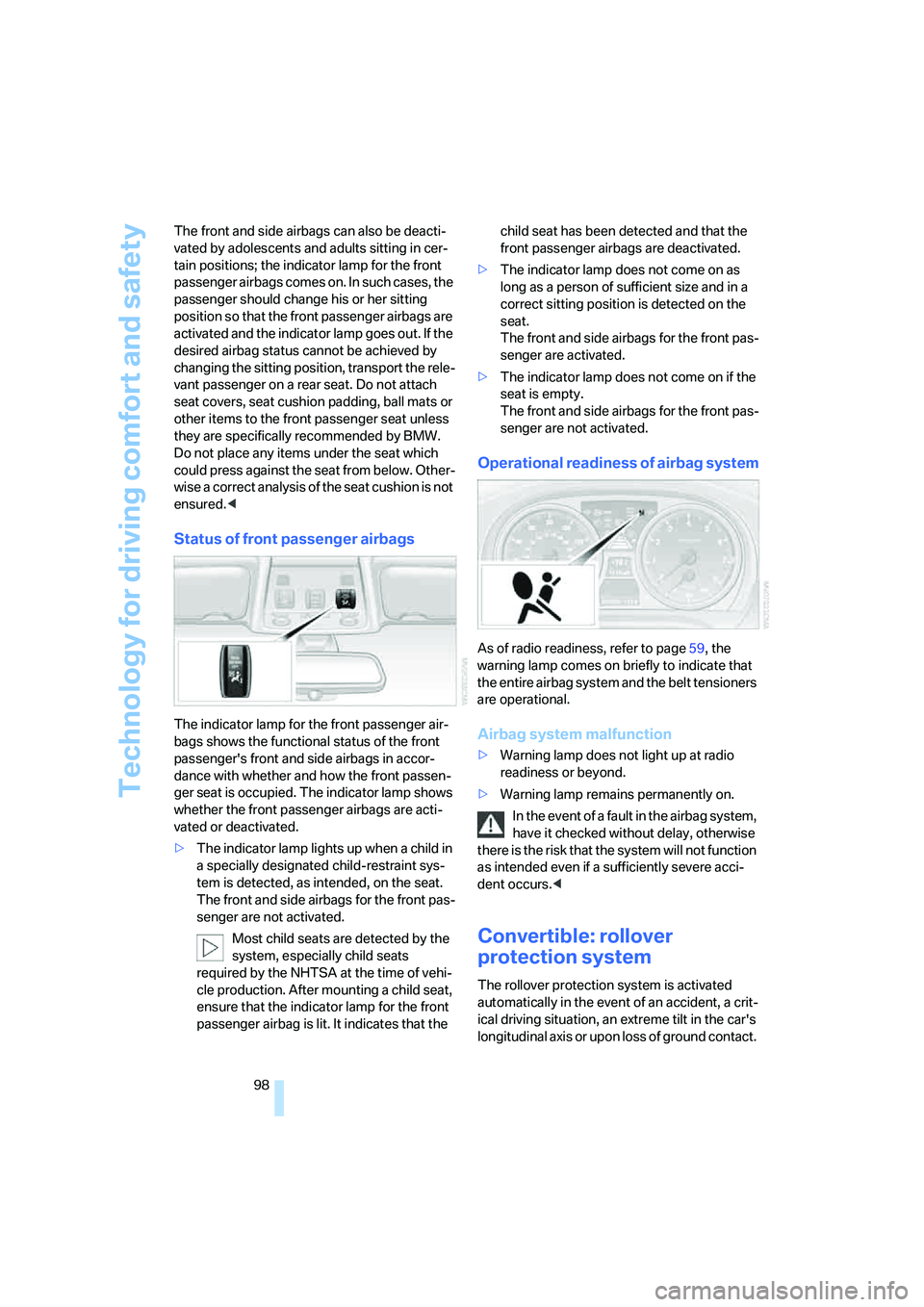
Status of front passenger airbags
The indicator lamp for the front passenger air-
bags shows the functional status of the front
passenger's front and side airbags in accor-
dance with whether and how the front passen-
ger seat is occupied. The indicator lamp shows
whether the front passenger airbags are acti-
vated or deactivated.
>The indicator lamp lights up when a child in
a specially designated child-restraint sys-
tem is detected, as intended, on the seat.
The front and side airbags for the front pas-
senger are not activated.
Most child seats are detected by the
system, especially child seats
required by the NHTSA at the time of vehi-
cle production. After mounting a child seat,
ensure that the indicator lamp for the front
passenger airbag is lit. It indicates that the child seat has been detected and that the
front passenger airbags are deactivated.
>The indicator lamp does not come on as
long as a person of sufficient size and in a
correct sitting position is detected on the
seat.
The front and side airbags for the front pas-
senger are activated.
>The indicator lamp does not come on if the
seat is empty.
The front and side airbags for the front pas-
senger are not activated.
Operational readiness of airbag system
As of radio readiness, refer to page59, the
warning lamp comes on briefly to indicate that
the entire airbag system and the belt tensioners
are operational.
Airbag system malfunction
>Warning lamp does not light up at radio
readiness or beyond.
>Warning lamp remains permanently on.
In the event of a fault in the airbag system,
have it checked without delay, otherwise
there is the risk that the system will not function
as intended even if a sufficiently severe acci-
dent occurs.<
Convertible: rollover
protection system
The rollover protection system is activated
automatically in the event of an accident, a crit-
ical driving situation, an extreme tilt in the car's
longitudinal axis or upon loss of ground contact.
Page 232 of 272
Maintenance
230
Socket for On-Board
Diagnosis OBD
Primary components that make up exhaust
emissions can be checked by a device via the
OBD socket.
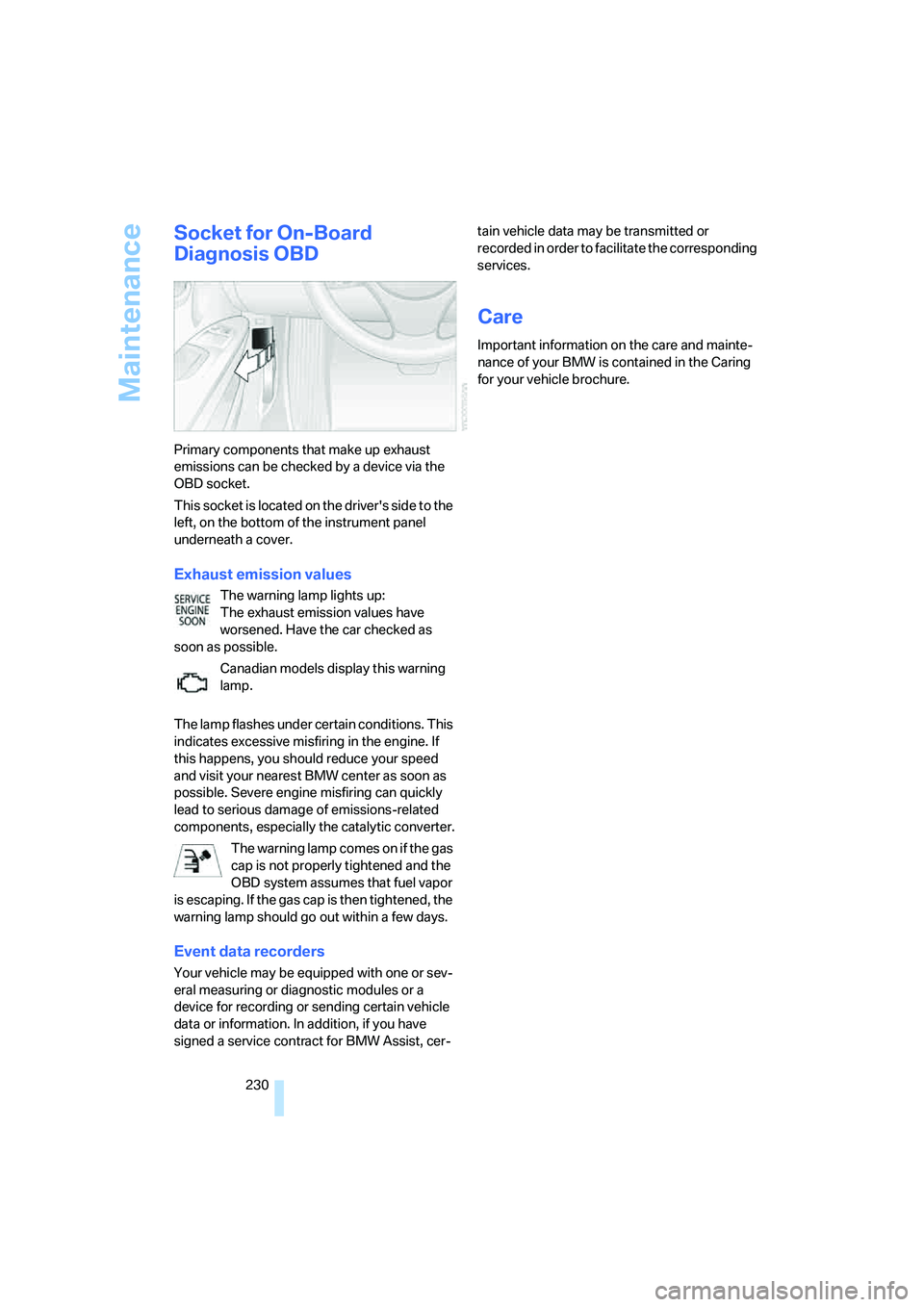
This socket is located on the driver's side to the
left, on the bottom of the instrument panel
underneath a cover.
Exhaust emission values
The warning lamp lights up:
The exhaust emission values have
worsened. Have the car checked as
soon as possible.
Canadian models display this warning
lamp.
The lamp flashes under certain conditions. This
indicates excessive misfiring in the engine. If
this happens, you should reduce your speed
and visit your nearest BMW center as soon as
possible. Severe engine misfiring can quickly
lead to serious damage of emissions-related
components, especially the catalytic converter.
The warning lamp comes on if the gas
cap is not properly tightened and the
OBD system assumes that fuel vapor
is escaping. If the gas cap is then tightened, the
warning lamp should go out within a few days.
Event data recorders
Your vehicle may be equipped with one or sev-
eral measuring or diagnostic modules or a
device for recording or sending certain vehicle
data or information. In addition, if you have
signed a service contract for BMW Assist, cer-tain vehicle data may be transmitted or
recorded in order to facilitate the corresponding
services.
Care
Important information on the care and mainte-
nance of your BMW is contained in the Caring
for your vehicle brochure.
Page 241 of 272
Mobility
239Reference
At a glance
Controls
Driving tips
Communications
Navigation
Entertainment
Using a tow fitting
The screw-in tow fitting must always be carried
in the car. It can be screwed in at the front or
rear of the BMW.
Coupe: it is sto red in the onboard tool kit under-
neath the cover on the right-hand side of the
cargo bay, refer to page231.
Convertible: it is stored in the onboard tool kit
underneath the cargo bay floor, refer to
page231.
Use only the tow fitting provided with the
vehicle and screw it all the way in. Use the
tow fitting for towing on paved roads only. Avoid
lateral loading of the tow fitting, e.g. do not lift
the vehicle by the tow fitting. Otherwise the tow
fitting and the vehicle could be damaged.<
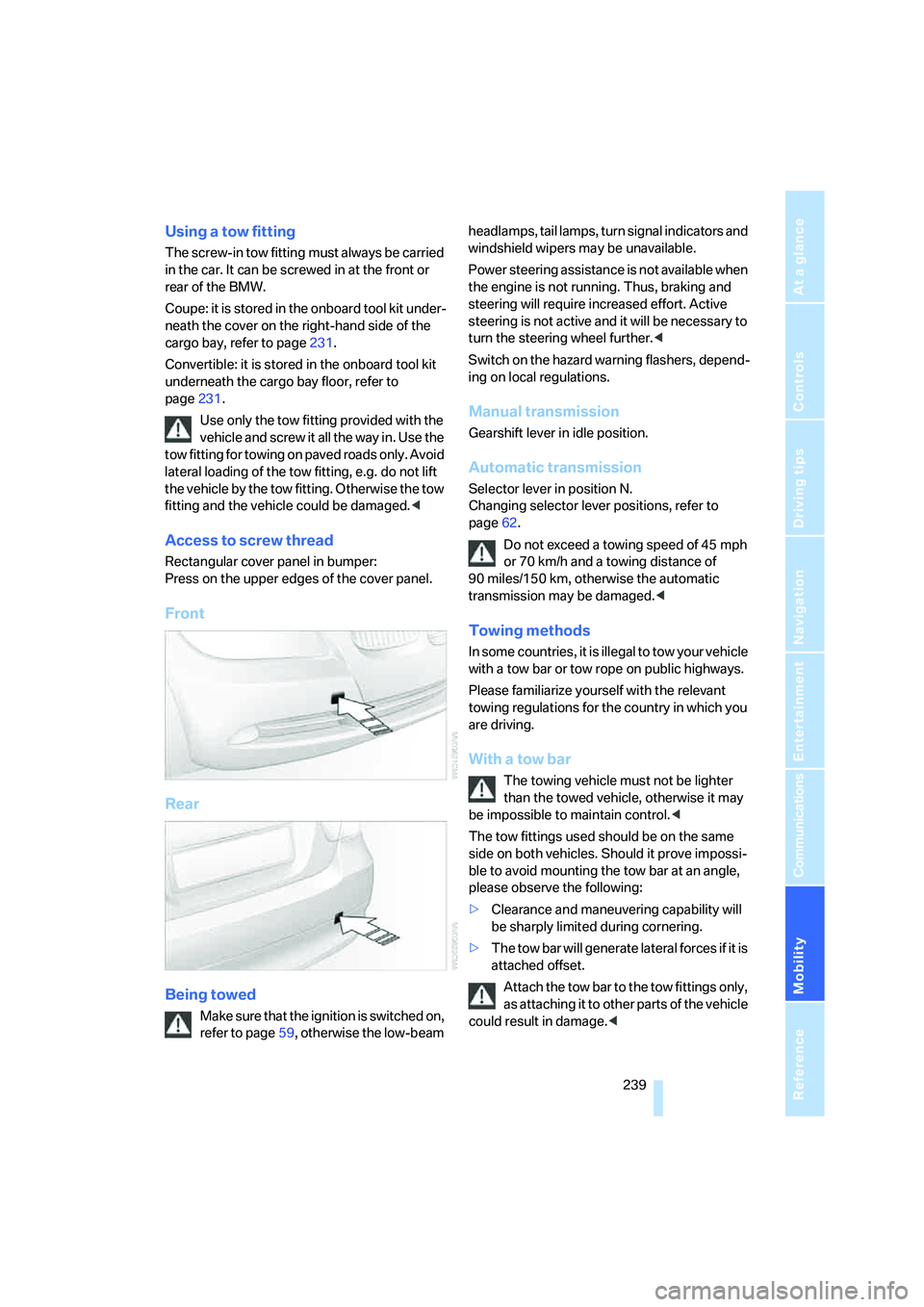
Access to screw thread
Rectangular cover panel in bumper:
Press on the upper edges of the cover panel.
Front
Rear
Being towed
Make sure that the ignition is switched on,
refer to page59, otherwise the low-beam headlamps, tail lamps, turn signal indicators and
windshield wipers may be unavailable.
Power steering assistance is not available when
the engine is not running. Thus, braking and
steering will require increased effort. Active
steering is not active and it will be necessary to
turn the steering wheel further.<
Switch on the hazard warning flashers, depend-
ing on local regulations.
Manual transmission
Gearshift lever in idle position.
Automatic transmission
Selector lever in position N.
Changing selector lever positions, refer to
page62.
Do not exceed a towing speed of 45 mph
or 70 km/h and a towing distance of
90 miles/150 km, otherwise the automatic
transmission may be damaged.<
Towing methods
I n s o m e c o u n t r i e s , i t i s i l l e g a l t o t o w y o u r v e h i c l e
with a tow bar or tow rope on public highways.
Please familiarize yourself with the relevant
towing regulations for the country in which you
are driving.
With a tow bar
The towing vehicle must not be lighter
than the towed vehicle, otherwise it may
be impossible to maintain control.<
The tow fittings used should be on the same
side on both vehicles. Should it prove impossi-
ble to avoid mounting the tow bar at an angle,
please observe the following:
>Clearance and maneuvering capability will
be sharply limited during cornering.
>The tow bar will generate lateral forces if it is
attached offset.
Attach the tow bar to the tow fittings only,
as attaching it to other parts of the vehicle
could result in damage.<
Page 254 of 272
Everything from A - Z
252
Everything from A - Z
Index
"..." Identifies Control Display
texts used to select
individual functions and
refers you to the page where
these texts can be found.
A
ABS Antilock Brake
System89
ACC, refer to Active cruise
control67
Accident, refer to Sending an
Emergency Request236
Activated-charcoal filter for
automatic climate
control108
"Activation time"109
Active cruise control67
– indicator lamps70
– malfunction71
– selecting distance69
– sensor71
Active steering96
– warning lamp96
Adaptive Head Light101
"Add digits" for mobile
phone194
Additives
– coolant227
"Address book" in
navigation142
Address for navigation
– deleting144
– entering134,142
– selecting143
– storing142
– storing current position143
"Add to destination
list"137,139
Adjusting temperature inside
the car, refer to Automatic
climate control105Adjusting the thigh support46
Adjusting the tone during
audio operation, refer to
Tone control161
Airbags97
– indicator/warning lamp98
– sitting safely45
Air conditioning mode
– automatic climate
control105
– ventilation107
Air distribution
– automatic106
– individual105
Air flow rate106
Airing, refer to Ventilation107
Air pressure, refer to Tire
inflation pressure212
Air recirculation, refer to
Recirculated-air mode106
"Air recirculation on / off"54
Air supply
– automatic climate
control105
– ventilation107
Air vents104
AKI, refer to Fuel
specifications211
Alarm system35
– avoiding unintentional
alarms36
– interior motion sensor36
– switching off an alarm35
– tilt alarm sensor36
"All channels" for satellite
radio171
All-season tires, refer to
Winter tires223
"All stations", displaying with
the radio164
All-wheel drive, refer to
xDrive90
"AM", waveband160,164Ambient air, refer to
Recirculated-air mode106
Antenna for mobile phone186
Antifreeze
– coolant227
– washer fluid65
Anti-theft alarm system, refer
to Alarm system35
Anti-theft system29
Approved axle loads, refer to
Weights247
Approved gross vehicle
weight, refer to Weights247
Armrest, refer to Center
armrest114
Arrival time, refer to
Computer76
Arrival time, refer to Starting
destination guidance147
Arrow display for
navigation148
"Arrow display" in
navigation148
Ashtray
– front116
– rear116
Assistance systems, refer to
Driving stability control
systems89
Assistance window20
– refer to iDrive20
AUC Automatic recirculated-
air control106
"Audio"163,167
Audio160
– controls160
– switching on/off160
– tone control161
– volume161
"Audio", refer to Tone
control161
Audio device, external114
Page 258 of 272
Everything from A - Z
256 Current position
– displaying155
– entering143
– storing143
"Customer
Relations"196,204
D
Dashboard, refer to
Cockpit10
Dashboard, refer to
Instrument cluster12
Dashboard lighting, refer to
Instrument lighting103
Data, technical244
– dimensions245
– engine244
– weights247
"Date"83
Date
– setting83
– setting format83
"Date format"83
"Daytime running lamps"101
Daytime running lamps101
DBC Dynamic Brake
Control89
"Deactivated"51
Deactivating front passenger
airbags97
Deadlocking, refer to
Locking30
Decommissioning the vehicle,
refer to Caring for your
vehicle brochure
Defect
– door lock32
– fuel filler door210
– glass roof40
"Delete address book" in
navigation144
"Delete all numbers" on the
mobile phone195
"Delete data" in
navigation144
"Delete" for mobile
phone195Destination address
– deleting144
– entering134,138
Destination for navigation
– destination list141
– entry134
– home address144
– manual entry134,138
– selecting from address
book143
– selecting using
information140
– selecting via language138
– selecting via map139
– storing142
Destination guidance147
– canceling voice
instructions55
– changing specified
route145
– displaying route
148
– distance and arrival147
– starting147
– terminating/continuing147
– voice instructions150
– volume of voice
instructions151
Destination list for navigation
system141
Destinations recently driven
to141
"Details" for audio mode181
"Dial" for mobile phone193
"Dial number"193
Digital clock74
Digital compass112
Digital radio, refer to High
Definition Radio167
Dimensions245
Directional indicators, refer to
Turn signals63
Direction instructions, refer to
Voice instructions150
Directory for navigation, refer
to Address book142
Displacement, refer to Engine
data244
Display, refer to iDrive
controls16Display lighting, refer to
Instrument lighting103
"Display off"21
Displays
– on the Control Display16
Displays, refer to Instrument
cluster12
Displays and controls10
Disposal
– coolant227
– remote control battery38
– vehicle battery235
Distance control, refer to
Active cruise control67
Distance remaining to service,
refer to Service
requirements79
"Distance to dest."77
Distance warning, refer to
PDC Park Distance
Control88
Door key, refer to Remote
control with integrated
key28
Door lock32
"Door locks"30,31,32,80
Doors, emergency
operation32
DOT Quality Grades220
Draft-free ventilation108
Drinks holders, refer to Cup
holders115
Drive-off assistance, refer to
Dynamic Stability Control
DSC89
Drive-off assistant91
Driving around a traffic
congestion154
Driving lamps, refer to Parking
lamps/low beams100
Driving notes124
Driving off on hills, refer to
Drive-off assistant91
Driving route, refer to
Displaying route148
Driving stability control
systems89
Driving through water126
Page 260 of 272
Everything from A - Z
258 Fast forward
– CD changer177
– CD player177
"Fast route" in navigation145
Filter
– refer to Microfilter/activated-
charcoal filter for automatic
climate control108
Fine wood, refer to Caring for
your vehicle brochure
First aid pouch237
Fixture for remote control,
refer to Ignition lock59
Flashlight, refer to LED hand
lamp114
Flash when locking/
unlocking31
Flat tire
– Run-Flat Tires222
– Tire Pressure Monitor
TPM93
Flat Tire Monitor FTM92
– indicating a flat tire93
– indicator/warning lamp93
– initializing the system92
– malfunction93
– snow chains92,223
– system limits92
Flat tires, refer to Tire
condition221
Floor mats, carpets, refer to
Caring for your vehicle
brochure
Fluid reservoir, refer to
Washer fluid reservoir65
"FM", waveband160,164
FM, waveband164
Fog lamps102
– indicator lamp13,102
Folding in the mirrors, before
driving into a car wash52
Folding up the floor panel119
Footbrake, refer to Braking
safely126
Footwell lamps, refer to
Interior lamps103
For your own safety5
Four-wheel drive, refer to
xDrive90Frequency, selecting
manually165
Front airbags97
FTM, refer to Flat Tire
Monitor92
Fuel211
– average consumption76
– gauge75
– high-quality brands211
– quality211
– specifications211
– tank contents, refer to
Capacities247
Fuel clock, refer to Fuel
gauge75
Fuel display, refer to Fuel
gauge75
Fuel filler door210
– releasing in the event of
electrical malfunction210
Fuses235
G
Garage door opener, refer to
Integrated universal remote
control110
Gasoline
– refer to Average
consumption76
Gasoline, refer to Required
fuel211
Gasoline display, refer to Fuel
gauge75
Gear indicator, automatic
transmission with
Steptronic61
Gearshift lever
– automatic transmission with
Steptronic62
– manual transmission61
Gearshifts
– automatic transmission with
Steptronic62
– manual transmission61
General driving notes125Glass roof, electric39
– closing after electrical
malfunction40
– convenient operation30,32
– initializing40
– opening, closing39
– operation with convenient
access37
– pinch protection system40
– power failure40
– raising39
– remote control30
Glove compartment113
– LED hand lamp114
GPS navigation, refer to
Navigation system132
Grills104
Gross vehicle weight, refer to
Weights247
H
Handbrake, refer to Parking
brake60
Hand lamp, refer to LED hand
lamp114
Hands-free system14
Hazard warning flashers14
HDC Hill Descent Control90
"HD radio"167
HD radio, refer to High
Definition Radio167
Head airbags97
Headlamp control,
automatic100
Headlamp flasher63
– indicator lamp11,13
Headlamps
– care, refer to Caring for your
vehicle brochure
Head restraints47
– front, removing48
– rear, removing48
– sitting safely45
Heated
– mirrors53
– rear window107
– seats49
Page 261 of 272
Reference 259
At a glance
Controls
Driving tips
Communications
Navigation
Entertainment
Mobility
Heating
– mirrors53
– rear window107
– residual heat107
– seats49
Heating and ventilation, refer
to Climate104
Heating while at a standstill,
refer to Using residual
heat107
Heavy loads, refer to Stowing
cargo127
Height, refer to
Dimensions245
Height adjustment
– seats46
– steering wheel53
High beams102
– headlamp flasher102
– indicator lamp13
High Definition Radio167
High water, refer to Driving
through water126
Highways, refer to Route
criteria145
Hill Descent Control HDC90
Hills126
Holders for cups115
Home address144
"Home address" in
navigation145
Homepage BMW4
Hood224
Hooks for shopping bags118
Horn10,11
Hotel function, refer to
Locking or unlocking
separately34
Hot exhaust system125
"Hour memo"82
"House number" in
destination entry137
Hydraulic brake assist, refer to
Dynamic Brake Control
DBC89
Hydroplaning125I
IBOC, refer to High Definition
Radio167
Ice warning, refer to Outside
temperature
warning74
ID3 tag, refer to Information
about the track175
Identification marks
– Run-Flat Tires222
– tire coding220
iDrive16
– adjusting brightness86
– assistance window20
– automatic climate
control105
– changing language86
– changing units of measure
and display format78
– confirming selection or
entry19
– controls16
– displays, menus17
– menu guidance17
– operating principle16
– overview16
– selecting a menu item19
– setting the date and time81
– start menu17
– status information20
– switching menu pages19
– symbols18
iDrive operating principle16
Ignition59
– switched off59
– switched on59
Ignition key, refer to Remote
control with integrated
key28
Ignition key position 1, refer to
Radio readiness59
Ignition key position 2, refer to
Ignition on59
Ignition lock59
i menu18
Imprint2Indicator and warning
lamps13
– Tire Pressure Monitor
TPM95
Individual air distribution105
Inflation pressure, refer to Tire
inflation pressure212
Inflation pressure monitoring,
refer to Tire Pressure
Monitor TPM93
Information
– on another location140
– on country140
– on current position140
– on destination location140
Information menu, refer to
i menu18
"Information on
destination"142
"Info sources"80
Initializing
– active steering96
– after power failure235
– compass, refer to
Calibrating112
– Flat Tire Monitor FTM92
– glass roof40
"Input map"139
Installation location
– CD changer177
– navigation DVD drive132
– telephone114
Instructions for navigation
system, refer to Voice
instructions150
Instrument cluster12
Instrument lighting103
Instrument panel, refer to
Cockpit10
Integrated key28
Integrated universal remote
control110
Interesting destination for
navigation140
"Interim time"86
Interior lamps103
– remote control31
Interior motion sensor36