navigation BMW 328XI COUPE 2008 E92 Owner's Manual
[x] Cancel search | Manufacturer: BMW, Model Year: 2008, Model line: 328XI COUPE, Model: BMW 328XI COUPE 2008 E92Pages: 272, PDF Size: 8.98 MB
Page 199 of 272
197
Entertainment
Reference
At a glance
Controls
Driving tips Communications
Navigation
Mobility
and/or your mobile phone's operating
instructions.
>Press the button above the storage
compartment. The changeover can take
several seconds.
From hands-free system to mobile
phone
If you are making a call via the hands-free sys-
tem, it may be possible to continue the call via
the mobile phone, depending on your mobile
phone model. Refer to the display on your
mobile phone and/or your mobile phone's oper-
ating instructions.
Alternatively, you can deactivate the Bluetooth
link.
Depending on the type of mobile phone you are
using, it may occur that calls are switched from
the hands-free system to the mobile phone if
reception of the wireless network is poor.
Operation by voice
commands*
The concept
You can operate your mobile phone without
having to take a hand off the steering wheel.
During your entries, you will be guided in many
cases by announcements or questions.
The same prerequisites apply as for operation
via iDrive, refer to page191.
Symbols in the Owner's Manual
Saying commands
Activating the system
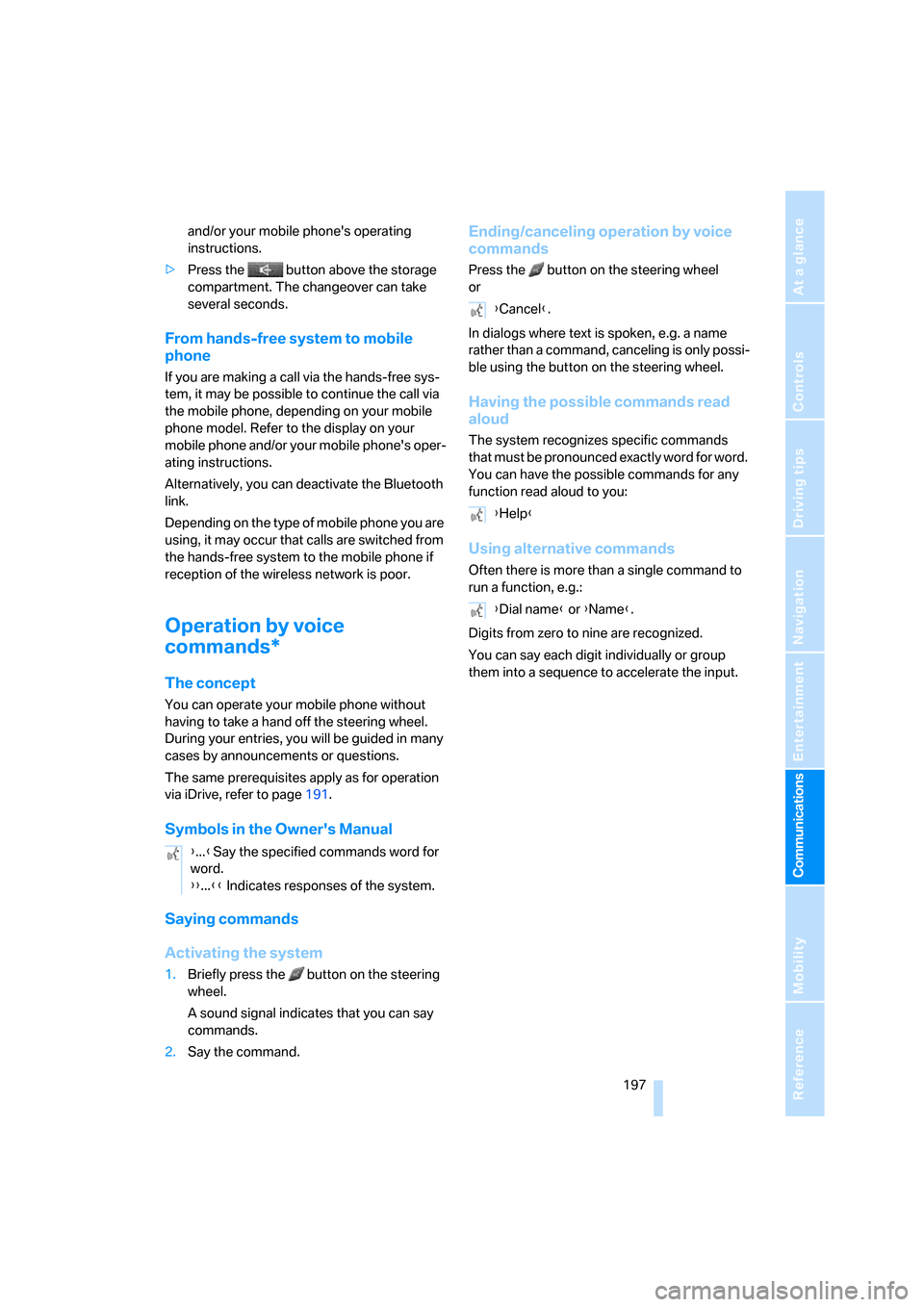
1.Briefly press the button on the steering
wheel.
A sound signal indicates that you can say
commands.
2.Say the command.
Ending/canceling operation by voice
commands
Press the button on the steering wheel
or
In dialogs where text is spoken, e.g. a name
rather than a command, canceling is only possi-
ble using the button on the steering wheel.
Having the possible commands read
aloud
The system recognizes specific commands
t h a t m u s t b e p r o n o u n c e d e x a c t l y w o r d f o r w o r d .
You can have the possible commands for any
function read aloud to you:
Using alternative commands
Often there is more than a single command to
run a function, e.g.:
Digits from zero to nine are recognized.
You can say each digit individually or group
them into a sequence to accelerate the input.
{...}Say the specified commands word for
word.
{{...}} Indicates responses of the system.
{Cancel}.
{Help}
{Dial name} or {Name}.
Page 201 of 272
199
Entertainment
Reference
At a glance
Controls
Driving tips Communications
Navigation
Mobility
Notes
Important for voice commands
For voice commands, bear in mind the follow-
ing:
>Pronounce the commands smoothly and at
normal volume, avoiding excessive empha-
ses and pauses.
>Keep the doors, windows and glass roof
closed to prevent interference from outside
noise.
>Avoid ambient noise in the vehicle while
speaking.
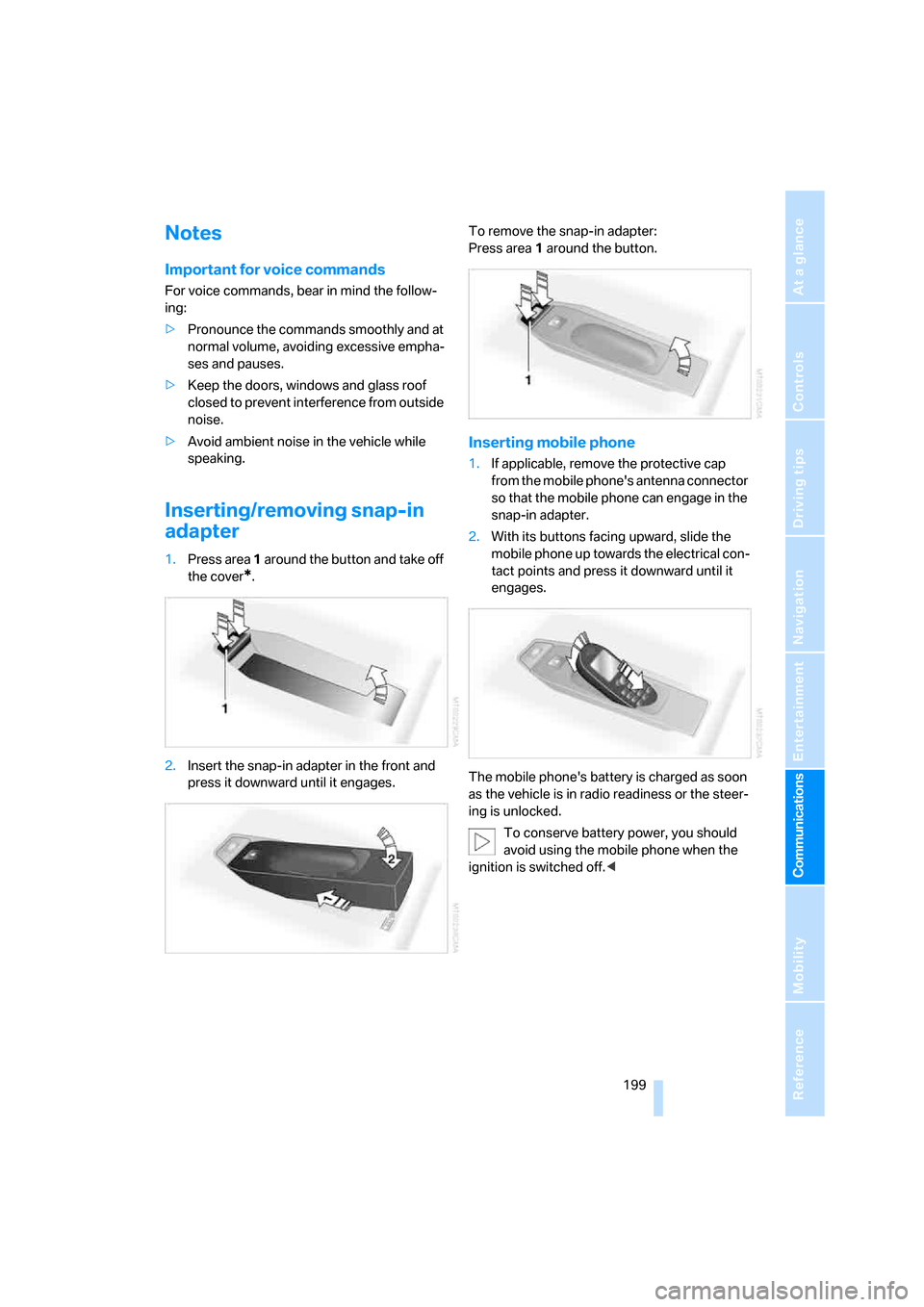
Inserting/removing snap-in
adapter
1.Press area 1 around the button and take off
the cover
*.
2.Insert the snap-in adapter in the front and
press it downward until it engages.To remove the snap-in adapter:
Press area 1 around the button.
Inserting mobile phone
1.If applicable, remove the protective cap
from the mobile phone's antenna connector
so that the mobile phone can engage in the
snap-in adapter.
2.With its buttons facing upward, slide the
mobile phone up towards the electrical con-
tact points and press it downward until it
engages.
The mobile phone's battery is charged as soon
as the vehicle is in radio readiness or the steer-
ing is unlocked.
To conserve battery power, you should
avoid using the mobile phone when the
ignition is switched off.<
Page 203 of 272
201
Entertainment
Reference
At a glance
Controls
Driving tips Communications
Navigation
Mobility
BMW Assist
BMW Assist provides you with various services.
For example, the position data of your vehicle
can be transmitted to the BMW Assist
Response Center if an Emergency Request
*
has been sent.
Many BMW Assist services depend on the indi-
vidually agreed contract.
After your contract has expired, the
BMW Assist system will be deactivated by the
BMW Assist Response Center without you hav-
ing to visit a BMW center. After the BMW Assist
system has been deactivated, no BMW Assist
service will be available. The BMW Assist sys-
tem can be reactivated by a BMW center after a
new contract has been signed.
Requirements
You can use BMW Assist when the following
requirements are met:
>The installed BMW Assist system is logged
on to a mobile phone network. This network
must be capable of transmitting the ser-
vices.
>To transmit position data, the vehicle must
be able to determine the current position.
>To activate and update BMW Assist, a GPS
signal must be available.
>You have subscribed to BMW Assist with
your BMW center or with the BMW Assist
Response Center. Enabling must have
been completed.
>BMW Assist is activated, refer to page206.
Offered services
The following services are available via
BMW Assist:
>Emergency Request, refer to page236:
When you press the SOS button, a connec-
tion is established to the BMW Assist
Response Center. The BMW Assist Response Center contacts you and takes
further steps to help you.
>Automatic Collision Notification:
Under certain conditions, a connection is
established to the BMW Assist Response
Center after a serious accident. If possible,
the BMW Assist Response Center contacts
you and takes further steps to help you.
>Enhanced Roadside Assistance:
You can call BMW Roadside Assistance
*
should you require help in the event of a
breakdown. If possible, the vehicle data and
position data are transmitted during this
call.
>Customer Relations:
For all information related to your vehicle
you can be connected with BMW Customer
Relations.
>TeleService:
Data on your vehicle's service status or
required inspections are transmitted to your
BMW center either automatically before a
service due date or when you request a
BMW service appointment.
>Remote Door Unlock:
Contact the BMW Assist Response Center
if your remote control or key is not available
and you would like to have the vehicle
unlocked.
>Stolen Vehicle Recovery:
After you report your vehicle stolen with the
police, call the BMW Assist Response Cen-
ter to determine its position.
In addition, optional services can be provided to
you, such as the Concierge service or informa-
tion on directions, traffic or the weather. You
can use Critical Calling to activate a limited
number of calls via the BMW Assist Response
Center, e.g. when you do not have your mobile
phone with you.
Press the SOS button in order to contact the
BMW Assist Response Center, see below.
*
Page 205 of 272
203
Entertainment
Reference
At a glance
Controls
Driving tips Communications
Navigation
Mobility
TeleService
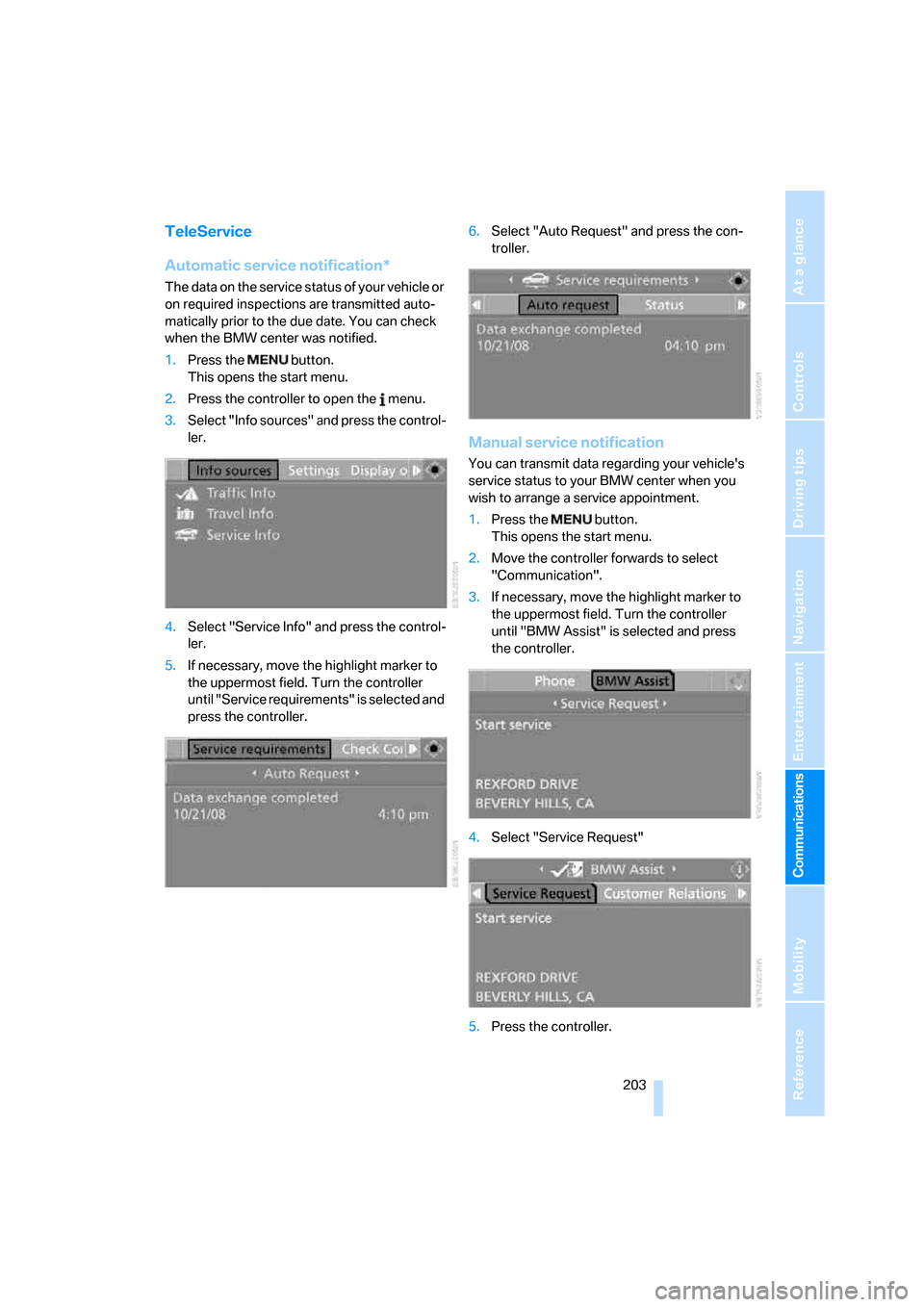
Automatic service notification*
The data on the service status of your vehicle or
on required inspections are transmitted auto-
matically prior to the due date. You can check
when the BMW center was notified.
1.Press the button.
This opens the start menu.
2.Press the controller to open the menu.
3.Select "Info sources" and press the control-
ler.
4.Select "Service Info" and press the control-
ler.
5.If necessary, move the highlight marker to
the uppermost field. Turn the controller
until "Service requirements" is selected and
press the controller.6.Select "Auto Request" and press the con-
troller.
Manual service notification
You can transmit data regarding your vehicle's
service status to your BMW center when you
wish to arrange a service appointment.
1.Press the button.
This opens the start menu.
2.Move the controller forwards to select
"Communication".
3.If necessary, move the highlight marker to
the uppermost field. Turn the controller
until "BMW Assist" is selected and press
the controller.
4.Select "Service Request"
5.Press the controller.
Page 207 of 272
205
Entertainment
Reference
At a glance
Controls
Driving tips Communications
Navigation
Mobility
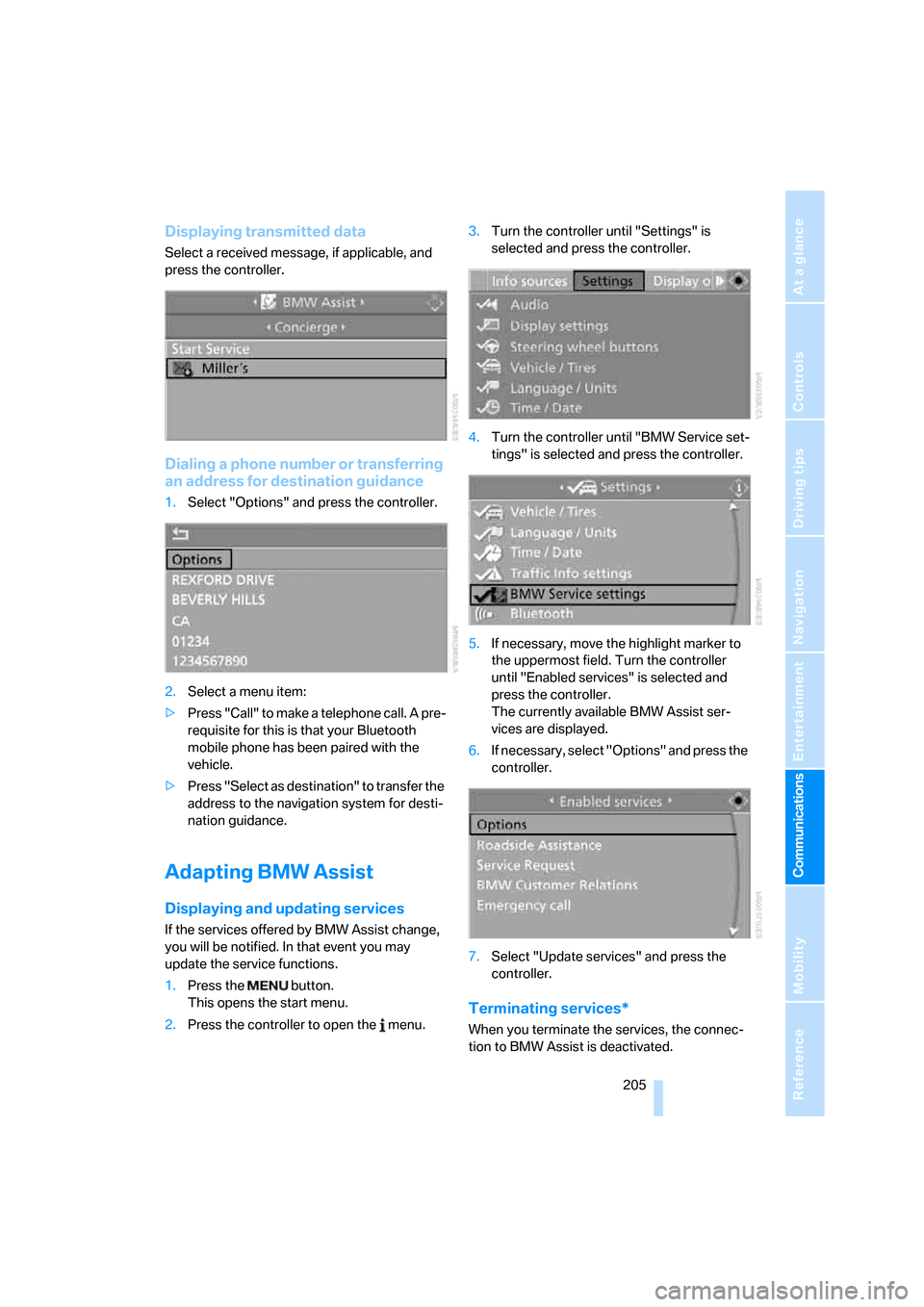
Displaying transmitted data
Select a received message, if applicable, and
press the controller.
Dialing a phone number or transferring
an address for destination guidance
1.Select "Options" and press the controller.
2.Select a menu item:
>Press "Call" to make a telephone call. A pre-
requisite for this is that your Bluetooth
mobile phone has been paired with the
vehicle.
>Press "Select as destination" to transfer the
address to the navigation system for desti-
nation guidance.
Adapting BMW Assist
Displaying and updating services
If the services offered by BMW Assist change,
you will be notified. In that event you may
update the service functions.
1.Press the button.
This opens the start menu.
2.Press the controller to open the menu.3.Turn the controller until "Settings" is
selected and press the controller.
4.Turn the controller until "BMW Service set-
tings" is selected and press the controller.
5.If necessary, move the highlight marker to
the uppermost field. Turn the controller
until "Enabled services" is selected and
press the controller.
The currently available BMW Assist ser-
vices are displayed.
6.If necessary, select "Options" and press the
controller.
7.Select "Update services" and press the
controller.
Terminating services*
When you terminate the services, the connec-
tion to BMW Assist is deactivated.
Page 209 of 272
207
Entertainment
Reference
At a glance
Controls
Driving tips Communications
Navigation
Mobility
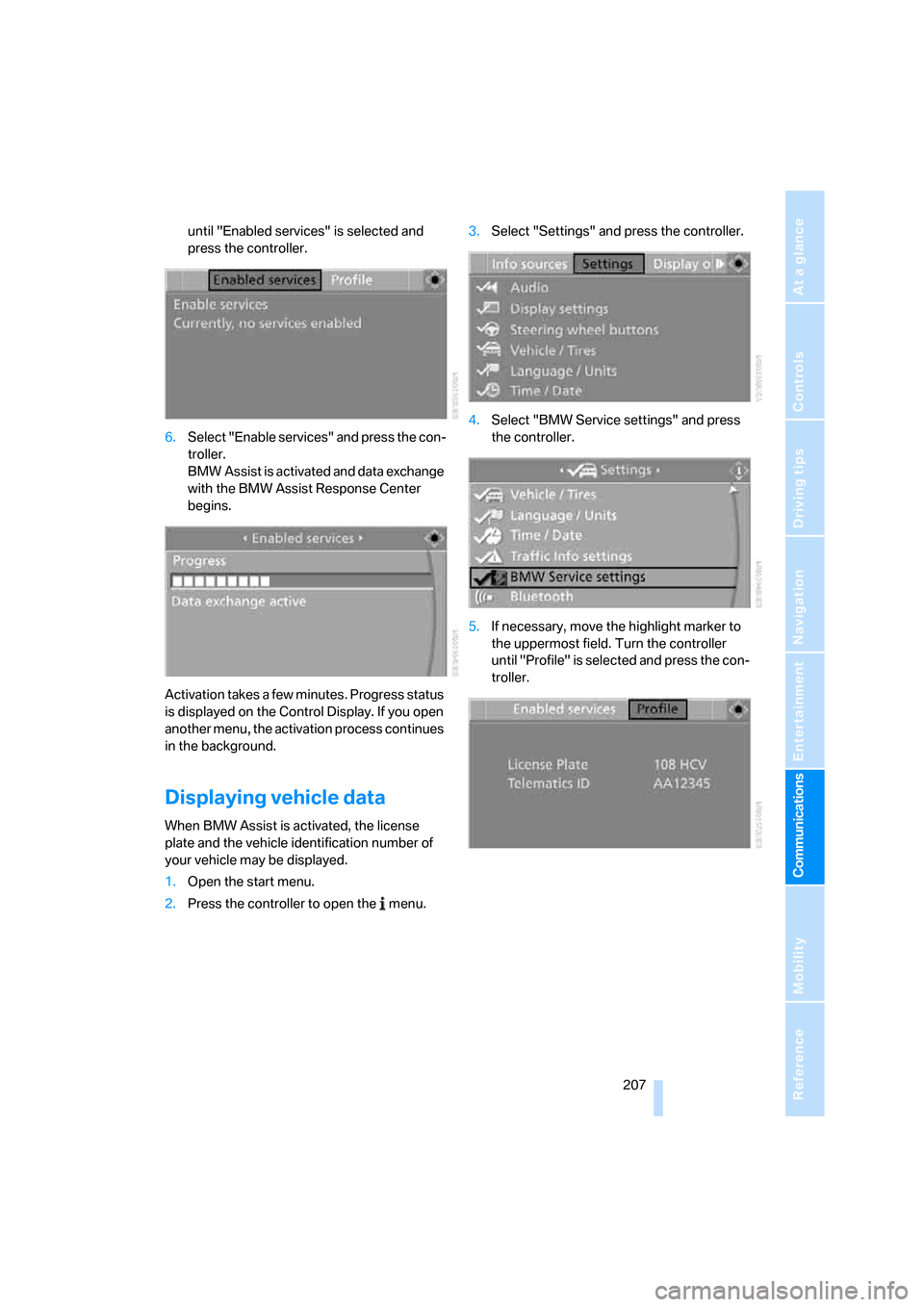
until "Enabled services" is selected and
press the controller.
6.Select "Enable services" and press the con-
troller.
BMW Assist is activated and data exchange
with the BMW Assist Response Center
begins.
Activation takes a few minutes. Progress status
is displayed on the Control Display. If you open
another menu, the activation process continues
in the background.
Displaying vehicle data
When BMW Assist is activated, the license
plate and the vehicle identification number of
your vehicle may be displayed.
1.Open the start menu.
2.Press the controller to open the menu.3.Select "Settings" and press the controller.
4.Select "BMW Service settings" and press
the controller.
5.If necessary, move the highlight marker to
the uppermost field. Turn the controller
until "Profile" is selected and press the con-
troller.
Page 213 of 272
Mobility
211Reference
At a glance
Controls
Driving tips
Communications
Navigation
Entertainment
>reduced efficiency of the fuel-vapor recov-
ery system.
The fuel tank is full when the filler nozzle clicks
off the first time.
Fuel tank capacity
Approx. 16.1 US gallons/61 liters, including the
reserve capacity of 2.1 US gallons/8 liters.
Refuel as soon as possible once your
cruising range falls below 30 miles/
50 km, otherwise engine functions are not
ensured and damage can occur.<
Fuel specifications
Do not fill the tank with leaded fuel, as this
would cause permanent damage to the
catalytic converter.
Do not fill the tank with E85, i.e. fuel containing
85 % ethanol, nor with FlexFuel. Otherwise the
engine and fuel supply system will be dam-
aged.<
Required fuel
Super Premium Gasoline/AKI 91
This gasoline is highly recommended.
However, you may also use gasoline with less
AKI. The minimum AKI Rating is:
>328i/xi: 87
>335i/xi: 89.
If you use gasoline with this minimum AKI Rat-
ing, the engine may produce knocking sounds
when starting at high outside temperatures.
This has no effect on the engine life.
Do not use any gasoline below the speci-
fied minimum fuel grade. Otherwise the
engine could be damaged.<
Use high-quality brands
Field experience has indicated significant dif-
ferences in fuel quality: volatility, composition,
additives, etc., among gasolines offered for sale
in the United States and Canada. Fuels contain-
ing up to and including 10 % ethanol or other oxygenates with up to 2.8 % oxygen by weight,
that is, 15 % MTBE or 3 % methanol plus an
equivalent amount of co-solvent, will not void
the applicable warranties with respect to
defects in materials or workmanship.
The use of poor-quality fuels may result in
driveability, starting and stalling problems
especially under certain environmental condi-
tions such as high ambient temperature and
high altitude.
Should you encounter driveability problems
which you suspect could be related to the fuel
you are using, we recommend that you respond
by switching to a recognized high-quality brand
such as gasoline that is advertised as Top Tier
Detergent Gasoline.
Failure to comply with these recommendations
may also result in unscheduled maintenance.<
Page 215 of 272
Mobility
213Reference
At a glance
Controls
Driving tips
Communications
Navigation
Entertainment
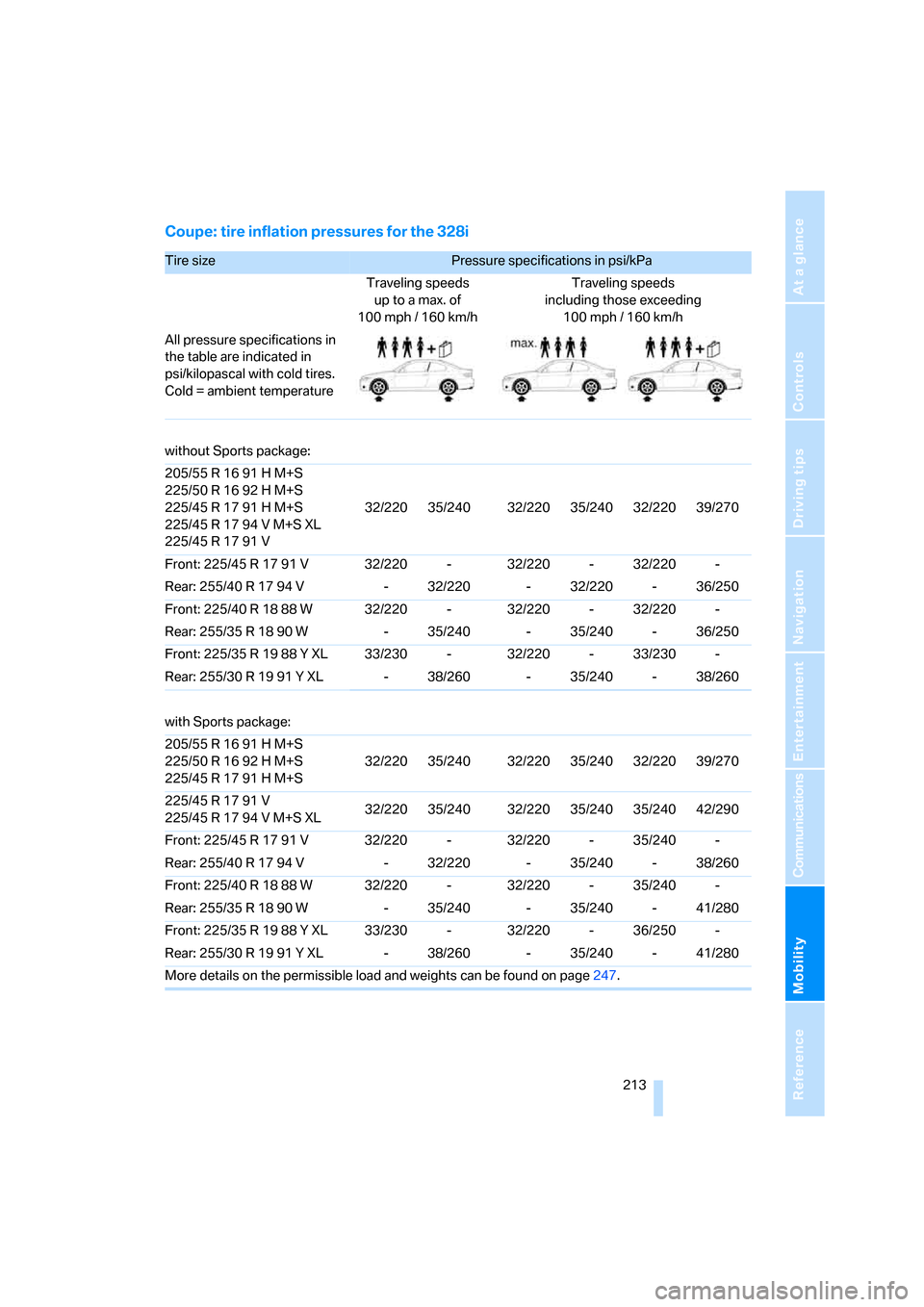
Coupe: tire inflation pressures for the 328i
Tire size Pressure specifications in psi/kPa
Traveling speeds
up to a max. of
100 mph / 160 km/hTraveling speeds
including those exceeding
100mph / 160km/h
All pressure specifications in
the table are indicated in
psi/kilopascal with cold tires.
Cold = ambient temperature
without Sports package:
205/55 R 16 91 H M+S
225/50 R 16 92 H M+S
225/45 R 17 91 H M+S
225/45 R 17 94 V M+S XL
225/45 R 17 91 V32/220 35/240 32/220 35/240 32/220 39/270
Front: 225/45 R 17 91 V 32/220 - 32/220 - 32/220 -
Rear: 255/40 R 17 94 V - 32/220 - 32/220 - 36/250
Front: 225/40 R 18 88 W 32/220 - 32/220 - 32/220 -
Rear: 255/35 R 18 90 W - 35/240 - 35/240 - 36/250
Front: 225/35 R 19 88 Y XL 33/230 - 32/220 - 33/230 -
Rear: 255/30 R 19 91 Y XL - 38/260 - 35/240 - 38/260
with Sports package:
205/55 R 16 91 H M+S
225/50 R 16 92 H M+S
225/45 R 17 91 H M+S32/220 35/240 32/220 35/240 32/220 39/270
225/45 R 17 91 V
225/45 R 17 94 V M+S XL32/220 35/240 32/220 35/240 35/240 42/290
Front: 225/45 R 17 91 V 32/220 - 32/220 - 35/240 -
Rear: 255/40 R 17 94 V - 32/220 - 35/240 - 38/260
Front: 225/40 R 18 88 W 32/220 - 32/220 - 35/240 -
Rear: 255/35 R 18 90 W - 35/240 - 35/240 - 41/280
Front: 225/35 R 19 88 Y XL 33/230 - 32/220 - 36/250 -
Rear: 255/30 R 19 91 Y XL - 38/260 - 35/240 - 41/280
More details on the permissible load and weights can be found on page247.
Page 217 of 272
Mobility
215Reference
At a glance
Controls
Driving tips
Communications
Navigation
Entertainment
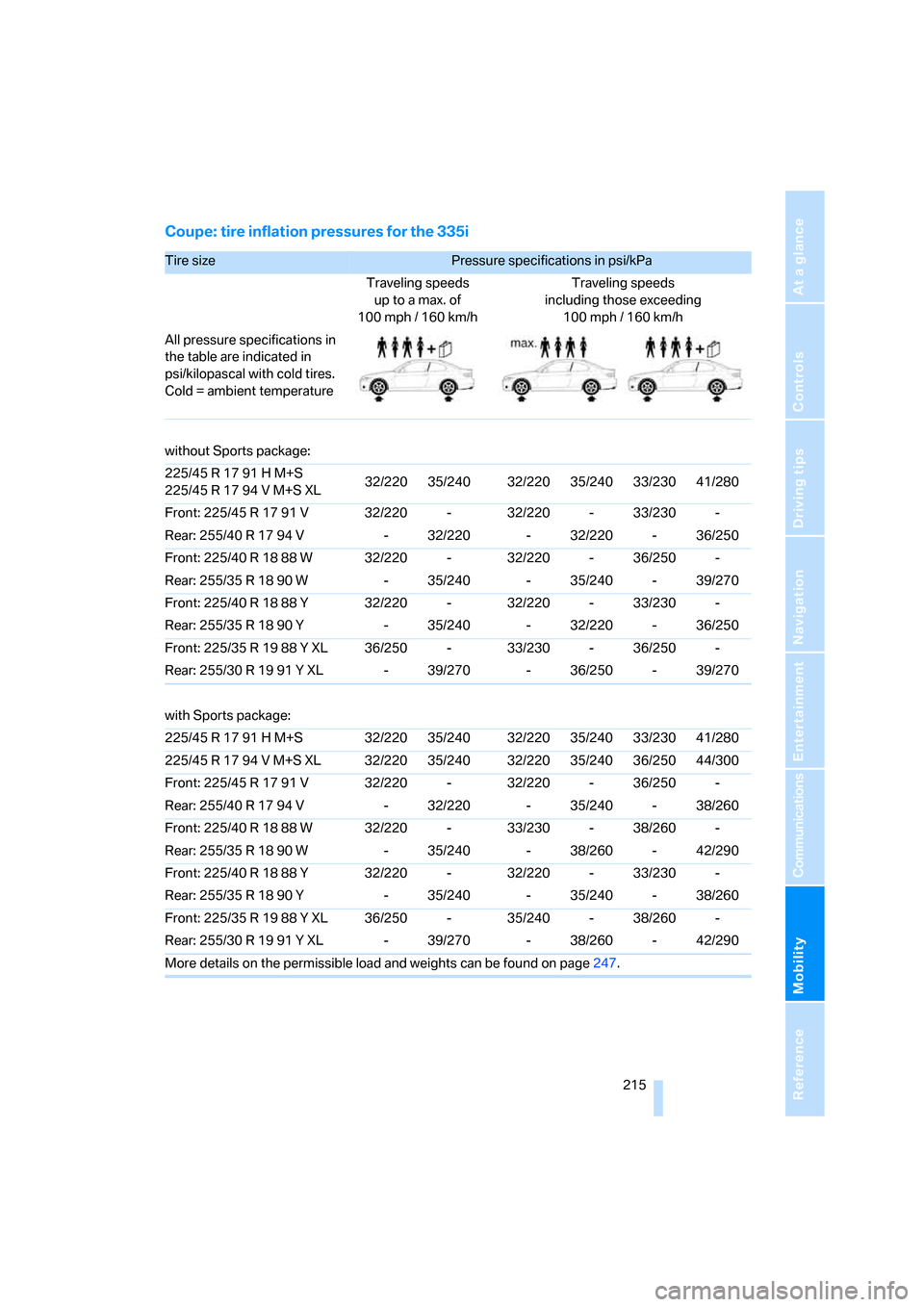
Coupe: tire inflation pressures for the 335i
Tire size Pressure specifications in psi/kPa
Traveling speeds
up to a max. of
100 mph / 160 km/hTraveling speeds
including those exceeding
100mph / 160km/h
All pressure specifications in
the table are indicated in
psi/kilopascal with cold tires.
Cold = ambient temperature
without Sports package:
225/45 R 17 91 H M+S
225/45 R 17 94 V M+S XL32/220 35/240 32/220 35/240 33/230 41/280
Front: 225/45 R 17 91 V 32/220 - 32/220 - 33/230 -
Rear: 255/40 R 17 94 V - 32/220 - 32/220 - 36/250
Front: 225/40 R 18 88 W 32/220 - 32/220 - 36/250 -
Rear: 255/35 R 18 90 W - 35/240 - 35/240 - 39/270
Front: 225/40 R 18 88 Y 32/220 - 32/220 - 33/230 -
Rear: 255/35 R 18 90 Y - 35/240 - 32/220 - 36/250
Front: 225/35 R 19 88 Y XL 36/250 - 33/230 - 36/250 -
Rear: 255/30 R 19 91 Y XL - 39/270 - 36/250 - 39/270
with Sports package:
225/45 R 17 91 H M+S 32/220 35/240 32/220 35/240 33/230 41/280
225/45 R 17 94 V M+S XL 32/220 35/240 32/220 35/240 36/250 44/300
Front: 225/45 R 17 91 V 32/220 - 32/220 - 36/250 -
Rear: 255/40 R 17 94 V - 32/220 - 35/240 - 38/260
Front: 225/40 R 18 88 W 32/220 - 33/230 - 38/260 -
Rear: 255/35 R 18 90 W - 35/240 - 38/260 - 42/290
Front: 225/40 R 18 88 Y 32/220 - 32/220 - 33/230 -
Rear: 255/35 R 18 90 Y - 35/240 - 35/240 - 38/260
Front: 225/35 R 19 88 Y XL 36/250 - 35/240 - 38/260 -
Rear: 255/30 R 19 91 Y XL - 39/270 - 38/260 - 42/290
More details on the permissible load and weights can be found on page247.
Page 219 of 272
Mobility
217Reference
At a glance
Controls
Driving tips
Communications
Navigation
Entertainment
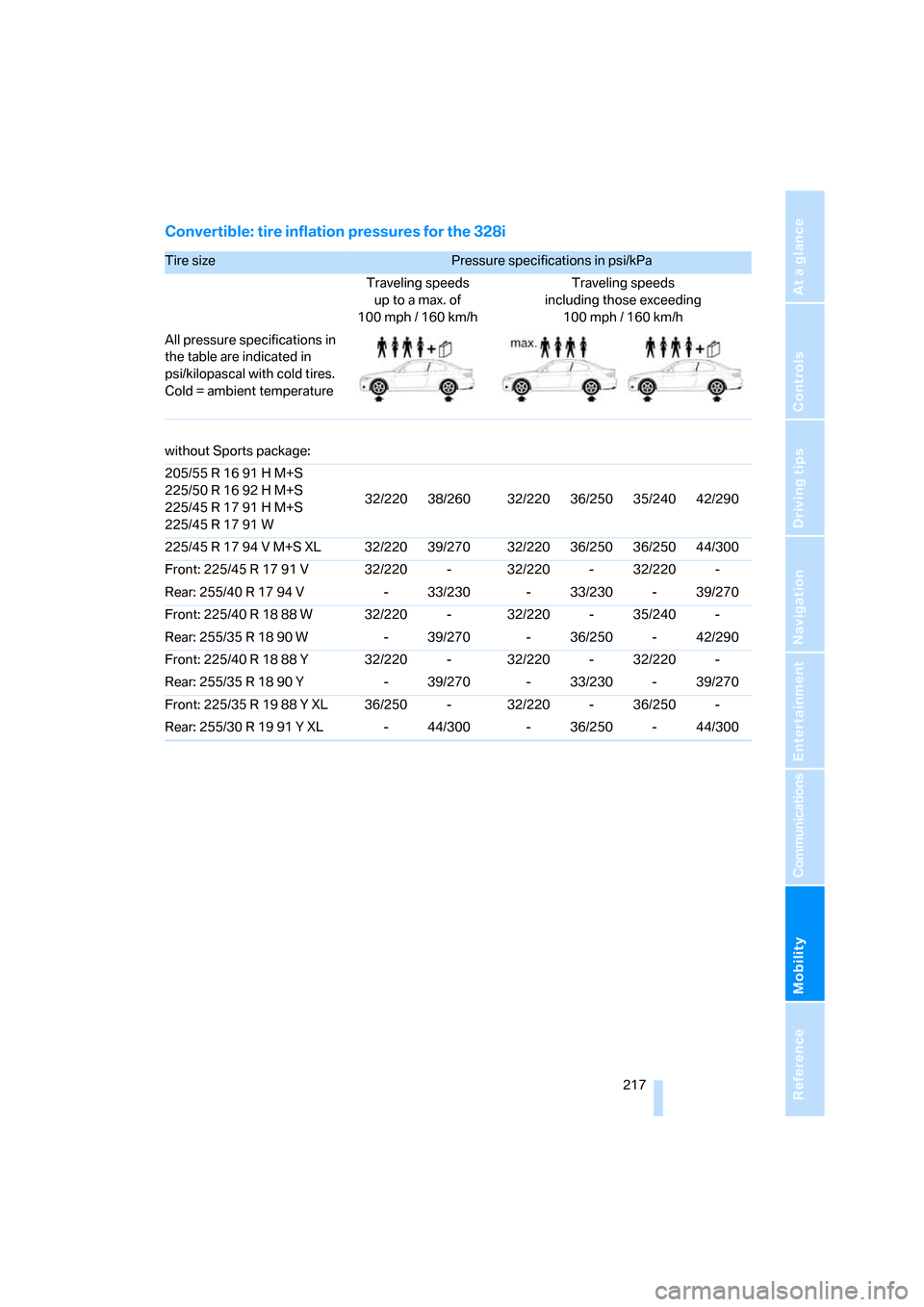
Convertible: tire inflation pressures for the 328i
Tire size Pressure specifications in psi/kPa
Traveling speeds
up to a max. of
100 mph / 160 km/hTraveling speeds
including those exceeding
100mph / 160km/h
All pressure specifications in
the table are indicated in
psi/kilopascal with cold tires.
Cold = ambient temperature
without Sports package:
205/55 R 16 91 H M+S
225/50 R 16 92 H M+S
225/45 R 17 91 H M+S
225/45 R 17 91 W32/220 38/260 32/220 36/250 35/240 42/290
225/45 R 17 94 V M+S XL 32/220 39/270 32/220 36/250 36/250 44/300
Front: 225/45 R 17 91 V 32/220 - 32/220 - 32/220 -
Rear: 255/40 R 17 94 V - 33/230 - 33/230 - 39/270
Front: 225/40 R 18 88 W 32/220 - 32/220 - 35/240 -
Rear: 255/35 R 18 90 W - 39/270 - 36/250 - 42/290
Front: 225/40 R 18 88 Y 32/220 - 32/220 - 32/220 -
Rear: 255/35 R 18 90 Y - 39/270 - 33/230 - 39/270
Front: 225/35 R 19 88 Y XL 36/250 - 32/220 - 36/250 -
Rear: 255/30 R 19 91 Y XL - 44/300 - 36/250 - 44/300