navigation BMW 328XI COUPE 2008 E92 Owner's Manual
[x] Cancel search | Manufacturer: BMW, Model Year: 2008, Model line: 328XI COUPE, Model: BMW 328XI COUPE 2008 E92Pages: 272, PDF Size: 8.98 MB
Page 241 of 272
Mobility
239Reference
At a glance
Controls
Driving tips
Communications
Navigation
Entertainment
Using a tow fitting
The screw-in tow fitting must always be carried
in the car. It can be screwed in at the front or
rear of the BMW.
Coupe: it is sto red in the onboard tool kit under-
neath the cover on the right-hand side of the
cargo bay, refer to page231.
Convertible: it is stored in the onboard tool kit
underneath the cargo bay floor, refer to
page231.
Use only the tow fitting provided with the
vehicle and screw it all the way in. Use the
tow fitting for towing on paved roads only. Avoid
lateral loading of the tow fitting, e.g. do not lift
the vehicle by the tow fitting. Otherwise the tow
fitting and the vehicle could be damaged.<
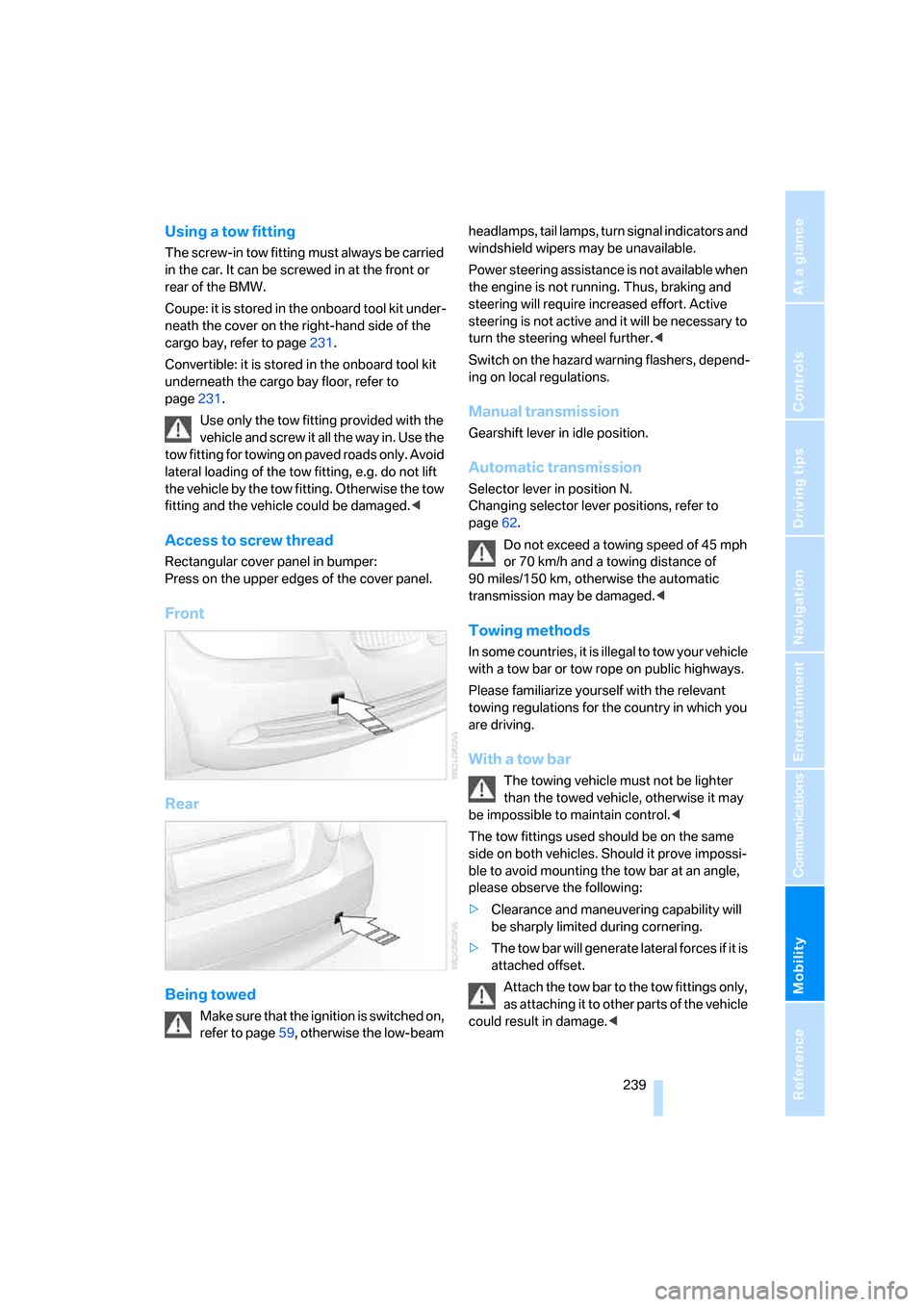
Access to screw thread
Rectangular cover panel in bumper:
Press on the upper edges of the cover panel.
Front
Rear
Being towed
Make sure that the ignition is switched on,
refer to page59, otherwise the low-beam headlamps, tail lamps, turn signal indicators and
windshield wipers may be unavailable.
Power steering assistance is not available when
the engine is not running. Thus, braking and
steering will require increased effort. Active
steering is not active and it will be necessary to
turn the steering wheel further.<
Switch on the hazard warning flashers, depend-
ing on local regulations.
Manual transmission
Gearshift lever in idle position.
Automatic transmission
Selector lever in position N.
Changing selector lever positions, refer to
page62.
Do not exceed a towing speed of 45 mph
or 70 km/h and a towing distance of
90 miles/150 km, otherwise the automatic
transmission may be damaged.<
Towing methods
I n s o m e c o u n t r i e s , i t i s i l l e g a l t o t o w y o u r v e h i c l e
with a tow bar or tow rope on public highways.
Please familiarize yourself with the relevant
towing regulations for the country in which you
are driving.
With a tow bar
The towing vehicle must not be lighter
than the towed vehicle, otherwise it may
be impossible to maintain control.<
The tow fittings used should be on the same
side on both vehicles. Should it prove impossi-
ble to avoid mounting the tow bar at an angle,
please observe the following:
>Clearance and maneuvering capability will
be sharply limited during cornering.
>The tow bar will generate lateral forces if it is
attached offset.
Attach the tow bar to the tow fittings only,
as attaching it to other parts of the vehicle
could result in damage.<
Page 243 of 272

Mobility
241Reference
At a glance
Controls
Driving tips
Communications
Navigation
Entertainment
Page 247 of 272
Reference 245
At a glance
Controls
Driving tips
Communications
Navigation
Entertainment
Mobility
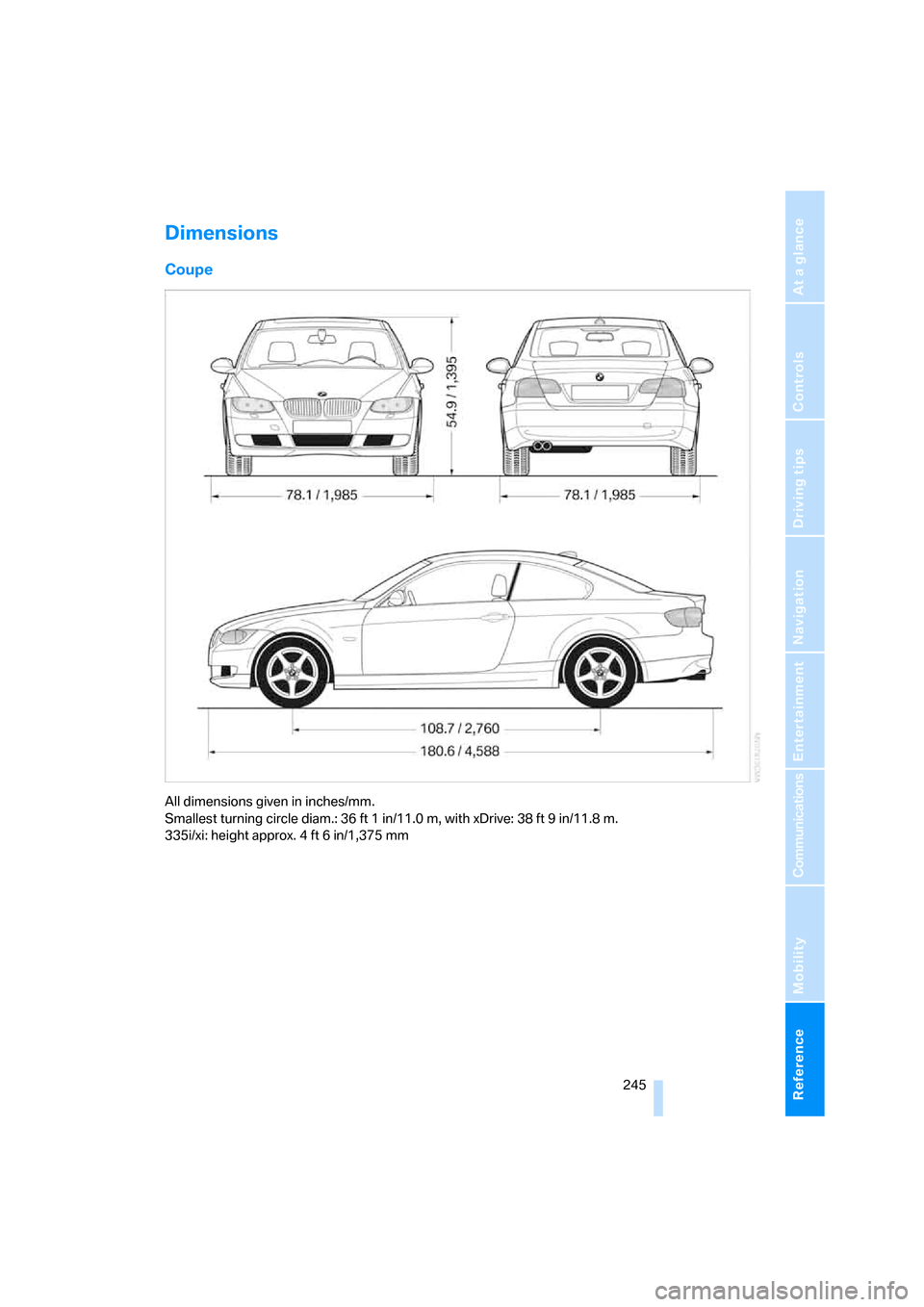
Dimensions
Coupe
All dimensions given in inches/mm.
Smallest turning circle diam.: 36 ft 1 in/11.0 m, with xDrive: 38 ft 9 in/11.8 m.
335i/xi: height approx. 4 ft 6 in/1,375 mm
Page 249 of 272
Reference 247
At a glance
Controls
Driving tips
Communications
Navigation
Entertainment
Mobility
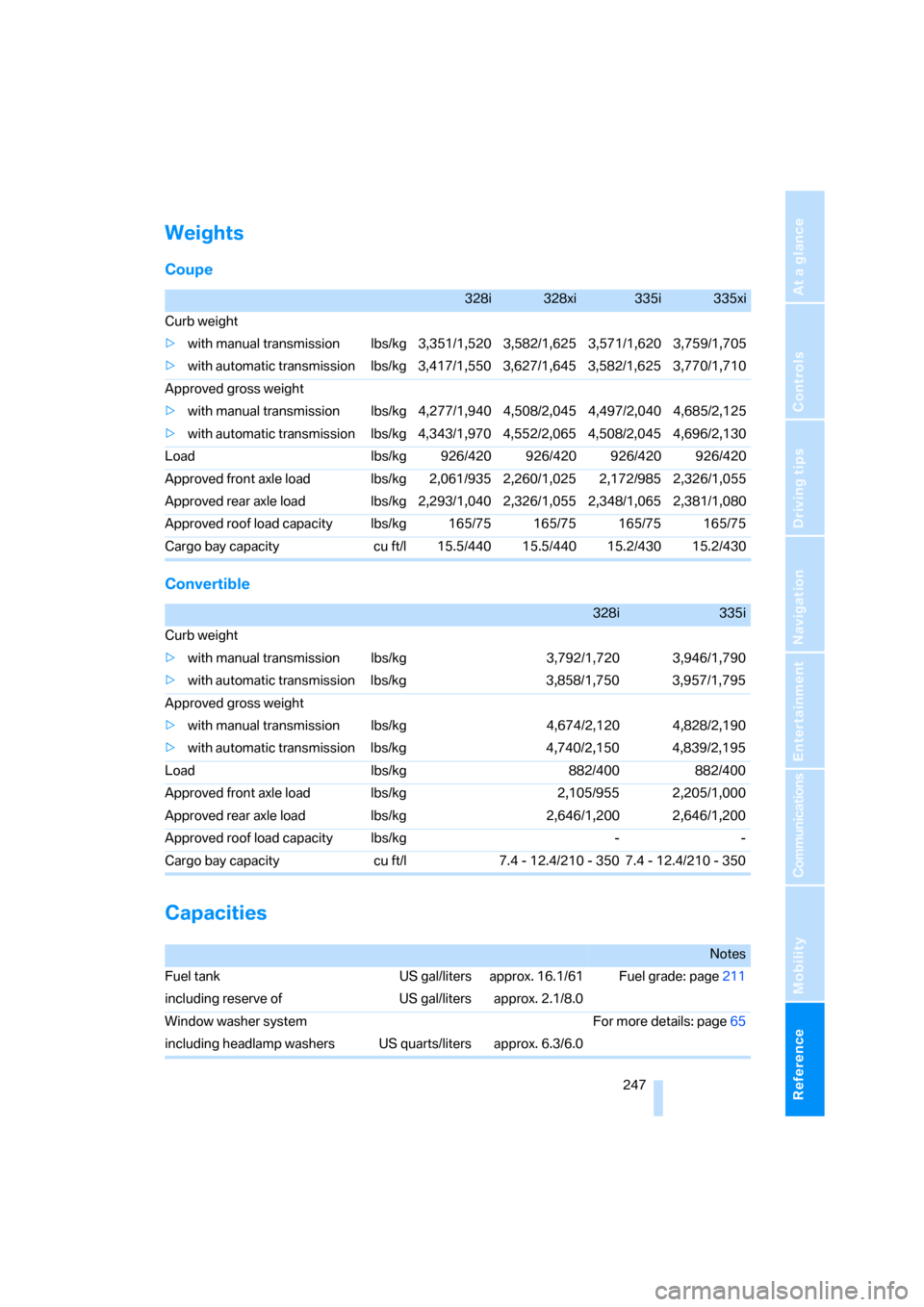
Weights
Coupe
Convertible
Capacities
328i328xi335i335xi
Curb weight
>with manual transmission lbs/kg 3,351/1,520 3,582/1,625 3,571/1,620 3,759/1,705
>with automatic transmission lbs/kg 3,417/1,550 3,627/1,645 3,582/1,625 3,770/1,710
Approved gross weight
>with manual transmission lbs/kg 4,277/1,940 4,508/2,045 4,497/2,040 4,685/2,125
>with automatic transmission lbs/kg 4,343/1,970 4,552/2,065 4,508/2,045 4,696/2,130
Load lbs/kg 926/420 926/420 926/420 926/420
Approved front axle load lbs/kg 2,061/935 2,260/1,025 2,172/985 2,326/1,055
Approved rear axle load lbs/kg 2,293/1,040 2,326/1,055 2,348/1,065 2,381/1,080
Approved roof load capacity lbs/kg 165/75 165/75 165/75 165/75
Cargo bay capacity cu ft/l 15.5/440 15.5/440 15.2/430 15.2/430
328i335i
Curb weight
>with manual transmission lbs/kg 3,792/1,720 3,946/1,790
>with automatic transmission lbs/kg 3,858/1,750 3,957/1,795
Approved gross weight
>with manual transmission lbs/kg 4,674/2,120 4,828/2,190
>with automatic transmission lbs/kg 4,740/2,150 4,839/2,195
Load lbs/kg 882/400 882/400
Approved front axle load lbs/kg 2,105/955 2,205/1,000
Approved rear axle load lbs/kg 2,646/1,200 2,646/1,200
Approved roof load capacity lbs/kg - -
Cargo bay capacity cu ft/l 7.4 - 12.4/210 - 350 7.4 - 12.4/210 - 350
Notes
Fuel tank US gal/liters approx. 16.1/61 Fuel grade: page211
including reserve of US gal/liters approx. 2.1/8.0
Window washer system For more details: page65
including headlamp washers US quarts/liters approx. 6.3/6.0
Page 251 of 272
Reference 249
At a glance
Controls
Driving tips
Communications
Navigation
Entertainment
Mobility
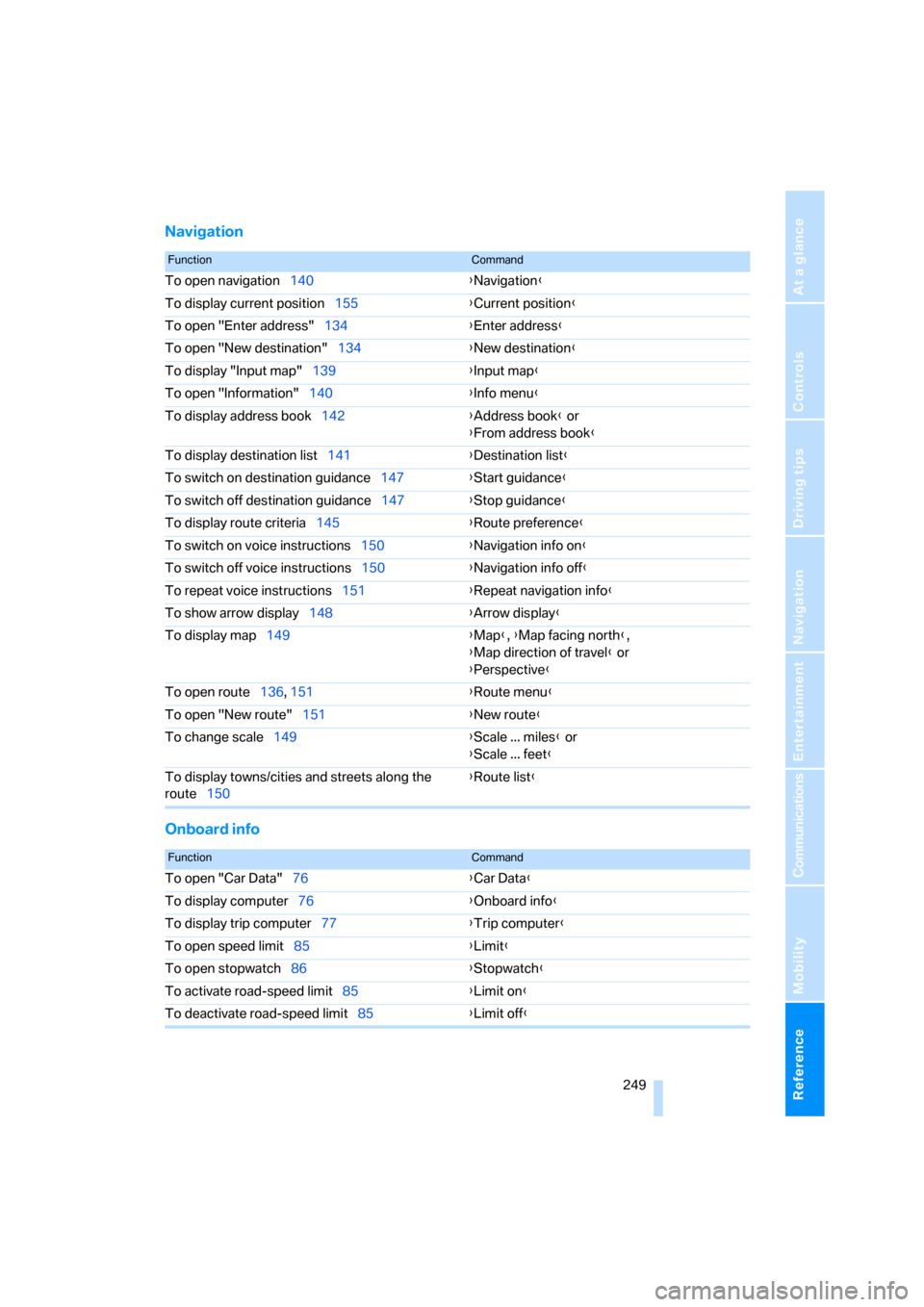
Navigation
Onboard info
FunctionCommand
To open navigation140{Navigation}
To display current position155{Current position}
To open "Enter address"134{Enter address}
To open "New destination"134{New destination}
To display "Input map"139{Input map}
To open "Information"140{Info menu}
To display address book142{Address book} or
{From address book}
To display destination list141{Destination list}
To switch on destination guidance147{Start guidance}
To switch off destination guidance147{Stop guidance}
To display route criteria145{Route preference}
To switch on voice instructions150{Navigation info on}
To switch off voice instructions150{Navigation info off}
To repeat voice instructions151{Repeat navigation info}
To show arrow display148{Arrow display}
To display map149{Map}, {Map facing north},
{Map direction of travel} or
{Perspective}
To open route136, 151
{Route menu}
To open "New route"151{New route}
To change scale149{Scale ... miles} or
{Scale ... feet}
To display towns/cities and streets along the
route150{Route list}
FunctionCommand
To open "Car Data"76{Car Data}
To display computer76{Onboard info}
To display trip computer77{Trip computer}
To open speed limit85{Limit}
To open stopwatch86{Stopwatch}
To activate road-speed limit85{Limit on}
To deactivate road-speed limit85{Limit off}
Page 253 of 272
Reference 251
At a glance
Controls
Driving tips
Communications
Navigation
Entertainment
Mobility
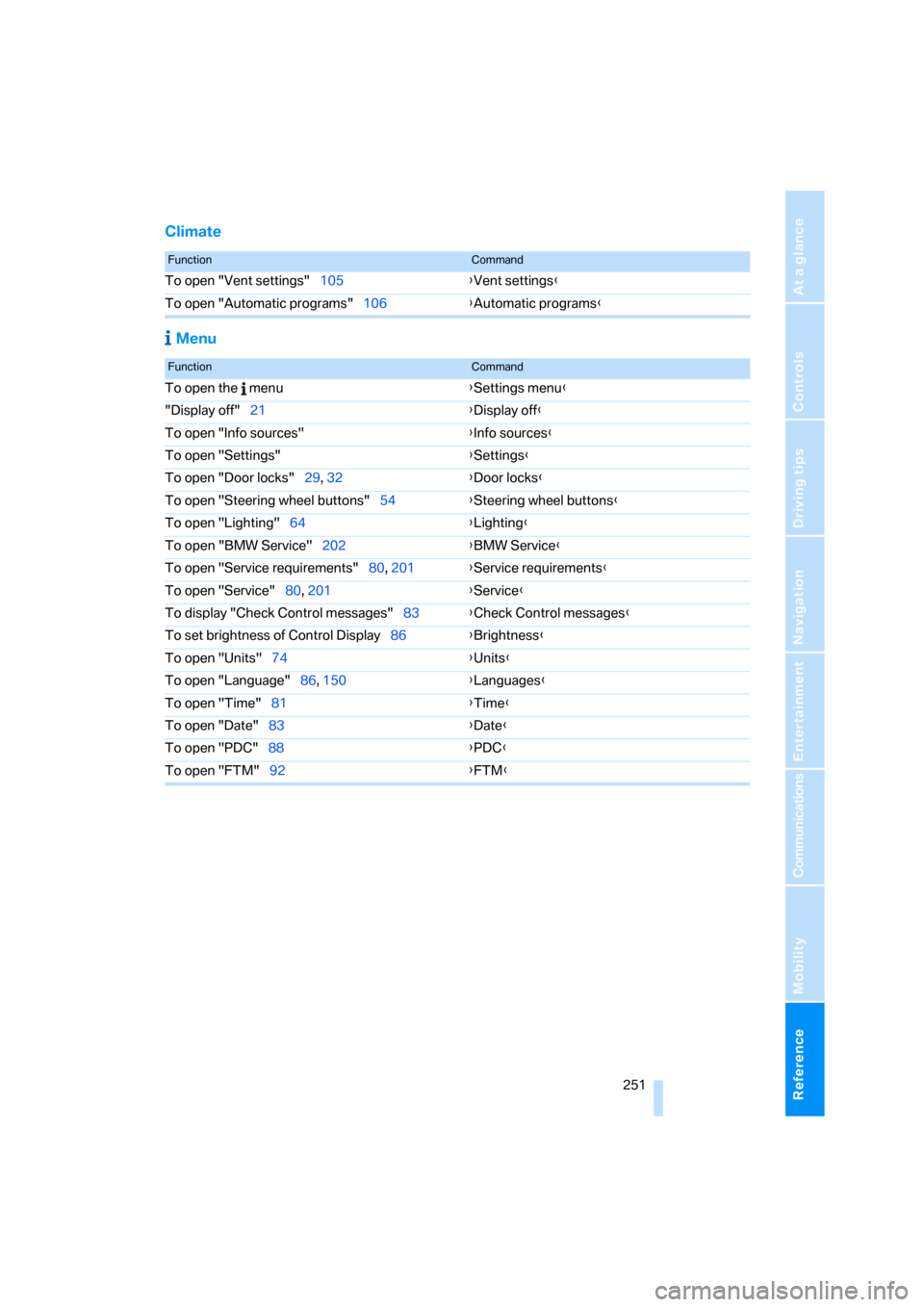
Climate
Menu
FunctionCommand
To open "Vent settings"105{Vent settings}
To open "Automatic programs"106{Automatic programs}
FunctionCommand
To open the menu{Settings menu}
"Display off"21{Display off}
To open "Info sources"{Info sources}
To open "Settings"{Settings}
To open "Door locks"29, 32{Door locks}
To open "Steering wheel buttons"54{Steering wheel buttons}
To open "Lighting"64{Lighting}
To open "BMW Service"202{BMW Service}
To open "Service requirements"80, 201{Service requirements}
To open "Service"80, 201{Service}
To display "Check Control messages"83{Check Control messages}
To set brightness of Control Display86{Brightness}
To open "Units"74{Units}
To open "Language"86, 150{Languages}
To open "Time"81{Time}
To open "Date"83{Date}
To open "PDC"88{PDC}
To open "FTM"92{FTM}
Page 254 of 272
Everything from A - Z
252
Everything from A - Z
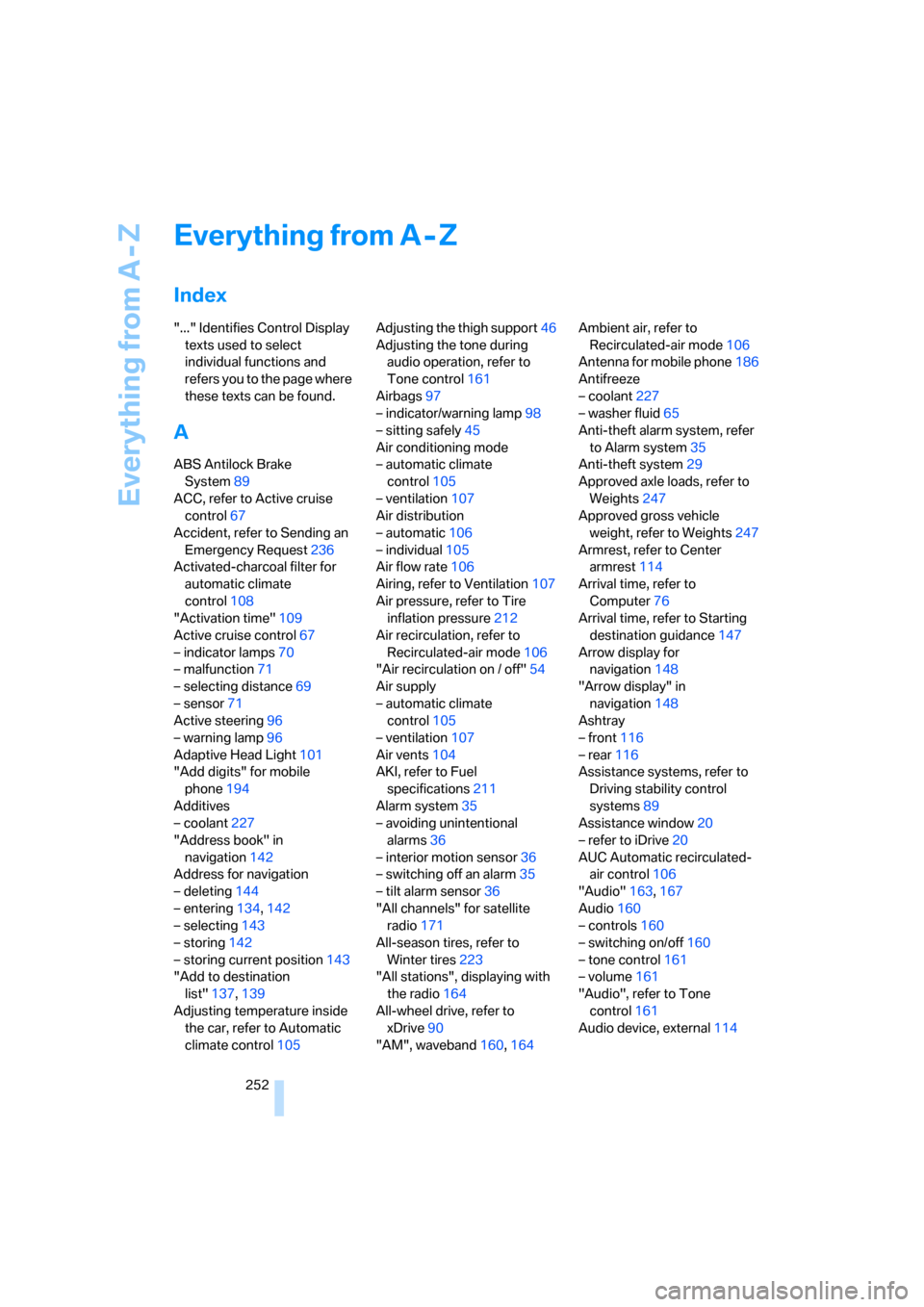
Index
"..." Identifies Control Display
texts used to select
individual functions and
refers you to the page where
these texts can be found.
A
ABS Antilock Brake
System89
ACC, refer to Active cruise
control67
Accident, refer to Sending an
Emergency Request236
Activated-charcoal filter for
automatic climate
control108
"Activation time"109
Active cruise control67
– indicator lamps70
– malfunction71
– selecting distance69
– sensor71
Active steering96
– warning lamp96
Adaptive Head Light101
"Add digits" for mobile
phone194
Additives
– coolant227
"Address book" in
navigation142
Address for navigation
– deleting144
– entering134,142
– selecting143
– storing142
– storing current position143
"Add to destination
list"137,139
Adjusting temperature inside
the car, refer to Automatic
climate control105Adjusting the thigh support46
Adjusting the tone during
audio operation, refer to
Tone control161
Airbags97
– indicator/warning lamp98
– sitting safely45
Air conditioning mode
– automatic climate
control105
– ventilation107
Air distribution
– automatic106
– individual105
Air flow rate106
Airing, refer to Ventilation107
Air pressure, refer to Tire
inflation pressure212
Air recirculation, refer to
Recirculated-air mode106
"Air recirculation on / off"54
Air supply
– automatic climate
control105
– ventilation107
Air vents104
AKI, refer to Fuel
specifications211
Alarm system35
– avoiding unintentional
alarms36
– interior motion sensor36
– switching off an alarm35
– tilt alarm sensor36
"All channels" for satellite
radio171
All-season tires, refer to
Winter tires223
"All stations", displaying with
the radio164
All-wheel drive, refer to
xDrive90
"AM", waveband160,164Ambient air, refer to
Recirculated-air mode106
Antenna for mobile phone186
Antifreeze
– coolant227
– washer fluid65
Anti-theft alarm system, refer
to Alarm system35
Anti-theft system29
Approved axle loads, refer to
Weights247
Approved gross vehicle
weight, refer to Weights247
Armrest, refer to Center
armrest114
Arrival time, refer to
Computer76
Arrival time, refer to Starting
destination guidance147
Arrow display for
navigation148
"Arrow display" in
navigation148
Ashtray
– front116
– rear116
Assistance systems, refer to
Driving stability control
systems89
Assistance window20
– refer to iDrive20
AUC Automatic recirculated-
air control106
"Audio"163,167
Audio160
– controls160
– switching on/off160
– tone control161
– volume161
"Audio", refer to Tone
control161
Audio device, external114
Page 255 of 272
Reference 253
At a glance
Controls
Driving tips
Communications
Navigation
Entertainment
Mobility
Automatic
– air distribution106
– air flow rate106
– cruise control66,67
– headlamp control100
– service notification203
– storing of stations165
Automatic climate control104
– automatic air
distribution106
– settings via iDrive105
Automatic curb monitor53
"Automatic programs" with
automatic climate
control106
Automatic recirculated-air
control AUC106
Automatic station search165
Automatic transmission with
Steptronic61
– interlock61,62
– overriding selector lever
lock63
– shiftlock, refer to Changing
selector lever position62
– sport program62
– towing238
– tow-starting238
"Automatic ventilation"108
AUTO program for automatic
climate control106
"Auto Request"203
"Autostore"
– on the radio166
"AUX"160,179,181
– AUX-In port179
– USB-audio interface180
AUX-IN
– port114
AUX-In port179
Average fuel consumption76
– setting the units78
Average speed76
"Avoid ferries" in
navigation145
"Avoid highways" in
navigation145
Avoid highways in
navigation145Avoiding unintentional
alarms36
"Avoid tollroads" in
navigation145
Axle loads, refer to
Weights247
"A - Z"193
,194
B
Backrest contour, refer to
Lumbar support47
Backrests, refer to Seat
adjustment46
Backrest width adjustment47
Back seats
– refer to Rear seats48
Backup lamps
– replacing bulb233
Backup lamps, refer to Tail
lamps233
Bag holder118
Balance, tone control161
Band-aids, refer to First-aid
pouch237
Bar, refer to Towing
methods239
Base plate for telephone or
mobile phone
– refer to Snap-in adapter in
the center armrest storage
compartment114
Bass, tone control161
Bass sounds, refer to Treble
and bass161
Battery235
– charging235
– disposal38,235
– jump starting237
– remote control28
– temporary power failure235
Battery renewal
– remote control38
– remote control for vehicle38
Being towed239
Belt hand-over52
– pinch protection system52
Belts, refer to Safety belts51Belt tensioner, refer to Safety
belts51
Beverage holders, refer to
Cup holders115
Blinds, refer to Roller sun
blinds113
Blower, refer to Air flow
rate106
Bluetooth, refer to separate
Owner's Manual
"BMW Assist"202,203,204
BMW Assist
– activating206
– Concierge service204
– contacting BMW Customer
Relations204
– Roadside Assistance202
– services offered201
– TeleService203
"BMW Contact"196
"BMW Contact
Numbers"196
BMW Homepage4
BMW Maintenance
System229
"BMW Service settings"207
BMW webpage4
Bottle holders, refer to Cup
holders115
Brake assist, refer to Dynamic
Brake Control DBC89
Brake fluid, refer to Service
requirements79
Brake Force Display96
Brake lamps
– replacing bulb233
– two-stage96
Brake pads124
– breaking in124
Brake rotors126
– brakes124
– breaking in124
Brakes
– ABS89
– BMW Maintenance
System229
– breaking in124
– parking brake60
– service requirements79
Page 257 of 272
Reference 255
At a glance
Controls
Driving tips
Communications
Navigation
Entertainment
Mobility
Changes, technical, refer to
For your own safety5
Changing bulbs, refer to
Lamps and bulbs231
Changing the language on the
Control Display86
Changing the measurement
units on the Control
Display78
Changing wheels234
Chassis number, refer to
Engine compartment225
Check Control83
"Check Control
messages"85
Child-restraint fixing system
LATCH57
Child-restraint systems56
Child seats, refer to
Transporting children
safely56
Chrome parts, care, refer to
Caring for your vehicle
brochure
Cigarette lighter, refer to
Lighter116
Cleaning, refer to Caring for
your vehicle brochure
Cleaning headlamps65
– washer fluid65
"Climate"105
Clock74
– 12h/24h mode82
– setting time81
Closing
– from inside32
– from outside29
Clothes hooks115
Cockpit10
Cold start, refer to Starting the
engine60
Combined instrument, refer to
Instrument cluster12
Comfort access, refer to
Convenient access36
Comfort area, refer to Around
the center console14
"Communication"192,202,2
03,204Compact disc, refer to
– CD changer173
– CD player173
Compartment for remote
control, refer to Ignition
lock59
Compass112
Computer75
– displays on Control
Display76
– hour signal82
Computer, refer to iDrive16
"Concert hall" for Tone
control162
"Concierge"
204
Concierge service204
Condensation, refer to When
the vehicle is parked126
Condition Based Service
CBS229
Configuring settings, refer to
Personal Profile28
Confirmation signals for
locking/unlocking the
vehicle31
Connecting vacuum cleaner,
refer to Connecting
electrical appliances116
Consumption, refer to
Average consumption76
Consumption display
– average consumption76
"Continue guidance to
destination?"148
Control Center, refer to
iDrive16
Control Display
– brightness86
– changing the language86
– switching off/on21
Control Display, refer to
iDrive16
Controller, refer to iDrive16
Controls and displays10
Control unit, refer to iDrive16
Convenient access36
– replacing the battery38
– what to observe before
entering a car wash37Convenient loading in
convertible31
Convenient operation
– glass roof30
– glass roof with convenient
access37
– retractable hardtop30
– windows30
– windows with convenient
access37
Convertible
– bag holder118
– convenient loading31
– enlarging cargo bay117
– folding down rear
backrest118
– retractable hardtop41
– rollover protection
system98
– securing cargo128
– stowing cargo127
Coolant227
– checking level228
Coolant temperature75
Cooling, maximum106
Cooling fluid, refer to
Coolant227
Cooling system, refer to
Coolant227
Copyright2
Corner-illuminating lamps,
refer to Adaptive Head
Light101
Cornering lamps, refer to
Adaptive Head Light101
Correct tires222
Courtesy lamps, refer to
Interior lamps103
Cross-hairs in navigation139
Cruise control66
– active67
– malfunction67
Cruising range75
Cup holders115
Curb weight, refer to
Weights247
"Current position"155
Page 258 of 272
Everything from A - Z
256 Current position
– displaying155
– entering143
– storing143
"Customer
Relations"196,204
D
Dashboard, refer to
Cockpit10
Dashboard, refer to
Instrument cluster12
Dashboard lighting, refer to
Instrument lighting103
Data, technical244
– dimensions245
– engine244
– weights247
"Date"83
Date
– setting83
– setting format83
"Date format"83
"Daytime running lamps"101
Daytime running lamps101
DBC Dynamic Brake
Control89
"Deactivated"51
Deactivating front passenger
airbags97
Deadlocking, refer to
Locking30
Decommissioning the vehicle,
refer to Caring for your
vehicle brochure
Defect
– door lock32
– fuel filler door210
– glass roof40
"Delete address book" in
navigation144
"Delete all numbers" on the
mobile phone195
"Delete data" in
navigation144
"Delete" for mobile
phone195Destination address
– deleting144
– entering134,138
Destination for navigation
– destination list141
– entry134
– home address144
– manual entry134,138
– selecting from address
book143
– selecting using
information140
– selecting via language138
– selecting via map139
– storing142
Destination guidance147
– canceling voice
instructions55
– changing specified
route145
– displaying route
148
– distance and arrival147
– starting147
– terminating/continuing147
– voice instructions150
– volume of voice
instructions151
Destination list for navigation
system141
Destinations recently driven
to141
"Details" for audio mode181
"Dial" for mobile phone193
"Dial number"193
Digital clock74
Digital compass112
Digital radio, refer to High
Definition Radio167
Dimensions245
Directional indicators, refer to
Turn signals63
Direction instructions, refer to
Voice instructions150
Directory for navigation, refer
to Address book142
Displacement, refer to Engine
data244
Display, refer to iDrive
controls16Display lighting, refer to
Instrument lighting103
"Display off"21
Displays
– on the Control Display16
Displays, refer to Instrument
cluster12
Displays and controls10
Disposal
– coolant227
– remote control battery38
– vehicle battery235
Distance control, refer to
Active cruise control67
Distance remaining to service,
refer to Service
requirements79
"Distance to dest."77
Distance warning, refer to
PDC Park Distance
Control88
Door key, refer to Remote
control with integrated
key28
Door lock32
"Door locks"30,31,32,80
Doors, emergency
operation32
DOT Quality Grades220
Draft-free ventilation108
Drinks holders, refer to Cup
holders115
Drive-off assistance, refer to
Dynamic Stability Control
DSC89
Drive-off assistant91
Driving around a traffic
congestion154
Driving lamps, refer to Parking
lamps/low beams100
Driving notes124
Driving off on hills, refer to
Drive-off assistant91
Driving route, refer to
Displaying route148
Driving stability control
systems89
Driving through water126