phone BMW 330I 2005 Owner's Manual
[x] Cancel search | Manufacturer: BMW, Model Year: 2005, Model line: 330I, Model: BMW 330I 2005Pages: 223, PDF Size: 7.49 MB
Page 160 of 223
159
Entertainment
Reference
At a glance
Controls
Driving tips Communications
Navigation
Mobility
Storing an entry
An entry always consists of a name and phone
number.
Selecting an entry
The connection to the phone number of the
selected entry is established.
Having entries read aloud and selecting
You can have all the entries of your voice phone
book read aloud in the order of input and select
a certain entry to establish a connection:
Redialing
The {Redial} command calls up "Redial".
Deleting an entry
You can delete any entry from the voice phone
book.
Deleting all entries
{Delete phone book} deletes all entries in the
phone book.
Notes
The voice commands in English were
available as of this printing. Other lan-
guages are currently in preparation. To operate
the portable phone via the voice command sys-
tem, refer to page22.<
Important for voice commands
For voice commands, bear in mind the follow-
ing:
>Issue the commands smoothly and at nor-
mal volume, avoiding excessive emphasis
and pauses.
>Keep the doors, windows and glass sunroof
closed to prevent interference from ambi-
ent noise.
>Avoid other sources of noise in the vehicle
while speaking, and ask other vehicle occu-
pants to refrain from talking while you are
using the system. 1.{Save name}.
The dialog for storing a name is
opened.
2.Say the name and repeat it upon
request.
The spoken length of the names in the
phone book must not exceed approx.
2seconds.
3.Say the phone number when prompted.
4.To store the phone number:
{Save}.
1.{Dial name}.
The dialog for selecting an entry is
opened.
2.Say the name when prompted.
3.Confirm the prompt with {Yes}.
1.{Read phone book}.
The dialog for having the phone book
read is opened.
2.{Dial number} when the desired entry is
read aloud.
1.{Delete name}.
The dialog for deleting an entry is
opened.
2.Say the name when prompted.
3.Confirm the prompt with {Yes}.
1.{Delete phone book}.
The dialog for deleting phone book is
opened.
2.Confirm the prompt with {Yes}.
3.Confirm the repeated prompt with
{Yes}.
Page 161 of 223
TeleService, BMW Assist
160
TeleService , BMW Assist
TeleService
TeleService supports you when communicat-
ing with a BMW center. The built-in car phone
can be used to transmit data regarding the ser-
vice status of your vehicle or regarding legally
mandated inspections directly to your BMW
center. This is the same data that is also stored
for CBS Condition Based Service in the master
key. Your BMW center can then contact you,
and you can make an appointment that suits
you while you are still on the road. Your advan-
tage here is that your BMW center can prepare
in advance for the required maintenance work.
The TeleService functions are country-specific:
depending on the country in which you are driv-
ing, data about your vehicle's service status or
regarding legally required inspections are
transmitted to your BMW center either auto-
matically before a service due date or when you
place a call to the BMW center. Your BMW cen-
ter will be glad to provide more detailed infor-
mation.
BMW Assist
BMW Assist provides you with other services in
addition to TeleService. For example, the posi-
tion data of your vehicle can be transferred to
the BMW Assist response center if an emer-
gency call
* has been initiated.
Many functions of BMW Assist depend on the
individually agreed contract. Data transmission,
e.g. of the CBS Condition Based Service, differs
from country to country.
The subscriber agreement must be completed
successfully before using the BMW Assist ser-
vices.
You can also utilize BMW Assist services via the
Internet. The service package is continually
expanded.
Requirements
You can use TeleService or BMW Assist when
the following requirements are met:
>The installed car phone is logged on to a
portable telephone network. This network
must be capable of transmitting the ser-
vices.
>To transmit position data, the vehicle must
be able to determine the current position.
This can be displayed on the Control Dis-
play.
>In order to enable and update TeleService
or BMW Assist, a GPS signal must be
present.
>For BMW Assist: you must have applied for
BMW Assist at your BMW center or BMW
customer service.
Enabling TeleService or BMW Assist
For you to be able to use the services of
TeleService or BMW Assist, these must be
enabled.
Requirements
>Make sure that the vehicle can determine its
current location. As a rule, this is possible
when you are in the open.
>Leave radio readiness switched on while
connecting to the system.
Enabling
iDrive concept, refer to page16.
1.Press the button.
This opens the start menu.
2.Press the controller to open the menu.
3.Select "Communication settings" and
press the controller.
**
Page 163 of 223
TeleService, BMW Assist
162
Roadside Assistance
You can call the Roadside Assistance* of the
BMW Group should you require help in the
event of a breakdown.
iDrive concept, refer to page16.
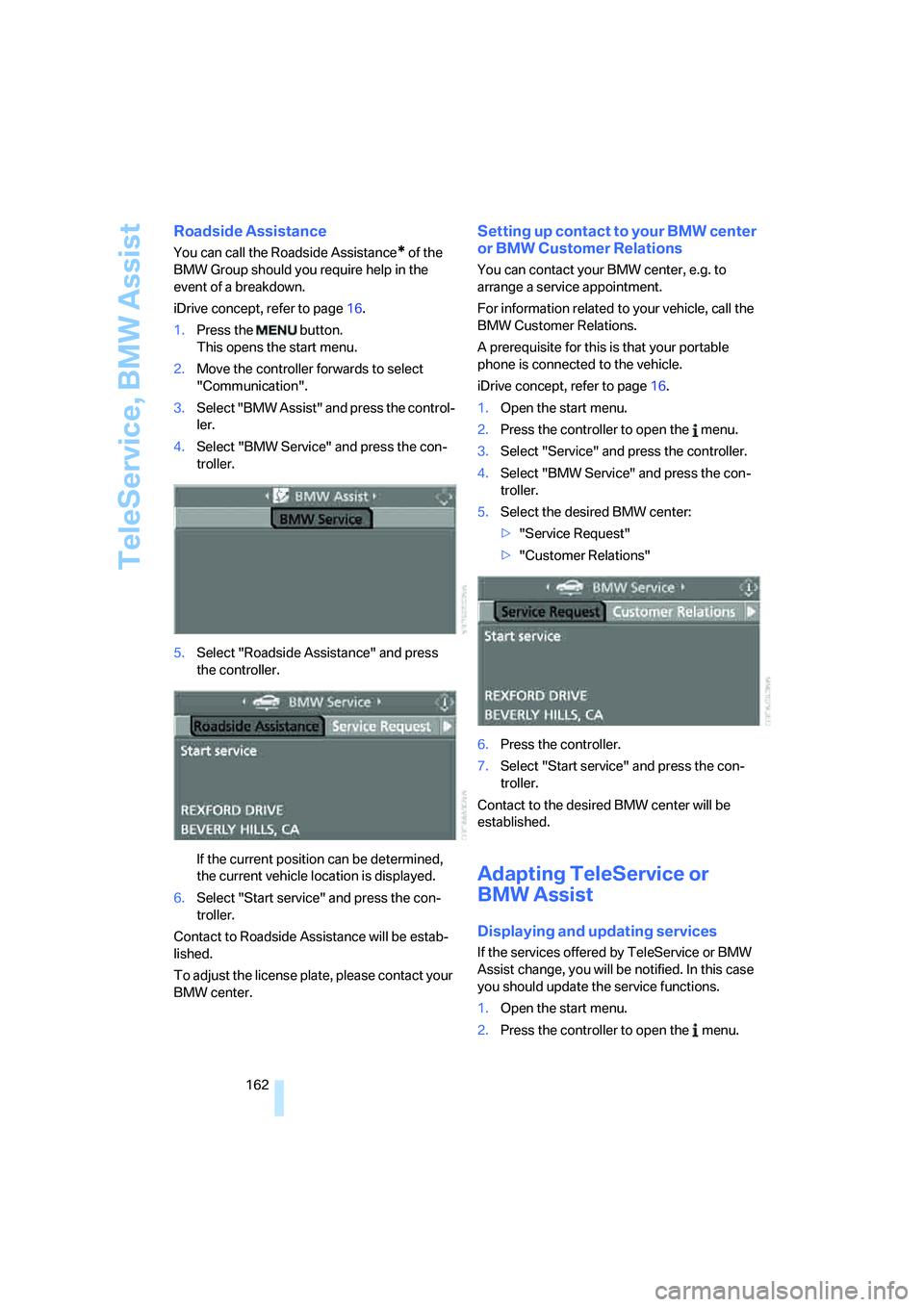
1.Press the button.
This opens the start menu.
2.Move the controller forwards to select
"Communication".
3.Select "BMW Assist" and press the control-
ler.
4.Select "BMW Service" and press the con-
troller.
5.Select "Roadside Assistance" and press
the controller.
If the current position can be determined,
the current vehicle location is displayed.
6.Select "Start service" and press the con-
troller.
Contact to Roadside Assistance will be estab-
lished.
To adjust the license plate, please contact your
BMW center.
Setting up contact to your BMW center
or BMW Customer Relations
You can contact your BMW center, e.g. to
arrange a service appointment.
For information related to your vehicle, call the
BMW Customer Relations.
A prerequisite for this is that your portable
phone is connected to the vehicle.
iDrive concept, refer to page16.
1.Open the start menu.
2.Press the controller to open the menu.
3.Select "Service" and press the controller.
4.Select "BMW Service" and press the con-
troller.
5.Select the desired BMW center:
>"Service Request"
>"Customer Relations"
6.Press the controller.
7.Select "Start service" and press the con-
troller.
Contact to the desired BMW center will be
established.
Adapting TeleService or
BMW Assist
Displaying and updating services
If the services offered by TeleService or BMW
Assist change, you will be notified. In this case
you should update the service functions.
1.Open the start menu.
2.Press the controller to open the menu.
Page 164 of 223
163
Entertainment
Reference
At a glance
Controls
Driving tips Communications
Navigation
Mobility
3.Select "Communication settings" and
press the controller.
4.Select "BMW Service settings" and press
the controller.
5.Select "Service Status" and press the con-
troller.
The current services available from
TeleService or BMW Assist are displayed.
6.If applicable, select "Options" and press the
controller.
7.Select "Update services" and press the
controller.
Terminating services
If you terminate the services, your vehicle will
not be equipped to contact the BMW Assist call
center.
1.Open the start menu.
2.Press the controller to open the menu.
3.Select "Communication settings" and
press the controller.
4.Select "BMW Service settings" and press
the controller.
5.Select "Service Status" and press the con-
troller.
6.Select "Options" and press the controller.
7.Select "Terminate services" and press the
controller.
The use of TeleService or BMW Assist is
blocked. To cancel the service block, the sys-
tem must be reactivated, refer to page160.
Your contractual agreement is not affected by
this.The automatic service notification can be dis-
abled separately. Please contact your BMW
center for this purpose.
Enable TeleService and, if applicable, BMW
Assist once again to log on again.
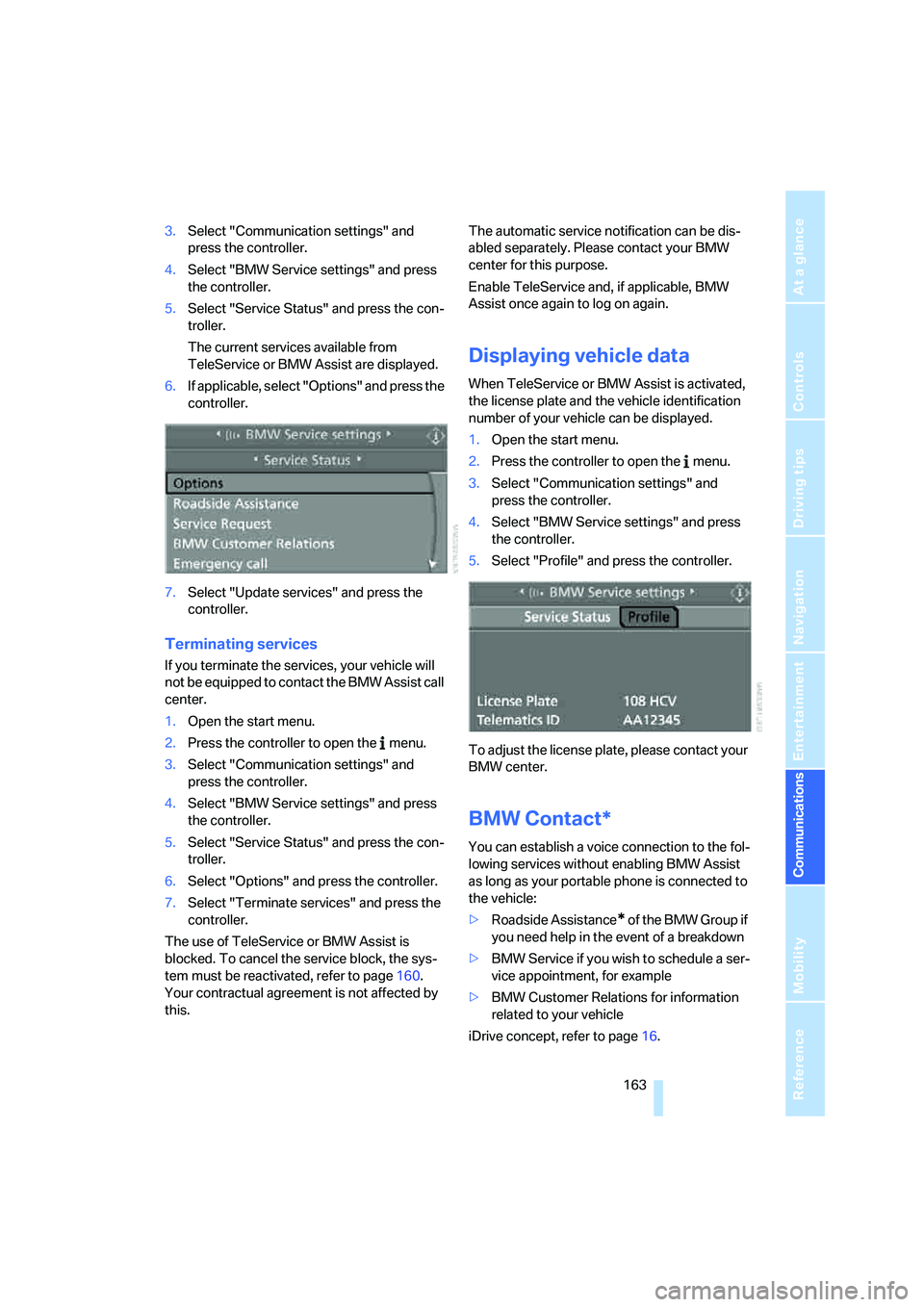
Displaying vehicle data
When TeleService or BMW Assist is activated,
the license plate and the vehicle identification
number of your vehicle can be displayed.
1.Open the start menu.
2.Press the controller to open the menu.
3.Select "Communication settings" and
press the controller.
4.Select "BMW Service settings" and press
the controller.
5.Select "Profile" and press the controller.
To adjust the license plate, please contact your
BMW center.
BMW Contact*
You can establish a voice connection to the fol-
lowing services without enabling BMW Assist
as long as your portable phone is connected to
the vehicle:
>Roadside Assistance
* of the BMW Group if
you need help in the event of a breakdown
>BMW Service if you wish to schedule a ser-
vice appointment, for example
>BMW Customer Relations for information
related to your vehicle
iDrive concept, refer to page16.
Page 194 of 223
Mobility
193Reference
At a glance
Controls
Driving tips
Communications
Navigation
Entertainment
Giving and receiving assistance
Emergency calling*
Conditions for an emergency call:
>Radio readiness is switched on.
>The car phone is logged on to a portable
telephone network.
>The emergency call system is operable.
Initiating an emergency call
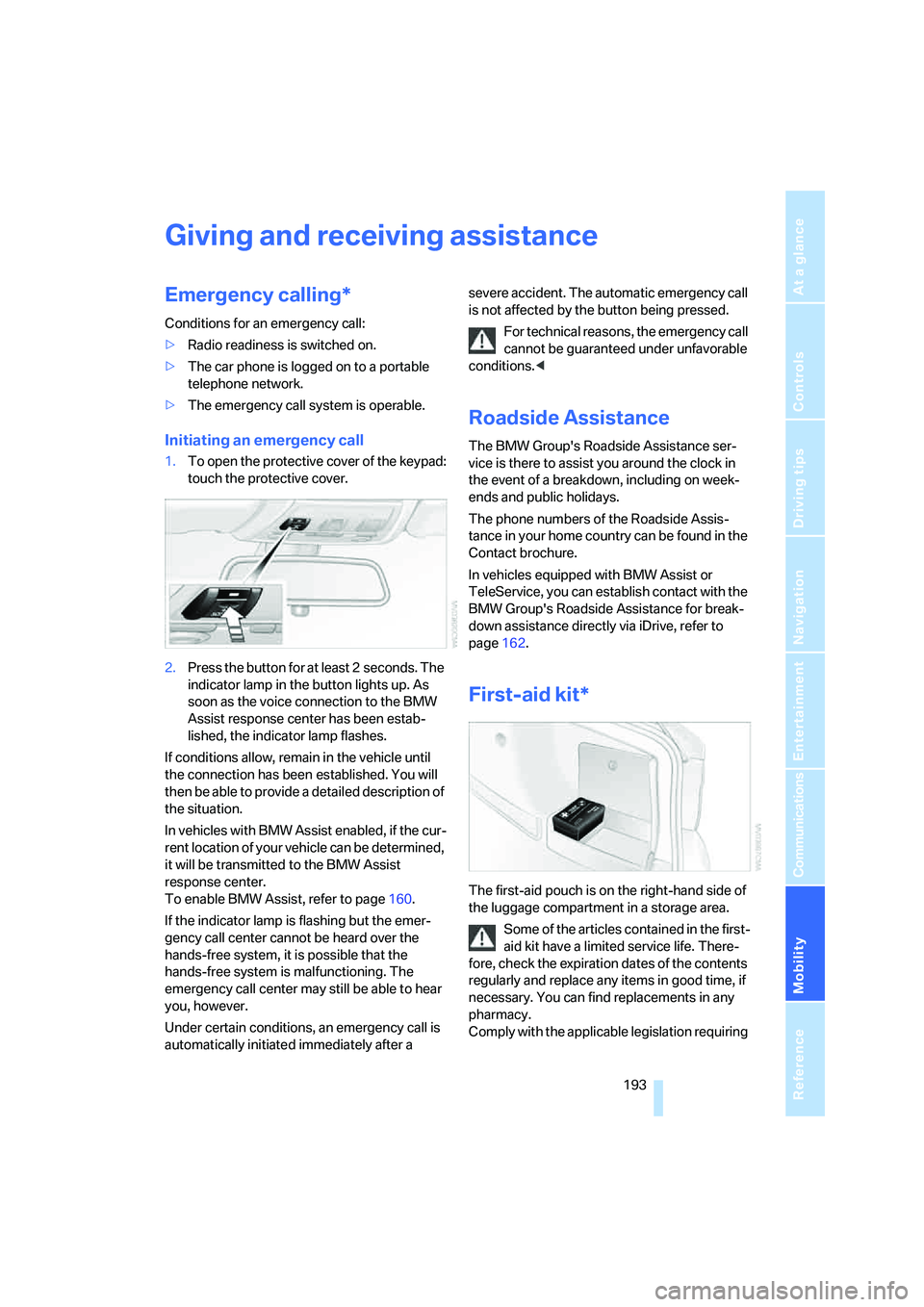
1.To open the protective cover of the keypad:
touch the protective cover.
2.Press the button for at least 2 seconds. The
indicator lamp in the button lights up. As
soon as the voice connection to the BMW
Assist response center has been estab-
lished, the indicator lamp flashes.
If conditions allow, remain in the vehicle until
the connection has been established. You will
then be able to provide a detailed description of
the situation.
In vehicles with BMW Assist enabled, if the cur-
rent location of your vehicle can be determined,
it will be transmitted to the BMW Assist
response center.
To enable BMW Assist, refer to page160.
If the indicator lamp is flashing but the emer-
gency call center cannot be heard over the
hands-free system, it is possible that the
hands-free system is malfunctioning. The
emergency call center may still be able to hear
you, however.
Under certain conditions, an emergency call is
automatically initiated immediately after a severe accident. The automatic emergency call
is not affected by the button being pressed.
For technical reasons, the emergency call
cannot be guaranteed under unfavorable
conditions.<
Roadside Assistance
The BMW Group's Roadside Assistance ser-
vice is there to assist you around the clock in
the event of a breakdown, including on week-
ends and public holidays.
The phone numbers of the Roadside Assis-
tance in your home country can be found in the
Contact brochure.
In vehicles equipped with BMW Assist or
TeleService, you can establish contact with the
BMW Group's Roadside Assistance for break-
down assistance directly via iDrive, refer to
page162.
First-aid kit*
The first-aid pouch is on the right-hand side of
the luggage compartment in a storage area.
Some of the articles contained in the first-
aid kit have a limited service life. There-
fore, check the expiration dates of the contents
regularly and replace any items in good time, if
necessary. You can find replacements in any
pharmacy.
Comply with the applicable legislation requiring
Page 203 of 223
Short commands for the voice command system
202
Short commands for the voice command
system
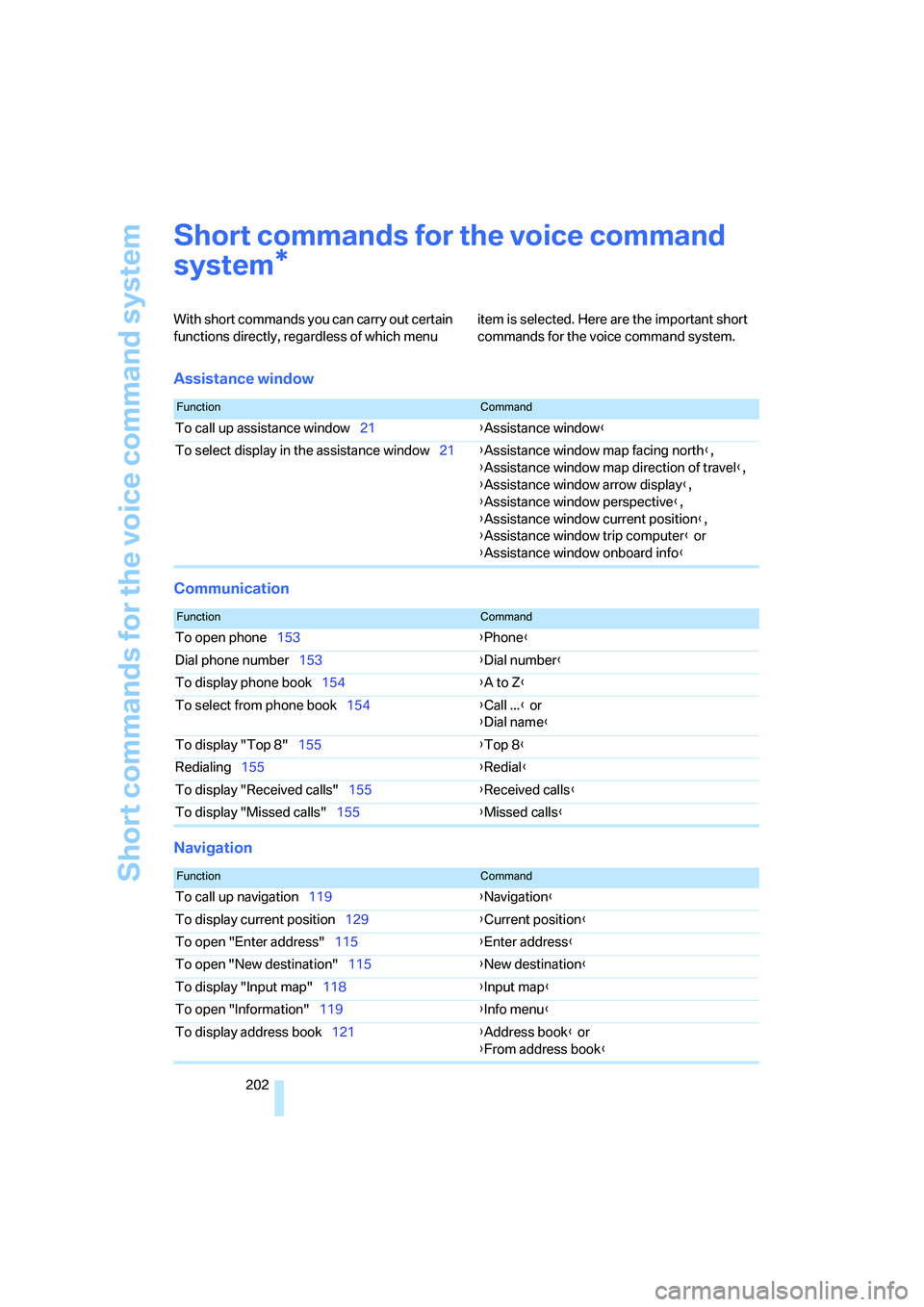
With short commands you can carry out certain
functions directly, regardless of which menu item is selected. Here are the important short
commands for the voice command system.
Assistance window
Communication
Navigation
*
FunctionCommand
To call up assistance window21{Assistance window}
To select display in the assistance window21{Assistance window map facing north},
{Assistance window map direction of travel},
{Assistance window arrow display},
{Assistance window perspective},
{Assistance window current position},
{Assistance window trip computer} or
{Assistance window onboard info}
FunctionCommand
To open phone153{Phone}
Dial phone number153{Dial number}
To display phone book154{A to Z}
To select from phone book154{Call ...} or
{Dial name}
To display "Top 8"155{Top 8}
Redialing155{Redial}
To display "Received calls"155{Received calls}
To display "Missed calls"155{Missed calls}
FunctionCommand
To call up navigation119{Navigation}
To display current position129{Current position}
To open "Enter address"115{Enter address}
To open "New destination"115{New destination}
To display "Input map"118{Input map}
To open "Information"119{Info menu}
To display address book121{Address book} or
{From address book}
Page 207 of 223
Everything from A - Z
206
Everything from A - Z
Index
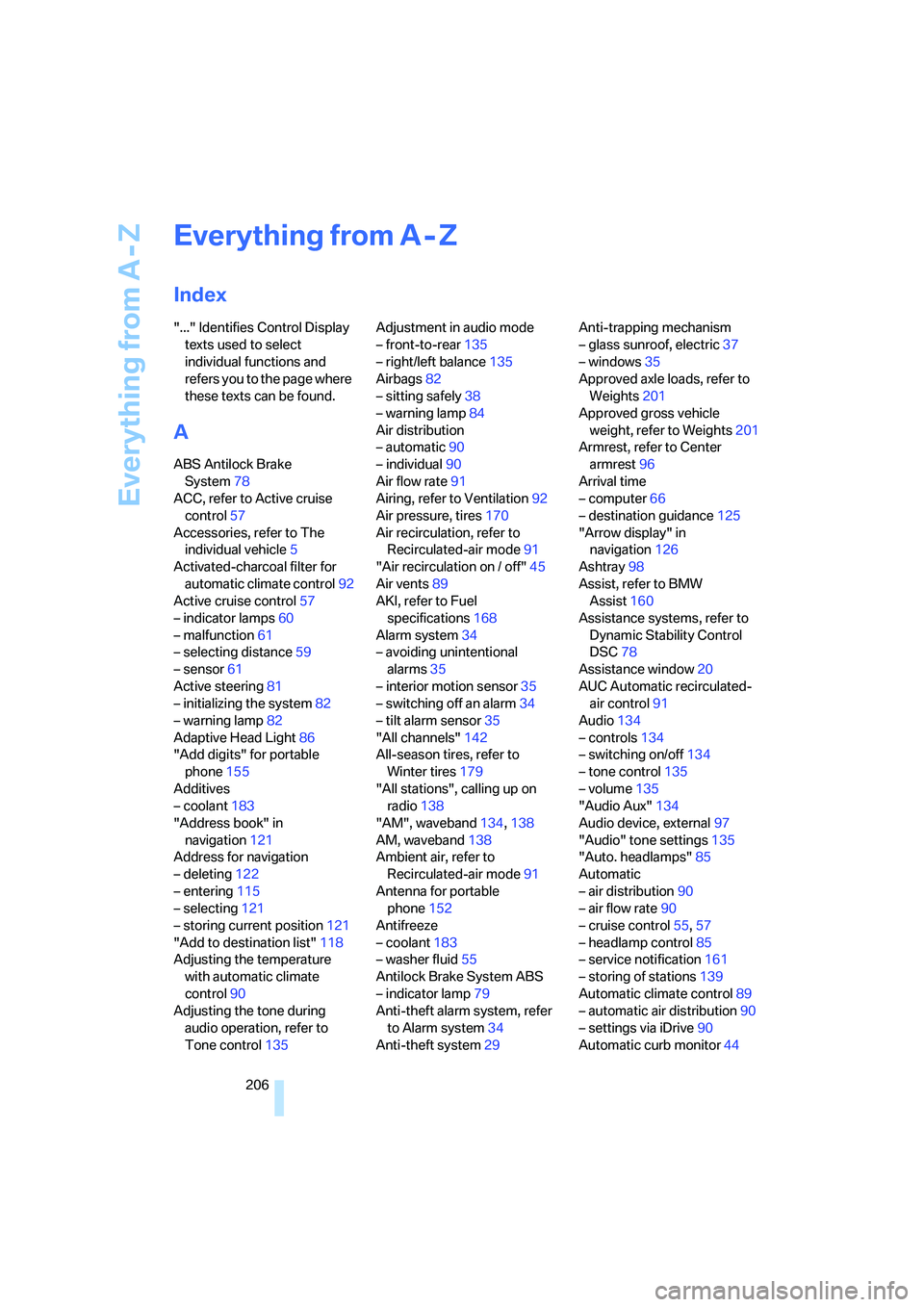
"..." Identifies Control Display
texts used to select
individual functions and
refers you to the page where
these texts can be found.
A
ABS Antilock Brake
System78
ACC, refer to Active cruise
control57
Accessories, refer to The
individual vehicle5
Activated-charcoal filter for
automatic climate control92
Active cruise control57
– indicator lamps60
– malfunction61
– selecting distance59
– sensor61
Active steering81
– initializing the system82
– warning lamp82
Adaptive Head Light86
"Add digits" for portable
phone155
Additives
– coolant183
"Address book" in
navigation121
Address for navigation
– deleting122
– entering115
– selecting121
– storing current position121
"Add to destination list"118
Adjusting the temperature
with automatic climate
control90
Adjusting the tone during
audio operation, refer to
Tone control135Adjustment in audio mode
– front-to-rear135
– right/left balance135
Airbags82
– sitting safely38
– warning lamp84
Air distribution
– automatic90
– individual90
Air flow rate91
Airing, refer to Ventilation92
Air pressure, tires170
Air recirculation, refer to
Recirculated-air mode91
"Air recirculation on / off"45
Air vents89
AKI, refer to Fuel
specifications168
Alarm system34
– avoiding unintentional
alarms35
– interior motion sensor35
– switching off an alarm34
– tilt alarm sensor35
"All channels"
142
All-season tires, refer to
Winter tires179
"All stations", calling up on
radio138
"AM", waveband134,138
AM, waveband138
Ambient air, refer to
Recirculated-air mode91
Antenna for portable
phone152
Antifreeze
– coolant183
– washer fluid55
Antilock Brake System ABS
– indicator lamp79
Anti-theft alarm system, refer
to Alarm system34
Anti-theft system29Anti-trapping mechanism
– glass sunroof, electric37
– windows35
Approved axle loads, refer to
Weights201
Approved gross vehicle
weight, refer to Weights201
Armrest, refer to Center
armrest96
Arrival time
– computer66
– destination guidance125
"Arrow display" in
navigation126
Ashtray98
Assist, refer to BMW
Assist160
Assistance systems, refer to
Dynamic Stability Control
DSC78
Assistance window20
AUC Automatic recirculated-
air control91
Audio134
– controls134
– switching on/off134
– tone control135
– volume135
"Audio Aux"134
Audio device, external97
"Audio" tone settings135
"Auto. headlamps"85
Automatic
– air distribution90
– air flow rate90
– cruise control55,57
– headlamp control85
– service notification161
– storing of stations139
Automatic climate control89
– automatic air distribution90
– settings via iDrive90
Automatic curb monitor44
Page 208 of 223
Reference 207
At a glance
Controls
Driving tips
Communications
Navigation
Entertainment
Mobility
"Automatic programs" with
automatic climate control91
Automatic recirculated-air
control AUC91
Automatic station search139
Automatic transmission with
Steptronic51
– interlock51,52
– overriding selector lever
lock53
– shiftlock52
– sport program52
– towing away195
– tow-starting195
AUTO program for automatic
climate control90
"Autostore"
on the radio140
AUX-IN149
– port97
Average fuel consumption66
– setting the units68
Average speed65
"Avoid ferries" in
navigation124
Avoid freeways for
navigation123
"Avoid highways" in
navigation123
Avoiding unintentional
alarms35
"Avoid tollroads" in
navigation124
Axle loads, refer to
Weights201
"A - Z"154
B
Backrests, refer to Seats39
Backrest width adjustment40
Back seats, refer to Rear seats
– adjusting head restraints41
Backup lamps
– replacing bulbs190
Backup lamps, refer to Tail
lamps189
Balance, tone control135Bar, refer to Tow-starting,
towing away196
Bass, tone control135
Battery191
– charging191
– disposal191
– jump starting194
– temporary power failure191
Being towed195
Belts, refer to Safety belts43
Belt tensioner, refer to Safety
belts43
Beverage holders, refer to
Cup holders98
Black ice, refer to Ice
warning64
Blower, refer to Air flow
rate91
BMW Assist160
– enabling160
– services offered161
"BMW Contact"164
"BMW Contact
Numbers"164
BMW Maintenance
System185
"BMW Service"162
"BMW Service settings"161
Bottle holders, refer to Cup
holders98
Brake assist, refer to Dynamic
Brake Control78
Brake fluid184
– level too low184
– warning lamp184
Brake fluid, refer to Service
requirements69
Brake Force Display82
Brake hydraulics, refer to
Brakes184
Brake lamps
– Brake Force Display82
– replacing bulbs190
Brake pads, breaking in106
Brake rotors108
– brakes106
– breaking in106Brakes
– ABS78
– BMW Maintenance
System185
– brake fluid184
– brake pads184
– breaking in106
– handbrake51
– service requirements69
Brakes, refer to Braking
safely107
Brake system106
– BMW Maintenance
System185
– brake fluid184
– brake pads184
– breaking in106
– disc brakes108
Breakdown services, refer to
Roadside Assistance193
Breaking in the clutch106
Breaking in the
differential106
Break-in period106
"Brightness"76
Bulb changing, refer to Lamps
and bulbs187
Button for starting engine49
Buttons on steering wheel11
C
California Proposition 65
warning5
"Call"154
Call
– accepting153
– displaying accepted155
– ending154
– in absence155
– starting153
Calling
– from phone book154
– from Top 8 list155
– redialing155
Can holders, refer to Cup
holders98
Capacities201
Page 209 of 223
Everything from A - Z
208 Car battery, refer to Vehicle
battery191
Car care, refer to Caring for
your vehicle brochure
Car-care products, refer to
Caring for your vehicle
brochure
"Car Data"66
Care, refer to Caring for your
vehicle brochure
Cargo, securing109
Cargo loading
– stowing cargo109
– vehicle108
Caring for artificial leather,
refer to Caring for your
vehicle brochure
Caring for leather, refer to
Caring for your vehicle
brochure
Caring for light-alloy wheels,
refer to Caring for your
vehicle brochure
Caring for plastic, refer to
Caring for your vehicle
brochure
Caring for the carpet, refer to
Caring for your vehicle
brochure
Caring for the vehicle finish,
refer to Caring for your
vehicle brochure
Car jack
– jacking points191
Car key, refer to Integrated
key/remote control28
Car phone152
– installation location, refer to
Center armrest96
– refer to Portable phone152
– refer to separate Owner's
Manual
Car radio, refer to Radio138
Car wash108
– also refer to Caring for your
vehicle brochure
Catalytic converter, refer to
Hot exhaust system106
"Categories"142CBS Condition Based
Service185
"CD"134,145
CD changer145
– controls134
– fast forward/reverse147
– installation location147
– playing a track146
– random order147
– repeating a track146
– selecting a CD145
– selecting a track146
– switching on/off134
– tone control135
– volume135
CD player145
– controls134
– fast forward/reverse147
– playing a track
146
– random order147
– repeating a track146
– selecting a track146
– switching on/off134
– tone control135
– volume135
Center armrest96
Center brake lamp
– replacing bulbs190
Center console, refer to
Around the center
console14
"Central locking"30
Central locking
– from inside32
– from outside29
Central locking system29
Changing bulbs187
Changing the language on the
Control Display76
Changing the measurement
units on the Control
Display68
Changing wheels191
Chassis number, refer to
Engine compartment181
Check Control73
"Check Control
messages"75
Check Gas Cap168Checking the air pressure,
refer to Tire inflation
pressure170
Child-restraint fixing system
LATCH48
Child-restraint systems46
Child-safety lock48
Child seats46
Chrome parts, care, refer to
Caring for your vehicle
brochure
Cigarette lighter99
– socket99
Cleaning, refer to Caring for
your vehicle brochure
Cleaning headlamps54
– washer fluid55
"Climate"90
Clock64
– 12h/24h mode72
– setting time71
Closing
– from inside32
– from outside30
Clothes hooks97
Cold start, refer to Starting the
engine49
Combined instrument, refer to
Instrument cluster12
Comfort area, refer to Around
the center console14
"Communication"153
"Communication
settings"160
Compact disc, refer to
– CD changer145
– CD player145
Compact wheel
– inflation pressure
172,173,174,175
Compartment for remote
control, refer to Ignition
lock49
Compass94
Computer65
– displays on Control
Display66
– hour signal72
Computer, refer to iDrive16
Page 210 of 223
Reference 209
At a glance
Controls
Driving tips
Communications
Navigation
Entertainment
Mobility
"Concert hall" tone
settings136
Condensation, refer to When
the vehicle is parked108
Configuring settings, refer to
Personal Profile29
Confirmation signals for
locking/unlocking of the
vehicle31
Connecting vacuum cleaner,
refer to Connecting
electrical appliances99
Consumption display
– average consumption66
Consumption indicator
– Energy Control64
"Continue guidance to
destination?"126
Control Center, refer to
iDrive16
Control Display, refer to
iDrive16
Controller, refer to iDrive16
Controls and displays10
Convenience operation
– windows30
Convenience start, refer to
Starting the engine49
Coolant183
– adding183
– checking level183
Cooling, maximum90
Cooling fluid, refer to
Coolant183
Country of destination for
navigation116
Courtesy lamps87
Cruise control55
– active57
– malfunction57
Cruising range65
Cup holders98
Curb weight, refer to
Weights201
Current fuel consumption64
"Current position"129Current position
– displaying129
– entering121
– storing121
"Customer
Relations"162,164
D
Dashboard, refer to
Cockpit10
Dashboard lighting, refer to
Instrument lighting87
Data200
– capacities201
– dimensions200
– engine200
– weights201
"Date"73
Date
– setting72
– setting format73
"Date format"73
Daytime driving lamps86
DBC Dynamic Brake
Control78
Deactivating front passenger
airbags83
Deadlocking, refer to
Locking30
Decommissioning the vehicle
– refer to Caring for your
vehicle brochure
Defect
– fuel filler door168
– glass sunroof37
Defogging windows91
Defroster
– rear window92
Defrosting windows91
Defrosting windows and
removing condensation91
Defrost position, refer to
Defrosting windows91
"Delete address book" in
navigation122
"Delete all numbers" on the
portable phone156"Delete data" in
navigation122
"Delete" for portable
phone156
Destination address
– deleting122
– entering115
Destination for navigation
– entry115
– navigation list120
– selecting from address
book121
– selecting using
information119
– storing121
Destination guidance125
– canceling voice
instructions45
– changing specified
route123
– displaying routes126
– distance and arrival125
– interrupting125
– starting125
– terminating/continuing125
– voice instructions127
– volume of voice
instructions128
Destination list for navigation
system120
Destinations recently driven
to120
"Dial" for portable phone153
"Dial number"154
Digital clock64
Digital compass94
Dimensions200
Directional indicators, refer to
Turn signals53
Direction instructions, refer to
Voice instructions127
Directory, refer to Phone
book154
Directory for navigation, refer
to Address book121
Displacement, refer to Engine
data200
Display, refer to iDrive
controls16