ECU BMW 330I 2006 User Guide
[x] Cancel search | Manufacturer: BMW, Model Year: 2006, Model line: 330I, Model: BMW 330I 2006Pages: 246, PDF Size: 8.43 MB
Page 121 of 246
Driving tips
119Reference
At a glance
Controls
Communications
Navigation
Entertainment
Mobility
cargo and luggage load capacity calculated
in step 4.
6.If your vehicle will be towing a trailer, part of
the load from your trailer will be transferred
to your vehicle. Consult the manual for
transporting a trailer to determine how this
may reduce the available cargo and luggage
load capacity of your vehicle.
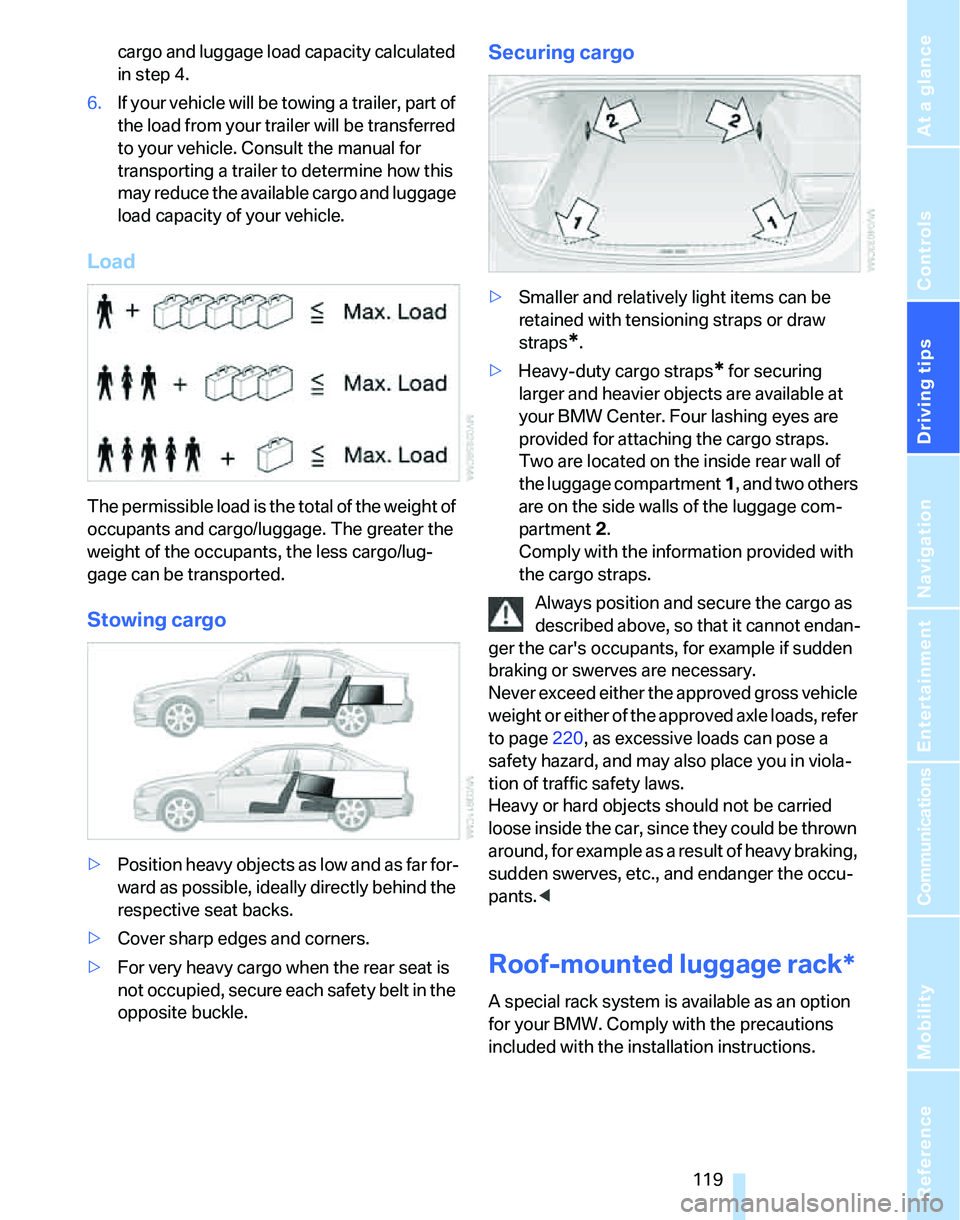
Load
The permissible load is the total of the weight of
occupants and cargo/luggage. The greater the
weight of the occupants, the less cargo/lug-
gage can be transported.
Stowing cargo
>Position heavy objects as low and as far for-
ward as possible, ideally directly behind the
respective seat backs.
>Cover sharp edges and corners.
>For very heavy cargo when the rear seat is
not occupied, secure each safety belt in the
opposite buckle.
Securing cargo
>Smaller and relatively light items can be
retained with tensioning straps or draw
straps
*.
>Heavy-duty cargo straps
* for securing
larger and heavier objects are available at
your BMW Center. Four lashing eyes are
provided for attaching the cargo straps.
Two are located on the inside rear wall of
the luggage compartment 1, and two others
are on the side walls of the luggage com-
partment 2.
Comply with the information provided with
the cargo straps.
Always position and secure the cargo as
described above, so that it cannot endan-
ger the car's occupants, for example if sudden
braking or swerves are necessary.
Never exceed either the approved gross vehicle
weight or either of the approved axle loads, refer
to page220, as excessive loads can pose a
safety hazard, and may also place you in viola-
tion of traffic safety laws.
Heavy or hard objects should not be carried
loose inside the car, since they could be thrown
around, for example as a result of heavy braking,
sudden swerves, etc., and endanger the occu-
pants.<
Roof-mounted luggage rack*
A special rack system is available as an option
for your BMW. Comply with the precautions
included with the installation instructions.
Page 122 of 246
Things to remember when driving
120
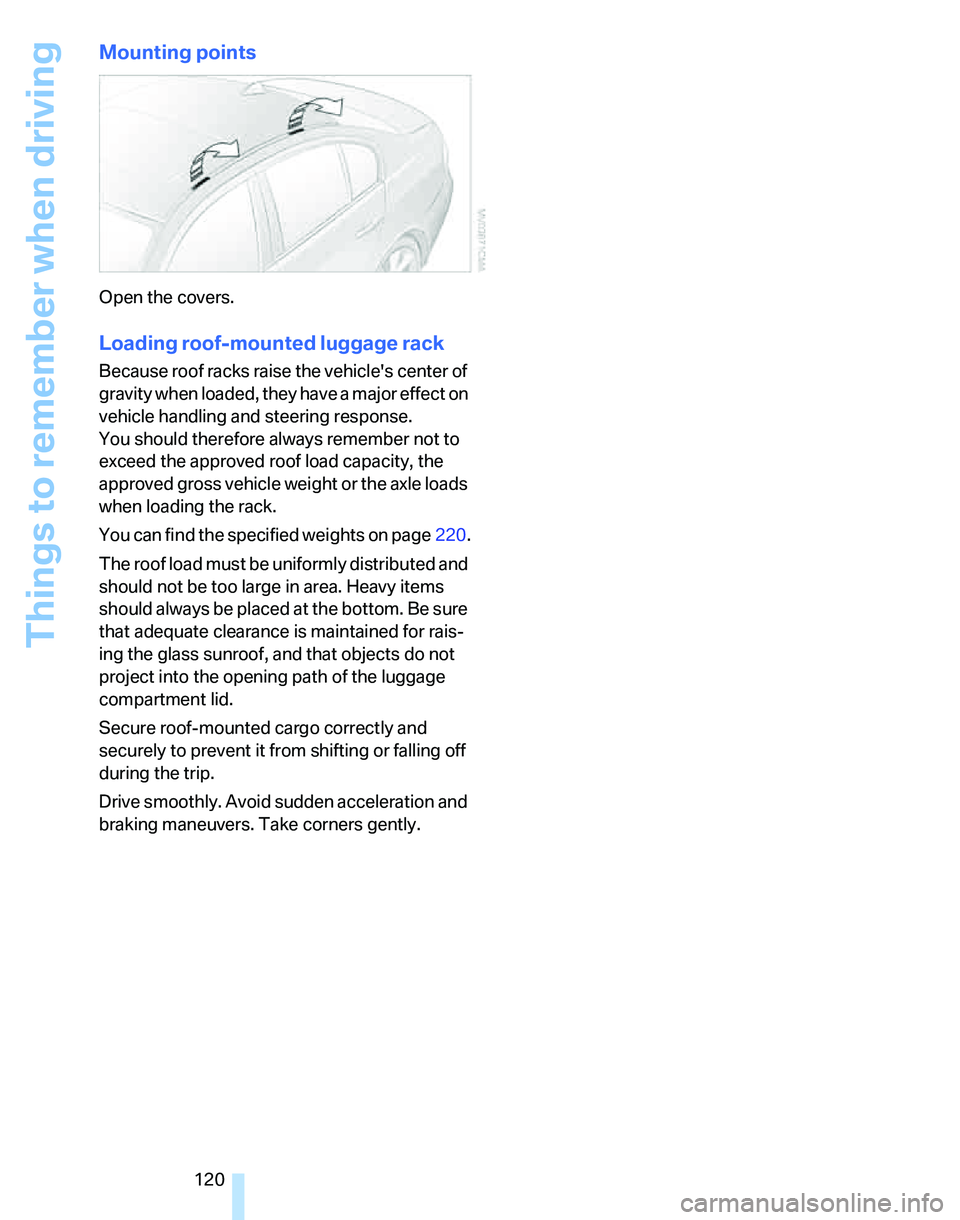
Mounting points
Open the covers.
Loading roof-mounted luggage rack
Because roof racks raise the vehicle's center of
gravity when loaded, they have a major effect on
vehicle handling and steering response.
You should therefore always remember not to
exceed the approved roof load capacity, the
approved gross vehicle weight or the axle loads
when loading the rack.
You can find the specified weights on page220.
The roof load must be uniformly distributed and
should not be too large in area. Heavy items
should always be placed at the bottom. Be sure
that adequate clearance is maintained for rais-
ing the glass sunroof, and that objects do not
project into the opening path of the luggage
compartment lid.
Secure roof-mounted cargo correctly and
securely to prevent it from shifting or falling off
during the trip.
Drive smoothly. Avoid sudden acceleration and
braking maneuvers. Take corners gently.
Page 141 of 246
Navigation
Driving tips
139Reference
At a glance
Controls
Communications
Entertainment
Mobility
Displaying towns/cities and streets
along the route
You can have the roads and towns along the
route displayed during destination guidance.
The distances remaining to be traveled within
each section of the route are also displayed.
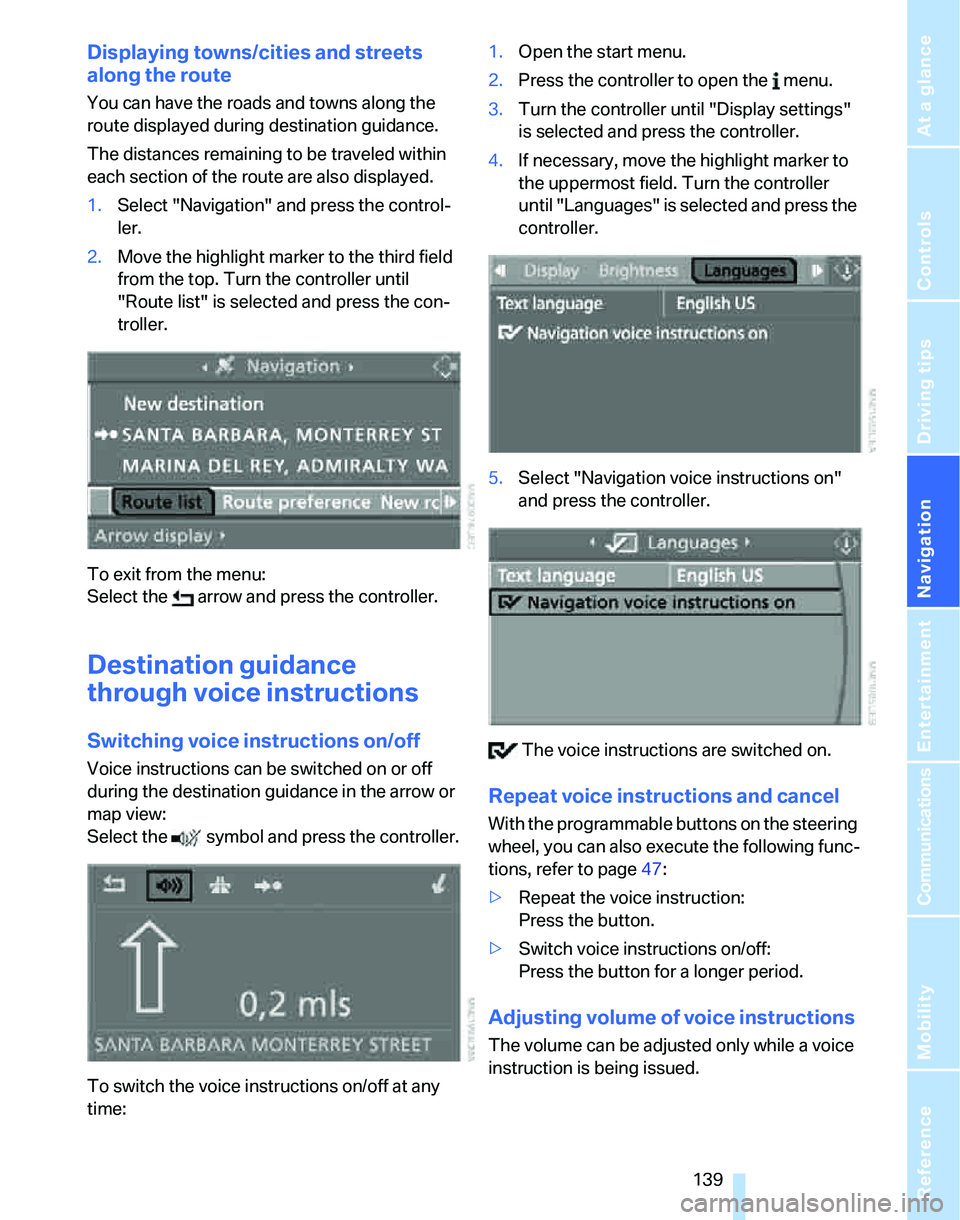
1.Select "Navigation" and press the control-
ler.
2.Move the highlight marker to the third field
from the top. Turn the controller until
"Route list" is selected and press the con-
troller.
To exit from the menu:
Select the arrow and press the controller.
Destination guidance
through voice instructions
Switching voice instructions on/off
Voice instructions can be switched on or off
during the destination guidance in the arrow or
map view:
Select the symbol and press the controller.
To switch the voice instructions on/off at any
time:1.Open the start menu.
2.Press the controller to open the menu.
3.Turn the controller until "Display settings"
is selected and press the controller.
4.If necessary, move the highlight marker to
the uppermost field. Turn the controller
until "Languages" is selected and press the
controller.
5.Select "Navigation voice instructions on"
and press the controller.
The voice instructions are switched on.
Repeat voice instructions and cancel
With the programmable buttons on the steering
wheel, you can also execute the following func-
tions, refer to page47:
>Repeat the voice instruction:
Press the button.
>Switch voice instructions on/off:
Press the button for a longer period.
Adjusting volume of voice instructions
The volume can be adjusted only while a voice
instruction is being issued.
Page 200 of 246
Under the hood
198
Under the hood
Do not work on the car unless you pos-
sess the necessary technical knowledge.
If you are unfamiliar with the statutory guide-
lines, have any work on the vehicle performed
only by a BMW Center or by a workshop that
work according to BMW repair procedures with
correspondingly trained personnel. If this work
is not carried out properly, there is a danger of
subsequent damage and related safety haz-
ards.<
Hood
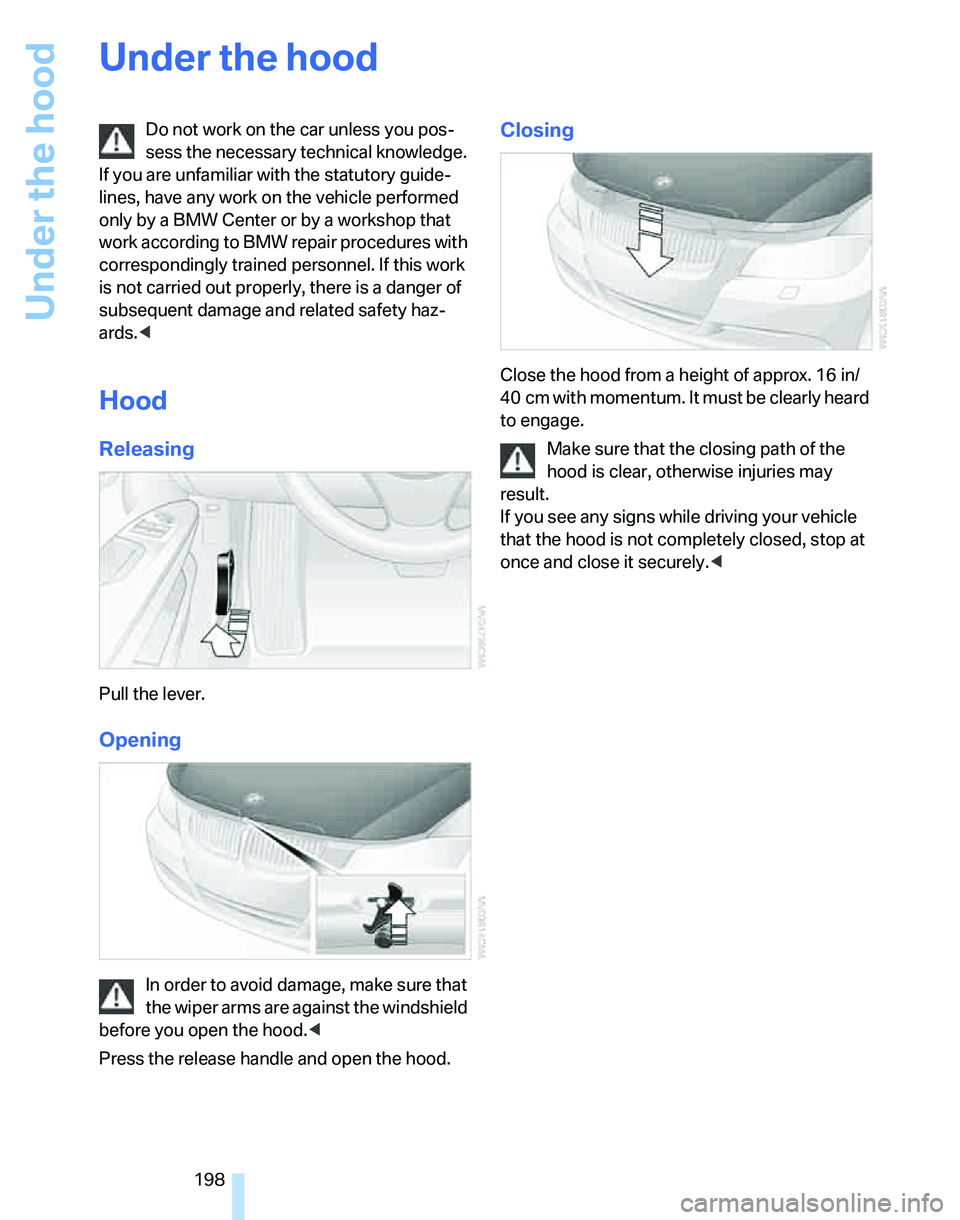
Releasing
Pull the lever.
Opening
In order to avoid damage, make sure that
the wiper arms are against the windshield
before you open the hood.<
Press the release handle and open the hood.
Closing
Close the hood from a height of approx. 16 in/
40 cm with momentum. It must be clearly heard
to engage.
Make sure that the closing path of the
hood is clear, otherwise injuries may
result.
If you see any signs while driving your vehicle
that the hood is not completely closed, stop at
once and close it securely.<
Page 211 of 246
Mobility
209Reference
At a glance
Controls
Driving tips
Communications
Navigation
Entertainment
according to BMW repair procedures with cor-
respondingly trained personnel.
Changing wheels
Your BMW is equipped with Run-Flat Tires as
standard. This removes the need to change a
wheel immediately in the event of a puncture.
The symbol identifying Run-Flat Tires is a circle
with the letters RSC on the sidewall, refer to
Run-Flat Tires, page196.
When mounting new tires or changing over
from summer to winter tires and vice versa,
mount Run-Flat Tires for your own safety. In the
event of a flat, moreover, no spare wheel is
available. Your BMW Center will be glad to
advise you. Refer also to New wheels and tires,
page196.
The tools for changing wheels are avail-
able as optional accessories from your
BMW Center.<
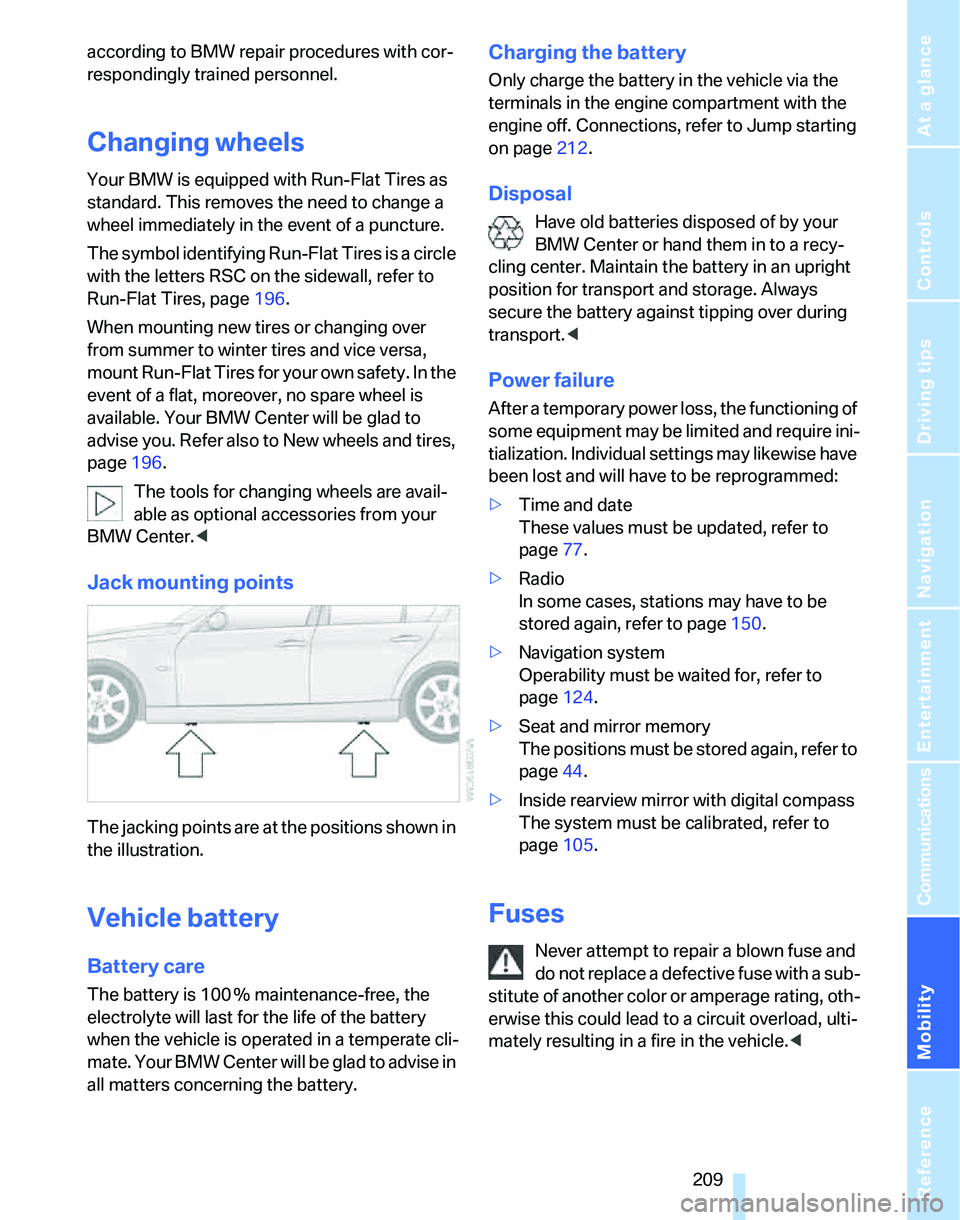
Jack mounting points
The jacking points are at the positions shown in
the illustration.
Vehicle battery
Battery care
The battery is 100 % maintenance-free, the
electrolyte will last for the life of the battery
when the vehicle is operated in a temperate cli-
mate. Your BMW Center will be glad to advise in
all matters concerning the battery.
Charging the battery
Only charge the battery in the vehicle via the
terminals in the engine compartment with the
engine off. Connections, refer to Jump starting
on page212.
Disposal
Have old batteries disposed of by your
BMW Center or hand them in to a recy-
cling center. Maintain the battery in an upright
position for transport and storage. Always
secure the battery against tipping over during
transport.<
Power failure
After a temporary power loss, the functioning of
some equipment may be limited and require ini-
tialization. Individual settings may likewise have
been lost and will have to be reprogrammed:
>Time and date
These values must be updated, refer to
page77.
>Radio
In some cases, stations may have to be
stored again, refer to page150.
>Navigation system
Operability must be waited for, refer to
page124.
>Seat and mirror memory
The positions must be stored again, refer to
page44.
>Inside rearview mirror with digital compass
The system must be calibrated, refer to
page105.
Fuses
Never attempt to repair a blown fuse and
do not replace a defective fuse with a sub-
stitute of another color or amperage rating, oth-
erwise this could lead to a circuit overload, ulti-
mately resulting in a fire in the vehicle.<
Page 230 of 246
Everything from A - Z
228 "Brightness"on the control
display82
Bulb changing, refer to Lamps
and bulbs205
Burned fuel
– refer to Average
consumption71
Button for starting engine52
Buttons on steering wheel11
C
California Proposition 65
warning6
"Call"172
Call
– accepting170
– displaying accepted172
– ending171
– in absence172
– starting171
Calling
– from phone book171
– from Top 8 list172
– redialing172
Can holders, refer to Cup
holders107
Capacities221
Capacity of luggage
compartment220
Car battery, refer to Vehicle
battery209
Car care, refer to Caring for
your vehicle brochure
Car-care products, refer to
Caring for your vehicle
brochure
"Car Data"71
Care, refer to Caring for your
vehicle brochure
Cargo, securing119
Cargo loading
– stowing cargo119
– vehicle118
Caring for artificial leather,
refer to Caring for your
vehicle brochureCaring for leather, refer to
Caring for your vehicle
brochure
Caring for light-alloy wheels,
refer to Caring for your
vehicle brochure
Caring for plastic, refer to
Caring for your vehicle
brochure
Caring for the carpet, refer to
Caring for your vehicle
brochure
Caring for the vehicle finish,
refer to Caring for your
vehicle brochure
Car jack
– jacking points209
Car key, refer to Integrated
key/remote control28
Car phone166
– installation location, refer to
Center armrest106
– refer to Mobile phone166
– refer to separate Owner's
Manual
Car radio, refer to Radio148
Car wash118
– also refer to Caring for your
vehicle brochure
Catalytic converter, refer to
Hot exhaust system116
"Categories"154
CBS Condition Based
Service203
"CD"144,156
CD changer156
– controls144
– fast forward/reverse
160
– installation location160
– playing a track158
– random order159
– repeating a track159
– selecting a CD156
– selecting a track157
– switching on/off144
– tone control145
– volume145CD player156
– controls144
– fast forward/reverse160
– playing a track158
– random order159
– repeating a track159
– selecting a track157
– switching on/off144
– tone control145
– volume145
Center armrest106
Center brake lamp
– replacing bulbs208
Center console, refer to
Around the center
console14
"Central locking"30
Central locking
– from inside32
– from outside29
Central locking system29
– convenient access35
Changing bulbs205
Changing the language on the
Control Display82
Changing the measurement
units on the Control
Display73
Changing wheels209
Chassis number, refer to
Engine compartment199
Check Control79
"Check Control
messages"80
Check Gas Cap186
Checking the air pressure,
refer to Tire inflation
pressure188
Child-restraint fixing system
LATCH50
Child-restraint systems49
Child-safety lock51
Child seats49
Chrome parts, care, refer to
Caring for your vehicle
brochure
Cigarette lighter108
– socket108
Page 235 of 246
Reference 233
At a glance
Controls
Driving tips
Communications
Navigation
Entertainment
Mobility
Indicator and warning
lamps13
Individual air distribution98
Individually programmable
buttons on steering
wheel47
Individual settings, refer to
Personal Profile29
Information
– on another location130
– on country130
– on current position130
– on destination location130
"Information" in
navigation131
"Information on
destination"132
Initializing
– compass, refer to
Calibrating105
– Flat Tire Monitor FTM88
– glass sunroof39
"Input map"130
Installation location
– CD changer160
Instructions for navigation
system, refer to Voice
instructions139
Instrument cluster12
Instrument lighting96
Instrument panel, refer to
Cockpit10
Integrated key28
Integrated universal remote
control103
Interesting destination for
navigation130
"Interim time"82
Interior lamps96
– remote control30
Interior motion sensor35
Interior rearview mirror46
– automatic dimming
feature117
Interior rearview mirror with
digital compass104
Interlock57
Intermittent mode of the
wipers59J
Jacking points209
Joystick, refer to iDrive16
Jumpering, refer to Jump
starting212
Jump starting212
K
Key, refer to Integrated key/
remote control28
Keyless Go, refer to
Convenient access35
Keyless opening and closing,
refer to Convenient
access35
Key Memory, refer to Personal
Profile29
"Keypad"173
Kick-down58
– automatic transmission with
Steptronic58
– sequential manual gearbox
SMG56
Knock control186
L
Lamps, refer to Parking lamps/
low beams93
Lamps and bulbs, replacing
bulbs205
"Languages" in
navigation139
"Languages"on the control
display82
Lap-and-shoulder safety
belt45
Lashing eyes, refer to
Securing cargo119
Last destinations, refer to
Destination list131
"Last seat pos."44
LATCH child-restraint fixing
system50
LEDs light-emitting
diodes205Length, refer to
Dimensions219
License plate lamp, replacing
bulbs208
Light-emitting diodes
LEDs205
Lighter108
"Lighting"94
Lighting
– instruments96
– lamps and bulbs205
– of the vehicle, refer to
Lamps93
Light switch93
"Limit"81
Limit, refer to Speed limit81
Loading
– securing cargo119
Load securing equipment,
refer to Securing cargo119
Location
– drive for navigation DVD and
audio CD124
Lock buttons in the doors,
refer to Locking33
Locking
– adjusting confirmation
signal31
– from inside33
– from outside30
– without remote control, refer
to Convenient access35
Locking and unlocking doors
– from inside32
– from outside30
"LOGIC7", refer to Tone
control146
Low beams93
– automatic93
– replacing bulbs206
Lower back support, refer to
Lumbar support41
Page 236 of 246
Everything from A - Z
234 Luggage compartment
– capacity220
– convenient access36
– folding up the floor
panel110
– lamp96
– opening from inside33
– opening from outside33
Luggage compartment lid33
– convenient access36
– unlocking with remote
control31
Luggage compartment lid,
refer to Tailgate33
Luggage compartment net,
refer to Securing cargo119
Luggage rack, refer to Roof-
mounted luggage rack119
Lumbar support41
M
M+S tires, refer to Winter
tires197
Maintenance, refer to Service
Booklet
Maintenance system203
Malfunction warnings, refer to
Check Control79
Manual mode
– automatic transmission with
Steptronic58
– sequential manual gearbox
SMG55
"Manual" on the radio149
Manual operation
– door lock32
– glass sunroof39
– panorama glass roof39
– transmission lock, automatic
transmission58
Manual release
– fuel filler door186
Manual transmission54
Map
– changing scale138
– destination entry129
"Map direction of travel"138
"Map facing north"138Master key, refer to Integrated
key/remote control28
Maximum cooling98
Maximum speed
– with winter tires197
Memory, refer to Seat and
mirror memory44
MENU button16
Menus, refer to iDrive16
Microfilter
– BMW Maintenance
System203
– for automatic climate
control101
Microfilter/activated-charcoal
filter
– BMW Maintenance
System203
Microphone for telephone14
Mirror dimming feature117
Mirrors45
– automatic curb monitor46
– exterior mirrors45
– heating46
– interior rearview mirror46
"Missed calls"172
Missed calls172
Mobile phone
– accepted calls172
– adjusting volume170
– calling171
– ending call171
– installation location, refer to
Center armrest106
– missed calls
172
– operation via iDrive170
– redialing172
– refer to separate Owner's
Manual
– Top 8172
– touch tone dialing173
Mobile phone, installation
location, refer to Center
armrest106
Mobile phone, refer to the
separate Owner's Manual
Mobile phone in the
vehicle116Mobile phones, use inside the
car, refer to Mobile phone in
the vehicle116
Modifications, technical, refer
to For your own safety5
Monitor, refer to iDrive
controls16
Monitoring system for tire
pressures, refer to Flat Tire
Monitor88
"Monitor on / off"47
Most recent mobile phone
numbers172
MP3, refer to Compressed
audio files156
Multifunctional steering
wheel, refer to Buttons on
the steering wheel11
Multifunction switch
– refer to Turn signals/
headlamp flasher58
– refer to Wiper system59
Music track
– finding158
"Mute on / off"47
Muting the TV144
N
"Navigation"125
Navigation address
– home address134
Navigation announcements,
refer to Switching voice
instructions on/off139
Navigation destination
– manual entry125,128
– selecting via map129
Navigation drive, location124
Navigation DVD124
Page 239 of 246
Reference 237
At a glance
Controls
Driving tips
Communications
Navigation
Entertainment
Mobility
"Reset" for stopwatch82
"Reset" for tone settings147
Residual heat mode99
Restraint systems
– for children49
– refer to Safety belts45
Reverse
– CD changer160
– CD player160
Reverse gear
– automatic transmission with
Steptronic58
– manual transmission55
– sequential manual gearbox
SMG55
Road map138
"Roadside Assistance"180
Roadside
Assistance180,211
Roadside parking lamps95
– replacing bulbs207
Roadworthiness test, refer to
Service requirements74
Roller blind
– sun blinds106
Roof load capacity220
Roof-mounted luggage
rack119
Rope, refer to Tow-starting,
towing away214
Rotary/pushbutton, refer to
iDrive16
Route134
– bypassing sections140
– changing134
– display137
– displaying arrow view137
– displaying map view138
– displaying town139
– list139
– selecting134
– selecting criteria134
Route selection134
RSC Runflat System
Component, refer to Run-
Flat Tires196
Runflat System Component
RSC, refer to Run-Flat
Tires196Run-Flat Tires196
– continuing driving with a
damaged tire89
– flat tire89
– new tires196
– replacing tires196
– tire pressures188
– winter tires197
Runflat Tyres, refer to Run-
Flat Tires196
S
Safety-belt height
adjustment45
Safety belts45
– damage45
– indicator lamp45
– reminder45
– sitting safely40
Safety systems
– airbags90
– Antilock Brake System
ABS84
– Dynamic Stability Control
DSC84
– safety belts45
Safety tires, refer to Run-Flat
Tires196
Sampling tracks
– scan158
Satellite radio153
– enabling153
– selecting channel154
– storing channel154
"SAT" for radio144,153
"Scan"
– sampling radio stations149
– sampling tracks on CD158
Scan
– CD changer158
– CD player158
– radio149
"Scan all" for audio mode159
"Scan directory" for audio
mode159
Screen, refer to iDrive
controls16Screw thread for tow
fitting213
SDARS, refer to Satellite
radio153
Seat adjustment
– electric41
– mechanical41
Seat and mirror memory44
Seat belt reminder, refer to
'Fasten safety belts'
reminder45
Seats40
– adjusting the seats41
– heating43
– sitting safely40
Securing cargo111
Securing the vehicle
– from inside32
– from outside30
"Select as destination"131
"Select current speed"81
Selecting an audio source144
Selecting distance for active
cruise control64
Selecting menu items19
Selecting new scale for
navigation138
Selecting the frequency
manually149
Selecting the route134
Selection options with
navigation system134
Selector lever
– automatic transmission with
Steptronic57
– sequential manual gearbox
SMG55
Selector lever lock, refer to
Shiftlock
– automatic transmission with
Steptronic57
– sequential manual gearbox
SMG55
Selector lever positions
– automatic transmission with
Steptronic57
– sequential manual gearbox
SMG55
Page 241 of 246
Reference 239
At a glance
Controls
Driving tips
Communications
Navigation
Entertainment
Mobility
Steering wheel47
– adjustment47
– buttons on steering
wheel11
– freely programmable
buttons47
– lock52
"Steering wheel buttons"47
Steering with variable ratio,
refer to Active steering89
Steptronic, refer to Automatic
transmission with
Steptronic57
"Stopwatch"81
Stopwatch81
Storage compartments107
"Store in address book" in
navigation132
"Store" on the radio150,155
Storing current position132
Storing radio stations150
Storing seat positions, refer to
Seat and mirror memory44
Storing tires197
Stowage, refer to Storage
compartments107
"Street" in destination
entry127
Summer tires, refer to Wheels
and tires188
Sun blinds106
Switches, refer to Cockpit10
Switching off
– engine53
Switching off the engine
– start/stop button52
Switching on
– audio144
– CD changer144
– CD player144
– radio144
Switching on the hour
signal78
Switching the cooling function
on and off100
Symbols4
– Control Display20T
Tachometer69
Tailgate
– locking or unlocking
separately33
– opening and closing33
– opening from inside33
– opening from outside33
Tail lamps207
– replacing bulbs208
Tank contents, refer to
Capacities221
Technical data218
Technical modifications5
Telematik, refer to
TeleService, BMW
Assist178
Telephone
– installation location, refer to
Center armrest106
– refer to separate Owner's
Manual
Telephone, refer to Mobile
phone166
"Telephone list"47
TeleService178
– enabling178
– services offered179
Temperature adjustments
– automatic climate control98
Temperature display
– ice warning69
– outside temperature69
– setting the units73
Temperature of the coolant,
refer to Coolant
temperature69
Tensioning straps, refer to
Securing cargo119
"Terminate services"181
"Text language"82
"Theater" tone settings146
The individual vehicle5
Thigh support42
Third brake lamp, refer to
Center brake lamp208
Tilt alarm sensor35Tilt function, passenger-side
mirror46
"Time"78
"Time format"78
Timer, refer to Preselecting
switch-on times101
"Timer 1" for parked car
ventilation/heating101
"Timer 2" for parked car
ventilation/heating101
Tire inflation pressures188
Tire pressure
– loss89
Tire pressure monitoring,
refer to Flat Tire Monitor88
Tire puncture, refer to Flat Tire
Monitor89
Tire Quality Grading194
Tires
– age194,196
– breaking in116
– changing, refer to Changing
wheels209
– condition195
– damage195
– inflation pressure188
– minimum tread depth195
– new tires196
– pressure monitoring, refer to
Flat Tire Monitor88
– puncture89
– Run-Flat Tires196
– size194
– wear indicators, refer to
Minimum tread depth195
– winter tires197
"Tone"145
Tone in audio mode
– adjusting145
– middle setting147
Tools, refer to Onboard tool
kit205
"Top 8" for mobile phone172
Torque218
Touch tone dialing173
Tow bar214
Tow fitting
– screw thread213
Tow fittings213