steering wheel BMW 335D 2011 E90 Owner's Guide
[x] Cancel search | Manufacturer: BMW, Model Year: 2011, Model line: 335D, Model: BMW 335D 2011 E90Pages: 286, PDF Size: 8.25 MB
Page 187 of 286
185
Entertainment
Reference
At a glance
Controls
Driving tips Communications
Navigation
Mobility
Dialing phone numbers
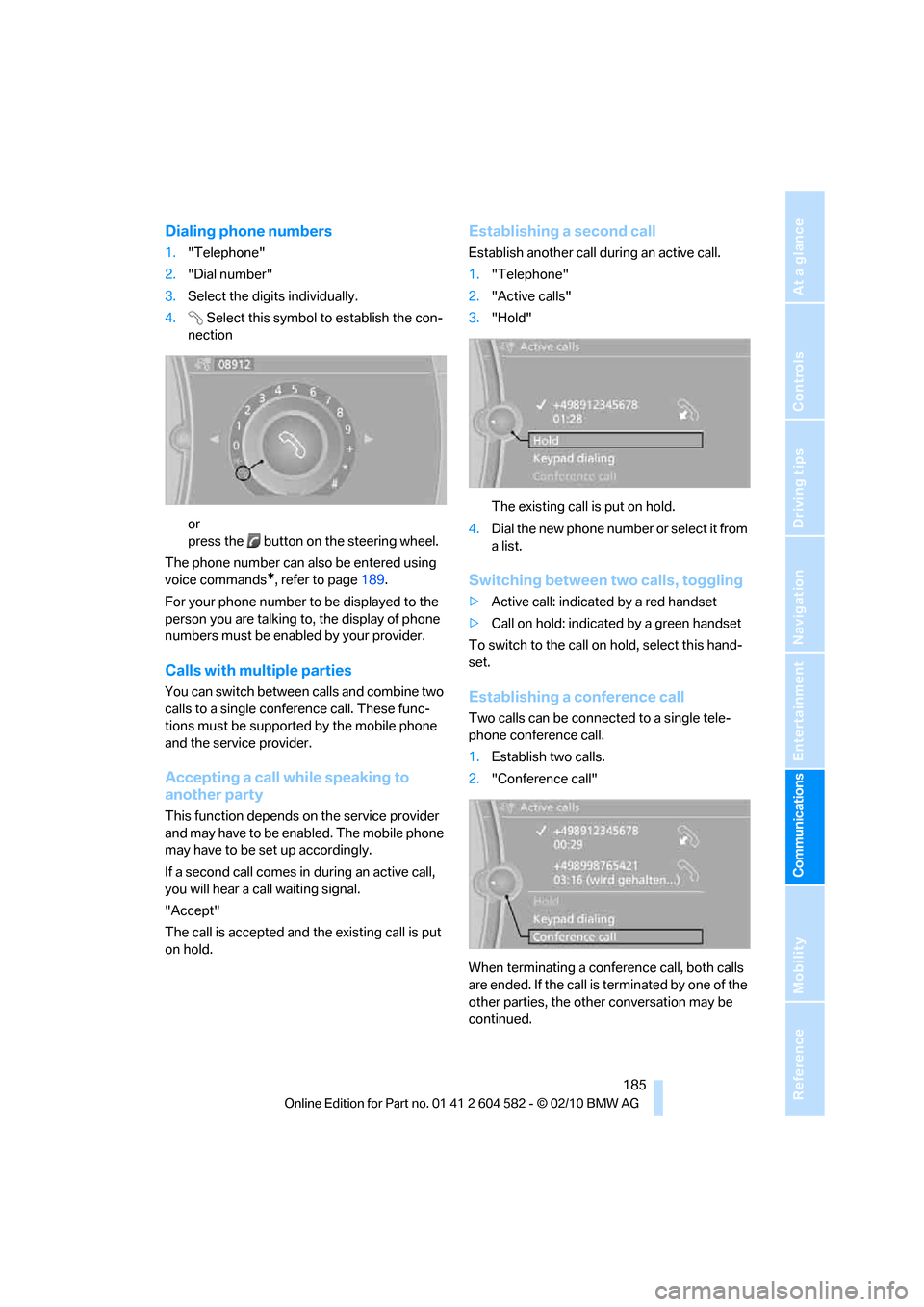
1."Telephone"
2."Dial number"
3.Select the digits individually.
4.Select this symbol to establish the con-
nection
or
press the button on the steering wheel.
The phone number can also be entered using
voice commands
*, refer to page189.
For your phone number to be displayed to the
person you are talking to, the display of phone
numbers must be enabled by your provider.
Calls with multiple parties
You can switch between calls and combine two
calls to a single conference call. These func-
tions must be supported by the mobile phone
and the service provider.
Accepting a call while speaking to
another party
This function depends on the service provider
and may have to be enabled. The mobile phone
may have to be set up accordingly.
If a second call comes in during an active call,
you will hear a call waiting signal.
"Accept"
The call is accepted and the existing call is put
on hold.
Establishing a second call
Establish another call during an active call.
1."Telephone"
2."Active calls"
3."Hold"
The existing call is put on hold.
4.D ial the new phone number or se lec t it fro m
a list.
Switching between two calls, toggling
>Active call: indicated by a red handset
>Call on hold: indicated by a green handset
To switch to the call on hold, select this hand-
set.
Establishing a conference call
Two calls can be connected to a single tele-
phone conference call.
1.Establish two calls.
2."Conference call"
When terminating a conference call, both calls
are ended. If the call is terminated by one of the
other parties, the other conversation may be
continued.
Page 191 of 286
189
Entertainment
Reference
At a glance
Controls
Driving tips Communications
Navigation
Mobility
Operation by voice
commands*
The concept
>You can operate your mobile phone without
having to take a hand off the steering wheel.
>{...} Verbal instructions to use with the voice
activation system.
Requirements
The same prerequisites apply as for operation
via iDrive, refer to page184.
Saying commands
Activating voice activation system
1.Briefly press the button on the steering
wheel.
A sound signal indicates that you can say
commands.
2.Say the command.
Ending/canceling operation by voice
commands
Briefly press the button on the steering
wheel or
In dialogs not involving voice commands, i.e.
when you are speaking only text, e.g. a name,
canceling is possible only via the button on the
steering wheel.
Having the possible commands read
aloud
The system recognizes specific commands
that must be pronounced exactly word for word.
You can have the possible commands for any
function read aloud to you:
Digits from zero to nine are recognized.
You can say each digit individually or group
them into a sequence to accelerate the input.
Using alternative commands
Often there is more than a single command to
run a function, e.g.:
Example: dialing phone numbers
To start the dialog:
Press the button on the steering wheel.
{Cancel}.
{Help}.
{Dial name} or {Name}.
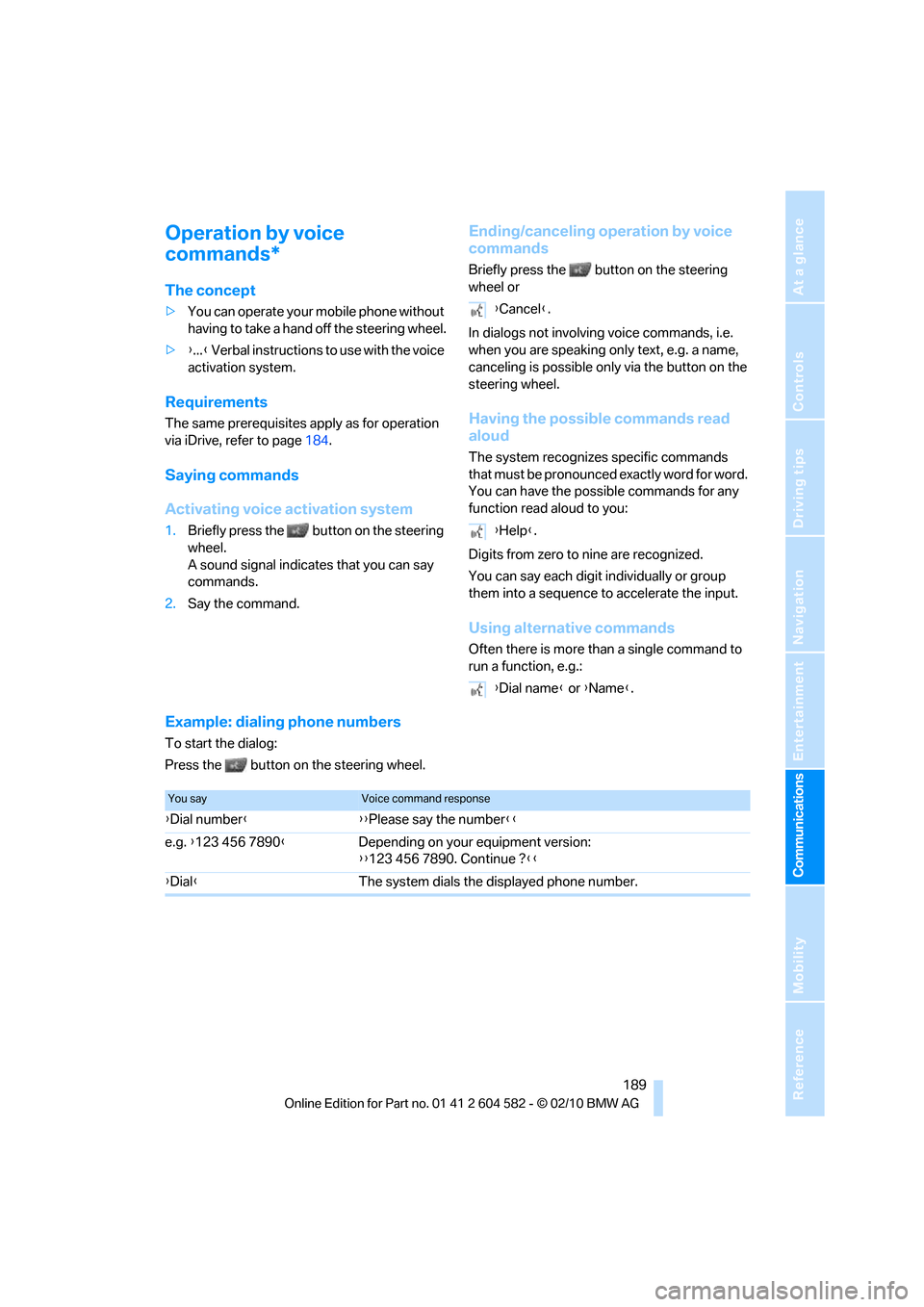
You sayVoice command response
{Dial number}{{Please say the number}}
e.g. {123 456 7890}Depending on your equipment version:
{{123 456 7890. Continue ?}}
{Dial}The system dials the displayed phone number.
Page 251 of 286
Mobility
249Reference
At a glance
Controls
Driving tips
Communications
Navigation
Entertainment
Using a tow fitting
The screw-in tow fitting must always be carried
in the car. It can be screwed in at the front or
rear of the BMW.
Sedan: it is stored in the onboard vehicle tool kit
underneath the cover on the right-hand side of
the cargo area, refer to page237.
Sports Wagon: it is stored in the onboard vehi-
cle tool kit underneath the cover on the left-
hand side of the cargo area, refer to page237.
Use only the tow fitting provided with the
vehicle and screw it all the way in. Use the
tow fitting for towing on paved roads only. Avoid
lateral loading of the tow fitting, e.g. do not lift
the vehicle by the tow fitting. Otherwise, the
tow fitting and the vehicle could be damaged.<
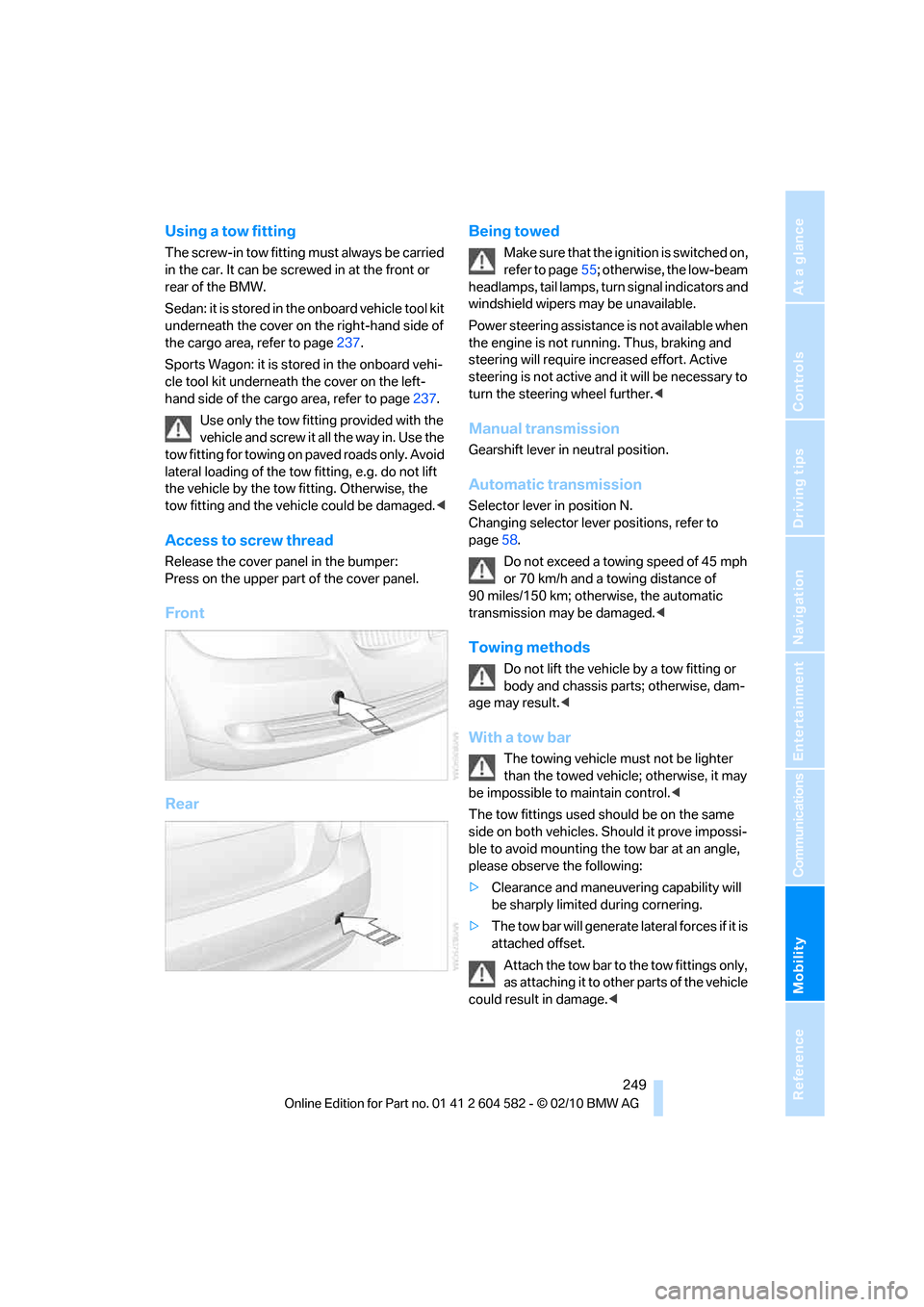
Access to screw thread
Release the cover panel in the bumper:
Press on the upper part of the cover panel.
Front
RearBeing towed
Make sure that the ignition is switched on,
refer to page55; otherwise, the low-beam
headlamps, tail lamps, turn signal indicators and
windshield wipers may be unavailable.
Power steering assistance is not available when
the engine is not running. Thus, braking and
steering will require increased effort. Active
steering is not active and it will be necessary to
turn the steering wheel further.<
Manual transmission
Gearshift lever in neutral position.
Automatic transmission
Selector lever in position N.
Changing selector lever positions, refer to
page58.
Do not exceed a towing speed of 45 mph
or 70 km/h and a towing distance of
90 miles/150 km; otherwise, the automatic
transmission may be damaged.<
Towing methods
Do not lift the vehicle by a tow fitting or
body and chassis parts; otherwise, dam-
age may result.<
With a tow bar
The towing vehicle must not be lighter
than the towed vehicle; otherwise, it may
be impossible to maintain control.<
The tow fittings used should be on the same
side on both vehicles. Should it prove impossi-
ble to avoid mounting the tow bar at an angle,
please observe the following:
>Clearance and maneuvering capability will
be sharply limited during cornering.
>The tow bar will generate lateral forces if it is
attached offset.
Attach the tow bar to the tow fittings only,
as attaching it to other parts of the vehicle
could result in damage.<
Page 252 of 286
Giving and receiving assistance
250
With a tow rope
When starting off in the towing vehicle, make
sure that the tow rope is taut.
To avoid jerking and the associated
stresses on vehicle components when
towing, always use nylon ropes or nylon straps.
Attach the tow rope to the tow fittings only, as
attaching it to other parts of the vehicle could
result in damage.<
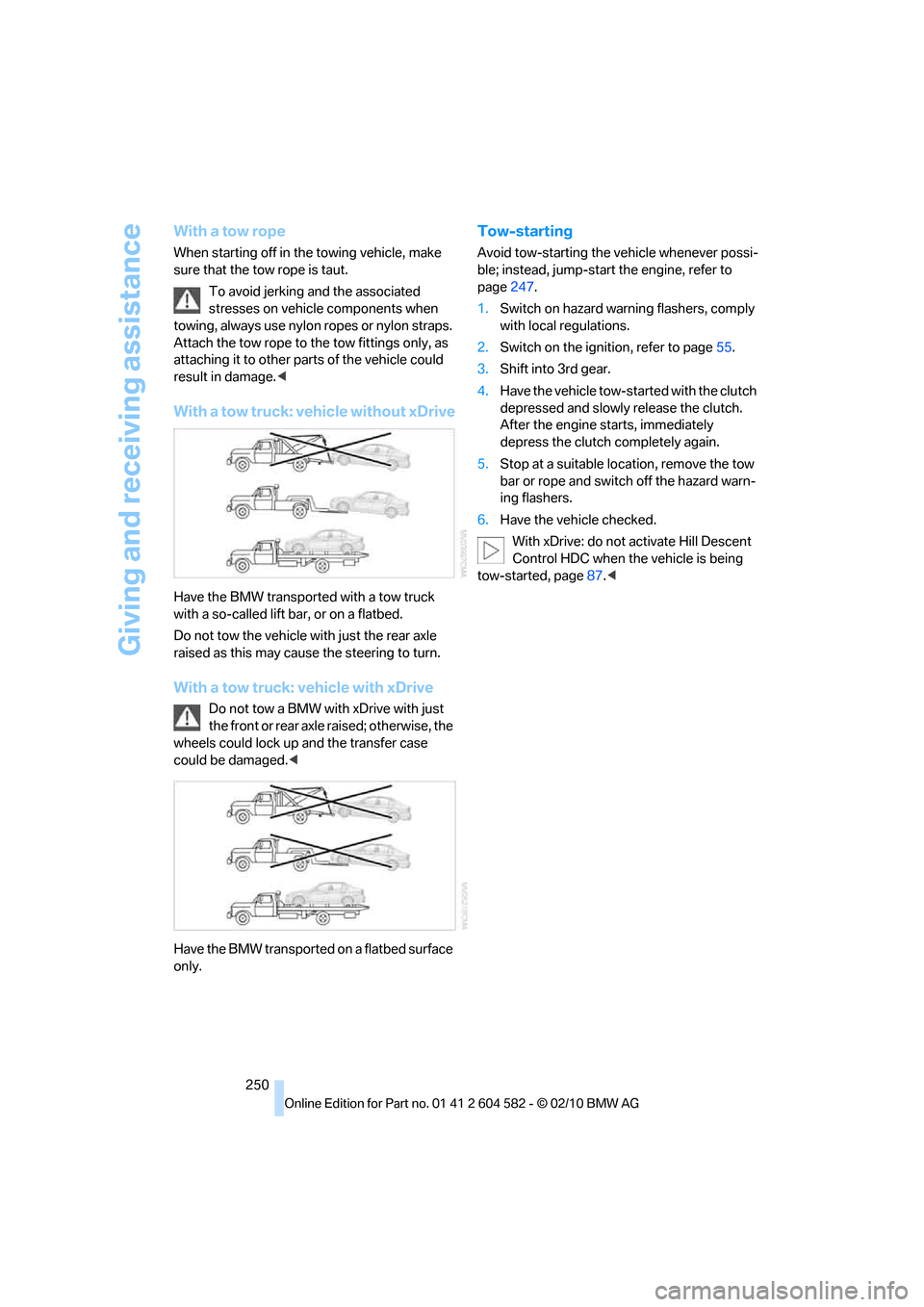
With a tow truck: vehicle without xDrive
Have the BMW transported with a tow truck
with a so-called lift bar, or on a flatbed.
Do not tow the vehicle with just the rear axle
raised as this may cause the steering to turn.
With a tow truck: vehicle with xDrive
Do not tow a BMW with xDrive with just
the front or rear axle raised; otherwise, the
wheels could lock up and the transfer case
could be damaged.<
Have the BMW transported on a flatbed surface
only.
Tow-starting
Avoid tow-starting the vehicle whenever possi-
ble; instead, jump-start the engine, refer to
page247.
1.Switch on hazard warning flashers, comply
with local regulations.
2.Switch on the ignition, refer to page55.
3.Shift into 3rd gear.
4.Have the vehicle tow-started with the clutch
depressed and slowly release the clutch.
After the engine starts, immediately
depress the clutch completely again.
5.Stop at a suitable location, remove the tow
bar or rope and switch off the hazard warn-
ing flashers.
6.Have the vehicle checked.
With xDrive: do not activate Hill Descent
Control HDC when the vehicle is being
tow-started, page87.<
Page 268 of 286
Everything from A to Z
266
Everything from A to Z
Index
A
ABS Antilock Brake
System85
ACC, refer to Active cruise
control64
Accident, refer to Sending an
Emergency Request246
Activated-charcoal filter for
automatic climate
control105
Active Cruise Control
– indicator lamp67
– malfunction68
– selecting distance66
– sensor68
Active cruise control64
Active steering92
Adaptive brake light
– Brake Force Display93
Adaptive light control98
Additives
– coolant230
Address, entering131,137
Address for navigation
– entering131
Adjusting temperature inside
the car, refer to Automatic
climate control103
Adjusting the thigh support43
Airbags94
– indicator/warning lamp96
– sitting safely42
Air conditioning mode
– automatic climate
control103
– ventilation105
Air distribution
– automatic103
Airing, refer to Ventilation105
Air pressure, refer to Tire
inflation pressure208Air recirculation, refer to
Recirculated-air mode104
Air supply
– automatic climate
control103
– ventilation105
Air vents102
Air volume104
AKI, refer to Fuel
specifications203
Alarm system33
– avoiding unintentional
alarms34
– interior motion sensor34
– switching off an alarm34
– tilt alarm sensor34
Albums of music
collection170
ALL program104
All-season tires, refer to
Winter tires224
All-wheel drive, refer to
xDrive86
AM, waveband153
Ambient air, refer to
Recirculated-air mode104
Antenna for mobile phone180
Antifreeze
– coolant230
– washer fluid62
Antilock Brake System
ABS85
Anti-theft alarm system, refer
to Alarm system33
Anti-theft system27
Approved axle loads, refer to
Weights257
Approved gross vehicle
weight, refer to Weights257
Armrest, refer to Center
armrest111
Arrival time, refer to
Computer74Ashtray112
Assist systems, refer to
Driving stability control85
AUC Automatic recirculated-
air control104
Audible instructions, refer to
Spoken instructions142
Audio150
– controls150
– switching on/off150
– tone control150
– volume150
Audio device, external111
Automatic
– air distribution103
– air volume103
– cruise control62,64
– headlamp control97
Automatic car washes233
Automatic climate control102
Automatic curb monitor49
Automatic high beams and
low beams, refer to High-
beam assistant99
Automatic recirculated-air
control AUC104
Automatic Service
Request199
Automatic transmission with
Steptronic57
– interlock58
– overriding selector lever
lock60
– shiftlock, refer to Changing
selector lever position58
– sport program59
– towing248
– tow-starting248
AUTO program for automatic
climate control103
AUX-IN
– port111
AUX-IN port173
Page 269 of 286
Reference 267
At a glance
Controls
Driving tips
Communications
Navigation
Entertainment
Mobility
Available services199
Average fuel consumption73
– setting the units76
Average speed73
Avoid highways in
navigation140
Avoiding unintentional
alarms34
Axle loads, refer to
Weights257
B
Backrest contour, refer to
Lumbar support44
Backrests, refer to Seat
adjustment43
Backrest width adjustment44
Back seats
– refer to Rear seats45
Backup lamps
– replacing bulb242,243
Band-aids, refer to First aid
pouch247
Bar, refer to Towing
methods249
Base plate for telephone or
mobile phone
– refer to Snap-in adapter192
– refer to Snap-in adapter in
the center armrest storage
compartment111
Bass, tone setting150
Battery244
– charging244
– disposal36,244
– jump-starting247
– remote control26
– replacing244
– temporary power failure245
Battery for mobile phone192
Battery renewal
– remote control36
– remote control for vehicle36
Being towed249Belts, refer to Safety belts47
Belt tensioner, refer to Safety
belts47
Beverage holders, refer to
Cupholders112
Black ice, refer to Outside
temperature warning71
Blower, refer to Air
volume104
Bluetooth, activating/
deactivating183
BMW
– car shampoo235
BMW Advanced Diesel204
BMW Assist195
BMW Assist,
activating197,199
BMW Homepage4
BMW Maintenance
System231
BMW Search197
BMW webpage4
Bottle holders, refer to
Cupholders112
Brake Assist, refer to Dynamic
Brake Control DBC85
Brake fluid, refer to Service
requirements76
Brake Force Display93
Brake lamps
– Brake Force Display93
– replacing bulb242,243
Brake pads122
– breaking in122
Brake rotors125
– brakes122
– breaking in122
Brakes
– ABS85
– BMW Maintenance
System231
– Brake Force Display93
– breaking in122
– parking brake57
– service requirements76Brakes, refer to Braking
safely124
Brake system122
– BMW Maintenance
System231
– breaking in122
– disc brakes125
Breakdown services, refer to
Roadside Assistance246
Breaking in the clutch122
Breaking in the differential,
refer to Engine and
differential122
Break-in period122
Brightness of the Control
Display83
Bulb changing, refer to Lamps
and bulbs238
Button for starting the engine,
refer to Start/stop button55
Buttons on the steering
wheel11
C
California Proposition 65
warning6
Call
– accepting184
– ending184
– rejecting184
Calling, refer to Phone
numbers, dialing185
Calling, refer to Telephone
owner's manual
Can holders, refer to
Cupholders112
Capacities258
Capacity of the cargo area257
Car battery, refer to Vehicle
battery244
Car care, refer to Care233
Page 272 of 286
Everything from A to Z
270 Displacement, refer to Engine
data254
Display, refer to iDrive
controls16
Display lighting, refer to
Instrument lighting101
Displays
– on the Control Display16
Displays, refer to Instrument
cluster12
Displays and controls10
Disposal
– coolant230
– remote control battery36
– vehicle battery244
Distance remaining to service,
refer to Service
requirements76
Distance warning, refer to
Park Distance Control
PDC84
Door key, refer to Remote
control with integrated
key26
Door lock29
Doors, emergency
operation30
DOT Quality Grades221
Draft-free ventilation105
Drinks holders, refer to
Cupholders112
Drive-off assistance, refer to
Dynamic Stability Control
DSC85
Drive-off assistant87
Driving lamps, refer to Parking
lamps/low beams97
Driving notes122
Driving off on hills, refer to
Drive-off assistant87
Driving stability control
systems85
Driving through water124
Driving tips, refer to Driving
notes122
Dry air, refer to Cooling
function104
DSC Dynamic Stability
Control85DTC Dynamic Traction
Control86
– indicator/warning lamp86
DVD
– country codes163
– settings164
– video playback163
DVD menu164
DVD player, refer to CD
player161
DVD video163
Dynamic Brake Control
DBC85
Dynamic destination
guidance141
Dynamic Stability Control
DSC85
– indicator/warning lamp86
Dynamic Traction Control
DTC
– indicator/warning lamp86
E
EBV Electronic brake-force
distribution85
Eject button, refer to Buttons
on the CD/DVD player150
Electrical malfunction
– door lock30
– driver's door30
– fuel filler flap202
– glass roof38
– panorama glass roof40
– trunk lid32
Electric seat adjustment43
Electric steering wheel lock
– with Comfort Access35
Electronic brake-force
distribution EBV85
Electronic oil level check227
Electronic Stability Program
ESP, refer to Dynamic
Stability Control DSC85
Emergency actuation,
automatic transmission,
refer to Overriding selector
lever lock60Emergency operation
– fuel filler flap, manual
release202
Emergency operation, refer to
Closing manually
– glass roof38
– panorama glass roof40
Emergency operation, refer to
Manual operation
– door lock30
Emergency release
– trunk lid from inside32
Emergency Request246
Emergency services, refer to
Roadside Assistance246
Energy, saving
– saving fuel122
Energy-conscious driving,
refer to Energy Control72
Energy Control72
Engine
– breaking in122
– data254
– overheated, refer to Coolant
temperature72
– speed254
– starting56
– starting, Comfort Access34
– switching off56
Engine compartment226
Engine coolant, refer to
Coolant230
Engine oil
– adding229
– alternative oil types229
– BMW Maintenance
System231
– capacity258
– checking level227
– dipstick
227
– intervals between changes,
refer to Service
requirements76
Engine output, refer to Engine
data254
Engine speed, refer to Engine
data254
Engine starting, refer to
Starting the engine56
Page 274 of 286
Everything from A to Z
272 Glass roof, electric37
– closing after electrical
malfunction38
– convenient operation28,29
– initializing38
– opening, closing38
– pinch protection system38
– power failure38
– raising37
– remote control28
Glove compartment110
GPS navigation, refer to
Navigation system130
Grills102
Gross vehicle weight, refer to
Weights257
H
Halogen lamps
– replacing bulbs239
Handbrake, refer to Parking
brake57
Hands-free system14
Hazard warning flashers14
HDC Hill Descent Control87
HD Radio154
Head airbags94
Headlamp control,
automatic97
Headlamp cover239
Headlamp flasher60
– indicator lamp11,13
Headlamps
– replacing bulbs239
Head restraints44
– rear, removing45
– sitting safely42
Heated
– mirrors48
– rear window104
– seats46
– steering wheel50
Heating
– mirrors48
– rear window104
– seats46
– steering wheel50Heating and ventilation, refer
to Climate102
Heavy loads, refer to Stowing
cargo126
Height, refer to
Dimensions255
Height adjustment
– seats43
– steering wheel50
High-beam assistant99
High beams99
– headlamp flasher99
– indicator lamp13
– replacing bulbs239
High beams and low beams,
automatic, refer to High-
beam assistant99
High-pressure
washer233,234
High water, refer to Driving
through water124
Highways, refer to Route
criteria140
Hill Descent Control HDC87
Hills124
Holders for cups112
Homepage BMW4
Hood225
Hooks for shopping
bags116,117
Horn10,11
Hotel function, refer to
Locking or unlocking
separately32
Hot exhaust system123
Hydraulic brake assist, refer to
Dynamic Brake Control85
Hydroplaning124
I
IBOC, refer to HD Radio154
Ice warning, refer to Outside
temperature warning71
Identification marks
– run-flat tires223
– tire coding221iDrive16
– adjusting brightness83
– changing date and time79
– changing language83
– changing settings83
– changing units of measure
and display format76
– controls16
– menu guidance17
– operating principle16
– overview16
– start menu17
– status information19
iDrive operating principle16
Ignition55
– switched off56
– switched on55
Ignition key, refer to Remote
control with integrated
key26
Ignition key position 1, refer to
Radio readiness55
Ignition key position 2, refer to
Ignition on55
Ignition lock55
Imprint2
Indicator and warning
lamps13
– Tire Pressure Monitor
TPM91
Inflation pressure, refer to Tire
inflation pressure208
Inflation pressure monitoring,
refer to Tire Pressure
Monitor TPM89
Initializing
– after power failure245
– compass, refer to
Calibrating110
– Flat Tire Monitor FTM88
– glass roof38
– panorama glass roof40
– radio, refer to Station,
storing154
– refer to Setting the time and
date79
Installation location
– telephone111
Page 276 of 286
Everything from A to Z
274 Manual transmission57
Map for navigation
– changing scale143
– entering destination136
Map view142
Master key, refer to Remote
control with integrated
key26
Maximum cooling103
Maximum speed
– with winter tires224
Measurements, refer to
Dimensions255
Memory, refer to Seat and
mirror memory46
MENU button16
Menus, refer to iDrive16
Messages187
Messages from the concierge
service188
Microfilter
– BMW Maintenance
System231
– for automatic climate
control105
Microfilter/activated-charcoal
filter
– BMW Maintenance
System231
Microphone
– telephone14
– voice commands14
Mirror dimming feature49
Mirrors48
– automatic curb monitor49
– exterior mirrors48
– heating48
– interior rearview mirror49
– memory, refer to Seat and
mirror memory46
Mirrors, folding in before
entering a car wash48Mobile phone
– adjusting volume183
– connecting, refer to Mobile
phone, pairing181
– installation location, refer to
Center armrest111
– operation via iDrive184
– pairing181
– refer to separate Owner's
Manual
Mobile phone, installation
location, refer to Center
armrest111
Mobile phone, refer to
Telephone180
Mobile phone, refer to the
separate Owner's Manual
Modifications, technical, refer
to For your own safety5
Monitor, refer to iDrive
controls16
Monitoring system for tire
pressures, refer to Flat Tire
Monitor88
MP3 player, connecting, refer
to AUX-IN port
173
MP3 player, connecting, refer
to USB audio interface174
Multi-channel playback151
Multifunctional steering
wheel, refer to Buttons on
the steering wheel11
Multifunction switch
– refer to Turn signals/
headlamp flasher60
– refer to Wiper system61
Multimedia screen, refer to
iDrive16
Music, managing171
Music collection168
– backup172
– deleting172
– random sequence171
– restoring172
Music player, connecting,
refer to AUX-IN port173Music player, connecting,
refer to USB audio
interface174
Music search169
My Info188
N
Navigation
– starting destination
guidance after entering a
destination133
– storing current position134
– voice activation137
Navigation announcements,
refer to Switching voice
instructions on/off142
Navigation data130
Navigation system130
– address book133
– bypassing a route
section141
– continuing destination
guidance140
– destination entry131
– dynamic destination
guidance141
– entering a destination by
voice137
– entering a destination
manually131
– frequently asked
questions147
– gas station
recommendations142
– planning a trip138
– route list141
– selecting destination via
map136
– selecting route criteria140
– special destinations135
– starting destination
guidance140
– terminating destination
guidance140
– traffic bulletins144
– voice instructions142
– volume adjustment142
Page 277 of 286
Reference 275
At a glance
Controls
Driving tips
Communications
Navigation
Entertainment
Mobility
Neck support, refer to Head
restraints44
Nets, refer to Storage
compartments112
New tires223
Next Service indicator, refer to
Condition Based Service
CBS231
North-facing map142
Nozzles102
Number of cylinders, refer to
Engine data254
Nylon rope, refer to Tow
rope250
O
OBD socket, refer to Socket
for Onboard Diagnosis232
Octane ratings, refer to Fuel
specifications203
Odometer71
Oil, refer to Engine oil227
Oil consumption227
Oil level227
Old batteries, refer to
Disposal244
Onboard vehicle tool kit237
Opening and closing
– Comfort Access34
– from inside30
– from outside27
– using the door lock29
– using the remote control27
Options, selecting for
navigation140
Orientation menu, refer to
Start menu17
Outlets
– refer to Ventilation105
Output, refer to Engine
data254
Outside-air mode
– automatic climate
control104
Outside temperature
display71
– changing unit of measure76
– in computer76Outside temperature
warning71
Overheated engine, refer to
Coolant temperature72
Overriding selector lever
lock60
Overview
– radio control150
P
Paintwork care234
Panorama glass roof39
– closing after electrical
malfunction40
– comfort position40
– convenient operation28
– initializing40
– opening, closing39
– pinch protection system40
– power failure40
– raising39
– remote control28
Park assistant, refer to Park
Distance Control84
Park Distance Control PDC84
Parked car ventilation106
– preselecting switch-on
times106
– switching on and off
directly106
Parking
– vehicle56
Parking aid, refer to Park
Distance Control PDC84
Parking brake57
– indicator lamp57
Parking lamps97
– replacing bulbs238,240
Parking lamps/low beams97
Particulate filter, refer to
Diesel particulate filter124
Partition net116
Passenger side mirror tilt
function49
Pathway lighting98
Personal Profile26
Phone book184Phone numbers
– dialing185
Pinch protection system
– glass roof, electric38
– panorama glass roof40
– windows37
Playing music169
Polish235
Pollen
– refer to Microfilter/activated-
charcoal filter for automatic
climate control105
Power failure245
Power windows36
– safety switch37
Power windows, refer to
Windows36
Preheating, refer to Diesel
engine56
Pressure, tires208
Pressure monitoring, tires88
– Flat Tire Monitor88
Pressure monitoring of tires,
refer to Tire Pressure
Monitor TPM89
Programmable buttons on the
steering wheel11
Protection function, refer to
Pinch protection system
– glass roof, electric38
– panorama glass roof40
– windows37
Providing medical assistance,
refer to First aid pouch247
Puncture
– Flat Tire Monitor88
R
Radio
– controls150
– HD Radio154
– satellite radio156
– selecting waveband153
– storing stations154
– switching on/off150
– tone control150
– volume150