ECU BMW 335I 2009 User Guide
[x] Cancel search | Manufacturer: BMW, Model Year: 2009, Model line: 335I, Model: BMW 335I 2009Pages: 268, PDF Size: 11.52 MB
Page 109 of 268
Controls
107Reference
At a glance
Driving tips
Communications
Navigation
Entertainment
Mobility
The lashing eyes in the cargo bay provide you
with a way to attach cargo bay nets
* or draw
straps for securing suitcases and luggage, refer
to page 118.
Sports Wagon:
Cargo bay
Roll-up cover
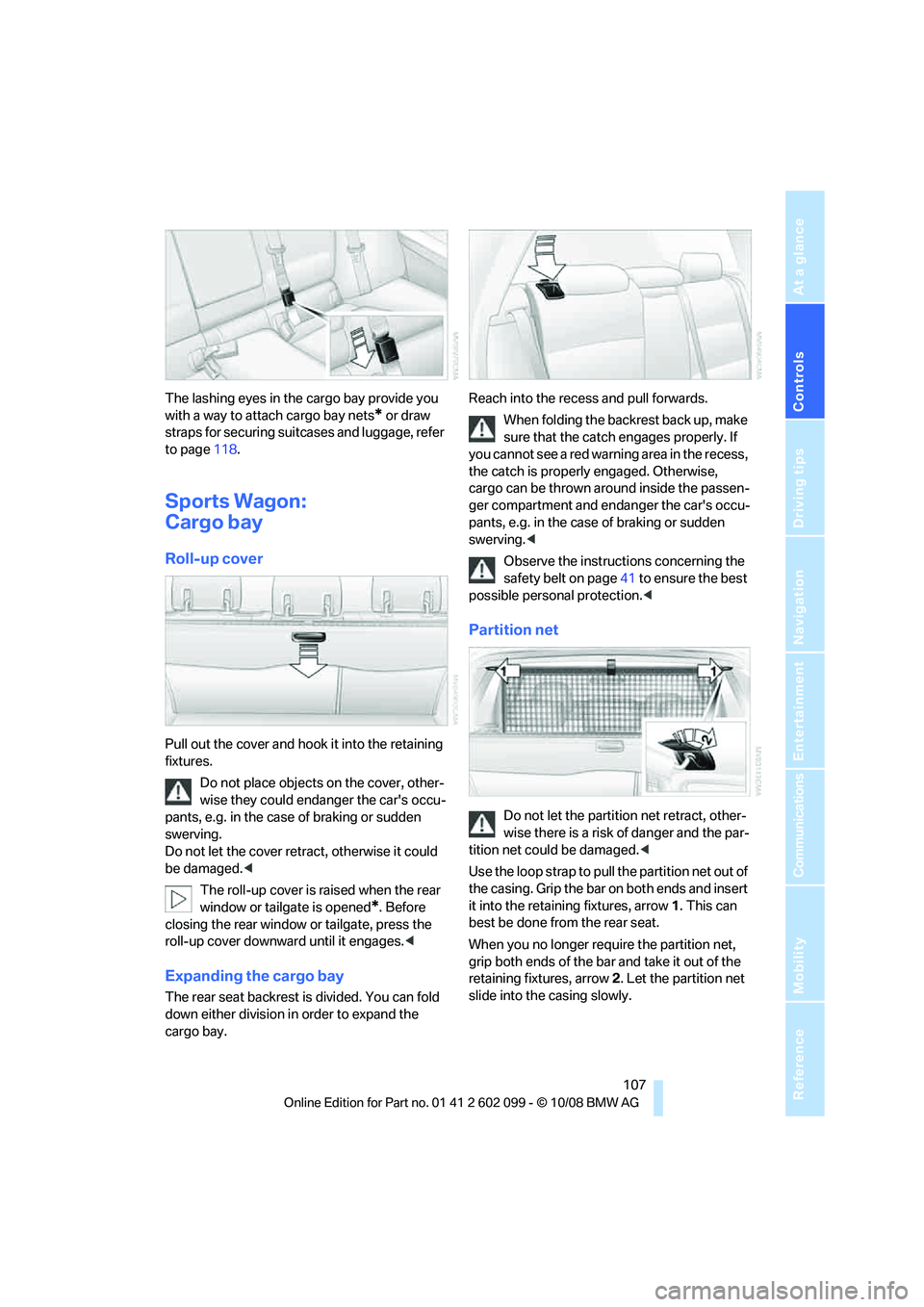
Pull out the cover and hook it into the retaining
fixtures.
Do not place objects on the cover, other-
wise they could endanger the car's occu-
pants, e.g. in the case of braking or sudden
swerving.
Do not let the cover retr act, otherwise it could
be damaged. <
The roll-up cover is raised when the rear
window or tailgate is opened
*. Before
closing the rear window or tailgate, press the
roll-up cover downward until it engages. <
Expanding the cargo bay
The rear seat backrest is divided. You can fold
down either division in order to expand the
cargo bay. Reach into the recess
and pull forwards.
When folding the backrest back up, make
sure that the catch engages properly. If
you cannot see a red warning area in the recess,
the catch is properly engaged. Otherwise,
cargo can be thrown around inside the passen-
ger compartment and enda nger the car's occu-
pants, e.g. in the case of braking or sudden
swerving. <
Observe the instructions concerning the
safety belt on page 41 to ensure the best
possible personal protection. <
Partition net
Do not let the partition net retract, other-
wise there is a risk of danger and the par-
tition net could be damaged. <
Use the loop strap to pull the partition net out of
the casing. Grip the bar on both ends and insert
it into the retaining fixtures, arrow 1. This can
best be done from the rear seat.
When you no longer require the partition net,
grip both ends of the ba r and take it out of the
retaining fixtures, arrow 2. Let the partition net
slide into the casing slowly.
ba8_E9091_cic.book Seite 107 Mittwoch, 29. Oktober 2008 2:59 14
Page 110 of 268

Practical interior accessories
108
With cargo bay expanded
1.Fold down both rear seat backrests, refer to
Expanding the cargo bay.
2. Use the buttons to unlatch the casing on
both sides, arrow 1.
3. Pull the casing out backwards, arrow 2,
without tilting it.
4. Slide the casing into the guides on the
backs of the seat backrests.
5. Carefully pull out the pa rtition net and insert
it into the front retain ing fixtures, refer to
Partition net above. This can best be done
from the front seat.
Follow the same steps in reverse order to return
the partition net and seats to their original posi-
tions. Finally, slide the ca sing into both retaining
fixtures on the sides until it engages. Tug on the
casing to check if it is properly locked in place.
Storage compartments inside
the cargo bay
Sedan
Depending on your vehicle's equipment, the
following storage spaces can be found in the
cargo bay: >
Left storage compartment, e.g. for storing a
box of cleaning tissues or up to 12 CD jack-
ets, depending on vehicle equipment ver-
sion
> Net
* for securing smaller objects, to be
attached to the fixtur es on the floor panel
> Hooks for hanging up, e.g. shopping bags
or tote bags
> Rubber strap on the left trim panel for
securing small objects such as a folding
umbrella
> Net for small objects on the right trim panel
of the cargo bay
> Folding, removable box
* under the floor
panel, e.g. for wet or dirty items
> Storage compartment under the floor panel
> Insertable dividers
* and removable storage
tray for the storage compartment under the
floor panel
Sports Wagon
The following storage spaces can be found in
the cargo bay:
> Umbrella holder on th e bottom of the parti-
tion net casing
> Rubber strap on the left and right trim panel
for securing small objects such as a folding
umbrella
> Hooks for hanging up shopping bags or tote
bags, for example, on the left and right-hand
sides of the cargo bay
> Net for small objects on the right trim panel
of the cargo bay
> Storage compartment under the floor panel
ba8_E9091_cic.book Seite 108 Mittwoch, 29. Oktober 2008 2:59 14
Page 111 of 268
Controls
109Reference
At a glance
Driving tips
Communications
Navigation
Entertainment
Mobility
Depending on your vehicle's equipment, other
storage spaces can be found in the cargo bay:
> Net
* for securing smaller objects, to be
attached to the fixtures on the floor panel
> Net
* on the left side trim of the cargo bay
instead of the rubber strap
> Reversible floor panel with integrated plas-
tic cover
* for cargo bay or bumper
> Folding, removable box
* under the floor
panel, e.g. for wet or dirty items
> Insertable dividers
* and removable storage
tray for the storage compartment under the
floor panel
Folding up the floor panel
Do not exceed the maximum permissible
load of 55 lbs/25 kg for the storage com-
partment under the floor panel, otherwise dam-
age could result. <
Sedan
Press the floor panel against the ceiling of the
cargo bay; a locking device holds the floor panel
in place. To detach the fl oor panel, pull it out of
the locking device.
Sports Wagon
Fold up the floor panel and take it out or lean it
forward.
Lashing eyes
You will find lashing eyel ets in the cargo bay for
securing luggage items with nets or tensioning
straps, refer to page 118.
Ski bag*
The ski bag is designed for safe, clean transport
of up to 4 pairs of standard skis or up to
2snowboards.
With the ski bag you can st ow skis with a length
of up to 6ft 10in/2.10m. When skis of 6ft 10in/
2.10 m length are loaded, the overall capacity of
the ski bag is reduced due to its tapered design.
Loading
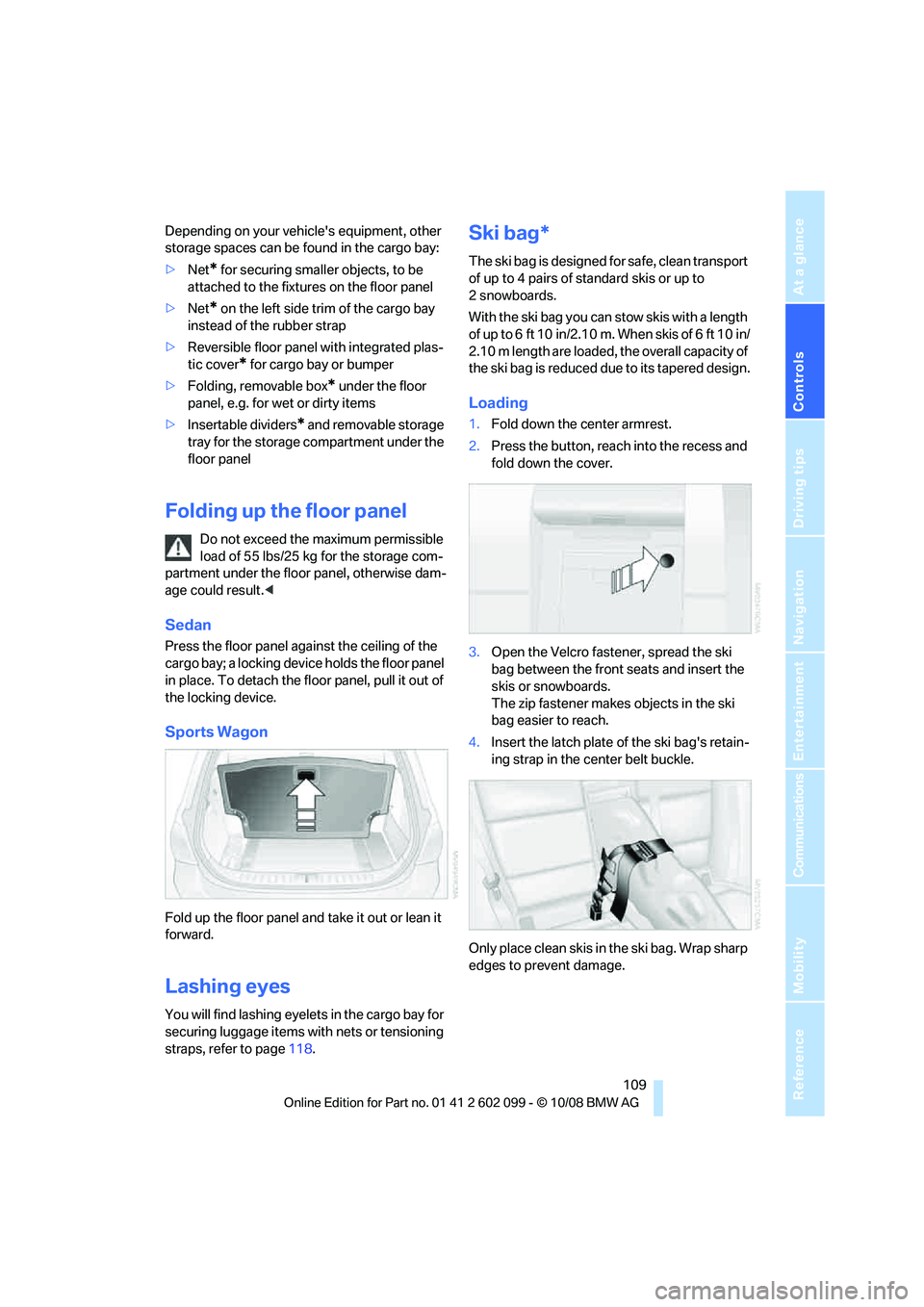
1. Fold down the center armrest.
2. Press the button, reac h into the recess and
fold down the cover.
3. Open the Velcro fastener, spread the ski
bag between the front seats and insert the
skis or snowboards.
The zip fastener makes objects in the ski
bag easier to reach.
4. Insert the latch plate of the ski bag's retain-
ing strap in the center belt buckle.
Only place clean skis in the ski bag. Wrap sharp
edges to prevent damage.
ba8_E9091_cic.book Seite 109 Mittwoch, 29. Oktober 2008 2:59 14
Page 112 of 268
Practical interior accessories
110
Securing cargo
After loading, secure the ski bag and its con-
tents. Tighten the retaining strap on the ten-
sioning buckle for this purpose.
Secure the ski bag in the manner
described, otherwise it could endanger
the car's occupants, e.g. in case of heavy brak-
ing or sudden swerving. <
To store the ski bag, perform the steps
described for loading in reverse order.
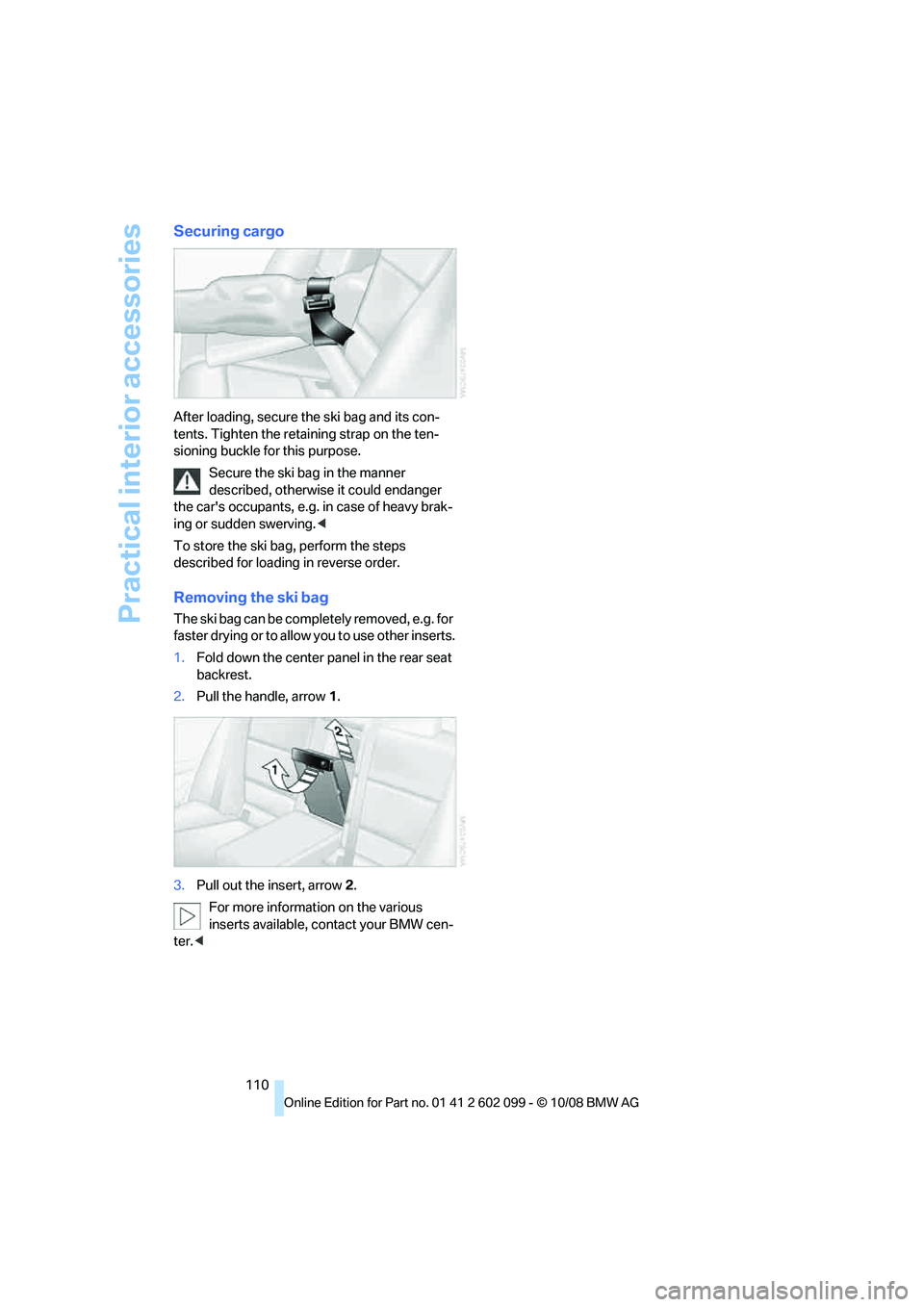
Removing the ski bag
The ski bag can be comple tely removed, e.g. for
faste r drying or to allo w you to use other inserts.
1. Fold down the center pa nel in the rear seat
backrest.
2. Pull the handle, arrow 1.
3. Pull out the insert, arrow 2.
For more information on the various
inserts available, contact your BMW cen-
ter. <
ba8_E9091_cic.book Seite 110 Mittwoch, 29. Oktober 2008 2:59 14
Page 120 of 268
Things to remember when driving
118
Load
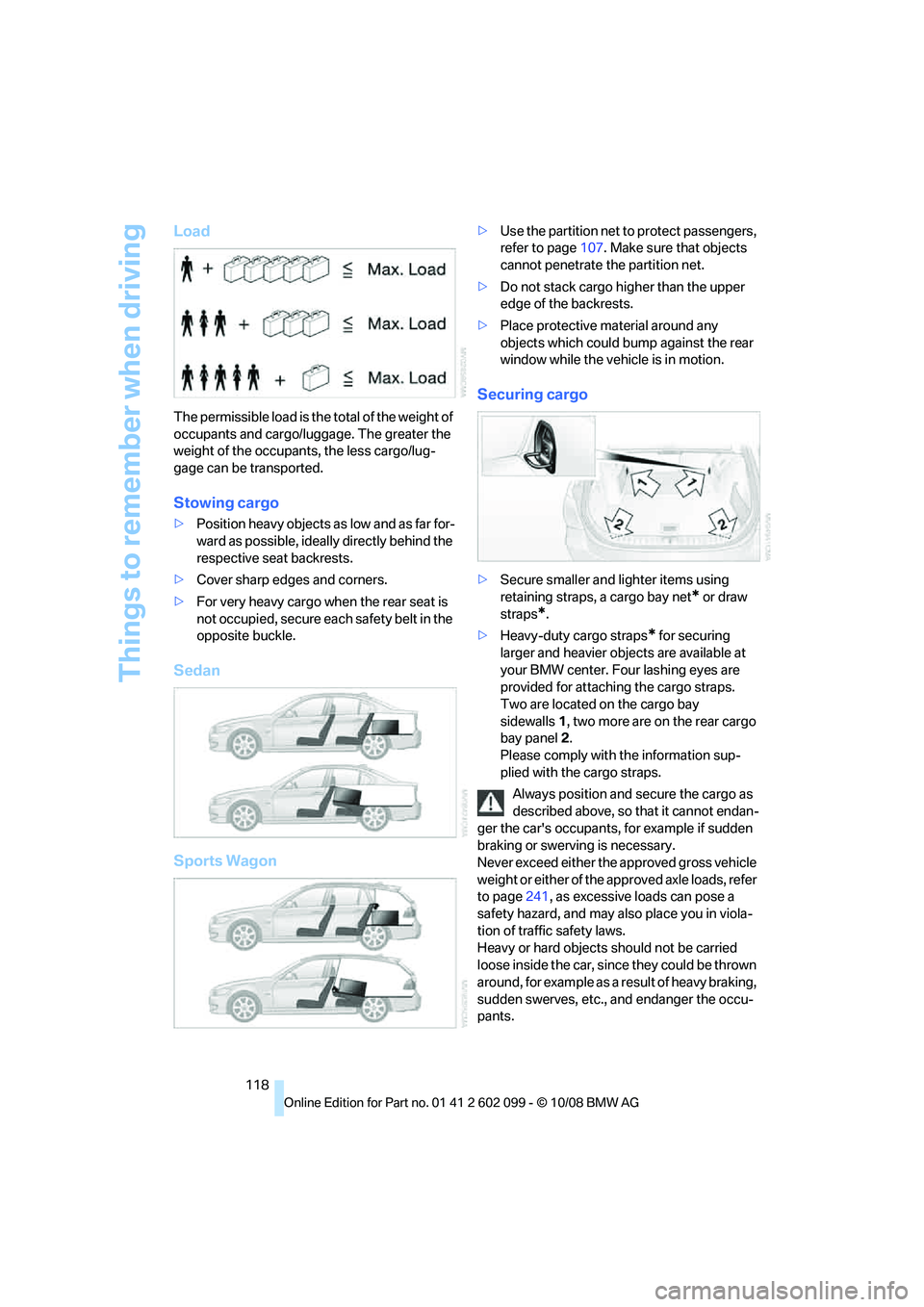
The permissible load is the total of the weight of
occupants and cargo/luggage. The greater the
weight of the occupants, the less cargo/lug-
gage can be transported.
Stowing cargo
>Position heavy objects as low and as far for-
ward as possible, ideally directly behind the
respective seat backrests.
> Cover sharp edges and corners.
> For very heavy cargo when the rear seat is
not occupied, secure each safety belt in the
opposite buckle.
Sedan
Sports Wagon
> Use the partition net to protect passengers,
refer to page 107. Make sure that objects
cannot penetrate the partition net.
> Do not stack cargo hi gher than the upper
edge of the backrests.
> Place protective material around any
objects which could bump against the rear
window while the vehicle is in motion.
Securing cargo
>Secure smaller and lighter items using
retaining straps, a cargo bay net
* or draw
straps
*.
> Heavy-duty cargo straps
* for securing
larger and heavier objects are available at
your BMW center. Four lashing eyes are
provided for attaching the cargo straps.
Two are located on the cargo bay
sidewalls 1, two more are on the rear cargo
bay panel 2.
Please comply with the information sup-
plied with the cargo straps.
Always position and secure the cargo as
described above, so that it cannot endan-
ger the car's occupants, for example if sudden
braking or swerving is necessary.
Never exceed either the approved gross vehicle
weight or either of the a pproved axle loads, refer
to page 241, as excessive loads can pose a
safety hazard, and may al so place you in viola-
tion of traffic safety laws.
Heavy or hard objects should not be carried
loose inside the car, since they could be thrown
around, for example as a result of heavy braking,
sudden swerves, etc., and endanger the occu-
pants.
ba8_E9091_cic.book Seite 118 Mittwoch, 29. Oktober 2008 2:59 14
Page 121 of 268
Driving tips
119Reference
At a glance
Controls
Communications
Navigation
Entertainment
Mobility
Only attach the cargo straps using the lashing
eyes shown in the illustration. Do not secure
cargo with the anchors for tether straps, refer to
page 50, otherwise these could be damaged. <
Roof-mounted luggage rack*
A special rack system is available as an option
for your BMW. Comply with the directions given
in the installation instructions.
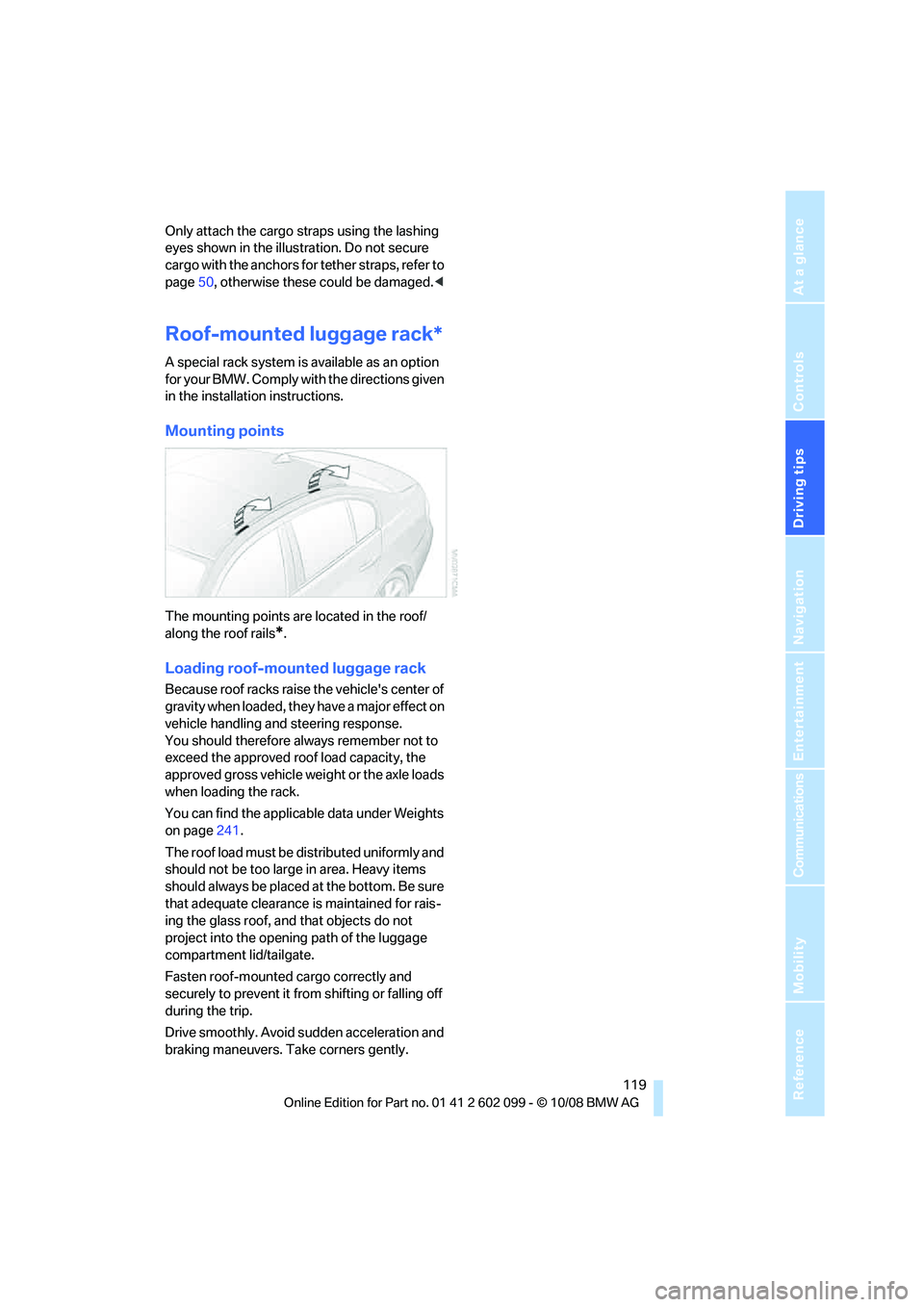
Mounting points
The mounting points are located in the roof/
along the roof rails
*.
Loading roof-mounted luggage rack
Because roof racks raise the vehicle's center of
gravity when loaded, they have a major effect on
vehicle handling and steering response.
You should therefore always remember not to
exceed the approved roof load capacity, the
approved gross vehicle weight or the axle loads
when loading the rack.
You can find the applicab le data under Weights
on page 241.
The roof load must be distributed uniformly and
should not be too large in area. Heavy items
should always be placed at the bottom. Be sure
that adequate clearance is maintained for rais-
ing the glass roof, and that objects do not
project into the opening path of the luggage
compartment lid/tailgate.
Fasten roof-mounted cargo correctly and
securely to prevent it from shifting or falling off
during the trip.
Drive smoothly. Avoid sudden acceleration and
braking maneuvers. Ta ke corners gently.
ba8_E9091_cic.book Seite 119 Mittwoch, 29. Oktober 2008 2:59 14
Page 186 of 268
BMW Assist
184
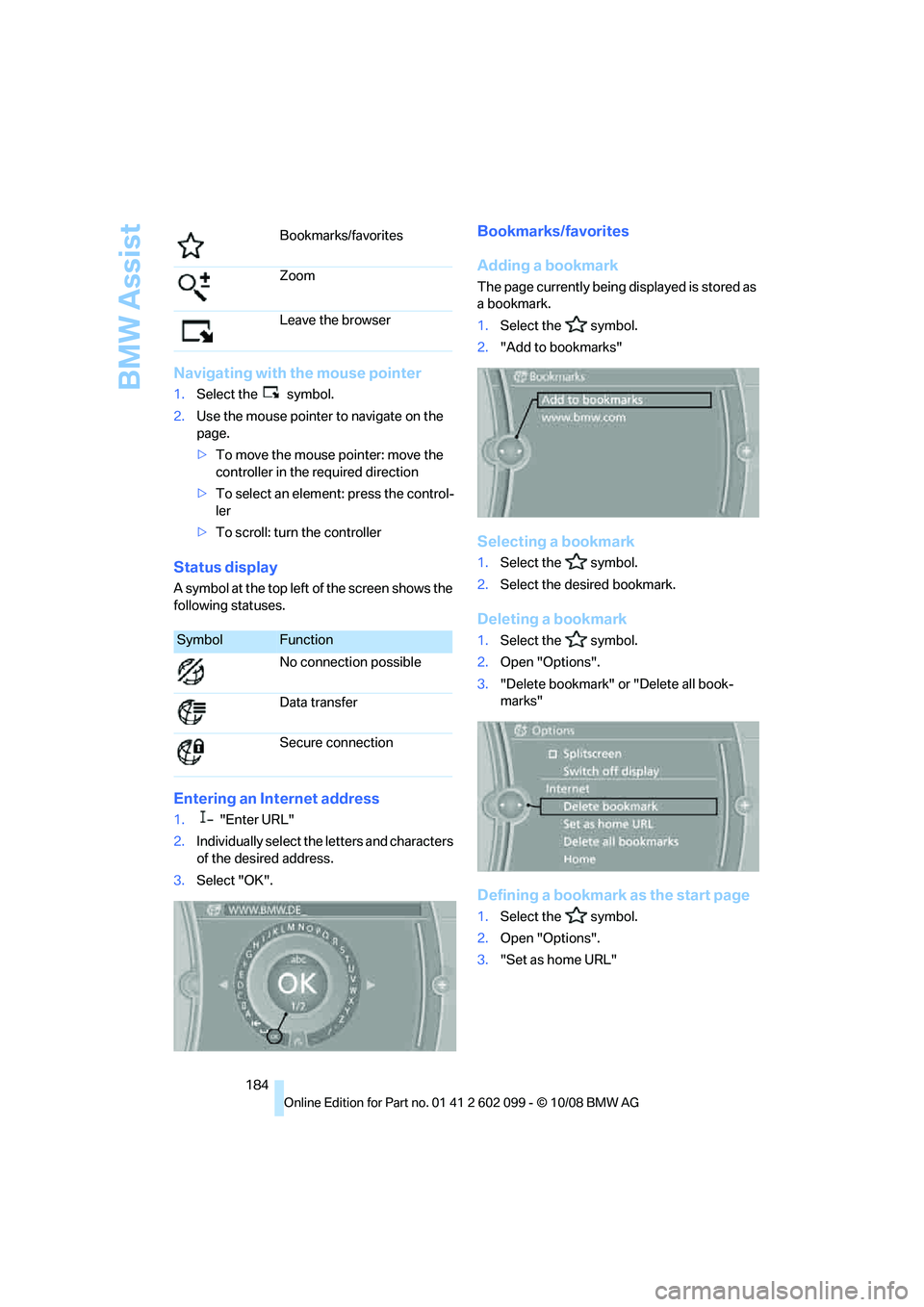
Navigating with the mouse pointer
1.Select the symbol.
2. Use the mouse pointer to navigate on the
page.
>To move the mouse pointer: move the
controller in the required direction
> To select an element: press the control-
ler
> To scroll: turn the controller
Status display
A symbol at the top left of the screen shows the
following statuses.
Entering an Internet address
1. "Enter URL"
2. Individually select the letters and characters
of the desired address.
3. Select "OK".
Bookmarks/favorites
Adding a bookmark
The page currently being displayed is stored as
a bookmark.
1. Select the symbol.
2. "Add to bookmarks"
Selecting a bookmark
1.Select the symbol.
2. Select the desired bookmark.
Deleting a bookmark
1.Select the symbol.
2. Open "Options".
3. "Delete bookmark" or "Delete all book-
marks"
Defining a bookmark as the start page
1.Select the symbol.
2. Open "Options".
3. "Set as home URL"
Bookmarks/favorites
Zoom
Leave the browser
SymbolFunction
No connection possible
Data transfer
Secure connection
ba8_E9091_cic.book Seite 184 Mittwoch, 29. Oktober 2008 2:59 14
Page 213 of 268
Mobility
211Reference
At a glance
Controls
Driving tips
Communications
Navigation
Entertainment
Under the hood
Do not work on the car unless you pos-
sess the necessary technical knowledge.
If you are unfamiliar with the statutory guide-
lines, have any work on the vehicle performed
only by a BMW center or by a workshop that
work according to BMW repair procedures with
correspondingly trained pe rsonnel. If this work
is not carried out properly, there is a danger of
subsequent damage an d related safety haz-
ards. <
Hood
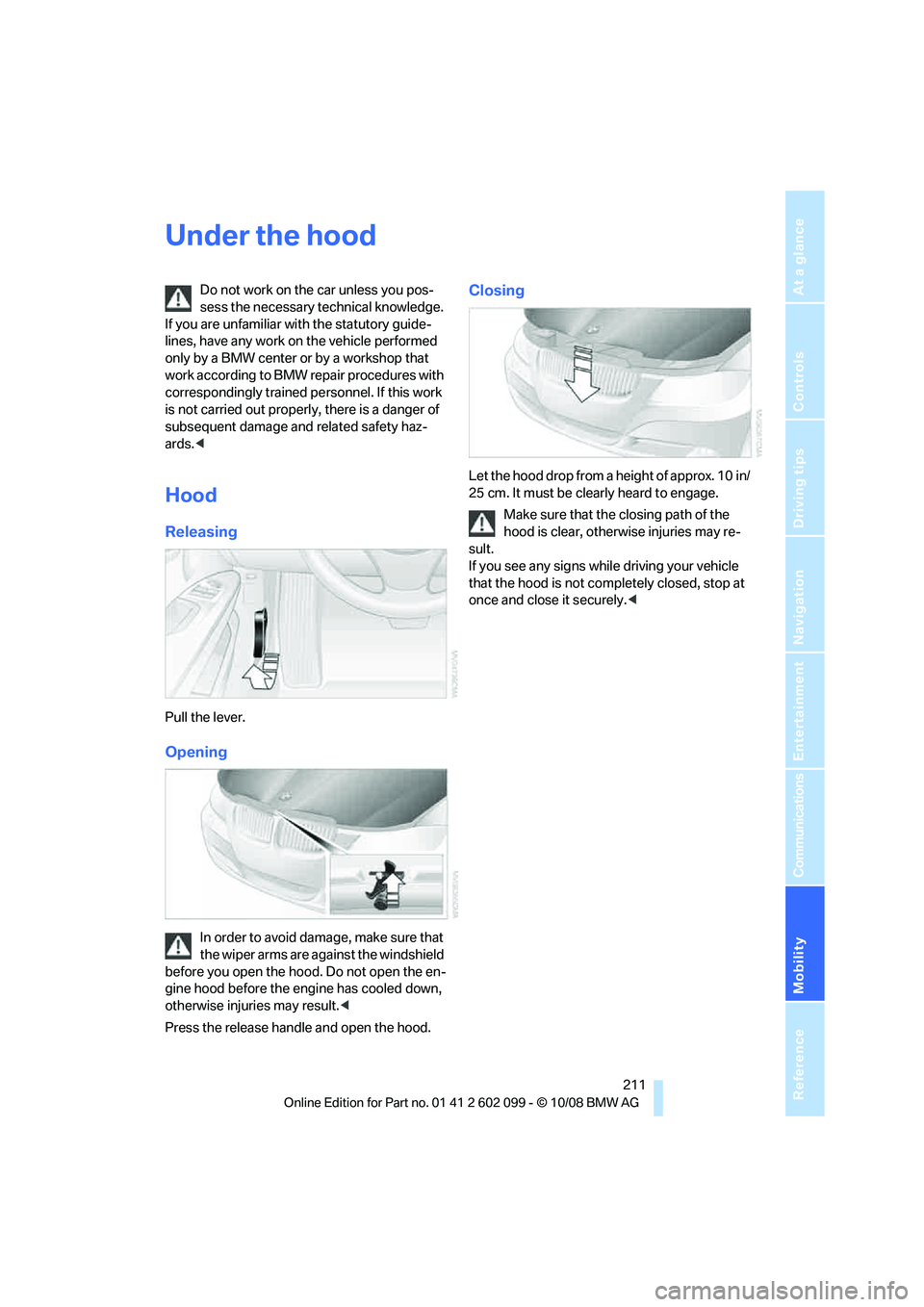
Releasing
Pull the lever.
Opening
In order to avoid damage, make sure that
the wiper arms are against the windshield
before you open the hood. Do not open the en-
gine hood before the engine has cooled down,
otherwise injuries may result. <
Press the release handle and open the hood.
Closing
Let the hood drop from a height of approx. 10 in/
25 cm. It must be clearly heard to engage.
Make sure that the closing path of the
hood is clear, otherwise injuries may re-
sult.
If you see any signs while driving your vehicle
that the hood is not comp letely closed, stop at
once and close it securely. <
ba8_E9091_cic.book Seite 211 Mittwoch, 29. Oktober 2008 2:59 14
Page 231 of 268
Mobility
229Reference
At a glance
Controls
Driving tips
Communications
Navigation
Entertainment
Charging the battery
Only charge the battery in the vehicle via the
terminals in the engine compartment with the
engine off. Connections, refer to Jump starting
on page 231.
Disposal
Have old batteries disposed of by your
BMW center or hand them in to a recy-
cling center. Maintain the battery in an upright
position for transport and storage. Always
secure the battery agains t tipping over during
transport.<
Power failure
After a temporary power loss, the functioning of
some equipment may be limited and require
reinitialization. Individual settings may likewise
have been lost and will have to be programmed:
> Time and date
These values must be updated, refer to
page 73.
> Radio
In some cases, stations may have to be
stored again, refer to page 145.
> Navigation system
Operability must be waited for, refer to
page 122.
> Glass roof
It may happen that the roof can only be
raised. The system must be initialized.
Please contact your BMW center.
> Panorama glass roof
It may happen that the roof can only be
raised. The system must be initialized.
Please contact your BMW center.
> Seat and mirror memory
The positions must be stored again, refer to
page 45.
> Inside rearview mirror with digital compass
The system must be calibrated, refer to
page 101.
Fuses
Never attempt to repa ir a blown fuse and
do not replace a defective fuse with a sub-
stitute of another color or amperage rating, oth-
erwise this could lead to a circuit overload, ulti-
mately resulting in a fire in the vehicle.<
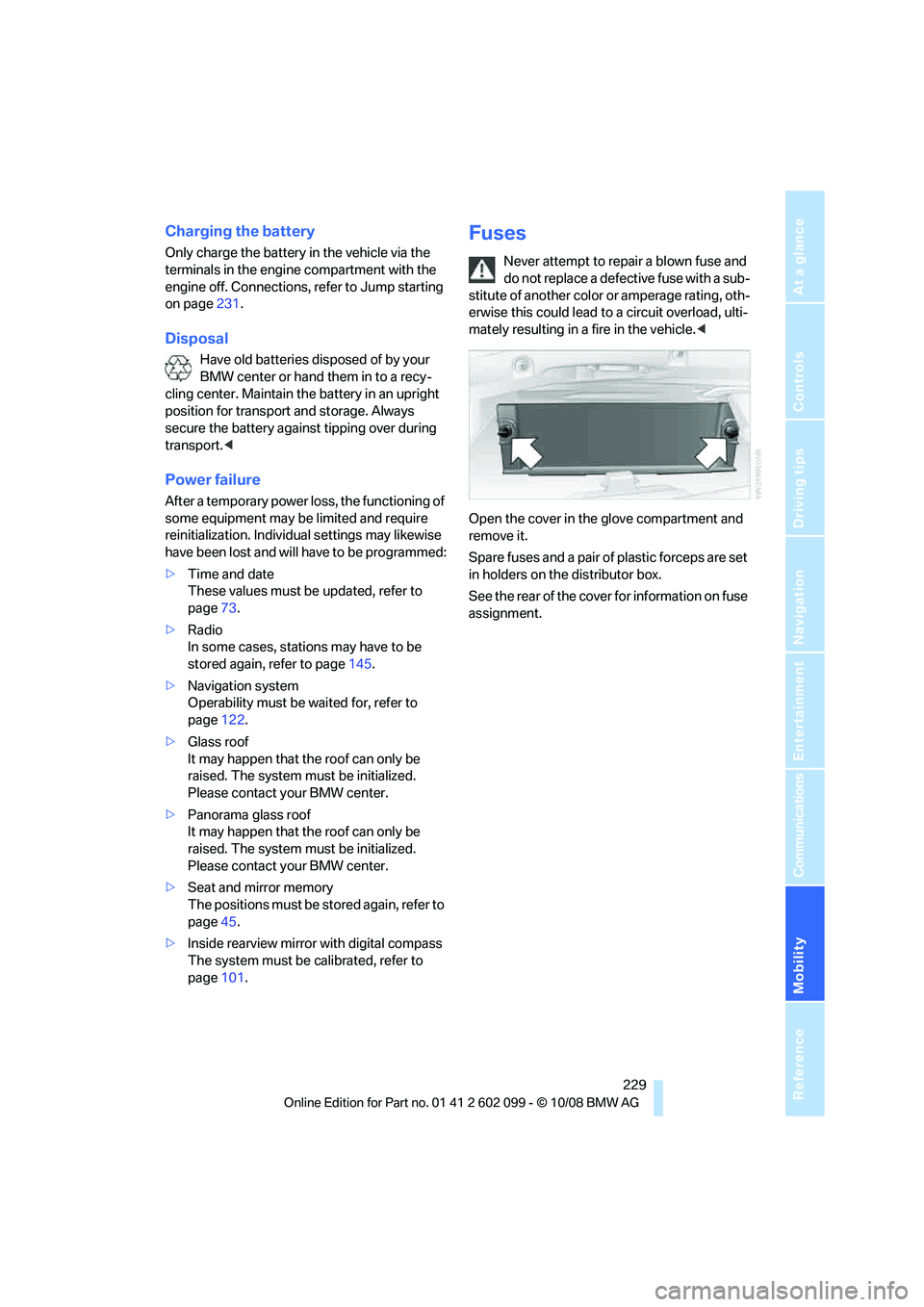
Open the cover in the glove compartment and
remove it.
Spare fuses and a pair of plastic forceps are set
in holders on the distributor box.
See the rear of the cover for information on fuse
assignment.
ba8_E9091_cic.book Seite 229 Mittwoch, 29. Oktober 2008 2:59 14
Page 254 of 268
Everything from A - Z
252
Care
218
– automatic car washes 218
– care products 218
– carpets 220
– CD/DVD drives 221
– chrome parts 219
– displays 220
– exterior 218
– fine wood parts 220
– headlamps 219
– high-pressure washer 218
– interior 220
– leather 220
– light-alloy wheels 219
– paintwork 219
– plastic parts 220
– rubber seals 219
– safety belts 220
– sensors and cameras 220
– upholstery and cloth trim 220
– washing the car
manually 219
– windows 219
– wiper blades 219
Cargo, securing 118
Cargo bay 107
– capacity 241
– convenient access 35
– folding up the floor panel 109
– lamp, refer to Interior lamps 93
– opening from inside 30
– opening from outside 31
– partition net 107
– roll-up cover 107
Cargo bay lid, refer to Luggage compartment lid/
tailgate 30
Cargo bay net, refer to Partition net 107
Cargo loading 117
– securing cargo 118
– stowing cargo 118
– vehicle 117
Car jack
– jacking points 228 Car key, refer to Integrated
key/remote control 26
Car phone
– installation location, refer to Center armrest 103
– refer to separate Owner's Manual
Car phone, refer to
Telephone 168
Car radio, refer to Radio 145
Car s
hampoo 220
Car wash 117
Catalytic converter, refer to
Hot exhaust system 115
CBS Condition Based Service 216
CD, audio playback 150
CD changer 150
– controls 142
– fast forward/reverse 152
– installation location 154
– random play sequence 151
– selecting a track 150
– switching on/off 142
– tone control 142
– volume 142
CD player 150
– controls 142
– fast forward/reverse 152
– random play sequence 151
– selecting a track 150
– switching on/off 142
– tone control 142
– volume 142
Center armrest 103
Center brake lamp
– replacing bulb 228
Center console, refer to Around the center
console 14
Central locking
– from inside 30
– from outside 27
Central locking system 27
– convenient access 34
– hotel function 32
– setting unlocking characteristics 27 Changes, technical, refer to
For your own safety 5
Changing bulbs, refer to Lamps and bulbs 223
Changing the measurement
units on the Control
Display 71
Changing wheels 228
Chassis number, refer to Engine compartment 212
Check Control 75
Check Gas Cap 190
Child-restraint fixing system
LATCH 50
Child-restraint systems 49
Child-safety lock 52
Child seats, refer to Transporting children
safely 49
Chrome parts 220
Chrome polish 220
Cigarette lighter, refer to
Ligh
ter104
Cleaning headlamps 58
– washer fluid 59
Cleaning your BMW, refer to Care 218
Clock 67
– 12h/24h mode 74
– setting the time and date 74
– setting time 73
Closing
– from inside 30
– from outside 27
Clothes hooks 103
Cockpit 10
Cold start, refer to Starting the
engine 53
Combined instrument, refer to Instrument cluster 12
Comfort access, refer to Convenient access 34
Comfort area, refer to Around
the center console 14
Compartment for remote control, refer to Ignition
lock 53
Compass 101
ba8_E9091_cic.book Seite 252 Mittwoch, 29. Oktober 2008 2:59 14