remote control BMW 335I 2009 Owner's Guide
[x] Cancel search | Manufacturer: BMW, Model Year: 2009, Model line: 335I, Model: BMW 335I 2009Pages: 268, PDF Size: 11.52 MB
Page 102 of 268
Practical interior accessories
100
The corresponding memory button
1 is now
programmed with the signal of the original
hand-held transmitter.
You can operate the device while the ignition is
switched off.
If the device fails to function even after
repeated programming, check whether
the original hand-held transmitter uses an alter-
nating-code system. To do so, either read the
instructions for the original hand-held transmit-
ter or hold down the programmed memory
button 1 of the integrated universal remote
control. If the LED 2 on the integrated universal
remote control flashes rapidly and then remains
lit for about two seconds, the original hand-held
transmitter uses an alternating-code system. If
it uses an alternating-code system, program
the memory buttons 1 as described under
Alternating-code hand-held transmitters. <
Alternating-code hand-held
transmitters
To program the integrated universal remote
control, consult the operating instructions for
the device to be set. You will find information
there on the possibilities for synchronization.
When programming hand-held transmitters
that employ an alternating code, please observe
the following supplementary instructions:
Programming will be easi er with the aid of
a second person. <
1. Park your vehicle within the range of the
remote-controlled device.
2. Program the integrated universal remote
control as described above in the section
Fixed-code hand-held transmitters.
3. Locate the button on the receiver of the
device to be set, e.g. on the drive unit.
4. Press the button on the receiver of the
device to be set. Af ter step 4, you have
approx. 30 seconds for step 5.
5. Press the programmed memory button 1 of
the integrated univer sal remote control
three times. The corresponding memory button
1 is now
programmed with the signal of the original
hand-held transmitter.
If you have any questions, please contact
your BMW center. <
Deleting all stored programs
Press the left and right memory buttons 1 for
approx. 20 seconds until the LED 2 flashes rap-
idly: all stored programs are deleted.
Reassigning individual programs
1. Hold the original hand-held transmitter at a
distance of approx. 4 to 12 in/10 to 30 cm
from the memory buttons 1.
The required distance between the
hand-held transmitter and the mem-
ory buttons 1 depends on the system of the
respective original hand-held transmitter
used. <
2. Press the desired memory button 1 of the
integrated universal remote control.
3. If the LED 2 flashes slowly after approx.
20 seconds, press the transmit key of the
original hand-held transmitter. Release
both buttons as soon as the LED 2 flashes
rapidly. If the LED 2 does not flash rapidly
after approx. 15 seconds, alter the distance
and repeat this step.
ba8_E9091_cic.book Seite 100 Mittwoch, 29. Oktober 2008 2:59 14
Page 105 of 268
Controls
103Reference
At a glance
Driving tips
Communications
Navigation
Entertainment
Mobility
Locking
To lock the glove compartment, use the inte-
grated key of the remote control, refer to
page26.
USB interface for data transmission
Port for importing and exporting data on USB
devices, e.g. music collections, refer to
page 160.
Observe the following when connecting:
> Do not use force when plugging the con-
nector into the USB audio interface.
> Do not connect devices such as fans or
lamps to the USB audio interface.
> Do not connect USB hard disks.
> Do not use the USB interface to recharge
external devices.
Center armrest
Storage compartment
The center armrest between the front seats
contains either a compar tment or the cover for
the snap-in adapter
*, depending on the equip-
ment version. For more information about this
mobile phone base plate, refer to page 177.
Opening
Press the button, see arrow.
Settings*
Slide the center armrest into the desired posi-
tion on the driver's side.
Connection for external audio device
You can connect an external audio device such
as a CD or MP3 player and play audio tracks
over the car's loudspeaker system:
> AUX-IN port, refer to page 161
> USB-audio interface
*, refer to page 162
Storage compartments inside
the vehicle
Depending on your vehicle's equipment, you
will find compartments be side the steering col-
umn
*, in the front doors and in the center con-
sole
*.
There are nets
* on the front-seat backrests.
Clothes hooks
There are clothes hooks on the grab handles in
the rear passenger compartment.
ba8_E9091_cic.book Seite 103 Mittwoch, 29. Oktober 2008 2:59 14
Page 107 of 268
Controls
105Reference
At a glance
Driving tips
Communications
Navigation
Entertainment
Mobility
remote control so that children cannot operate
the cigarette lighter and burn themselves.<
Ashtray, rear
Opening
Push the ridge on the cover.
Emptying
Lift out the insert.
Connecting electrical
appliances
In your BMW, when the engine is running or the
ignition is switched on, you can use electrical
devices such as a flashlight, car vacuum
cleaner, etc., up to approx. 200 watts at
12 volts, as long as one of the following sockets
is available. Avoid damaging the sockets by
attempting to insert plugs of unsuitable shape
or size.
Cigarette lighter socket*
To access the socket: ta ke the cigarette lighter
out of the socket.
Socket in the center armrest
External audio device, refer to page 103.
Sockets in the rear center console*
Remove corresponding cover.
Socket in the cargo bay*
Sedan
Sports Wagon
Open the cap.
ba8_E9091_cic.book Seite 105 Mittwoch, 29. Oktober 2008 2:59 14
Page 119 of 268
Driving tips
117Reference
At a glance
Controls
Communications
Navigation
Entertainment
Mobility
When the vehicle is parked
Condensation forms while the automatic cli-
mate control is in operation, and then exits
under the vehicle. Traces of condensed water
under the vehicle are therefore normal.
Before driving into a car wash
General information on caring for your BMW
can be found on page218.
Sports Wagon: re ar window wiper
Driving through an automatic car wash can
result in damage to the rear window wiper. If
necessary, ask the operator of the car wash
about protective measures you should take.
With convenient access and automatic
transmission
Insert the remote control into the ignition
switch.
The engine can be switched off when the selec-
tor lever is in position N. Refer also to page 218.
Cargo loading
To avoid loading the tires beyond their
approved carrying capacity, never over-
load the vehicle. Overlo ading can lead to over-
heating and increases the rate at which damage
develops inside the tires. This can ultimately
result in a sudden blow-out. <
Make sure that no liquids are spilled or
leak from their containers in the cargo
bay, as this could result in damage to the vehi-
cle. <
Determining loading limit
1. Locate the following statement on your
vehicle's placard
*:
The combined weight of occupants
and cargo should never exceed
XXX kg or YYY lbs. Otherwise, overloading
can result in damage to the vehicle and
unstable driving conditions.<
2. Determine the combined weight of the
driver and passengers that will be riding in
your vehicle.
3. Subtract the combined weight of the driver
and passengers from XXX kilograms or YYY
pounds.
4. The resulting figure equals the available
amount of cargo and luggage load capacity.
For example, if the YYY amount equals
1,400 lbs. and there will be five 150-lb. pas-
sengers in your vehicle, the amount of avail-
able cargo and luggage load capacity is
650 lbs:
1,400 lbs. minus 750 lbs. = 650 lbs.
5. Determine the combined weight of luggage
and cargo being loaded on the vehicle. That
weight may not safely exceed the available
cargo and luggage load capacity calculated
in step 4.
6. If your vehicle will be towing a trailer, part of
the load from your tra iler will be transferred
to your vehicle. Consult the manual for
transporting a trailer to determine how this
may reduce the availa ble cargo and luggage
load capacity of your vehicle.
ba8_E9091_cic.book Seite 117 Mittwoch, 29. Oktober 2008 2:59 14
Page 135 of 268
Navigation
Driving tips
133Reference
At a glance
Controls
Communications
Entertainment
Mobility
Destination guidance
Starting destination
guidance
1."Navigation"
2. "Enter address"
3. Select the destination.
4. "Start guidance"
After the route is calculated, the route is dis-
played in the map on the Control Display.
Terminating destination
guidance
1. "Navigation"
2. "Map"
3. Select the symbol
Continuing destination
guidance
If the destination was not reached at the end of
the last trip, the system asks whether it should
continue destination guidance.
Select "Resume guidance" or "Stop guidance".
Route criteria
General information
You can influence the calculated route by
choosing certain route criteria. You can change
the route criteria as often as you like during des-
tination entry or during destination guidance.
The route is planned acco rding to fixed rules.
The type of road is taken into account, e.g.
whether it is a highway or a winding road. As a
result, the routes recommended by the naviga-
tion system may not alwa ys be the same ones
that you would choose ba sed on personal expe-
rience. The settings are stored for the remote control
currently in use.
Changing route criteria
1.
"Navigation"
2. "Map"
3. "Route preference"
4. Selecting a criterion:
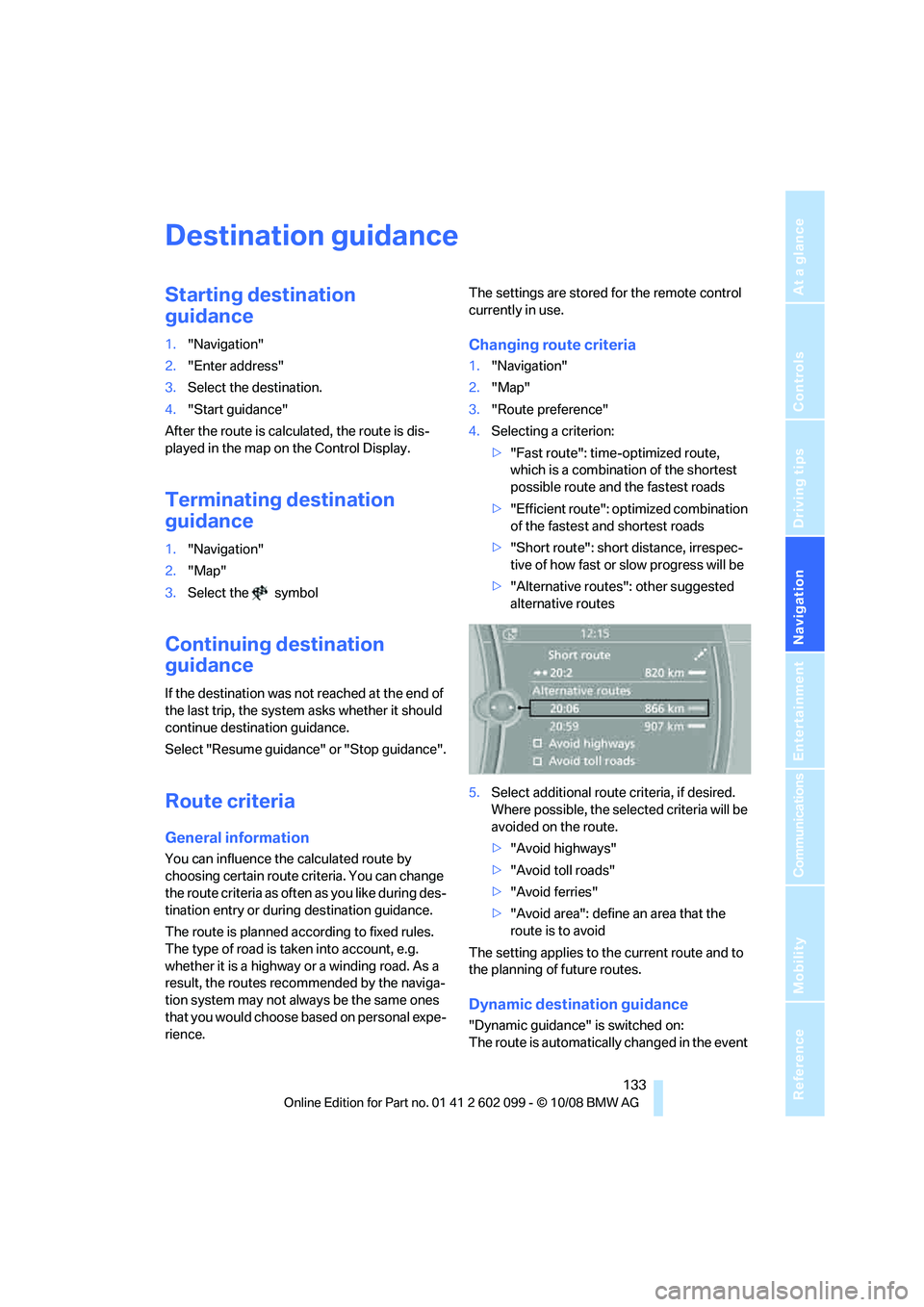
>"Fast route": time-optimized route,
which is a combination of the shortest
possible route and the fastest roads
> "Efficient route": optimized combination
of the fastest and shortest roads
> "Short route": short distance, irrespec-
tive of how fast or slow progress will be
> "Alternative routes ": other suggested
alternative routes
5. Select additional route criteria, if desired.
Where possible, the sele cted criteria will be
avoided on the route.
> "Avoid highways"
> "Avoid toll roads"
> "Avoid ferries"
> "Avoid area": define an area that the
route is to avoid
The setting applies to the current route and to
the planning of future routes.
Dynamic destination guidance
"Dynamic guidance" is switched on:
The route is automatically changed in the event
ba8_E9091_cic.book Seite 133 Mittwoch, 29. Oktober 2008 2:59 14
Page 137 of 268
Navigation
Driving tips
135Reference
At a glance
Controls
Communications
Entertainment
Mobility
1."Navigation"
2. "Map"
3. Select the symbol
The voice instructions are switched on.
For rapid access, the feature can be stored on a
programmable memory key, refer to page20.
Repeating a voice instruction
1."Navigation"
2. "Map"
3. Select the symbol twice.
Adjusting volume fo r voice instructions
The volume can be adjust ed only while a voice
instruction is being issued.
1. Have the last voice in struction repeated, if
necessary.
2. Turn the button during the voice instruction
to select the desired volume.
The setting is stored for the remote control cur-
rently in use.
Map display
Map display
You can have your current position displayed on
a map. After starting th e destination guidance,
the planned route is shown on the map. 1.
"Navigation"
2. "Map"
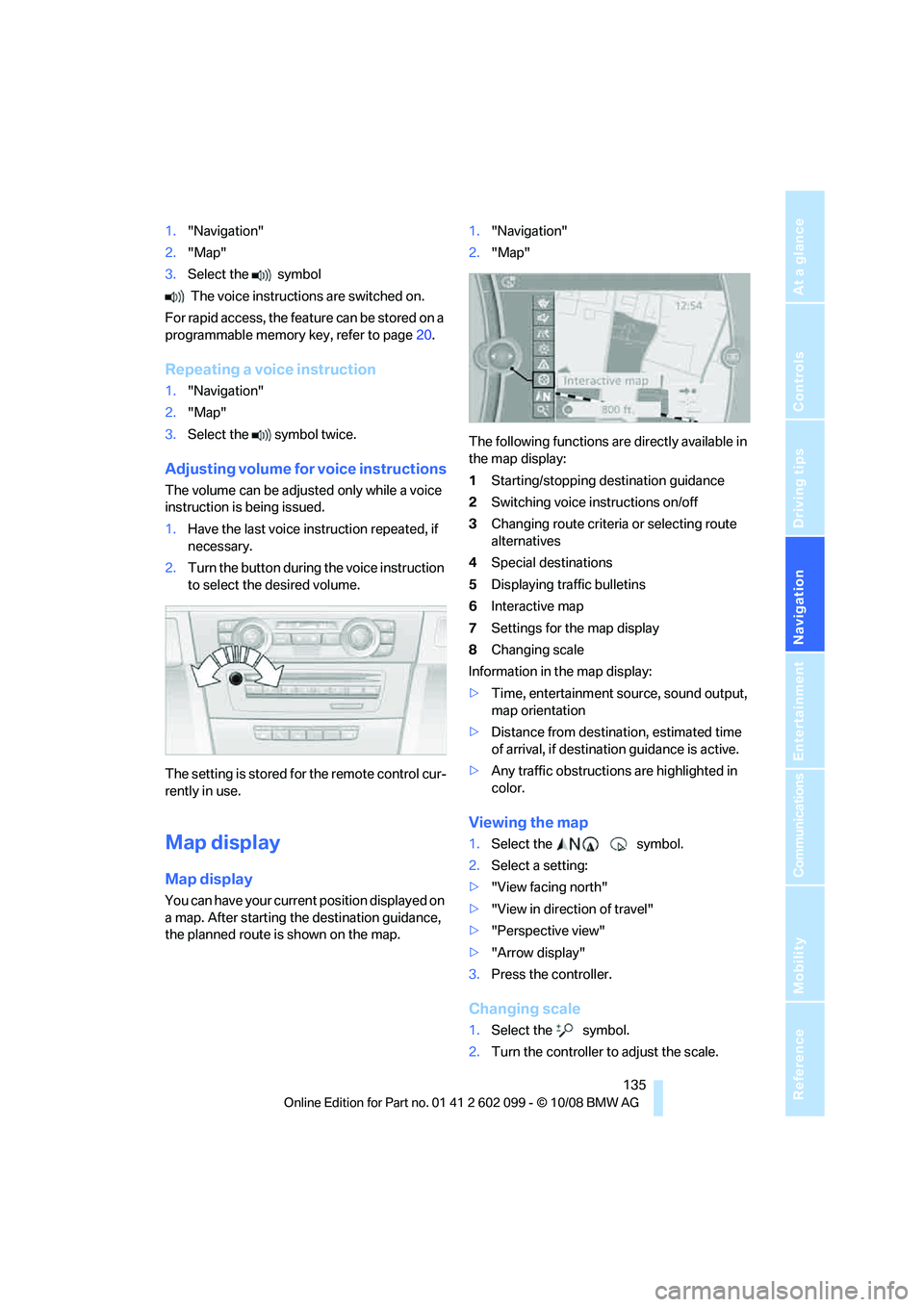
The following functions are directly available in
the map display:
1 Starting/stopping destination guidance
2 Switching voice instructions on/off
3 Changing route criteria or selecting route
alternatives
4 Special destinations
5 Displaying traffic bulletins
6 Interactive map
7 Settings for the map display
8 Changing scale
Information in the map display:
> Time, entertainment source, sound output,
map orientation
> Distance from destination, estimated time
of arrival, if destinat ion guidance is active.
> Any traffic obstructions are highlighted in
color.
Viewing the map
1.Select the symbol.
2. Select a setting:
> "View facing north"
> "View in direction of travel"
> "Perspective view"
> "Arrow display"
3. Press the controller.
Changing scale
1.Select the symbol.
2. Turn the controller to adjust the scale.
ba8_E9091_cic.book Seite 135 Mittwoch, 29. Oktober 2008 2:59 14
Page 144 of 268
On/off and tone
142
On/off and tone
The following audio and video sources share
the same control elements and adjustments:
>Radio
> CD player
> CD changer
*
>Video
> External devices, e.g. MP3 player
Controls
The audio and video sources can be controlled
using the:
>Buttons near the CD player
> iDrive
> Buttons on the steeri ng wheel, refer to
page 11
> Programmable memory keys, refer to
page 20
> Voice activation system
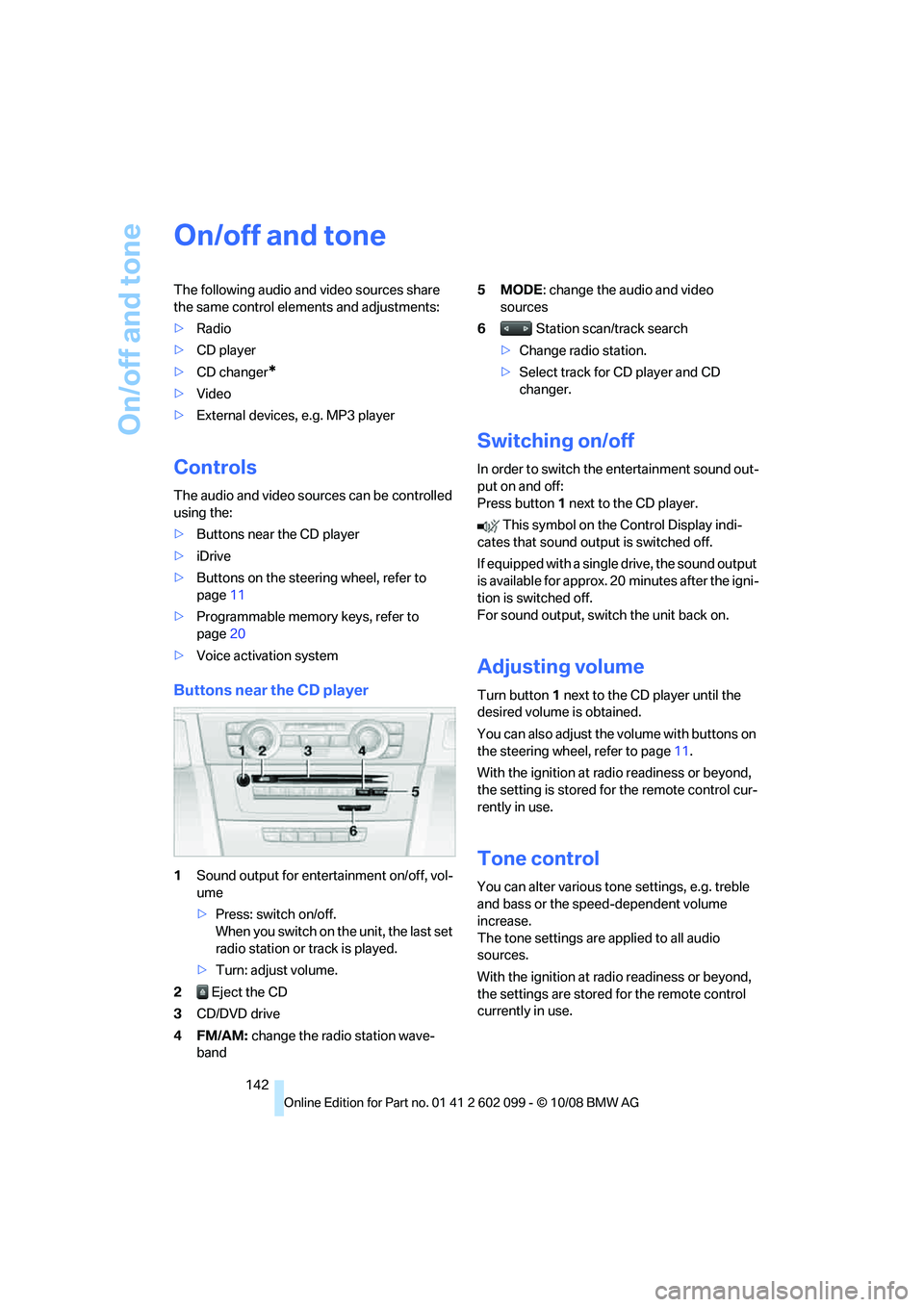
Buttons near the CD player
1Sound output for entertainment on/off, vol-
ume
>Press: switch on/off.
When you switch on the unit, the last set
radio station or track is played.
> Turn: adjust volume.
2 Eject the CD
3 CD/DVD drive
4FM/AM: change the radio station wave-
band 5MODE
: change the audio and video
sources
6 Station scan/track search
> Change radio station.
> Select track for CD player and CD
changer.
Switching on/off
In order to switch the entertainment sound out-
put on and off:
Press button 1 next to the CD player.
This symbol on the Control Display indi-
cates that sound output is switched off.
If equipped with a single drive, the sound output
is available for approx. 20 minutes after the igni-
tion is switched off.
For sound output, switch the unit back on.
Adjusting volume
Turn button 1 next to the CD player until the
desired volume is obtained.
You can also adjust the volume with buttons on
the steering wheel, refer to page 11.
With the ignition at ra dio readiness or beyond,
the setting is stored fo r the remote control cur-
rently in use.
Tone control
You can alter various tone settings, e.g. treble
and bass or the speed-dependent volume
increase.
The tone settings are applied to all audio
sources.
With the ignition at ra dio readiness or beyond,
the settings are stored for the remote control
currently in use.
ba8_E9091_cic.book Seite 142 Mittwoch, 29. Oktober 2008 2:59 14
Page 148 of 268
Radio
146
4.
Select the desired memory location.
The station is stored.
The stations are stored for the remote control
currently in use.
Via programmable memory keys
You can store a station on the programmable
memory keys, refe r also to page20.
1. Select a station.
2. ... Press the desired button
for a longer period.
Radio Data System RDS
On the FM waveband, additional information is
broadcast via RDS. If the reception conditions
are good, the station names are shown on the
Control Display. Where re ception is poor or in
the event of interference, it may take some time
before the station names will appear in the dis-
play.
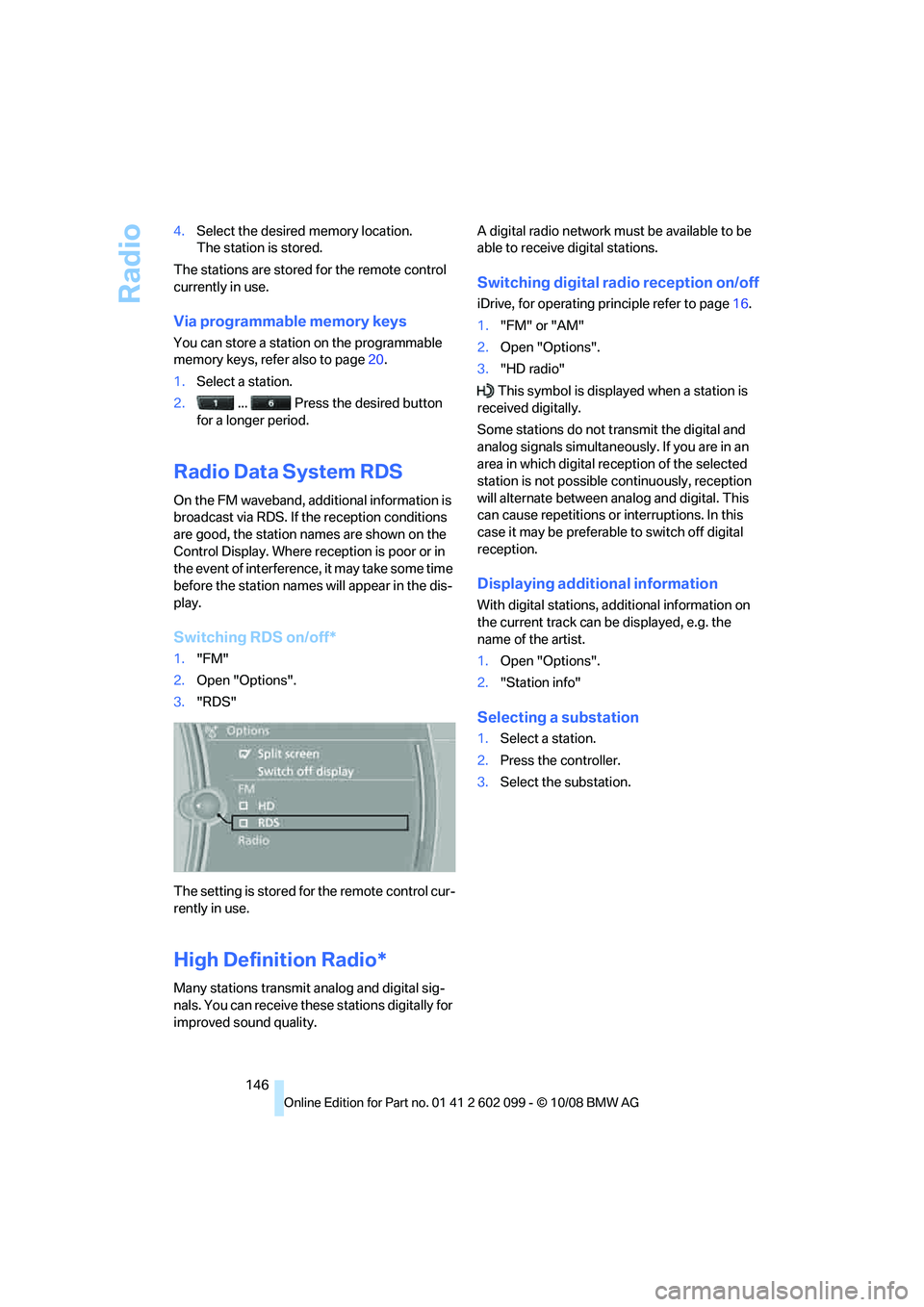
Switching RDS on/off*
1. "FM"
2. Open "Options".
3. "RDS"
The setting is stored fo r the remote control cur-
rently in use.
High Definition Radio*
Many stations transmit analog and digital sig-
nals. You can receive these stations digitally for
improved sound quality. A digital radio network mu
st be available to be
able to receive digital stations.
Switching digital radio reception on/off
iDrive, for operating pr inciple refer to page16.
1. "FM" or "AM"
2. Open "Options".
3. "HD radio"
This symbol is displa yed when a station is
received digitally.
Some stations do not transmit the digital and
analog signals simultaneously. If you are in an
area in which digital re ception of the selected
station is not possible continuously, reception
will alternate between analog and digital. This
can cause repetitions or interruptions. In this
case it may be preferable to switch off digital
reception.
Displaying additional information
With digital stations, a dditional information on
the current track can be displayed, e.g. the
name of the artist.
1. Open "Options".
2. "Station info"
Selecting a substation
1.Select a station.
2. Press the controller.
3. Select the substation.
ba8_E9091_cic.book Seite 146 Mittwoch, 29. Oktober 2008 2:59 14
Page 171 of 268
169
Entertainment
Reference
At a glance
Controls
Driving tips
Communications
Navigation
Mobility
> Certain presettings ma y be necessary on
some mobile phones: e.g. using the follow-
ing menu items:
> Bluetooth switched on
> Connection must be allowed without
requiring further confirmation
> Reconnection
> Depending on the mobile phone type, the
power-saving mode setting, for example,
may result in a paired mobile phone not
being detected by the vehicle.
> For pairing purposes, define any 4 to 16-
digit number as a Bluetooth passkey,
e.g. 25081107. A long and complex number
offers the best protection against unautho-
rized access. This Bluetooth passkey is no
longer required after pairing has been suc-
cessful.
> The ignition is switched on.
Pair the mobile phone with the vehicle
only when the car is stationary, to avoid
endangering the car's occupants and other
road users by be ing distracted.<
Switch on ignition
1.Insert remote control all the way into the
ignition lock.
2. Switch on ignition without operating the
brake or clutch or pressing the start/stop
button.
Preparation via iDrive
iDrive, for operating principle refer to page 16.
3. "Telephone"
4. "Bluetooth"
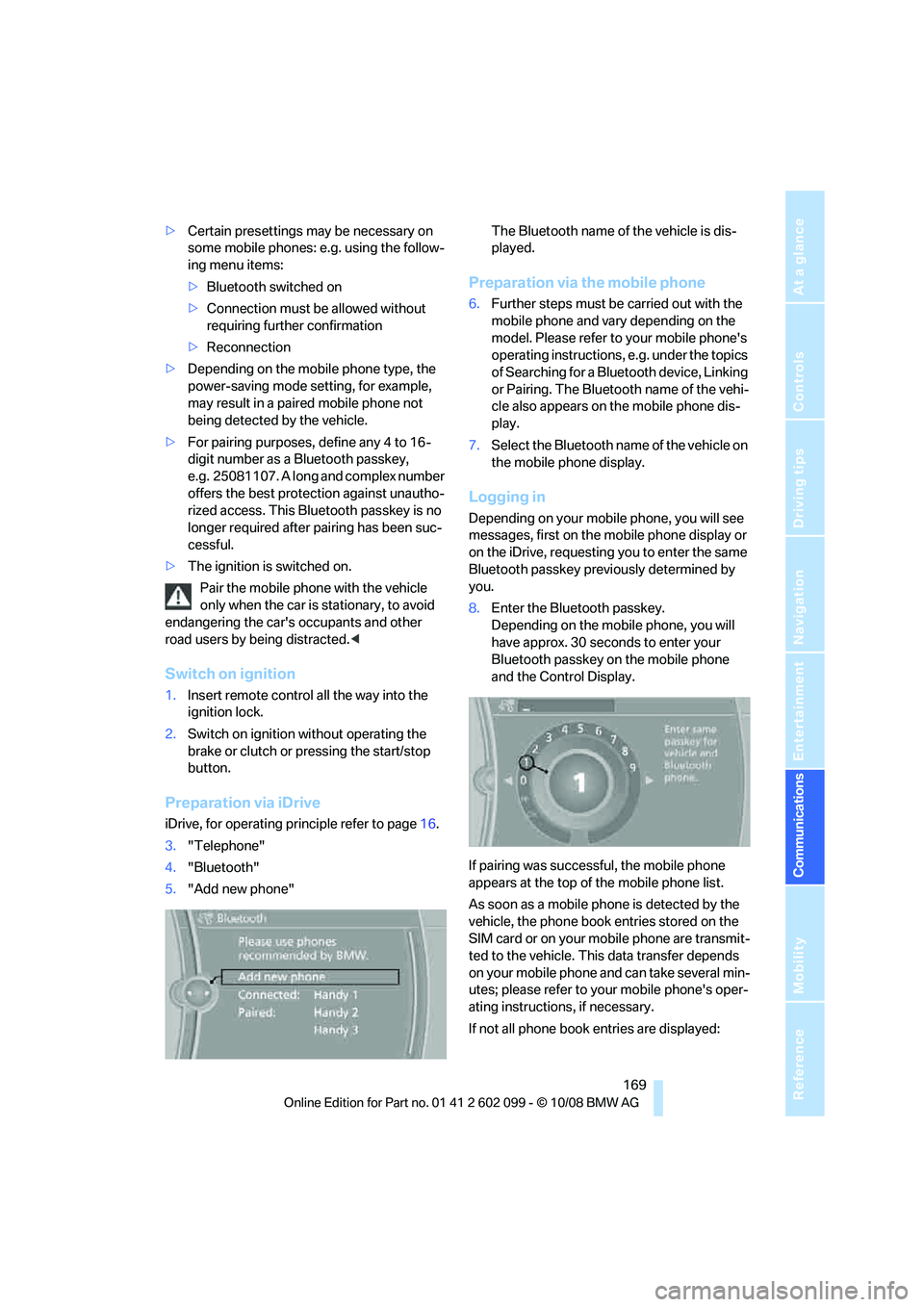
5. "Add new phone" The Bluetooth name of the vehicle is dis-
played.
Preparation via the mobile phone
6.
Further steps must be carried out with the
mobile phone and vary depending on the
model. Please refer to your mobile phone's
operating instructions, e.g. under the topics
of Searching for a Bluetooth device, Linking
or Pairing. The Bluetooth name of the vehi-
cle also appears on the mobile phone dis-
play.
7. Select the Bluetooth na me of the vehicle on
the mobile phone display.
Logging in
Depending on your mob ile phone, you will see
messages, first on the mobile phone display or
on the iDrive, requesting you to enter the same
Bluetooth passkey previously determined by
you.
8. Enter the Bluetooth passkey.
Depending on the mobile phone, you will
have approx. 30 seco nds to enter your
Bluetooth passkey on the mobile phone
and the Control Display.
If pairing was successful, the mobile phone
appears at the top of the mobile phone list.
As soon as a mobile ph one is detected by the
vehicle, the phone book entries stored on the
SIM card or on your mobile phone are transmit-
ted to the vehicle. This data transfer depends
on your mobile phone and can take several min-
utes; please refer to your mobile phone's oper-
ating instructions, if necessary.
If not all phone book entries are displayed:
ba8_E9091_cic.book Seite 169 Mittwoch, 29. Oktober 2008 2:59 14
Page 173 of 268
171
Entertainment
Reference
At a glance
Controls
Driving tips
Communications
Navigation
Mobility
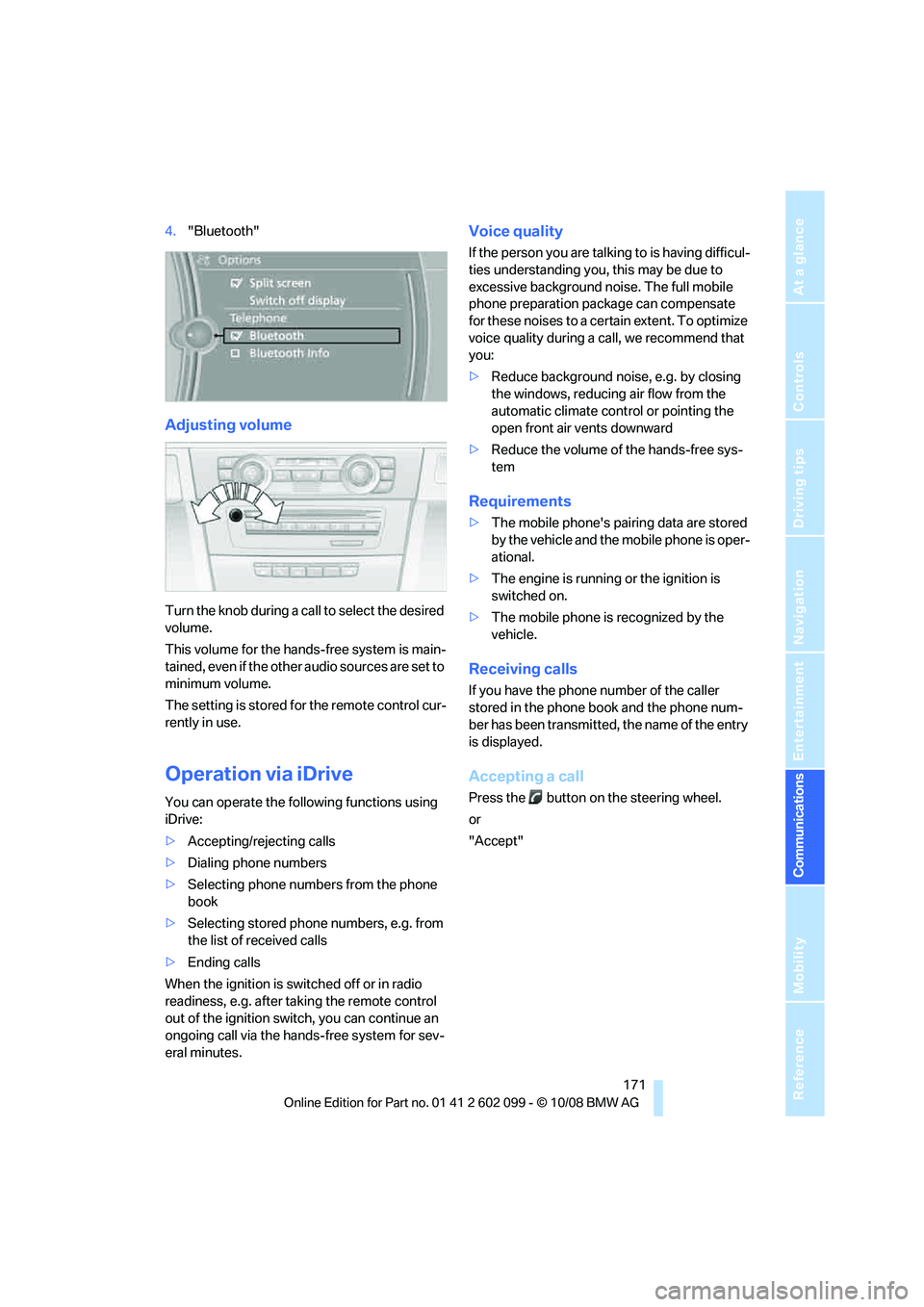
4. "Bluetooth"
Adjusting volume
Turn the knob during a call to select the desired
volume.
This volume for the hands-free system is main-
tained, even if the other audio sources are set to
minimum volume.
The setting is stored for the remote control cur-
rently in use.
Operation via iDrive
You can operate the following functions using
iDrive:
> Accepting/rejecting calls
> Dialing phone numbers
> Selecting phone numbers from the phone
book
> Selecting stored phone numbers, e.g. from
the list of received calls
> Ending calls
When the ignition is switched off or in radio
readiness, e.g. after ta king the remote control
out of the ignition swit ch, you can continue an
ongoing call via the hand s-free system for sev-
eral minutes.
Voice quality
If the person you are talk ing to is having difficul-
ties understanding you, this may be due to
excessive background noise. The full mobile
phone preparation pack age can compensate
for these noises to a cert ain extent. To optimize
voice quality during a call, we recommend that
you:
> Reduce background noise, e.g. by closing
the windows, reducing air flow from the
automatic climate cont rol or pointing the
open front air vents downward
> Reduce the volume of the hands-free sys-
tem
Requirements
>The mobile phone's pair ing data are stored
by the vehicle and the mobile phone is oper-
ational.
> The engine is running or the ignition is
switched on.
> The mobile phone is recognized by the
vehicle.
Receiving calls
If you have the phone number of the caller
stored in the phone b ook and the phone num-
ber has been transmitted, the name of the entry
is displayed.
Accepting a call
Press the button on the steering wheel.
or
"Accept"
ba8_E9091_cic.book Seite 171 Mittwoch, 29. Oktober 2008 2:59 14