ECO mode BMW 335I CONVERTIBLE 2013 Owner's Manual
[x] Cancel search | Manufacturer: BMW, Model Year: 2013, Model line: 335I CONVERTIBLE, Model: BMW 335I CONVERTIBLE 2013Pages: 308, PDF Size: 5.65 MB
Page 262 of 308
261
Maintenance
Mobility
Socket for Onboard
Diagnosis OBD
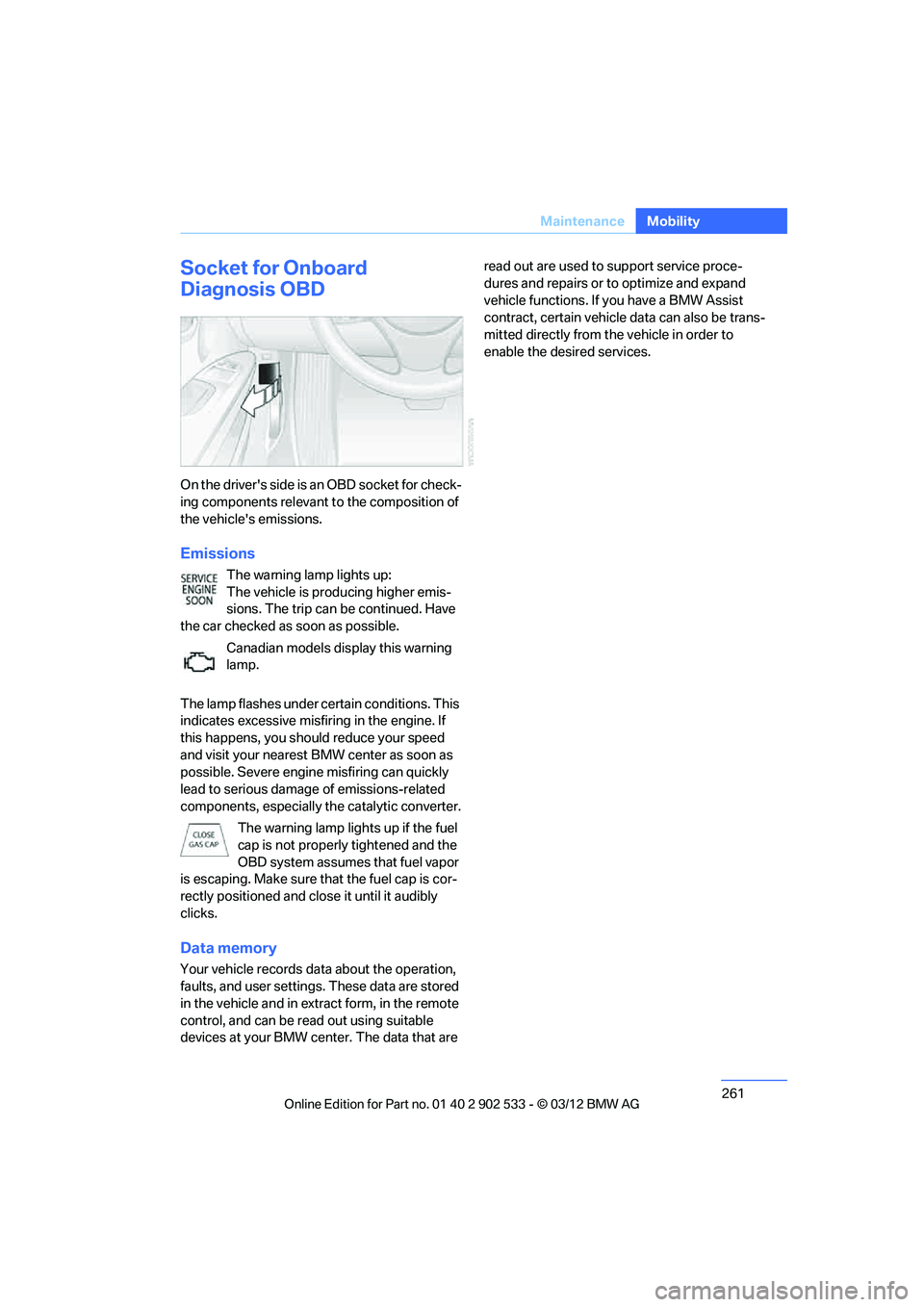
On the driver's side is an OBD socket for check-
ing components relevant to the composition of
the vehicle's emissions.
Emissions
The warning lamp lights up:
The vehicle is producing higher emis-
sions. The trip can be continued. Have
the car checked as soon as possible.
Canadian models display this warning
lamp.
The lamp flashes under certain conditions. This
indicates excessive misfiring in the engine. If
this happens, you should reduce your speed
and visit your nearest BMW center as soon as
possible. Severe engine misfiring can quickly
lead to serious damage of emissions-related
components, especially the catalytic converter. The warning lamp lights up if the fuel
cap is not properly tightened and the
OBD system assumes that fuel vapor
is escaping. Make sure that the fuel cap is cor-
rectly positioned and close it until it audibly
clicks.
Data memory
Your vehicle records data about the operation,
faults, and user settings. These data are stored
in the vehicle and in extract form, in the remote
control, and can be read out using suitable
devices at your BMW center. The data that are read out are used to support service proce-
dures and repairs or to optimize and expand
vehicle functions. If you have a BMW Assist
contract, certain vehicle data can also be trans-
mitted directly from the vehicle in order to
enable the desired services.
00320051004F004C00510048000300280047004C0057004C005200510003
Page 263 of 308
262
MobilityCare
Care
Vehicle equipment
In this chapter, all production, country, and
optional equipment that is offered in the model
range is described. For this reason, descrip-
tions will be given of some equipment that may
not be available in a vehicle, for example due to
the special options or national-market version
selected. This also applies to safety related
functions and systems.
Care products
Regular cleaning and care contributes signifi-
cantly to the value retention of your BMW.
BMW recommends cleaning and caring for your
vehicle with products that are approved by
BMW for this purpose.
Your BMW center will be happy to advise you on
the products and services available for cleaning
and caring for your BMW.
Original BMW CareProducts have been
material-tested, laboratory-checked and
proven in the field, and offer optimal care and
protection for your vehicle. <
Do not use cleaners that contain alcohol
or solvents as these may result in dam-
age. <
Cleaning agents can contain substances
that are dangerous or hazardous to your
health. Therefore, follow the warning and safety
instructions on the packaging. When cleaning
inside the vehicle, always open the doors or
windows of the vehicle. In enclosed areas, pro-
vide for sufficient ventilation. Only use products
designed for cleaning vehicles. <
Exterior care
Washing the vehicle
Especially during the winter months,
ensure that the vehicle is washed more
frequently. Heavy soiling and road salt can lead
to vehicle damage. <
After washing the vehicle, apply the
brakes briefly to dry them; otherwise,
water can reduce braking efficiency over the
short term and the brake discs can corrode. <
Automatic car washes
Give preference to car washes that use cloth or
soft brushes in order to avoid paint damage.
Do not use high-pressure car washes;
otherwise, water may drip into the vehicle
around the windows. <
Before driving into a car wash, ensure that it is
suitable for your BMW. Check the following:
> Dimensions of your vehicle, refer to
page 281.
> If necessary: fold in the exterior mirrors,
refer to page 54.
> Maximum permissible tire width.
Avoid car washes with guide rail heights
over 4 in/10 cm; otherwise, there is the
danger of damaging chassis parts. <
Preparations before driving into an automatic
car wash:
> Unscrew the rod antenna.
> Deactivate the rain sensor to prevent
undesired wiper operation.
> Remove additional add-on parts, e.g. spoil-
ers or phone antennas, if they could be
damaged.
> Leave the remote control in the ignition
lock.
00320051004F004C00510048000300280047004C0057004C005200510003
Page 267 of 308
266
MobilityReplacin g compon ents
Replacing components
Vehicle equipment
In this chapter, all production, country, and
optional equipment that is offered in the model
range is described. For this reason, descrip-
tions will be given of some equipment that may
not be available in a vehicle, for example due to
the special options or national-market version
selected. This also applies to safety related
functions and systems.
Onboard vehicle tool kit
Coupe
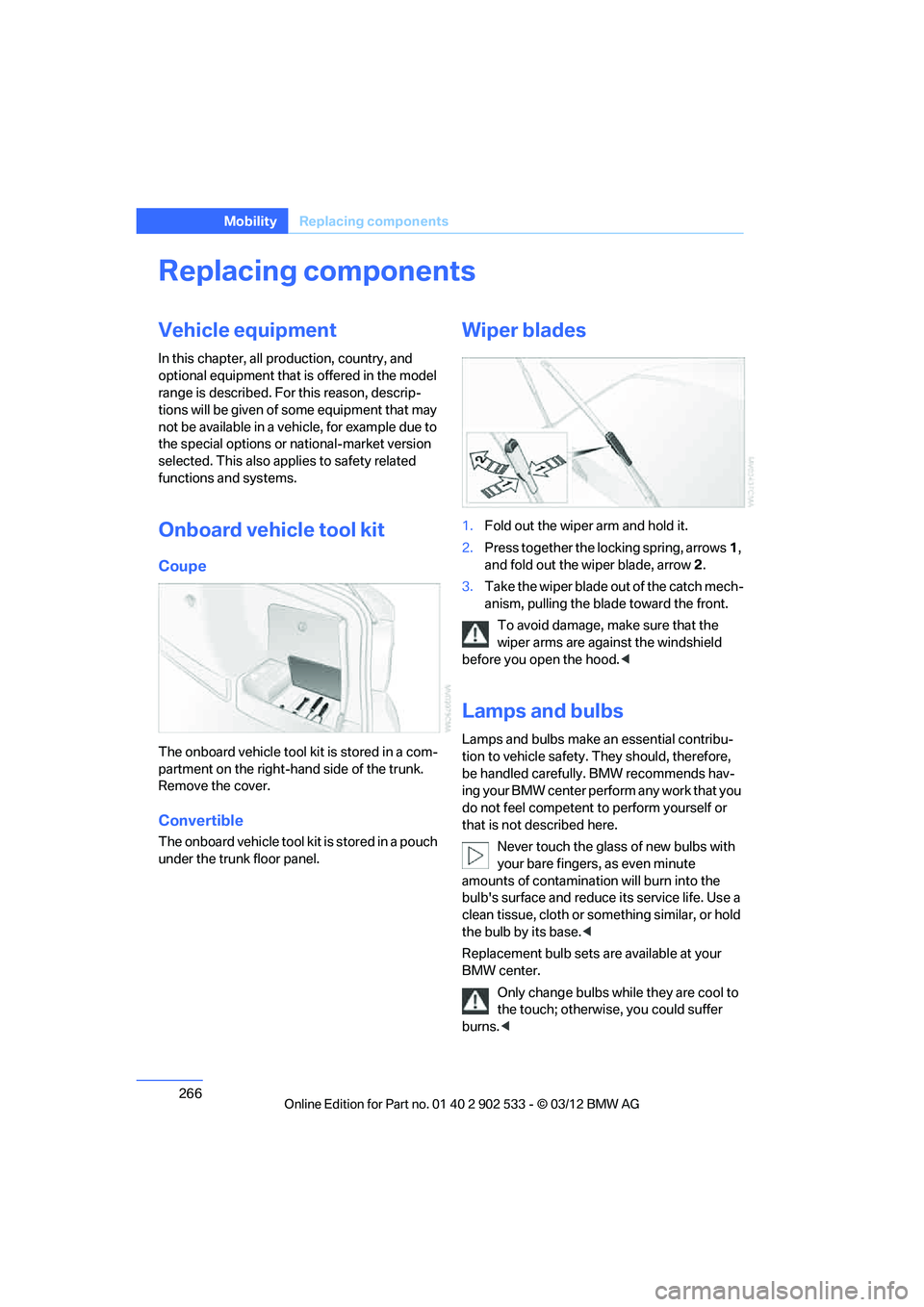
The onboard vehicle tool kit is stored in a com-
partment on the right-hand side of the trunk.
Remove the cover.
Convertible
The onboard vehicle tool kit is stored in a pouch
under the trunk floor panel.
Wiper blades
1.Fold out the wiper arm and hold it.
2. Press together the locking spring, arrows 1,
and fold out the wiper blade, arrow 2.
3. Take the wiper blade out of the catch mech-
anism, pulling the blade toward the front.
To avoid damage, make sure that the
wiper arms are against the windshield
before you open the hood. <
Lamps and bulbs
Lamps and bulbs make an essential contribu-
tion to vehicle safety. They should, therefore,
be handled carefully. BMW recommends hav-
ing your BMW center perform any work that you
do not feel competent to perform yourself or
that is not described here.
Never touch the glass of new bulbs with
your bare fingers, as even minute
amounts of contamination will burn into the
bulb's surface and reduce its service life. Use a
clean tissue, cloth or something similar, or hold
the bulb by its base. <
Replacement bulb sets are available at your
BMW center.
Only change bulbs while they are cool to
the touch; otherwise, you could suffer
burns. <
00320051004F004C00510048000300280047004C0057004C005200510003
Page 301 of 308
300
Referen ceEverything from A to Z
Mirrors53
– automatic curb monitor 54
– exterior mirrors 53
– heating 54
– interior rearview mirror 54
– memory, refer to Seat and mirror memory 52
Mirrors, folding in before entering a car wash 54
Mobile phone
– adjusting volume 205
– connecting, refer to Mobile phone, pairing 201
– installation location, refer to Center armrest 124
– operation 205
– pairing 201
– refer to separate Owner's Manual
– suitable mobile phones 200
– unpairing 203
– What to do if…. 204
Mobile phone, installation location, refer to Center
armrest 124
Mobile phone, refer to Telephone 200
Mobile phone, refer to the
separate Owner's Manual
Modifications, technical, refer to For your own safety 5
Monitor, refer to iDrive controls 18
Monitoring system for tire
pressures, refer to Flat Tire
Monitor 98
Multifunctional steering
wheel, refer to Buttons on
the steering wheel 11
Multifunction switch
– refer to Turn signals/
headlamp flasher 70
– refer to Wiper system 70
Multimedia screen, refer to iDrive 18
My Info 217N
Navigation
– starting destination
guidance after entering a
destination 148
– storing current position 149
– voice activation 152
Navigation announcements, refer to Switching voice
instructions on/off 157
Navigation data 144
Navigation system 144
– address book 148
– bypassing a route section 156
– continuing destination guidance 155
– destination entry 146
– dynamic destination guidance 162
– entering a destination by
voice 152
– entering a destination manually 146
– frequently asked questions 163
– gas station
recommendations 157
– planning a trip 153
– route list 156
– selecting destination via map 151
– selecting route criteria 155
– special destinations 150
– starting destination guidance 155
– terminating destination guidance 155
– traffic bulletins 159
– voice instructions 157
– volume adjustment 157
Neck support, refer to Head
restraints 49
Nets, refer to Storage compartments 125
Neutral 66 New tires
253
Next Service indicator, refer to Condition Based Service
CBS 260
North-facing map 157
Notes 220
Nozzles 114
Nylon rope, refer to Tow rope 276
O
OBD socket, refer to Socket
for Onboard Diagnosis 261
Octane ratings, refer to Fuel specifications 233
Odometer 80
Office 213
– current office 213
– What to do if…. 221
Oil, refer to Engine oil 256
Oil consumption 256
Oil level 256
Old batteries, refer to Disposal 271
Onboard vehicle tool kit 266
Opening and closing
– Comfort Access 38
– from inside 34
– from outside 32
– retractable hardtop 43
– using the door lock 34
– using the remote control 32
Options, selecting for
navigation 155
Orientation menu, refer to Start menu 19
Outlets
– refer to Ventilation 117
Outside-air mode
– automatic climate
control 116
Outside temperature
display 80
– changing unit of measure 85
– in computer 85
00320051004F004C00510048000300280047004C0057004C005200510003