Sound BMW 335I COUPE 2006 E92 User Guide
[x] Cancel search | Manufacturer: BMW, Model Year: 2006, Model line: 335I COUPE, Model: BMW 335I COUPE 2006 E92Pages: 239, PDF Size: 11.87 MB
Page 142 of 239
On/off and settings
140
On/off and settings
The following audio sources have shared con-
trols and setting options:
>Radio
>CD player
>CD changer
*
Controls
The audio sources can be operated using:
>Buttons near the CD player
>iDrive
>Buttons
on the steering wheel, refer to
page11
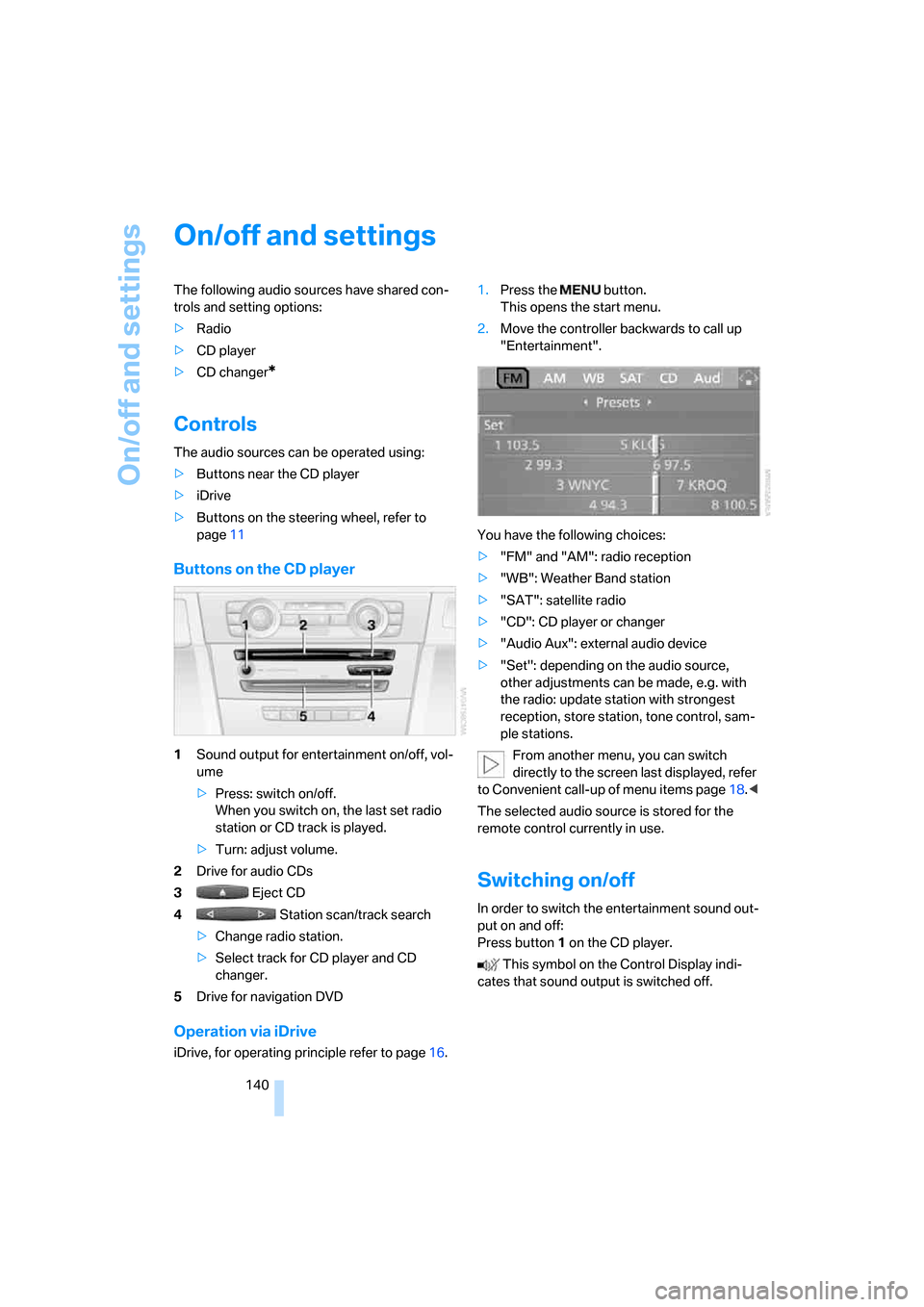
Buttons on the CD player
1Sound output for entertainment on/off, vol-
ume
>Press: switch on/off.
When you switch on, the last set radio
station or CD track is played.
>Turn: adjust volume.
2Drive for audio CDs
3 Eject CD
4 Station scan/track search
>Change radio station.
>Select track for CD player and CD
changer.
5Drive for navigation DVD
Operation via iDrive
iDrive, for operating principle refer to page16.1.Press the button.
This opens the start menu.
2.Move the controller backwards to call up
"Entertainment".
You have the following choices:
>"FM" and "AM": radio reception
>"WB": Weather Band station
>"SAT": satellite radio
>"CD": CD player or changer
>"Audio Aux": external audio device
>"Set": depending on the audio source,
other adjustments can be made, e.g. with
the radio: update station with strongest
reception, store station, tone control, sam-
ple stations.
From another menu, you can switch
directly to the screen last displayed, refer
to Convenient call-up of menu items page18.<
The selected audio source is stored for the
remote control currently in use.
Switching on/off
In order to switch the entertainment sound out-
put on and off:
Press button1 on the CD player.
This symbol on the Control Display indi-
cates that sound output is switched off.
ba8_E9293_US.book Seite 140 Freitag, 5. Mai 2006 1:02 13
Page 144 of 239
On/off and settings
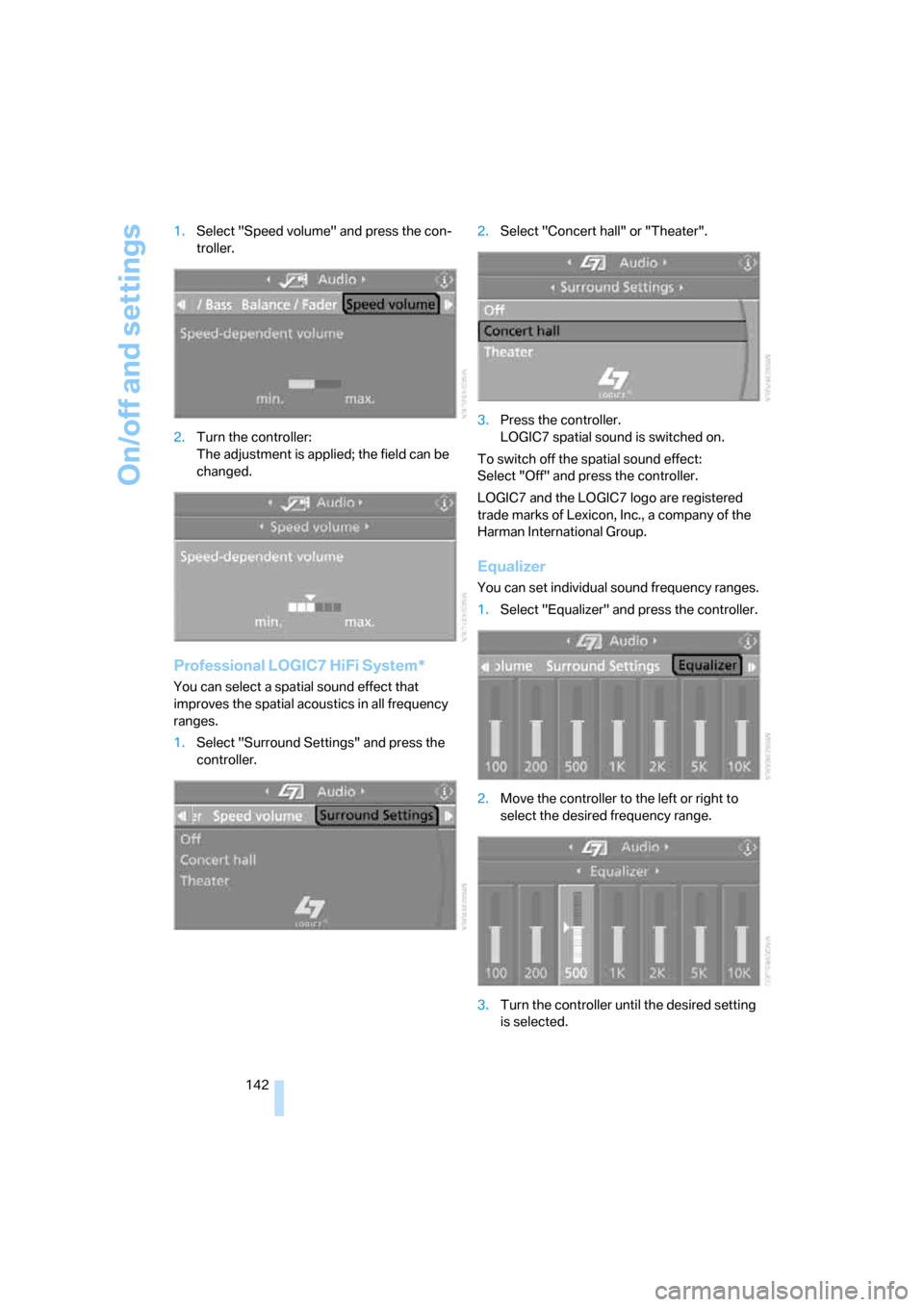
142 1.Select "Speed volume" and press the con-
troller.
2.Turn the controller:
The adjustment is applied; the field can be
changed.
Professional LOGIC7 HiFi System*
You can select a spatial sound effect that
improves the spatial acoustics in all frequency
ranges.
1.Select "Surround Settings" and press the
controller.2.Select "Concert hall" or "Theater".
3.Press the controller.
LOGIC7 spatial sound is switched on.
To switch off the spatial sound effect:
Select "Off" and press the controller.
LOGIC7 and the LOGIC7 logo are registered
trade marks of Lexicon, Inc., a company of the
Harman International Group.
Equalizer
You can set individual sound frequency ranges.
1.Select "Equalizer" and press the controller.
2.Move the controller to the left or right to
select the desired frequency range.
3.Turn the controller until the desired setting
is selected.
ba8_E9293_US.book Seite 142 Freitag, 5. Mai 2006 1:02 13
Page 146 of 239
Radio
144
Radio
Your radio provides reception of the FM and AM
wavebands:
Listening to the radio
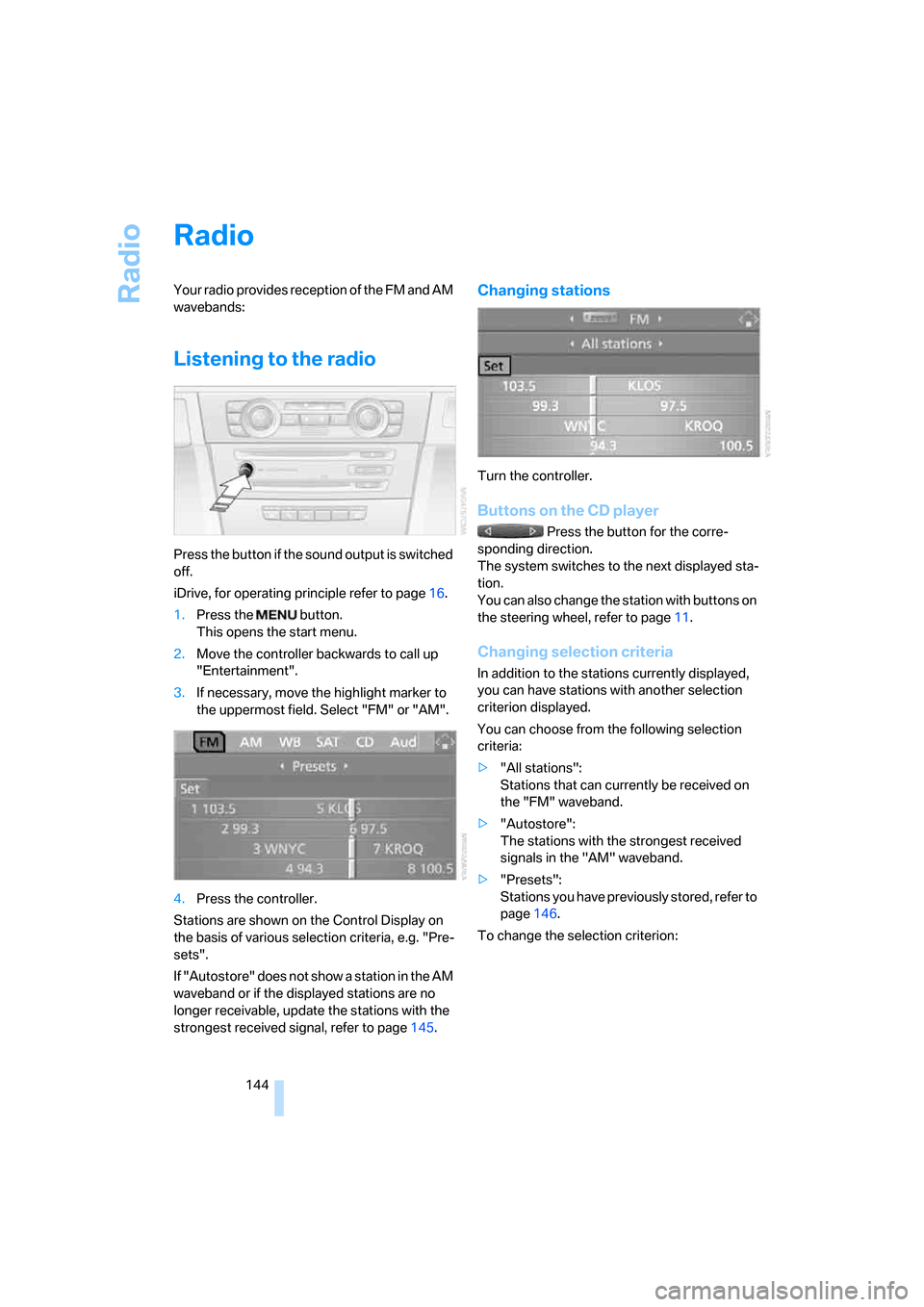
Press the button if the sound output is switched
off.
iDrive, for operating principle refer to page16.
1.Press the button.
This opens the start menu.
2.Move the controller backwards to call up
"Entertainment".
3.If necessary, move the highlight marker to
the uppermost field. Select "FM" or "AM".
4.Press the controller.
Stations are shown on the Control Display on
the basis of various selection criteria, e.g. "Pre-
sets".
If "Autostore" does not show a station in the AM
waveband or if the displayed stations are no
longer receivable, update the stations with the
strongest received signal, refer to page145.
Changing stations
Turn the controller.
Buttons on the CD player
Press the button for the corre-
sponding direction.
The system switches to the next displayed sta-
tion.
You can also change the station with buttons on
the steering wheel, refer to page11.
Changing selection criteria
In addition to the stations currently displayed,
you can have stations with another selection
criterion displayed.
You can choose from the following selection
criteria:
>"All stations":
Stations that can currently be received on
the "FM" waveband.
>"Autostore":
The stations with the strongest received
signals in the "AM" waveband.
>"Presets":
Stations you have previously stored, refer to
page146.
To change the selection criterion:
ba8_E9293_US.book Seite 144 Freitag, 5. Mai 2006 1:02 13
Page 149 of 239
Navigation
Entertainment
Driving tips
147Reference
At a glance
Controls
Communications
Mobility
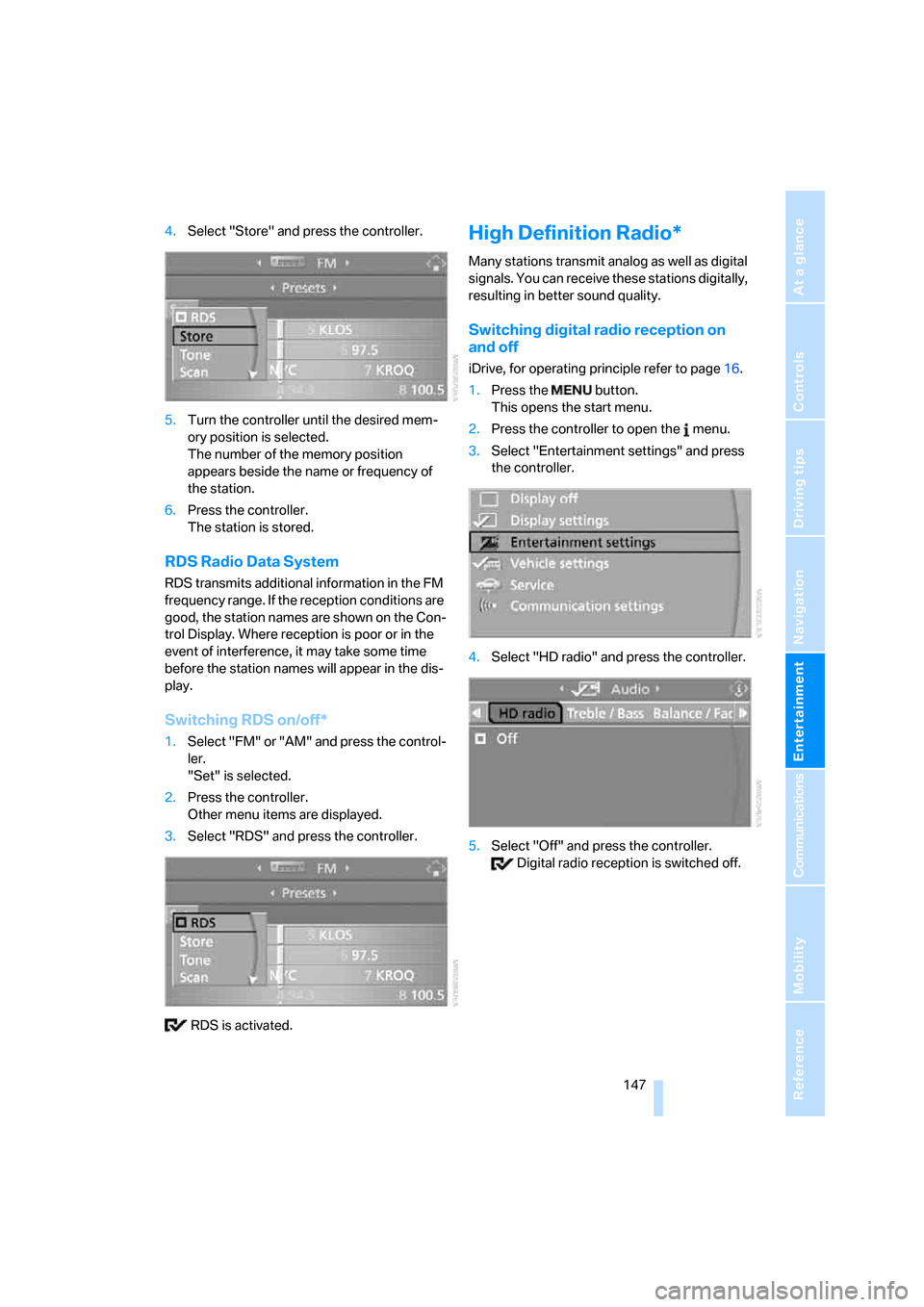
4.Select "Store" and press the controller.
5.Turn the controller until the desired mem-
ory position is selected.
The number of the memory position
appears beside the name or frequency of
the station.
6.Press the controller.
The station is stored.
RDS Radio Data System
RDS transmits additional information in the FM
frequency range. If the reception conditions are
good, the station names are shown on the Con-
trol Display. Where reception is poor or in the
event of interference, it may take some time
before the station names will appear in the dis-
play.
Switching RDS on/off*
1.Select "FM" or "AM" and press the control-
ler.
"Set" is selected.
2.Press the controller.
Other menu items are displayed.
3.Select "RDS" and press the controller.
RDS is activated.
High Definition Radio*
Many stations transmit analog as well as digital
signals. You can receive these stations digitally,
resulting in better sound quality.
Switching digital radio reception on
and off
iDrive, for operating principle refer to page16.
1.Press the button.
This opens the start menu.
2.Press the controller to open the menu.
3.Select "Entertainment settings" and press
the controller.
4.Select "HD radio" and press the controller.
5.Select "Off" and press the controller.
Digital radio reception is switched off.
ba8_E9293_US.book Seite 147 Freitag, 5. Mai 2006 1:02 13
Page 151 of 239
Navigation
Entertainment
Driving tips
149Reference
At a glance
Controls
Communications
Mobility
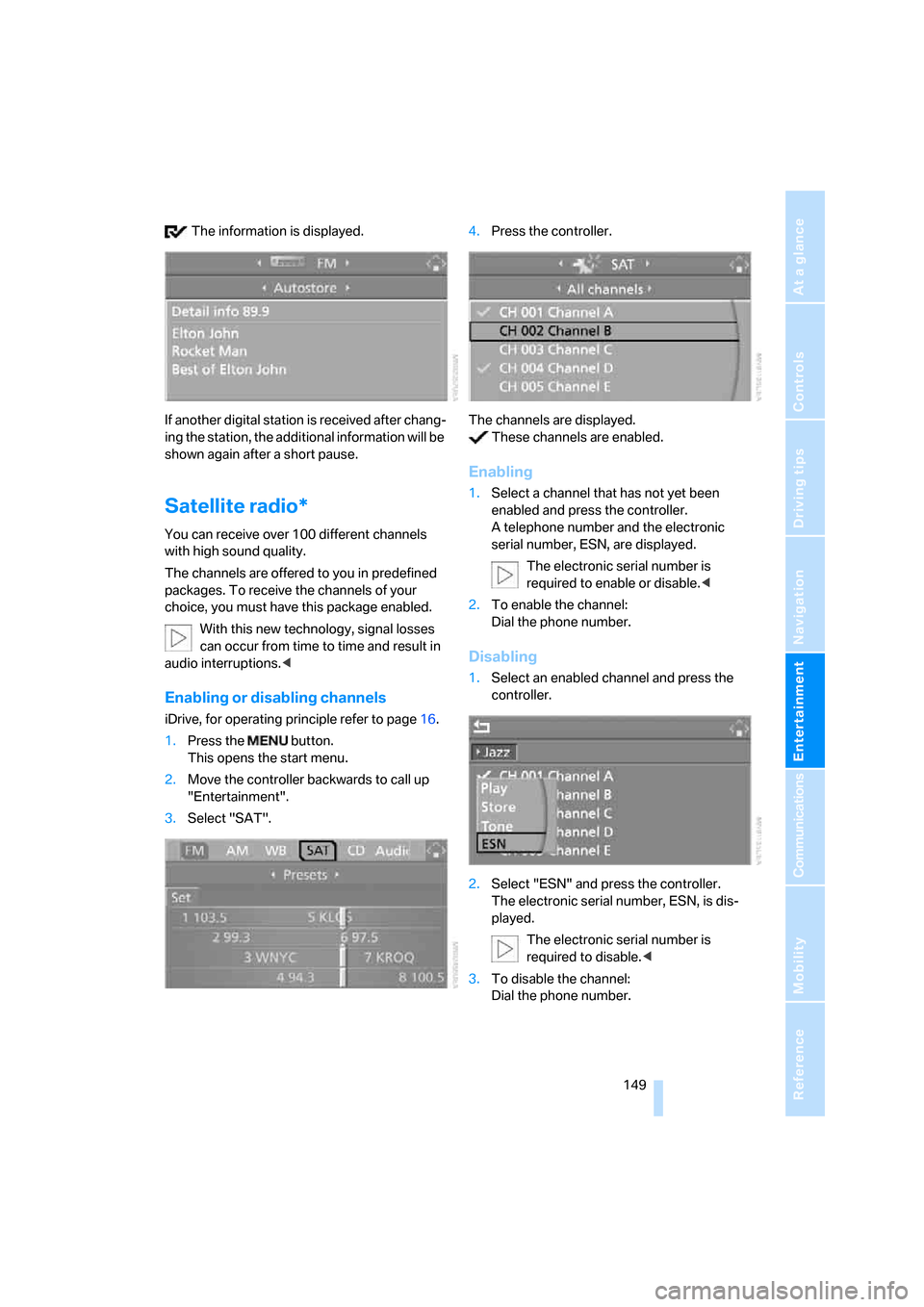
The information is displayed.
If another digital station is received after chang-
ing the station, the additional information will be
shown again after a short pause.
Satellite radio*
You can receive over 100 different channels
with high sound quality.
The channels are offered to you in predefined
packages. To receive the channels of your
choice, you must have this package enabled.
With this new technology, signal losses
can occur from time to time and result in
audio interruptions.<
Enabling or disabling channels
iDrive, for operating principle refer to page16.
1.Press the button.
This opens the start menu.
2.Move the controller backwards to call up
"Entertainment".
3.Select "SAT".4.Press the controller.
The channels are displayed.
These channels are enabled.
Enabling
1.Select a channel that has not yet been
enabled and press the controller.
A telephone number and the electronic
serial number, ESN, are displayed.
The electronic serial number is
required to enable or disable.<
2.To enable the channel:
Dial the phone number.
Disabling
1.Select an enabled channel and press the
controller.
2.Select "ESN" and press the controller.
The electronic serial number, ESN, is dis-
played.
The electronic serial number is
required to disable.<
3.To disable the channel:
Dial the phone number.
ba8_E9293_US.book Seite 149 Freitag, 5. Mai 2006 1:02 13
Page 154 of 239
CD player and CD changer
152
CD player and CD changer
Listening to CDs
Compressed audio files*
CDs with compressed audio files, MP3s, can be
played by the CD player and CD changer.
Starting the CD player
The upper drive is for audio CDs.
Insert the CD into the drive with the labeled side
up.
The CD is pulled in automatically. Playback
starts automatically if the sound output is on.
When playing CDs with compressed audio files,
it can take the CD player approx. 1 minute to
read in the data, depending on the directory
structure.
To start playback when there is already a CD in
the drive:
iDrive, for operating principle refer to page16.
1.Press the button.
This opens the start menu.
2.Move the controller backwards to call up
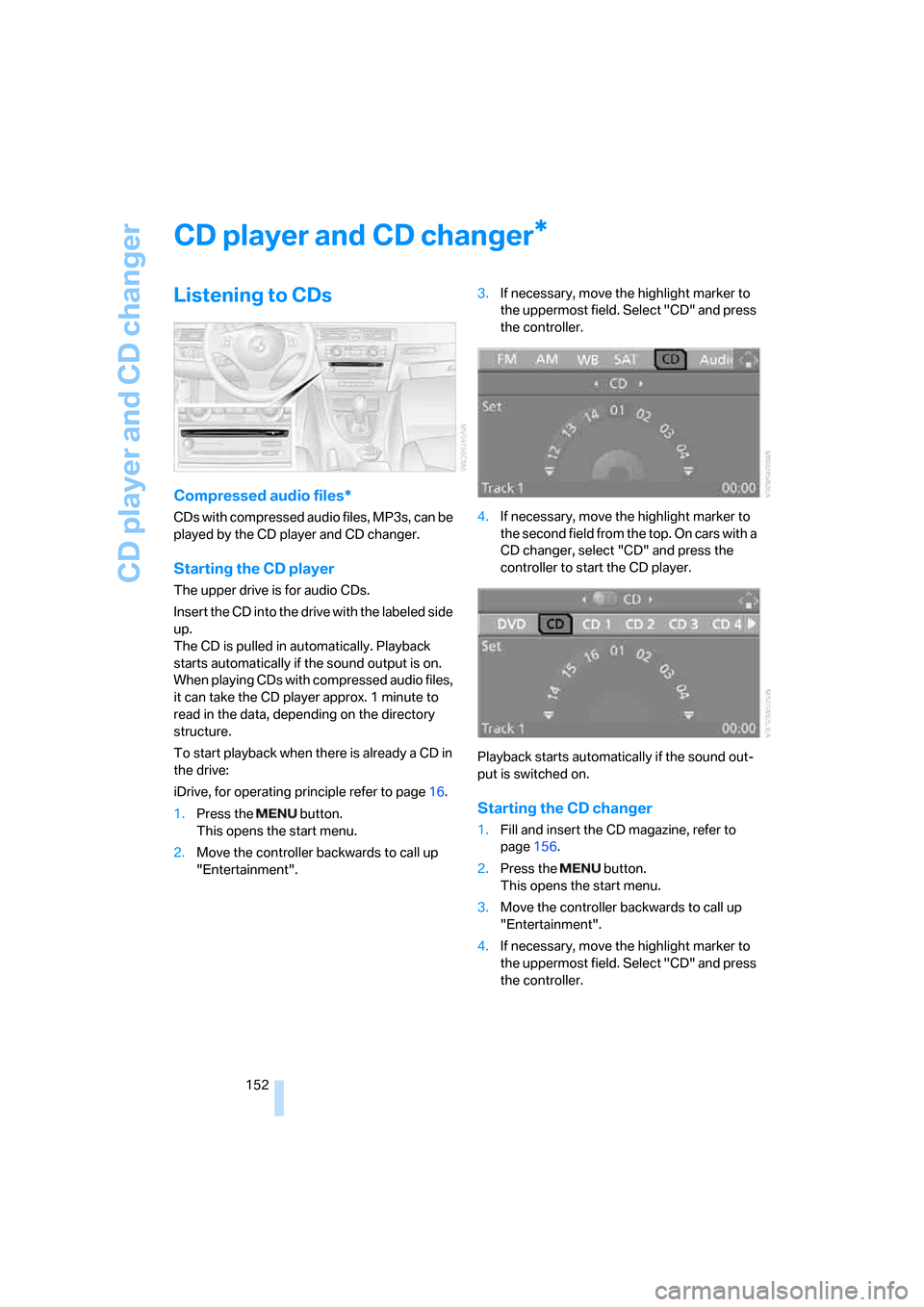
"Entertainment".3.If necessary, move the highlight marker to
the uppermost field. Select "CD" and press
the controller.
4.If necessary, move the highlight marker to
the second field from the top. On cars with a
CD changer, select "CD" and press the
controller to start the CD player.
Playback starts automatically if the sound out-
put is switched on.
Starting the CD changer
1.Fill and insert the CD magazine, refer to
page156.
2.Press the button.
This opens the start menu.
3.Move the controller backwards to call up
"Entertainment".
4.If necessary, move the highlight marker to
the uppermost field. Select "CD" and press
the controller.
*
ba8_E9293_US.book Seite 152 Freitag, 5. Mai 2006 1:02 13
Page 173 of 239
171
Entertainment
Reference
At a glance
Controls
Driving tips Communications
Navigation
Mobility
and/or your mobile phone's operating
instructions.
>Press the button above the storage
compartment. The changeover can take
several seconds.
From hands-free system to mobile
phone
If you are making a call via the hands-free sys-
tem, you can also continue the call via the
mobile phone, if necessary, depending on your
mobile phone model. Refer to the display on
your mobile phone and/or your mobile phone's
operating instructions.
Operation by voice
commands*
The concept
You can operate your mobile phone without
having to take a hand off the steering wheel.
During your entries, you will be guided in many
cases by announcements and questions.
The same prerequisites apply as for operation
via iDrive, refer to page166.
Symbols in the Owner's Manual
Saying commands
Activating the system
1.Briefly press the button on the steering
wheel.
A sound signal indicates that you can say
commands.
2.Say the command.
The text or numbers that the voice com-
mand system has registered will appear on
the Control Display.
Ending/canceling operation by voice
commands
Briefly press the button on the steering
wheel or
In dialogs where text is spoken, e.g. a name
rather than a command, canceling is only possi-
ble using the button on the steering wheel.
Having the possible commands read
aloud
The system recognizes specific commands
t h a t m u s t b e p r o n o u n c e d e x a c t l y w o r d f o r w o r d .
You can have the possible commands for any
function read aloud to you:
Using alternative commands
Often there is more than a single command to
run a function, e.g.:
Digits from zero to nine are recognized.
You can say each digit individually or group
them into a sequence to accelerate the input.
{...}Say the specified commands word for
word.
{{...}} Indicates responses of the system.
{Cancel}.
{Help}
{Dial name} or {Name}.
ba8_E9293_US.book Seite 171 Freitag, 5. Mai 2006 1:02 13
Page 185 of 239
Mobility
183Reference
At a glance
Controls
Driving tips
Communications
Navigation
Entertainment
Required fuel
Super Premium Gasoline/AKI 91
This gasoline is highly recommended.
However, you may also use gasoline with less
AKI. The minimum AKI Rating is:
>328i: 87
>335i: 89.
If you use gasoline with this minimum AKI Rat-
ing, the engine may produce knocking sounds
when starting at high outside temperatures.
This has no effect on the engine life.
Do not use any gasoline below the mini-
mum specified fuel grade. Otherwise the
engine could be damaged.<
Use high-quality brands
Field experience has indicated significant dif-
ferences in fuel quality: volatility, composition,
additives, etc., among gasolines offered for sale
in the United States and Canada. Fuels contain-
ing up to and including 10 % ethanol or other
oxygenates with up to 2.8 % oxygen by weight,
that is, 15 % MTBE or 3 % methanol plus an
equivalent amount of co-solvent, will not void
the applicable warranties with respect to
defects in materials or workmanship.
The use of poor-quality fuels may result in
drivability, starting and stalling problems
especially under certain environmental condi-
tions such as high ambient temperature and
high altitude.
Should you encounter driveability problems
which you suspect could be related to the fuel
you are using, we recommend that you respond
by switching to a recognized high-quality brand
such as gasoline that is advertised as Top Tier
Detergent Gasoline.
Failure to comply with these recommendations
may also result in unscheduled maintenance.<
ba8_E9293_US.book Seite 183 Freitag, 5. Mai 2006 1:02 13
Page 218 of 239
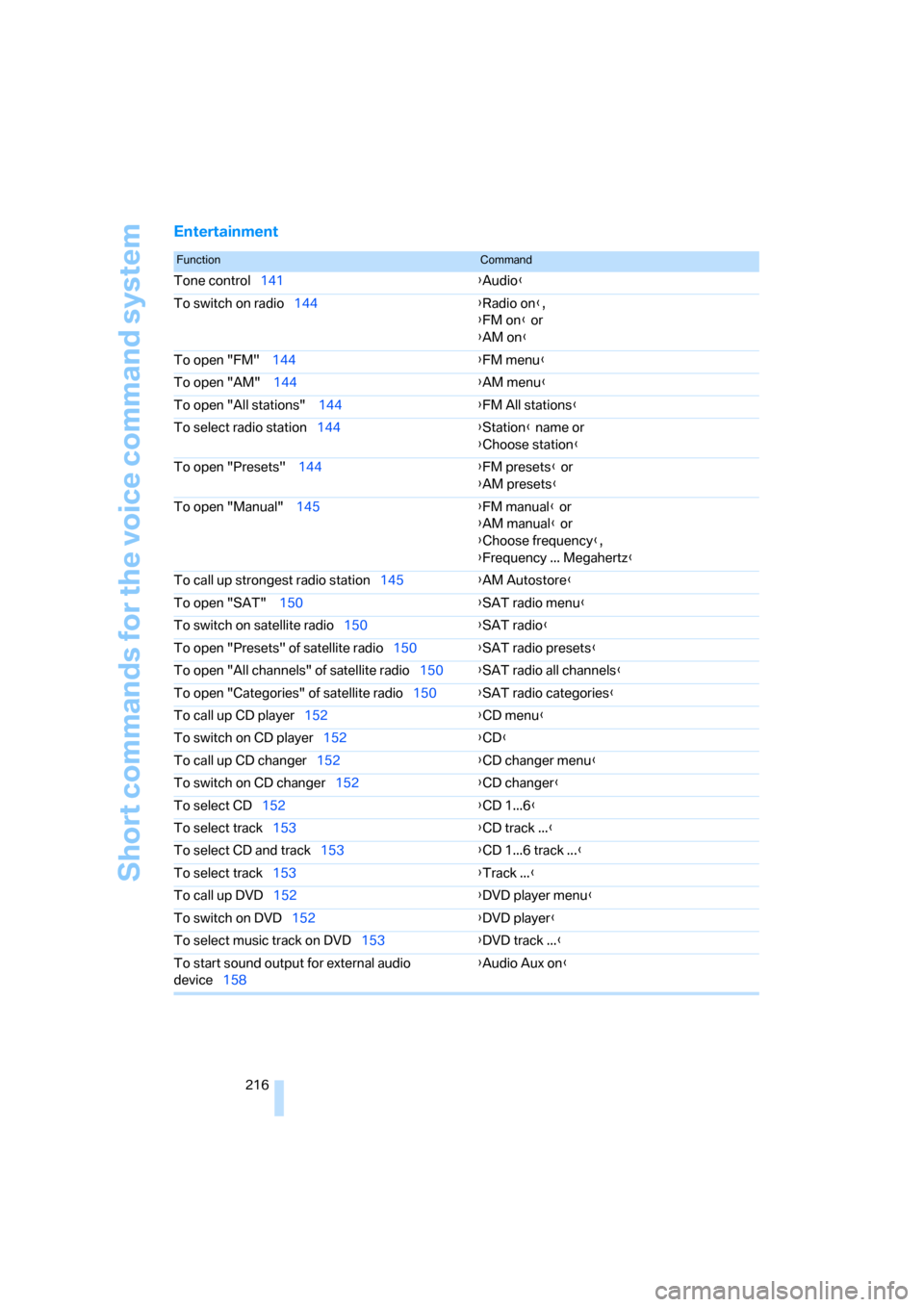
Short commands for the voice command system
216
Entertainment
FunctionCommand
Tone control141{Audio}
To switch on radio144{Radio on},
{FM on} or
{AM on}
To open "FM" 144{FM menu}
To open "AM" 144{AM menu}
To open "All stations" 144{FM All stations}
To select radio station144{Station} name or
{Choose station}
To open "Presets" 144{FM presets} or
{AM presets}
To open "Manual" 145{FM manual} or
{AM manual} or
{Choose frequency},
{Frequency ... Megahertz}
To call up strongest radio station145{AM Autostore}
To open "SAT" 150{SAT radio menu}
To switch on satellite radio150{SAT radio}
To open "Presets" of satellite radio150{SAT radio presets}
To open "All channels" of satellite radio150{SAT radio all channels}
To open "Categories" of satellite radio150{SAT radio categories}
To call up CD player152{
CD menu}
To switch on CD player152{CD}
To call up CD changer152{CD changer menu}
To switch on CD changer152{CD changer}
To select CD152{CD 1...6}
To select track153{CD track ...}
To select CD and track153{CD 1...6 track ...}
To select track153{Track ...}
To call up DVD152{DVD player menu}
To switch on DVD152{DVD player}
To select music track on DVD153{DVD track ...}
To start sound output for external audio
device158{Audio Aux on}
ba8_E9293_US.book Seite 216 Freitag, 5. Mai 2006 1:02 13
Page 221 of 239
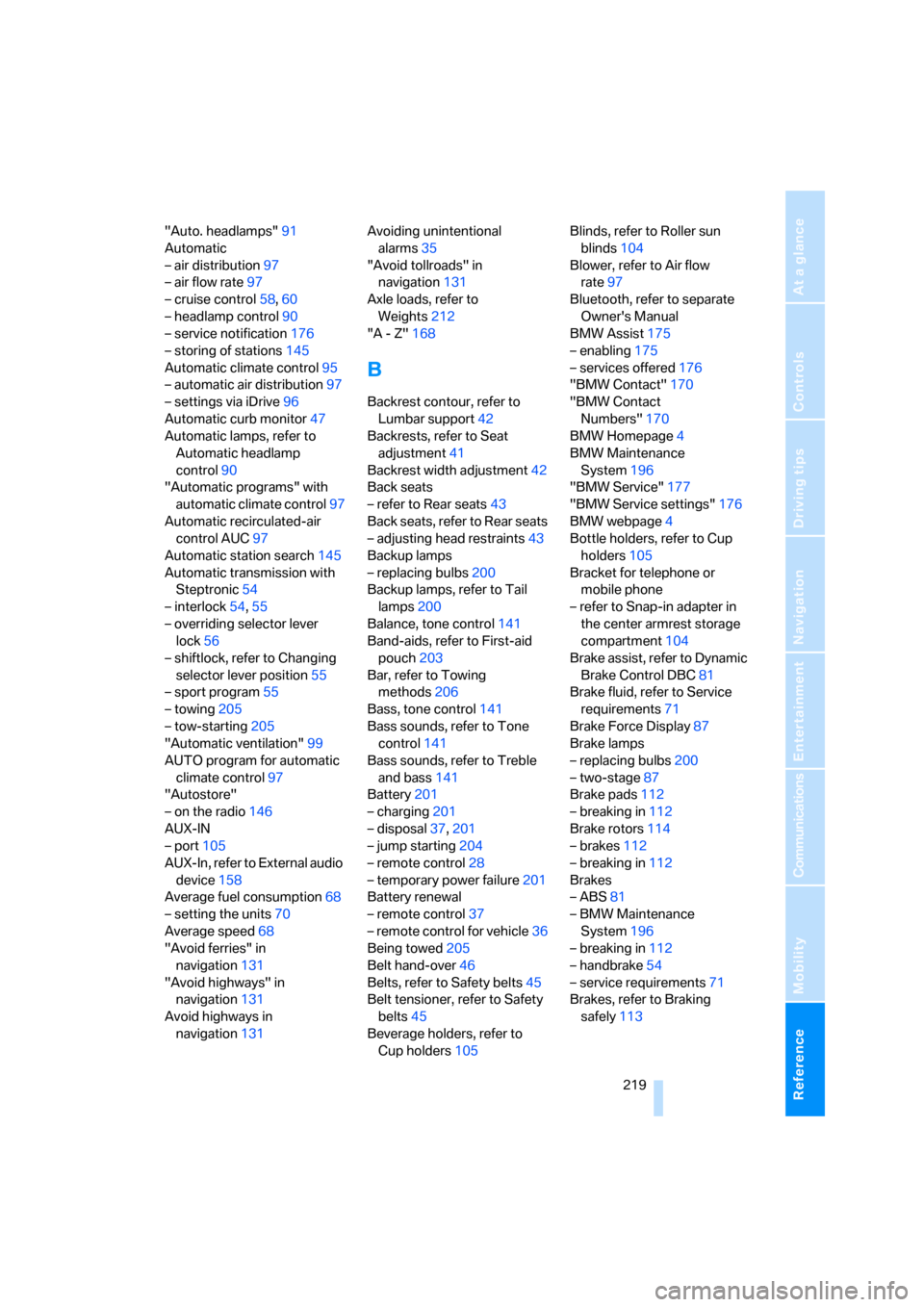
Reference 219
At a glance
Controls
Driving tips
Communications
Navigation
Entertainment
Mobility
"Auto. headlamps"91
Automatic
– air distribution97
– air flow rate97
– cruise control58,60
– headlamp control90
– service notification176
– storing of stations145
Automatic climate control95
– automatic air distribution97
– settings via iDrive96
Automatic curb monitor47
Automatic lamps, refer to
Automatic headlamp
control90
"Automatic programs" with
automatic climate control97
Automatic recirculated-air
control AUC97
Automatic station search145
Automatic transmission with
Steptronic54
– interlock54,55
– overriding selector lever
lock56
– shiftlock, refer to Changing
selector lever position55
– sport program55
– towing205
– tow-starting205
"Automatic ventilation"99
AUTO program for automatic
climate control97
"Autostore"
– on the radio146
AUX-IN
– port105
AUX-In, refer to External audio
device158
Average fuel consumption68
– setting the units70
Average speed68
"Avoid ferries" in
navigation131
"Avoid highways" in
navigation131
Avoid highways in
navigation131Avoiding unintentional
alarms35
"Avoid tollroads" in
navigation131
Axle loads, refer to
Weights212
"A - Z"168
B
Backrest contour, refer to
Lumbar support42
Backrests, refer to Seat
adjustment41
Backrest width adjustment42
Back seats
– refer to Rear seats43
Back seats, refer to Rear seats
– adjusting head restraints43
Backup lamps
– replacing bulbs200
Backup lamps, refer to Tail
lamps200
Balance, tone control141
Band-aids, refer to First-aid
pouch203
Bar, refer to Towing
methods206
Bass, tone control141
Bass sounds, refer to Tone
control141
Bass sounds, refer to Treble
and bass141
Battery201
– charging201
– disposal37,201
– jump starting204
– remote control28
– temporary power failure201
Battery renewal
– remote control37
– remote control for vehicle36
Being towed205
Belt hand-over46
Belts, refer to Safety belts45
Belt tensioner, refer to Safety
belts45
Beverage holders, refer to
Cup holders105Blinds, refer to Roller sun
blinds104
Blower, refer to Air flow
rate97
Bluetooth, refer to separate
Owner's Manual
BMW Assist175
– enabling175
– services offered176
"BMW Contact"170
"BMW Contact
Numbers"170
BMW Homepage4
BMW Maintenance
System196
"BMW Service"177
"BMW Service settings"176
BMW webpage4
Bottle holders, refer to Cup
holders105
Bracket for telephone or
mobile phone
– refer to Snap-in adapter in
the center armrest storage
compartment104
Brake assist, refer to Dynamic
Brake Control DBC81
Brake fluid, refer to Service
requirements71
Brake Force Display87
Brake lamps
– replacing bulbs200
– two-stage87
Brake pads112
– breaking in112
Brake rotors114
– brakes112
– breaking in112
Brakes
– ABS81
– BMW Maintenance
System196
– breaking in112
– handbrake54
– service requirements71
Brakes, refer to Braking
safely113
ba8_E9293_US.book Seite 219 Freitag, 5. Mai 2006 1:02 13