Voice BMW 335I COUPE 2007 E92 Owner's Guide
[x] Cancel search | Manufacturer: BMW, Model Year: 2007, Model line: 335I COUPE, Model: BMW 335I COUPE 2007 E92Pages: 272, PDF Size: 8.97 MB
Page 204 of 272
BMW Assist
202
Characteristics of the offered services
The following characteristics apply to the ser-
vices:
>The services offered are country-specific.
>Voice contact is established or data are
transferred, depending on the equipment
and the country. In some countries, it is
possible to do both.
>The data transmitted can be vehicle data,
for example, your current position or the
Condition Based Service CBS data.
Using services
Contacting the BMW Assist Response
Center
You can establish contact with the BMW Assist
Response Center via the SOS button.
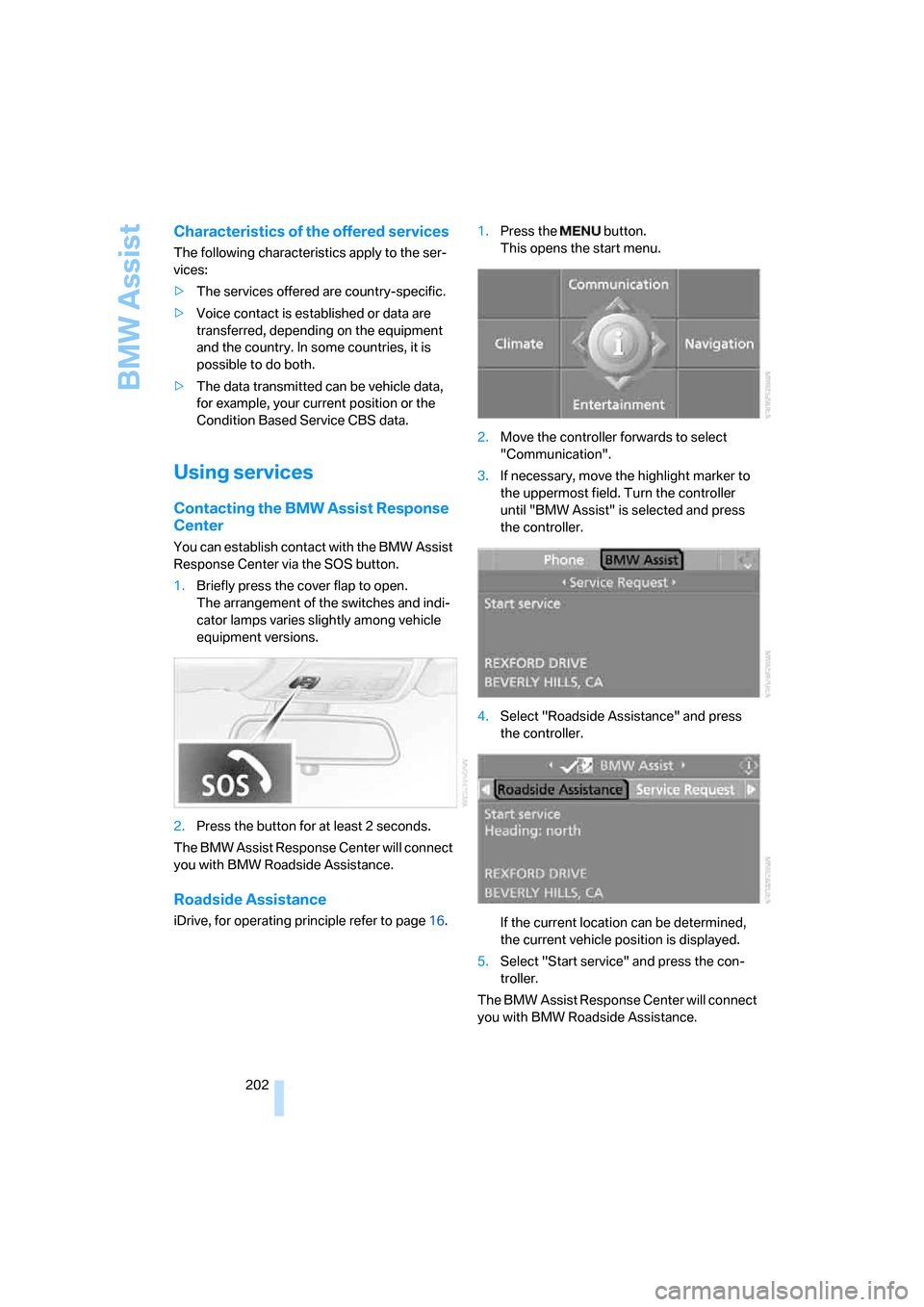
1.Briefly press the cover flap to open.
The arrangement of the switches and indi-
cator lamps varies slightly among vehicle
equipment versions.
2.Press the button for at least 2 seconds.
The BMW Assist Response Center will connect
you with BMW Roadside Assistance.
Roadside Assistance
iDrive, for operating principle refer to page16.1.Press the button.
This opens the start menu.
2.Move the controller forwards to select
"Communication".
3.If necessary, move the highlight marker to
the uppermost field. Turn the controller
until "BMW Assist" is selected and press
the controller.
4.Select "Roadside Assistance" and press
the controller.
If the current location can be determined,
the current vehicle position is displayed.
5.Select "Start service" and press the con-
troller.
The BMW Assist Response Center will connect
you with BMW Roadside Assistance.
Page 238 of 272
Giving and receiving assistance
236
Giving and receiving assistance
Emergency call*
Conditions for an emergency call:
>Equipment version with full preparation
package mobile phone. This equipment
makes it possible to initiate an emergency
call even if no mobile phone is paired with
the vehicle.
>BMW Assist is activated. Activating
BMW Assist, refer to page206.
>Radio readiness is on.
>The BMW Assist system is logged on to a
mobile phone network.
>The emergency calling system is operable.
Once your service contract for BMW Assist
expires, the BMW Assist system can be deacti-
vated by a BMW center without you having to
visit a workshop. Once the BMW Assist system
has been deactivated, emergency calls are not
possible. The BMW Assist system can be reac-
tivated by a BMW center after a new contract
has been signed.
Initiating an Emergency Request call
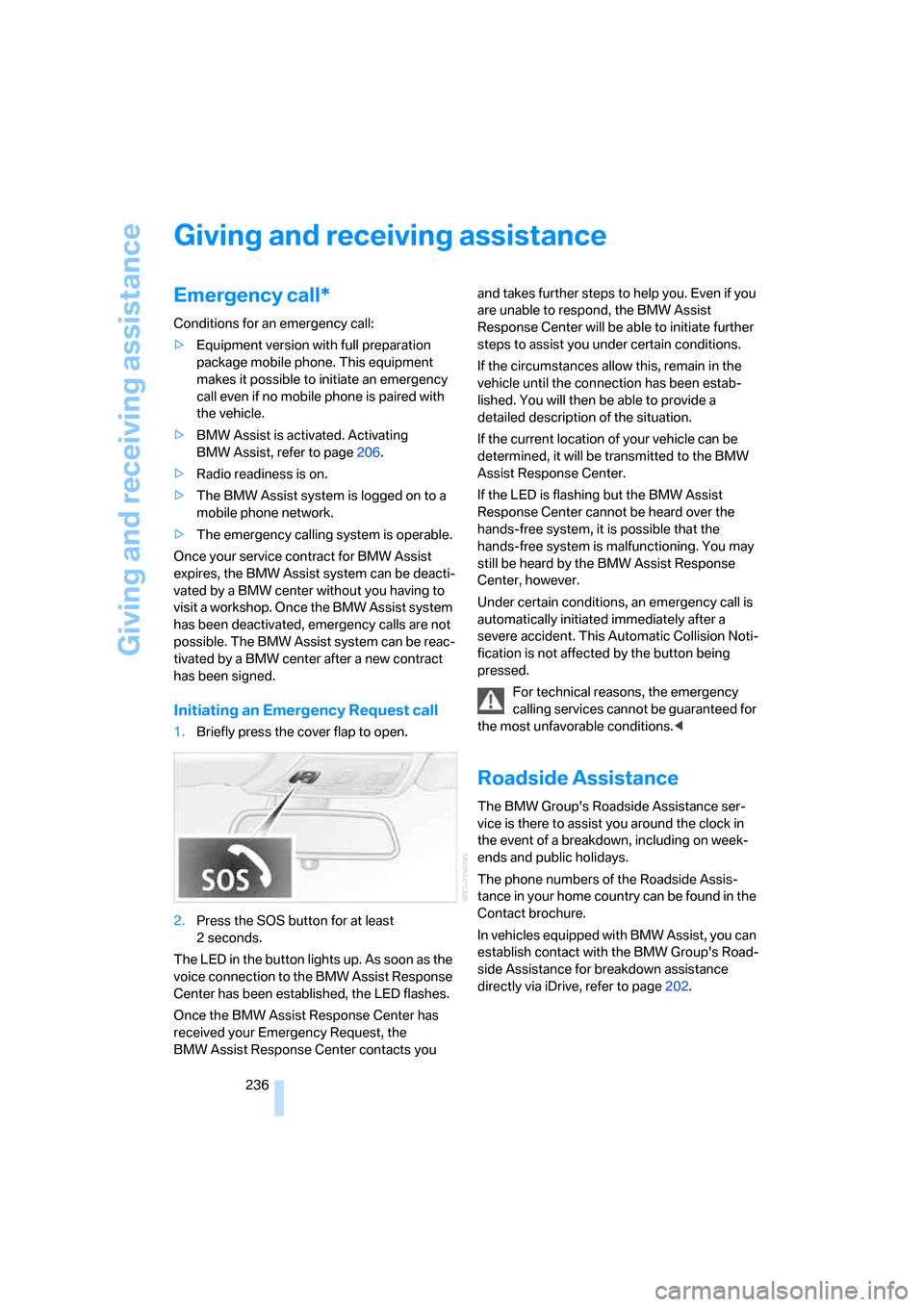
1.Briefly press the cover flap to open.
2.Press the SOS button for at least
2seconds.
The LED in the button lights up. As soon as the
voice connection to the BMW Assist Response
Center has been established, the LED flashes.
Once the BMW Assist Response Center has
received your Emergency Request, the
BMW Assist Response Center contacts you and takes further steps to help you. Even if you
are unable to respond, the BMW Assist
Response Center will be able to initiate further
steps to assist you under certain conditions.
If the circumstances allow this, remain in the
vehicle until the connection has been estab-
lished. You will then be able to provide a
detailed description of the situation.
If the current location of your vehicle can be
determined, it will be transmitted to the BMW
Assist Response Center.
If the LED is flashing but the BMW Assist
Response Center cannot be heard over the
hands-free system, it is possible that the
hands-free system is malfunctioning. You may
still be heard by the BMW Assist Response
Center, however.
Under certain conditions, an emergency call is
automatically initiated immediately after a
severe accident. This Automatic Collision Noti-
fication is not affected by the button being
pressed.
For technical reasons, the emergency
calling services cannot be guaranteed for
the most unfavorable conditions.<
Roadside Assistance
The BMW Group's Roadside Assistance ser-
vice is there to assist you around the clock in
the event of a breakdown, including on week-
ends and public holidays.
The phone numbers of the Roadside Assis-
tance in your home country can be found in the
Contact brochure.
In vehicles equipped with BMW Assist, you can
establish contact with the BMW Group's Road-
side Assistance for breakdown assistance
directly via iDrive, refer to page202.
Page 245 of 272
Reference
This chapter contains technical data, short
commands for the voice command system and
an index that will help you find information most
quickly.
Reference
Page 250 of 272
Short commands for the voice command system
248
Short commands for the voice command
system
With short commands you can carry out certain
functions directly, regardless of which menu item is selected. Here are the important short
commands for the voice command system.
Assistance window
Communication
*
FunctionCommand
To open assistance window20{Assistance window}
To select display in the assistance window20{Assistance window map facing north},
{Assistance window map direction of travel},
{Assistance window arrow display},
{Assistance window perspective},
{Assistance window current position},
{Assistance window trip computer} or
{Assistance window onboard info}
To change the scale in the assistance
window149{Assistance window scale ... feet} or
{Assistance window scale ... miles}
FunctionCommand
To open phone193{Phone}
To dial phone number193{Dial number}
To display phone book193{A to Z}
To select from phone book193{Call ...} or
{Dial name}
To display "Top 8"193{Top 8}
Redialing193{Redial}
To display "Received calls"193{Received calls}
To display "Missed calls"193{Missed calls}
To display "Bluetooth"187{Bluetooth}
To open BMW Assist206{BMW Assist}
To open "BMW Service" services202{BMW Service}
To open "BMW Contact"195{BMW Contact}
To open "BMW Contact Numbers"195{BMW Contact numbers}
To open "Roadside Assistance"202{Roadside Assistance}
Page 251 of 272
Reference 249
At a glance
Controls
Driving tips
Communications
Navigation
Entertainment
Mobility
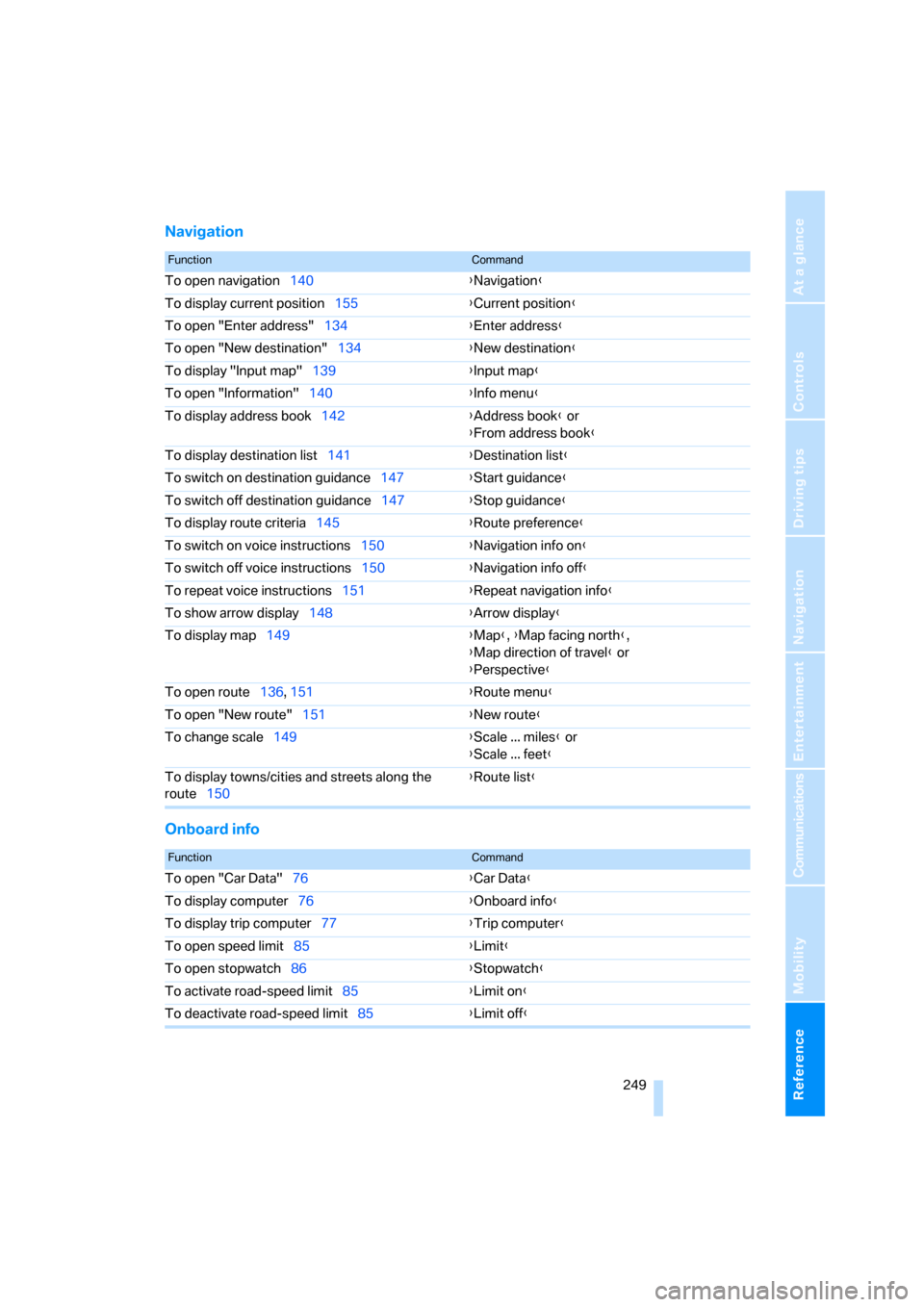
Navigation
Onboard info
FunctionCommand
To open navigation140{Navigation}
To display current position155{Current position}
To open "Enter address"134{Enter address}
To open "New destination"134{New destination}
To display "Input map"139{Input map}
To open "Information"140{Info menu}
To display address book142{Address book} or
{From address book}
To display destination list141{Destination list}
To switch on destination guidance147{Start guidance}
To switch off destination guidance147{Stop guidance}
To display route criteria145{Route preference}
To switch on voice instructions150{Navigation info on}
To switch off voice instructions150{Navigation info off}
To repeat voice instructions151{Repeat navigation info}
To show arrow display148{Arrow display}
To display map149{Map}, {Map facing north},
{Map direction of travel} or
{Perspective}
To open route136, 151
{Route menu}
To open "New route"151{New route}
To change scale149{Scale ... miles} or
{Scale ... feet}
To display towns/cities and streets along the
route150{Route list}
FunctionCommand
To open "Car Data"76{Car Data}
To display computer76{Onboard info}
To display trip computer77{Trip computer}
To open speed limit85{Limit}
To open stopwatch86{Stopwatch}
To activate road-speed limit85{Limit on}
To deactivate road-speed limit85{Limit off}
Page 252 of 272
Short commands for the voice command system
250
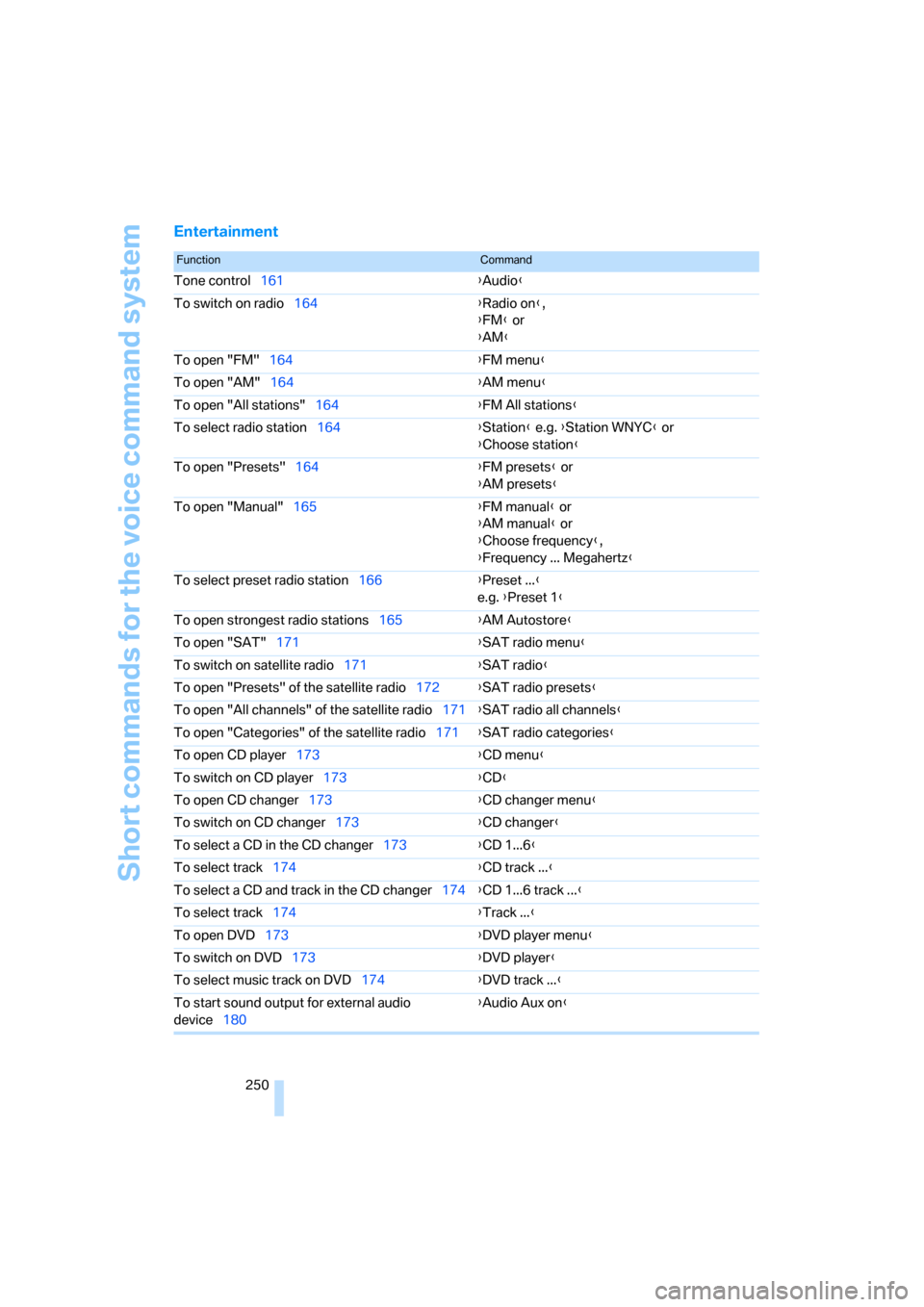
Entertainment
FunctionCommand
Tone control161{Audio}
To switch on radio164{Radio on},
{FM} or
{AM}
To open "FM"164{FM menu}
To open "AM"164{AM menu}
To open "All stations"164{FM All stations}
To select radio station164{Station} e.g. {Station WNYC} or
{Choose station}
To open "Presets"164{FM presets} or
{AM presets}
To open "Manual"165{FM manual} or
{AM manual} or
{Choose frequency},
{Frequency ... Megahertz}
To select preset radio station166{Preset ...}
e.g. {Preset 1}
To open strongest radio stations165{AM Autostore}
To open "SAT"171{SAT radio menu}
To switch on satellite radio171{SAT radio}
To open "Presets" of the satellite radio172{SAT radio presets}
To open "All channels" of the satellite radio171{SAT radio all channels}
To open "Categories" of the satellite radio171{SAT radio categories}
To open CD player173{CD menu}
To switch on CD player173{CD}
To open CD changer173{CD changer menu}
To switch on CD changer173{CD changer}
To select a CD in the CD changer173{CD 1...6}
To select track174{CD track ...}
To select a CD and track in the CD changer174{CD 1...6 track ...}
To select track174{Track ...}
To open DVD173{DVD player menu}
To switch on DVD173{DVD player}
To select music track on DVD174{DVD track ...}
To start sound output for external audio
device180{Audio Aux on}
Page 258 of 272
Everything from A - Z
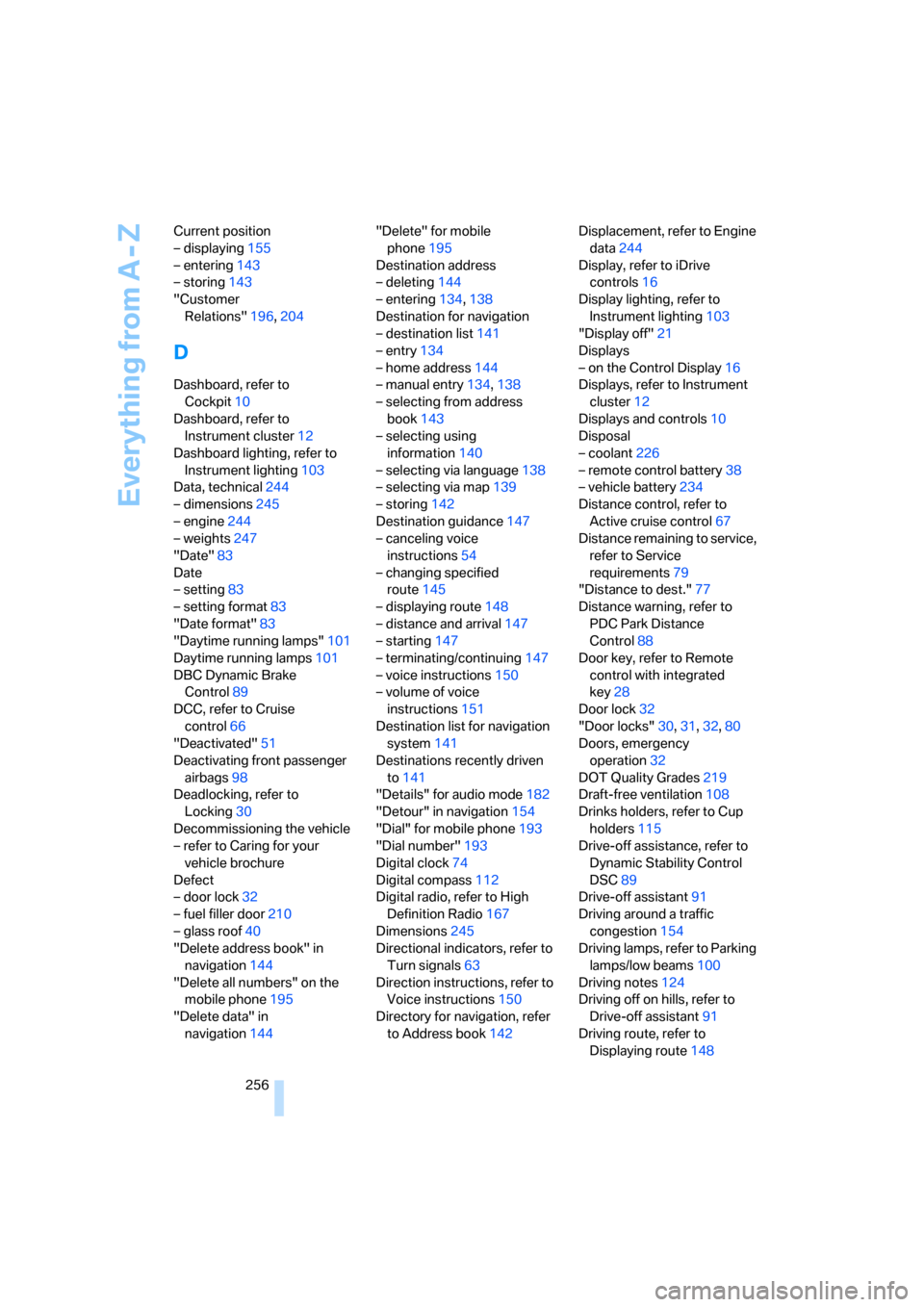
256 Current position
– displaying155
– entering143
– storing143
"Customer
Relations"196,204
D
Dashboard, refer to
Cockpit10
Dashboard, refer to
Instrument cluster12
Dashboard lighting, refer to
Instrument lighting103
Data, technical244
– dimensions245
– engine244
– weights247
"Date"83
Date
– setting83
– setting format83
"Date format"83
"Daytime running lamps"101
Daytime running lamps101
DBC Dynamic Brake
Control89
DCC, refer to Cruise
control66
"Deactivated"51
Deactivating front passenger
airbags98
Deadlocking, refer to
Locking30
Decommissioning the vehicle
– refer to Caring for your
vehicle brochure
Defect
– door lock32
– fuel filler door210
– glass roof40
"Delete address book" in
navigation144
"Delete all numbers" on the
mobile phone195
"Delete data" in
navigation144"Delete" for mobile
phone195
Destination address
– deleting144
– entering134,138
Destination for navigation
– destination list141
– entry134
– home address144
– manual entry134,138
– selecting from address
book143
– selecting using
information140
– selecting via language138
– selecting via map139
– storing142
Destination guidance147
– canceling voice
instructions54
– changing specified
route145
– displaying route148
– distance and arrival147
– starting147
– terminating/continuing147
– voice instructions150
– volume of voice
instructions151
Destination list for navigation
system141
Destinations recently driven
to141
"Details" for audio mode182
"Detour" in navigation154
"Dial" for mobile phone193
"Dial number"193
Digital clock74
Digital compass112
Digital radio, refer to High
Definition Radio167
Dimensions245
Directional indicators, refer to
Turn signals63
Direction instructions, refer to
Voice instructions150
Directory for navigation, refer
to Address book142Displacement, refer to Engine
data244
Display, refer to iDrive
controls16
Display lighting, refer to
Instrument lighting103
"Display off"21
Displays
– on the Control Display16
Displays, refer to Instrument
cluster12
Displays and controls10
Disposal
– coolant226
– remote control battery38
– vehicle battery234
Distance control, refer to
Active cruise control67
Distance remaining to service,
refer to Service
requirements79
"Distance to dest."77
Distance warning, refer to
PDC Park Distance
Control88
Door key, refer to Remote
control with integrated
key28
Door lock32
"Door locks"30,31,32,80
Doors, emergency
operation
32
DOT Quality Grades219
Draft-free ventilation108
Drinks holders, refer to Cup
holders115
Drive-off assistance, refer to
Dynamic Stability Control
DSC89
Drive-off assistant91
Driving around a traffic
congestion154
Driving lamps, refer to Parking
lamps/low beams100
Driving notes124
Driving off on hills, refer to
Drive-off assistant91
Driving route, refer to
Displaying route148
Page 261 of 272
Reference 259
At a glance
Controls
Driving tips
Communications
Navigation
Entertainment
Mobility
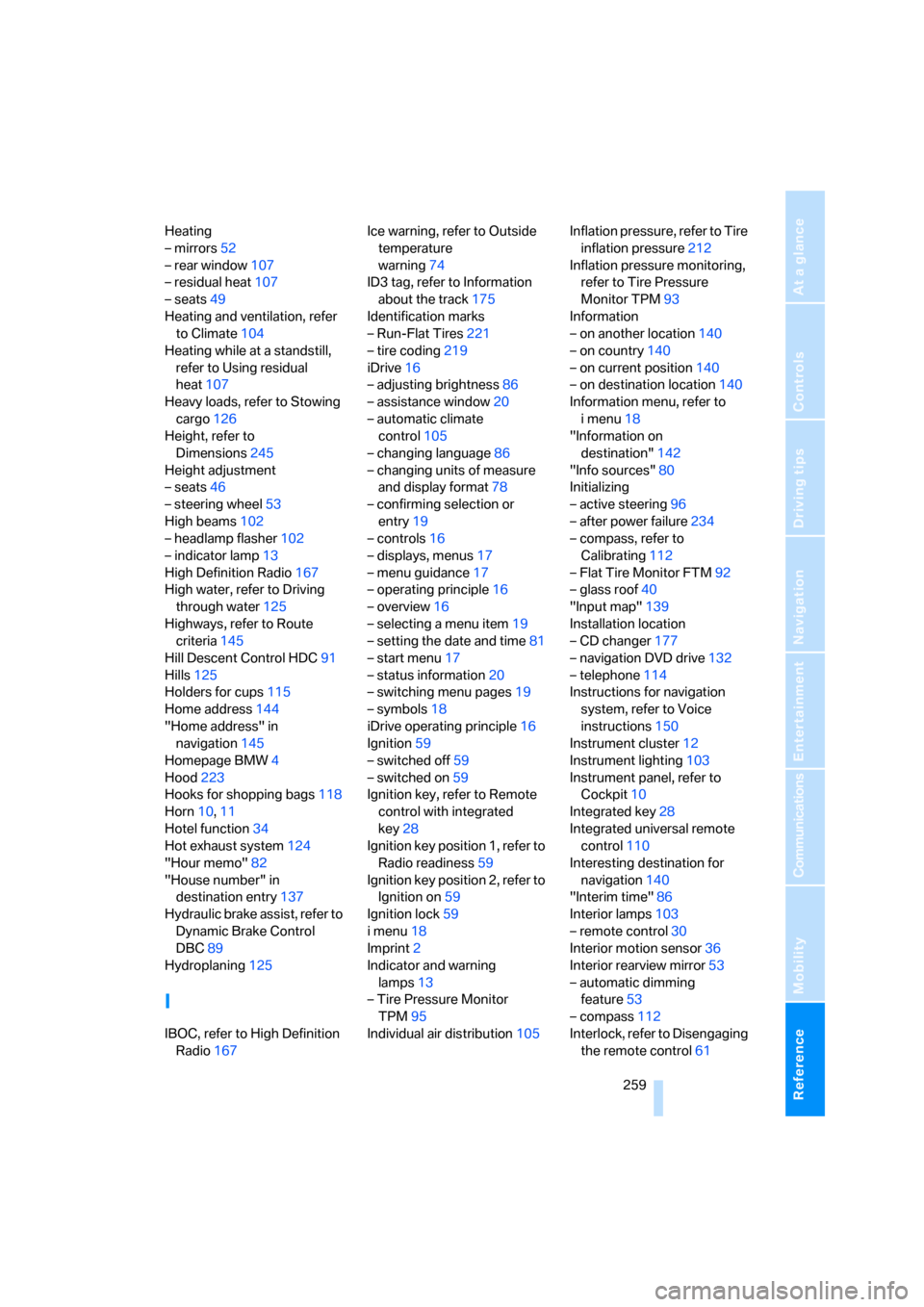
Heating
– mirrors52
– rear window107
– residual heat107
– seats49
Heating and ventilation, refer
to Climate104
Heating while at a standstill,
refer to Using residual
heat107
Heavy loads, refer to Stowing
cargo126
Height, refer to
Dimensions245
Height adjustment
– seats46
– steering wheel53
High beams102
– headlamp flasher102
– indicator lamp13
High Definition Radio167
High water, refer to Driving
through water125
Highways, refer to Route
criteria145
Hill Descent Control HDC91
Hills125
Holders for cups115
Home address144
"Home address" in
navigation145
Homepage BMW4
Hood223
Hooks for shopping bags118
Horn10,11
Hotel function34
Hot exhaust system124
"Hour memo"82
"House number" in
destination entry137
Hydraulic brake assist, refer to
Dynamic Brake Control
DBC89
Hydroplaning125
I
IBOC, refer to High Definition
Radio167Ice warning, refer to Outside
temperature
warning74
ID3 tag, refer to Information
about the track175
Identification marks
– Run-Flat Tires221
– tire coding219
iDrive16
– adjusting brightness86
– assistance window20
– automatic climate
control105
– changing language86
– changing units of measure
and display format78
– confirming selection or
entry19
– controls16
– displays, menus17
– menu guidance17
– operating principle16
– overview16
– selecting a menu item19
– setting the date and time81
– start menu17
– status information20
– switching menu pages19
– symbols18
iDrive operating principle16
Ignition59
– switched off59
– switched on59
Ignition key, refer to Remote
control with integrated
key28
Ignition key position 1, refer to
Radio readiness59
Ignition key position 2, refer to
Ignition on59
Ignition lock59
i menu18
Imprint2
Indicator and warning
lamps13
– Tire Pressure Monitor
TPM95
Individual air distribution105Inflation pressure, refer to Tire
inflation pressure212
Inflation pressure monitoring,
refer to Tire Pressure
Monitor TPM93
Information
– on another location140
– on country140
– on current position140
– on destination location140
Information menu, refer to
i menu18
"Information on
destination"142
"Info sources"80
Initializing
– active steering96
– after power failure234
– compass, refer to
Calibrating112
– Flat Tire Monitor FTM92
– glass roof40
"Input map"139
Installation location
– CD changer177
– navigation DVD drive132
– telephone114
Instructions for navigation
system, refer to Voice
instructions150
Instrument cluster12
Instrument lighting103
Instrument panel, refer to
Cockpit10
Integrated key28
Integrated universal remote
control110
Interesting destination for
navigation140
"Interim time"86
Interior lamps103
– remote control30
Interior motion sensor36
Interior rearview mirror53
– automatic dimming
feature53
– compass112
Interlock, refer to Disengaging
the remote control61
Page 263 of 272
Reference 261
At a glance
Controls
Driving tips
Communications
Navigation
Entertainment
Mobility
Master key, refer to Remote
control with integrated
key28
Maximum cooling106
Maximum speed
– with winter tires222
Measurements, refer to
Dimensions245
Memory, refer to Seat and
mirror memory50
Memory keys,
programmable21
MENU button16
Menus
– Control Display17
Menus, refer to iDrive16
Message list, traffic
information152
Microfilter
– BMW Maintenance
System228
– for automatic climate
control108
Microfilter/activated-charcoal
filter
– BMW Maintenance
System228
Microphone
– telephone14
– voice input14
Mirror dimming feature53
Mirrors52
– automatic curb monitor53
– exterior mirrors52
– heating52
– interior rearview mirror53
– memory, refer to Seat and
mirror memory50
"Missed calls"194
Missed calls194Mobile phone
– accepted calls194
– adjusting volume191
– calling193
– ending call193
– installation location, refer to
Center armrest114
– missed calls194
– operation via iDrive192
– redialing194
– refer to separate Owner's
Manual
– Top 8194
– touch tone dialing196
Mobile phone, installation
location, refer to Center
armrest114
Mobile phone, refer to the
separate Owner's Manual
Mobile phones in the
vehicle124
Modifications, technical, refer
to For your own safety5
Monitor, refer to iDrive
controls16
Monitoring system for tire
pressures, refer to Flat Tire
Monitor92
"Monitor on / off"54
Most recent mobile phone
numbers194
MP3, refer to Compressed
audio files173
Multifunctional steering
wheel, refer to Buttons on
the steering wheel11
Multifunction switch
– refer to Turn signals/
headlamp flasher63
– refer to Wiper system64
Multimedia screen, refer to
iDrive16
Music tracks, refer to
Tracks174
"Mute on / off"54
N
"Navigation"134,140Navigation announcements,
refer to Switching voice
instructions on/off150
Navigation drive, location132
Navigation DVD132
Navigation system132
– address book142
– changing a route151
– destination entry134
– destination guidance in
assistance window132
– destination list141
– displaying current
position155
– entering a destination
manually134,138
– last destinations141
– navigation DVD132
– opening134
– route display148
– route list150
– searching for a special
destination140
– selecting destination using
information140
– selecting destination via
map139
– selecting route criteria145
– starting destination
guidance147
– switching off, refer to
Terminating/continuing
destination guidance147
– terminating/continuing
destination guidance147
– voice instructions150
– volume adjustment151
"Navigation voice
instructions"133
"Navigation voice
instructions" via buttons on
the steering wheel54
Neck support, refer to Head
restraints47
Nets, refer to Storage
compartments114
"New address" in
navigation143
"New destination"134,139
Page 264 of 272
Everything from A - Z
262 "New route"151
New tires221
"Next entertainment
source"54
North-facing map149
Nozzles104
Number of cylinders, refer to
Engine data244
Nylon rope, refer to Tow
rope240
O
OBD socket, refer to Socket
for On-Board Diagnosis229
Octane ratings, refer to Fuel
specifications211
Odometer74
Oil, refer to Engine oil224
Oil consumption224
Oil level224
Old batteries, refer to
Disposal234
"On a new destination" in
navigation141
"Onboard info"76
Onboard tool kit230
"On destination"141
"On location"141
Opening and closing
– convenient access36
– from inside32
– from outside29
– using the door lock32
– via the remote control29
Operation by voice for mobile
phone197
– adjusting volume198
– canceling197
– correcting phone
number198
– dialing phone number198
– placing a call198
– redialing198
– voice commands197
– voice phone book198
"Options"205
Orientation menu, refer to
Start menu17Outlets
– refer to Ventilation107
Output, refer to Engine
data244
Outside-air mode
– automatic climate
control106
Outside-temperature
display74
– changing units of
measure78
– in computer78
Outside temperature
warning74
Overheated engine, refer to
Coolant temperature75
Overriding selector lever
lock63
P
Park assistant, refer to Park
Distance Control88
"Parked car operation"108
"Parked car ventilation"108
Parked car ventilation108
– activating switch-on
times109
– preselecting switch-on
times108
– switching on and off
directly108
Parking
– vehicle60
Parking aid, refer to PDC Park
Distance Control88
Parking brake60
– indicator lamp61
Parking lamps100
Parking lamps/low beams100
Passenger-side mirror tilt
function53
"Pathway lighting"101
Pathway lighting101
"PDC"88
PDC Park Distance Control88
Personal Profile28
"Perspective"149
Phone book192Phone numbers
– deleting from phone
book195
– dialing193
– most recent numbers194
– selecting in phone book194
– Top 8194
Pinch protection system
– glass roof, electric40
– windows39
Placing a call, refer to
telephone owner's manual
"Play" for satellite radio171
Pollen
– refer to Microfilter/activated-
charcoal filter for automatic
climate control108
Position
– displaying155
– saving, refer to Storing
current position143
Power failure234
Power seats46
Power windows38
Power windows, refer to
Windows38
"Presets" displaying with the
radio164
"Presets" for satellite
radio171
Pressure, tires212
Pressure monitoring, tires92
– Flat Tire Monitor92
Pressure monitoring of tires,
refer to Tire Pressure
Monitor TPM93
"Profile"207
Programmable buttons on the
steering wheel11
Programmable memory
keys21
Protection function, refer to
Pinch protection system
– glass roof, electric40
– windows39
Providing medical assistance,
refer to First add pouch237
Puncture
– Flat Tire Monitor92