memory BMW 335I COUPE 2008 E92 Owner's Guide
[x] Cancel search | Manufacturer: BMW, Model Year: 2008, Model line: 335I COUPE, Model: BMW 335I COUPE 2008 E92Pages: 272, PDF Size: 8.98 MB
Page 195 of 272
193
Entertainment
Reference
At a glance
Controls
Driving tips Communications
Navigation
Mobility
Calling
Dialing phone numbers
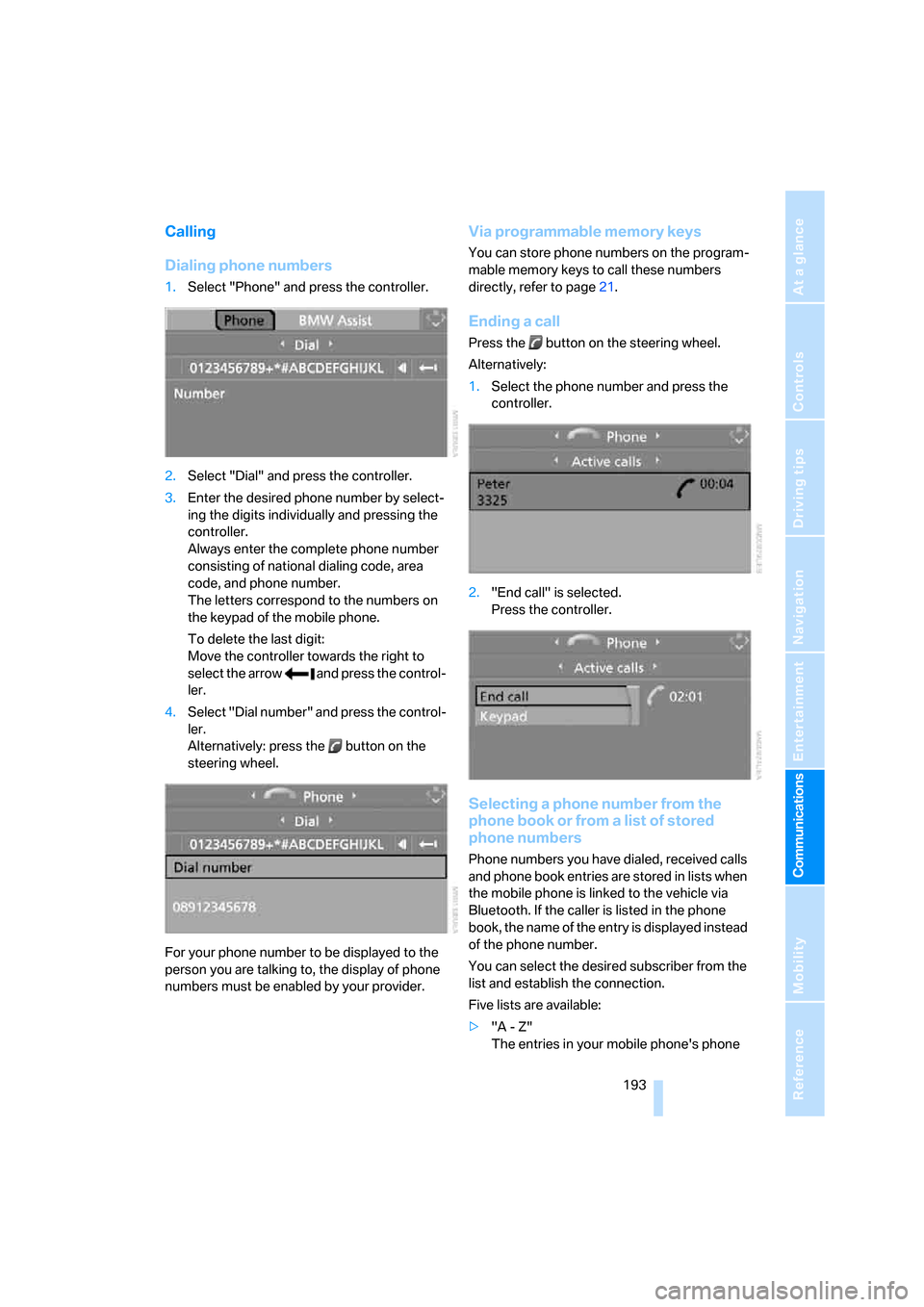
1.Select "Phone" and press the controller.
2.Select "Dial" and press the controller.
3.Enter the desired phone number by select-
ing the digits individually and pressing the
controller.
Always enter the complete phone number
consisting of national dialing code, area
code, and phone number.
The letters correspond to the numbers on
the keypad of the mobile phone.
To delete the last digit:
Move the controller towards the right to
select the arrow and press the control-
ler.
4.Select "Dial number" and press the control-
ler.
Alternatively: press the button on the
steering wheel.
For your phone number to be displayed to the
person you are talking to, the display of phone
numbers must be enabled by your provider.
Via programmable memory keys
You can store phone numbers on the program-
mable memory keys to call these numbers
directly, refer to page21.
Ending a call
Press the button on the steering wheel.
Alternatively:
1.Select the phone number and press the
controller.
2."End call" is selected.
Press the controller.
Selecting a phone number from the
phone book or from a list of stored
phone numbers
Phone numbers you have dialed, received calls
and phone book entries are stored in lists when
the mobile phone is linked to the vehicle via
Bluetooth. If the caller is listed in the phone
book, the name of the entry is displayed instead
of the phone number.
You can select the desired subscriber from the
list and establish the connection.
Five lists are available:
>"A - Z"
The entries in your mobile phone's phone
Page 200 of 272
Telephoning
198
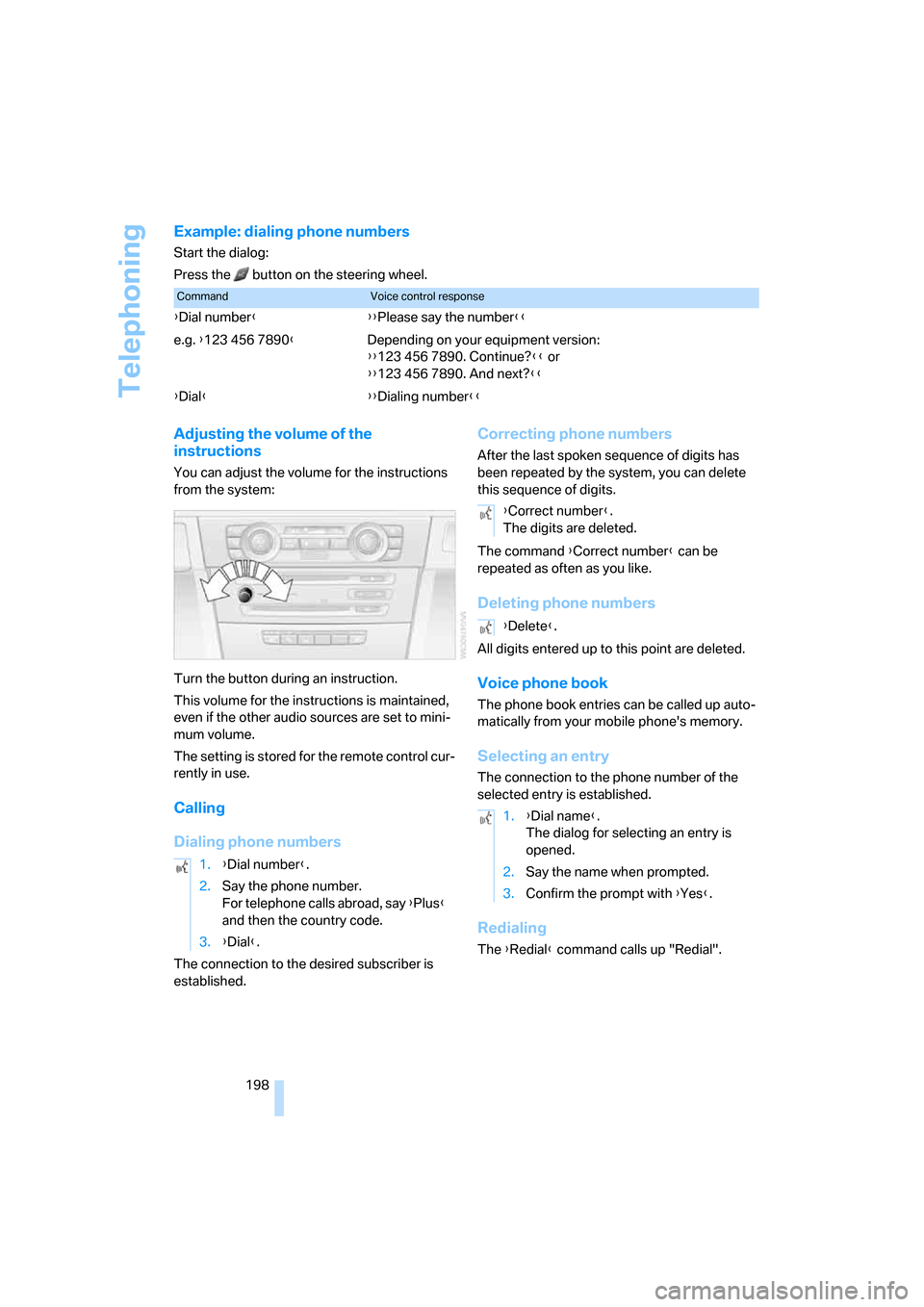
Example: dialing phone numbers
Start the dialog:
Press the button on the steering wheel.
Adjusting the volume of the
instructions
You can adjust the volume for the instructions
from the system:
Turn the button during an instruction.
This volume for the instructions is maintained,
even if the other audio sources are set to mini-
mum volume.
The setting is stored for the remote control cur-
rently in use.
Calling
Dialing phone numbers
The connection to the desired subscriber is
established.
Correcting phone numbers
After the last spoken sequence of digits has
been repeated by the system, you can delete
this sequence of digits.
The command {Correct number} can be
repeated as often as you like.
Deleting phone numbers
All digits entered up to this point are deleted.
Voice phone book
The phone book entries can be called up auto-
matically from your mobile phone's memory.
Selecting an entry
The connection to the phone number of the
selected entry is established.
Redialing
The {Redial} command calls up "Redial".
CommandVoice control response
{Dial number}{{Please say the number}}
e.g. {123 456 7890}Depending on your equipment version:
{{123 456 7890. Continue?}} or
{{123 456 7890. And next?}}
{Dial}{{Dialing number}}
1.{Dial number}.
2.Say the phone number.
For telephone calls abroad, say {Plus}
and then the country code.
3.{Dial}.
{Correct number}.
The digits are deleted.
{Delete}.
1.{Dial name}.
The dialog for selecting an entry is
opened.
2.Say the name when prompted.
3.Confirm the prompt with {Yes}.
Page 237 of 272
Mobility
235Reference
At a glance
Controls
Driving tips
Communications
Navigation
Entertainment
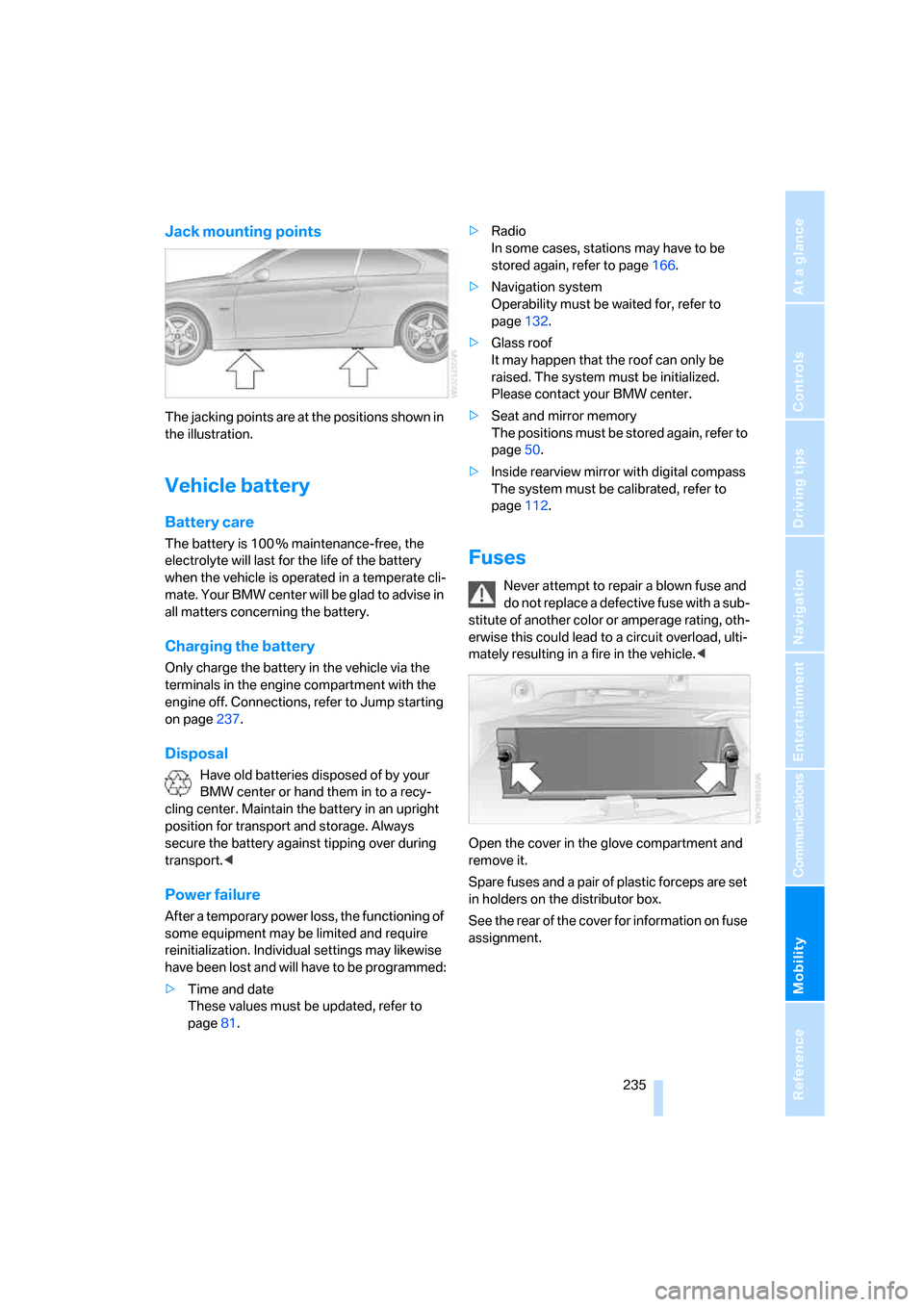
Jack mounting points
The jacking points are at the positions shown in
the illustration.
Vehicle battery
Battery care
The battery is 100 % maintenance-free, the
electrolyte will last for the life of the battery
when the vehicle is operated in a temperate cli-
mate. Your BMW center will be glad to advise in
all matters concerning the battery.
Charging the battery
Only charge the battery in the vehicle via the
terminals in the engine compartment with the
engine off. Connections, refer to Jump starting
on page237.
Disposal
Have old batteries disposed of by your
BMW center or hand them in to a recy-
cling center. Maintain the battery in an upright
position for transport and storage. Always
secure the battery against tipping over during
transport.<
Power failure
After a temporary power loss, the functioning of
some equipment may be limited and require
reinitialization. Individual settings may likewise
have been lost and will have to be programmed:
>Time and date
These values must be updated, refer to
page81.>Radio
In some cases, stations may have to be
stored again, refer to page166.
>Navigation system
Operability must be waited for, refer to
page132.
>Glass roof
It may happen that the roof can only be
raised. The system must be initialized.
Please contact your BMW center.
>Seat and mirror memory
The positions must be stored again, refer to
page50.
>Inside rearview mirror with digital compass
The system must be calibrated, refer to
page112.
Fuses
Never attempt to repair a blown fuse and
do not replace a defective fuse with a sub-
stitute of another color or amperage rating, oth-
erwise this could lead to a circuit overload, ulti-
mately resulting in a fire in the vehicle.<
Open the cover in the glove compartment and
remove it.
Spare fuses and a pair of plastic forceps are set
in holders on the distributor box.
See the rear of the cover for information on fuse
assignment.
Page 262 of 272
Everything from A - Z
260 Interior rearview mirror53
– automatic dimming
feature53
– compass112
Interlock, refer to Disengaging
the remote control61
Intermittent mode of the
wipers64
J
Jacking points235
Joystick, refer to iDrive16
Jumpering, refer to Jump
starting237
Jump starting237
K
Key, refer to Integrated key/
remote control28
Keyless go, refer to
Convenient access36
Keyless opening and closing,
refer to Convenient
access36
Key Memory, refer to Personal
Profile28
Kick-down62
– automatic transmission with
Steptronic62
Knock control211
L
Lamps
– automatic headlamp
control100
– parking lamps/low
beams100
Lamps and bulbs, replacing
bulbs231
"Language / Units"78
"Language / Units" in
navigation133,150
"Language" on the Control
Display86
"Languages" in
navigation133,150Lap-and-shoulder belt, refer
to Safety belts51
Lashing eyes, refer to
Securing cargo128
Last destinations, refer to
Destination list141
"Last seat pos."51
LATCH child-restraint fixing
system57
LED hand lamp114
LED Light-emitting
diodes232
Length, refer to
Dimensions245
License plate lamp, replacing
bulb234
Light-emitting diodes
LED232
Lighter116
– connecting electrical
appliances116
"Lighting"64
Lighting
– instruments103
– lamps and bulbs231
– vehicle, refer to Lamps100
Light-metal alloy wheels, care,
refer to Caring for your
vehicle brochure
Light switch100
"Limit"85
Limit, refer to Speed limit85
Load securing equipment,
refer to Securing cargo128
Lock buttons, doors, refer to
Locking33
Locking
– adjusting confirmation
signal31
– from inside33
– from outside30
– without remote control, refer
to Convenient access36
Locking and unlocking doors
– confirmation signals31
– from inside32
– from outside29
Low-beam headlamps100
– automatic
100Lower back support, refer to
Lumbar support47
Luggage compartment lid33
– convenient access37
– emergency operation, refer
to Opening manually33
– emergency release34
– locking or unlocking
separately34
– opening from inside33
– opening from outside33
– opening manually33
– remote control31
Luggage rack, refer to Roof-
mounted luggage rack129
Lumbar support47
M
M+S tires, refer to Winter
tires223
Maintenance, refer to Service
Booklet
Maintenance system229
Malfunction
– automatic transmission with
Steptronic63
– luggage compartment lid33
– tires93
Malfunction warnings, refer to
Check Control83
Manual mode, automatic
transmission with
Steptronic62
"Manual" on the radio165
Manual operation
– door lock32
– driver's door32
– fuel filler door210
– glass roof40
– luggage compartment lid33
– transmission lock, automatic
transmission63
Manual transmission61
Map
– changing scale149
– destination entry139
"Map direction of travel"149
"Map facing north"149
Page 263 of 272
Reference 261
At a glance
Controls
Driving tips
Communications
Navigation
Entertainment
Mobility
Master key, refer to Remote
control with integrated
key28
Maximum cooling106
Maximum speed
– with winter tires223
Measurements, refer to
Dimensions245
Memory, refer to Seat and
mirror memory50
Memory keys,
programmable21
MENU button16
Menus
– Control Display17
Menus, refer to iDrive16
Message list, traffic
information152
Microfilter
– BMW Maintenance
System229
– for automatic climate
control108
Microfilter/activated-charcoal
filter
– BMW Maintenance
System229
Microphone
– telephone14
– voice input14
Mirror dimming feature53
Mirrors52
– automatic curb monitor53
– exterior mirrors52
– heating53
– interior rearview mirror53
– memory, refer to Seat and
mirror memory50
"Missed calls"194
Missed calls194Mobile phone
– accepted calls194
– adjusting volume191
– calling193
– ending call193
– installation location, refer to
Center armrest114
– missed calls194
– operation via iDrive191
– redialing194
– refer to separate Owner's
Manual
– Top 8194
– touch tone dialing196
Mobile phone, installation
location, refer to Center
armrest114
Mobile phone, refer to the
separate Owner's Manual
Modifications, technical, refer
to For your own safety5
Monitor, refer to iDrive
controls16
Monitoring system for tire
pressures, refer to Flat Tire
Monitor92
"Monitor on / off"54
Most recent mobile phone
numbers194
MP3, refer to Compressed
audio files173
Multifunctional steering
wheel, refer to Buttons on
the steering wheel11
Multifunction switch
– refer to Turn signals/
headlamp flasher63
– refer to Wiper system64
Multimedia screen, refer to
iDrive16
Music tracks, refer to
Tracks174
"Mute on / off"54
N
"Navigation"134,140Navigation announcements,
refer to Switching voice
instructions on/off150
Navigation drive, location132
Navigation DVD132
Navigation system132
– address book142
– changing a route151
– destination entry134
– destination guidance in
assistance window132
– destination list141
– displaying current
position155
– entering a destination
manually134,138
– last destinations141
– navigation DVD132
– opening134
– route display148
– route list150
– searching for a special
destination140
– selecting destination using
information140
– selecting destination via
map139
– selecting route criteria145
– starting destination
guidance147
– switching off, refer to
Terminating/continuing
destination guidance147
– terminating/continuing
destination guidance147
– voice instructions150
– volume adjustment151
"Navigation voice
instructions"133
"Navigation voice
instructions" via buttons on
the steering wheel54
Neck support, refer to Head
restraints47
Nets, refer to Storage
compartments114
"New address" in
navigation143
"New destination"135,139
Page 264 of 272
Everything from A - Z
262 "New route"151
New tires222
"Next entertainment
source"54
North-facing map149
Nozzles104
Number of cylinders, refer to
Engine data244
Nylon rope, refer to Tow
rope240
O
OBD socket, refer to Socket
for On-Board Diagnosis230
Octane ratings, refer to Fuel
specifications211
Odometer74
Oil, refer to Engine oil225
Oil consumption225
Oil level225
Old batteries, refer to
Disposal235
"On a new destination" in
navigation141
"Onboard info"76
Onboard tool kit231
"On destination"141
"On location"141
Opening and closing
– convenient access36
– from inside32
– from outside29
– using the door lock32
– via the remote control29
Operation by voice for mobile
phone197
– adjusting volume198
– canceling197
– correcting phone
number198
– dialing phone number198
– placing a call198
– redialing198
– voice commands197
– voice phone book198
"Options"205
Orientation menu, refer to
Start menu17Outlets
– refer to Ventilation107
Output, refer to Engine
data244
Outside-air mode
– automatic climate
control106
Outside-temperature
display74
– changing units of
measure78
– in computer78
Outside temperature
warning74
Overheated engine, refer to
Coolant temperature75
Overriding selector lever
lock63
P
Park assistant, refer to Park
Distance Control88
"Parked car operation"108
"Parked car ventilation"108
Parked car ventilation108
– activating switch-on
times109
– preselecting switch-on
times108
– switching on and off
directly108
Parking
– vehicle60
Parking aid, refer to PDC Park
Distance Control88
Parking brake60
– indicator lamp61
Parking lamps100
Parking lamps/low beams100
Passenger-side mirror tilt
function53
"Pathway lighting"101
Pathway lighting101
"PDC"88
PDC Park Distance Control88
Personal Profile28
"Perspective"149
Phone book191Phone numbers
– deleting from phone
book195
– dialing193
– most recent numbers194
– selecting in phone book194
– Top 8194
Pinch protection system
– glass roof, electric40
– windows39
Placing a call, refer to
telephone owner's manual
"Play" for satellite radio171
Pollen
– refer to Microfilter/activated-
charcoal filter for automatic
climate control108
Position
– displaying155
– saving, refer to Storing
current position143
Power failure235
Power windows38
Power windows, refer to
Windows38
"Presets", displaying with the
radio164
"Presets" for satellite
radio171
Pressure, tires212
Pressure monitoring, tires92
– Flat Tire Monitor92
Pressure monitoring of tires,
refer to Tire Pressure
Monitor TPM
93
"Profile"207
Programmable buttons on the
steering wheel11
Programmable memory
keys21
Protection function, refer to
Pinch protection system
– glass roof, electric40
– windows39
Providing medical assistance,
refer to First add pouch237
Puncture
– Flat Tire Monitor92
Page 266 of 272
Everything from A - Z
264 Route145
– arrow display148
– changing151
– display148
– displaying streets and
towns/cities150
– displaying town150
– list150
– map display149
– selecting145
– selecting criteria145
RSC Runflat System
Component, refer to Run-
Flat Tires222
Rubber parts, refer to Caring
for your vehicle brochure
Runflat System Component
RSC, refer to Run-Flat
Tires222
Run-Flat Tires222
– continuing driving with a
damaged tire93
– flat tire93
– Flat Tire Monitor93
– new tires222
– replacing222
– tire inflation pressure212
– winter tires223
S
Safety-belt height
adjustment51
Safety belts51
– belt hand-over52
– damage51
– indicator/warning lamp51
– reminder51
– sitting safely45
Safety belts, care, refer to
Caring for your vehicle
brochureSafety systems
– airbags97
– Antilock Brake System
ABS89
– brake system89
– driving stability control
systems89
– Dynamic Stability Control
DSC89
– rollover protection system,
convertible98
– safety belts51
Safety tires, refer to Run-Flat
Tires222
"SAT"160,170
Satellite radio170
– displaying additional
information171
– enabling170
– selecting channel171
– storing channel171
Saving fuel124
"Scan"
– sampling radio stations165
– sampling tracks on CD175
Scan
– CD changer175
– CD player175
– radio165
"Scan all" for audio mode175
"Scan directory" for audio
mode175
Screen, refer to iDrive
controls16
Screw thread for tow
fitting239
SDARS, refer to Satellite
radio170
Seat adjustment
– electric46
– mechanical46
Seat and mirror memory50
Seat belt reminder, refer to
'Fasten safety belts'
reminder51
Seat heating49Seats45
– adjusting electrically46
– adjusting the seats46
– heating49
– memory, refer to Seat and
mirror memory50
– saving a setting, refer to Seat
and mirror memory50
– sitting safely45
Securing cargo119,121
Securing the vehicle
– from inside32
– from outside29
"Select as
destination"141,205
"Select current speed"86
Selecting a country for
navigation135
Selecting an audio source160
Selecting distance for active
cruise control69
Selecting menu items19
Selecting new scale for
navigation149
Selector lever
– automatic transmission with
Steptronic62
Selector lever lock, refer to
Changing selector lever
positions, shiftlock62
Selector lever positions
– automatic transmission with
Steptronic62
Service, refer to Roadside
Assistance236
Service car, refer to Roadside
Assistance236
Service data in the remote
control229
"Service Info"80,203,226
Service Interval Display, refer
to Condition Based Service
CBS229
"Service Request"196,203
Service requirement display,
refer to Condition Based
Service CBS229
"Service
requirements"80,203,226
Page 267 of 272
Reference 265
At a glance
Controls
Driving tips
Communications
Navigation
Entertainment
Mobility
Service requirements79
"Set date"83
"Set time"82
"Settings"207
Settings
– changing settings on the
Control Display86
– clock, 12h/24h mode82
– date format83
– language86
Settings and information78
"Settings" for unlocking30
Settings menu, refer to
imenu17
Setting times, refer to
Preselecting switch-on
times108
Shifting gears
– automatic transmission with
Steptronic62
– manual transmission61
Shiftlock
– automatic transmission,
refer to Changing selector
lever positions62
Short commands for the voice
command system248
Shortest route in navigation,
refer to Selecting route145
"Short route" in
navigation145
"Show current position"140
"Show destination
position"140
Shuffled, refer to Random
– CD changer176
– CD player176
Side airbags97
Side windows, refer to
Windows38
Signal horn, refer to
Horn10,11
Sitting safely45
– with airbags45
– with head restraint45
– with safety belts45
Ski bag119Ski bag for convertible, refer to
Through-loading opening
with integrated transport
bag120
Sliding/tilt sunroof, refer to
Glass roof, electric39
Slot for remote control59
Smokers' package, refer to
Ashtray116
Snap-in adapter, refer to
Center armrest storage
compartment114
Socket, On-Board Diagnosis
OBD230
Socket, refer to Connecting
electrical appliances116
Song search, refer to Playing a
track175
SOS, refer to Sending an
Emergency Request236
Sound output for
entertainment on/off160
Spare fuses,235
Spare fuses, refer to
Fuses235
Speaking, refer to Voice
instructions from navigation
system150
Speed
– Run-Flat Tires93
– with winter tires223
Speed-dependent volume
control161
Speed limit85
Speed limit warning, refer to
Speed limit85
Speedometer12
"Speed volume", refer to Tone
control162
Spray nozzles, refer to
Cleaning windshield and
headlamps65
Stability control, refer to
Driving stability control
systems89
Start/stop button59
– starting the engine60
– switching off the engine60
"Start guidance"137Starting, refer to Starting the
engine60
Starting assistance, refer to
Jump starting237
Starting difficulties
– jump starting237
Starting the engine
– start/stop button59
Start menu17
"Start service"202
"Start Service" for BMW
Assist204
"State / Province" in
destination entry135
Station
– refer to Radio164
"Status"80
Status of this Owner's Manual
at time of printing5
Steering wheel53
– adjustment53
– buttons on steering
wheel11
– lock59
– locking with convenient
access37
"Steering wheel buttons"54
Steering with variable ratio,
refer to Active steering96
Steptronic, refer to Automatic
transmission with
Steptronic61
"Stopwatch"86
Stopwatch86
Storage compartments
114
Storage nets118
"Store" for satellite radio172
"Store in address book" in
navigation143
"Store" on the radio166
Storing current position143
Storing radio stations166
Storing seat positions, refer to
Seat and mirror memory50
Storing tires223
Stowage, refer to Storage
compartments114
"Street" in destination
entry137