electrical BMW 335I COUPE 2009 E92 User Guide
[x] Cancel search | Manufacturer: BMW, Model Year: 2009, Model line: 335I COUPE, Model: BMW 335I COUPE 2009 E92Pages: 260, PDF Size: 7.95 MB
Page 181 of 260
179
Entertainment
Reference
At a glance
Controls
Driving tips Communications
Navigation
Mobility
Selecting an entry
The connection to the phone number of the
selected entry is established.
Redialing
To redial the phone number dialed last:
Notes
Important for voice commands
For voice commands, bear in mind the follow-
ing:
>Pronounce the commands smoothly and at
normal volume, avoiding excessive empha-
ses and pauses.
>Keep the doors, windows and glass roof
closed to prevent interference from outside
noise.
>Avoid ambient noise in the vehicle while
speaking.
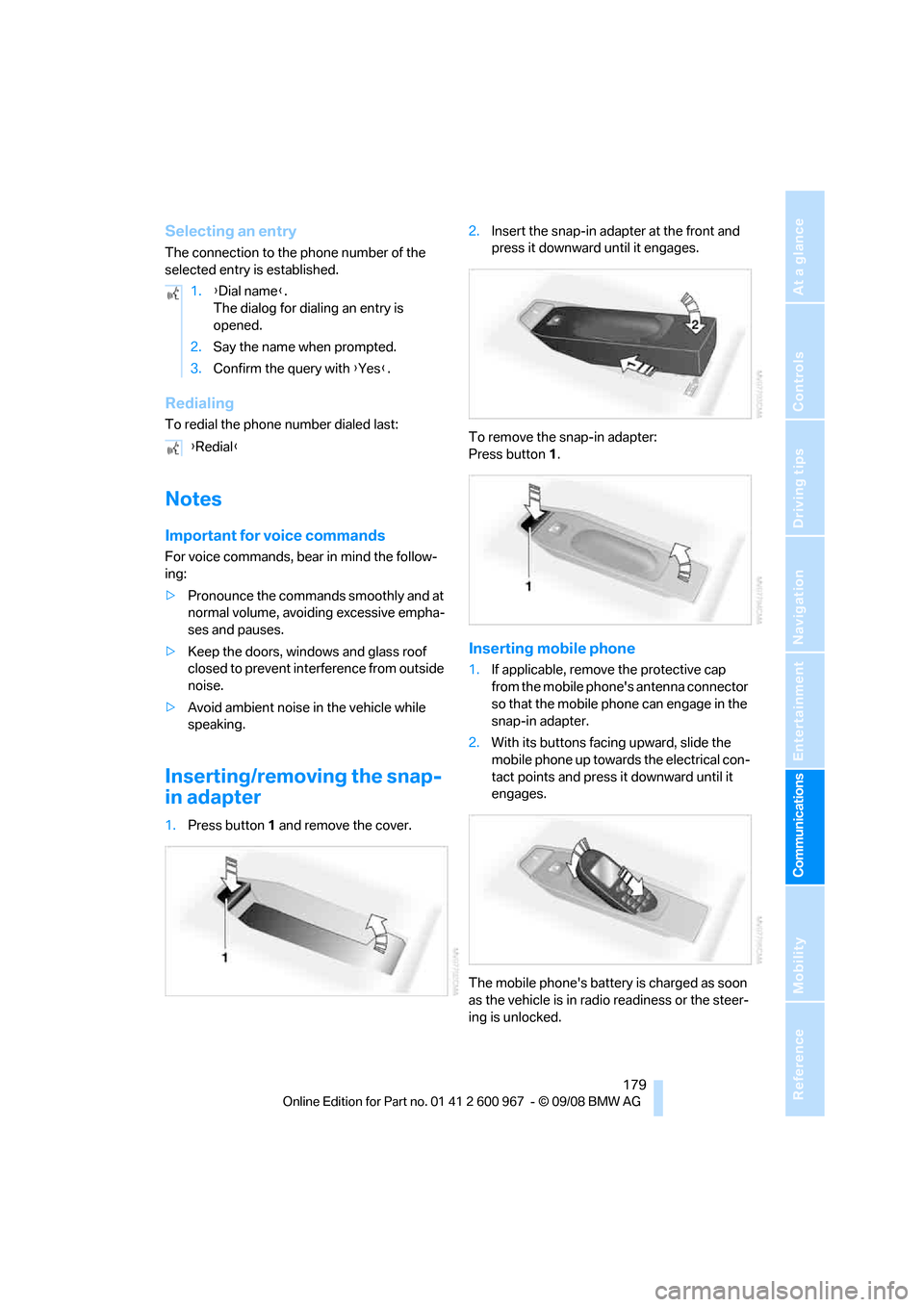
Inserting/removing the snap-
in adapter
1.Press button1 and remove the cover.2.Insert the snap-in adapter at the front and
press it downward until it engages.
To remove the snap-in adapter:
Press button 1.
Inserting mobile phone
1.If applicable, remove the protective cap
from the mobile phone's antenna connector
so that the mobile phone can engage in the
snap-in adapter.
2.With its buttons facing upward, slide the
mobile phone up towards the electrical con-
tact points and press it downward until it
engages.
The mobile phone's battery is charged as soon
as the vehicle is in radio readiness or the steer-
ing is unlocked. 1.{Dial name}.
The dialog for dialing an entry is
opened.
2.Say the name when prompted.
3.Confirm the query with {Yes}.
{Redial}
Page 218 of 260
Care
216 Avoid applying excessive pressure when
cleaning the displays, otherwise damage
may occur.<
Do not use chemical or abrasive house-
hold cleaning agents. Keep all types of
fluid away from the device. Otherwise, surfaces
or electrical components may be corroded or
damaged.<
CD/DVD drives
Do not use a cleaning CD, as it may dam-
age parts of the drive.<
Vehicle storage
If your vehicle is to be decommissioned for
longer than three months, your BMW center or
a workshop that operates according to BMW
specifications will be glad to advise you.
Page 220 of 260
Replacing components
218
Lamps and bulbs
Lamps and bulbs make an essential contribu-
tion to vehicle safety. They should, therefore,
be handled carefully. BMW recommends hav-
ing your BMW center perform any work that you
do not feel competent to perform yourself or
that is not described here.
Never touch the glass of new bulbs with
your bare fingers, as even minute
amounts of contamination will burn into the
bulb's surface and reduce its service life. Use a
clean tissue, cloth or something similar, or hold
the bulb by its base.<
You can obtain a selection of replacement bulbs
at your BMW center.
Only change bulbs while they are cool to
the touch, otherwise you could suffer
burns.<
When working on electrical systems,
always begin by switching off the con-
sumer in question, otherwise short-circuits
could result. To avoid possible injury or equip-
ment damage when replacing bulbs, observe
any instructions provided by the bulb manufac-
turer.<
For care of the headlamps, please follow the
instructions in the chapter entitled 'Care'.
If the routine for changing a particular
bulb is not described here, please contact
your BMW center or a workshop that works
according to BMW repair procedures with cor-
respondingly trained personnel.<
Light-emitting diodes LED
Light-emitting diodes installed behind translu-
cent lenses serve as the light source for many of
the controls and displays in your vehicle. These
light-emitting diodes, which operate using a
concept similar to that applied in conventional
lasers, are officially designated as Class 1 light-
emitting diodes.
Do not remove the covers or expose the
eyes directly to the unfiltered light source
for several hours, otherwise this could cause
irritation to the retina.<
Xenon lamps
These bulbs have a very long service life and are
highly unlikely to fail. If a xenon bulb fails never-
theless, switch on the fog lamps and continue
the journey with great care, provided that local
legislation does not prohibit this.
Have any work on the xenon lamp system,
including bulb replacements, performed
only by a BMW center or a workshop that works
according to BMW repair procedures with cor-
respondingly trained personnel. Otherwise, if
such work is carried out improperly, the high
voltage in the system presents the danger of
fatal injuries.<
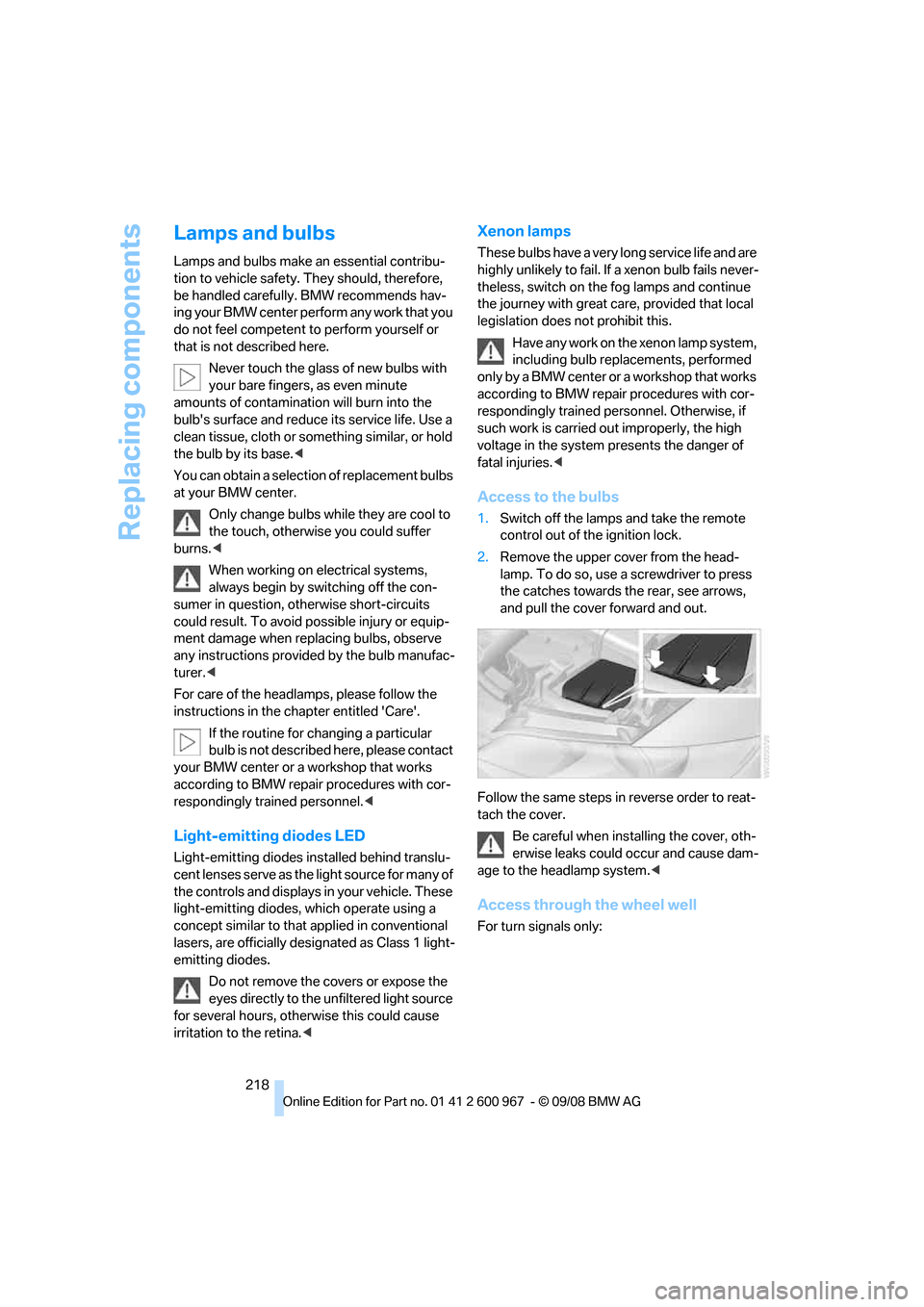
Access to the bulbs
1.Switch off the lamps and take the remote
control out of the ignition lock.
2.Remove the upper cover from the head-
lamp. To do so, use a screwdriver to press
the catches towards the rear, see arrows,
and pull the cover forward and out.
Follow the same steps in reverse order to reat-
tach the cover.
Be careful when installing the cover, oth-
erwise leaks could occur and cause dam-
age to the headlamp system.<
Access through the wheel well
For turn signals only:
Page 227 of 260
Mobility
225Reference
At a glance
Controls
Driving tips
Communications
Navigation
Entertainment
First aid pouch*
Some of the articles contained in the first aid
pouch have a limited service life. Therefore,
check the expiration dates of the contents reg-
ularly and replace any items in good time, if nec-
essary.
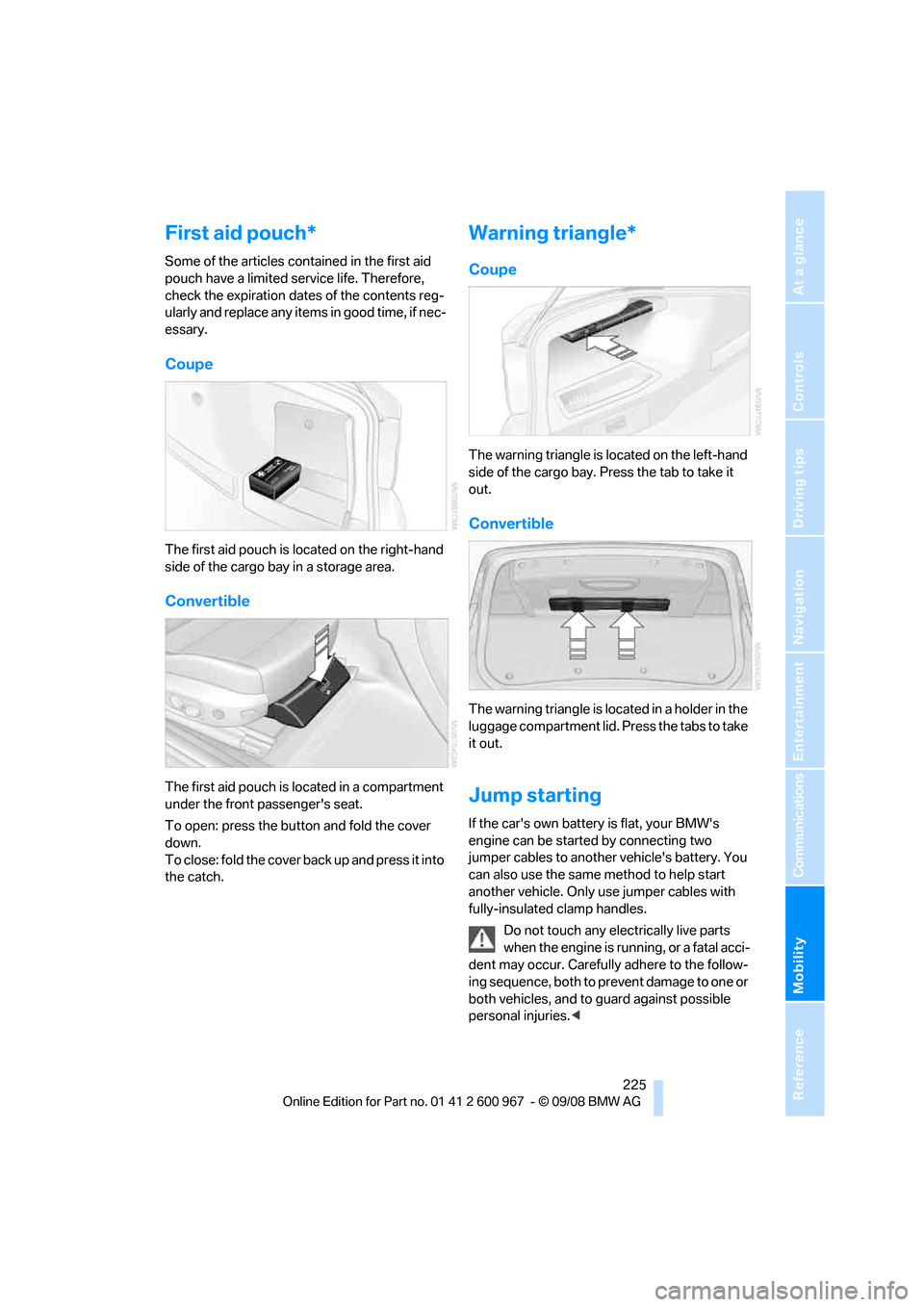
Coupe
The first aid pouch is located on the right-hand
side of the cargo bay in a storage area.
Convertible
The first aid pouch is located in a compartment
under the front passenger's seat.
To open: press the button and fold the cover
down.
To close: fold the cover back up and press it into
the catch.
Warning triangle*
Coupe
The warning triangle is located on the left-hand
side of the cargo bay. Press the tab to take it
out.
Convertible
The warning triangle is located in a holder in the
luggage compartment lid. Press the tabs to take
it out.
Jump starting
If the car's own battery is flat, your BMW's
engine can be started by connecting two
jumper cables to another vehicle's battery. You
can also use the same method to help start
another vehicle. Only use jumper cables with
fully-insulated clamp handles.
Do not touch any electrically live parts
when the engine is running, or a fatal acci-
dent may occur. Carefully adhere to the follow-
ing sequence, both to prevent damage to one or
both vehicles, and to guard against possible
personal injuries.<
Page 247 of 260
Reference 245
At a glance
Controls
Driving tips
Communications
Navigation
Entertainment
Mobility
Confirmation signals for
locking/unlocking the
vehicle29
Congestion
– refer to Route, bypassing
sections136
Connecting vacuum cleaner,
refer to Connecting
electrical appliances108
Consumption, refer to
Average consumption71
Consumption display
– average consumption71
Control Center, refer to
iDrive16
Control Display, refer to
iDrive16
– adjusting brightness80
– switching on/off19
Controller, refer to iDrive16
Controls and displays10
Control unit, refer to iDrive16
Convenient access34
– replacing the battery35
Convenient loading in
convertible28
Convenient operation
– glass roof28
– glass roof with convenient
access34
– retractable hardtop28
– windows28
– windows with convenient
access34
Convertible
– bag holder110
– convenient loading28
– enlarging cargo bay109
– folding down rear
backrest110
– retractable hardtop38
– rollover protection
system92
– securing cargo120
– stowing cargo119
Coolant209
– checking level210
Coolant temperature70
Cooling, maximum98Cooling fluid, refer to
Coolant209
Cooling system, refer to
Coolant209
Copyright2
Corner-illuminating lamps
– replacing bulbs219
Corner-illuminating lamps,
refer to Adaptive Head
Light94
Cornering lamps, refer to
Adaptive Head Light94
Correct tires204
Country codes DVD154
Courtesy lamps, refer to
Interior lamps96
Criteria for route135
Cross-hairs in navigation130
Cruise control61
– active63
– malfunction63
Cruising range70
Cup holders107
Curb weight, refer to
Weights235
Current playback of music
collection160
Current position
– displaying141
Customer Relations187
D
Dashboard, refer to
Cockpit10
Dashboard, refer to
Instrument cluster12
Dashboard lighting, refer to
Instrument lighting95
Data, technical232
– dimensions233
– engine232
– weights235
Data transfer188
Date
– date format77
– setting76
Daytime running lamps94
– replacing bulbs219DBC Dynamic Brake
Control83
Deactivating front passenger
airbags90
Deadlocking, refer to
Locking28
Defect
– door lock30
– fuel filler door192
– glass roof38
Destination, entering by town/
city name125
Destination address
– entering125,131
Destination for navigation
– entering by voice131
– entering via map130
– entry125
– home address128
– manual entry125
Destination guidance135
– bypassing a route
section136
– changing specified
route135
– continuing135
– starting135
– voice instructions136
– volume of voice
instructions137
Digital clock69
Digital compass104
Digital radio, refer to High
Definition Radio148
Dimensions233
Directional indicators, refer to
Turn signals59
Direction instructions, refer to
Voice instructions136
Directory for navigation, refer
to Address book127
Displacement, refer to Engine
data232
Display, refer to iDrive
controls16
"Display current location"141
Display lighting, refer to
Instrument lighting95
Page 248 of 260
Everything from A - Z
246 Displays
– on the Control Display16
Displays, refer to Instrument
cluster12
Displays and controls10
Disposal
– coolant209
– remote control battery35
– vehicle battery222
Distance control, refer to
Active cruise control63
Distance remaining to service,
refer to Service
requirements73
Distance warning, refer to
Park Distance Control
PDC82
Door key, refer to Remote
control with integrated
key26
Door lock29
Doors, emergency
operation30
DOT Quality Grades202
Draft-free ventilation100
Drinks holders, refer to Cup
holders107
Drive-off assistance, refer to
Dynamic Stability Control
DSC83
Drive-off assistant85
Driving lamps, refer to Parking
lamps/low beams93
Driving notes116
Driving off on hills, refer to
Drive-off assistant85
Driving stability control
systems83
Driving through water118
Driving tips, refer to Driving
notes116
Dry air, refer to Cooling
function100
DSC Dynamic Stability
Control83
DTC Dynamic Traction
Control83
– indicator/warning lamp83DVD
– country codes154
– settings155
– video playback154
DVD menu155
DVD video154
Dynamic Brake Control
DBC83
Dynamic Stability Control
DSC
– indicator/warning lamp83
Dynamic Traction Control
DTC
– indicator/warning lamp84
E
Eject button, refer to Buttons
on the CD player144
Electrical malfunction
– door lock30
– driver's door30
– fuel filler door192
– glass roof38
Electric seat adjustment43
Electric steering wheel lock
– with convenient access34
Electronic brake-force
distribution EBV83
Electronic oil level check207
Electronic Stability Program
ESP, refer to Dynamic
Stability Control DSC83
Emergency actuation,
automatic transmission,
refer to Overriding selector
lever lock59
Emergency operation
– fuel filler door, manual
release192
Emergency operation, refer to
Closing manually
– glass roof38
Emergency operation, refer to
Manual operation
– door lock30
Emergency release
– luggage compartment lid
from inside32Emergency Request224
Emergency services, refer to
Roadside Assistance224
Energy, saving
– saving fuel116
Engine
– breaking in116
– data232
– overheated, refer to Coolant
temperature70
– speed232
– starting55
– starting, convenient
access34
– switching off56
Engine compartment207
Engine coolant, refer to
Coolant209
Engine oil
– adding209
– BMW Maintenance
System211
– capacity235
– checking level207
– intervals between changes,
refer to Service
requirements73
Engine output, refer to Engine
data232
Engine speed, refer to Engine
data232
Engine starting, refer to
Starting the engine55
Entry lamps, refer to Interior
lamps
96
Entry map for destination130
Equalizer, tone setting145
Error messages, refer to
Check Control77
Event data recorders212
Exhaust system, refer to Hot
exhaust system117
Exterior mirrors49
– adjusting49
– automatic dimming
feature50
– automatic heating50
– folding in and out49
External audio device106
Page 249 of 260
Reference 247
At a glance
Controls
Driving tips
Communications
Navigation
Entertainment
Mobility
Eyes
– for tow-starting and towing
away227
– for tying down loads120
F
Failure messages, refer to
Check Control77
Failure of an electrical
consumer223
False alarm
– avoiding unintentional
alarm33
– switching off an alarm33
Fastening safety belts, refer to
Safety belts48
Fastest route for
navigation135
Fast forward
– CD changer154
– CD player154
Filter
– refer to Microfilter/activated-
charcoal filter for automatic
climate control100
First aid pouch225
Fixture for remote control,
refer to Ignition lock55
Flash when locking/
unlocking29
Flat tire
– Run-Flat Tires204
– Tire Pressure Monitor
TPM86
Flat Tire Monitor FTM85
– indicating a flat tire86
– indicator/warning lamp86
– initializing the system85
– malfunction86
– snow chains85,205
– system limits85
Flat tires, refer to Tire
condition203
Fluid reservoir, refer to
Washer fluid reservoir61
FM, waveband147
Fog lamps95
– indicator lamp13,95Folding up the floor panel111
Footbrake, refer to Braking
safely118
Footwell lamps, refer to
Interior lamps96
For your own safety5
Four-wheel drive, refer to
xDrive84
Free memory capacity, music
collection161
Front airbags90
FTM, refer to Flat Tire
Monitor85
Fuel193
– average consumption71
– gauge70
– high-quality brands193
– quality193
– specifications193
– tank contents, refer to
Capacities235
Fuel clock, refer to Fuel
gauge70
Fuel display, refer to Fuel
gauge70
Fuel filler door192
– releasing in the event of
electrical malfunction192
Fuses223
G
Garage door opener, refer to
Integrated universal remote
control102
Gasoline
– refer to Average
consumption71
Gasoline, refer to Required
fuel193
Gasoline display, refer to Fuel
gauge70
Gear indicator, automatic
transmission with
Steptronic57
Gearshift lever
– automatic transmission with
Steptronic58
– manual transmission57Gearshifts
– automatic transmission with
Steptronic58
– manual transmission57
General driving notes117
Glass roof, electric37
– closing after electrical
malfunction38
– convenient operation28,30
– initializing37
– opening, closing37
– operation with convenient
access34
– pinch protection system37
– power failure37
– raising37
– remote control28
Glove compartment105
GPS navigation, refer to
Navigation system124
Grills97
Gross vehicle weight, refer to
Weights235
H
Handbrake, refer to Parking
brake56
Hands-free system14
Hazard warning flashers14
HDC Hill Descent Control84
HD radio, refer to High
Definition Radio148
Head airbags90
Headlamp control,
automatic93
Headlamp flasher59
– indicator lamp11,13
Head restraints44
– rear, removing46
– sitting safely42
Heated
– mirrors50
– rear window100
– seats47
Page 251 of 260
Reference 249
At a glance
Controls
Driving tips
Communications
Navigation
Entertainment
Mobility
K
Key, refer to Integrated key/
remote control26
Keyless go, refer to
Convenient access34
Keyless opening and closing,
refer to Convenient
access34
Key Memory, refer to Personal
Profile26
Kick-down58
– automatic transmission with
Steptronic58
Knock control193
L
Lamps
– automatic headlamp
control93
– parking lamps/low beams93
Lamps and bulbs, replacing
bulbs218
Language, changing on
Control Display80
Lap-and-shoulder belt, refer
to Safety belts48
Lashing eyes, refer to
Securing cargo120
Last destinations128
LATCH child-restraint fixing
system53
Leather care215
LED Light-emitting
diodes218
Length, refer to
Dimensions233
License plate lamp, replacing
bulb222
Light-alloy wheels215
Light-emitting diodes
LED218
Lighter108
– connecting electrical
appliances108Lighting
– instruments95
– lamps and bulbs218
– vehicle, refer to Lamps93
Light switch93
Limit, refer to Speed limit79
Load119
Load securing equipment,
refer to Securing cargo120
Lock buttons, doors, refer to
Locking31
Locking
– adjusting confirmation
signal29
– from inside31
– from outside28
– without remote control, refer
to Convenient access34
Locking and unlocking doors
– confirmation signals29
– from inside30
– from outside27
Low-beam headlamps93
– automatic93
Lower back support, refer to
Lumbar support44
Luggage compartment lid31
– convenient access34
– emergency release32
– locking or unlocking
separately31
– opening from inside31
– opening from outside
31
– remote control28
Luggage rack, refer to Roof-
mounted luggage rack121
Lumbar support44
LW, waveband147
M
M+S tires, refer to Winter
tires205
Maintenance, refer to Service
Booklet
Maintenance system211Malfunction
– automatic transmission with
Steptronic59
– tires86
Malfunction warnings, refer to
Check Control77
Manual car wash214
Manual mode, automatic
transmission with
Steptronic58
Manual operation
– door lock30
– driver's door30
– fuel filler door192
– glass roof38
– transmission lock, automatic
transmission59
Manual transmission57
Map display137
Map for navigation
– changing scale137
– entering destination130
Master key, refer to Remote
control with integrated
key26
Maximum cooling98
Maximum speed
– with winter tires205
Measurements, refer to
Dimensions233
Memory, refer to Seat and
mirror memory47
MENU button16
Menus, refer to iDrive16
Microfilter
– BMW Maintenance
System211
– for automatic climate
control100
Microfilter/activated-charcoal
filter
– BMW Maintenance
System211
Microphone
– telephone14
– voice commands14
Mirror dimming feature50
Page 254 of 260
Everything from A - Z
252 Reverse
– CD changer154
– CD player154
Reverse gear
– automatic transmission with
Steptronic58
– manual transmission57
Road map137
Roadside
Assistance183,224
Roadside parking lamps95
– replacing bulbs219
Roadworthiness test, refer to
Service requirements73
Roller sun blinds105
Rollover protection system,
convertible92
– resetting92
Roof load capacity235
Roof-mounted luggage
rack121
Rope, refer to Tow-starting,
towing away227
Rotary/pushbutton, refer to
iDrive16
Route135,136
– bypassing sections136
– changing135,136
– changing criteria135
– displaying streets or towns/
cities136
– map display137
– selecting135
Route instructions, refer to
Destination guidance
through voice
instructions136
Route map, refer to Map
display137
Route section, changing136
Route selection135
RSC Runflat System
Component, refer to Run-
Flat Tires204
Runflat System Component
RSC, refer to Run-Flat
Tires204Run-Flat Tires204
– continuing driving with a
damaged tire86
– flat tire86
– Flat Tire Monitor86
– new tires204
– replacing204
– tire inflation pressure194
– winter tires205
S
Safety-belt height
adjustment48
Safety belts48
– belt hand-over49
– damage48
– indicator/warning lamp48
– reminder48
– sitting safely42
Safety systems
– airbags90
– Antilock Brake System
ABS83
– brake system83
– driving stability control
systems83
– Dynamic Stability Control
DSC83
– rollover protection system,
convertible92
– safety belts48
Safety tires, refer to Run-Flat
Tires204
Satellite radio150
– enabling channel150
– selecting channel151
– storing channel151
Saving fuel116
Screen, refer to iDrive
controls16
Screw thread for tow
fitting227
SDARS, refer to Satellite
radio150
Seat adjustment
– electric43
– mechanical43
Seat and mirror memory47Seat belt reminder, refer to
'Fasten safety belts'
reminder48
Seat heating47
Seats42
– adjusting electrically43
– adjusting the seats43
– heating47
– memory, refer to Seat and
mirror memory47
– saving a setting, refer to Seat
and mirror memory47
– sitting safely42
Securing cargo111,113
Securing the vehicle
– from inside30
– from outside27
Selecting distance for active
cruise control65
Selecting new scale for
navigation137
Selector lever
– automatic transmission with
Steptronic
58
Selector lever lock, refer to
Changing selector lever
positions, shiftlock58
Selector lever positions
– automatic transmission with
Steptronic58
Service, refer to Roadside
Assistance224
Service car, refer to Roadside
Assistance224
Service data in the remote
control211
Service Interval Display, refer
to Condition Based Service
CBS211
Service Request187
Service requirement display,
refer to Condition Based
Service CBS211
Service requirements73
Services status188
Page 255 of 260
Reference 253
At a glance
Controls
Driving tips
Communications
Navigation
Entertainment
Mobility
Settings
– changing on Control
Display80
– clock, 12h/24h mode76
– DVD155
– language80
Settings and information72
Setting times, refer to
Preselecting switch-on
times101
Shifting gears
– automatic transmission with
Steptronic58
– manual transmission57
Shiftlock
– automatic transmission,
refer to Changing selector
lever positions58
Short commands for the voice
activation system236
Short route in navigation, refer
to Selecting route135
Shuffled, refer to Random
– CD changer153
– CD player153
Side airbags90
Side windows, refer to
Windows35
Signal horn, refer to
Horn10,11
Sitting safely42
– with airbags42
– with head restraint42
– with safety belts42
Ski bag111
Ski bag for convertible, refer to
Through-loading opening
with integrated transport
bag112
Sliding/tilt sunroof, refer to
Glass roof, electric37
Slot for remote control55
Smokers' package, refer to
Ashtray108
Snap-in adapter
– inserting/removing179
– use170Snap-in adapter, refer to
Center armrest storage
compartment106
Socket, On-Board Diagnosis
OBD212
Socket, refer to Connecting
electrical appliances108
SOS, refer to Sending an
Emergency Request224
Sound output for
entertainment on/off144
Spare fuses,223
Spare fuses, refer to
Fuses223
Special destinations128
Speed
– Run-Flat Tires86
– with winter tires
205
Speed limit79
Speed limit warning, refer to
Speed limit79
Speedometer12
Speed Volume145
Split screen, refer to Control
Display, switching on/off19
Split screen content, refer to
Display for split screen
content, selecting19
Spray nozzles, refer to
Cleaning windshield and
headlamps60
Stability control, refer to
Driving stability control
systems83
Start/stop button55
– starting the engine55
– switching off the engine56
Starting, refer to Starting the
engine55
Starting assistance, refer to
Jump starting225
Starting difficulties
– jump starting225
Starting the engine
– start/stop button55
Start menu17
State/province, for
navigation125Station, selecting
– radio147
Status of this Owner's Manual
at time of printing5
Steam jet213,214
Steering wheel50
– adjustment50
– buttons on steering
wheel11
– heating51
– lock55
– locking with convenient
access34
Steering with variable ratio,
refer to Active steering89
Steptronic, refer to Automatic
transmission with
Steptronic57
Storage216
Storage compartments106
Storage nets110
"Store Channel"
in radio151
Storing seat positions, refer to
Seat and mirror memory47
Storing tires205
Stowage, refer to Storage
compartments106
Street, entering,
navigation126
Summer tires, refer to Wheels
and tires194
Surface ice, refer to Outside
temperature warning69
SVCD154
SW, waveband147
Switches, refer to Cockpit10
Switching off
– engine56
Switching off the engine
– start/stop button55
Switching on
– audio144
– CD changer144
– CD player144
– radio144
Switching the cooling function
on and off100