reset BMW 335I COUPE 2009 E92 User Guide
[x] Cancel search | Manufacturer: BMW, Model Year: 2009, Model line: 335I COUPE, Model: BMW 335I COUPE 2009 E92Pages: 260, PDF Size: 7.95 MB
Page 148 of 260
On/off and tone
146
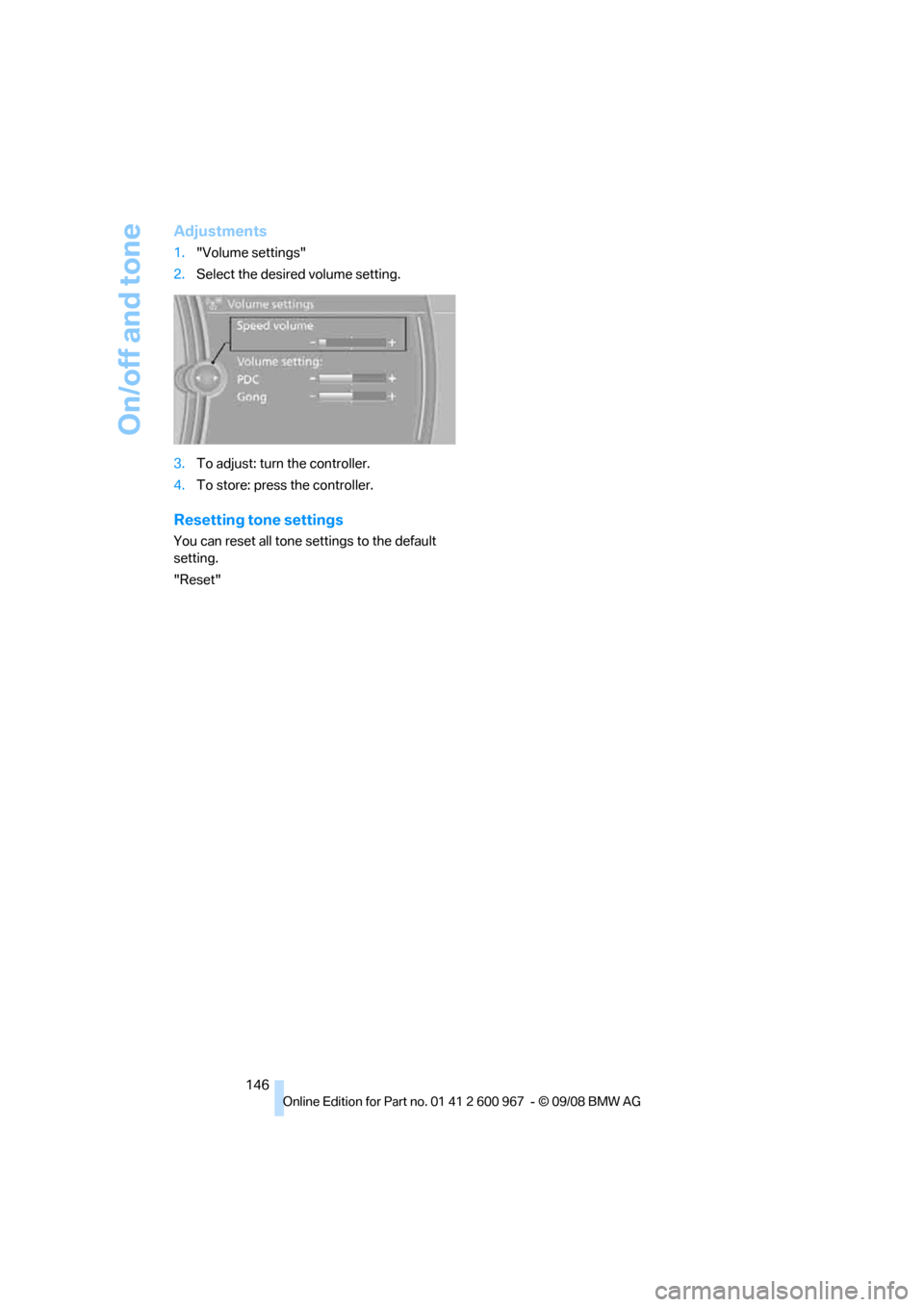
Adjustments
1."Volume settings"
2.Select the desired volume setting.
3.To adjust: turn the controller.
4.To store: press the controller.
Resetting tone settings
You can reset all tone settings to the default
setting.
"Reset"
Page 151 of 260
Navigation
Entertainment
Driving tips
149Reference
At a glance
Controls
Communications
Mobility
Presets
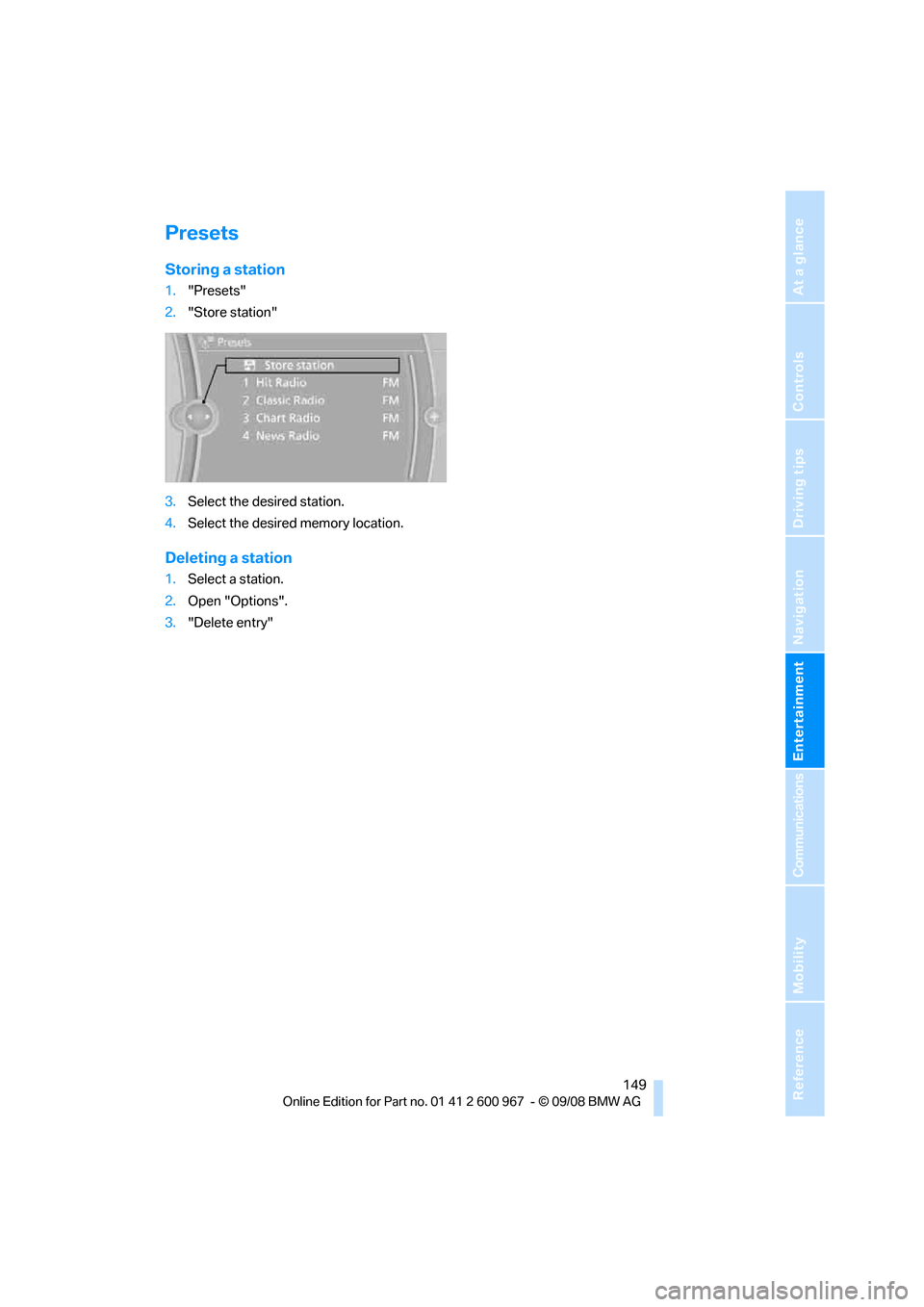
Storing a station
1."Presets"
2."Store station"
3.Select the desired station.
4.Select the desired memory location.
Deleting a station
1.Select a station.
2.Open "Options".
3."Delete entry"
Page 173 of 260
171
Entertainment
Reference
At a glance
Controls
Driving tips Communications
Navigation
Mobility
>Certain presettings may be necessary on
some mobile phones: e.g. using the follow-
ing menu items:
>Bluetooth switched on
>Connection must be allowed without
requiring further confirmation
>Reconnection
>Depending on the mobile phone type, the
power-saving mode setting, for example,
may result in a paired mobile phone not
being detected by the vehicle.
>For pairing purposes, define any 4 to 16-
digit number as a Bluetooth passkey,
e.g. 25081107. A long and complex number
offers the best protection against unautho-
rized access. This Bluetooth passkey is no
longer required after pairing has been suc-
cessful.
>The ignition is switched on.
Pair the mobile phone with the vehicle
only when the car is stationary, to avoid
endangering the car's occupants and other
road users by being distracted.<
Switch on ignition
1.Insert remote control all the way into the
ignition lock.
2.Switch on ignition without operating the
brake or clutch or pressing the start/stop
button.
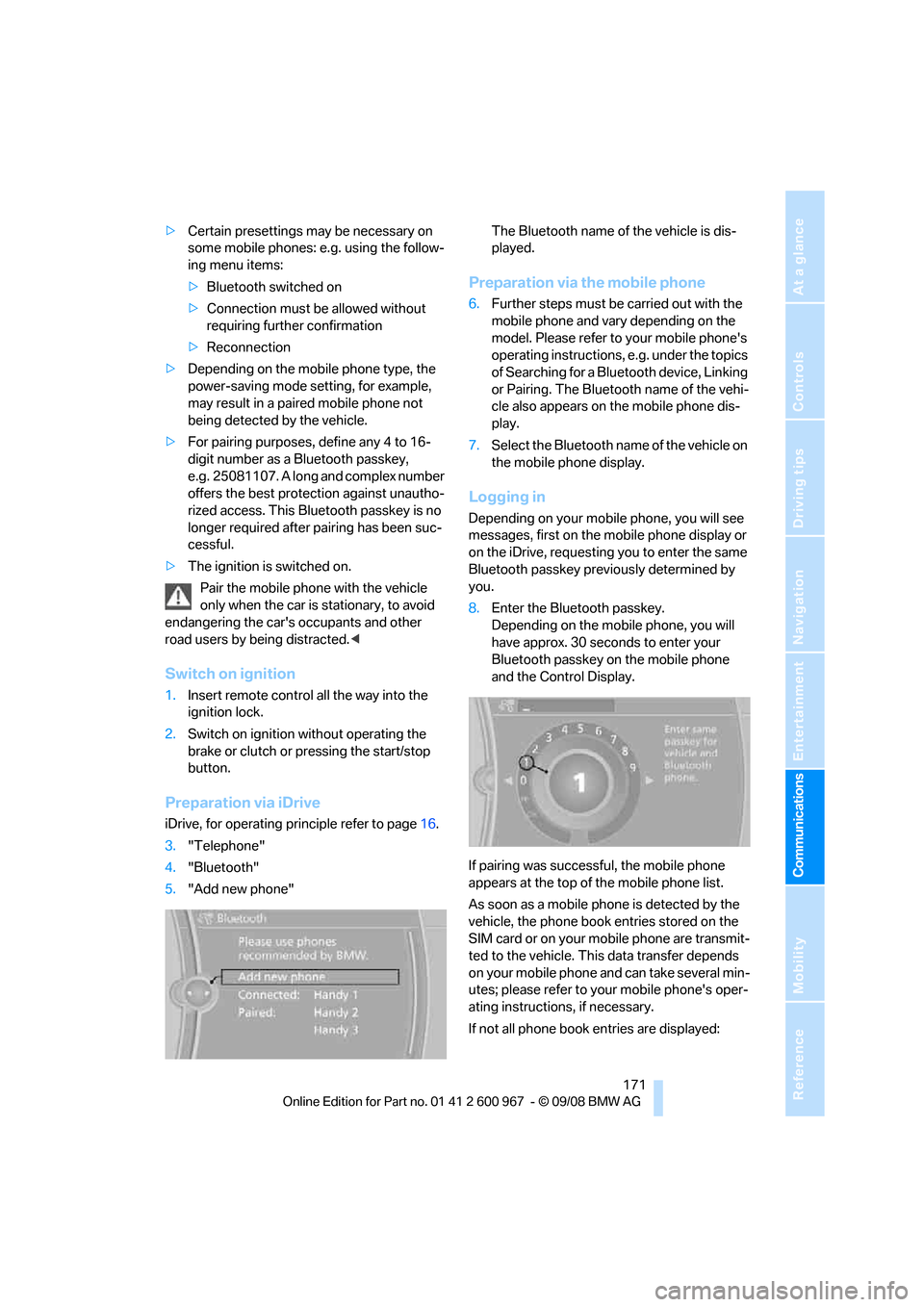
Preparation via iDrive
iDrive, for operating principle refer to page16.
3."Telephone"
4."Bluetooth"
5."Add new phone"The Bluetooth name of the vehicle is dis-
played.
Preparation via the mobile phone
6.Further steps must be carried out with the
mobile phone and vary depending on the
model. Please refer to your mobile phone's
operating instructions, e.g. under the topics
of Searching for a Bluetooth device, Linking
or Pairing. The Bluetooth name of the vehi-
cle also appears on the mobile phone dis-
play.
7.Select the Bluetooth name of the vehicle on
the mobile phone display.
Logging in
Depending on your mobile phone, you will see
messages, first on the mobile phone display or
on the iDrive, requesting you to enter the same
Bluetooth passkey previously determined by
you.
8.Enter the Bluetooth passkey.
Depending on the mobile phone, you will
have approx. 30 seconds to enter your
Bluetooth passkey on the mobile phone
and the Control Display.
If pairing was successful, the mobile phone
appears at the top of the mobile phone list.
As soon as a mobile phone is detected by the
vehicle, the phone book entries stored on the
SIM card or on your mobile phone are transmit-
ted to the vehicle. This data transfer depends
on your mobile phone and can take several min-
utes; please refer to your mobile phone's oper-
ating instructions, if necessary.
If not all phone book entries are displayed:
Page 240 of 260
Short commands for the voice activation system
238
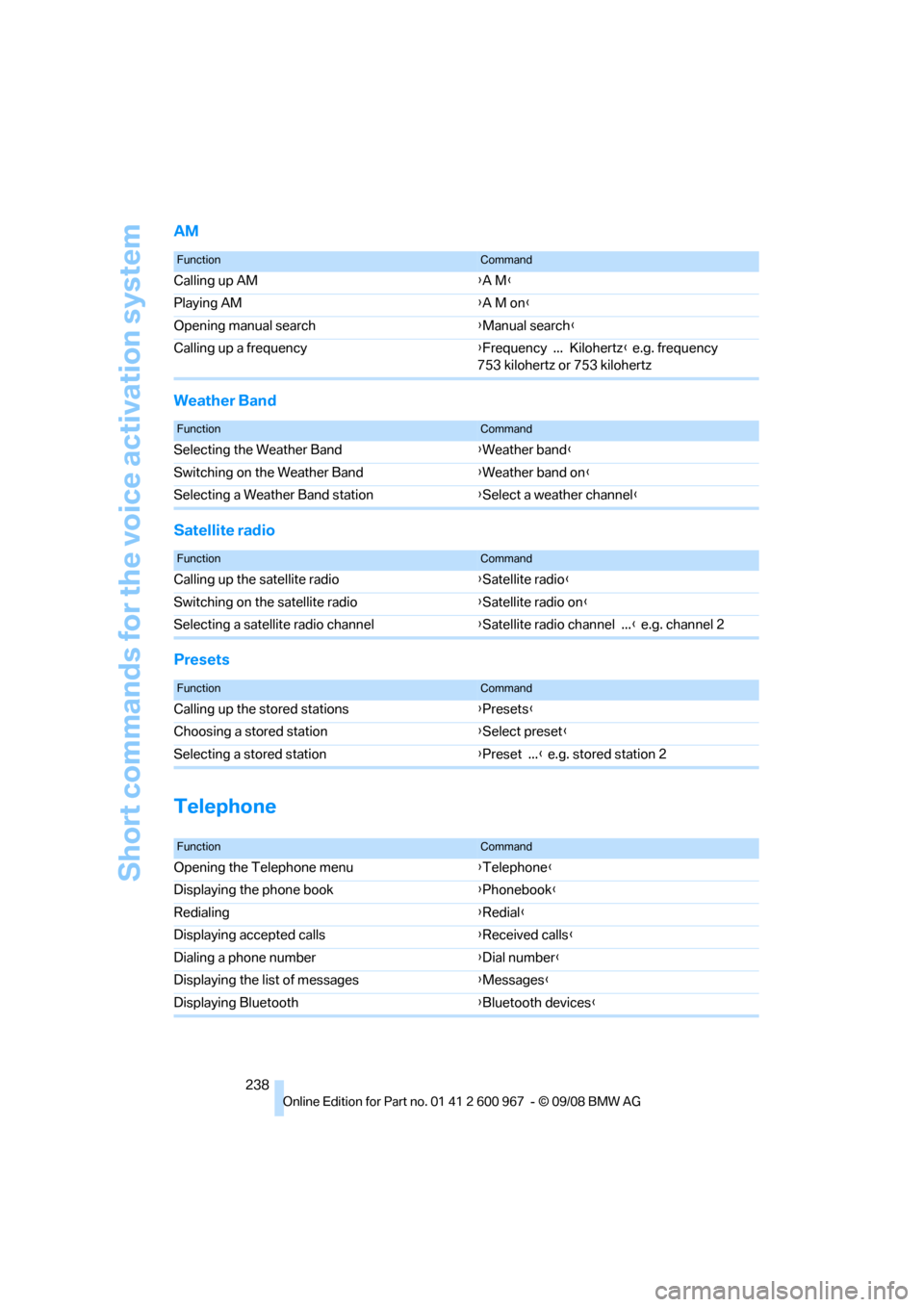
AM
Weather Band
Satellite radio
Presets
Telephone
FunctionCommand
Calling up AM{A M}
Playing AM{A M on}
Opening manual search{Manual search}
Calling up a frequency{Frequency ... Kilohertz} e.g. frequency
753 kilohertz or 753 kilohertz
FunctionCommand
Selecting the Weather Band{Weather band}
Switching on the Weather Band{Weather band on}
Selecting a Weather Band station{Select a weather channel}
FunctionCommand
Calling up the satellite radio{Satellite radio}
Switching on the satellite radio{Satellite radio on}
Selecting a satellite radio channel{Satellite radio channel ...} e.g. channel 2
FunctionCommand
Calling up the stored stations{Presets}
Choosing a stored station{Select preset}
Selecting a stored station{Preset ...} e.g. stored station 2
FunctionCommand
Opening the Telephone menu{Telephone}
Displaying the phone book{Phonebook}
Redialing{Redial}
Displaying accepted calls{Received calls}
Dialing a phone number{Dial number}
Displaying the list of messages{Messages}
Displaying Bluetooth{Bluetooth devices}
Page 253 of 260
Reference 251
At a glance
Controls
Driving tips
Communications
Navigation
Entertainment
Mobility
P
Paintwork care214
Park assistant, refer to Park
Distance Control82
Park Distance Control PDC82
Parked car ventilation100
– preselecting switch-on
times101
– switching on and off
directly101
Parking
– vehicle56
Parking aid, refer to Park
Distance Control PDC82
Parking brake56
– indicator lamp56
Parking lamps93
– replacing bulbs219
Parking lamps/low beams93
Passenger-side mirror tilt
function50
Pathway lighting94
Personal Profile26
Phone book173
Phone numbers
– dialing174
Pinch protection system
– glass roof, electric37
– windows36
Placing a call, refer to
telephone owner's manual
Polish215
Pollen
– refer to Microfilter/activated-
charcoal filter for automatic
climate control100
Position, refer to Current
position, displaying141
Postal code, entering for
navigation126
Power failure222
Power windows36
Power windows, refer to
Windows35
Pressure, tires194
Pressure monitoring, tires85
– Flat Tire Monitor85Pressure monitoring of tires,
refer to Tire Pressure
Monitor TPM86
Programmable buttons on the
steering wheel11
Protection function, refer to
Pinch protection system
– glass roof, electric37
– windows36
Providing medical assistance,
refer to First add pouch225
Puncture
– Flat Tire Monitor85
R
Radio
– controls144
– High Definition Radio148
– satellite radio150
– selecting a waveband147
– storing stations147
– switching on/off144
– tone control144
– volume144
– Weather Band, refer to
Weather information150
Radio position, refer to Radio
readiness55
Radio readiness55
– switched off55
– switched on55
Radio-remote key, refer to
Remote control with
integrated key26
Rain sensor60
Reading lamps96
Rear lamps, refer to Tail
lamps220
Rear seats
– adjusting head restraints45
– folding down backrests109
Rear turn signals
– replacing bulb220
Rear ventilation100
Rearview mirror, refer to
Mirrors49
Rear window defroster100Rear window roller blind, refer
to Roller sun blinds105
Receiving level of mobile
phone, refer to Status
information19
Reception
– quality148
– radio station148
Recirculated-air mode99
Recirculation of air, refer to
Recirculated-air mode99
Reclining seat, refer to
Backrest43
Refueling192
Releasing
– hood206
Remaining distance, refer to
Cruising range70
Remote control26
– battery renewal35
– convenient access34
– garage door opener102
– luggage compartment lid28
– malfunction29,35
– removing from the ignition
lock55
– service data211
Replacement remote
control26
Replacing bulbs, refer to
Lamps and bulbs218
Replacing tires204
Replacing tires, refer to New
wheels and tires204
Reporting safety defects6
Reserve warning, refer to Fuel
gauge70
Reset, refer to Resetting tone
settings146
Residual heat99
Restraint systems
– for children52
– refer to Safety belts48
Retractable hardtop38
– care, refer to Caring for your
vehicle brochure
– convenient operation28
– opening and closing39
– remote control28
Page 254 of 260
Everything from A - Z
252 Reverse
– CD changer154
– CD player154
Reverse gear
– automatic transmission with
Steptronic58
– manual transmission57
Road map137
Roadside
Assistance183,224
Roadside parking lamps95
– replacing bulbs219
Roadworthiness test, refer to
Service requirements73
Roller sun blinds105
Rollover protection system,
convertible92
– resetting92
Roof load capacity235
Roof-mounted luggage
rack121
Rope, refer to Tow-starting,
towing away227
Rotary/pushbutton, refer to
iDrive16
Route135,136
– bypassing sections136
– changing135,136
– changing criteria135
– displaying streets or towns/
cities136
– map display137
– selecting135
Route instructions, refer to
Destination guidance
through voice
instructions136
Route map, refer to Map
display137
Route section, changing136
Route selection135
RSC Runflat System
Component, refer to Run-
Flat Tires204
Runflat System Component
RSC, refer to Run-Flat
Tires204Run-Flat Tires204
– continuing driving with a
damaged tire86
– flat tire86
– Flat Tire Monitor86
– new tires204
– replacing204
– tire inflation pressure194
– winter tires205
S
Safety-belt height
adjustment48
Safety belts48
– belt hand-over49
– damage48
– indicator/warning lamp48
– reminder48
– sitting safely42
Safety systems
– airbags90
– Antilock Brake System
ABS83
– brake system83
– driving stability control
systems83
– Dynamic Stability Control
DSC83
– rollover protection system,
convertible92
– safety belts48
Safety tires, refer to Run-Flat
Tires204
Satellite radio150
– enabling channel150
– selecting channel151
– storing channel151
Saving fuel116
Screen, refer to iDrive
controls16
Screw thread for tow
fitting227
SDARS, refer to Satellite
radio150
Seat adjustment
– electric43
– mechanical43
Seat and mirror memory47Seat belt reminder, refer to
'Fasten safety belts'
reminder48
Seat heating47
Seats42
– adjusting electrically43
– adjusting the seats43
– heating47
– memory, refer to Seat and
mirror memory47
– saving a setting, refer to Seat
and mirror memory47
– sitting safely42
Securing cargo111,113
Securing the vehicle
– from inside30
– from outside27
Selecting distance for active
cruise control65
Selecting new scale for
navigation137
Selector lever
– automatic transmission with
Steptronic
58
Selector lever lock, refer to
Changing selector lever
positions, shiftlock58
Selector lever positions
– automatic transmission with
Steptronic58
Service, refer to Roadside
Assistance224
Service car, refer to Roadside
Assistance224
Service data in the remote
control211
Service Interval Display, refer
to Condition Based Service
CBS211
Service Request187
Service requirement display,
refer to Condition Based
Service CBS211
Service requirements73
Services status188
Page 256 of 260
Everything from A - Z
254 Switch-on times of parked car
ventilation, preselecting101
Symbols4
– status information19
– traffic bulletins for navigation
system138
T
Tachometer69
Tailgate, refer to Luggage
compartment lid31
Tail lamp
– replacing bulb222
Tail lamps220
– replacing bulb220,221
Tank contents, refer to
Capacities235
Technical data232
– capacities235
– dimensions233
Technical modifications, refer
to For your own safety5
Telephone170
– installation location, refer to
Center armrest106
– refer to separate Owner's
Manual
TeleService, activating187
TeleService Diagnosis184
TeleService Help184
Temperature
– automatic climate control98
– changing unit of measure72
– coolant, refer to Coolant
temperature70
Temperature display
– outside temperature69
– outside temperature
warning69
– setting the units72
Tempomat, refer to Cruise
control61
Tensioning straps, refer to
Securing cargo120
The individual vehicle5
Third brake lamp, refer to
Center brake lamp222Through-loading opening with
integrated transport
bag112
Through-loading system109
Tilt alarm sensor33
Tilt function, passenger-side
mirror50
Timer, refer to Preselecting
switch-on times101
Tire inflation pressure194
– loss86,87
Tire pressure monitoring,
refer to Flat Tire Monitor85
Tire Pressure Monitor
TPM86
– resetting the system87
– system limitations87
– warning lamp88
Tire puncture, refer to Flat Tire
Monitor86
Tire Quality Grading202Tires
– age202,203
– air loss88
– breaking in116
– changing, refer to Changing
wheels222
– condition203
– damage203
– inflation pressure194
– labels202
– minimum tread depth203
– new wheels and tires204
– pressure monitoring, refer to
Flat Tire Monitor85
– pressure monitoring, refer to
Tire Pressure Monitor
TPM86
– puncture86
– replacing204
– Run-Flat204
– size202
– storage205
– tread depth203
– wear indicators, refer to
Minimum tread depth203
– wheel/tire combination, refer
to Correct wheels and
tires204
– winter tires205
TMC station, refer to
Traffic bulletins138
Tone
– control144
– middle setting146
Tools, refer to Onboard tool
kit217
Top, refer to Retractable
hardtop38
Top 50 of music
collection161
Torque, refer to Engine
data232
Tow bar227
Tow fitting227
– screw thread227
Tow fittings for tow-starting
and towing away227