instrument cluster BMW 335I COUPE 2010 E93 Owner's Guide
[x] Cancel search | Manufacturer: BMW, Model Year: 2010, Model line: 335I COUPE, Model: BMW 335I COUPE 2010 E93Pages: 266, PDF Size: 8.6 MB
Page 85 of 266
Controls
83Reference
At a glance
Driving tips
Communications
Navigation
Entertainment
Mobility
e.g. unplowed snow-covered roads. The sys-
tem assures the maximal drive output, but with
reduced driving stability. It is therefore neces-
sary to drive with appropriate caution.
You may find it useful to briefly activate DTC
under the following special circumstances:
>When driving uphill on snow-covered roads,
in slush or on unplowed, snow-covered
roads
>When rocking a stuck vehicle free or start-
ing off in deep snow or on loose ground
>When driving with snow chains
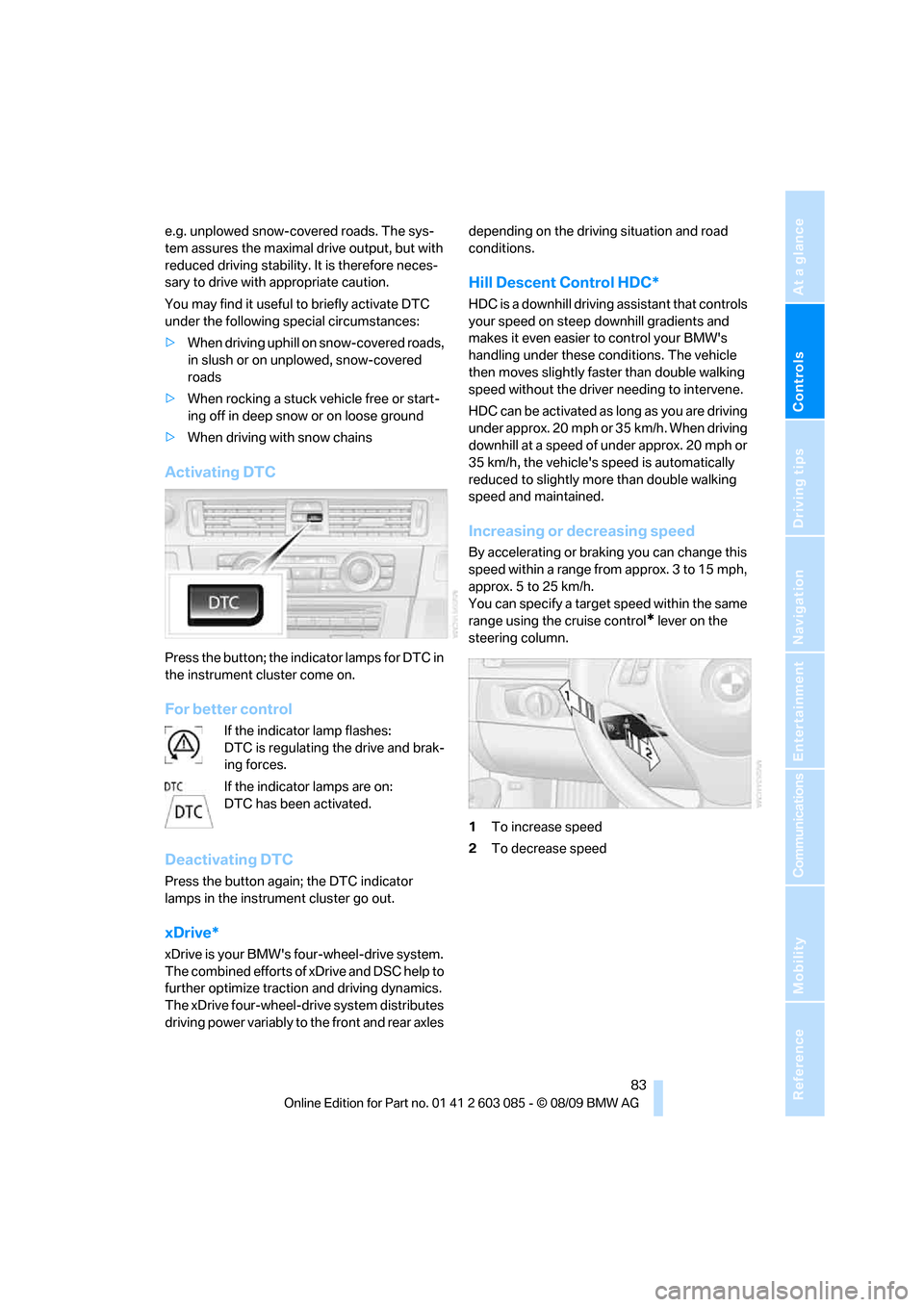
Activating DTC
Press the button; the indicator lamps for DTC in
the instrument cluster come on.
For better control
If the indicator lamp flashes:
DTC is regulating the drive and brak-
ing forces.
If the indicator lamps are on:
DTC has been activated.
Deactivating DTC
Press the button again; the DTC indicator
lamps in the instrument cluster go out.
xDrive*
xDrive is your BMW's four-wheel-drive system.
The combined efforts of xDrive and DSC help to
further optimize traction and driving dynamics.
The xDrive four-wheel-drive system distributes
driving power variably to the front and rear axles depending on the driving situation and road
conditions.
Hill Descent Control HDC*
HDC is a downhill driving assistant that controls
your speed on steep downhill gradients and
makes it even easier to control your BMW's
handling under these conditions. The vehicle
then moves slightly faster than double walking
speed without the driver needing to intervene.
HDC can be activated as long as you are driving
under approx. 20 mph or 35 km/h. When driving
downhill at a speed of under approx. 20 mph or
35 km/h, the vehicle's speed is automatically
reduced to slightly more than double walking
speed and maintained.
Increasing or decreasing speed
By accelerating or braking you can change this
speed within a range from approx. 3 to 15 mph,
approx. 5 to 25 km/h.
You can specify a target speed within the same
range using the cruise control
* lever on the
steering column.
1To increase speed
2To decrease speed
Page 86 of 266
Technology for driving comfort and safety
84
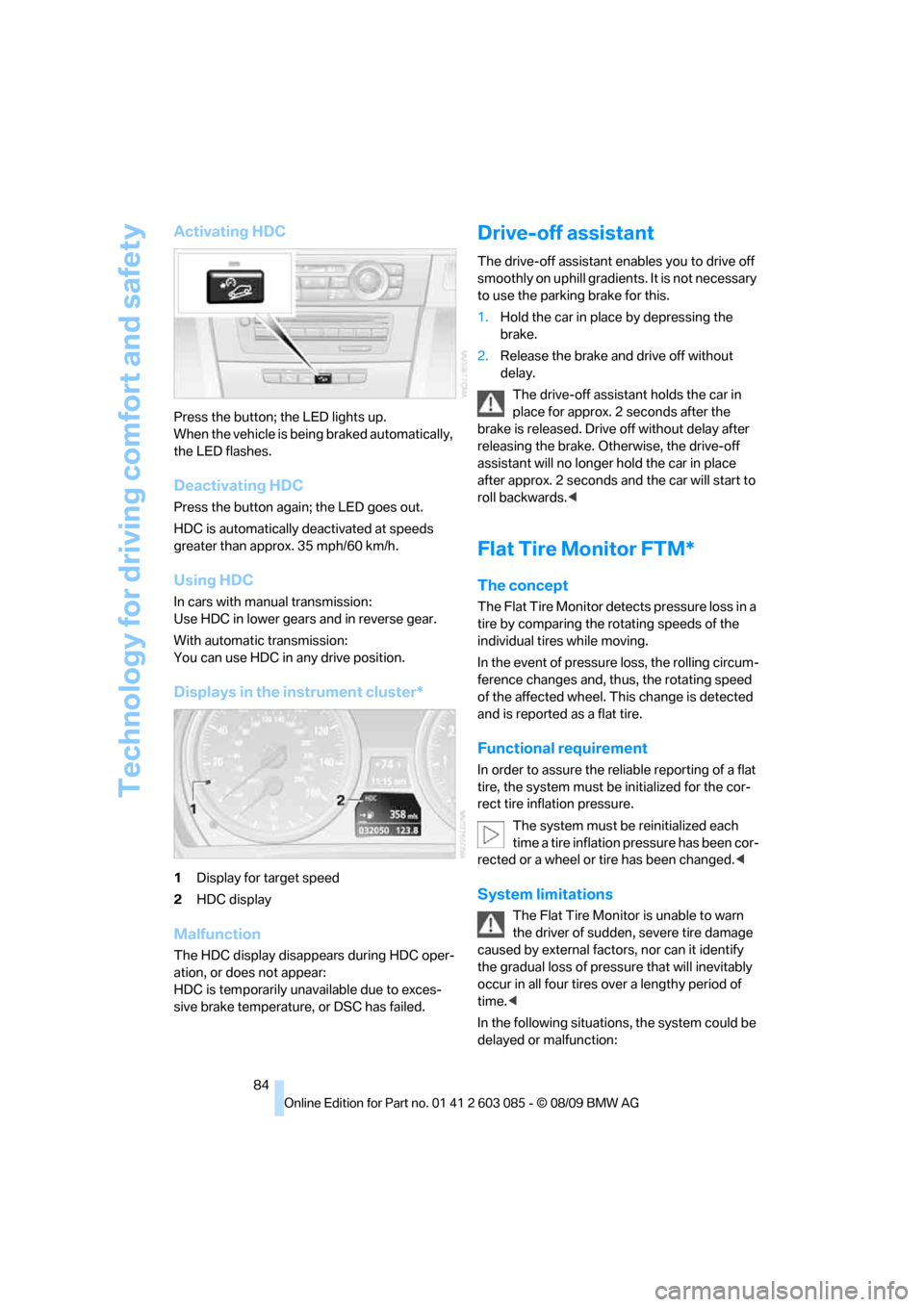
Activating HDC
Press the button; the LED lights up.
When the vehicle is being braked automatically,
the LED flashes.
Deactivating HDC
Press the button again; the LED goes out.
HDC is automatically deactivated at speeds
greater than approx. 35 mph/60 km/h.
Using HDC
In cars with manual transmission:
Use HDC in lower gears and in reverse gear.
With automatic transmission:
You can use HDC in any drive position.
Displays in the instrument cluster*
1Display for target speed
2HDC display
Malfunction
The HDC display disappears during HDC oper-
ation, or does not appear:
HDC is temporarily unavailable due to exces-
sive brake temperature, or DSC has failed.
Drive-off assistant
The drive-off assistant enables you to drive off
smoothly on uphill gradients. It is not necessary
to use the parking brake for this.
1.Hold the car in place by depressing the
brake.
2.Release the brake and drive off without
delay.
The drive-off assistant holds the car in
place for approx. 2 seconds after the
brake is released. Drive off without delay after
releasing the brake. Otherwise, the drive-off
assistant will no longer hold the car in place
after approx. 2 seconds and the car will start to
roll backwards.<
Flat Tire Monitor FTM*
The concept
The Flat Tire Monitor detects pressure loss in a
tire by comparing the rotating speeds of the
individual tires while moving.
In the event of pressure loss, the rolling circum-
ference changes and, thus, the rotating speed
of the affected wheel. This change is detected
and is reported as a flat tire.
Functional requirement
In order to assure the reliable reporting of a flat
tire, the system must be initialized for the cor-
rect tire inflation pressure.
The system must be reinitialized each
time a tire inflation pressure has been cor-
rected or a wheel or tire has been changed.<
System limitations
The Flat Tire Monitor is unable to warn
the driver of sudden, severe tire damage
caused by external factors, nor can it identify
the gradual loss of pressure that will inevitably
occur in all four tires over a lengthy period of
time.<
In the following situations, the system could be
delayed or malfunction:
Page 97 of 266
Controls
95Reference
At a glance
Driving tips
Communications
Navigation
Entertainment
Mobility
Malfunction
The LED next to the symbol for automatic head-
lamp control flashes. Adaptive light control is
malfunctioning or has failed. Have the system
checked as soon as possible.
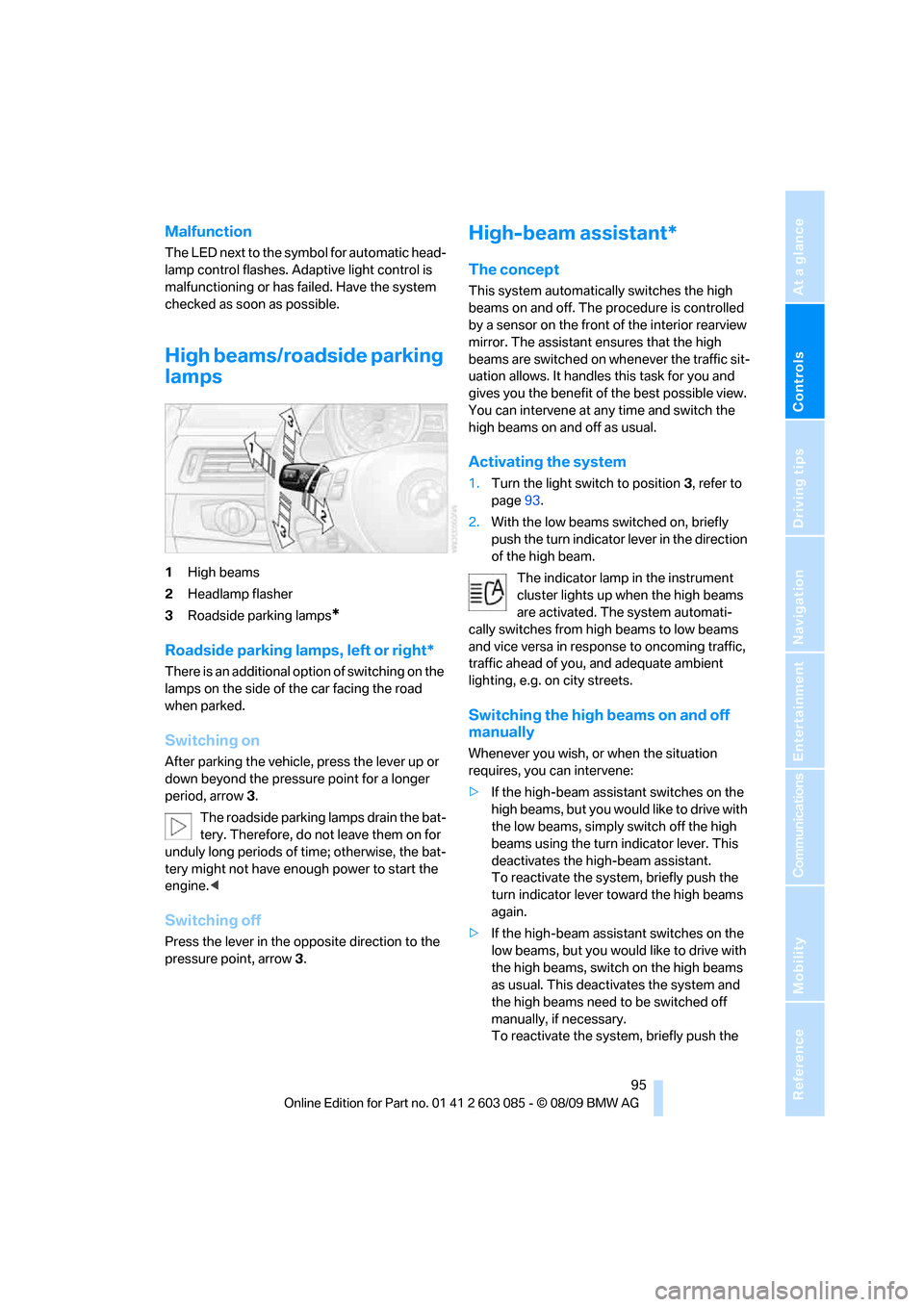
High beams/roadside parking
lamps
1High beams
2Headlamp flasher
3Roadside parking lamps
*
Roadside parking lamps, left or right*
There is an additional option of switching on the
lamps on the side of the car facing the road
when parked.
Switching on
After parking the vehicle, press the lever up or
down beyond the pressure point for a longer
period, arrow 3.
The roadside parking lamps drain the bat-
tery. Therefore, do not leave them on for
unduly long periods of time; otherwise, the bat-
tery might not have enough power to start the
engine.<
Switching off
Press the lever in the opposite direction to the
pressure point, arrow 3.
High-beam assistant*
The concept
This system automatically switches the high
beams on and off. The procedure is controlled
by a sensor on the front of the interior rearview
mirror. The assistant ensures that the high
beams are switched on whenever the traffic sit-
uation allows. It handles this task for you and
gives you the benefit of the best possible view.
You can intervene at any time and switch the
high beams on and off as usual.
Activating the system
1.Turn the light switch to position3, refer to
page93.
2.With the low beams switched on, briefly
push the turn indicator lever in the direction
of the high beam.
The indicator lamp in the instrument
cluster lights up when the high beams
are activated. The system automati-
cally switches from high beams to low beams
and vice versa in response to oncoming traffic,
traffic ahead of you, and adequate ambient
lighting, e.g. on city streets.
Switching the high beams on and off
manually
Whenever you wish, or when the situation
requires, you can intervene:
>If the high-beam assistant switches on the
high beams, but you would like to drive with
the low beams, simply switch off the high
beams using the turn indicator lever. This
deactivates the high-beam assistant.
To reactivate the system, briefly push the
turn indicator lever toward the high beams
again.
>If the high-beam assistant switches on the
low beams, but you would like to drive with
the high beams, switch on the high beams
as usual. This deactivates the system and
the high beams need to be switched off
manually, if necessary.
To reactivate the system, briefly push the
Page 98 of 266
Lamps
96 turn indicator lever toward the high beams
again.
>Use the headlamp flasher as usual with the
low beams switched on.
System limitations
The high-beam assistant cannot serve as
a substitute for the driver's personal judg-
ment of when to use the high beams. Therefore,
manually switch off the high beams in situations
where this is required to avoid a safety risk.<
The system is not fully functional in situations
such as the following, and driver intervention
may be necessary:
>In very unfavorable weather conditions,
such as fog or heavy precipitation
>In detecting poorly-lit road users, such as
pedestrians, cyclists, horseback riders and
wagons; when driving close to train or ship
traffic; and at animal crossings
>In tight curves, on hilltops or in depressions,
in cross traffic or half-obscured oncoming
traffic on highways
>In poorly lit towns and cities and in the pres-
ence of highly reflective signs
>At low speeds
>When the windshield in front of the interior
rearview mirror is fogged over, dirty or cov-
ered with stickers, etc.
>If the sensor is dirty. Clean the sensor on
the front of the interior rearview mirror using
a cloth moistened with a small amount of
glass cleaner.
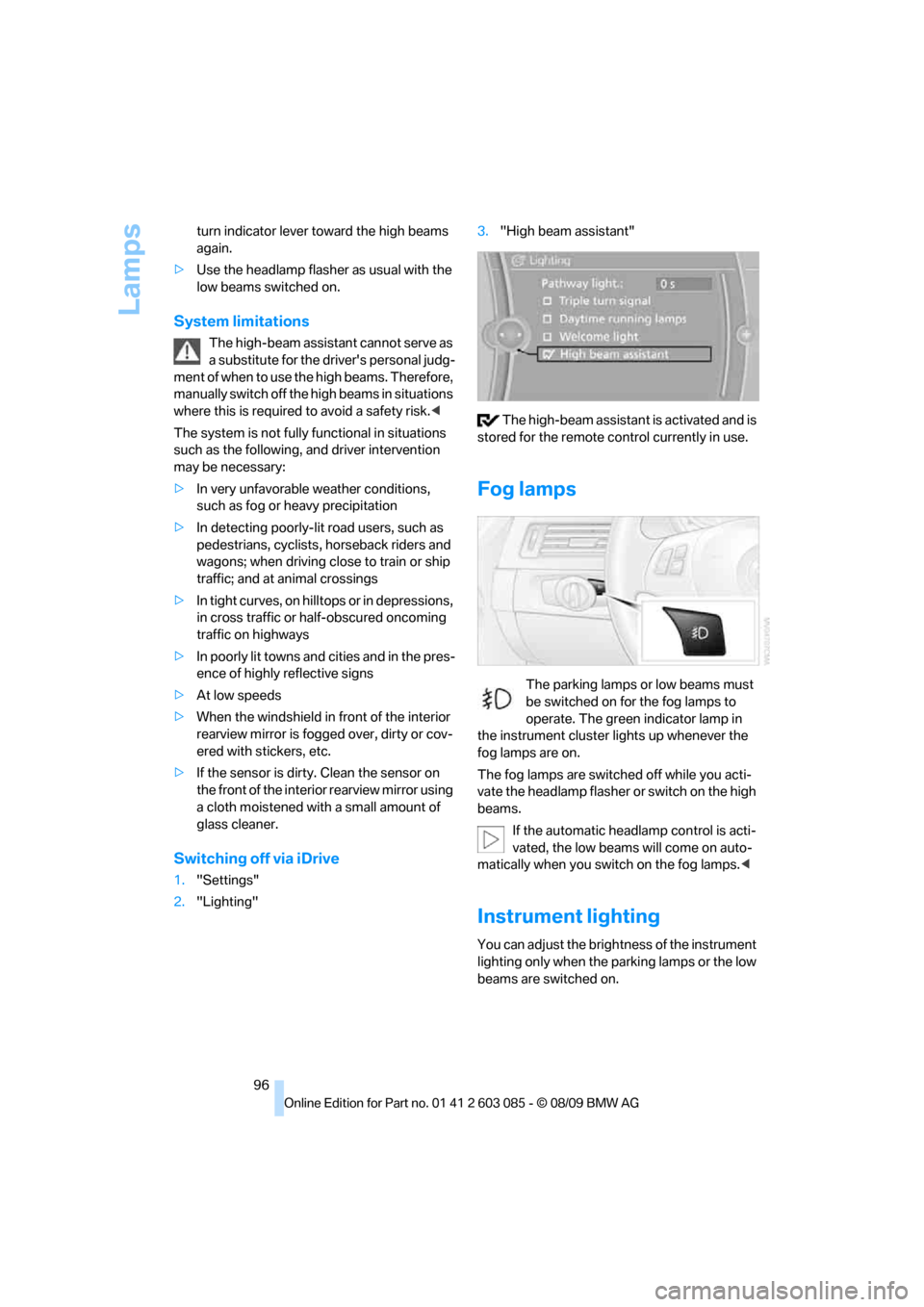
Switching off via iDrive
1."Settings"
2."Lighting"3."High beam assistant"
The high-beam assistant is activated and is
stored for the remote control currently in use.
Fog lamps
The parking lamps or low beams must
be switched on for the fog lamps to
operate. The green indicator lamp in
the instrument cluster lights up whenever the
fog lamps are on.
The fog lamps are switched off while you acti-
vate the headlamp flasher or switch on the high
beams.
If the automatic headlamp control is acti-
vated, the low beams will come on auto-
matically when you switch on the fog lamps.<
Instrument lighting
You can adjust the brightness of the instrument
lighting only when the parking lamps or the low
beams are switched on.
Page 215 of 266
Mobility
213Reference
At a glance
Controls
Driving tips
Communications
Navigation
Entertainment
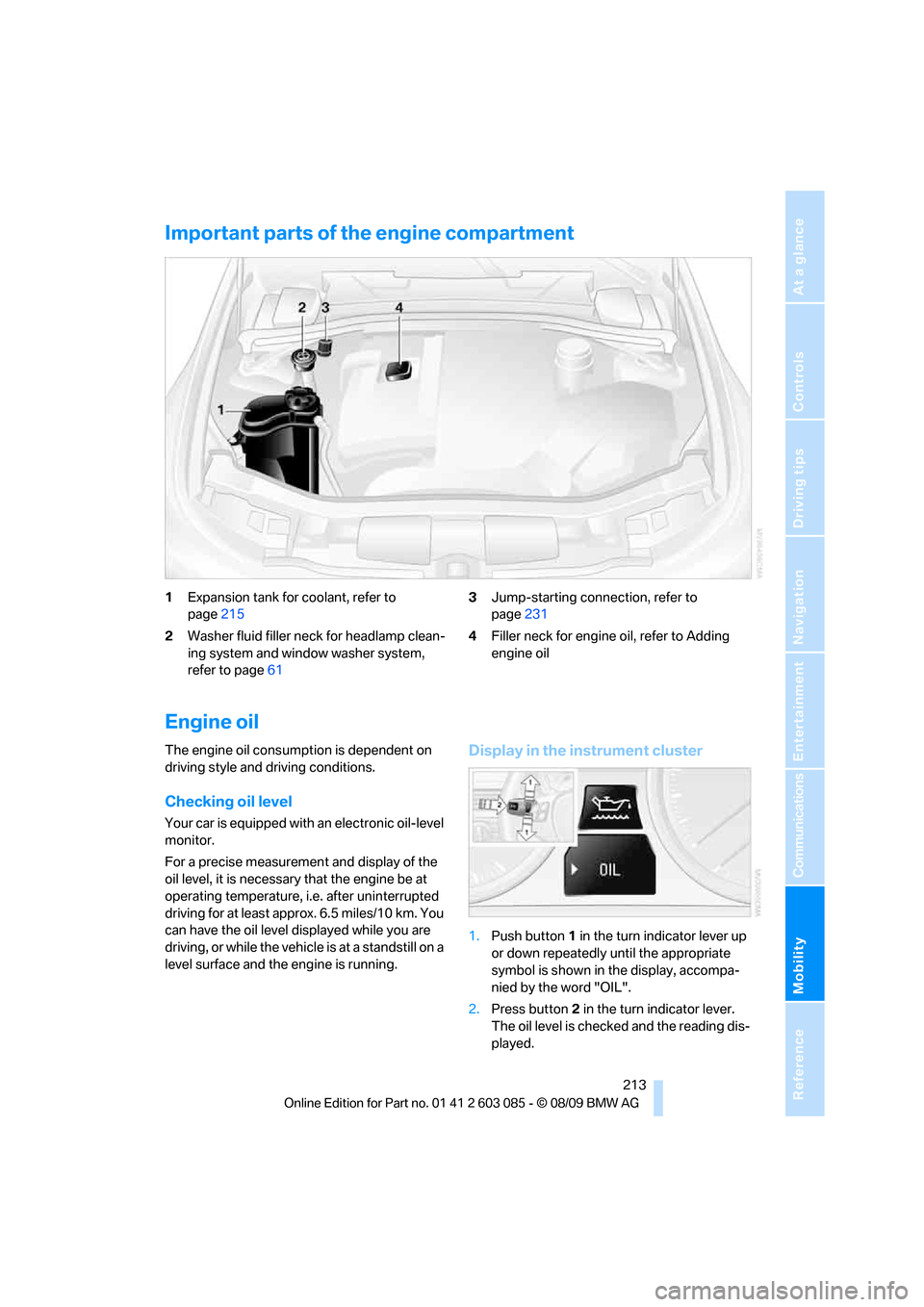
Important parts of the engine compartment
1Expansion tank for coolant, refer to
page215
2Washer fluid filler neck for headlamp clean-
ing system and window washer system,
refer to page613Jump-starting connection, refer to
page231
4Filler neck for engine oil, refer to Adding
engine oil
Engine oil
The engine oil consumption is dependent on
driving style and driving conditions.
Checking oil level
Your car is equipped with an electronic oil-level
monitor.
For a precise measurement and display of the
oil level, it is necessary that the engine be at
operating temperature, i.e. after uninterrupted
driving for at least approx. 6.5 miles/10 km. You
can have the oil level displayed while you are
driving, or while the vehicle is at a standstill on a
level surface and the engine is running.
Display in the instrument cluster
1.Push button 1 in the turn indicator lever up
or down repeatedly until the appropriate
symbol is shown in the display, accompa-
nied by the word "OIL".
2.Press button 2 in the turn indicator lever.
The oil level is checked and the reading dis-
played.
Page 223 of 266
Mobility
221Reference
At a glance
Controls
Driving tips
Communications
Navigation
Entertainment
Light-alloy wheels
For technical reasons, dust is generated during
braking that is deposited on the light-alloy
wheels. Remove the dust regularly using acid-
free rim cleaner.
Do not use aggressive, acidic, strongly
alkaline and abrasive cleaning agents or
steam jets over 1407/606; otherwise, dam-
age may occur.<
Outside sensors/cameras
Keep the sensors and cameras on the
outside of the vehicle, e.g. those for Park
Distance Control, clean and free of ice to ensure
that they remain fully functional.<
Interior care
Upholstery fabrics/cloth trims/
Alcantara fabrics
Vacuum regularly with a vacuum cleaner to
remove superficial dirt.
To remove severe spots such as stains from
beverages, use a soft sponge or lint-free
microfiber cloth and suitable interior cleaners.
Follow the instructions on the packaging.
Clean the upholstery down to the seams
using a sweeping motion. Avoid strong
rubbing.<
Opened Velcro fasteners on pants or
other articles of clothing can damage the
seat covers. Ensure that Velcro fasteners are
closed.<
Leather/leather trim
The leather used by BMW is a high quality
natural product. Slight irregularities in the
leather are a typical characteristic of natural
leather.<
Dust and road grit in the pores and folds of the
leather have an abrasive effect, leading to
increased wear and causing the leather surface
to become brittle prematurely. Therefore, fre-
quently clean the leather of dust using a cloth or
vacuum cleaner.Clean light-colored leather more frequently as
dust and dirt are more noticeable.
Treat the leather at least once every two
months using a leather lotion as dirt and grease
will gradually attack the leather's protective
layer.
Carpets/cargo area
You can vacuum the carpets and floor mats or
clean them with interior cleaner if heavily soiled.
The floor mats can be removed for cleaning.
When replacing the mats, ensure that the seat
rails do not extend over the floor mats, as this
may damage the mats.
Lint on the floor mats occurs for technical rea-
sons and can be removed by vacuuming
repeatedly.
Interior plastic parts
>Imitation leather surfaces
>Lamp glasses
>Display pane of instrument cluster
>Matte parts
Clean with water and solvent-free plastic
cleaner if necessary.
Fine wood parts
Clean fine wood trim and fine wood parts with a
damp cloth. Wipe dry with a soft cloth.
Safety belts
Dirty belt straps impede the reeling action and
thus have a negative impact on safety.
Do not clean chemically, as this may
destroy the webbing.<
Interior sensors/cameras
To clean interior sensors and cameras, e.g. of
the high-beam assistant, use a lint-free cloth
moistened with glass cleaner.
Displays
To clean displays, e.g. of the radio or instrument
cluster, use a cleaning cloth for displays or a
soft, non-abrasive, lint-free cloth.
Page 252 of 266
Everything from A - Z
250 Care219
– automatic car washes219
– care products219
– carpets221
– CD/DVD drives222
– chrome parts220
– displays221
– exterior219
– fine wood parts221
– headlamps220
– high-pressure washer219
– interior221
– leather221
– light-alloy wheels221
– paintwork220
– plastic parts221
– retractable hardtop220
– rubber seals220
– safety belts221
– sensors and cameras221
– upholstery and cloth
trim221
– washing the car
manually220
– windows220
Cargo, securing122
Cargo area
– capacity241
– Comfort Access34
– folding up the floor
panel112
– lamp, refer to Interior
lamps97
– opening from inside31
– opening from outside31
Cargo loading120
– securing cargo122
– stowing cargo121
– vehicle120
Car jack
– jacking points228
Car key, refer to Integrated
key/remote control26
Car phone
– installation location, refer to
Center armrest107
– refer to separate Owner's
ManualCar phone, refer to
Telephone176
Car radio, refer to Radio149
Car shampoo221
Catalytic converter, refer to
Hot exhaust system119
CD, audio playback157
CD changer157,161
– controls146
– fast forward/reverse159
– filling or emptying the
magazine162
– random play sequence158
– selecting a track157
– switching on/off146
– tone control146
– volume146
CD player157
– controls146
– fast forward/reverse159
– random play sequence158
– selecting a track157
– switching on/off146
– tone control146
– volume146
Center armrest107
Center brake lamp
– replacing bulb227
Center console, refer to
Around the center
console14
Central locking
– from inside30
– from outside27
Central locking system27
– Comfort Access33
– hotel function31
– setting unlocking
characteristics27
Changes, technical, refer to
For your own safety5
Changing bulbs, refer to
Lamps and bulbs223
Changing the language on the
Control Display79
Changing the measurement
units on the Control
Display72
Changing wheels227Chassis number, refer to
Engine compartment213
Check Control77
Child restraint fixing system
LATCH53
Child restraint systems52
Child seats, refer to
Transporting children
safely52
Chrome parts221
Chrome polish221
Cigarette lighter, refer to
Lighter109
Cleaning headlamps61
– washer fluid61
Cleaning your BMW, refer to
Care219
Clock69
– 12h/24h mode76
– setting the time and date
76
– setting time75
Closing
– from inside30
– from outside27
Clothes hooks108
Cockpit10
Cold start, refer to Starting the
engine56
Combined instrument, refer to
Instrument cluster12
Comfort Access33
– replacing the battery35
Comfort access, refer to
Comfort Access33
Comfort area, refer to Around
the center console14
Compartment for remote
control, refer to Ignition
lock55
Compass105
Computer70
– displays on Control
Display71
Computer, refer to iDrive16
Concierge service191
Condensation, refer to When
the vehicle is parked120
Condition Based Service
CBS217
Page 253 of 266
Reference 251
At a glance
Controls
Driving tips
Communications
Navigation
Entertainment
Mobility
Configuring settings, refer to
Personal Profile26
Confirmation signals for
locking/unlocking the
vehicle29
Congestion
– refer to Route, bypassing
sections137
Connecting vacuum cleaner,
refer to Connecting
electrical appliances109
Consumption, refer to
Average consumption71
Consumption display
– average consumption71
Contacts
– creating188
Control Center, refer to
iDrive16
Control Display, refer to
iDrive16
– adjusting brightness80
– switching on/off19
Controller, refer to iDrive16
Controls and displays10
Control unit, refer to iDrive16
Convenient loading in
Convertible28
Convenient operation
– glass roof28
– glass roof with Comfort
Access34
– retractable hardtop28
– windows28
– windows with Comfort
Access34
Convertible
– bag holder111
– Convenient loading28
– enlarging cargo area110
– folding down rear
backrest110
– retractable hardtop38
– rollover protection
system92
– securing cargo122
– stowing cargo121
Coolant215
– checking level215Coolant temperature70
Cooling, maximum99
Cooling fluid, refer to
Coolant215
Cooling system, refer to
Coolant215
Copyright2
Corner-illuminating lamps
– replacing bulbs224
Corner-illuminating lamps,
refer to Adaptive light
control94
Cornering lamps, refer to
Adaptive light control94
Correct tires210
Country codes DVD159
Courtesy lamps, refer to
Interior lamps97
Criteria for route136
Cross-hairs in navigation132
Cruise control61
– active63
– malfunction63
Cruising range70
Cupholders108
Curb weight, refer to
Weights241
Current playback
– external devices171
– of music collection166
Customer Relations193
D
Dashboard, refer to
Cockpit10
Dashboard, refer to
Instrument cluster12
Dashboard lighting, refer to
Instrument lighting96
Data, technical238
– capacities241
– dimensions239
– engine238
– weights241
Data transfer194
Date
– date format77
– setting76Daytime running lights94
– replacing bulbs224
DBC Dynamic Brake
Control82
Deactivating front passenger
airbags90
Deadlocking, refer to
Locking28
Defect
– door lock30
– fuel filler flap198
– glass roof37
Destination, entering by town/
city name127
Destination address
– entering127,133
Destination entry via BMW
Assist131
Destination for navigation
– entering by voice133
– entering via map132
– entry127
– home address130
– manual entry127
Destination guidance136
– bypassing a route
section137
– changing specified
route136
– continuing136
– starting136
– voice instructions137
– volume of voice
instructions138
Digital clock69
Digital compass105
Digital radio, refer to HD
Radio150
Dimensions239
Directional indicators, refer to
Turn signals59
Direction instructions, refer to
Voice instructions137
Directory for navigation, refer
to Address book
129
Displacement, refer to Engine
data238
Display, refer to iDrive
controls16
Page 254 of 266
Everything from A - Z
252 Display lighting, refer to
Instrument lighting96
Displays
– on the Control Display16
Displays, refer to Instrument
cluster12
Displays and controls10
Disposal
– coolant215
– remote control battery35
– vehicle battery228
Distance control, refer to
Active cruise control63
Distance remaining to service,
refer to Service
requirements73
Distance warning, refer to
Park Distance Control
PDC81
Door key, refer to Remote
control with integrated
key26
Door lock29
Doors, emergency
operation30
DOT Quality Grades208
Draft-free ventilation101
Drinks holders, refer to
Cupholders108
Drive-off assistance, refer to
Dynamic Stability Control
DSC82
Drive-off assistant84
Driving lamps, refer to Parking
lamps/low beams93
Driving notes118
Driving off on hills, refer to
Drive-off assistant84
Driving stability control
systems82
Driving through water120
Driving tips, refer to Driving
notes118
Dry air, refer to Cooling
function100
DSC Dynamic Stability
Control82DTC Dynamic Traction
Control82
– indicator/warning lamp82
DVD
– country codes159
– settings160
– video playback159
DVD menu160
DVD player, refer to CD
player157
DVD video159
Dynamic Brake Control
DBC82
Dynamic destination
guidance137
Dynamic Stability Control
DSC82
– indicator/warning lamp82
Dynamic Traction Control
DTC
– indicator/warning lamp83
E
EBV Electronic brake-force
distribution82
Eject button, refer to Buttons
on the CD/DVD player146
Electrical malfunction
– door lock30
– driver's door30
– fuel filler flap198
– glass roof37
Electric seat adjustment43
Electric steering wheel lock
– with Comfort Access34
Electronic brake-force
distribution EBV82
Electronic oil level check213
Electronic Stability Program
ESP, refer to Dynamic
Stability Control DSC82
Emergency actuation,
automatic transmission,
refer to Overriding selector
lever lock59
Emergency operation
– fuel filler flap, manual
release198Emergency operation, refer to
Closing manually
– glass roof37
Emergency operation, refer to
Manual operation
– door lock30
Emergency release
– trunk lid from inside31
Emergency Request230
Emergency services, refer to
Roadside Assistance230
Energy, saving
– saving fuel118
Engine
– breaking in118
– data238
– overheated, refer to Coolant
temperature70
– speed238
– starting56
– starting, Comfort Access33
– switching off56
Engine compartment213
Engine coolant, refer to
Coolant215
Engine oil
– adding215
– alternative oil types215
– BMW Maintenance
System217
– capacity241
– checking level213
– intervals between changes,
refer to Service
requirements73
Engine output, refer to Engine
data238
Engine speed, refer to Engine
data238
Engine starting, refer to
Starting the engine56
Entry lamps, refer to Interior
lamps97
Entry map for destination132
Equalizer, tone setting147
Error messages, refer to
Check Control77
Page 256 of 266
Everything from A - Z
254 Hands-free system14
Hazard warning flashers14
HDC Hill Descent Control83
HD Radio150
Head airbags90
Headlamp control,
automatic93
Headlamp flasher59
– indicator lamp11,13
Head restraints44
– rear, removing46
– sitting safely42
Heated
– mirrors50
– rear window100
– seats47
– steering wheel51
Heating
– mirrors50
– rear window100
– seats47
– steering wheel51
Heating and ventilation, refer
to Climate98
Heavy loads, refer to Stowing
cargo121
Height, refer to
Dimensions239
Height adjustment
– seats43
– steering wheel51
High-beam assistant95
High beams95
– headlamp flasher95
– indicator lamp13
High beams and low beams,
automatic, refer to High-
beam assistant95
High-pressure
washer219,220
High water, refer to Driving
through water120
Highways, refer to Route
criteria136
Hill Descent Control HDC83
Hills120
Holders for cups108
Homepage BMW4
Hood212Hooks for shopping bags111
Horn10,11
Hotel function, refer to
Locking or unlocking
separately31
Hot exhaust system
119
Hydraulic brake assist, refer to
Dynamic Brake Control
DBC82
Hydroplaning119
I
IBOC, refer to HD Radio150
Ice warning, refer to Outside
temperature
warning69
Identification marks
– run-flat tires210
– tire coding208
iDrive16
– adjusting brightness80
– changing language79
– changing settings79
– changing units of measure
and display format72
– controls16
– menu guidance17
– operating principle16
– overview16
– setting the date and time76
– start menu17
– status information19
iDrive operating principle16
Ignition55
– switched off56
– switched on55
Ignition key, refer to Remote
control with integrated
key26
Ignition key position 1, refer to
Radio readiness55
Ignition key position 2, refer to
Ignition on55
Ignition lock55
Imprint2Indicator and warning
lamps13
– Tire Pressure Monitor
TPM87
Inflation pressure, refer to Tire
inflation pressure200
Inflation pressure monitoring,
refer to Tire Pressure
Monitor TPM86
Initializing
– after power failure228
– compass, refer to
Calibrating105
– Flat Tire Monitor FTM85
– glass roof37
– radio, refer to Station,
storing149
– refer to Setting the time and
date76
Installation location
– telephone107
Instructions for navigation
system, refer to Voice
instructions137
Instrument cluster12
Instrument lighting96
Instrument panel, refer to
Cockpit10
Integrated key26
Integrated universal remote
control103
Interactive map132
Interior lamps97
– remote control28
Interior motion sensor33
Interior rearview mirror51
– automatic dimming
feature51
– compass105
Interlock, refer to Disengaging
the remote control57
Intermittent mode of the
wipers60
Intersection, entering,
navigation128
iPod, connecting, refer to
AUX-IN port169
iPod, connecting, refer to USB
audio interface169