ESP BMW 335XI SEDAN 2008 E90 Manual PDF
[x] Cancel search | Manufacturer: BMW, Model Year: 2008, Model line: 335XI SEDAN, Model: BMW 335XI SEDAN 2008 E90Pages: 274, PDF Size: 8.88 MB
Page 235 of 274
Mobility
233Reference
At a glance
Controls
Driving tips
Communications
Navigation
Entertainment
Sports Wagon
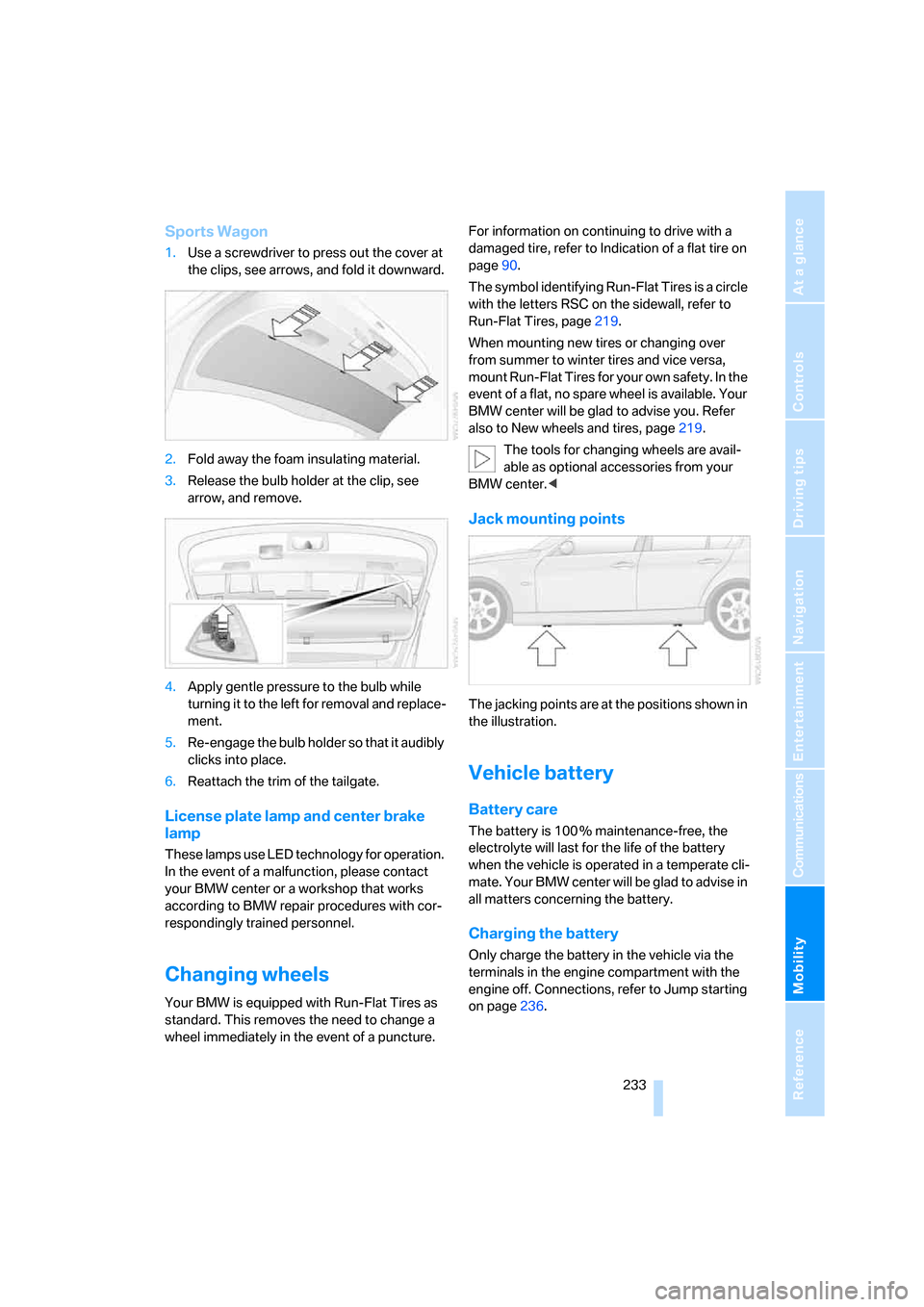
1.Use a screwdriver to press out the cover at
the clips, see arrows, and fold it downward.
2.Fold away the foam insulating material.
3.Release the bulb holder at the clip, see
arrow, and remove.
4.Apply gentle pressure to the bulb while
turning it to the left for removal and replace-
ment.
5.Re-engage the bulb holder so that it audibly
clicks into place.
6.Reattach the trim of the tailgate.
License plate lamp and center brake
lamp
These lamps use LED technology for operation.
In the event of a malfunction, please contact
your BMW center or a workshop that works
according to BMW repair procedures with cor-
respondingly trained personnel.
Changing wheels
Your BMW is equipped with Run-Flat Tires as
standard. This removes the need to change a
wheel immediately in the event of a puncture.For information on continuing to drive with a
damaged tire, refer to Indication of a flat tire on
page90.
The symbol identifying Run-Flat Tires is a circle
with the letters RSC on the sidewall, refer to
Run-Flat Tires, page219.
When mounting new tires or changing over
from summer to winter tires and vice versa,
mount Run-Flat Tires for your own safety. In the
event of a flat, no spare wheel is available. Your
BMW center will be glad to advise you. Refer
also to New wheels and tires, page219.
The tools for changing wheels are avail-
able as optional accessories from your
BMW center.<
Jack mounting points
The jacking points are at the positions shown in
the illustration.
Vehicle battery
Battery care
The battery is 100 % maintenance-free, the
electrolyte will last for the life of the battery
when the vehicle is operated in a temperate cli-
mate. Your BMW center will be glad to advise in
all matters concerning the battery.
Charging the battery
Only charge the battery in the vehicle via the
terminals in the engine compartment with the
engine off. Connections, refer to Jump starting
on page236.
Page 237 of 274
Mobility
235Reference
At a glance
Controls
Driving tips
Communications
Navigation
Entertainment
Giving and receiving assistance
Emergency Request*
Conditions for an Emergency Request:
>Equipment version with full preparation
package mobile phone. This equipment
makes it possible to send an Emergency
Request even if no mobile phone is paired
with the vehicle.
>BMW Assist is activated. Activating
BMW Assist, refer to page202.
>Radio readiness is on.
>The BMW Assist system is logged on to a
mobile phone network.
>The Emergency Request system is opera-
ble.
Once your service contract for BMW Assist
expires, the BMW Assist system can be deacti-
vated by a BMW center without you having to
visit a workshop. Once the BMW Assist system
has been deactivated, Emergency Requests
are not possible. The BMW Assist system can
be reactivated by a BMW center after a new
contract has been signed.
Sending an Emergency Request
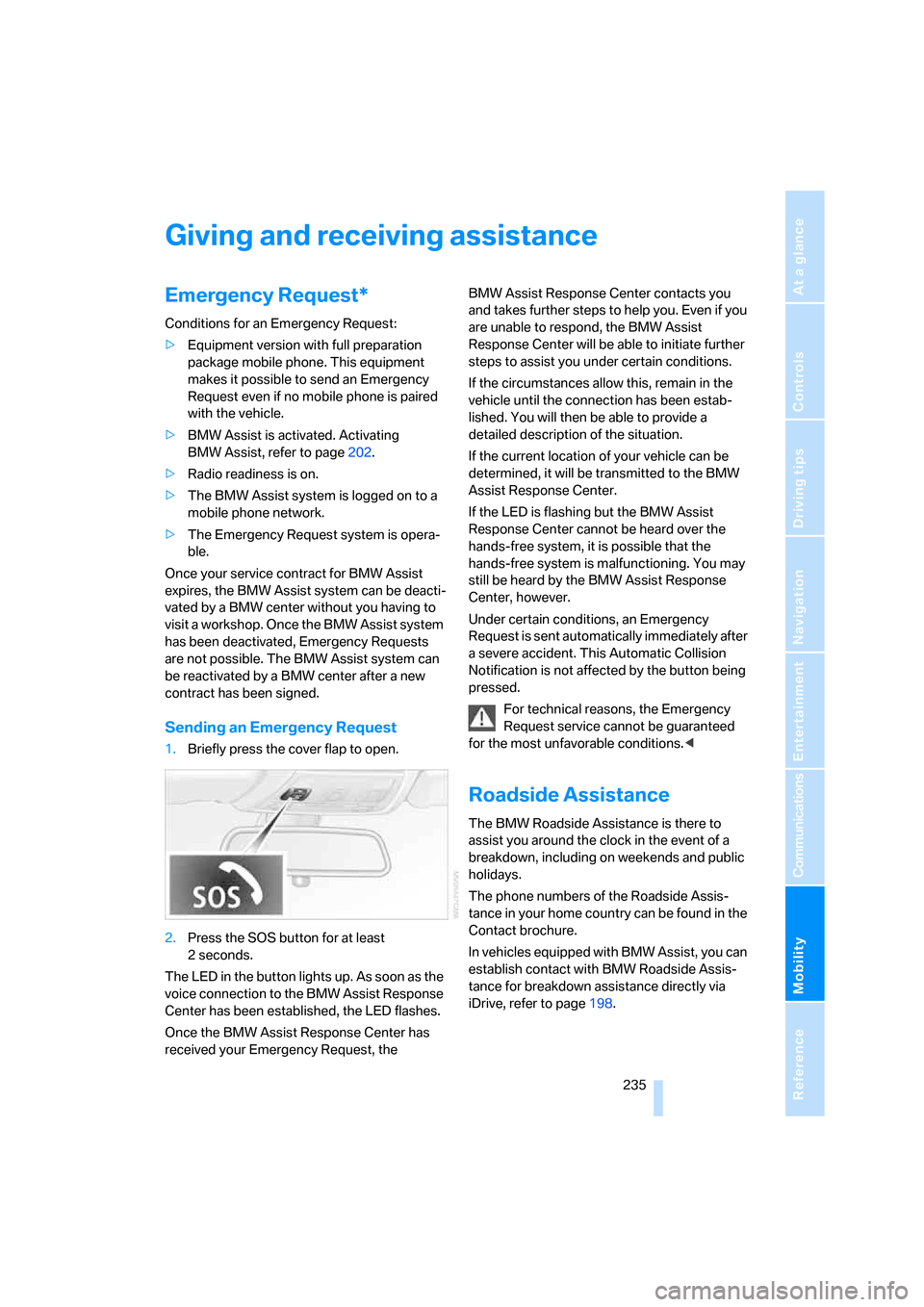
1.Briefly press the cover flap to open.
2.Press the SOS button for at least
2seconds.
The LED in the button lights up. As soon as the
voice connection to the BMW Assist Response
Center has been established, the LED flashes.
Once the BMW Assist Response Center has
received your Emergency Request, the BMW Assist Response Center contacts you
and takes further steps to help you. Even if you
are unable to respond, the BMW Assist
Response Center will be able to initiate further
steps to assist you under certain conditions.
If the circumstances allow this, remain in the
vehicle until the connection has been estab-
lished. You will then be able to provide a
detailed description of the situation.
If the current location of your vehicle can be
determined, it will be transmitted to the BMW
Assist Response Center.
If the LED is flashing but the BMW Assist
Response Center cannot be heard over the
hands-free system, it is possible that the
hands-free system is malfunctioning. You may
still be heard by the BMW Assist Response
Center, however.
Under certain conditions, an Emergency
Request is sent automatically immediately after
a severe accident. This Automatic Collision
Notification is not affected by the button being
pressed.
For technical reasons, the Emergency
Request service cannot be guaranteed
for the most unfavorable conditions.<
Roadside Assistance
The BMW Roadside Assistance is there to
assist you around the clock in the event of a
breakdown, including on weekends and public
holidays.
The phone numbers of the Roadside Assis-
tance in your home country can be found in the
Contact brochure.
In vehicles equipped with BMW Assist, you can
establish contact with BMW Roadside Assis-
tance for breakdown assistance directly via
iDrive, refer to page198.
Page 259 of 274
Reference 257
At a glance
Controls
Driving tips
Communications
Navigation
Entertainment
Mobility
DSC Dynamic Stability
Control86
DTC Dynamic Traction
Control87
– indicator/warning lamp87
DVD for navigation128
Dynamic Brake Control
DBC86
"Dynamic route" in
navigation141
Dynamic Stability Control
DSC
– indicator/warning lamp87
Dynamic Traction Control
DTC
– indicator/warning lamp87
E
EBV Electronic brake-force
distribution86
Eject button, refer to Buttons
on the CD player156
Electrical malfunction
– door lock31
– driver's door31
– fuel filler door206
– glass roof40
– luggage compartment lid/
tailgate33
– panorama glass roof42
Electric seat adjustment44
Electric steering wheel lock
– with convenient access37
Electronic oil level check222
Emergency actuation,
automatic transmission,
refer to Overriding selector
lever lock60
Emergency operation
– fuel filler door, manual
release206
Emergency operation, refer to
Closing manually
– glass roof40
– panorama glass roof42
Emergency operation, refer to
Manual operation
– door lock31Emergency release
– luggage compartment lid
from inside34
Emergency Request235
Emergency services, refer to
Roadside Assistance235
"Enabled services"202
"Enable services"203
"End call"189
Energy, saving
– saving fuel120
Energy-conscious driving,
refer to Energy Control72
Energy Control72
Engine
– breaking in120
– data242
– overheated, refer to Coolant
temperature72
– speed242
– starting57
– starting, convenient
access36
– switching off57
Engine compartment222
Engine coolant, refer to
Coolant224
Engine oil
– adding224
– BMW Maintenance
System226
– capacity246
– checking level222
– intervals between changes,
refer to Service
requirements76
"Engine oil level"223
Engine output, refer to Engine
data242
Engine speed, refer to Engine
data242
Engine starting, refer to
Starting the engine57
"Enter address"131
Entering a destination131
Entering a destination
country131
Entering a house number or
intersection133Entering an intersection132
Entering a street132
"Entertainment"156
Entry lamps, refer to Interior
lamps99
Environmentally friendly
driving, refer to Energy
Control72
"Equalizer", refer to Tone
control159
Equalizer, refer to Tone
control158
Error messages, refer to
Check Control81
"ESN"166
ESP Electronic Stability
Program, refer to DSC
Dynamic Stability
Control86
Event data recorders227
Exhaust system, refer to Hot
exhaust system121
Expanding the cargo bay114
Exterior mirrors49
– adjusting49
– automatic dimming
feature50
– automatic heating49
– folding in and out49
External audio device110
External audio device, refer to
AUX-In port175
Eyes
– for tow-starting and towing
away238
– for tying down loads124
F
Fader, tone control157
Failure messages, refer to
Check Control81
Failure of an electrical
consumer234
False alarm
– avoiding unintentional
alarm36
– switching off an alarm36