navigation BMW 5 SERIES 2010 Owners Manual
[x] Cancel search | Manufacturer: BMW, Model Year: 2010, Model line: 5 SERIES, Model: BMW 5 SERIES 2010Pages: 271, PDF Size: 9.19 MB
Page 191 of 271
189
Entertainment
Reference
At a glance
Controls
Driving tips Communications
Navigation
Mobility
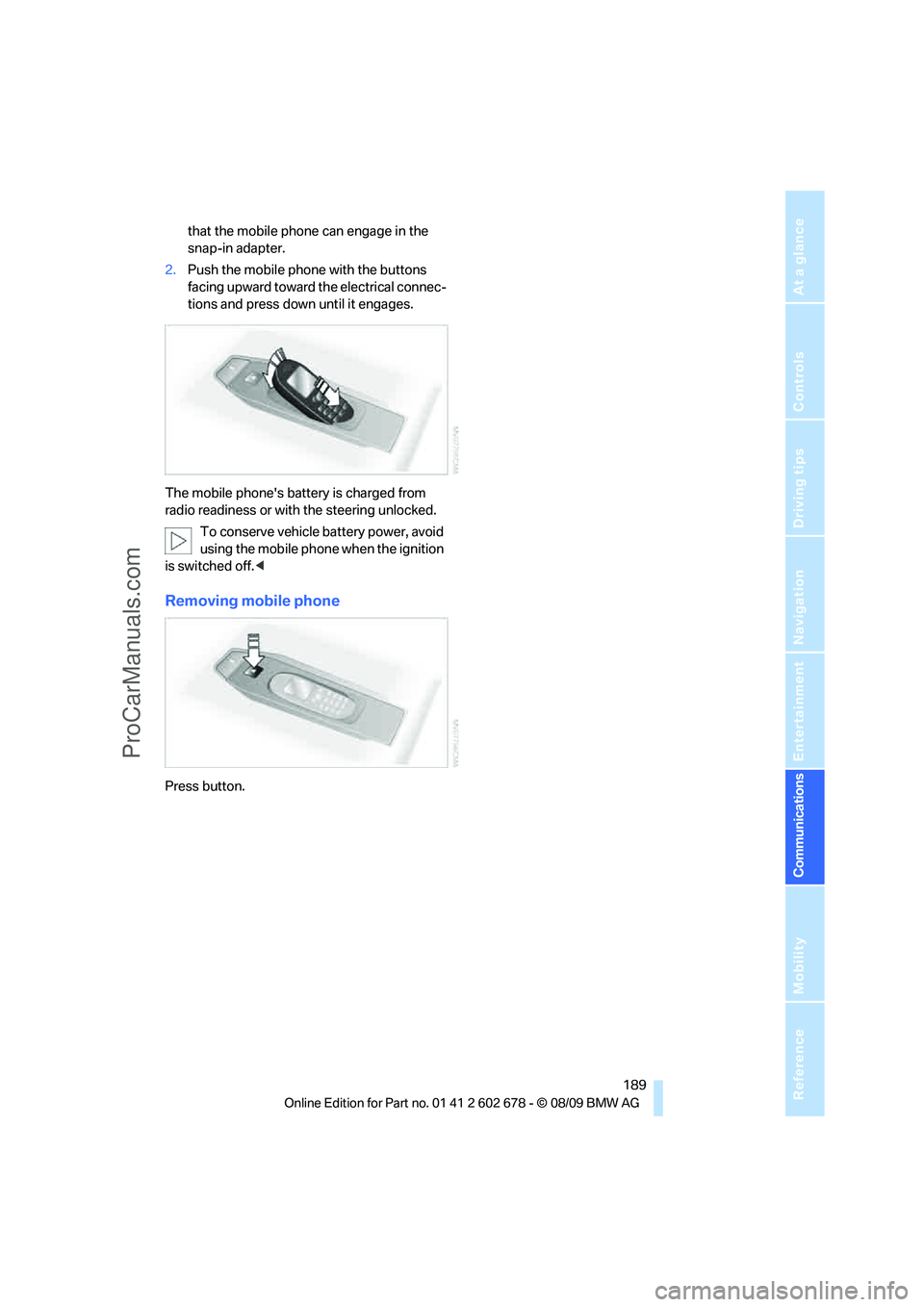
that the mobile phone can engage in the
snap-in adapter.
2.Push the mobile phone with the buttons
facing upward toward the electrical connec-
tions and press down until it engages.
The mobile phone's battery is charged from
radio readiness or with the steering unlocked.
To conserve vehicle battery power, avoid
using the mobile phone when the ignition
is switched off.<
Removing mobile phone
Press button.
ProCarManuals.com
Page 192 of 271
Contacts
190
Contacts
You can create and edit contacts. The contacts
from the mobile phone
* are displayed as well if
this function is supported by the mobile phone.
The addresses can be used as destinations for
navigation and the phone numbers can be
dialed.
New contact
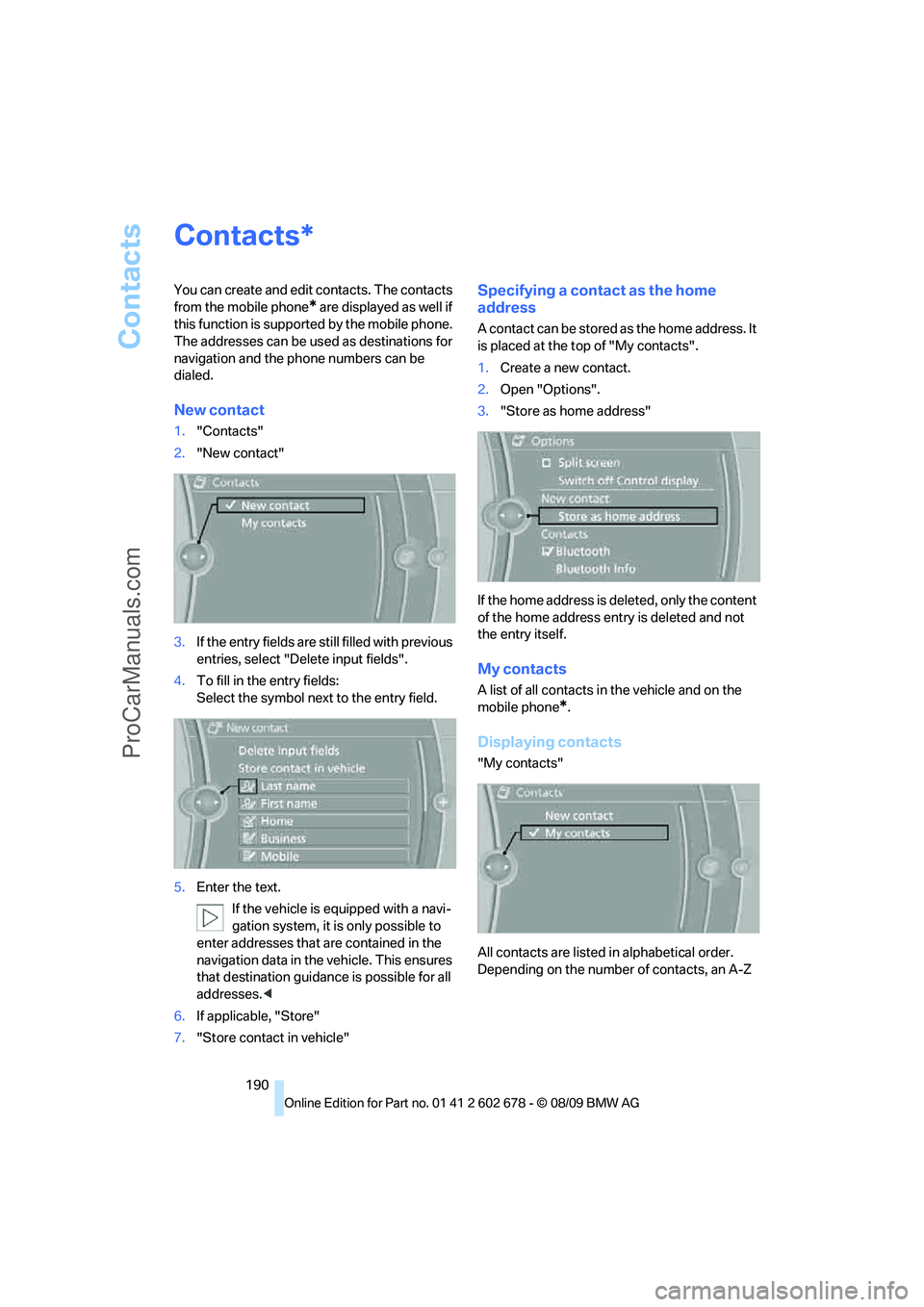
1."Contacts"
2."New contact"
3.If the entry fields are still filled with previous
entries, select "Delete input fields".
4.To fill in the entry fields:
Select the symbol next to the entry field.
5.Enter the text.
If the vehicle is equipped with a navi-
gation system, it is only possible to
enter addresses that are contained in the
navigation data in the vehicle. This ensures
that destination guidance is possible for all
addresses.<
6.If applicable, "Store"
7."Store contact in vehicle"
Specifying a contact as the home
address
A contact can be stored as the home address. It
is placed at the top of "My contacts".
1.Create a new contact.
2.Open "Options".
3."Store as home address"
If the home address is deleted, only the content
of the home address entry is deleted and not
the entry itself.
My contacts
A list of all contacts in the vehicle and on the
mobile phone
*.
Displaying contacts
"My contacts"
All contacts are listed in alphabetical order.
Depending on the number of contacts, an A-Z
*
ProCarManuals.com
Page 193 of 271
191
Entertainment
Reference
At a glance
Controls
Driving tips Communications
Navigation
Mobility
search is offered. A symbol indicates the stor-
age location of the contacts:
Displaying the detailed view*
Select the desired contact.
All fields that have been filled in for that contact
are displayed.
Selecting a contact as the navigation
destination
1."My contacts"
2.Select the desired contact.
3.Select the desired address.
Contacts from the mobile phone
* may contain
addresses that do not match the navigation
data contained in the vehicle and thus cannot
be used for destination guidance. In this case:
Manually correct the address.
Checking the address as a destination*
An address that is to be used for destination
guidance must match the navigation data con-
tained in the vehicle. An address that is stored
on the mobile phone can be corrected to match
to the navigation data.
1.Select the desired contact and highlight the
address.
2.Open "Options".
3."Check as destination"
4.Correct and store the address, if necessary.
After an address has been corrected, the con-
tact can be stored in the vehicle. The address is
not changed on the mobile phone.
Dialing a phone number*
1."My contacts"
2.Select the desired contact.
3.Select the desired phone number.
The connection is established.
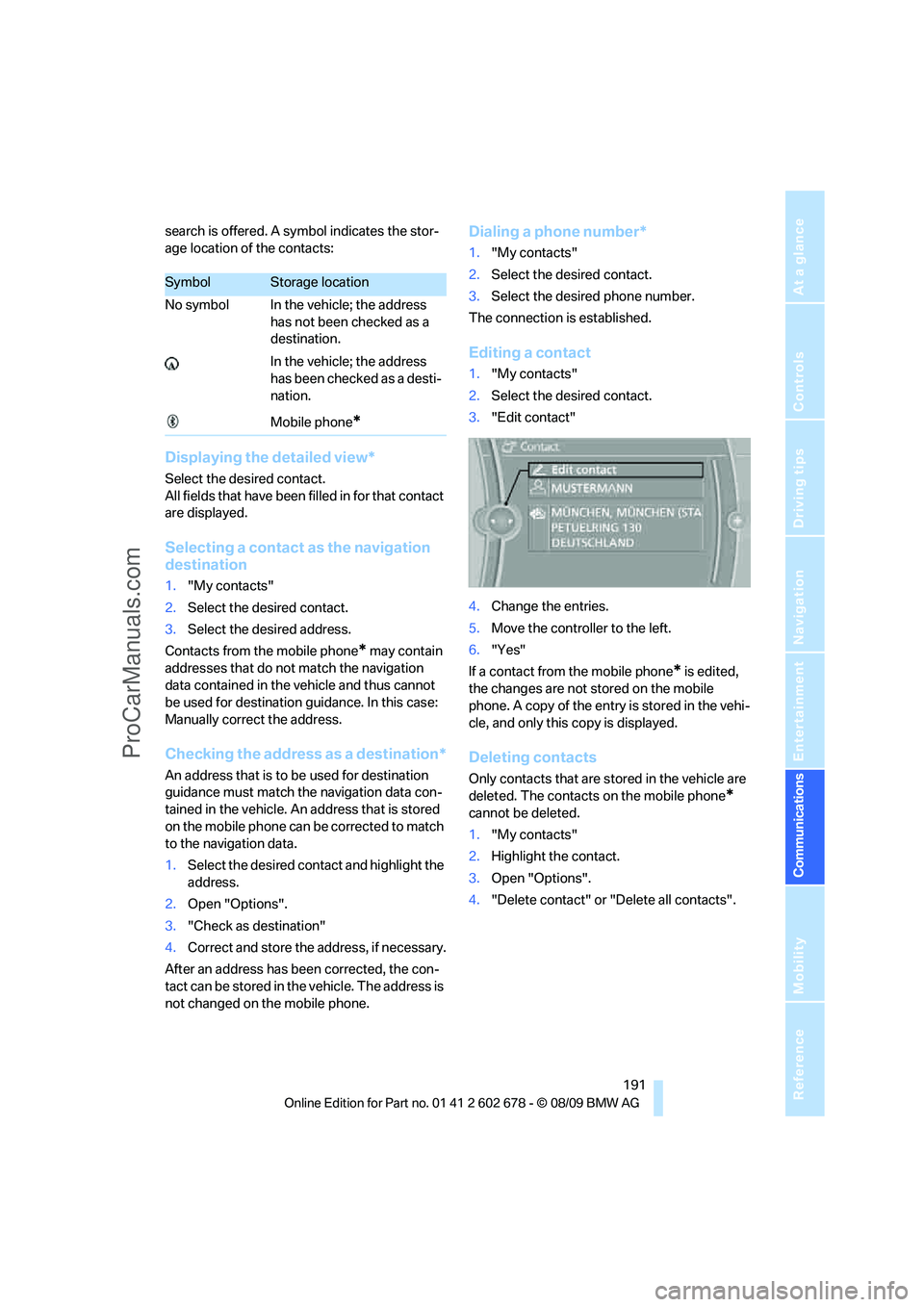
Editing a contact
1."My contacts"
2.Select the desired contact.
3."Edit contact"
4.Change the entries.
5.Move the controller to the left.
6."Yes"
If a contact from the mobile phone
* is edited,
the changes are not stored on the mobile
phone. A copy of the entry is stored in the vehi-
cle, and only this copy is displayed.
Deleting contacts
Only contacts that are stored in the vehicle are
deleted. The contacts on the mobile phone
*
cannot be deleted.
1."My contacts"
2.Highlight the contact.
3.Open "Options".
4."Delete contact" or "Delete all contacts".
SymbolStorage location
No symbol In the vehicle; the address
has not been checked as a
destination.
In the vehicle; the address
has been checked as a desti-
nation.
Mobile phone
*
ProCarManuals.com
Page 195 of 271
193
Entertainment
Reference
At a glance
Controls
Driving tips Communications
Navigation
Mobility
in advance. This shortens the duration of
the service appointment.
>In the event of a breakdown, data on the
vehicle's condition can be sent directly to
Roadside Assistance
*.
>The service varies by country.
>Connection costs may ensue.
>Services may be restricted abroad.
Requirements
>BMW Assist is activated.
>Wireless reception is available.
>The engine is running.
Concierge service*
When you call the BMW Assist Concierge, you
can obtain information about, for example, res-
taurants, emergency pharmacy services, gas
stations or hotels, as well as receive the corre-
sponding telephone numbers and addresses.
You can then dial a phone number directly or
use an address for destination guidance
*.
Starting the Concierge service
1."BMW Assist"
2."Concierge"
3."Start service"
A voice connection is established to the BMW
Concierge.
You are connected to the BMW Concierge ser-
vice to obtain the required information. You can
then have the phone number and address sent
to you and, for example, use it for destination
guidance in the navigation system. Many hotels can be booked directly through the BMW Assist
Concierge service. When an information mes-
sage is received, a list of the received messages
is displayed automatically. Open the message
via the message list, refer to page184.
Roadside Assistance
You can call Roadside Assistance* of the
BMW Group should you require help in the
event of a breakdown.
Starting Roadside Assistance
Vehicle not equipped with BMW Assist
or TeleService
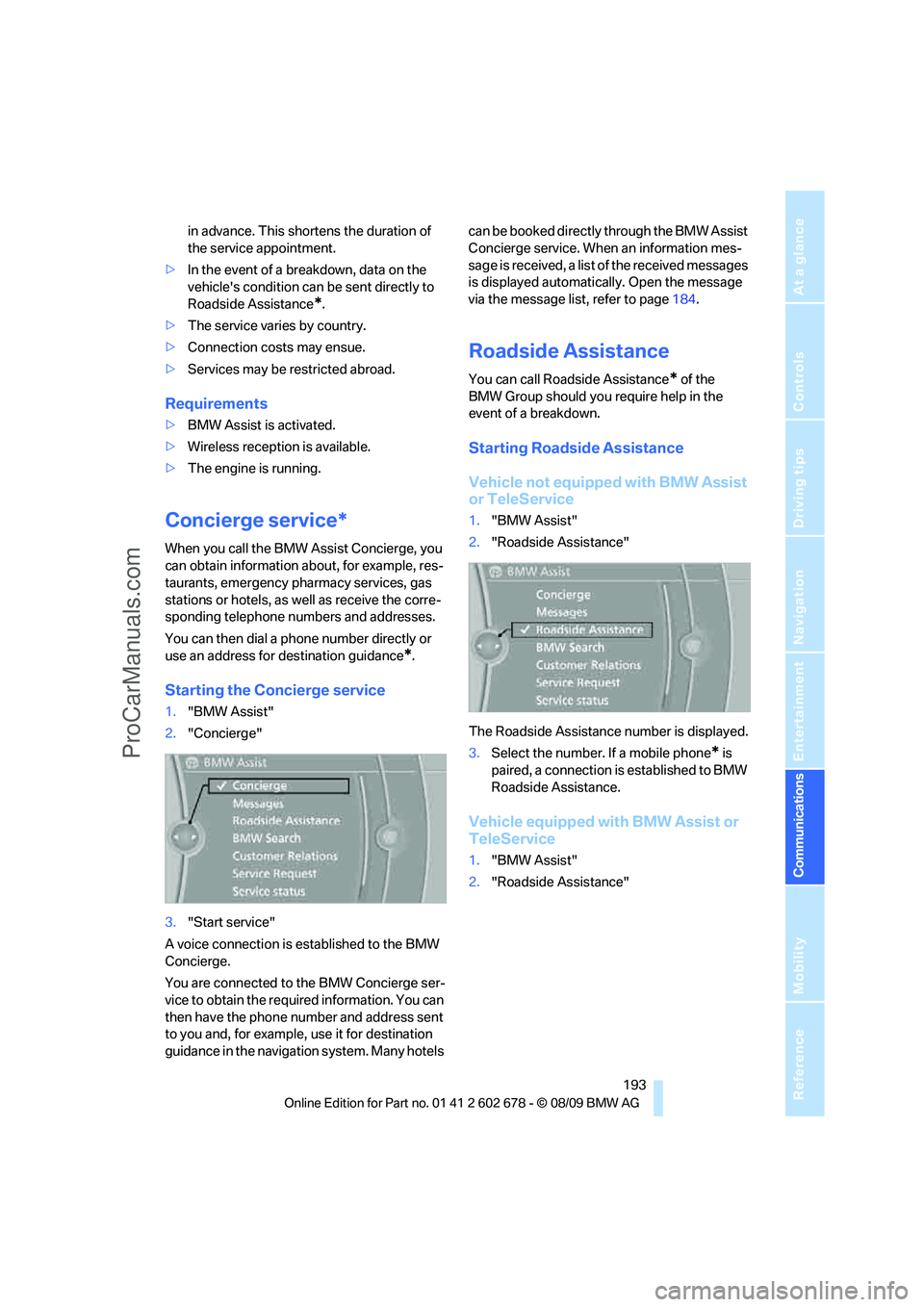
1."BMW Assist"
2."Roadside Assistance"
The Roadside Assistance number is displayed.
3.Select the number. If a mobile phone
* is
paired, a connection is established to BMW
Roadside Assistance.
Vehicle equipped with BMW Assist or
TeleService
1."BMW Assist"
2."Roadside Assistance"
ProCarManuals.com
Page 197 of 271
195
Entertainment
Reference
At a glance
Controls
Driving tips Communications
Navigation
Mobility
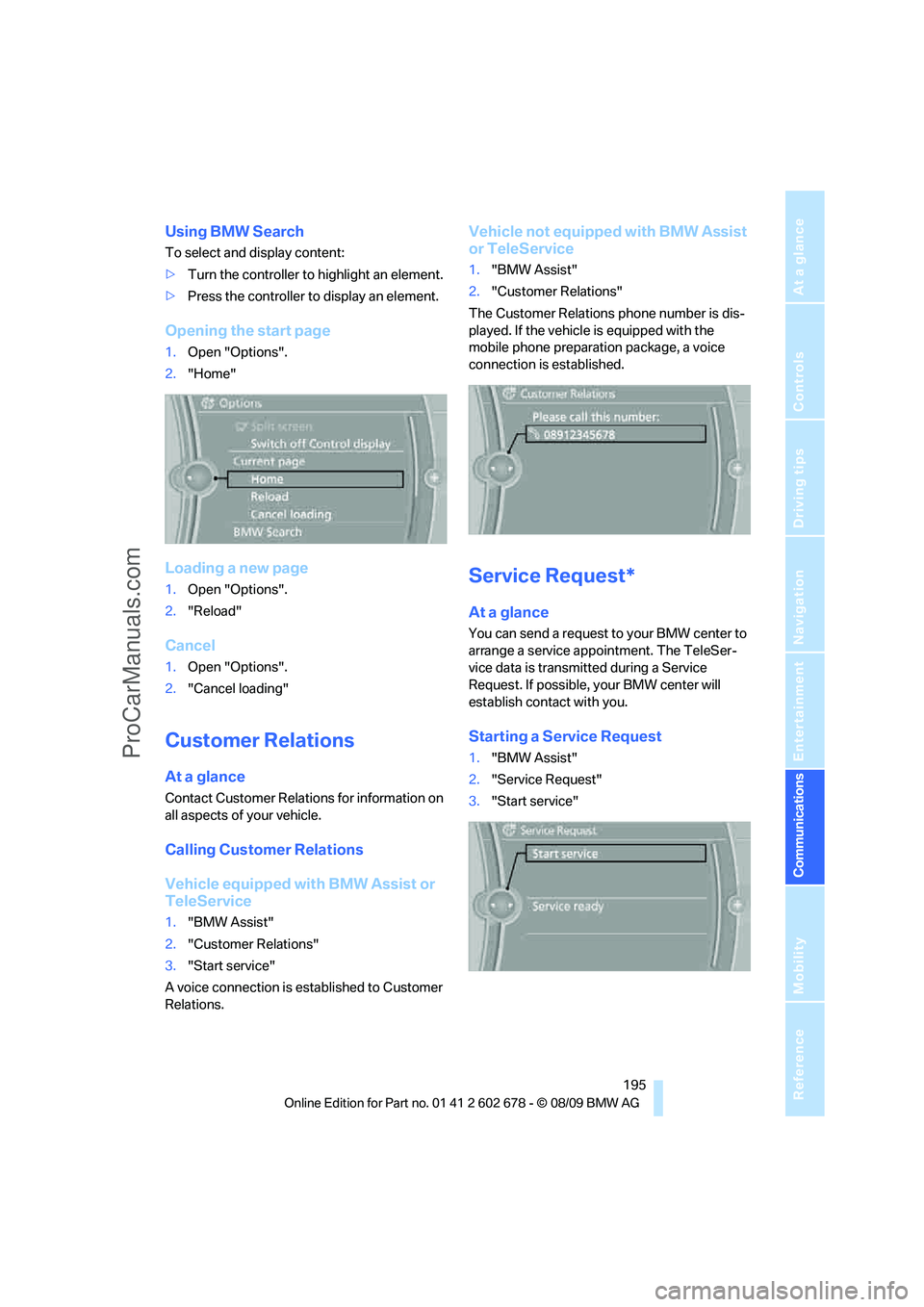
Using BMW Search
To select and display content:
>Turn the controller to highlight an element.
>Press the controller to display an element.
Opening the start page
1.Open "Options".
2."Home"
Loading a new page
1.Open "Options".
2."Reload"
Cancel
1.Open "Options".
2."Cancel loading"
Customer Relations
At a glance
Contact Customer Relations for information on
all aspects of your vehicle.
Calling Customer Relations
Vehicle equipped with BMW Assist or
TeleService
1."BMW Assist"
2."Customer Relations"
3."Start service"
A voice connection is established to Customer
Relations.
Vehicle not equipped with BMW Assist
or TeleService
1."BMW Assist"
2."Customer Relations"
The Customer Relations phone number is dis-
played. If the vehicle is equipped with the
mobile phone preparation package, a voice
connection is established.
Service Request*
At a glance
You can send a request to your BMW center to
arrange a service appointment. The TeleSer-
vice data is transmitted during a Service
Request. If possible, your BMW center will
establish contact with you.
Starting a Service Request
1."BMW Assist"
2."Service Request"
3."Start service"
ProCarManuals.com
Page 199 of 271

197
Entertainment
Reference
At a glance
Controls
Driving tips Communications
Navigation
Mobility
ProCarManuals.com
Page 203 of 271
Mobility
201Reference
At a glance
Controls
Driving tips
Communications
Navigation
Entertainment
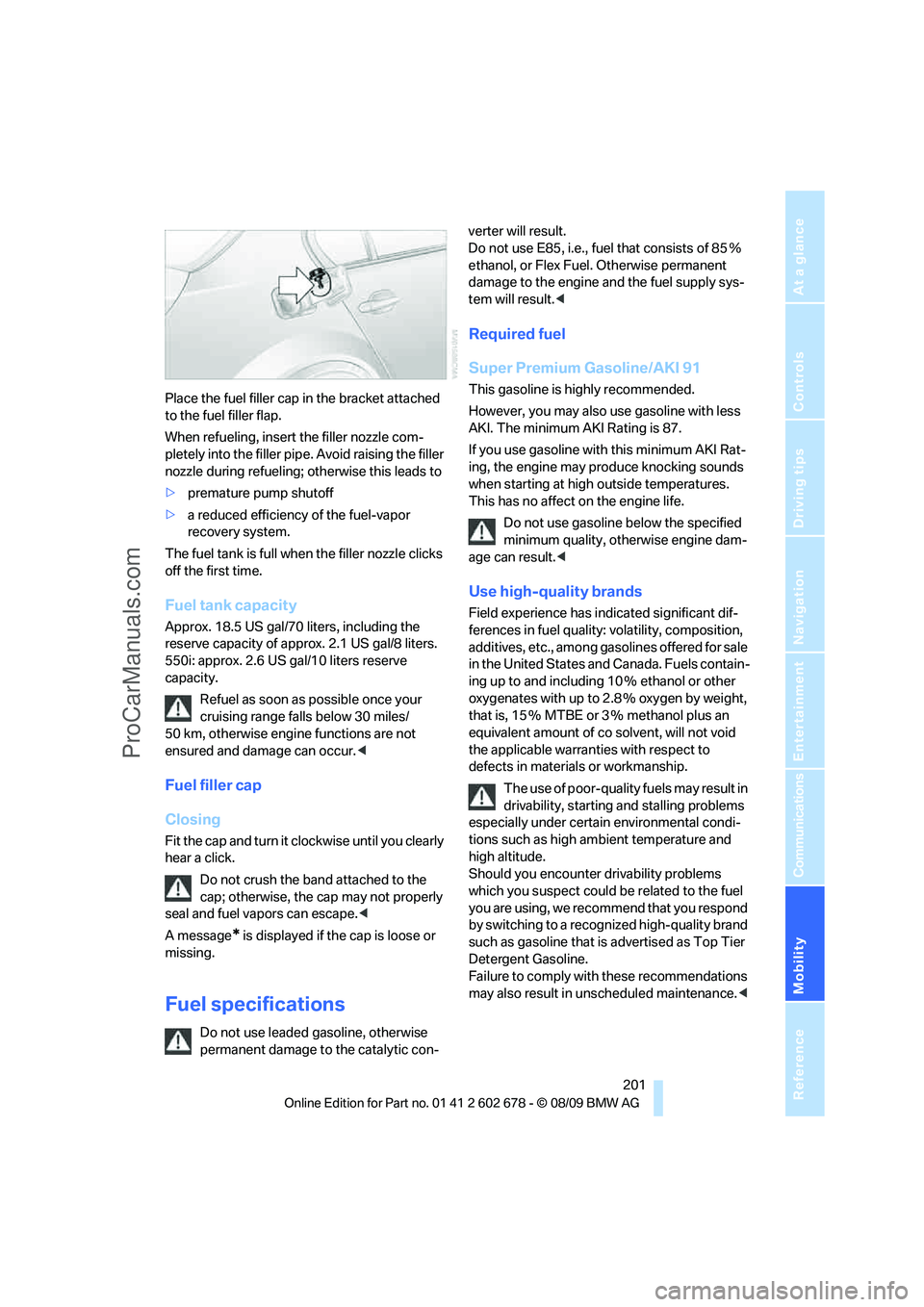
Place the fuel filler cap in the bracket attached
to the fuel filler flap.
When refueling, insert the filler nozzle com-
pletely into the filler pipe. Avoid raising the filler
nozzle during refueling; otherwise this leads to
>premature pump shutoff
>a reduced efficiency of the fuel-vapor
recovery system.
The fuel tank is full when the filler nozzle clicks
off the first time.
Fuel tank capacity
Approx. 18.5 US gal/70 liters, including the
reserve capacity of approx. 2.1 US gal/8 liters.
550i: approx. 2.6 US gal/10 liters reserve
capacity.
Refuel as soon as possible once your
cruising range falls below 30 miles/
50 km, otherwise engine functions are not
ensured and damage can occur.<
Fuel filler cap
Closing
Fit the cap and turn it clockwise until you clearly
hear a click.
Do not crush the band attached to the
cap; otherwise, the cap may not properly
seal and fuel vapors can escape.<
A message
* is displayed if the cap is loose or
missing.
Fuel specifications
Do not use leaded gasoline, otherwise
permanent damage to the catalytic con-verter will result.
Do not use E85, i.e., fuel that consists of 85%
ethanol, or Flex Fuel. Otherwise permanent
damage to the engine and the fuel supply sys-
tem will result.<
Required fuel
Super Premium Gasoline/AKI 91
This gasoline is highly recommended.
However, you may also use gasoline with less
AKI. The minimum AKI Rating is 87.
If you use gasoline with this minimum AKI Rat-
ing, the engine may produce knocking sounds
when starting at high outside temperatures.
This has no affect on the engine life.
Do not use gasoline below the specified
minimum quality, otherwise engine dam-
age can result.<
Use high-quality brands
Field experience has indicated significant dif-
ferences in fuel quality: volatility, composition,
additives, etc., among gasolines offered for sale
in the United States and Canada. Fuels contain-
ing up to and including 10 % ethanol or other
oxygenates with up to 2.8 % oxygen by weight,
that is, 15 % MTBE or 3 % methanol plus an
equivalent amount of co solvent, will not void
the applicable warranties with respect to
defects in materials or workmanship.
The use of poor-quality fuels may result in
drivability, starting and stalling problems
especially under certain environmental condi-
tions such as high ambient temperature and
high altitude.
Should you encounter drivability problems
which you suspect could be related to the fuel
you are using, we recommend that you respond
by switching to a recognized high-quality brand
such as gasoline that is advertised as Top Tier
Detergent Gasoline.
Failure to comply with these recommendations
may also result in unscheduled maintenance.<
ProCarManuals.com
Page 205 of 271
Mobility
203Reference
At a glance
Controls
Driving tips
Communications
Navigation
Entertainment
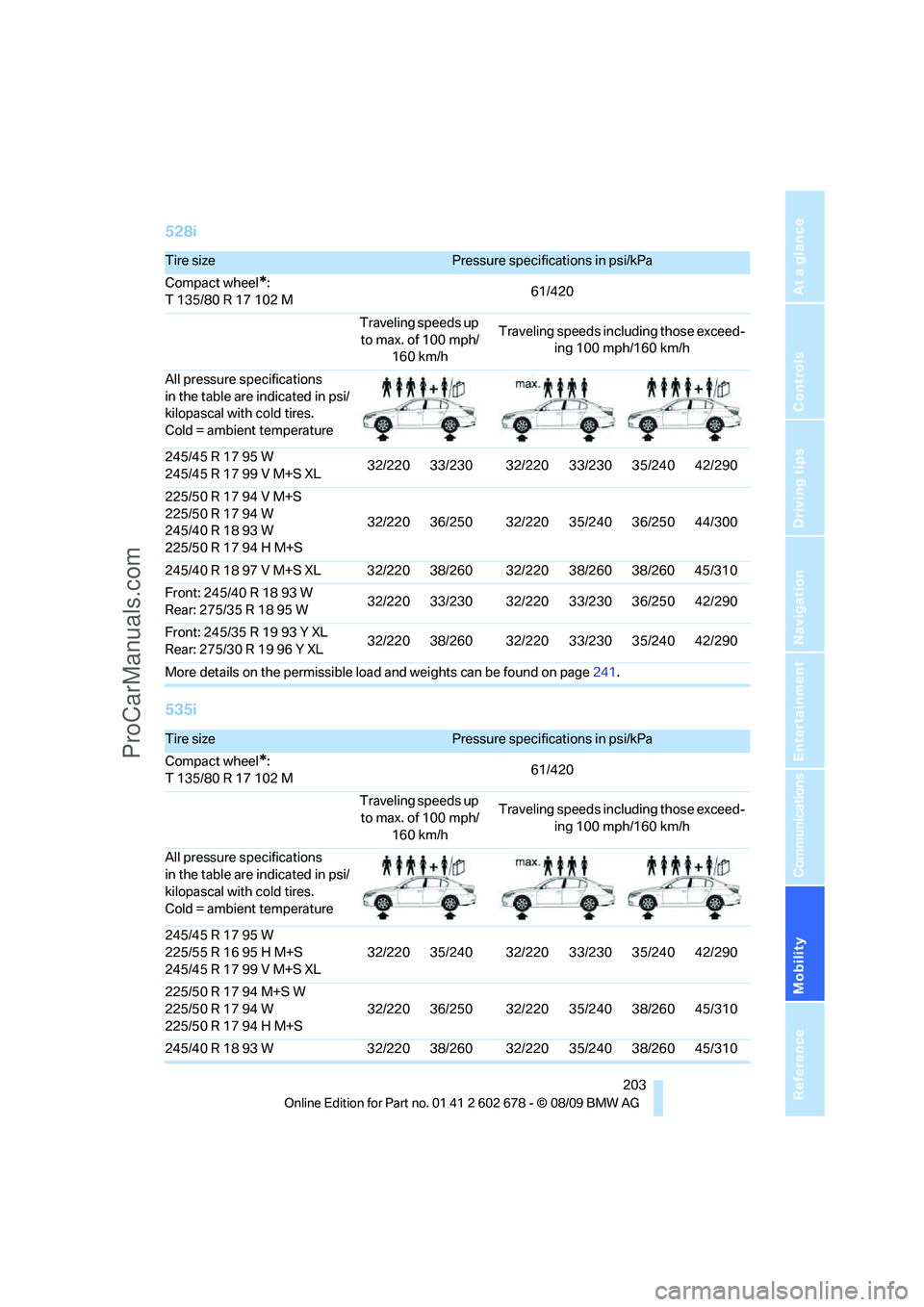
528i
535i
Tire sizePressure specifications in psi/kPa
Compact wheel
*:
T 135/80 R 17 102 M61/420
Traveling speeds up
to max. of 100 mph/
160 km/hTraveling speeds including those exceed-
ing 100 mph/160 km/h
All pressure specifications
in the table are indicated in psi/
kilopascal with cold tires.
Cold = ambient temperature
245/45 R 17 95 W
245/45 R 17 99 V M+S XL32/220 33/230 32/220 33/230 35/240 42/290
225/50 R 17 94 V M+S
225/50 R 17 94 W
245/40 R 18 93 W
225/50 R 17 94 H M+S32/220 36/250 32/220 35/240 36/250 44/300
245/40 R 18 97 V M+S XL 32/220 38/260 32/220 38/260 38/260 45/310
Front: 245/40 R 18 93 W
Rear: 275/35R1895W32/220 33/230 32/220 33/230 36/250 42/290
Front: 245/35 R 19 93 Y XL
Rear: 275/30R1996YXL32/220 38/260 32/220 33/230 35/240 42/290
More details on the permissible load and weights can be found on page241.
Tire sizePressure specifications in psi/kPa
Compact wheel
*:
T 135/80 R 17 102 M61/420
Traveling speeds up
to max. of 100 mph/
160 km/hTraveling speeds including those exceed-
ing 100 mph/160 km/h
All pressure specifications
in the table are indicated in psi/
kilopascal with cold tires.
Cold = ambient temperature
245/45 R 17 95 W
225/55 R 16 95 H M+S
245/45 R 17 99 V M+S XL32/220 35/240 32/220 33/230 35/240 42/290
225/50 R 17 94 M+S W
225/50 R 17 94 W
225/50 R 17 94 H M+S32/220 36/250 32/220 35/240 38/260 45/310
245/40 R 18 93 W 32/220 38/260 32/220 35/240 38/260 45/310
ProCarManuals.com
Page 207 of 271
Mobility
205Reference
At a glance
Controls
Driving tips
Communications
Navigation
Entertainment
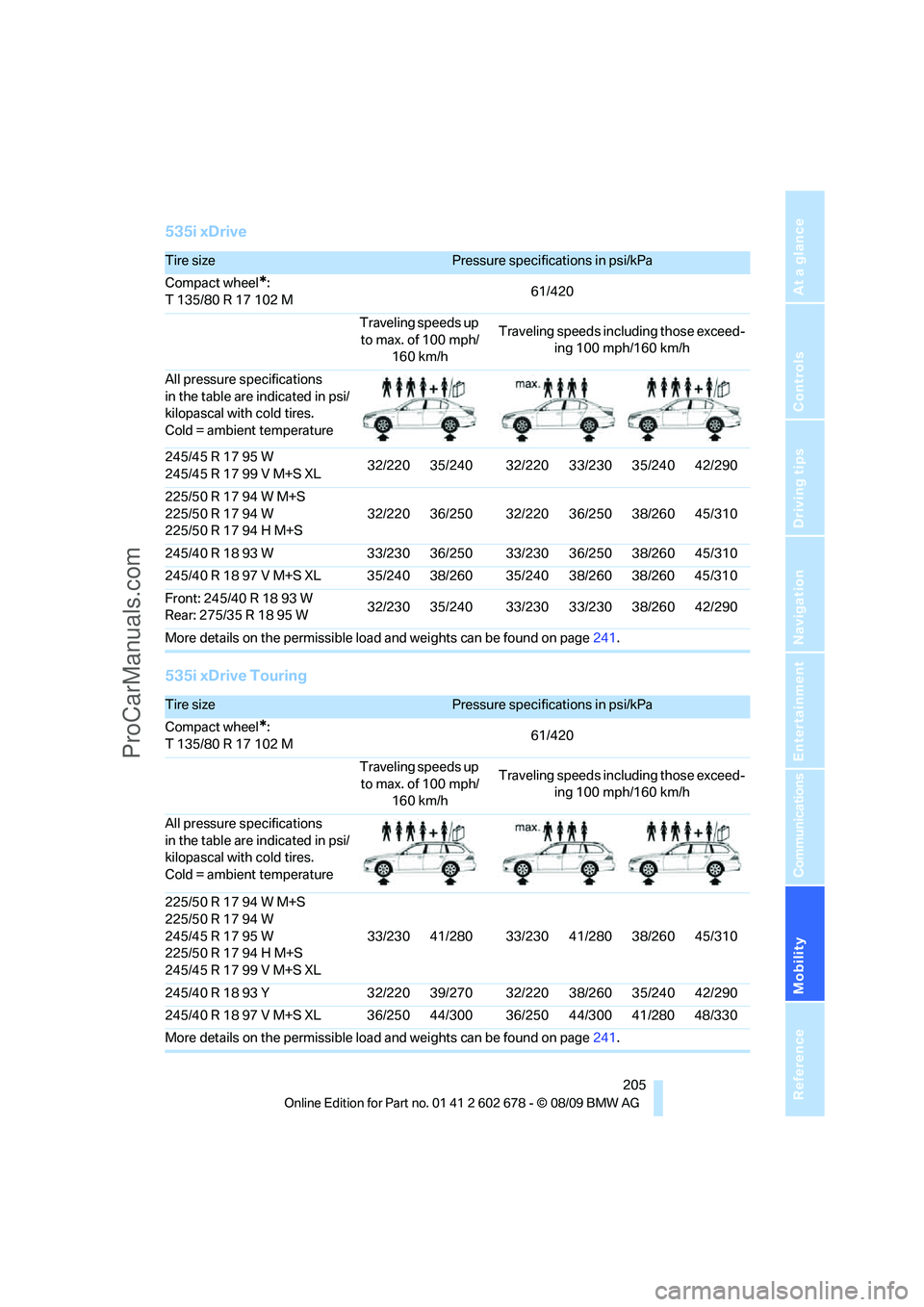
535i xDrive
535i xDrive Touring
Tire sizePressure specifications in psi/kPa
Compact wheel
*:
T 135/80 R 17 102 M61/420
Traveling speeds up
to max. of 100 mph/
160 km/hTraveling speeds including those exceed-
ing 100 mph/160 km/h
All pressure specifications
in the table are indicated in psi/
kilopascal with cold tires.
Cold = ambient temperature
245/45 R 17 95 W
245/45 R 17 99 V M+S XL32/220 35/240 32/220 33/230 35/240 42/290
225/50 R 17 94 W M+S
225/50 R 17 94 W
225/50 R 17 94 H M+S32/220 36/250 32/220 36/250 38/260 45/310
245/40 R 18 93 W 33/230 36/250 33/230 36/250 38/260 45/310
245/40 R 18 97 V M+S XL 35/240 38/260 35/240 38/260 38/260 45/310
Front: 245/40 R 18 93 W
Rear: 275/35R1895W32/230 35/240 33/230 33/230 38/260 42/290
More details on the permissible load and weights can be found on page241.
Tire sizePressure specifications in psi/kPa
Compact wheel
*:
T 135/80 R 17 102 M61/420
Traveling speeds up
to max. of 100 mph/
160 km/hTraveling speeds including those exceed-
ing 100 mph/160 km/h
All pressure specifications
in the table are indicated in psi/
kilopascal with cold tires.
Cold = ambient temperature
225/50 R 17 94 W M+S
225/50 R 17 94 W
245/45 R 17 95 W
225/50 R 17 94 H M+S
245/45 R 17 99 V M+S XL33/230 41/280 33/230 41/280 38/260 45/310
245/40 R 18 93 Y 32/220 39/270 32/220 38/260 35/240 42/290
245/40 R 18 97 V M+S XL 36/250 44/300 36/250 44/300 41/280 48/330
More details on the permissible load and weights can be found on page241.
ProCarManuals.com
Page 209 of 271
Mobility
207Reference
At a glance
Controls
Driving tips
Communications
Navigation
Entertainment
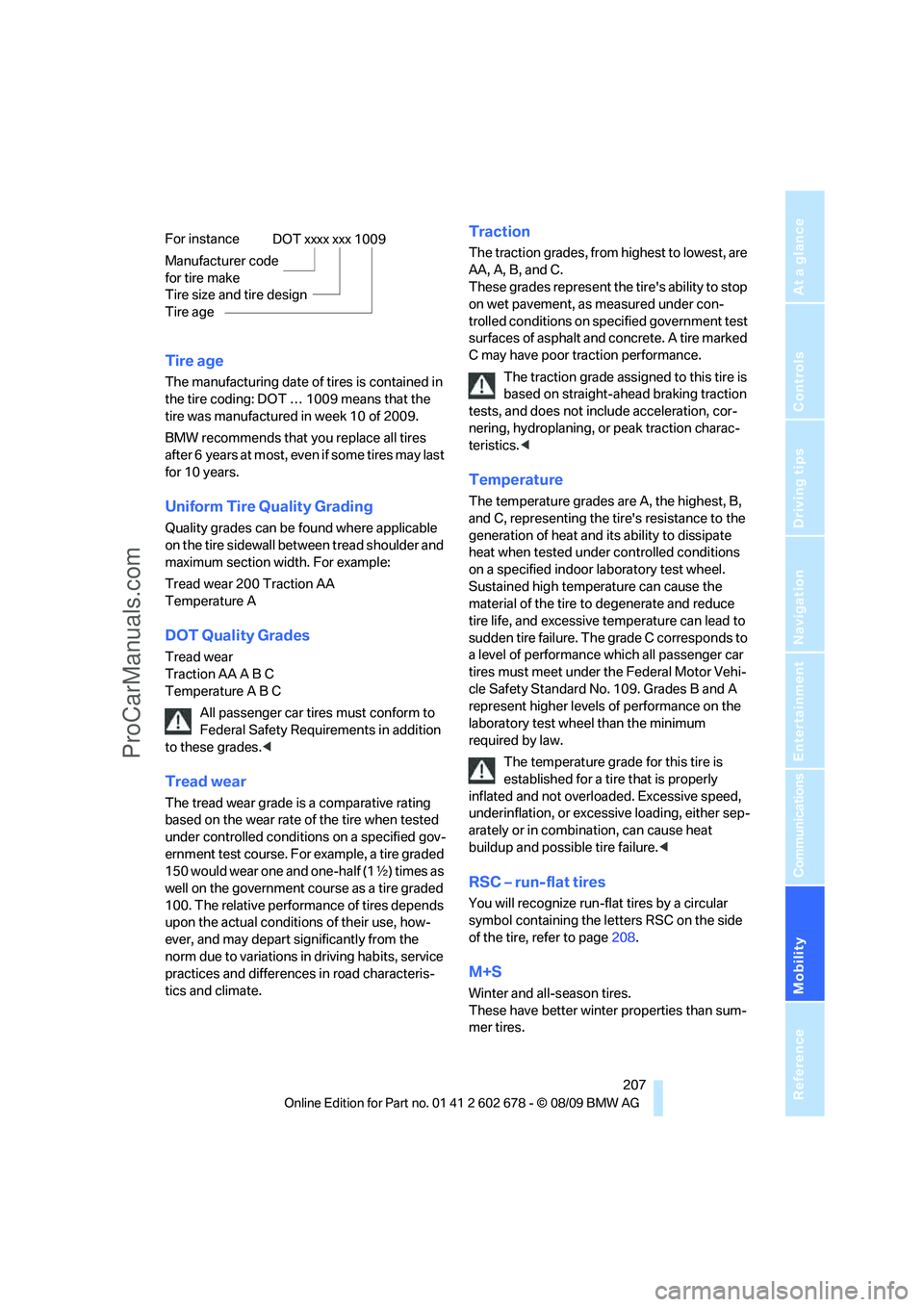
Tire age
The manufacturing date of tires is contained in
the tire coding: DOT … 1009 means that the
tire was manufactured in week 10 of 2009.
BMW recommends that you replace all tires
after 6 years at most, even if some tires may last
for 10 years.
Uniform Tire Quality Grading
Quality grades can be found where applicable
on the tire sidewall between tread shoulder and
maximum section width. For example:
Tread wear 200 Traction AA
Temperature A
DOT Quality Grades
Tread wear
Traction AA A B C
Temperature A B C
All passenger car tires must conform to
Federal Safety Requirements in addition
to these grades.<
Tread wear
The tread wear grade is a comparative rating
based on the wear rate of the tire when tested
under controlled conditions on a specified gov-
ernment test course. For example, a tire graded
150 would wear one and one-half (1γ) times as
well on the government course as a tire graded
100. The relative performance of tires depends
upon the actual conditions of their use, how-
ever, and may depart significantly from the
norm due to variations in driving habits, service
practices and differences in road characteris-
tics and climate.
Traction
The traction grades, from highest to lowest, are
AA, A, B, and C.
These grades represent the tire's ability to stop
on wet pavement, as measured under con-
trolled conditions on specified government test
surfaces of asphalt and concrete. A tire marked
C may have poor traction performance.
The traction grade assigned to this tire is
based on straight-ahead braking traction
tests, and does not include acceleration, cor-
nering, hydroplaning, or peak traction charac-
teristics.<
Temperature
The temperature grades are A, the highest, B,
and C, representing the tire's resistance to the
generation of heat and its ability to dissipate
heat when tested under controlled conditions
on a specified indoor laboratory test wheel.
Sustained high temperature can cause the
material of the tire to degenerate and reduce
tire life, and excessive temperature can lead to
sudden tire failure. The grade C corresponds to
a level of performance which all passenger car
tires must meet under the Federal Motor Vehi-
cle Safety Standard No. 109. Grades B and A
represent higher levels of performance on the
laboratory test wheel than the minimum
required by law.
The temperature grade for this tire is
established for a tire that is properly
inflated and not overloaded. Excessive speed,
underinflation, or excessive loading, either sep-
arately or in combination, can cause heat
buildup and possible tire failure.<
RSC – run-flat tires
You will recognize run-flat tires by a circular
symbol containing the letters RSC on the side
of the tire, refer to page208.
M+S
Winter and all-season tires.
These have better winter properties than sum-
mer tires. For instance
Manufacturer code
for tire make
Tire size and tire design
Tire age
DOT xxxx xxx 1009
ProCarManuals.com