brake light BMW 5 SERIES 2010 User Guide
[x] Cancel search | Manufacturer: BMW, Model Year: 2010, Model line: 5 SERIES, Model: BMW 5 SERIES 2010Pages: 271, PDF Size: 9.19 MB
Page 90 of 271
Technology for comfort, convenience and safety
88 1.Hold the vehicle with the brake.
2.Release the brake and begin to drive imme-
diately.
After releasing the brake, begin to drive
immediately; otherwise, the drive-off
assistant no longer holds the vehicle after
approx. 2 seconds and your vehicle will start to
roll backward.<
Dynamic Drive*
The concept
Dynamic Drive minimizes body roll and opti-
mizes vehicle stability during cornering and
evasive maneuvers.
Dynamic Drive is based on active stabilizers on
the front and rear axles. Suspension compli-
ance adapts to suit driving conditions, varying
from performance-oriented during cornering to
smooth and comfort-oriented when the vehicle
is proceeding in a straight line. During vehicle
operation, the system continuously runs
through closed-loop control cycles lasting only
fractions of a second.
The system assumes operational status each
time you start the engine.
Sports Wagon: self-leveling
suspension
Malfunction
The warning lamp for self-leveling sus-
pension lights up yellow and a message
is shown on the Control Display. A mal-
function has occurred in the self-leveling sus-
pension. Stop and check the vehicle. If it is con-
siderably lower at the rear than at the front, and
possibly also on one side – rear left compared to
rear right – go to the nearest BMW center or a
workshop that works according to BMW repair
procedures with correspondingly trained per-
sonnel. Drive with appropriate caution in the
meantime. The vehicle has reduced ground
clearance and driving comfort may be notice-
ably reduced. Even if the position of the vehicle is normal, go to the nearest BMW center or a
workshop that works according to BMW repair
procedures with correspondingly trained per-
sonnel.
FTM Flat Tire Monitor*
The concept
The Flat Tire Monitor detects a pressure loss in
one tire by comparing the speeds of the individ-
ual wheels during driving.
In the event of a pressure loss, there is a change
in the rolling circumference and therefore the
rotation speed of the corresponding wheel. The
system detects this change and reports it as a
flat tire.
Functional requirement
The system must have been initialized when the
tire inflation pressure was correct; otherwise,
reliable signaling of a flat tire is not ensured.
The initialization must be repeated after
every correction of the tire inflation pres-
sure and after every tire or wheel change.<
System limits
The Flat Tire Monitor is unable to warn
the driver of sudden, severe tire damage
caused by external factors, nor can it identify
the gradual loss of pressure that will inevitably
occur in all four tires over a lengthy period of
time.<
In the following situations, the system could be
delayed or malfunction:
>System has not been initialized
>Driving on snowy or slippery road surface
>Sporty driving style: slip in the drive wheels,
high lateral acceleration
>Driving with snow chains
*
When you are driving with the compact wheel*
the Flat Tire Monitor is unable to function.
ProCarManuals.com
Page 95 of 271
Controls
93Reference
At a glance
Driving tips
Communications
Navigation
Entertainment
Mobility
When you are driving in the low speed range,
e. g. in a town or when parking, the steering
angle increases, i.e., the steering becomes very
direct. In the higher speed range, on the other
hand, the steering angle is reduced more and
more. This improves the handling capability of
your BMW over the entire speed range.
In critical situations, the system can make tar-
geted corrections to the steering angle pro-
vided by the driver and thus stabilize the vehicle
before the driver intervenes. This stabilizing
intervention is simultaneously deactivated
when DSC is switched off, refer to page85.
Malfunction
The warning lamp lights up yellow and
a message is shown on the Control Dis-
play. Active steering is malfunctioning
or is temporarily deactivated. At low speeds,
greater steering wheel movements are
required, whereas at higher speeds, the vehicle
reacts more sensitively to steering wheel move-
ments. The stability-promoting intervention
can also be deactivated. Proceed cautiously
and drive defensively.
Deactivation
Active steering is deactivated to perform an ini-
tialization. A message indicates that the feature
is deactivated. Initialization may take several
minutes.
If the message does not go out during the cur-
rent trip, have the system checked.
Defect
A text message appears if there is a defect.
Have the system checked.
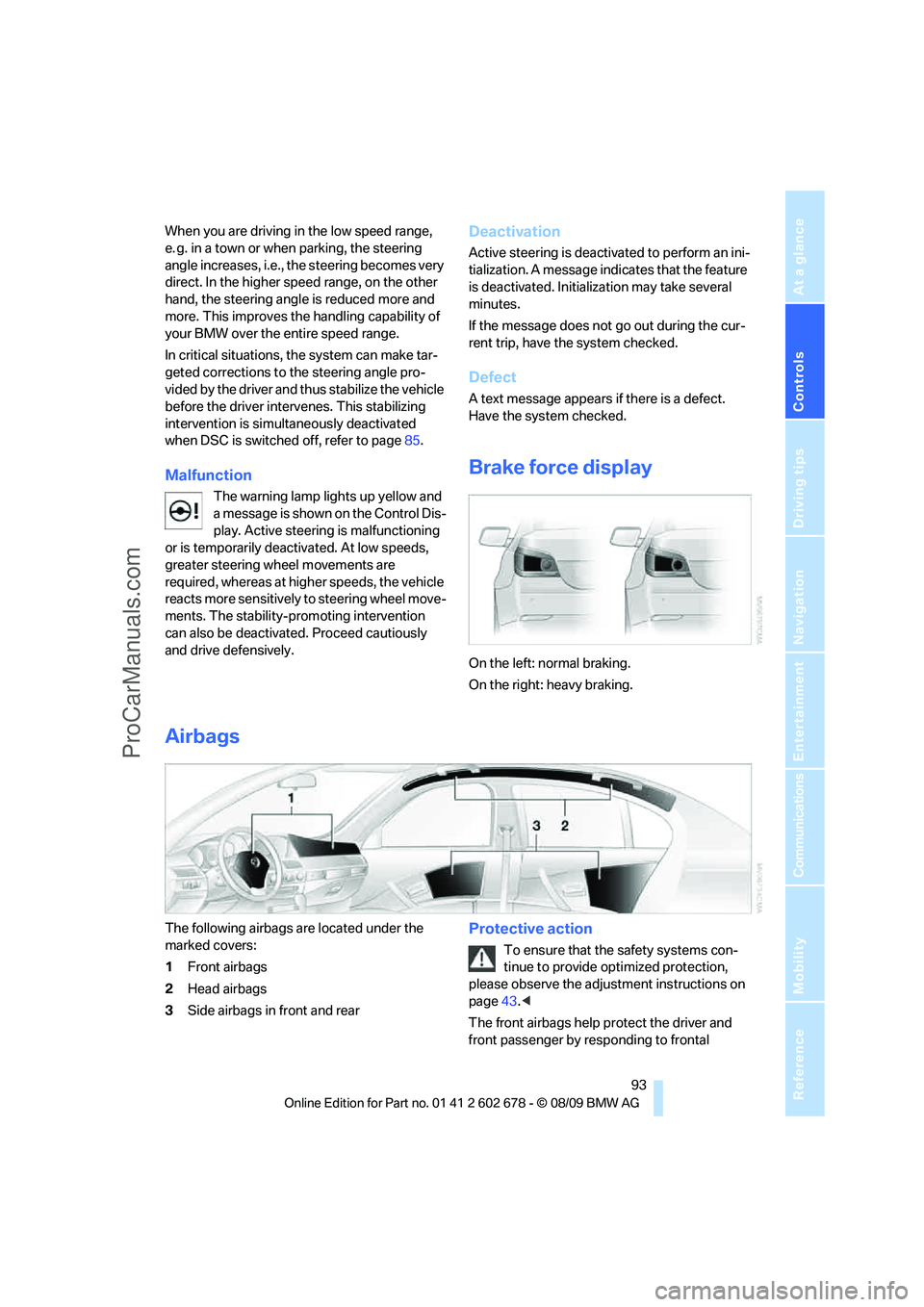
Brake force display
On the left: normal braking.
On the right: heavy braking.
Airbags
The following airbags are located under the
marked covers:
1Front airbags
2Head airbags
3Side airbags in front and rearProtective action
To ensure that the safety systems con-
tinue to provide optimized protection,
please observe the adjustment instructions on
page43.<
The front airbags help protect the driver and
front passenger by responding to frontal
ProCarManuals.com
Page 101 of 271
Controls
99Reference
At a glance
Driving tips
Communications
Navigation
Entertainment
Mobility
remove any debris, ice or snow. To avoid dam-
age to the lens, do not use sharp or abrasive
instruments to clean ice, snow, or dirt off the
lens.
When the windshield is cleaned with the head-
lamps on, the camera lens area is automatically
sprayed as well. Refer to page64.
Lane Departure Warning*
The concept
This system warns you from a speed of approx.
40 mph/70 km/h when the vehicle is leaving the
lane you are currently in on roads with lane limit
lines. You feel this due to a slight vibration of the
steering wheel.
The system does not warn you if you signal
before leaving the lane.
It is best to use the system on well-developed
roads and freeways.
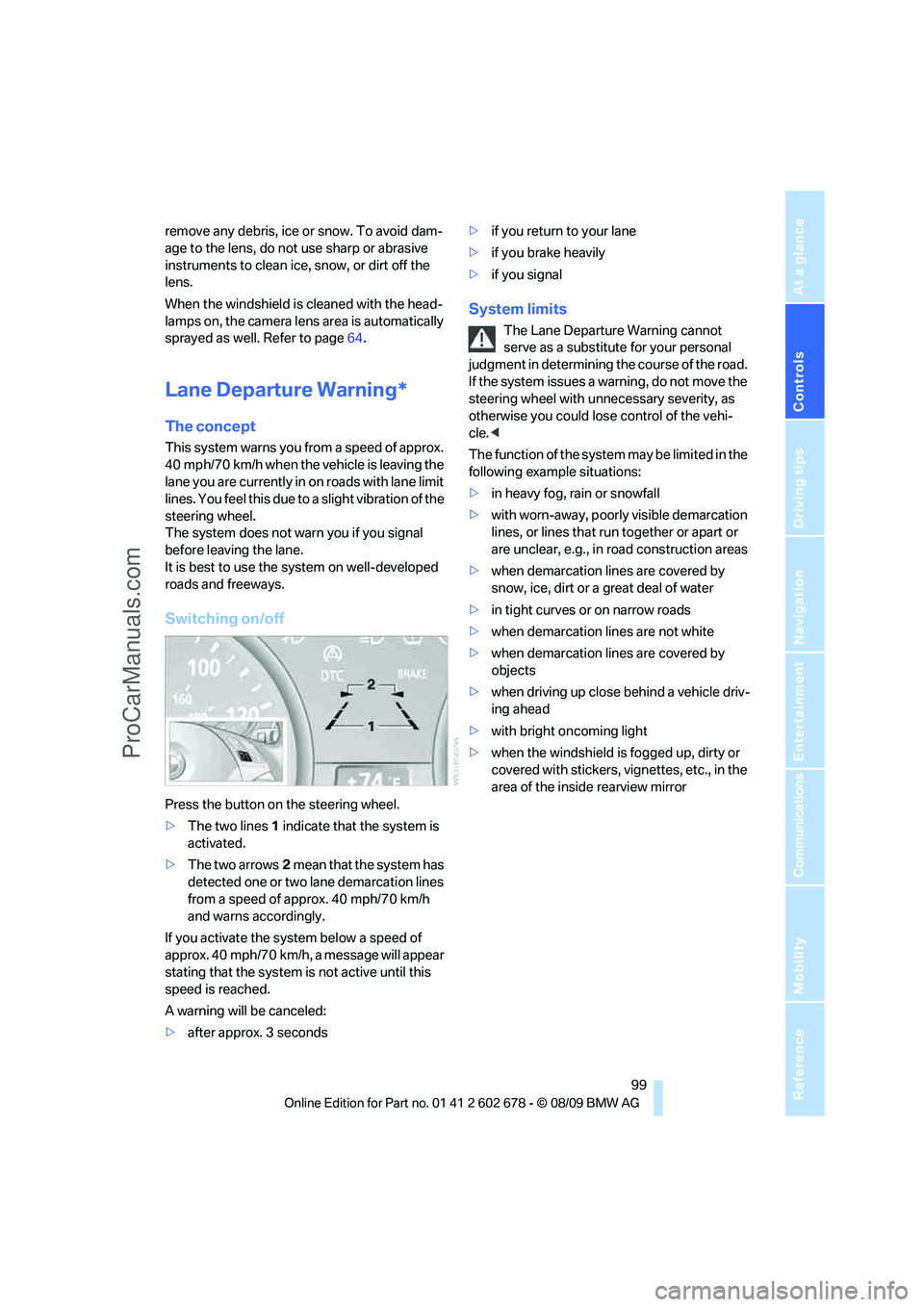
Switching on/off
Press the button on the steering wheel.
>The two lines1 indicate that the system is
activated.
>The two arrows2 mean that the system has
detected one or two lane demarcation lines
from a speed of approx. 40 mph/70 km/h
and warns accordingly.
If you activate the system below a speed of
approx. 40 mph/70 km/h, a message will appear
stating that the system is not active until this
speed is reached.
A warning will be canceled:
>after approx. 3 seconds>if you return to your lane
>if you brake heavily
>if you signal
System limits
The Lane Departure Warning cannot
serve as a substitute for your personal
judgment in determining the course of the road.
If the system issues a warning, do not move the
steering wheel with unnecessary severity, as
otherwise you could lose control of the vehi-
cle.<
The function of the system may be limited in the
following example situations:
>in heavy fog, rain or snowfall
>with worn-away, poorly visible demarcation
lines, or lines that run together or apart or
are unclear, e.g., in road construction areas
>when demarcation lines are covered by
snow, ice, dirt or a great deal of water
>in tight curves or on narrow roads
>when demarcation lines are not white
>when demarcation lines are covered by
objects
>when driving up close behind a vehicle driv-
ing ahead
>with bright oncoming light
>when the windshield is fogged up, dirty or
covered with stickers, vignettes, etc., in the
area of the inside rearview mirror
ProCarManuals.com
Page 128 of 271
Things to remember when driving
126 the road surface, ultimately undermining your
ability to steer and brake the vehicle.<
The risk of hydroplaning increases as the tread
depth of the tires decreases, refer also to Mini-
mum tire tread on page208.
Driving through water
Do not drive through water on the road if it
is deeper than 1 ft/30 cm, and then only at
walking speed at the most. Otherwise, the vehi-
cle's engine, the electrical systems and the
transmission may be damaged.<
Using parking brake on inclines
On inclines, do not hold the vehicle in
place for a long time by riding the clutch;
use the parking brake. Otherwise greater clutch
wear will result.<
Braking safely
Your BMW is equipped with ABS as a standard
feature. In situations that require it, it is best to
brake with full force. Since the vehicle maintains
steering responsiveness, you can still avoid
possible obstacles with a minimum of steering
effort.
Pulsation of the brake pedal, combined with
sounds from the hydraulic circuits, indicate that
ABS is in its active mode.
Do not drive with your foot resting on the
brake pedal. Even light but consistent
pedal pressure can lead to high temperatures,
brake wear and possibly even brake failure.<
Driving in wet conditions
When roads are wet or there is heavy rain,
briefly exert gentle pressure on the brake pedal
every few miles. Monitor traffic conditions to
ensure that this maneuver does not endanger
other road users. The heat generated in this
process helps dry the pads and rotors to ensure
that full braking efficiency will then be available
when you need it.
Hills
To prevent overheating and the resulting
reduced efficiency of the brake system, drive long or steep downhill gradients in the
gear in which the least braking is required. Even
light but consistent pressure on the brake can
lead to high temperatures, brake wear and pos-
sibly even brake failure.<
The braking effect of the engine can be further
increased by downshifting, if necessary all the
way down into first gear. This strategy helps
you avoid placing excessive loads on the brake
system. For information on downshifting in the
manual mode of the automatic transmission,
refer to page61.
Do not drive with the clutch depressed, in
idle or with the engine switched off, other-
wise there will be no engine braking action or
support of the braking force and steering.
Never allow floor mats, carpets or any other
objects to protrude into the area of movement
of the pedals and impair their operation.<
Corrosion on brake rotors
When the vehicle is driven only occasionally,
during extended periods when the vehicle is not
used at all, and in operating conditions where
brake applications are less frequent, there is an
increased tendency for corrosion to form on
rotors, while contaminants accumulate on the
brake pads. This occurs because the minimum
pressure which must be exerted by the pads
during brake applications to clean the rotors is
not reached.
Should corrosion form on the brake rotors, the
brakes will tend to respond with a pulsating
effect that even extended application will fail to
cure.
When vehicle is parked
Condensation forms in the air conditioner sys-
tem during operation, and then exits under the
vehicle. Traces of condensed water under the
vehicle are therefore normal.
Cargo loading
To avoid loading the tires beyond their
approved carrying capacity, never over-
load the vehicle. Overloading can lead to over-
ProCarManuals.com
Page 220 of 271
Care
218 ating instructions for the high-pressure clean-
ing jets.<
When using high-pressure cleaning jets,
do not remain in one place for a long time
and be sure to maintain a distance of at least
12 in/30 cm from sensors, e.g., Park Distance
Control sensors or radar sensors.<
Hand washing
When washing the vehicle by hand, use plenty
of water and car washing shampoo. Clean the
vehicle with gentle pressure using a sponge or a
washing brush.
Before cleaning the windshield, deacti-
vate the rain sensor or switch off the igni-
tion to prevent unwanted wiper operation.<
Follow local guidelines for washing vehi-
cles by hand.<
Headlamps
Do not rub dry and never use abrasives or
strong solvents to clean the covers.
Loosen dirt, e.g., insects, with shampoo or
insect remover and wash away with plenty of
water.
Use a window de icer to remove accumulated
ice and snow, not a scraper.
Windows
Use a glass cleaner to clean the inside and out-
side surfaces of the windows and the glass sur-
faces of the mirrors.
Do not use quartz-containing cleansers
to clean glass surfaces of the mirrors.<
Paintwork care
Regular care helps your vehicle retain its value
and protects the paint from the long-term
effects of aggressive substances.
Regionally occurring environmental factors can
affect and damage vehicle finish. It is therefore
important to tailor the frequency and extent of
your car care accordingly.
Immediately remove particularly aggressive
substances such as spilled fuel, oil, grease, brake fluid, tree resin, or bird droppings; other-
wise, they may damage your paint.
Repairing paint damage
Repair stone damage or scratches imme-
diately, depending on the severity of the
damage, to prevent the formation of rust.<
BMW recommends having paint damage pro-
fessionally repaired using Genuine BMW finish
materials in accordance with factory guidelines.
Waxing
Sealant is required when water no longer beads
on the clean surface of the paint. Use only prod-
ucts that contain carnauba wax or synthetic wax
to seal your finish.
Rubber gaskets
Treat only with water or a rubber care product.
To avoid noise or damage, do not use
products that contain silicone to care for
rubber gaskets.<
Chrome components
Particularly after exposure to road salt, thor-
oughly cleanse parts like the radiator grille, door
handles, or window frames with plenty of water
with shampoo added to it. For additional treat-
ment, use chrome polish.
Alloy wheels
Depending on your system, braking can gener-
ate dust, which settles on the light-alloy wheels.
Remove this dust regularly with acid-free wheel
cleaner.
Do not use aggressive, acid-containing,
strongly alkaline, or coarse cleansers and
do not use steam cleaners at temperatures
greater than 140 °F/606, otherwise you may
damage your vehicle.<
Outside sensors
Sensors on the outside of the vehicle, such as
Park Distance Control sensors or radar sensors,
should be kept clean and free of ice to retain
their full function.
ProCarManuals.com
Page 252 of 271
Everything from A to Z
250
Everything from A to Z
Index
A
ABS Antilock Brake
System85
– indicator lamp87
ACC, refer to Active cruise
control66
Accessories6
Accident, refer to Emergency
request231
Acoustic signal, refer to Check
Control79
Activated-charcoal filter for
automatic climate
control108
Activation times of parked car
ventilation, preselecting109
Active backrest width,
adjusting45
Active cruise control66
– indicator lamp70
– radar sensors70
– selecting distance68
– warning lamps70
Active front head restraints47
Active seat50
Active seat ventilation50
Active steering92
– warning lamp93
Adapter for spare key26
Adaptive brake assistant85
Adaptive brake lamps, refer to
Brake force display93
Adaptive Light Control101
Additional connection of
music player in mobile
phone172
Additives
– coolant214
– engine oil, refer to Approved
engine oils213
Address for navigation
– entering133Adjusting interior
temperature106
Adjusting the tone during
audio operation, refer to
Tone control152
Adjusting thigh support44
Airbags93
– indicator/warning lamp95
– indicator lamp for front
passenger airbags94
– sitting safely43
Air distribution
– automatic106
– manual107
Airing, refer to Ventilation108
Air recirculation
– AUC Automatic
recirculated-air control107
– recirculated-air mode107
Air recirculation, refer to
Recirculated-air mode107
Air supply, automatic climate
control105
Air volume107
AKI, refer to Fuel
specifications201
Alarm system35
– avoiding unintentional
alarms36
– interior motion sensor36
– switching off alarm35
– switching off tilt alarm
sensor and interior motion
sensor36
– tilt alarm sensor36
Albums of music
collection169
Alloy wheels218
All-season tires, refer to
Winter tires209
All-wheel drive, refer to
xDrive86Alterations, technical, refer to
For your own safety5
Altering stretch of road143
Antenna for mobile phone178
Antifreeze
– coolant214
– washer fluid65
Anti-theft alarm system, refer
to Alarm system35
Anti-theft system, refer to
Central lokking system27
Approved axle loads, refer to
Weights241
Approved engine oils213
Approved gross vehicle
weight, refer to Weights241
Armrest, refer to Center
armrest
– rear116
Around the center console14
Around the steering wheel10
Arrival time
– refer to Computer76
Ashtray
– front114
– rear115
Assistance systems, refer to
Driving stability control
systems85
AUC Automatic recirculated-
air control107
Audio152
– controls152
– switching on/off152
– tone control152
– volume152
Audio device, external113
ProCarManuals.com
Page 253 of 271
Reference 251
At a glance
Controls
Driving tips
Communications
Navigation
Entertainment
Mobility
Automatic
– air distribution106
– air volume106
– cruise control66
– garage door opener110
– headlamp control100
– recirculated-air control
AUC107
– steering wheel
adjustment45
– tailgate operation34
Automatic climate control105
– automatic air
distribution106
– parked car ventilation109
– settings via iDrive108
– switching on and off108
– ventilation in rear108
Automatic closing of doors,
refer to Automatic soft
closing31
Automatic curb monitor51
Automatic lighting
– refer to Automatic headlamp
control100
– refer to Daytime running
lamps101
– refer to Interior lamps104
– refer to Pathway lighting101
– refer to Welcome lamps100
Automatic lights
– refer to High-beam
Assistant102
Automatic low beams, refer to
High-beam Assistant102
Automatic luggage
compartment roller cover,
Sports Wagon117
Automatic Service
Request196
Automatic soft closing31
Automatic speed reduction for
descents, refer to HDC Hill
Descent Control86Automatic transmission with
Steptronic59
– interlock60
– kick down60
– manually unlocking and
locking transmission lock61
– shiftlock60
– towing234
– tow-starting235
– with Comfort Access37
AUTO program for automatic
climate control106
AUX-IN port172
Available services196
Average fuel consumption75
– setting units76
Average speed, refer to
Computer75
Avoiding freeways for
navigation142
Avoiding unintentional
alarms36
Axle loads, refer to
Weights241
B
Backrest contour, refer to
Lumbar support45
Backrests, refer to Seats44
Backrest width adjustment44
Back seats, refer to Rear seats
Backup lamps, replacing
bulbs224
Band-aids, refer to First aid
kit232
Bass, refer to Tone
control152
Battery, refer to Vehicle
battery229
– jump starting232
Battery replacement
– remote control for Comfort
Access38
BC button, refer to
Computer75
Being towed234
Belts, refer to Safety belts48Beverage holder, refer to
Cupholders114
Blower, refer to Air
volume107
Bluetooth, activating/
deactivating180
BMW
– Car Shampoo219
BMW Assist,
activating194,196
BMW Assist192
BMW homepage4
BMW maintenance
system215
BMW Night Vision96
– activating98
– cleaning camera98
– cleaning camera, refer to
Wiper system64
– deactivating98
– making settings98
BMW Search194
BMW website4
Bottle holder, refer to
Cupholders114
Bracket for telephone or
mobile phone
– refer to Snap-in adapter188
Brake assistant85
– adaptive85
Brake force display93
Brake lamps
– replacing bulbs224
– two-stage93
Brake rotors
– breaking-in124
– refer to Braking safely126
ProCarManuals.com
Page 254 of 271
Everything from A to Z
252 Brakes
– ABS Antilock Brake
System85
– brake assistant85
– brake force display93
– breaking-in124
– CBC Cornering Brake
Control85
– electronic brake-force
distribution85
– parking brake59
– refer to Braking safely126
– warning lamps13
Brake system124
– brake pads124
– breaking-in124
– disk brakes126
– warning lamp87
Braking safely126
Breakdown services, refer to
Roadside Assistance232
Breaking-in brake pads124
Breaking-in the clutch124
Breaking-in the differential,
refer to Engine and
differential124
Break-in period124
Brightness of Control
Display83
Button for starting engine,
refer to Start/Stop button57
C
California Proposition 65
Warning6
Call
– accepting181
– ending182
– rejecting182
Calling, refer to Phone
numbers, dialing182
Can holder, refer to
Cupholders114
Capacities242
Car battery, refer to Vehicle
battery229Care217
– car-care products217
– carpets219
– car washes217
– CD/DVD player219
– chrome components218
– displays219
– exterior217
– fine wooden
components219
– hand washing218
– headlamps218
– high-pressure cleaning
jets217
– interior219
– leather219
– light-alloy wheels218
– paint218
– plastic components219
– rubber gaskets218
– safety belts219
– sensors and cameras219
– upholstery and cloth-
covered paneling219
– windows218
Cargo
– refer to Cargo loading126
– securing128
– securing with ski bag120Cargo bay
– capacity241
– emergency operation, refer
to Opening manually, Sports
Wagon33
– emergency release32
– expanding, Sports
Wagon117
– floor panel flap, refer to
Compartment in floor,
Sports Wagon118
– locking separately31
– opening/closing, refer to
Luggage compartment lid/
tailgate31
– opening from inside31
– opening from inside, Sports
Wagon33
– opening from outside
31
– opening from outside,
Sports Wagon33
– opening with remote
control29
Cargo bay cover, refer to
Luggage compartment
roller cover117
Caring for the vehicle
finish218
Car key, refer to Keys/remote
control26
Car phone
– installation location, refer to
Center armrest112
– refer to separate operating
instructions
Car phone, refer to
Telephone178
Car radio, refer to Radio155
Car Shampoo219
Car wash58
– with Comfort Access37
Car washes217
Catalytic converter, refer to
Hot exhaust system125
CBC Cornering Brake
Control85
CBS Condition Based
Service215
CD, audio playback160
ProCarManuals.com
Page 255 of 271
Reference 253
At a glance
Controls
Driving tips
Communications
Navigation
Entertainment
Mobility
CD changer160,164
– controls152
– fast forward/reverse162
– filling or emptying the
magazine164
– random sequence161
– selecting a track160
– switching on/off152
– tone control152
– volume152
CD player160
– controls152
– fast forward/reverse162
– random sequence161
– selecting a track160
– switching on/off152
– tone control152
– volume152
Center armrest
– front112
– rear116
Center brake lamp225
Center console14
Central locking
– from inside30
– from outside28
Central locking system27
– Comfort Access36
Changes, technical, refer to
For your own safety5
Changes, technical, refer to
Parts and accessories6
Changing language on
Control Display82
Changing scale for
navigation145
Changing trips141
Changing units of measure on
Control Display76
Changing wheels208,226
CHECK button80
Check Control79
Check Gas Cap201
Checking the air pressure,
refer to Tire inflation
pressure202
Child restraint fixing system
LATCH54
Child restraints53Child restraint systems53
Child-safety lock56
Child seats, refer to
Transporting children
safely53
Chime, refer to Check
Control
79
Chock227
Chrome-plated parts219
Chrome polish219
Cigarette lighter114
Cigarette lighter socket, refer
to Connecting electrical
devices115
Cleaning your BMW, refer to
Care217
Clock74
– 12h/24h format79
– setting time78
– setting time and date79
Closing
– from inside30
– from outside28
Closing fuel filler cap201
Clothes hooks113
Cockpit10
Cold start, refer to Engine,
starting58
Combination instrument, refer
to Instrument cluster12
Comfort Access36
Comfort access
– observe in car wash37
– replacing battery, remote
control38
Comfort area, refer to Around
the center console14
Comfort seat44
Compact wheel
– inflation pressure203
– wheel change228
Compartment for remote
control, refer to Ignition
lock57Compartments
– in cargo bay, Sports
Wagon118
– refer to Storage area loading
options, Sports Wagon119
– refer to Storage
compartments113
Computer75
– displays on Control
Display76
Concierge service193
Condensation, refer to When
vehicle is parked126
Condition Based Service
CBS215
Confirmation signals for
locking and unlocking29
Connecting car vacuum
cleaner, refer to Connecting
electrical devices115
Consumption, refer to
Average consumption75
Consumption indicator
– Energy Control75
Consumption statistics, refer
to Average fuel
consumption75
Contacts
– creating190
Control Center, refer to
iDrive16
Control Display, refer to
iDrive16
– setting brightness83
– switching off/on19
Controller, refer to iDrive16
Controls, refer to Cockpit10
Convenient opening and
closing
– glass sunroof28
– windows28
– windows and glass sunroof
with Comfort Access37
Coolant214
– checking level214
– temperature74
Cooling, maximum107
Cooling fluid, refer to
Coolant214
ProCarManuals.com
Page 256 of 271
Everything from A to Z
254 Cooling function, automatic
climate control107
Cooling system, refer to
Coolant214
Copyright2
Cornering Brake Control
CBC85
Country codes DVD162
Country of destination for
navigation133
Courtesy lamps104
Cradle for telephone or mobile
phone112
Cruise control65
– active cruise control66
Cruising range75
Cupholders114
Curb weight, refer to
Weights241
Current consumption, refer to
Energy Control75
Current playback
– external devices174
– of music collection169
Customer Relations195
Cylinders, refer to Engine
data238
D
Dashboard, refer to
Cockpit10
Dashboard lighting, refer to
Instrument lighting104
Data, technical238
– dimensions239
– engine238
– weights241
Data transfer196
Date74
– date format79
– retrieval74
– setting79
Daytime running lamps101Defect
– door lock30
– fuel filler flap200
– glass sunroof40
– luggage compartment lid32
– panorama glass sunroof41
– tailgate33
Defrosting windows106
Defrosting windows and
removing condensation106
Defrosting windshield, refer to
Defrosting windows106
Defrost position, refer to
Defrosting windows106
Deleting a trip141
Destination address
– entering133,139
Destination entry via BMW
Assist137
Destination for navigation
– entering via map138
– entering via voice139
– entry133
Destination guidance142
– bypassing route
sections143
– changing specified
route142
– continuing142
– starting142
– voice instructions143
– volume of voice
instructions144
Digital clock74
Digital radio, refer to HD
Radio156
Dimensions239
Directional indicators, refer to
Turn signals63
Direction announcements,
refer to Voice
instructions143
Direction instructions, refer to
Voice instructions143
Directory for navigation, refer
to Address book
135
Displacement, refer to Engine
data238Display, refer to iDrive
controls16
Display elements, refer to
Instrument cluster12
Display lighting, refer to
Instrument lighting104
Displays
– on Control Display, refer to
iDrive16
– refer to Instrument
cluster12
Displays on the windshield,
refer to Head-up Display95
Disposal
– battery of remote control
with Comfort Access38
– coolant214
– vehicle battery229
Distance, refer to
Computer76
Distance control, refer to
Active cruise control66
Distance to destination, refer
to Computer76
Distance warning, refer to
PDC Park Distance
Control84
Divided rear backrest, refer to
Through-loading
system116
Do201
Door entry lighting104
Door key, refer to Keys/
remote control26
Door lock30
Door locking, confirmation
signals29
Doors
– manual operation30
– remote control28
DOT Quality Grades207
Draft-free ventilation108
Drinks holder, refer to
Cupholders114
Drive-off assistant87
Driving lamps, refer to Parking
lamps/low beams100
Driving stability control
systems85
ProCarManuals.com