Socket BMW 5 SERIES 2014 F10 Owner's Manual
[x] Cancel search | Manufacturer: BMW, Model Year: 2014, Model line: 5 SERIES, Model: BMW 5 SERIES 2014 F10Pages: 273, PDF Size: 5.73 MB
Page 94 of 273
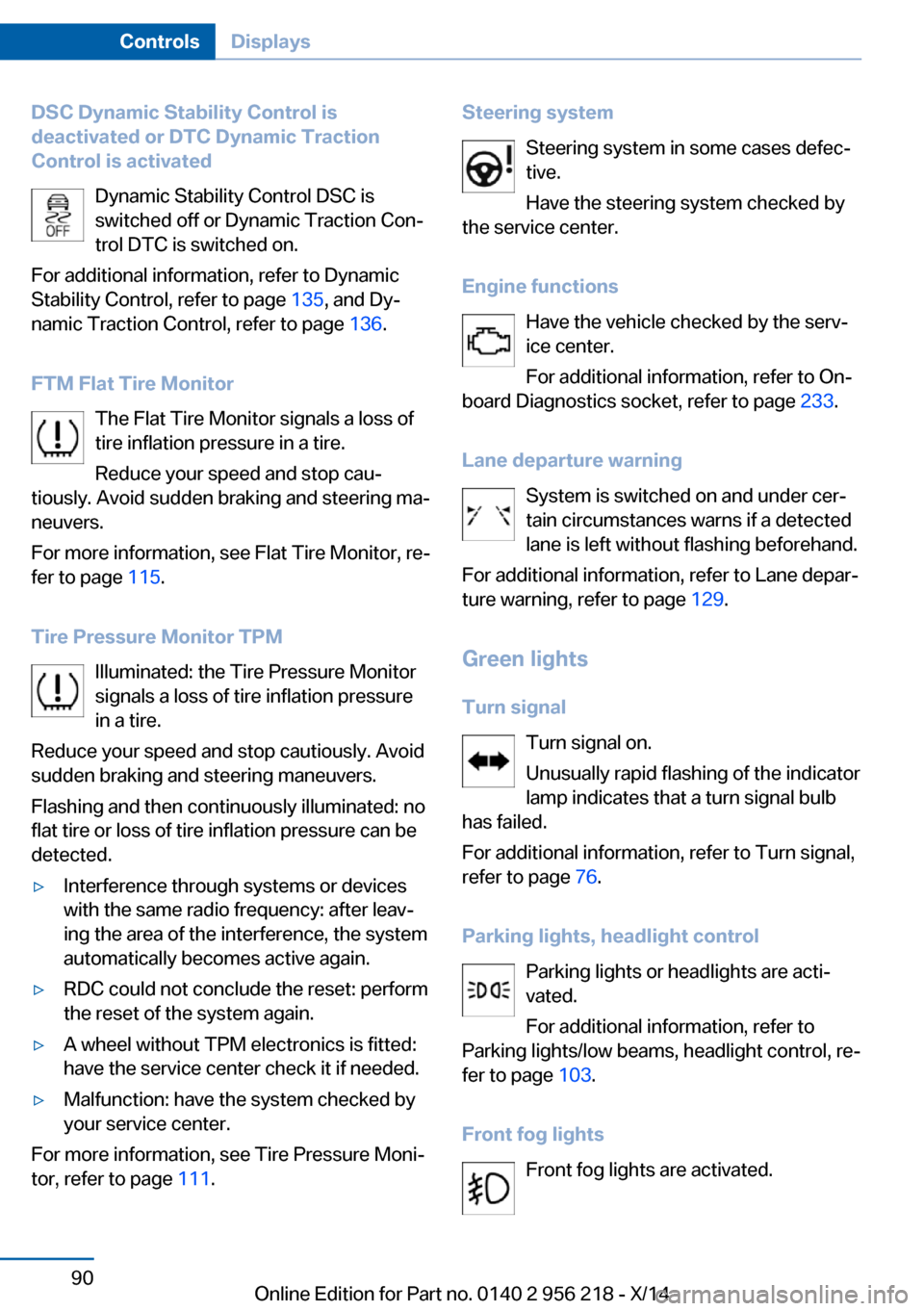
DSC Dynamic Stability Control is
deactivated or DTC Dynamic Traction
Control is activated
Dynamic Stability Control DSC is
switched off or Dynamic Traction Con‐
trol DTC is switched on.
For additional information, refer to Dynamic
Stability Control, refer to page 135, and Dy‐
namic Traction Control, refer to page 136.
FTM Flat Tire Monitor The Flat Tire Monitor signals a loss of
tire inflation pressure in a tire.
Reduce your speed and stop cau‐
tiously. Avoid sudden braking and steering ma‐
neuvers.
For more information, see Flat Tire Monitor, re‐
fer to page 115.
Tire Pressure Monitor TPM Illuminated: the Tire Pressure Monitor
signals a loss of tire inflation pressure
in a tire.
Reduce your speed and stop cautiously. Avoid
sudden braking and steering maneuvers.
Flashing and then continuously illuminated: no
flat tire or loss of tire inflation pressure can be
detected.▷Interference through systems or devices
with the same radio frequency: after leav‐
ing the area of the interference, the system
automatically becomes active again.▷RDC could not conclude the reset: perform
the reset of the system again.▷A wheel without TPM electronics is fitted:
have the service center check it if needed.▷Malfunction: have the system checked by
your service center.
For more information, see Tire Pressure Moni‐
tor, refer to page 111.
Steering system
Steering system in some cases defec‐tive.
Have the steering system checked by
the service center.
Engine functions Have the vehicle checked by the serv‐ice center.
For additional information, refer to On-
board Diagnostics socket, refer to page 233.
Lane departure warning System is switched on and under cer‐
tain circumstances warns if a detected
lane is left without flashing beforehand.
For additional information, refer to Lane depar‐
ture warning, refer to page 129.
Green lights Turn signal Turn signal on.
Unusually rapid flashing of the indicator
lamp indicates that a turn signal bulb
has failed.
For additional information, refer to Turn signal,
refer to page 76.
Parking lights, headlight control Parking lights or headlights are acti‐
vated.
For additional information, refer to
Parking lights/low beams, headlight control, re‐
fer to page 103.
Front fog lights Front fog lights are activated.Seite 90ControlsDisplays90
Online Edition for Part no. 0140 2 956 218 - X/14
Page 179 of 273
Switch off the ignition and take the remote
control with you when leaving the vehicle so
that children cannot use the lighter and burn
themselves.◀
Replace the cover after use
Reinsert the lighter or socket cover after
use, otherwise objects may get into the lighter
socket or fixture and cause a short circuit.◀
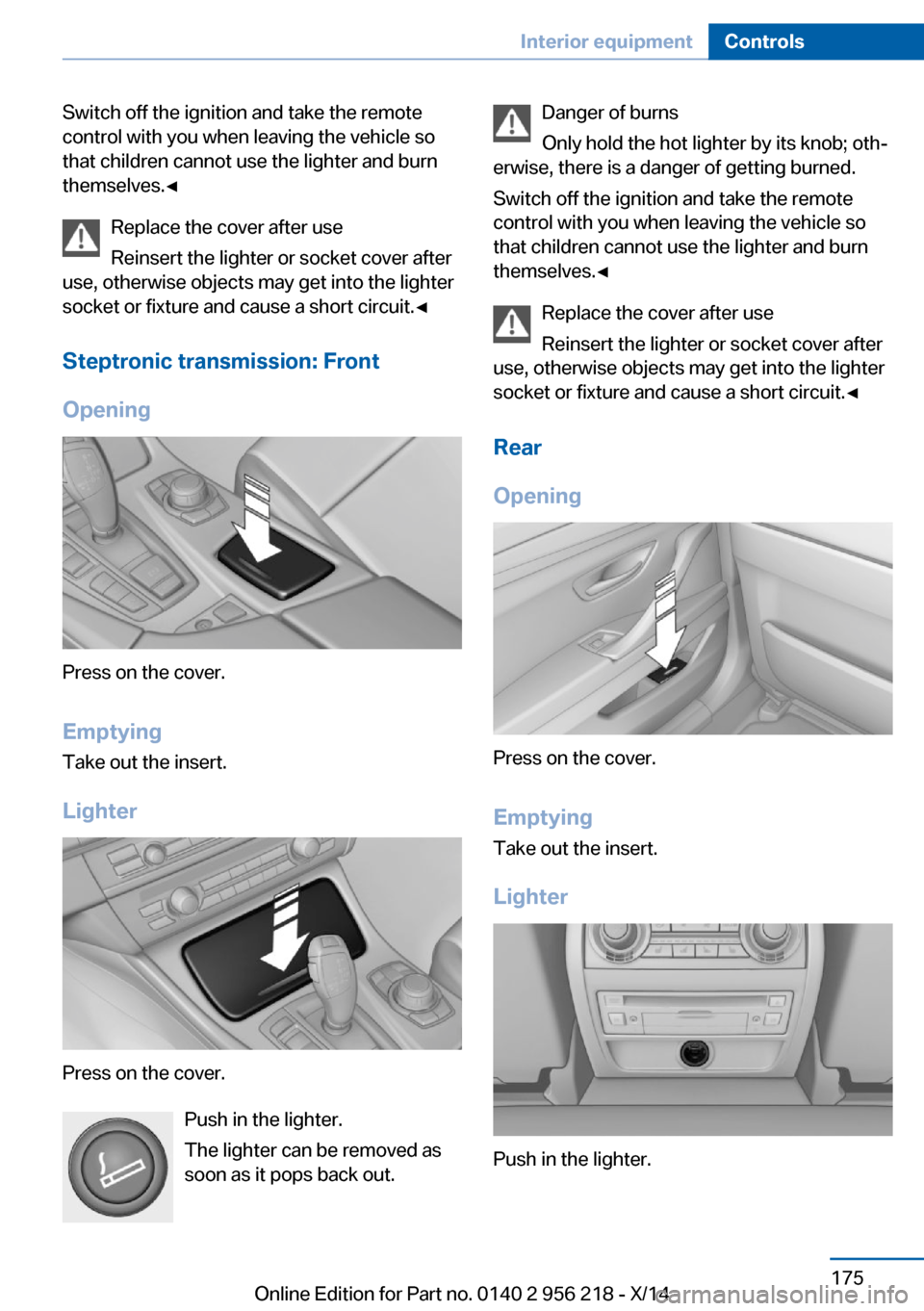
Steptronic transmission: Front
Opening
Press on the cover.
Emptying Take out the insert.
Lighter
Press on the cover. Push in the lighter.
The lighter can be removed as
soon as it pops back out.
Danger of burns
Only hold the hot lighter by its knob; oth‐
erwise, there is a danger of getting burned.
Switch off the ignition and take the remote
control with you when leaving the vehicle so
that children cannot use the lighter and burn
themselves.◀
Replace the cover after use
Reinsert the lighter or socket cover after
use, otherwise objects may get into the lighter
socket or fixture and cause a short circuit.◀
Rear
Opening
Press on the cover.
Emptying Take out the insert.
Lighter
Push in the lighter.
Seite 175Interior equipmentControls175
Online Edition for Part no. 0140 2 956 218 - X/14
Page 180 of 273
The lighter can be removed as soon as it pops
back out.
Danger of burns
Only hold the hot lighter by its knob; oth‐
erwise, there is a danger of getting burned.
Take the remote control with you when leaving
the vehicle so that children cannot use the
lighter and burn themselves.◀
Replace the cover after use
Reinsert the lighter or socket cover after
use, otherwise objects may get into the lighter
socket or fixture and cause a short circuit.◀
Connecting electrical
devices
Hints Do not connect charging devices to the
12 volt socket in the vehicle
Do not connect battery chargers to the fac‐
tory-installed 12 volt sockets in the vehicle as
this may damage the vehicle battery due to an
increased power consumption.◀
Replace the cover after use
Reinsert the lighter or socket cover after
use, otherwise objects may get into the lighter
socket or fixture and cause a short circuit.◀
Sockets
General information
The lighter socket can be used as a socket for
electrical equipment while the engine is run‐
ning or when the ignition is switched on.
Note The total load of all sockets must not exceed
140 watts at 12 volts.Do not damage the socket by using unsuitable
connectors.
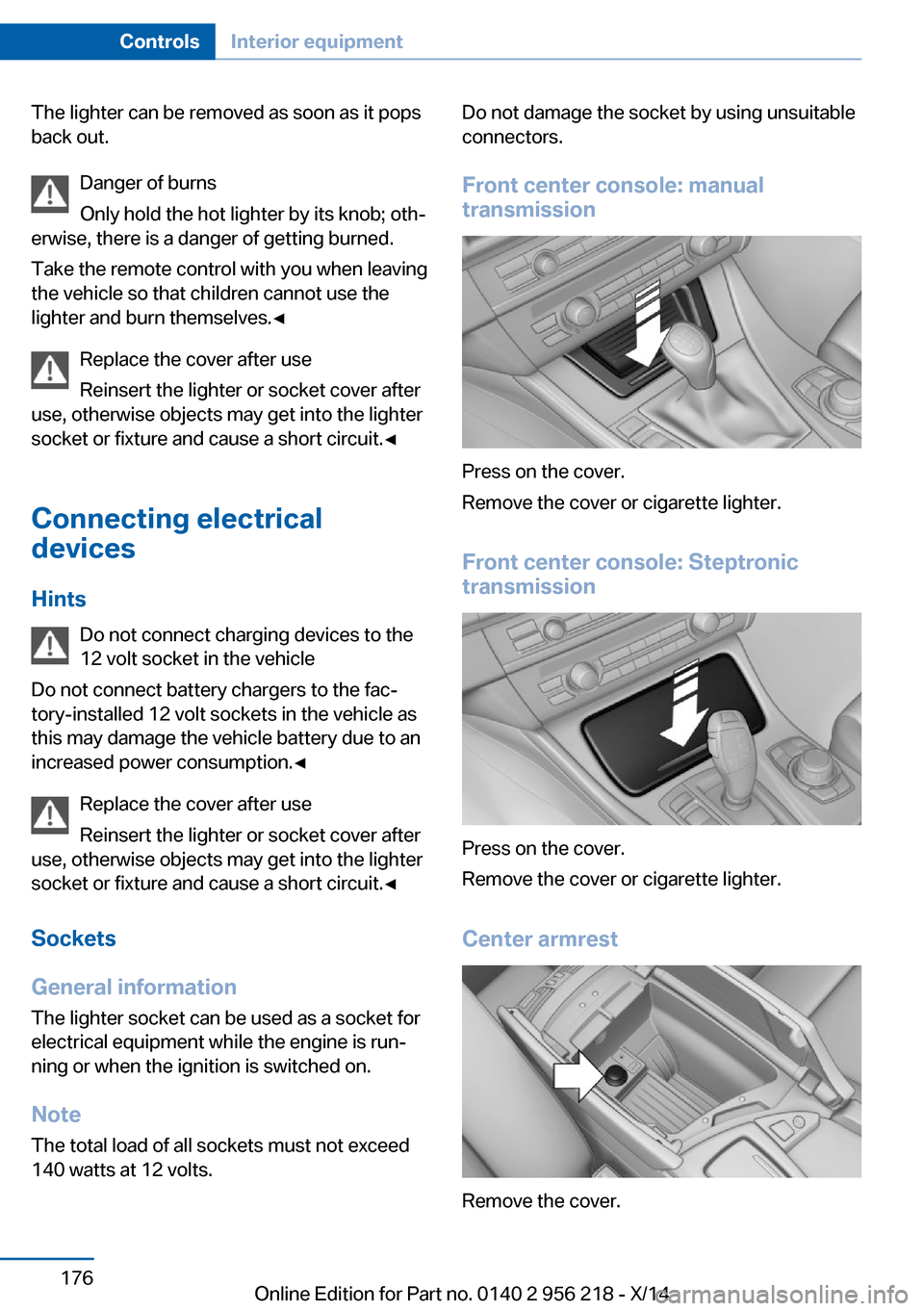
Front center console: manual
transmission
Press on the cover.
Remove the cover or cigarette lighter.
Front center console: Steptronic
transmission
Press on the cover.
Remove the cover or cigarette lighter.
Center armrest
Remove the cover.
Seite 176ControlsInterior equipment176
Online Edition for Part no. 0140 2 956 218 - X/14
Page 181 of 273
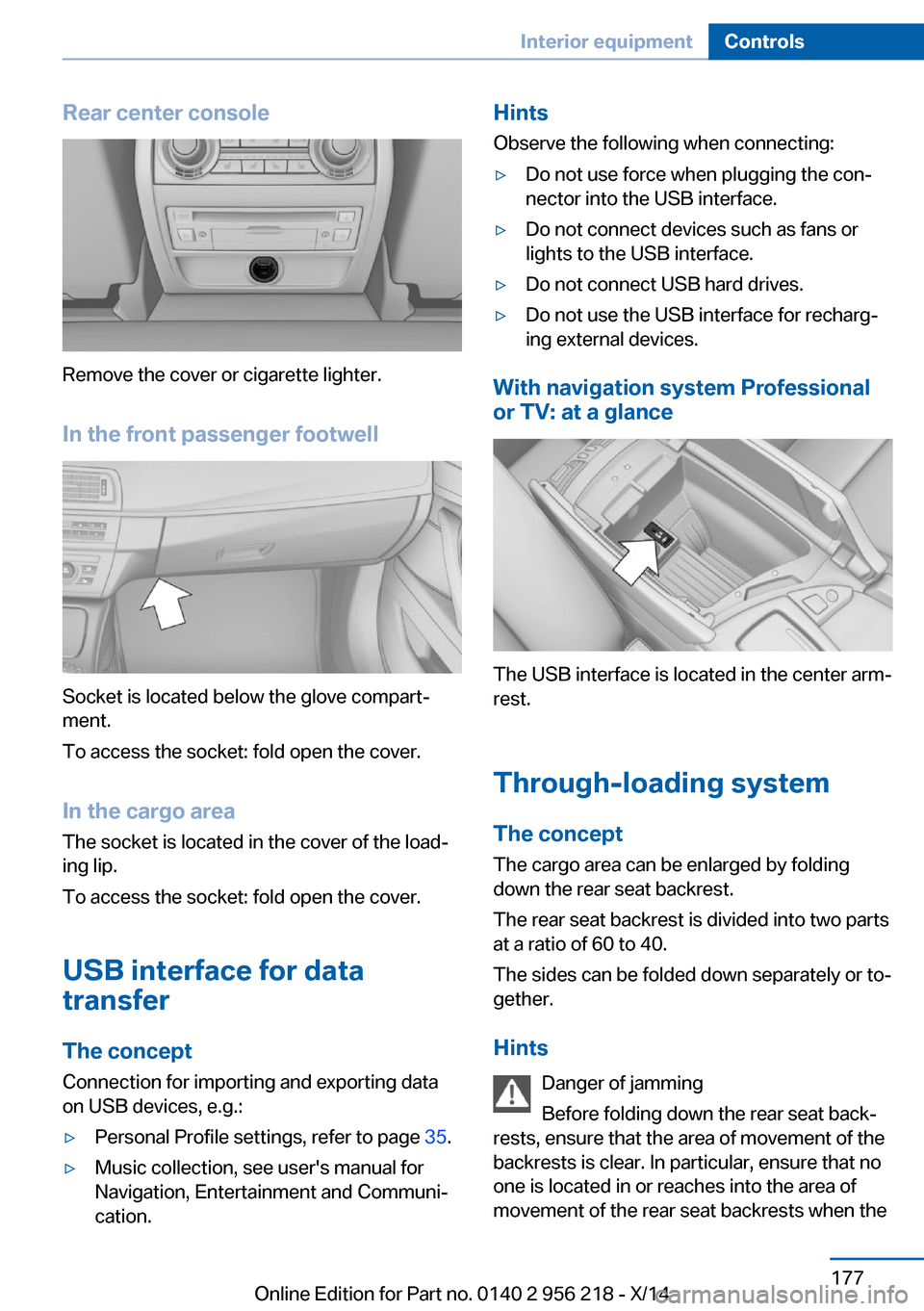
Rear center console
Remove the cover or cigarette lighter.
In the front passenger footwell
Socket is located below the glove compart‐
ment.
To access the socket: fold open the cover.
In the cargo area The socket is located in the cover of the load‐
ing lip.
To access the socket: fold open the cover.
USB interface for data
transfer
The concept Connection for importing and exporting data
on USB devices, e.g.:
▷Personal Profile settings, refer to page 35.▷Music collection, see user's manual for
Navigation, Entertainment and Communi‐
cation.Hints
Observe the following when connecting:▷Do not use force when plugging the con‐
nector into the USB interface.▷Do not connect devices such as fans or
lights to the USB interface.▷Do not connect USB hard drives.▷Do not use the USB interface for recharg‐
ing external devices.
With navigation system Professional
or TV: at a glance
The USB interface is located in the center arm‐
rest.
Through-loading system The concept The cargo area can be enlarged by folding
down the rear seat backrest.
The rear seat backrest is divided into two parts at a ratio of 60 to 40.
The sides can be folded down separately or to‐
gether.
Hints Danger of jamming
Before folding down the rear seat back‐
rests, ensure that the area of movement of the
backrests is clear. In particular, ensure that no
one is located in or reaches into the area of
movement of the rear seat backrests when the
Seite 177Interior equipmentControls177
Online Edition for Part no. 0140 2 956 218 - X/14
Page 237 of 273
MaintenanceVehicle features and options
This chapter describes all standard, country-
specific and optional features offered with the
series. It also describes features that are not
necessarily available in your car, e. g., due to
the selected options or country versions. This
also applies to safety-related functions and
systems.
BMW maintenance system
The maintenance system indicates required
maintenance measures, and thereby provides
support in maintaining road safety and the op‐
erational reliability of the vehicle.
Condition Based Service
CBS
Sensors and special algorithms take into ac‐
count the driving conditions of your vehicle.
Based on this, Condition Based Service recog‐
nizes the maintenance requirements.
The system makes it possible to adapt the
amount of maintenance corresponding to your
user profile.
Details on the service requirements, refer to
page 94, can be displayed on the Control Dis‐
play.
Service data in the remote control Information on the required maintenance is
continuously stored in the remote control.
Your service center will read out this data and
suggest the right array of service procedures
for your vehicle.
Therefore, hand your service specialist the re‐
mote control with which the vehicle was driven
most recently.Storage periods
Storage periods during which the vehicle bat‐
tery was disconnected are not taken into ac‐
count.
If this occurs, have a service center update the
time-dependent maintenance procedures,
such as checking brake fluid and, if needed,
changing the engine oil and the microfilter/
activated-charcoal filter.
Service and Warranty
Information Booklet for US
models and Warranty and
Service Guide Booklet for
Canadian models
Please consult your Service and Warranty In‐
formation Booklet for US models and Warranty
and Service Guide Booklet for Canadian mod‐ els for additional information on service re‐
quirements.
Maintenance and repair should be performed
by your service center. Make sure to have reg‐
ular maintenance procedures recorded in the
vehicle's Service and Warranty Information
Booklet for US models, and in the Warranty
and Service Guide Booklet for Canadian mod‐
els. These entries are proof of regular mainte‐
nance.
Socket for OBD Onboard
Diagnosis
Note Socket for Onboard Diagnosis
The socket for onboard diagnostics may
only be used by the service center or a work‐
shop that operates in accordance with the
specifications of the vehicle manufacturer withSeite 233MaintenanceMobility233
Online Edition for Part no. 0140 2 956 218 - X/14
Page 238 of 273
correspondingly trained personnel and other
authorized persons. Otherwise, use may result
in operating problems for the vehicle.◀
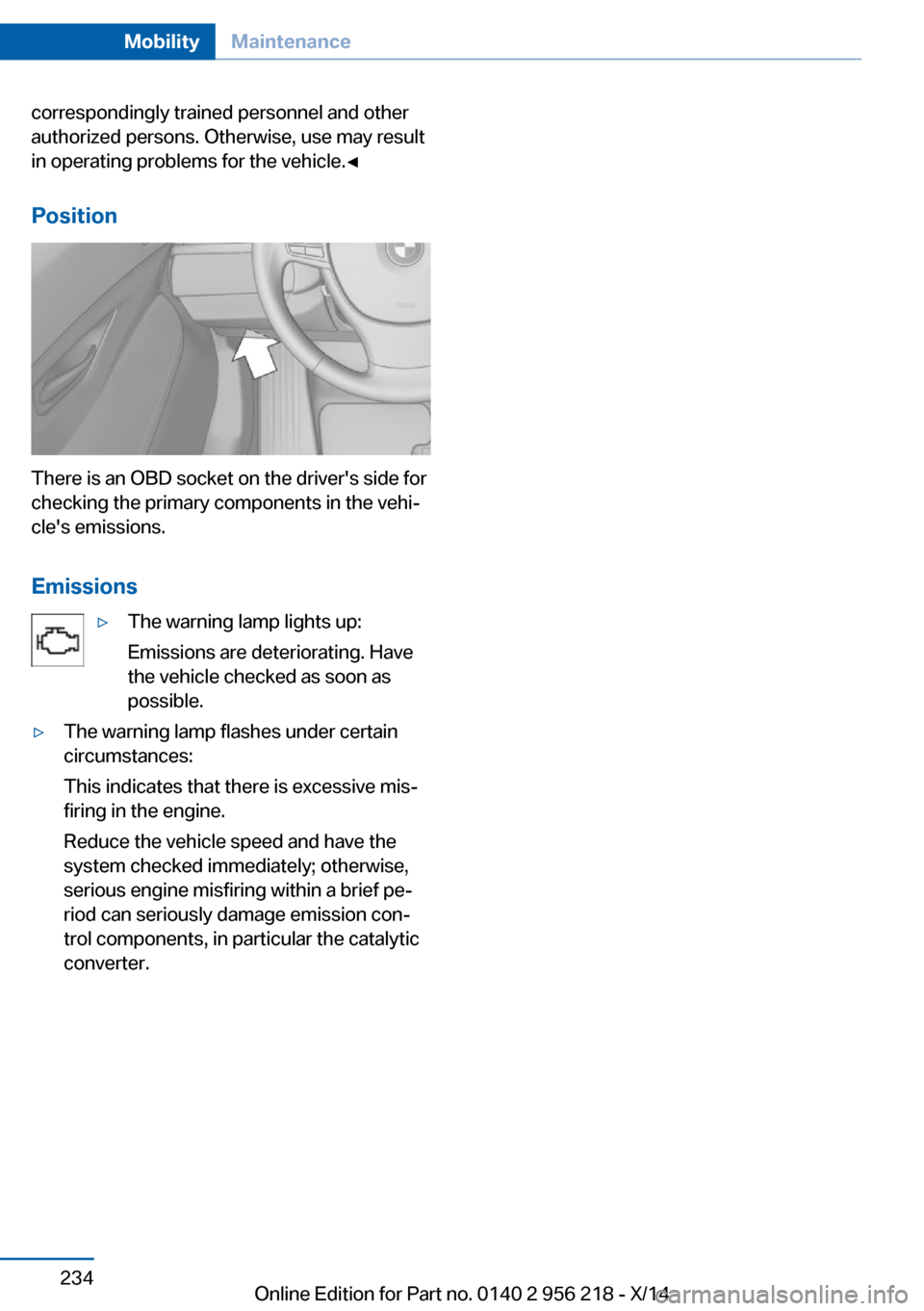
Position
There is an OBD socket on the driver's side for
checking the primary components in the vehi‐
cle's emissions.
Emissions
▷The warning lamp lights up:
Emissions are deteriorating. Have
the vehicle checked as soon as
possible.▷The warning lamp flashes under certain
circumstances:
This indicates that there is excessive mis‐
firing in the engine.
Reduce the vehicle speed and have the
system checked immediately; otherwise,
serious engine misfiring within a brief pe‐
riod can seriously damage emission con‐
trol components, in particular the catalytic
converter.Seite 234MobilityMaintenance234
Online Edition for Part no. 0140 2 956 218 - X/14
Page 244 of 273
Changing wheels
Hints
When using run-flat tires or sealants, a tire
does not need to be changed immediately in
the event of pressure loss due to a flat tire.
Which is why no spare tire is available.
The tools for changing wheels are available as
accessories from your service center.
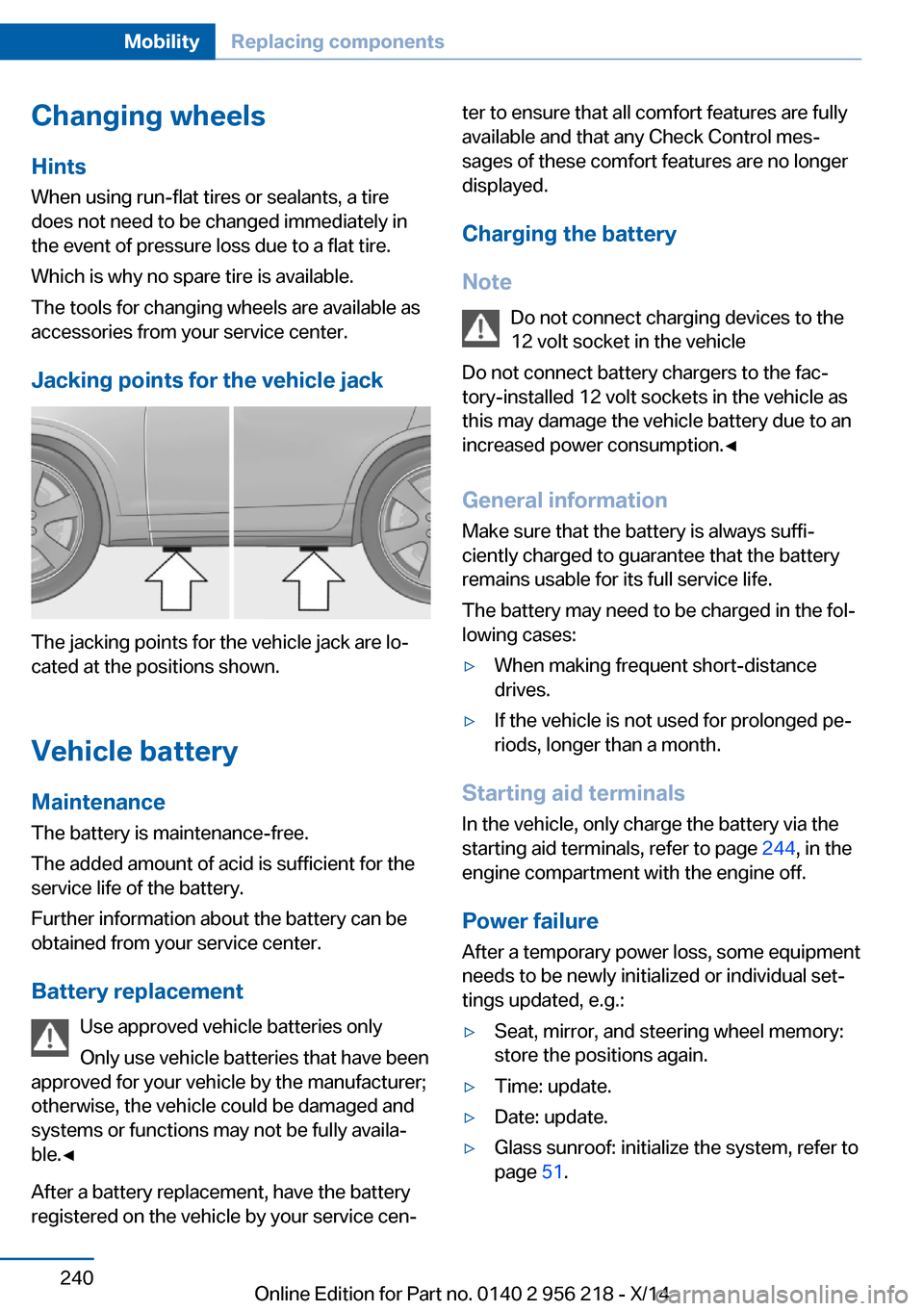
Jacking points for the vehicle jack
The jacking points for the vehicle jack are lo‐
cated at the positions shown.
Vehicle battery Maintenance
The battery is maintenance-free.
The added amount of acid is sufficient for the
service life of the battery.
Further information about the battery can be
obtained from your service center.
Battery replacement Use approved vehicle batteries only
Only use vehicle batteries that have been
approved for your vehicle by the manufacturer;
otherwise, the vehicle could be damaged and
systems or functions may not be fully availa‐
ble.◀
After a battery replacement, have the battery
registered on the vehicle by your service cen‐
ter to ensure that all comfort features are fully
available and that any Check Control mes‐
sages of these comfort features are no longer
displayed.
Charging the battery
Note Do not connect charging devices to the
12 volt socket in the vehicle
Do not connect battery chargers to the fac‐
tory-installed 12 volt sockets in the vehicle as
this may damage the vehicle battery due to an
increased power consumption.◀
General information Make sure that the battery is always suffi‐
ciently charged to guarantee that the battery
remains usable for its full service life.
The battery may need to be charged in the fol‐
lowing cases:▷When making frequent short-distance
drives.▷If the vehicle is not used for prolonged pe‐
riods, longer than a month.
Starting aid terminals
In the vehicle, only charge the battery via the
starting aid terminals, refer to page 244, in the
engine compartment with the engine off.
Power failure After a temporary power loss, some equipment
needs to be newly initialized or individual set‐
tings updated, e.g.:
▷Seat, mirror, and steering wheel memory:
store the positions again.▷Time: update.▷Date: update.▷Glass sunroof: initialize the system, refer to
page 51.Seite 240MobilityReplacing components240
Online Edition for Part no. 0140 2 956 218 - X/14
Page 268 of 273
OOBD Onboard Diagnosis 233
OBD, see OBD Onboard Di‐ agnosis 233
Object detection, see Night Vision 125
Obstacle marking, rearview camera 156
Octane rating, refer to Rec‐ ommended fuel grade 206
Odometer 92
Office, see user's manual for Navigation, Entertainment
and Communication
Oil 228
Oil, adding 229
Oil additives 229
Oil change 230
Oil change interval, service requirements 94
Oil filler neck 229
Oil types, alternative 230
Oil types, approved 230
Old batteries, disposal 241
Onboard monitor, refer to Control Display 18
Onboard vehicle tool kit 235
Opening/closing via door lock 39
Opening and closing 34
Opening and closing, without remote control 39
Opening and closing, with re‐ mote control 37
Opening the trunk lid with no- touch activation 44
Operating concept, iDrive 18
Optional equipment, standard equipment 6
Outside air, refer to Auto‐ matic recirculated-air con‐
trol 167
Overheating of engine, refer to Coolant temperature 92 P
Paint, vehicle 249
Parallel parking assistant 160
Park Distance Control PDC 152
Parked-car ventilation 171
Parked vehicle, condensa‐ tion 191
Parking aid, refer to PDC 152
Parking assistant 160
Parking brake 73
Parking lights 103
Parking with Automatic Hold 74
Particulate filter 189
Passenger side mirror, tilting downward 62
Pathway lines, rearview cam‐ era 156
PDC Park Distance Con‐ trol 152
Pedestrian detection, see Night Vision 125
Pedestrian warning with city braking function 123
Personal Profile 35
Personal Profile, exporting profiles 36
Pinch protection system, glass sunroof 51
Pinch protection system, win‐ dows 49
Plastic, care 250
Power failure 240
Power sunroof, glass 50
Power windows 48
Pressure, tire air pres‐ sure 211
Pressure warning FTM, tires 115
Profile, refer to Personal Pro‐ file 35
Programmable memory but‐ tons, iDrive 23 Protective function, glass
sunroof 51
Protective function, win‐ dows 49
Push-and-turn reel, refer to Controller 18
R Radiator fluid 231
Radio-operated key, refer to Remote control 34
Radio ready state 70
Radio, see user's manual for Navigation, Entertainment
and Communication
Rain sensor 77
Rear automatic climate con‐ trol 169
Rear axle steering 139
Rear lights 238
Rear socket 177
Rearview camera 154
Rearview mirror 62
Rear window defroster 167
Recirculated-air mode 167
Recommended fuel grade 206
Recommended tire brands 223
Refueling 204
Remaining range 93
Remote control/key 34
Remote control, malfunc‐ tion 38
Remote control, univer‐ sal 172
Replacement fuse 241
Replacing parts 235
Replacing wheels/tires 223
Reporting safety defects 9
RES button 146
RES button, see Active Cruise Control, ACC 143
RES button, see Cruise con‐ trol 150 Seite 264ReferenceEverything from A to Z264
Online Edition for Part no. 0140 2 956 218 - X/14
Page 269 of 273
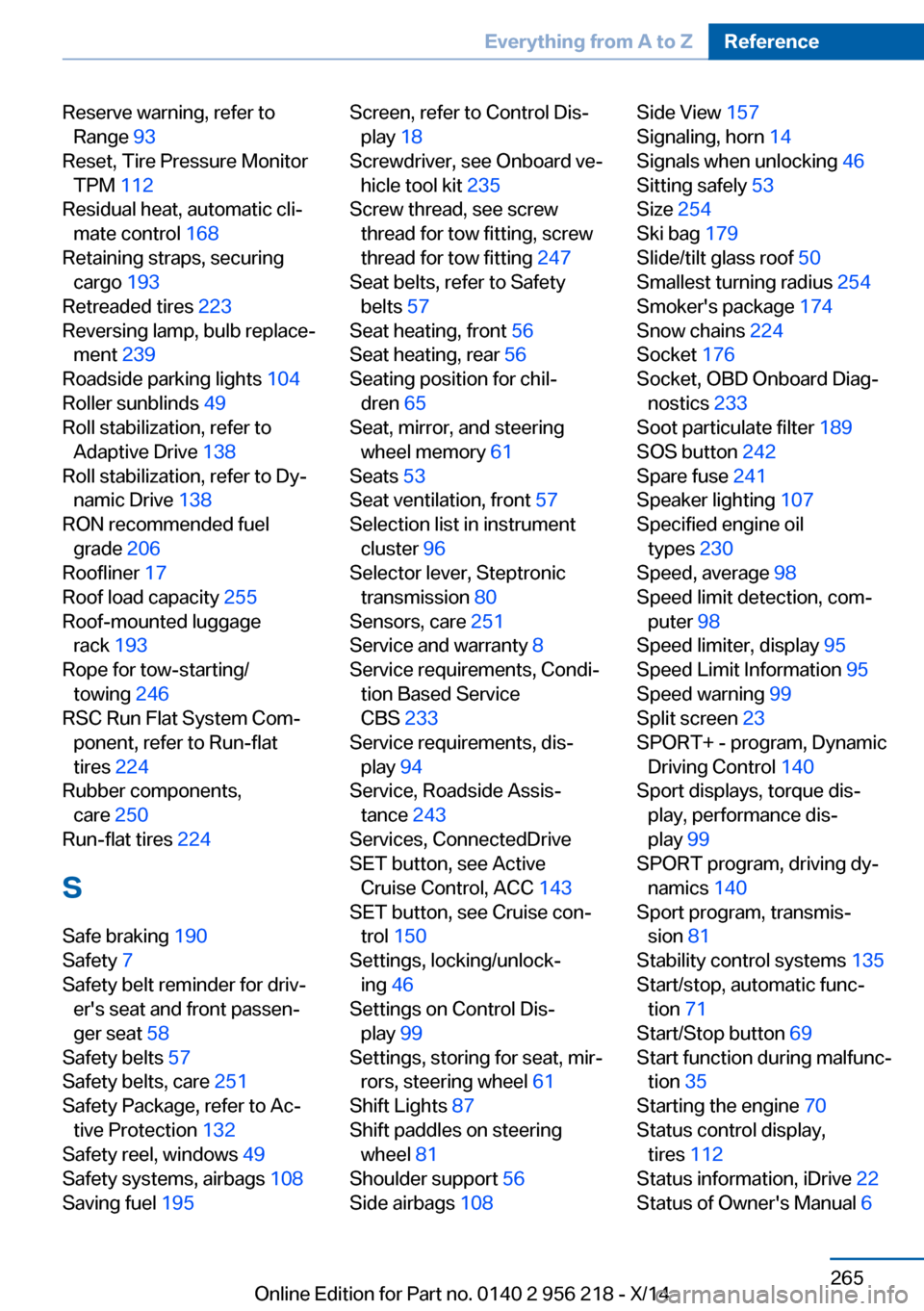
Reserve warning, refer toRange 93
Reset, Tire Pressure Monitor TPM 112
Residual heat, automatic cli‐ mate control 168
Retaining straps, securing cargo 193
Retreaded tires 223
Reversing lamp, bulb replace‐ ment 239
Roadside parking lights 104
Roller sunblinds 49
Roll stabilization, refer to Adaptive Drive 138
Roll stabilization, refer to Dy‐ namic Drive 138
RON recommended fuel grade 206
Roofliner 17
Roof load capacity 255
Roof-mounted luggage rack 193
Rope for tow-starting/ towing 246
RSC Run Flat System Com‐ ponent, refer to Run-flat
tires 224
Rubber components, care 250
Run-flat tires 224
S Safe braking 190
Safety 7
Safety belt reminder for driv‐ er's seat and front passen‐
ger seat 58
Safety belts 57
Safety belts, care 251
Safety Package, refer to Ac‐ tive Protection 132
Safety reel, windows 49
Safety systems, airbags 108
Saving fuel 195 Screen, refer to Control Dis‐
play 18
Screwdriver, see Onboard ve‐ hicle tool kit 235
Screw thread, see screw thread for tow fitting, screw
thread for tow fitting 247
Seat belts, refer to Safety belts 57
Seat heating, front 56
Seat heating, rear 56
Seating position for chil‐ dren 65
Seat, mirror, and steering wheel memory 61
Seats 53
Seat ventilation, front 57
Selection list in instrument cluster 96
Selector lever, Steptronic transmission 80
Sensors, care 251
Service and warranty 8
Service requirements, Condi‐ tion Based Service
CBS 233
Service requirements, dis‐ play 94
Service, Roadside Assis‐ tance 243
Services, ConnectedDrive
SET button, see Active Cruise Control, ACC 143
SET button, see Cruise con‐ trol 150
Settings, locking/unlock‐ ing 46
Settings on Control Dis‐ play 99
Settings, storing for seat, mir‐ rors, steering wheel 61
Shift Lights 87
Shift paddles on steering wheel 81
Shoulder support 56
Side airbags 108 Side View 157
Signaling, horn 14
Signals when unlocking 46
Sitting safely 53
Size 254
Ski bag 179
Slide/tilt glass roof 50
Smallest turning radius 254
Smoker's package 174
Snow chains 224
Socket 176
Socket, OBD Onboard Diag‐ nostics 233
Soot particulate filter 189
SOS button 242
Spare fuse 241
Speaker lighting 107
Specified engine oil types 230
Speed, average 98
Speed limit detection, com‐ puter 98
Speed limiter, display 95
Speed Limit Information 95
Speed warning 99
Split screen 23
SPORT+ - program, Dynamic Driving Control 140
Sport displays, torque dis‐ play, performance dis‐
play 99
SPORT program, driving dy‐ namics 140
Sport program, transmis‐ sion 81
Stability control systems 135
Start/stop, automatic func‐ tion 71
Start/Stop button 69
Start function during malfunc‐ tion 35
Starting the engine 70
Status control display, tires 112
Status information, iDrive 22
Status of Owner's Manual 6 Seite 265Everything from A to ZReference265
Online Edition for Part no. 0140 2 956 218 - X/14